Search Results: "Enrico Zini"

3 April 2017

Enrico Zini: Free Software on my phone

I try to run my phone on Free Software as much as I can. I recently switched to LineageOS. I took it as an opportunity to do a full factory wipe and reinstall, to simulate a disaster recovery. Here's a summary of the basic software I use:

1 April 2017

Enrico Zini: Stereo remote control

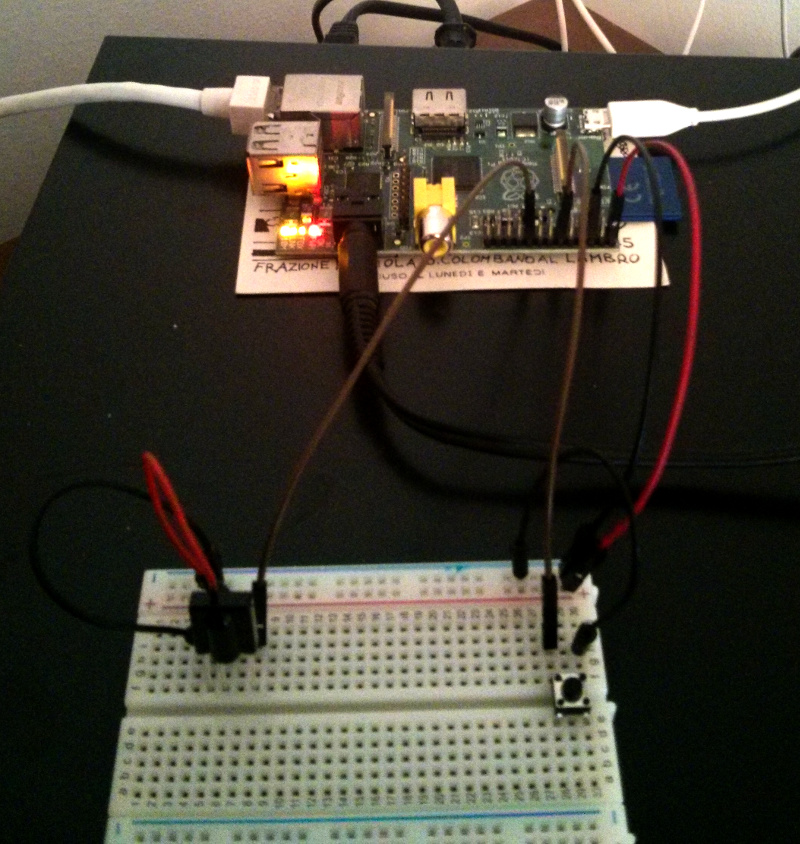
Wouldn't it be nice if I could use the hifi remote control to control mpd? It turns out many wishes can come true when one has a GPIO board. A friend of mine had a pile of IR receiver components in his stash and gave me one. It is labeled "38A 1424A", and the closest matching datasheet I found is this one. I wired the receiver with the control pin on GPIO port 24, and set up lirc by following roughly this guide. Hifi with shutdown button and IR receiver Enable lirc_rpi support I had to add these lines to /boot/config.txt to enable lirc_rpi support:
dtoverlay=lirc-rpi,gpio_in_pin=24,gpio_out_pin=22
dtparam=gpio_in_pull=up
At first I had missed configuration of the internal pull up resistor, and reception worked but was very, very poor. Then reboot. Install and configure lirc
apt install lirc
I added these lines to /etc/lirc/hardware.conf:
DRIVER="default"
DEVICE="/dev/lirc0"
MODULES="lirc_rpi"
Stopped lircd:
systemctl stop lirc
Tested that the receiver worked:
mode2 -d /dev/lirc0
Downloaded remote control codes for my hifi and put them in /etc/lirc/lircd.conf. Started lircd
systemctl start lirc
Tested that lirc could parse commands from my remote control:
$ irw
0000400405506035 00 CD_PAUSE RAK-SC304W
0000400405506035 01 CD_PAUSE RAK-SC304W
0000400405506035 02 CD_PAUSE RAK-SC304W
0000400405505005 00 CD_PLAY RAK-SC304W
0000400405505005 01 CD_PLAY RAK-SC304W
Interface lirc with mpd I made this simple lirc program and saved it in ~pi/.lircrc:
begin
     prog = irexec
     button = CD_NEXT
     config = mpc next
end
begin
     prog = irexec
     button = TAPE_FWD
     config = mpc next
end
begin
     prog = irexec
     button = TAPE_REW
     config = mpc prev
end
begin
     prog = irexec
     button = CD_PREV
     config = mpc prev
end
begin
     prog = irexec
     button = TAPE_PAUSE
     config = mpc pause
end
begin
     prog = irexec
     button = CD_PAUSE
     config = mpc pause
end
begin
     prog = irexec
     button = CD_PLAY
     config = mpc toggle
end
begin
     prog = debug
     button = TAPE_PLAY_RIGHT
     config = mpc toggle
end
Then wrote a systemd unit file to start irexec and saved it as /etc/systemd/system/mpd-irexec.service:
[Unit]
Description=Control mpd via lirc remote control
After=lirc mpd
[Service]
Type=simple
ExecStart=/usr/bin/irexec
Restart=always
User=pi
WorkingDirectory=~
[Install]
WantedBy=multi-user.target
Then systemctl start mpd-irexec to start irexec, and systemctl enable mpd-irexec to start irexec at boot. Profit! All of this was done by me, with almost no electronics training, following online tutorials for the hardware parts. To connect components I used a breadboard and female-male jumper leads, so I didn't have to solder, for which I have very little practice. Now the Raspberry Pi is so much a part of my hifi component that I can even control it with the hifi remote control. Given that I disconnected the CD and tape players, there are now at least 16 free buttons on the remote control that I can script however I like. Raspberry Pi closeup

31 March 2017

Enrico Zini: Links for April 2017

A Survey of Propaganda
an excellent survey article on modern propaganda techniques, how they work, and how we might defend ourselves against them. As to defense: "Debunking doesn't work: provide an alternative narrative."

Enrico Zini: Shutdown button for my Raspberry Pi

My Raspberry Pi hifi component setup lacked a way to cleanly shutdown the system without ssh. I wished the Raspberry Pi had a button so I can tell it to shutdown. I added one to the GPIO connector. It turns out many wishes can come true when one has a GPIO board. This is the /usr/local/bin/stereo-gpio script that reacts to the button press and triggers a shutdown:
 1
 2
 3
 4
 5
 6
 7
 8
 9
10
11
12
13
14
15
16
17
18
#!/usr/bin/python3
# http://razzpisampler.oreilly.com/ch07.html
# http://web.archive.org/web/20160305001215/http://razzpisampler.oreilly.com/ch07.html
from RPi import GPIO
import time
import subprocess
def on_button(pin):
    print("Button pressed", pin)
GPIO.setmode(GPIO.BCM)
GPIO.setup(18, GPIO.IN, pull_up_down=GPIO.PUD_UP)
while True:
    pin = GPIO.wait_for_edge(18, GPIO.FALLING)
    if pin == 18:
        subprocess.check_call(["/bin/systemctl", "halt"])
This is the /etc/systemd/system/stereo-gpio.service systemd unit file that runs the script as a daemon:
[Unit]
Description=Stereo GPIO manager
[Service]
Type=simple
ExecStart=/usr/local/bin/stereo-gpio
Restart=always
[Install]
WantedBy=multi-user.target
Then systemctl start stereo-gpio to start the script, and systemctl enable stereo-gpio to start the script at boot.

Enrico Zini: Raspberry Pi as a Hi-Fi component

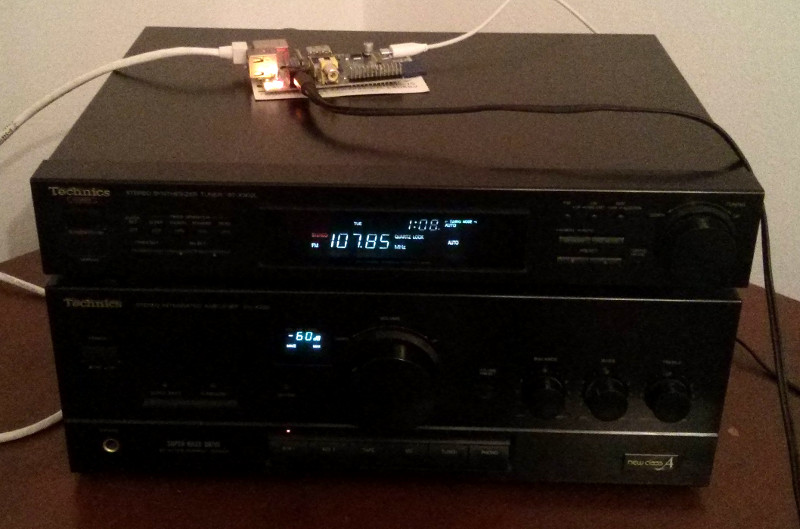
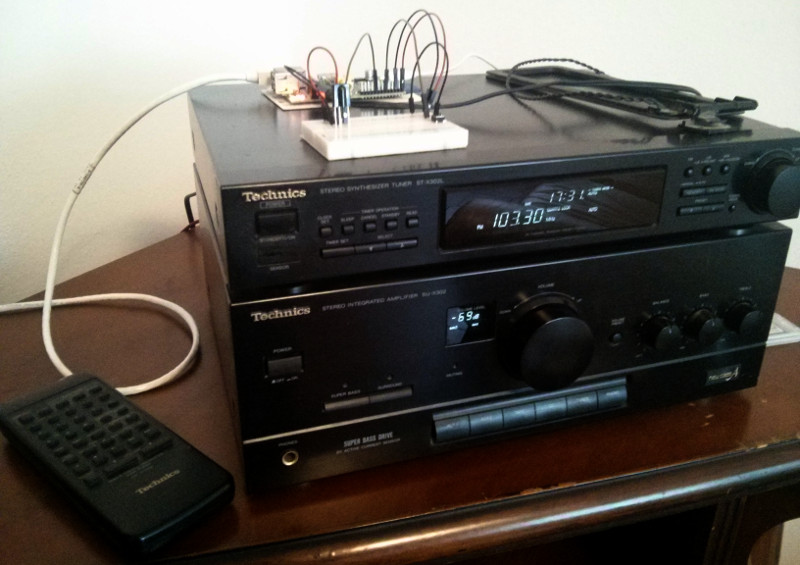
I have a 25 years old Technics hifi system that still works fine, and I gave it a new life by replacing the CD player and cassette player modules with a Raspberry Pi. Technics hifi with a Raspberry Pi attached Connection Each component of the hifi has a mains input and a mains plug that is used to power the next component. The element where the main power lead goes in is the radio component, which has a remote control receiver, a watch and a timer, and will power on the rest of the system when turned on by its power button, the remote control, or the alarm function. I disconnected the cassette and cd player modules, and plugged the Raspberry Pi phone charger/power supply in the free plug behind the amplifier module, at the end of the (now very short) power lead chain. I also connected the audio output of the Raspberry Pi to the CD input of my stereo. The advantage of CD over AUX is that the remote control buttons for switching audio sources don't cover the AUX inputs. With alsamixer I adjusted the output volume to match that of the radio component, so that I can switch between the two without surprising jumps in volume. I used alsactl store to save the mixer levels. Now when I turn the hifi on I also turn the Raspberry Pi on, and when I turn the hifi off, I also cut power from the Raspberry Pi. Operating system Operating system install instructions:
  1. I downloaded a Raspbian Jessie Lite image
  2. I put it on an SD card
  3. I created an empty ssh file on the boot partition
  4. I put the SD card on the Raspberry Pi and turned on the stereo.
  5. ssh pi@raspberrypi password raspberry
  6. sudo raspi-config to change the hostname, the password, and to enlarge the root partition to include all the rest of the space available in the SD card.
Music Player Daemon This is the set up of the music player part, with mpd.
apt install mpd
The configuration file is /etc/mpd.conf. The changes I made are: Make mpd accessible from my local network:
bind_to_address         "any"
Make mpd discoverable:
zeroconf_enabled                "yes"
zeroconf_name                   "stereo"
Allow anyone who visits me to control the playlist, and only me to run admin functions:
password                        "SECRET@read,add,control,admin"
default_permissions             "read,add,control"
At my first try, mpd hung when changing songs. I had to disable dmix by uncommenting the device option in the audio_output configuration. use_mmap is cargo-culted from the archlinux wiki.
audio_output  
        type            "alsa"
        name            "My ALSA Device"
        device          "hw:0,0"        # optional
        use_mmap        "yes"
 
If at some point I'll decide to use other audio software on the system, I'll probably want to play via pulseaudio. Sending music to the stereo I made a little script to sync the music directory on my laptop with /var/lib/mpd/music:
#!/bin/sh
rsync -avz --filter=". sync-stereo.filter" --copy-links --prune-empty-dirs --delete ./ pi@stereo:/var/lib/mpd/music
ssh pi@stereo "chmod u=rwX,go=rX -R /var/lib/mpd/music"
It uses this sync-stereo.filter rules file for rsync:
hide /_archive
include */
include **.mp3
hide *
mpd clients mpc
$ mpc -h stereo status
UltraCat - Unexpected Little Happenings
[playing] #15/22   0:03/4:06 (1%)
volume: 80%   repeat: off   random: on    single: off   consume: off
M.A.L.P. On my phone I installed M.A.L.P. and now I have a remote control for mpd. In its settings, I made a profile for home where I just had to set the hostname for the stereo and the admin password. Cantata On my laptop I installed cantata, set the hostname and password in the preferences, and had the client ready. Profit! Now I can take the remote control of my hi-fi, turn it on, and after a while mpd will resume playing the song that was playing when I last shut it down. I also have realtime player status on my phone and on my laptop, and can control music from either at any time. Friends who visit me can do that as well. Everything was rather straightforward, well documented and easy to replicate. The hardware is cheap and very easy to come by.

28 March 2017

Axel Beckert: Maintaining Debian Packages of Perl Modules with dh-dist-zilla

Maintaining Debian packages of Perl modules usually can be done with the common git-buildpackage (aka gbp) workflow with its three git branches master (or debian), upstream and pristine-tar: This also works more or less fine for Perl modules, where the Debian package maintainer is also the upstream developer. In that case mostly the upstream branch is used (and then maybe called master while the Debian packaging branch is then called debian). But the files needed for a proper so called CPAN distribution of a Perl module often contain redundant information (version numbers, required modules, etc.) which needs to be maintained. And for that, many people prefer Don t Repeat Yourself (DRY) as a principle. Dist::Zilla One nice and common tool for that is Dist::Zilla or short dzil. It generates most redundant but required data out of a central source, e.g. Dist::Zilla s dist.ini or the contained .pm files, etc. dzil build creates tar ball which contains all files necessary by CPAN. But now we have a dilemma: Debian expects those generated files inside the upstream branch while the files are only generated from other files in that branch. There are multiple solutions, but all of them involve committing generated files to the git repository: librun-parts-perl aka Run::Parts (a Perl wrapper around and a pure-perl implementation of Debian s run-parts tool) was initially maintained in the latter way. But especially in cases where we just need a Perl module packaged as .deb without uploading it to CPAN (e.g. project-internal modules), this is a tedious workflow and overkill. It would be much nicer if debhelper would just call dzil to generate all the stuff it needs to build the package. dh-dist-zilla Well, you can do that now, at least with Debian Jessie. This is what dh-dist-zilla does: It is a debhelper sequence plugin which calls dzil build and dzil clean in the right moment and takes care that all dh_auto_* commands look in the directory with the generated files instead of the rather clean project root directory. To use dh-dist-zilla, you just need to add a build-dependency on it and the Dist::Zilla plugins you use, and add --with dist-zilla to your minimal dh-style debian/rules file:
#!/usr/bin/make -f
%:
	dh $@ --with dist-zilla
That s it. With regards to workflow and git branches, you may still want to use separate branches for upstream work and debian work, and you may want to continue to use pristine-tar, but you don t have to commit generated files to git anymore and you can maintain a clean master branch with nearly no redundancy. And if you need to generate to final upstream tar ball for you debian package, just call dh get-orig-source or maybe easier to use with tab completion dh_dist_zilla_origtar. This is how the librun-parts-perl package is maintained nowadays. There s otherwise not much difference to the old, classically maintained versions. More DRY Next step in the DRY evolution is to reduce redundancies between upstream (Dist::Zilla based) packaging and the Debian packaging. There are a few tools available, partially brand new, partially not yet packaged: I wouldn t be surprised if there s more to come in this area. P.S.: I actually started this blog posting in September 2014 and never finished it until now. Had to kick out some already outdated again stuff, but also could add some more recent things.

16 March 2017

Enrico Zini: Django signing signs, does not encrypt

As is says in the documentation. django.core.signing signs, and does not encyrpt. Even though signing.dumps creates obscure-looking tokens, they are not encrypted, and here's a proof:
>>> from django.core import signing
>>> a = signing.dumps( "action":"set-password", "username": "enrico", "password": "SECRET" )
>>> from django.utils.encoding import force_bytes
>>> print(signing.b64_decode(force_bytes(a.split(":",1)[0])))
b' "action":"set-password","password":"SECRET","username":"enrico" '
I'm writing it down so one day I won't be tempted to think otherwise.

11 March 2017

Enrico Zini: On the meaning of "we"

Rather than as a word of endearment, I'm starting to see "we" as a word of entitlement. In some moments of insecurity, I catch myself "wee"-ing over other people, to claim them as mine.

22 February 2017

Enrico Zini: staticsite news: github mode and post series

GitHub mode Tobias Gruetzmacher implemented GitHub mode for staticsite. Although GitHub now has a similar site rendering mode, it doesn't give you a live preview: if you run ssite serve on a GitHub project you will get a live preview of README.md and the project documentation. Post series I have added support for post series, that allow you to easily interlink posts with previous/next links. You can see it in action on links and on An Italian song a day, an ongoing series that is currently each day posting a link to an Italian song.

31 January 2017

Enrico Zini: Links for February 2017

On Progress and Historical Change [archive]
Is progress inevitable? Is it natural? Is it fragile? Is it possible? Is it a problematic concept in the first place? Many people are reexamining these kinds of questions as 2016 draws to a close, so I thought this would be a good moment to share the sort-of zoomed out discussions the subject that historians like myself are always having.
A projection of the ISS live feed as a night light [archive]
I always wanted the ISS live feed as a "night light" / ambiance to fall asleep to on my ceiling how to build a "night light" that is actually a small video projector projecting the ISS live feed
Vatican Climate Forest [archive]
The Vatican Climate Forest, to be located in the B kk National Park, Hungary, was donated to the Vatican City by a carbon offsetting company. The forest is to be sized to offset the carbon emissions generated by the Vatican during 2007. The Vatican's acceptance of the offer, at a ceremony on July 5, 2007, was reported as being "purely symbolic", and a way to encourage Catholics to do more to safeguard the planet. No trees have been planted under the project and the carbon offsets have not materialised. I'm fascinated by how purely symbolic "purely symbolic" can be.

11 January 2017

Enrico Zini: Modern and secure instant messaging

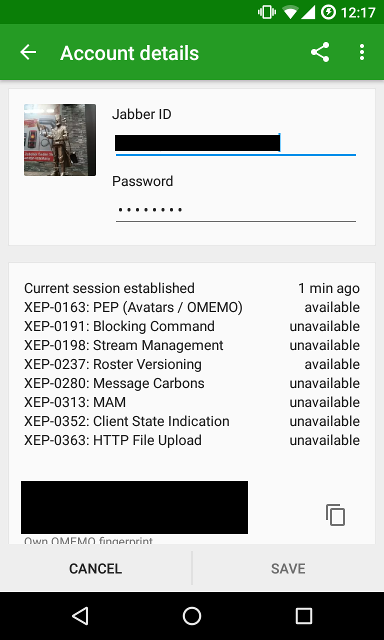
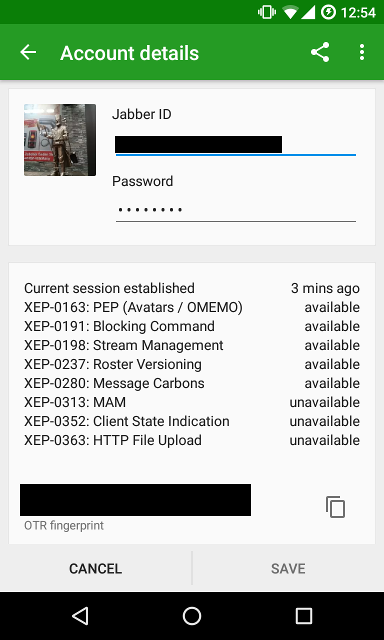
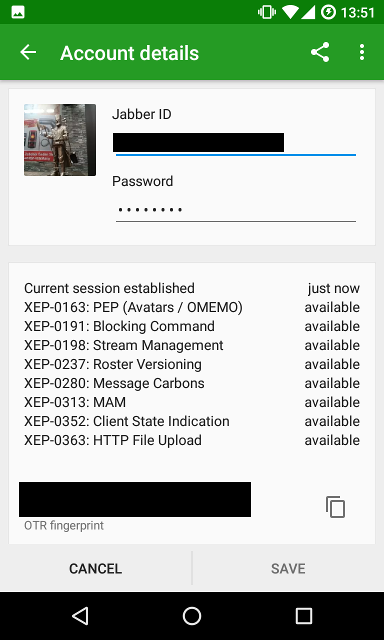
Conversations is a really nice, actively developed, up to date XMPP client for Android that has the nice feature of telling you what XEPs are supported by the server one is using: Initial server features Some days ago, me and Valhalla played the game of trying to see what happens when one turns them all on: I would send her screenshots from my Conversations, and she would poke at her Prosody to try and turn things on: After some work Valhalla eventually managed to get all features activated, purely using packages from Jessie+Backports: All features activated The result was a chat system in which I could see the same conversation history on my phone and on my laptop (with gajim)(https://gajim.org/), and have it synced even after a device has been offline, We could send each other rich media like photos, and could do OMEMO encryption (same as Signal) in group chats. I now have an XMPP setup which has all the features of the recent fancy chat systems, and on top of that it runs, client and server, on Free Software, which can be audited, it is federated and I can self-host my own server in my own VPS if I want to, with packages supported in Debian. Valhalla has documented the whole procedure. If you make a client for a protocol with lots of extension, do like Conversations and implement a status page with the features you'd like to have on the server, and little green indicators showing which are available: it is quite a good motivator for getting them all supported.

7 January 2017

Enrico Zini: Teamwork

When I saw this video or this video I thought of this article. When I feel part of a tightly coordinated and synchronized team I feel proud for the achievements of the team as a whole, which I see as bigger than what I could have achieved alone. I also don't feel at risk of taking bad decisions. I feel less responsible. If I do what I'm told, I can't be blamed for doing the wrong things. I find it relaxing, every once in a while, to not have to be in charge. I guess this could be part of the allure of a totalitarian regime: being freed from the burden of growing up Thinking about this, reading those articles about romantic relationships, I see quite a bit of parallels also with organising cooperation and teamwork. It looks like I ended up making parallels between Polyamory, Anarchism, and Free Software again. If you think there should traditionally be also a mention of BDSM, go back to "I find it relaxing, every once in a while, to not have to be in charge".

31 December 2016

Enrico Zini: Links for January 2017

systemd: Masking units [archive]
A good explanation of the three level of "stopping" a service in systemd, with a focus on masking.
How Skype fixes security vulnerabilities
This post describes my fruitless effort to convince Microsoft employees that Their service is vulnerable, and the humiliation one has to go through should One s account be blocked by a hacker. This is a story of ignorance, pain and Despair.
Mapping the Shadows of New York City: Every Building, Every Block
You re looking at a map of all of the shadows produced by thousands of buildings in New York City over the course of one day. This inverted view tells the story of the city s skyline at the ground level.

25 December 2016

Enrico Zini: "Intervallo RAI" generator

During holiday idling, I made a thing to generate picture slideshows similar to RAI's iconic "Intervallo" You can get it at https://github.com/spanezz/intervallo Usage:
$ intervallo --help
usage: intervallo [-h] [--font file.ttf] [--audio file.mp3] [--duration sec]
                  imgfile [imgfile ...]
Create an Intervallo RAI out of a collection of images.
positional arguments:
  imgfile           input image files
optional arguments:
  -h, --help        show this help message and exit
  --font file.ttf   Font to use for subtitles
  --audio file.mp3  Audio track
  --duration sec    Time for each image in seconds
For example:
./intervallo --font DejaVuSerif.ttf --audio Paradisi-Toccata.mp3 *.jpg
The images are captioned with their file name, without extension. You may want to rename the image files to have nice descriptive names. For some audio to use, you can try https://archive.org/details/IntervalloRai-Paradisi Example https://www.youtube.com/watch?v=ZCERwjTB4ck

30 November 2016

Enrico Zini: Links for December 2016

German Cities Are Solving The Age-Old Public Toilet Problem [map]
City governments are paying local businesses to open up their restrooms to the public. The program, called Nette Toilette or Nice Toilet, is active in 210 cities and has been running since 2000. Cities pay from $34 to $112 per month to a business, and it puts a sticker in its window to tell people that they can come in and pee for free. Bremen, a city with a population of over half a million people, reckons it saves $1 million per year by using the network, which costs it $168,000 per year. So successful is the scheme that it has given Bremen the best ratio of public toilets to citizens in Germany.

15 November 2016

Enrico Zini: Software quality in 2016

Ansible's default output, including the stderr of failed commands, is JSON encoded, which makes reading Jenkins' output hard. Ansible however has Callback plugins that could be used. In that page it says:
Ansible comes with a number of callback plugins that you can look at for examples. These can be found in lib/ansible/plugins/callback.
That is a link to a git repo with just a pile of Python sources and no, say README.md index to what they do. Hopefully they have some docstring with a short description of what they do? no. Actually, some do, but just because someone copypasted the default one and didn't even bother removing its docstring. frustration

9 November 2016

Enrico Zini: On SPF

I woke up this morning with some Django server error mails in my inbox:
UnicodeDecodeError: 'ascii' codec can't decode byte 0xc5 in position 9: ordinal not in range(128)
 
 'REMOTE_USER': u' -guest@users.alioth.debian.org',
I did what one does in cases like these, I tried to fix the bug and mailed -guest@users.alioth.debian.org asking them to try again and let me know if it works. I get a bounce:
  <Actual user's email>
    (generated from  -guest@users.alioth.debian.org)
    SMTP error from remote mail server after MAIL FROM:<enrico@enricozini.org> SIZE=3948:
    host   [ ]: 550 Please see http://www.openspf.org/Why?id=enrico%40enricozini.org&ip=2001%3a41c8%3a1000%3a21%3a%3a21%3a21&receiver=bq :
    Reason: mechanism
I resent the mail to the actual user's address, and it went through. Job done, at least until they get back to me telling me that my fix didn't work. Lessons learnt:

2 November 2016

Enrico Zini: schroot connector for ansible

I accidentally made an ansible connector plugin for schroot. I haven't even used ansible yet, so I have no idea what I am doing. You can choose the chroot type by setting something like schroot_type: jessie in your variables. You can install this locally as connection_plugins/schroot.py.
# Based on chroot.py (c) 2013, Maykel Moya <mmoya@speedyrails.com>
# Based on chroot.py (c) 2015, Toshio Kuratomi <tkuratomi@ansible.com>
# (c) 2016, Enrico Zini <enrico@debian.org>
#
# This is free software: you can redistribute it and/or modify
# it under the terms of the GNU General Public License as published by
# the Free Software Foundation, either version 3 of the License, or
# (at your option) any later version.
#
# Ansible is distributed in the hope that it will be useful,
# but WITHOUT ANY WARRANTY; without even the implied warranty of
# MERCHANTABILITY or FITNESS FOR A PARTICULAR PURPOSE.  See the
# GNU General Public License for more details.
#
# You should have received a copy of the GNU General Public License
# along with Ansible.  If not, see <http://www.gnu.org/licenses/>.
from __future__ import (absolute_import, division, print_function)
__metaclass__ = type
import distutils.spawn
import os
import os.path
import pipes
import subprocess
import traceback
from ansible import constants as C
from ansible.errors import AnsibleError
from ansible.plugins.connection import ConnectionBase, BUFSIZE
from ansible.module_utils.basic import is_executable
from ansible.utils.unicode import to_bytes
try:
    from __main__ import display
except ImportError:
    from ansible.utils.display import Display
    display = Display()
class Connection(ConnectionBase):
    ''' Local chroot based connections '''
    transport = 'schroot'
    has_pipelining = True
    # su currently has an undiagnosed issue with calculating the file
    # checksums (so copy, for instance, doesn't work right)
    # Have to look into that before re-enabling this
    become_methods = frozenset(C.BECOME_METHODS).difference(('su',))
    def __init__(self, play_context, new_stdin, *args, **kwargs):
        super(Connection, self).__init__(play_context, new_stdin, *args, **kwargs)
        self.chroot = self._play_context.remote_addr
        #if os.geteuid() != 0:
            #raise AnsibleError("chroot connection requires running as root")
        # we're running as root on the local system so do some
        # trivial checks for ensuring 'host' is actually a chroot'able dir
        #if not os.path.isdir(self.chroot):
        #    raise AnsibleError("%s is not a directory" % self.chroot)
        #chrootsh = os.path.join(self.chroot, 'bin/sh')
        ## Want to check for a usable bourne shell inside the chroot.
        ## is_executable() == True is sufficient.  For symlinks it
        ## gets really complicated really fast.  So we punt on finding that
        ## out.  As long as it's a symlink we assume that it will work
        #if not (is_executable(chrootsh) or (os.path.lexists(chrootsh) and os.path.islink(chrootsh))):
        #    raise AnsibleError("%s does not look like a chrootable dir (/bin/sh missing)" % self.chroot)
        self.chroot_cmd = distutils.spawn.find_executable('schroot')
        if not self.chroot_cmd:
            raise AnsibleError("chroot command not found in PATH")
        self.chroot_id = "session:" + self.chroot
        self.chroot_type = "stable"
        existing = subprocess.check_output([self.chroot_cmd, "--list", "--all"])
        self.chroot_exists = False
        for line in existing.splitlines():
            if line == self.chroot_id:
                self.chroot_exists = True
    def set_host_overrides(self, host, hostvars=None):
        super(Connection, self).set_host_overrides(host, hostvars)
        self.chroot_type = hostvars.get("schroot_type", self.chroot_type)
    def _connect(self):
        ''' connect to the chroot; nothing to do here '''
        super(Connection, self)._connect()
        if not self._connected:
            if not self.chroot_exists:
                self.chroot_id = subprocess.check_output([self.chroot_cmd, "-b", "-c", self.chroot_type, "-n", self.chroot]).strip()
                subprocess.check_call([self.chroot_cmd, "-r", "-c", self.chroot_id, "-u", "root", "--", "apt-get", "update"])
                subprocess.check_call([self.chroot_cmd, "-r", "-c", self.chroot_id, "-u", "root", "--", "apt-get", "-y", "install", "python"])
            display.vvv("THIS IS A LOCAL CHROOT DIR", host=self.chroot)
            self._connected = True
    def _buffered_exec_command(self, cmd, stdin=subprocess.PIPE):
        ''' run a command on the chroot.  This is only needed for implementing
        put_file() get_file() so that we don't have to read the whole file
        into memory.
        compared to exec_command() it looses some niceties like being able to
        return the process's exit code immediately.
        '''
        executable = C.DEFAULT_EXECUTABLE.split()[0] if C.DEFAULT_EXECUTABLE else '/bin/sh'
        local_cmd = [self.chroot_cmd, "-r", "-c", self.chroot_id, "-u", "root", "--", executable, '-c', cmd]
        display.vvv("EXEC %s" % (local_cmd), host=self.chroot)
        local_cmd = [to_bytes(i, errors='strict') for i in local_cmd]
        p = subprocess.Popen(local_cmd, shell=False, stdin=stdin,
                stdout=subprocess.PIPE, stderr=subprocess.PIPE)
        return p
    def exec_command(self, cmd, in_data=None, sudoable=False):
        ''' run a command on the chroot '''
        super(Connection, self).exec_command(cmd, in_data=in_data, sudoable=sudoable)
        p = self._buffered_exec_command(cmd)
        stdout, stderr = p.communicate(in_data)
        return (p.returncode, stdout, stderr)
    def _prefix_login_path(self, remote_path):
        ''' Make sure that we put files into a standard path
            If a path is relative, then we need to choose where to put it.
            ssh chooses $HOME but we aren't guaranteed that a home dir will
            exist in any given chroot.  So for now we're choosing "/" instead.
            This also happens to be the former default.
            Can revisit using $HOME instead if it's a problem
        '''
        if not remote_path.startswith(os.path.sep):
            remote_path = os.path.join(os.path.sep, remote_path)
        return os.path.normpath(remote_path)
    def put_file(self, in_path, out_path):
        ''' transfer a file from local to chroot '''
        super(Connection, self).put_file(in_path, out_path)
        display.vvv("PUT %s TO %s" % (in_path, out_path), host=self.chroot)
        out_path = pipes.quote(self._prefix_login_path(out_path))
        try:
            with open(to_bytes(in_path, errors='strict'), 'rb') as in_file:
                try:
                    p = self._buffered_exec_command('dd of=%s bs=%s' % (out_path, BUFSIZE), stdin=in_file)
                except OSError:
                    raise AnsibleError("chroot connection requires dd command in the chroot")
                try:
                    stdout, stderr = p.communicate()
                except:
                    traceback.print_exc()
                    raise AnsibleError("failed to transfer file %s to %s" % (in_path, out_path))
                if p.returncode != 0:
                    raise AnsibleError("failed to transfer file %s to %s:\n%s\n%s" % (in_path, out_path, stdout, stderr))
        except IOError:
            raise AnsibleError("file or module does not exist at: %s" % in_path)
    def fetch_file(self, in_path, out_path):
        ''' fetch a file from chroot to local '''
        super(Connection, self).fetch_file(in_path, out_path)
        display.vvv("FETCH %s TO %s" % (in_path, out_path), host=self.chroot)
        in_path = pipes.quote(self._prefix_login_path(in_path))
        try:
            p = self._buffered_exec_command('dd if=%s bs=%s' % (in_path, BUFSIZE))
        except OSError:
            raise AnsibleError("chroot connection requires dd command in the chroot")
        with open(to_bytes(out_path, errors='strict'), 'wb+') as out_file:
            try:
                chunk = p.stdout.read(BUFSIZE)
                while chunk:
                    out_file.write(chunk)
                    chunk = p.stdout.read(BUFSIZE)
            except:
                traceback.print_exc()
                raise AnsibleError("failed to transfer file %s to %s" % (in_path, out_path))
            stdout, stderr = p.communicate()
            if p.returncode != 0:
                raise AnsibleError("failed to transfer file %s to %s:\n%s\n%s" % (in_path, out_path, stdout, stderr))
    def close(self):
        ''' terminate the connection; nothing to do here '''
        super(Connection, self).close()
        #subprocess.check_command([self.chroot_cmd, "-e", "-c", self.chroot_id])
        self._connected = False
31 October 2016

Enrico Zini: Links for November 2016

So You Want To Learn Physics... [archive]
This post is a condensed version of what I've sent to people who have contacted me over the years, outlining what everyone needs to learn in order to really understand physics.
Operation Tamarisk [archive]
Operation Tamarisk was a Cold War-era operation run by the military intelligence services of the U.S., U.K., and France through their military liaison missions in East Germany, that gathered discarded paper, letters, and garbage from Soviet trash bins and military maneuvers, including used toilet paper.
Mortara case
Of how in Bologna, where I live, in the 1850s/1860s, when my grand-grand-granddad lived, the Papal State seized a child from a Jewish family on the basis of a former servant's testimony that she had administered emergency baptism to the boy when he fell sick as an infant.

30 October 2016

Enrico Zini: Bremen Freimarkt Parade

Look! They are having a parade with people dressed like Debian releases! Bremen Freimarkt Parade

Next.

Previous.