Search Results: "ag"

31 August 2011

Axel Beckert: Useful but Unknown Unix Tools: How wdiff and colordiff help to choose the right Swiss Army Knife

In light of the fact that it seems possible to fit the plastic caps of a Debian branded Swiss Army Knife (Last orders today!) on an existing Swiss Army Knife (German written howto as PDF), I started to think about which Victorinox Cybertool would be the best fitting for me. And because the Victorinox comparison page doesn t really show diffs, just columns with floating text which are not very helpful for generating diffs in your head, I used command line tools for that purpose: wdiff Because the floating texts are not line- but just whitespace-based, the tool of choice is not diff but wdiff, a word-based diff. It encloses additions and removals in + + and [- -] blocks. (No, those aren t Japanese smileys although they look a lot like some. ^^). The easiest and clearest way is to copy and paste the texts from Victorinox comparison page into some text files and compare them with wdiff:
$ wdiff cybertool34.txt cybertool41.txt
+Schraubendreher 2.5mm,+ Pinzette, N hahle mit Nadel hr, +Holzs ge,+ Bit-Schl ssel( 5 mm Innensechskant f r die D-SUB Steckverbinder, 4 mm Innensechskant f r Bits, Bit Phillips 0, Bit Phillips 1, Bit-Schlitzschrauben 4 mm, Bit Phillips 2, Bit Hex 4 mm, Bit Torx 8, Bit Torx 10, Bit Torx 15 ), Kombizange( H lsenpresser, Drahtschneider ), Stech-Bohrahle, Kugelschreiber( auch zum DIP-Switch verstellen ), Mehrzweckhaken (Pakettr ger), +Metalls ge( Metallfeile, Nagelfeile, Nagelreiniger ),+ Dosen ffner( kleiner Schraubendreher ), Kleine Klinge, Grosse Klinge, Ring, inox, Mini-Schraubendreher, Kapselheber( Schraubendreher, Drahtabisolierer ), +Holzmeissel / Schaber,+ Bit-Halter, Stecknadel, inox, Schere, Korkenzieher, Zahnstocher
So this already extracted the information which are the seven tools which are in the Cybertool 41, but not in the Cybertool 34. Nevertheless the diff is still not easily recognizable on the first glance. There are several ways to help here. First wdiff has an option --no-common (the according short option is -3) which just shows added and removed words:
$ wdiff -3 cybertool34.txt cybertool41.txt
======================================================================
 +Schraubendreher 2.5mm,+ 
======================================================================
  +Holzs ge,+ 
======================================================================
  +Metalls ge( Metallfeile, Nagelfeile, Nagelreiniger ),+ 
======================================================================
  +Holzmeissel / Schaber,+ 
======================================================================
This is already way better to quickly recognize the actual differences. But if you still also want to see the common tools of the two knifes you need some visual help: One option is to use wdiff s --terminal (or short -t) option. Added words are then displayed inverse and removed words are shown underlined (background and foreground colors hardcoded as there is no invert colors style in CSS or HTML):

$ wdiff -t cybertool34.txt cybertool41.txt
Schraubendreher 2.5mm, Pinzette, N hahle mit Nadel hr, Holzs ge, Bit-Schl ssel( 5 mm Innensechskant f r die D-SUB Steckverbinder, 4 mm Innensechskant f r Bits, Bit Phillips 0, Bit Phillips 1, Bit-Schlitzschrauben 4 mm, Bit Phillips 2, Bit Hex 4 mm, Bit Torx 8, Bit Torx 10, Bit Torx 15 ), Kombizange( H lsenpresser, Drahtschneider ), Stech-Bohrahle, Kugelschreiber( auch zum DIP-Switch verstellen ), Mehrzweckhaken (Pakettr ger), Metalls ge( Metallfeile, Nagelfeile, Nagelreiniger ), Dosen ffner( kleiner Schraubendreher ), Kleine Klinge, Druckkugelschreiber, Grosse Klinge, Ring, inox, Mini-Schraubendreher, Kapselheber( Schraubendreher, Drahtabisolierer ), Holzmeissel / Schaber, Bit-Halter, Stecknadel, inox, Schere, Korkenzieher, Zahnstocher

But some still like to to use color instead of the contrast-rich inverse and the easily to oversee underlining. This is where colordiff comes into play: colordiff colordiff is like syntax highlighting for diffs on the command line. I works with classic and unified diffs as well as with wdiffs and debdiffs (the debdiff command is part of the devscripts package).
$ wdiff cybertool34.txt cybertool41.txt colordiff
+Schraubendreher 2.5mm,+ Pinzette, N hahle mit Nadel hr, +Holzs ge,+ Bit-Schl ssel( 5 mm Innensechskant f r die D-SUB Steckverbinder, 4 mm Innensechskant f r Bits, Bit Phillips 0, Bit Phillips 1, Bit-Schlitzschrauben 4 mm, Bit Phillips 2, Bit Hex 4 mm, Bit Torx 8, Bit Torx 10, Bit Torx 15 ), Kombizange( H lsenpresser, Drahtschneider ), Stech-Bohrahle, Kugelschreiber( auch zum DIP-Switch verstellen ), Mehrzweckhaken (Pakettr ger), +Metalls ge( Metallfeile, Nagelfeile, Nagelreiniger ),+ Dosen ffner( kleiner Schraubendreher ), Kleine Klinge, Grosse Klinge, Ring, inox, Mini-Schraubendreher, Kapselheber( Schraubendreher, Drahtabisolierer ), +Holzmeissel / Schaber,+ Bit-Halter, Stecknadel, inox, Schere, Korkenzieher, Zahnstocher
$ wdiff cybertool29.txt cybertool41.txt colordiff
+Schraubendreher 2.5mm,+ Pinzette, N hahle mit Nadel hr, +Holzs ge,+ Bit-Schl ssel( 5 mm Innensechskant f r die D-SUB Steckverbinder, 4 mm Innensechskant f r Bits, Bit Phillips 0, Bit Phillips 1, Bit-Schlitzschrauben 4 mm, Bit Phillips 2, Bit Hex 4 mm, Bit Torx 8, Bit Torx 10, Bit Torx 15 ), +Kombizange( H lsenpresser, Drahtschneider ),+ Stech-Bohrahle, +Kugelschreiber( auch zum DIP-Switch verstellen ), Mehrzweckhaken (Pakettr ger), Metalls ge( Metallfeile, Nagelfeile, Nagelreiniger ),+ Dosen ffner( kleiner Schraubendreher ), Kleine Klinge, [-Druckkugelschreiber,-] Grosse Klinge, Ring, inox, Mini-Schraubendreher, Kapselheber( Schraubendreher, Drahtabisolierer ), +Holzmeissel / Schaber,+ Bit-Halter, Stecknadel, inox, +Schere,+ Korkenzieher, Zahnstocher
(Coloured Screenshots done with ANSI HTML Adapter from the package aha.) Some, especially those who are used to git, are probably confused by the default choice of diff colors. This is easily fixable by writing the following into you ~/.colordiffrc:
newtext=green
oldtext=red
diffstuff=darkblue
cvsstuff=darkyellow
(See also /etc/colordiff for the defaults and hints.) colordiff has by the way two operating modes: So now let us compare the Cybertool 29 with Cybertool 34 in a normal diff (by using the texts from above and replacing all commata with newline characters) with git-like colors:
$ colordiff cybertool29-lines.txt cybertool34-lines.txt
12a13,14
> Kombizange( H lsenpresser
> Drahtschneider )
13a16,17
> Kugelschreiber( auch zum DIP-Switch verstellen )
> Mehrzweckhaken (Pakettr ger)
16d19
< Druckkugelschreiber
25a29
> Schere
Or as unifed diff with some context:
$ colordiff -u cybertool29-lines.txt cybertool34-lines.txt
--- cybertool29-lines.txt     2011-08-31 20:55:37.195546238 +0200
+++ cybertool34-lines.txt   2011-08-31 20:55:11.667710504 +0200
@@ -10,10 +10,13 @@
 Bit Torx 8
 Bit Torx 10
 Bit Torx 15 )
+Kombizange( H lsenpresser
+Drahtschneider )
 Stech-Bohrahle
+Kugelschreiber( auch zum DIP-Switch verstellen )
+Mehrzweckhaken (Pakettr ger)
 Dosen ffner( kleiner Schraubendreher )
 Kleine Klinge
-Druckkugelschreiber
 Grosse Klinge
 Ring
 inox
@@ -23,5 +26,6 @@
 Bit-Halter
 Stecknadel
 inox
+Schere
 Korkenzieher
 Zahnstocher
So if you want nicely colored diffs with Subversion like you re used to with git, you can use svn diff colordiff.

Russell Coker: Links August 2011

Alex Steffen gave an interesting TED talk summarising the ways that greater urban density can reduce energy use while increasing our quality of life [1]. Geoffrey West gave an interesting TED talk about the way animals, corporations, and cities scale [2]. The main factor is the way that various variables scale in proportion to size. On a logarithmic graph the growth of a city shows a steady increase in both positive factors such as wages and inventions and in negative factors such as crime as it grows larger. So it seems that we need to decrease the crime rate significantly to permit the growth of larger cities and therefore gain more efficiency. The Mankind Project (MKP) has a mission of redefining mature masculinity for the 21st Century [3]. They have some interesting ideas. Phillip Zimbardo gave a provocative TED talk about the demise of men [4]. He provided little evidence to support his claims though.

Tollef Fog Heen: Bizarre slapd (and gnutls) failures

Just this morning, I was setting up TLS on a LDAP host, but slapd refused to start afterwards with a bizarre error message:
TLS init def ctx failed: -207
The key and certificate was freshly generated using openssl on my laptop (running wheezy, so OpenSSL 1.0.0d-3). After a bit of googling, I discovered that -207 is gnutls-esque for "Base64 error". Of course, the key looks just fine and decodes fine using base64, openssl base64 and even gnutls's own certtool. Now, certtool also spits out what it considers the right base64 version of the key and I noticed it differed. Using the one certtool output seems to work, though, so if you ever run into this problem try running the key through certtool --infile foo.pem -k and use the base64 representation it outputs.

David Welton: Pranks that are actually funny

I saw this link on Hacker News:
http://techcrunch.com/2011/08/30/speaking-of-dropbox-heres-my-no-1-phone-prank/

And couldn't help but thinking it was singularly unfunny. He changed the guy's password - ha ha! I'm sure most people can do better. Here's one off the top of my head: I was due to leave a company in a few days, prior to our move to Austria. One of my colleagues in the programming department was tasked, in that period, with doing a bunch of work with Drupal, which he found singularly unpleasant and a pain in the neck to work with, which was compounded by the boss asking often about the status of the project. My colleague tended to be an early riser and would get into the office to get some work done early, before it got noisy and people started hassling him about this, that or the other thing. So on my soon-to-be-abandoned workstation, I set up a cron job that would, during those hours, randomly play a sound file I recorded while he was out, with my impression of a ghostly voice saying "druuuuuuuppaaaaaaallll". He said it scared the pants off him the first couple of times it went off.

Keith Packard: Altos1.0

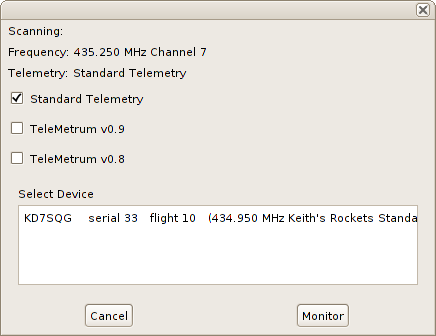
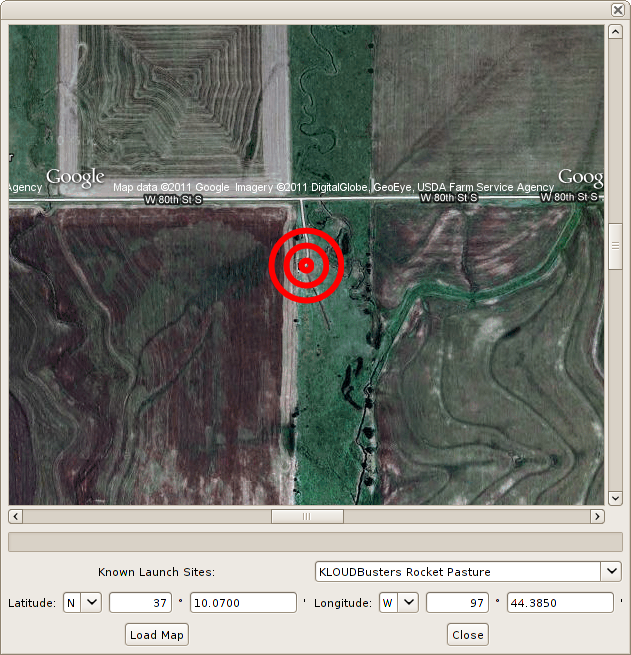
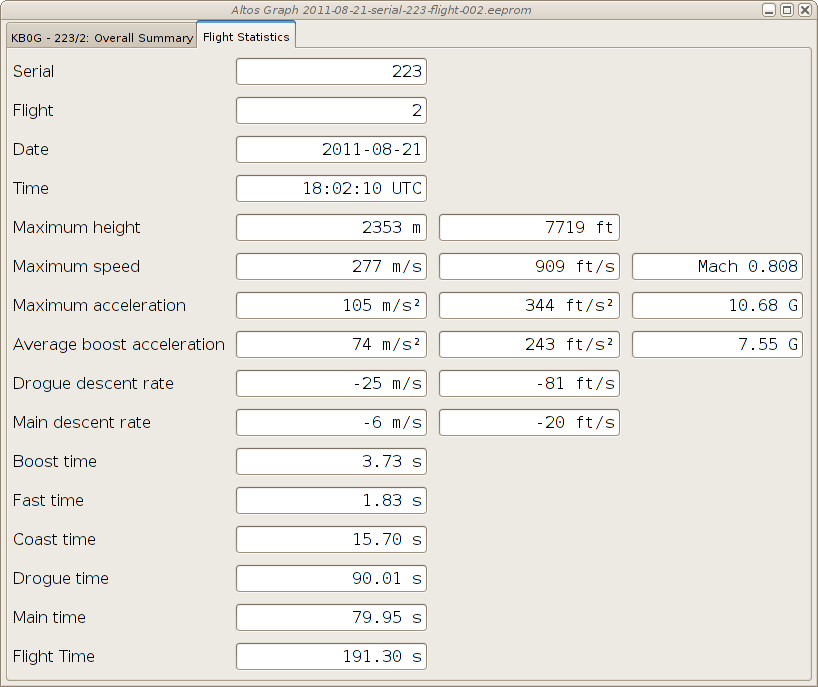
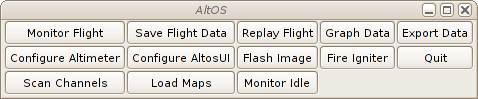
AltOS 1.0 TeleMini support and a host of new features Bdale and I are pleased to announce the release of AltOS version 1.0. AltOS is the core of the software for all of the Altus Metrum products. It consists of cc1111-based microcontroller firmware and Java-based ground station software. AltOS Firmware TeleMini support, Kalman Filtering and more Support for the new TeleMini altimeter is included in version 1.0 along with a wealth of other new features: AltosUI New Features AltosUI has also seen quite a bit of work for the 1.0.1 release. Of course, many of the changes in AltosUI are to accomodate the new TeleMini altimeter and changes in the AltOS firmware for TeleMetrum. In addition, we ve also added lots of new features in response to user requests.
30 August 2011

Keith Packard: TeleMini

TeleMini Dual-deploy altimeter with telemetry now available TeleMini is a miniature dual-deploy flight computer with data logging and radio telemetry. Small enough to fit comfortably in an 18mm tube, this powerful package does everything you need on a single board: I don t have anything in these images to show just how tiny this board is but the spacing between the screw terminals is 2.54mm (0.1in), and the whole board is only 13mm wide (1/2in). We ve been flying these for quite a while; testing the hardware and tuning the firmware. My new 29mm mmt airframe, Koala, sports a TeleMini board for apogee-only deployment. It s been really nice to have something flying on G s and H s that doesn t depend on the vagaries of delay grains.

Sylvain Beucler: Modern OpenGL free documentation

Hi all, OpenGL 2.x introduces a programmable pipeline with the new shaders system, and is notably available in mobile devices (OpenGL ES 2) as well as more recently in WebGL. I was looking for Free documentation on this "modern" OpenGL 2.x, and was disappointed to find little of it: most of what I found was using the "legacy" 1.x API, and the rest was non-free. It's a gap to fill for the free gaming scene! Consequently I started a on-going series of tutorials at WikiBooks (CC-BY-SA/GFDL) beginning from scratch with shaders:
http://en.wikibooks.org/wiki/OpenGL_Programming#Modern_OpenGL
The code samples are in the public domain:
https://gitorious.org/wikibooks-opengl/modern-tutorials/trees/master
Comments and contributions welcome :) What do you think of it?

Gintautas Miliauskas: Crackbook

Shortly before starting my job at Google, I had invested a little time into writing a Chrome extension called Crackbook. It helps against wasting time on the web by delaying access to selected sites (see this XKCD cartoon for an illustration, and check out the hint too). Because access is just delayed rather than blocked, you are less likely to just disable the tool after a while, which is exactly what happened to the other tools I tried to use. Having found a little free time in the evenings, I have just updated the extension. If you use Chrome, please try it and give feedback! The extension also collects anonymous statistics on what domains people tend to mark as junk and how often the domains are hit. Some very basic results are available at crackbook.info. Now that a fair amount of data has been collected, a deeper statistical inspection is in the plans. Stay tuned.

Miriam Ruiz: Fantastic Park 2011 is over

On the 26th of June I wrote that I wouldn t be able to travel anywhere this summer (including DebConf 11), because I was going to be teaching lots of things related to Information and Communication Technologies (ICT) to a bunch of kids. That was a bit more than two months ago. On the 27th of June we started the first edition of Fantastic Park with a lot of enthusiasm, and hoping that the kids participating could get in touch to the ICT world while having fun. After all, it was summer holidays. The results have not only more than fulfilled our expectations but, from what their parents tell, we have also been able to overcome what the children were expecting. It was somehow encouraging to know that the kids were telling their parents to get up half an hour earlier (heh, sorry for them, but that s what being a parent is about, isn t it?), to be able to start as soon as they could, and also to make them wait until the last minute for going back home. These four editions have involved more than two months of work (280 hours), and 82 kids have taken part on it (57 boys and 25 girls). There have also been visits to different companies that work on the field of ICT (32 in total), and there was an important number of other people collaborating (thanks to all of them). Finally, the last edition of the Park has ended yesterday. Along these weeks, the kids have been able to get acquainted with a lot of different things, such as robotics (using Lego WeDo), digital photography and photo edition (using Pinta), Free Software, satellites, GPS or learning to code with Scratch. It has been very intensive and I m almost exhausted, but I m also quite sad that it s over. Hopefully some of these children might have developed an interest in this field, and who knows what might come out of it. If somebody is interested in the daily activities at the Park, we have been writing a blog with daily entries (in Spanish, sorry). We have also published quite a lot of photos of the activities. Of course, needless is to say that I m really happy to have taken part on it, and that the kids participating were simply great. I ll miss them.

Timo Jyrinki: MeeGo (CE) and the FreeSmartphone.Org Distributions

Debian MeeGo mixup. MeeGo screenshot CC-BY wiki.meego.com, Debian screenshot by me
FreeSmartphone.Org (FSO), Openmoko, Debian's FSO group, SHR, QtMoko et cetera are a few of the community based intertwined projects to bring free software to smartphones. They have a relatively long and colorful history of doing this, and have nowadays been approaching multiple target devices despite limited resources and for example the losing of Openmoko Inc. in 2009. I've been using Debian on my Neo FreeRunner phone for over two years now, and over three years of FreeRunner use altogether. FSO2, the next generation freesmartphone.org stack, is finally coming into Debian now, extending the basic phone support besides Openmoko phones to eg. Palm Pre, Nexus One, Nokia N900 and a few HTC phones. It needs a lot of tweaking and eg. a proper kernel, but still.

Four years after beginning of sales of the first Openmoko device (Neo1973), we're still in the pioneering phase of free distributions for mobile phones. There is no "Ubuntu for phones" so to speak, not for even a selected models. Meanwhile, like so often in the wide world, competing free software approaches have arrived. Android is the obvious one, and has seen a port to Neo Freerunner among else. Android is not as open a project as one could like, and replaces everything we've known with its own code, but nevertheless it requires to be noted and is completely usable in its free software form. But since there are limitations to its approach, and since it's more of an own separate world from the rest of Linux distributions, it is not as interesting to me as the others in the long run, at least in its current shape.

A more similar competitor to FSO and distributions using FSO is MeeGo and its middleware, and to be more precise so far specifically Nokia's efforts on it. Obviously there is the strong competitor for the best general population smartphone of the year, the Qt based Nokia N9, but its default software is more of a proprietary thing even though it has a neatly rock solid free software foundation with separate free/non-free repositories and all that. Nice and great for the (GNU/)Linux in general, but the Harmattan software is not exactly on topic for this blog post. It's however in my opinion the best marketing to vendors around the world GNU/Linux + Qt can get as Android Linux has been taking most of the limelight. But meanwhile, with significantly smaller focus and resources, Nokia has also been sponsoring to try to create a truly community based mobile phone software stack at the MeeGo upstream, nowadays called "MeeGo Community Edition" or MeeGo CE for short. It co-operates with the MeeGo Handset target of MeeGo (and Intel) that hasn't got actual target consumer hardware at the moment, although that might change soon (?), but has been doing some nice applications recently. CE has the target hardware and additional device specific and non-specific software cooking. It used to target Nokia N900 only, but nowadays the project has added N950 (the for-developers-only phone) and N9 to the targets, and it is starting to seem there should be no showstoppers to bring MeeGo CE (or other distributions later on) to them, despite some earlier doubts. A few needed bits to void the warranty we all want to do are still missing, though, but coming. After that it's just developing free software. Usual caveats about specifics of a few kernel drivers apply, as the devices were not designed with the sole purpose of free software drivers in mind. Hopefully mobile 3D gets into a better shape in the coming years, but that's another story.

MeeGo (CE) smartphone middleware, of course, shares nothing with FSO *). While FSO is a "handle everything" in itself with its wide variety of daemons, MeeGo consists of more separate software like Intel's and Nokia's oFono for modem support. FSO demo UIs and SHR UIs have traditionally focused on using Enlightenment 17 for its suitability to low power machines, while in MeeGo everything is written in Qt. As Qt/QML is becoming faster and faster, and it's very powerful to write, there might be quite a bit of useful software emerging from there also for other distributions besides MeeGo itself. Actually, there is already a Debian MeeGo stack maintainer group available, although it hasn't yet focused on the UIs as far as I can see (if I'll have free time I'll join the effort and see for myself in more detail). There is also the QtMoko distribution, based on the original, canceled Trolltech/Nokia Qt Extended (Qtopia) project, but ported to newer Qt:s and put on top of Debian.

*) Although, correct me if I'm wrong and I might be, the Nokia N900 isi modem driver in FSO was ported/learned from oFono.

MeeGo CE is not only a project to bring a proper MeeGo distribution to a few smartphones, but also to shake out bugs in the MeeGo project's contributions and community processes. It is acting as a completely open MeeGo product contributor, and investigating how things should be optimally done so that everything gets integrated into the MeeGo properly, and that proper MeeGo software releases can be done for the target devices. Therefore it's also an important project for the vitality of the whole MeeGo.

MeeGo CE has so far had a whole team in Nokia working on it, but for obvious strategy related reasons community cannot rely on it lasting forever. The real hurdle is for the wider free smartphones community to be ready for really embracing a project that is already a community project but to outsiders might seem like a company project. I believe it's never easy to grow a volunteer community if the starting setup is a paid company team, but it mainly requires a) the interested people and b) the few smart ones to take control and communication responsibility so that it's not anymore seen as a company project. MeeGo CE never was a traditional company project, everything being done in the open and together with volunteers, but I just know how people perceive these things by default. People tend to assume stuff as someone else's responsibility

Whatever happens, I hope there are enough people interested in free software for mobile phones to carry on all these different approaches to the software needed. I hope MeeGo / MeeGo CE will have a great future, and I hope that both the middleware like FSO and MeeGo's components, and the UIs like FSO, SHR, QtMoko and MeeGo Handheld UIs continue to develop. I also hope other distributions like Debian will gather a strong suite of packaged software for smartphones. I know I have had some hard time to find suitable apps for my phone at times.

For those interested about how I use Debian as my mobile phone OS, see http://wiki.openmoko.org/wiki/User:TimoJyrinki

29 August 2011

Axel Beckert: SSH Multiplexer: parallel-ssh

There are many SSH multiplexers in Debian and most of them have one or two features which make them unique and especially useful for that one use case. I use some of them regularily (I even maintain the Debian package of one of them, namely pconsole :-) and I ll present then and when one of them here. For non-interactive purposes I really like parallel-ssh aka pssh. It takes a file of hostnames and a bunch of common ssh parameters as parameters, executes the given command in parallel in up to 32 threads (by default, adjustable with -p) and waits by default for 60 seconds (adjustable with -t). For example to restart hobbit-client on all hosts in kiva.txt, the following command is suitable:
$ parallel-ssh -h kiva.txt -l root /etc/init.d/hobbit-client restart
[1] 19:56:03 [FAILURE] kiva6 Exited with error code 127
[2] 19:56:04 [SUCCESS] kiva
[3] 19:56:04 [SUCCESS] kiva4
[4] 19:56:04 [SUCCESS] kiva2
[5] 19:56:04 [SUCCESS] kiva5
[6] 19:56:04 [SUCCESS] kiva3
[7] 19:57:03 [FAILURE] kiva1 Timed out, Killed by signal 9
(Coloured Screenshots done with ANSI HTML Adapter from the package aha.) You easily see on which hosts the command failed and partially also why: On kiva6 hobbit-client is not installed and therefore the init.d script is not present. kiva1 is currently offline so the ssh connection timed out. If you want to see the output of the commands, you have a two choices. Which one to choose depends on the expected amount of output: If you don t expect a lot of output, the -i (or --inline) option for inline aggregated output is probably the right choice:
$ parallel-ssh -h kiva.txt -l root -t 10 -i uptime
[1] 20:30:20 [SUCCESS] kiva
 20:30:20 up 7 days,  5:51,  0 users,  load average: 0.12, 0.08, 0.06
[2] 20:30:20 [SUCCESS] kiva2
 20:30:20 up 7 days,  5:50,  0 users,  load average: 0.19, 0.08, 0.02
[3] 20:30:20 [SUCCESS] kiva3
 20:30:20 up 7 days,  5:49,  0 users,  load average: 0.10, 0.06, 0.06
[4] 20:30:20 [SUCCESS] kiva4
 20:30:20 up 7 days,  5:49,  0 users,  load average: 0.25, 0.17, 0.14
[5] 20:30:20 [SUCCESS] kiva6
 20:30:20 up 7 days,  5:49, 10 users,  load average: 0.16, 0.08, 0.02
[6] 20:30:21 [SUCCESS] kiva5
 20:30:21 up 7 days,  5:49,  0 users,  load average: 3.11, 3.36, 3.06
[7] 20:30:29 [FAILURE] kiva1 Timed out, Killed by signal 9
If you expect a lot of output you can give directories with the -o (or --outdir) and -e (or --errdir) option:
$ parallel-ssh -h kiva.txt -l root -t 20 -o kiva-output lsb_release -a
[1] 20:36:51 [SUCCESS] kiva
[2] 20:36:51 [SUCCESS] kiva2
[3] 20:36:51 [SUCCESS] kiva3
[4] 20:36:51 [SUCCESS] kiva4
[5] 20:36:53 [SUCCESS] kiva6
[6] 20:36:54 [SUCCESS] kiva5
[7] 20:37:10 [FAILURE] kiva1 Timed out, Killed by signal 9
$ ls -l kiva-output
total 24
-rw-r--r-- 1 abe abe  98 Aug 28 20:36 kiva
-rw-r--r-- 1 abe abe   0 Aug 28 20:36 kiva1
-rw-r--r-- 1 abe abe  98 Aug 28 20:36 kiva2
-rw-r--r-- 1 abe abe  98 Aug 28 20:36 kiva3
-rw-r--r-- 1 abe abe  98 Aug 28 20:36 kiva4
-rw-r--r-- 1 abe abe 102 Aug 28 20:36 kiva5
-rw-r--r-- 1 abe abe 100 Aug 28 20:36 kiva6
$ cat kiva-output/kiva5
Distributor ID:	Debian
Description:	Debian GNU/Linux 6.0.2 (squeeze)
Release:	6.0.2
Codename:	squeeze
The only annoying thing IMHO is that the host list needs to be in a file. With zsh, bash and the original ksh (but neither tcsh, pdksh nor mksh), you can circumvent this restriction with one of the following command lines:
$ parallel-ssh -h <(printf "host1\nhost2\nhost3\n ") -l root uptime
[ ]
$ parallel-ssh -h <(echo host1 host2 host3     xargs -n1) -l root uptime
[ ]
In addition to parallel-ssh the pssh package also contains some more ssh based tools: I though think that parallel-ssh is by far the most useful tool from the pssh package. (Probably no wonder as it s the most generic one. :-)

Tiago Bortoletto Vaz: VoIP in Neo Freerunner with Qtmoko and Linphone

I keep using a Neo Freerunner with Qtmoko in a Debian Squeeze (+ some Wheezy) chroot as my daily phone. It also works well for SMS, GPS, MUA, IM, IRC and some Web browsing with Aurora (using both Wifi and GPRS). Last weekend I managed to play a little with VoIP possibilities in Qtmoko and ended with a functional SIP client in my hands. I want to share some points which may be useful for other brave freerunners: UPDATE: I didn't make clear that I get a very nice audio quality using internal mic/speaker with the above voip-handset state file. The issue is only when using the headset, which demands understanding and setting up a proper state file. Enjoy some shots:

Erich Schubert: ELKI 0.4 beta release

Two weeks ago, I've published the first beta of the upcoming ELKI 0.4 release. The accompanying publication at SSTD 2011 won the "Best Demonstration Paper Award"!
ELKI is a Java framework for developing data mining algorithms and index structures. It has indexes such as the R*-Tree and M-Tree, and a huge collection of algorithms and distance functions. These are all writen rather generic, so you can build all the combinations of indexes, algorithms and distances. There are evaluation and visualization modules.
Note that I'm using "data mining" in the broad, original sense that focuses on knowledge discovery by unsupervised methods such as clustering and outlier detection. Today, many people just think of machine learning and "artificial intelligence" - or even worse: large scale data collecting - when they hear data mining. But there is much more to it than just learning!
Java comes at a certain price. The latest version got already around 50% faster than the previous release just by reducing Java boxing and unboxing that puts quite some pressure on the memory management. So you could implement these things in C to become a lot faster; but this is not production software. I need code that I can put students on to work with it and extend it, this is much more important than getting the maximum speed. You can probably still use this for prototyping. See what works, then implement just that which you really need in a low level language for maximum performance.
You can do some of that in Java. You could work on a large chunk of doubles, and access them via the Unsafe class. But is that then still Java, or aren't you actually doing just plain C? In our framework, we want to be able to support non-numerical vectors and non-double distances, too. Even when they are only applicable to certain specialized use cases. Plus, generic and Java-style code is usually much more readable, and the performance cost is not critical for research use.
Release 0.4 has plenty of under the hood changes. It allows multiple indexes to exist in parallel, it support multi-relational data. There are also a dozen new algorithms, mostly from the geo/spatial outlier field, which were used for the demonstration. But for example, it also includes methods for rescaling the output of outlier detection methods to a more sensible numerical scale for visualization and comparison.
You can install ELKI on a Debian testing and unstable system by the usual "aptitude install elki" command. It will install a menu entry for the UI and also includes the command-line launcher "elki-cli" for batch operation. The "-h" flag can produce an extensive online help, or you can just copy the parameters from the GUI. By reusing Java packages such as Batik and FOP already in Debian, this also is a smaller download. I guess the package will at some point also transition to Ubuntu - since it is Java you can just download and install it anyway I guess.

Benjamin Mako Hill: Donner Pass

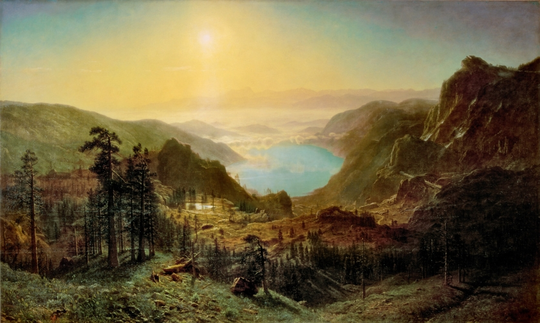
/copyrighteous/images/bierstadt-donner_lake.png In the Peabody Essex Museum a couple weeks ago, I saw a beautiful landscape by Albert Bierstadt of Donner Pass whose label referenced the famous Donner Party of 1846 and their, "sensational story of privation, cannibalism, and death." I would reorder that sentence.

Uwe Hermann: Flashrom 0.9.4 released - Flashing BIOS/ROM chips from the Unix/Linux command line using various programmers

flashrom logo Forgot to mention this here: We released flashrom 0.9.4 a few days ago, the latest release of the open-source, GPL'd ROM chip flashing software for Linux, *BSD, DOS, and partially also Windows (work in progress, though). Here's a quick summary of the release announcement. Some of the noteworthy news items include: Get the latest release tarball, or download and build the most recent version via Subversion:
  $ svn co svn://flashrom.org/flashrom/trunk flashrom
  $ cd flashrom
  $ make
I already updated the Debian package to 0.9.4 (it has also already migrated to Debian testing and Ubuntu), other people have updated Fedora, Gentoo, NetBSD etc. etc. There's already a huge amount of patches queued for the next release, including support for even more programmers, PowerPC support (tested on Mac Mini and others), and of course the usual "more boards, more chips" items...

Mike Hommey: Extreme tab browsing

I have a pathological use of browser tabs: I use a lot of them. A lot is probably an understatement. We could say I use them as bookmarks of things I need to track. A couple weeks ago, I was saying I had around two hundred tabs opened. I now actually have much more. It affected startup until I discovered that setting the browser.sessionstore.max_concurrent_tabs pref to 0 was making things much better by only loading tabs when they are selected. This preference has/will become browser.sessionstore.restore_on_demand. However, since I only start my main browser once a day, while other applications start and while I begin to read email, I hadn t noticed that this was still heavily affecting startup time: about:startup tells me reaching the sessionRestored state takes seven seconds, even on a warm startup. It also affects memory usage, because even when tabs are only loaded on demand, there is a quite big overhead for each tab. And more importantly, it gets worse with time. And I think the user interface is actively making it worse. So, to get an idea how bad things were in my session, I wrote a little restartless extension. After installing it, you can go to the about:tabs url to see the damage on your session. Please note that the number of groups is currently wrong until you open the tab grouping interface. This is what the extension has to say about my session 2 days ago, right after a startup: The first thing to note is that when I filed the memory bug 4 days earlier, I had a bit more than 470 tabs in that session. You can see 4 days later, I now have 555 tabs (if excluding the about:tabs tab). The second thing to note is something I suspected because it s so easy to get there: a lot of the tabs are opened on the same address. Since Firefox 4.0, if I m not mistaken, there is a great feature in the awesomebar, that allows to jump to an existing tab matching what you type in the urlbar. That is very useful, and I use it a lot. However, there are a lot of cases where it s not as useful as it could be. One of the addresses I visit a lot is http://buildd.debian.org/iceweasel. It gives me the build status of the latest iceweasel package I uploaded to Debian unstable. That url is particularly known in my browsing history, and is the first hit when I type buildd in the urlbar (actually, even typing b brings it first). Unfortunately, that url redirects to https://buildd.debian.org/status/package.php?p=iceweasel through an HTTP redirection. I say unfortunately because when I type buildd in the urlbar, I get 6 suggestions for urls in the form http://buildd.debian.org/package (I also watch other packages build status), and the suggestion to switch to the existing tab for what the first hit would get me to is 7th. Guess what? The suggestion list only shows 6 items ; you have to scroll to see the 7th. The result is that I effectively have fifteen tabs open on that url. I also keep a lot of bugzilla.mozilla.org bugs open in different tabs. The extension tells me there are 255 of them for 166 unique bugs. Largely, the duplicate bug tabs are due to having these bugs open in some tab, but accessing the same bugs from somewhere else, usually a dependent bug or TBPL. I also have 5 tabs opened on my request queue. I usually get there by going to the bugzilla home page and clicking on the My Requests link. And I have several tabs opened on the same bug lists. For the same reason. When I started using tab groups, I splitted in very distinct groups. Basically, one for Mozilla, one for Debian, one for stuff I want to follow (usually blog posts I want to follow comments from), and one for the rest. While I was keeping up with grouping at the beginning, I don t anymore, and the result is that each group is now a real mess. Firefox has hundreds of millions users. It s impossible to create a user experience that works for everyone. One thing is sure, it doesn t work for me. My usage is probably very wrong at different levels, but I don t feel my browser is encouraging me to use it better, except by making my number of opened tabs explode to an unmanageable level (I already have 30 tabs more than when I started writing this post 2 days ago). There are a few other things I would like to know about my usage that my extension hasn t told me yet, either because it doesn t tell, or because I haven t looked: Reflecting on my usage patterns, I think a few improvements, either in the stock browser, or through extensions, could make my browsing easier: Maybe these exist as extensions, I don t know. It s hard to find very specific things like that through an add-on search (though I haven t searched very hard). [Looks like there is an experiment for the auto tab grouping part] I think it would also be interesting to have something like Test Pilot, but for users that want to know the answer to How do I use my browser? . As I understand it, Test Pilot can show individual user data, but it only can do so if there is such data, and you can t get data for past studies you didn t take. In my case, I m not entirely sure that, apart from the pinned tabs, I use the tab bar a lot. And even for pinned tabs, most of the time I use keyboard shortcuts. I m not using the menu button that much either. I already removed the url and search bar (most of the time) with LessChrome HD. Maybe I could go further and use the full window for web browsing.

Sylvestre Ledru: Debian identi.ca / Twitter feed: removed packages

After a request from Olivier Berger, I developed the Removed packages feed for Debian. This feed lists packages removed from the Debian Archive. Debian removed packages on Identi.ca
Debian removed packages on Twitter
For more information about removed packages

28 August 2011

Lior Kaplan: Talk proposal accepted to LibreOffice Conference 2011

A month ago I sent a talk proposal for the LibreOffice conference regarding RTL issues in LibreOffice . Today I got the response:
Thank you for your paper submission to the LibreOffice Conference.
We are happy to inform you that your proposal has been accepted.
Cool but now the hard part begins with preparing the talk itself and making sure people who are used to left to right languages would also understand and take something productive out of it.
Filed under: Free software applications, LibreOffice

Christian Perrier: 10 years being Debian Developer - part 3: the news and genealogy years

I stopped my story in early 1994, after my Big Switch to the mysterious and new world of Linux. My home server, kheops, is now running Debian and is fed with news and mail by FrMug, formerly French Minix Users Group and now run by AFAU, the "Association Fran aise des Amateurs de Usenet". As I'm still console-challenged, I'm reading mail and news on another machine I have at home, named "khephren", which is running an, ahem, beta copy of Microsoft Windows 95. Yeah, I know...:-) These 1994-1999 years were mostly the Usenet years, for me. I gradually became more and more involved in several fr.* newsgroups, either related to the Linux world...or to the Windows world. The latter was professionnally a bonus for me as 1994 is also the year where I switched from the Material Science department at Onera to the Network and Computing Department. My mission there was to accompany the increasing prevalence of personal desktop workstations in the daily life of what was formerly the Big Castle of Computing at Onera, hosting various generations of Cray computers, most of which being in the Top500 world supercomputers (we even had one in the Top10, very briefly, at somepoint). So, I was "the PC and Windows guy" in this world of supercomputing, Unix and network wizards. But my hobby at home helped me keeping and growing skills in both "worlds" which, over the years, has proven to be a not so common profile..:-) Meanwhile, at home, I was spending hours and nights reading those newsgroups...or getting involved in fr.* hierarchy management..or expanding my friends network to many people in the news, Linux, BSD worlds. That lasted for about 3 years with ups and downs (with three young kids at home, you end up having slightly less time...). I was gradually improving my home server use, adding more functionalities to it, for instance setting it up as a file and print server with Samba 1.9.something (this will be the beginning of a long story with samba!). Unfortunately, my dear Ren had passed in the meantime. Ren did so much for Linux in France that he'll be the only link I give in this article. If you happen to go through P re Lachaise cemetery in Paris, go to its Memory garden instead of visiting Jim Morrison's grave and drink a whisky bottle in memory of Ren . Or just install one of the most funnily named Debian packages: le-dico-de-rene-cougnenc and, again, drink something to his memory (whisky is highly preferred). We then reached 1997 and a specific event: my father (who was very sick for years) passed during summer, some time after my grand-father passed too. As it apparently happens for many people, it triggerred me into the interest for family history. After all, those people who are going away are family memories. And, in some way, I wanted to keep track of this memory. As a consequence, I started collecting family memories, interviewing my close relatives (the oldest ones) and ending, of course, in tracking all this with my computers. That was the start of a long genealogy research that sent me on the track of the Perrier family (of course), but also all other branches, on my mother and father side, as well as reconstructing the tree of cousins we have, etc, etc. As anybody who did that knows, this is quite an endless task but I went very committed to it. I quickly ended up in joining research groups that were using the recent growth of personal access to Internet communication. Those groups were, in these 90's, building elaborated systems where people can help together in their research instead of having to travel to places where archives are stored. I participated to many such groups and even ended up animating one who was doing research in archives of the "Yvelines" "d partement", my place of living (even though I have no family branch there). At the same time, other groups were sending me research results for my own family in the French region where my roots are. Collective effort, help others for free, you can recognize things that are a constant all over these years, indeed. It actually helped me in tracking my Perrier ancestors up to about 1680, with 11 generations of men holding that name (from Jean-Baptiste, my son, up to tienne Perrier, who is born about 1640-1650, in the small village named Briant in Sa ne et Loire, in France). Or even climbing up to Laurent Polette, born circa 1510, mentioned in a document date February 1562. He his my oldest known ancestor.Those folks being 15 generations before me. My oldest ancestor is born under Fran ois the First, King of France, protector of Leonardo Da Vinci, at the time La Joconde was painted or the Chambord castle was built. Doh. Unfortunately, genealogy software, at that time, was quite poor for Unix systems. Lifelines was a quite strong development but wasn't that user-friendly and I ended up using a Windows-based "shareware" software written by an individual. Still, my Linux machine was used quite intensively: databases were stored there, and saved there, all important informations were there, my mail was received there, along with dozens of mailing lists I was reading. I even hosted a few mailing lists on my home server. Still, in the meantime also, again in 1997, in October, another event happened. We had a pollution peak in Paris area and October 1st was the first (and as of now the only ever) day where driving restrictions were applied. Up to that moment, I was driving to/from work (30 kilometers one way). I decided to use this opportunity to really test public transport, for one full month. As I knew it would take me much more time than driving, I tried to imagine a way to use that time. How about reading mail and news on a laptop instead of only at home? Done... In a few days, I found a used Compaq Aero laptop (486 16MHz), I installed Debian "bo" on it, switched my mail and news workflow to console programs (mutt and slrn) and here we go! So, finally, in October 1997, I was using Linux nearly all time long, the only exception being genealogy data handling. That laptop was named "mykerinos" (the small pyramid) and....my laptop is still named mykerinos, though it's now the 5th mykerinos I have..:-) Ah, and since then, I nearly always use public transport to go to/from work. Debian addiction is good for the planet! At some point (I don't remember exactly when...about 1999, I think), DSL connections appeared and one of the first DSL FAI emerged on France: Free. I was already using their services for dialup access, but DSL was then a revolution: persistent connection! And nearly immediately, static IP! I became one of their first DSL customers (and I'm still one). Moreover, I had then friends working there...and they had many Debian machines to host their services. So, with the help of my Freenix friends, some DNS hosting on their machines and the still tireless eu.org entirely free domain, perrier.eu.org was born. Immediately, this gave me opportunities for doing many interesting things with my home server: setting up www.perrier.eu.org and use it....for learning web things and sharing genealogical data. For instance, I ended up hosting some data sent by other genealogists such as digital copies of archives for some French regions, all served through my 512/128kbps DSL line (quickly upgraded to 2Mb, IIRC). And, very quickly, I felt the need to share my family tree, of course! And here comes Geneweb. Written (in Ocaml) by Daniel de Rauglaudre, Geneweb was (and still is) by far one of the best tools to share genealogy data over the Net. So, I ended up installing it on my home machine. Guess how I did that? "apt-get install geneweb", of course. Yes, it was packaged. Indeed by Brent Fulgham who did the initial release on July 22nd 2000. Here, my memory is a little bit vague. I think I actually packaged Geneweb for my own use and sharing it on upstream FTP site, forking Brent's package as a start, but updating to latest upstream release. Then I quickly ended up having discussions with Brent about this new upstream release, and that lead to:
geneweb (3.10-3) unstable; urgency=low
  * Merging with unofficial package from Geneweb ftp site
    (in preparation of new maintainer [Christian Perrier] takeing
    over responsibility).  Note that all of this work is from
    Christian.
  * Default database dir is now writable by members of geneweb group
  * New geneweb group added at installation
  * Package tries to properly handle former installations of the
    unofficial Geneweb package available on Geneweb ftp site
  * Debconf dialogs translated in french
  * More languages available
  * Creation of /var/geneweb/etc, /var/geneweb/cnt, /var/geneweb/images
    with proper permission so that authorised users may use these also
  * When de-installed, all databases are exported with gwu (should allow
    smooth upgrades when the databse format changes)
 -- Brent A. Fulgham <bfulgham>  Mon, 22 Jan 2001 19:30:47 -0800
See? Already "debconf translation to French"! "More languages available". Here we are. As discussed with Brent, he propsoed me to take the package over. So, on January 11th 2001, I had applied in the New Maintainer Process. I'm amazed how quickly it went indeed: there was a tool I needed, it needed to be packaged, I could handle the packaging...and then I decided to be involved. Here we are: bubulle is on his way to become one of those magicians who are building the best universal operating system. Yes, me, the clueless material scientist..:-) How did it go? You'll know this in next episode, of course...

Micha Lenk: Finally transitioning to a new GnuPG key

Finally I managed to write up a transition statement for my not so new, but stronger GnuPG key. See below:
-----BEGIN PGP SIGNED MESSAGE-----
Hash: SHA1,SHA256
I am transitioning my GPG key from an old 1024-bit key to a new 4096-bit key.
The old key will continue to be valid for some time, but I prefer all new
correspondence to be encrypted for the new key, and will be making all
signatures going forward with the new key.
If you have signed my old key, I would appreciate signatures on my new key as
well, provided that your signing policy permits that without reauthenticating
me.
The old key, which I am transitioning away from, is:
pub   1024D/99E141B4 2004-02-10
      Key fingerprint = 25FE 4741 4770 0558 949D  1DB1 58DD 3FE2 99E1 41B4
The new key, to which I am transitioning, is:
pub   4096R/51B85139 2009-06-18
      Key fingerprint = A3EB B41F C5AB D675 CEE4  1C45 EA6C A6B9 51B8 5139
Thanks in advance.
Cheers,
Micha Lenk
-----BEGIN PGP SIGNATURE-----
Version: GnuPG v1.4.10 (GNU/Linux)
iEYEARECAAYFAk5aOnkACgkQWN0/4pnhQbTxPgCgzRhREZlQiKJyI9UIdJLLs3Zq
bH4AnA1myFxgDWM7aUMHXgvvsujLTjiWiQIcBAEBCAAGBQJOWjp5AAoJEOpsprlR
uFE5gCsP/0dtCUPl9aQHV1MbQl7+bMofpsC2ikkpdZmrzi68jTG16We49BuzY+PV
S8FhXqg17/YxhKYDnDNTowfztUOyjAOJxy5vrqm3X5xiLwTqN3js9mra+vb4s35k
EVbKMzLLDhj3i0FjeargWEmJmm9cVhaZWKvOvQUhDJAilqvEQ0/50P7B8I+1YvtV
UHoQKbweTljVSlK5R1YPPy9i6r2/oZBYxK4nrknWwS+qPQ5luqelJd+mZdgQ6tow
7HIvtmPgCblJ+hYZWFpoZK6vxs8RaBbuCQcKwYArNhZT/v4TeD/LAaUmIkbQMyKV
J2TKuEHya4+5GMbtg6BGKeiZpleEHPnAq1AfvGpz6opkxjxCLG3RO3X8D3EuM3RW
mkq60mWM8+Zwu1yKbb62iHplp6jpyiQgdjJlB6eHjX7SdY7CvHgYZxGDx4kclP0/
HAdig2U1T+nG6Nn5XflmmKwvNLuKlQlIwJ5NeXyCONRnYvdomQn2hgvkjwMLCdFh
ulIhxa4UvDY7/aQNPZeOrvDHb2XYpiV3TwA9hLgQXXWd0FPmUMVVPpKpRjilaWth
Mtq/QiMGP5Mq/YxgLInRZHGyajDtE67RD4+RgHYOP50cP3UGPoB4ncc2EEtM2kfe
BzJrXPHmdtyGEA6Korl0YwUTRnYsqkqkY1VqDsO0UkOLlV7RAzb9
=9vw1
-----END PGP SIGNATURE-----

Next.

Previous.