Reproducible builds folks: Reproducible Builds: week 73 in Stretch cycle
What happened in the Reproducible
Builds effort between Sunday
September 11 and Saturday September 17 2016:
Toolchain developments
Ximin Luo started a new series of tools called (for now)
debrepatch, to
make it easier to automate checks that our old patches to Debian packages still
apply to newer versions of those packages, and still make these reproducible.
Ximin Luo updated one of our few remaining patches for dpkg in #787980
to make it cleaner and more minimal.
The following tools were fixed to produce reproducible output:
- naturaldocs/1.51-2 by Petter Reinholdtsen, original patch by Chris Lamb.
- elog/3.1.2-1-1 by Roger Kalt, original patch by Reiner Herrmann.
- eyed3/0.6.18-3 by Petter Reinholdtsen, original patch by Chris Lamb.
- frog/0.13.5-1 by Maarten van Gompel, original patch by Chris Lamb.
- gtranslator/2.91.7-3 by Andreas Henriksson, original patch by Reiner Herrmann.
- sozi/12.05-1.1 by Daniel Kahn Gillmor, original patch by Chris Lamb.
- evince/3.21.92-1 by Michael Biebl.
- gnome-control-center/1:3.21.92-2 by Rapha l Hertzog.
- libipathverbs/1.3-2 by Ana Beatriz Guerrero Lopez.
- pagekite/0.5.8e-2 by Petter Reinholdtsen.
- eurephia/1.1.0-6 by Alberto Gonzalez Iniesta, original patch by Chris Lamb.
- fdroidserver/0.7.0-1 by Hans-Christoph Steiner, original patch by Chris Lamb.
- mini-buildd/1.0.18 by Stephan S rken.
- nbc/1.2.1.r4+dfsg-3 by Petter Reinholdtsen, original patch by Chris Lamb.
- ncurses/6.0+20160910-1 by Sven Joachim, #818067 by Niels Thykier.
- python-kinterbasdb/3.3.0-4 by Santiago Vila, original patch by Chris Lamb.
- snapper/0.3.3-1 Hideki Yamane, original patch by Sascha Steinbiss.
- Added a new annotation for issues called "fix-deterministic" to help us update package reviews more easily. This indicates whether we expect that an issue would always happen on Jenkins; i.e. if there is a successful build, then we know the issue is fixed for that package and can update our notes.
- Added random_order_in_sisu_javax_inject_named and too_much_input_for_diff.
- Removed timestamps_in_manpages_generated_by_ronn.
- Updated timestamps_in_allegro_dat_files. Additionally, 21 issues were marked with "fix-deterministic".
- Chris Lamb (10)
- Filip Pytloun (1)
- Santiago Vila (1)
60 was
uploaded to unstable by Mattia
Rizzolo. It included
contributions
from:
- Mattia Rizzolo:
- Various packaging and testing improvements.
- HW42:
- minor wording fixes
- Reiner Herrmann:
- minor wording fixes
0.027-1 and 0.028-1 were uploaded to
unstable by Chris Lamb. It included
contributions
from:
- Chris Lamb:
- Testing improvements, including better handling of timezones.
0.5.1 was
uploaded to unstable by Chris
Lamb. It included
contributions
from:
- Andrew Ayer and Chris Lamb:
- Support relative paths for ROOTDIR; it no longer needs to be an absolute path.
- Chris Lamb:
- Print the behaviour (shuffle/reverse/sort) on startup to stdout.
 we're not running out of (perl-related) RC bugs. here's my list for this
week:
we're not running out of (perl-related) RC bugs. here's my list for this
week:
 As mentioned on sunweaver s blog
  I have prepared packages for mate-terminal and nemo built from the most recent git sources. The new mate-terminal now does not crash anymore on profile changes (bug
  It was also somehow a strange talk (slides are available
  I am happy to announce the release of OASIS v0.4.7.
 OASIS is a tool to help OCaml developers to integrate configure, build and install systems in their projects. It should help to create standard entry points in the source code build system, allowing external tools to analyse projects easily.
This tool is freely inspired by Cabal which is the same kind of tool for Haskell.
You can find the new release
OASIS is a tool to help OCaml developers to integrate configure, build and install systems in their projects. It should help to create standard entry points in the source code build system, allowing external tools to analyse projects easily.
This tool is freely inspired by Cabal which is the same kind of tool for Haskell.
You can find the new release  Every year since 2010 the

 My monthly report covers a large part of what I have been doing in the free software world. I write it for


 Even though the Chess Olympiad takes some attention right now, development on
Nageru (my live video mixer) has continued steadily throughout since the 1.3.0 release. I wanted to
take a little time to talk about the upcoming 1.4.0 release, and why things
are as they are; writing down things often make them a bit clearer.
Every major release of Nageru has had a specific primary focus: 1.0.0 was about
just getting everything to work, 1.1.0 was about NVIDIA support for more
oomph, 1.2.0 was about stabilization and polish (and added support for
Blackmagic's PCI cards as a nice little bonus), and 1.3.0 was about x264
integration. For 1.4.0, I wanted to work on multitrack audio and mixing.
Audio has always been a clear focus for Nageru, and for good reason; video is
90% about audio, and it's sorely neglected in most amateur productions
(not to mention that processing tools are nearly non-existant in most free or
cheap software video mixers). Right from the get-go, it's had a chain with
proper leveling, compressors and most importantly visual monitoring, so that
you know when things are not as they should be. However, it was also written
with an assumption that there would be a single audio input source (one of
the cameras), and that's going to change.
Single-input is less of a showstopper than one'd think at first; you can work
around it by buying a mixer, plug everything into that and then feed that
signal into the computer. However, there are a few downsides: If you want
camera audio, you'll need to pull more cable from each camera (or have SDI
de-embedders). Your mixer is likely to require an extra power supply, and
that means yet more cable (any decent USB video card can power over USB, so
why shouldn't your audio?). You'll need to buy and transport yet another
device. And so on. (If you already have a PA mixer, of course you can use it,
but just reusing the PA mix as a stream mix rarely gives the best results,
and mixing on an aux bus gives very little flexibility.)
So for 1.4.0, I wanted something to get essentially the processing equivalent
of a mid-range mixer. But even though my education is in DSP, my experience
with mixers is rather limited, so I did the only reasonable thing and went
over to a friend who's also an (award-winning) audio engineer. (It turns out
that everything on a mixer is the way it is for a pretty good reason, tuned
through 50+ years of collective audio experience. If you just try to make up
something on your own without understanding what's going on, you have a
0.001% chance of stumbling upon some genius new way of doing things by
accident, and a significantly larger chance than that of messing things up.)
After some back and forth, we figured out a reasonable set of basic tools
that would be useful in the right hands, and not too confusing for a
beginner. So let's have a look at the new controls you get:
Even though the Chess Olympiad takes some attention right now, development on
Nageru (my live video mixer) has continued steadily throughout since the 1.3.0 release. I wanted to
take a little time to talk about the upcoming 1.4.0 release, and why things
are as they are; writing down things often make them a bit clearer.
Every major release of Nageru has had a specific primary focus: 1.0.0 was about
just getting everything to work, 1.1.0 was about NVIDIA support for more
oomph, 1.2.0 was about stabilization and polish (and added support for
Blackmagic's PCI cards as a nice little bonus), and 1.3.0 was about x264
integration. For 1.4.0, I wanted to work on multitrack audio and mixing.
Audio has always been a clear focus for Nageru, and for good reason; video is
90% about audio, and it's sorely neglected in most amateur productions
(not to mention that processing tools are nearly non-existant in most free or
cheap software video mixers). Right from the get-go, it's had a chain with
proper leveling, compressors and most importantly visual monitoring, so that
you know when things are not as they should be. However, it was also written
with an assumption that there would be a single audio input source (one of
the cameras), and that's going to change.
Single-input is less of a showstopper than one'd think at first; you can work
around it by buying a mixer, plug everything into that and then feed that
signal into the computer. However, there are a few downsides: If you want
camera audio, you'll need to pull more cable from each camera (or have SDI
de-embedders). Your mixer is likely to require an extra power supply, and
that means yet more cable (any decent USB video card can power over USB, so
why shouldn't your audio?). You'll need to buy and transport yet another
device. And so on. (If you already have a PA mixer, of course you can use it,
but just reusing the PA mix as a stream mix rarely gives the best results,
and mixing on an aux bus gives very little flexibility.)
So for 1.4.0, I wanted something to get essentially the processing equivalent
of a mid-range mixer. But even though my education is in DSP, my experience
with mixers is rather limited, so I did the only reasonable thing and went
over to a friend who's also an (award-winning) audio engineer. (It turns out
that everything on a mixer is the way it is for a pretty good reason, tuned
through 50+ years of collective audio experience. If you just try to make up
something on your own without understanding what's going on, you have a
0.001% chance of stumbling upon some genius new way of doing things by
accident, and a significantly larger chance than that of messing things up.)
After some back and forth, we figured out a reasonable set of basic tools
that would be useful in the right hands, and not too confusing for a
beginner. So let's have a look at the new controls you get:
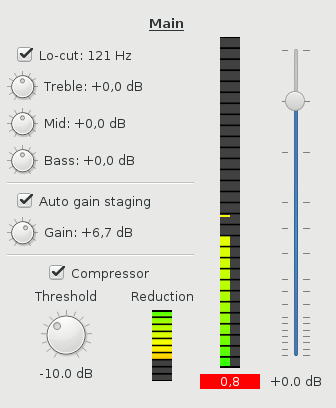 There's one set of these controls for each bus. (This is the expanded view; there's
also a compact view that has only the meters and the fader, which is what
you'll typically want to use during the run itself the expanded view is for
setup and tweaking.) A bus in Nageru is a pair of channels (left/right),
sourced from a video capture or ALSA card. The channel mapping is flexible;
my USB sound card has 18 channels, for instance, and you can use that to make
several buses. Each bus has a name (here I named it very creatively Main ,
but in a real setting you might want something like Blue microphone or
Speaker PC ), which is just for convenience; it doesn't mean much.
The most important parts of the mix are given the most screen estate,
so even though the way through the signal chain is left-to-right
top-to-bottom, I'll go over it in the opposite direction.
By far the most important part is the audio level, so the fader naturally is
very prominent. (Note that the scale is nonlinear; you want more resolution
in the most important area.) Changing a fader with the mouse or keyboard is
possible, and probably most people will be doing that, but Nageru will also
support USB faders. These usually speak MIDI, for historical reasons, and
there are some UI challenges when they're all so different, but you can get
really small ones if you want to get that tactile feel without blowing up
your budget or getting a bigger backpack.
Then there's the meter to the left of that. Nageru already has R128 level
meters in the mastering section (not shown here, but generally unchanged from
1.3.0), and those are kept as-is, but for each bus, you don't want to know loudness; you want to know
recording levels, so you want a peak meter, not a loudness meter. In particular, you don't want the bus to send clipped data
to the master (which would happen if you set it too high); Nageru can handle
this situation pretty well (unlike most digital mixers, it mixes in
full 32-bit floating-point so there's no internal clipping, and there's a limiter on the master by default),
but it's still not a good place to be in, so you can see that being marked
in red in this example. The meter doubles as an input peak check during
setup; if you turn off all the effects and set the fader to neutral, you can
see if the input hits peak or not, and then adjust it down. (Also, you can
see here that I only have audio in the left channel; I'd better check my
connections, or perhaps just use mono, by setting the right channel on the
bus mapping to the same input as the left one.)
The compressor (now moved from the mastering section to each bus) should be
well-known for those using 1.3.0, but in this view, it also has a reduction
meter, so that you can see whether it kicks in or not. Most casual users
would want to just leave the gain staging and compressor settings alone, but
a skilled audio engineer will know how to adjust these to each speaker's
antics (some speak at a pretty even volume and thus can get a bit of
headroom, while some are much more variable and need tighter settings).
Finally (or, well, first), there's the EQ section. The lo-cut is again
well-known from 1.3.0 (the cutoff frequency is the same across all buses),
but there's now also a simple three-band EQ per bus. Simply ask the speaker
to talk normally for a bit, and tweak the controls until it sounds good.
People have different voices and different ways of holding the microphone,
and if you have a reasonable ear, you can use the EQ to your advantage to
make them sound a little more even on the stream. Either that, or just
put it in neutral, and the entire EQ code will be bypassed.
The code is making pretty good progress; all the DSP stuff is done
(save for some optimizations I want to do in zita-resampler, now that
the discussion flow is started again),
and in theory, one could use it already as-is. However, there's a fair
amount of gnarly support code that still needs to be written: In particular,
I need to do some refactoring to support ALSA hotplug (you don't want
your entire stream to go down just because an USB soundcard dropped out
for a split second), and similarly some serialization of saving/loading
bus mappings. It's not exactly rocket science, but all the code still needs
to be written, and there are a number of corner cases to think of.
If you want to peek, the code is in the
There's one set of these controls for each bus. (This is the expanded view; there's
also a compact view that has only the meters and the fader, which is what
you'll typically want to use during the run itself the expanded view is for
setup and tweaking.) A bus in Nageru is a pair of channels (left/right),
sourced from a video capture or ALSA card. The channel mapping is flexible;
my USB sound card has 18 channels, for instance, and you can use that to make
several buses. Each bus has a name (here I named it very creatively Main ,
but in a real setting you might want something like Blue microphone or
Speaker PC ), which is just for convenience; it doesn't mean much.
The most important parts of the mix are given the most screen estate,
so even though the way through the signal chain is left-to-right
top-to-bottom, I'll go over it in the opposite direction.
By far the most important part is the audio level, so the fader naturally is
very prominent. (Note that the scale is nonlinear; you want more resolution
in the most important area.) Changing a fader with the mouse or keyboard is
possible, and probably most people will be doing that, but Nageru will also
support USB faders. These usually speak MIDI, for historical reasons, and
there are some UI challenges when they're all so different, but you can get
really small ones if you want to get that tactile feel without blowing up
your budget or getting a bigger backpack.
Then there's the meter to the left of that. Nageru already has R128 level
meters in the mastering section (not shown here, but generally unchanged from
1.3.0), and those are kept as-is, but for each bus, you don't want to know loudness; you want to know
recording levels, so you want a peak meter, not a loudness meter. In particular, you don't want the bus to send clipped data
to the master (which would happen if you set it too high); Nageru can handle
this situation pretty well (unlike most digital mixers, it mixes in
full 32-bit floating-point so there's no internal clipping, and there's a limiter on the master by default),
but it's still not a good place to be in, so you can see that being marked
in red in this example. The meter doubles as an input peak check during
setup; if you turn off all the effects and set the fader to neutral, you can
see if the input hits peak or not, and then adjust it down. (Also, you can
see here that I only have audio in the left channel; I'd better check my
connections, or perhaps just use mono, by setting the right channel on the
bus mapping to the same input as the left one.)
The compressor (now moved from the mastering section to each bus) should be
well-known for those using 1.3.0, but in this view, it also has a reduction
meter, so that you can see whether it kicks in or not. Most casual users
would want to just leave the gain staging and compressor settings alone, but
a skilled audio engineer will know how to adjust these to each speaker's
antics (some speak at a pretty even volume and thus can get a bit of
headroom, while some are much more variable and need tighter settings).
Finally (or, well, first), there's the EQ section. The lo-cut is again
well-known from 1.3.0 (the cutoff frequency is the same across all buses),
but there's now also a simple three-band EQ per bus. Simply ask the speaker
to talk normally for a bit, and tweak the controls until it sounds good.
People have different voices and different ways of holding the microphone,
and if you have a reasonable ear, you can use the EQ to your advantage to
make them sound a little more even on the stream. Either that, or just
put it in neutral, and the entire EQ code will be bypassed.
The code is making pretty good progress; all the DSP stuff is done
(save for some optimizations I want to do in zita-resampler, now that
the discussion flow is started again),
and in theory, one could use it already as-is. However, there's a fair
amount of gnarly support code that still needs to be written: In particular,
I need to do some refactoring to support ALSA hotplug (you don't want
your entire stream to go down just because an USB soundcard dropped out
for a split second), and similarly some serialization of saving/loading
bus mappings. It's not exactly rocket science, but all the code still needs
to be written, and there are a number of corner cases to think of.
If you want to peek, the code is in the


 The
The 
 Quite on schedule (just one day later),