A new release 0.4.18 of RProtoBuf arrived on CRAN earlier today. RProtoBuf provides R with bindings for the Google Protocol Buffers ( ProtoBuf ) data encoding and serialization library used and released by Google, and deployed very widely in numerous projects as a language and operating-system agnostic protocol.
This release, the first since March of last year, contains two contributed pull requests improving or extending the package, some internal maintance updating the CI setup as well as retiring an old-yet-unused stub interface for RPC, as well as an update for UCRT builds on Windows.
The following section from the NEWS.Rd file has more details.
Changes in RProtoBuf version 0.4.18 (2021-12-15)
Support string_view in FindMethodByName() (Adam Cozzette in #72).
CI use was updated first at Travis, later at GitHub and now uses r-ci (Dirk in #74 and (parts of) #76).
The (to the best of our knowledge) unused minimal RPC mechanism has been removed, retiring one method and one class as well as the import of the RCurl package (Dirk in #76).
The toJSON() method supports two (upstream) formatting toggles (Vitali Spinu in #79 with minor edit by Dirk).
Windows UCRT builds are now supported (Jeroen in #81, Dirk and Tomas Kalibera in #82).
Boost is a very large and comprehensive set of (peer-reviewed) libraries for the C++ programming language, containing well over 100 individual libraries. The BH package provides a sizeable subset of header-only libraries for (easier, no linking required) use by R. It is fairly widely used: the (partial) CRAN mirror logs (aggregated from the cloud mirrors) show over 28 million package downloads.
Version 1.78.0 of Boost was released in a few days ago on their schedule with April, August and December releases. We follow these releases at a lower (annual) cadence, and BH 1.78.0-0 catches up to Boost 1.78 from the 1.75 version packaged last winter. Three reverse-depends checks revealed only minors needs for changes (after I corrected a fat-finger typo, whoops) in a handful of packages whose maintainers I contacted via PRs or emails. With that, CRAN permitted the upload yesterday. My thanks once again to the maintainers of these packages for helping it along promptly, and of course to the CRAN team.
This release adds the new header-only library Boost Lambda2 offering simple but functional lambda functions (for C++14 and later), as well as Boost Process to manage system processes.
Via my CRANberries, there is a diffstat report relative to the previous release.
Comments and suggestions about BH are welcome via the issue tracker at the GitHub repo.
If you like this or other open-source work I do, you can now sponsor me at GitHub.
Boost is a very large and comprehensive set of (peer-reviewed) libraries for the C++ programming language, containing well over 100 individual libraries. The BH package provides a sizeable subset of header-only libraries for (easier, no linking required) use by R. It is fairly widely used: the (partial) CRAN mirror logs (aggregated from the cloud mirrors) show over 28 million package downloads.
Version 1.78.0 of Boost was released in a few days ago on their schedule with April, August and December releases. We follow these releases at a lower (annual) cadence, and BH 1.78.0-0 catches up to Boost 1.78 from the 1.75 version packaged last winter. Three reverse-depends checks revealed only minors needs for changes (after I corrected a fat-finger typo, whoops) in a handful of packages whose maintainers I contacted via PRs or emails. With that, CRAN permitted the upload yesterday. My thanks once again to the maintainers of these packages for helping it along promptly, and of course to the CRAN team.
This release adds the new header-only library Boost Lambda2 offering simple but functional lambda functions (for C++14 and later), as well as Boost Process to manage system processes.
Via my CRANberries, there is a diffstat report relative to the previous release.
Comments and suggestions about BH are welcome via the issue tracker at the GitHub repo.
If you like this or other open-source work I do, you can now sponsor me at GitHub.
Our project funding work continues with an active bid on the work of packaging a recent gradle in Debian. This month the bidder has been estimating the scope of the entire project.
The Grow Your Ideas project page also has some ambitious initiatives that may evolve into a funded project. The project ideas on that page range from a new wiki for Debian, a more efficient reimbursement process, and the implementation of PPAs for Debian.
We continue to looking forward to hearing about Debian project proposals from various Debian stakeholders. This month has seen work on a survey that will go out to Debian Developers to gather feedback on what they think should be the priorities for funding in the project.
Learn more about the rationale behind this initiative in this article.
Debian LTS contributors
In November 13 contributors were paid to work on Debian LTS, their reports are available below. If you re interested in participating in the LTS or ELTS teams, we welcome participation from the Debian community. Simply get in touch with Jeremiah if you are interested in participating.
Adrian Bunk did 62h out of 56h assigned for November and 6h from October.
Jeremiah Foster is coordinating/managing the LTS team did 29h (out of 10h assigned and 10h from October for LTS administration), and spent 9 hours on Projects funded directly through the project funding program.
Lee Garrett did 9 hours out 60 assigned and carried over 51h into December
Utkarsh Gupta did 30 (out of 40h assigned), thus carrying over 10h to December.
Evolution of the situation
In November we released 31 DLAs.
The security tracker currently lists 23 packages with a known CVE and the dla-needed.txt file has 16 packages needing an update.
Thanks to our sponsors
Sponsors that joined recently are in bold.
How to disable internal keyboard/touchpad when a cat arrives I m using an external keyboard (1) and mouse (2), but the laptop lid is usually still open for better cooling. That means the internal keyboard (3) and touchpad (4) made of comfortable materials are open to be used by a cat searching for warmth (7), in the obvious every time case that a normal non-heated nest (6) is not enough.
The problem is, everything goes chaotic at that point in the default configuration. The solution is to have quick shortcuts in my Dash to Dock (8) to both disable (10) and enable (9) keyboard and touchpad at a very rapid pace.It is to be noted that I m not disabling the touch screen (5) by default, because most of the time the cat is not leaning on it there is also the added benefit that if one forgets about the internal keyboard and touchpad disabling and detaches the laptop from the USB-C monitor (11), there s the possibility of using the touch screen and on-screen keyboard to type in the password and tap on the keyboard/touchpad enabling shortcut button again. If also touch screen was disabled, the only way would be to go back to an external keyboard or reboot.So here are the scripts. First, the disabling script (pardon my copy-paste use of certain string manipulation tools):
dconf write /org/gnome/desktop/peripherals/touchpad/send-events "'disabled'" sudo killall evtest sudo evtest --grab $(sudo libinput list-devices grep -A 1"AT Translated Set 2 keyboard" tail -n 1 sed 's/.*\/dev/\/dev/')& sudo evtest --grab $(sudo libinput list-devices grep -A 1"Dell WMI" tail -n 1 sed 's/.*\/dev/\/dev/')& sudo evtest --grab $(sudo libinput list-devices grep -A 1"Power" grep Kernel tail -n 1 sed 's/.*\/dev/\/dev/')& sudo evtest --grab $(sudo libinput list-devices grep -A 1"Power" grep Kernel head -n 1 sed 's/.*\/dev/\/dev/')& sudo evtest --grab $(sudo libinput list-devices grep -A 1"Sleep" grep Kernel tail -n 1 sed 's/.*\/dev/\/dev/')& sudo evtest --grab $(sudo libinput list-devices grep -A 1"HID" grep Kernel head -n 1 sed 's/.*\/dev/\/dev/')& sudo evtest --grab $(sudo libinput list-devices grep -A 1"HID" tail -n 1 sed 's/.*\/dev/\/dev/')& #sudo evtest --grab $(sudo libinput list-devices grep -A 1 "ELAN" tail -n 1 sed 's/.*\/dev/\/dev/') # Touch screen
And the associated ~/.local/share/applications/disable-internal-input.desktop:
With these, if I sense a cat or am just proactive enough, I press Super+9. If I m about to detach my laptop from the monitor, I press Super+8. If I forget the latter (usually this is the case) and haven t yet locked the screen, I just tap the enabling icon on the touch screen.
A new package of mine arrived on CRAN yesterday in its inaugural 0.0.1 upload: qlcal.
qlcal is based on the calendaring subset of QuantLib. It is provided (for the R package) as a set of included files, so the package is self-contained and does not depend on an external QuantLib library (which can be challenging to build). The only build requirements are Rcpp for the seamless R/C++ integration, and BH for Boost headers.
qlcal covers over sixty country / market calendars and can compute holiday lists, its complement (i.e. business day lists) and much more. As a teaser see this two-liner for 2022 holiday for the Federal Reserve calendar in the United States, now including Juneteenth (on June 20 next year) as the most recently added holiday:
See the project page and package documentation for more details, and more examples.
Going forward, and time permitting, it would be nice to slowly reduce the Boost dependency to make the underlying qlcal C++ library more self-sufficient.
If you like this or other open-source work I do, you can now sponsor me at GitHub.
Advent of Code 2021Advent of Code, for those not in the know,
is a yearly Advent calendar (since 2015) of coding puzzles many people
participate in for a plenary of reasons ranging from speed coding to code
golf with stops at learning a new language or practicing already known
ones.
I usually write boring C++, but any language and then some can be used.
There are reports of people implementing it in hardware, solving them by
hand on paper or using Microsoft Excel
so, after solving a puzzle the easy way yesterday, this time
I thought: CHALLENGE ACCEPTED! as I somehow remembered an old 2008
article about solving Sudoku with aptitude
(Daniel Burrows via archive.org as the blog is long gone)
and the good same old a package management system that can solve [puzzles] based on package dependency rules is not something that I think would be useful or worth having (Russell Coker).
Day 8 has a rather lengthy
problem description and can reasonably be approached in a bunch of
different way. One unreasonable approach might be to massage the
problem description into Debian packages and let apt help me solve the
problem (specifically Part 2, which you unlock by solving Part 1. You
can do that now, I will wait here.)
Be warned: I am spoiling Part 2 in the following, so solve it yourself
first if you are interested.
I will try to be reasonable consistent in naming things in the following
and so have chosen: The input we get are lines like acedgfb cdfbe gcdfa fbcad dab cefabd cdfgeb eafb cagedb ab cdfeb fcadb cdfeb cdbaf.
The letters are wires mixed up and connected to the segments of the
displays: A group of these letters is hence a digit (the first 10)
which represent one of the digits 0 to 9 and (after the pipe) the four
displays which match (after sorting) one of the digits which means
this display shows this digit. We are interested in which digits are
displayed to solve the puzzle. To help us we also know which segments
form which digit, we just don't know the wiring in the back.
So we should identify which wire maps to which segment!
We are introducing the packages wire-X-connects-to-Y for this which
each provide & conflict1 with the virtual packages segment-Y and
wire-X-connects.
The later ensures that for a given wire we can only pick one segment and
the former ensures that not multiple wires map onto the same segment.
As an example: wire a's possible association with segment b is
described as:
Note that we do not know if this is true! We generate packages for
all possible (and then some) combinations and hope dependency resolution
will solve the problem for us. So don't worry, the hard part will be
done by apt, we just have to provide all (im)possibilities!
What we need now is to translate the 10 digits (and 4 outputs) from
something like acedgfb into digit-0-is-eight and not, say
digit-0-is-one. A clever solution might realize that a one consists
only of two segments so a digit wiring up seven segments can not be
a 1 (and must be 8 instead), but again we aren't here to be clever:
We want apt to figure that out for us! So what we do is simply making
every digit-0-is-N (im)possible choice available as a package and
apply constraints: A given digit-N can only display one number and
each N is unique as digit so for both we deploy Provides
& Conflicts again.
We also need to reason about the segments in the digits: Each of the
digit packages gets Depends on wire-X-connects-to-Y where X is each
possible wire (e.g. acedgfb) and Y each segment forming the digit
(e.g. cf for one). The different choices for X are or'ed together,
so that either of them satisfies the Y.
We know something else too through: The segments which are not used by
the digit can not be wired to any of the Xs. We model this with
Conflicts on wire-X-connects-to-Y.
As an example: If digit-0s acedgfb would be displaying a one
(remember, it can't) the following package would be installable:
Repeat such stanzas for all 10 possible digits for digit-0 and then
repeat this for all the other nine digit-N. We produce pretty much the
same stanzas for display-0(-is-one), just that we omit the second
Provides & Conflicts from above (digit-is-one) as in the display
digits can be repeated. The rest is the same (modulo using display
instead of digit as name of course).
Lastly we create a package dubbed solution which depends on all 10
digit-N and 4 display-N all of them virtual packages apt will have
to choose an installable provider from and we are nearly done!
The resulting Packages file2 we can give to apt while requesting to
install the package solution and it will spit out not only the display
values we are interested in but also which number each digit represents
and which wire is connected to which segment. Nifty!
$ ./skip-aoc 'acedgfb cdfbe gcdfa fbcad dab cefabd cdfgeb eafb cagedb ab   cdfeb fcadb cdfeb cdbaf'
[ ]
The following additional packages will be installed:
  digit-0-is-eight digit-1-is-five digit-2-is-two digit-3-is-three
  digit-4-is-seven digit-5-is-nine digit-6-is-six digit-7-is-four
  digit-8-is-zero digit-9-is-one display-1-is-five display-2-is-three
  display-3-is-five display-4-is-three wire-a-connects-to-c
  wire-b-connects-to-f wire-c-connects-to-g wire-d-connects-to-a
  wire-e-connects-to-b wire-f-connects-to-d wire-g-connects-to-e
[ ]
0 upgraded, 22 newly installed, 0 to remove and 0 not upgraded.
We are only interested in the numbers on the display through, so grepping
the apt output (-V is our friend here) a bit should let us end up with
what we need as calculating3 is (unsurprisingly) not a strong suit of
our package relationship language so we need a few shell commands to
help us with the rest.
$ ./skip-aoc 'acedgfb cdfbe gcdfa fbcad dab cefabd cdfgeb eafb cagedb ab   cdfeb fcadb cdfeb cdbaf' -qq
5353
I have written the skip-aoc script as a testcase for apt,
so to run it you need to place it in
/path/to/source/of/apt/test/integration and built apt first, but that
is only due to my laziness. We could write a standalone script
interfacing with the system installed apt directly and in any apt
version since
~2011.
To hand in the solution for the puzzle we just need to run this on each
line of the input (~200 lines) and add all numbers together. In other
words: Behold this beautiful shell one-liner:
parallel -I ' ' ./skip-aoc ' ' -qq < input.txt paste -s -d'+' - bc
(You may want to run parallel with -P to properly grill your CPU as
that process can take a while otherwise and it still does anyhow as
I haven't optimized it at all the testing framework does a lot of
pointless things wasting time here, but we aren't aiming for the
leaderboard so )
That might or even likely will fail through as I have so far omitted a
not unimportant detail: The default APT resolver is not able to solve
this puzzle with the given problem description we need another solver!
Thankfully that is as easy as installing apt-cudf (and with it aspcud)
which the script is using via --solver aspcud to make apt hand over the
puzzle to a "proper" solver (or better: A solver who is supposed to be
good at "answering set" questions). The buildds are using this for
experimental and/or backports builds and also for installability checks
via dose3 btw, so you might have encountered it before.
Be careful however: Just because aspcud can solve this puzzle doesn't
mean it is a good default resolver for your day to day apt. One of the
reasons the default resolver has such a hard time solving this here is
that or-groups have usually an order in which the first is preferred over
every later option and so fort. This is of no concern here as all these
alternatives will collapse to a single solution anyhow, but if there are
multiple viable solutions (which is often the case) picking the "wrong"
alternative can have bad consequences. A classic example would be
exim4 postfix nullmailer. They are all MTAs
but behave very different. The non-default solvers also tend to lack
certain features like keeping track of auto-installed packages or
installing Recommends/Suggests. That said, Julian is working on
another solver
as I write this which might deal with more of these issues.
And lastly: I am also relatively sure that with a bit of massaging the
default resolver could be made to understand the problem, but I can't
play all day with this maybe some other day.
Disclaimer: Originally posted in the daily megathread
on reddit, the version here is just slightly better understandable as
I have hopefully renamed all the packages to have more conventional
names and tried to explain what I am actually doing.
No cows were harmed in this improved version, either.
If you would upload those packages somewhere, it would be good
style to add Replaces as well, but it is of minor concern for apt
so I am leaving them out here for readability.
We have generated 49 wires, 100 digits, 40 display and 1 solution
package for a grant total of 190 packages. We are also making use of
a few purely virtual ones, but that doesn't add up to many packages
in total. So few packages are practically childs play for apt given it
usually deals with thousand times more. The instability for those
packages tends to be a lot better through as only 22 of 190 packages
we generated can (and will) be installed. Britney will hate you if
your uploads to Debian unstable are even remotely as bad as this.
What we could do is introduce 10.000 packages which denote every
possible display value from 0000 to 9999. We would then need to
duplicate our 10.190 packages for each line (namespace them) and then
add a bit more than a million packages with the correct dependencies
for summing up the individual packages for apt to be able to display
the final result all by itself. That would take a while through as at
that point we are looking at working with ~22 million packages with
a gazillion amount of dependencies probably overworking every solver
we would throw at it a bit of shell glue seems the better option for
now.
This article was written by David Kalnischkies on apt-get a life and republished here by pulling it from a syndication feed. You should check there for updates and more articles about apt and EDSP.
Welcome to the 34th post in the rambunctiously refreshing R recitations, or R4. Today s post is about architecture.
Mies defined modernism. When still in Europe, I had been to the Neue Nationalgalerie in Berlin which provides a gorgeous space for the arts. Twenty-five years ago, I worked next to his Toronto-Dominion Center in Toronto. Here in Chicago we have numerous buildings: the Federal Center (the Dirksen, the Kluczynski and the US Post Office rounding out the square in the Loop), multiple buildings on the Illinois Tech (aka IIT) Campus where he taught in the architecture department he created and lead, the (formerly called) IBM Plaza building at the river and more.
Structure and minimalism, often based on the same core elements of black steel beams and glass, are a landmark of these buildings. One immediately senses that there is nothing left to take away.
Code and programming can be similar. We too compose based on parts we assemble and combine to create something hopefully larger than the parts. The difficulty arising from too many dependencies is something we discussed before both here in this 2018 post but also via the tinyverse site.
Over the last seven days, and via uploads to new versions to CRAN, I have switched the vignettes of seven packages from using minidown (which in turn requires rmarkdown and knitr, plus their aggregate dependencies) to using simplermarkdown with its sole dependency. That is, of course, a personal choice. I tend to not even knit much in my vignettes (and simplermarkdown supports what I do) but to rely mostly on pandoc for code rendering. So I only need a small subset of the functionality provided, but I can not access just that as the default comes with numerous bells, whistles as well as enough other instruments to form a small marching band.
A picture may express this better:
(courtesy of the deepdep package for the figures).
Which of these two setups is less likely to surprise you with random breaks, say in continuous integration? Which takes less time to install, and burns fewer cpu cycles just to be set up, each time we run a new test? Which is taxing your students, colleagues, collaborators, users, less on setup for use or replication? The first, comprises a total of 29 dependencies, or the second with just one?
My money is on the second choice. Less is more.
One might think, this blog is exclusively about weirdlanguage behavior and yelling at computers Well, welcome to another episode of Jackass!
Today's opponent is Ruby, or maybe minitest , or maybe Mocha. I'm not exactly sure, but it was a rather amusing exercise and I like to share my nightmares ;)
It all started with the classical "you're using old and unmaintained software, please switch to something new".
The first attempt was to switch from the ci_reporter_minitest plugin to the minitest-ci plugin. While the change worked great for Foreman itself, it broke the reporting in Katello - the tests would run but no junit.xml was generated and Jenkins rightfully complained that it got no test results.
While investigating what the hell was wrong, we realized that Katello was already using a minitest reporting plugin: minitest-reporters. Loading two different reporting plugins seemed like a good source for problems, so I tried using the same plugin for Foreman too.
Guess what? After a bit of massaging (mostly to disable the second minitest-reporters initialization in Katello) reporting of test results from Katello started to work like a charm. But now the Foreman tests started to fail. Not fail to report, fail to actually run. WTH
The failure was quite interesting too:
test/unit/parameter_filter_test.rb:5:in  block in <class:ParameterFilterTest>':
  Mocha methods cannot be used outside the context of a test (Mocha::NotInitializedError)
Yes, this is a single test file failing, all others were fine.
The failing code doesn't look problematic on first glance:
The failing line (5) is mock('Example').tap and for some reason Mocha thinks it's not initialized here.
This certainly has something to do with how the various reporting plugins inject themselves, but I really didn't want to debug how to run two reporting plugins in parallel (which, as you remember, didn't expose this behavior). So the only real path forward was to debug what's happening here.
Calling the test on its own, with one of the working reporter was the first step:
Wait, what? #<Mocha::Mock: >? Shouldn't this read more like ParameterFilterTest:: as it happens for every single other test in our test suite? It definitely should! That's actually great, as it tells us that there is really something wrong with the test and the change of the reporting plugin just makes it worse.
What comes next is sheer luck. Well, that, and years of experience in yelling at computers.
We use let(:klass) to define an object called klass and this object is a Mocha::Mock that we'll use in our tests later. Now klass is a very common term in Ruby when talking about classes and needing to store them mostly because one can't use class which is a keyword. Is something else in the stack using klass and our let is overriding that, making this whole thing explode?
It was! The moment we replaced klass with klass1 (silly, I know, but there also was a klass2 in that code, so it did fit), things started to work nicely.
I really liked Tomer's comment in the PR: "no idea why, but I am not going to dig into mocha to figure that out."
Turns out, I couldn't let (HAH!) the code rest and really wanted to understand what happened there.
What I didn't want to do is to debug the whole Foreman test stack, because it is massive.
So I started to write a minimal reproducer for the issue.
All starts with a Gemfile, as we need a few dependencies:
And a test! I took the liberty to replace ActiveSupport::TestCase with Minitest::Test, as the test won't be using any Rails features and I wanted to keep my environment minimal.
Wait, I didn't change anything and it's already failing?! Fuck! I mean, cool!
But the test isn't minimal yet. What can we reduce? let is just a fancy, lazy def, right? So instead of let(:klass) we should be able to write def class and achieve a similar outcome and drop that Minitest::Spec.
$ bundle exec rake testTESTOPTS=-v
/home/evgeni/Devel/minitest-wtf/test/parameter_filter_test.rb:5:in klass': Mocha methods cannot be used outside the context of a test (Mocha::NotInitializedError) from /home/evgeni/Devel/minitest-wtf/vendor/bundle/ruby/3.0.0/gems/railties-6.1.4.1/lib/rails/test_unit/reporter.rb:68:in format_line' from /home/evgeni/Devel/minitest-wtf/vendor/bundle/ruby/3.0.0/gems/railties-6.1.4.1/lib/rails/test_unit/reporter.rb:15:in record' from /home/evgeni/Devel/minitest-wtf/vendor/bundle/ruby/3.0.0/gems/minitest-5.10.3/lib/minitest.rb:682:in block in record' from /home/evgeni/Devel/minitest-wtf/vendor/bundle/ruby/3.0.0/gems/minitest-5.10.3/lib/minitest.rb:681:in each' from /home/evgeni/Devel/minitest-wtf/vendor/bundle/ruby/3.0.0/gems/minitest-5.10.3/lib/minitest.rb:681:in record' from /home/evgeni/Devel/minitest-wtf/vendor/bundle/ruby/3.0.0/gems/minitest-5.10.3/lib/minitest.rb:324:in run_one_method' from /home/evgeni/Devel/minitest-wtf/vendor/bundle/ruby/3.0.0/gems/minitest-5.10.3/lib/minitest.rb:311:in block (2 levels) in run' from /home/evgeni/Devel/minitest-wtf/vendor/bundle/ruby/3.0.0/gems/minitest-5.10.3/lib/minitest.rb:310:in each' from /home/evgeni/Devel/minitest-wtf/vendor/bundle/ruby/3.0.0/gems/minitest-5.10.3/lib/minitest.rb:310:in block in run' from /home/evgeni/Devel/minitest-wtf/vendor/bundle/ruby/3.0.0/gems/minitest-5.10.3/lib/minitest.rb:350:in on_signal' from /home/evgeni/Devel/minitest-wtf/vendor/bundle/ruby/3.0.0/gems/minitest-5.10.3/lib/minitest.rb:337:in with_info_handler' from /home/evgeni/Devel/minitest-wtf/vendor/bundle/ruby/3.0.0/gems/minitest-5.10.3/lib/minitest.rb:309:in run' from /home/evgeni/Devel/minitest-wtf/vendor/bundle/ruby/3.0.0/gems/minitest-5.10.3/lib/minitest.rb:159:in block in __run' from /home/evgeni/Devel/minitest-wtf/vendor/bundle/ruby/3.0.0/gems/minitest-5.10.3/lib/minitest.rb:159:in map' from /home/evgeni/Devel/minitest-wtf/vendor/bundle/ruby/3.0.0/gems/minitest-5.10.3/lib/minitest.rb:159:in __run' from /home/evgeni/Devel/minitest-wtf/vendor/bundle/ruby/3.0.0/gems/minitest-5.10.3/lib/minitest.rb:136:in run' from /home/evgeni/Devel/minitest-wtf/vendor/bundle/ruby/3.0.0/gems/minitest-5.10.3/lib/minitest.rb:63:in block in autorun'rake aborted!
Oh nice, this is even better! Instead of the mangled class name, we now get the very same error the Foreman tests aborted with, plus a nice stack trace! But wait, why is it pointing at railties? We're not loading that! Anyways, lets look at railties-6.1.4.1/lib/rails/test_unit/reporter.rb, line 68
defformat_line(result)klass=result.respond_to?(:klass)?result.klass:result.class"%s#%s = %.2f s = %s"%[klass,result.name,result.time,result.result_code]end
Heh, this is touching result.klass, which we just messed up. Nice!
But quickly back to railties What if we only add that to the Gemfile, not full blown Rails?
Yepp, same failure. Also happens with require => false added to the line, so it seems railties somehow injects itself into rake even if nothing is using it?! "Cool"!
By the way, why are we still pinning minitest to < 5.11? Oh right, this was the original reason to look into that whole topic. And, uh, it's pointing at klass there already! 4 years ago!
So lets remove that boundary and funny enough, now tests are passing again, even if we use klass!
Minitest 5.11 changed how Minitest::Test is structured, and seems not to rely on klass at that point anymore. And I guess Rails also changed a bit since the original pin was put in place four years ago.
I didn't want to go another rabbit hole, finding out what changed in Rails, but I did try with 5.0 (well, 5.0.7.2) to be precise, and the output with newer (>= 5.11) Minitest was interesting:
It's leaking Minitest::Result as klass now, instead of Mocha::Mock. So probably something along these lines was broken 4 years ago and triggered this pin.
What do we learn from that?
klass is cursed and shouldn't be used in places where inheritance and tooling might decide to use it for some reason
inheritance is cursed - why the heck are implementation details of Minitest leaking inside my tests?!
tooling is cursed - why is railties injecting stuff when I didn't ask it to?!
dependency pinning is cursed - at least if you pin to avoid an issue and then forget about said issue for four years
The IBM i operating system on the AS/400 is a system that runs on PPC for midrange systems. I did a bit of reading about it after seeing an AS/400 on ebay for $300, if I had a lot more spare time and energy I might have put in a bid for that if it didn t look like it had been left out in the rain. It seems that AS/400 is not dead, there are cloud services available, here s one that provides a VM with 2GM of RAM for only EUR 251 monthly [1], wow. I m not qualified to comment on whether that s good value, but I think it s worth noting that a Linux VM running an AMD64 CPU with similar storage and the same RAM can be expected to cost about $10 per month.
There is also a free AS/400 cloud named pub400 [2], this is the type of thing I d do if I had my own AS/400.
On the road to AppStream 1.0, a lot of items from the long todo list have been done so far only one major feature is remaining, external release descriptions, which is a tricky one to implement and specify. For AppStream 1.0 it needs to be present or be rejected though, as it would be a major change in how release data is handled in AppStream.
Besides 1.0 preparation work, the recent 0.15 release and the releases before it come with their very own large set of changes, that are worth a look and may be interesting for your application to support. But first, for a change that affects the implementation and not the XML format:
1. Completely rewritten caching code
Keeping all AppStream data in memory is expensive, especially if the data is huge (as on Debian and Ubuntu with their large repositories generated from desktop-entry files as well) and if processes using AppStream are long-running. The latter is more and more the case, not only does GNOME Software run in the background, KDE uses AppStream in KRunner and Phosh will use it too for reading form factor information. Therefore, AppStream via libappstream provides an on-disk cache that is memory-mapped, so data is only consuming RAM if we are actually doing anything with it.
Previously, AppStream used an LMDB-based cache in the background, with indices for fulltext search and other common search operations. This was a very fast solution, but also came with limitations, LMDB s maximum key size of 511 bytes became a problem quite often, adjusting the maximum database size (since it has to be set at opening time) was annoyingly tricky, and building dedicated indices for each search operation was very inflexible. In addition to that, the caching code was changed multiple times in the past to allow system-wide metadata to be cached per-user, as some distributions didn t (want to) build a system-wide cache and therefore ran into performance issues when XML was parsed repeatedly for generation of a temporary cache. In addition to all that, the cache was designed around the concept of one cache for data from all sources , which meant that we had to rebuild it entirely if just a small aspect changed, like a MetaInfo file being added to /usr/share/metainfo, which was very inefficient.
To shorten a long story, the old caching code was rewritten with the new concepts of caches not necessarily being system-wide and caches existing for more fine-grained groups of files in mind. The new caching code uses Richard Hughes excellent libxmlb internally for memory-mapped data storage. Unlike LMDB, libxmlb knows about the XML document model, so queries can be much more powerful and we do not need to build indices manually. The library is also already used by GNOME Software and fwupd for parsing of (refined) AppStream metadata, so it works quite well for that usecase. As a result, search queries via libappstream are now a bit slower (very much depends on the query, roughly 20% on average), but can be mmuch more powerful. The caching code is a lot more robust, which should speed up startup time of applications. And in addition to all of that, the AsPool class has gained a flag to allow it to monitor AppStream source data for changes and refresh the cache fully automatically and transparently in the background.
All software written against the previous version of the libappstream library should continue to work with the new caching code, but to make use of some of the new features, software using it may need adjustments. A lot of methods have been deprecated too now.
2. Experimental compose support
Compiling MetaInfo and other metadata into AppStream collection metadata, extracting icons, language information, refining data and caching media is an involved process. The appstream-generator tool does this very well for data from Linux distribution sources, but the tool is also pretty heavyweight with lots of knobs to adjust, an underlying database and a complex algorithm for icon extraction. Embedding it into other tools via anything else but its command-line API is also not easy (due to D s GC initialization, and because it was never written with that feature in mind). Sometimes a simpler tool is all you need, so the libappstream-compose library as well as appstreamcli compose are being developed at the moment. The library contains building blocks for developing a tool like appstream-generator while the cli tool allows to simply extract metadata from any directory tree, which can be used by e.g. Flatpak. For this to work well, a lot of appstream-generator s D code is translated into plain C, so the implementation stays identical but the language changes.
Ultimately, the generator tool will use libappstream-compose for any general data refinement, and only implement things necessary to extract data from the archive of distributions. New applications (e.g. for new bundling systems and other purposes) can then use the same building blocks to implement new data generators similar to appstream-generator with ease, sharing much of the code that would be identical between implementations anyway.
2. Supporting user input controls
Want to advertise that your application supports touch input? Keyboard input? Has support for graphics tablets? Gamepads? Sure, nothing is easier than that with the new control relation item and supports relation kind (since 0.12.11 / 0.15.0, details):
3. Defining minimum display size requirements
Some applications are unusable below a certain window size, so you do not want to display them in a software center that is running on a device with a small screen, like a phone. In order to encode this information in a flexible way, AppStream now contains a display_length relation item to require or recommend a minimum (or maximum) display size that the described GUI application can work with. For example:
This will make the application require a display length greater or equal to 300 logical pixels. A logical pixel (also device independent pixel) is the amount of pixels that the application can draw in one direction. Since screens, especially phone screens but also screens on a desktop, can be rotated, the display_length value will be checked against the longest edge of a display by default (by explicitly specifying the shorter edge, this can be changed).
This feature is available since 0.13.0, details. See also Tobias Bernard s blog entry on this topic.
4. Tags
This is a feature that was originally requested for the LVFS/fwupd, but one of the great things about AppStream is that we can take very project-specific ideas and generalize them so something comes out of them that is useful for many. The new tags tag allows people to tag components with an arbitrary namespaced string. This can be useful for project-internal organization of applications, as well as to convey certain additional properties to a software center, e.g. an application could mark itself as featured in a specific software center only. Metadata generators may also add their own tags to components to improve organization. AppStream gives no recommendations as to how these tags are to be interpreted except for them being a strictly optional feature. So any meaning is something clients and metadata authors need to negotiate. It therefore is a more specialized usecase of the already existing custom tag, and I expect it to be primarily useful within larger organizations that produce a lot of software components that need sorting. For example:
This feature is available since 0.15.0, details.
5. MetaInfo Creator changes
The MetaInfo Creator (source) tool is a very simple web application that provides you with a form to fill out and will then generate MetaInfo XML to add to your project after you have answered all of its questions. It is an easy way for developers to add the required metadata without having to read the specification or any guides at all.
Recently, I added support for the new control and display_length tags, resolved a few minor issues and also added a button to instantly copy the generated output to clipboard so people can paste it into their project. If you want to create a new MetaInfo file, this tool is the best way to do it!
The creator tool will also not transfer any data out of your webbrowser, it is strictly a client-side application.
And that is about it for the most notable changes in AppStream land! Of course there is a lot more, additional tags for the LVFS and content rating have been added, lots of bugs have been squashed, the documentation has been refined a lot and the library has gained a lot of new API to make building software centers easier. Still, there is a lot to do and quite a few open feature requests too. Onwards to 1.0!
This post is part of a series called "PACKRAT". If this is the first post
you've found, it'd be worth reading the
intro post first and then looking over
all posts in the series.
In the last post, we left off at being able to send and recieve PACKRAT frames
to and from devices. Since we can transport IPv4 packets over the network,
let s go ahead and see if we can read/write
Ethernet frames from a Linux network
interface, and on the backend, read and write PACKRAT frames over the air.
This has the benifit of continuing to allow Linux userspace tools to work (like
cURL, as we ll try!), which means we don t have to do a lot of work to
implement higher level protocols or tactics to get a connection established
over the link.
Given that this post is less RF and more Linuxy, I m going to include more code
snippits than in prior posts, and those snippits are closer to runable Go, but
still not complete examples. There s also a lot of different ways to do this,
I ve just picked the easiest one for me to implement and debug given my
existing tooling for you, you may find another approach easier to implement!
Again, deviation here is very welcome, and since this segment is the least
RF centric post in the series, the pace and tone is going to feel different.
If you feel lost here, that s OK. This isn t the most important part of
the series, and is mostly here to give a concrete ending to the story arc.
Any way you want to finish your own journy is the best way for you to finish
it!
Implement Ethernet conversion code
This assumes an importable package with a Frame struct, which we can use to
convert a Frame to/from Ethernet. Given that the PACKRAT frame has a field that
Ethernet doesn t (namely, Callsign), that will need to be explicitly passed
in when turning an Ethernet frame into a PACKRAT Frame.
...// ToPackrat will create a packrat frame from an Ethernet frame.
funcToPackrat(callsign [8]byte, frame*ethernet.Frame) (*packrat.Frame, error)
varframeTypepackrat.FrameTypeswitchframe.EtherTypecaseethernet.EtherTypeIPv4:
frameType = packrat.FrameTypeIPv4default:
returnnil, fmt.Errorf("ethernet: unsupported ethernet type %x", frame.EtherType)
return&packrat.FrameDestination: frame.Destination,
Source: frame.Source,
Type: frameType,
Callsign: callsign,
Payload: frame.Payload,
, nil// FromPackrat will create an Ethernet frame from a Packrat frame.
funcFromPackrat(frame*packrat.Frame) (*ethernet.Frame, error)
varetherTypeethernet.EtherTypeswitchframe.Typecasepackrat.FrameTypeRaw:
returnnil, fmt.Errorf("ethernet: unsupported packrat type 'raw'")
casepackrat.FrameTypeIPv4:
etherType = ethernet.EtherTypeIPv4default:
returnnil, fmt.Errorf("ethernet: unknown packrat type %x", frame.Type)
// We lose the Callsign here, which is sad.
returnðernet.FrameDestination: frame.Destination,
Source: frame.Source,
EtherType: etherType,
Payload: frame.Payload,
, nil
Our helpers, ToPackrat and FromPackrat can now be used to transmorgify
PACKRAT into Ethernet, or Ethernet into PACKRAT. Let s put them into use!
Implement a TAP interface
On Linux, the networking stack can be exposed to userland using TUN or
TAP interfaces. TUN devices allow a
userspace program to read and write data at the Layer 3 / IP layer. TAP devices
allow a userspace program to read and write data at the Layer 2 Data Link /
Ethernet layer. Writing data at Layer 2 is what we want to do, since we re
looking to transform our Layer 2 into Ethernet s Layer 2 Frames. Our first job
here is to create the actual TAP interface, set the MAC address, and set the IP
range to our pre-coordinated IP range.
...import (
"net""github.com/mdlayher/ethernet""github.com/songgao/water""github.com/vishvananda/netlink"
)
...config:=water.ConfigDeviceType: water.TAPconfig.Name = "rat0"iface, err:=water.New(config)
...netIface, err:=netlink.LinkByName("rat0")
...// Pick a range here that works for you!
//
// For my local network, I'm using some IPs
// that AMPR (ampr.org) was nice enough to
// allocate to me for ham radio use. Thanks,
// AMPR!
//
// Let's just use 10.* here, though.
//
ip, cidr, err:=net.ParseCIDR("10.0.0.1/24")
...cidr.IP = iperr = netlink.AddrAdd(netIface, &netlink.AddrIPNet: cidr,
Peer: cidr,
)
...// Add all our neighbors to the ARP table
for_, neighbor:=rangeneighborsnetlink.NeighAdd(&netlink.NeighLinkIndex: netIface.Attrs().Index,
Type: netlink.FAMILY_V4,
State: netlink.NUD_PERMANENT,
IP: neighbor.IP,
HardwareAddr: neighbor.MAC,
)
// Pick a MAC that is globally unique here, this is
// just used as an example!
addr, err:=net.ParseMAC("FA:DE:DC:AB:LE:01")
...netlink.LinkSetHardwareAddr(netIface, addr)
...err = netlink.LinkSetUp(netIface)
varframe = ðernet.Framevarbuf = make([]byte, 1500)
forn, err:=iface.Read(buf)
...err = frame.UnmarshalBinary(buf[:n])
...// process frame here (to come)
...
Now that our network stack can resolve an IP to a MAC Address (via ip neigh
according to our pre-defined neighbors), and send that IP packet to our daemon,
it s now on us to send IPv4 data over the airwaves. Here, we re going to take
packets coming in from our TAP interface, and marshal the Ethernet frame into a
PACKRAT Frame and transmit it. As with the rest of the RF code, we ll leave
that up to the implementer, of course, using what was built during Part 2:
Transmitting BPSK symbols and Part 4: Framing
data.
...for// continued from above
n, err:=iface.Read(buf)
...err = frame.UnmarshalBinary(buf[:n])
...switchframe.EtherTypecase0x0800:
// ipv4 packet
pack, err:=ToPackrat(
// Add my callsign to all Frames, for now
[8]byte'K', '3', 'X', 'E', 'C' ,
frame,
)
...err = transmitPacket(pack)
......
Now that we have transmitting covered, let s go ahead and handle the recieve
path here. We re going to listen on frequency using the code built in
Part 3: Receiving BPSK symbols and
Part 4: Framing data. The Frames we decode from
the airwaves are expected to come back from the call
packratReader.Next in the code below, and the exact way that works
is up to the implementer.
...for// pull the next packrat frame from
// the symbol stream as we did in the
// last post
packet, err:=packratReader.Next()
...// check for CRC errors and drop invalid
// packets
err = packet.Check()
...ifbytes.Equal(packet.Source, addr)
// if we've heard ourself transmitting
// let's avoid looping back
continue// create an ethernet frame
frame, err:=FromPackrat(packet)
...buf, err:=frame.MarshalBinary()
...// and inject it into the tap
err = iface.Write(buf)
......
Phew. Right. Now we should be able to listen for PACKRAT frames on the
air and inject them into our TAP interface.
Putting it all Together
After all this work weeks of work! we can finally get around to putting
some real packets over the air. For me, this was an incredibly satisfying
milestone, and tied together months of learning!
I was able to start up a UDP server on a remote machine with an RTL-SDR dongle
attached to it, listening on the TAP interface s host IP with my defined MAC
address, and send UDP packets to that server via PACKRAT using my laptop,
/dev/udp and an Ettus B210, sending packets into the TAP interface.
Now that UDP was working, I was able to get TCP to work using two PlutoSDRs,
which allowed me to run the cURL command I pasted in the first post (both
simultaneously listen and transmit on behalf of my TAP interface).
It s my hope that someone out there will be inspired to implement their own
Layer 1 and Layer 2 as a learning exercise, and gets the same sense of
gratification that I did! If you re reading this, and at a point
where you ve been able to send IP traffic over your own Layer 1 / Layer 2,
please get in touch! I d be thrilled to hear all about it. I d love to link
to any posts or examples you publish here!
Another small release of the tidyCpp package arrived on CRAN this morning. The packages offers a clean C++ layer (as well as one small C++ helper class) on top of the C API for R which aims to make use of this robust (if awkward) C API a little easier and more consistent. See the vignette for motivating examples.
This release makes a tiny code change, remove a YAML file for the disgraced former continuous integration service we shall not name (yet that we all used to use). And just like digest five days ago, drat four days ago, littler three days ago, RcppAPT two days ago, and RcppSpdlog yesterday, we converted the vignettes from using the minidown package to the (fairly new) simplermarkdown package which is so much more appropriate for our use of the minimal water.css style.
The NEWS entry follows.
A new version 0.0.7 of RcppSpdlog is now on CRAN. RcppSpdlog bundles spdlog, a wonderful header-only C++ logging library with all the bells and whistles you would want that was written by Gabi Melman, and also includes fmt by Victor Zverovich.
This release brings upstream bugfix releases 1.9.1 and 1.9.2 of spdlog. We also removed the YAML file (and badge) for the disgraced former continuous integration service we shall not name (yet that we all used to use). And just like digest four days ago, drat three days ago, littler two days ago, and RcppAPT yesterday, we converted the vignettes from using the minidown package to the (fairly new) simplermarkdown package which is so much more appropriate for our use of the minimal water.css style.
The (minimal) NEWS entry for this release follows.
Changes in RcppSpdlog version 0.0.7 (2021-12-05)
Upgraded to upstream bug fix releases spdlog 1.9.1 and 1.9.2
This post is part of a series called "PACKRAT". If this is the first post
you've found, it'd be worth reading the
intro post first and then looking over
all posts in the series.
In the last post, we we were able to build a functioning
Layer 1 PHY where we can encode symbols to transmit, and receive symbols on the
other end, we re now at the point where we can encode and decode those symbols
as bits and frame blocks of data, marking them with a Sender and a Destination
for routing to the right host(s). This is a Layer 2 scheme in the OSI model,
which is otherwise known as the Data Link
Layer. You re using one to
view this website right now I m willing to bet your data is going
through an Ethernet layer 2 as well as WiFi or maybe a cellular data
protocol like 5G or LTE.
Given that this entire exercise is hard enough without designing a complex
Layer 2 scheme, I opted for simplicity in the hopes this would free me from the
complexity and research that has gone into this field for the last 50 years. I
settled on stealing a few ideas from Ethernet Frames namely, the use of MAC
addresses to identify parties, and
the EtherType field to indicate the Payload type. I also stole the idea of
using a CRC at the end of the Frame to check for corruption, as well as the
specific CRC method (crc32 using 0xedb88320 as the polynomial).
Lastly, I added a callsign field to make life easier on ham radio frequencies
if I was ever to seriously attempt to use a variant of this protocol over the
air with multiple users. However, given this scheme is not a commonly used
scheme, it s best practice to use a nearby radio to identify your transmissions
on the same frequency while testing or use a Faraday box to test without
transmitting over the airwaves. I added the callsign field in an effort to lean
into the spirit of the Part 97 regulations, even if I relied on a phone
emission to identify the Frames.
As an aside, I asked the ARRL for input here, and their stance to me over email
was I d be OK according to the regs if I were to stick to UHF and put my
callsign into the BPSK stream using a widely understood encoding (even with no
knowledge of PACKRAT, the callsign is ASCII over BPSK and should be easily
demodulatable for followup with me). Even with all this, I opted to use FM
phone to transmit my callsign when I was active on the air (specifically, using
an SDR and a small bash script to automate transmission while I watched for
interference or other band users).
Right, back to the Frame:
sync
dest
source
callsign
type
payload
crc
With all that done, I put that layout into a struct, so that we can marshal
and unmarshal bytes to and from our Frame objects, and work with it
in software.
Time to pick some consts
I picked a unique and distinctive sync sequence, which the sender
will transmit before the Frame, while the receiver listens for that
sequence to know when it s in byte alignment with the symbol stream.
My sync sequence is [3]byte 'U', 'f', '~' which works out to be a
very pleasant bit sequence of 01010101 01100110 01111110. It s important
to have soothing preambles for your Frames. We need all the good energy
we can get at this point.
var (
FrameStart = [3]byte'U', 'f', '~'FrameMaxPayloadSize = 1500
)
Next, I defined some FrameType values for the type field,
which I can use to determine what is done with that data next,
something Ethernet was originally missing, but has since grown
to depend on (who needs Length anyway? Not me. See below!)
FrameType
Description
Bytes
Raw
Bytes in the Payload field are opaque and not to be parsed.
[2]byte 0x00, 0x01
IPv4
Bytes in the Payload field are an IPv4 packet.
[2]byte 0x00, 0x02
And finally, I decided on a maximum length of the Payload, and decided on
limiting it to 1500 bytes to align with the MTU of Ethernet.
var (
FrameTypeRaw = FrameType0, 1FrameTypeIPv4 = FrameType0, 2
)
Given we know how we re going to marshal and unmarshal binary data to and from
Frames, we can now move on to looking through the bit stream for our Frames.
Why is there no Length field?
I was initially a bit surprised that Ethernet Frames didn t have a Length field
in use, but the more I thought about it, the more it seemed like a big ole'
failure mode without a good implementation outcome. Either the Length is right
(resulting in no action and used bits on every packet) or the Length is not the
length of the Payload and the driver needs to determine what to do with the
packet does it try and trim the overlong payload and ignore the rest? What
if both the end of the read bytes and the end of the subset of the packet
denoted by Length have a valid CRC? Which is used? Will everyone agree? What
if Length is longer than the Payload but the CRC is good where we detected a
lost carrer?
I decided on simplicity. The end of a Frame is denoted by the loss of the BPSK
carrier when the signal is no longer being transmitted (or more correctly,
when the signal is no longer received), we know we ve hit the end of a packet.
Missing a single symbol will result in the Frame being finalized. This can
cause some degree of corruption, but it s also a lot easier than doing tricks
like bit stuffing to create an end of symbol stream delimiter.
Finding the Frame start in a Symbol Stream
First thing we need to do is find our sync bit pattern in the symbols we re
receiving from our BPSK demodulator. There s some smart ways to do this, but
given that I m not much of a smart man, I again decided to go for simple
instead. Given our incoming vector of symbols (which are still float values)
prepend one at a time to a vector of floats that is the same length as the
sync phrase, and compare against the sync phrase, to determine if we re in
sync with the byte boundary within the symbol stream.
The only trick here is that because we re using BPSK to modulate and demodulate
the data, post phaselock we can be 180 degrees out of alignment (such that a +1
is demodulated as -1, or vice versa). To deal with that, I check against both
the sync phrase as well as the inverse of the sync phrase (both [1, -1, 1] as well as [-1, 1, -1]) where if the inverse sync is matched, all symbols
to follow will be inverted as well. This effectively turns our symbols back
into bits, even if we re flipped out of phase. Other techniques like
NRZI will represent a 0 or
1 by a change in phase state which is great, but can often cascade into long
runs of bit errors, and is generally more complex to implement. That
representation isn t ambiguous, given you look for a phase change, not the
absolute phase value, which is incredibly compelling.
Here s a notional example of how I ve been thinking about the phrase sliding
window and how I ve been thinking of the checks. Each row is a new symbol
taken from the BPSK receiver, and pushed to the head of the sliding window,
moving all symbols back in the vector by one.
Given the pseudocode above, let s step through what the checks would be doing
at each step:
Buffer
Sync
Inverse Sync
[ ]float 0, ,0
[ ]float -1, ,-1
[ ]float 1, ,1
[ ]float 0, ,1
[ ]float -1, ,-1
[ ]float 1, ,1
[more bits in]
[ ]float -1, ,-1
[ ]float 1, ,1
[ ]float 1, ,1
[ ]float -1, ,-1
[ ]float 1, ,1
After this notional set of comparisons, we know that at the last step, we are
now aligned to the frame and byte boundary the next symbol / bit will be the
MSB of the 0th Frame byte. Additionally, we know we re also 180 degrees out of
phase, so we need to flip the symbol s sign to get the bit. From this point on
we can consume 8 bits at a time, and re-assemble the byte stream. I don t know
what this technique is called or even if this is used in real grown-up
implementations, but it s been working for my toy implementation.
Next Steps
Now that we can read/write Frames to and from PACKRAT, the next steps here are
going to be implementing code to encode and decode Ethernet traffic into
PACKRAT, coming next in Part 5!
This post is part of a series called "PACKRAT". If this is the first post
you've found, it'd be worth reading the
intro post first and then looking over
all posts in the series.
In the last post, we worked through how to generate
a BPSK signal, and hopefully transmit it using one of our SDRs.
Let s take that and move on to Receiving BPSK and turning that back
into symbols!
Demodulating BPSK data is a bit more tricky than transmitting BPSK data, mostly
due to tedious facts of life such as space, time, and hardware built with
compromises because not doing that makes the problem impossible. Unfortunately,
it s now our job to work within our imperfect world to recover perfect data. We
need to handle the addition of noise, differences in frequency, clock
synchronization and interference in order to recover our information. This
makes life a lot harder than when we transmit information, and as a result, a
lot more complex.
Coarse Sync
Our starting point for this section will be working from a capture of a number
of generated PACKRAT packets
as heard by a PlutoSDR at (xz compressed interleaved int16, 2,621,440 samples per second)
Every SDR has its own oscillator, which eventually controls a number of
different components of an SDR, such as the IF (if it s a superheterodyne
architecture) and the sampling rate. Drift in oscillators lead to drifts in
frequency such that what one SDR may think is 100MHz may be 100.01MHz for
another radio. Even if the radios were perfectly in sync, other artifacts such
as doppler time dilation due to motion
can cause the frequency to appear higher or lower in frequency than it was
transmitted.
All this is a long way of saying, we need to determine when we see a strong
signal that s close-ish to our tuned frequency, and take steps to roughly
correct it to our center frequency (in the order of 100s of Hz to kHz) in order
to acquire a phase lock on the signal to attempt to decode information contained
within.
The easiest way of detecting the loudest signal of interest is to use an
FFT. Getting into how
FFTs work is out of scope of this post, so if this is the first time you re
seeing mention of an FFT, it may be a good place to take a quick break to learn
a bit about the time domain (which is what the IQ data we ve been working with
so far is), frequency domain, and how the FFT and iFFT operations can convert
between them.
Lastly, because FFTs average power over the window, swapping phases such that
the transmitted wave has the same number of in-phase and inverted-phase symbols
the power would wind up averaging to zero. This is not helpful, so I took a tip
from Dr. Marc Lichtman s PySDR
project
and used complex squaring to drive
our BPSK signal into a single detectable carrier by squaring the IQ data.
Because points are on the unit circle and at tau/2 (specifically, tau/(2^1)
for BPSK, 2^2 for QPSK) angles, and given that squaring has the effect of
doubling the angle, and angles are all mod tau, this will drive our wave
comprised of two opposite phases back into a continuous wave effectively
removing our BPSK modulation, making it much easier to detect in the
frequency domain. Thanks to Tom Bereknyei
for helping me with that!
...variq []complexvarfreq []complexfori:=rangeiqiq[i] = iq[i] *iq[i]
// perform an fft, computing the frequency
// domain vector in freq given the iq data
// contained in iq .
fft(iq, freq)
// get the array index of the max value in the
// freq array given the magnitude value of the
// complex numbers.
varbinIdx = max(abs(freq))
...
Now, most FFT operations will lay the frequency domain data out a bit
differently than you may expect (as a human), which is that the 0th element of
the FFT is 0Hz, not the most negative number (like in a waterfall). Generally
speaking, zero first is the most common frequency domain layout (and
generally speaking the most safe assumption if there s no other documentation
on fft layout). Negative first is usually used when the FFT is being rendered
for human consumption such as a waterfall plot.
Given that we now know which FFT bin (which is to say, which index into the
FFT array) contains the strongest signal, we ll go ahead and figure out what
frequency that bin relates to.
In the time domain, each complex number is the next time instant. In the
frequency domain, each bin is a discrete frequency or more specifically a
frequency range. The bandwidth of the bin is a function of the sampling rate
and number of time domain samples used to do the FFT operation. As you increase
the amount of time used to preform the FFT, the more precise the FFT
measurement of frequency can be, but it will cover the same bandwidth, as
defined by the sampling rate.
...varsampleRate = 2,621,440// bandwidth is the range of frequencies
// contained inside a single FFT bin,
// measured in Hz.
varbandwidth = sampleRate/len(freq)
...
Now that we know we have a zero-first layout and the bin bandwidth,
we can compute what our frequency offset is in Hz.
...// binIdx is the index into the freq slice
// containing the frequency domain data.
varbinIdx = 0// binFreq is the frequency of the bin
// denoted by binIdx
varbinFreq = 0ifbinIdx > len(freq)/2// This branch covers the case where the bin
// is past the middle point - which is to say,
// if this is a negative frequency.
binFreq = bandwidth* (binIdx- len(freq))
else// This branch covers the case where the bin
// is in the first half of the frequency array,
// which is to say - if this frequency is
// a positive frequency.
binFreq = bandwidth*binIdx...
However, sice we squared the IQ data, we re off in frequency by twice the
actual frequency if we are reading 12kHz, the bin is actually 6kHz. We
need to adjust for that before continuing with processing.
...varbinFreq = 0...// [compute the binFreq as above]
...// Adjust for the squaring of our IQ data
binFreq = binFreq/2...
Finally, we need to shift the frequency by the inverse of the binFreq
by generating a carrier wave at a specific frequency and rotating every
sample by our carrier wave so that a wave at the same frequency will
slow down (or stand still!) as it approaches 0Hz relative to the carrier
wave.
vartau = pi*2// ts tracks where in time we are (basically: phase)
vartsfloat// inc is the amount we step forward in time (seconds)
// each sample.
varincfloat = (1/sampleRate)
// amount to shift frequencies, in Hz,
// in this case, shift +12 kHz to 0Hz
varshift = -12,000fori:=rangeiqts+=incifts > tau// not actually needed, but keeps ts within
// 0 to 2*pi (since it is modulus 2*pi anyway)
ts-=tau// Here, we're going to create a carrier wave
// at the provided frequency (in this case,
// -12kHz)
cwIq = complex(cos(tau*shift*ts), sin(tau*shift*ts))
iq[i] = iq[i] *cwIq
Now we ve got the strong signal we ve observed (which may or may not be
our BPSK modulated signal!) close enough to 0Hz that we ought to be able
to Phase Lock the signal in order to begin demodulating the signal.
Filter
After we re roughly in the neighborhood of a few kHz, we can now take some
steps to cut out any high frequency components (both positive high frequencies
and negative high frequencies). The normal way to do this would be to do an
FFT, apply the filter in the frequency domain, and then do an iFFT to turn it
back into time series data. This will work in loads of cases, but I ve
found it to be incredibly tricky to get right when doing PSK. As such, I ve
opted to do this the old fashioned way in the time domain.
I ve again opted to go simple rather than correct, and haven t used
nearly any of the advanced level trickery I ve come across for fear of using
it wrong. As a result, our process here is going to be generating a
sinc filter by computing a
number of taps, and applying that in the time domain directly on the IQ
stream.
...// Apply sinc taps to an IQ stream
variq []complex// taps as created in dst above
vartaps []floatvardelay = make([]complex, len(taps))
fori:=rangeiq// let's shift the next sample into
// the delay buffer
copy(delay[1:], delay)
delay[0] = iq[i]
varphasorcomplexforj:=rangedelay// for each sample in the buffer, let's
// weight them by the tap values, and
// create a new complex number based on
// filtering the real and imag values.
phasor+= complex(
taps[j] * real(delay[j]),
taps[j] * imag(delay[j]),
)
// now that we've run this sample
// through the filter, we can go ahead
// and scale it back (since we multiply
// above) and drop it back into the iq
// buffer.
iq[i] = complex(
real(phasor) / len(taps),
imag(phasor) / len(taps),
)
...
After running IQ samples through the taps and back out, we ll have a signal
that s been filtered to the shape of our designed Sinc filter which will
cut out captured high frequency components (both positive and negative).
Astute observers will note that we re using the real (float) valued taps
on both the real and imaginary values independently. I m sure there s a way
to apply taps using complex numbers, but it was a bit confusing to work
through without being positive of the outcome. I may revisit this in the
future!
Downsample
Now, post-filter, we ve got a lot of extra RF bandwidth being represented in
our IQ stream at our high sample rate All the high frequency values are now
filtered out, which means we can reduce our sampling rate without losing much
information at all. We can either do nothing about it and process at the fairly
high sample rate we re capturing at, or we can drop the sample rate down and
help reduce the volume of numbers coming our way.
There s two big ways of doing this; either you can take every Nth sample (e.g.,
take every other sample to half the sample rate, or take every 10th to decimate
the sample stream to a 10th of what it originally was) which is the easiest to
implement (and easy on the CPU too), or to average a number of samples to
create a new sample.
A nice bonus to averaging samples is that you can trade-off some CPU time for a
higher effective number of bits
(ENOB) in your IQ
stream, which helps reduce noise, among other things. Some hardware does
exactly this (called Oversampling ), and like many things, it has
some pros and some cons.
I ve opted to treat our IQ stream like an oversampled IQ stream
and average samples to get a marginal bump in ENOB.
Taking a group of 4 samples and averaging them results in a bit of added
precision. That means that a stream of IQ data at 8 ENOB can be bumped to 9
ENOB of precision after the process of oversampling and averaging. That
resulting stream will be at 1/4 of the sample rate, and this process can be
repeated 4 samples can again be taken for a bit of added precision; which is
going to be 1/4 of the sample rate (again), or 1/16 of the original sample
rate. If we again take a group of 4 samples, we ll wind up with another bit and
a sample rate that s 1/64 of the original sample rate.
Phase Lock
Our starting point for this section is the same capture as above, but
post-coarse sync, filtering downsampling (xz compressed interleaved float32, 163,840 samples per second)
The PLL in PACKRAT was one
of the parts I spent the most time stuck on. There s no shortage of discussions
of how hardware PLLs work, or even a few software PLLs, but very little by way
of how to apply them and/or troubleshoot them. After getting frustrated trying
to follow the well worn path, I decided to cut my own way through the bush
using what I had learned about the concept, and hope that it works well enough
to continue on.
PLLs, in concept are fairly simple you generate a carrier wave at a
frequency, compare the real-world SDR IQ sample to where your carrier wave is
in phase, and use the difference between the local wave and the observed wave
to adjust the frequency and phase of your carrier wave. Eventually, if all goes
well, that delta is driven as small as possible, and your carrier wave can be
used as a reference clock to determine if the observed signal changes in
frequency or phase.
In reality, tuning PLLs is a total pain, and basically no one outlines how to
apply them to BPSK signals in a descriptive way. I ve had to steal an approach
I ve seen in hardware to implement my software PLL, with any hope it s close
enough that this isn t a hazard to learners. The concept is to generate the
carrier wave (as above) and store some rolling averages to tune the carrier
wave over time. I use two constants, alpha and beta (which appear to be
traditional PLL variable names for this function) which control how quickly the
frequency and phase is changed according to observed mismatches. Alpha is set
fairly high, which means discrepancies between our carrier and observed data
are quickly applied to the phase, and a lower constant for Beta, which will
take long-term errors and attempt to use that to match frequency.
This is all well and good. Getting to this point isn t all that obscure, but
the trouble comes when processing a BPSK signal. Phase changes kick the PLL
out of alignment and it tends to require some time to get back into phase lock,
when we really shouldn t even be loosing it in the first place. My attempt is
to generate two predicted samples, one for each phase of our BPSK signal. The
delta is compared, and the lower error of the two is used to adjust the PLL,
but the carrier wave itself is used to rotate the sample.
varalpha = 0.1varbeta = (alpha*alpha) /2varphase = 0.0varfrequency = 0.0...fori:=rangeiqpredicted = complex(cos(phase), sin(phase))
sample = iq[i] *conj(predicted)
delta = phase(sample)
predicted2 = complex(cos(phase+pi), sin(phase+pi))
sample2 = iq[i] *conj(predicted2)
delta2 = phase(sample2)
ifabs(delta2) < abs(delta)
// note that we do not update 'sample'.
delta = delta2phase+=alpha*deltafrequency+=beta*delta// adjust the iq sample to the PLL rotated
// sample.
iq[i] = sample...
If all goes well, this loop has the effect of driving a BPSK signal s imaginary
values to 0, and the real value between +1 and -1.
Average Idle / Carrier Detect
Our starting point for this section is the same capture as above, but
post-PLL (xz compressed interleaved float32, 163,840 samples per second)
When we start out, we have IQ samples that have been mostly driven to an
imaginary component of 0 and real value range between +1 and -1 for each symbol
period. Our goal now is to determine if we re receiving a signal, and if so,
determine if it s +1 or -1. This is a deceptively hard problem given it spans a
lot of other similarly entertaining hard problems. I ve opted to not solve the
hard problems involved and hope that in practice my very haphazard
implementation works well enough. This turns out to be both good (not solving a
problem is a great way to not spend time on it) and bad (turns out it does
materially impact performance). This segment is the one I plan on revisiting,
first. Expect more here at some point!
Given that I want to be able to encapsulate three states in the output from
this section (our Symbols are no carrier detected ( 0 ), real value 1 ( 1 ) or
real value -1 ("-1")), which means spending cycles to determine what the
baseline noise is to try and identify when a signal breaks through the noise
becomes incredibly important.
varidleThresholdvarthresholdFactor = 10...// sigThreshold is used to determine if the symbol
// is -1, +1 or 0. It's 1.3 times the idle signal
// threshold.
varsigThreshold = (idleThreshold*0.3) +idleThreshold// iq contains a single symbol's worth of IQ samples.
// clock alignment isn't really considered; so we'll
// get a bad packet if we have a symbol transition
// in the middle of this buffer. No attempt is made
// to correct for this yet.
variq []complex// avg is used to average a chunk of samples in the
// symbol buffer.
varavgfloatvarmid = len(iq) /2// midNum is used to determine how many symbols to
// average at the middle of the symbol.
varmidNum = len(iq) /50forj:=mid; j < mid+midNum; j++avg+= real(iq[j])
avg/=midNumvarsymbolfloatswitchcaseavg > sigThreshold:
symbol = 1caseavg < -sigThreshold:
symbol = -1default:
symbol = 0// update the idleThreshold using the thresholdFactor
// to average the idleThreshold over more samples to
// get a better idea of average noise.
idleThreshold = (
(idleThreshold*(thresholdFactor-1) +symbol) \
/thresholdFactor
)
// write symbol to output somewhere
...
Next Steps
Now that we have a stream of values that are either +1, -1 or 0, we
can frame / unframe the data contained in the stream, and decode Packets
contained inside, coming next in Part 4!
A new version of the RcppAPT package interfacing from R to the C++ library behind the awesome apt, apt-get, apt-cache, commands and their cache powering Debian, Ubuntu and the like arrived on CRAN earlier today.
RcppAPT allows you to query the (Debian or Ubuntu) package dependency graph at will, with build-dependencies (if you have deb-src entries), reverse dependencies, and all other goodies. See the vignette and examples for illustrations.
This release updates some package metadata, adds a new package testing helper, and, just like digest three days ago, drat two days ago, and littler yesterday, we converted the vignettes from using the minidown package to the (fairly new) simplermarkdown package which is so much more appropriate for our use of the minimal water.css style.
Changes in version 0.0.8 (2021-12-04)
New test file version.R ensures NEWS file documents current package version
This post is part of a series called "PACKRAT". If this is the first post
you've found, it'd be worth reading the
intro post first and then looking over
all posts in the series.
In the last post, we worked through what IQ is,
and different formats that it may be sent or received in. Let s take that
and move on to Transmitting BPSK using IQ data!
When we transmit and receive information through RF using an SDR, data is
traditionally encoded into a stream of
symbols
which are then used by a program to modulate the IQ stream, and sent over
the airwaves.
PACKRAT uses BPSK to
encode Symbols through RF. BPSK is the act of modulating the phase of a
sine wave to carry information. The transmitted wave swaps between two
states in order to convey a 0 or a 1. Our symbols modulate the transmitted
sine wave s phase, so that it moves between in-phase with the SDR s transmitter
and 180 degrees (or radians) out of phase with the SDR s transmitter.
The difference between a Bit and a Symbol in PACKRAT is not incredibly
meaningful, and I ll often find myself slipping up when talking about them.
I ve done my best to try and use the right word at the right stage, but it s
not as obvious where the line between bit and symbol is at least not as
obvious as it would be with QPSK or QAM. The biggest difference is that there
are three meaningful states for PACKRAT over BPSK - a 1 (for In phase ), -1
(for 180 degrees out of phase ) and 0 (for no carrier ). For my
implementation, a stream of all zeros will not transmit data over the airwaves,
a stream of all 1s will transmit all 1 bits over the airwaves, and a stream
of all -1s will transmit all 0 bits over the airwaves.
We re not going to cover turning a byte (or bit) into a symbol yet I m going
to write more about that in a later section. So for now, let s just worry about
symbols in, and symbols out.
Transmitting a Sine wave at 0Hz
If we go back to thinking about IQ data as a precisely timed measurements of
energy over time at some particular specific frequency, we can consider what
a sine wave will look like in IQ. Before we dive into antennas and RF, let s go
to something a bit more visual.
For the first example, you can see an example of a camera who s frame rate (or
Sampling Rate!) matches the exact number of rotations per second (or
Frequency!) of the propeller and it appears to stand exactly
still. Every time the Camera
takes a frame, it s catching the propeller in the exact same place in space,
even though it s made a complete rotation.
The second example is very similar, it s a light strobing (in this case, our
sampling rate, since the darkness is ignored by our brains) at the same rate
(frequency) as water dropping from a
faucet and the video creator
is even nice enough to change the sampling frequency to have the droplets move
both forward and backward (positive and negative frequency) in comparison to the
faucet.
IQ works the same way. If we catch something in perfect frequency alignment
with our radio, we ll wind up with readings that are the same for the entire
stream of data. This means we can transmit a sine wave by setting all of the
IQ samples in our buffer to 1+0i, which will transmit a pure sine wave at
exactly the center frequency of the radio.
Alternatively, we can transmit a Sine wave (but with the opposite phase) by
flipping the real value from 1 to -1. The same Sine wave is transmitted on
the same Frequency, except when the wave goes high in the example above, the
wave will go low in the example below.
In fact, we can make a carrier wave at any phase angle and amplitude by using a
bit of trig.
// angle is in radians - here we have
// 1.5 Pi (3 Tau) or 270 degrees.
varangle = pi*1.5// amplitude controls the transmitted
// strength of the carrier wave.
varamplitude = 1.0// output buffer as above
varsine []complexfori:=rangesinesine[i] = complex(
amplitude*cos(angle),
amplitude*sin(angle),
)
The amplitude of the transmitted wave is the absolute value of the IQ
sample (sometimes called magnitude), and the phase can be computed as the
angle (or argument). The amplitude remains constant (at 1) in both cases.
Remember back to the airplane propeller or water droplets we re controlling
where we re observing the sine wave. It looks like a consistent value
to us, but in reality it s being transmitted as a pure carrier wave at the
provided frequency. Changing the angle of the number we re transmitting will
control where in the sine wave cycle we re observing it at.
Generating BPSK modulated IQ data
Modulating our carrier wave with our symbols is fairly straightforward to
do we can multiply the symbol by 1 to get the real value to be used
in the IQ stream. Or, more simply - we can just use the symbol directly in
the constructed IQ data.
varsampleRate = 2,621,440varbaudRate = 1024// This represents the number of IQ samples
// required to send a single symbol at the
// provided baud and sample rate. I picked
// two numbers in order to avoid half samples.
// We will transmit each symbol in blocks of
// this size.
varsamplesPerSymbol = sampleRate/baudRatevarsamples = make([]complex, samplesPerSymbol)
// symbol is one of 1, -1 or 0.
foreachsymbolinsymbolsfori:=rangesamplessamples[i] = complex(symbol, 0)
// write the samples out to an output file
// or radio.
write(samples)
Next Steps
Now that we can transmit data, we ll start working on a receive path in Part 3,
in order to check our work when transmitting the packets, as well as being
able to hear packets we transmit from afar, coming up next in
Part 3!!
The sixteenth release of littler as a CRAN package just landed, following in the now fifteen year history (!!) as a package started by Jeff in 2006, and joined by me a few weeks later.
littler is the first command-line interface for R as it predates Rscript. It allows for piping as well for shebang scripting via #!, uses command-line arguments more consistently and still starts faster. It also always loaded the methods package which Rscript only started to do in recent years.
littler lives on Linux and Unix, has its difficulties on macOS due to yet-another-braindeadedness there (who ever thought case-insensitive filesystems as a default were a good idea?) and simply does not exist on Windows (yet the build system could be extended see RInside for an existence proof, and volunteers are welcome!). See the FAQ vignette on how to add it to your PATH. A few examples are highlighted at the Github repo, as well as in the examples vignette.
This release brings a more robust and featureful install2.r script (thanks to Gergely Dar czi), corrects some documentation typos (thanks to John Kerl), and now compacts pdf vignette better when using the build.r helper. It also one more updates the URLs for the two RStudio downloaders, and adds a simplermarkdown wrapper. Next, we removed the YAML file (and badge) for the disgraced former continuous integration service we shall not name (yet that we all used to use). And, following digest two days ago and drat yesterday, we converted the vignettes from using the minidown package to the (fairly new) simplermarkdown package which is so much more appropriate for our use of the minimal water.css style.
The full change description follows.
Changes in littler version 0.3.15 (2021-12-03)
Changes in examples
The install2 script can select download methods, and cope with errors from parallel download (thanks to Gergely Daroczi)
The build.r now uses both as argument to --compact-vignettes
The RStudio download helper were once again updated for changed URLs
New caller for simplermarkdown::mdweave_to_html
Changes in package
Several typos were correct (thanks to John Kerl)
Travis artifacts and badges have been pruned
Vignettes now use simplermarkdown
My CRANberries service provides a comparison to the previous release. Full details for the littler release are provided as usual at the ChangeLog page, and also on the package docs website. The code is available via the GitHub repo, from tarballs and now of course also from its CRAN page and via install.packages("littler"). Binary packages are available directly in Debian as well as soon via Ubuntu binaries at CRAN thanks to the tireless Michael Rutter.
Comments and suggestions are welcome at the GitHub repo.
If you like this or other open-source work I do, you can now sponsor me at GitHub.
I hope you enjoyed my last post about Ansible Galaxy Namespaces. In there I noted that I originally looked for something completely different and the namespace takeover was rather accidental.
Well, originally I was looking at how the different Ansible content hosting services and their client (ansible-galaxy) behave in regard to clashes in naming of the hosted content.
"Ansible content hosting services"?! There are currently three main ways for users to obtain Ansible content:
Ansible Galaxy - the original, community oriented, free hosting platform
Automation Hub - the place for Red Hat certified and supported content, available only with a Red Hat subscription, hosted by Red Hat
Ansible Automation Platform - the on-premise version of Automation Hub, syncs content from there and allows customers to upload own content
Now the question I was curious about was: how would the tooling behave if different sources would offer identically named content?
This was inspired by Alex Birsan: Dependency Confusion: How I Hacked Into Apple, Microsoft and Dozens of Other Companies and zofrex: Bundler is Still Vulnerable to Dependency Confusion Attacks (CVE - 2020 - 36327), who showed that the tooling for Python, Node.js and Ruby can be tricked into fetching content from "the wrong source", thus allowing an attacker to inject malicious code into a deployment.
For the rest of this article, it's not important that there are different implementations of the hosting services, only that users can configure and use multiple sources at the same time.
The problem is that, if the user configures their server_list to contain multiple Galaxy-compatible servers, like Ansible Galaxy and Automation Hub, and then asks to install a collection, the Ansible Galaxy CLI will ask every server in the list, until one returns a successful result. The exact order seems to differ between versions, but this doesn't really matter for the issue at hand.
Imagine someone wants to install the redhat.satellite collection from Automation Hub (using ansible-galaxy collection install redhat.satellite). Now if their configuration defines Galaxy as the first, and Automation Hub as the second server, Galaxy is always asked whether it has redhat.satellite and only if the answer is negative, Automation Hub is asked. Today there is no redhat namespace on Galaxy, but there is a redhat user on GitHub, so
The canonical answer to this issue is to use a requirements.yml file and setting the source parameter. This parameter allows you to express "regardless which sources are configured, please fetch this collection from here". That's is nice, but I think this not being the default syntax (contrary to what e.g. Bundler does) is a bad approach. Users might overlook the security implications, as the shorter syntax without the source just "magically" works.
However, I think this is not even the main problem here. The documentation says: Once a collection is found, any of its requirements are only searched within the same Galaxy instance as the parent collection. The install process will not search for a collection requirement in a different Galaxy instance. But as it turns out, the source behavior waschanged and now only applies to the exact collection it is set for, not for any dependencies this collection might have.
For the sake of the example, imagine two collections: evgeni.test1 and evgeni.test2, where test2 declares a dependency on test1 in its galaxy.yml. Actually, no need to imagine, both collections are available in version 1.0.0 from galaxy.ansible.com and test1 version 2.0.0 is available from galaxy-dev.ansible.com.
Now, given our recent reading of the docs, we craft the following requirements.yml:
In a perfect world, following the documentation, this would mean that both collections are fetched from galaxy.ansible.com, right? However, this is not what ansible-galaxy does. It will fetch evgeni.test2 from the specified source, determine it has a dependency on evgeni.test1 and fetch that from the "first" available source from the configuration.
Take for example the following ansible.cfg:
And try to install collections, using the above requirements.yml:
% ansible-galaxy collection install -r requirements.yml -vvv
ansible-galaxy 2.9.27 config file = /home/evgeni/Devel/ansible-wtf/collections/ansible.cfg configured module search path = ['/home/evgeni/.ansible/plugins/modules', '/usr/share/ansible/plugins/modules'] ansible python module location = /usr/lib/python3.10/site-packages/ansible executable location = /usr/bin/ansible-galaxy python version = 3.10.0 (default, Oct 4 2021, 00:00:00) [GCC 11.2.1 20210728 (Red Hat 11.2.1-1)]Using /home/evgeni/Devel/ansible-wtf/collections/ansible.cfg as config fileReading requirement file at '/home/evgeni/Devel/ansible-wtf/collections/requirements.yml'Found installed collection theforeman.foreman:3.0.0 at '/home/evgeni/.ansible/collections/ansible_collections/theforeman/foreman'Process install dependency mapProcessing requirement collection 'evgeni.test2'Collection 'evgeni.test2' obtained from server explicit_requirement_evgeni.test2 https://galaxy.ansible.com/api/Opened /home/evgeni/.ansible/galaxy_tokenProcessing requirement collection 'evgeni.test1' - as dependency of evgeni.test2Collection 'evgeni.test1' obtained from server test_galaxy https://galaxy-dev.ansible.com/apiStarting collection install processInstalling 'evgeni.test2:1.0.0' to '/home/evgeni/.ansible/collections/ansible_collections/evgeni/test2'Downloading https://galaxy.ansible.com/download/evgeni-test2-1.0.0.tar.gz to /home/evgeni/.ansible/tmp/ansible-local-133/tmp9uqyjgkiInstalling 'evgeni.test1:2.0.0' to '/home/evgeni/.ansible/collections/ansible_collections/evgeni/test1'Downloading https://galaxy-dev.ansible.com/download/evgeni-test1-2.0.0.tar.gz to /home/evgeni/.ansible/tmp/ansible-local-133/tmp9uqyjgki
As you can see, evgeni.test1 is fetched from galaxy-dev.ansible.com, instead of galaxy.ansible.com. Now, if those servers instead would be Galaxy and Automation Hub, and somebody managed to snag the redhat namespace on Galaxy, I would be now getting the wrong stuff Another problematic setup would be with Galaxy and on-prem Ansible Automation Platform, as you can have any namespace on the later and these most certainly can clash with namespaces on public Galaxy.
I have reported this behavior to Ansible Security on 2021-08-26, giving a 90 days disclosure deadline, which expired on 2021-11-24.
So far, the response was that this is working as designed, to allow cross-source dependencies (e.g. a private collection referring to one on Galaxy) and there is an issue to update the docs to match the code. If users want to explicitly pin sources, they are supposed to name all dependencies and their sources in requirements.yml. Alternatively they obviously can configure only one source in the configuration and always mirror all dependencies.
I am not happy with this and I think this is terrible UX, explicitly inviting people to make mistakes.
 A new release 0.4.18 of RProtoBuf arrived on CRAN earlier today. RProtoBuf provides R with bindings for the Google Protocol Buffers ( ProtoBuf ) data encoding and serialization library used and released by Google, and deployed very widely in numerous projects as a language and operating-system agnostic protocol.
This release, the first since March of last year, contains two contributed pull requests improving or extending the package, some internal maintance updating the CI setup as well as retiring an old-yet-unused stub interface for RPC, as well as an update for UCRT builds on Windows.
The following section from the NEWS.Rd file has more details.
A new release 0.4.18 of RProtoBuf arrived on CRAN earlier today. RProtoBuf provides R with bindings for the Google Protocol Buffers ( ProtoBuf ) data encoding and serialization library used and released by Google, and deployed very widely in numerous projects as a language and operating-system agnostic protocol.
This release, the first since March of last year, contains two contributed pull requests improving or extending the package, some internal maintance updating the CI setup as well as retiring an old-yet-unused stub interface for RPC, as well as an update for UCRT builds on Windows.
The following section from the NEWS.Rd file has more details.





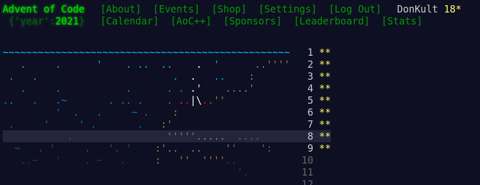
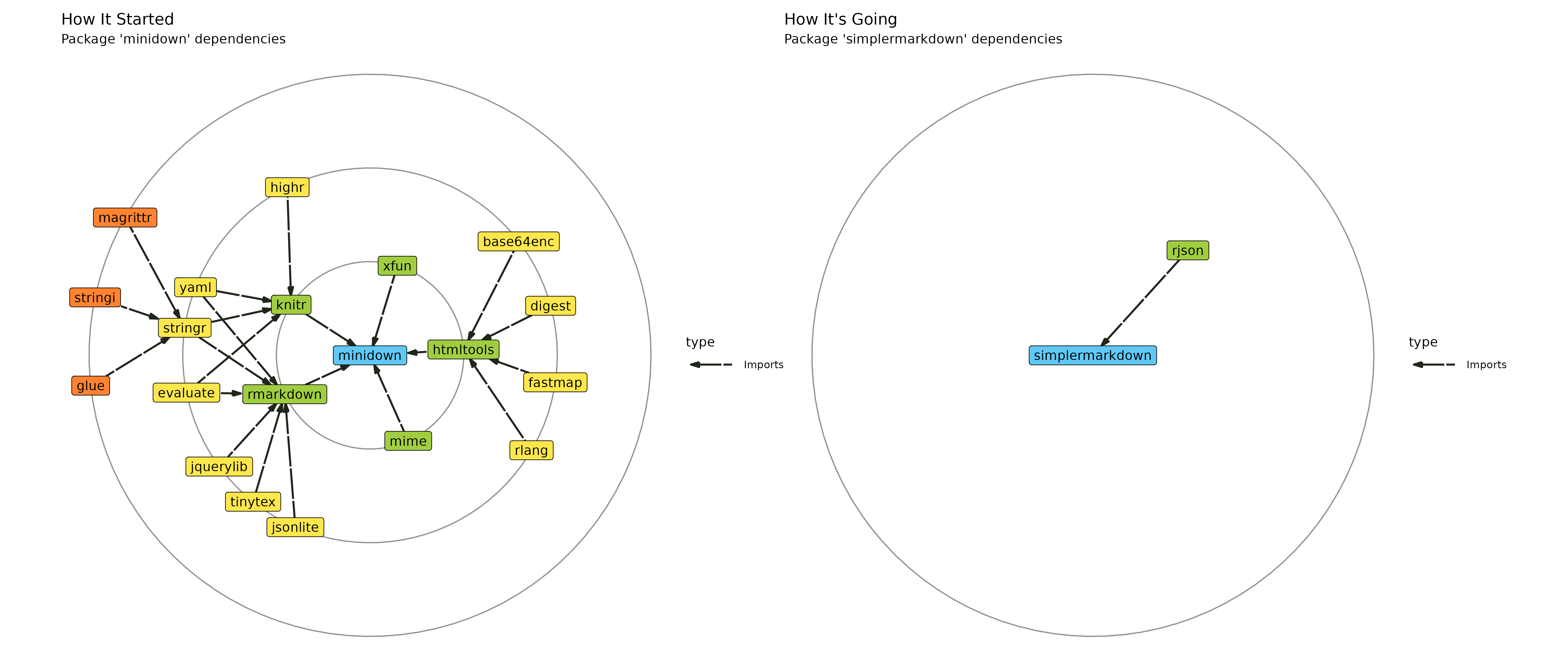 (courtesy of the

 Now that UDP was working, I was able to get TCP to work using two PlutoSDRs,
which allowed me to run the cURL command I pasted in the first post (both
simultaneously listen and transmit on behalf of my TAP interface).
It s my hope that someone out there will be inspired to implement their own
Layer 1 and Layer 2 as a learning exercise, and gets the same sense of
gratification that I did! If you re reading this, and at a point
where you ve been able to send IP traffic over your own Layer 1 / Layer 2,
please get in touch! I d be thrilled to hear all about it. I d love to link
to any posts or examples you publish here!
Now that UDP was working, I was able to get TCP to work using two PlutoSDRs,
which allowed me to run the cURL command I pasted in the first post (both
simultaneously listen and transmit on behalf of my TAP interface).
It s my hope that someone out there will be inspired to implement their own
Layer 1 and Layer 2 as a learning exercise, and gets the same sense of
gratification that I did! If you re reading this, and at a point
where you ve been able to send IP traffic over your own Layer 1 / Layer 2,
please get in touch! I d be thrilled to hear all about it. I d love to link
to any posts or examples you publish here!
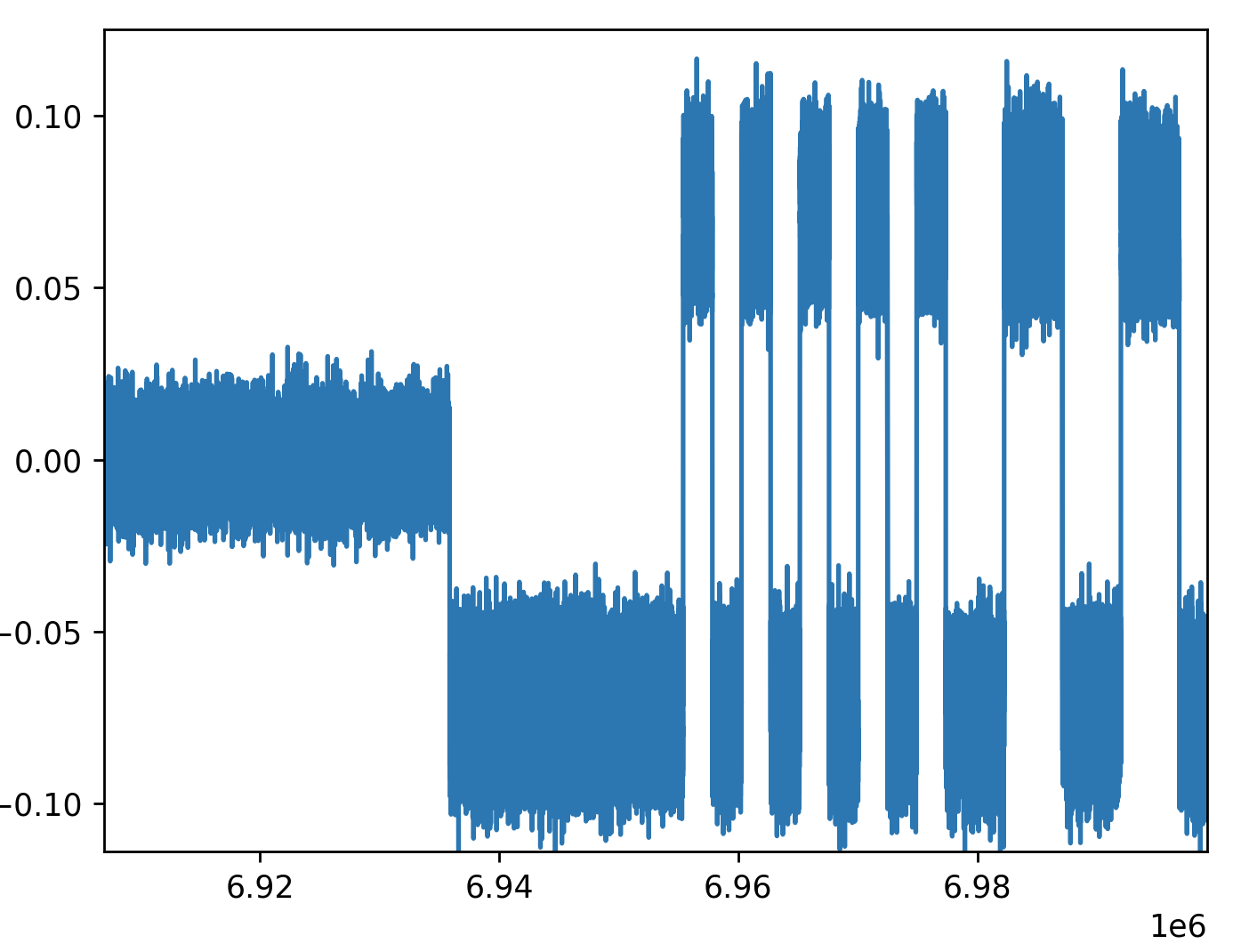
 The sixteenth release of