Emanuele Rocca: systemd is your friend
Today I want to talk a bit about some cool features of systemd, the default
Debian init system since the release of Jessie. Ubuntu has also adopted
systemd in 15.04, meaning that you are going to find it literally everywhere.
Logging
The component responsible for logging in systemd is called journal. It collects
and stores logs in a structured, indexed journal (hence the name). The journal
can replace traditional syslog daemons such as rsyslog and syslog-ng, or work
together with them. By default Debian keeps on using rsyslog, but if you don't
need to ship logs to a centralized server (or do other fancy things) it is
possible to stop using rsyslog right now and rely on systemd-journal instead.
The obvious question is: why would anybody use a binary format for logs instead
of a bunch of tried and true plain-text files? As it turns out, there are quite
a lot of good reasons to do so.
The killer features of systemd-journald for me are:
- Index tons of logs while being able to search with good performance: O(log(n)) instead of O(n) which is what you get with text files
- No need to worry about log rotation anymore, in any shape or form
journalctl -b                # Show all messages since last boot
journalctl -f                # Tail your logs
journalctl --since=yesterday # Show all messages produced since yesterday
journalctl -pcrit            # Filter messages by priority
journalctl /bin/su           # Filter messages by program
journalctl --disk-usage      # The amount of space in use for journaling
Further reading:
- http://0pointer.de/blog/projects/systemctl-journal.html
- journalctl(1)
- journald.conf(5)
- systemd-journald(8)
Containers
A relatively little known component of systemd is systemd-nspawn. It is a
small, straightforward container manager.
If you don't already have a chroot somewhere, here is how to create a basic
Debian Jessie chroot under /srv/chroots/jessie:
$ debootstrap jessie /srv/chroots/jessie http://http.debian.net/debian/With systemd-nspawn you can easily run a shell inside the chroot:
$ sudo systemd-nspawn -D /srv/chroots/jessie
Spawning container jessie on /srv/chroots/jessie.
Press ^] three times within 1s to kill container.
/etc/localtime is not a symlink, not updating container timezone.
root@jessie:~#
Done. Everything works out of the box: no need for you to mount /dev, /run and friends, systemd-nspawn took care of that. Networking also works. If you want to actually boot the system, just add the -b switch to the previous command:
$ sudo systemd-nspawn -b -D /srv/chroots/jessie
Spawning container jessie on /srv/chroots/jessie.
Press ^] three times within 1s to kill container.
/etc/localtime is not a symlink, not updating container timezone.
systemd 215 running in system mode. (+PAM +AUDIT +SELINUX +IMA +SYSVINIT +LIBCRYPTSETUP +GCRYPT +ACL +XZ -SECCOMP -APPARMOR)
Detected virtualization 'systemd-nspawn'.
Detected architecture 'x86-64'.
Welcome to Debian GNU/Linux jessie/sid!
Set hostname to <orion>.
[  OK  ] Reached target Remote File Systems (Pre).
[  OK  ] Reached target Encrypted Volumes.
[  OK  ] Reached target Paths.
[  OK  ] Reached target Swap.
[  OK  ] Created slice Root Slice.
[  OK  ] Created slice User and Session Slice.
[  OK  ] Listening on /dev/initctl Compatibility Named Pipe.
[  OK  ] Listening on Delayed Shutdown Socket.
[  OK  ] Listening on Journal Socket (/dev/log).
[  OK  ] Listening on Journal Socket.
[  OK  ] Created slice System Slice.
[  OK  ] Created slice system-getty.slice.
[  OK  ] Listening on Syslog Socket.
         Mounting POSIX Message Queue File System...
         Mounting Huge Pages File System...
         Mounting FUSE Control File System...
         Starting Copy rules generated while the root was ro...
         Starting Journal Service...
[  OK  ] Started Journal Service.
[  OK  ] Reached target Slices.
         Starting Remount Root and Kernel File Systems...
[  OK  ] Mounted Huge Pages File System.
[  OK  ] Mounted POSIX Message Queue File System.
[  OK  ] Mounted FUSE Control File System.
[  OK  ] Started Copy rules generated while the root was ro.
[  OK  ] Started Remount Root and Kernel File Systems.
         Starting Load/Save Random Seed...
[  OK  ] Reached target Local File Systems (Pre).
[  OK  ] Reached target Local File Systems.
         Starting Create Volatile Files and Directories...
[  OK  ] Reached target Remote File Systems.
         Starting Trigger Flushing of Journal to Persistent Storage...
[  OK  ] Started Load/Save Random Seed.
         Starting LSB: Raise network interfaces....
[  OK  ] Started Create Volatile Files and Directories.
         Starting Update UTMP about System Boot/Shutdown...
[  OK  ] Started Trigger Flushing of Journal to Persistent Storage.
[  OK  ] Started Update UTMP about System Boot/Shutdown.
[  OK  ] Started LSB: Raise network interfaces..
[  OK  ] Reached target Network.
[  OK  ] Reached target Network is Online.
[  OK  ] Reached target System Initialization.
[  OK  ] Listening on D-Bus System Message Bus Socket.
[  OK  ] Reached target Sockets.
[  OK  ] Reached target Timers.
[  OK  ] Reached target Basic System.
         Starting /etc/rc.local Compatibility...
         Starting Login Service...
         Starting LSB: Regular background program processing daemon...
         Starting D-Bus System Message Bus...
[  OK  ] Started D-Bus System Message Bus.
         Starting System Logging Service...
[  OK  ] Started System Logging Service.
         Starting Permit User Sessions...
[  OK  ] Started /etc/rc.local Compatibility.
[  OK  ] Started LSB: Regular background program processing daemon.
         Starting Cleanup of Temporary Directories...
[  OK  ] Started Permit User Sessions.
         Starting Console Getty...
[  OK  ] Started Console Getty.
[  OK  ] Reached target Login Prompts.
[  OK  ] Started Login Service.
[  OK  ] Reached target Multi-User System.
[  OK  ] Reached target Graphical Interface.
         Starting Update UTMP about System Runlevel Changes...
[  OK  ] Started Cleanup of Temporary Directories.
[  OK  ] Started Update UTMP about System Runlevel Changes.
Debian GNU/Linux jessie/sid orion console
orion login:
That's it! Just one command to start a shell in your chroot or boot the
container, again zero configuration needed.
Finally, systemd provides a command called machinectl that allows you to
introspect and control your container:
$ sudo machinectl status jessie
jessie
           Since: Wed 2015-10-07 11:22:56 CEST; 55min ago
          Leader: 32468 (systemd)
         Service: nspawn; class container
            Root: /srv/chroots/jessie
         Address: fe80::8e70:5aff:fe81:2290
                  192.168.122.1
                  192.168.1.13
              OS: Debian GNU/Linux jessie/sid
            Unit: machine-jessie.scope
                   32468 /lib/systemd/systemd
                   system.slice
                     dbus.service
                       32534 /usr/bin/dbus-daemon --system --address=systemd: --nofork --nopidfile -...
                     cron.service
                       32539 /usr/sbin/cron
                     systemd-journald.service
                       32487 /lib/systemd/systemd-journald
                     systemd-logind.service
                       32532 /lib/systemd/systemd-logind
                     console-getty.service
                       32544 /sbin/agetty --noclear --keep-baud console 115200 38400 9600 vt102
                     rsyslog.service
                       32540 /usr/sbin/rsyslogd -n
With machinectl you can also reboot, poweroff, terminate your containers and
more. There are so many things to learn about systemd and containers! Here are
some references.
- systemd-nspawn(1)
- machinectl(1)
- http://0pointer.net/blog/systemd-for-administrators-part-xxi.html
 On one of my regular walks with a friend, we decided today to walk part of the BLT Trail to Cranberry Lake and the bog just past it, an easy 5 km round trip.


 Reaction to Sarah's post about
 I just released sbuild 0.66.0-1 into unstable. It fixes a whopping 30 bugs!
Thus, I'd like to use this platform to:

 Do not follow the advice of web sites that invite you to send pizza or anything else of value to prospective mentors.
Following the steps in this page doesn't guarantee selection. That said, people who do follow these steps are much more likely to be considered and interviewed than somebody who hasn't done any of the things in this list.
Understand what free software really is
You may hear terms like free software and open source software used interchangeably.
They don't mean exactly the same thing and many people use the term free software for the wrong things. Not all projects declaring themselves to be "free" or "open source" meet the definition of free software. Those that don't, usually as a result of deficiencies in their licenses, are fundamentally incompatible with the majority of software that does use genuinely free licenses.
Google Summer of Code is about both writing and publishing your code and it is also about community. It is fundamental that you know the basics of licensing and how to choose a free license that empowers the community to collaborate on your code well after GSoC has finished.
Please review the definition of free software early on and come back and review it from time to time. The
 Having a portfolio of free software that you have created or collaborated on and a wide network of professional contacts that you develop before, during and after GSoC will continue to pay you back for years to come. While other graduates are being screened through group interviews and testing days run by employers, people with a track record in a free software project often find they go straight to the final interview round.
Register your domain name and make a permanent email address
Free software is all about community and collaboration. Register your own domain name as this will become a focal point for your work and for people to get to know you as you become part of the community.
This is sound advice for anybody working in IT, not just programmers. It gives the impression that you are confident and have a long term interest in a technology career.
Choosing the provider: as a minimum, you want a provider that offers DNS management, static web site hosting, email forwarding and XMPP services all linked to your domain. You do not need to choose the provider that is linked to your internet connection at home and that is often not the best choice anyway. The XMPP foundation maintains a
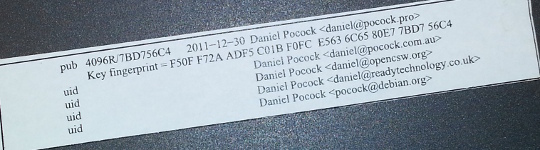 This is what my own PGP fingerprint slip looks like. You can also print the key fingerprint on a business card for a more professional look.
Using PGP, it is recommend that you sign any important messages you send but you do not have to encrypt the messages you send, especially if some of the people you send messages to (like family and friends) do not yet have the PGP software to decrypt them.
If using the
 Conclusion
Getting into the world of software engineering is much like joining any other profession or even joining a new hobby or sporting activity. If you run, you probably have various types of shoe and a running watch and you may even spend a couple of nights at the track each week. If you enjoy playing a musical instrument, you probably have a collection of sheet music, accessories for your instrument and you may even aspire to build a recording studio in your garage (or you probably know somebody else who already did that).
The things listed on this page will not just help you walk the walk and talk the talk of a software developer, they will put you on a track to being one of the leaders. If you look over the profiles of other software developers on the Internet, you will find they are doing most of the things on this page already. Even if you are not selected for GSoC at all or decide not to apply, working through the steps on this page will help you clarify your own ideas about your career and help you make new friends in the software engineering community.


 Inspired by
 Updates for my multi-boot/multi-purpose USB stick: All components have been updated to the latest versions and I have confirmed that all of them still boot properly although changes in the grub.cfg file are necessary. So going through these explanations one will end up with a usable USB stick that can boot you into
 Since there have been a lot of updates, and also changes in the setup and grub config file, I include the full procedure here, that is, merging and updating these previous posts:
 Unity, that is the Ubuntu user interface, that nobody else uses.
Since it is a Ubuntu-only thing, few applications have native support for
its OSX-style hipster "global" menus.
For Java, someone





