Search Results: "ed"

8 August 2012

Raphaël Hertzog: How to use quilt to manage patches in Debian packages

Most Debian source packages are using the 3.0 (quilt) format. This means that Debian changes to upstream files are managed in a quilt patch series. Knowledge of quilt is thus a must if you want to get involved in some serious packaging work. Don t worry, this tutorial will teach you how to use quilt in the context of Debian packaging. Pre-requisites Install the packaging-dev package to get a decent set of packages to do Debian packaging. It includes the quilt package.
$ sudo apt-get install packaging-dev
What s quilt? Read the description of the Debian package:
Quilt manages a series of patches by keeping track of the changes each of them makes. They are logically organized as a stack, and you can apply, un-apply, update them easily by traveling into the stack (push/pop). Quilt is good for managing additional patches applied to a package received as a tarball or maintained in another version control system. The stacked organization is proven to be efficient for the management of very large patch sets (more than hundred patches). As matter of fact, it was designed by and for Linux kernel hackers (Andrew Morton, from the -mm branch, is the original author), and its main use by the current upstream maintainer is to manage the (hundreds of) patches against the kernel made for the SUSE distribution.
The various files involved Stack of files PictureTo better understand the various quilt commands, you should have a basic idea of how the tool works. The stack of patches is maintained in a dedicated directory ( patches by default, but in Debian packages we override this value to debian/patches ). This directory contains the patch files and a series file that gives an ordered list of patches to apply. Example:
$ ls debian/patches/
01_use_stdlib_htmlparser_when_possible.diff
02_disable-sources-in-sphinxdoc.diff
03_manpage.diff
06_use_debian_geoip_database_as_default.diff
series
$ cat debian/patches/series
01_use_stdlib_htmlparser_when_possible.diff
02_disable-sources-in-sphinxdoc.diff
03_manpage.diff
06_use_debian_geoip_database_as_default.diff
When quilt is used, it also maintains some internal files in a directory of its own (it s named .pc ). This directory is used to know what patches are currently applied (.pc/applied-patches) and to keep backup copies of files modified by the various patches. Configuring quilt Before going further, you should put this in your ~/.quiltrc file:
for where in ./ ../ ../../ ../../../ ../../../../ ../../../../../; do
    if [ -e $ where debian/rules -a -d $ where debian/patches ]; then
        export QUILT_PATCHES=debian/patches
        break
    fi
done
This ensures that quilt will always use debian/patches instead of patches when your current directory is within a Debian source package where debian/patches exists. If you only use quilt for debian packaging, then you can be more expedient and put a simple export QUILT_PATCHES=debian/patches in that file. As a matter of personal preferences, I also have those lines in my ~/.quiltrc:
QUILT_PUSH_ARGS="--color=auto"
QUILT_DIFF_ARGS="--no-timestamps --no-index -p ab --color=auto"
QUILT_REFRESH_ARGS="--no-timestamps --no-index -p ab"
QUILT_DIFF_OPTS='-p'
It enables syntax coloring for the output of several commands and customizes the generated patches to get rid of useless information. I recommend you to use those settings too. Applying and unapplying patches, navigating in the stack of patches When you already have a patch series, you can navigate in the stack of patches so that any subset of consecutive patches (starting from the bottom) can be applied. quilt series will list all patches known by quilt. You can apply all patches with quilt push -a or unapply them all with quilt pop -a. You can also verify what patches are applied (quilt applied) or unapplied (quilt unapplied). quilt push applies the next unapplied patch (i.e. the patch returned by quilt next) and quilt pop unapplies the last applied patch (i.e. the patch returned by quilt top). You can give a patch name as parameter to quilt push/pop and it will apply/unapply all the patches required until the given patch is on the top. Here are some examples of navigation in a quilt patch series
$ quilt series
02_disable-sources-in-sphinxdoc.diff
03_manpage.diff
06_use_debian_geoip_database_as_default.diff
$ quilt applied
No patches applied
$ quilt next
02_disable-sources-in-sphinxdoc.diff
$ quilt push
Applying patch 02_disable-sources-in-sphinxdoc.diff
patching file docs/conf.py
Now at patch 02_disable-sources-in-sphinxdoc.diff
$ quilt push
Applying patch 03_manpage.diff
patching file docs/man/django-admin.1
Now at patch 03_manpage.diff
$ quilt applied
02_disable-sources-in-sphinxdoc.diff
03_manpage.diff
$ quilt unapplied
06_use_debian_geoip_database_as_default.diff
$ quilt pop -a
Removing patch 03_manpage.diff
Restoring docs/man/django-admin.1
Removing patch 02_disable-sources-in-sphinxdoc.diff
Restoring docs/conf.py
No patches applied
$ quilt push 03_manpage.diff
Applying patch 02_disable-sources-in-sphinxdoc.diff
patching file docs/conf.py
Applying patch 03_manpage.diff
patching file docs/man/django-admin.1
Now at patch 03_manpage.diff
$ quilt top
03_manpage.diff
Creating a new patch If there s no quilt series yet, you want to create the debian/patches directory first. If you already have one, you need to decide where to insert the new patch. Quilt will always add the new patch just after the patch which is currently on top. So if you want to add the patch at the end of the series, you need to run quilt push -a first. Then you can use quilt new name-of-my-patch.diff to tell quilt to insert a new empty patch after the current topmost patch. In this operation quilt does almost nothing except updating the series file and recording the fact that the new patch is applied (even if still empty at this point!). Now to add changes in this patch, you re supposed to modify files but only after having informed quilt of your intent to modify those files. You do this with quilt add file-to-modify. At this point quilt will make a backup copy of that file so that it can generate the final patch when you re done with your changes. It s quite common to forget this step and to be unable to generate the patch afterward. That s why I recommend you to use quilt edit file-to-modify which is a shorthand for doing quilt add and then opening the file in your favorite text editor. If you want, you can review your work in progress with quilt diff. When you re done with the changes, you should call quilt refresh to generate the patch (or to update it if it was already existing). And since you re a good packager, you call quilt header --dep3 -e to add DEP-3 meta-information to your patch header. Importing an external patch If someone else already prepared a patch, you can just import it right away with quilt import /tmp/the-patch. If you want to import it under a better name you can use the option -P better-patch-name . Like quilt new, it inserts the patch after the topmost patch. Updating patches for a new upstream version With some luck, your patches will still apply with some offsets in line numbers (quilt displays those offsets) and sometimes with some fuzz:
$ quilt push
[...]
Hunk #1 succeeded at 1362 (offset 11 lines).
Hunk #2 succeeded at 1533 with fuzz 1 (offset 4 lines).
[...]
While offsets are nothing to worry about (it means some lines were added and/or removed before the patched part), fuzz means that patch had to ignore some context lines to find the place where to apply the changes. In that case, you need to double check that patch did the right thing because it might have made changes somewhere where it shouldn t. Also, you ll have to update those patches because dpkg-source doesn t accept any fuzz. If you re confident that all patches are correctly applied by quilt, you can refresh them to get rid of those warnings:
$ quilt pop -a
[...]
$ while quilt push; do quilt refresh; done
That was for the easy case. Now let s deal with the case where some of the patches no longer apply. There s one case that is usually nice to have:
$ quilt push
Applying patch 04_hyphen-manpage.diff
patching file docs/man/django-admin.1
Hunk #1 FAILED at 194.
1 out of 1 hunk FAILED -- rejects in file docs/man/django-admin.1
Patch 04_hyphen-manpage.diff can be reverse-applied
When the patch can be reverse-applied, it means that the upstream authors included the Debian patch (or that they made the same change even though you forgot to forward the patch). You can thus get rid of it:
$ quilt delete -r 04_hyphen-manpage.diff
Removed patch 04_hyphen-manpage.diff
Note that without the -r the patch is only dropped from the series file. With -r the patch file is also removed. But there s a less desirable case where the patch is still relevant but it doesn t apply any longer:
$ quilt push
Applying patch 01_disable_broken_test.diff
patching file tests/regressiontests/test_utils/tests.py
Hunk #1 FAILED at 422.
1 out of 1 hunk FAILED -- rejects in file tests/regressiontests/test_utils/tests.py
Patch 01_disable_broken_test.diff does not apply (enforce with -f)
In that case, you should follow quilt s advice to force the patch application, manually apply the parts of the patch that were rejected, and then refresh the patch.
$ quilt push -f
Applying patch 01_disable_broken_test.diff
patching file tests/regressiontests/test_utils/tests.py
Hunk #1 FAILED at 422.
1 out of 1 hunk FAILED -- saving rejects to file tests/regressiontests/test_utils/tests.py.rej
Applied patch 01_disable_broken_test.diff (forced; needs refresh)
$ vim tests/regressiontests/test_utils/tests.py    
$ quilt refresh
Refreshed patch 01_disable_broken_test.diff
Other quilt commands You should probably read quilt s manual page too to learn about the various other commands and options that exist. There s at least quilt rename new-name that you can also find useful to rename the topmost patch (you can use -P patch-to-rename to rename a patch which is not currently at the top). Feedback Please leave comments if you have suggestions of improvements, or if there are some tips that are good to know. I might incorporate them in this article. Feel free to share this article with newbie packagers which are struggling with quilt. For your convenience, you can also refer to this article with this URL: http://raphaelhertzog.com/go/quilt
Found it useful? Be sure to not miss other packaging tips (or lessons), click here to subscribe to my free newsletter and get new articles by email.

2 comments Liked this article? Click here. My blog is Flattr-enabled.

Aigars Mahinovs: Fun with the new camera

Triple hit! So, I finally received my Canon 650D and Canon EF 40mm STM lens. I am very happy with the purchase. The STM lens is very, very compact, it is barely bigger than the lens cap that comes with the camera. The focusing is fast enough and it is very smooth and silent enough not to be audible in video mode. The largest bonus of the 650D compared to my old 550D is the articulated display. It has come in handy many times already. It is especially useful with the STM lens, live view and touch to focus function. Very useful to focus on something even when the camera is at an weird angle. And a couple days ago I got to really use the new camera capturing the shot above (an others in that set). It turns out capturing cool lightning shots is quite easy: It is basically the same as shooting photos of a fireworks display, with the exception that lightning is not so bright sometimes and that there is a high chance of rain in a thunderstorm ;) P.S. Got over 5k photos in Flickr now with this set, and closing in for 500k views. That feels cool :)

Russell Coker: Hard Drives for Backup

The general trend seems to be that cheap hard drives are increasing in capacity faster than much of the data that is commonly stored. Back in 1998 I had a 3G disk in my laptop and about 800M was used for my home directory. Now I have 6.2G used for my home directory (and another 2G in ~/src) out of the 100G capacity in my laptop. So my space usage for my home directory has increased by a factor of about 8 while my space available has increased by a factor of about 30. When I had 800M for my home directory I saved space by cropping pictures for my web site and deleting the originals (thus losing some data I would rather have today) but now I just keep everything and it s still doesn t take up much of my hard drive. Similar trends apply to most systems that I use and that I run for my clients. Due to the availability of storage people are gratuitously using a lot of disk space. A relative recently took 10G of pictures on a holiday, her phone has 12G of internal storage so there was nothing stopping her. She might decide that half the pictures aren t that great if she had to save space, but that space is essentially free (she couldn t buy a cheaper phone with less storage) so there s no reason to delete any pictures. When considering backup methods one important factor is the ability to store all of one type of data on one backup device. Having a single backup span multiple disks, tapes, etc has a dramatic impact on the ease of recovery and the potential for data loss. Currently 3TB SATA disks are really cheap and 4TB disks are available but rather expensive. Currently only one of my clients has more than 4TB of data used for one purpose (IE a single filesystem) so apart from that client a single SATA disk can backup anything that I run. Benefits of Hard Drive Backup When using a hard drive there is an option to make it a bootable disk in the same format as the live disk. I haven t done this, but if you want the option of a quick recovery from a hardware failure then having a bootable disk with all the data on it is a good option. For example a server with software RAID-1 could have a backup disk that is configured as a degraded RAID-1 array. The biggest benefit is the ability to read a disk anywhere. I ve read many reports of tape drives being discovered to be defective at the least convenient time. With a SATA disk you can install it in any PC or put it in a USB bay if you have USB 3.0 or the performance penalty of USB 2.0 is bearable a USB 2.0 bay is great if you want to recover a single file, but if you want terabytes in a hurry then it won t do. A backup on a hard drive will typically use a common filesystem. For backing up Linux servers I generally use Ext3, at some future time I will move to BTRFS as having checksums on all data is a good feature for a backup. Using a regular filesystem means that I can access the data anywhere without needing any special software, I can run programs like diff on the backup, and I can export the backup via NFS or Samba if necessary. You never know how you will need to access your backup so it s best to keep your options open. Hard drive backups are the best solution for files that are accidentally deleted. You can have the first line of backups on a local server (or through a filesystem like BTRFS or ZFS that supports snapshots) and files can be recovered quickly. Even a SATA disk in a USB bay is very fast for recovering a single file. LTO tapes have a maximum capacity of 1.5TB at the moment and tape size has been increasing more slowly than disk size. Also LTO tapes have an expected lifetime of only 200 reads/writes of the entire tape. It seems to me that tapes don t provide a great benefit unless you are backing up enough data to need a tape robot. Problems with a Hard Drive Backup Hard drives tend not to survive being dropped so posting a hard drive for remote storage probably isn t a good option. This can be solved by transferring data over the Internet if the data isn t particularly big or doesn t change too much (I have a 400G data set backed up via rsync to another country because most of the data doesn t change over the course of a year). Also if the data is particularly small then solid state storage (which costs about $1 per GB) is a viable option, I run more than a few servers which could be entirely backed up to a 200G SSD. $200 for a single backup of 200G of data is a bit expensive, but the potential for saving time and money on the restore means that it can be financially viable. Some people claim that tape storage will better survive a Carrington Event than hard drives. I m fairly dubious about the benefits of this, if a hard drive in a Faraday Cage (such as a regular safe that is earthed) is going to be destroyed then you will probably worry about security of the food supply instead of your data. Maybe I should just add a disclaimer this backup system won t survive a zombie apocalypse . ;) It s widely regarded that tape storage lasts longer than hard drives. I doubt that this provides a real benefit as some of my personal servers are running on 20G hard drives from back when 20G was big. The fact that drives tend to last for more than 10 years combined with the fact that newer bigger drives are always being released means that important backups can be moved to bigger drives. As a general rule you should assume that anything which isn t regularly tested doesn t work. So whatever your backup method you should test it regularly and have multiple copies of the data to deal with the case when one copy becomes corrupt. The process of testing a backup can involve moving it to newer media. I ve seen it claimed that a benefit of tape storage is that part of the data can be recovered from a damaged tape. One problem with this is that part of a database often isn t particularly useful. Another issue is that in my experience hard drives usually don t fail entirely unless you drop them, drives usually fail a few sectors at a time. How to Implement Hard Drive Backup The most common need for backups is when someone deletes the wrong file. It s usually a small restore and you want it to be an easy process. The best solution to this is to have a filesystem with snapshots such as BTRFS or ZFS. In theory it shouldn t be too difficult to have a cron job manage snapshots, but as I ve only just started putting BTRFS and ZFS on servers I haven t got around to changing my backups. Snapshots won t cover more serious problems such as hardware, software, or user errors that wipe all the disks in a server. For example the only time I lost a significant amount of data from a hosted server was when the data center staff wiped it, so obviously good off-site backups are needed. The easiest way to deal with problems that wipe a server is to have data copied to another system. For remote backups you can rsync to a local system and then use cp -rl or your favorite snapshot system to make a hard linked copy of the tree. A really neat feature is the ZFS ability to send a filesystem snapshot (or the diff between two snapshots) to a remote system [1]. Once you have regular backups on local storage you can then copy them to removable disks as often as you wish, I think I ll have to install ZFS on some of my servers for the sole purpose of getting the send feature! There are NAS devices that provide similar functionality to the ZFS send/receive (maybe implemented with ZFS), but I m not a fan of cheap NAS devices [2]. It seems that the best way to address the first two needs of backup (fast local restore and resilience in the face of site failure) is to use ZFS snapshots on the server and ZFS send/receive to copy the data to another site. The next issue is that the backup server probably won t be big enough for all the archives and you want to be able to recover from a failure on the backup server. This requires some removable storage. The simplest removable backup is to use a SATA drive bay with eSATA and USB connectors. You use a regular filesystem like Ext3 and just copy the files on. It s easy, cheap, and requires no special skill or software. Requiring no special skill is important, you never know who will be called on to recover from backups. When a server is backing up another server by rsync (whether it s in the same rack or another country) you want the backup server to be reliable. However there is no requirement for a single reliable server and sometimes having multiple backup servers will be cheaper. At current purchase prices you can buy two cheap tower systems with 4*3TB disks for less money than a single server that has redundant PSUs and other high end server features. Having two cheap servers die at once seems quite unlikely so getting two backup servers would be the better choice. For filesystems that are bigger than 4TB a disk based backup would require backup software that handles multi part archives. One would hope that any software that is designed for tape backup would work well for this (consider a hard drive as a tape with a very fast seek), but often things don t work as desired. If anyone knows of a good Linux backup program that supports multiple 4TB SATA disks in eSATA or USB bays then please let me know. Conclusion BTRFS or ZFS snapshots are the best way of recovering from simple mistakes. ZFS send/receive seems to be the best way of synchronising updates to filesystems to other systems or sites. ZFS should be used for all servers. Even if you don t currently need send/receive you never know what the future requirements may be. Apart from needing huge amounts of RAM (one of my servers had OOM failures when it had a mere 4G of RAM) there doesn t seem to be any down-side to ZFS. I m unsure of whether to use BTRFS for removable backup disks. The immediate up-sides are checksums on all data and meta-data and the possibility of using built-in RAID-1 so that a random bad sector is unlikely to lose data. There is also the possibility of using snapshots on a removable backup disk (if the disk contains separate files instead of an archive). The down-sides are lack of support on older systems and the fact that BTRFS is fairly new. Have I missed anything? Related posts:
  1. New Storage Developments Eweek has an article on a new 1TB Seagate drive....
  2. IDE hard drives I just lent two 80G IDE drives to a friend,...
  3. Hot-swap Storage I recently had to decommission an old Linux server and...

Johannes Schauer: Bootstrappable Debian - How to help

TLDR: multiarch, multiarch, multiarch, cross buildability, staged build dependencies, wiki page, corrections/hints/requests to debian-bootstrap at lists.mister-muffin.de This summer (and this year's GSoC) is nearing its end and to make it easier for people to make use of the information my tools produced so far, I created a page in the Debian wiki. It lists not only the open issues I see but also statistics that I gathered using the output of my GSoC project. I want to use this blog post to make people aware of that page as well as to get some feedback on it and anything related to it. The biggest blocker my tools face, is that many packages are still missing multiarch information. As long as at least the basic packages do not have their cross build dependencies satisfied via multiarch for an existing foreign architecture, automated tools can not properly analyze the dependency situation in the bootstrapping case, when many packages of the new foreign architecture do not even exist yet. If Debian is supposed to be bootstrappable, then the first stage is to make a set of basic packages cross compile for an existing foreign architecture. Once this is possible, a tool of mine can analyze the cyclic build dependency situation that might occur when cross compiling for an architecture that does not exist yet. Then, staged cross builds can be used to cross compile a minimal foreign system. Due to missing multiarch classification, it is not known yet how big the cyclic build dependency situation is for the base packages. It is not only the conversion of packages to multiarch that is needed but also the adding of the :any (and rare cases :native) qualifier to build dependencies on M-A: allowed packages. Prominent build dependencies that should (but are not yet) be M-A: allowed are python and gettext. Both are needed as a build dependency by many packages of the base system. Unfortunately wanna-build does not understand qualifiers like :any and :native yet. Until it does, no package can be marked :any or :native and cross compilation of many base packages can not succeed. Once the point is reached, where a base system can be cross compiled from nothing, native compilation can start. Since native compilation doesnt depend on multiarch, the dependency situation when trying to natively compiling all of Debian from nothing is understood much better. Unfortunately, the cyclic build dependency situation is also much worse in the native case and there exists a big 1000 node strongly connected component of binary and source packages that all interdepend on each other. This dependency mess can be solved using three approaches: The wiki page gives many hints on how to find packages that each method can be applied to. Stage building is a tool that might be useful for cross building (we dont know for sure yet) but is definitely needed for native compilation. It is needed for native compilation because after all possible dependencies are moved to Build-Depends-Indep, the only other alternative to stage building for breaking dependency cycles is to cross build source packages. Since building a package without one of its build dependencies "staged" is often much easier than making the package in question cross compile, it is a preferred alternative. Once more packages have been made multiarch, it might be possible to prove that there is no alternative to introducing a notion of staged builds. Some people (wookey, Patrick McDermott, Guillem Jover, myself) decided that the following format to mark staged build dependencies would be preferred over others:

Build-Depends: huge (>= 1.0) [i386 arm] <!embedded !bootstrap>, tiny
The <> format was proposed by Guillem Jover in bug#661538. Patches for dpkg and dose3 are done. More people need to discuss about this format for a final decision on how to indicate staged build dependencies. For more information on the topic, have a look at the corresponding wiki page. Feel free to direct any comments/critique/hints to debian-bootstrap at lists.mister-muffin.de or directly to me.

Mart&iacute;n Ferrari: Debian whois: a proposal to increase visibility and recognition of contributors

Another great DebConf is over. Two weeks ago, I was lingering a little longer in Nicaragua, enjoying some tropical holidays, and having a few To as with some fellow debconfers in Granada, and I exposed some rough ideas I've been incubating in the back of my head for some days. Since it had a positive initial reaction from the table (Gregor already volunteered to help!), I want to show it to a larger audience, in the hopes of getting some useful feedback, ideas, and maybe even some volunteers! The trigger was Zack's Bits from the DPL talk, and Enrico's post on the same topic. We need to recognise more what people is doing in the project, much valuable work is done in the shadows, and it is in our interest to make the people doing that work feel acknowledged, feel they are part of the project. The core of my idea is to create a web service that, for each person known to the project (let's say, http://whois.debian.net/tincho), shows a simple page with information about the person, optionally a mugshot/hackergotchi, what are they working on, maybe some stats and links (the Debian portfolio stuff, for example), and the core of this idea badges of merit, and attribution for their contributions. What I picture is having badges that say: Closed X RC bugs , Active translator for Esperanto , #1 video team camera operator in DC12 , Created 100 bugs .. You get the idea. In this ugly mock I created with my null designing skills, the idea might be a little more clear.
An important feature of the project is that it will be just a collector of information distributed in different places: This way, every team or project in Debian that wants to give recognition to its volunteers would easily do it, without needing to dive into the details of the code, or dealing with much bureaucracy. Just a signed mail with the pointer to the source of the data would be sufficient. I think the more complex part of this project would be matching different identities to real persons, in a way similar to carnivore, so we can match between different email addresses, a name, a Debian or alioth user-id (if applicable), IRC nickname, or any other identification that might be used to distinguish a person inside Debian. This might sound scary, but I don't plan on exposing or crawling any identities that are not currently publicly exposed, I just want to be able to see in a single page all the information associated both with my debian.org email address and with my gmail one. I have some basic design ideas, but I don't want to make this post even longer than what it is now. Please get in touch if you have comments, ideas, or if you want to flame me. Tags: Planet Debian

7 August 2012

C.J. Adams-Collier: STUN server up

cjac@foxtrot:/usr/src/svn/debian/stun/stun-0.96.dfsg$ dig +short _stun._udp.colliertech.org SRV
10 0 3478 stun.colliertech.org.
cjac@foxtrot:/usr/src/svn/debian/stun/stun-0.96.dfsg$ ./client stun.colliertech.org
STUN client version 0.96
Primary: Dependent Mapping, preserves ports, no hairpin
Return value is 0 000019 Also of note, the web server now redirects requests for the blog on port 80 over to 443.

C.J. Adams-Collier: STUN server up

cjac@foxtrot:/usr/src/svn/debian/stun/stun-0.96.dfsg$ dig +short _stun._udp.colliertech.org SRV

10 0 3478 stun.colliertech.org.
cjac@foxtrot:/usr/src/svn/debian/stun/stun-0.96.dfsg$ ./client stun.colliertech.org
STUN client version 0.96
Primary: Dependent Mapping, preserves ports, no hairpin
Return value is 0 000019 Also of note, the web server now redirects requests for the blog on port 80 over to 443.

6 August 2012

Vincent Sanders: Education is when you read the fine print. Experience is what you get if you don't.

Given my title I guess I just got a load of "experience" from Gandi. Previously I have written about building the NetSurf Continuous Integration (CI) server and my misjudgement of the resources it would require to be useful.

I contacted Gandi and they confirmed my suspicion that my only options to extend the VPS were to spend a great deal more money. The total spend would have been in excess of 300 per year to get a minimally satisfactory configuration.

So I contacted Mythic Beasts and they offered the NetSurf project a selection of deals they could not refuse. Once we decided on the right deal for us the system was in place, ready to use, within a morning.

Thanks to the generous open source project discount the offering from Mythic is almost double what Gandi were offering for less than half the price. I was, as previously concluded, dumb to go with Gandi in the first place when Mythic were an option.

Once the system was transferred to the shiny new server I went back to Gandi and asked how much my mistake of buying a years service for a single month worth of VPS service was going to cost. The reply was somewhat disappointing I was simply referred to section 8.1.2 of the contract (tl;dr We have your money now, tough luck, your problem). It would appear my mistake was going to cost me the full 114 I had paid.

I was somewhat disheartened at this turn of events but then Daniel Silverstone offered to take on the VPS if I could transfer it to his Gandi handle so he could administer it. this seemed like a good solution, at least the resource would be used and not wasted. Gandi response to this was initially promising but this is the final reply:

I'm really sorry to inform you that my supervisor refused the share transfer request to the other account. He told me that we do not transfer products either in those cases. I deeply apologize since I thought it was possible. I thank you for your confidence in Gandi, and hope that this occurrence does not deter you from continuing with us.
Now I must stress that Gandi are completely within their contractual rights to do this and are not obligated to provide any assistance to help make my blunder less costly to me, but they have firmly shown they have no willingness to be flexible in any way which means I know where I will not be spending my money in future.

Oh and then Pete from Mythic mentioned that they have a full refund and flexible policy on their services and we can always switch to the monthly billing rate and get a refund on the outstanding balance or move it or...

Basically my recommendation for an open source project looking for hosting, VPS or any network services has to be to go talk to the nice people at Mythic and steer clear of Gandi. Maybe in future all providers will realise that they are in a competitive market and certainly a little customer service flexibility might have made this posting much more about my mistake and not the attitude of the suppliers involved.

Vincent Sanders: Pimm's and Punting

The Sun came out in Cambridge the other week (yes I know, a rare occurrence) and because Robert is a generous soul he decided the office should go punting on the cam.

I had not previously been out on the river but Robert proved to be the consummate punter.

We even got fruit based drinks and some serenading, although perhaps that was not a benefit.


I took many photos of the event including the rather nice meal afterwards, some were even in focus and not blurry.

Mike Hommey: Building a Linux kernel module without the exact kernel headers

Imagine you have a Linux kernel image for an Android phone, but you don t have the corresponding source, nor do you have the corresponding kernel headers. Imagine that kernel has module support (fortunately), and that you d like to build a module for it to load. There are several good reasons why you can t just build a new kernel from source and be done with it (e.g. the resulting kernel lacks support for important hardware, like the LCD or touchscreen). With the ever-changing Linux kernel ABI, and the lack of source and headers, you d think you re pretty much in a dead-end. As a matter of fact, if you build a kernel module against different kernel headers, the module will fail to load with errors depending on how different they are. It can complain about bad signatures, bad version or other different things. But more on that later. Configuring a kernel The first thing is to find a kernel source for something close enough to the kernel image you have. That s probably the trickiest part with getting a proper configuration. Start from the version number you can read from /proc/version. If, like me, you re targeting an Android device, try Android kernels from Code Aurora, Linaro, Cyanogen or Android, whichever is closest to what is in your phone. In my case, it was msm-3.0 kernel. Note you don t necessarily need the exact same version. A minor version difference is still likely to work. I ve been using a 3.0.21 source, which the kernel image was 3.0.8. Don t however try e.g. using a 3.1 kernel source when the kernel you have is 3.0.x. If the kernel image you have is kind enough to provide a /proc/config.gz file, you can start from there, otherwise, you can try starting from the default configuration, but you need to be extra careful, then (although I won t detail using the default configuration because I was fortunate enough that I didn t have to, there will be some details further below as to why a proper configuration is important). Assuming arm-eabi-gcc is in your PATH, and that you have a shell opened in the kernel source directory, you need to start by configuring the kernel and install headers and scripts:
$ mkdir build
$ gunzip -c config.gz > build/.config # Or whatever you need to prepare a .config
$ make silentoldconfig prepare headers_install scripts ARCH=arm CROSS_COMPILE=arm-eabi- O=build KERNELRELEASE= adb shell uname -r 
The silentoldconfig target is likely to ask you some questions about whether you want to enable some things. You may want to opt for the default, but that may also not work properly. You may use something different for KERNELRELEASE, but it needs to match the exact kernel version you ll be loading the module from. A simple module To create a dummy module, you need to create two files: a source file, and a Makefile. Place the following content in a hello.c file, in some dedicated directory:
#include <linux/module.h>       /* Needed by all modules */
#include <linux/kernel.h>       /* Needed for KERN_INFO */
#include <linux/init.h>         /* Needed for the macros */
static int __init hello_start(void)
 
  printk(KERN_INFO "Hello world\n");
  return 0;
 
static void __exit hello_end(void)
 
  printk(KERN_INFO "Goodbye world\n");
 
module_init(hello_start);
module_exit(hello_end);
Place the following content in a Makefile under the same directory:
obj-m = hello.o
Building such a module is pretty straightforward, but at this point, it won t work yet. Let me enter some details first. The building of a module When you normally build the above module, the kernel build system creates a hello.mod.c file, which content can create several kind of problems:
MODULE_INFO(vermagic, VERMAGIC_STRING);
VERMAGIC_STRING is derived from the UTS_RELEASE macro defined in include/generated/utsrelease.h, generated by the kernel build system. By default, its value is derived from the actual kernel version, and git repository status. This is what setting KERNELRELEASE when configuring the kernel above modified. If VERMAGIC_STRING doesn t match the kernel version, loading the module will lead to the following kind of message in dmesg:
hello: version magic '3.0.21-perf-ge728813-00399-gd5fa0c9' should be '3.0.8-perf'
Then, there s the module definition.
struct module __this_module
__attribute__((section(".gnu.linkonce.this_module"))) =  
 .name = KBUILD_MODNAME,
 .init = init_module,
#ifdef CONFIG_MODULE_UNLOAD
 .exit = cleanup_module,
#endif
 .arch = MODULE_ARCH_INIT,
 ;
In itself, this looks benign, but the struct module, defined in include/linux/module.h comes with an unpleasant surprise:
struct module
 
        (...)
#ifdef CONFIG_UNUSED_SYMBOLS
        (...)
#endif
        (...)
        /* Startup function. */
        int (*init)(void);
        (...)
#ifdef CONFIG_GENERIC_BUG
        (...)
#endif
#ifdef CONFIG_KALLSYMS
        (...)
#endif
        (...)
(... plenty more ifdefs ...)
#ifdef CONFIG_MODULE_UNLOAD
        (...)
        /* Destruction function. */
        void (*exit)(void);
        (...)
#endif
        (...)
 
This means for the init pointer to be at the right place, CONFIG_UNUSED_SYMBOLS needs to be defined according to what the kernel image uses. And for the exit pointer, it s CONFIG_GENERIC_BUG, CONFIG_KALLSYMS, CONFIG_SMP, CONFIG_TRACEPOINTS, CONFIG_JUMP_LABEL, CONFIG_TRACING, CONFIG_EVENT_TRACING, CONFIG_FTRACE_MCOUNT_RECORD and CONFIG_MODULE_UNLOAD. Start to understand why you re supposed to use the exact kernel headers matching your kernel? Then, the symbol version definitions:
static const struct modversion_info ____versions[]
__used
__attribute__((section("__versions"))) =  
	  0xsomehex, "module_layout"  ,
	  0xsomehex, "__aeabi_unwind_cpp_pr0"  ,
	  0xsomehex, "printk"  ,
 ;
These come from the Module.symvers file you get with your kernel headers. Each entry represents a symbol the module requires, and what signature it is expected to have. The first symbol, module_layout, varies depending on what struct module looks like, i.e. depending on which of the config options mentioned above are enabled. The second, __aeabi_unwind_cpp_pr0, is an ARM ABI specific function, and the last, is for our printk function calls. The signature for each function symbol may vary depending on the kernel code for that function, and the compiler used to compile the kernel. This means that if you have a kernel you built from source, modules built for that kernel, and rebuild the kernel after modifying e.g. the printk function, even in a compatible way, the modules you built initially won t load with the new kernel. So, if we were to build a kernel from the hopefully close enough source code, with the hopefully close enough configuration, chances are we wouldn t get the same signatures as the binary kernel we have, and it would complain as follows, when loading our module:
hello: disagrees about version of symbol symbol_name
Which means we need a proper Module.symvers corresponding to the binary kernel, which, at the moment, we don t have. Inspecting the kernel Conveniently, since the kernel has to do these verifications when loading modules, it actually contains a list of the symbols it exports, and the corresponding signatures. When the kernel loads a module, it goes through all the symbols the module requires, in order to find them in its own symbol table (or other modules symbol table when the module uses symbols from other modules), and check the corresponding signature. The kernel uses the following function to search in its symbol table (in kernel/module.c):
bool each_symbol_section(bool (*fn)(const struct symsearch *arr,
                                    struct module *owner,
                                    void *data),
                         void *data)
 
        struct module *mod;
        static const struct symsearch arr[] =  
                  __start___ksymtab, __stop___ksymtab, __start___kcrctab,
                  NOT_GPL_ONLY, false  ,
                  __start___ksymtab_gpl, __stop___ksymtab_gpl,
                  __start___kcrctab_gpl,
                  GPL_ONLY, false  ,
                  __start___ksymtab_gpl_future, __stop___ksymtab_gpl_future,
                  __start___kcrctab_gpl_future,
                  WILL_BE_GPL_ONLY, false  ,
#ifdef CONFIG_UNUSED_SYMBOLS
                  __start___ksymtab_unused, __stop___ksymtab_unused,
                  __start___kcrctab_unused,
                  NOT_GPL_ONLY, true  ,
                  __start___ksymtab_unused_gpl, __stop___ksymtab_unused_gpl,
                  __start___kcrctab_unused_gpl,
                  GPL_ONLY, true  ,
#endif
         ;
        if (each_symbol_in_section(arr, ARRAY_SIZE(arr), NULL, fn, data))
                return true;
        (...)
The struct used in this function is defined in include/linux/module.h as follows:
struct symsearch  
        const struct kernel_symbol *start, *stop;
        const unsigned long *crcs;
        enum  
                NOT_GPL_ONLY,
                GPL_ONLY,
                WILL_BE_GPL_ONLY,
          licence;
        bool unused;
 ;
Note: this kernel code hasn t changed significantly in the past four years. What we have above is three (or five, when CONFIG_UNUSED_SYMBOLS is defined) entries, each of which contains the start of a symbol table, the end of that symbol table, the start of the corresponding signature table, and two flags. The data is static and constant, which means it will appear as is in the kernel binary. By scanning the kernel for three consecutive sequences of three pointers within the kernel address space followed by two integers with the values from the definitions in each_symbol_section, we can deduce the location of the symbol and signature tables, and regenerate a Module.symvers from the kernel binary. Unfortunately, most kernels these days are compressed (zImage), so a simple search is not possible. A compressed kernel is actually a small bootstrap binary followed by a compressed stream. It is possible to scan the kernel zImage to look for the compressed stream, and decompress it from there. I wrote a script to do decompression and extraction of the symbols info automatically. It should work on any recent kernel, provided it is not relocatable and you know the base address where it is loaded. It takes options for the number of bits and endianness of the architecture, but defaults to values suitable for ARM. The base address, however, always needs to be provided. It can be found, on ARM kernels, in dmesg:
$ adb shell dmesg   grep "\.init"
<5>[01-01 00:00:00.000] [0: swapper]      .init : 0xc0008000 - 0xc0037000   ( 188 kB)
The base address in the example above is 0xc0008000. If like me you re interested in loading the module on an Android device, then what you have as a binary kernel is probably a complete boot image. A boot image contains other things besides the kernel, so you can t use it directly with the script. Except if the kernel in that boot image is compressed, in which case the part of the script that looks for the compressed image will find it anyways. If the kernel is not compressed, you can use the unbootimg program as outlined in this old post of mine to get the kernel image out of your boot image. Once you have the kernel image, the script can be invoked as follows:
$ python extract-symvers.py -B 0xc0008000 kernel-filename > Module.symvers
Symbols and signature info could also be extracted from binary modules, but I was not interested in that information so the script doesn t handle that. Building our module Now that we have a proper Module.symvers for the kernel we want to load our module in, we can finally build the module: (again, assuming arm-eabi-gcc is in your PATH, and that you have a shell opened in the kernel source directory)
$ cp /path/to/Module.symvers build/
$ make M=/path/to/module/source ARCH=arm CROSS_COMPILE=arm-eabi- O=build modules
And that s it. You can now copy the resulting hello.ko onto the device and load it. and enjoy
$ adb shell
# insmod hello.ko
# dmesg   grep insmod
<6>[mm-dd hh:mm:ss.xxx] [id: insmod]Hello world
# lsmod
hello 586 0 - Live 0xbf008000 (P)
# rmmod hello
# dmesg   grep rmmod
<6>[mm-dd hh:mm:ss.xxx] [id: rmmod]Goodbye world

Richard Hartmann: The problem with copyright maximalism

The gradual descent into a [permission culture](http://www.ibiblio.org/ebooks/Lessig/Free_Culture/Free Culture.htm#pxiii) has many ugly heads. Be they copyright maximalism, patent wars, cementing antiquated business models by suing, or a myriad of other things. One of said ugly heads is that people pretend to have a copyright just to milk others. The name Righthaven will be known to most people as a prime example of this going badly for the offenders. From how it looks, the people behind Righthaven, a company founded just to sue others, are being pursued through that shell. Many of you will know the infamous "You have to watch this on YouTube as Rightster filed a copyright claim" notice. What this means is that YouTube will (try to) display ads and Rightster will get a share of any revenue. I can't comment on the validity of those claims, but some of them struck me as dubious in the past. We reached a new low, though. Scripps Local News, which publishes world-renowned papers such as Ventura County Star and Corpus Christi Caller-Times, temporarily blocked NASA's video of Mission Control during MSL's seven minutes of radio silence with their copyright claim. As NASA-produced video featuring NASA, published on NASA's YouTube account. Blocked: Turns out something is borked here and I don't have time to fix it right now. I uploaded it to imgur as a quick fix. The video has been made accessible again in the meantime, but this is, yet again, proof that we are sliding into a society where content and knowledge is locked down by default. Don't let that happen. Pester your politicians, inform your friends, participate in demonstrations, and don't give up. It's our culture, not theirs.

Junichi Uekawa: Android.

Android. Found out that I have not developed an Android App since July 2011... It's been a year and things are rusty.

Michal &#268;iha&#345;: Ukolovnik 1.4

Great effort of new translators finally forced me to release Ukolovnik 1.4. There are only minor bug fixes besides translations updates. Full list of changes: PS: I don't plan any further development of this tool, in fact I have not touched it in last year and I don't expect this to change.

Filed under: English Ukolovnik 0 comments Flattr this!

Vasudev Kamath: Logging issue with Flask

While enabling logging for release of rewritten version of SILPA described in my previous post I faced a weird problem. I enabled Logging as described in the Flask documentation but SILPA won't log anything to the log even though log file is created in whatever location I gave while configuring the logging. Flask documentation suggests following way to use logging
import logging
from logging.handlers import RequiredHandler
file_handler = RequiredHandler(...)
file_handler.setLevel(logging.WARNING)
app.logger.addHandler(file_handler)
After banging my head for some time I again wanted to look at Python's logging tutorials see if I'm doing something wrong and I found this example
import logging
# create logger
logger = logging.getLogger('simple_example')
logger.setLevel(logging.DEBUG)
# create console handler and set level to debug
ch = logging.StreamHandler()
ch.setLevel(logging.DEBUG)
# create formatter
formatter = logging.Formatter('%(asctime)s - %(name)s - %(levelname)s - %(message)s')
# add formatter to ch
ch.setFormatter(formatter)
# add ch to logger
logger.addHandler(ch)
# 'application' code
logger.debug('debug message')
logger.info('info message')
logger.warn('warn message')
logger.error('error message')
logger.critical('critical message')
So there it is I need to set the logging level even on logger to same level as what I set on my handler. Now I didn't take time to read the documentation because I wanted to see if my findings really does the trick so I modified function configuring logging to look something like below (I'm taking the example given in Flask documentation itself real code can be seen in SILPA code on Github)
import logging
from logging.handlers import RequiredHandler
file_handler = RequiredHandler(...)
file_handler.setLevel(logging.WARNING)
app.logger.setLevel(logging.WARNING)
app.logger.addHandler(file_handler)
This actually did the trick and now Flask is happily logging whatever I give to app.logger.levelname So I don't know this was my stupidity or fault in Flask's documentation by forgetting to mention this crucial point. But in the end all is well :-) Do comment your thoughts.

5 August 2012

Dirk Eddelbuettel: Counting CRAN Package Depends, Imports and LinkingTo

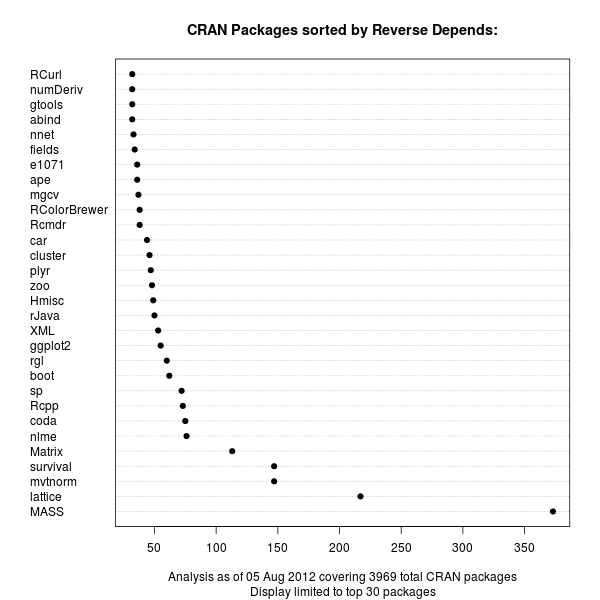
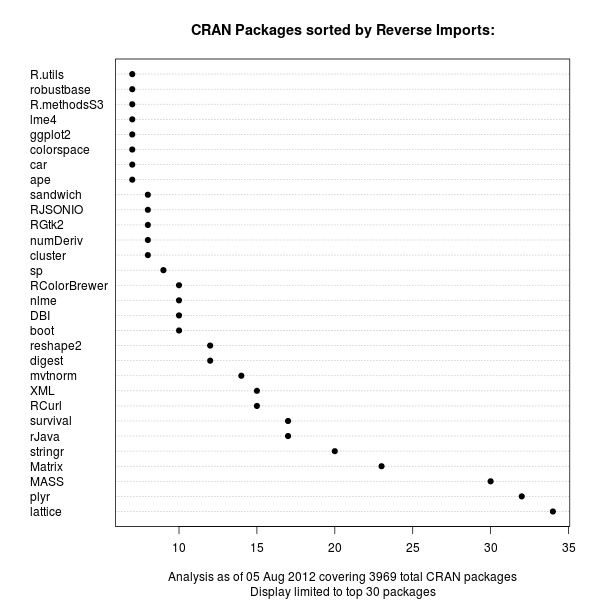
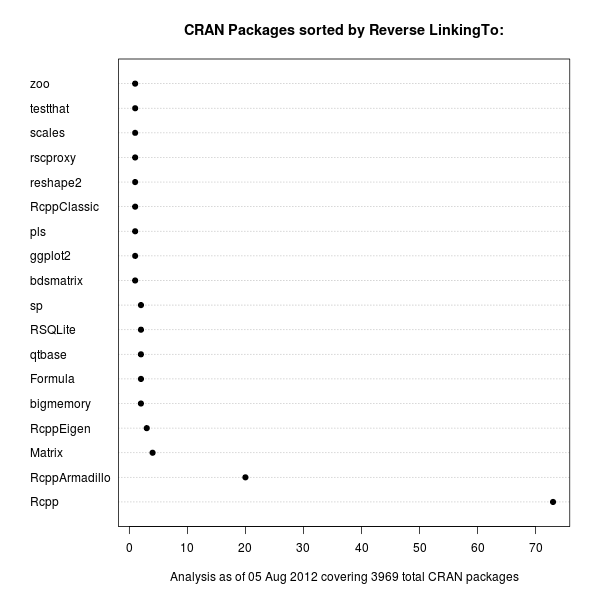
The recent update by S ren H jsgaard's to his gRbase package for graphical models made it the 75th package to depend on our Rcpp package for R and C++ integration. So in a lighthearted weekend moment, I tweeted about gRbase being number 75 for Rcpp to which Hadley replied, asking if Rcpp was in fact number one among R package Depends. Far from it, and I immediately replied listing lattice and Matrix as packages with way more other packages depending upon them. But as the question seemed deserving of a bit more analysis, I spent a few minutes on this and prepared three charts listing package in order of reverse Depends, reverse Imports and reverse LinkingTo. First off, the reverse Depends:. This is the standard means of declaring a dependence of one package upon another. CRAN package chart of Reverse Depends relations Unsurprisingly, the MASS package from the classic Venables and Ripley book comes first, with Deepayan Sarkar's powerful lattice package (also covered in a book) coming second. These are both recommended packages which are commonly distributed with R itself. Next are mvtnorm and survival. Our Rcpp is up there in the top-ten, but not a frontrunner. With the advent of namespaces a few R releases ago, it became possible to import functions from other packages. So the Imports: statement now provides an alternative to the (older) Depends:. The next chart displays the same relationship for Imports:: CRAN package chart of Reverse Imports relations Now lattice still leads, but Hadleys's plyr package grabbed the second spot just before MASS and Matrix. It is interesting to see that the sheer number of Imports: is still not where the Depends: are. On the other hand, we see a number of more recent packages popping up in the second chart. This may reflect more recent coding practices. It will be interesting to see how this stacks up over time when we revisit this chart. Lastly, we can also look at LinkingTo:, a declaration used to provide a C/C++-level dependency at the source code level. We use this in the Rcpp family to provide automatic resolution of the header files needed to compile against our packages. And unsurprisingly, because packages using Rcpp actually use its API (rather than R functions), the package is a little ahead of others. In the package we find three more packages of the Rcpp family, but only a limited number of other packages as C/C++-level dependencies are still somewhat rare in the R universe. There are also fewer packages overall making use of this mechanism. CRAN package chart of Reverse LinkingTo relations One could of course take this one level further and sum up dependencies in a recursive manner, or visualize the relationship differently. But these dotchart graphs provide a first visual description of the magnitude of Depends, Imports and LinkingTo among CRAN packages for R.

Andrew Cater

Back to internet and Debian after a week without any network connectivity. Didn't quite go mad :(

A couple of installs recently of Wheezy: three by installing minimal Squeeze and then upgrading, two by using the new beta of Wheezy's installer.

One very desirable side effect: I gave away a laptop and a couple of other deskside machines and one of the recipients gave me a Thinkpad Z60t.
Installed perfectly with Wheezy beta installer, all hardware recognised and Wifi working without non-free drivers.

All good - sorry for blank post earlier to Planet Debian :)


Stefano Zacchiroli: bits from the DPL for July 2012

Monthly DPL bits, fresh from the oven.
Tip to feel good about the release #476: before reading this, grab and fix one of the RC bugs affecting Wheezy. Done? Now you're ready for a slightly less exciting report of DPL activities. Highlights Assets Logo & trademark Note that the actual logo relicensing should be done by SPI, via their board, upon request of mine (as Debian Project liaison). We won't make it for the next SPI board meeting, as it is on 4 days away. But we can aim for the subsequent meeting, on September 13th. If all goes well (big "if"), we will enjoy a DFSG-free logo after that date. Internal organization Recent flurry of re-organization in the tech-ctte --- which I somewhat triggered pushing for periodic meetings --- seems to be proceeding well. I'm very happy about it, as we all need to trust that tech-ctte decisions will be not only sound, but also prompt. If you're interested into this topic, some recent evidence of the ongoing reorganization and its result can be found in their DebConf12 BoF, minutes of the last meeting, a set of forthcoming GRs, and the recent great decision of posting decisions results to d-d-a (as it happened for node/nodejs). Kudos to tech-ctte members for the recent activism! I haven't worked on it myself directly, but I highlight Enrico's work on server side archival of NM conversations. It has the potential of enabling automatic detection of stuck NM processes. I'm a bit rusty as AM now, but I think missing that ability is one of the main remaining causes of frustration when joining Debian. So, if you are an AM, please opt-in and use this feature with your appicants. If you are not an AM why not? :-) Miscellanea Some misc legal stuff: and some misc "political" stuff: Happy RC bug squashing,
Cheers.
PS the boring day-to-day activity log for July 2012 is available at master:/srv/leader/news/bits-from-the-DPL.txt.201207

Steve Kemp: minidlna is now packaged

So in my previous entry I talked about streaming audio media to my new tablet. Despite it working for others I couldn't get MPDroid to stream to my tablet from my MPD server successfully. After looking around for alternatives I used MediaTomb to stream my content to the Android "2player" application. After a while I switched from MediaTomb to minidlna instead - that application being built from source. To save myself effort, and be useful, I've packaged that for Squeeze here : There's a configuration file in /etc/minidlna and a trivial init-script. Works for me. In more fun news yesterday I endured and epic 8 hour bus trip and travelled from Edinburgh to Loch Ness. Why go to Loch Ness? Well I fancied a swim, and wanted to capture shots of hairy cows. In addition to that I saw several interesting birds and a lot of Scottish Scenery. All in all a good day out. ObQuote: "It's not you. It's me... I'm completely fucked up."- Cruel Intentions

Gregor Herrmann: RC bugs 2012/31

this was my first week at work after my vacations, & also the first week of "normal" RC bug work. here's my short report:

Craig Small: Context sensitive menus with GtkTreeView

A project I now maintain called GJay uses the GTK+ toolkit and has a GtkTreeView that shows the directories and the songs in them. I was wanting to add a context sensitive menu on that view so that you could do things to the item you have right-clicked on; generally file specific things like give me information about this song or queue it to play. My only problem was, how to do it? A few Google searches showed things that were almost, but not quite, what I was after. The main problem being either the documentation was incomplete or it assumed I was after the selected field (the row I may of left-clicked on) and not the one I right-clicked on to get this event. This GtkTreeView uses a store where NAME_COLUMN is defined at 0, meaning it is the first column. The program uses this column to store the filename of the song. So first I needed to create an event to kick things off, we need to connect the button-press-event to our tree_view, which calls a function in this case view_on_button_pressed.
 g_signal_connect(tree_view, "button-press-event", 
   G_CALLBACK(view_on_button_pressed), NULL);
gboolean view_on_button_pressed(GtkWidget *tree_view, 
                                GdkEventButton *event, 
                                gpointer user_data)  
  GtkTreeSelection *selection;
  GtkTreePath *tree_path;
  GtkTreeModel *tree_model;
  GtkTreeIter tree_iter;
  gchar *name;
 
  if (event-&gt;type == GDK_BUTTON_PRESS &amp;&amp; event-&gt;button == 3)  
    tree_model = gtk_tree_view_get_model(GTK_TREE_VIEW(tree_view));
    if (gtk_tree_view_get_path_at_pos(GTK_TREE_VIEW(tree_view),
          (int)event-&gt;x, (int)event-&gt;y,
          &amp;tree_path, NULL, NULL, NULL))  
      if (gtk_tree_model_get_iter(tree_model, &amp;tree_iter, tree_path))  
        gtk_tree_model_get(tree_model, &amp;tree_iter, NAME_COLUMN, &amp;name, -1);
        g_print("rc name is %s\n", name);


So a breakdown of what my callback is doing: The program, now that it knows the song title, can then go off and generate a menu for that song.

Next.

Previous.