Search Results: "mt"

10 December 2010

Jonathan McDowell: Why Linux? (Part 2: Efficiency)

(This is part of a series of posts on Why Linux?) My first PC was an Amstrad PPC640D; an 8088 with twin 720k 3.5" disk drives. It never ran Windows (3.0 was current at that point in time and I don't think it would manage to run off a single floppy), so ran DOS. I moved on to an 8086 desktop machine, complete with 10M full height 5.25" HDD and CGA graphics. It still runs DOS. From there I moved to an 80386DX-40 desktop, with 4M RAM and SVGA graphics. A massive leap forward, and something actually capable of running more than DOS. Except I didn't. I had a Windows for Workgroups 3.11 install, but mostly I still did what I needed to from DOS. The machine was never networked; it had a modem attached but that was used to connect to Fidonet which was well serviced by DOS tools. I put Linux on the box at one point but it was C and TCP/IP and I was Pascal and Fido in those days, so I didn't really know what to make of it. Fast forward a few years and I'm still mostly using DOS, but I'm on a 486 and am running a separate machine as a BBS. It's using RemoteAccess under DOS and it feels like with 486 hardware I should be able to do some of this multitasking lark. I try OS/2 and Windows 95, but both end up dropping modem data when doing other things (I've moved on to ISDN at this point). Maybe I just needed to tweak things more, but I deem multitasking with BBS software a failure and go back to DOS and 2 machines. When I went to university one of my new course mates had brought a machine running Linux, and various of the older students are already running it. There was a wealth of information and interest available to me. So I try again. I've learnt C and TCP/IP networking since last time, and suddenly it all makes more sense and I'm able to do more with it (I'm sure a summer using HP/UX on my desktop at Nortel helped). And, as I finally get to the point, it's efficient. It makes use of the extra memory in the machine that DOS can only touch with kludges. It allows me to multitask in a usable fashion. I don't feel the need for a GUI so I don't have to run one, which no doubt helps, but everything that's running is easily visible and tunable. I start running it as my desktop at university and convert the BBS over to it at some point soon after. It doesn't drop modem data. I rejoice, and don't look back. In those days I was running hardware that was probably at the low end of what the popular multitasking OSes wanted (I remember seeing Win95 on a 4M machine when it first came out, and it crawled). These days my main machines are (I would hope) more than capable of running Windows well. The efficiency angle is still an appeal of Linux though; for example in the server space I don't understand why you'd want to run something with the overhead of an always on GUI (people who leave Linux servers running GDM confuse me). I want to be able to do everything I need on a server remotely, be that via SSH or, in a pinch, a serial console. I don't want to sit at the box and use a GUI. Linux lets me run only what I actually need on the machine.

7 December 2010

Matt Brown: Under the cover of the Kindle 3

For my birthday back in October, my wonderful wife gave me a Kindle 3 from Amazon. I d been considering other e-book readers for quite some time, but I had mostly ignored the Kindle due to the lack of EPUB support and a general dislike of Amazon s DRM enforcement. In the end, the superior hardware and ecosystem of the Kindle overpowered those concerns and overall I m very pleased with the purchase. The screen is amazing, literally just like reading off a piece of paper and the selection of books is OK. I ve been buying almost all my books from Amazon to date since it s so easy (the Whispernet is amazingly quick!) but it s not terribly difficult to get EPUBs from elsewhere onto the device after a quick run through Calibre to turn them into a MOBI file, so I keep telling myself I ve still got some flexibility. Almost as much fun as reading on the device has been learning about how it works. The Mobile Read forums have lots of step by step posts on how to do specific tasks like replacing the screensaver image, but they don t give much background detail on how the Kindle is actually operating which is what really interests me. Luckily among all the step by step posts I also found a usbnetwork package which also adds an SSH server to the Kindle, so after installing that and then SSHing in to my Kindle I ve been poking around. Under the cover the Kindle reveals a fairly standard Linux installation. While the hardware and IO devices are obviously unique, compared to something like an Android phone, the Kindle is refreshingly normal . Hardware Software The application/framework code is heavily obfuscated apparently using the Allatori Java Obfuscator. The jrename and jd-gui utilities have proven very handy in helping to untangle the puzzle, although they still only leave you with a pile of Java source code with mostly single letter alphabetic variable and class names! I ve been using IntelliJ s support for refactoring/renaming Java code to slowly work through it (thanks in large part to error/log messages and string constants found through the code which can t be obfuscated easily and help to explain what is going on), and I m slowly beginning to piece together how the book reading functionality works. I ll maybe write more on this in a future post. In one of my initial tweets about the Kindle I mentioned that it seemed to be regularly uploading syslog data to Amazon based on some sendlogs scripts I d noticed and a few syslog lines containing GPS co-ordinates that had been pasted on the Mobile Read forums. I can t find any trace of GPS co-ordinates in any syslog messages I ve seen on my device, but there is definitely information about the cell sites that my Kindle can see, the books that I m opening and where I m up to in them:

101206:235431 wand[2515]: I dtp:diag: t=4cfd77b7,MCC MNC=272 01,Channel=10762,Band=WCDMA I IMT 2000,Cell ID=1362209,LAC=3021,RAC=1
,Network Time=0000/00/00 00.00.00,Local Time Offset=Not provided,Selection Mode=Automatic,Test Mode=0,Bars=4,Roaming=1,RSSI=-88,Tx
Power=6,System Mode=WCDMA,Data Service Mode=HSDPA,Service Status=Service,Reg Status=Success,Call Status=Conversation,MM Attach St
ate=Attach accept,MM LU State=LU update,GMM Attach State=Attach accept,GMM State=Registered,GMM RAU State=Not available,PDP State=
Active,Network Mode=CS PS separate attach mode,PMM Mode=Connected,SIM Status=Valid; PIN okay; R3,MM Attach Error=No error,MM LU Er
ror=No error,GMM Attach Error=No error,GMM RAU Error=Not available,PDP Rej Reason=No error,Active/Monitored Sets=0;39;-11 1;180;-1
5,RSCP=-111,DRX=64,HSDPA Status=Active,HSDPA Indication=HSDPA HSUPA unsupp,Neighbor Cells=,Best 6 Cells=,Pathloss=,MFRM=,EGPRS Ind
ication=,HPLMN=,RPLMN=272;01 ,FPLMN=234;33 234;30 234;20 272;05 ,n=1:
101206:235758 cvm[3426]: I Reader:BOOK INFO:book asin=B003IWZZ3Y,file size=233168,file last mod date=2010-11-27 19.18.22 +0000,con
tent type=ebook,length=MobiPosition_ 465747,access=2010-12-06 09.44.32 +0000,last read position=MobiPosition_ 464387,isEncrypted=f
alse,isSample=false,isNew=false,isTTSMetdataPresent=false,isTTSMetadataAllowed=true,fileExtn=azw:
101206:233416 udhcpc[5639]: Offer from server xxx.xxx.2.254 received
101206:233416 udhcpc[5639]: Sending select for xxx.xxx.2.10...
Interestingly you can see from the last two lines, that Amazon has taken some care to preserve privacy by not including the full IP address given to the device by my local Wifi network, so in light of that I find it interesting that they decided not to obfuscate the Cell and Book IDs in those respective log messages too. Seems rather inconsistent. As to how and when these logs are sent to Amazon, the picture is a little bit murky. Every 15 minutes tinyrot runs out of cron and rotates /var/log/messages if it is greater than 256k in size. Rotated logs are stored into /var/local/log under filenames like messages_00000044_20101207000006.gz and alongside the log files are a set of state files named nexttosendfile, messages_oldest, messages_youngest. Something regularly sweeps through this directory to update the state and remove the old logs (after sending them up to Amazon I assume). I suspect that something is buried in the Java application code mentioned above. On the whole the Kindle is a fascinating piece of technology. It delivers a wonderful reading experience on top of a familiar Linux system and is going to provide me with many more hours of entertainment as I unpack all the tricks and techniques that have gone into this device. I would recommended it as a present for geeks everywhere.

5 December 2010

Andrew Pollock: [tech] A cleaner puppet manifest

Jon Downland is tinkering with Puppet, and wrote a class with a package resource to install a bunch of packages, but didn't quite like the way it was written. The way that I'd achieve the same thing, and be slightly cleaner would be something like this:
class jon-desktop  
	$packages_to_install_by_default = [
		'icedove',
		'git-core',
		'vim-gnome',
		'vinagre',
		'build-essential',
		'devscripts',
		'subversion',
		'git-buildpackage',
		'mutt',
		'offlineimap',
		'ascii',
		'gitk',
		'chromium-browser',
	]
	package   $packages_to_install_by_default:
		ensure => installed,
	 
 
This way your actual package resource definition never needs to change. The variable you choose to use to define the list of packages to install can be abstracted away as much as desired.

Jon Dowland: puppet

As a first step on the road to evaluating different configuration management systems, I set up two VMs to test out puppet. Puppet is conveniently packaged within Debian so client and server installation was very simple. By default, puppet clients will look for a host named puppet on the local network, so by naming the server sensibly the two started talking to each other. puppetca --sign [client hostname] on the server started the ball rolling. My first test configuration was to add a user to the sudoers file. With CF Engine 2, I would have achieved this by using editfiles to check for a regular expression and insert a line if necessary. I stumbled across some CF Engine-style definitions for puppet in a Debian Administration article (taken originally from puppet's own wiki, which have since been moved/deleted) and achieved it using
append_if_no_such_line   sudo:
  file => "/etc/sudoers",
  line => "jon ALL=(ALL) ALL"
 
I'm a little concerned that this approach to problem solving is no better than CF Engine 2, and in fact worse than how I'd do it with CF Engine 2: if the host had a line with a different quantity of whitespace, such as jon ALL=(ALL) ALL, it won't match exactly and a duplicate line will be appended, whereas with CF Engine 2 I would have checked for something like ^jon \+ALL=(ALL) \+ALL$. I set up my work laptop as another test node, and used puppet to install some packages that I commonly use:
class jon-desktop  
  package   ['icedove', 'git-core', 'vim-gnome', 'vinagre', 'build-essential',
             'devscripts', 'subversion', 'git-buildpackage', 'mutt',
             'offlineimap', 'ascii', 'gitk', 'chromium-browser'
            ]: ensure => installed  
 
This worked fine, but is a little verbose and the package list is awkward to maintain buried inside the puppet syntax. I spent some time trying to see whether I could populate a puppet list based on the contents of a file: then I could list the packages one-per-line in a separate file. I haven't found a way of doing that yet. Using my laptop as a second node also exposed some interesting puppet client behaviour. Once I went off-site, the laptop tried to look up puppet on foreign networks (such as my home network). I would have assumed that, once the strong SSL association had been made, the client would try to connect to the FQDN of the server. This probably isn't a serious problem in practice, as we probably won't need to rely on nodes off-site talking to the configuration server, but I hope that the client doesn't trust any host that happens to answer to puppet... I fixed this by hacking my hosts file to include an entry for puppet. I could maintain this hack using Puppet itself, which would protect me against stale definitions if any renumbering takes place. I could also have added a line
server = puppet.fqdn.example.org
in /etc/puppet/puppet.conf, which is a more robust way of solving the problem.

27 November 2010

Paul van Tilburg: 10 Years of Spacelabs

A few months ago I realised it has been 10 years already since Spacelabs 1 was founded. Today we will celebrate that with a reunion and probably reminisce about past projects, events and experiences. Therefore, I thought it would be nice to accompany this with a post. The past Spacelabs was founded to create something that sits in between research and consumer appliances. Since we are associated to the Electro-Optical Communication group these things often had to do with bandwidth. For example, showing the ease of use of plastic optical fiber or participate in GPRS/UMTS trials. However, due to the loose structure of Spacelabs, we ventured into many other projects of our own such a information system-enabled fridge with a barcode reader, a dynamic DNS system, etc. At some point we got our own Internet connection with an accompanying subnet. It has been fun and rewarding to learn how to setup and run a mini ISP. Spacelabs doesn t have any formal structure: when you are on the mailing list, you are a member. There are no regular meetings, no hierarchy, no obligations. So in some ways, we are a group that is much like a free/open source software community. I think that this approach has provided us the drive to work both on projects during our free time as well as our own ideas. I feel that Spacelabs has contributed so much to my life. It might not be the typical study association, but it was a big supplement to my studies, it was fun and it was completely ours. Not only did it teach me many, many technical things from networks to program languages to software design but it also gave me experiences on other levels, such as very attuned group work and responsibilities for key systems. Spacelabs in 2006 The future Soon, everyone connected to Spacelabs will have finished their Master s or PhD (in my case) and nobody will be left to continue the project. Although this is a bit sad, I think we can be proud of what we have accomplished, learnt and experienced. I will miss our location high in the Potentiaal/E-hoog building overlooking Eindhoven, and our being together as a group. We are however not gone yet, there is still a lot to plan and to work on if we want to rescue the huge amount of servers and services that we have accumulated over the years if we were to leave

1 Yes, the website is very much from the past.

22 November 2010

Petter Reinholdtsen: Lenny->Squeeze upgrades of the Gnome and KDE desktop, now with apt-get autoremove

Michael Biebl suggested to me on IRC, that I changed my automated upgrade testing of the Lenny Gnome and KDE Desktop to do apt-get autoremove when using apt-get. This seem like a very good idea, so I adjusted by test scripts and can now present the updated result from today: This is for Gnome: Installed using apt-get, missing with aptitude
apache2.2-bin aptdaemon baobab binfmt-support browser-plugin-gnash cheese-common cli-common cups-pk-helper dmz-cursor-theme empathy empathy-common freedesktop-sound-theme freeglut3 gconf-defaults-service gdm-themes gedit-plugins geoclue geoclue-hostip geoclue-localnet geoclue-manual geoclue-yahoo gnash gnash-common gnome gnome-backgrounds gnome-cards-data gnome-codec-install gnome-core gnome-desktop-environment gnome-disk-utility gnome-screenshot gnome-search-tool gnome-session-canberra gnome-system-log gnome-themes-extras gnome-themes-more gnome-user-share gstreamer0.10-fluendo-mp3 gstreamer0.10-tools gtk2-engines gtk2-engines-pixbuf gtk2-engines-smooth hamster-applet libapache2-mod-dnssd libapr1 libaprutil1 libaprutil1-dbd-sqlite3 libaprutil1-ldap libart2.0-cil libboost-date-time1.42.0 libboost-python1.42.0 libboost-thread1.42.0 libchamplain-0.4-0 libchamplain-gtk-0.4-0 libcheese-gtk18 libclutter-gtk-0.10-0 libcryptui0 libdiscid0 libelf1 libepc-1.0-2 libepc-common libepc-ui-1.0-2 libfreerdp-plugins-standard libfreerdp0 libgconf2.0-cil libgdata-common libgdata7 libgdu-gtk0 libgee2 libgeoclue0 libgexiv2-0 libgif4 libglade2.0-cil libglib2.0-cil libgmime2.4-cil libgnome-vfs2.0-cil libgnome2.24-cil libgnomepanel2.24-cil libgpod-common libgpod4 libgtk2.0-cil libgtkglext1 libgtksourceview2.0-common libmono-addins-gui0.2-cil libmono-addins0.2-cil libmono-cairo2.0-cil libmono-corlib2.0-cil libmono-i18n-west2.0-cil libmono-posix2.0-cil libmono-security2.0-cil libmono-sharpzip2.84-cil libmono-system2.0-cil libmtp8 libmusicbrainz3-6 libndesk-dbus-glib1.0-cil libndesk-dbus1.0-cil libopal3.6.8 libpolkit-gtk-1-0 libpt2.6.7 libpython2.6 librpm1 librpmio1 libsdl1.2debian libsrtp0 libssh-4 libtelepathy-farsight0 libtelepathy-glib0 libtidy-0.99-0 media-player-info mesa-utils mono-2.0-gac mono-gac mono-runtime nautilus-sendto nautilus-sendto-empathy p7zip-full pkg-config python-aptdaemon python-aptdaemon-gtk python-axiom python-beautifulsoup python-bugbuddy python-clientform python-coherence python-configobj python-crypto python-cupshelpers python-elementtree python-epsilon python-evolution python-feedparser python-gdata python-gdbm python-gst0.10 python-gtkglext1 python-gtksourceview2 python-httplib2 python-louie python-mako python-markupsafe python-mechanize python-nevow python-notify python-opengl python-openssl python-pam python-pkg-resources python-pyasn1 python-pysqlite2 python-rdflib python-serial python-tagpy python-twisted-bin python-twisted-conch python-twisted-core python-twisted-web python-utidylib python-webkit python-xdg python-zope.interface remmina remmina-plugin-data remmina-plugin-rdp remmina-plugin-vnc rhythmbox-plugin-cdrecorder rhythmbox-plugins rpm-common rpm2cpio seahorse-plugins shotwell software-center system-config-printer-udev telepathy-gabble telepathy-mission-control-5 telepathy-salut tomboy totem totem-coherence totem-mozilla totem-plugins transmission-common xdg-user-dirs xdg-user-dirs-gtk xserver-xephyr
Installed using apt-get, removed with aptitude
cheese ekiga eog epiphany-extensions evolution-exchange fast-user-switch-applet file-roller gcalctool gconf-editor gdm gedit gedit-common gnome-games gnome-games-data gnome-nettool gnome-system-tools gnome-themes gnuchess gucharmap guile-1.8-libs libavahi-ui0 libdmx1 libgalago3 libgtk-vnc-1.0-0 libgtksourceview2.0-0 liblircclient0 libsdl1.2debian-alsa libspeexdsp1 libsvga1 rhythmbox seahorse sound-juicer system-config-printer totem-common transmission-gtk vinagre vino
Installed using aptitude, missing with apt-get
gstreamer0.10-gnomevfs
Installed using aptitude, removed with apt-get
[nothing]
This is for KDE: Installed using apt-get, missing with aptitude
ksmserver
Installed using apt-get, removed with aptitude
kwin network-manager-kde
Installed using aptitude, missing with apt-get
arts dolphin freespacenotifier google-gadgets-gst google-gadgets-xul kappfinder kcalc kcharselect kde-core kde-plasma-desktop kde-standard kde-window-manager kdeartwork kdeartwork-emoticons kdeartwork-style kdeartwork-theme-icon kdebase kdebase-apps kdebase-workspace kdebase-workspace-bin kdebase-workspace-data kdeeject kdelibs kdeplasma-addons kdeutils kdewallpapers kdf kfloppy kgpg khelpcenter4 kinfocenter konq-plugins-l10n konqueror-nsplugins kscreensaver kscreensaver-xsavers ktimer kwrite libgle3 libkde4-ruby1.8 libkonq5 libkonq5-templates libnetpbm10 libplasma-ruby libplasma-ruby1.8 libqt4-ruby1.8 marble-data marble-plugins netpbm nuvola-icon-theme plasma-dataengines-workspace plasma-desktop plasma-desktopthemes-artwork plasma-runners-addons plasma-scriptengine-googlegadgets plasma-scriptengine-python plasma-scriptengine-qedje plasma-scriptengine-ruby plasma-scriptengine-webkit plasma-scriptengines plasma-wallpapers-addons plasma-widget-folderview plasma-widget-networkmanagement ruby sweeper update-notifier-kde xscreensaver-data-extra xscreensaver-gl xscreensaver-gl-extra xscreensaver-screensaver-bsod
Installed using aptitude, removed with apt-get
ark google-gadgets-common google-gadgets-qt htdig kate kdebase-bin kdebase-data kdepasswd kfind klipper konq-plugins konqueror ksysguard ksysguardd libarchive1 libcln6 libeet1 libeina-svn-06 libggadget-1.0-0b libggadget-qt-1.0-0b libgps19 libkdecorations4 libkephal4 libkonq4 libkonqsidebarplugin4a libkscreensaver5 libksgrd4 libksignalplotter4 libkunitconversion4 libkwineffects1a libmarblewidget4 libntrack-qt4-1 libntrack0 libplasma-geolocation-interface4 libplasmaclock4a libplasmagenericshell4 libprocesscore4a libprocessui4a libqalculate5 libqedje0a libqtruby4shared2 libqzion0a libruby1.8 libscim8c2a libsmokekdecore4-3 libsmokekdeui4-3 libsmokekfile3 libsmokekhtml3 libsmokekio3 libsmokeknewstuff2-3 libsmokeknewstuff3-3 libsmokekparts3 libsmokektexteditor3 libsmokekutils3 libsmokenepomuk3 libsmokephonon3 libsmokeplasma3 libsmokeqtcore4-3 libsmokeqtdbus4-3 libsmokeqtgui4-3 libsmokeqtnetwork4-3 libsmokeqtopengl4-3 libsmokeqtscript4-3 libsmokeqtsql4-3 libsmokeqtsvg4-3 libsmokeqttest4-3 libsmokeqtuitools4-3 libsmokeqtwebkit4-3 libsmokeqtxml4-3 libsmokesolid3 libsmokesoprano3 libtaskmanager4a libtidy-0.99-0 libweather-ion4a libxklavier16 libxxf86misc1 okteta oxygencursors plasma-dataengines-addons plasma-scriptengine-superkaramba plasma-widget-lancelot plasma-widgets-addons plasma-widgets-workspace polkit-kde-1 ruby1.8 systemsettings update-notifier-common
Running apt-get autoremove made the results using apt-get and aptitude a bit more similar, but there are still quite a lott of differences. I have no idea what packages should be installed after the upgrade, but hope those that do can have a look.

20 November 2010

Petter Reinholdtsen: Lenny->Squeeze upgrades, apt vs aptitude with the Gnome and KDE desktop

I'm still running upgrade testing of the Lenny Gnome and KDE Desktop, but have not had time to spend on reporting the status. Here is a short update based on a test I ran 20101118. I still do not know what a correct migration should look like, so I report any differences between apt and aptitude and hope someone else can see if anything should be changed. This is for Gnome: Installed using apt-get, missing with aptitude
apache2.2-bin aptdaemon at-spi baobab binfmt-support browser-plugin-gnash cheese-common cli-common cpp-4.3 cups-pk-helper dmz-cursor-theme empathy empathy-common finger freedesktop-sound-theme freeglut3 gconf-defaults-service gdm-themes gedit-plugins geoclue geoclue-hostip geoclue-localnet geoclue-manual geoclue-yahoo gnash gnash-common gnome gnome-backgrounds gnome-cards-data gnome-codec-install gnome-core gnome-desktop-environment gnome-disk-utility gnome-screenshot gnome-search-tool gnome-session-canberra gnome-spell gnome-system-log gnome-themes-extras gnome-themes-more gnome-user-share gs-common gstreamer0.10-fluendo-mp3 gstreamer0.10-tools gtk2-engines gtk2-engines-pixbuf gtk2-engines-smooth hal-info hamster-applet libapache2-mod-dnssd libapr1 libaprutil1 libaprutil1-dbd-sqlite3 libaprutil1-ldap libart2.0-cil libatspi1.0-0 libboost-date-time1.42.0 libboost-python1.42.0 libboost-thread1.42.0 libchamplain-0.4-0 libchamplain-gtk-0.4-0 libcheese-gtk18 libclutter-gtk-0.10-0 libcryptui0 libcupsys2 libdiscid0 libeel2-data libelf1 libepc-1.0-2 libepc-common libepc-ui-1.0-2 libfreerdp-plugins-standard libfreerdp0 libgail-common libgconf2.0-cil libgdata-common libgdata7 libgdl-1-common libgdu-gtk0 libgee2 libgeoclue0 libgexiv2-0 libgif4 libglade2.0-cil libglib2.0-cil libgmime2.4-cil libgnome-vfs2.0-cil libgnome2.24-cil libgnomepanel2.24-cil libgnomeprint2.2-data libgnomeprintui2.2-common libgnomevfs2-bin libgpod-common libgpod4 libgtk2.0-cil libgtkglext1 libgtksourceview-common libgtksourceview2.0-common libmono-addins-gui0.2-cil libmono-addins0.2-cil libmono-cairo2.0-cil libmono-corlib2.0-cil libmono-i18n-west2.0-cil libmono-posix2.0-cil libmono-security2.0-cil libmono-sharpzip2.84-cil libmono-system2.0-cil libmtp8 libmusicbrainz3-6 libndesk-dbus-glib1.0-cil libndesk-dbus1.0-cil libopal3.6.8 libpolkit-gtk-1-0 libpt-1.10.10-plugins-alsa libpt-1.10.10-plugins-v4l libpt2.6.7 libpython2.6 librpm1 librpmio1 libsdl1.2debian libservlet2.4-java libsrtp0 libssh-4 libtelepathy-farsight0 libtelepathy-glib0 libtidy-0.99-0 libxalan2-java libxerces2-java media-player-info mesa-utils mono-2.0-gac mono-gac mono-runtime nautilus-sendto nautilus-sendto-empathy openoffice.org-writer2latex openssl-blacklist p7zip p7zip-full pkg-config python-4suite-xml python-aptdaemon python-aptdaemon-gtk python-axiom python-beautifulsoup python-bugbuddy python-clientform python-coherence python-configobj python-crypto python-cupshelpers python-cupsutils python-eggtrayicon python-elementtree python-epsilon python-evolution python-feedparser python-gdata python-gdbm python-gst0.10 python-gtkglext1 python-gtkmozembed python-gtksourceview2 python-httplib2 python-louie python-mako python-markupsafe python-mechanize python-nevow python-notify python-opengl python-openssl python-pam python-pkg-resources python-pyasn1 python-pysqlite2 python-rdflib python-serial python-tagpy python-twisted-bin python-twisted-conch python-twisted-core python-twisted-web python-utidylib python-webkit python-xdg python-zope.interface remmina remmina-plugin-data remmina-plugin-rdp remmina-plugin-vnc rhythmbox-plugin-cdrecorder rhythmbox-plugins rpm-common rpm2cpio seahorse-plugins shotwell software-center svgalibg1 system-config-printer-udev telepathy-gabble telepathy-mission-control-5 telepathy-salut tomboy totem totem-coherence totem-mozilla totem-plugins transmission-common xdg-user-dirs xdg-user-dirs-gtk xserver-xephyr zip
Installed using apt-get, removed with aptitude
arj bluez-utils cheese dhcdbd djvulibre-desktop ekiga eog epiphany-extensions epiphany-gecko evolution-exchange fast-user-switch-applet file-roller gcalctool gconf-editor gdm gedit gedit-common gnome-app-install gnome-games gnome-games-data gnome-nettool gnome-system-tools gnome-themes gnome-utils gnome-vfs-obexftp gnome-volume-manager gnuchess gucharmap guile-1.8-libs hal libavahi-compat-libdnssd1 libavahi-core5 libavahi-ui0 libbind9-50 libbluetooth2 libcamel1.2-11 libcdio7 libcucul0 libcurl3 libdirectfb-1.0-0 libdmx1 libdvdread3 libedata-cal1.2-6 libedataserver1.2-9 libeel2-2.20 libepc-1.0-1 libepc-ui-1.0-1 libexchange-storage1.2-3 libfaad0 libgadu3 libgalago3 libgd2-noxpm libgda3-3 libgda3-common libggz2 libggzcore9 libggzmod4 libgksu1.2-0 libgksuui1.0-1 libgmyth0 libgnome-desktop-2 libgnome-pilot2 libgnomecups1.0-1 libgnomeprint2.2-0 libgnomeprintui2.2-0 libgpod3 libgraphviz4 libgtk-vnc-1.0-0 libgtkhtml2-0 libgtksourceview1.0-0 libgtksourceview2.0-0 libgucharmap6 libhesiod0 libicu38 libisccc50 libisccfg50 libiw29 libjaxp1.3-java-gcj libkpathsea4 liblircclient0 libltdl3 liblwres50 libmagick++10 libmagick10 libmalaga7 libmozjs1d libmpfr1ldbl libmtp7 libmysqlclient15off libnautilus-burn4 libneon27 libnm-glib0 libnm-util0 libopal-2.2 libosp5 libparted1.8-10 libpisock9 libpisync1 libpoppler-glib3 libpoppler3 libpt-1.10.10 libraw1394-8 libsdl1.2debian-alsa libsensors3 libsexy2 libsmbios2 libsoup2.2-8 libspeexdsp1 libssh2-1 libsuitesparse-3.1.0 libsvga1 libswfdec-0.6-90 libtalloc1 libtotem-plparser10 libtrackerclient0 libvoikko1 libxalan2-java-gcj libxerces2-java-gcj libxklavier12 libxtrap6 libxxf86misc1 libzephyr3 mysql-common rhythmbox seahorse sound-juicer swfdec-gnome system-config-printer totem-common totem-gstreamer transmission-gtk vinagre vino w3c-dtd-xhtml wodim
Installed using aptitude, missing with apt-get
gstreamer0.10-gnomevfs
Installed using aptitude, removed with apt-get
[nothing]
This is for KDE: Installed using apt-get, missing with aptitude
autopoint bomber bovo cantor cantor-backend-kalgebra cpp-4.3 dcoprss edict espeak espeak-data eyesapplet fifteenapplet finger gettext ghostscript-x git gnome-audio gnugo granatier gs-common gstreamer0.10-pulseaudio indi kaddressbook-plugins kalgebra kalzium-data kanjidic kapman kate-plugins kblocks kbreakout kbstate kde-icons-mono kdeaccessibility kdeaddons-kfile-plugins kdeadmin-kfile-plugins kdeartwork-misc kdeartwork-theme-window kdeedu kdeedu-data kdeedu-kvtml-data kdegames kdegames-card-data kdegames-mahjongg-data kdegraphics-kfile-plugins kdelirc kdemultimedia-kfile-plugins kdenetwork-kfile-plugins kdepim-kfile-plugins kdepim-kio-plugins kdessh kdetoys kdewebdev kdiamond kdnssd kfilereplace kfourinline kgeography-data kigo killbots kiriki klettres-data kmoon kmrml knewsticker-scripts kollision kpf krosspython ksirk ksmserver ksquares kstars-data ksudoku kubrick kweather libasound2-plugins libboost-python1.42.0 libcfitsio3 libconvert-binhex-perl libcrypt-ssleay-perl libdb4.6++ libdjvulibre-text libdotconf1.0 liberror-perl libespeak1 libfinance-quote-perl libgail-common libgsl0ldbl libhtml-parser-perl libhtml-tableextract-perl libhtml-tagset-perl libhtml-tree-perl libio-stringy-perl libkdeedu4 libkdegames5 libkiten4 libkpathsea5 libkrossui4 libmailtools-perl libmime-tools-perl libnews-nntpclient-perl libopenbabel3 libportaudio2 libpulse-browse0 libservlet2.4-java libspeechd2 libtiff-tools libtimedate-perl libunistring0 liburi-perl libwww-perl libxalan2-java libxerces2-java lirc luatex marble networkstatus noatun-plugins openoffice.org-writer2latex palapeli palapeli-data parley parley-data poster psutils pulseaudio pulseaudio-esound-compat pulseaudio-module-x11 pulseaudio-utils quanta-data rocs rsync speech-dispatcher step svgalibg1 texlive-binaries texlive-luatex ttf-sazanami-gothic
Installed using apt-get, removed with aptitude
amor artsbuilder atlantik atlantikdesigner blinken bluez-utils cvs dhcdbd djvulibre-desktop imlib-base imlib11 kalzium kanagram kandy kasteroids katomic kbackgammon kbattleship kblackbox kbounce kbruch kcron kdat kdemultimedia-kappfinder-data kdeprint kdict kdvi kedit keduca kenolaba kfax kfaxview kfouleggs kgeography kghostview kgoldrunner khangman khexedit kiconedit kig kimagemapeditor kitchensync kiten kjumpingcube klatin klettres klickety klines klinkstatus kmag kmahjongg kmailcvt kmenuedit kmid kmilo kmines kmousetool kmouth kmplot knetwalk kodo kolf kommander konquest kooka kpager kpat kpdf kpercentage kpilot kpoker kpovmodeler krec kregexpeditor kreversi ksame ksayit kshisen ksig ksim ksirc ksirtet ksmiletris ksnake ksokoban kspaceduel kstars ksvg ksysv kteatime ktip ktnef ktouch ktron kttsd ktuberling kturtle ktux kuickshow kverbos kview kviewshell kvoctrain kwifimanager kwin kwin4 kwordquiz kworldclock kxsldbg libakode2 libarts1-akode libarts1-audiofile libarts1-mpeglib libarts1-xine libavahi-compat-libdnssd1 libavahi-core5 libavc1394-0 libbind9-50 libbluetooth2 libboost-python1.34.1 libcucul0 libcurl3 libcvsservice0 libdirectfb-1.0-0 libdjvulibre21 libdvdread3 libfaad0 libfreebob0 libgd2-noxpm libgraphviz4 libgsmme1c2a libgtkhtml2-0 libicu38 libiec61883-0 libindex0 libisccc50 libisccfg50 libiw29 libjaxp1.3-java-gcj libk3b3 libkcal2b libkcddb1 libkdeedu3 libkdegames1 libkdepim1a libkgantt0 libkleopatra1 libkmime2 libkpathsea4 libkpimexchange1 libkpimidentities1 libkscan1 libksieve0 libktnef1 liblockdev1 libltdl3 liblwres50 libmagick10 libmimelib1c2a libmodplug0c2 libmozjs1d libmpcdec3 libmpfr1ldbl libneon27 libnm-util0 libopensync0 libpisock9 libpoppler-glib3 libpoppler-qt2 libpoppler3 libraw1394-8 librss1 libsensors3 libsmbios2 libssh2-1 libsuitesparse-3.1.0 libswfdec-0.6-90 libtalloc1 libxalan2-java-gcj libxerces2-java-gcj libxtrap6 lskat mpeglib network-manager-kde noatun pmount tex-common texlive-base texlive-common texlive-doc-base texlive-fonts-recommended tidy ttf-dustin ttf-kochi-gothic ttf-sjfonts
Installed using aptitude, missing with apt-get
dolphin kde-core kde-plasma-desktop kde-standard kde-window-manager kdeartwork kdebase kdebase-apps kdebase-workspace kdebase-workspace-bin kdebase-workspace-data kdeutils kscreensaver kscreensaver-xsavers libgle3 libkonq5 libkonq5-templates libnetpbm10 netpbm plasma-widget-folderview plasma-widget-networkmanagement xscreensaver-data-extra xscreensaver-gl xscreensaver-gl-extra xscreensaver-screensaver-bsod
Installed using aptitude, removed with apt-get
kdebase-bin konq-plugins konqueror

Jon Dowland: music players: from old to new

the iRiver music player
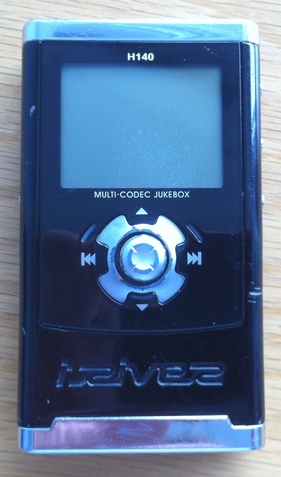
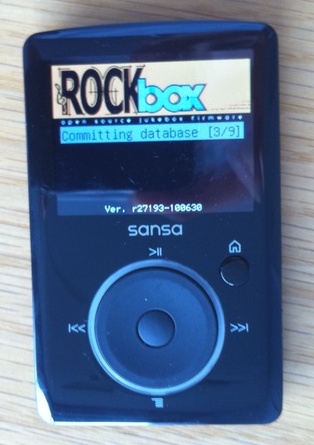
About six years ago, I spent a chunk of my very first salary on a portable music player, the iRiver H140, a relatively bulky and large hard-disk based player, with a capacity of 40G. Uniquely for music players before or since, the iRiver features both digital and analogue line ins and outs. It also has (more common) recording facilities and an FM tuner, the latter of which I used a great deal (and rules out just about all the iPods). This remarkable player has lasted nearly six years of moderate daily use. For the majority of that time, I've ran the rockbox open source firmware on the player, which has provided me with really wide codec support and excellent recording facilities. In the last month I finally had to replace the iRiver. I bought a Sansa Fuze player, featuring 8G of flash storage and a microsd expansion slot. The Fuze is also capable of running rockbox. This year, 32G microsd cards have arrived. Adding one of those brings the capacity of the new player right back up to 40G. For those who are curious: yes, a Sandisk 32G microsd does work in the Fuze, at least with rockbox, for playback. At the moment, rockbox cannot write to storage on the Fuze, so you need to either use the original firmware or an external reader/writer to manipulate the contents of the microsd. However, I am not sure how well the original firmware can handle the 32G. Whenever I boot it, I see a "refreshing your media" message which lasts longer than my patience. I will write an update once I've established further the degree of support.
the fuze player
I kept a canonical copy of my music library on a desktop computer and used rsync to keep the iRiver up-to-date. I can use almost exactly the same procedure for the new player (with some small changes to cope with the split-storage) I now have a 40G player running rockbox exactly as I had before, albeit at a fraction of the size and weight (and cost: approximately half as expensive), and with a nicer display including colours, album art, etc. They both can even play doom (although the controls are even more awkward than iPhone Doom).

Jon Dowland: Debconf 10 videos

I'm planning on transcoding some of the Debconf 10 event videos in order to watch them on my phone (and other devices). Most likely to an MPEG container, H264 codec or similar. Subject to a license check, I could stick the results up somewhere for others if there is any interest. Let me know via comment or email.

Jon Dowland: psychic

I'm in the process of setting up a mail server, which will eventually accept mail for a given domain. I am also changing name servers for said domain (to make use of zoneedit.com). So far, I have the new server accepting mail for the domain, and the new name server serving records for the domain, including an MX pointing at the new server. However, I haven't updated the domain record, so the authorative nameservers haven't changed. Despite this, somehow, spammers are already attempting to submit mail for the domain in question to the new MX server. Not only that, but it's targetted at particular users with non-obvious local parts. The new MX advertises itself as "a-sub-domain.example.org", for values of "example.org", so it's possible in theory to derive "example.org" from the banner. But unlikely. Are they psychic? Or is a spammer somehow getting notified of new MX records hosted at zoneedit (no matter whether glue records point at them)?

Jon Dowland: transition

I've just finished reading and thoroughly enjoying Transition by Iain Banks. Despite a terrible writeup in the Guardian, I found the book to concentrate just as strongly on character as world-building, but I wouldn't be surprised if a sequel was on the cards. The novel is, in part, an exploration of the many worlds theory of quantum mechanics. Or at least that's it's setting. In the UK, it has been published without the traditional 'M' infix denoting Science Fiction, although it is undeniably so: It's not even pretending to be anything else. The book reminded me of Quarantine, and to a lesser extend Permutation City, both by Greg Egan; and another book I've read recently which I can't reveal without spoiling this one.

Jon Dowland: scm

Can anyone recommend some videos to me which explain the ins-and-outs of the chef and puppet configuration management tools? I have some familiarity with configuration management, having worked on cfengine (version 2) for a few years. However I haven't managed to evaluate the newer tools effectively. The barrier to entry (setting up at least a master and a slave VM...) has been too high (or I haven't given it enough time!) If there are any good screencasts/videos that cover not just how they work but their individual advantages, that would be excellent: I have some upcoming time in which I can absorb material like that (but not the kind of time in which I could get hands-on).

19 November 2010

Axel Beckert: Useful but Unknown Unix Tools: Swiss Army Knife for SMTP

Which mail server administrator hasn t tested his servers using telnet on port 25, speaking SMTP himself? And which of them made a typo and had to retype everything due to missing readline support of telnet? If you want to check SMTP over SSL aka SMTPS, you had to use openssl s_client -connect yourserver:465 . And what did you use to check TLS support on port 25? Just forget about those hassles and use swaks (Debian package), the Swiss Army Knife for SMTP. It does all the annoying stuff (using the correct syntax, typing fast enough, SSL, TLS, etc.) for you while still giving you full control over the SMTP session, especially showing you all input and output:
$ swaks -t abe@noone.org -s sym.noone.org -q RCPT
=== Trying sym.noone.org:25...
=== Connected to sym.noone.org.
<-  220 sym.noone.org ESMTP Postfix (Debian/GNU)
 -> EHLO nemo.deuxchevaux.org
<-  250-sym.noone.org
<-  250-PIPELINING
<-  250-SIZE 10240000
<-  250-ENHANCEDSTATUSCODES
<-  250 8BITMIME
 -> MAIL FROM:<abe@nemo.deuxchevaux.org>
<-  250 2.1.0 Ok
 -> RCPT TO:<abe@noone.org>
<** 450 4.2.0 <abe@nemo.deuxchevaux.org>: Sender address rejected: Greylisted, see http://postgrey.schweikert.ch/help/noone.org.html
 -> QUIT
<-  221 2.0.0 Bye
=== Connection closed with remote host.
Since the moment I discovered swaks, I never telnetted to port 25 anymore.

Tiago Bortoletto Vaz: Pidgin / Finch users x Microsoft certificate error

I still have some social life with non-geek friends who keep using MSN for instant messaging. I m currently using Finch, which is a libpurple-based IM. If you re in a similar situation, so you probably came to this post due to a certificate error message from Microsoft servers when trying to start your Finch (or Pidgin). All you need is download the following updated certificates from Pidgin website and replace them into your purple installation dir (probably in /usr/share/purple/ca-certs): http://developer.pidgin.im/viewmtn/revision/downloadfile/cd236baf6d00f3e1561a40974ce1828b793ea187/share/ca-certs/Microsoft_Secure_Server_Authority_2010.pem http://developer.pidgin.im/viewmtn/revision/downloadfile/cd236baf6d00f3e1561a40974ce1828b793ea187/share/ca-certs/Microsoft_Internet_Authority_2010.pem

11 November 2010

Michael Casadevall: On Achieving Goals ...

*blows the dust off his blog*

It's been quite awhile since I last wrote anything in this thing, so I guess its a good time as any, off the tails of UDS-N, to finally sit down and write something down. Since my last blog posting in May, I've been travelling around the world, attending conferences, and trying to represent both Ubuntu and Debian itself, and Canonical in all my travels. I was recently posted to China for a full month where I lived and worked out of an office, made friends with fellow Ubuntu users, and tech enthusiasts, had a wonderful time meeting with people with the Beijing Linux User's Group, and worked hard within my team at Canonical, and the legions of Ubuntu Developers to help make one of the best releases we've ever had.

As I was writing specs and drafting work items, I came to the point that I was reflecting on my own personal goals and growth in life. Two years and change ago, I was a struggling junior at Rochester Institute of Technology, a little less than two years ago, I started working full time with Canonical, and this year, I've gone and traveled to many places I've only dreamed about; Anchorage & Barrow, Alaska; Tampere, Finland; Prague, Czech Republic; and Brussels, Belgium, just to name a few. I packed up and lived in China for a month (an amazing experience, and I look forward to going back and visiting again sometime in the near future). Had you told the me of two years ago what I would be doing now, I'd probably think you were smoking something good.

One thing I've discovered in my life is that if you want to do something, you need to get out there and just ****ing do it. This may seem simple, but I think of the dreams a lot of people have that never seem to come to fruition. When I have an opportunity, I take it; going to Alaska was a dream I harbored for many years, especially entering the arctic circle, and heading to Barrow. That entire trip was booked on roughly four days notice, and the side trip to Barrow was planned the day before it actually happen. I don't regret any of it; it was one of the best things I ever done.

It brings me to what I consider the flux of this blog posting. For those who know me, I've had a goal of visiting every state within the United States. At this time last year, this map looked like this

As of two weeks ago today, this map looked like this:


Now, by the end of the day today, it will look like this:


The point I'm trying to make is if you want to do something, do it the first chance you get, or just don't do it; I say this because you never know when you will be able to do it again.

As for completing a life goal, well, it feels pretty amazing :-). I may write about that in a future blog posting ...

8 November 2010

Joachim Breitner: A Solution to the Configuration Problem in Haskell

On the drive back home from BelHac I thought about the configuration problem in Haskell: The issue is finding a convenient way to work with values that are initialized once and used in many places all over the code. Assume you have a large module of pure code that, using many custom functions and combinators, parses some data structure. Later you noticed that somewhere far down in the parser, you need to react differently depending on some user preferences say, his preferred language. The usual solution is to add a new parameter to that function and, in consequence, to each and every function that calls or might call directly or indirectly this function. This is often very inconvenient. Other solutions include: The solution I thought of and implemented uses Template Haskell, the Haskell library to modify code at compile time, to turn the style you prefer to write in (pure code that uses configuration values as if they were global constants) into the style that is semantically correct (pure code with configuration values as an additional parameter). I uploaded the resulting code as seal-module to hackage and added plenty of comments and examples to the SealModule module ( are comments according to ohcount). I refrain from copying that into this blog post, so if you are curious, please continue reading there.

6 November 2010

Joey Hess: howto: create your own time zone

Tomorrow I won't have to deal with it getting dark at a soul-crushing 5:30 pm. Nor will I have to wake up blearily an hour early in the spring. Instead I will be enjoying my new, custom time zone. It's "JEST", for "Joey's Eastern (non)Standard Time", and in JEST, there is no spring forward or fall back stress. The folly of daylight savings time (Ben Franlin's best prank ever) really becomes apparent when you have solar power. It's bad enough that the sun is setting at 6:30 without compounding that by an hour. By keeping my clock set so the sun sets in midwinter at 6 pm, I will maximise what little light there is, and minimise time spent using batteries in the dark. Of course, it helps that I'm my own boss, and that most of the people I work with are probably not in a nearby timezone anyway, and that most things are done asynchronously. Since JEST is an hour ahead of local time here in the winter, I will, at worst, tend to be running early. So I only have to change my clocks one time -- and by "change", I mean create a custom timezone in Linux. Here's how to do that.
  1. Make a custom timezone file. The standard one for North America is a bewildering 3000 lines of special cases, conflicting legistlation, and historical weirdness, but I only need one: echo "Zone JEST -4:00 - JEST" > JEST.zone
  2. Compile and install it to somewhere; I put it in ~/.zoneinfo zic JEST.zone -d ~/.zoneinfo
  3. Set TZ to use it. Also TZDIR if it's not in the system directory. export TZDIR=~/.zoneinfo TZ=JEST
Update: Turns out it was easier than I thought, just setting TZ=FOO+4 will make date display a timezone "FOO" that is 4 hours behind GMT. So all I need is to set TZ=JEST+4 Result:
date: Sat Oct 30 21:43:39 JEST 2010
date -R: Sat, 30 Oct 2010 21:43:39 -0400
Previously:

26 October 2010

Sergio Talens-Oliag: Debian Squeeze, PowerPC and the Linux Containers

Two kids, their really busy mother and my paid job leave me without much time to blog or do Debian related work lately (well, at least on my free time, I do Debian related things at work, but mostly as a user, not as a developer). Anyway, a couple of weeks ago I decided it was time to upgrade my home servers to Squeeze and I did it, but it was harder than expected. At home I'm using two old laptops as servers, an old Aluminium PowerBook and an Asus EeePC; the Asus was installed to replace an older PowerBook (a really old one, BTW) that I was using as home server since my father gave it to me. The plan was to use OpenVZ on the Asus to move all the PowerPC services to a couple of Virtual Environments, but as I wanted to migrate and change almost all the services I never got enough free time to finish the job and when the old PowerBook hardware failed I replaced it with another PowerBook that I wasn't using anymore, but instead of reinstalling the machine I did a clean Lenny install using a kernel with support for linux-vserver (OpenVZ does not work on PowerPC) and transformed the old machine installation (it was an Etch installation at the time) into a Virtual Private Server that run on the new hardware. Having both systems running I upgraded the VPS to Lenny and, as usually happens, left the things as they were without consolidating the services into only one machine, as I initially planned. With this state of affairs I upgraded the Asus to Squeeze without much trouble (in fact I installed a kernel without OpenVZ support, as the services I use from this laptop were running on the host and not on a VE) and did the same with the PowerPC host, but to my surprise the linux-vserver VPS failed to start with a message that seemed to imply that the VServer support was not enabled. I should have filled a bug on the BTS then, but as I looked into how to solve the issue I found bugs saying that the meaning of the message was that I had no support for linux-vserver and I needed to start the VPS ASAP, as it was the machine that runs my SMTP server. Before doing a restore of my last backup I did some digging and found a lot of messages recommending to move OpenVZ and Linux-VServer virtual machines to LXC and decided to give it a try. First I built a container on the Asus and it worked OK, after that I did the same on the PowerPC, but the script failed; luckily the patch was trivial, the problem was on the /usr/lib/lxc/templates/lxc-debian script; it uses arch to get the Debian architecture, but for powerpc it gives ppc instead of powerpc, so it needs to be fixed on the script (Note to self: I have to submit bug + patch to the lxc package to fix it). After creating this container and trying it I tried to boot my old VPS with a LXC configuration: After a couple of tries I noticed that the system was not booting because it was missing the devices files needed; to fix it I copied the /dev directory of my first LXC test and using a chroot I also removed the udev packages from the container. After that last changes the machine booted as expected and all services were running OK. To summarize, I decided to do the move to LXC and fixed the configuration to boot the virtual machines on each restart: I know that LXC is still missing some functionality (I hate the way the container stop function kills everything instead of doing a run-level change, I guess I'll be using hacks until I move to a newer kernel with the proper support enters into Debian), but having the code on the mainline kernel is a great bonus and the user level utilities are good enough for my home needs... and I hope they'll arrive to a point where we'll be able to migrate the OpenVZ containers at work (we are using Proxmox and the support of the OpenVZ patchset is starting to worry us). On my next post: The Freak Firewall or The Story of a HA Firewall based on OpenBSD's pf running on Debian GNU/kFreeBSD hosts.

22 October 2010

Adrian von Bidder: SuperMicro BMC / IPMI: Can I Get In?

So I got a SuperMicro A+ Server 1012G-MTF today (seems to be a very nice unit for a decent price) and am preparing it for taking over fortytwo.ch and related services. Now this thing has got IPMI / BMC with remote management and KVM (both serial console and full graphical console with virtual CD-ROM etc.); works very nice. Basically the only thing I miss is the ability to disable services I don't need and/or restrict access to certain IP addresses. (No, I don't have the BMC on a public IP, but still...) So the question is: has anybody worked out how to hack / what kind of file system the IPMI Firmware for the H8SGL-F mainboard is? Or how one could drop from the BMC commandline to a /bin/sh prompt on the urnning system? A blog entry at Serverfault suggests it's been done but doesn't say how. (Running strings on the firmware binary shows the string Photoshop ICC profile near the end. I'm not sure if I want to know the story ... ;-)

5 October 2010

Jon Dowland: tips

Simple tips and tricks for people.

Next.

Previous.