Search Results: "beh"

9 August 2014

Russell Coker: Being Obviously Wrong About Autism

I m watching a Louis Theroux documentary about Autism (here s the link to the BBC web site [1]). The main thing that strikes me so far (after watching 7.5 minutes of it) is the bad design of the DLC-Warren school for Autistic kids in New Jersey [2]. A significant portion of people on the Autism Spectrum have problems with noisy environments, whether most Autistic people have problems with noise depends on what degree of discomfort is considered a problem. But I think it s reasonable to assume that the majority of kids on the Autism Spectrum will behave better in a quiet environment. So any environment that is noisy will cause more difficult behavior in most Autistic kids and the kids who don t have problems with the noise will have problems with the way the other kids act. Any environment that is more prone to noise pollution than is strictly necessary is hostile to most people on the Autism Spectrum and all groups of Autistic people. The school that is featured in the start of the documentary is obviously wrong in this regard. For starters I haven t seen any carpet anywhere. Carpeted floors are slightly more expensive than lino but the cost isn t significant in terms of the cost of running a special school (such schools are expensive by private-school standards). But carpet makes a significant difference to ambient noise. Most of the footage from that school included obvious echos even though they had an opportunity to film when there was the least disruption presumably noise pollution would be a lot worse when a class finished. It s not difficult to install carpet in all indoor areas in a school. It s also not difficult to install rubber floors in all outdoor areas in a school (it seems that most schools are doing this already in play areas for safety reasons). For a small amount of money spent on installing and maintaining noise absorbing floor surfaces the school could achieve better educational results. The next step would be to install noise absorbing ceiling tiles and wallpaper, that might be a little more expensive to install but it would be cheap to maintain. I think that the hallways in a school for Autistic kids should be as quiet as the lobby of a 5 star hotel. I don t believe that there is any technical difficulty in achieving that goal, making a school look as good as an expensive hotel would be expensive but giving it the same acoustic properties wouldn t be difficult or expensive. How do people even manage to be so wrong about such things? Do they never seek any advice from any adult on the Autism Spectrum about how to run their school? Do they avoid doing any of the most basic Google searches for how to create a good environment for Autistic people? Do they just not care at all and create an environment that looks good to NTs? If they are just trying to impress NTs then why don t they have enough pride to care that people like me will know how bad they are? These aren t just rhetorical questions, I d like to know what s wrong with those people that makes them do their jobs in such an amazingly bad way.

8 August 2014

Jan Wagner: Monitoring Plugins Debian packages

You may wonder why the old good nagios-plugins are not up to date in Debian unstable and testing. Since the people behind and maintaining the plugins <= 1.5 were forced to rename the software project into Monitoring Plugins there was some work behind the scenes and much QA work necessary to release the software in a proper state. This happened 4 weeks ago with the release of the version 2.0 of the Monitoring Plugins. With one day of delay the package was uploaded into unstable, but did hit the Debian NEW queue due the changed package name(s). Now we (and maybe you) are waiting to get them reviewed by ftp-master. This will hopefully happen before the jessie freeze. Until this will happen, you may grab packages for wheezy by the 'wheezy-backports' suite from ftp.cyconet.org/debian/ or 'debmon-wheezy' suite from debmon.org. Feedback is much appreciated.

7 August 2014

Niels Thykier: Recent improvements to Britney2

As mentioned by Rapha l Hertzog, I have been spending some time on improving Britney2. Just the other day I submitted a second branch for review that I expect to merge early next week. I also got another set patches coming up soon. Currently, none of them are really user visible, so unless you are hosting your own version of Britney, these patches are probably not all that interesting to you. The highlights:
  1. Reduce the need for backtracking by finding semantically equivalent packages.
  2. Avoid needing to set up a backtrack point in some cases.
    • This has the side-effect of eliminating some O(e^n) runtime cases.
  3. Optimise installability testing of packages affected by a hinted migration.
    • This has the side-effect of avoiding some O(e^n) runtime cases when the post-hint state does not trigger said behaviour.
    • There is a follow-up patch for this one coming in the third series to fix a possible bug for a corner-case (causing a valid hint to be incorrectly rejected when it removed an uninstallable package).
  4. Reduce the number of affected packages to test when migrating items by using knowledge about semantically equivalent packages.
    • In some cases, Britney can now do free migrations when all binaries being updated replace semantically equivalent packages.
  5. (Merge pending) Avoid many redundant calls to sort_actions() , which exhibits at least O(n^2) runtime in some cases.
    • For the dataset Rapha l submitted, this patch shaves off over 30 minutes runtime. In the particular case, each call to sort_actions takes 3+ minutes and it was called at least 10 times, where it was not needed.
    • That said, sort_actions have a vastly lower runtime in the runs for Debian (and presumably also Ubuntu, since no one complained from their side so far).
The results so far: After the first patch series was merged, the Kali dataset (from Rapha l) could be processed in only ~2 hours. With the second patch series merged, the dataset will drop by another 30-50 minutes (most of which are thanks to the change mentioned in highlight #5). The third patch series currently do not have any mention-worthy performance related changes. It will probably be limited to bug fixes and some refactoring. Reflections: The 3 first highlights only affects the new installability tester meaning that the Britney2 instances at Ubuntu and Tanglu should be mostly unaffected by the O(n^2) runtime. Although those cases will probably just fail with several AIEEE s. :) The 5th highlight should equally interesting to all Britney2 instances though. For me, the most interesting part is that we have never observed the O(n^2) behaviour in a daily sid -> testing run. The dataset from Rapha l was basically a stable -> testing/sid run, which is a case I do not think we have ever done before. Despite our current updates, there is still room for improvements on that particular use case. In particular, I was a bit disheartened at how poorly our auto hinter(s) performed on this dataset. Combined they only assisted with the migration of something like 28 items . For comparison, the main run migrated ~7100 items and 9220 items were unable to migrate. Furthermore, the Original auto hinter spend the better part of 15 minutes computing hints at least it results in 10 items migrating. Links to the patches:

Dirk Eddelbuettel: Rcpp now used by 250 CRAN packages

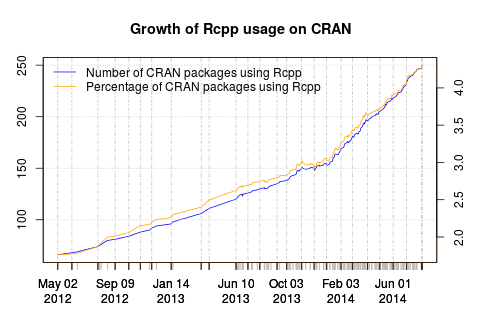
Rcpp growth
Rcpp reached a nice round milestone yesterday: 250 packages on CRAN now depend on it (as measured by Depends, Imports and LinkingTo declarations). The graph is on the left depicts the growth of Rcpp over time. Or at least since I started to write down some usage numbers: first informally, then via a script. Also displayed is the relative proportion of CRAN packages using it. Rcpp cleared the four per-cent hurdle just before useR! 2014 where I showed a similar graph (as two distinct graphs) in my invited talk. 250 is a pretty impressive, and rather humbling, number. From everybody behind Rcpp, I would like to say a heartfelt Thank You! to all the users and of course contributors.

This post by Dirk Eddelbuettel originated on his Thinking inside the box blog. Please report excessive re-aggregation in third-party for-profit settings.

Ian Donnelly: How-To: Write a Plug-In (Part 2, The Contract)

Hi Everybody! This is the second installment of my tutorial, How-To: Write a Plug-In. Previously, in Part 1, I went over the basic interface of an Elektra Storage Plug-In. For this installment, I will be focusing on one of the most important aspects of a plug-in, its contract. The contract describes how a plug-in may behave. The main part of the contract describes to Elektra how it will modify the KeySet returned. This is what allows Elektra to work with various types of plug-ins. This guide will focus on one type of plug-in: the storage plug-in. We already have a published specification for plug-ins on our repository but I will reiterate the details here. The first part of the contract you will need is the system/elektra/modules/plugin (where plugin represents the name of your plug-in). All this key does is let elektra know that your plug-in exists. The next key is system/elektra/modules/plugin/exports. This key lets Elektra know that your plug-in exports symbols to Elektra. Below this key you need to create keys for each function you want to export, in my line plug-in I implemented functions for get and set so I will create two keys as follows:
keyNew ("system/elektra/modules/line/exports/get",
KEY_FUNC, elektraLineGet, KEY_END),
keyNew ("system/elektra/modules/line/exports/set",
KEY_FUNC, elektraLineSet, KEY_END),
So far we have told Elektra that our plugin exists and will be exporting functions for getting and setting keys. The next set of keys are the system/elektra/Plugin/infos keys. These are pretty self-explanatory. The first three children of this key, author, license, and description are pretty self explanatory. The infos/provides key tells Elektra the type of plug-in that is being used, this will be storage for any storage plug-in (which is what this tutorial focuses on). To be precise, it tells Elektra which abstract functionality is provided. This allows other plugins to reference abstract functionality instead of declaring a hard dependency to one specific plugin. For example plugins could state that they want to be placed before any other plugin doing the abstract functionality conversion instead of referencing for example the keytometa plugin directly. The info/placements key tells Elektra which functions of the plug-in it should call. Since I implemented get and set in the line plug-in, I would set this key to getstorage setstorage . Next is infos/needs and infos/recommends, infos/needs should contain a list of plug-ins or providers that your plug-in needs to work (see the info/provides key above). Otherwise this key needs to be set to be blank . infos/recommends works exactly like needs except that a plug-in that needs another plug-in won t form a valid backend if the other plug-in doesn t exist but if it only recommends having the other plug-in, it will still work in the others absence. Since Elektra 0.8.7, the best practice for creating a plug-in involves storing the info keys at the very top of a file named REAMDE.md in the same directory as the plugin source. For instance, in my line plugin, the first few lines of README.md are as follows:
- infos = Information about LINE plugin is in keys below
- infos/author = Ian Donnelly <ian.s.donnelly@gmail.com>
- infos/licence = BSD
- infos/needs =
- infos/provides = storage
- infos/placements = getstorage setstorage
- infos/description = Very simple storage plug-in which stores each line from a file as a key
The rest of the README.md file should contain an English description of the plug-in. You can include an introduction to the plug-in, its purpose, any shortcomings it may have, and examples of how to use it. This README.md file is standard for GitHub which will automatically be displayed when a user is browsing your plug-in s directory in the repo. It is written in Markdown. In order to generate the contract from this file you must edit the CMakeLists.txt file in your plug-in source directory to include the following lines:
generate_readme (plugin)
add_includes (elektra-full $ CMAKE_CURRENT_BINARY_DIR )
include_directories ($ CMAKE_CURRENT_BINARY_DIR )

where you substitute plugin with the name of you plugin. This will generate a file called readme_plugin.c (once again, substitute plugin), in your plugin s build directory when you run the make command. The best way to declare the contract is within it s own function, elektraPluginContract. This makes it easier to manage the contract and is much more readable. This is the contract declaration for my line plug-in:

static inline KeySet *elektraLineContract()

return ksNew (30,
keyNew ("system/elektra/modules/line",
KEY_VALUE, "line plugin waits for your orders", KEY_END),
keyNew ("system/elektra/modules/line/exports", KEY_END),
keyNew ("system/elektra/modules/line/exports/get",
KEY_FUNC, elektraLineGet, KEY_END),
keyNew ("system/elektra/modules/line/exports/set",
KEY_FUNC, elektraLineSet, KEY_END),
#include "readme_line.c"
keyNew ("system/elektra/modules/line/infos/version",
KEY_VALUE, PLUGINVERSION, KEY_END),
KS_END);

Next, you will need to make sure to actually set the contract. This is always done in the elektraPluginGet function since this is technically the only REQUIRED function in a plug-in. We just create a new KeySet, set it to our contract, and append it to the returned KeySet. You can see how this is done for line (note that this code is at the very beginning of elektraLineGet):

if (!strcmp (keyName(parentKey), "system/elektra/modules/line"))

KeySet *moduleConfig = elektraLineContract();
ksAppend(returned, moduleConfig);
ksDel(moduleConfig);
return 1;


Note that the plugin contract is nothing special, but just a KeySet interpreted by the resolver forming an Elektra backend. Elektra will request the keys below system/elektra/modules/plugin (where plugin is the pluginname) as soon as it wants to know something about that plugin. Notice also the line #include "readme_line.c". This line, pulls in the contents of readme_line.c in my plug-in s build directory, which due to the lines we added in CMakeLists.txt will contain the contract as defined at the top of README.md. Any changes to the keys in README.md will be reflected in the plug-in next time it is built. Part 2 of this tutorial focuses on the plug-in contract by explaining what each element does and explaining how to implement a contract. For more information about plug-ins and more detailed examples I highly suggest reading Markus Thesis for Elektra. Chapter 4, which starts on page 61 goes into much more detail on Plug-Ins and explains the various features of the contracts. Look for Part 3 soon!

6 August 2014

Russell Coker: Booting GPT

I m installing new 4TB disks on an older Dell server, it s a PowerEdge T110 with a G6950 CPU so it s not really old, but it s a couple of generations behind the latest Dell servers. I tried to enable UEFI booting, but when I turned that option on the system locked up during the BIOS process (wouldn t boot from the CD or take keyboard input). So I had to make it boot with a BIOS compatible MBR and a GPT partition table. Number Start (sector) End (sector) Size Code Name
1 2048 4095 1024.0 KiB EF02 BIOS boot partition
2 4096 25169919 12.0 GiB FD00 Linux RAID
3 25169920 7814037134 3.6 TiB 8300 Linux filesystem After spending way to much time reading various web pages I discovered that the above partition table works. The 1MB partition is for GRUB code and needs to be enabled by a parted command such as the following: parted /dev/sda set 1 bios_grub on /dev/sda2 is a RAID-1 array used for the root filesystem. If I was installing a non-RAID system I d use the same partition table but with a type of 8300 instead of FD00. I have a RAID-1 array over sda2 and sdb2 for the root filesystem and sda3, sdb3, sdc3, sdd3, and sde3 are used for a RAID-Z array. I m reserving space for the root filesystem on all 5 disks because it seems like a good idea to use the same partition table and the 12G per disk that is unused on sdc, sdd, and sde isn t worth worrying about when dealing with 4TB disks.

5 August 2014

Andrew Pollock: [geek] Lifehacking with NFC, Tasker and HabitRPG

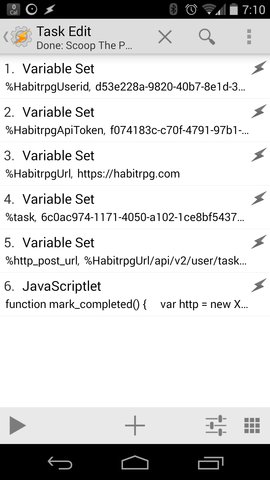
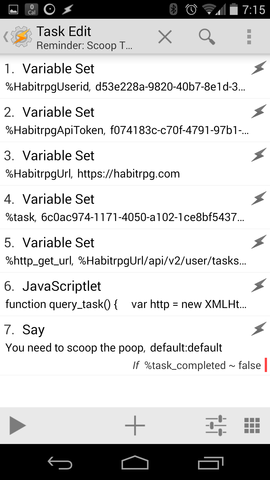
Oh man, I'm such a geek... Being a single parent has required a considerable amount of self-discipline on my behalf. I find I do best in an environment with routine to make sure stuff gets done. One of the things I did to try and make sure stuff got done was to form positive habits. To help and make this a bit more "fun", I started using HabitRPG, an online role-playing game based on habits. I've only ever used it in a half-arsed manner, and as a result, I die a lot. Often I'll do my dailies, but then forget to mark them off. Sometimes I just fall off the habit wagon altogether. And die. One of my dailies is to scoop my cat's litterboxes. For whatever reason, I find this a tad onerous, and had found myself falling out of the habit of doing it on a daily basis. My cat deserves better than this, so I wanted to get back on the habit wagon, but make it a bit more "fun" as well. I love NFC, I've been a big NFC weenie for a long time. It's a solution looking for a problem. I have a huge collection of NFC tags, and I've finally found a problem I could use them with. I wanted to make it more frictionless to mark a task as completed in HabitRPG. I didn't want to have to take out my phone, unlock it, open the HabitRPG app and check off the daily task. I just wanted to wave my phone at an NFC tag. Here's how I did it. The inimitable Paul Fenwick, who first inspired me to use HabitRPG, has a way more complicated set up to achieve something similar. The Site Reliability Engineer in me wanted the least number of moving parts and third-parties to have to get from my phone to HabitRPG. After some hunting around, I found this wiki page on integrating Tasker with HabitRPG's API, so based on that breadcrumb, I got hacking. I'd not used Tasker before. I was already using AutomateIt to do some other, reasonably dumb automation on my phone, though. Tasker is a little bit obtuse, and it took me a couple of days of casual fiddling with it to wrap my head around it's usage model. The fact that it can run arbitrary JavaScript, and that NFC Tools integrates with it is where the real awesome lies. So based off the wiki, I crafted a couple of bits of JavaScript, one to mark daily tasks as complete on HabitRPG, and one to query HabitRPG to see if they have been marked as complete. For the former, it was trivial, using NFC Tools, to write an NFC tag that then runs the Tasker task to call the HabitRPG API to mark a daily task as complete. That goal was now complete. The equally satisfying part was also having Tasker do a time-based conditional nag based on the state of the daily task in HabitRPG. So now if it gets to 4:45pm and I haven't scooped the litterboxes, my phone literally tells me I'd better go do it. I've also done the same thing with putting the dishwasher on. I've stuck an NFC tag on the dishwashing powder bottle lid, and I get a conditional reminder before bed time. It used to be an unconditional reminder with AutomateIt, and it was dumb, because I rarely forget to put the dishwasher on. Now, I can use HabitRPG to keep state on it instead. The hunk of JavaScript to update HabitRPG is very simple:
function mark_completed()   
  var http = new XMLHttpRequest();
  http.open("POST", http_post_url, false);
  http.setRequestHeader("x-api-user", global('HabitrpgUserid'));
  http.setRequestHeader("x-api-key", global('HabitrpgApiToken'));
  http.send();
  return(http.responseText); 
 
try   
  var result = mark_completed(); 
  catch(e)   
  var error = e.message; 
 
All of the interesting stuff is defined in variables preceding the JavaScript in the task definition. Here's a screenshot of the Task in Tasker that tells a thousand words: Screenshot of Tasker task that uses HabitRPG API to mark a task complete Similarly, to query HabitRPG, I'm using:
function query_task()   
  var http = new XMLHttpRequest();
  http.open("GET",http_get_url,false);
  http.setRequestHeader("x-api-user", global('HabitrpgUserid'));
  http.setRequestHeader("x-api-key", global('HabitrpgApiToken'));
  http.send();
  var p = JSON.parse(http.responseText);
  return p['completed'];
 
try   
  var task_completed = query_task(); 
  catch(e)   
  var error = e.message; 
 
It's only slightly trickier because you have to parse the JSON blob that comes back. Again, a screenshot. Screenshot of Tasker task that uses HabitRPG API to query task state Now maybe I'll stop dying so much in HabitRPG, my cat will have the clean toilet she deserves, and I'll stop getting reminded about putting the dishwasher on when I already have. Better living through automation, that's my motto.

4 August 2014

Ian Donnelly: New Release: Elektra 0.8.7

Hi Everybody! I am very proud to inform you all that Elektra has just shipped a new release, version 0.8.7, with many great features and fixes! First of all, I want to let you all know that a lot of work from my Google Summer of Code Project has made its way into this release. Elektra now includes support for a three way merge of KeySets! A special and sincere thanks goes out to Felix Berlakovich for helping me test this new merge feature and adding some great features to allow for different merge strategies and dealing with meta keys. You can try out the new merge features using the kdb merge command or by using the Elektra API. There is still work to be done with Merging and improving documentation (also look for some posts on this blog soon about the feature). Additionally, thanks to Felix, we have technical previews for some new plug-ins. The new plug-ins are keytometa and ini. In short the keytometa plugin allows to convert normal keys to meta keys during the get operation and reverting this conversion during the set operation. The ini plugin is basically a rewrite of the simpleini plugin and makes use of the inih library. Also there have been many improvements made to the glob plug-in. He even found some time to add a new script for bash tab completion which is located under scripts/kdb-bash-completion. To use it on debian just copy it to /etc/bash_completion.d/ and make sure it is executable. Moreover, we fixed a lot of things with this newest release. Pino Toscano has been working on fixing up the Debian packages for Elektra but he has also fixed many other things along the way including fixing a lot of spelling errors, simplifying the RPATH setting, improvements to respecting $HOME and $TMPDIR, and improvements to some test cases. The kdb tool now does a better job of checking for subfolders that aren t allow and it now makes sure to output warnings before errors so errors can more easily be seen. We have also improved some tests for kdb tool and some plugins as well as fixed compiler warnings on clang and gcc 4.9. We also made some fixes to kdb import and export for some storage plugins and fixed some bugs so that kdb run_all now works flawlessly. There have also been a few tweaks to the API for this release, specifically in the C++ bindings. There is now a delMeta() function for C++. The reason for this is that contrary to the C API, calling

key.setMeta("metaname", NULL)

does not delete the metadata, but stores the value 0 . Additionally, we changed the arguments for isBelow, isDirectBelow, and isBelowSame for the C++ binding to be easier to understand and be more natural to use. Before this change, the C++ binding closely mirrored the C API which lead to an unintuitive behaviour. Before the change the API did the following:

Key ( user/config/key/below ).isBelow (Key ( user/config )) == false
Key ( user/config/key/below ).isBelow (Key ( user/config/key/below/deeper )) == true

That is because the first argument in the C API is the object itself in the C++ API.
The attribute of being below the key in question (the object) refers to the second key in the C API.
While this makes some sense for the C API, it definitely does not for the C++ API. Now the API behaves as follows (as intuitively expected):

Key ( user/config/key/below ).isBelow (Key ( user/config )) == true
Key ( user/config/key/below ).isBelow (Key ( user/config/key/below/deeper )) == false

We even had time for a bunch of documentation changes. We now have a tutorial for contextual values to GitHub so developers can start using contextual values with Elektra. We also included a specification for metadata and a better specification for contracts. There is even a little bit of extra news to share. We now use GitHub for active development of Elektra. We have adopted its issue tracker for issues. Also, now pull requests automatically get built by the server to see if the merge would brake the build and whether it passes all the tests. We are also in the process of updating a lot of our documentation and READMEs to use Markdown so they can be viewed easily on GitHub. Also, Raffael Pancheri has been making really great progress on a qt-gui for Elektra. There is still work to be done but it looks great and is coming along nicely. You can download the release now from Markus site: http://www.markus-raab.org/ftp/elektra/releases/elektra-0.8.7.tar.gz size: 1566800
md5sum: 4996df62942791373b192c793d912b4c
sha1: 00887cc8edb3dea1bc110f69ea64f6b700c29402
sha256: 698ebd41d540eb0c6427c17c13a6a0f03eef94655fbd40655c9b42d612ea1c9b Also there are packages already ready for some distributions: There is a lot of ongoing work to fix the Debian packages and I will post about it on this blog when they are good to go! Enjoy the new release!
-Ian S. Donnelly

3 August 2014

Dirk Eddelbuettel: Introducing sanitizers 0.1.0

A new package sanitizers is now on CRAN. It provides test cases for Address Sanitizers, and Undefined Behaviour Sanitizers. These are two recent features of both g++ and clang++, and described in the Checking Memory Access section of the Writing R Extension manual. I set up a new web page for the sanitizers package which illustrates their use case via pre-built Docker images, similar to what I presented at the end of my useR! 2014 keynote a few weeks ago. So instead of repeating this over here, I invite you to read the detailed discussion on the sanitizers page.

This post by Dirk Eddelbuettel originated on his Thinking inside the box blog. Please report excessive re-aggregation in third-party for-profit settings.

1 August 2014

Ian Donnelly: How-To: Write a Plug-In (Part 1, The Basics)

Hi Everybody! For the first part of my Plug-In tutorial, I am going to cover the basic overview of an elektra plug-in. This post just explains the basic format and functions of an Elektra plug-in, specifically a storage plug-in (this will be the focus of my tutorial). All plug-ins use the same basic interface. This interface consists of five basic functions, elektraPluginOpen, elektraPluginGet, elektraPluginSet, elektraPluginError, and elektraPluginClose. The developer replaces Plugin with the name of their plugin. So in the case of my plugin, the names of these functions would be elektraLineOpen(), elektraLineGet(), elektraLineSet(), elektraLineError(), and elektraLineClose(). Additionally, there is one more function called ELEKTRA_PLUGIN_EXPORT(plugin), where once again Plugin should be replaced with the name of the plug-in, this time in lower-case. So for my line plugin this function would be ELEKTRA_PLUGIN_EXPORT(line). The KDB relies on the first five functions for interacting with configuration files stored in the key database. Calls for kdbGet() and kdbClose() will call the functions elektraPluginGet() and elektraPluginClose() respectively for the plugin that was used to mount the configuration data. kdbSet() calls elektraPluginSet() but also elektraPluginError() when an error occurs. elektraPluginOpen() is called before the first call to elektraPluginGet() or elektraPluginSet(). These functions serve different purposes that allow the plug-in to work: Most simply put: most plug-ins consist of five major functions, elektraPluginOpen(), elektraPluginClose(), elektraPluginGet(), elektraPluginSet(), and ELEKTRA_EXPORT_PLUGIN(Plugin). Because remembering all these functions can be cumbersome, we provide a skeleton plugin in order to easily create a new plugin. The skeleton plugin is called template and a new plugin can be created by calling the copy-template script. For example for my plugin I called

../../scripts/copy-template line

from within the plugins directory. Afterwards two important things are left to be done:
  1. remove all functions (and their exports) from the plugin that are not needed. For example not every plugin actually makes use of the elektraPluginOpen() function.
  2. provide a basic contract as described above
After these two steps your plugin is ready to be compiled, installed and mounted for the first time. Have a look at the mount tutorial for details on howto do this. So Part 1 of the tutorial covers the implementation details for a plug-in. Next up will be Part 2, which will cover the theory behind contracts in Elektra as well as how to implement them. Sincerely,
Ian S. Donnelly

31 July 2014

Craig Small: Linux Capabilities

I was recently updating some code that uses fping. Initially it used exec() that was redirected to a temporary file but I changed it to use popen. While it had been a while since I ve done this sort of thing, I do recall there was an issue with running popen on setuid binary. A later found it is mainly around setuid scripts which are very problematic and there are good reasons why you don t do this. Anyhow, the program worked fine which surprised me. Was fping setuid root to get the raw socket?
$ ls -l /usr/bin/fping
-rwxr-xr-x 1 root root 31464 May  6 21:42 /usr/bin/fping
It wasn t which at first all I thought ok, so that s why popen is happy . The way that fping and other programs work is they bind to a raw socket. This socket sits below the normal type sockets such as the ones used for TCP and UDP and normal users cannot use them by default. So how did fping work it s magic and get access to this socket? It used Capabilities. Previously getting privileged features had a big problem; it was an all or nothing thing. You want access to a raw socket? Sure, be setuid but that means you also could, for example, read any file on the system or set passwords. Capabilites provide a way of giving programs some better level of access, but not a blank cheque. The tool getcap is the way of determining what capabilities are found on a file. These capabilities are attributes on the file which, when the file is run, turn into capabilities or extra permissions. fping has the capability cap_net_raw+ep applied to it. This gives access to the RAW and PACKET sockets which is what fping needs. The +ep after the capability name means it is an Effective and Permitted capability, which describes what happens with child processes and dropping privileges. I hadn t seen these Capabilities before. They are a nice way to give your programs the access they need, but limiting the risk of something going wrong and having a rouge program running as root.

24 July 2014

Matthew Palmer: First Step with Clojure: Terror

$ sudo apt-get install -y leiningen
[...]
$ lein new scratch
[...]
$ cd scratch
$ lein repl
Downloading: org/clojure/clojure/1.3.0/clojure-1.3.0.pom from repository central at http://repo1.maven.org/maven2
Transferring 5K from central
Downloading: org/sonatype/oss/oss-parent/5/oss-parent-5.pom from repository central at http://repo1.maven.org/maven2
Transferring 4K from central
Downloading: org/clojure/clojure/1.3.0/clojure-1.3.0.jar from repository central at http://repo1.maven.org/maven2
Transferring 3311K from central
[...]
Wait what? lein downloads some random JARs from a website over HTTP1, with, as far as far I can tell, no verification that what I m asking for is what I m getting (has nobody ever heard of Man-in-the-Middle attacks in Maven land?). It downloads a .sha1 file to (presumably) do integrity checking, but that s no safety net if I can serve you a dodgy .jar, I can serve you an equally-dodgy .sha1 file, too (also, SHA256 is where all the cool kids are at these days). Finally, jarsigner tells me that there s no signature on the .jar itself, either. It gets better, though. The repo1.maven.org site is served by the fastly.net2 pseudo-CDN3, which adds another set of points in the chain which can be subverted to hijack and spoof traffic. More routers, more DNS zones, and more servers. I ve seen Debian take a kicking more than once because packages aren t individually signed, or because packages aren t served over HTTPS. But at least Debian s packages can be verified by chaining to a signature made by a well-known, widely-distributed key, signed by two Debian Developers with very well-connected keys. This repository, on the other hand oy gevalt. There are OpenPGP (GPG) signatures available for each package (tack .asc onto the end of the .jar URL), but no attempt was made to download the signatures for the .jar I downloaded. Even if the signature was downloaded and checked, there s no way for me (or anyone) to trust the signature the signature was made by a key that s signed by one other key, which itself has no signatures. If I were an attacker, it wouldn t be hard for me to replace that key chain with one of my own devising. Even ignoring everyone living behind a government- or company-run intercepting proxy, and everyone using public wifi, it s pretty well common knowledge by now (thanks to Edward Snowden) that playing silly-buggers with Internet traffic isn t hard to do, and there s no shortage of evidence that it is, in fact, done on a routine basis by all manner of people. Serving up executable code to a large number of people, in that threat environment, with no way for them to have any reasonable assurance that code is trustworthy, is very disappointing. Please, for the good of the Internet, improve your act, Maven. Putting HTTPS on your distribution would be a bare minimum. There are attacks on SSL, sure, but they re a lot harder to pull off than sitting on public wifi hijacking TCP connections. Far better would be to start mandating signatures, requiring signature checks to pass, and having all signatures chain to a well-known, widely-trusted, and properly secured trust root. Signing all keys that are allowed to upload to maven.org with a maven.org distribution root key (itself kept in hardware and only used offline), and then verifying that all signatures chain to that key, wouldn t be insanely difficult, and would greatly improve the security of the software supply chain. Sure, it wouldn t be perfect, but don t make the perfect the enemy of the good. Cost-effective improvements are possible here. Yes, security is hard. But you don t get to ignore it just because of that, when you re creating an attractive nuisance for anyone who wants to own up a whole passel of machines by slipping some dodgy code into a widely-used package.
  1. To add insult to injury, it appears to ignore my http_proxy environment variable, and the repo1.maven.org server returns plain-text error responses with Content-Type: text/xml. But at this point, that s just icing on the shit cake.
  2. At one point in the past, my then-employer (a hosting provider) blocked Fastly s caching servers from their network because they took down a customer site with a massive number of requests to a single resource, and the incoming request traffic was indistinguishable from a botnet-sourced DDoS attack. The requests were coming from IP space registered to a number of different ISPs, with no distinguishing rDNS (184-106-82-243.static.cloud-ips.com doesn t help me to distinguish between I m a professionally-run distributed proxy and I m a pwned box here to hammer your site into the ground ).
  3. Pretty much all of the new breed of so-called CDNs aren t actually pro-actively distributing content, they re just proxies. That isn t a bad thing, per se, but I rather dislike the far-too-common practice of installing varnish (and perhaps mod_pagespeed, if they re providing advanced capabilities) on a couple of AWS instances, and hanging out your shingle as a CDN. I prefer a bit of truth in my advertising.

23 July 2014

Michael Prokop: Book Review: The Docker Book

Docker is an open-source project that automates the deployment of applications inside software containers. I m responsible for a docker setup with Jenkins integration and a private docker-registry setup at a customer and pre-ordered James Turnbull s The Docker Book a few months ago. Recently James he s working for Docker Inc released the first version of the book and thanks to being on holidays I already had a few hours to read it AND blog about it. :) (Note: I ve read the Kindle version 1.0.0 and all the issues I found and reported to James have been fixed in the current version already, jey.) The book is very well written and covers all the basics to get familiar with Docker and in my opinion it does a better job at that than the official user guide because of the way the book is structured. The book is also a more approachable way for learning some best practices and commonly used command lines than going through the official reference (but reading the reference after reading the book is still worth it). I like James approach with ENV REFRESHED_AT $TIMESTAMP for better controlling the cache behaviour and definitely consider using this in my own setups as well. What I wasn t aware is that you can directly invoke docker build $git_repos_url and further noted a few command line switches I should get more comfortable with. I also plan to check out the Automated Builds on Docker Hub. There are some references to further online resources, which is relevant especially for the more advanced use cases, so I d recommend to have network access available while reading the book. What I m missing in the book are best practices for running a private docker-registry in a production environment (high availability, scaling options, ). The provided Jenkins use cases are also very basic and nothing I personally would use. I d also love to see how other folks are using the Docker plugin, the Docker build step plugin or the Docker build publish plugin in production (the plugins aren t covered in the book at all). But I m aware that this are fast moving parts and specialised used cases upcoming versions of the book are already supposed to cover orchestration with libswarm, developing Docker plugins and more advanced topics, so I m looking forward to further updates of the book (which you get for free as existing customer, being another plus). Conclusion: I enjoyed reading the Docker book and can recommend it, especially if you re either new to Docker or want to get further ideas and inspirations what folks from Docker Inc consider best practices.

22 July 2014

Andrew Pollock: [debian] Day 174: Kindergarten, startup stuff, tennis

I picked up Zoe from Sarah this morning and dropped her at Kindergarten. Traffic seemed particularly bad this morning, or I'm just out of practice. I spent the day powering through the last two parts of the registration block of my real estate licence training. I've got one more piece of assessment to do, and then it should be done. The rest is all dead-tree written stuff that I have to mail off to get marked. Zoe's doing tennis this term as her extra-curricular activity, and it's on a Tuesday afternoon after Kindergarten at the tennis court next door. I'm not sure what proportion of the class is continuing on from previous terms, and so how far behind the eight ball Zoe will be, but she seemed to do okay today, and she seemed to enjoy it. Megan's in the class too, and that didn't seem to result in too much cross-distraction. After that, we came home and just pottered around for a bit and then Zoe watched some TV until Sarah came to pick her up.

21 July 2014

Francois Marier: Creating a modern tiling desktop environment using i3

Modern desktop environments like GNOME and KDE involving a lot of mousing around and I much prefer using the keyboard where I can. This is why I switched to the Ion tiling window manager back when I interned at Net Integration Technologies and kept using it until I noticed it had been removed from Debian. After experimenting with awesome for 2 years and briefly considering xmonad , I finally found a replacement I like in i3. Here is how I customized it and made it play nice with the GNOME and KDE applications I use every day.

Startup script As soon as I log into my desktop, my startup script starts a few programs, including: Because of a bug in gnome-settings-daemon which makes the mouse cursor disappear as soon as gnome-settings-daemon is started, I had to run the following to disable the offending gnome-settings-daemon plugin:
dconf write /org/gnome/settings-daemon/plugins/cursor/active false

Screensaver In addition, gnome-screensaver didn't automatically lock my screen, so I installed xautolock and added it to my startup script:
xautolock -time 30 -locker "gnome-screensaver-command --lock" &
to lock the screen using gnome-screensaver after 30 minutes of inactivity. I can also trigger it manually using the following shortcut defined in my ~/.i3/config:
bindsym Ctrl+Mod1+l exec xautolock -locknow

Keyboard shortcuts While keyboard shortcuts can be configured in GNOME, they don't work within i3, so I added a few more bindings to my ~/.i3/config:
# volume control
bindsym XF86AudioLowerVolume exec /usr/bin/pactl set-sink-volume @DEFAULT_SINK@ -- '-5%'
bindsym XF86AudioRaiseVolume exec /usr/bin/pactl set-sink-volume @DEFAULT_SINK@ -- '+5%'
# brightness control
bindsym XF86MonBrightnessDown exec xbacklight -steps 1 -time 0 -dec 5
bindsym XF86MonBrightnessUp exec xbacklight -steps 1 -time 0 -inc 5
bindsym XF86AudioMute exec /usr/bin/pactl set-sink-mute @DEFAULT_SINK@ toggle
# show battery stats
bindsym XF86Battery exec gnome-power-statistics
to make volume control, screen brightness and battery status buttons work as expected on my laptop. These bindings require the following packages:

Keyboard layout switcher Another thing that used to work with GNOME and had to re-create in i3 is the ability to quickly toggle between two keyboard layouts using the keyboard. To make it work, I wrote a simple shell script and assigned a keyboard shortcut to it in ~/.i3/config:
bindsym $mod+u exec /home/francois/bin/toggle-xkbmap

Suspend script Since I run lots of things in the background, I have set my laptop to avoid suspending when the lid is closed by putting the following in /etc/systemd/login.conf:
HandleLidSwitch=lock
Instead, when I want to suspend to ram, I use the following keyboard shortcut:
bindsym Ctrl+Mod1+s exec /home/francois/bin/s2ram
which executes a custom suspend script to clear the clipboards (using xsel), flush writes to disk and lock the screen before going to sleep. To avoid having to type my sudo password every time pm-suspend is invoked, I added the following line to /etc/sudoers:
francois  ALL=(ALL)  NOPASSWD:  /usr/sbin/pm-suspend

Window and workspace placement hacks While tiling window managers promise to manage windows for you so that you can focus on more important things, you will most likely want to customize window placement to fit your needs better.

Working around misbehaving applications A few applications make too many assumptions about window placement and are just plain broken in tiling mode. Here's how to automatically switch them to floating mode:
for_window [class="VidyoDesktop"] floating enable
You can get the Xorg class of the offending application by running this command:
xprop   grep WM_CLASS
before clicking on the window.

Keeping IM windows on the first workspace I run Pidgin on my first workspace and I have the following rule to keep any new window that pops up (e.g. in response to a new incoming message) on the same workspace:
assign [class="Pidgin"] 1

Automatically moving workspaces when docking Here's a neat configuration blurb which automatically moves my workspaces (and their contents) from the laptop screen (eDP1) to the external monitor (DP2) when I dock my laptop:
# bind workspaces to the right monitors
workspace 1 output DP2
workspace 2 output DP2
workspace 3 output DP2
workspace 4 output DP2
workspace 5 output DP2
workspace 6 output eDP1
You can get these output names by running:
xrandr --display :0   grep " connected"
Finally, because X sometimes fail to detect my external monitor when docking/undocking, I also wrote a script to set the displays properly and bound it to the appropriate key on my laptop:
bindsym XF86Display exec /home/francois/bin/external-monitor

20 July 2014

Laura Arjona: Upgrading my laptop to Debian Jessie

Some days ago I decided to upgrade my laptop from stable to testing. I had tried Jessie since several months, in my husband s laptop, but that was a fresh install, and a not-so-old laptop, and we have not much software installed there. In my netbook (Compaq Mini 110c), with stable, I already had installed Pumpa, Dianara and how-can-i-help from testing, and since the freeze is coming, I thought that I could full-upgrade and use Jessie from now on, and report my issues and help to diagnose or fix them, if possible, before the freeze. I keep Debian stable at work for my desktop and servers (well, some of them are still in oldstable, thanks LTS team!!), and I have testing in a laptop that I use as clonezilla/drbl server (but I had issues, next week I ll put some time on them and I ll write here my findings, and report bugs, if any). So! let s go. Here I write my experience and the issues that I found (very few! and not sure if they are bugs or configuration problems or what, I ll keep an eye on them). The upgrade I pointed my /etc/apt/sources.list to jessie, then apt-get update, then apt-get dist-upgrade. (With the servers I am much more careful, read the release notes, upgrade guides and so, or directly I go for a fresh install, but with my laptop, I am too lazy). I went to bed (wow, risky LArjona!) and when I got up for going to work, the laptop was waiting for me to accept to block root from ssh access, or restart some services, and so. Ok! the upgrade resumed but I have to go to work and I wanted my laptop! Since all the packages were already downloaded, I closed the lid (double risky LArjona!) unplugged it, put everything in my bag, and catched the bus in time :) At the bus, I opened again the lid of my laptop (crossing fingers!) and perfect, the laptop had suspended and returned back to life, and the upgrade just resumed with no problem. Wow! I love you Debian! After 15 minutes, I had to suspend again, since the bus arrived and I had to take the metro. In the metro, the upgrade resumed, and finished. I shutdown my laptop and arrive to work. Testing testing :) In a break for lunch, I opened my brand new laptop (the hardware is the same, but the software totally renewed, so it s brand new for me). I have to say that use xfce, with some GNOME/GTK apps installed (gedit, cheese, evince, XChat ) and some others that use Qt or are part of the KDE project (Okular, Kile, QtLinguist, Pumpa, Dianara). I don t know/care too much about desktops and tweaking my desktop: I just put the terminal and gedit in black background, Debian wallpaper is enough dark for me so ok, put the font size a bit smaller to better use my low-vertical-resolution, and that s all, I only go to configure something else if there s something that really annoys me. My laptop booted correctly and a nice, more modern LightDM was greeting me. I logged in and everything worked ok, except some issues that follow. Network Manager and WPA2-enterprise wireless connections I had to reconfigure some wireless connections in Network Manager. At the University we use WPA2-enterprise, TTLS + PAP. I had stored my username and password in the connection, and network manager seemed to remember the username but not the password. No problem, I said, and I wrote it when it asked, but the Save or OK button was greyed out. I could not click it. Then I went to edit the connections, and more or less the same, it seems that I could edit, but not save the (new) configuration. Finally, I removed the wireless connection and created it again, and everything worked as a charm. This, I had to do it with the two wireless in my University (both of them are WPA2-enterprise TTLS + PAP). At home, I have WPA2 personal, and I had no issues, everything worked ok. This problem is not appearing in a fresh install, since there are no old configs to keep. Adblock Plus not working any more I opened Iceweasel and I began to see ads in the webpages that I visited. What? I checked and Adblock plus was installed and activated I reinstalled the package xul-ext-adblock-plus and it worked again. Strange display in programs based on Qt When I opened Pumpa I noticed that the edges of the windows where too rough, as if it was not using a desktop theme. I asked to a friend that uses Plasma and he suggested to install qt4-qtconfig, and then, select a theme for my Qt apps. It worked like a charm, but I find strange that I didn t need it before in stable. Maybe the default xfce configuration from stable is setting a theme, and the new one is not setting it, and so, the Qt apps are left barefoot .
With qtconfig I chose a GTK+ Style GUI for my Qt apps and then, they looked similar to what I had in stable (frankly, I cannot say if it was similar or exactly the same , but I didn t find them strange as before, so I m fine). Strange display in programs from GNOME Well, this is not a Jessie problem, it s just that some programs adopted the new GNOME appearance, and since I m on xfce, not on GNOME, they look a bit strange (no menus integration, and so). I am not sure that I can run GNOME (fallback, classic?) in my 1 GB RAM laptop, I have to investigate if I can tweak it to use less memory, or what. I m not very tied to xfce, and in fact it does not look so light (well, on top of it, I don t run light programs, I run Iceweasel, Icedove, Libreoffice, and some others). At work I use GNOME in my desktop, but with GNOME shell, not the fallback or classic modes, so I m thinking about giving a chance to MATE or second chance to LXDE. We ll see. Issues when opening the lid (waking up from suspend) This is the most strange thing I found in the migration, and the most dangerous one, I think. As I said before, I don t tweak too much my desktop, if it works with the default configuration. I m not sure that I know the differences between suspend, hibernate, hard disks disconnections and so. When I was in stable, and I closed the lid of my laptop, it just shutdown the screen, then I heard something like the system going to suspend or whatever, and after some seconds, the harddisk and fans stop, the wireless led turns off, and the power led begins to blink. Ok. When I open the lid, then it was waking up itself (the power led stayed on, the wireless led turns on, and when I tap the touchpad or type anything, the screen was coming, with the xscreensaver asking for my password). Just sometimes, when the screen was turning on, I could see my desktop for less than a second, before xscreensaver turns the background black and asks for the password. Now since I migrated to Jessie, I m experiencing a different behavior. When I close the lid, the laptop behaves the same. When I open the lid, the laptop behaves the same, but when I type or tap the touchpad and xscreensaver comes to ask the password, before than I can type it, the laptop just suspends again (or hibernates, I m not sure), and I have to press the power button in order to bring it back to life (then I see the xscreensaver again asking for the password, I type it, and my desktop is there, the same as I left it when I closed the lid). Strange, isn t it? I have tried to suspend my laptop directly from the menu, and it comes to the same state in which I have to press the power button in order to bring it back to life, but then, no xscreensaver password is required (which is double strange, IMHO). Things I miss in Jessie Well, until now, the only thing I miss in Jessie is the software center. I rarely use it (I love apt) but I think it makes a good job in easing the installation of programs in Debian for people coming from other operative systems (specially after smartphones and their copied software stores became popular). I hope the maintainer can upload a new version before the freeze, and so, it enters in the release. I ll try to contact him. Update 2014/07/20: Julian Andres Klode, maintainer of software-center, just replied (see his comment below) and pointed to GNOME Software (gnome-packagekit) as alternative. I just installed and it looks neat and nice. I m very happy! TODO I have a Debian stable laptop at work (this one with xfce + GNOME), I ll try to upgrade it and see if I see the same problems that I notice in mine. Then, I ll check the corresponding packages to see if there are open bugs about them, and if not, report them to their maintainers. I have to review the wiki pages related to the Jessie Desktop theme selection, I think they wanted the wallpaper to be inside before the freeze. Maybe I can help in publicity about that, handle the votings and so. I like Joy, but it s time to change a bit, new fresh air into the room!
Filed under: My experiences and opinion Tagged: Contributing to libre software, Debian, English, Free Software, Moving into free software

17 July 2014

Jonathan McDowell: On the state of Free VoIP

Every now and then I decide I'll try and sort out my VoIP setup. And then I give up. Today I tried again. I really didn't think I was aiming that high. I thought I'd start by making my email address work as a SIP address. Seems reasonable, right? I threw in the extra constraints of wanting some security (so TLS, not UDP) and a soft client that would work on my laptop (I have a Grandstream hardphone and would like an Android client as well, but I figure those are the easy cases while the "I have my laptop and I want to remain connected" case is a bit trickier). I had a suitable Internet connected VM, access to control my DNS fully (so I can do SRV records) and time to read whatever HOWTOs required. And oh my ghod the state of the art is appalling. Let's start with getting a SIP server up and running. I went with repro which seemed to be a reasonably well recommended SIP server to register against. And mostly getting it up and running and registering against it is fine. Until you try and make a TLS SIP call through it (to a sip5060.net test address). Problem the first; the StartCom free SSL certs are not suitable because they don't advertise TLS Client. So I switch to CACert. And then I get bitten by the whole question about whether the common name on the cert should be the server name, or the domain name on the SIP address (it's the domain name on the SIP address apparently, though that might make your SIP client complain). That gets the SIP side working. Of course RTP is harder. repro looks like it's doing the right thing. The audio never happens. I capitulate at this point, and install Lumicall on my phone. That registers correctly and I can call the sip:test.time@sip5060.net test number and hear the time. So the server is functioning, it's the client that's a problem. I try the following (Debian/testing): I'm bored at this point. Can I "dial" my debian.org SIP address from Lumicall? Of course not; I get a "Codecs incompatible" (SIP 488 Not Acceptable Here) response. I have no idea what that means. I seem to have all of the options on Lumicall enabled. Is it a NAT thing? A codec thing? Did I sacrifice the wrong colour of goat? At some point during this process I get a Skype call from some friends, which I answer. Up comes a video call with them, their newborn, perfect audio, and no hassle. I have a conversation with them that doesn't involve me cursing technology at all. And then I go back to fighting with SIP. Gunnar makes the comment about Skype creating a VoIP solution 10 years ago when none was to be found. I believe they're still the market leader. It just works. I'm running the Linux client, and they're maintaining it (a little behind the curve, but close enough), and it works for text chat, voice chat and video calls. I've spent half a day trying to get a Free equivalent working and failing. I need something that works behind NAT, because it's highly likely when I'm on the move that's going to be the case. I want something that lets my laptop be the client, because I don't want to rely on my mobile phone. I want my email address to also be my VoIP address. I want some security (hell, I'm not even insisting on SRTP, though I'd like to). And the state of the Open VoIP stack just continues to make me embarrassed. I haven't given up yet, but I'd appreciate some pointers. And Skype, if you're hiring, drop me a line. ;)

16 July 2014

Juliana Louback: Become an Open-source Contributor Video Conference

A couple weeks ago I was contacted by Yehuda Korotkin through one of the Debian mailing lists. Yehuda is a tech professor at one of Israel s leading colleges for women. He proposed a video conference to present the open source community to his class and explain how they can contribute to open source projects. I volunteered to participate and last Monday (July 14th 2014) we had our virtual meeting, which I hope was the first of many. Shauna G. also participated from Boston, making it a Israel - USA - Brazil meetup. Pretty impressive, eh? The conference was hosted on Google Hangouts, the video is available for viewing here. Run time is around 2.5 hours so to save you time I ve kindly posted a summary of the conference! To be frank, I look ghastly half the time so I d much prefer that you read this post. First there was a Q&A period which was more of a discussion panel, followed by a hands-on session where the girls made their first contribution to an open source project. Here s the gist of it: Q&A Hands on For the practical part of our conference, Yehuda s students contributed to Jscommunicator s Issue #5 which requests i18n support for major languages. JSCommunicator is a SIP communication tool developed in HTML and JavaScript, currently supporting audio/video calls and SIP SIMPLE instant messaging. First we set up Github in their local machines and forked the Jscommunicator repo. We learned the basic git commands needed to push changes to their remote repositories and to create a pull requests. This is explained in further detail here. At the end of the conference with nearly an hour overtime due to my tendency to be overly verbose, Yehuda s class made their first contribution with a Hebrew translation for Jscommunicator! All in all, it was great to virtually meet Yehuda and his epic students who all seemed very clever engineers. I m looking forward to our next meetup once I gain some time-management skills.

6 July 2014

Matthew Palmer: Witness the security of this fully DNSSEC-enabled zone!

After dealing with the client side of the DNSSEC puzzle last week, I thought it behooved me to also go about getting DNSSEC going on the domains I run DNS for. Like the resolver configuration, the server side work is straightforward enough once you know how, but boy howdy are there some landmines to be aware of. One thing that made my job a little less ordinary is that I use and love tinydns. It s an amazingly small and simple authoritative DNS server, strong in the Unix tradition of do one thing and do it well . Unfortunately, DNSSEC is anything but small and simple and so tinydns doesn t support DNSSEC out of the box. However, Peter Conrad has produced a patch for tinydns to do DNSSEC, and that does the trick very nicely. A brief aside about tinydns and DNSSEC, if I may Poor key security is probably the single biggest compromise vector for crypto. So you want to keep your keys secure. A great way to keep keys secure is to not put them on machines that run public-facing network services (like DNS servers). So, you want to keep your keys away from your public DNS servers. A really great way of doing that would be to have all of your DNS records somewhere out of the way, and when they change regenerate the zone file, re-sign it, and push it out to all your DNS servers. That happens to be exactly how tinydns works. I happen to think that tinydns fits very nicely into a DNSSEC-enabled world. Anyway, back to the story. Once I d patched the tinydns source and built updated packages, it was time to start DNSSEC-enabling zones. This breaks down into a few simple steps:
  1. Generate a key for each zone. This will produce a private key (which, as the name suggests, you should keep to yourself), a public key in a DNSKEY DNS record, and a DS DNS record. More on those in a minute. One thing to be wary of, if you re like me and don t want or need separate Key Signing and Zone Signing keys. You must generate a Key Signing key this is a key with a flags value of 257. Doing this wrong will result in all sorts of odd-ball problems. I wanted to just sign zones, so I generated a Zone Signing key, which has a flags value of 256. Big mistake. Also, the DS record is a hash of everything in the DNSKEY record, so don t just think you can change the 256 to a 257 and everything will still work. It won t.
  2. Add the key records to the zone data. For tinydns, this is just a matter of copying the zone records from the generated key into the zone file itself, and adding an extra pseudo record (it s all covered in the tinydnssec howto).
  3. Publish the zone data. Reload your BIND config, run tinydns-sign and tinydns-data then rsync, or do whatever it is PowerDNS people do (kick the database until replication starts working again?).
  4. Test everything. I found the Verisign Labs DNSSEC Debugger to be very helpful. You want ticks everywhere except for where it s looking for DS records for your zone in the higher-level zone. If there are any other freak-outs, you ll want to fix those because broken DNSSEC will take your domain off the Internet in no time.
  5. Tell the world about your DNSSEC keys. This is simply a matter of giving your DS record to your domain registrar, for them to add it to the zone data for your domain s parent. Wherever you d normally go to edit the nameservers or contact details for your domain, you probably want to do to the same place and look for something about DS or Domain Signer records. Copy and paste the details from the DS record in your zone into there, submit, and wait a minute or two for the records to get published.
  6. Test again. Before you pat yourself on the back, make sure you ve got a full board of green ticks in the DNSSEC Debugger. if anything s wrong, you want to rollback immediately, because broken DNSSEC means that anyone using a DNSSEC-enabled resolver just lost the ability to see your domain.
That s it! There s a lot of complicated crypto going on behind the scenes, and DNSSEC seems to revel in the number of acronyms and concepts that it introduces, but the actual execution of DNSSEC-enabling your domains is quite straightforward.

5 July 2014

Mario Lang: I love my MacBookAir with Debian

In short: I love my MacBook Air. It is the best (laptop) hardware I ever owned. I have seen hardware which was much more flaky in the past. I can set the display backlight to zero via software, which saves me a lot of battery life and also offers a bit of anti-spy-acroos-my-shoulder support. WLAN and bluetooth work nicely. And I just love the form-factor and the touch-feeling of the hardware. I even had the bag I use to carry my braille display modified so that the Air just fits in. I can't say how it behaves with X11. Given how flaky accessibility with graphical desktops on Linux is, I have still not made the switch. My MacBookAir is my perfect mobile terminal, I LOVE it. I am sort of surprised about the recent rant of Paul about MacBook Hardware. It is rather funny that we perceive the same technology so radically different. And after reading the second part of his rant I am wondering if I am no longer allowed to consider myself part of the "hardcore F/OSS world", because I don't consider Apple as evil as apparently most others. Why? Well, first of all, I actually like the hardware. Secondly, you have to show me a vendor first that builds usable accessibility into their products, and I mean all their products, without any extra price-tag attached. Once the others start to consider people with disabilities, we can talk about apple-bashing again. But until then, sorry, you don't see the picture as I do. Apple was the first big company on the market to take accessibility seriously. And they are still unbeaten, at least when it comes to bells and whistles included. I can unbox and configure any Apple product sold currently completely without assisstance. With some products, you just need to know a signle keypress (tripple-press the home button for touch devices and Cmd+F5 for Mac OS/X), and with others, during initial bootup, a speech synthesizer even tells you how to enable accessibility in case you need it. And after that is enabled, I can perform the setup of the device completely on my own. I don't need help from anyone else. And after the setup is complete, I can use 95% of the functionality provided by the operating system. And I am blind, part of a very small margin group so to speak. In Debian circles, I have even heard the sentiment that we supposedly have to accept that small margin groups are ignored sometimes. Well, as long as we think that way, as long as we strictly think economically, we will never be able to go there, fully. And we will never be the universal operating system, actually. Sorry to say that, but I think there is some truth to it. So, who is evil? Scratch your own itch doesn't always work to cover everything. How do we motivate contributors to work on things they don't personally need (yet)? How can we ensure that complicated but seldomly used features stay stable and do not fall to dust just because some upstream decides to rewrite an essential subcomponent of the dependency tree? I don't know. All I know is that these issues need to be solved in an universal operating system.

Next.

Previous.