Search Results: "ed"

6 October 2012

Andrea Veri: SSH Tunneling for VNC

Logging in into a Linux machine and executing the hundreds commands available is just one of the most common usages of OpenSSH. Another interesting and very useful usage is tunneling some specific (or even all) traffic from your local machine to an external machine you have access to. Today we ll analyze how to access a certain virtual machine s console by tunneling the relevant VNC port locally and accessing it through your favorite VNC client. The scenario:
  1. Machine A is our main virtualization machine and hosts several virtual machines. (VMs)
  2. Each VM has its own VNC port assigned. (usually the port range goes from 5900 to 5910 or even more if the hosted VMs are more than 10)
  3. We ll be using libvirt, thus virsh.
We first need to find out which port got assigned to the VM we want to have console access to:
sudo virsh
virsh # list
Id   Name   Status
----------------------------------------------------
5    foo    running
6    bar    running
7    foobar running
virsh # vncdisplay foobar
:3
We, then, create a tunnel which redirects all the traffic from the main virtualization machine s port to the port we gonna specify in the next command:
ssh -f -N -L 5910:localhost:5903 user@machine-A.com
A few details about the previous command:
  1. -N tells SSH to not execute any command after logging in.
  2. -f tells SSH to hide into the background just before the command gets executed.
  3. -L enables the port forwarding between the local (client) host and the host on the remote side.
And why did I choose respectively port 5903 and 5910? While you can adjust port 5910 with your own choice (that will just move the tunneled traffic from port 5910 to your favorite port), that won t work as expected with port 5903 since each VNC port is binded to the number of display virsh assigned to it. (for example, the bar VM may be running on display 5, thus its vncdisplay port will be 5905) When done, fire up your favorite VNC client and create a new connection with the following details:
Protocol: VNC - Virtual Network Computing
Server: localhost - 127.0.0.1
Port: 5910
The connection will load and you ll be put in front of your foobar VM console.

Andrea Veri: SSH Tunneling for VNC

Logging in into a Linux machine and executing the hundreds commands available is just one of the most common usages of OpenSSH. Another interesting and very useful usage is tunneling some specific (or even all) traffic from your local machine to an external machine you have access to. Today we ll analyze how to access a certain virtual machine s console by tunneling the relevant VNC port locally and accessing it through your favorite VNC client. The scenario:
  1. Machine A is our main virtualization machine and hosts several virtual machines. (VMs)
  2. Each VM has its own VNC port assigned. (usually the port range goes from 5900 to 5910 or even more if the hosted VMs are more than 10)
  3. We ll be using libvirt, thus virsh.
We first need to find out which port got assigned to the VM we want to have console access to:
sudo virsh
virsh # list
Id   Name   Status
----------------------------------------------------
5    foo    running
6    bar    running
7    foobar running
virsh # vncdisplay foobar
:3
We, then, create a tunnel which redirects all the traffic from the main virtualization machine s port to the port we gonna specify in the next command:
ssh -f -N -L 5910:localhost:5903 user@machine-A.com
A few details about the previous command:
  1. -N tells SSH to not execute any command after logging in.
  2. -f tells SSH to hide into the background just before the command gets executed.
  3. -L enables the port forwarding between the local (client) host and the host on the remote side.
And why did I choose respectively port 5903 and 5910? While you can adjust port 5910 with your own choice (that will just move the tunneled traffic from port 5910 to your favorite port), that won t work as expected with port 5903 since each VNC port is binded to the number of display virsh assigned to it. (for example, the bar VM may be running on display 5, thus its vncdisplay port will be 5905) When done, fire up your favorite VNC client and create a new connection with the following details:
Protocol: VNC - Virtual Network Computing
Server: localhost - 127.0.0.1
Port: 5910
The connection will load and you ll be put in front of your foobar VM console.

Timo Jyrinki: Light-weight security, Grub2 password setup problems 1.99 vs 2.00

I believe I'm not the only one who thinks that use case oriented Grub2 documentation is hard to find, and a lot of the documentation is obsolete or wrong. My main cause for writing this blog post is a currently unanswered question regarding 2.00, but meanwhile it seems months have passed and still most 1.99 documentation is wrong as well, which might be interesting to some.

The aim is to prevent grub entries from being edited, while not restricting actual booting. This protection is meant for computers not having any confidential stuff, but just wanting to do some light weight security with the assumption that the computer isn't physically opened.

Common setup

You will obviously want to disable any automatically generated root access giving entries, by for example uncommenting GRUB_DISABLE_RECOVERY="true" in /etc/default/grub on Debian or Ubuntu. Also you would disable allowing any external boot devices to be used in BIOS/EFI/coreboot, which you would also have protected with a password. And that often means you need to also disable USB legacy support, since some BIOSes tend to offer all USB devices as bootable without password otherwise (note that I guess that could also cause problems accessing setup on desktop computers if your only keyboard is USB).

1.99

So to first fix the false instructions in various places - no, setting the superuser in 00_header as instructed is not enough. It might be, but does not apply if eg. old kernels are put into submenu (Ubuntu bug 718670, Fedora bug 836259). The protection from editing does not apply there. And if you remove all but one kernel so that there is no submenu, a submenu will be automatically created when there is a new kernel installed via security updates. I didn't need the submenu feature anyway, so I used to comment out the following lines in /etc/grub.d/10_linux:

#if [ "$list" ] && ! $in_submenu; then
#echo "submenu \"Previous Linux versions\" "
#in_submenu=:
#fi
...
#if $in_submenu; then
# echo " "
#fi

I hope that was useful. I can imagine it causing a couple of family battles if the commonly instructed setup was the only protection used and there's for example a case of two computer savvy siblings that are eager to get to each others' computers...

2.00 & The Question

The problem with 2.00 is that the superusers setup yields a non-bootable system, ie. password is required for booting. But Google wasn't smiling at me today! Terrible. Can you help me (and others) with 2.00? The aim would be to have a 1.99-like setup where superuser password protects all entries from editing, but booting is fine without any passwords.

Update: Thanks, problem solved, see comments! Find the following line in /etc/grub.d/10_linux:

echo "menuentry '$(echo "$os" grub_quote)' $ CLASS \$menuentry_id_option 'gnulinux-simple-$boot_device_id' " sed "s/^/$submenu_indentation/"

And add --unrestricted there. Don't mix the line with the another menuentry line two lines earlier. The submenu problem doesn't exist anymore in 2.00.

5 October 2012

Keith Packard: fd-passing

FD passing for DRI.Next Using the DMA-BUF interfaces to pass DRI objects between the client and server, as discussed in my previous blog posting on DRI-Next, requires that we successfully pass file descriptors over the X protocol socket. Rumor has it that this has been tried and found to be difficult, and so I decided to do a bit of experimentation to see how this could be made to work within the existing X implementation. (All of the examples shown here are licensed under the GPL, version 2 and are available from git://keithp.com/git/fdpassing) Basics of FD passing The kernel internals that support FD passing are actually quite simple POSIX already require that two processes be able to share the same underlying reference to a file because of the semantics of the fork(2) call. Adding some ability to share arbitrary file descriptors between two processes then is far more about how you ask the kernel than the actual file descriptor sharing operation. In Linux, file descriptors can be passed through local network sockets. The sender constructs a mystic-looking sendmsg(2) call, placing the file descriptor in the control field of that operation. The kernel pulls the file descriptor out of the control field, allocates a file descriptor in the target process which references the same file object and then sticks the file descriptor in a queue for the receiving process to fetch. The receiver then constructs a matching call to recvmsg that provides a place for the kernel to stick the new file descriptor. A helper API for testing I first write a stand-alone program that created a socketpair, forked and then passed an fd from the parent to the child. Once that was working, I decided that some short helper functions would make further testing a whole lot easier. Here s a function that writes some data and an optional file descriptor:
ssize_t
sock_fd_write(int sock, void *buf, ssize_t buflen, int fd)
 
    ssize_t     size;
    struct msghdr   msg;
    struct iovec    iov;
    union  
        struct cmsghdr  cmsghdr;
        char        control[CMSG_SPACE(sizeof (int))];
      cmsgu;
    struct cmsghdr  *cmsg;
    iov.iov_base = buf;
    iov.iov_len = buflen;
    msg.msg_name = NULL;
    msg.msg_namelen = 0;
    msg.msg_iov = &iov;
    msg.msg_iovlen = 1;
    if (fd != -1)  
        msg.msg_control = cmsgu.control;
        msg.msg_controllen = sizeof(cmsgu.control);
        cmsg = CMSG_FIRSTHDR(&msg);
        cmsg->cmsg_len = CMSG_LEN(sizeof (int));
        cmsg->cmsg_level = SOL_SOCKET;
        cmsg->cmsg_type = SCM_RIGHTS;
        printf ("passing fd %d\n", fd);
        *((int *) CMSG_DATA(cmsg)) = fd;
      else  
        msg.msg_control = NULL;
        msg.msg_controllen = 0;
        printf ("not passing fd\n");
     
    size = sendmsg(sock, &msg, 0);
    if (size < 0)
        perror ("sendmsg");
    return size;
 
And here s the matching receiver function:
ssize_t
sock_fd_read(int sock, void *buf, ssize_t bufsize, int *fd)
 
    ssize_t     size;
    if (fd)  
        struct msghdr   msg;
        struct iovec    iov;
        union  
            struct cmsghdr  cmsghdr;
            char        control[CMSG_SPACE(sizeof (int))];
          cmsgu;
        struct cmsghdr  *cmsg;
        iov.iov_base = buf;
        iov.iov_len = bufsize;
        msg.msg_name = NULL;
        msg.msg_namelen = 0;
        msg.msg_iov = &iov;
        msg.msg_iovlen = 1;
        msg.msg_control = cmsgu.control;
        msg.msg_controllen = sizeof(cmsgu.control);
        size = recvmsg (sock, &msg, 0);
        if (size < 0)  
            perror ("recvmsg");
            exit(1);
         
        cmsg = CMSG_FIRSTHDR(&msg);
        if (cmsg && cmsg->cmsg_len == CMSG_LEN(sizeof(int)))  
            if (cmsg->cmsg_level != SOL_SOCKET)  
                fprintf (stderr, "invalid cmsg_level %d\n",
                     cmsg->cmsg_level);
                exit(1);
             
            if (cmsg->cmsg_type != SCM_RIGHTS)  
                fprintf (stderr, "invalid cmsg_type %d\n",
                     cmsg->cmsg_type);
                exit(1);
             
            *fd = *((int *) CMSG_DATA(cmsg));
            printf ("received fd %d\n", *fd);
          else
            *fd = -1;
      else  
        size = read (sock, buf, bufsize);
        if (size < 0)  
            perror("read");
            exit(1);
         
     
    return size;
 
With these two functions, I rewrote the simple example as follows:
void
child(int sock)
 
    int fd;
    char    buf[16];
    ssize_t size;
    sleep(1);
    for (;;)  
        size = sock_fd_read(sock, buf, sizeof(buf), &fd);
        if (size <= 0)
            break;
        printf ("read %d\n", size);
        if (fd != -1)  
            write(fd, "hello, world\n", 13);
            close(fd);


void
parent(int sock)
 
    ssize_t size;
    int i;
    int fd;
    fd = 1;
    size = sock_fd_write(sock, "1", 1, 1);
    printf ("wrote %d\n", size);
 
int
main(int argc, char **argv)
 
    int sv[2];
    int pid;
    if (socketpair(AF_LOCAL, SOCK_STREAM, 0, sv) < 0)  
        perror("socketpair");
        exit(1);
     
    switch ((pid = fork()))  
    case 0:
        close(sv[0]);
        child(sv[1]);
        break;
    case -1:
        perror("fork");
        exit(1);
    default:
        close(sv[1]);
        parent(sv[0]);
        break;
     
    return 0;
 
Experimenting with multiple writes I wanted to know what would happen if multiple writes were made, some with file descriptors and some without. So I changed the simple example parent function to look like:
void
parent(int sock)
 
    ssize_t size;
    int i;
    int fd;
    fd = 1;
    size = sock_fd_write(sock, "1", 1, -1);
    printf ("wrote %d without fd\n", size);
    size = sock_fd_write(sock, "1", 1, 1);
    printf ("wrote %d with fd\n", size);
    size = sock_fd_write(sock, "1", 1, -1);
    printf ("wrote %d without fd\n", size);
 
When run, this demonstrates that the reader gets two bytes in the first read along with a file descriptor followed by one byte in a second read, without a file descriptor. This demonstrates that a file descriptor message forms a barrier within the socket; multiple messages will be merged together, but not past a message containing a file descriptor. Reading without accepting a file descriptor What happens when the reader isn t expecting a file descriptor? Does it just get lost? Does the reader not get the message until it asks for the file descriptor? What about the boundary issue described above? Here s my test case:
void
child(int sock)
 
    int fd;
    char    buf[16];
    ssize_t size;
    sleep(1);
    size = sock_fd_read(sock, buf, sizeof(buf), NULL);
    if (size <= 0)
        return;
    printf ("read %d\n", size);
    size = sock_fd_read(sock, buf, sizeof(buf), &fd);
    if (size <= 0)
        return;
    printf ("read %d\n", size);
    if (fd != -1)  
        write(fd, "hello, world\n", 13);
        close(fd);
     
 
void
parent(int sock)
 
    ssize_t size;
    int i;
    int fd;
    fd = 1;
    size = sock_fd_write(sock, "1", 1, 1);
    printf ("wrote %d without fd\n", size);
    size = sock_fd_write(sock, "1", 1, 2);
    printf ("wrote %d with fd\n", size);
 
This shows that the first passed file descriptor is picked up by the first sockfdread call, but the file descriptor is closed. The second file descriptor passed is picked up by the second sockfdread call. Zero-length writes Can a file descriptor be passed without sending any data?
void
parent(int sock)
 
    ssize_t size;
    int i;
    int fd;
    fd = 1;
    size = sock_fd_write(sock, "1", 1, -1);
    printf ("wrote %d without fd\n", size);
    size = sock_fd_write(sock, NULL, 0, 1);
    printf ("wrote %d with fd\n", size);
    size = sock_fd_write(sock, "1", 1, -1);
    printf ("wrote %d without fd\n", size);
 
And the answer is clearly no the file descriptor is not passed when no data are included in the write. A summary of results
  1. read and recvmsg don t merge data across a file descriptor message boundary.
  2. failing to accept an fd in the receiver results in the fd being closed by the kernel.
  3. a file descriptor must be accompanied by some data.
Make X pass file descriptors I d like to get X to pass a file descriptor without completely rewriting the internals of both the library and the X server. Ideally, without making any changes to the existing code paths for regular request processing at all. On the sending side, this seems pretty straightforward we just need to get the X connection file descriptor and call sendmsg directly, passing the desired file descriptor along. In XCB, this could be done by using the xcbtakesocket interface to temporarily hijack the protocol as Xlib does. It s the receiving side where things are messier. Because a bare read will discard any delivered file descriptor, we must make sure to use recvmsg whenever we want to actually capture the file descriptor. Kludge X server fd receiving Because a passed fd creates a barrier in the bytestream, when the X server reads requests from a client, the read will stop sending data after the message with the file descriptor is consumed. Of course, this process consumes the passed file descriptor, and if that call isn t made with recvmsg set up to receive it, the fd will be lost. As a simple kludge, if we pass a meaningless fd with the X request and then the real fd with a following XNoOperation request, the existing request reading code will get the request, discard the meaningless fd and then stop reading at that point due to the barrier. Once into the request processing code, recvmsg can be called to get the real file descriptor and the associated XNoOperation request. I wrote a test for this that demonstrates how this works:
static void
child(int sock)
 
    uint8_t xreq[1024];
    uint8_t xnop[4];
    uint8_t req;
    int i, reqlen;
    ssize_t size, fdsize;
    int fd = -1, *fdp;
    int j;
    sleep (1);
    for (j = 0;; j++)  
        size = sock_fd_read(sock, xreq, sizeof (xreq), NULL);
        printf ("got %d\n", size);
        if (size == 0)
            break;
        i = 0;
        while (i < size)  
            req = xreq[i];
            reqlen = xreq[i+1];
            i += reqlen;
            switch (req)  
            case 0:
                break;
            case 1:
                if (i != size)  
                    fprintf (stderr, "Got fd req, but not at end of input %d < %d\n",
                         i, size);
                 
                fdsize = sock_fd_read(sock, xnop, sizeof (xnop), &fd);
                if (fd == -1)  
                    fprintf (stderr, "no fd received\n");
                  else  
                    FILE    *f = fdopen (fd, "w");
                    fprintf(f, "hello %d\n", j);
                    fflush(f);
                    fclose(f);
                    close(fd);
                    fd = -1;
                 
                break;
            case 2:
                fprintf (stderr, "Unexpected FD passing req\n");
                break;


int
tmp_file(int j)  
    char    name[64];
    sprintf (name, "tmp-file-%d", j);
    return creat(name, 0666);
 
static void
parent(int sock)
 
    uint8_t xreq[32];
    uint8_t xnop[4];
    int i, j;
    int fd;
    for (j = 0; j < 4; j++)  
        /* Write a bunch of regular requests */
        for (i = 0; i < 8; i++)  
            xreq[0] = 0;
            xreq[1] = sizeof (xreq);
            sock_fd_write(sock, xreq, sizeof (xreq), -1);
         
        /* Write our 'pass an fd' request with a 'useless' FD to block the receiver */
        xreq[0] = 1;
        xreq[1] = sizeof(xreq);
        sock_fd_write(sock, xreq, sizeof (xreq), 1);
        /* Pass an fd */
        xnop[0] = 2;
        xnop[1] = sizeof (xnop);
        fd = tmp_file(j);
        sock_fd_write(sock, xnop, sizeof (xnop), fd);
        close(fd);
     
 
Fixing XCB to receive file descriptors Multiple threads may be trying to get replies and events back from the X server at the same time, which means the kludge of having the real fd follow the message will likely lead to the wrong thread getting the file descriptor. Instead, I suspect the best plan will be to fix XCB to internally capture passed file descriptors and save them with the associated reply. Because the file descriptor message will form a barrier in the read stream, xcb can associate any received file descriptor with the last reply in the read data. The X server would then send the reply with an explicit sendmsg call to pass both reply and file descriptor together. Next steps The next thing to do is code up a simple fd passing extension and try to get it working, passing descriptors back and forth to the X server. Once that works, design of the rest of the DRM-Next extension should be pretty straightforward.

Bartosz Fe&#324;ski: Zenbook and kernel 3.6

Eventually after upgrade to kernel 3.6 I can without stress unplug power cable from my Zenbook.

It doesn t randomly die after that. Yay!

Mart&iacute;n Ferrari: KGB 1.16 is out!

It was a surprisingly busy week. The commit notification service CIA was shut down about a week ago, so I spammedsent some messages to announce that KGB could be used as a replacement, and Don Armstrong wrote a great tutorial on how to set it up. As a result, many people came to us to use our bots, or to set-up their own instances. Since then, 14 Debian sub-projects started using our bots, and we know of at least two other bots being run independently. For a small project that was mainly developed and maintained for our own use, this was quite some unexpected popularity! With bug reports and feature requests starting to flow in, Damyan Ivanov (who's basically the one doing most of the work these days) sat down and produced a new release. So, I present you, KGB 1.16! What's new Bug fixes Coming up soon Tags: Planet Debian, KGB

Dirk Eddelbuettel: RcppArmadillo 0.3.4.3

Another bug-fix release of Armadillo, now at version 3.4.3 whike the 3.4.* stabilizes, and with it a version 0.3.4.3 of RcppArmadillo, our wrapper for R and Armadillo. The new version is already on CRAN as of earlier today. Once again no R level or interface changes were, the upstream changes are summarized below.
Changes in RcppArmadillo version 0.3.4.3 (2012-10-04)
  • Upgraded to Armadillo release 3.4.3
    • fix for aliasing issue in diagmat()
    • fix for speye() signature
Courtesy of CRANberries, there is also a diffstat report for 0.3.4.3 relative to 0.3.4.2 As always, more detailed information is on the RcppArmadillo page. Questions, comments etc should go to the rcpp-devel mailing list off the R-Forge page.

Dirk Eddelbuettel: RProtoBuf 0.2.6

Release 0.2.6 of RProtoBuf arrived on CRAN earlier this morning. RProtoBuf provides GNU R bindings for the Google Protobuf data encoding library used and released by Google. This release was once more driven largely by Murray whom we have now added among the list of authors of the package too. The NEWS file entry follows below:
Changes in version 0.2.6 (2012-10-04)
  • Applied several more patches by Murray to
    • correct '_' and '__' mismatches in wrapper calls
    • update a few manual pages for style, and add examples
    • fix a bug where NAs were silently treated as TRUE for logical/bool types
    • fix a bug that caused crashes when adding vectors to optional fields
    • fix bugs in readASCII that returned empty protocol buffers when the file or connection could not be opened
    • distinguish between non-existant and not-set fieldswith has() by returning NULL in the former case.
    • fix a bug that caused non-deterministic behavior when setting a repeated message field in a protobuf to a single Message.
    • add unit tests for all of the above.
  • Added Murray to Authors: field in DESCRIPTION
  • Removed old and unconvincing example on RProtoBuf for storage and serialization in an imagined HighFrequencyFinance context
CRANberries also provides a diff to the previous release 0.2.5. More information is at the RProtoBuf page which has a draft package vignette, a 'quick' overview vignette and a unit test summary vignette. Questions, comments etc should go to the rprotobuf mailing list off the RProtoBuf page at R-Forge.

4 October 2012

Steve Kemp: Artificially inflation of facebook-likes

Facebook Like-Inflation
If you have a website, with a "Facebook Like" box on it, it probably shows something like this:
  • 400 People Like this
Did you know that number is not just the total number of people who clicked "Like" on your page? Did you know you can artificially inflate that number? Interesting stuff.
Send a message to yourself with the URL in the body, such that it becomes an "attachment". Watch as the like-counter increases by 1 or even 2. Lather. Rinse. Repeat. Sending messages to other people probably does the same thing. But sending to yourself is sufficient.

Rapha&#235;l Hertzog: My Debian Activities in September 2012

This is my monthly summary of my Debian related activities. If you re among the people who made a donation to support my work (1086.48 , thanks everybody!), then you can learn how I spent your money. Otherwise it s just an interesting status update on my various projects. Dpkg I am subscribed to Launchpad s dpkg bug tracker and I was getting annoyed with the amount of noise I got under the form of bug reports that look like package foo failed to install/upgrade: package foo is already installed and configured . Those reports are a combination of a bug in APT and of random other failures (often hardware related like corrupted .deb files, or I/O errors, but sometimes also real problems in other packages) but they always end up assigned on dpkg (because dpkg is outputting an error message complaining about APT s decision to configure something that doesn t have to be configured). I simply don t have the time required to manually process and inspect all those reports, so I decided to filter them at the apport level with a new Ubuntu bug pattern that indicates that those reports are a duplicate of LP#541595. Thanks to this, the dpkg bug count quickly went down from 130 to about 80. Packaging I sponsored a new upstream version of ledgersmb. I quickly updated WordPress to version 3.4.2 since it contains security relevant fixes. I also pushed a small update of nautilus-dropbox fixing #686863 because upstream renamed the binary package that they hand out on their website from nautilus-dropbox to dropbox. Their dropbox package only conflicts with old versions of nautilus-dropbox and not with the version that Debian is shipping and thus I had to add a Conflicts on our side to forbid co-installation of both packages. Testing wheezy s installation I bought a new laptop (Lenovo Thinkpad X230) and used this as an excuse to test Wheezy s installation process. It worked mostly fine except for two things:
  1. First I noticed that it would not accept my passphrase for my encrypted partition during early boot this turned out to be already reported as #619711 but was no longer getting any attention from the package maintainer. After some IRC discussion with Julien Cristau, we prodded Michael Prokop who had apparently already offered to take care of this issue. I tested his updated package and the result got quickly uploaded.
  2. I had weird networking problems that turned out to be related to the lack of the loopback network (i.e. on localhost). This was the result of a broken /etc/network/interfaces: it had been incorrectly modified by NetworkManager. I reported this in #688355. This issue affects people with IPv6 enabled networks.
Debian France There s a resurgence of activity in Debian France. Sylvestre Ledru is leading the organization of a mini-debconf in Paris on November 24-25th. And Tanguy Ortolo is now taking care of some merchandising (Polo shirts, to change from the usual T-Shirt). I might give a talk during this mini-debconf, possibly about multi-arch. Misc It s been a few months that I noticed a 2 second lag of gnome-shell everytime that smuxi (my IRC client) sent a notification. It s very annoying, you have the impression that the entire machine freezes. So I contacted Mirco Bauer on #smuxi and we investigated a bit. It turns out that smuxi is using an old version of the notification protocol where the picture is sent as a bytestream leading to huge dbus messages. This is clearly sub-optimal so smuxi will be fixed to be able to send the path of the picture instead of the picture itself. On the other hand, it s really a bug of gnome-shell that it freezes during the time it takes to handle the bigger-than-usual dbus message. So I also filed a bug on GNOME Shell (Bugzilla #683829) to get this fixed. Librement: funding free software work I started a new project with the goal of helping free software developers to fund their free software work. It s still mostly vaporware for now but I have a public code repository, a nice logo and lots of ideas. If the topic is of interest to you, and you d like to be involved, feel free to get in touch. Otherwise stay tuned. Thanks See you next month for a new summary of my activities.

4 comments Liked this article? Click here. My blog is Flattr-enabled.

Jon Dowland: Engaged

The ring The ring
Back in August, I asked Sarah to marry me, and she said yes! It took a little while to get the proper engagement ring sorted. I proposed with a stand-in, because I had a heirloom diamond that I wanted to offer Sarah for the ring. Happily she loved the idea, and so we had a ring made around the diamond.

3 October 2012

John Goerzen: Difficult Times & Hope

This past month has been the most difficult in my life and that of my family as well. I m not going to go into it for the whole Internet, but any well wishes, happy thoughts, prayers, whatever you want to send our way, whether we know about it or not, would certainly be welcome. And, of course, the reason I m not very active online right now is that I m focusing on family, work, and other pressing matters. I have had some measure of comfort from hearing from others that have had pain in their lives. It is good to know I m not alone, good to have people to talk and share with. And it is good to find some way to have hope in the midst of difficulty and uncertainty. I sing with the Kansas Mennonite Men s Chorus, and when listening to one of our recordings recently, was struck by these words in a whole new way. Let music never die in me is a powerful message.
I dreamed a dream, a silent dream,
of a land not far away.
Where no bird sang,
no steeples rang
and teardrops fell like rain. I dreamed a dream.
No alleluia, not one hosanna,
No song of love, no lullaby. And no choir sang to change the world.
No pipers played, no dancers twirled.
I dreamed a dream, a silent dream.
Silent.
Silent. Awake! Awake!
Awake, my soul and sing!
The time for praise has come.
The silence of the night has passed;
a new day has begun.
Let music never die in me!
Forever let my spirit sing!
Wherever emptiness is found,
Let there be joy and glorious sound. Let music never die in me!
Forever let my spirit sing! Let all our voices join as one
to praise the giver of the song! Awake! Awake!
Let music live! The Awakening, Joseph M. Martin (excerpts)
See a performance here. Even when hope is dim, or the music is playing only softly, it s not dead. I hear it when an 85-year-old person in church, comes up to me with tears in her eyes and gives me a big, silent hug. I feel the music when when I can share about things with people, when I sing, when the beautiful Kansas sunset peeks out, when I share a smile or laugh with someone, and when I see the delight and happiness of children. Let music live!

Alberto Garc a: IndustryPack, QEMU and LinuxCon

IndustryPack drivers for Linux In the past months we have been working at Igalia to give Linux support to IndustryPack devices. IndustryPack modules are small boards ( mezzanine ) that are attached to a carrier board, which serves as a bridge between them and the host bus (PCI, VME, ). We wrote the drivers for the TEWS TPCI200 PCI carrier and the GE IP-OCTAL-232 module.
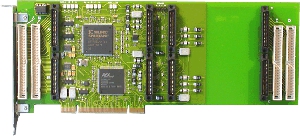
TEWS TPCI200
GE IP-OCTAL-232
My mate Samuel was the lead developer of the kernel drivers. He published some details about this work in his blog some time ago. The drivers are available in latest Linux release (3.6 as of this writing) but if you want the bleeding-edge version you can get it from here (make sure to use the staging-next branch). IndustryPack emulation for QEMU Along with Samuel s work on the kernel driver, I have been working to add emulation of the aformentioned IndustryPack devices to QEMU. The work consists on three parts: I decided to split the emulation like this to be as close as possible to how the hardware works and to make it easier to reuse the code to implement other IndustryPack devices. The emulation is functional and can be used with the existing Linux driver. Just make sure to enable CONFIG_IPACK_BUS, CONFIG_BOARD_TPCI200 and CONFIG_SERIAL_IPOCTAL in the kernel configuration. I submitted the code to QEMU, but it hasn t been integrated yet, so if you want to test it you ll need to patch it yourself: get the QEMU source code and apply the TPCI200 patch and the IP-Octal 232 patch. Those patches have been tested with QEMU 1.2.0. And here s how you run QEMU with support for these devices:
$ qemu -device tpci200 -device ipoctal
The IP-Octal board implements eight RS-232 serial ports. Each one of those can be redirected to a character device in the host using the functionality provided by QEMU. The serial0 to serial7 parameters can be used to specify each one of the redirections. Example:
$ qemu -device tpci200 -device ipoctal,serial0=pty
With this, the first serial port of the IP-Octal board ( /dev/ipoctal.0.0.0 on the guest) will be redirected to a newly-allocated pty on the host. LinuxCon Europe Having virtual hardware allows us to test and debug the Linux driver more easily. In November I ll be in Barcelona with the rest of the Igalia OS team for LinuxCon Europe and the KVM Forum. I will be talking about how to use QEMU to improve the robustness of device drivers and speed up their development.. Some other Igalians will also be there, including Juan Su rez who will be talking about the Grilo multimedia framework. See you in Barcelona!

Stefano Zacchiroli: put some Debian salt in the Ubuntu charity marathon

Fellow geeks of the Canonical community team will be doing something pretty weird this week. They're fund-raising for charity, for causes ranging from environment to autism, from homeless support to kids education, from poverty fight to water supplies. But that's not weird. What's weird is that the fund-raising will culminate in a 24-hour work marathon stream live, which will kick off tomorrow (Thursday) at 10:00 UTC. As I like charity, and as I like contributing to Free Software, I gladly accepted to rely here a challenge to the Debian community by one of the marathon "horsemen", Michael Hall: Raising the stakes, Nick Skaggs has decided to propose a similar challenge: Wanna take the challenge? And how about the other 4 horsemen? No challenges to the Debian community? Feel free to leave a comment and I'll raise the stakes even more, updating the list above. Update 4/10/2012, 13:35 +0200: Daniel Holbach added his own challenge to the Debian community:

Petter Reinholdtsen: Why is your local library collecting the "wrong" computer books?

I just read the blog post from Tim Retout about the computer science book collection available in his local library, and just wanted to share my comment on his theory about computer books becoming obsolete so soon. That is part of the reason why the selection is so sad in almost any local library (it is in mine too), but I believe the major contributing factor is that the people buying books to the library have no way to know a good and future computer classic from trash. And they need to know which one will become a classic in the future, as they would normally buy one of the recently published books. During my university years, I worked for a while at the university library, and even there the person in charge of buying computer related books (and in fact any natural science related book), did not know enough about computers to make a good educated guess. Once, just before Christmas, they had some leftover money on the book budget and I was asked if I could pick out a lot of computer books in the university book store, for the library to buy for their collection. I had a great time picking all the books I dreamt of buying and reading, and the books I knew were classics (like most of the Stevens collection). I picked several of the generic O'Reilly books (ie documenting protocols, formats and systems, not specific versions of products) and stayed away from the 'teach yourself X in N days' class. I had a great time, and probably picked out more than a hundred books for the library that evening. The sad fact is that there is no way a overworked librarian is going to know that for example The Practice of Programming is a must-have in any computer library, and they will most of the time end up picking the wrong books to buy. Perhaps you can help your local library make better choices by giving the suggestions for books to get? I know they would love to hear from you, even if their budget might block them from getting your favourite book right away.

Kumar Appaiah: A backup workflow with bup

It's important to back things up. You should also make your life easier by using some good software. I use obnam for some backups, but I wanted to try out bup for a new backup workflow I needed. I will describe the workflow here.The situation: I have a laptop with things to be backed up. I also have a Raspberry Pi which I use as a network attached storage (it has a 1 TB external drive attached to it) and runs Raspbian Wheezy on it. Naturally, you can do this on any NAS running some GNU/Linux variant. In addition, I also have an external portable USB hard disk where another backup copy will be stored. How do I automate this?Here is how I went about this process. First, for the Raspberry Pi:
  1. First, identify the directory or directories to be backed up. To keep this simple, the directory I am backing up is /home/kumar/Work.
  2. On the Raspberry Pi, install bup. If you want to build it from the git clone, you would need python-dev, and pandoc for the documentation.
    sudo aptitude install pandoc python-dev
    git clone git://github.com/apenwarr/bup.git
    cd bup;make;sudo make install
    
  3. Initialize the backup directory on the Raspberry Pi:
    BUP_DIR=/home/kumar/BACKUPS bup init
    BACKUPS is the place where bup is asked to store the backups (much like it's analogue of .git). You can store all your backups within this directory, and you can still classify backup sets within this directory with different names (much like git branches).
  4. On the local machine, initialize the backup directory.
    bup index -uv /home/kumar/Work
  5. Back it up. This will take time the first time, if the Work directory has several contents within it.
    bup save -r kumar@<raspberry_pi_ip_address>:BACKUPS -n workbackup /home/kumar/Work
    
    workbackup is the name of the backup set. This can be paperbackup or databackup or notesbackup so that several classes can be backed up within the BACKUPS directory.
  6. Now, you have backed things up. Make changes in the Work directory. For instance, add/edit/remove/move some files.
  7. Rerun the index and save commands from steps 4 and 5 above. Enjoy the speedup and ability to rewind to the previous state.
  8. Test restoration of ONE directory of backup (just to save time) on Pi itself directly on the Pi:
    bup -d /home/kumar/BACKUPS/ restore -C /tmp/ /workbackup/latest/home/kumar/Work/offset-coupling-params
    
    Then scp it back if you need it.
  9. Alternative: Use fuse. On the Pi:
    sudo aptitude install python-fuse
    sudo adduser kumar fuse
    mkdir Mount
    bup -d /home/kumar/BACKUPS fuse Mount
    Then cd into Mount and cp/scp the correct files wherever.
    fusermount -u Mount
    
  10. Once happy, write the bup index/bup save commands into a script and run it periodically to back up (check this at the end of the post). Have fun.
Next, to prepare the external hard disk, I went with the old-style autofs automounting solution:
  1. To automount the disk, in /etc/auto.master, add
    /auto			/etc/auto.misc	--timeout=60
    
  2. In /etc/auto.misc add:
    backupdrive	-fstype=btrfs	:UUID="7927a7ab-8c3f-4198-bd73-d3cc519a9ac3"
    
    fstype may need changing for your file system, and UUID can be found using blkid on the exact partition of the hard disk you wish to back up to.
  3. Initialize the backup directory:
    sudo mkdir /auto/backupdrive/BACKUPS
    sudo chown kumar.kumar /auto/backupdrive/BACKUPS
    bup -d /auto/backupdrive/BACKUPS/ init
    
  4. Index and back up:
    bup -d /auto/backupdrive/BACKUPS/ index -uv /home/kumar/Work
    bup -d /auto/backupdrive/BACKUPS/ save -n workbackup /home/kumar/Work
    
  5. Make changes in the Work directory. Add/edit/remove/move files.
  6. Rerun index and save commands from step 5. Enjoy the speed.
  7. Test restoration of ONE directory of backup from removable disk:
    bup -d /auto/backupdrive/BACKUPS/ restore -C /tmp/ /workbackup/latest/home/kumar/Work/offset-coupling-params
    
  8. Once happy, write the bup index/bup save commands into a script and run it periodically to back up. Have fun.
Finally, a quick script to automate all of the above.
#!/bin/sh
bup index -u /home/kumar/Work
bup save -r kumar@<raspberry_pi_ip_address>:BACKUPS -n workbackup /home/kumar/Work
if ls /auto/backupdrive/ 2> /dev/null;then
    echo Backing up to the removable disk...
    bup -d /auto/backupdrive/BACKUPS/ index -u /home/kumar/Work
    bup -d /auto/backupdrive/BACKUPS/ save -n workbackup /home/kumar/Work
    echo Backed up to the removable disk! Yay!
else
    echo WARNING: Not backing up to the removable disk
fi
What this script does it, it backs up to the NAS, and then checks if the external disk is connected. If the disk is mounted, then it backs up to that disk as well. It might be a good idea to cron or anacron this script, or have someone remind you to run this periodically. The only limitation I have is that you can't use bup restore to restore from a remote repository yet, but that isn't a huge issue for me now. In addition, metadata is not stored by the bup save/restore commands. You would have to use split and join with tar to get that. However, bup is fast moving, so I'd expect these features soon. Till then, this workflow works all right for data only backups.Although this is just a mental dump of the procedure I made for myself, suggestions for improvement are welcome. Thanks.

2 October 2012

Tim Retout: The Library - a challenge

I visited my local library at the weekend, on a whim. (The weekend before, I'd been to the British Library for the first time, so I guess this inspired me.) The computing sections at public libraries do not tend to inspire me, on the whole. Southampton's is actually relatively good - there are four tall bookcases assigned to computing, although one is introductory IT (Word and Excel), and another seems to be assigned to graphic design (Photoshop). Still, the two in the middle do have some programming texts - you just have to work around "Red Hat Linux 7 for Dummies" and the like. I think the trouble is, computing books become obsolete so quickly; you don't get point releases of Shakespeare every six months. I also suspect the low demand for serious computing texts creates a vicious circle, where the type of people who might want that sort of thing know better than to look in the library for it. It got me thinking - could this be changed? Could I change it?

Tim Retout: Enscript 1.6.6

The other day, I released GNU Enscript 1.6.6. You should all go and send me bug reports. It's basically the same as the 1.6.5.90 release, but more official. (I'm bored of the long version numbers - maybe I ought to knock a decimal point off.)

Michael Stapelberg: Hello Planet Debian

Hello Planet Debian. This post serves as a confirmation that my feed/blog setup is working. I am a DD since a few months and will blog occasionally about my Debian activities.

Andrea Veri: An interview with Allan Day

A few days ago I had the great pleasure to interview Allan Day, GNOME designer and enthusiastic contributor. Me: Hello Allan, mind presenting yourself? Allan: I m a designer working on the GNOME Project. I ve been involved for quite a few years now. Last year I was lucky to be hired by Red Hat to work in their Desktop Team. Me: Can you tell us something more about GNOME 4? Can we alias it GNOME OS? Allan: GNOME 4 isn t something that is being seriously considered right now, at least as far as I m aware. Those of us in the GNOME Project are thinking about the future though, and have been setting some big goals for the next few years. Who knows, maybe those things will lead to a big new version? It s probably too soon to tell though. Me: Which new features will be introduced in the incoming GNOME 3.6, and what about GNOME 3.8? Allan: 3.6 is already out, so you can read the release notes if you want to find out about it. I was really happy with it, and the last release had quite a lot of new features. My personal favourites where the input sources work, the Lock Screen and the work we need on notifications and the Message Tray. Oh, and I m really pleased with the new Clocks application that we released a preview of. Members of the community are still proposing features for 3.8, so it s a little early to say what we will be working on for the next six months. I think I d be happy if we can continue to polish the core user experience, and hopefully get some more new applications off the ground. Me: GNOME Fallback is due to be completely dropped, are you in favor of that choice and why? Allan: I think that s mostly a technical discussion, and I m not a developer. Also, GNOME needs to have an open discussion about that question as a community which is something we might be doing at this year s Boston
Summit. What I would say is that it is important for us to deliver high quality user experiences, so if fallback mode isn t good enough, or if it is holding back the primary GNOME 3 UX, then we obviously need to think about what needs to happen. Me: Ubuntu has recently released the first two Alphas of the Ubuntu GNOME Remix, do you think this will strengthen the cooperation between GNOME and Canonical as in the past? Allan: As far as I understand it, the GNOME Remix is a community effort, and isn t coming from Canonical itself. That said, we always want to see more involvement in GNOME by Canonical and Ubuntu. Me: Do you see anything in the current GNOME 3 that would require an improvement? and can you add a few words about the brand new login screen recently introduced? Allan: GNOME 3 is getting better all the time, and I m particularly pleased with the latest version. That said, there is plenty of work still to do. I think the big area for us right now is to filling the missing blanks in our application story, so we have a suite of consistent core applications. That will enable people to access content more easily, and will serve as a springboard for other new GNOME applications. What to say about the Lock Screen?! Well, it was originally conceived as something that is like a screensaver, but is really really useful (rather than just looking pretty). We wanted something that looks cool when the machine is locked, but we also wanted to add plenty of features on top, like having media playback controls and built-in notifications. The idea is to make some things possible without having to enter a password, like pausing your music or checking to see if you have received any emails. Me: Many have argued new contributors most of the times aren t redirected correctly to their area of interest, thus they lose interest in contributing and leave. Do you feel anything could be improved in how GNOME welcomes new contributors? Allan: That s a good observation. I agree that one of the hardest things about contributing to open source projects is finding the right place to start. In GNOME we are working to help with this, such as through new mentoring schemes, but there is certainly more that we could do. One thing would be to run more online events, like bug days. Another thing is advertising good tasks for newcomers; we do some of that, but we could be better at it. Me: Anything else you would like to add? Allan: Just that anyone is always welcome in GNOME! That s what we re about really creating opportunities for people, having fun and making great technologies.

Next.

Previous.