Search Results: "ed"

2 November 2012

Lisandro Damián Nicanor Pérez Meyer: Is your KDE slooooow? Check your loopback interface

While digging Debian Qt-KDE's bugs, it has become more common to find people reporting that their KDE is very slow. Most of the time (if not every time) it turns out that the loopback interface is down. Sometimes the user did something wrong, sometimes some network manager, but the end result is the same: KDE is terribly slow.

A user filled a bug upstream to ask for a dialogue in KDE that warns the user about this fact. Let's hope it get's implemented :-)

OK, so, how do I check that my lo interface is up?

You can simply run:

$ /sbin/ifconfig
eth0 Link encap:Ethernet HWaddr 00:1f:c6:ba:70:f3

lo Link encap:Local Loopback
inet addr:127.0.0.1 Mask:255.0.0.0
inet6 addr: ::1/128 Scope:Host
UP LOOPBACK RUNNING MTU:16436 Metric:1
RX packets:1807 errors:0 dropped:0 overruns:0 frame:0
TX packets:1807 errors:0 dropped:0 overruns:0 carrier:0
collisions:0 txqueuelen:0
RX bytes:494525 (482.9 KiB) TX bytes:494525 (482.9 KiB)

The last entry "lo" tells us that the interface is up.

In Debian, the file /etc/network/interfaces should have something like:

# The loopback network interface
auto lo
iface lo inet loopback

So, next time you find a KDE session is slow, you know what to do ;-)

1 November 2012

Michal Čihař: Weblate brings source strings checks and review

Weblate 1.3 will bring several new features. One of recently implemented parts is source strings review. Translators quite often find some problems with original string. Be it typo, wrong wording or simply the message is hard to understand. In Weblate 1.3 they will have an option to push feedback to developers. The feedback is stored within Weblate and optionally can be sent to configured email. In addition to this, there are now checks for source strings as well, which might help you to improve quality of them. New checks are of course covered in the documentation. You can already try current Weblate on http://demo.weblate.org/, though there are still some things which need polishing.

Filed under: English Weblate 0 comments Flattr this!

Antoine Beaupr : My short computing history

This is a long story. I wanted to document which tools I used on my desktop, but then realized it was difficult to do this without an historical context. This therefore, became a history of my computer usage and programming habits.

Before the desktop: vic 20 and apple My first contacts with computers were when my uncle showed me his Apple computers at his home. He was working at UQAM and had access to all sorts of crazy computers. My memory is vague, but I believe he showed me a turtle moving around the screen, which I suspect was Logo, and some rabbit game which I was quite fond of. Later, I hooked up with a Vic-20 (similar to a Commodore 64) and typed in my first programs. Back then, you would painstakingly transcribe the program from a book into the screen, type RUN at the end and really hope that you didn't make a typo. You could also read and write data off audio tape with an external tape drive, which was really amazing. To put things into perspective, the Vic-20 would plug into your television for a display, and the computer was "in the keyboard". Old school shit. The language was BASIC, which was awful. Later, we got luxurious and had the privilege of a Macintosh Plus computer. 3000$ plus the printer, that was quite something. Still, that modern system could run Word, had games, and a 9" black and white screen. But the best part, and where I really started to learn to program, is with Hypercard, the crazy software written by Bill Atkinson that became the inspiration for wikis, the Myst computer game and, to a certain extent, popularized the concept of hyperlinking, which is the basic principle of the World Wide Web.

The early years: afterstep and FreeBSD But my real computer life all started with FreeBSD 2.2.x (probably 2.2.5), around 1997, when I installed my first FLOSS operating system. This was just amazing: source code for everything, down to the compilers themselves, I was amazed, since I was coming from a Mac (still had that Mac Plus lying around) and Windows (95!) world. Back then, X11 (XFree86, it was called) was a fantasy. Something I would compile with the FreeBSD ports system and sometimes would be able to run. Window managers were some weird things I wasn't sure how to use, but I figured out twm (yuck!) but was still amazed. At the university, we had SGI workstations (remember the Indigo machines?) on which I started setting up the Afterstep window manager, which I used for a long time. The web browser was Netscape Communicator 4, and lo and behold, it also did email, although I mostly used Pine over a modem terminal to the university. Internet access at home was spotty and was dependent on students compiling discreetly copies of slirp which were allowing us, in a really clunky way, to run a PPP session over those terminal lines. That actually got my account suspended because I messed up my sendmail configuration and was sending emails that appeared to be coming as , which freaked out the sysadmins that be over there. The hardware was a Pentium 166Mhz with 32MB of ram and 20GB of disk space, which was a huge improvement over the 1MB of ram and 20MB of (external!) hard disk that the Mac Plus was proud of. By then, I started programming in more languages: I learned the basics of shell scripting, C programming and I had learned Pascal in a college class.

The real freedom: Debian and... enlightenment? I then switched to Debian, thanks to my friend scyrma, which showed me the power of dselect which, for a FreeBSD user, was really impressive. Imagine that: you could just install software and all dependencies without compiling anything! ;) I don't exactly remember when that was, but it was probably Woody. I probably still used afterstep, but at that time, changing window managers was like changing t-shirts and we would waste countless hours fiddling around with borders and background images and other silly things. I remember running Enlightenment and writing software for it, for example, but not much else. Back then, email was still over pine, but a new web browser was rearing its ugly head, Mozilla, and was quickly trimmed down to Phoenix, shortly lived as Mozilla Firebird, only to be finally renamed Mozilla Firefox, and was unleashed as a stable release to an unsuspecting Internet Explorer and Microsoft-dominated world. Throughout this chaos, I also used various Mozilla derivatives like Galeon since all of this was pretty unstable and heavy for my poor computers. This was probably around 2002 to 2005. By then, I had formal classes on programming languages, was forced to learn Java, discovered C++, and learned more C as the university assumed that you knew that language in the data structures and algorithm class, which some students really didn't find funny at all. I also learned some Prolog and Haskell back then. Through my experiences with free software, I discovered various eclectic programming languages like TCL, and kept an eye out for other languages like lisp (thanks to Emacs), Forth (thanks to the FreeBSD boot loader), HTML/CSS/Javascript (no thanks to the web). There are probably others I am forgetting here, voluntarily or not.

The years of the desktops: rox, sawfish and gnome Another stable increment on my desktop was the use of the sawfish window manager and the rox desktop, mostly because of the awesome Rox file manager that had no equal in the rest of the free software world. Gnome was an atrocity and KDE even more so: bloated and unstable. Eventually, however, KDE and Gnome not only matured, but simply took over the whole of the graphical environment psyche of the free world. People nowadays don't even know what a window manager is and assume that you now have a "desktop environment", which, for me, is a real desk with a bunch of papers, a radio transceiver and maybe a computer with a screen lying around. So I did use KDE, and then Gnome. I switched from KDE to Gnome because I felt that Gnome left me more space to run my own stuff without starting crazy daemons to preload everything. At this point, Firefox was the new thing and basically stable enough for daily use. This lasted until around 2009, I guess. On the programming side, I had picked up Perl because I had to learn it to work at Ericsson (don't ask) and learned PHP to pay my rent, which I consider one of the biggest professional mistakes I have made so far in that story. It is around that time that Koumbit was founded by me and other friends.

The tiles fall on the gnomes: awesome desktop and sysadmin programming At some point, friends (mostly comar and millette) introduced me to wmii as the best thing since sliced bread. I banged my head against it with great pains, but I really enjoyed the hands off approach to window management. Tiling window managers really got a hold on me there, and in fact we can say on the whole desktop, with recent Gnome 3 taking up some tiling concepts itself. I have since then switched to the Awesome Window Manager which is probably the worst name you can use for software (try googling for "Awesome crash" to get an idea). I have switched from Firefox to Chromium, after having repeated crashes from Firefox on a site that Chrome would load fine. I was expecting Chrome to crash only one tab, because of its design, and it turned out to not crash at all, and I have since given up on Firefox totally. I have also given up on desktop environments. While I have given them a chance in quick setups and still use them when forced to, I find them too bloated and single-minded for my needs. I want control over my desktop, and those tools work very hard to remove control and hide it behind user interfaces that treat me like a brain-dead dog. Finally, I have kept on programming in PHP for work, because that's what we do over there (unfortunately). Mostly because of Drupal and Aegir, in which I was and still am deeply involved. But I am quite fond of Python for my personnal project and still use shell scripting to get myself out of trouble or automate data processing from time to time. I have a rule though: once a program hits 100 lines of shell scripting, it needs to be rewritten, usually in Perl because the syntax is closer. During the years 2009 to 2012, I have started to work more and more on system administration however. In 2010, I became a Debian Developer and a lot of my work at Koumbit revolves around system administration, optimisation and maintenance. I work oncall and sometimes get called during the night to nurse servers (which is why I am up writing this right now).

The future of programming I have become seriously disgruntled with programming. I have seen the emergence of the web, where programmers felt it was relevant to rewrite 30 years of programs into the web framework (webmail? wtf?), and now we are seeing the same thing happen with mobile devices, the tracking devices they call phones and "pads", we should rather say. And again they are trying to make people pay for trivial software. I am tired of seeing our community reinvent the wheel every 10 years because of infatuated egos and marketing sprints. We are wasting great minds on this, a lot of energy and precious time. I would rather maintain 5 year old imperfect software than coordinate a 5 year project to rewrite that software into another imperfect software. That is what is happening right now, and it's going nowhere. So here's the current state of affairs, some perls, some tiles, but mostly system administration and less programming. Through all this time, the common pattern is that I have learned to solve problems and document my work, which are key concepts of the job of a system administrator, which is what I really am now. Somehow, that popped into my life like a natural fit. Maybe, one day, I will retire and become a shepherd in far away mountains, but I will always have in my mind the strong desire to fix shit up and make things right with the world. Maybe get involved in a project like Open Source Ecology and especially their Global Village Construction Set to make sure humankind survives all that stupidity.

Rog rio Brito: Another meme: The Geek test

I was with some spare time a few days ago and I took one of those stupid tests that are so popular in the Internet. Well, here are the results, saying that I am, indeed, a Geek, which does not surprise me that much. :)
NerdTests.com says I'm a Cool Nerd King.  Click here to take the Nerd Test, get geeky images and jokes, and write on the nerd forum!
I did expect my Math score to be higher than everything else (I'm only in the 90th percentile with respect to this), while I am high on the Computer side of things (in the 97th percentile). I guess that I should devote myself to more Mathematics and writing less code. :)

31 October 2012

Yves-Alexis Perez: Update on OpenPGPv2 smartcards

After some feedback from other people, I have an important update to make on my last post. As I said, what decided me to eventually buy an OpenPGP smartcard was that it supported 4096 bit keys, so it would fit my 4096R/71EF0BA8 key. In the end, it seems it's a little more complicated than that. 4096R keys are indeed supported, as far as signing and authentication are concerned. But encryption keys seem limited to 3072 bits (or maybe more, I didn't test toroughly). When trying to decrypt some stuff encrypted for a 4096R key on the smartcard, gpg fails with some general error . It has already been reported here, but no news since. In my case, it's not that bad, I decided to go for 2048R for all subkeys. But if you desperately need 4096 bit encryption key, OpenPGPv2 smartcards might not be the right solution for you. I have no idea if the problem lies in GnuPG or in the smartcard, and I can't really find much information on this.

Benjamin Mako Hill: Time to Boot

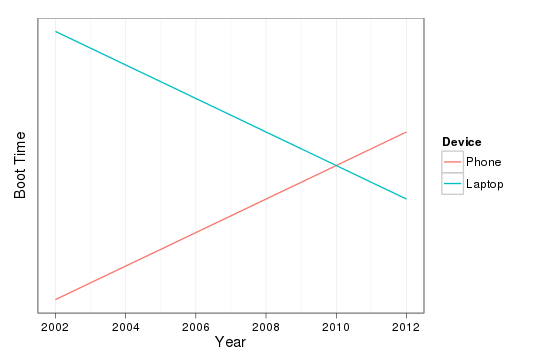
Last weekend, my friend Andr s Monroy-Hern ndez pointed out something that I've been noticing as well. Although the last decade has seen a huge decrease in the time of it takes to boot, the same can not be said for the increasing powerful computer in my pocket that is my phone. Graph showing increasing boot-times for phones and decreasing boot-times for laptops. As the graph indicates, I think my cross-over was around 2010 when I acquired an SSD for my laptop.

Mirco Bauer: Mono 3.0 Preview Packages for Debian and Ubuntu

Just after the Mono 3.0 release was announced I started working on Debian packages and after a couple of days of hard work I already have some preview packages for you. The preview packages are currently limited to the AMD64 architecture but can be installed on Debian/Testing (Wheezy), Debian/Unstable (Sid) and Ubuntu/Quantal (12.10). After these preview packages have received some successful feedback (please leave feedback via comments!), I will upload them to Debian/Experimental. In case you are shocked why I have packages in just 8 days after the official Mono 3.0 release, there are 3 factors that play a big role:
  1. New packaging workflow
    • Downstream patches are management in git branches
    • Release Early, Release Often: I no longer port and test every patch very carefully (especially with architecture specific patches), instead I port them with my best knowledge and upload them to debian.meebey.net and/or Debian/Experimental and use that as test ground. If regressions happen, let them happen, and make further uploads to address them.
  2. New packaging style
  3. Sponsored packaging
    • As my employer needs Mono packages for an upcoming software project, I was granted to work on Mono packages in worktime.
Install instructions OBLIGATORY WARNING: DO NOT USE THESE PREVIEW PACKAGES ON PRODUCTION SYSTEMS NOR BLAME ME IF YOUR MONO SOFTWARE NO LONGER WORKS! Add this line to your /etc/apt/sources.list file:
deb http://debian.meebey.net/experimental/mono /
Now update the APT database and install mono-complete from that repository:
apt-get update
apt-get install mono-complete

Raphael Geissert: rsync is not enough

Ask how can one create a Debian mirror and you will get a dozen different responses. Those who are used to mirroring content, whether it is distribution packages, software in general, documents, etc., will usually come up with one answer: rsync.

Truth is: for Debian's archive, rsync is not enough.

Due to the design of the archive, a single call to rsync leaves the mirror in an inconsistent state during most of the sync process.
Explanation is simple: index files are stored in dists/, package files are stored in pool/. Sort those directories by name (just like rsync does) and you get that the indexes will be updated before the actual packages are downloaded.

There are multiple scripts out there that do exactly that, one of them in Ubuntu's wiki. Plenty more if you search the web.

Now, addressing that issue shouldn't be so difficult, right? after all, all the index files are in dists/, so syncing in two stages should be enough. It's not that simple.

With the dists/ directory containing over 8.5GBs worth of indexes and, erm, installer files, even a two stages sync will usually leave the mirror in an inconsistent state for a while.

How about only deferring to the second stage the bare minimum?, I hear you ask.
That is the current approach, but it leads to some errors when new index files are added and used. The fact that people insist in writing their own scripts doesn't help.

Hopefully, some ideas like moving the installer stuff out of dists/ and
overhauling the repository layout are being considered. An alternative is to make the users of the mirrors more robust and fault-tolerant, but we would be talking about tenths if not hundreds of tools that would need to be improved.

In all cases, the one script that is actively maintained, is rather portable, and improved from time to time is the ftpsync script. Please, do yourself and your users a favour: don't attempt to reinvent the wheel (and forget about calling rsync just once).

Russell Coker: Links October 2012

The F Word has an informative post about men commenting on Feminist blogs [1]. Most of it applies to any situation where a member of a powerful group comments on an issue related to a minority group. Near the end they say: I ll also paraphrase and flesh out the most useful piece of advice I ever read, when I made the effort to research white privilege: don t expect the minority to trust you. Trust is earned, and you re just another commenter who they can t tell apart from any other commenter. You re entering someone else s space, where different rules apply. You get to have the rest of the world for people to assume you re a wonderful person. Here, you re just another one of them , and given the track record of them , it s up to you to listen, learn and prove that you re being thoughtful and honestly trying to examine your privilege. Sociological Images has an interesting article on people s perception of the sky colour it seems that the blue sky meme is modern [2]. Charles Stross wrote an interesting article about the possible uses for future low power computers [3]. He gets a bit over-excited about the possibilities for sensing making a tiny computer that can sense so many things isn t going to be easy (DSLRs are big for a reason). But having lots of powerful computers everywhere does provide lots of interesting and potentially bad opportunities. Martin Bekkelund has an interesting article about Amazon wiping DRM infected books that it had sold to a customer without giving a refund or an explanation [4]. If you want to buy ebooks it seems that the sensible thing to do would be to immediately crack them or download them from The Pirate Bay so Amazon can t steal them back. Rebecca Saxe gave an interesting talk about trying to develop methods for conflict resolution through neuroscience [5]. Barry Eisler has written an interesting article about the corruption of journalists [6]. It s really worth reading, some of the methods of corruption apply to even the more casual bloggers. Krebs on Security has an informative article about the Microsoft Tech Support phone scams [7]

Mark Brown: ASoC updates in 3.6

Linux v3.6 was another quiet release for ASoC with just a single notable framework feature being merged:

Mark Brown: UK landline non-security (and Orange clue)

Yesterday when I got in from work I got my second letter in as many months through from BT saying that my account was being closed as my landline was being transferred to another provider. This was the first I d heard of this and it causes a cancellation charge so I called to complain; the first time I did this they said they couldn t tell me anything about who the line had been transferred to. They did tell me that there was no equivalent of PAC or MAC for landlines and that the only thing stopping this happening is the two week delay in implementing. This time BT felt able to tell me that the line had been transferred to Orange so I phoned Orange. Orange told me that the phone number had indeed been transferred to them in the name of someone else. They also said that they had no intention of attempting to carry out any authentication that lines being transferred to them are owned by the person they re being transferred to I explicitly asked them if anyone could just do this for any phone number and they confirmed that this is indeed the case. BT claim they can t block transfers for regulatory reasons; Orange claim this is possible and that I should just do that. I ve asked Orange to put a note on the account (which was the best they claimed they could do) and complained to OFCOM (who won t really talk to me without a formal escalation from the phone providers) but none of this really helps given the gaping security holes in the system. You really should need more information than just the phone number itself to transfer a number. On the slightly bright side I still appear to have phone service; presumably currently paid for by whoever is initiating the transfers.

Paul Tagliamonte: dput-ng -- the next generation of your friendly upload tool

Hello, World! Arno and I have been in the middle of a 3 week long quest to rewrite dput. We feature tons of improvements over the old dput, such as: Support for even core features are treated as plugins, so derivative distributions should be able to add features without maintaining a patch against dput (current situation). In addition, I ve implemented some show-ey post-upload hooks, such as a Twitter plugin. Here s how it s defined:
import twitter
import json
import os
def tweet(changes, profile, interface):
    tweet = "I've just uploaded %s/%s to %s's %s suite #debian" % (
        changes['Source'],
        changes['Version'],
        profile['name'],
        changes['Distribution']
    )
    if len(tweet) > 140:
        tweet = tweet[:140]
    obj = json.load(open(os.path.expanduser("~/.twitter.json"), 'r'))
    t = twitter.Api(
        consumer_key=obj['consumer_key'],
        consumer_secret=obj['consumer_secret'],
        access_token_key=obj['oath_token'],
        access_token_secret=obj['oath_secret']
    )
    t.PostUpdates(tweet)
This file is placed in ~/.dput.d/scripts, as tweet.py, and the plugin def file is placed in ~/.dput.d/processors (since it s a post-upload processor), which looks like:
 
    "name": "Tweet after an upload.",
    "path": "tweet.tweet"
 
I know this sounds confusing, but it s actually quite nice. Check out the plugin in action Feedback, and contributors more then welcome! Documentation is at dput.rtfd.org. It s all a bit pre-beta at the moment, but the authors are using it for all their uploads, and should be stable for users who don t mind a bit of breakage. We ve filed the ITP, and updates on it & and upload will follow shortly. We re just weeding out some final major issues. Should be stable enough for general use in the next 30 days or so.

30 October 2012

Tanguy Ortolo: Supporting GNU MediaGoblin

Gavroche, a purple goblin, holding a poster in his arms and giving it a hug You certainly know Picasa Albums Web and Flickr, two commercial picture hosting services. You probably know a few free software projects that allow people to keep control of their own pictures, such as Gallery, Piwigo, Zenphoto or PhotoShow. GNU MediaGoblin is a similar project, but with some interesting characteristics and features: If you find GNU MediaGoblin as promising as I do, please consider donating!

Nathan Handler: Debian Screencast Challenge

Today in #debian-mentors, a brief discussion about screencasts came up. Some people felt that a series of short screencasts might be a nice addition to the existing Debian Developer documentation. After seeing the popularity of of Ubuntu's various video series over the years, I tend to agree that video documentation can be a nice way to supplement traditional text-based documentation. No, this is not designed to replace the existing documentation; it is merely designed to provide an alternative method for people to learn the material. From past experience, I know that if I were to start making screencasts by myself, I would end up making one or two before getting bored and moving on to a new project. That is why I am posing a challenge to the Debian community: I will make one screencast for every screencast made by someone in the Debian community. These screencasts can and should be short (only a couple of minutes in length) and focus on accomplishing one small task or explaining a single concept related to Debian Development. I discovered a Debian Screencasts page on the Debian wiki that links to Ubuntu's guide to creating screencasts. While I have done some traditional documentation work in the past, I have never really tried doing screencasts. As a result, this will be a bit of a learning experience for me at first. If you are interested in taking me up on this challenge, simply send me an email (nhandler [at] ubuntu [dot] com) or poke me on IRC (nhandler@ freenode,oftc ). This will allow us to coordinate and plan the screencasts. As I mentioned earlier, I have no experience creating screencasts, so if you are familar with the Debian Development processes and think this challenge sounds interesting, feel free to contact me.

Raphaël Hertzog: Auto Mounting Windows Shares in GNOME with Gigolo and gvfs-fuse

The traditional way to mount Windows (or Samba) shares involves hardcoding the credentials in a plain-text file and some /etc/fstab entry to mount it automatically at boot time. If you don t want to store a plain-text copy of your password, you re bound to mount your shares interactively. This is clearly sub-optimal and I thought that there must be a better way to handle this in the context of a GNOME desktop (which already supports connecting to such shares in the file browser). So I looked for a solution and after a bit of googling I found one. Start by installing a few packages:
$ sudo apt-get install gigolo gvfs-fuse
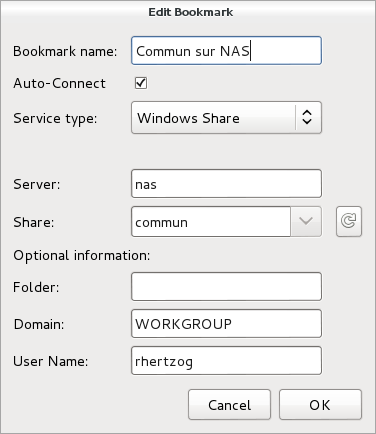
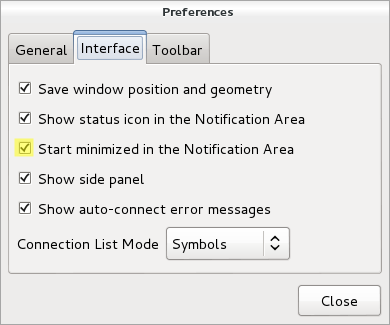
Launch Gigolo, setup your shares as bookmarks and mark them as Auto-Connect . During (first) connection, you will be prompted for your password and you have the possibility to store it in the GNOME keyring (and here it s encrypted, not in plain-text!). You should also configure the Gigolo preferences so that it starts minimized in the system tray (because we re going to run it on session startup):
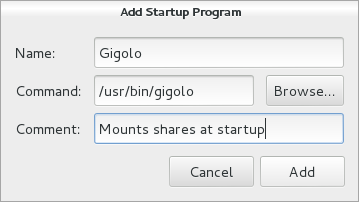
The last step is to ensure that Gigolo is executed at the start of each GNOME session. Unfortunately this GNOME feature is no longer accessible from the control center so you have to execute gnome-session-properties manually (from a terminal or the command line accessible via Alt+F2). Click on Add to add a new startup program: You re done! The main limitation is that those shares are not real mounts, instead they are available within GNOME s virtual file system (GVFS). If you use only 100% GNOME application, then it s not a problem but otherwise it s pretty annoying. You can t cd in those shares from a terminal for example. There s a workaround though, it s called gvfs-fuse and you installed it right at the start of this HOWTO. This service hooks into GVFS and exports all the virtual filesystem(s) in a real fuse-based mount that is automatically setup in ~/.gvfs/. However for this to work, the user must be in the fuse group. So you should run something like this:
$ sudo adduser $USER fuse
By the way, I haven t found a way to use a non-hidden directory so if you want this directory to be more visible, I suggest that you create a symlink pointing to it.
Do you want to read more HOWTO like this one? Click here to subscribe to my free newsletter, you can opt to receive future articles by email.

No comment Liked this article? Click here. My blog is Flattr-enabled.

Wouter Verhelst: The fastest slug in the world (probably)

How fast do slugs travel? Empirical evidence tells me that's about 1 meter per hour1. But not this slug. IMAG0114 As I was driving home from $CUSTOMER, I noticed something on my car. At first I thought it was bird poop, but then bird poop doesn't move. As the animal crawled higher and higher next to my windshield (while I was driving down the highway), I thought it would soon be blown off; but no, it bravely held on. Since it was crawling against my driving direction, that meant it was hurling down the highway at about 119.999 kph. I'm not sure if slugs have emotions; but if they do, the poor animal must've been terribly scared. Since these weird 120kph winds kept blowing on this weird and not very sticky surface that is the rubber and the metal edge to the side of the winshield, the animal kept going until it found that the glass of the windshield itself is actually a very interesting place for it to settle. By that time I had reached a usable exit, so I went off. As I reduced the car's speed once off the highway, the animal had decided that it was fairly nice outside its house now, and was starting to move horizontally along my windshield. Not exactly what I wanted it to do. So I took the above picture with the wrong camera (I remembered a mere few minutes later that I had my DSLR in the back of my car), took it off, and released it into the nearby bushes. Of course, by that time I'd driven several dozens of kilometers away from wherever it was that I picked it up, so the animal will probably never get home again. But hey, I'm sure it'll love the new bushes. 1 Once, over half a lifetime ago, I noticed a slug sitting by the side of the road. Not having much else to do, I sat down and watched it. By the time it had moved some two meters, it had gotten dark and cold, and I went home. At that point, my parents told me they'd started to worry because I was two hours late from school. I could be slightly wrong about the numbers, though. It's been a long time.

Matthew Garrett: A detailed technical description of Shim

Shim is the first stage bootloader we've been implementing for supporting Secure Boot. It's called Shim because it serves as an object to fit the gap between the Microsoft trust root and our own trust root. As originally envisaged it would do nothing other than load and execute appropriately signed binaries, but it's got a little more complicated than that now. It is, however, basically feature complete at this point - I don't expect it to grow significantly further.

(For those of you following along at home, the Shim source code I'm talking about is here)

First, it checks whether the user has disabled local signature verification in check_mok_sb(). This is done by reading the MokSBState UEFI variable and verifying that it has the correct variable attributes, ensuring that it was created in the trusted boot services environment. If so, and if it's set appropriately, signature verification is disabled for the rest of Shim. Shim then pauses for a couple of seconds while displaying a message indicating that it's running in insecure mode.

Next, Shim checks whether the user has set any variables that indicate that a Mok request has been made in check_mok_request(). If so, it launches MokManager. The mechanism by which this is done is described later.

Shim then copies the Mok key database into a runtime variable, which makes it accessible to the kernel (mirror_mok_list()). The kernel can then use the Mok keys when performing module signature verification. Next, as the last step before launching the next stage bootloader, Shim installs a UEFI protocol that permits other applications to call back into Shim. We're now ready to branch off from Shim into the actual bootloader.

To do this, Shim has to do a few things. First, we need to get the bootloader off disk. This involves finding Shim's path, which we can do by opening the loaded image protocol on Shim's image handle, turning that into a string, walking backwards along it until we find a directory separator, stripping the filename and appending the path to the second stage bootloader. This is then turned back into a binary device path, all of this happening in generate_path(). The binary is then read off disk in load_image(), using the simple filesystem protocol. We open the device, open a reference to the file, check how large the file is, allocate a buffer to hold the file and then read it off disk into that buffer. Everything so far has been fairly straightforward, but now things get more complicated.

handle_image() is the real meat of Shim. First it has to examine the header data in read_header(), copying the relevant bits into a context structure that will be used later. Some basic sanity checks on the binary are also performed here. If we're running in secure mode (ie, Secure Boot is enabled and we haven't been toggled into insecure mode) we then need to verify that the binary matches the signature and hasn't been blacklisted.

verify_buffer() has to implement the Microsoft Authenticode specification, which details which sections of the binary have to be hashed and in which order. The actual hashing is done in generate_hash(), which calls into the crypto code to add each binary section to the hashed data. The comments in generate_hash() describe what's going on there clearly enough. The crypto code itself is a copy of the crypto library extracted from the Tiano source tree. It's a relatively thin layer on top of OpenSSL, so the code's been fairly well tested.

Once we have the hash, we need to verify the signature. First, we ensure that the Mok database hasn't been modified from the OS (verify_mok()). Next, we check whether the binary's hash or signature have been blacklisted (check_blacklist()). This is done for each of the SHA1 and SHA256 hashes of the binary (the two hashes implemented in Tiano) and the certificate. If any of these match an entry in the dbx variable or a built-in blacklist, Shim will refuse to run them. Next, we simply do the same for the whitelist. If the binary's hash is either in the db variable or the Mok list, or if it's signed with a certificate that chains back to an entry in either db or the Mok list, we'll run it. Finally, the signature is checked against any built-in keys. Certificate verification is carried out with the AuthenticodeVerify() function, which again comes from Tiano's crypto library and is mostly implemented in OpenSSL.

If the binary passed signature validation we return to handle_image() and now load the binary's sections into their desired addresses. That buffer is handed to relocate_coff() which runs through the binary's relocation entries and fixes them up. There's one last subtlety, which is that because we've been fixing this up by hand, the image handle still refers to the shim binary. We fix the ImageBase and ImageSize values in the loaded image protocol to match the newly relocated binary, which is vital because otherwise grub is unable to find its built in modules. Finally, we jump into the binary's entry point. What the binary does next is up to it - if it's a bootloader, there's a good chance that it'll simply launch an OS and we'll never return. If it does return, we restore ImageBase and ImageSize, uninstall the protocol we installed and exit ourselves. If Shim exits (either because the second stage bootloader wasn't present, didn't verify, or exited) then control will simply pass on to the next boot option in the UEFI priority list. If there's nothing else, the platform will do something platform defined.

And that's how Shim works.

comment count unavailable comments

Matthew Garrett: An overview of our Secure Boot implementation

I've written rather a lot about how we're implementing our Secure Boot support, but there's been a range of subtle changes over time. Here's an overview of how it all fits together.Secure Boot and signingSecure Boot is part of the UEFI specification. When enabled, systems will refuse to boot any UEFI executables (such as an OS bootloader) unless they've been signed by a trusted key. The only trusted key effectively guaranteed to be present is Microsoft's, and Microsoft will sign binaries if you have access to the Windows hardware dev center. You gain access to this by purchasing a certificate from Verisign that verifies your identity and then use that to create a developer account at the Sysdev website. Once you've agreed to the legal contracts, you can submit a UEFI executable and Microsoft will then send you back a signed one. The signature is added to the end of the binary, so it's trivial to verify that your executable hasn't otherwise been modified in the process.
Avoiding signing round tripsWe didn't want to have to get binaries re-signed every time we updated our bootloader or kernel, so we came up with a compromise approach. We implemented a shim bootloader (cunningly called "Shim") which is signed by Microsoft and includes a copy of a public key that's under our control. Shim will launch any binary signed with either a key installed in the system firmware or the public key built into it. This allows us to build and sign all other binaries ourselves.
Preventing Secure Boot circumventionSecure Boot is intended to prevent scenarios where untrusted code can be run before an OS kernel. Locking down the boot environment avoids the simple case of using a modified bootloader, and requiring that the kernel also be signed avoids simply booting arbitrary attack code that looks roughly like a kernel but does nothing to prevent the more complex case of using a running kernel to launch another kernel. To do that we've had to restrict the behaviour of the kernel in Secure Boot environments. Direct hardware access from userspace has been blocked, and modules must be signed by a key the kernel trusts.
Providing user control over trustMicrosoft requires that it be possible to modify the key database on all Windows-certified x86 systems, but the UI to do so may be inconsistent and awkward. Suse developed a plan to avoid this, involving adding an additional key database to the system. The user enrols a key from the running OS and enters a password. On the next reboot, shim detects that a key is awaiting enrolment and drops to a prompt. If the user does nothing or just hits enter, the system continues to boot. If the user chooses to enrol a new key, the user is asked to re-enter the password in order to confirm that they're the same user that initiated the original request. If successful, the key is then copied into a boot services variable which cannot be directly modified from the OS. Anything signed with the user's key will then be trusted.
Providing user control over signature verificationSome users (such as kernel developers) may be hampered by Secure Boot - forcing them to sign every new kernel they build is time consuming and unhelpful. Windows-certified x86 hardware will be required to provide an option to disable Secure Boot, but again that UI may be inconsistent. We've added an option where a user can generate a request to disable signature validation, again requiring a password. On next boot the user must explicitly choose the "Toggle signature validation" menu item and will then be requested to enter three randomly chosen characters from their password. After confirmation, signature validation in Shim will then be disabled.
Supporting other distributionsNot all distributions will want (or be able) to sign via Microsoft. They'll be able to take any other signed version of Shim and put it on their boot media. If their second stage bootloader is signed by a key that Shim doesn't trust, Shim will pop up a menu permitting the user to choose to enrol a new key off the install media. The user can select this, navigate a file browser and select the key. After confirmation, the key will be added to Shim's trusted key list. The user can then install the distribution.
Third party modulesThere's two approaches here. The first is for the third party to provide a module key that the user can install into Shim's database. The kernel will import this at boot time and trust any modules signed with it. The second is for the third party to provide a key signed by Microsoft. David Howells has come up with with the idea of utilising this approach of embedding a public key in a pe binary, with the kernel then having support for importing this key, noticing that it's signed by a trusted key and adding it to the kernel keyring.
How about ARM?We're not planning on supporting Secure Boot on ARM, for two reasons. The first is that Microsoft require that it be impossible to disable Secure Boot on ARM, and we don't want to support systems unless it's guaranteed that the user will be able to run what they want. The second is that there's no strong expectation that the signing key used for signing third party UEFI binaries will be present on ARM systems.
What are other distributions doing?As far as I know, Suse and Fedora will be shipping the same code. Ubuntu is shipping an older version of Shim but should pick up the local key management code in the next release. The only significant difference is that Ubuntu doesn't require that kernel modules be signed.

comment count unavailable comments

Matthew Garrett: Getting started with UEFI development

It's not difficult to write a UEFI application under Linux. You'll need three things:


So, let's write a trivial UEFI application. Here's one from the gnu-efi source tree:
#include <efi.h>
#include <efilib.h>
EFI_STATUS
efi_main (EFI_HANDLE image, EFI_SYSTEM_TABLE *systab)
 
        SIMPLE_TEXT_OUTPUT_INTERFACE *conout;
        conout = systab->ConOut;
        InitializeLib(image, systab);
        uefi_call_wrapper(conout->OutputString, 2, conout, L"Hello World!\n\r");
        return EFI_SUCCESS;
 
The includes are fairly obvious. efi.h gives you UEFI functions defined by the specification, and efilib.h gives you functions provided by gnu-efi. The runtime will call efi_main() rather than main(), so that's our main function. It returns an EFI_STATUS which will in turn be returned to whatever executed the binary. The EFI_HANDLE image is a pointer to the firmware's context for this application, which is used in certain calls. The EFI_SYSTEM_TABLE *systab is a pointer to the UEFI system table, which in turn points to various other tables.

So far so simple. Now things get interesting. The heart of the UEFI programming model is a set of protocols that provide interfaces. Each of these interfaces is typically a table of function pointers. In this case, we're going to use the simple text protocol to print some text. First, we get a pointer to the simple text output table. This is always referenced from the system table, so we can simply assign it. InitializeLib() just initialises some internal gnu-efi functions - it's not technically required if we're purely calling native UEFI functions as we are here, but it's good style since forgetting it results in weird crashes.

Anyway. We now have conout, a pointer to a SIMPLE_TEXT_OUTPUT_INTERFACE structure. This is described in section 11.4 of the UEFI spec, but looks like this:
typedef struct _EFI_SIMPLE_TEXT_OUTPUT_PROTOCOL  
    EFI_TEXT_RESET Reset;
    EFI_TEXT_STRING OutputString;
    EFI_TEXT_TEST_STRING TestString;
    EFI_TEXT_QUERY_MODE QueryMode;
    EFI_TEXT_SET_MODE SetMode;
    EFI_TEXT_SET_ATTRIBUTE SetAttribute;
    EFI_TEXT_CLEAR_SCREEN ClearScreen;
    EFI_TEXT_SET_CURSOR_POSITION SetCursorPosition;
    EFI_TEXT_ENABLE_CURSOR EnableCursor;
    SIMPLE_TEXT_OUTPUT_MODE *Mode;
  EFI_SIMPLE_TEXT_OUTPUT_PROTOCOL;
The majority of these are functions - the only exception is the SIMPLE_TEXT_OUTPUT_MODE pointer, which points to the current mode. In an ideal world you'd be able to just call these directly, but sadly UEFI and Linux calling conventions are different and we need some thunking. That's where the uefi_call_function() call comes in. This takes a UEFI function as its first argument (in this case, conout->OutputString), the number of arguments (2, in this case) and then the arguments. Checking the spec for OutputString, we see this:
typedef
EFI_STATUS
(EFIAPI *EFI_TEXT_STRING) (
    IN EFI_SIMPLE_TEXT_OUTPUT_PROTOCOL *This,
    IN CHAR16 *String
);
The first argument is a pointer to the specific instance of the simple text output protocol. This permits multiple instances of the same protocol to exist on a single machine, without having to duplicate all of the code. The second argument is simply a UCS-2 string. Our conout pointer is a pointer to the protocol, so we pass that as the first argument. For the second argument, we pass L"Hello World!\n", with the L indicating that this is a wide string rather than a simple 8-bit string. uefi_call_function() then rearranges these arguments into the appropriate calling convention and calls the UEFI function. The firmware then prints "Hello World!" on the screen. Success.

(Warning: uefi_call_function() does no type checking on its arguments, so if you pass in a struct instead of a pointer it'll build without complaint and then give you a bizarre error at runtime)

Finally, we clean up by simply returning EFI_SUCCESS. Nothing more for us to worry about. That's the simple case. What about a more complicated one? Let's do something with that EFI_HANDLE that got passed into efi_main().
#include <efi.h>
#include <efilib.h>
EFI_STATUS
efi_main (EFI_HANDLE image, EFI_SYSTEM_TABLE *systab)
 
        EFI_LOADED_IMAGE *loaded_image = NULL;
        EFI_GUID loaded_image_protocol = LOADED_IMAGE_PROTOCOL;
        EFI_STATUS status;
        InitializeLib(image, systab);
        status = uefi_call_wrapper(systab->BootServices->HandleProtocol,
                                3,
                                image, 
                                &loaded_image_protocol, 
                                (void **) &loaded_image);
        if (EFI_ERROR(status))  
                Print(L"handleprotocol: %r\n", status);
         
        Print(L"Image base        : %lx\n", loaded_image->ImageBase);
        Print(L"Image size        : %lx\n", loaded_image->ImageSize);
        Print(L"Image file        : %s\n", DevicePathToStr(loaded_image->FilePath));
        return EFI_SUCCESS;
 
UEFI handles can have multiple protocols attached to them. A handle may represent a piece of physical hardware, or (as in this case) it can represent a software object. In this case we're going to get a pointer to the loaded image protocol that's associated with the binary we're running. To do this we call the HandleProtocol() function from the Boot Services table. Boot services are documented in section 6 of the UEFI specification and are the interface to the majority of UEFI functionality. HandleProtocol takes an image and a protocol identifier, and hands back a pointer to the protocol. UEFI protocol identifiers are all GUIDs and defined in the specification. If you call HandleProtocol on a handle that doesn't implement the protocol you request, you'll simply get an error back in the status argument. No big deal.

The loaded image protocol is fairly different to the simple text output protocol in that it's almost entirely data rather than function pointers. In this case we're printing the address that our executable was loaded at and the size of our relocated executable. Finally, we print the path of the file. UEFI device paths are documented in section 9.2 of the UEFI specification. They're a binary representation of a file path, which may include the path of the device that the file is on. DevicePathToStr is a gnu-efi helper function that converts the objects it understands into a textual representation. It doesn't cover the full set of specified UEFI device types, so in some corner cases it may print "Unknown()".

That covers how to use protocols attached to the image handle. How about protocols that are attached to other handles? In that case we can do something like this:
#include <efi.h>
#include <efilib.h>
EFI_STATUS
efi_main (EFI_HANDLE image_handle, EFI_SYSTEM_TABLE *systab)
 
        EFI_STATUS status;
        EFI_GRAPHICS_OUTPUT_PROTOCOL *gop;
        EFI_GUID gop_guid = EFI_GRAPHICS_OUTPUT_PROTOCOL_GUID;
        InitializeLib(image_handle, systab);
        status = uefi_call_wrapper(systab->BootServices->LocateProtocol,
                                   3,
                                   &gop_guid,
                                   NULL,
                                   &gop);
        Print(L"Framebuffer base is at %lx\n", gop->Mode->FrameBufferBase);
        return EFI_SUCCESS;
 
This will find the first (where first is an arbitrary platform ordering) instance of a protocol and return a pointer to it. If there may be multiple instances of a protocol (as there often are with the graphics output protocol) you should use LocateHandleBuffer() instead. This returns an array of handles that implement the protocol you asked for - you can then use HandleProtocol() to give you the instance on the specific handle. There's various helpers in gnu-efi like LibLocateHandle() that make these boilerplate tasks easier. You can find the full list in /usr/include/efi/efilib.h.

That's a very brief outline of how to use basic UEFI functionality. The spec documents the full set of UEFI functions available to you, including things like direct block access, filesystems and networking. The process is much the same in all cases - you locate the handle that you want to interact with, open the protocol that's installed on it and then make calls using that protocol.Building these examplesBuilding these examples is made awkward due to UEFI wanting PE-COFF binaries and Linux toolchains building ELF binaries. You'll want a makefile something like this:
ARCH            = $(shell uname -m   sed s,i[3456789]86,ia32,)
LIB_PATH        = /usr/lib64
EFI_INCLUDE     = /usr/include/efi
EFI_INCLUDES    = -nostdinc -I$(EFI_INCLUDE) -I$(EFI_INCLUDE)/$(ARCH) -I$(EFI_INCLUDE)/protocol
EFI_PATH        = /usr/lib64/gnuefi
EFI_CRT_OBJS    = $(EFI_PATH)/crt0-efi-$(ARCH).o
EFI_LDS         = $(EFI_PATH)/elf_$(ARCH)_efi.lds
CFLAGS          = -fno-stack-protector -fpic -fshort-wchar -mno-red-zone $(EFI_INCLUDES)
ifeq ($(ARCH),x86_64)
        CFLAGS  += -DEFI_FUNCTION_WRAPPER
endif
LDFLAGS         = -nostdlib -znocombreloc -T $(EFI_LDS) -shared -Bsymbolic -L$(EFI_PATH) -L$(LIB_PATH) \
                  $(EFI_CRT_OBJS) -lefi -lgnuefi
TARGET  = test.efi
OBJS    = test.o
SOURCES = test.c
all: $(TARGET)
test.so: $(OBJS)
       $(LD) -o $@ $(LDFLAGS) $^ $(EFI_LIBS)
%.efi: %.so
        objcopy -j .text -j .sdata -j .data \
                -j .dynamic -j .dynsym  -j .rel \
                -j .rela -j .reloc -j .eh_frame \
                --target=efi-app-$(ARCH) $^ $@
There's rather a lot going on here, but the important stuff is the CFLAGS line and everything after that. First, we need to disable the stack protection code - there's nothing in the EFI runtime for it to call into, so we'll build a binary with unresolved symbols otherwise. Second, we need to build position independent code, since UEFI may relocate us anywhere. short-wchar is needed to indicate that strings like L"Hi!" should be 16 bits per character, rather than gcc's default of 32 bits per character. no-red-zone tells the compiler not to assume that there's 256 bytes of stack available to it. Without this, the firmware may modify stack that the binary was depending on.

The linker arguments are less interesting. We simply tell it not to link against the standard libraries, not to merge relocation sections, and to link in the gnu-efi runtime code. Nothing very exciting. What's more interesting is that we build a shared library. The reasoning here is that we want to perform all our linking, but we don't want to build an executable - the Linux executable runtime code would be completely pointless in a UEFI binary. Once we have our .so file, we use objcopy to pull out the various sections and rebuild them into a PE-COFF binary that UEFI will execute.

comment count unavailable comments

Craig Small: procps-ng 3.3.5

Are you using procps 3.3.4? My suggestion is you don t! An API change slipped through which mean if you tried to run procps 3.3.5 on libproc 3.3.4 it did strange things. One of those strange things is ps ax crashes. Top looked rather interesting as well. This in turn upsets the boot sequence around mounting drives so you get a horrible mess. The problem is the testsuite didn t catch it because we re not testing the API yet and the binaries use the libtool hack to use the library in the build directory. Lucky for me I only updated manually the binaries and not the library so I saw it early. procps 3.3.5 was released tonight and it has the SONAME bump ,so we are not at libprocps1 not libprocps0.

Next.

Previous.