Search Results: "xam"

25 April 2020

Reinhard Tartler: Building Packages with Buildah in Debian

1 Building Debian Packages with buildah
Building packages in Debian seems to be a solved problem. But is it? At the bottom, installing the dpkg-dev package provides all the basic tools needed. Assuming that you already succeeded with creating the necessary packaging metadata (i.e., debian/changelog, debian/control, debian/copyright, etc., and there are great helper tools for this such ash dh-make, dh-make-golang, etc.,) it should be as simple as invoking the dpkg-buildpackage tool. So what's the big deal here?

The issue is that dpkg-buildpackage expects to be called with an appropriately setup build context, that is, it needs to be called in an environment that satisfies all build dependencies on the system. Let's say you are building a package for Debian unstable on your Debian stable system (this is the common scenario for the official Debian build machines), you would need your build to link against libraries in unstable, not stable. So how to tell the package build process where to find its dependencies?

The answer (in Debian and many other Linux distributions) is you do not at all. This is actually a somewhat surprising answer for software developers without a Linux distribution development background1. Instead, chroots "simulate" an environment that has all dependencies that we want to build against at the system locations, that is. /usr/lib, etc.

Chroots are basically full system installations in a subdirectory that includes system and application libraries. In order to use them, a package build needs to use the chroot(2) system call, which is a privileged operation. Also creating these system installations is a somewhat finicky process. In Debian, we have tools that make this process easier, the most popular ones are probably pbuilder(1)2 and sbuild(1)3. Still, they are somewhat clumsy to use, add significant levels of abstraction in the sense that they do quite a bit of magic behind the scenes to work hide the fact that privileged operations (need root to run chroot(2), etc.) are required. They are also somewhat brittle, for instance, if a build process is aborted (SIGKILL, or system crash), you may end up with temporary directories and files under userids other than your own that again may require root-privileges to cleanup.

What if there was an easy way to do all of the above without any process running as root? Enter rootless buildah.

Modern Linux container technologies allow unprivileged users to "untie" a process from the system (cf. the unshare(2) system call). This means that a regular user may run a process (and its child processes) in an "environment" where system calls behave differently and provide a configurable amount of isolation levels. This article demonstrates a novel build tool buildah, which is:
  • easy to setup build environment from the command line
  • secure, as no process needs to run as root
  • simple in architecture, requires no running daemon like for example docker
  • convenient to use: you can debug your debian/rules interactively
Architecturally, buildah is written in golang and compiled as a (mostly) statically linked executable. It builds on top a number of libraries written in golang, including github.com/containers/storage and github.com/containers/image. The overlay functionality is provided by the fuse-overlayfs(1) utility.

1.1 Preparation:
The Kernel in Debian bullseye (and in buster, and recent Ubuntu kernels to the best of my knowledge) do support usernamespaces, but leave them disabled by default. Here is how to enable them:
echo kernel.unprivileged_userns_clone = 1   sudo tee -a /etc/sysctl.d/containers.conf
systemctl -p /etc/sysctl.d/containers.conf
I have to admit that I'm not entirely sure why the Debian kernels don't enable usernamespaces by default. I've found a reference on stackexchange4 that claims this disables some "hardening" features in the Debian kernel. I also understand this step is not necessary if you chose to compile and run a vanilla upstream kernel. I'd appreciate a better reference and am happy to update this text.
$ c=$(buildah from docker.io/debian:sid)
Getting image source signatures
Copying blob 2bbc6b8c460d done
Copying config 9b90abe801 done
Writing manifest to image destination
Storing signatures
This command downloads the image from docker.io and stores it locally in your home directory. Let's install essential utilities for building Debian packages:
1: buildah run $c apt-get update -qq
2: buildah run $c apt-get install dpkg-dev -y
3: buildah config --workingdir /src $c
4: buildah commit $c dpkg-dev
The command on line 1 and 2 execute the installation of compilers and dpkg development tools such as dpkg-buildpackage, etc. The buildah config command in line 4 arranges that whenever you start a shell in the container, the current working directory in the container is in /src. Don't worry about this location not existing yet, we will make sources from your host system available there. The last command creates an OCI image with the name dpkg-dev. BTW, the name you use for the image in the commit command can be used in podman (but not the "containers"). See 5 and 6 for a comparison between podman and buildah.
buildah images -a
This output might look like this:
  REPOSITORY                 TAG      IMAGE          ID   CREATED   SIZE             
localhost/dpkg-dev latest b85c34f95d3e 16 seconds ago 406 MB
docker.io/library/debian sid 9b90abe801db 11 hours ago 124 MB

1.2 Running a package build
Now we have a working container with the reference in the variable $c. To use it conveniently with source packages that I have stored in /srv/scratch/packages/containers, let's introduce a shell alias r like this:
alias r='buildah run --tty -v /srv/scratch/packages/containers:/src $c '
This allows you to easily execute commands in that container:
r pwd
r bash
The last command will give you an interactive shell that we'll be using for building packages!
siretart@x1:~/scratch/packages/containers/libpod$ r bash

root@x1:/src# cd golang-github-openshift-imagebuilder

root@x1:/src/golang-github-openshift-imagebuilder# dpkg-checkbuilddeps
dpkg-checkbuilddeps: error: Unmet build dependencies: debhelper (>= 11) dh-golang golang-any golang-github-containers-storage-dev (>= 1.11) golang-github-docker-docker-dev (>= 18.09.3+dfsg1) golang-github-fsouza-go-dockerclient-dev golang-glog-dev

root@x1:/src/golang-github-openshift-imagebuilder# apt-get build-dep -y .
Note, using directory '.' to get the build dependencies
Reading package lists... Done
Building dependency tree
Reading state information... Done
The following NEW packages will be installed:
[...]

root@x1:/src/golang-github-openshift-imagebuilder# dpkg-checkbuilddeps

root@x1:/src/golang-github-openshift-imagebuilder#
Now we have a environment that has all build-dependencies available and we are ready to build the package:
root@x1:/src/golang-github-openshift-imagebuilder# dpkg-buildpackage -us -uc -b
Assuming the package builds, the package build results are placed in /src inside the container, and are visible at ~/scratch/packages/containers on the host. There you can inspect, extract or even install them. The latter part allows you to interactively rebuild packages against updated dependencies, without the need of setting up an apt archive or similar.

2 Availability
The buildah(1) tool is available in debian/bullseye since 2019-12-17. Since is a golang binary, it only links dynamically against system libraries such as libselinux and libseccomp, which are all available in buster-backports. I'd expect buildah to just work on a debian/buster system as well provided you install those system libraries and possibly the backported Linux kernel.

Keeping the package at the latest upstream version is challenging because of its fast development pace that picks up new dependencies on golang libraries and new versions of existing libraries with every new upstream release. In general, this requires updating several source packages, and in many cases also uploading new source packages to the Debian archive that need to be processed by the Debian ftp-masters.

As an exercise, I suggest to install the buildah package from bullseye, 'git clone' the packaging repository from https://salsa.debian.org/go-team/packages/golang-github-containers-buildah and build the latest version yourself. Note, I would expect the above to even work on a Fedora laptop.

The Debian packages have not swept into the Ubuntu distributions yet, but I expect them to be included in the Ubuntu 20.10 release. In the mean time, ubuntu users can install the package that are provided by the upstream maintainers in the "Project Atomic" PPA at https://launchpad.net/~projectatomic/+archive/ubuntu/ppa

3 Related Tools
The buildah tool is accompanied with two "sister" tools:

The Skopeo package provides tooling to work with remote images registries. This allows you download, upload images to remote registries, convert container images between different formats. It has been available in Debian since 2020-04-20.

The podman tool is a 'docker' replacement. It provides a command-line interface that mimics the original docker command to an extend that a user familiar with docker might want to place this in their ~/.bashrc file:
alias docker='podman'
Unfortunately, at the time of writing podman is still being processed by the ftp-masters since 01-03-2020. At this point, I recommend building the package from our salsa repository at https://salsa.debian.org/debian/libpod

4 Conclusion
Building packages in the right build context is a fairly technical issue for which many tools have been written for. They come with different trade-off when it comes to usability. Containers promise a secure alternative to the tried and proven chroot-based approaches, and the buildah makes using this technology very easy to use.

I'd love to get into a conversation with you on how these tools work for you, and would like to encourage participation and assistance with keeping the complicated software stack up-to-date in Debian (and by extension, in derived distribution such as Ubuntu, etc.).

Footnotes:
1
At my day-job, we build millions of lines of C++ code on Solaris10 and AIX6, where concepts such as "chroots" are restricted to the super user 'root' and is therefore not available to developers, not even through wrappers. Instead, libraries and headers are installed into "refroots", that is, subdirectories that mimic the structure of the "sysroot" directories that are used in the embedded Linux community for cross-compiling packages, and we use Makefiles that set include flags (-I rules and -L flags) to tell the compiler and linker where to look.


23 April 2020

Evgeni Golov: Controlling roller shutters using a Shelly 2.5, ESPHome and Home Assistant

Our house has roller shutters on all windows and most of them have an electric motor to open and close them. The motors are Schellenberg shaft motors (not sure this is the right English term), that you can configure end positions for and then by applying current to the right pair of pins they move the shutters up and down until the current is removed or one of the endstops is reached. As the motors were installed over a long period of time, the attached control units varied in functionality: different ways to program open/close times, with and without battery for the clock/settings etc, but they all had something in common: no central management and pretty ugly. We decided to replace those control units with regular 2 gang light switches that match the other switches in the house. And as we didn't want to lose the automatic open/close timer, we had to add some smarts to it. Shelly 2.5 and ESPHome Say hello to Shelly 2.5! The Shelly 2.5 is an ESP8266 with two relays attached to it in a super tiny package you can hide in the wall behind a regular switch. Pretty nifty. It originally comes with a Mongoose OS based firmware and an own app, but ain't nobody needs that, especially nobody who wants to implement some crude logic. That said, the original firmware isn't bad. It has a no-cloud mode, a REST API and does support MQTT for integration into Home Assistant and others. My ESP firmware of choice is ESPHome, which you can flash easily onto a Shelly (no matter 1, 2 or 2.5) using a USB TTL adapter that provides 3.3V. Home Assistant has native ESPHome support with auto-discovery, which is much nicer than manually attaching things to MQTT topics. To get ESPHome compiled for the Shelly 2.5, we'll need a basic configuration like this:
esphome:
  name: shelly25
  platform: ESP8266
  board: modwifi
  arduino_version: 2.4.2
We're using board: modwifi as the Shelly 2.5 (and all other Shellys) has 2MB flash and the usually recommended esp01_1m would only use 1MB of that - otherwise the configurations are identical (see the PlatformIO entries for modwifi and esp01_1m). And arduino_version: 2.4.2 is what the Internet suggests is the most stable SDK version, and who will argue with the Internet?! Now an ESP8266 without network connection is boring, so we add a WiFi configuration:
wifi:
  ssid: !secret wifi_ssid
  password: !secret wifi_password
  power_save_mode: none
The !secret commands load the named variables from secrets.yaml. While testing, I found the network connection of the Shelly very unreliable, especially when placed inside the wall and thus having rather bad bad reception (-75dBm according to ESPHome). However, setting power_save_mode: none explicitly seems to have fixed this, even if NONE is supposed to be the default on ESP8266. At this point the Shelly has a working firmware and WiFi, but does not expose any of its features: no switches, no relays, no power meters. To fix that we first need to find out the GPIO pins all these are connected to. Thankfully we can basically copy paste the definition from the Tasmota (another open-source firmware for ESPs) template:
pin_led1: GPIO0
pin_button1: GPIO2
pin_relay1: GPIO4
pin_switch2n: GPIO5
pin_sda: GPIO12
pin_switch1n: GPIO13
pin_scl: GPIO14
pin_relay2: GPIO15
pin_ade7953: GPIO16
pin_temp: A0
If we place that into the substitutions section of the ESPHome config, we can use the names everywhere and don't have to remember the pin numbers. The configuration for the ADE7953 power sensor and the NTC temperature sensor are taken verbatim from the ESPHome documentation, so there is no need to repeat them here. The configuration for the switches and relays are also rather straight forward:
binary_sensor:
  - platform: gpio
    pin: $ pin_switch1n 
    name: "Switch #1"
    internal: true
    id: switch1
  - platform: gpio
    pin: $ pin_switch2n 
    name: "Switch #2"
    internal: true
    id: switch2
switch:
  - platform: gpio
    pin: $ pin_relay1 
    name: "Relay #1"
    internal: true
    id: relay1
    interlock: &interlock_group [relay1, relay2]
  - platform: gpio
    pin: $ pin_relay2 
    name: "Relay #2"
    internal: true
    id: relay2
    interlock: *interlock_group
All marked as internal: true, as we don't need them visible in Home Assistant. ESPHome and Schellenberg roller shutters Now that we have a working Shelly 2.5 with ESPHome, how do we control Schellenberg (and other) roller shutters with it? Well, first of all we need to connect the Up and Down wires of the shutter motor to the two relays of the Shelly. And if they would not be marked as internal: true, they would show up in Home Assistant and we would be able to flip them on and off, moving the shutters. But this would also mean that we need to flip them off each time after use, as while the motor knows when to stop and will do so, applying current to both wires at the same time produces rather interesting results. So instead of fiddling around with the relays directly, we define a time-based cover in our configuration:
cover:
  - platform: time_based
    name: "$ location  Rolladen"
    id: rolladen
    open_action:
      - switch.turn_on: relay2
    open_duration: $ open_duration 
    close_action:
      - switch.turn_on: relay1
    close_duration: $ close_duration 
    stop_action:
      - switch.turn_off: relay1
      - switch.turn_off: relay2
We use a time-based cover because that's the easiest thing that will also turn the relays off for us after the shutters have been opened/closed, as the motor does not "report" any state back. We could use the integrated power meter of the Shelly to turn off when the load falls under a threshold, but I was too lazy and this works just fine as it is. Next, let's add the physical switches to it. We could just add on_press automations to the binary GPIO sensors we configured for the two switch inputs the Shelly has. But if you have kids at home, you'll know that they like to press ALL THE THINGS and what could be better than a small kill-switch against small fingers?
switch:
  [ previous definitions go here ]
  - platform: template
    id: block_control
    name: "$ location  Block Control"
    optimistic: true
  - platform: template
    name: "Move UP"
    internal: true
    lambda:  -
      if (id(switch1).state && !id(block_control).state)  
        return true;
        else  
        return false;
       
    on_turn_on:
      then:
        cover.open: rolladen
    on_turn_off:
      then:
        cover.stop: rolladen
  - platform: template
    name: "Move DOWN"
    internal: true
    lambda:  -
      if (id(switch2).state && !id(block_control).state)  
        return true;
        else  
        return false;
       
    on_turn_on:
      then:
        cover.close: rolladen
    on_turn_off:
      then:
        cover.stop: rolladen
This adds three more template switches. The first one, "Block Control", is exposed to Home Assistant, has no lambda definition and is set to optimistic: true, which makes is basically a dumb switch that can be flipped at will and the only thing it does is storing the binary on/off state. The two others are almost identical. The name differs, obviously, and so does the on_turn_on automation (one triggers the cover to open, the other to close). And the really interesting part is the lambda that monitors one of the physical switches and if that is turned on, plus "Block Control" is off, reports the switch as turned on, thus triggering the automation. With this we can now block the physical switches via Home Assistant, while still being able to control the shutters via the same. All this (and a bit more) can be found in my esphome-configs repository on GitHub, enjoy!

21 April 2020

Matthew Garrett: Linux kernel lockdown, integrity, and confidentiality

The Linux kernel lockdown patches were merged into the 5.4 kernel last year, which means they're now part of multiple distributions. For me this was a 7-year journey, which means it's easy to forget that others aren't as invested in the code as I am. Here's what these patches are intended to achieve, why they're implemented in the current form and what people should take into account when deploying the feature.

Root is a user - a privileged user, but nevertheless a user. Root is not identical to the kernel. Processes running as root still can't dereference addresses that belong to the kernel, are still subject to the whims of the scheduler and so on. But historically that boundary has been very porous. Various interfaces make it straightforward for root to modify kernel code (such as loading modules or using /dev/mem), while others make it less straightforward (being able to load new ACPI tables that can cause the ACPI interpreter to overwrite the kernel, for instance). In the past that wasn't seen as a significant issue, since there were no widely deployed mechanisms for verifying the integrity of the kernel in the first place. But once UEFI secure boot became widely deployed, this was a problem. If you verify your boot chain but allow root to modify that kernel, the benefits of the verified boot chain are significantly reduced. Even if root can't modify the on-disk kernel, root can just hot-patch the kernel and then make this persistent by dropping a binary that repeats the process on system boot.

Lockdown is intended as a mechanism to avoid that, by providing an optional policy that closes off interfaces that allow root to modify the kernel. This was the sole purpose of the original implementation, which maps to the "integrity" mode that's present in the current implementation. Kernels that boot in lockdown integrity mode prevent even root from using these interfaces, increasing assurances that the running kernel corresponds to the booted kernel. But lockdown's functionality has been extended since then. There are some use cases where preventing root from being able to modify the kernel isn't enough - the kernel may hold secret information that even root shouldn't be permitted to see (such as the EVM signing key that can be used to prevent offline file modification), and the integrity mode doesn't prevent that. This is where lockdown's confidentiality mode comes in. Confidentiality mode is a superset of integrity mode, with additional restrictions on root's ability to use features that would allow the inspection of any kernel memory that could contain secrets.

Unfortunately right now we don't have strong mechanisms for marking which bits of kernel memory contain secrets, so in order to achieve that we end up blocking access to all kernel memory. Unsurprisingly, this compromises people's ability to inspect the kernel for entirely legitimate reasons, such as using the various mechanisms that allow tracing and probing of the kernel.

How can we solve this? There's a few ways:
  1. Introduce a mechanism to tag memory containing secrets, and only restrict accesses to this. I've tried to do something similar for userland and it turns out to be hard, but this is probably the best long-term solution.
  2. Add support for privileged applications with an appropriate signature that implement policy on the userland side. This is actually possible already, though not straightforward. Lockdown is implemented in the LSM layer, which means the policy can be imposed using any other existing LSM. As an example, we could use SELinux to impose the confidentiality restrictions on most processes but permit processes with a specific SELinux context to use them, and then use EVM to ensure that any process running in that context has a legitimate signature. This is quite a few hoops for a general purpose distribution to jump through.
  3. Don't use confidentiality mode in general purpose distributions. The attacks it protects against are mostly against special-purpose use cases, and they can enable it themselves.

My recommendation is for (3), and I'd encourage general purpose distributions that enable lockdown to do so only in integrity mode rather than confidentiality mode. The cost of confidentiality mode is just too high compared to the benefits it provides. People who need confidentiality mode probably already know that they do, and should be in a position to enable it themselves and handle the consequences.

comment count unavailable comments

14 April 2020

Emmanuel Kasper: Recommended keyboard settings for Productivity and Usability, for European Programmers

TLDR: setxkbmap -layout us -variant altgr-intl and become a happier programmer.
The case for QWERTY for European ProgrammersIf you re working on Unix / Linux, or C based programming languages, it can make sense to switch to the qwerty(us) keyboard layout. Why ?
Unix, C, Perl, Java, and most of programming languages have been conceived on QWERTY keyboards.
So when the designers choose special characters to use for the language synthax, they simply choose what was easy to access on their own keyboard. This has been historically documented for the vi editor.

To give an example, using an Unix shell you have to type the dot . and slash / symbols quite often to navigate the filesystem. The two keys producing these symbols, are nicely aligned on a QWERTY layout and do not require a key combination to be entered. So you can quickly enter something like ../.. using a single hand.
Now using a QWERTZ layout, like in Germany / Austria, you have the . symbol easily accessible, but you need to combine two keys ( Shift + 7 ) to get a / .
And if you are a poor soul using an AZERTY layout, to get the . and / symbol you need each time a key combo.
The need of key combos is bad not only for speed (multiple keys to lookup) but also for usability, as you have to stretch your fingers to reach the key if using a single hand, provoking repetitive strain injury. You might be smiling but this is commonly known amongst Emacs Users, due to the prominent use of commands using Ctrl and Alt combos, and led to the creation of an Emacs Ergonomic wiki.

This goes as well for many symbol commonly used in programming languages, think for instance about the semicolon ; for terminating a statement, the [ , and ] symbols for defining an array, and the backslash \ for escaping.
All these keys are accessible via a single keypress on qwerty and require key combos on qwertz and azerty. No wonder Linux, Minix and BSD were invented on non-azerty layouts: in France we were still busy typing the path to the source code, when in other parts of the world people already had the file open in their editor.
You don t need to throw away your existing keyboards when learning the qwerty (us) layout: for a couple of euros, you can find on ebay alternate keys stickers to put on your laptop.
Accessing keys with diacritics with the AltGr International variantNow if you want to switch to a qwerty keyboard layout, and you re French or German, you might wonder how to access the characters with diacritics, the and of French and and of German.
Fortunately there is a very clever keyboard variant for the us layout who uses the AltGr key, to make all these keys accessible, just hiding them behind the AltGr key.
Need ? that s just AltGr + e away. Needs ? That s just AltGr + , Needs ? AltGr +p
See the coolness of that ? You can type all international diacritics in an easy way, and there are even keyboard stickers for that too.

Now how to access to this layout of wonder ?
You can configure the layout and variant in Xorg, in debian/ubuntu that would be entering in /etc/default/keyboard
XKBLAYOUT="us"
XKBVARIANT="altgr-intl"
After restarting the X server, you can check that the settings have been applied with
setxkbmap -print -verbose 10
If using Gnome, you can also set the keyboard layout and variant by changing the schema org.gnome.desktop-inputsources, which will override the desktop-agnostic settings of /etc/default/keyboard.
For this you can either call
dconf write /org/gnome/desktop/input-sources/sources "[('xkb', 'us+altgr-intl')]"
or navigate with the gui tool dconf-settings to org.gnome.desktop-inputsources and set the value there.

If you want to further improve your keyboard layout, you can also have a look at swapping Ctrl and Alt, as described here (French language article) Happy hacking !

Steve Kemp: A collection of simple golang tools

In a previous job I wrote some simple utilities which were helpful for continuous-integration pipelines. Most of these were very very simple, for example: Each of these simple tools were run of the mill shell-scripts, or simple binaries. I've been putting together a simple deployable tool which lets you run them easily, so here it is: The idea is that you install the tool, then run the commands by specify the appropriate sub-command:
sysbox validate-yaml [path/to/find/files/beneath]
Of course if you symlink validate-yaml to sysbox you don't need to prefix with the name - so this is just like busybox in this regard. Might be interesting to some.

13 April 2020

Matthew Garrett: Implementing support for advanced DPTF policy in Linux

Intel's Dynamic Platform and Thermal Framework (DPTF) is a feature that's becoming increasingly common on highly portable Intel-based devices. The adaptive policy it implements is based around the idea that thermal management of a system is becoming increasingly complicated - the appropriate set of cooling constraints to place on a system may differ based on a whole bunch of criteria (eg, if a tablet is being held vertically rather than lying on a table, it's probably going to be able to dissipate heat more effectively, so you should impose different constraints). One way of providing these criteria to the OS is to embed them in the system firmware, allowing an OS-level agent to read that and then incorporate OS-level knowledge into a final policy decision.

Unfortunately, while Intel have released some amount of support for DPTF on Linux, they haven't included support for the adaptive policy. And even more annoyingly, many modern laptops run in a heavily conservative thermal state if the OS doesn't support the adaptive policy, meaning that the CPU throttles down extremely quickly and the laptop runs excessively slowly.

It's been a while since I really got stuck into a laptop reverse engineering project, and I don't have much else to do right now, so I've been working on this. It's been a combination of examining what source Intel have released, reverse engineering the Windows code and staring hard at hex dumps until they made some sort of sense. Here's where I am.

There's two main components to the adaptive policy - the adaptive conditions table (APCT) and the adaptive actions table (APAT). The adaptive conditions table contains a set of condition sets, with up to 10 conditions in each condition set. A condition is something like "is the battery above a certain charge", "is this temperature sensor below a certain value", "is the lid open or closed", "is the machine upright or horizontal" and so on. Each condition set is evaluated in turn - if all the conditions evaluate to true, the condition set's target is implemented. If not, we move onto the next condition set. There will typically be a fallback condition set to catch the case where none of the other condition sets evaluate to true.

The action table contains sets of actions associated with a specific target. Once we've picked a target by evaluating the conditions, we execute the actions that have a corresponding target. Actions are things like "Set the CPU power limit to this value" or "Load a passive policy table". Passive policy tables are simply tables associating sensors with devices and an associated temperature limit. If the limit is exceeded, the associated device should be asked to reduce its heat output until the situation is resolved.

There's a couple of twists. The first is the OEM conditions. These are conditions that refer to values that are exposed by the firmware and are otherwise entirely opaque - the firmware knows what these mean, but we don't, so conditions that rely on these values are magical. They could be temperature, they could be power consumption, they could be SKU variations. We just don't know. The other is that older versions of the APCT table didn't include a reference to a device - ie, if you specified a condition based on a temperature, you had no way to express which temperature sensor to use. So, instead, you specified a condition that's greater than 0x10000, which tells the agent to look at the APPC table to extract the device and the appropriate actual condition.

Intel already have a Linux app called Thermal Daemon that implements a subset of this - you're supposed to run the binary-only dptfxtract against your firmware to parse a few bits of the DPTF tables, and it writes out an XML file that Thermal Daemon makes use of. Unfortunately it doesn't handle most of the more interesting bits of the adaptive performance policy, so I've spent the past couple of days extending it to do so and to remove the proprietary dependency.

My current work is here - it requires a couple of kernel patches (that are in the patches directory), and it only supports a very small subset of the possible conditions. It's also entirely possible that it'll do something inappropriate and cause your computer to melt - none of this is publicly documented, I don't have access to the spec and you're relying on my best guesses in a lot of places. But it seems to behave roughly as expected on the one test machine I have here, so time to get some wider testing?

comment count unavailable comments

9 April 2020

Antoine Beaupr : Mumble dreams

With everyone switching to remote tools for social distancing, I've been using Mumble more and more. That's partly by choice -- I don't like videoconferencing much, frankly -- and partly by necessity: sometimes my web browser fails and Mumble is generally more reliable. Some friend on a mailing list recently asked "shouldn't we make Mumble better?" and opened the door for me to go on a long "can I get a pony?" email. Because I doubt anyone on that mailing list has the time or capacity to actually fix those issues, I figured I would copy this to a broader audience in the hope that someone else would pick it up.

Why Mumble rocks Before I go on with the UI critique, I should show why care: Mumble is awesome. When you do manage to configure it correctly, Mumble just works; it's highly reliable. It uses little CPU, both on the client and the server side, and can have rooms with tens if not hundreds of participants. The server can be easily installed and configured: there's a Debian package and resource requirements are minimal. It's basically network-bound. There are at least three server implementations, the official one called Murmur, the minimalist umurmur and Grumble, a Go rewrite. It has great quality: echo canceling, when correctly configured, is solid and latency is minimal. It has "overlays" so you can use it while gaming or demo'ing in full screen while still having an idea of who's talking. It also supports positional audio for gaming that integrates with popular games like Counterstrike or Half-Life. It's moderately secure: it doesn't support end-to-end encryption, but client/server communication is encrypted with TLS. It supports a server password and some moderation mechanisms.

UI improvements Mumble should be smarter about a bunch of things. Having all those settings is nice for geeky control freaks, but it makes the configuration absolutely unusable for most people. Hide most settings by default, and make better defaults. Specifically, those should be on by default:
  • RNNoise
  • echo cancellation (the proper "monitor" channels)
  • pre-configured shortcut for PTT (Push To Talk) -- right-shift is my favorite
  • "double-PTT" to hold it enabled
  • be more silent by default (I understand why it would want to do voice synthesis, but it would need to be much better at it before it's default)
The echo test should be more accessible, one or two clicks away from the main UI. I have only found out about that feature when someone told me where to find it. This basically means to take it out of the settings page and into its own dialog. The basic UI should be much simpler. It could look something like Jitsi: just one giant mute button with a list of speakers. Basically:
  1. Take that status bar and make it use the entire space of the main window
  2. Push the chat and room list dialog to separate, optional dialog (e.g. the room list could be a popup on login, but we don't need to continuously see the damn thing)
  3. Show the name of the person talking in the main UI, along with other speakers (Big Blue Button does this well: just a label that fades away with time after a person talks)
Some features could be better explained. For example, the "overlay" feature makes no sense at all for most users. It only makes sense when you're a gamer and use Mumble alongside another full-screen program, to show you who's talking. Improved authentication. The current authentication systems in Mumble are somewhat limited: the server can have a shared password to get access to it, and from there it's pretty much free-for-all. There are client certificates but those are hard to understand and the most common usage scenario is that someone manages to configure it once, forgets about it and then cannot login again with the same username. It should be easier to get the audio right. Now, to be fair, this is hard to do in any setup, and Mumble is only a part of this. There are way too many moving parts in Linux for this to be easy: between your hardware, ALSA drivers, Pulseaudio mixers and Mumble, too many things can go wrong. So this is a general problem when doing multimedia in general, and the Linux ecosystem in particular, but Mumble is especially hard to configure in there. Improved speaker stats. When you right-click on a user in Mumble, you get detailed stats about the user: packet loss, latency, bandwidth, codecs... It's pretty neat. But that is hard to parse for a user. Jitsi, in contrast, shows a neat little "bar graph" (similar to what you get on a cell phone) with a color code to show network conditions for that user. Then you can drill down to show more information. Having that info for the user would be really useful to figure out which user is causing that echo or latency. Heck, while I'm dreaming, we could do the same thing Jitsi and tell the user when we detect too much noise on their side and suggest muting! There's probably more UI issues, but at that point you have basically rebuilt the entire user interface. This problem is hard to fix because UX people are unlikely to have the skills required to hack at an (old) Qt app, and C++ hackers are unlikely to have the best UX skills...

Missing features Video. It has been on the roadmap since 2011, so I'm not holding my breath. It is, obviously, the key feature missing from the software when compared to other conferencing tools and it's nice to see they are considering it. Screensharing and whiteboarding would also be a nice addition. Unfortunately, all that is a huge undertaking and it's unlikely to happen in the short term. And even if it does, it's possible hard-core Mumble users would be really upset at the change... A good web app -- a major blocker to the adoption of Mumble is the need for that complex app. If users could join just with a web browser, adoption would be much easier. There is a web app called mumble-web out there, but it seems to work only for listening as there are numerous problems with recording: quality issues, audio glitches, voice activation, voice activation.. The CCC seems to be using that app to stream talk translation, so that part supposedly works correctly. Dial-in -- allow plain old telephones to call into conferences. There seems to be a program called mumsi that can do this, but it's unmaintained and it's unclear if any of the forks work at all. Update: according to samba, mumsi works, but sometimes freezes and needs to be restarted. Each SIP account shows up as a bot that comes up when someone calls the number. It supports multiple callers, although apparently mumsi crashes after a while with 4 callers. A comment here also mentioned there's a fork that mentions using a "pin" as well for dialing in.

Caveats Now the above will probably not happen soon. Unfortunately, Mumble has had trouble with their release process recently. It took them a long time to even agree on releasing 1.3, and when they did agree, it took them a long time again to actually do the release. There has been much more activity on the Mumble client and web app recently, so hopefully I will be proven wrong. The 1.3.1 release actually came out recently(correction:) is actually being worked on, which is encouraging. All in all, mumble has some deeply ingrained UI limitations. it's built like an app from the 1990, all the way down to the menu system and "status bar" buttons. It's definitely not intuitive for a new user and while there's an audio wizard that can help you get started, it doesn't always work and can be confusing in itself. I understand that I'm just this guy saying "please make this for me ktxbye". I'm not writing this as a critic of Mumble: I love the little guy, the underdog. Mumble has been around forever and it kicks ass. I'm writing this in a spirit of solidarity, in the hope the feedback can be useful and to provide useful guidelines on how things could be improved. I wish I had the time to do this myself and actually help the project beyond just writing, but unfortunately the reality is I'm a poor UI designer and I have little time to contribute to more software projects. So hopefully someone could take those ideas and make Mumble even greater. And if not, we'll just have to live with it. Thanks to all the Mumble developers who, over all those years, managed to make and maintain such an awesome product. You rock!

Update: a chat with Mumble folks Update: it seems the idea of simplifying the Mumble interface will take some time to sink in. After presenting this article in the #mumble Freenode IRC channel, it became obvious that having a more usable interface is not a priority. To put it in the words of a participant in the channel:
If someone is too stupid to use a piece of software than they should probably use something else or have someone capable of critical thinking set it up for them. -- meep
So I guess "I'm with stupid": I do not believe we should make software only for "smart" people because that leads to overly complicated and over-engineered user interfaces that are needlessly hard to use and configure. Mumble is actually an excellent example of such programs: powerful software, but too hard to use to actually reach critical mass. Thankfully, meep is not a Mumble developer and does not actually represent the official position of the Mumble project. A core developer (not representing the project either) was more nuanced:
The UI being not up to date is a matter of taste. The kind of UI you are describing is the kind of UI I certainly don't want. More gernally though I agree that the UI needs some rework and especially: Flexibility so that each user can (ideally) make it appear as (s)he wants. Before this can happen though, we'll have to rewrite a fair bit of code as we'll have to separate backend and frontend from one another. -- krzmbrzl
So this will take time. The fact that Qt seems to be moving back to closed-source does not help the situation with Mumble's GUI development, unfortunately. But the other hand, maybe it will provide the necessary "kick" to write a new, simpler GUI.

8 April 2020

Louis-Philippe V ronneau: Using Jitsi Meet with Puppet for self-hosted video conferencing

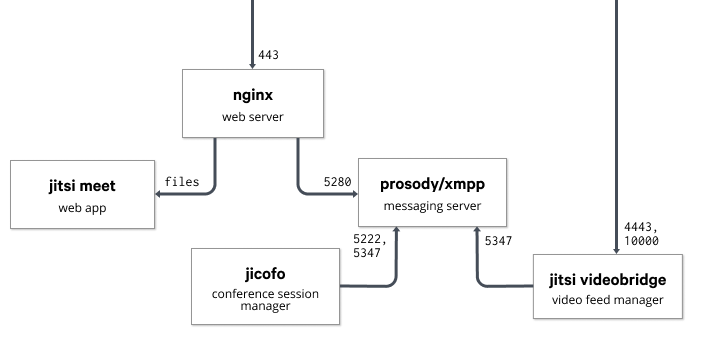
Here's a blog post I wrote for the puppet.com blog. Many thanks to Ben Ford and all their team!. With everything that is currently happening around the world, many of us IT folks have had to solve complex problems in a very short amount of time. Pretty quickly at work, I was tasked with finding a way to make virtual meetings easy, private and secure. Whereas many would have turned to a SaaS offering, we decided to use Jitsi Meet, a modern and fully on-premise FOSS videoconferencing solution. Jitsi works on all platforms by running in a browser and comes with nifty Android and iOS applications. We've been using our instance quite a bit, and so far everyone from technical to non-technical users have been pretty happy with it. Jitsi Meet is powered by WebRTC and can be broken into multiple parts across multiple machines if needed. In addition to the webserver running the Jitsi Meet JavaScript code, the base configuration uses the Videobridge to manage users' video feeds, Jicofo as a conference focus to manage media sessions and the Prosody XMPP server to tie it all together. Here's a network diagram I took from their documentation to show how those applications interact: A network diagram that shows how the different bits of jitsi meet work together Getting started with the Jitsi Puppet module First of all, you'll need a valid domain name and a server with decent bandwidth. Jitsi has published a performance evaluation of the Videobridge to help you spec your instance appropriately. You will also need to open TCP ports 443, 4443 and UDP port 10000 in your firewall. The puppetlabs/firewall module could come in handy here. Once that is done, you can use the smash/jitsimeet Puppet module on a Debian 10 (Buster) server to spin up an instance. A basic configuration would look like this:
  class   'jitsimeet':
    fqdn                 => 'jitsi.example.com',
    repo_key             => puppet:///files/apt/jitsimeet.gpg,
    manage_certs         => true,
    jitsi_vhost_ssl_key  => '/etc/letsencrypt/live/jitsi.example.com/privkey.pem'
    jitsi_vhost_ssl_cert => '/etc/letsencrypt/live/jitsi.example.com/cert.pem'
    auth_vhost_ssl_key   => '/etc/letsencrypt/live/auth.jitsi.example.com/privkey.pem'
    auth_vhost_ssl_cert  => '/etc/letsencrypt/live/auth.jitsi.example.com/cert.pem'
    jvb_secret           => 'mysupersecretstring',
    focus_secret         => 'anothersupersecretstring',
    focus_user_password  => 'yetanothersecret',
    meet_custom_options  =>  
      'enableWelcomePage'         => true,
      'disableThirdPartyRequests' => true,
     ;
   
The jitsimeet module is still pretty young: it clearly isn't perfect and some external help would be very appreciated. If you have some time, here are a few things that would be nice to work on: If you use this module to manage your Jitsi Meet instance, please send patches and bug reports our way! Learn more

David Bremner: Tangling multiple files

I have lately been using org-mode literate programming to generate example code and beamer slides from the same source. I hit a wall trying to re-use functions in multiple files, so I came up with the following hack. Thanks 'ngz' on #emacs and Charles Berry on the org-mode list for suggestions and discussion.
(defun db-extract-tangle-includes ()
  (goto-char (point-min))
  (let ((case-fold-search t)
        (retval nil))
    (while (re-search-forward "^#[+]TANGLE_INCLUDE:" nil t)
      (let ((element (org-element-at-point)))
        (when (eq (org-element-type element) &aposkeyword)
          (push (org-element-property :value element) retval))))
    retval))
(defun db-ob-tangle-hook ()
  (let ((includes (db-extract-tangle-includes)))
    (mapc #&aposorg-babel-lob-ingest includes)))
(add-hook &aposorg-babel-pre-tangle-hook #&aposdb-ob-tangle-hook t)
Use involves something like the following in your org-file.
#+SETUPFILE: presentation-settings.org
#+SETUPFILE: tangle-settings.org
#+TANGLE_INCLUDE: lecture21.org
#+TITLE: GC V: Mark & Sweep with free list
For batch export with make, I do something like
%.tangle-stamp: %.org
    emacs --batch --quick  -l org  -l $ HOME /.emacs.d/org-settings.el --eval "(org-babel-tangle-file \"$<\")"
    touch $@

7 April 2020

Reproducible Builds: Reproducible Builds in March 2020

Welcome to the March 2020 report from the Reproducible Builds project. In our reports we outline the most important things that we have been up to over the past month and some plans for the future.
What are reproducible builds? One of the original promises of open source software is that distributed peer review and transparency of process results in enhanced end-user security. However, whilst anyone may inspect the source code of free and open source software for malicious flaws, almost all software today is distributed as pre-compiled binaries. This allows nefarious third-parties to compromise systems by injecting malicious code into ostensibly secure software during the various compilation and distribution processes.

News The report from our recent summit in Marrakesh was published and is now available in both PDF and HTML formats. A sincere thank you to all of the Reproducible Builds community for the input to the event a sincere thank you to Aspiration for preparing and collating this report. Harmut Schorrig published a detailed document on how to compile Java applications in such as way that the .jar build artefact is reproducible across builds. A practical and hands-on guide, it details how to avoid unnecessary differences between builds by explicitly declaring an encoding as the default value differs across Linux and MS Windows systems and ensuring that the generated .jar a variant of a .zip archive does not embed any nondeterministic filesystem metadata, and so on. Janneke gave a quick presentation on GNU Mes and reproducible builds during the lighting talk session at LibrePlanet 2020. [ ] Vagrant Cascadian presented There and Back Again, Reproducibly! video at SCaLE 18x in Pasadena in California which generated some attention on Twitter. Herv Boutemy mentioned on our mailing list in a thread titled Rebuilding and checking Reproducible Builds from Maven Central repository that since the update of a central build script (the parent POM ) every Apache project using the Maven build system should build reproducibly. A follow-up discussion regarding how to perform such rebuilds was also started on the Apache mailing list. The Telegram instant-messaging platform announced that they had updated their iOS and Android OS applications and claim that they are reproducible according to their full instructions, verifying that its original source code is exactly the same code that is used to build the versions available on the Apple App Store and Google Play distribution platforms respectfully. Herv Boutemy also reported about a new project called reproducible-central which aims to allow anyone to rebuild a component from the Maven Central Repository that is expected to be reproducible and check that the result is as expected. In last month s report we detailed Omar Navarro Leija s work in and around an academic paper titled Reproducible Containers which describes in detail the workings of a user-space container tool called dettrace (PDF). Since then, the PhD student from the University Of Pennsylvania presented on this tool at the ASPLOS 2020 conference in Lausanne, Switzerland. Furthermore, there were contributions to dettrace from the Reproducible Builds community itself. [ ][ ]

Distribution work

openSUSE In openSUSE, Bernhard M. Wiedemann published his monthly Reproducible Builds status update as well as made the following changes within the distribution itself:

Debian Chris Lamb further refined his merge request for the debian-installer component to allow all arguments from sources.list files (such as [check-valid-until=no] ) in order that we can test the reproducibility of the installer images on the Reproducible Builds own testing infrastructure. (#13) Holger Levsen filed a number of bug reports against the debrebuild tool that attempts to rebuild a Debian package given a .buildinfo file as input, including: 48 reviews of Debian packages were added, 17 were updated and 34 were removed this month adding to our knowledge about identified issues. Many issue types were noticed, categorised and updated by Chris Lamb, including: Finally, Holger opened a bug report against the software running tracker.debian.org, a service for Debian Developers to follow the evolution of packages via web and email interfaces to request that they integrate information from buildinfos.debian.net (#955434) and Chris Lamb kept isdebianreproducibleyet.com up to date. [ ]

Software development

diffoscope Chris Lamb made the following changes to diffoscope, the Reproducible Builds project s in-depth and content-aware diff utility that can locate and diagnose reproducibility issues, including preparing and uploading version 138 to Debian:
  • Improvements:
    • Don t allow errors with R script deserialisation cause the entire operation to fail, for example if an external library cannot be loaded. (#91)
    • Experiment with memoising output from expensive external commands, eg. readelf. (#93)
    • Use dumppdf from the python3-pdfminer if we do not see any other differences from pdftext, etc. (#92)
    • Prevent a traceback when comparing two R .rdx files directly as the get_member method will return a file even if the file is missing. [ ]
  • Reporting:
    • Display the supported file formats into the package long description. (#90)
    • Print a potentially-helpful message if the PyPDF2 module is not installed. [ ]
    • Remove any duplicate comparator descriptions when formatting in the --help output or in the package long description. [ ]
    • Weaken Install the X package to get a better output message to may produce a better output as the former is not actually guaranteed. [ ]
  • Misc:
    • Ensure we only parse the recommended packages from --list-debian-substvars when we want them for debian/tests/control generation. [ ]
    • Add upstream metadata file [ ] and add a Lintian override for upstream-metadata-in-native-source as we are upstream. [ ]
    • Inline the RequiredToolNotFound.get_package method s functionality as it is only used once. [ ]
    • Drop the deprecated py36 = [..] argument in the pyproject.toml file. [ ]
In addition, Vagrant Cascadian updated diffoscope in GNU Guix to version 138 [ ], as well as updating reprotest our end-user tool to build same source code twice in widely differing environments and then checks the binaries produced by each build for any differences to version 0.7.14 [ ].

Upstream patches The Reproducible Builds project detects, dissects and attempts to fix as many currently-unreproducible packages as possible. We endeavour to send all of our patches upstream where appropriate. This month we wrote a large number of such patches, including:

Project documentation There was further work performed on our documentation and website this month including Alex Wilson adding a section regarding using Gradle for reproducible builds in JVM projects [ ] and Holger Levsen added the report from our recent summit in Marrakesh [ ][ ]. In addition, Chris Lamb made a number of changes, including correcting the syntax of some CSS class formatting [ ], improved some filed against copy a little better [ ] and corrected a reference to calendar.monthrange Python method in a utility function. [ ]

Testing framework We operate a large and many-featured Jenkins-based testing framework that powers tests.reproducible-builds.org that, amongst many other tasks, tracks the status of our reproducibility efforts as well as identifies any regressions that have been introduced. This month, Chris Lamb reworked the web-based package rescheduling tool to:
  • Require a HTTP POST method in the web-based scheduler as not only should HTTP GET requests be idempotent but this will allow many future improvements in the user interface. [ ][ ][ ]
  • Improve the authentication error message in said rescheduler to suggest that the developer s SSL certificate may have expired. [ ]
In addition, Holger Levsen made the following changes:
  • Add a new ath97 subtarget for the OpenWrt distribution.
  • Revisit ordering of Debian suites; sort the experimental distribution last and reverse the ordering of suites to prioritise the suites in development. [ ][ ][ ]
  • Schedule Debian buster and bullseye a little less in order to allow unstable to catch up on the i386 architecture. [ ][ ]
  • Various cosmetic changes to the web-based scheduler. [ ][ ][ ][ ]
  • Improve wordings in the node health maintenance output. [ ]
Lastly, Vagrant Cascadian updated a link to the (formerly) weekly news to our reports page [ ] and kpcyrd fixed the escaping in an Alpine Linux inline patch [ ]. The usual build nodes maintenance was performed by Holger Levsen [ ][ ], Mattia Rizzolo [ ] and Vagrant Cascadian [ ][ ].
If you are interested in contributing to the Reproducible Builds project, please visit our Contribute page on our website. However, you can get in touch with us via:

This month s report was written by Bernhard M. Wiedemann, Chris Lamb, Holger Levsen and Vagrant Cascadian. It was subsequently reviewed by a bunch of Reproducible Builds folks on IRC and the mailing list.

Steve Kemp: A busy few days

Over the past few weeks things have been pretty hectic. Since I'm not working at the moment I'm mostly doing childcare instead. I need a break, now and again, so I've been sending our child to p iv koti two days a week with him home the rest of the time. I love taking care of the child, because he's seriously awesome, but it's a hell of a lot of work when most of our usual escapes are unavailable. For example we can't go to the (awesome) Helsinki Central Library as that is closed. Instead of doing things outdoors we've been baking bread together, painting, listening to music and similar. He's a big fan of any music with drums and shouting, so we've been listening to Rammstein, The Prodigy, and as much Queen as I can slip in without him complaining ("more bang bang!"). I've also signed up for some courses at the Helsinki open university, including Devops with Docker so perhaps I have a future career working with computers? I'm hazy. Finally I saw a fun post the other day on reddit asking about the creation of a DSL for server-setup. I wrote a reply which basically said two things: Anyway I had an idea of just expressing things in a simple fashion, borrowing Puppet syntax (which I guess is just Ruby hash literals). So a module to do stuff with files would just look like this:
file   name   => "This is my rule",
       target => "/tmp/blah",
       ensure => "absent"  
The next thing to do is to allow that to notify another rule, when it results in a change. So you add in:
notify => "Name of rule"
# or
notify => [ "Name of rule", "Name of another rule" ]
You could also express dependencies the other way round:
shell   name => "Do stuff",
        command => "wc -l /etc/passwd > /tmp/foo",
        requires => [ "Rule 1", "Rule 2"]  
Anyway the end result is a simple syntax which allows you to do things; I wrote a file to allow me to take a clean system and configure it to run a simple golang application in an hour or so. The downside? Well the obvious one is that there's no support for setting up cron jobs, setting up docker images, MySQL usernames/passwords, etc. Just a core set of primitives. Adding new things is easy, but also an endless job. So I added the ability to run external/binary plugins stored outside the project. To support that is simple with the syntax we have: All good. People can write modules, if they like, and they can do that in any language they like. Fun times. We'll call it marionette since it's all puppet-inspired: And that concludes this irregular update.

6 April 2020

Joachim Breitner: A Telegram bot in Haskell on Amazon Lambda

I just had a weekend full of very successful serious geekery. On a whim I thought: Wouldn't it be nice if people could interact with my game Kaleidogen also via a telegram bot? This led me to learn about how I write a Telegram bot in Haskell and how I can deploy such a Haskell program to Amazon Lambda. In particular the latter bit might be interesting to some of my readers, so here is how went about it.

Kaleidogen Kaleidogen is a little contemplative game (or toy game where, starting from just unicolored disks, you combine abstract circular patterns to breed more interesting patterns. See my FARM 2019 talk for more details, or check out the source repository. BTW, I am looking for help turning it into an Android app!
KaleidogenBot in action

KaleidogenBot in action

Amazon Lambda Amazon Lambda is the Function as a service offering of Amazon Web Services. The idea is that you don t rent a server, where you have to deal with managing the whole system and that you are paying for constantly, but you just upload the code that responds to outside requests, and AWS takes care of the rest: Starting and stopping instances, providing a secure base system etc. When nobody is using the service, no cost occurs. This sounds ideal for hosting a toy Telegram bot: Most of the time nobody will be using it, and I really don't want to have to baby sit yet another service on my server. On Amazon Lambda, I can probably just forget about it. But Haskell is not one of the officially supported languages on Amazon Lambda. So to run Haskell on Lambda, one has to solve two problems:
  • how to invoke the Haskell code on the server, and
  • how to build Haskell so that it runs on the Amazon Linux distribution

A Haskell runtime for Lambda For the first we need a custom runtime. While this sounds complicated, it is actually a pretty simple concept: A runtime is an executable called bootstrap that queries the Lambda Runtime Interface for the next request to handle. The Lambda documentation is phrased as if this runtime has to be a dispatcher that calls the separate function s handler. But it could just do all the things directly. I found the Haskell package aws-lambda-haskell-runtime which provides precisely that: A function
runLambda :: (LambdaOptions -> IO (Either String LambdaResult)) -> IO ()
that talks to the Lambda Runtime API and invokes its argument on each message. The package also provides Template Haskell magic to collect handlers of any JSON-able type and generates a dispatcher, like you might expect from other, more dynamic languages. But that was too much magic for me, so I ignored that and just wrote the handler manually:
main :: IO ()
main = runLambda run
  where
   run ::  LambdaOptions -> IO (Either String LambdaResult)
   run opts = do
    result <- handler (decodeObj (eventObject opts)) (decodeObj (contextObject opts))
    either (pure . Left . encodeObj) (pure . Right . LambdaResult . encodeObj) result
data Event = Event
    path :: T.Text
  , body :: Maybe T.Text
    deriving (Generic, FromJSON)
data Response = Response
    statusCode :: Int
  , headers :: Value
  , body :: T.Text
  , isBase64Encoded :: Bool
    deriving (Generic, ToJSON)
handler :: Event -> Context -> IO (Either String Response)
handler Event body, path  context =
 
I expose my Lambda function to the world via Amazon s API Gateway, configured to just proxy the HTTP requests. This means that my code receives a JSON data structure describing the HTTP request (here called Event, listing only the fields I care about), and it will respond with a Response, again as JSON. The handler can then simply pattern-match on the path to decide what to do. For example this code handles URLs like /img/CAFFEEFACE.png, and responds with an image.
handler :: TC -> Event -> Context -> IO (Either String Response)
handler Event body, path  context
      Just bytes <- isImgPath path >>= T.decodeHex = do
        let pngData = genPurePNG bytes
        pure $ Right Response
              statusCode = 200
            , headers = object [ "Content-Type" .= ("image/png" :: String) ]
            , isBase64Encoded = True
            , body = T.decodeUtf8 $ LBS.toStrict $ Base64.encode pngData
             
     
isImgPath :: T.Text -> Maybe T.Text
isImgPath  = T.stripPrefix "/img/" >=> T.stripSuffix ".png"
If this program would grow more, then one should probably use something more structured for routing here; maybe servant, or bridging towards wai apps (amost like wai-lamda, but that still assumes an existing runtime, instead of simply being the runtime). But for my purposes, no extra layers of indirection or abstraction are needed!

Deploying Haskell to Lambda Building Haskell locally and deploying to different machiens is notoriously tricky; you often end up depending on a shared library that is not available on the other platform. The aws-lambda-haskell-runtime package, and similar projects like serverless-haskell, solve this using stack and Docker two technologies that are probably great, but I never warmed up to them. So instead adding layers and complexities, can I solve this instead my making things simpler? If I compiler my bootstrap into a static Linux binary, it should run on any Linux, including Amazon Linux. Unfortunately, building Haskell programs statically is also notoriously tricky. But it is made much simpler by the work of Niklas Hamb chen and others in the context of the Nix package manager, coordinated in the static-haskell-nix project. The promise here is that once you have set up building your project with Nix, then getting a static version is just one flag away. The support is not completely upstreamed into nixpkgs proper yet, but their repository has a nix file that contains a nixpkgs set with their patches:
let pkgs = (import (sources.nixpkgs-static + "/survey/default.nix")  ).pkgs; in
This, plus a fairly standard nix setup to build the package, yields what I was hoping for:
$ nix-build -A kaleidogen
/nix/store/ppwyq4d964ahd6k56wsklh93vzw07ln0-kaleidogen-0.1.0.0
$ file result/bin/kaleidogen-amazon-lambda
result/bin/kaleidogen-amazon-lambda: ELF 64-bit LSB executable, x86-64, version 1 (SYSV), statically linked, stripped
$ ls -sh result/bin/kaleidogen-amazon-lambda
6,7M result/bin/kaleidogen-amazon-lambda
If we put this file, named bootstrap, into a zip file and upload it to Amazon Lambda, then it just works! Creating the zip file is easily scripted using nix:
  function-zip = pkgs.runCommandNoCC "kaleidogen-lambda"  
    buildInputs = [ pkgs.zip ];
    ''
    mkdir -p $out
    cp $ kaleidogen /bin/kaleidogen-amazon-lambda bootstrap
    zip $out/function.zip bootstrap
  '';
So to upload this, I use this one-liner (line-wrapped for your convenience):
nix-build -A function-zip &&
aws lambda update-function-code --function-name kaleidogen \
  --zip-file fileb://result/function.zip
Thanks to how Nix pins all dependencies, I am fairly confident that I can return to this project in 4 months and still be able to build it. Of course, I want continuous integration and deployment. So I build the project with GitHub Actions, using a cachix nix cache to significantly speed up the build, and auto-deploy to Lambda using aws-lambda-deploy; see my workflow file for details.

The Telegram part The above allows me to run basically any stateless service, and a Telegram bot is nothing else: When configured to act as a WebHook, Telegram will send a request with a message to our Lambda function, where we can react on it. The telegram-api package provides bindigs for the Telegram Bot API (although I had to use the repository version, as the version on Hackage has some bitrot). Slightly simplified I can write a handler for an Update:
handleUpdate :: Update -> TelegramClient ()
handleUpdate Update  message = Just m   = do
  let c = ChatId (chat_id (chat m))
  liftIO $ printf "message from %s: %s\n" (maybe "?" user_first_name (from m)) (maybe "" T.unpack (text m))
  if "/start"  T.isPrefixOf  fromMaybe "" (text m)
  then do
    rm <- sendMessageM $ sendMessageRequest c "Hi! I am @KaleidogenBot.  "
    return ()
  else do
    m1 <- sendMessageM $ sendMessageRequest c "One moment "
    withPNGFile  $ \pngFN -> do
      m2 <- uploadPhotoM $ uploadPhotoRequest c
        (FileUpload (Just "image/png") (FileUploadFile pngFN))
      return ()
handleUpdate _ u =
  liftIO $ putStrLn $ "Unhandled message: " ++ show u
and call this from the handler that I wrote above:
     
      path == "/telegram" =
      case eitherDecode (LBS.fromStrict (T.encodeUtf8 (fromMaybe "" body))) of
        Left err ->  
        Right update -> do
          runTelegramClient token manager $ handleUpdate Nothing update
          pure $ Right Response
              statusCode = 200
            , headers = object [ "Content-Type" .= ("text/plain" :: String) ]
            , isBase64Encoded = False
            , body = "Done"
             
     
Note that the Lambda code receives the request as JSON data structure with a body that contains the original HTTP request body. Which, in this case, is itself JSON, so we have to decode that. All that is left to do is to tell Telegram where this code lives:
curl --request POST \
  --url https://api.telegram.org/bot<token>/setWebhook
  --header 'content-type: application/json'
  --data ' "url": "https://api.kaleidogen.nomeata.de/telegram" '
As a little add on, I also created a Telegram game for Kaleidogen. A Telegram game is nothing but a webpage that runs inside Telegram, so it wasn t much work to wrap the Web version of Kaleidogen that way, but the resulting Telegram game (which you can access via https://core.telegram.org/bots/games) still looks pretty neat.

No /dev/dri/renderD128 I am mostly happy with this setup: My game is now available to more people in more ways. I don t have to maintain any infrastructure. When nobody is using this bot no resources are wasted, and the costs of the service are neglectible -- this is unlikely to go beyond the free tier, and even if it would, the cost per generated image is roughly USD 0.000021. There is one slight disappointment, though. What I find most intersting about Kaleidogen from a technical point of view is that when you play it in the browser, the images are not generated by my code. Instead, my code creates a WebGL shader program on the fly, and that program generates the image on your graphics card. I even managed to make the GL rendering code work headlessly, i.e. from a command line program, using EGL and libgbm and a helper written in C. But it needs access to a graphics card via /dev/dri/renderD128. Amazon does not provide that to Lambda code, and neither do the other big Function-as-a-service providers. So I had to swallow my pride and reimplement the rendering in pure Haskell. So if you think the bot is kinda slow, then that s why. Despite properly optimizing the pure implementation (the inner loop does not do allocations and deals only with unboxed Double# values), the GL shader version is still three times as fast. Maybe in a few years GPU access will be so ubiquitous that it s even on Amazon Lambda; then I can easily use that.

Jonathan Carter: Free Software Activities for 2020-03

DPL Campaign 2020 On the 12th of March, I posted my self-nomination for the Debian Project Leader election. This is the second time I m running for DPL, and you can read my platform here. The campaign period covered the second half of the month, where I answered a bunch of questions on the debian-vote list. The voting period is currently open and ends on 18 April.

Debian Social

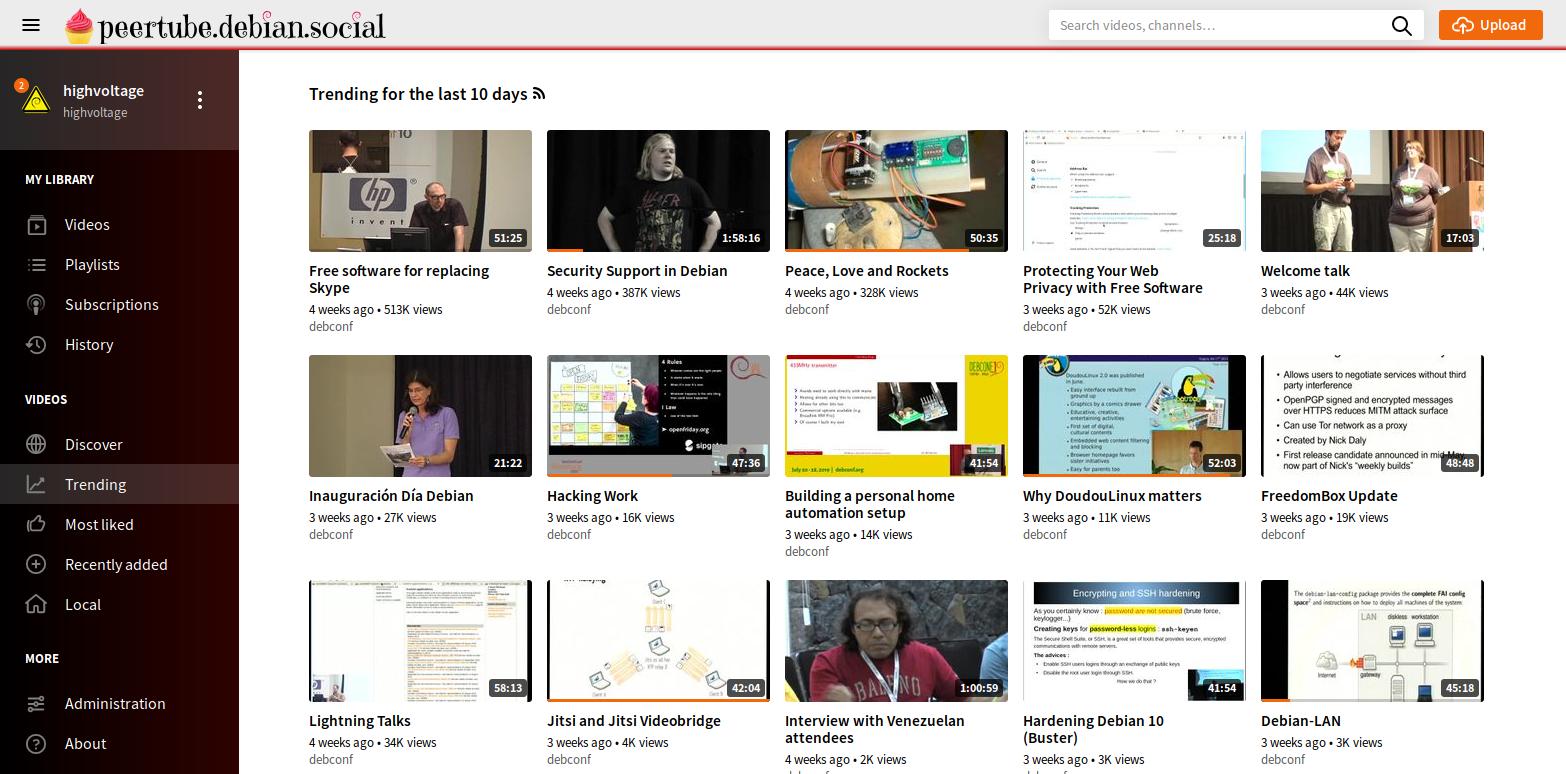
This month we finally announced the Debian Social project. A project that hosts a few websites with the goal to improve communication and collaboration within the Debian project, improve visibility on the work that people do and make it easier for general users to interact with the community and feel part of the project. Some History This has been a long time in the making. From my side I ve been looking at better ways to share/play our huge DebConf video archives for the last 3 years or so. Initially I was considering either some sort of script or small server side app that combined the archives and the metadata into a player, or using something like MediaDrop (which I was using on my highvoltage.tv website for a while). I ran into a lot of MediaDrop s limitations early on. It was fine for a very small site but I don t think it would ever be the right solution for a Debian-wide video hosting platform, and it didn t seem all that actively maintained either. Wouter went ahead and implemented a web player option for the video archives. His solution is good because it doesn t rely on any server side software, so it s easy to mirror and someone who lives on an island could download it and view it offline in that player. It still didn t solve all our problems though. Popular videos (by either views or likes) weren t easily discoverable, and the site itself isn t that easy to discover. Then PeerTube came along. PeerTube provides a similar type of interface such as MediaDrop or YouTube that gives you likes, viewcount and comments. But what really set it apart from previous things that we looked at was that it s a federated service. Not only does it federate with other PeerTube instances, but the protocols it uses means that it can connect to all kinds of other services that makes up an interconnected platform called the Fediverse. This was especially great since independent video sites tend to become these lonely islands on the web that become isolated and forgotten. With PeerTube, video sites can subscribe to similar sites on the Fediverse, which makes videos and other video sites significantly more discoverable and attracts more eyeballs. At DebConf19 I wanted to ramp up the efforts to make a Debian PeerTube instance a reality. I spoke to many people about this and discovered that some Debianites are already making all kinds of Debian videos in many different languages. Some were even distributing them locally on DVD and have never uploaded them. I thought that the Debian PeerTube instance could not only be a good platform for DebConf videos, but it could be a good home for many free software content creators, especially if they create Debian specific content. I spoke to Rhonda about it, who s generally interested in the Fediverse and wanted to host a instances of Pleroma (microblogging service) and PixelFed (free image hosting service that resembles the Instagram site), but needed a place to host them. We decided to combine efforts, and since a very large amount of fediverse services end with .social in their domain names, we ended up calling this project Debian Social. We re also hosting some non-fediverse services like a WordPress multisite and a Jitsi instance for video chatting. Current Status Currently, we have a few services in a beta/testing state. I think we have most of the kinks sorted out to get them to a phase where they re ready for wider use. Authentication is a bit of a pain point right now. We don t really have a single sign-on service in Debian, that guest users can use, or that all these services integrate with. So for now, if you re a Debian Developer who wants an account on one of these services, you can request a new account by creating a ticket on salsa.debian.org and selecting the New account template. Not all services support having dashes (or even any punctuation in the username whatsoever), so to keep it consistent we re currently appending just guest to salsa usernames for guest users, and team at the end of any Debian team accounts or official accounts using these services Stefano finished uploading all the Debconf videos to the PeerTube instance. Even though it s largely automated, it ended up being quite a big job fixing up some old videos, their metadata and adding support for PeerTube to the DebConf video scripts. This also includes some videos from sprints and MiniDebConfs that had video coverage, currently totaling 1359 videos.
Future plans This is still a very early phase for the project. Here are just some ideas that might develop over time on the Debian Social sites: If you d like to join this initiative and help out, please join #debian-social on oftc. We re also looking for people who can help moderate posts on these sites.

Debian packaging I had the sense that there were fewer upstream releases this month. I suspect that everyone was busy figuring out how to cope during Covid-19 lockdowns taking place all over the world. 2020-03-02: Upload package calamares (3.2.10-1) to Debian unstable. 2020-03-10: Upload package gnome-shell-extension-dash-to-panel (29-1) to Debian unstable. 2020-03-10: Upload package gnome-shell-extension-draw-on-your-screen (5.1-1) to Debian unstable. 2020-03-28: Upload package gnome-shell-extension-dash-to-panel (31-1) to Debian unstable. 2020-03-28: Upload package gnome-shell-extension-draw-on-your-screen (6-1) to Debian unstable. 2020-03-28: Update package python3-flask-autoindexing packaging, not releasing due to licensing change that needs further clarification. (GitHub issue #55). 2020-03-28: Upload package gamemode (1.5.1-1) to Debian unstable. 2020-03-28: Upload package calamares (3.2.21-1) to Debian unstable.

Debian mentoring 2020-03-03: Sponsor package python-jaraco.functools (3.0.0-1) (Python team request). 2020-03-03: Review python-ftputil (3.4-1) (Needs some more work) (Python team request). 2020-03-04: Sponsor package pythonmagick (0.9.19-6) for Debian unstable (Python team request). 2020-03-23: Sponsor package bitwise (0.41-1) for Debian unstable (Email request). 2020-03-23: Sponsor package gpxpy (1.4.0-1) for Debian unstable (Python team request). 2020-03-28: Sponsor package gpxpy (1.4.0-2) for Debian unstable (Python team request). 2020-03-28: Sponsor package celery (4.4.2-1) for Debian unstable (Python team request). 2020-03-28: Sponsor package buildbot (2.7.0-1) for Debian unstable (Python team request).

5 April 2020

Vincent Bernat: Safer SSH agent forwarding

ssh-agent is a program to hold in memory the private keys used by SSH for public-key authentication. When the agent is running, ssh forwards to it the signature requests from the server. The agent performs the private key operations and returns the results to ssh. It is useful if you keep your private keys encrypted on disk and you don t want to type the password at each connection. Keeping the agent secure is critical: someone able to communicate with the agent can authenticate on your behalf on remote servers. ssh also provides the ability to forward the agent to a remote server. From this remote server, you can authenticate to another server using your local agent, without copying your private key on the intermediate server. As stated in the manual page, this is dangerous!
Agent forwarding should be enabled with caution. Users with the ability to bypass file permissions on the remote host (for the agent s UNIX-domain socket) can access the local agent through the forwarded connection. An attacker cannot obtain key material from the agent, however they can perform operations on the keys that enable them to authenticate using the identities loaded into the agent. A safer alternative may be to use a jump host (see -J).
As mentioned, a better alternative is to use the jump host feature: the SSH connection to the target host is tunneled through the SSH connection to the jump host. See the manual page and this blog post for more details.
If you really need to use SSH agent forwarding, you can secure it a bit through a dedicated agent with two main attributes: The following alias around the ssh command will spawn such an ephemeral agent:
alias assh="ssh-agent ssh -o AddKeysToAgent=confirm -o ForwardAgent=yes"
With the -o AddKeysToAgent=confirm directive, ssh adds the unencrypted private key to the agent but each use must be confirmed.1 Once connected, you get a password prompt for each signature request:2
ssh-agent prompt confirmation with fingerprint and yes/no buttons
Request for the agent to use the specified private key
But, again, avoid using agent forwarding!

Update (2020-04) In a previous version of this article, the wrapper around the ssh command was a more complex function. Alexandre Oliva was kind enough to point me to the simpler solution above.

Update (2020-04) Guardian Agent is an even safer alternative: it shows and ensures the usage (target and command) of the requested signature. There is also a wide range of alternative solutions to this problem. See for example SSH-Ident, Wikimedia solution and solo-agent.


  1. Alternatively, you can add the keys with ssh-add -c.
  2. Unfortunately, the dialog box default answer is Yes.

3 April 2020

Dirk Eddelbuettel: RcppSimdJson 0.0.4: Even Faster Upstream!

A new (upstream) simdjson release was announced by Daniel Lemire earlier this week, and my Twitter mentions have been running red-hot ever since as he was kind enough to tag me. Do look at that blog post, there is some impressive work in there. We wrapped up the (still very simple) rcppsimdjson around it last night and shipped it this morning. RcppSimdJson wraps the fantastic and genuinely impressive simdjson library by Daniel Lemire. Via some very clever algorithmic engineering to obtain largely branch-free code, coupled with modern C++ and newer compiler instructions, it results in parsing gigabytes of JSON parsed per second which is quite mindboggling. For illustration, I highly recommend the video of the recent talk by Daniel Lemire at QCon (which was also voted best talk). The best-case performance is faster than CPU speed as use of parallel SIMD instructions and careful branch avoidance can lead to less than one cpu cycle use per byte parsed. This release brings upstream 0.3 (and 0.3.1) plus a minor tweak (also shipped back upstream). Our full NEWS entry follows.

Changes in version 0.0.4 (2020-04-03)
  • Upgraded to new upstream releases 0.3 and 0.3.1 (Dirk in #9 closing #8)
  • Updated example validateJSON to API changes.

But because Daniel is such a fantastic upstream developer to collaborate with, he even filed a full feature-request maybe you can consider upgrading as issue #8 at our repo containing the fully detailed list of changes. As it is so impressive I will simple quote the upper half of just the major changes:

Highlights
  • Multi-Document Parsing: Read a bundle of JSON documents (ndjson) 2-4x faster than doing it individually. API docs / Design Details
  • Simplified API: The API has been completely revamped for ease of use, including a new JSON navigation API and fluent support for error code and exception styles of error handling with a single API. Docs
  • Exact Float Parsing: Now simdjson parses floats flawlessly without any performance loss (https://github.com/simdjson/simdjson/pull/558). Blog Post
  • Even Faster: The fastest parser got faster! With a shiny new UTF-8 validator and meticulously refactored SIMD core, simdjson 0.3 is 15% faster than before, running at 2.5 GB/s (where 0.2 ran at 2.2 GB/s).

For questions, suggestions, or issues please use the issue tracker at the GitHub repo. Courtesy of CRANberries, there is also a diffstat report for this release. If you like this or other open-source work I do, you can now sponsor me at GitHub. For the first year, GitHub will match your contributions.

This post by Dirk Eddelbuettel originated on his Thinking inside the box blog. Please report excessive re-aggregation in third-party for-profit settings.

31 March 2020

Chris Lamb: Free software activities in March 2020

Here is my monthly update covering what I have been doing in the free software world during March 2020 (previous month): In addition, I did even more hacking on the Lintian static analysis tool for Debian packages, including:
Reproducible builds One of the original promises of open source software is that distributed peer review and transparency of process results in enhanced end-user security. However, whilst anyone may inspect the source code of free and open source software for malicious flaws, almost all software today is distributed as pre-compiled binaries. This allows nefarious third-parties to compromise systems by injecting malicious code into ostensibly secure software during the various compilation and distribution processes. The motivation behind the Reproducible Builds effort is to ensure no flaws have been introduced during this compilation process by promising identical results are always generated from a given source, thus allowing multiple third-parties to come to a consensus on whether a build was compromised. The initiative is proud to be a member project of the Software Freedom Conservancy, a not-for-profit 501(c)(3) charity focused on ethical technology and user freedom. Conservancy acts as a corporate umbrella allowing projects to operate as non-profit initiatives without managing their own corporate structure. If you like the work of the Conservancy or the Reproducible Builds project, please consider becoming an official supporter. This month, I: In our tooling, I also made the following changes to diffoscope, our in-depth and content-aware diff utility that can locate and diagnose reproducibility issues, including preparing and uploading version 138 to Debian: The Reproducible Builds project also operates a fully-featured and comprehensive Jenkins-based testing framework that powers tests.reproducible-builds.org. This month, I reworked the web-based package rescheduling tool to:
Debian LTS This month I have worked 18 hours on Debian Long Term Support (LTS) and 8 hours on its sister Extended LTS project. You can find out more about the Debian LTS project via the following video:
Debian Uploads For the Debian Privacy Maintainers team I requested that the pyptlib package be removed from the archive (#953429) as well as uploading onionbalance (0.1.8-6) to fix test failures under Pytest 3.x (#953535) and a new upstream release of nautilus-wipe. Finally, I sponsored an upload of bilibop (0.6.1) on behalf of Yann Amar.

30 March 2020

Jonathan Dowland: ephemeral note-taking wins

Some further thoughts on ephemeral versus preserve-everything note-taking. Note-taking is about capturing ideas, thoughts, and processes. You want as little friction as possible when doing so: you don't want to be thinking the page is too small, or the paper drying up the ink too quickly so the pen doesn't move smoothly, or similar such things distracting from capturing what you are trying to capture. I used my PhD notebook as an example of a preserve-everything approach. A serious drawback of the notebook as the sole place to capture work is the risk that it will be damaged or lost. I periodically photograph all the pages and store those photos digitally, alongside other things relating to the work. Those other things include two different private wiki instances that I use to capture notes when I'm working at the computer, as well as several Git repositories (some public, some private) for source code, experiments, drafts of papers, etc. There's also a not-insignificant amount of email correspondence. There have been several train journeys and several meetings where I've grabbed a cheap, larger-format pad of paper and a box of Pound-shop felt-tip pens to sketch ideas, whiteboard-style. At the time it just seemed easier to capture what we were doing in that way, rather than try to do so into the notebook. So the notebook is neither canonical nor comprehensive. Ultimately it's really another example of ephemeral note-taking, and so I think the Ephemeral model wins out. Use whatever notebook or paper or envelope or window pane that is convenient and feels attractive at the time you need to capture something with the least amount of friction. Digitise that and store, catalogue, adjust, derive, etc. from that in the digital domain.

Axel Beckert: How do you type on a keyboard with only 46 or even 28 keys?

Some of you might have noticed that I m into keyboards since a few years ago into mechanical keyboards to be precise. Preface It basically started with the Swiss Mechanical Keyboard Meetup (whose website I started later on) was held in the hackerspace of the CCCZH. I mostly used TKL keyboards (i.e. keyboards with just the for me useless number block missing) and tried to get my hands on more keyboards with Trackpoints (but failed so far). At some point a year or two ago, I looking into smaller keyboards for having a mechanical keyboard with me when travelling. I first bought a Vortex Core at Candykeys. The size was nice and especially having all layers labelled on the keys was helpful, but nevertheless I soon noticed that the smaller the keyboards get, the more important is, that they re properly programmable. The Vortex Core is programmable, but not the keys in the bottom right corner which are exactly the keys I wanted to change to get a cursor block down there. (Later I found out that there are possibilities to get this done, either with an alternative firmware and a hack of it or desoldering all switches and mounting an alternative PCB called Atom47.) 40% Keyboards So at some point I ordered a MiniVan keyboard from The Van Keyboards (MiniVan keyboards will soon be available again at The Key Dot Company), here shown with GMK Paperwork (also bought from and designed by The Van Keyboards):
The MiniVan PCBs are fully programmable with the free and open source firmware QMK and started to use that more and more instead of bigger keyboards. Layers With the MiniVan I learned the concepts of layers. Layers are similar to what many laptop keyboards do with the Fn key and to some extent also what the German standard layout does with the AltGr key: Layers are basically alternative key maps you can switch with a special key (often called Fn , Fn1 , Fn2 , etc., or especially if there are two additional layers Raise and Lower ). There are several concepts how these layers can be reached with these keys: My MiniVan Layout For the MiniVan, two additional layers suffice easily, but since I have a few characters on multiple layers and also have mouse control and media keys crammed in there, I have three additional layers on my MiniVan keyboards:

TRNS means transparent, i.e. use the settings from lower layers.
I also use a feature that allows me to mind different actions to a key depending if I just tap the key or if I hold it. Some also call this tap dance . This is especially very popular on the usually rather huge spacebar. There, the term SpaceFn has been coined, probably after this discussion on Geekhack. I use this for all my layer switching keys: With this layout I can type English texts as fast as I can type them on a standard or TKL layout. German umlauts are a bit more difficult because it requires 4 to 6 key presses per umlaut as I use the Compose key functionality (mapped to the Menu key between the spacebars and the cursor block. So to type an on my MiniVan, I have to:
  1. press and release Menu (i.e. Compose); then
  2. press and hold either Shift-Spacebar (i.e. Shift-Fn1) or Slash (i.e. Fn2), then
  3. press N for a double quote (i.e. Shift-Fn1-N or Fn2-N) and then release all keys, and finally
  4. press and release the base character for the umlaut, in this case Shift-A.
And now just use these concepts and reduce the amount of keys to 28: 30% and Sub-30% Keyboards In late 2019 I stumbled upon a nice little keyboard kit shop on Etsy which I (and probably most other people in the mechanical keyboard scene) didn t take into account for looking for keyboards called WorldspawnsKeebs. They offer mostly kits for keyboards of 40% size and below, most of them rather simple and not expensive. For about 30 you get a complete sub-30% keyboard kit (without switches and keycaps though, but that very common for keyboard kits as it leaves the choice of switches and key caps to you) named Alpha28 consisting of a minimal Acrylic case and a PCB and electronics set. This Alpha28 keyboard is btw. fully open source as the source code, (i.e. design files) for the hardware are published under a free license (MIT license) on GitHub. And here s how my Alpha28 looks like with GMK Mitolet (part of the GMK Pulse group-buy) key caps:
So we only have character keys, Enter (labelled Data as there was no 1u Enter key with that row profile in that key cap set; I ll also call it Data for the rest of this posting) and a small spacebar, not even modifier keys. The Default Alpha28 Layout The original key layout by the developer of the Alpha28 used the spacbar as Shift on hold and as space if just tapped, and the Data key switches always to the next layer, i.e. it switches the layer permanently on tap and not just on hold. This way that key rotates through all layers. In all other layers, V switches back to the default layer. I assume that the modifiers on the second layer are also on tap and apply to the next other normal key. This has the advantage that you don t have to bend your fingers for some key combos, but you have to remember on which layer you are at the moment. (IIRC QMK allows you to show that via LEDs or similar.) Kinda just like vi. My Alpha28 Layout But maybe because I m more an Emacs person, I dislike remembering states myself and don t bind bending my fingers. So I decided to develop my own layout using tap-or-hold and only doing layer switches by holding down keys:

A triangle means that the settings from lower layers are used, N/A means the key does nothing.
It might not be very obvious, but on the default layer, all keys in the bottom row and most keys on the row ends have tap-or-hold configurations. Basic ideasBottom row if holdOther rows if holdHow the keys are divided into layersUsing the Alpha28 This layout works surprisingly well for me. Only for Minus, Equal, Single Quote and Semicolon I still often have to think or try if they re on Layer 1 or 2 as on my 40%s (MiniVan, Zlant, etc.) I have them all on layer 1 (and in general one layer less over all). And for really seldom used keys like Insert, PrintScreen, ScrollLock or Pause, I might have to consult my own documentation. They re somewhere in the middle of the keyboard, either on layer 1, 2, or 3. ;-) And of course, typing umlauts takes even two keys more per umlaut as on the MiniVan since on the one hand Menu is not on the default layer and on the other hand, I don t have this nice shifted number row and actually have to also press Shift to get a double quote. So to type an on my Alpha, I have to:
  1. press and release Space-F (i.e. Fn1-F) for Menu (i.e. Compose); then
  2. press and hold A-Spacebar-L (i.e. Shift-Fn1-L) for getting a double quote, then
  3. press and release the base character for the umlaut, in this case L-A for Shift-A (because we can t use A for Shift as I can t hold a key and then press it again :-).
Conclusion If the characters on upper layers are not labelled like on the Vortex Core, i.e. especially on all self-made layouts, typing is a bit like playing that old children s game Memory: as soon as you remember (or your muscle memory knows) where some special characters are, typing gets faster. Otherwise, you start with trial and error or look the documentation. Or give up. ;-) Nevertheless, typing on a sub-30% keyboard like the Alpha28 is much more difficult and slower than on a 40% keyboard like the MiniVan. So the Alpha28 very likely won t become my daily driver while the MiniVan defacto is my already my daily driver. But I like these kind of challenges as others like the game Memory . So I ordered three more 30% and sub-30% keyboard kits and WorldspawnsKeebs for soldering on the upcoming weekend during the COVID19 lockdown: And if I at some point want to try to type with even fewer keys, I ll try a Butterstick keyboard with just 20 keys. It s a chorded keyboard where you have to press multiple keys at the same time to get one charcter: So to get an A from the missing middle row, you have to press Q and Z simultaneously, to get Escape, press Q and W simultaneously, to get Control, press Q, W, Z and X simultaneously, etc. And if that s not even enough, I already bought a keyboard kit named Ginny (or Ginni, the developer can t seem to decide) with just 10 keys from an acquaintance. Couldn t resist when offered his surplus kits. :-) It uses the ASETNIOP layout which was initially developed for on-screen keyboards on tablets.

28 March 2020

Fran ois Marier: How to get a direct WebRTC connections between two computers

WebRTC is a standard real-time communication protocol built directly into modern web browsers. It enables the creation of video conferencing services which do not require participants to download additional software. Many services make use of it and it almost always works out of the box. The reason it just works is that it uses a protocol called ICE to establish a connection regardless of the network environment. What that means however is that in some cases, your video/audio connection will need to be relayed (using end-to-end encryption) to the other person via third-party TURN server. In addition to adding extra network latency to your call that relay server might overloaded at some point and drop or delay packets coming through. Here's how to tell whether or not your WebRTC calls are being relayed, and how to ensure you get a direct connection to the other host.

Testing basic WebRTC functionality Before you place a real call, I suggest using the official test page which will test your camera, microphone and network connectivity. Note that this test page makes use of a Google TURN server which is locked to particular HTTP referrers and so you'll need to disable privacy features that might interfere with this:
  • Brave: Disable Shields entirely for that page (Simple view) or allow all cookies for that page (Advanced view).
  • Firefox: Ensure that http.network.referer.spoofSource is set to false in about:config, which it is by default.
  • uMatrix: The "Spoof Referer header" option needs to be turned off for that site.

Checking the type of peer connection you have Once you know that WebRTC is working in your browser, it's time to establish a connection and look at the network configuration that the two peers agreed on. My favorite service at the moment is Whereby (formerly Appear.in), so I'm going to use that to connect from two different computers:
  • canada is a laptop behind a regular home router without any port forwarding.
  • siberia is a desktop computer in a remote location that is also behind a home router, but in this case its internal IP address (192.168.1.2) is set as the DMZ host.

Chromium For all Chromium-based browsers, such as Brave, Chrome, Edge, Opera and Vivaldi, the debugging page you'll need to open is called chrome://webrtc-internals. Look for RTCIceCandidatePair lines and expand them one at a time until you find the one which says:
  • state: succeeded (or state: in-progress)
  • nominated: true
  • writable: true
Then from the name of that pair (N6cxxnrr_OEpeash in the above example) find the two matching RTCIceCandidate lines (one local-candidate and one remote-candidate) and expand them. In the case of a direct connection, I saw the following on the remote-candidate:
  • ip shows the external IP address of siberia
  • port shows a random number between 1024 and 65535
  • candidateType: srflx
and the following on local-candidate:
  • ip shows the external IP address of canada
  • port shows a random number between 1024 and 65535
  • candidateType: prflx
These candidate types indicate that a STUN server was used to determine the public-facing IP address and port for each computer, but the actual connection between the peers is direct. On the other hand, for a relayed/proxied connection, I saw the following on the remote-candidate side:
  • ip shows an IP address belonging to the TURN server
  • candidateType: relay
and the same information as before on the local-candidate.

Firefox If you are using Firefox, the debugging page you want to look at is about:webrtc. Expand the top entry under "Session Statistics" and look for the line (should be the first one) which says the following in green:
  • ICE State: succeeded
  • Nominated: true
  • Selected: true
then look in the "Local Candidate" and "Remote Candidate" sections to find the candidate type in brackets.

Firewall ports to open to avoid using a relay In order to get a direct connection to the other WebRTC peer, one of the two computers (in my case, siberia) needs to open all inbound UDP ports since there doesn't appear to be a way to restrict Chromium or Firefox to a smaller port range for incoming WebRTC connections. This isn't great and so I decided to tighten that up in two ways by:
  • restricting incoming UDP traffic to the IP range of siberia's ISP, and
  • explicitly denying incoming to the UDP ports I know are open on siberia.
To get the IP range, start with the external IP address of the machine (I'll use the IP address of my blog in this example: 66.228.46.55) and pass it to the whois command:
$ whois 66.228.46.55   grep CIDR
CIDR:           66.228.32.0/19
To get the list of open UDP ports on siberia, I sshed into it and ran nmap:
$ sudo nmap -sU localhost
Starting Nmap 7.60 ( https://nmap.org ) at 2020-03-28 15:55 PDT
Nmap scan report for localhost (127.0.0.1)
Host is up (0.000015s latency).
Not shown: 994 closed ports
PORT      STATE         SERVICE
631/udp   open filtered ipp
5060/udp  open filtered sip
5353/udp  open          zeroconf
Nmap done: 1 IP address (1 host up) scanned in 190.25 seconds
I ended up with the following in my /etc/network/iptables.up.rules (ports below 1024 are denied by the default rule and don't need to be included here):
# Deny all known-open high UDP ports before enabling WebRTC for canada
-A INPUT -p udp --dport 5060 -j DROP
-A INPUT -p udp --dport 5353 -j DROP
-A INPUT -s 66.228.32.0/19 -p udp --dport 1024:65535 -j ACCEPT

26 March 2020

Axel Beckert: Pictures in pure HTML with chafa and aha

I recently stumbled upon chafa, a tool to display pictures, especially color pictures on your ANSI text terminal, e.g. inside an xterm. And I occasionally use aha, the Ansi HTML Adapter to convert a colorful terminal content into HTML to show off terminal screenshots without the requirement of a picture so that it also works in e.g. text browsers or for blinds. Combining chafa and aha: Examples A moment ago I had the thought what would happen if I feed the output of chafa into aha and expected nothing really usable. But I was surprised by the quality of the outcome.
looks like this after chafa -w 9 -c full -s 160x50 DSCN4692.jpg aha -n:


Checking the Look in Text Browsers It even looks not that bad in elinks as far as I know the only text browser which supports CSS and styles:
In Lynx and Links 2, the text composing the image is displayed only in black and white, but you at least can recognise the edges in the picture:
Same Functionality in One Tool? I knew there was a tool which did this in one step. Seems to have been png2html. Tried to play around with it, too, but neither really understood how to use it (seems to require a text file for the characters to be used why?) nor did I really got it working. It always ran until I aborted it and it never filled the target file with any content. Additionally, png2html insists on one character per pixel, requiring to first properly resize the image before converting to HTML. The Keyboard in the Pictures Oh, and btw., the displayed keyboard is my Zlant. The Zlant is a 40% uniform staggered mechanical keyboard. Currently, only Zlant PCBs are available at 1UP Keyboards (USA), i.e. no complete kits. It is shown with the SA Vilebloom key cap set, currently available at MechSupply (UK).

Next.

Previous.