Joachim Breitner: Joining the Lean FRO
 Tomorrow is going to be a new first day in a new job for me: I am joining the Lean FRO, and I m excited.

 Armadillo is a powerful
and expressive C++ template library for linear algebra and scientific
computing. It aims towards a good balance between speed and ease of use,
has a syntax deliberately close to Matlab, and is useful for algorithm
development directly in C++, or quick conversion of research code into
production environments. RcppArmadillo
integrates this library with the R environment and language and is
widely used by (currently) 1110 other packages on CRAN, downloaded 31.2 million
times (per the partial logs from the cloud mirrors of CRAN), and the CSDA paper (preprint
/ vignette) by Conrad and myself has been cited 563 times according
to Google Scholar.
This release brings upstream bugfix releases 12.6.5 (sparse matrix
corner case) and 12.6.6 with an ARPACK correction. Conrad released it
this this morning, I had been running reverse dependency checks anyway
and knew we were in good shape so for once I did not await a full run
against the now over 1100 (!!) packages using RcppArmadillo.
This release also contains a change I prepared on Sunday and which
helps with much-criticized (and rightly I may add) insistence by CRAN concerning throttling . The
motivation is understandable: CRAN tests many packages at once
on beefy servers and can ill afford tests going off and requesting
numerous cores. But rather than providing a global setting at
their end, CRAN insists that
each package (!!) deals with this. The recent traffic on the
helpful-as-ever r-pkg-devel mailing clearly shows that this confuses
quite a few package developers. Some have admitted to simply turning
examples and tests off: a net loss for all of us. Now, Armadillo defaults to using up
to eight cores (which is enough to upset CRAN) when running with OpenMP
(which is generally only on Linux for reasons I rather not get into ).
With this release I expose a helper functions (from OpenMP) to limit
this. I also set up an example package and repo RcppArmadilloOpenMPEx
detailing this, and added a demonstration of how to use the new
throttlers to the
fastLm example. I hope this proves useful to users of the
package.
The set of changes since the last CRAN release follows.
Courtesy of my CRANberries, there is a diffstat report relative to previous release. More detailed information is on the RcppArmadillo page. Questions, comments etc should go to the rcpp-devel mailing list off the Rcpp R-Forge page. If you like this or other open-source work I do, you can sponsor me at GitHub.Changes in RcppArmadillo version 0.12.6.6.0 (2023-10-31)
- Upgraded to Armadillo release 12.6.6 (Cortisol Retox)
- Fix
eigs_sym(),eigs_gen()andsvds()to generate deterministic results in ARPACK mode- Add helper functions to set and get the number of OpenMP threads
- Store initial thread count at package load and use in thread-throttling helper (and resetter) suitable for CRAN constraints
Changes in RcppArmadillo version 0.12.6.5.0 (2023-10-14)
- Upgraded to Armadillo release 12.6.5 (Cortisol Retox)
- Fix for corner-case bug in handling sparse matrices with no non-zero elements
This post by Dirk Eddelbuettel originated on his Thinking inside the box blog. Please report excessive re-aggregation in third-party for-profit settings.
armhf and arm64) is not even
mentioned. Is this really true? It is, after all a Debian-based
system, so it should in theory be doable. Let s try!
We have always said that for a major version upgrade, you should re-image your SD card and start again with a clean image. In the past, we have suggested procedures for updating an existing image to the new version, but always with the caveat that we do not recommend it, and you do this at your own risk. This time, because the changes to the underlying architecture are so significant, we are not suggesting any procedure for upgrading a Bullseye image to Bookworm; any attempt to do this will almost certainly end up with a non-booting desktop and data loss. The only way to get Bookworm is either to create an SD card using Raspberry Pi Imager, or to download and flash a Bookworm image from here with your tool of choice.Which means, it s time to actually try it turns out it s actually trivial, if you use RPIs as headless servers. I had only three issues:
initrd, the new initrd-building scripts/hooks are
looking for some binaries in /usr/bin, and not in /bin;
solution: install manually the usrmerge package, and then re-run
dpkg --configure -a;/boot/config-$(uname -r), and the raspberry pi
kernel package doesn t provide this; workaround: modprobe configs && zcat /proc/config.gz > /boot/config-$(uname -r);/etc/network/interface, migrating
from the previous dhcpcd to NetworkManager will break network
connectivity, and require you to log in locally and fix things.login.defs
being rewritten from scratch and showing a baffling diff, for
example), it was easy.
Is it worth doing? Definitely. Had no data loss, and no non-booting
system.
devscripts, since you will need dget dpkg --add-architecture arm64whiptail:amd64 and rejoice at
running a 64-bit binary!dget
and dpkg -iarmhf and arm64 versions
before doing dpkg -i, since you ll need to rollback some
installsdpkg and apt to
arm64, at which point the default architecture flips over; from
here, if you ve done it at the right moment, it becomes very easy;
you ll probably need an apt install --fix-broken, though, at
firstarm64 versionsdpkg --remove-architecture armhf, reboot, and profit!apt-show-versions to see which packages have
versions that are no longer in any repo, then downgrade them.
There s a further, minor, complication that there were about 3-4
packages with same version but different hash (!), which simply needed
apt install --reinstall, I think.
arch:any), that is
fine. But architecture-independent packages (arch:all) are
problematic since usually they depend on a binary package, but they
always depend on the default architecture version!
Hrmm, and I just realise I don t have logs from this, so I m only ~80% confident. But basically:
vim-solarized (arch:all) depends on vim (arch:any)vim-solarized, until the default architecture becomes arm64Multi-Arch: foreign solves this, per the debian wiki which says:
Note that even thoughIt also has warnings about how to properly use this. But, in general, not many packages have it, so it is a problem.Architecture: allandMulti-Arch: foreignmay look like similar concepts, they are not. The former means that the same binary package can be installed on different architectures. Yet, after installation such packages are treated as if they were native architecture (by definition the architecture of the dpkg package) packages. Thus Architecture: all packages cannot satisfy dependencies from other architectures without being marked Multi-Arch foreign.
dpkg -i)# apt install systemd:arm64 --no-install-recommends
The following packages will be REMOVED:
systemd
The following NEW packages will be installed:
systemd:arm64
0 upgraded, 1 newly installed, 1 to remove and 35 not upgraded.
Do you want to continue? [Y/n] y
dpkg: systemd: dependency problems, but removing anyway as you requested:
systemd-sysv depends on systemd.
Removing systemd (247.3-7+deb11u2) ...
systemd is the active init system, please switch to another before removing systemd.
dpkg: error processing package systemd (--remove):
installed systemd package pre-removal script subprocess returned error exit status 1
dpkg: too many errors, stopping
Errors were encountered while processing:
systemd
Processing was halted because there were too many errors.dpkg -i
from /var/cache/apt/archives.
In this case it manifested via a prerm script, in other cases is
manifests via dependencies that are no longer satisfied for packages
that can t be removed, etc. etc. So you will have to resort to dpkg -i a lot.
lib package,
in one go, since these can coexist.
Well, this simple plan is complicated by the fact that some packages
are named libfoo-bar, but are actual holding (e.g.) the bar binary
for the libfoo package. Examples:
libmagic-mgc contains /usr/lib/file/magic.mgc, which conflicts
between the 32 and 64 bit versions; of course, it s the exact same
file, so this should be an arch:all package, but libpam-modules-bin and liblockfile-bin actually contain binaries
(per the -bin suffix)# apt install $(dpkg -i grep ^ii awk ' print $2 ' grep :amrhf sed -e 's/:armhf/:arm64')
import requests
from datetime import datetime
import appdaemon.plugins.hass.hassapi as hass
app_token = "<FIREFLY_PERSONAL_ACCESS_TOKEN>"
firefly_url = "<FIREFLY_URL>"
class HelloWorld(hass.Hass):
    def initialize(self):
        self.run_every(self.set_asset, "now", 60 * 60)
    def set_asset(self, kwargs):
        ent = self.get_entity("sensor.firefly3_asset_sparkasse_main")
        if not ent.exists():
            ent.add(
                state=0.0,
                attributes=
                    "native_value": 0.0,
                    "native_unit_of_measurement": "EUR",
                    "state_class": "measurement",
                    "device_class": "monetary",
                    "current_balance_date": datetime.now(),
                 )
        r = requests.get(
            firefly_url + "/api/v1/accounts?type=asset",
            headers=
                "Authorization": "Bearer " + app_token,
                "Accept": "application/vnd.api+json",
                "Content-Type": "application/json",
         )
        data = r.json()
        for account in data["data"]:
            if not "attributes" in account or "name" not in account["attributes"]:
                continue
            if account["attributes"]["name"] != "Sparkasse giro":
                continue
            self.log("Account :" + str(account["attributes"]))
            ent.set_state(
                state=account["attributes"]["current_balance"],
                attributes=
                    "native_value": account["attributes"]["current_balance"],
                    "current_balance_date": datetime.fromisoformat(account["attributes"]["current_balance_date"]),
                 )
            self.log("Entity updated")
It uses a URL and personal access token to access Firefly III API, gets the asset accounts information, then extracts info about current balance and balance date of my main account and then creates and/or updates a "sensor" value into Home Assistant. This sensor is with metadata marked as a monetary value and as a measurement. This makes Home Assistant track this value in the database as a graphable changing value. I modified the file using the File Editor addon to edit the
/config/appdaemon/apps/hello.py file. Each
time the file is saved it is reloaded and logs can be seen in the AppDaemon Logs section - main_log for
logging messages or error_log if there is a crash. Useful to know that
requests library is included, but it hard to see in the
docks what else is included or if there is an easy way to install extra Python packages.
This is already a very nice basis for custom value insertion into Home Assistant - whatever you can with
a Python script extract or calculate, you can also inject into Home Assistant.
With even this simple approach you can monitor balances, budgets, piggy-banks, bill payment status and
even sum of transactions in particular catories in a particular time window. Especially interesting data
can be found in the insight section of the Firefly III API.
The script above uses a trigger
like self.run_every(self.set_asset, "now", 60 * 60) to simply run once per hour. The data in Firefly will not
be updated too often anyway, at least not until we figure out how to make bank connection run automatically
without user interaction and not screw up already existing transactions along the way. In theory a
webhook API of the Firefly III
could be used to trigger the data update instantly when any transaction is created or updated. Possibly
even using Home Assistant
webhook integration. Hmmm. Maybe.
Who am I kiddind? I am going to make that work, for sure! :D But first - how about figuring out the future?
So what I want to do? In short, I want to predict what will be the balance on my main account just
before the next months salary comes in. To do this I would:
if [ "$TERM" == "xterm-kitty" ]; then
  alias icat='kitty +kitten icat'
fi
The kitten interface can be supported by other programs. The version of the mpv video player in Debian/Unstable has a --vo=kitty option which is an interesting feature. However playing a video in a Kitty window that takes up 1/4 of the screen on my laptop takes a bit over 100% of a CPU core for mpv and about 10% to 20% for Kitty which gives a total of about 120% CPU use on my i5-6300U compared to about 20% for mpv using wayland directly. The option to make it talk to Kitty via shared memory doesn t improve things. Using this effectively requires installing the kitty-terminfo package on every system you might ssh to. But you can set the term type to xterm-256color when logged in to a system without the kitty terminfo installed. The fact that icat and presumably other advanced terminal functions work over ssh by default is a security concern, but this also works with Konsole and will presumably be added to other terminal emulators so it s a widespread problem that needs attention. There is support for desktop notifications in the Kitty terminal encoding [2]. One of the things I m interested in at the moment is how to best manage notifications on converged systems (phone and desktop) so this is something I ll have to investigate. Overall Kitty has some great features and definitely has the potential to improve productivity for some work patterns. There are some security concerns that it raises through closer integration between systems and between programs, but many of them aren t exclusive to Kitty.
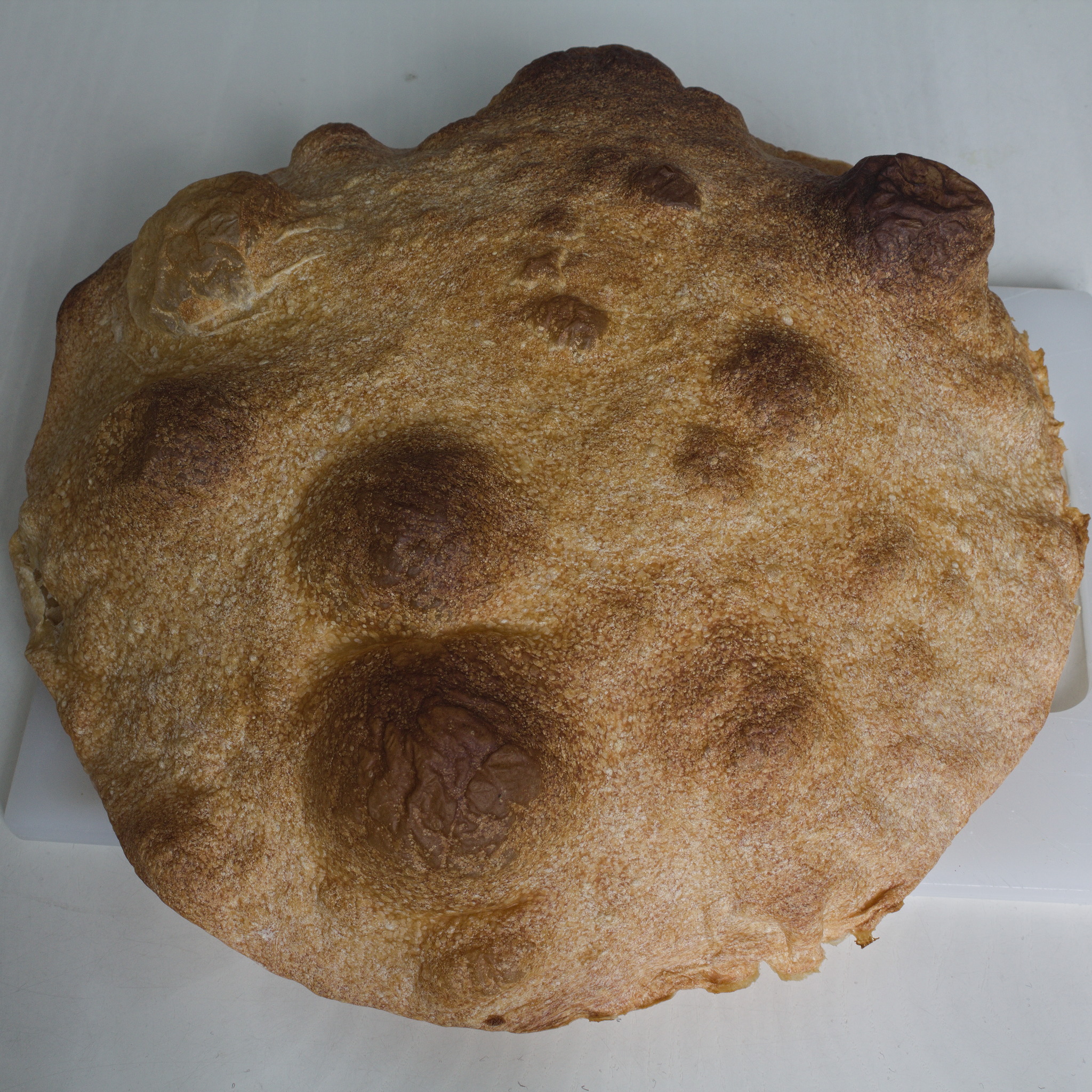 I ve made it again. And again. And a few more times, and now it has an official household name, Pan Sbagliato , or Wrong Bread .
And this is the procedure I ve mostly settled on; starting on the day before (here called Saturday) and baking it so that it s ready for lunch time (on what here is called Sunday).
Saturday: around 13:00
In a bowl, mix together and work well:Saturday: around 18:00cover to rise.
- 250 g water;
- 400 g flour;
- 8 g salt;
In a small bowl, mix together:Saturday: around 21:00
- 2-3 g yeast;
- 10 g water;
- 10 g flour.
In the bowl with the original dough, add the contents of the small bowl plus:Sunday: around 8:00and work well; cover to rise overnight.
- 100 g flour;
- 100 g water;
Pour the dough on a lined oven tray, leave in the cold oven to rise.Sunday: around 11:00
Remove the tray from the oven, preheat the oven to 240 C, bake for 10 minutes, then lower the temperature to 160 C and bake for 20 more minutes. Waiting until it has cooled down a bit will make it easier to cut, but is not strictly necessary.
 I ve had up to a couple of hours variations in the times listed, with no ill effects.
sudo vpnc-connect
and later on sudo vpnc-disconnect. In the past that also
managed to restore my resolv.conf, currently it doesn't.
According to a colleague that's also the case for Ubuntu.
Taking a step back, the sane way would be to use the
NetworkManager vpnc plugin, but that does not work with
this specific case because we use uncool VPN tech which
requires the Enable weak authentication setting for vpnc.
There is a feature request open for that one at
https://gitlab.gnome.org/GNOME/NetworkManager-vpnc/-/issues/11
Taking another step back I thought that it shouldn't be that
hard to add some checkbox, a boolean and render out another
config flag or line in a config file. Not as intuitive as I
thought this mix of XML and C. So let's quickly look elsewhere.
What happens is that the backup files in /var/run/vpnc/ are
created by the vpnc-scripts script called vpnc-script, but not
moved back, because it adds some pid as a suffix and the pid is
not the final pid of the vpnc process. Basically it can not find
the backup when it tries to restore it. So I decided to replace the
pid guessing code with a suffix made up of the gateway IP and the
tun interface name. No idea if that is stable in all circumstance
(someone with a vpn name DNS RR?) or several connections to different
gateways. But good enough for myself, so here is my patch:
vpnc-scripts [master]$ cat debian/patches/replace-pid-detection
Index: vpnc-scripts/vpnc-script
===================================================================
--- vpnc-scripts.orig/vpnc-script
+++ vpnc-scripts/vpnc-script
@@ -91,21 +91,15 @@ OS=" uname -s "
 HOOKS_DIR=/etc/vpnc
-# Use the PID of the controlling process (vpnc or OpenConnect) to
-# uniquely identify this VPN connection. Normally, the parent process
-# is a shell, and the grandparent's PID is the relevant one.
-# OpenConnect v9.0+ provides VPNPID, so we don't need to determine it.
-if [ -z "$VPNPID" ]; then
-    VPNPID=$PPID
-    PCMD= ps -c -o cmd= -p $PPID
-    case "$PCMD" in
-        *sh) VPNPID= ps -o ppid= -p $PPID  ;;
-    esac
+# This whole script is called twice via vpnc-connect. On the first run
+# the variables are empty. Catch that and move on when they're there.
+if [ -n "$VPNGATEWAY" ]; then
+    BACKUPID="$ VPNGATEWAY _$ TUNDEV "
+    DEFAULT_ROUTE_FILE=/var/run/vpnc/defaultroute.$ BACKUPID
+    DEFAULT_ROUTE_FILE_IPV6=/var/run/vpnc/defaultroute_ipv6.$ BACKUPID
+    RESOLV_CONF_BACKUP=/var/run/vpnc/resolv.conf-backup.$ BACKUPID
 fi
-DEFAULT_ROUTE_FILE=/var/run/vpnc/defaultroute.$ VPNPID
-DEFAULT_ROUTE_FILE_IPV6=/var/run/vpnc/defaultroute_ipv6.$ VPNPID
-RESOLV_CONF_BACKUP=/var/run/vpnc/resolv.conf-backup.$ VPNPID
 SCRIPTNAME= basename $0
 # some systems, eg. Darwin & FreeBSD, prune /var/run on boot
--enable-weak-authentication. The beauty is,
all of this will break on updates, so at some point someone has to
understand GTK4 to fix the NetworkManager plugin for good. 
| Publisher: | W.W. Norton & Company |
| Copyright: | 2023 |
| ISBN: | 1-324-07434-5 |
| Format: | Kindle |
| Pages: | 255 |
| Series: | Discworld #33 |
| Publisher: | Harper |
| Copyright: | October 2004 |
| Printing: | November 2014 |
| ISBN: | 0-06-233497-2 |
| Format: | Mass market |
| Pages: | 471 |
xzcat haos_generic-x86-64-11.0.img.xz dd of=/dev/mmcblk0 bs=1M
That just worked, prefectly and really fast. If you want to use a GUI in a live environment, then just using
the gnome-disk-utility ("Disks" in Gnome menu) and using the "Restore Disk Image ..." on a partition would
work just as well. It even supports decompressing the XZ images directly while writing.
But that image is small, will it not have a ton of unused disk space behind the fixed install partition? Yes,
it will ... until first boot. The HA OS takes over the empty space after its install partition on the first
boot-up and just grows its main partition to take up all the remaining space. Smart. After first boot is
completed, the first boot wizard can be accessed via your web browser and one of the prominent buttons there
is restoring from backup. So you just give it the backup file and wait. Sadly the restore does not actually give
any kind of progress, so your only way to figure out when it is done is opening the same web adress in another
browser tab and refresh periodically - after restoring from backup it just boots into the same config at it had
before - all the settings, all the devices, all the history is preserved. Even authentification tokens are
preserved so if yu had a Home Assitant Mobile installed on your phone (both for remote access and to send
location info and phone state, like charging, to HA to trigger automations) then it will just suddenly start
working again without further actions needed from your side. That is an almost perfect backup/restore experience.
The first thing you get for using the OS version of HA is easy automatic update that also automatically takes
a backup before upgrade, so if anything breaks you can roll back with one click. There is also a command-line
tool that allows to upgrade, but also downgrade ha-core and other modules. I had to use it today as HA version
23.10.4 actually broke support for the Sonoff bridge that I am using to control Zigbee devices, which are like
90% of all smart devices in my home. Really helpful stuff, but not a must have.
What is a must have and that you can (really) only get with Home Assistant Operating System are Addons. Some
addons are just normal servers you can run alongside HA on the same HA OS server, like MariaDB or Plex or a
file server. That is not the most important bit, but even there the software comes pre-configured to use in
a home server configuration and has a very simple config UI to pre-configure key settings, like users,
passwords and database accesses for MariaDB - you can litereally in a few clicks and few strings make serveral
users each with its own access to its own database. Couple more clicks and the DB is running and will be kept
restarted in case of failures.
But the real gems in the Home Assistant Addon Store are modules that extend Home Assitant core functionality
in way that would be really hard or near impossible to configure in Home Assitant Container manually,
especially because no documentation has ever existed for such manual config - everyone just tells you to
install the addon from HA Addon store or from HACS. Or you can read the addon metadata in various repos and
figure out what containers it actually runs with what settings and configs and what hooks it puts into the HA
Core to make them cooperate. And then do it all over again when a new version breaks everything 6 months later
when you have already forgotten everything. In the Addons that show up immediately after installation are
addons to install the new Matter
server, a MariaDB and MQTT server
(that other addons can use for data storage
and message exchange), Z-Wave support and ESPHome integration and very handy File manager that includes
editors to edit Home Assitant configs directly in brower and SSH/Terminal addon that boht allows SSH
connection and also a
web based terminal that gives access to the OS itself and also to a comand line interface, for example, to
do package downgrades if needed or see detailed logs. And also there is where you can get the features
that are the focus this year for HA developers - voice enablers.
However that is only a beginning. Like in Debian you can add additional repositories to expand your list of
available addons. Unlike Debian most of the amazing software that is available for Home Assistant is outside
the main, official addon store. For now I have added the most popular addon repository - HACS (Home Assistant
Community Store) and repository maintained by Alexbelgium. The first includes things like NodeRED (a workflow
based automation programming UI), Tailscale/Wirescale for VPN servers, motionEye for CCTV control, Plex for
home streaming. HACS also includes a lot of HA UI enhacement modules, like themes, custom UI control panels
like Mushroom or mini-graph-card and integrations that provide more advanced functions, but also require
more knowledge to use, like Local Tuya - that is harder to set up, but allows fully local control of (normally)
cloud-based devices. And it has AppDaemon - basically a Python based automation framework where you put in
Python scrips that get run in a special environment where they get fed events from Home Assistant and can
trigger back events that can control everything HA can and also do anything Python can do. This I will need
to explore later.
And the repository by Alex includes the thing that is actually the focus of this blog post (I know :D) -
Firefly III addon and Firefly Importer addon that you can then add to your Home Assistant OS with a few
clicks. It also has all kinds of addons for NAS management, photo/video server, book servers and
Portainer that
lets us setup and run any Docker container inside the HA OS structure. HA OS will detect this and warn you
about unsupported processes running on your HA OS instance (nice security feature!), but you can just dismiss
that. This will be very helpful very soon.
This whole environment of OS and containers and apps really made me think - what was missing in Debian that
made the talented developers behind all of that to spend the immense time and effor to setup a completely
new OS and app infrastructure and develop a completel paraller developer community for Home Assistant apps,
interfaces and configurations. Is there anything that can still be done to make HA community and the
general open source and Debian community closer together? HA devs are not doing anything wrong: they are
using the best open source can provide, they bring it to people whould could not install and use it otherwise,
they are contributing fixes and improvements as well. But there must be some way to do this better, together.
So I installed MariaDB, create a user and database for Firefly. I installed Firefly III and configured
it to use the MariaDB with the web config UI. When I went into the Firefly III web UI I was confronted with
the normal wizard to setup a new instance. And no reference to any backup restore. Hmm, ok. Maybe that goes
via the Importer? So I make an access token again, configured the Importer to use that, configured the
Nordlinger bank connection settings. Then I tried to import the export that I downloaded from Firefly III
before. The importer did not auto-recognose the format. Turns out it is just a list of transactions ...
It can only be barely useful if you first manually create all the asset accounts with the same names as
before and even then you'll again have to deal with resolving the problem of transfers showing up twice.
And all of your categories (that have not been used yet) are gone, your automation rules and bills are gone,
your budgets and piggy banks are gone. Boooo. It will be easier for me to recreate my account data from
bank exports again than to resolve data in that transaction export.
Turns out that Firefly III documenation explicitly
recommends making a mysqldump of your own and not rely
on anything in the app itself for backup purposes. Kind of sad this was not mentioned in the export page
that sure looked a lot like a backup :D
After doing all that work all over again I needed to make something new not to feel like I wasted days of
work for no real gain. So I started solving a problem I had for a while already - how do I add cash
transations to the system when I am out of the house with just my phone in the hand? So far my workaround has
been just sending myself messages in WhatsApp with the amount and description of any cash expenses. Two
solutions are possible: app and bot.
There are actually multiple Android-based phone apps that work with Firefly III API to do full
financial management from the phone. However, after trying it out, that is not what I will be using most
of the time. First of all this requires your Firefly III instance to be accessible from the Internet. Either
via direct API access using some port forwarding and secured with HTTPS and good access tokens, or via
a VPN server redirect that is installed on both HA and your phone. Tailscale was really easy to get working.
But the power has its drawbacks - adding a new cash transaction requires opening the app, choosing new
transaction view, entering descriptio, amount, choosing "Cash" as source account and optionally choosing
destination expense account, choosing category and budget and then submitting the form to the server.
Sadly none of that really works if you have no Internet or bad Internet at the place where you are using
cash. And it's just too many steps. Annoying.
An easier alternative is setting up a Telegram bot -
it is running in a custom Docker container right
next to your Firefly (via Portainer) and you talk to it via a custom Telegram chat channel that you create
very easily and quickly. And then you can just tell it "Coffee 5" and it will create a transaction
from the (default) cash account in 5 amount with description "Coffee". This part also works if you are
offline at the moment - the bot will receive the message once you get back online. You can use Telegram
bot menu system to edit the transaction to add categories or expense accounts, but this part only work
if you are online. And the Firefly instance does not have to be online at all. Really nifty.
So next week I will need to write up all the regular payments as bills in Firefly (again) and then I can start
writing a Python script to predict my (financial) future!arduino was in Debian.
But it turns out that the Debian package s version doesn t support the DigiSpark. (AFAICT from the list it offered me, I m not sure it supports any ATTiny85 board.) Also, disturbingly, its board manager seemed to be offering to install board support, suggesting it would download stuff from the internet and run it. That wouldn t be acceptable for my main laptop.
I didn t expect to be doing much programming or debugging, and the project didn t have significant security requirements: the chip, in my circuit, has only a very narrow ability do anything to the real world, and no network connection of any kind. So I thought it would be tolerable to do the project on my low-security video laptop . That s the machine where I m prepared to say yes to installing random software off the internet.
So I went to the upstream Arduino site and downloaded a tarball containing the Arduino IDE. After unpacking that in /opt it ran and produced a pointy-clicky IDE, as expected. I had already found a 3rd-party tutorial saying I needed to add a magic URL (from the DigiSpark s vendor) in the preferences. That indeed allowed it to download a whole pile of stuff. Compilers, bootloader clients, god knows what.
However, my tiny test program didn t make it to the board. Half-buried in a too-small window was an error message about the board s bootloader ( Micronucleus ) being too new.
The boards I had came pre-flashed with micronucleus 2.2. Which is hardly new, But even so the official Arduino IDE (or maybe the DigiSpark s board package?) still contains an old version. So now we have all the downsides of curl bash-ware, but we re lacking the it s up to date and it just works upsides.
Further digging found some random forum posts which suggested simply downloading a newer micronucleus and manually stuffing it into the right place: one overwrites a specific file, in the middle the heaps of stuff that the Arduino IDE s board support downloader squirrels away in your home directory. (In my case, the home directory of the untrusted shared user on the video laptop,)
So, whatever . I did that. And it worked!
Having demo d my ability to run code on the board, I set about writing my program.
Writing C again
The programming language offered via the Arduino IDE is C.
It s been a little while since I started a new thing in C. After having spent so much of the last several years writing Rust. C s primitiveness quickly started to grate, and the program couldn t easily be as DRY as I wanted (Don t Repeat Yourself, see Wilson et al, 2012, 4, p.6). But, I carried on; after all, this was going to be quite a small job.
Soon enough I had a program that looked right and compiled.
Before testing it in circuit, I wanted to do some QA. So I wrote a simulator harness that #included my Arduino source file, and provided imitations of the few Arduino library calls my program used. As an side advantage, I could build and run the simulation on my main machine, in my normal development environment (Emacs, make, etc.). The simulator runs confirmed the correct behaviour. (Perhaps there would have been some more faithful simulation tool, but the Arduino IDE didn t seem to offer it, and I wasn t inclined to go further down that kind of path.)
So I got the video laptop out, and used the Arduino IDE to flash the program. It didn t run properly. It hung almost immediately. Some very ad-hoc debugging via led-blinking (like printf debugging, only much worse) convinced me that my problem was as follows:
Arduino C has 16-bit ints. My test harness was on my 64-bit Linux machine. C was autoconverting things (when building for the micrcocontroller). The way the Arduino IDE ran the compiler didn t pass the warning options necessary to spot narrowing implicit conversions. Those warnings aren t the default in C in general javax.jmdns, with hex DNS packet dumps. WTF.
Other things that were vexing about the Arduino IDE: it has fairly fixed notions (which don t seem to be documented) about how your files and directories ought to be laid out, and magical machinery for finding things you put nearby its sketch (as it calls them) and sticking them in its ear, causing lossage. It has a tendency to become confused if you edit files under its feet (e.g. with git checkout). It wasn t really very suited to a workflow where principal development occurs elsewhere.
And, important settings such as the project s clock speed, or even the target board, or the compiler warning settings to use weren t stored in the project directory along with the actual code. I didn t look too hard, but I presume they must be in a dotfile somewhere. This is madness.
Apparently there is an Arduino CLI too. But I was already quite exasperated, and I didn t like the idea of going so far off the beaten path, when the whole point of using all this was to stay with popular tooling and share fate with others. (How do these others cope? I have no idea.)
As for the integer overflow bug:
I didn t seriously consider trying to figure out how to control in detail the C compiler options passed by the Arduino IDE. (Perhaps this is possible, but not really documented?) I did consider trying to run a cross-compiler myself from the command line, with appropriate warning options, but that would have involved providing (or stubbing, again) the Arduino/DigiSpark libraries (and bugs could easily lurk at that interface).
Instead, I thought, if only I had written the thing in Rust . But that wasn t possible, was it? Does Rust even support this board?
Rust on the DigiSpark
I did a cursory web search and found a very useful blog post by Dylan Garrett.
This encouraged me to think it might be a workable strategy. I looked at the instructions there. It seemed like I could run them via the privsep arrangement I use to protect myself when developing using upstream cargo packages from crates.io.
I got surprisingly far surprisingly quickly. It did, rather startlingly, cause my rustup to download a random recent Nightly Rust, but I have six of those already for other Reasons. Very quickly I got the trinket LED blink example, referenced by Dylan s blog post, to compile. Manually copying the file to the video laptop allowed me to run the previously-downloaded micronucleus executable and successfully run the blink example on my board!
I thought a more principled approach to the bootloader client might allow a more convenient workflow. I found the upstream Micronucleus git releases and tags, and had a look over its source code, release dates, etc. It seemed plausible, so I compiled v2.6 from source. That was a success: now I could build and install a Rust program onto my board, from the command line, on my main machine. No more pratting about with the video laptop.
I had got further, more quickly, with Rust, than with the Arduino IDE, and the outcome and workflow was superior.
So, basking in my success, I copied the directory containing the example into my own project, renamed it, and adjusted the path references.
That didn t work. Now it didn t build. Even after I copied about .cargo/config.toml and rust-toolchain.toml it didn t build, producing a variety of exciting messages, depending what precisely I tried. I don t have detailed logs of my flailing: the instructions say to build it by cd ing to the subdirectory, and, given that what I was trying to do was to not follow those instructions, it didn t seem sensible to try to prepare a proper repro so I could file a ticket. I wasn t optimistic about investigating it more deeply myself: I have some experience of fighting cargo, and it s not usually fun. Looking at some of the build control files, things seemed quite complicated.
Additionally, not all of the crates are on crates.io. I have no idea why not. So, I would need to supply local copies of them anyway. I decided to just git subtree add the avr-hal git tree.
(That seemed better than the approach taken by the avr-hal project s cargo template, since that template involve a cargo dependency on a foreign git repository. Perhaps it would be possible to turn them into path dependencies, but given that I had evidence of file-location-sensitive behaviour, which I didn t feel like I wanted to spend time investigating, using that seems like it would possibly have invited more trouble. Also, I don t like package templates very much. They re a form of clone-and-hack: you end up stuck with whatever bugs or oddities exist in the version of the template which was current when you started.)
Since I couldn t get things to build outside avr-hal, I edited the example, within avr-hal, to refer to my (one) program.rs file outside avr-hal, with a #[path] instruction. That s not pretty, but it worked.
I also had to write a nasty shell script to work around the lack of good support in my nailing-cargo privsep tool for builds where cargo must be invoked in a deep subdirectory, and/or Cargo.lock isn t where it expects, and/or the target directory containing build products is in a weird place. It also has to filter the output from cargo to adjust the pathnames in the error messages. Otherwise, running both cd A; cargo build and cd B; cargo build from a Makefile produces confusing sets of error messages, some of which contain filenames relative to A and some relative to B, making it impossible for my Emacs to reliably find the right file.
RIIR (Rewrite It In Rust)
Having got my build tooling sorted out I could go back to my actual program.
I translated the main program, and the simulator, from C to Rust, more or less line-by-line. I made the Rust version of the simulator produce the same output format as the C one. That let me check that the two programs had the same (simulated) behaviour. Which they did (after fixing a few glitches in the simulator log formatting).
Emboldened, I flashed the Rust version of my program to the DigiSpark. It worked right away!
RIIR had caused the bug to vanish. Of course, to rewrite the program in Rust, and get it to compile, it was necessary to be careful about the types of all the various integers, so that s not so surprising. Indeed, it was the point. I was then able to refactor the program to be a bit more natural and DRY, and improve some internal interfaces. Rust s greater power, compared to C, made those cleanups easier, so making them worthwhile.
However, when doing real-world testing I found a weird problem: my timings were off. Measured, the real program was too fast by a factor of slightly more than 2. A bit of searching (and searching my memory) revealed the cause: I was using a board template for an Adafruit Trinket. The Trinket has a clock speed of 8MHz. But the DigiSpark runs at 16.5MHz. (This is discussed in a ticket against one of the C/C++ libraries supporting the ATTiny85 chip.)
The Arduino IDE had offered me a choice of clock speeds. I have no idea how that dropdown menu took effect; I suspect it was adding prelude code to adjust the clock prescaler. But my attempts to mess with the CPU clock prescaler register by hand at the start of my Rust program didn t bear fruit.
So instead, I adopted a bodge: since my code has (for code structure reasons, amongst others) only one place where it dealt with the underlying hardware s notion of time, I simply changed my delay function to adjust the passed-in delay values, compensating for the wrong clock speed.
There was probably a more principled way. For example I could have (re)based my work on either of the two unmerged open MRs which added proper support for the DigiSpark board, rather than abusing the Adafruit Trinket definition. But, having a nearly-working setup, and an explanation for the behaviour, I preferred the narrower fix to reopening any cans of worms.
An offer of help
As will be obvious from this posting, I m not an expert in dev tools for embedded systems. Far from it. This area seems like quite a deep swamp, and I m probably not the person to help drain it. (Frankly, much of the improvement work ought to be done, and paid for, by hardware vendors.)
But, as a full Member of the Debian Project, I have considerable gatekeeping authority there. I also have much experience of software packaging, build systems, and release management. If anyone wants to try to improve the situation with embedded tooling in Debian, and is willing to do the actual packaging work. I would be happy to advise, and to review and sponsor your contributions.
An obvious candidate: it seems to me that micronucleus could easily be in Debian. Possibly a DigiSpark board definition could be provided to go with the arduino package.
Unfortunately, IMO Debian s Rust packaging tooling and workflows are very poor, and the first of my suggestions for improvement wasn t well received. So if you need help with improving Rust packages in Debian, please talk to the Debian Rust Team yourself.
Conclusions
Embedded programming is still rather a mess and probably always will be.
Embedded build systems can be bizarre. Documentation is scant. You re often expected to download board support packages full of mystery binaries, from the board vendor (or others).
Dev tooling is maddening, especially if aimed at novice programmers. You want version control? Hermetic tracking of your project s build and install configuration? Actually to be told by the compiler when you write obvious bugs? You re way off the beaten track.
As ever, Free Software is under-resourced and the maintainers are often busy, or (reasonably) have other things to do with their lives.
All is not lost
Rust can be a significantly better bet than C for embedded software:
The Rust compiler will catch a good proportion of programming errors, and an experienced Rust programmer can arrange (by suitable internal architecture) to catch nearly all of them. When writing for a chip in the middle of some circuit, where debugging involves staring an LED or a multimeter, that s precisely what you want.
Rust embedded dev tooling was, in this case, considerably better. Still quite chaotic and strange, and less mature, perhaps. But: significantly fewer mystery downloads, and significantly less crazy deviations from the language s normal build system. Overall, less bad software supply chain integrity.
The ATTiny85 chip, and the DigiSpark board, served my hardware needs very well. (More about the hardware aspects of this project in a future posting.) The eighth release of the still fairly new qlcal package
arrivied at CRAN today.
qlcal
delivers the calendaring parts of QuantLib. It is provided (for the R
package) as a set of included files, so the package is self-contained
and does not depend on an external QuantLib library (which can be
demanding to build). qlcal covers
over sixty country / market calendars and can compute holiday lists, its
complement (i.e. business day lists) and much more.
This release brings updates from the just-released QuantLib 1.32 version. It also
avoids a nag from R during build ( only specify C++14 if you really need
it ) but switching to a versioned depends on R 4.2.0 or later. This
implies C++14 or later as the default. If you need qlcal on an
older R, grab the sources, edit DESCRIPTION to remove this
constraint and set the standard as before in src/Makevars
(or src/Makevars.win).
Courtesy of my CRANberries, there is a diffstat report for this release. See the project page and package documentation for more details, and more examples. If you like this or other open-source work I do, you can now sponsor me at GitHub.Changes in version 0.0.8 (2023-10-21)
- A small set of updates from QuantLib 1.32 have been applied
- The explicit C++14 compilation standard has been replaced with an implicit one by relying on R (>= 4.2.0)
This post by Dirk Eddelbuettel originated on his Thinking inside the box blog. Please report excessive re-aggregation in third-party for-profit settings.
| Series: | Discworld #32 |
| Publisher: | HarperTrophy |
| Copyright: | 2004 |
| Printing: | 2005 |
| ISBN: | 0-06-058662-1 |
| Format: | Mass market |
| Pages: | 407 |
| Series: | October Daye #14 |
| Publisher: | DAW |
| Copyright: | 2020 |
| ISBN: | 0-7564-1253-6 |
| Format: | Kindle |
| Pages: | 351 |
apt install grub2 apparmor-profiles-extra apparmor-profiles apparmor
apparmor=1 security=apparmor to the kernel command line
(GRUB_CMDLINE_LINUX) in /etc/default/grub.
https://cloud.linode.com/linodes/<linode ID>/configurations),grub-install --grub-setup=/bin/true /dev/null
/etc/apparmor.d/local/usr.sbin.unbound:
/etc/letsencrypt/archive/** r,
/etc/letsencrypt/live/** r,
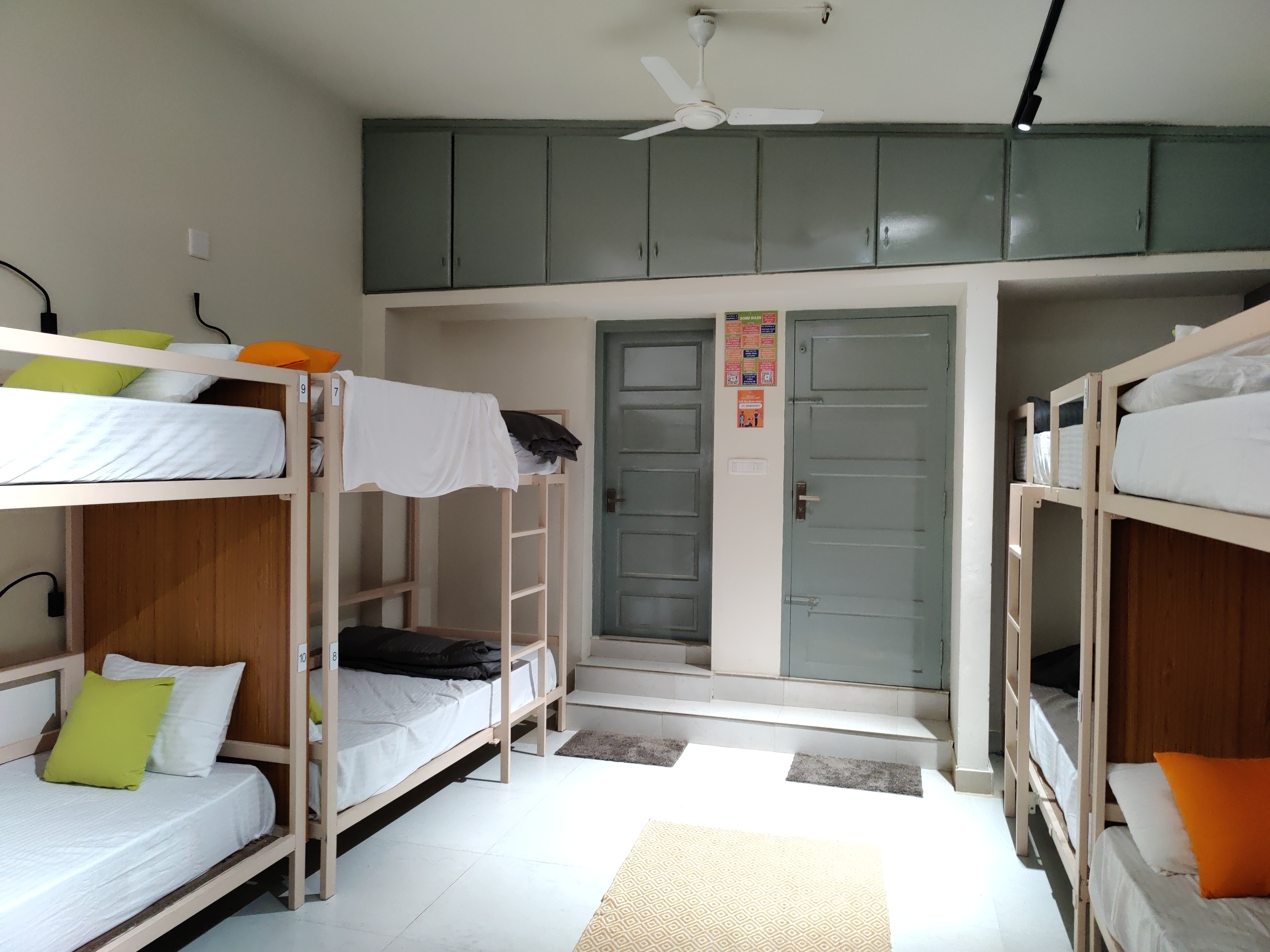 Dormitory room in Zostel Ernakulam, Kochi.
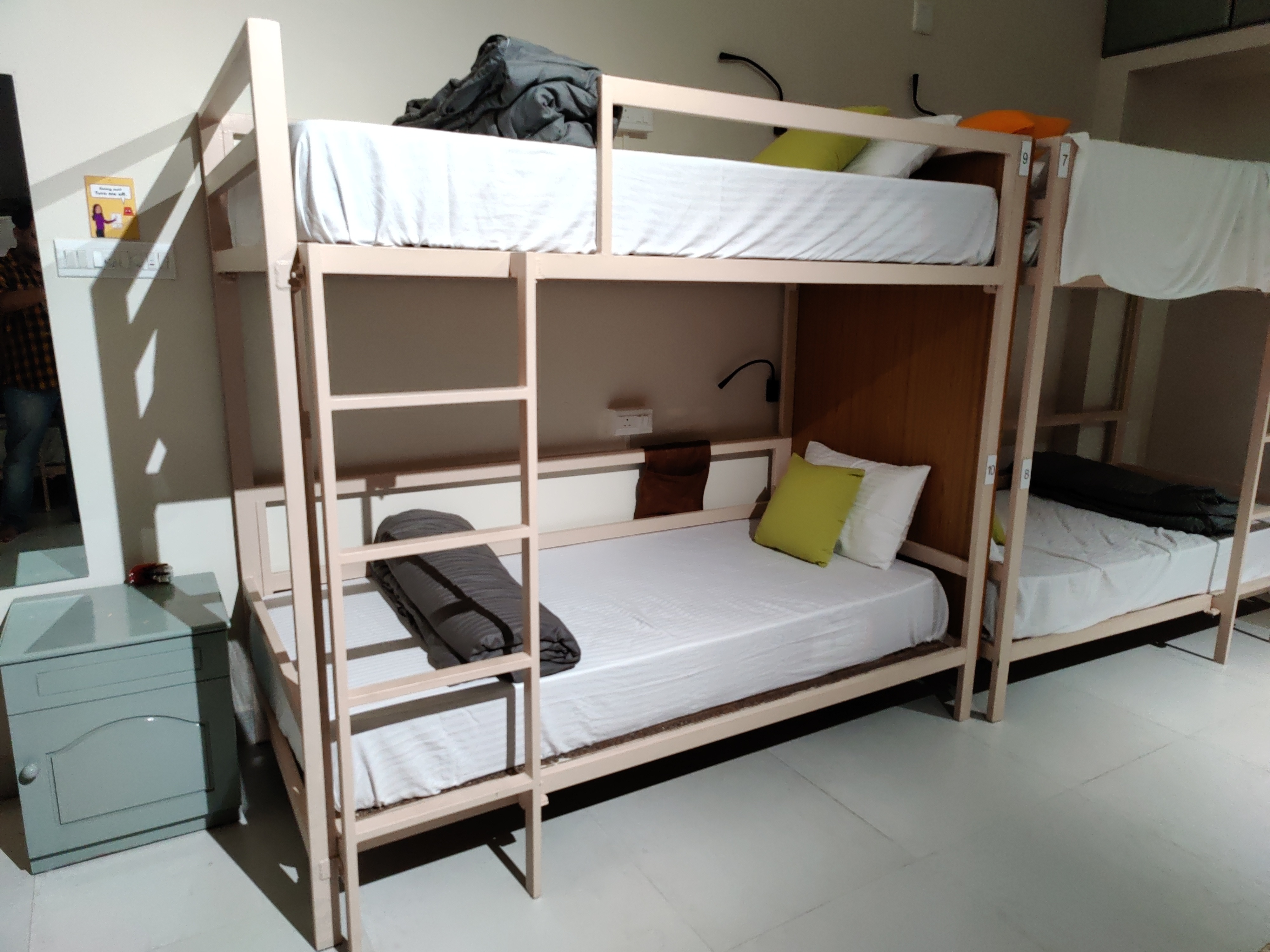 Beds in Zostel Ernakulam, Kochi.
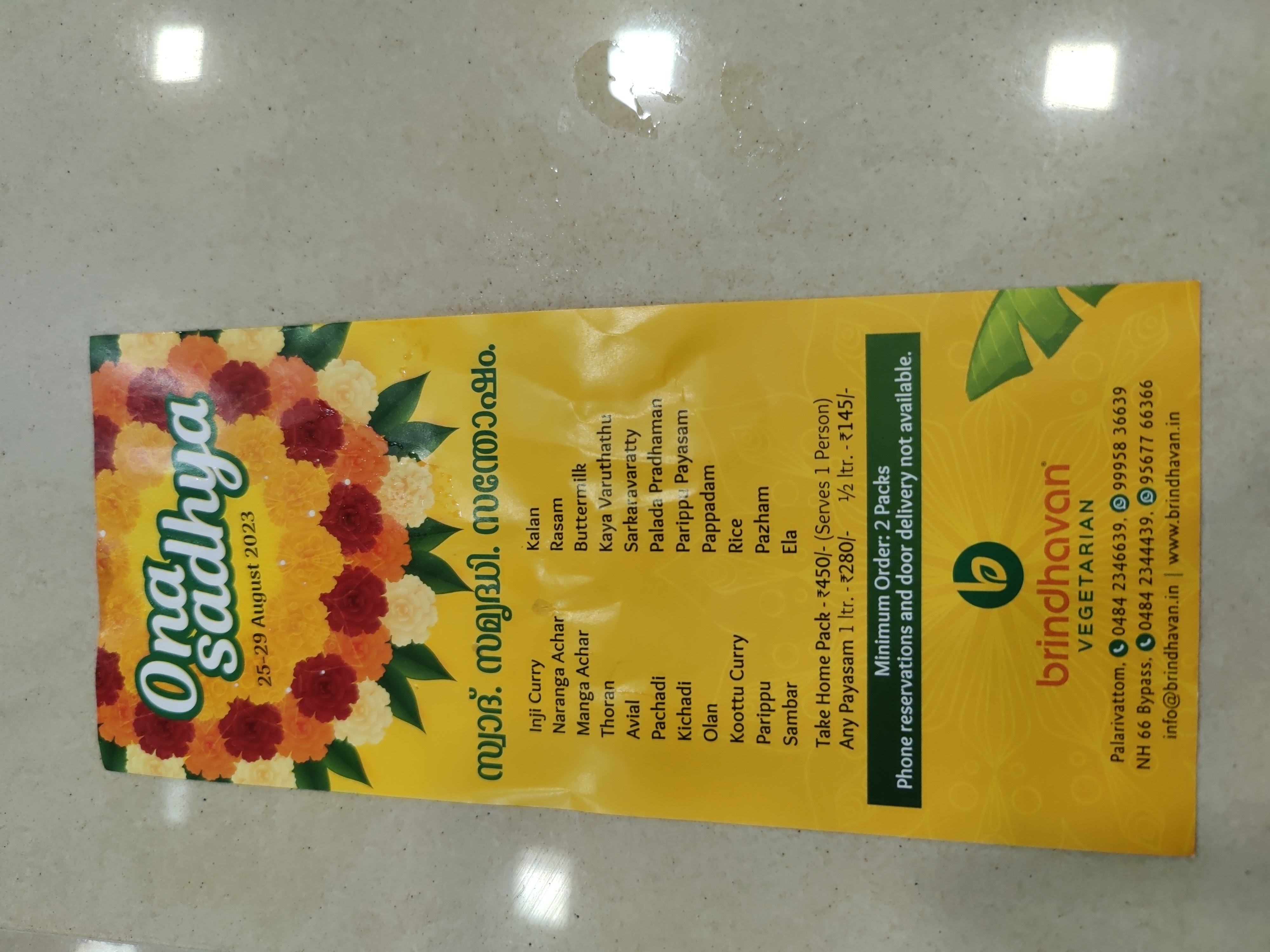 Onam sadya menu from Brindhavan restaurant.
 Sadya lined up for serving
 Sadya thali served on banana leaf.
 We were treated with such views during the Wayanad trip.
 A road in Rippon.
 Entry to Kanthanpara Falls.
 Kanthanpara Falls.
 A view of Zostel Wayanad.
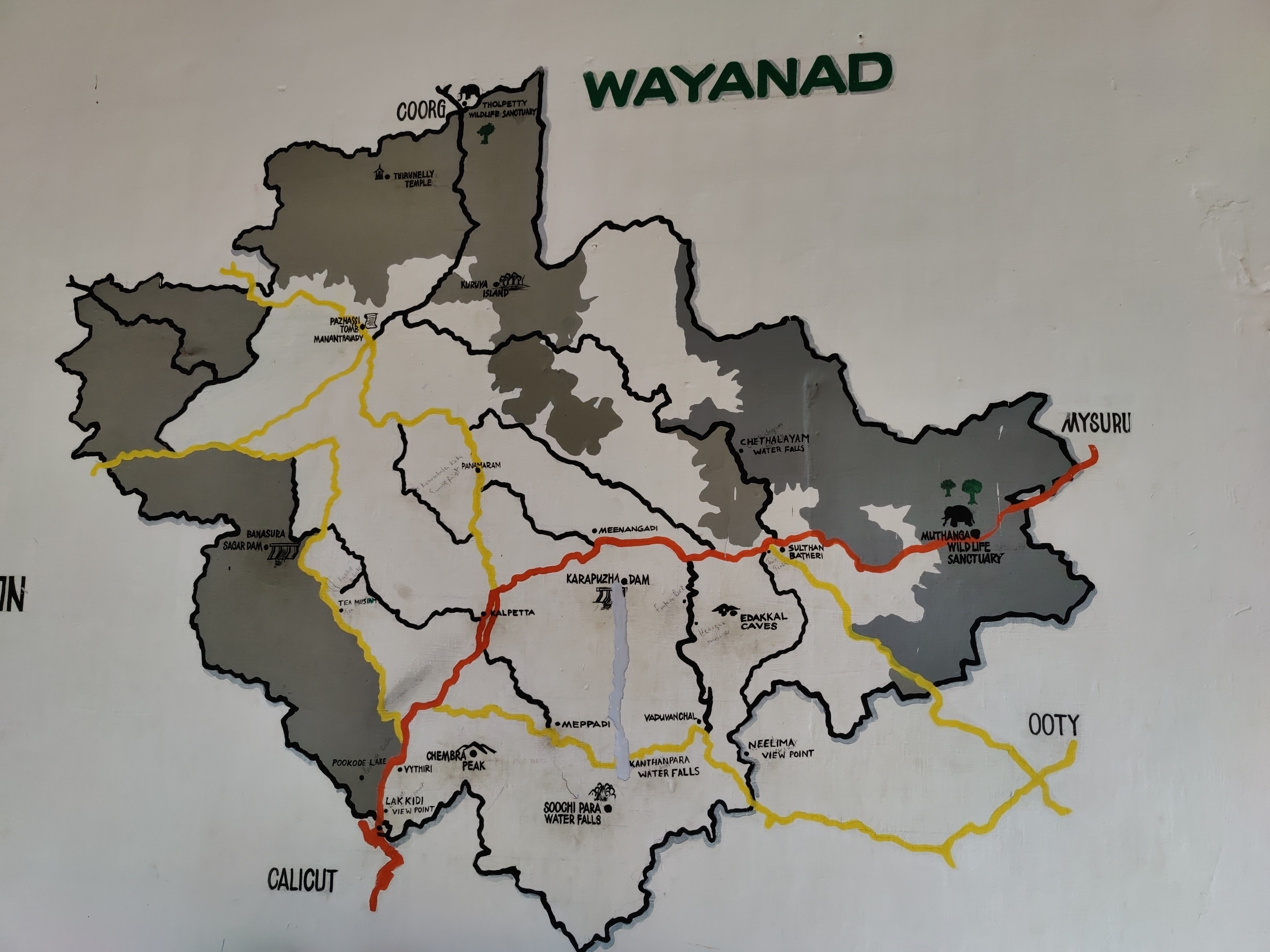 A map of Wayanad showing tourist places.
 A view from inside the Zostel Wayanad property.
 Terrain during trekking towards the Chembra peak.
 Heart-shaped lake at the Chembra peak.
 Me at the heart-shaped lake.
 Views from the top of the Chembra peak.
 View of another peak from the heart-shaped lake.
| description |
|---|
| umbrello |
| squashfuse |
| golang-github-muesli-mango |
| golang-github-muesli-roff |
| speechpy-fast |
| lingua-franca |
Next.