Search Results: "ag"

1 December 2024

Sandro Knau : QML Dependency tracking in Debian

Tracking library dependencies work in Debian to resolve from symbols usage to a library and add this to the list of dependencies. That is working for years now. The KDE community nowadays create more and more QML based applications. Unfortunately QML is a interpreted language, this means missing QML dependencies will only be an issue at runtime. To fix this I created dh_qmldeps, that searches for QML dependencies at build time and will fail if it can't resolve the QML dependency. Me didn't create an own QML interpreter, just using qmlimportscanner behind the scenes and process the output further to resolve the QML modules to Debian packages. The workflow is like follows: The package compiles normally and split to the binary packages. Than dh_qmldeps scans through the package content to find QML content ( .qml files, or qmldirfor QML modules). All founded files will be scanned by qmlimportscanner, the output is a list of depended QML modules. As QML modules have a standardized file path, we can ask the Debian system, which packages ship this file path. We end up with a list of Debian packages in the variable $ qml6:Depends . This variable can be attached to the list of dependencies of the scanned package. A maintainer can also lower some dependencies to Recommends or Suggest, if needed. You can find the source code on salsa and usage documentation you can find on https://qt-kde-team.pages.debian.net/dh_qmldeps.html. The last weeks I now enabled dh_qmldeps for newly every package, that creates a QML6 module package. So the first bugs are solved and it should be usable for more packages. By scanning with qmlimportscanner trough all code, I found several non-existing QML modules: YEAH - the first milestone is reached. We are able to simply handle QML modules. But QML applications there is still room for improvement. In apps the QML files are inside the executable. Additionally applications create internal QML modules, that are shipped directly in the same executable. I still search for a good way to analyse an executable to get a list of internal QML modules and a list of included QML files. Any ideas are welcomed :) As workaround dh_qmldeps scans currently all QML files inside the application source code.

30 November 2024

Dima Kogan: Strava track filtering validation

After years of seeing people's strava tracks, I became convinced that they insufficiently filter the data, resulting in over-estimating the effort. Today I did a bit of lazy analysis, and half-confirmed this: in the one case I looked at, strava reported reasonable elevation gain numbers, but greatly overestimated the distance traveled. I looked at a single gps track of a long bike ride. This was uploaded to strava manually, as a .gpx file. I can imagine that different things happen if you use the strava app or some device that integrates with the service (the filtering might happen before the data hits the server, and the server could decide to not apply any more filtering). I processed the data with a simple hysteretic filter, ignoring small changes in position and elevation, trying out different thresholds in the process. I completely ignore the timestamps, and only look at the differences between successive points. This handles the usual GPS noise; it does not handle GPS jumps, which I completely ignore in this analysis. Ignoring these would produce inflated elevation/gain numbers, but I'm working with a looong track, so hopefully this is a small effect. Clearly this is not scientific, but it's something.

The code
Parsing .gpx is slow (this is a big file), so I cache that into a .vnl:
import sys
import gpxpy
filename_in  = 'INPUT.gpx'
filename_out = 'OUTPUT.gpx'
with open(filename_in, 'r') as f:
    gpx = gpxpy.parse(f)
f_out = open(filename_out, 'w')
tracks = gpx.tracks
if len(tracks) != 1:
    print("I want just one track", file=sys.stderr)
    sys.exit(1)
track = tracks[0]
segments = track.segments
if len(segments) != 1:
    print("I want just one segment", file=sys.stderr)
    sys.exit(1)
segment = segments[0]
time0 = segment.points[0].time
print("# time lat lon ele_m")
for p in segment.points:
    print(f" (p.time - time0).seconds   p.latitude   p.longitude   p.elevation ",
          file = f_out)
And I process this data with the different filters (this is a silly Python loop, and is slow):
#!/usr/bin/python3
import sys
import numpy as np
import numpysane as nps
import gnuplotlib as gp
import vnlog
import pyproj
geod = None
def dist_ft(lat0,lon0, lat1,lon1):
    global geod
    if geod is None:
        geod = pyproj.Geod(ellps='WGS84')
    return \
        geod.inv(lon0,lat0, lon1,lat1)[2] * 100./2.54/12.
f = 'OUTPUT.gpx'
track,list_keys,dict_key_index = \
    vnlog.slurp(f)
t      = track[:,dict_key_index['time' ]]
lat    = track[:,dict_key_index['lat'  ]]
lon    = track[:,dict_key_index['lon'  ]]
ele_ft = track[:,dict_key_index['ele_m']] * 100./2.54/12.
@nps.broadcast_define( ( (), ()),
                       (2,))
def filter_track(ele_hysteresis_ft,
                 dxy_hysteresis_ft):
    dist        = 0.0
    ele_gain_ft = 0.0
    lon_accepted = None
    lat_accepted = None
    ele_accepted = None
    for i in range(len(lat)):
        if ele_accepted is not None:
            dxy_here  = dist_ft(lat_accepted,lon_accepted, lat[i],lon[i])
            dele_here = np.abs( ele_ft[i] - ele_accepted )
            if dxy_here < dxy_hysteresis_ft and dele_here < ele_hysteresis_ft:
                continue
            if ele_ft[i] > ele_accepted:
                ele_gain_ft += dele_here;
            dist += np.sqrt(dele_here * dele_here +
                            dxy_here  * dxy_here)
        lon_accepted = lon[i]
        lat_accepted = lat[i]
        ele_accepted = ele_ft[i]
    # lose the last point. It simply doesn't matter
    dist_mi = dist / 5280.
    return np.array((ele_gain_ft, dist_mi))
Nele_hysteresis_ft    = 20
ele_hysteresis0_ft    = 5
ele_hysteresis1_ft    = 100
ele_hysteresis_ft_all = np.linspace(ele_hysteresis0_ft,
                                    ele_hysteresis1_ft,
                                    Nele_hysteresis_ft)
Ndxy_hysteresis_ft = 20
dxy_hysteresis0_ft = 5
dxy_hysteresis1_ft = 1000
dxy_hysteresis_ft  = np.linspace(dxy_hysteresis0_ft,
                                 dxy_hysteresis1_ft,
                                 Ndxy_hysteresis_ft)
# shape (Nele,Ndxy,2)
gain,distance = \
    nps.mv( filter_track( nps.dummy(ele_hysteresis_ft_all,-1),
                          dxy_hysteresis_ft),
            -1,0 )
# Stolen from mrcal
def options_heatmap_with_contours( plotoptions, # we update this on output
                                   *,
                                   contour_min           = 0,
                                   contour_max,
                                   contour_increment     = None,
                                   do_contours           = True,
                                   contour_labels_styles = 'boxed',
                                   contour_labels_font   = None):
    r'''Update plotoptions, return curveoptions for a contoured heat map'''
    gp.add_plot_option(plotoptions,
                       'set',
                       ('view equal xy',
                        'view map'))
    if do_contours:
        if contour_increment is None:
            # Compute a "nice" contour increment. I pick a round number that gives
            # me a reasonable number of contours
            Nwant = 10
            increment = (contour_max - contour_min)/Nwant
            # I find the nearest 1eX or 2eX or 5eX
            base10_floor = np.power(10., np.floor(np.log10(increment)))
            # Look through the options, and pick the best one
            m   = np.array((1., 2., 5., 10.))
            err = np.abs(m * base10_floor - increment)
            contour_increment = -m[ np.argmin(err) ] * base10_floor
        gp.add_plot_option(plotoptions,
                           'set',
                           ('key box opaque',
                            'style textbox opaque',
                            'contour base',
                            f'cntrparam levels incremental  contour_max , contour_increment , contour_min '))
        if contour_labels_font is not None:
            gp.add_plot_option(plotoptions,
                               'set',
                               f'cntrlabel format "%d" font " contour_labels_font "' )
        else:
            gp.add_plot_option(plotoptions,
                               'set',
                               f'cntrlabel format "%.0f"' )
        plotoptions['cbrange'] = [contour_min, contour_max]
        # I plot 3 times:
        # - to make the heat map
        # - to make the contours
        # - to make the contour labels
        _with = np.array(('image',
                          'lines nosurface',
                          f'labels  contour_labels_styles  nosurface'))
    else:
        gp.add_plot_option(plotoptions, 'unset', 'key')
        _with = 'image'
    using = \
        f'( dxy_hysteresis0_ft +$1* float(dxy_hysteresis1_ft-dxy_hysteresis0_ft)/(Ndxy_hysteresis_ft-1) ):' + \
        f'( ele_hysteresis0_ft +$2* float(ele_hysteresis1_ft-ele_hysteresis0_ft)/(Nele_hysteresis_ft-1) ):3'
    plotoptions['_3d']     = True
    plotoptions['_xrange'] = [dxy_hysteresis0_ft,dxy_hysteresis1_ft]
    plotoptions['_yrange'] = [ele_hysteresis0_ft,ele_hysteresis1_ft]
    plotoptions['ascii']   = True # needed for using to work
    gp.add_plot_option(plotoptions, 'unset', 'grid')
    return \
        dict( tuplesize=3,
              legend = "", # needed to force contour labels
              using = using,
              _with=_with)
contour_granularity = 1000
plotoptions = dict()
curveoptions = \
    options_heatmap_with_contours( plotoptions, # we update this on output
                                   # round down to the nearest contour_granularity
                                   contour_min = (np.min(gain) // contour_granularity)*contour_granularity,
                                   # round up to the nearest contour_granularity
                                   contour_max = ((np.max(gain) + (contour_granularity-1)) // contour_granularity) * contour_granularity,
                                   do_contours = True)
gp.add_plot_option(plotoptions, 'unset', 'key')
gp.add_plot_option(plotoptions, 'set', 'size square')
gp.plot(gain,
        xlabel  = "Distance hysteresis (ft)",
        ylabel  = "Elevation hysteresis (ft)",
        cblabel = "Elevation gain (ft)",
        wait = True,
        **curveoptions,
        **plotoptions,
        title    = 'Computed gain vs filtering parameters')
contour_granularity = 10
plotoptions = dict()
curveoptions = \
    options_heatmap_with_contours( plotoptions, # we update this on output
                                   # round down to the nearest contour_granularity
                                   contour_min = (np.min(distance) // contour_granularity)*contour_granularity,
                                   # round up to the nearest contour_granularity
                                   contour_max = ((np.max(distance) + (contour_granularity-1)) // contour_granularity) * contour_granularity,
                                   do_contours = True)
gp.add_plot_option(plotoptions, 'unset', 'key')
gp.add_plot_option(plotoptions, 'set', 'size square')
gp.plot(distance,
        xlabel  = "Distance hysteresis (ft)",
        ylabel  = "Elevation hysteresis (ft)",
        cblabel = "Distance (miles)",
        wait = True,
        **curveoptions,
        **plotoptions,
        title    = 'Computed distance vs filtering parameters')

Results: gain
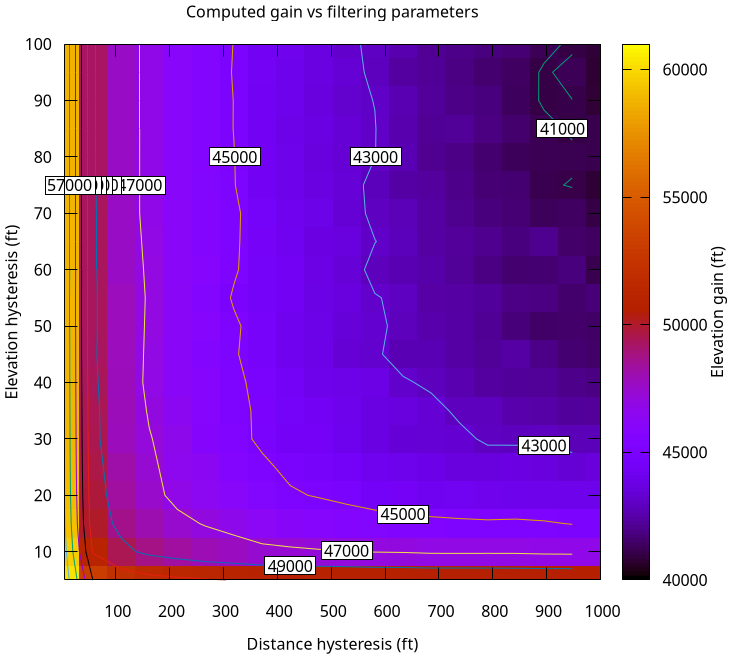
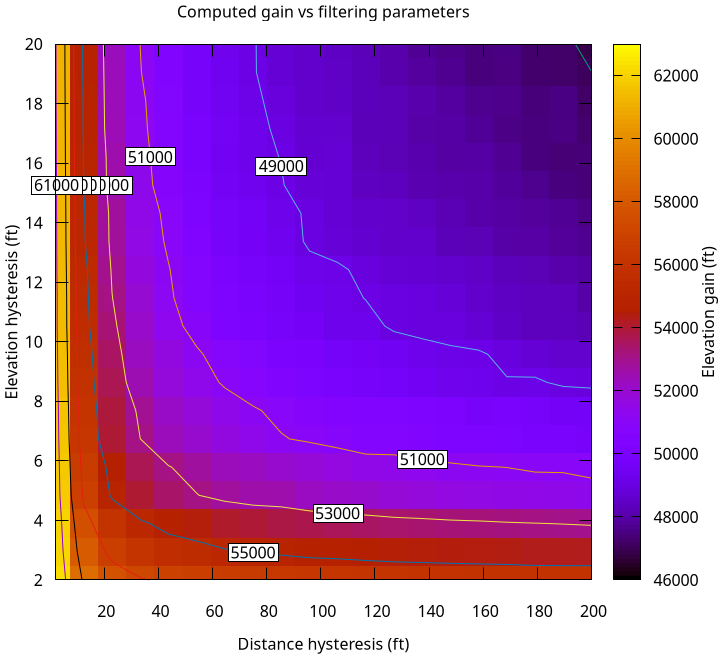
Strava says the gain was 46307ft. The analysis says:
strava-gain.png
strava-gain-zoom.png
These show the filtered gain for different values of the distance and gain hysteresis thresholds. The same data is shown at diffent zoom levels. There's no sweet spot, but we get 46307ft with a reasonable amount of filtering. Maybe 46307ft is a bit low even.

Results: distance
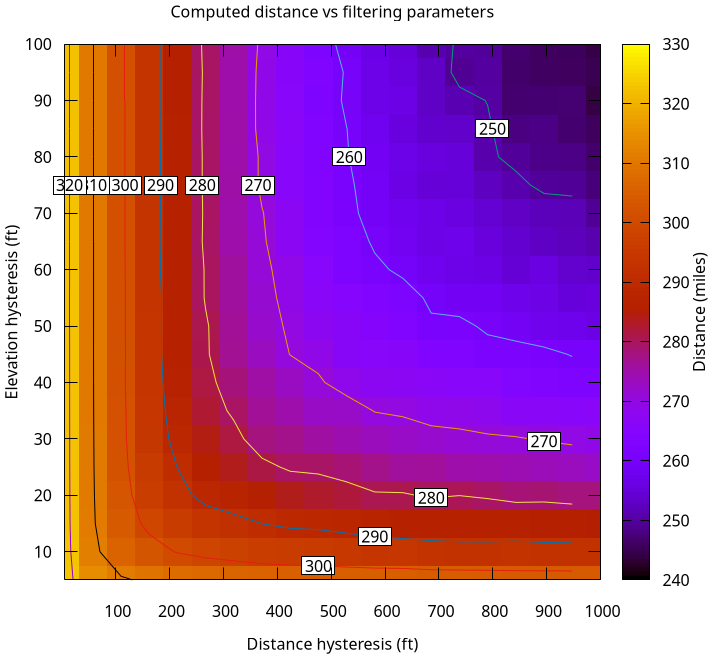
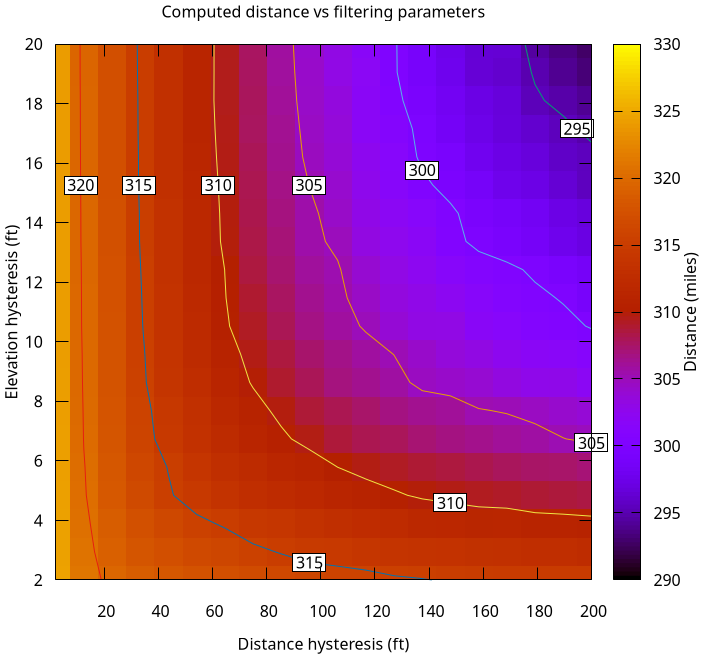
Strava says the distance covered was 322 miles. The analysis says:
strava-distance.png
strava-distance-zoom.png
Once again, there's no sweet spot, but we get 322 miles only if we apply no filtering at all. That's clearly too high, and is not reasonable. From the map (and from other people's strava routes) the true distance is closer to 305 miles. Why those people's strava numbers are more believable is anybody's guess.

Enrico Zini: New laptop setup

My new laptop Framework (Framework Laptop 13 DIY Edition (AMD Ryzen 7040 Series)) arrived, all the hardware works out of the box on Debian Stable, and I'm very happy indeed. This post has the notes of all the provisioning steps, so that I can replicate them again if needed. Installing Debian 12 Debian 12's installer just worked, with Secure Boot enabled no less, which was nice. The only glitch is an argument with the guided partitioner, which was uncooperative: I have been hit before by a /boot partition too small, and I wanted 1G of EFI and 1G of boot, while the partitioner decided that 512Mb were good enough. Frustratingly, there was no way of changing that, nor I found how to get more than 1G of swap, as I wanted enough swap to fit RAM for hybernation. I let it install the way it pleased, then I booted into grml for a round of gparted. The tricky part of that was resizing the root btrfs filesystem, which is in an LV, which is in a VG, which is in a PV, which is in LUKS. Here's a cheatsheet. Shrink partitions: note that I used an increasing size because I don't trust that each tool has a way of representing sizes that aligns to the byte. I'd be happy to find out that they do, but didn't want to find out the hard way that they didn't. Resize with gparted: Move and resize partitions at will. Shrinking first means it all takes a reasonable time, and you won't have to wait almost an hour for a terabyte-sized empty partition to be carefully moved around. Don't ask me why I know. Regrow partitions: Setup gnome When I get a new laptop I have a tradition of trying to make it work with Gnome and Wayland, which normally ended up in frustration and a swift move to X11 and Xfce: I have a lot of long-time muscle memory involved in how I use a computer, and it needs to fit like prosthetics. I can learn to do a thing or two in a different way, but any papercut that makes me break flow and I cannot fix will soon become a dealbreaker. This applies to Gnome as present in Debian Stable. General Gnome settings tips I can list all available settings with:
gsettings list-recursively
which is handy for grepping things like hotkeys. I can manually set a value with:
gsettings set <schema> <key> <value>
and I can reset it to its default with:
gsettings reset <schema> <key>
Some applications like Gnome Terminal use "relocatable schemas", and in those cases you also need to specify a path, which can be discovered using dconf-editor:
gsettings set <schema>:<path> <key> <value>
Install appindicators First thing first: app install gnome-shell-extension-appindicator, log out and in again: the Gnome Extension manager won't see the extension as available until you restart the whole session. I have no idea why that is so, and I have no idea why a notification area is not present in Gnome by default, but at least now I can get one. Fix font sizes across monitors My laptop screen and monitor have significantly different DPIs, so:
gsettings set org.gnome.mutter experimental-features "['scale-monitor-framebuffer']"
And in Settings/Displays, set a reasonable scaling factor for each display. Disable Alt/Super as hotkey for the Overlay Seeing all my screen reorganize and reshuffle every time I accidentally press Alt leaves me disoriented and seasick:
gsettings set org.gnome.mutter overlay-key ''
Focus-follows-mouse and Raise-or-lower My desktop is like my desktop: messy and cluttered. I have lots of overlapping window and I switch between them by moving the focus with the mouse, and when the visible part is not enough I have a handy hotkey mapped to raise-or-lower to bring forward what I need and send back what I don't need anymore. Thankfully Gnome can be configured that way, with some work: This almost worked, but sometimes it didn't do what I wanted, like I expected to find a window to the front but another window disappeared instead. I eventually figured that by default Gnome delays focus changes by a perceivable amount, which is evidently too slow for the way I move around windows. The amount cannot be shortened, but it can be removed with:
gsettings set org.gnome.shell.overrides focus-change-on-pointer-rest false
Mouse and keyboard shortcuts Gnome has lots of preconfigured sounds, shortcuts, animations and other distractions that I do not need. They also either interfere with key combinations I want to use in terminals, or cause accidental window moves or resizes that make me break flow, or otherwise provide sensory overstimulation that really does not work for me. It was a lot of work, and these are the steps I used to get rid of most of them. Disable Super+N combinations that accidentally launch a questionable choice of programs:
for i in  seq 1 9 ; do gsettings set org.gnome.shell.keybindings switch-to-application-$i '[]'; done
Gnome-Shell settings: gnome-tweak-tool settings: Gnome Terminal settings: Thankfully 10 years ago I took notes on how to customize Gnome Terminal, and they're still mostly valid: Other hotkeys that got in my way and had to disable the hard way:
for n in  seq 1 12 ; do gsettings set org.gnome.mutter.wayland.keybindings switch-to-session-$n '[]'; done
gsettings set org.gnome.desktop.wm.keybindings move-to-workspace-down '[]'
gsettings set org.gnome.desktop.wm.keybindings move-to-workspace-up '[]'
gsettings set org.gnome.desktop.wm.keybindings panel-main-menu '[]'
gsettings set org.gnome.desktop.interface menubar-accel '[]'
Note that even after removing F10 from being bound to menubar-accel, and after having to gsetting binding to F10 as is:
$ gsettings list-recursively grep F10
org.gnome.Terminal.Legacy.Keybindings switch-to-tab-10 '<Alt>F10'
I still cannot quit Midnight Commander using F10 in a terminal, as that moves the focus in the window title bar. This looks like a Gnome bug, and a very frustrating one for me. Appearance Gnome-Shell settings: gnome-tweak-tool settings: Gnome Terminal settings: Other decluttering and tweaks Gnome Shell Settings: Set a delay between screen blank and lock: when the screen goes blank, it is important for me to be able to say "nope, don't blank yet!", and maybe switch on caffeine mode during a presentation without needing to type my password in front of cameras. No UI for this, but at least gsettings has it:
gsettings set org.gnome.desktop.screensaver lock-delay 30
Extensions I enabled the Applications Menu extension, since it's impossible to find less famous applications in the Overview without knowing in advance how they're named in the desktop. This stole a precious hotkey, which I had to disable in gsettings:
gsettings set org.gnome.shell.extensions.apps-menu apps-menu-toggle-menu '[]'
I also enabled: I didn't go and look for Gnome Shell extentions outside what is packaged in Debian, as I'm very wary about running JavaScript code randomly downloaded from the internet with full access over my data and desktop interaction. I also took care of checking that the Gnome Shell Extensions web page complains about the lacking "GNOME Shell integration" browser extension, because the web browser shouldn't be allowed to download random JavaScript from the internet and run it with full local access. Yuck. Run program dialog The default run program dialog is almost, but not quite, totally useless to me, as it does not provide completion, not even just for executable names in path, and so it ends up being faster to open a new terminal window and type in there. It's possible, in Gnome Shell settings, to bind a custom command to a key. The resulting keybinding will now show up in gsettings, though it can be located in a more circuitous way by grepping first, and then looking up the resulting path in dconf-editor:
gsettings list-recursively grep custom-key
org.gnome.settings-daemon.plugins.media-keys custom-keybindings ['/org/gnome/settings-daemon/plugins/media-keys/custom-keybindings/custom0/']
I tried out several run dialogs present in Debian, with sad results, possibly due to most of them not being tested on wayland: Both gmrun and xfrun4 seem like workable options, with xfrun4 being customizable with convenient shortcut prefixes, so xfrun4 it is. TODO I'll try to update these notes as I investigate. Conclusion so far I now have something that seems to work for me. A few papercuts to figure out still, but they seem manageable. It all feels a lot harder than it should be: for something intended to be minimal, Gnome defaults feel horribly cluttered and noisy to me, continuosly getting in the way of getting things done until tamed into being out of the way unless called for. It felt like a device that boots into flashy demo mode, which needs to be switched off before actual use. Thankfully it can be switched off, and now I have notes to do it again if needed. gsettings oddly feels to me like a better UI than the interactive settings managers: it's more comprehensive, more discoverable, more scriptable, and more stable across releases. Most of the Q&A I found on the internet with guidance given on the UI was obsolete, while when given with gsettings command lines it kept being relevant. I also have the feeling that these notes would be easier to understand and follow if given as gsettings invocations instead of descriptions of UI navigation paths. At some point I'll upgrade to Trixie and reevaluate things, and these notes will be a useful checklist for that. Fingers crossed that this time I'll manage to stay on Wayland. If not, I know that Xfce is still there for me, and I can trust it to be both helpful and good at not getting in the way of my work.

Aurelien Jarno: UEFI Unified Kernel Image for Debian Installer on riscv64

On the riscv64 port, the default boot method is UEFI, with U-Boot typically used as the firmware. This approach aligns more closely with other architectures, which avoid developping riscv64 specific code. For advanced users, booting using U-Boot and extlinux is possible, thanks to the kernel being built with CONFIG_EFI_STUB=y. The same applies to the Debian Installer, which is provided as ISO images in various sizes and formats like on other architectures. These images can be put on a USB drive or an SD-card and booted directly from U-Boot in UEFI mode. Some users prefer to use the netboot "image", which in practice consists of a Linux kernel, an initrd, plus a set of Device Tree Blob (DTB) files. However, booting this in UEFI mode is not straightforward, unless you use a TFTP server, which is also not trivial. Less known to users, there is also a corresponding mini.iso image, which contains all the above plus a bootloader. This offers a simpler alternative for installation, but depending on your (vendor) U-Boot version this still requires to go through a media. Systemd version 257-rc2 comes with a great new feature, the ability to include multiple DTB files in a single UKI (Unified Kernel Image) file, with systemd-stub automatically loading the appropriate one for the current hardware. A UKI file combines a UEFI boot stub program, a Linux kernel image, an optional initrd, and further resources in a single UEFI PE file. This finally solves the DTB problem in the UEFI world for distributions, as a single image can work on multiple boards. Building upon this, debian-installer on riscv64 now also creates a UEFI UKI mini.efi image, which contains systemd-stub, a Linux kernel, an initrd, plus a set of Device Tree Blob (DTB) files. Using this image also ensures that the system is booted in UEFI mode. Booting it with debian-installer is as simple as:
load mmc 0:1 mini.efo $kernel_addr_r # (can also be done using tftpboot, wget, etc.)
bootefi $kernel_addr_r
Additional parameters can be passed to the image using the U-Boot bootargs environment variable. For instance, to boot in rescue mode:
setenv bootargs "rescue/enable=true"

Russell Coker: Links November 2024

Interesting news about NVidia using RISC-V CPUs in all their GPUs [1]. Hopefully they will develop some fast RISC-V cores. Interesting blog post about using an 8K TV as a monitor, I m very tempted to do this [2]. Interesting post about how the Windows kernel development work can t compete with Linux kernel development [3]. Paul T wrote an insightful article about the ideal of reducing complexity of computer systems and the question of from who s perspective complexity will be reduced [4]. Interesting lecture at the seL4 symposium about the PANCAKE language for verified systems programming [5]. The idea that if you are verifying your code types don t help much is interesting. Interesting lecture from the seL4 summit about real world security, starts with the big picture and ends with seL4 specifics [6]. Interesting lecture from the seL4 summit about Cog s work building a commercial virtualised phome [7]. He talks about not building a brick of a smartphone that s obsolete 6 months after release , is he referring to the Librem5? Informative document about how Qualcom prevents OSs from accessing EL2 on Snapdragon devices with a link to a work-around for devices shipped with Windows (not Android), this means that only Windows can use the hypervisor features of those CPUs [8]. Linus tech tips did a walk through of an Intel fab, I learned a few things about CPU manufacture [9]. Interesting information on the amount of engineering that can go into a single component. There s lots of parts that are grossly overpriced (Dell and HP have plenty of examples in their catalogues) but generally aerospace doesn t have much overpricing [10]. Interesting lecture about TEE on RISC-V with the seL4 kernel [11]. Ian Jackson wrote an informative blog post about the repeating issue of software licenses that aren t free enough with Rust being the current iteration of this issue [12]. The quackery of Master Bates to allegedly remove the need for glasses is still going around [13].

29 November 2024

Dirk Eddelbuettel: RcppAPT 0.0.10: Maintenance

A new version of the RcppAPT package arrived on CRAN earlier today. RcppAPT connects R to the C++ library behind the awesome apt, apt-get, apt-cache, commands (and their cache) which powering Debian, Ubuntu and other derivative distributions. RcppAPT allows you to query the (Debian or Ubuntu) package dependency graph at will, with build-dependencies (if you have deb-src entries), reverse dependencies, and all other goodies. See the vignette and examples for illustrations. This release moves the C++ compilation standard from C++11 to C++17. I had removed the setting for C++11 last year as compilation by compiler default worked well enough. But the version at CRAN still carried, which started to lead to build failures on Debian unstable so it was time for an update. And rather than implicitly relying on C++17 as selected by the last two R releases, we made it explicit. Otherwise a few of the regular package and repository updates have been made, but no new code or features were added The NEWS entries follow.

Changes in version 0.0.10 (2024-11-29)
  • Package maintenance updating continuous integration script versions as well as coverage link from README, and switching to Authors@R
  • C++ compilation standards updated to C++17 to comply with libapt-pkg

Courtesy of my CRANberries, there is also a diffstat report for this release. A bit more information about the package is available here as well as at the GitHub repo. If you like this or other open-source work I do, you can now sponsor me at GitHub.

This post by Dirk Eddelbuettel originated on his Thinking inside the box blog. Please report excessive re-aggregation in third-party for-profit settings.

Raju Devidas: Finding all sub domains of a main domain

Problem: Need to know all the sub domains of a main domain, e.g. example.com has a sub domain dev.example.com , I also want to know other sub domains. Solution: Install the package called sublist3r, written by Ahmed Aboul-Ela
$ sudo apt install sublist3r
run the command
$ sublist3r -d example.com -o subdomains-example.com.txt
                 ____        _     _ _     _   _____
                / ___  _   _   __   (_)___   _ ___ / _ __
                \___ \        &apos_ \    / __  __   _ \  &apos__ 
                 ___)    _     _)     \__ \  _ ___)    
                 ____/ \__,_ _.__/ _ _ ___/\__ ____/ _ 
                # Coded By Ahmed Aboul-Ela - @aboul3la
[-] Enumerating subdomains now for example.com
[-] Searching now in Baidu..
[-] Searching now in Yahoo..
[-] Searching now in Google..
[-] Searching now in Bing..
[-] Searching now in Ask..
[-] Searching now in Netcraft..
[-] Searching now in DNSdumpster..
[-] Searching now in Virustotal..
[-] Searching now in ThreatCrowd..
[-] Searching now in SSL Certificates..
[-] Searching now in PassiveDNS..
Process DNSdumpster-8:
Traceback (most recent call last):
  File "/usr/lib/python3.12/multiprocessing/process.py", line 314, in _bootstrap
    self.run()
  File "/usr/lib/python3/dist-packages/sublist3r.py", line 269, in run
    domain_list = self.enumerate()
                  ^^^^^^^^^^^^^^^^
  File "/usr/lib/python3/dist-packages/sublist3r.py", line 649, in enumerate
    token = self.get_csrftoken(resp)
            ^^^^^^^^^^^^^^^^^^^^^^^^
  File "/usr/lib/python3/dist-packages/sublist3r.py", line 644, in get_csrftoken
    token = csrf_regex.findall(resp)[0]
            ~~~~~~~~~~~~~~~~~~~~~~~~^^^
IndexError: list index out of range
[!] Error: Google probably now is blocking our requests
[~] Finished now the Google Enumeration ...
[!] Error: Virustotal probably now is blocking our requests
[-] Saving results to file: subdomains-example.com.txt
[-] Total Unique Subdomains Found: 7
AS207960 Test Intermediate - example.com
www.example.com
dev.example.com
m.example.com
products.example.com
support.example.com
m.testexample.com
We can see the subdomains listed at the end of the command output. enjoy, have fun, drink water!

Bits from Debian: Debian welcomes its new Outreachy interns

Outreachy logo Debian continues participating in Outreachy, and we're excited to announce that Debian has selected two interns for the Outreachy December 2024 - March 2025 round. Patrick Noblet Appiah will work on Automatic Indi-3rd-party driver update, mentored by Thorsten Alteholz. Divine Attah-Ohiemi will work on Making the Debian main website more attractive by switching to HuGo as site generator, mentored by Carsten Schoenert, Subin Siby and Thomas Lange.

Congratulations and welcome Patrick Noblet Appiah and Divine Attah-Ohiemi! From the official website: Outreachy provides three-month internships for people from groups traditionally underrepresented in tech. Interns work remotely with mentors from Free and Open Source Software (FOSS) communities on projects ranging from programming, user experience, documentation, illustration and graphical design, to data science. The Outreachy programme is possible in Debian thanks to the efforts of Debian developers and contributors who dedicate their free time to mentor students and outreach tasks, and the Software Freedom Conservancy's administrative support, as well as the continued support of Debian's donors, who provide funding for the internships. Join us and help extend Debian! You can follow the work of the Outreachy interns reading their blogs (they are syndicated in Planet Debian), and chat with us in the #debian-outreach IRC channel and mailing list.

Bits from Debian: Debian welcomes its new Outreachy interns

Outreachy logo Debian continues participating in Outreachy, and we're excited to announce that Debian has selected two interns for the Outreachy December 2024 - March 2025 round. Patrick Noblet Appiah will work on Automatic Indi-3rd-party driver update, mentored by Thorsten Alteholz. Divine Attah-Ohiemi will work on Making the Debian main website more attractive by switching to HuGo as site generator, mentored by Carsten Schoenert, Subin Siby and Thomas Lange.
Congratulations and welcome Patrick Noblet Appiah and Divine Attah-Ohiemi! From the official website: Outreachy provides three-month internships for people from groups traditionally underrepresented in tech. Interns work remotely with mentors from Free and Open Source Software (FOSS) communities on projects ranging from programming, user experience, documentation, illustration and graphical design, to data science. The Outreachy programme is possible in Debian thanks to the efforts of Debian developers and contributors who dedicate their free time to mentor students and outreach tasks, and the Software Freedom Conservancy's administrative support, as well as the continued support of Debian's donors, who provide funding for the internships. Join us and help extend Debian! You can follow the work of the Outreachy interns reading their blogs (they are syndicated in Planet Debian), and chat with us in the #debian-outreach IRC channel and mailing list.

Russ Allbery: Review: The Duke Who Didn't

Review: The Duke Who Didn't, by Courtney Milan
Series: Wedgeford Trials #1
Publisher: Femtopress
Copyright: September 2020
ASIN: B08G4QC3JC
Format: Kindle
Pages: 334
The Duke Who Didn't is a Victorian romance novel, the first of a loosely-connected trilogy in the romance sense of switching protagonists between books. It's self-published, but by Courtney Milan, so the quality of the editing and publishing is about as high as you will see for a self-published novel. Chloe Fong has a goal: to make her father's sauce the success that it should be. His previous version of the recipe was stolen by White and Whistler and is now wildly popular as Pure English Sauce. His current version is much better. In a few days, tourists will come from all over England to the annual festival of the Wedgeford Trials, and this will be Chloe's opportunity to give the sauce a proper debut and marketing push. There is only the small matter of making enough sauce and coming up with a good name. Chloe is very busy and absolutely does not have time for nonsense. Particularly nonsense in the form of Jeremy Yu. Jeremy started coming to the Wedgeford Trials at the age of twelve. He was obviously from money and society, obviously enough that the villagers gave him the nickname Posh Jim after his participation in the central game of the trials. Exactly how wealthy and exactly which society, however, is something that he never quite explained, at first because he was having too much fun and then because he felt he'd waited too long. The village of Wedgeford was thriving under the benevolent neglect of its absent duke and uncollected taxes, and no one who loved it had any desire for that to change. Including Jeremy, the absent duke in question. Jeremy had been in love with Chloe for years, but the last time he came to the Trials, Chloe told him to stop pursuing her unless he could be serious. That was three years and three Trials ago, and Chloe was certain Jeremy had made his choice by his absence. But Jeremy never forgot her, and despite his utter failure to become a more serious person, he is determined to convince her that he is serious about her. And also determined to finally reveal his identity without breaking everything he loves about the village. Somehow. I have mentioned in other reviews that I mostly read sapphic instead of heterosexual romance because the gender roles in heterosexual romance are much more likely to irritate me. It occurred to me that I was probably being unfair to the heterosexual romance genre, I hadn't read nearly widely enough to draw any real conclusions, and I needed to find better examples. I've followed Courtney Milan occasionally on social media (for reasons unrelated to her novels) for long enough to know that she was unlikely to go for gender essentialism, and I'd been meaning to try one of her books for a while. Hence this novel. It is indeed not gender-essentialist. Neither Chloe nor Jeremy fit into obvious gender boxes. Chloe is the motivating force in the novel and many of their interactions were utterly charming. But, despite that, the gender roles still annoyed me in ways that are entirely not the fault of this book. I'm not sure I can even put a finger on something specific. It's a low-grade, pervasive feeling that men do one type of thing and women do a different type of thing, and even if these characters don't stick to that closely, it saturates the vibes. (Admittedly, a Victorian romance was probably not the best choice when I knew this was my biggest problem with genre heterosexual romance. It was just what I had on hand.) The conceit of the Wedgeford Trials series is that the small village of Wedgeford in England, through historical accident, ended up with an unusually large number of residents with Chinese ancestry. This is what I would call a "believable outlier": there was not such a village so far as I know, but there could well have been. At the least, there were way more people with non-English ancestry, including east Asian ancestry, in Victorian England than modern readers might think. There is quite a lot in this novel about family history, cultural traditions, immigration, and colonialism that I'm wholly unqualified to comment on but that was fascinating to read about and seemed (as one would expect from Milan) adroitly written. As for the rest of the story, The Duke Who Didn't is absolutely full of banter. If your idea of a good time with a romance novel is teasing, word play, mock irritation, and endless verbal fencing as a way to avoid directly confronting difficult topics, you will be in heaven. Jeremy is one of those people who is way too much in his own head and has turned his problems into a giant ball of anxiety, but who is good at being the class clown, and therefore leans heavily on banter and making people laugh (or blush) as a way of avoiding whatever he's anxious about. I thought the characterization was quite good, but I admit I still got a bit tired of it. 350 pages is a lot of banter, particularly when the characters have some serious communication problems they need to resolve, and to fully enjoy this book you have to have a lot of patience for Jeremy's near-pathological inability to be forthright with Chloe. Chloe's most charming characteristic is that she makes lists, particularly to-do lists. Her ideal days proceed as an orderly process of crossing things off of lists, and her way to approach any problem is to make a list. This is a great hook, and extremely relatable, but if you're going to talk this much about her lists, I want to see the lists! Chloe is all about details; show me the details! This book does not contain anywhere close to enough of Chloe's lists. I'm not sure there was a single list in this book that the reader both got to see the details of and that made it to more than three items. I think Chloe would agree that it's pointless to talk about the concept of lists; one needs to commit oneself to making an actual list. This book I would unquestioningly classify as romantic comedy (which given my utter lack of familiarity with romance subgenres probably means that it isn't). Jeremy's standard interaction style with anyone is self-deprecating humor, and Chloe is the sort of character who is extremely serious in ways that strike other people as funny. Towards the end of the book, there is a hilarious self-aware subversion of a major romance novel trope that even I caught, despite my general lack of familiarity with the genre. The eventual resolution of Jeremy's problem of hidden identity caught me by surprise in that way where I should have seen it all along, and was both beautifully handled and quite entertaining. All the pieces are here for a great time, and I think a lot of people would love this book. Somehow, it still wasn't quite my thing; I thoroughly enjoyed parts of it, but I don't find myself eager to read another. I'm kind of annoyed at myself that it didn't pull me in, since if I'd liked this I know where to find lots more like it. But ah well. If you like banter-heavy heterosexual romance that is very self-aware about its genre without devolving into metafiction, this is at least worth a try. Followed in the romance series way by The Marquis Who Mustn't, but this is a complete story with a satisfying ending. Rating: 7 out of 10

Freexian Collaborators: Tryton 7.0 LTS reaches Debian trixie (by Mathias Behrle, Rapha l Hertzog and Anupa Ann Joseph)

Tryton is a FOSS software suite which is highly modular and scalable. Tryton along with its standard modules can provide a complete ERP solution or it can be used for specific functions of a business like accounting, invoicing etc. Debian packages for Tryton are being maintained by Mathias Behrle. You can follow him on Mastodon or get his help on Tryton related projects through MBSolutions (his own consulting company). Freexian has been sponsoring Mathias s packaging work on Tryton for a while, so that Debian gets all the quarterly bug fix releases as well as the security release in a timely manner.

About Tryton 7.0 LTS Lately Mathias has been busy packaging Tryton 7.0 LTS. As the LTS tag implies, this release is recommended for production deployments since it will be supported until November 2028. This release brings numerous bug fixes, performance improvements and various new features. As part of this work, 41 new Tryton modules and 3 dependency packages have been added to Debian, significantly broadening the options available to Debian users and improving integration with Tryton systems.

Running different versions of Tryton on different Debian releases To provide extended compatibility, a dedicated Tryton mirror is being managed and is available at https://debian.m9s.biz/debian/. This mirror hosts backports for all supported Tryton series, ensuring availability for a variety of Debian releases and deployment scenarios. These initiatives highlight MBSolutions technical contributions to the Tryton community, made possible by Freexian s financial backing. Together, we are advancing the Tryton ecosystem for Debian users.

28 November 2024

Bits from Debian: New Debian Developers and Maintainers (September and October 2024)

The following contributors got their Debian Developer accounts in the last two months: The following contributors were added as Debian Maintainers in the last two months: Congratulations!

27 November 2024

Bits from Debian: OpenStreetMap migrates to Debian 12

You may have seen this toot announcing OpenStreetMap's migration to Debian on their infrastructure.
After 18 years on Ubuntu, we've upgraded the @openstreetmap servers to Debian 12 (Bookworm). openstreetmap.org is now faster using Ruby 3.1. Onward to new mapping adventures! Thank you to the team for the smooth transition. #OpenStreetMap #Debian
We spoke with Grant Slater, the Senior Site Reliability Engineer for the OpenStreetMap Foundation. Grant shares: Why did you choose Debian?
There is a large overlap between OpenStreetMap mappers and the Debian community. Debian also has excellent coverage of OpenStreetMap tools and utilities, which helped with the decision to switch to Debian. The Debian package maintainers do an excellent job of maintaining their packages - e.g.: osm2pgsql, osmium-tool etc. Part of our reason to move to Debian was to get closer to the maintainers of the packages that we depend on. Debian maintainers appear to be heavily invested in the software packages that they support and we see critical bugs get fixed.
What drove this decision to migrate?
OpenStreetMap.org is primarily run on actual physical hardware that our team manages. We attempt to squeeze as much performance from our systems as possible, with some services being particularly I/O bound. We ran into some severe I/O performance issues with kernels ~6.0 to < ~6.6 on systems with NVMe storage. This pushed us onto newer mainline kernels, which led us toward Debian. On Debian 12 we could simply install the backport kernel and the performance issues were solved.
How was the transition managed?
Thankfully we manage our server setup nearly completely with code. We also use Test Kitchen with inspec to test this infrastructure code. Tests run locally using Podman or Docker containers, but also run as part of our git code pipeline. We added Debian as a test target platform and fixed up the infrastructure code until all the tests passed. The changes required were relatively small, simple package name or config filename changes mostly.
What was your timeline of transition?
In August 2024 we moved the www.openstreetmap.org Ruby on Rails servers across to Debian. We haven't yet finished moving everything across to Debian, but we will upgrade the rest when it makes sense. Some systems may wait until the next hardware upgrade cycle. Our focus is to build a stable and reliable platform for OpenStreetMap mappers.
How has the transition from another Linux distribution to Debian gone?
We are still in the process of fully migrating between Linux distributions, but we can share that we recently moved our frontend servers to Debian 12 (from Ubuntu 22.04) which bumped the Ruby version from 3.0 to 3.1 which allowed us to also upgrade the version of Ruby on Rails that we use for www.openstreetmap.org. We also changed our chef code for managing the network interfaces from using netplan (default in Ubuntu, made by Canonical) to directly using systemd-networkd to manage the network interfaces, to allow commonality between how we manage the interfaces in Ubuntu and our upcoming Debian systems. Over the years we've standardised our networking setup to use 802.3ad bonded interfaces for redundancy, with VLANs to segment traffic; this setup worked well with systemd-networkd. We use netboot.xyz for PXE networking booting OS installers for our systems and use IPMI for the out-of-band management. We remotely re-installed a test server to Debian 12, and fixed a few minor issues missed by our chef tests. We were pleasantly surprised how smoothly the migration to Debian went. In a few limited cases we've used Debian Backports for a few packages where we've absolutely had to have a newer feature. The Debian package maintainers are fantastic. What definitely helped us is our code is libre/free/open-source, with most of the core OpenStreetMap software like osm2pgsql already in Debian and well packaged. In some cases we do run pre-release or custom patches of OpenStreetMap software; with Ubuntu we used launchpad.net's Personal Package Archives (PPA) to build and host deb repositories for these custom packages. We were initially perplexed by the myriad of options in Debian (see this list - eeek!), but received some helpful guidance from a Debian contributor and we now manage our own deb repository using aptly. For the moment we're currently building deb packages locally and pushing to aptly; ideally we'd like to replace this with a git driven pipeline for building the custom packages in the future.
Thank you for taking the time to share your experience with us.
Thank you to all the awesome people who make Debian!

We are overjoyed to share this in-use case which demonstrates our commitment to stability, development, and long term support. Debian offers users, companies, and organisations the ability to plan, scope, develop, and maintain at their own pace using a rock solid stable Linux distribution with responsive developers. Does your organisation use Debian in some capacity? We would love to hear about it and your use of 'The Universal Operating System'. Reach out to us at Press@debian.org - we would be happy to add your organisation to our 'Who's Using Debian?' page and to share your story! About Debian The Debian Project is an association of individuals who have made common cause to create a free operating system. This operating system that we have created is called Debian. Installers and images, such as live systems, offline installers for systems without a network connection, installers for other CPU architectures, or cloud instances, can be found at Getting Debian.

26 November 2024

Emanuele Rocca: Building Debian packages The Right Way

There is more than one way to do it, but it seems that The Right Way to build Debian packages today is using sbuild with the unshare backend. The most common backend before the rise of unshare was schroot.
The official Debian Build Daemons have recently transitioned to using sbuild with unshare, providing a strong motivation to consider making the switch. Additionally the new approach means: (1) no need to configure schroot, and (2) no need to run the build as root.
Here are my notes about moving to the new setup, for future reference and in case they may be useful to others.
First I installed the required packages:
apt install sbuild mmdebstrap uidmap
Then I created the following script to update my chroots every night:
#!/bin/bash
for arch in arm64 armhf armel; do
    HOME=/tmp mmdebstrap --quiet --arch=$arch --include=ca-certificates --variant=buildd unstable \
        ~/.cache/sbuild/unstable-$arch.tar http://127.0.0.1:3142/debian
done
In the script, I m calling mmdebstrap with --quiet because I don t want to get any output on succesful execution. The script is running in cron with email notifications, and I only want to get a message if something goes south. I m setting HOME=/tmp for a similar reason: the unshare user does not have access to my actual home directory, and by default dpkg tries to use $HOME/.dpkg.cfg as the configuration file. By overriding HOME I avoid the following message to standard error:
dpkg: warning: failed to open configuration file '/home/ema/.dpkg.cfg' for reading: Permission denied
Then I added the following to my sbuild configuration file (~/.sbuildrc):
$chroot_mode = 'unshare';
$unshare_tmpdir_template = '/dev/shm/tmp.sbuild.XXXXXXXXXX';
The first option sets the sbuild backend to unshare, whereas unshare_tmpdir_template is needed on Bookworm to ensure that the build process runs in memory rather than on disk for performance reasons. Starting with Trixie, /tmp is by default a tmpfs so the setting won t be needed anymore.
Packages for different architectures can now be built as follows:
# Tarball used: ~/.cache/sbuild/unstable-arm64.tar
$ sbuild --dist=unstable hello
# Tarball used: ~/.cache/sbuild/unstable-armhf.tar
$ sbuild --dist=unstable --arch=armhf hello
If you have any comments or suggestions about any of this, please let me know.

Sandro Knau : Akademy 2024 in W rzburg

In order to prepare for the Akademy I started some days before to give my Librem 5 ( an Open Hardware Phone) another try and ended up with a non starting Plasma 6. Actually this issue was known already, but hasn't been addressed. In the end I reached the Akademy with my Librem 5 having phosh installed (which is Gnome based), in order to have something working. I met Bushan and Bart who took care and the issue was fixed two days later I could finally install Plasma 6 on it. The last time I tested my Librem 5 with Plasma 5 it felt sluggish and not well working. But this time I was impressed how well the system reacts. Sure there are some things here and there, but in the bigger picture it is quite useable. One annoying issue is that the camera is only working with one app and the other issue is the battery capacity, you have to charge it once a day. Because of missing a QR reader that can use the camera, getting data to the phone was quite challenging. Unfortunately the conference Wifi separated the devices and I couldn't use KDE Connect to transfer data. In the end the only way to import data was taking five photos from the QR Code to import my D-Ticket to Itinerary. With a device with Plasma Mobile, it directly was used for a experiment: How well does Dolphin works on a Plasma Mobile device. Together with Felix Ernst we tried it out and were quite impressed, that Dolphin does work very well on Plasma Mobile, after some simple modifications on the UI. That resulted in a patch to add a mobile UI for Dolphin !826. With more time to play with my Librem 5 I also found an bug in KWeather, that is missing a Refresh option, when used in a Plasma Mobile environment #493656. Akademy is a good place to identify and solve some issues. It is always like that, you chat with someone and they can tell you who to ask to answer the concrete question and in the end you can solve things, that seems unsolvable in the beginning. There was also time to look into the travelling app Itinerary. A lot people are faced with a lot of real world issues, when not in their home town. Itinerary is the best traveling apps I know about. It can import nearly every ticket you have and can get location information from restaurant websites and allow routing to that place. It does add many useful information, while traveling like current delays, platform changes, live updates for elevator, weather information at the destination, a station map and all those features with strong focus on privacy. In detail I found some small things to improve: I additionally learned that it has a lot of details that helps people who have special needs. That is the reason why Daniel Kraut wants to get Itinerary available for iOS. As spoken out, that Daniel wants to reach this goal, others already started to implement the first steps to build apps for iOS. This year I was volunteering in helping out at Akademy. For me it was a lot of fun to meet everyone at the infodesk or help the speakers setup the beamer and microphone. It is also a good opportunity to meet many new faces and get in contact with them. I see also room for improvement. As we were quite busy at the Welcome Event to get out the badges to everyone, I couldn't answer the questions from newcomers, as the queue was too long. I propose that some people volunteer to be available for questions from newcomers. Often it is hard for newcomers to get their first contact(s) in a new community. There is a lot of space for improvement to make it easier for newcomers to join. Some ideas in my head are: Make an event for the newcomers to get them some links into the community and show that everyone is friendly. The tables at the BoFs should make a circle, so everyone can see each other. It was also hard for me to understand everyone as they mostly spoken towards the front. And then BoFs are sometimes full of very specific words and if you are not already deep in the topic you are lost. I can see the problem, on the one side BoFs are also the place where the person that knows the topic already wants to get things done. On the other side new comers join BoFs, are overwhelmed by to many new words get frustrated and think, that they are not welcome. Maybe at least everyone should present itself with name and ask new faces, why they joined the BoF to help them joining. I'm happy, that the food provided for the attendees was very delicious and that I'm not the only one mostly vegetarian with a big amount to be vegan. At the conference the KDE Eco initiation really caught me, as I see a lot of new possibilities in giving more reasons to switch to an Open Source system. The talk from Natalie was great to see how pupils get excited about Open Source and also help their grandparents to move to a Linux system. As I also will start to work as a teacher, I really got ideas what I can do at school. Together with Joseph and Nicole, we finally started to think about how to drive an exploration on what kind of old hardware is still KDE software running. The ones with the oldest hardware will get an old KDE shirt. For more information see #40. The conference was very motivating for me, I also had still energy at the evening to do some Debian packaging and finally pushed kweathercore to Debian and started to work on KWeather. Now I'm even more interested in the KDE apps focusing the mobile world, as I now have some hardware that can actually use those apps. I really enjoyed the workshop how to contribute to Qt by Volker Hilsheimer, especially the way how Volker explained things in a very friendly way, answered every question, sometime postponed some questions but came back to them later. All in all I now have a good overview how Qt is doing development and how I can fix bugs. The daytrip to Rothenburg ob der Tauber was very interesting for me. It was the first time I visited the village. But in my memory it feels like I know the village already. I grew up with reading a lot of comic albums including the good SiFi comic album series "Yoku Tsuno" created by the Belgian writer Roger Leloup. Yoku Tsuno is an electronics engineer, raised in Japan but now living in Belgium. In "On the edge of life" she helps her friend Ingard, who actually lives in Rothenburg. Leloup invested a lot of time to travel to make the make his drawings as accurate as possible. a comic page with Yoko Tsuno in Rothenburg ob der Tauber In order to not have a hard cut from Akademy to normal life, I had a lunch with Carlos, to discuss KDE Neon and how we can improve the interaction with Debian. In the future this should have less friction and make both communities work together more smoothly. Additionally as I used to develop on KDEPIM with the help of Docker images based on Neon I ask for a meta kf6 dev meta package. That should help to get rid of most hand written lists of dev packages in the Docker file in order to make it more simple for new contributors to start hacking on KDEPIM. The rest of the day I finally found time to do the normal tourist stuff: Going to the Wine bridge and having a walk to the castle of W rzburg. Unfortunately you hear a lot of car noises up there, but I could finally relaxe in a Japanese designed garden. Finally at Saturday I started my trip back. The trains towards Eberswalde are broken and I needed to find alternative routing. I got a little bit nervous, as it was the first time I travelled with my Librem 5 and Itinerary only and needed to reach the next train in less than two mins. With the indoor maps provided, I could prepare my run through the train station so I reached successfully my next train. By the way, also if you only only use KDE software, I would recommend everyone to join Akademy ;)

24 November 2024

Edward Betts: A mini adventure at MiniDebConf Toulouse

A mini adventure at MiniDebConf Toulouse Last week, I ventured to Toulouse, for a delightful mix of coding, conversation, and crepes at MiniDebConf Toulouse, part of the broader Capitole du Libre conference, akin to the more well-known FOSDEM but with a distinctly French flair. This was my fourth and final MiniDebConf of the year. no jet bridge My trek to Toulouse was seamless. I hopped on a bus from my home in Bristol to the airport, then took a short flight. I luxuriated in seat 1A, making me the first to disembark a mere ten minutes later, I was already on the bus heading to my hotel.

Exploring the Pink City pink img 29 duck shop Once settled, I wasted no time exploring the charms of Toulouse. Just a short stroll from my hotel, I found myself beside a tranquil canal, its waters mirroring the golden hues of the trees lining its banks. Autumn in Toulouse painted the city in warm oranges and reds, creating a picturesque backdrop that was a joy to wander through. Every corner of the street revealed more of the city's rich cultural tapestry and striking architecture. Known affectionately as 'La Ville Rose' (The Pink City) for its unique terracotta brickwork, Toulouse captivated me with its blend of historical allure and vibrant modern life.

MiniDebCamp FabLab sign laptop setup Prior to the main event, the MiniDebCamp provided two days of hacking at Artilect FabLab a space as creative as it was welcoming. It was a pleasure to reconnect with familiar faces and forge new friendships.
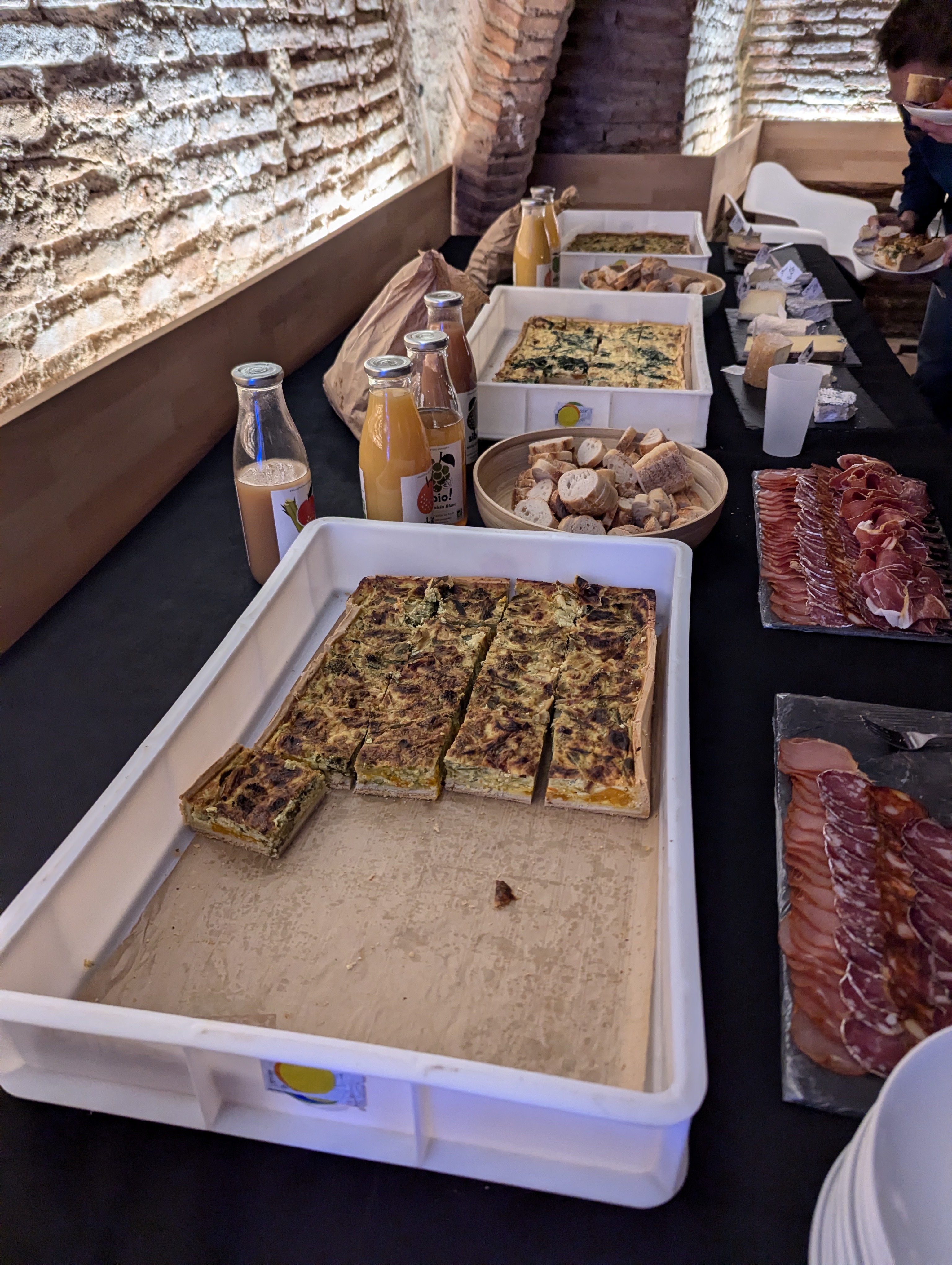
Culinary delights lunch 1 img 14 img 15 img 16 img 17 cakes The hospitality was exceptional. Our lunches boasted a delicious array of quiches, an enticing charcuterie board, and a superb selection of cheeses, all perfectly complemented by exquisite petite fours. Each item was not only a feast for the eyes but also a delight for the palate.
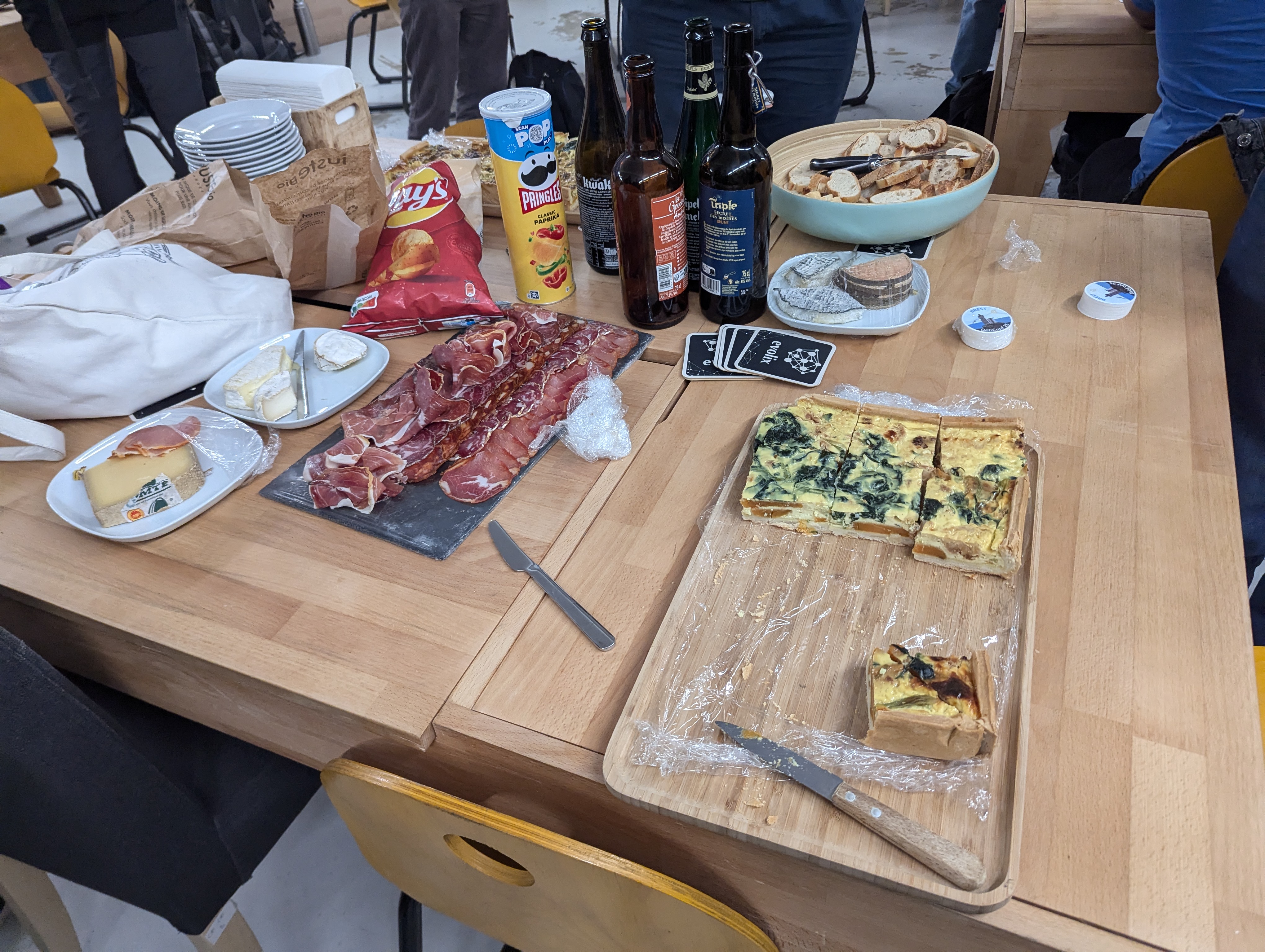
Wine and cheese wine and cheese 1 wine and cheese 2 Leftovers from these gourmet feasts fuelled our impromptu cheese and wine party on Thursday evening a highlight where informal chats blended seamlessly with serious software discussions.


The river at night night river 1 night river 2 night river 3 night river 4 The enchantment of Toulouse doesn't dim with the setting sun; instead, it transforms. My evening strolls took me along the banks of the Garonne, under a sky just turning from twilight to velvet blue. The river, a dark mirror, perfectly reflected the illuminated grandeur of the city's architecture. Notably, the dome of the H pital de La Grave stood out, bathed in a warm glow against the night sky. This architectural gem, coupled with the soft lights of the bridge and the serene river, created a breathtaking scene that was both tranquil and awe-inspiring.

Capitole du Libre making crepes The MiniDebConf itself, part of the larger Capitole du Libre event, was a fantastic immersion into the world of free software. Unlike the ticket-free FOSDEM, this conference required QR codes for entry and even had bag searches, adding an unusual layer of security for a software conference. Highlights included the crepe-making by the organisers, reminiscent of street food scenes from larger festivals. The availability of crepes for MiniDebConf attendees and the presence of food trucks added a festive air, albeit with the inevitable long queues familiar to any festival-goer.

v l Toulouse bike cyclocity The city's bike rental system was a boon easy to use with handy bike baskets perfect for casual city touring. I chose pedal power over electric, finding it a pleasant way to navigate the streets and absorb the city's vibrant atmosphere.

Markets market flatbreads Toulouse's markets were a delightful discovery. From a spontaneous visit to a market near my hotel upon arrival, to cycling past bustling marketplaces, each day presented new local flavours and crafts to explore. The Za'atar flatbread from a Syrian stall was a particularly memorable lunch pick.

La brasserie Les Arcades img 25 img 26 img 27 Our conference wrapped up with a spontaneous gathering at La Brasserie Les Arcades in Place du Capitole. Finding a caf that could accommodate 30 of us on a Sunday evening without a booking felt like striking gold. What began with coffee and ice cream smoothly transitioned into dinner, where I enjoyed a delicious braised duck leg with green peppercorn sauce. This meal rounded off the trip with lively conversations and shared experiences.

The journey back home img 30 img 31 img 32 img 33 Returning from Toulouse, I found myself once again in seat 1A, offering the advantage of being the first off the plane, both on departure and arrival. My flight touched down in Bristol ahead of schedule, and within ten minutes, I was on the A1 bus, making my way back into the heart of Bristol.

Anticipating DebConf 25 in Brittany My trip to Toulouse for MiniDebConf was yet another fulfilling experience; the city was delightful, and the talks were insightful. While I frequently travel, these journeys are more about continuous learning and networking than escape. The food in Toulouse was particularly impressive, a highlight I've come to expect and relish on my trips to France. Looking ahead, I'm eagerly anticipating DebConf in Brest next year, especially the opportunity to indulge once more in the excellent French cuisine and beverages.

22 November 2024

Matthew Palmer: Your Release Process Sucks

For the past decade-plus, every piece of software I write has had one of two release processes. Software that gets deployed directly onto servers (websites, mostly, but also the infrastructure that runs Pwnedkeys, for example) is deployed with nothing more than git push prod main. I ll talk more about that some other day. Today is about the release process for everything else I maintain Rust / Ruby libraries, standalone programs, and so forth. To release those, I use the following, extremely intricate process:
  1. Create an annotated git tag, where the name of the tag is the software version I m releasing, and the annotation is the release notes for that version.
  2. Run git release in the repository.
  3. There is no step 3.
Yes, it absolutely is that simple. And if your release process is any more complicated than that, then you are suffering unnecessarily. But don t worry. I m from the Internet, and I m here to help.

Sidebar: annotated what-now?!? The annotated tag is one git s best-kept secrets. They ve been available in git for practically forever (I ve been using them since at least 2014, which is practically forever in software development), yet almost everyone I mention them to has never heard of them. A tag , in git parlance, is a repository-unique named label that points to a single commit (as identified by the commit s SHA1 hash). Annotating a tag is simply associating a block of free-form text with that tag. Creating an annotated tag is simple-sauce: git tag -a tagname will open up an editor window where you can enter your annotation, and git tag -a -m "some annotation" tagname will create the tag with the annotation some annotation . Retrieving the annotation for a tag is straightforward, too: git show tagname will display the annotation along with all the other tag-related information. Now that we know all about annotated tags, let s talk about how to use them to make software releases freaking awesome.

Step 1: Create the Annotated Git Tag As I just mentioned, creating an annotated git tag is pretty simple: just add a -a (or --annotate, if you enjoy typing) to your git tag command, and WHAM! annotation achieved. Releases, though, typically have unique and ever-increasing version numbers, which we want to encode in the tag name. Rather than having to look at the existing tags and figure out the next version number ourselves, we can have software do the hard work for us. Enter: git-version-bump. This straightforward program takes one mandatory argument: major, minor, or patch, and bumps the corresponding version number component in line with Semantic Versioning principles. If you pass it -n, it opens an editor for you to enter the release notes, and when you save out, the tag is automagically created with the appropriate name. Because the program is called git-version-bump, you can call it as a git command: git version-bump. Also, because version-bump is long and unwieldy, I have it aliased to vb, with the following entry in my ~/.gitconfig:
[alias]
    vb = version-bump -n
Of course, you don t have to use git-version-bump if you don t want to (although why wouldn t you?). The important thing is that the only step you take to go from here is our current codebase in main to everything as of this commit is version X.Y.Z of this software , is the creation of an annotated tag that records the version number being released, and the metadata that goes along with that release.

Step 2: Run git release As I said earlier, I ve been using this release process for over a decade now. So long, in fact, that when I started, GitHub Actions didn t exist, and so a lot of the things you d delegate to a CI runner these days had to be done locally, or in a more ad-hoc manner on a server somewhere. This is why step 2 in the release process is run git release . It s because historically, you can t do everything in a CI run. Nowadays, most of my repositories have this in the .git/config:
[alias]
    release = push --tags
Older repositories which, for one reason or another, haven t been updated to the new hawtness, have various other aliases defined, which run more specialised scripts (usually just rake release, for Ruby libraries), but they re slowly dying out. The reason why I still have this alias, though, is that it standardises the release process. Whether it s a Ruby gem, a Rust crate, a bunch of protobuf definitions, or whatever else, I run the same command to trigger a release going out. It means I don t have to think about how I do it for this project, because every project does it exactly the same way.

The Wiring Behind the Button
It wasn t the button that was the problem. It was the miles of wiring, the hundreds of miles of cables, the circuits, the relays, the machinery. The engine was a massive, sprawling, complex, mind-bending nightmare of levers and dials and buttons and switches. You couldn t just slap a button on the wall and expect it to work. But there should be a button. A big, fat button that you could press and everything would be fine again. Just press it, and everything would be back to normal.
  • Red Dwarf: Better Than Life
Once you ve accepted that your release process should be as simple as creating an annotated tag and running one command, you do need to consider what happens afterwards. These days, with the near-universal availability of CI runners that can do anything you need in an isolated, reproducible environment, the work required to go from annotated tag to release artifacts can be scripted up and left to do its thing. What that looks like, of course, will probably vary greatly depending on what you re releasing. I can t really give universally-applicable guidance, since I don t know your situation. All I can do is provide some of my open source work as inspirational examples. For starters, let s look at a simple Rust crate I ve written, called strong-box. It s a straightforward crate, that provides ergonomic and secure cryptographic functionality inspired by the likes of NaCl. As it s just a crate, its release script is very straightforward. Most of the complexity is working around Cargo s inelegant mandate that crate version numbers are specified in a TOML file. Apart from that, it s just a matter of building and uploading the crate. Easy! Slightly more complicated is action-validator. This is a Rust CLI tool which validates GitHub Actions and Workflows (how very meta) against a published JSON schema, to make sure you haven t got any syntax or structural errors. As not everyone has a Rust toolchain on their local box, the release process helpfully build binaries for several common OSes and CPU architectures that people can download if they choose. The release process in this case is somewhat larger, but not particularly complicated. Almost half of it is actually scaffolding to build an experimental WASM/NPM build of the code, because someone seemed rather keen on that. Moving away from Rust, and stepping up the meta another notch, we can take a look at the release process for git-version-bump itself, my Ruby library and associated CLI tool which started me down the Just Tag It Already rabbit hole many years ago. In this case, since gemspecs are very amenable to programmatic definition, the release process is practically trivial. Remove the boilerplate and workarounds for GitHub Actions bugs, and you re left with about three lines of actual commands. These approaches can certainly scale to larger, more complicated processes. I ve recently implemented annotated-tag-based releases in a proprietary software product, that produces Debian/Ubuntu, RedHat, and Windows packages, as well as Docker images, and it takes all of the information it needs from the annotated tag. I m confident that this approach will successfully serve them as they expand out to build AMIs, GCP machine images, and whatever else they need in their release processes in the future.

Objection, Your Honour! I can hear the howl of the but, actuallys coming over the horizon even as I type. People have a lot of Big Feelings about why this release process won t work for them. Rather than overload this article with them, I ve created a companion article that enumerates the objections I ve come across, and answers them. I m also available for consulting if you d like a personalised, professional opinion on your specific circumstances.

DVD Bonus Feature: Pre-releases Unless you re addicted to surprises, it s good to get early feedback about new features and bugfixes before they make it into an official, general-purpose release. For this, you can t go past the pre-release. The major blocker to widespread use of pre-releases is that cutting a release is usually a pain in the behind. If you ve got to edit changelogs, and modify version numbers in a dozen places, then you re entirely justified in thinking that cutting a pre-release for a customer to test that bugfix that only occurs in their environment is too much of a hassle. The thing is, once you ve got releases building from annotated tags, making pre-releases on every push to main becomes practically trivial. This is mostly due to another fantastic and underused Git command: git describe. How git describe works is, basically, that it finds the most recent commit that has an associated annotated tag, and then generates a string that contains that tag s name, plus the number of commits between that tag and the current commit, with the current commit s hash included, as a bonus. That is, imagine that three commits ago, you created an annotated release tag named v4.2.0. If you run git describe now, it will print out v4.2.0-3-g04f5a6f (assuming that the current commit s SHA starts with 04f5a6f). You might be starting to see where this is going. With a bit of light massaging (essentially, removing the leading v and replacing the -s with .s), that string can be converted into a version number which, in most sane environments, is considered newer than the official 4.2.0 release, but will be superceded by the next actual release (say, 4.2.1 or 4.3.0). If you re already injecting version numbers into the release build process, injecting a slightly different version number is no work at all. Then, you can easily build release artifacts for every commit to main, and make them available somewhere they won t get in the way of the official releases. For example, in the proprietary product I mentioned previously, this involves uploading the Debian packages to a separate component (prerelease instead of main), so that users that want to opt-in to the prerelease channel simply modify their sources.list to change main to prerelease. Management have been extremely pleased with the easy availability of pre-release packages; they ve been gleefully installing them willy-nilly for testing purposes since I rolled them out. In fact, even while I ve been writing this article, I was asked to add some debug logging to help track down a particularly pernicious bug. I added the few lines of code, committed, pushed, and went back to writing. A few minutes later (next week s job is to cut that in-process time by at least half), the person who asked for the extra logging ran apt update; apt upgrade, which installed the newly-built package, and was able to progress in their debugging adventure. Continuous Delivery: It s Not Just For Hipsters.

+1, Informative Hopefully, this has spurred you to commit your immortal soul to the Church of the Annotated Tag. You may tithe by buying me a refreshing beverage. Alternately, if you re really keen to adopt more streamlined release management processes, I m available for consulting engagements.

Matthew Palmer: Invalid Excuses for Why Your Release Process Sucks

In my companion article, I made the bold claim that your release process should consist of no more than two steps:
  1. Create an annotated Git tag;
  2. Run a single command to trigger the release pipeline.
As I have been on the Internet for more than five minutes, I m aware that a great many people will have a great many objections to this simple and straightforward idea. In the interests of saving them a lot of wear and tear on their keyboards, I present this list of common reasons why these objections are invalid. If you have an objection I don t cover here, the comment box is down the bottom of the article. If you think you ve got a real stumper, I m available for consulting engagements, and if you turn out to have a release process which cannot feasibly be reduced to the above two steps for legitimate technical reasons, I ll waive my fees.

But I automatically generate my release notes from commit messages! This one is really easy to solve: have the release note generation tool feed directly into the annotation. Boom! Headshot.

But all these files need to be edited to make a release! No, they absolutely don t. But I can see why you might think you do, given how inflexible some packaging environments can seem, and since that s how we ve always done it .

Language Packages Most languages require you to encode the version of the library or binary in a file that you want to revision control. This is teh suck, but I m yet to encounter a situation that can t be worked around some way or another. In Ruby, for instance, gemspec files are actually executable Ruby code, so I call code (that s part of git-version-bump, as an aside) to calculate the version number from the git tags. The Rust build tool, Cargo, uses a TOML file, which isn t as easy, but a small amount of release automation is used to take care of that.

Distribution Packages If you re building Linux distribution packages, you can easily apply similar automation faffery. For example, Debian packages take their metadata from the debian/changelog file in the build directory. Don t keep that file in revision control, though: build it at release time. Everything you need to construct a Debian (or RPM) changelog is in the tag version numbers, dates, times, authors, release notes. Use it for much good.

The Dreaded Changelog Finally, there s the CHANGELOG file. If it s maintained during the development process, it typically has an archive of all the release notes, under version numbers, with an Unreleased heading at the top. It s one more place to remember to have to edit when making that preparing release X.Y.Z commit, and it is a gift to the Demon of Spurious Merge Conflicts if you follow the policy of every commit must add a changelog entry . My solution: just burn it to the ground. Add a line to the top with a link to wherever the contents of annotated tags get published (such as GitHub Releases, if that s your bag) and never open it ever again.

But I need to know other things about my release, too! For some reason, you might think you need some other metadata about your releases. You re probably wrong it s amazing how much information you can obtain or derive from the humble tag so think creatively about your situation before you start making unnecessary complexity for yourself. But, on the off chance you re in a situation that legitimately needs some extra release-related information, here s the secret: structured annotation. The annotation on a tag can be literally any sequence of octets you like. How that data is interpreted is up to you. So, require that annotations on release tags use some sort of structured data format (say YAML or TOML or even XML if you hate your release manager), and mandate that it contain whatever information you need. You can make sure that the annotation has a valid structure and contains all the information you need with an update hook, which can reject the tag push if it doesn t meet the requirements, and you re sorted.

But I have multiple packages in my repo, with different release cadences and versions! This one is common enough that I just refer to it as the monorepo drama . Personally, I m not a huge fan of monorepos, but you do you, boo. Annotated tags can still handle it just fine. The trick is to include the package name being released in the tag name. So rather than a release tag being named vX.Y.Z, you use foo/vX.Y.Z, bar/vX.Y.Z, and baz/vX.Y.Z. The release automation for each package just triggers on tags that match the pattern for that particular package, and limits itself to those tags when figuring out what the version number is.

But we don t semver our releases! Oh, that s easy. The tag pattern that marks a release doesn t have to be vX.Y.Z. It can be anything you want. Relatedly, there is a (rare, but existent) need for packages that don t really have a conception of releases in the traditional sense. The example I ve hit most often is automatically generated bindings packages, such as protobuf definitions. The source of truth for these is a bunch of .proto files, but to be useful, they need to be packaged into code for the various language(s) you re using. But those packages need versions, and while someone could manually make releases, the best option is to build new per-language packages automatically every time any of those definitions change. The versions of those packages, then, can be datestamps (I like something like YYYY.MM.DD.N, where N starts at 0 each day and increments if there are multiple releases in a single day). This process allows all the code that needs the definitions to declare the minimum version of the definitions that it relies on, and everything is kept in sync and tracked almost like magic.

Th-th-th-th-that s all, folks! I hope you ve enjoyed this bit of mild debunking. Show your gratitude by buying me a refreshing beverage, or purchase my professional expertise and I ll answer all of your questions and write all your CI jobs.

20 November 2024

Ian Jackson: The Rust Foundation's 2nd bad draft trademark policy

tl;dr: The Rust Foundation s new trademark policy still forbids unapproved modifications: this would forbid both the Rust Community s own development work(!) and normal Free Software distribution practices. Background In April 2023 I wrote about the Rust Foundation s ham-fisted and misguided attempts to update the Rust trademark policy. This turned into drama. The new draft Recently, the Foundation published a new draft. It s considerably less bad, but the most serious problem, which I identified last year, remains. It prevents redistribution of modified versions of Rust, without pre-approval from the Rust Foundation. (Subject to some limited exceptions.) The people who wrote this evidently haven t realised that distributing modified versions is how free software development works. Ie, the draft Rust trademark policy even forbids making a github branch for an MR to contribute to Rust! It s also very likely unacceptable to Debian. Rust is still on track to repeat the Firefox/Iceweasel debacle. Below is a copy of my formal response to the consultation. The consultation closes at 07:59:00 UTC tomorrow (21st November), ie, at the end of today (Wednesday) US Pacific time, so if you want to reply, do so quickly. My consultation response
Hi. My name is Ian Jackson. I write as a Rust contributor and as a Debian Developer with first-hand experience of Debian s approach to trademarks. (But I am not a member of the Debian Rust Packaging Team.) Your form invites me to state any blocking concerns. I m afraid I have one: PROBLEM The policy on distributing modified versions of Rust (page 4, 8th bullet) is far too restrictive. PROBLEM - ASPECT 1 On its face the policy forbids making a clone of the Rust repositories on a git forge, and pushing a modified branch there. That is publicly distributing a modified version of Rust. I.e., the current policy forbids the Rust s community s own development workflow! PROBLEM - ASPECT 2 The policy also does not meet the needs of Software-Freedom-respecting downstreams, including community Linux distributions such as Debian. There are two scenarios (fuzzy, and overlapping) which provide a convenient framing to discuss this: Firstly, in practical terms, Debian may need to backport bugfixes, or sometimes other changes. Sometimes Debian will want to pre-apply bugfixes or changes that have been contributed by users, and are intended eventually to go upstream, but are not included upstream in official Rust yet. This is a routine activity for a distribution. The policy, however, forbids it. Secondly, Debian, as a point of principle, requires the ability to diverge from upstream if and when Debian decides that this is the right choice for Debian s users. The freedom to modify is a key principle of Free Software. This includes making changes that the upstream project disapproves of. Some examples of this, where Debian has made changes, that upstream do not approve of, have included things like: removing user-tracking code, or disabling obsolescence timebombs that stop a particular version working after a certain date. Overall, while alignment in values between Debian and Rust seems to be very good right now, modifiability it is a matter of non-negotiable principle for Debian. The 8th bullet point on page 4 of the PDF does not give Debian (and Debian s users) these freedoms. POSSIBLE SOLUTIONS Other formulations, or an additional permission, seem like they would be able to meet the needs of both Debian and Rust. The first thing to recognise is that forbidding modified versions is probably not necessary to prevent language ecosystem fragmentation. Many other programming languages are distributed under fully Free Software licences without such restrictive trademark policies. (For example, Python; I m sure a thorough survey would find many others.) The scenario that would be most worrying for Rust would be embrace - extend - extinguish . In projects with a copyleft licence, this is not a concern, but Rust is permissively licenced. However, one way to address this would be to add an additional permission for modification that permits distribution of modified versions without permission, but if the modified source code is also provided, under the original Rust licence. I suggest therefore adding the following 2nd sub-bullet point to the 8th bullet on page 4:
  • changes which are shared, in source code form, with all recipients of the modified software, and publicly licenced under the same licence as the official materials.
This means that downstreams who fear copyleft have the option of taking Rust s permissive copyright licence at face value, but are limited in the modifications they may make, unless they rename. Conversely downstreams such as Debian who wish to operate as part of the Free Software ecosystem can freely make modifications. It also, obviously, covers the Rust Community s own development work. NON-SOLUTIONS Some upstreams, faced with this problem, have offered Debian a special permission: ie, said that it would be OK for Debian to make modifications that Debian wants to. But Debian will not accept any Debian-specific permissions. Debian could of course rename their Rust compiler. Debian has chosen to rename in the past: infamously, a similar policy by Mozilla resulted in Debian distributing Firefox under the name Iceweasel for many years. This is a PR problem for everyone involved, and results in a good deal of technical inconvenience and makework. Debian could seek approval for changes, and the Rust Foundation would grant that approval quickly . This is unworkable on a practical level - requests for permission do not fit into Debian s workflow, and the resulting delays would be unacceptable. But, more fundamentally, Debian rightly insists that it must have the freedom to make changes that the Foundation do not approve of. (For example, if a future Rust shipped with telemetry features Debian objected to.) Debian and Rust could compromise . However, Debian is an ideological as well as technological project. The principles I have set out are part of Debian s Foundation Documents - they are core values for Debian. When Debian makes compromises, it does so very slowly and with great deliberation, using its slowest and most heavyweight constitutional governance processes. Debian is not likely to want to engage in such a process for the benefit of one programming language. Users will get Rust from upstream . This is currently often the case. Right now, Rust is moving very quickly, and by Debian standards is very new. As Rust becomes more widely used, more stable, and more part of the infrastructure of the software world, it will need to become part of standard, stable, reliable, software distributions. That means Debian.
(The consultation was a Google Forms page with a single text field, so the formatting isn t great. I have edited the formatting very lightly to avoid rendering bugs here on my blog.)

comment count unavailable comments

Russell Coker: Solving Spam and Phishing for Corporations

Centralisation and Corporations An advantage of a medium to large company is that it permits specialisation. For example I m currently working in the IT department of a medium sized company and because we have standardised hardware (Dell Latitude and Precision laptops, Dell Precision Tower workstations, and Dell PowerEdge servers) and I am involved in fixing all Linux compatibility issues on that I can fix most problems in a small fraction of the time that I would take to fix on a random computer. There is scope for a lot of debate about the extent to which companies should standardise and centralise things. But for computer problems which can escalate quickly from minor to serious if not approached in the correct manner it s clear that a good deal of centralisation is appropriate. For people doing technical computer work such as programming there s a large portion of the employees who are computer hobbyists who like to fiddle with computers. But if the support system is run well even they will appreciate having computers just work most of the time and for a large portion of the failures having someone immediately recognise the problem, like the issues with NVidia drivers that I have documented so that first line support can implement workarounds without the need for a lengthy investigation. A big problem with email in the modern Internet is the prevalence of Phishing scams. The current corporate approach to this is to send out test Phishing email to people and then force computer security training on everyone who clicks on them. One problem with this is that attackers only need to fool one person on one occasion and when you have hundreds of people doing something on rare occasions that s not part of their core work they will periodically get it wrong. When every test Phishing run finds several people who need extra training it seems obvious to me that this isn t a solution that s working well. I will concede that the majority of people who click on the test Phishing email would probably realise their mistake if asked to enter the password for the corporate email system, but I think it s still clear that this isn t a great solution. Let s imagine for the sake of discussion that everyone in a company was 100% accurate at identifying Phishing email and other scam email, if that was the case would the problem be solved? I believe that even in that hypothetical case it would not be a solved problem due to the wasted time and concentration. People can spend minutes determining if a single email is legitimate. On many occasions I have had relatives and clients forward me email because they are unsure if it s valid, it s great that they seek expert advice when they are unsure about things but it would be better if they didn t have to go to that effort. What we ideally want to do is centralise the anti-Phishing and anti-spam work to a small group of people who are actually good at it and who can recognise patterns by seeing larger quantities of spam. When a spam or Phishing message is sent to 600 people in a company you don t want 600 people to individually consider it, you want one person to recognise it and delete/block all 600. If 600 people each spend one minute considering the matter then that s 10 work hours wasted! The Rationale for Human Filtering For personal email human filtering usually isn t viable because people want privacy. But corporate email isn t private, it s expected that the company can read it under certain circumstances (in most jurisdictions) and having email open in public areas of the office where colleagues might see it is expected. You can visit gmail.com on your lunch break to read personal email but every company policy (and common sense) says to not have actually private correspondence on company systems. The amount of time spent by reception staff in sorting out such email would be less than that taken by individuals. When someone sends a spam to everyone in the company instead of 500 people each spending a couple of minutes working out whether it s legit you have one person who s good at recognising spam (because it s their job) who clicks on a remove mail from this sender from all mailboxes button and 500 messages are deleted and the sender is blocked. Delaying email would be a concern. It s standard practice for CEOs (and C*Os at larger companies) to have a PA receive their email and forward the ones that need their attention. So human vetting of email can work without unreasonable delays. If we had someone checking all email for the entire company probably email to the senior people would never get noticeably delayed and while people like me would get their mail delayed on occasion people doing technical work generally don t have notifications turned on for email because it s a distraction and a fast response isn t needed. There are a few senders where fast response is required, which is mostly corporations sending a click this link within 10 minutes to confirm your password change email. Setting up rules for all such senders that are relevant to work wouldn t be difficult to do. How to Solve This Spam and Phishing became serious problems over 20 years ago and we have had 20 years of evolution of email filtering which still hasn t solved the problem. The vast majority of email addresses in use are run by major managed service providers and they haven t managed to filter out spam/phishing mail effectively so I think we should assume that it s not going to be solved by filtering. There is talk about what AI technology might do for filtering spam/phishing but that same technology can product better crafted hostile email to avoid filters. An additional complication for corporate email filtering is that some criteria that are used to filter personal email don t apply to corporate mail. If someone sends email to me personally about millions of dollars then it s obviously not legit. If someone sends email to a company then it could be legit. Companies routinely have people emailing potential clients about how their products can save millions of dollars and make purchases over a million dollars. This is not a problem that s impossible to solve, it s just an extra difficulty that reduces the efficiency of filters. It seems to me that the best solution to the problem involves having all mail filtered by a human. A company could configure their mail server to not accept direct external mail for any employee s address. Then people could email files to colleagues etc without any restriction but spam and phishing wouldn t be a problem. The issue is how to manage inbound mail. One possibility is to have addresses of the form it+russell.coker@example.com (for me as an employee in the IT department) and you would have a team of people who would read those mailboxes and forward mail to the right people if it seemed legit. Having addresses like it+russell.coker means that all mail to the IT department would be received into folders of the same account and they could be filtered by someone with suitable security level and not require any special configuration of the mail server. So the person who read the is mailbox would have a folder named russell.coker receiving mail addressed to me. The system could be configured to automate the processing of mail from known good addresses (and even domains), so they could just put in a rule saying that when Dell sends DMARC authenticated mail to is+$USER it gets immediately directed to $USER. This is the sort of thing that can be automated in the email client (mail filtering is becoming a common feature in MUAs). For a FOSS implementation of such things the server side of it (including extracting account data from a directory to determine which department a user is in) would be about a day s work and then an option would be to modify a webmail program to have extra functionality for approving senders and sending change requests to the server to automatically direct future mail from the same sender. As an aside I have previously worked on a project that had a modified version of the Horde webmail system to do this sort of thing for challenge-response email and adding certain automated messages to the allow-list. The Change One of the first things to do is configuring the system to add every recipient of an outbound message to the allow list for receiving a reply. Having a script go through the sent-mail folders of all accounts and adding the recipients to the allow lists would be easy and catch the common cases. But even with processing the sent mail folders going from a working system without such things to a system like this will take some time for the initial work of adding addresses to the allow lists, particularly for domain wide additions of all the sites that send password confirmation messages. You would need rules to direct inbound mail to the old addresses to the new style and then address a huge amount of mail that needs to be categorised. If you have 600 employees and the average amount of time taken on the first day is 10 minutes per user then that s 100 hours of work, 12 work days. If you had everyone from the IT department, reception, and executive assistants working on it that would be viable. After about a week there wouldn t be much work involved in maintaining it. Then after that it would be a net win for the company. The Benefits If the average employee spends one minute a day dealing with spam and phishing email then with 600 employees that s 10 hours of wasted time per day. Effectively wasting one employee s work! I m sure that s the low end of the range, 5 minutes average per day doesn t seem unreasonable especially when people are unsure about phishing email and send it to Slack so multiple employees spend time analysing it. So you could have 5 employees being wasted by hostile email and avoiding that would take a fraction of the time of a few people adding up to less than an hour of total work per day. Then there s the training time for phishing mail. Instead of having every employee spend half an hour doing email security training every few months (that s 300 hours or 7.5 working weeks every time you do it) you just train the few experts. In addition to saving time there are significant security benefits to having experts deal with possibly hostile email. Someone who deals with a lot of phishing email is much less likely to be tricked. Will They Do It? They probably won t do it any time soon. I don t think it s expensive enough for companies yet. Maybe government agencies already have equivalent measures in place, but for regular corporations it s probably regarded as too difficult to change anything and the costs aren t obvious. I have been unsuccessful in suggesting that managers spend slightly more on computer hardware to save significant amounts of worker time for 30 years.

Next.

Previous.