Search Results: "zed"

3 September 2015

John Goerzen: There s still a chance to save WiFi

You may not know it, but wifi is under assault in the USA due to proposed FCC regulations about modifications to devices with modular radios. In short, it would make it illegal for vendors to sell devices with firmware that users can replace. This is of concern to everyone, because Wifi routers are notoriously buggy and insecure. It is also of special concern to amateur radio hobbyists, due to the use of these devices in the Amateur Radio Service (FCC Part 97). I submitted a comment to the FCC about this, which I am pasting in here. This provides a background and summary of the issues for those that are interested. Here it is: My comment has two parts: one, the impact on the Amateur Radio service; and two, the impact on security. Both pertain primarily to the 802.11 ( Wifi ) services typically operating under Part 15. The Amateur Radio Service (FCC part 97) has long been recognized by the FCC and Congress as important to the nation. Through it, amateurs contribute to scientific knowledge, learn skills that bolster the technological competitiveness of the United States, and save lives through their extensive involvement in disaster response. Certain segments of the 2.4GHz and 5GHz Wifi bands authorized under FCC Part 15 also fall under the frequencies available to licensed amateurs under FCC Part 97 [1]. By scrupulously following the Part 97 regulations, many amateur radio operators are taking devices originally designed for Part 15 use and modifying them for legal use under the Part 97 Amateur Radio Service. Although the uses are varied, much effort is being devoted to fault-tolerant mesh networks that provide high-speed multimedia communications in response to a disaster, even without the presence of any traditional infrastructure or Internet backbone. One such effort [2] causes users to replace the firmware on off-the-shelf Part 15 Wifi devices, reconfiguring them for proper authorized use under Part 97. This project has many vital properties, particularly the self-discovery of routes between nodes and self-healing nature of the mesh network. These features are not typically available in the firmware of normal Part 15 devices. It should also be noted that there is presently no vendor of Wifi devices that operate under Part 97 out of the box. The only route available to amateurs is to take Part 15 devices and modify them for Part 97 use. Amateur radio users of these services have been working for years to make sure they do not cause interference to Part 15 users [3]. One such effort takes advantage of the modular radio features of consumer Wifi gear to enable communication on frequencies that are within the Part 97 allocation, but outside (though adjacent) to the Part 15 allocation. For instance, the chart at [1] identifies frequencies such as 2.397GHz or 5.660GHz that will never cause interference to Part 15 users because they lie entirely outside the Part 15 Wifi allocation. If the FCC prevents the ability of consumers to modify the firmware of these devices, the following negative consequences will necessarily follow: 1) The use of high-speed multimedia or mesh networks in the Amateur Radio service will be sharply curtailed, relegated to only outdated hardware. 2) Interference between the Amateur Radio service which may use higher power or antennas with higher gain and Part 15 users will be expanded, because Amateur Radio service users will no longer be able to intentionally select frequencies that avoid Part 15. 3) The culture of inventiveness surrounding wireless communication will be curtailed in an important way. Besides the impact on the Part 97 Amateur Radio Service, I also wish to comment on the impact to end-user security. There have been a terrible slew of high-profile situations where very popular consumer Wifi devices have had incredible security holes. Vendors have often been unwilling to address these issues [4]. Michael Horowitz maintains a website tracking security bugs in consumer wifi routers [5]. Sadly these bugs are both severe and commonplace. Within just the last month, various popular routers have been found vulnerable to remote hacking [6] and platforms for launching Distributed Denial-of-Service (DDoS) attacks [7]. These impacted multiple models from multiple vendors. To make matters worse, most of these issues should have never happened in the first place, and were largely the result of carelessness or cluelessness on the part of manufacturers. Consumers should not be at the mercy of vendors to fix their own networks, nor should they be required to trust unauditable systems. There are many well-regarded efforts to provide better firmware for Wifi devices, which still keep them operating under Part 15 restrictions. One is OpenWRT [8], which supports a wide variety of devices with a system built upon a solid Linux base. Please keep control of our devices in the hands of consumers and amateurs, for the benefit of all. References: [1] https://en.wikipedia.org/wiki/High-speed_multimedia_radio [2] http://www.broadband-hamnet.org/just-starting-read-this.html [3] http://www.qsl.net/kb9mwr/projects/wireless/modify.html [4] http://www.tomsitpro.com/articles/netgear-routers-security-hole,1-2461.html [5] http://routersecurity.org/bugs.php [6] https://www.kb.cert.org/vuls/id/950576 [7] https://www.stateoftheinternet.com/resources-cloud-security-2015-q2-web-security-report.html [8] https://openwrt.org/

Petter Reinholdtsen: Book cover for the Free Culture book finally done

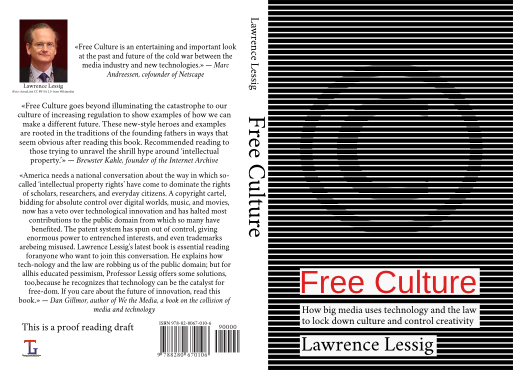
Creating a good looking book cover proved harder than I expected. I wanted to create a cover looking similar to the original cover of the Free Culture book we are translating to Norwegian, and I wanted it in vector format for high resolution printing. But my inkscape knowledge were not nearly good enough to pull that off. But thanks to the great inkscape community, I was able to wrap up the cover yesterday evening. I asked on the #inkscape IRC channel on Freenode for help and clues, and Marc Jeanmougin (Mc-) volunteered to try to recreate it based on the PDF of the cover from the HTML version. Not only did he create a SVG document with the original and his vector version side by side, he even provided an instruction video explaining how he did it. But the instruction video is not easy to follow for an untrained inkscape user. The video is a recording on how he did it, and he is obviously very experienced as the menu selections are very quick and he mentioned on IRC that he did use some keyboard shortcuts that can't be seen on the video, but it give a good idea about the inkscape operations to use to create the stripes with the embossed copyright sign in the center. I took his SVG file, copied the vector image and re-sized it to fit on the cover I was drawing. I am happy with the end result, and the current english version look like this: I am not quite sure about the text on the back, but guess it will do. I picked three quotes from the official site for the book, and hope it will work to trigger the interest of potential readers. The Norwegian cover will look the same, but with the texts and bar code replaced with the Norwegian version. The book is very close to being ready for publication, and I expect to upload the final draft to Lulu in the next few days and order a final proof reading copy to verify that everything look like it should before allowing everyone to order their own copy of Free Culture, in English or Norwegian Bokm l. I'm waiting to give the the productive proof readers a chance to complete their work.

1 September 2015

Norbert Preining: PiwigoPress release 2.31

I just pushed a new release of PiwigoPress (main page, WordPress plugin dir) to the WordPress servers. This release incorporates new features for the sidebar widget, and better interoperability with some Piwigo galleries. piwigopress-logo The new features are: That s all, enjoy, and leave your wishlist items and complains at the issue tracker on the github project piwigopress.

30 August 2015

Antonio Terceiro: DebConf15, testing debian packages, and packaging the free software web

This is my August update, and by the far the coolest thing in it is Debconf. Debconf15 I don t get tired of saying it is the best conference I ever attended. First it s a mix of meeting both new people and old friends, having the chance to chat with people whose work you admire but never had a chance to meet before. Second, it s always quality time: an informal environment, interesting and constructive presentations and discussions. This year the venue was again very nice. Another thing that was very nice was having so many kids and families. This was no coincidence, since this was the first DebConf in which there was organized childcare. As the community gets older, this a very good way of keeping those who start having kids from being alienated from the community. Of course, not being a parent yet I have no idea how actually hard is to bring small kids to a conference like DebConf. ;-) I presented two talks: There was also the now traditional Ruby BoF, where discussed the state and future of the Ruby ecosystem in Debian; and an in promptu Ruby packaging workshop where we introduced the basics of packaging in general, and Ruby packaging specifically. Besides shak, I was able to hack on a few cool things during DebConf: Miscellaneous updates

Philipp Kern: Automating the 3270 part of a Debian System z install

If you try to install Debian on System z within z/VM you might be annoyed at the various prompts it shows before it lets you access the network console via SSH. We can do better. From within CMS copy the default EXEC and default PARMFILE:

COPYFILE DEBIAN EXEC A DEBAUTO EXEC A
COPYFILE PARMFILE DEBIAN A PARMFILE DEBAUTO A

Now edit DEBAUTO EXEC A and replace the DEBIAN in 'PUNCH PARMFILE DEBIAN * (NOHEADER' with DEBAUTO. This will load the alternate kernel parameters file into the card reader, while still loading the original kernel and initrd files.

Replace PARMFILE DEBAUTO A's content with this (note the 80 character column limit):

ro locale=C
s390-netdevice/choose_networktype=qeth s390-netdevice/qeth/layer2=true
s390-netdevice/qeth/choose=0.0.fffc-0.0.fffd-0.0.fffe
netcfg/get_ipaddress=<IPADDR> netcfg/get_netmask=255.255.255.0
netcfg/get_gateway=<GW> netcfg/get_nameservers=<FIRST-DNS>
netcfg/confirm_static=true netcfg/get_hostname=debian
netcfg/get_domain=
network-console/authorized_keys_url=http://www.kern.lc/id_rsa.pub
preseed/url=http://www.kern.lc/preseed-s390x.cfg

Replace <IPADDR>, <GW>, and <FIRST-DNS> to suit your local network config. You might also need to change the netmask, which I left in for clarity about the format. Adjust the device address of your OSA network card. If it's in layer 3 mode (very likely) you should set layer2=false. Note that mixed case matters, hence you will want to SET CASE MIXED in xedit.

Then there are the two URLs that need to be changed. The authorized_keys_url file contains your SSH public key and is fetched unencrypted and unauthenticated, so be careful what networks you traverse with your request (HTTPS is not supported by debian-installer in Debian).

preseed/url is needed for installation parameters that do not fit the parameters file - there is an upper character limit that's about two lines longer than my example. This is why this example only contains the bare minimum for the network part, everything else goes into this preseeding file. It file can optionally be protected with a MD5 checksum in preseed/url/checksum.

Both URLs need to be very short. I thought that there was a way to specify a line continuation, but in my tests I was unable to produce one. Hence it needs to fit on one line, including the key. You might want to use an IPv4 as the hostname.

To skip the initial boilerplate prompts and to skip straight to the user and disk setup you can use this as preseed.cfg:

d-i debian-installer/locale string en_US
d-i debian-installer/country string US
d-i debian-installer/language string en
d-i time/zone US/Eastern
d-i mirror/country manual
d-i mirror/http/mirror string httpredir.debian.org
d-i mirror/http/directory string /debian
d-i mirror/http/proxy string

I'm relatively certain that the DASD disk setup part cannot be automated yet. But the other bits of the installation should be preseedable just like on non-mainframe hardware.

Dirk Eddelbuettel: RcppGSL 0.3.0

A new version of RcppGSL just arrived on CRAN. The RcppGSL package provides an interface from R to the GNU GSL using our Rcpp package. Following on the heels of an update last month we updated the package (and its vignette) further. One of the key additions concern memory management: Given that our proxy classes around the GSL vector and matrix types are real C++ object, we can monitor their scope and automagically call free() on them rather then insisting on the user doing it. This renders code much simpler as illustrated below. Dan Dillon added const correctness over a series on pull request which allows us to write more standard (and simply nicer) function interfaces. Lastly, a few new typedef declaration further simply the use of the (most common) double and int vectors and matrices. Maybe a code example will help. RcppGSL contains a full and complete example package illustrating how to write a package using the RcppGSL facilities. It contains an example of computing a column norm -- which we blogged about before when announcing an much earlier version. In its full glory, it looks like this:
#include <RcppGSL.h>
#include <gsl/gsl_matrix.h>
#include <gsl/gsl_blas.h>
extern "C" SEXP colNorm(SEXP sM)  
  try  
        RcppGSL::matrix<double> M = sM;     // create gsl data structures from SEXP
        int k = M.ncol();
        Rcpp::NumericVector n(k);           // to store results
        for (int j = 0; j < k; j++)  
            RcppGSL::vector_view<double> colview = gsl_matrix_column (M, j);
            n[j] = gsl_blas_dnrm2(colview);
         
        M.free() ;
        return n;                           // return vector
    catch( std::exception &ex )  
        forward_exception_to_r( ex );
    catch(...)  
        ::Rf_error( "c++ exception (unknown reason)" );
   
  return R_NilValue; // -Wall
 
We manually translate the SEXP coming from R, manually cover the try and catch exception handling, manually free the memory etc pp. Well in the current version, the example is written as follows:
#include <RcppGSL.h>
#include <gsl/gsl_matrix.h>
#include <gsl/gsl_blas.h>
// [[Rcpp::export]]
Rcpp::NumericVector colNorm(const RcppGSL::Matrix & G)  
    int k = G.ncol();
    Rcpp::NumericVector n(k);           // to store results
    for (int j = 0; j < k; j++)  
        RcppGSL::VectorView colview = gsl_matrix_const_column (G, j);
        n[j] = gsl_blas_dnrm2(colview);
     
    return n;                           // return vector
 
This takes full advantage of Rcpp Attributes automagically creating the interface and exception handler (as per the previous release), adds a const & interface, does away with the tedious and error-pronce free() and uses the shorter-typedef forms for RcppGSL::Matrix and RcppGSL::VectorViews using double variables. Now the function is short and concise and hence easier to read and maintain. The package vignette has more details on using RcppGSL. The NEWS file entries follows below:
Changes in version 0.3.0 (2015-08-30)
  • The RcppGSL matrix and vector class now keep track of object allocation and can therefore automatically free allocated object in the destructor. Explicit x.free() use is still supported.
  • The matrix and vector classes now support const reference semantics in the interfaces (thanks to PR #7 by Dan Dillon)
  • The matrix_view and vector_view classes are reorganized to better support const arguments (thanks to PR #8 and #9 by Dan Dillon)
  • Shorthand forms such as Rcpp::Matrix have been added for double and int vectors and matrices including views.
  • Examples such as fastLm can now be written in a much cleaner and shorter way as GSL objects can appear in the function signature and without requiring explicit .free() calls at the end.
  • The included examples, as well as the introductory vignette, have been updated accordingly.
Courtesy of CRANberries, a summary of changes to the most recent release is available. More information is on the RcppGSL page. Questions, comments etc should go to the rcpp-devel mailing list off the R-Forge page.

This post by Dirk Eddelbuettel originated on his Thinking inside the box blog. Please report excessive re-aggregation in third-party for-profit settings.

29 August 2015

Tassia Camoes Araujo: Report from the MicroDebconf Bras lia 2015

This was an event organized due to a coincidental meeting of a few DD s in the city of Brasilia on May 31st 2015. What a good thing when we can mix vacations, friends and Debian ;-)

Group photo

We called it Micro due to its short duration and planning phase, to be fair with other Mini DebConfs that take a lot more of organization. We also ended up having a translation sprint inside the event that attracted contributors from other cities. Our main goal was to boost the local community and bring new contributors to Debian. And we definitely made it! The meeting happened at University of Brasilia (UnB Gama). It started with a short presentation where each DD and Debian contributor presented their involvement with Debian and plans for the hacking session. This was an invitation for new contributors to choose the activities they were willing to engage, taking advantage of being guided by more experienced people. Then we moved to smaller rooms where participants were split in different groups to work on each track: packaging, translation and community/contribution. We all came together later for the keysigning party. Some of the highlights of the day:
  • ~40 participants, from which ~10 were already engaged in the Debian community
  • hands-on packaging tutorial
  • 4 new packages uploaded
  • from the 6 brazilian names annouced as new contributors in the DPN just after the meeting, 4 were among us in Bras lia
  • hands-on translation tutorial
  • newbie translators paired with more experienced ones, numerous translations committed
  • discussion about chalenges of migrating debianArt to Noosfero
  • initial setup of Collab.Debian (with Noosfero), aiming to facilitate contributions of users to the Debian project (this platform was offcially released at DC15 lightining talks (46:00))
  • first keysigning party for many of the participants
  • first time some longterm Brazilian contributors had the change to meet in person
For more details of what happened, you can read our full report. The MicroDebconf wouldn t be possible without the support of prof. Paulo Meirelles from UnB Gama and all the LAPPIS team for the local organization and students mobilization. We also need to thank to Debian donnors, who covered the travel costs of one of our contributors. Last but not least, thanks to our participants and the large Brazilian community who is giving a good example of team work. A similar meeting happened in July during the Free Software International Forum (FISL) and another one is already planned to happen in October as part of the LatinoWare. I hope I can join those folks again in the near future!

14 August 2015

Wouter Verhelst: Multi-pass transcoding to WebM with normalisation

Transcoding video from one format to another seems to be a bit of a black art. There are many tools that allow doing this kind of stuff, but one issue that most seem to have is that they're not very well documented. I ran against this a few years ago, when I was first doing video work for FOSDEM and did not yet have proper tools to do the review and transcoding workflow. At the time, I just used mplayer to look at the .dv files, and wrote a text file with a simple structure to remember exactly what to do with it. That file was then fed to a perl script which wrote out a shell script that would use the avconv command to combine and extract the "interesting" data from the source DV files into a single DV file per talk, and which would then call a shell script which used gst-launch and sox to do a multi-pass transcode of those intermediate DV files into a WebM file. While all that worked properly, it was a rather ugly hack, never cleaned up, and therefore I never really documented it properly either. Recently, however, someone asked me to do so anyway, so here goes. Before you want to complain about how this ate the videos of your firstborn child, however, note the above. The perl script spent a somewhat large amount of code reading out the text file and parsing it into an array of hashes. I'm not going to reproduce that, since the actual format of the file isn't all that important anyway. However, here's the interesting bits:
foreach my $pfile(keys %parts)  
        my @files = @ $parts $pfile ;
        say "#" x (length($pfile) + 4);
        say "# " . $pfile . " #";
        say "#" x (length($pfile) + 4);
        foreach my $file(@files)  
                my $start = "";
                my $stop = "";
                if(defined($file-> start ))  
                        $start = "-ss " . $file-> start ;
                 
                if(defined($file-> stop ))  
                        $stop = "-t " . $file-> stop ;
                 
                if(defined($file-> start ) && defined($file-> stop ))  
                        my @itime = split /:/, $file-> start ;
                        my @otime = split /:/, $file-> stop ;
                        $otime[0]-=$itime[0];
                        $otime[1]-=$itime[1];
                        if($otime[1]<0)  
                                $otime[0]-=1;
                                $otime[1]+=60;
                         
                        $otime[2]-=$itime[2];
                        if($otime[2]<0)  
                                $otime[1]-=1;
                                $otime[2]+=60;
                         
                        $stop = "-t " . $otime[0] . ":" . $otime[1] .  ":" . $otime[2];
                 
                if(defined($file-> start )   defined($file-> stop ))  
                        say "ln " . $file-> name  . ".dv part-pre.dv";
                        say "avconv -i part-pre.dv $start $stop -y -acodec copy -vcodec copy part.dv";
                        say "rm -f part-pre.dv";
                  else  
                        say "ln " . $file-> name  . ".dv part.dv";
                 
                say "cat part.dv >> /tmp/" . $pfile . ".dv";
                say "rm -f part.dv";
         
        say "dv2webm /tmp/" . $pfile . ".dv";
        say "rm -f /tmp/" . $pfile . ".dv";
        say "scp /tmp/" . $pfile . ".webm video.fosdem.org:$uploadpath   true";
        say "mv /tmp/" . $pfile . ".webm .";
 
That script uses avconv to read one or more .dv files and transcode them into a single .dv file with all the start- or end-junk removed. It uses /tmp rather than the working directory, since the working directory was somewhere on the network, and if you're going to write several gigabytes of data to an intermediate file, it's usually a good idea to write them to a local filesystem rather than to a networked one. Pretty boring. It finally calls dv2webm on the resulting .dv file. That script looks like this:
#!/bin/bash
set -e
newfile=$(basename $1 .dv).webm
wavfile=$(basename $1 .dv).wav
wavfile=$(readlink -f $wavfile)
normalfile=$(basename $1 .dv)-normal.wav
normalfile=$(readlink -f $normalfile)
oldfile=$(readlink -f $1)
echo -e "\033]0;Pass 1: $newfile\007"
gst-launch-0.10 webmmux name=mux ! fakesink \
  uridecodebin uri=file://$oldfile name=demux \
  demux. ! ffmpegcolorspace ! deinterlace ! vp8enc multipass-cache-file=/tmp/vp8-multipass multipass-mode=1 threads=2 ! queue ! mux.video_0 \
  demux. ! progressreport ! audioconvert ! audiorate ! tee name=t ! queue ! vorbisenc ! queue ! mux.audio_0 \
  t. ! queue ! wavenc ! filesink location=$wavfile
echo -e "\033]0;Audio normalize: $newfile\007"
sox --norm $wavfile $normalfile
echo -e "\033]0;Pass 2: $newfile\007"
gst-launch-0.10 webmmux name=mux ! filesink location=$newfile \
  uridecodebin uri=file://$oldfile name=video \
  uridecodebin uri=file://$normalfile name=audio \
  video. ! ffmpegcolorspace ! deinterlace ! vp8enc multipass-cache-file=/tmp/vp8-multipass multipass-mode=2 threads=2 ! queue ! mux.video_0 \
  audio. ! progressreport ! audioconvert ! audiorate ! vorbisenc ! queue ! mux.audio_0
rm $wavfile $normalfile
... and is a bit more involved. Multi-pass encoding of video means that we ask the encoder to first encode the file but store some statistics into a temporary file (/tmp/vp8-multipass, in our script), which the second pass can then reuse to optimize the transcoding. Since DV uses different ways of encoding things than does VP8, we also need to do a color space conversion (ffmpegcolorspace) and deinterlacing (deinterlace), but beyond that the video line in the first gstreamer pipeline isn't very complicated. Since we're going over the file anyway and we need the audio data for sox, we add a tee plugin at an appropriate place in the audio line in the first gstreamer pipeline, so that we can later on pick up that same audio data an write it to a wav file containing linear PCM data. Beyond the tee, we go on and do a vorbis encoding, as is needed for the WebM format. This is not actually required for a first pass, but ah well. There's some more conversion plugins in the pipeline (specifically, audioconvert and audiorate), but those are not very important. We next run sox --norm on the .wav file, which does a fully automated audio normalisation on the input. Audio normalisation is the process of adjusting volume levels so that the audio is not too loud, but also not too quiet. Sox has pretty good support for this; the default settings of its --norm parameter make it adjust the volume levels so that the highest peak will just about reach the highest value that the output format can express. As such, you have no clipping anywhere in the file, but also have an audio level that is actually useful. Next, we run a second-pass encoding on the input file. This second pass uses the statistics gathered in the first pass to decide where to put its I- and P-frames so that they are placed at the most optimal position. In addition, rather than reading the audio from the original file, we now read the audio from the .wav file containing the normalized audio which we produced with sox, ensuring the audio can be understood. Finally, we remove the intermediate audio files we created; and the shell script which was generated by perl also contained an rm command for the intermediate .dv file. Some of this is pretty horrid, and I never managed to clean it up enough so it would be pretty (and now is not really the time). However, it Just Works(tm), and I am happy to report that it continues to work with gstreamer 1.0, provided you replace the ffmpegcolorspace by an equally simple videoconvert, which performs what ffmpegcolorspace used to perform in gstreamer 0.10.

12 August 2015

Daniel Pocock: Recording live events like a pro (part 2: video)

In the first blog in this series, we looked at how to capture audio effectively for a range of different events. While recording audio appears less complicated than video, it remains fundamental to a good recording. For some types of event, like a speech or a debate, you can have quite a bad video with poor lighting and other defects but people will still be able to watch it if the audio is good. Therefore, if you haven't already looked at the previous blog, please do so now. As mentioned in the earlier blog, many people now have high quality equipment for recording both audio and video and a wide range of opportunities to use it, whether it is a talk at a conference, a wedding or making a Kickstarter video. The right camera for video recording The fundamental piece of equipment is the camera itself. You may have a DSLR camera that can record video or maybe you have a proper handheld video camera. The leading DSLR cameras, combined with a good lens, make higher quality recordings than many handheld video cameras. Unfortunately, although you pay good money to buy a very well engineered DSLR that could easily record many hours of video, most DSLRs are crippled to record a maximum of 30 minutes in one recording. This issue and some workarounds are discussed later in this blog. If you don't have any camera at all you need to think carefully about which type to buy. If you are only going to use it once you may want to consider renting or borrowing or asking for other people attending the event to bring whatever cameras they have to help make multiple recordings (the crowdsourcing solution). If you are a very keen photographer then you will probably have a preference for a DSLR. Accessories Don't just look at the cost of your camera and conclude that is all the budget you need. For professional quality video recording, you will almost certainly need some accessories. You may find they are overpriced at the retail store where you bought your camera, but you still need some of them, so have a look online.
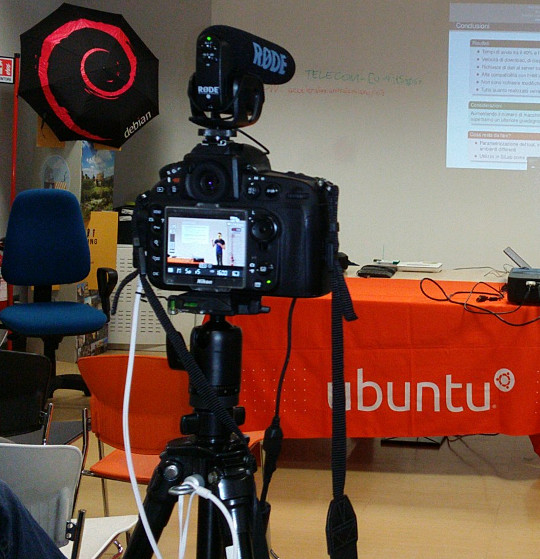
Recording a talk at a free software event with a Nikon D800 on a very basic tripod with Rode VideoMic Pro, headphones (white cable) and external power (black cable) If you want to capture audio with the camera and record it in the video file (discussed in more detail below), you will need to purchase a microphone that mounts on the camera. The built-in microphones on cameras are often quite bad, even on the most expensive cameras. If you are just using the built-in microphone for reference audio (to help with time synchronization when you combine different audio files with the video later) then the built-in microphone may be acceptable. Camera audio is discussed in more detail below. If your camera has a headphone socket, get some headphones for listening to the audio. Make sure you have multiple memory cards. Look carefully at the speed of the memory cards, slow ones are cheaper but they can't keep up with the speed of writing 1080p video. At a minimum, you should aim to buy memory cards that can handle one or two days worth of data for whatever it is you do. A tripod is essential for most types of video. If you use a particularly heavy camera or lens or if you are outdoors and it may be windy you will need a heavier tripod for stability. For video, it is very useful to have a tripod with a handle for panning left and right but if the camera will be stationary for the whole recording then the handle is not essential. Carrying at least one spare battery is another smart move. On one visit to the Inca Trail in Peru, we observed another member of our group hiking up and down the Andes with a brand new DSLR that they couldn't use because the battery was flat. For extended periods of recording, batteries will not be sufficient and you will need to purchase a mains power supply (PSU). These are available for most types of DSLR and video camera. The camera vendors typically design cameras with unusual power sockets so that you can only use a very specific and heavily overpriced PSU from the same company. Don't forget a surge protector too. There are various smartphone apps that allow you to remotely control the camera from the screen of your phone, such as the qDslrDashboard app. These often give a better preview than the screen built-in to the camera and may even allow you to use the touch screen to focus more quickly on a specific part of the picture. A regular USB cable is not suitable for this type of app, you need to buy a USB On-The-Go (OTG) cable.
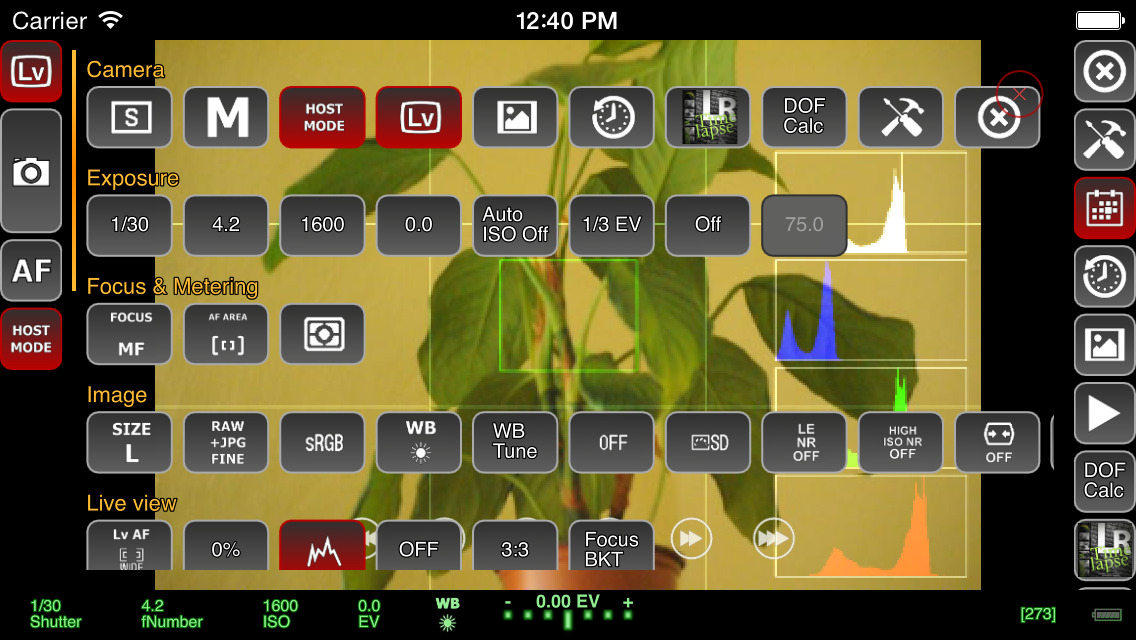
Screenshot of qDslrDashboard app on a smartphone, controlling a DSLR camera If you plan to copy the video from the camera to a computer at the event, you will need to make sure you have a fast memory card reader. The memory card readers in some laptops are quite slow and others can be quite fast so you may not need to buy an extra card reader. Camera audio Most cameras, including DSLRs, have a built-in microphone and a socket for connecting an external microphone. The built-in microphones obtain very poor quality sound. For many events, it is much better to have independent microphones, such as a lapel microphone attached to a smartphone or wireless transmitter. Those solutions are described in part one of this blog series. Nonetheless, there are still some benefits of capturing audio in the camera. The biggest benefit is the time synchronization: if you have audio recordings in other devices, you will need to align them with the video using post-production software. If the camera recorded an audio stream too, even if the quality is not very good, you can visualize the waveform on screen and use it to align the other audio recordings much more easily and precisely. If the camera will be very close to the people speaking then it may be acceptable to use a microphone mounted on the camera. This will be convenient for post-production because the audio will be synchronized with the video. It may still not be as good as a lapel microphone though, but the quality of these camera-mounted microphones is still far higher than the built-in microphones. I've been trying the Rode VideoMic Pro, it is definitely better than recording with the built-in microphone on the camera and also better than the built-in microphone on my phone. One problem that most people encounter is the sound of the lens autofocus mechanism being detected by the microphone. This occurs with both the built-in microphone and any other microphone you mount on the camera. A microphone mounted on top of the camera doesn't detect this noise with the same intensity as the built-in microphone but it is still present in the recordings. If using a camera-mounted microphone to detect the audio from an audience, you may need to have an omnidirectional microphone. Many camera-mounted microphones are directional and will not detect very much sound from the sides or behind the camera. When using any type of external microphone with the camera, it is recommend to disable automatic gain control (AGC) in the camera settings and then manually adjust the microphone sensitivity/volume level. Use headphones A final word on audio - most good cameras have an audio output socket. Connect headphones and wear them, to make sure you are always capturing audio. Otherwise, if the microphone's battery goes flat or if a wireless microphone goes out of range you may not notice. Choosing a lens The more light you get, the better. Bigger and more expensive lenses allow more light into the camera. Many of the normal lenses sold with a DSLR camera are acceptable but if it is a special occasion you may want to rent a more expensive lens for the day. If you already have a lens, it is a very good idea to test it in conditions similar to those you expect for the event you want to record. Recording duration limits Most DSLR cameras with video capability impose a 30 minute maximum recording duration This is basically the result of a friendly arrangement between movie studios and politicians to charge an extra tax on video recording technology and potentially make the movie studio bosses richer, supposedly justified by the fact that a tiny but exaggerated number of people use their cameras to record movies at the cinema. As a consequence, most DSLR manufacturers limit the duration of video recording so their product won't be subject to the tax, ensuring the retail price is lower and more attractive. On top of this, many DSLR cameras also have a 4GB file size limit if they use the FAT filesystem. Recording 1080p video at a high frame rate may hit the file size limit in 10 minutes, well before you encounter the 30 minute maximum recording duration. To deal with the file size issue, you can record at 720p instead of 1080p and use the frame rate 24fps. For events longer than 30 minutes or where you really want 1080p or a higher frame rate, there are some other options you can consider:
  • Buy or rent a proper video camera instead of using a DSLR camera
  • Using multiple cameras that can stop and be restarted at different times.
  • Manually stopping and restarting the camera if there are breaks in the event where it is safe to do so.
  • Use an app to control the camera and program it to immediately restart the recording each time it stops
  • Extract the raw output from the camera's HDMI socket and record into some other device or computer. There are several purpose-built devices
    that can be used this way with an embedded SSD for storage.
  • There are also some people distributing unofficial/alternative firmware images that remove the artificial 30 minute recording limit.
Camera settings There are many online tutorials and demonstration videos on YouTube that will help you optimize the camera settings for video. You may have already made recordings using the automatic mode. Adjusting some or all of the settings manually may help you create a more optimal recording. You will need to spend some time familiarizing yourself with the settings first. The first thing to check is white balance. This tells the camera the type of lighting in the location. If you set this incorrectly then the colours will be distorted. Many cameras have the ability to automatically set the white balance. For video, you may be able to change one or more settings that control the recording quality. These settings control the file compression ratio and image size. Typical image size settings are 720p and 1080p. Compression ratio may be controlled by a high/medium/low quality setting. Choosing the highest quality and biggest picture requires more space on the memory card and also means you reach the 4GB file size limit more quickly. A higher quality setting also implies a faster memory card is required, because the rate of megabytes per second written to the memory card is higher. Next you need to think about the frame rate. Events that involve fast moving subjects, such as sports, typically benefit from a higher frame rate. For other events it is quite acceptable to use 24 frames per second (fps). Higher frame rates also imply bigger file size and a requirement for a faster memory card. Once you have decided on the frame rate, the next thing to do is set the shutter speed. Use a shutter speed that is double the frame rate. For example, if using 24fps or 25fps, use a 1/50 shutter speed. The final two settings you need to adjust are the ISO and aperture. Set these based on the lighting conditions and extent to which the subjects are moving. For example, if the setting is dark or if you are trying to record fast moving subjects like athletes, vehicles or animals, use an ISO value of 800 or higher. Once you have chosen ISO, adjust the aperture to ensure the picture is sufficiently illuminated. Aperture also has a significant impact on the depth of field. Operating the camera: zoom and focus Many people use zoom lenses. It is not always necessary to change the zoom while recording a video, you can use software to zoom in and out on individual parts of the picture when editing it in post-production. If you do change the zoom while recording, it may be more difficult to maintain focus. Almost all lenses support manual focus (turning the focus ring by hand) and many support automatic focus. When shooting photographs with a DSLR, the mirror is down and the camera can use dedicated sensors for focus and light sensing. When shooting video, the mirror is up and the camera can not use the same focus sensors that are used in photography. Video recording uses a digital focussing algorithm based on contrast in the picture. If you take a lot of photos you are probably quite accustomed to the fast and precise autofocus for photography and you will notice that keeping a video in focus is more challenging. As mentioned already, one of the first things you can do to keep focus simple is to avoid zooming while recording. Record in a higher resolution than you require and then zoom with software later. Some people record using 4k resolution even when they only want to produce a 720p video, as they can digitally zoom in to different parts of the 4k recording without losing detail. If the subject is very stationary (people sitting at a desk for an interview is a typical example), you may be able to set the camera to manual focus and not change it at all while recording. If you choose to enable autofocus while recording, any built-in camera microphone or microphone mounted on the camera is likely to detect sounds from the motorized focus system. Ultimately, the autofocus mechanism is not accurate for all subjects and you may be unable to stop them moving around so you will need to change the focus manually while recording. It requires some practice to be able to do this quickly without overshooting the right focus. To make life more tricky, Nikon and Canon focus rings rotate in the opposite direction, so if you are proficient using one brand you may feel awkward if you ever have to use the other. A good way to practice this skill is to practice while in the car or on the train, pointing at different subjects outside the window and trying to stay in focus as you move from one subject to the next. Make a trial run Many events, from weddings right up to the Olympic Games opening ceremony, have a trial run the day before. One reason for that is to test the locations and settings of all the recording and broadcasting equipment. If a trial run isn't possible for your event, you may find some similar event to practice recording and test your equipment. For example, if you are planning to record a wedding, you could try and record a Sunday mass in the same church. Backup and duplicate the recordings before leaving the event If you only have one copy of the recordings and the equipment is stolen or damaged you may be very disappointed. Before your event, make a plan to duplicate the raw audio and video recordings so that several people can take copies away with them. Decide in advance who will be responsible for this, ensure there will be several portable hard disks and estimate how much time it will take to prepare the copies and factor this into the schedule. Conclusion All the products described can be easily purchased from online retailers. You may not need every accessory that is mentioned as it depends on the type of event you record. The total cost of buying or renting the necessary accessories may be as much as the cost of the camera itself so if you are new to this you may need to think carefully about making a budget with a spreadsheet to do it correctly. Becoming familiar with the camera controls and practicing the techniques for manual focus and zoom can take weeks or months. If you enjoy photography this can be time well spent but if you don't enjoy it then you may not want to commit the time necessary to make good quality video. Don't rule out options like renting equipment instead of buying it or crowdsourcing, asking several participants or friends to help make recordings with their own equipment. For many events, audio is far more indispensable than video and as emphasizing at the beginning of this article, it is recommended that you should be one hundred percent confident in your strategy for recording audio before you start planning to record video.

Daniel Pocock: UK wakes up to airport tax and data grab

The UK has just woken up to the fact that retailers at airports have been playing the VAT system. The focus of the media coverage has been on the VAT money, failing to give much emphasis to the fact this is also a sophisticated and coordinated attack on personal privacy. This situation has been obvious to me for years and it doesn't just occur in the UK. Whenever one of these retailers asks me for a boarding pass, I always refuse. Sometimes they lie to me and tell me that it is mandatory to let them scan my boarding pass: I tell them that a travel companion has the boarding passes and at this point they usually find some way to complete the transaction without further comment. It is only necessary to pay the correct amount With the rise of payment cards, people seem to be forgetting that you can pay for things in cash. If I have the right change to pay for something in this scenario, I typically put it on the counter and walk away. Why should I have to waste my time helping a poorly trained cashier understand VAT? I already deal with enough computer problems in the job I'm paid to do, why should I lose my time when on vacation explaining to a cashier that their computer is failing to correctly deduct 20% VAT? Whenever showing a boarding pass or passport It is far too common for people to try and scan or copy documents these days. When somebody in an airport shop or hotel asks to see a document, I don't let it out of my hands. It is not hard to cover the barcode with your fingers too. This prevents them making an unauthorized copy or using a barcode scanner to extract personal data. Some of these staff literally try to snatch the documents out of people's hands and drop them onto a scanner next to their till. In some countries hotels are obliged to look at your passport and make a record of the name but they often have no obligation to photocopy or scan it and it is often a huge risk if they do. If the airports are genuinely concerned about the security of passengers, they would be just as thorough in protecting data as they are in the hunt for terrorists. For example, they could give VAT-free passengers colour-coded boarding passes or some other vouchers without any personal information on them. VAT diversion funds customer data grab Shops pocket an extra 20% of the price of a product and they condition everybody, staff and customers, to having all customer data expropriated from the boarding pass at the point of sale, even the customers not eligible for a tax refund are unnecessarily having their data hoovered up in this way. The VAT money diverted away from both the tax man and the customer is rolled back into the system to fund the data grab. UK law promises customers significant protection from unlawful use of personal data, so how can these retailers lie to passengers and tell them that scanning the boarding pass is mandatory? Why not ask the Information Commission's Office to check up on this? Paying the correct amount and walking away It is not hard for people to add up the amount of VAT included in a price, deduct it themselves, give the correct and exact amount of cash to the cashier and walk away. Just type the price into your smart phone, divide by 1.2 and you can see the amount to pay. For example, if a product costs 24.95, just type 24.95 1.2 into the calculator on your phone and you find that you have to pay 20.79. It may only be necessary to show a boarding pass or ID for purchasing duty-free alcohol or tobacco. Not just for airports Carrying a correct amount of cash doesn't just help navigate the data grab in airports. Consider some of the other scenarios:
  • A long queue at the cashier in a petrol station, typically on a Sunday afternoon. Did you ever notice somebody who just walks past the queue and puts the exact change (or a cheque) on the counter and drives away while everybody else is waiting to pay with some payment card and scan their loyalty card?
  • Restaurant in a tourist spot, you receive a bill and notice they have added VAT and service charges or something you didn't ask for like bread. In European countries and Australia, the price next to each dish on the menu is the only price you have to pay, just like the price on the shelf in a shop or the price on a web page. If you have the right change you can just pay that amount and walk away without a discussion. In the US the taxes are added later and some tourist hot spots in Europe try this with English speaking customers, thinking that if they are American they won't complain.
  • Hotel tries to insist on a currency conversion when charging your credit card. Maybe you've already realized that dynamic currency conversion (DCC) used by retailers often adds at least 3% to a purchase but some hotels try to go way beyond this. The booking confirmation page you printed from their web site gives you a total price in one currency, perhaps USD or EUR and they use some arbitrary exchange rate, with a whopping 30% margin or more, to convert to the local currency and ask you to insert your PIN number or sign a credit card authorization. The best answer to this practice is usually to carry banknotes in the currency used for the booking, paying that exact amount in cash and if they try to argue, just keep counting out the bank notes to prove it matches the confirmation page. Hotels only get away with this trick because few people check the rate, even fewer carry sufficient cash and you may not be able to use local cash machines to get the currency specified in your booking. This is a situation I've encountered in eastern Europe and South America where it is common to quote in EUR and USD even if that isn't the domestic currency.

11 August 2015

Jonathan McDowell: Programming the FST-01 (gnuk) with a Bus Pirate + OpenOCD

Last year at DebConf14 Lucas authorized the purchase of a handful of gnuk devices, one of which I obtained. At the time it only supported 2048 bit RSA keys. I took a look at what might be involved in adding 4096 bit support during DebConf and managed to brick my device several times in doing so. Thankfully gniibe was on hand with his STLinkV2 to help me recover. However subsequently I was loathe to experiment further at home until I had a suitable programmer. As it is this year has been busy and the 1.1.x release train is supposed to have 4K RSA (as well as ECC) support. DebConf15 is coming up and I felt I should finally sort out playing with the device properly. I still didn t have a suitable programmer. Or did I? Could my trusty Bus Pirate help? The FST-01 has an STM32F103TB on it. There is an exposed SWD port. I found a few projects that claimed to do SWD with a Bus Pirate - Will Donnelly has a much cloned Python project, the MC HCK project have a programmer in Ruby and there s LibSWD though that s targeted to smarter programmers. None of them worked for me; I could get the Python bits as far as correctly doing the ID of the device, but not reading the option bytes or successfully flashing (though I did manage an erase). Enter the old favourite, OpenOCD. This already has SWD support and there s an outstanding commit request to add Bus Pirate support. NodoNogard has a post on using the ST-Link/V2 with OpenOCD and the FST-01 which provided some useful pointers. I grabbed the patch from Gerrit, applied it to OpenOCD git and built an openocd.cfg that contained:
source [find interface/buspirate.cfg]
buspirate_port /dev/ttyUSB0
buspirate_vreg 1
buspirate_mode normal
transport select swd
source [find target/stm32f1x.cfg]
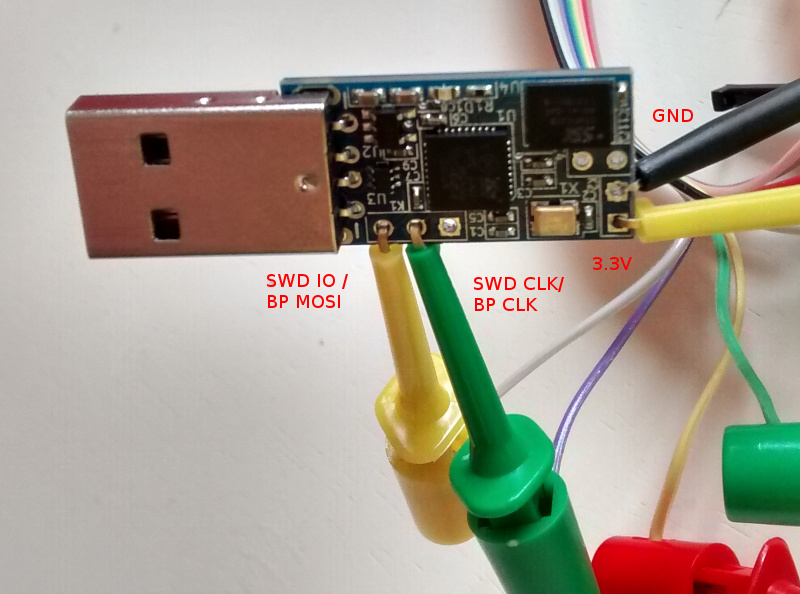
My BP has the Seeed Studio probe cable, so my hookups look like this: Bus Pirate + FST-01 SWD connection That s BP MOSI (grey) to SWD IO, BP CLK (purple) to SWD CLK, BP 3.3V (red) to FST-01 PWR and BP GND (brown) to FST-01 GND. Once that was done I fired up OpenOCD in one terminal and did the following in another:
$ telnet localhost 4444
Trying ::1...
Trying 127.0.0.1...
Connected to localhost.
Escape character is '^]'.
Open On-Chip Debugger
> reset halt
target state: halted
target halted due to debug-request, current mode: Thread
xPSR: 0x01000000 pc: 0xfffffffe msp: 0xfffffffc
Info : device id = 0x20036410
Info : SWD IDCODE 0x1ba01477
Error: Failed to read memory at 0x1ffff7e2
Warn : STM32 flash size failed, probe inaccurate - assuming 128k flash
Info : flash size = 128kbytes
> stm32f1x unlock 0
Device Security Bit Set
stm32x unlocked.
INFO: a reset or power cycle is required for the new settings to take effect.
> reset halt
target state: halted
target halted due to debug-request, current mode: Thread
xPSR: 0x01000000 pc: 0xfffffffe msp: 0xfffffffc
> flash write_image erase /home/noodles/checkouts/gnuk/src/build/gnuk.elf
auto erase enabled
wrote 109568 bytes from file /home/noodles/checkouts/gnuk/src/build/gnuk.elf in 95.055603s (1.126 KiB/s)
> stm32f1x lock 0
stm32x locked
> reset halt
target state: halted
target halted due to debug-request, current mode: Thread 
xPSR: 0x01000000 pc: 0x08000280 msp: 0x20005000
Then it was a matter of disconnecting the gnuk from the BP, plugging it into my USB port and seeing it come up successfully:
usb 1-2: new full-speed USB device number 11 using xhci_hcd
usb 1-2: New USB device found, idVendor=234b, idProduct=0000
usb 1-2: New USB device strings: Mfr=1, Product=2, SerialNumber=3
usb 1-2: Product: Gnuk Token
usb 1-2: Manufacturer: Free Software Initiative of Japan
usb 1-2: SerialNumber: FSIJ-1.1.7-87063020
usb 1-2: ep 0x82 - rounding interval to 1024 microframes, ep desc says 2040 microframes
More once I actually have a 4K key loaded on it.

10 August 2015

Daniel Pocock: Going 4K

I recently started using a 4K monitor. I've generally had a positive experience and thought I would share some comments about it. What can you do with 4K resolution?
  • View the entire London Underground map or Swiss railway map without having to zoom or scroll
  • Run a mail client like Thunderbird/Icedove and an IRC client side-by-side
  • Run Eclipse and the Android emulator side-by-side
  • Run Eclipse and some other program you are debugging side-by-side
  • When reading a PDF, show a whole page at a time but only using half the screen
Are there hardware issues? Originally the hardware was expensive and people would have to do things like using multiple cables to join their video card to their 4K screen. The latest generation of video cards and monitors don't have this problem. I chose to use NVIDIA's entry-level Quadro K420 card, the smallest and least expensive Quadro supporting 4K. The PC is a HP Z800 workstation. HP suggests they only certify the K420 with their latest workstations (e.g. Z840) but I have observed no problem using it in a Z800. The monitor is a 32" BenQ display. After reading comments from other 4K users, I felt that any monitor less than 30" would not help me get the most from the world of 4K. The monitor connects to the video card using a DisplayPort 1.2 cable that was in the box with the monitor. I've been able to get sound through the monitor but I found the volume is always a bit low and at one point sound stopped completely. What about software issues? Everything just appeared to work although the fonts are a bit smaller than what I'm used to. This appears to be related to DPI issues. DPI is not automatically detected and several applications have their own way of handling non-standard DPI. Discussion about this started on the debian-devel mailing list, given that non-standard DPI will be an issue with many newer monitors, handheld devices and more exotic displays such as televisions. Some web sites just don't look so good when the browser window is maximized to 4K resolution while others use the extra space really well. For example, using the AirBNB search, the maps show more detail but using another hotel booking site I found that it was still trying to render a map within a constant size region using less than ten percent of the page.

9 August 2015

Thorsten Alteholz: My Debian Activities in July 2015

FTP assistant This month I marked 485 packages for accept, rejected 87 of them and had to send 18 emails to maintainers. The NEW-queue is below 100 again, but you hardworking fellows don t make a break, but start the GCC5 transition. This is so much fun :-) . Squeeze LTS This was my thirteens month that I did some work for the Squeeze LTS initiative, started by Raphael Hertzog at Freexian. This month I got assigned a workload of 15h and I spent again most of it to work on a new upload of php5. I finally prepared the patches for the CVEs and realized only then that the number of failed tests drastically increased. So return to beginning and checking why everything is broken now :-( .
  • [DLA 269-1] linux-ftpd-ssl security update
  • [DLA 271-1] libunwind security update
  • [DLA 280-1] ghostscript security update
  • [DLA 281-1] expat security update
The patch for [DLA 269-1] was prepared by Mats Erik Andersson. This month I also had another term of doing frontdesk work. So I answered questions on the IRC channel and looked for CVEs that are important for Squeeze LTS or could be ignored. Other stuff This month I could finally finish the harminv transition and all affected packages migrated to testing meanwhile. I also uploaded a new version for pipexec. Donations Again, thanks alot to all donors. I really appreciate this and hope that everybody is pleased with my commitment. Don t hesitate to make suggestions for improvements.

Petter Reinholdtsen: First paper version of the Norwegian Free Culture book heading my way

Typesetting a book is harder than I hoped. As the translation is mostly done, and a volunteer proof reader was going to check the text on paper, it was time this summer to focus on formatting my translated docbook based version of the Free Culture book by Lawrence Lessig. I've been trying to get both docboox-xsl+fop and dblatex to give me a good looking PDF, but in the end I went with dblatex, because its Debian maintainer and upstream developer were responsive and very helpful in solving my formatting challenges. Last night, I finally managed to create a PDF that no longer made Lulu.com complain after uploading, and I ordered a text version of the book on paper. It is lacking a proper book cover and is not tagged with the correct ISBN number, but should give me an idea what the finished book will look like. Instead of using Lulu, I did consider printing the book using CreateSpace, but ended up using Lulu because it had smaller book size options (CreateSpace seem to lack pocket book with extended distribution). I looked for a similar service in Norway, but have not seen anything so far. Please let me know if I am missing out on something here. But I still struggle to decide the book size. Should I go for pocket book (4.25x6.875 inches / 10.8x17.5 cm) with 556 pages, Digest (5.5x8.5 inches / 14x21.6 cm) with 323 pages or US Trade (6x8 inches / 15.3x22.9 cm) with 280 pages? Fewer pager give a cheaper book, and a smaller book is easier to carry around. The test book I ordered was pocket book sized, to give me an idea how well that fit in my hand, but I suspect I will end up using a digest sized book in the end to bring the prize down further. My biggest challenge at the moment is making nice cover art. My inkscape skills are not yet up to the task of replicating the original cover in SVG format. I also need to figure out what to write about the book on the back (will most likely use the same text as the description on web based book stores). I would love help with this, if you are willing to license the art source and final version using the same CC license as the book. My artistic skills are not really up to the task. I plan to publish the book in both English and Norwegian and on paper, in PDF form as well as EPUB and MOBI format. The current status can as usual be found on github in the archive/ directory. So far I have spent all time on making the PDF version look good. Someone should probably do the same with the dbtoepub generated e-book. Help is definitely needed here, as I expect to run out of steem before I find time to improve the epub formatting. Please let me know via github if you find typos in the book or discover translations that should be improved. The final proof reading is being done right now, and I expect to publish the finished result in a few months.

7 August 2015

Ben Hutchings: Debian LTS work, July 2015

This was my eighth month working on Debian LTS. I was assigned 14.75 hours of work by Freexian's Debian LTS initiative. linux-2.6 I didn't upload any new version of the kernel this month, but I did send all the recent security fixes to Willy Tarreau who maintains the 2.6.32.y branch at kernel.org. I also spent more time working on a fix for bug #770492 aka CVE-2015-1350, which is not yet fixed upstream. I now have a candidate patch for 2.6.32.y/squeeze, and automated tests covering many of the affected filesystems. Front desk The LTS 'front desk' role is now assigned on a rota, and I was my first turn in the third week of July. I investigated which new CVEs affected LTS-supported packages in squeeze, recorded this in the secure-testing repository, and mailed the package maintainers to give them a chance to handle the updates. groovy Groovy had a single issue (CVE-2015-3253) with a simple fix that I could apply to the version in squeeze. Unfortunately the previous version in squeeze had not been properly updated during the squeeze release cycle and could no longer be built from source. I eventually worked out what the build-dependencies should be, uploaded the fix and issued DLA-274-1. ruby1.9.1 Ruby 1.9.1 also had a single issue (CVE-2014-6438), though the fixes were more complicated and hard to find. (The original bug report for this is still not public in the upstream bug tracker.) I also had to find an earlier upstream change that they depended on. As I've mentioned before, Ruby has an extensive test suite so I could be quite confident in my backported changes. I uploaded and issued DLA-275-1. libidn The GNU library for Internationalized Domain Names, libidn, required applications to pass only valid UTF-8 strings as domain names. The Jabber instant messaging server turned out not to be validating untrusted domain names, leading to a security issue there (CVE-2015-2059). As there are likely to be other applications with similar bugs, this was resolved by adding UTF-8 validation to libidn. The fix for this involved importing additional functions from the GNU portability library, gnulib, and there my difficulties began. Confusingly, libidn has two separate sets of functions imported from gnulib, and due to interdependencies it turned out that I would have to update both of these wholesale rather than just importing the new functions that were wanted. This resulted in a 35,000 line patch. Following that I needed to autoreconf the package (and debug that process when it failed), ending up with another 26,000 line patch. Finally, it turned out that the new gnulib code needed gperf to build a header file for Solaris (when building for Linux? huh?). I ended up adding that with another patch instead. libidn has a decent test suite, so I could at least be confident in the result of my changes. I uploaded and issued DLA-277-1. Dear upstream developers, please use sane libraries instead of gnulib.

John Goerzen: Detailed Smart Card Cryptographic Token Security Guide

After my first post about smartcards under Linux, I thought I would share some information I ve been gathering. This post is already huge, so I am not going to dive into much specific commands, but I am linking to many sources with detailed instructions. I ve reviewed several types of cards. For this review, I will focus on the OpenPGP card and the Yubikey NEO, since the Cardomatic Smartcard-HSM is not supported by the gpg version in Jessie. Both cards are produced by people with strong support for the Free Software ecosystem and have strong cross-platform support with source code. OpenPGP card: Basics with GnuPG The OpenPGP card is well-known as one of the first smart cards to work well on Linux. It is a single-application card focused on use with GPG. Generally speaking, by the way, you want GPG2 for use with smartcards. Basically, this card contains three slots: decryption, signing, and authentication slots. The concept is that the private key portions of the keys used for these items are stored only on the card, can never be extracted from the card, and the cryptographic operations are performed on the card. There is more information in my original post. In a fairly rare move for smartcards, this card supports 4096-byte RSA keys; most are restricted to 2048-byte keys. The FSF Europe hands these out to people and has a lot of good information about them online, including some HOWTOs. The official GnuPG smart card howto is 10 years old, and although it has some good background, I d suggest using the FSFE instructions instead. As you ll see in a bit, most of this information also pertains to the OpenPGP mode of the Yubikey Neo. OpenPGP card: Other uses Of course, this is already pretty great to enhance your GPG security, but there s a lot more that you can do with this card to add two-factor authentication (2FA) to a lot of other areas. Here are some pointers: OpenPGP card: remote authentication with ssh You can store the private part of your ssh key on the card. Traditionally, this was only done by using the ssh agent emulation mode of gnupg-agent. This is still possible, of course. Now, however, the OpenSC project now supports the OpenPGP card as a PKCS#11 and PKCS#15 card, which means it works natively with ssh-agent as well. Try just ssh-add -s /usr/lib/x86_64-linux-gnu/pkcs11/opensc-pkcs11.so if you ve put a key in the auth slot with GPG. ssh-add -L will list its fingerprint for insertion into authorized_keys. Very simple! As an aside: Comments that you need scute for PKCS#11 support are now outdated. I do not recommend scute. It is quite buggy. OpenPGP card: local authentication with PAM You can authenticate logins to a local machine by using the card with libpam-poldi here are some instructions. Between the use with ssh and the use with PAM, we have now covered 2FA for both local and remote use in Unix environments. OpenPGP card: use on Windows Let s move on to Windows environments. The standard suggestion here seems to be the mysmartlogon OpenPGP mini-driver. It works with some sort of Windows CA system, or the local accounts using EIDAuthenticate. I have not yet tried this. OpenPGP card: Use with X.509 or Windows Active Directory You can use the card in X.509 mode via these gpgsm instructions, which apparently also work with Windows Active Directory in some fashion. You can also use it with web browsers to present a certificate from a client for client authentication. For example, here are OpenSC instructions for Firefox. OpenPGP card: Use with OpenVPN Via the PKCS#11 mode, this card should be usable to authenticate a client to OpenVPN. See the official OpenVPN HOWTO or these other instructions for more. OpenPGP card: a note on PKCS#11 and PKCS#15 support You ll want to install the opensc-pkcs11 package, and then give the path /usr/lib/x86_64-linux-gnu/pkcs11/opensc-pkcs11.so whenever something needs the PKCS#11 library. There seem to be some locking/contention issues between GPG2 and OpenSC, however. Usually killing pcscd and scdaemon will resolve this. I would recommend doing manipulation operations (setting PINs, generating or uploading keys, etc.) via GPG2 only. Use the PKCS#11 tools only to access. OpenPGP card: further reading Kernel Concepts also has some nice readers; you can get this card in a small USB form-factor by getting the mini-card and the Gemalto reader. Yubikey Neo Introduction The Yubikey Neo is a fascinating device. It is a small USB and NFC device, a little smaller than your average USB drive. It is a multi-application device that actually has six distinct modes:
  • OpenPGP JavaCard Applet (pc/sc-compatible)
  • Personal Identity Verification [PIV] (pc/sc-compatible, PKCS#11-compatible in Windows and OpenSC)
  • Yubico HOTP, via your own auth server or Yubico s
  • OATH, with its two sub-modes:
    • OATH TOTP, with a mobile or desktop helper app (drop-in for Google Authenticator
    • OATH HOTP
  • Challenge-response mode
  • U2F (Universal 2nd Factor) with Chrome
There is a ton to digest with this device. Yubikey Neo Basics By default, the Yubikey Neo is locked to only a subset of its features. Using the yubikey-personalization tool (you ll need the version in stretch; jessie is too old), you can use ykpersonalize -m86 to unlock the full possibilities of the card. Run that command, then unplug and replug the device. It will present itself as a USB keyboard as well as a PC/SC-compatible card reader. It has a capacitive button, which is used to have it generate keystrokes to input validation information for HOTP or HMAC validation. It has two slots that can be configured with HMAC and HOTP; a short button press selects the default slot #1 and a long press selects slot #2. But before we get into that, let s step back at some basics. opensc-tool list-algorithms claims this card supports RSA with 1024, 2048, and 3072 sizes, and EC with 256 and 384-bit sizes. I haven t personally verified anything other than RSA-2048 though. Yubikey Neo: OpenPGP support In this mode, the card is mostly compatible with the physical OpenPGP card. I say mostly because there are a few protocol differences I ll get into later. It is also limited to 2048-byte keys. Support for this is built into GnuPG and the GnuPG features described above all work fine. In this mode, it uses firmware from the Yubico fork of the JavaCard OpenPGP Card applet. There are Yubico-specific tutorials available, but again, most of the general GPG stuff applies. You can use gnupg-agent to use the card with SSH as before. However, due to some incompatibilities, the OpenPGP applet on this card cannot be used as a PKCS#11 card with either scute or OpenSC. That is not exactly a huge problem, however, as the card has another applet (PIV) that is compatible with OpenSC and so this still provides an avenue for SSH, OpenVPN, Mozilla, etc. It should be noted that the OpenPGP applet on this card can also be used with NFC on Android with the OpenKeychain app. Together with pass (or its Windows, Mac, or phone ports), this makes a nicely secure system for storing passwords. Yubikey Neo: PKCS#11 with the PIV applet There is also support for the PIV standard on the Yubikey Neo. This is supported by default on Linux (via OpenSC) and Windows and provides a PKCS#11-compabible store. It should, therefore, be compatible with ssh-agent, OpenVPN, Active Directory, and all the other OpenPGP card features described above. The only difference is that it uses storage separate from the OpenPGP applet. You will need one of the Yubico PIV tools to configure the key for it; in Debian, the yubico-piv-tool from stretch does this. Here are some instructions on using the Yubikey Neo in PIV mode: A final note: for security, it s important to change the management key and PINs before deploying the PIV mode. I couldn t get this to work with Firefox, but it worked pretty much everywhere else. Yubikey Neo: HOTP authentication This is the default mode for your Yubikey; all other modes require enabling with ykpersonalize. In this mode, a 128-bit AES key stored on the Yubikey is used to generate one-time passwords (OTP). (This key was shared in advance with the authentication server.) A typical pattern would be for three prompts: username, password, and Yubikey HOTP. The user clicks in the Yubikey HOTP field, touches the Yubikey, and their one-time token is pasted in. In the background, the service being authenticated to contacts an authentication server. This authentication server can be either your own (there are several open source implementations in Debian) or the free Yubicloud. Either way, the server decrypts the encrypted part of the OTP, performs validity checks (making sure that the counter is larger than any counter it s seen before, etc) and returns success or failure back to the service demanding authentication. The first few characters of the posted auth contain the unencrypted key ID, and thus it can also be used to provide username if desired. Yubico has provided quite a few integrations and libraries for this mode. A few highlights: You can also find some details on the OTP mode. Here s another writeup. This mode is simple to implement, but it has a few downsides. One is that it is specific to the Yubico line of products, and thus has a vendor lock-in factor. Another is the dependence on the authentication server; this creates a potential single point of failure and can be undesireable in some circumtances. Yubikey Neo: OATH and HOTP and TOTP First, a quick note: OATH and OAuth are not the same. OATH is an authentication protocol, and OAuth is an authorization protocol. Now then Like Yubikey HOTP, OATH (both HOTP and TOTP) modes rely on a pre-shared key. (See details in the Yubico article.) Let s talk about TOTP first. With TOTP, there is a pre-shared secret with each service. Each time you authenticate to that service, your TOTP generator combines the timestamp with the shared secret using a HMAC algorithm and produces a OTP that changes every 30 seconds. Google Authenticator is a common example of this protocol, and this is a drop-in replacement for it. Gandi has a nice description of it that includes links to software-only solutions on various platforms as well. With the Yubikey, the shared secrets are stored on the card and processed within it. You cannot extract the shared secret from the Yubikey. Of course, if someone obtains physical access to your Yubikey they could use the shared secret stored on it, but there is no way they can steal the shared secret via software, even by compromising your PC or phone. Since the Yubikey does not have a built-in clock, TOTP operations cannot be completed solely on the card. You can use a PC-based app or the Android application (Play store link) with NFC to store secrets on the device and generate your TOTP codes. Command-line users can also use the yubikey-totp tool in the python-yubico package. OATH can also use HOTP. With HOTP, an authentication counter is used instead of a clock. This means that HOTP passwords can be generated entirely within the Yubikey. You can use ykpersonalize to configure either slot 1 or 2 for this mode, but one downside is that it can really only be used with one service per slot. OATH support is all over the place; for instance, there s libpam-oath from the OATH toolkit for Linux platforms. (Some more instructions on this exist.) Note: There is another tool from Yubico (not in Debian) that can apparently store multiple TOTP and HOTP codes in the Yubikey, although ykpersonalize and other documentation cannot. It is therefore unclear to me if multiple HOTP codes are supported, and how.. Yubikey Neo: Challenge-Response Mode This can be useful for doing offline authentication, and is similar to OATH-HOTP in a sense. There is a shared secret to start with, and the service trying to authenticate sends a challenge to the token, which must supply an appropriate response. This makes it only suitable for local authentication, but means it can be done fairly automatically and optionally does not even require a button press. To muddy the waters a bit, it supports both Yubikey OTP and HMAC-SHA1 challenge-response modes. I do not really know the difference. However, it is worth noting that libpam-yubico works with HMAC-SHA1 mode. This makes it suitable, for instance, for logon passwords. Yubikey Neo: U2F U2F is a new protocol for web-based apps. Yubico has some information, but since it is only supported in Chrome, it is not of interest to me right now. Yubikey Neo: Further resources Yubico has a lot of documentation, and in particular a technical manual that is actually fairly detailed. Closing comments Do not think a hardware security token is a panacea. It is best used as part of a multi-factor authentication system; you don t want a lost token itself to lead to a breach, just as you don t want a compromised password due to a keylogger to lead to a breach. These things won t prevent someone that has compromised your PC from abusing your existing ssh session (or even from establishing new ssh sessions from your PC, once you ve unlocked the token with the passphrase). What it will do is prevent them from stealing your ssh private key and using it on a different PC. It won t prevent someone from obtaining a copy of things you decrypt on a PC using the Yubikey, but it will prevent them from decrypting other things that used that private key. Hopefully that makes sense. One also has to consider the security of the hardware. On that point, I am pretty well satisfied with the Yubikey; large parts of it are open source, and they have put a lot of effort into hardening the hardware. It seems pretty much impervious to non-government actors, which is about the best guarantee a person can get about anything these days. I hope this guide has been helpful.
6 August 2015

Eduard Sanou: Reproducible builds on Debian for GSoC 2015, 1st update

This is the second blog post I m writing about my experiences contributing to Debian for Google Summer of Code 2015 (check my first post)

Status update

First month It s been two months and a few days since the GSoC started. During the first month I worked on fixing specific packages, mainly concerning issues with timestamps, which is a very common source of unreproducibility. In many cases, during the build process files are compressed into gzip or zip archives, which store the creation time of files in the metadata. This can lead to unreproducible results when there is timezone variation between builds (easily fixed setting the timezone to UTC before the compression happens). In some cases the compressed files are generated during the build, and thus add build times in the metadata of compressed files (in this case the creation date of the files needs to be normalized somehow). As explained in my application, I finished exams on the end of June, that s why I chose to work on small fixes first, so that I could make the most out of my time between studying and finishing university projects and reports. I m happy with my first month, as I have worked as originally planned. Actually, my estimation of the number of bugs I could submit every week was surpassed in reality!

Second month Once the university was over, I started dedicating myself fully to the project. This allowed me to start working on toolchain fixes, following my original plan on working with timestamp related issues. In particular I have been working a lot in implementing a proposal for deterministic timestamps that appeared in the reproducible builds project. The idea is to define an environment variable called SOURCE_DATE_EPOCH that contains a known timestamp in Unix epoch format. With this variable exported, tools that would embed the localtime in their generated or processed files, can use this externally supplied date. This would happen only if SOURCE_DATE_EPOCH is exported, so the behaviour of the tool wouldn t change if the variable is not set. The first package I patched to implement this behaviour was gcc. The reason behind this is that there are about 420 unreproducible packages due to using the __DATE__, __TIME__ and __TIMESTAMP__ C macros. My patch changes the behavior of the macros __DATE__ and __TIME__ if SOURCE_DATE_EPOCH is exported. I submitted this patch to the gcc-patches list. Even though there was some interesting discussions in the list, the patch has not been accepted yet. Seeing how the reproducible builds idea is gaining momentum and becoming widespread, I m positive that at some point the gcc people will be more receptive for such patch. The second work with SOURCE_DATE_EPOCH was in debhelper; I patched this building tool to export the variable with the latest debian/changelog entry timestamp. With this patch, all the tools that run under dh will be able to use it to embed deterministic timestamps. Unfortunately some parts of the build process of some packages don t happen under debhelper, so the variable needs to be exported in a different way. Having submitted the debhelper patch allowed many packages to become reproducible after the tools that embedded timestamps were patched to honour SOURCE_DATE_EPOCH. As of today, the toolchain packages I have patched to do that are: gcc, libxslt, gettext, ghostscript and qt4-x11 (qhelpgenerator). I have also continued working on fixing individual packages affected by timestamps, random orderings (such as the ones from listing hash keys) and locale depending orderings; I have tagged packages in our infrastructure to note what kind of issue makes them unreproducible; I have updated some parts of the Reproducible Builds Wiki.

Impressions about reproducible builds The work I did during the first month felt a bit tedious sometimes: it didn t require much creativity or thinking as most of the fixes where quite mechanical, following a recipe. After I became free from university duties, I started looking into less trivial issues, which require more deep investigation and feel more rewarding once they are fixed. I also worked on toolchain fixes, which need more work and need more care. Fixing toolchain packages feels particularly rewarding because they can cause many packages to become reproducible at once. There is a very active community in the reproducible builds project! It s great to see so many people contributing to this project spending so many hours and putting so much effort. I ve felt very welcome from the beginning and I have gotten kind replies and helpful answers to all the questions and doubts I ve had, both from my mentor and from the other people in the project. I want to add that I m still amazed by the awesome infrastructure set up for the reproducible builds project. The team is using a Jenkins machine to continuously build packages to check for reproducibility, with irc notifications for changes, and also with a really useful web interface to list all the packages organized by issues that allows exploring them individually with all the available information. Also not only the infrastructure is used to build Debian amd64 packages, but also FreeBSD, NetBSD, OpenWRT, coreboot and lately Debian armhf with the help of a few new arm nodes.

Impressions about working on a free software project This was my first time working on a community driven free software project and I ve learned so many things. Something I learned during the first days, which is even more present in such wide project like the reproducible builds, is that contributing is not just writing patches for the features you want; you also need to convince the maintainer of the package to accept the patch! I was a bit surprised at the beginning because even if this is a Debian project, that aims to make changes to the whole distribution, decisions are not absolute for the whole Debian project. After taking decisions within the reproducible builds teams on how to approach things, we need to convince the rest of the Debian developers (mainly maintainers) to follow them, as they are allowed to disagree. So it is required to work together for solutions that makes everyone comfortable, usually with discussions on mailing lists or irc. There is another fact that I wasn t expecting before getting involved in this project. The kind of teamwork I have done previously involves having a leader who decides how stuff is done, who takes decisions when needed and oversees the whole project. There seems to be a different philosophy in Debian. Instead of having a leader, everyone tries their best, trying to convince the others that their solution is good, often by showing an implementation of the solution and providing proof that it works, rather than trying to get the solution accepted before coding it. Also, solutions and ideas are valued for their quality rather than by the position of the person submitting them, and there is no hierarchy within the group: all comments and advices are taken equally, valuing their usefulness regardless of who gives them. Usually there are no votes when deciding things. Members try their best on their approaches, trying to convince others as best as they can. And even if someone disagrees they may end up accepting the solution if they don t manage to convince the original proposer of doing things differently. The idea is to spend more time working and coding than arguing and deciding on the way to do things. So far I ve seen this approach to be very efficient :) I ve been told by my mentor that for difficult cases there exist a Debian committee that helps mediate on disagreements, but that is only used as a last option, probably when the discussion gets heated up.

Personal experience Overall I m very happy to finally having set my foot in the free software community, where I m able to contribute to the kind of software I have been using for years. The sense of community in Debian is really big, and everyone is invited to participate. I think that Google is doing an awesome job with the Google Summer of Code, not only because it gives a lot to free software but because it helps students to join the free software world as contributors (which is something that may be difficult to get into when you don t know how to begin, as it happened to myself for some time). I plan to continue contributing to the free software world, and I d encourage anyone to find projects to get involved and contribute as well! Happy hacking to everyone!

3 August 2015

Jamie McClelland: Docker: evil spawn or useful tool

There are plenty of criticisms of docker, the system for building a container-based virtual machine running just a single application. I've read many of them have have consistently been either in agreement or at least amused. The most relevant criticism is about the basic approach of building single-application virtual machines. To understand this criticism, let's remember - in traditional application deployment there are at least three distinct jobs:
  • Distrubtion developers - the team the integrates all the various packages available into a coherent and well-functioning system and, importantly, monitors the upstream of all the packages to ensure that security bugs are properly packaged and made easily available for installation. These people don't give a shit about your PHP parse error and don't really care if you can't figure out the command to create a new Postgres Database.
  • System administrators - these are the people that ensure that the security updates provided by the distribution developers get installed on a regular basis and if something breaks during this process, they are the ones that fix it. They know how to create your new postgres database. They don't really care about your PHP parse error either, but may get roped in to tell you it's a PHP parse error.
  • Application developers - these are the people that care about the PHP parse error. They also know how to create beautiful things that end users can interact with.
These three groups have lived in happy tension for years. Now we have containers. The problem with containers is that suddenly the system administrators are out entirely and the distribution developers' role may have been dramatically minimized or circumvented altogether. Meanwhile, the application developer is both liberated from any constraints imposed by either the system administrator or the distribution developers (hooray!) but is also sadled with the enormous responsibilities of these two roles - which may not be apparent to the application developer at first. I have practically no distribution developer experience and have considerable experience as a system administrator and an application developer. And, it took me months to sort through how to properly develop and deploy an application using docker in a way that I thought was responsible and secure. I started by learning about how docker wants you to deploy images - by downloading them from their shared regisry. As I mentioned, I have very little experience in the realm of distribution development, but I at least know enough about Debian to know that a lot of time and thought has gone into cryptographically verifying packages that I install, which apparently is not done at all with Docker images. Is that obvious to everyone using Docker?? Fortunately, you can work around this problem by creating your own base image which is trivially easy. So, now I build all images, from scratch, locally. That helps put Debian developers back into the mix. Next, I started looking at Docker Files that I could use to construct my images and discovered something else troubling. Take, for example, the official nginx Docker image. It is based on Debian Jessie (hooray - our distribution developers are in the mix!). However, it then proceeds to install nginx from the nginx repository, not the debian repository. Well, I guess if you are nginx you want to have full control, but still, the Debian developers version of nginx has been vetted to ensure it works with Debian Jessie, so you are really losing something here. So... my next break from Docker convention is to use all Debian packages in my Docker files. Once my images were built and my application was tested and running, I was done, right? Wrong. Well, I would have been done if I didn't care about upgrading my systems, backing up my data or running cron jobs. Remember those things? Those are things that distribution developers and system administrators have been perfecting for decades. And, they are not trivial. I then built a series of scripts to help alert me when a image I am using has updates (you can't just use cron-apt any more since cron isn't running in your container) and help me update the image and deploy it to all my applications (which involves restarting the application). Backing up data is a whole different can of worms - sometimes involving interacting with your container (if it's a database container, you have to launch a database dump) or simply copying files from the host, assuming you got the right Docker volume strategy (which took me days to fully understand). Lastly, I had to run a cron job from the host that then runs whatever commands are needed on each of my containers. This was complicated. In the end, was it worth it? Yes, I think so. However, not because it was simple, which seems to be the Docker mantra. I think it's worth it because I can run 100 instances of my application using significantly less resources than when I was using full virtualization and because I can more easily and flexibly adjust the resource allocation. However, check in with me in a year and I'll probably have a different opinion.

Jamie McClelland: Agents, the kinds that work for us.

I recently decided I wanted to adjust how long my gpg password cache lasts and realized I had no idea how either my ssh-agent or gpg-agent was being launched or even which programs were being used as the agent for which protocol. While I appreciate that everthing just works based on blind faith, I decided to investigate more closely. I started by reading the man pages for ssh-agent and gpg-agent and discovered that gpg-agent could be used for providing ssh-agent. Since I run openbox, I decided to dig through my ~/.config/openbox/autostart file and discovered that I was also launching gnome-keyring-daemon, which provides both an ssh-agent and a gpg-agent. This is getting confusing. I then examined the output of ps -eFH and found this:
jamie    28499 28489  0  1082  1516   1 10:06 tty1     00:00:00     /bin/sh /usr/bin/startx
jamie    28542 28499  0  3987  1912   1 10:06 tty1     00:00:00       xinit /etc/X11/xinit/xinitrc -- /etc/X11/xinit/xserverrc :0 vt1 -auth /tmp/serverauth.gn3C5pYbPc
root     28543 28542  0 58065 25036   3 10:06 tty1     00:00:05         /usr/bin/X -nolisten tcp :0 vt1 -auth /tmp/serverauth.gn3C5pYbPc
jamie    28548 28542  0 69563 19980   0 10:06 tty1     00:00:00         /usr/bin/openbox --startup /usr/lib/x86_64-linux-gnu/openbox-autostart OPENBOX
jamie    28604 28548  0  2774   348   1 10:06 ?        00:00:00           /usr/bin/ssh-agent /usr/bin/gpg-agent --daemon --sh --write-env-file=/home/jamie/.gnupg/gpg-agent-info-animal /usr/bin/dbus-launch --exit-with-session /usr/bin/monkeysphere-validation-agent /usr/bin/im-launch /home/jamie/.xsession
jamie    28605 28548  0  4915   248   0 10:06 ?        00:00:00           /usr/bin/gpg-agent --daemon --sh --write-env-file=/home/jamie/.gnupg/gpg-agent-info-animal /usr/bin/dbus-launch --exit-with-session /usr/bin/monkeysphere-validation-agent /usr/bin/im-launch /home/jamie/.xsession
jamie    28610 28548  0 22402 34456   0 10:06 tty1     00:00:00           /usr/bin/perl -wT /usr/bin/monkeysphere-validation-agent /usr/bin/im-launch /home/jamie/.xsession
Further down (and not nested under the xinit process), I found my gnome-keyring-daemon process. I started by removing my own call to gnome-keyring-daemon and realized that everything still worked fine (both gpg and ssh). I must have added that line before things were configured system-wide to run automatically. Then, I saw that the gpg-agent was being launched without the --enable-ssh-support option (and ssh-agent was running), so looks like ssh is handled by ssh-agent and gpg is handled by gpg-agent. So far so good. Now, how do they get launched?? I start my graphical session by logging in at a console and running exec startx. In my home directory, I have ~/.xsession which contains the line exec /usr/bin/openbox-session. Therefore, I started by scouring all things openbox on my system and couldn't find any reference to these agents. Next, I turned my attention to X. Based on my ps -eFH output, I started with /etc/X11/xinit/xinitrc, which led me to /etc/X11/Xsession which led me to /etc/X11/Xsession.d and presto, I found my answer: a series of shell scripts that modify a global variable STARTUP which is executed by X. Thanks Debian developers for making it all work out of the box!

Matthew Palmer: How not to report abuse

This is the entire complaint that was received:

We are an IT security company from Spain. We have detected sensitive information belonging to Banesco Banco Universal, C.A. clientes. As authorized representative in the resolution of IT security incidents affecting Banesco Banco Universal, C.A., we demand the deletion of the content related to Banesco Banco Universal, C.A, clients. This content violates the law about electronic crime in Venezuela (see Ley Especial sobre Delitos Inform ticos de Venezuela , Chapter III, Articles 20 y 23).
Note the complete lack of any information regarding what URLs, or even which site(s), they consider to be problematic. Nope, just delete all our stuff! and a wave of the against the law somewhere! stick.

Next.

Previous.