Search Results: "mt"

3 April 2011

David Watson: Project 52 - Week 13

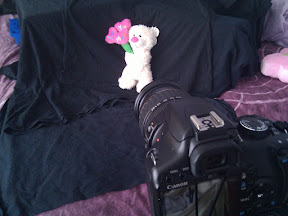
Today I shot an image of a bear my daughter gave to my wife for mothers day. Week 13 - Mothers Day This week I am also including a behind the scenes shot that shows how cheap my home "studio" is. In case you can't tell that is my bed with t-shirt covered boxes on it. All the light for this image comes from the window. After a little editing of the image the final outcome is what you see at the top of this post.

Francois Marier: Encrypted system backup to DVD

Inspired by World Backup Day, I decided to take a backup of my laptop. Thanks to using a free operating system I don't have to backup any of my software, just configuration and data files, which fit on a single DVD.

In order to avoid worrying too much about secure storage and disposal of these backups, I have decided to encrypt them using a standard encrypted loopback filesystem.

(Feel free to leave a comment if you can suggest an easier way of doing this.)

Cryptmount setupInstall cryptmount:
apt-get install cryptmount
and setup two encrypted mount points in /etc/cryptmount/cmtab:
backup  
dev=/backup.dat
dir=/backup
fstype=ext2 fsoptions=defaults cipher=aes

keyfile=/backup.key
keyhash=sha1 keycipher=des3


testbackup
dev=/cdrom/backup.dat
dir=/backup
fstype=ext2 fsoptions=defaults cipher=aes

keyfile=/cdrom/backup.key
keyhash=sha1 keycipher=des3

Initialize the encrypted filesystemMake sure you have at least 4.3 GB of free disk space on / and then run:
mkdir /backup
dd if=/dev/zero of=/backup.dat bs=1M count=4096
cryptmount --generate-key 32 backup
cryptmount --prepare backup
mkfs.ext2 -m 0 /dev/mapper/backup
cryptmount --release backup

Burn the data to a DVDMount the newly created partition:
cryptmount backup
and then copy the files you want to /backup/ before unmounting that partition:
cryptmount -u backup
Finally, use your favourite DVD-burning program to burn these two files:

Test your backupBefore deleting these two files, test the DVD you've just burned by mounting it:
mount /cdrom
cryptmount testbackup
and looking at a random sampling of the files contained in /backup.

Once you are satisfied that your backup is fine, umount the DVD:
cryptmount -u testbackup
umount /cdrom
and remove the temporary files:
rm /backup.dat /backup.key

Rog rio Brito: Running GRUB2 on PowerPC Macs

Here I write a little bit about my experiences running GRUB2 with a PowerPC Mac (actually, an iBook G4), since the current documentation is lacking in many places (outdated, incorrect, etc.). Some of what I say is platform agnostic, though, and may be of interest to users of GRUB in general.

Basics using GRUB2 with PowerPC First of all, it is important to understand (at least superficially) how botting on a Mac works. One of the first programs that run in your Mac is the OpenFirmware. It works with more or less the same purpose of a BIOS in a regular x86 system. The basic idea is the same: get the computer running with whatever programs you want it to run. The implementation, though, differs quite a bit. First of all, OpenFirmware (OF) usually presents itself as a command-line interface that is programmable, differently from the common day BIOSes from x86 boxes. As it is programmable, it is more flexible, but this flexibility comes at the price of an increased complexity. I may write some things more in a future article, if there is any interest. For now, it just suffices to say that to get to the OF prompt in a Mac, you have to press a combination keys during the time that your Mac gives a chime when you turn it on. At that moment, you have to press (simulaneously) Cmd + Option + O + F. (Note: the Cmd key is the key that has an Apple drawn on it, usually on the side of the space bar).

Limitations of Open Firmware Differently from usual BIOSes of x86 computers, Open Firmware can read the contents of a partition in your HD (or other devices), as long as it is formatted in the original HFS format (not in HFS+ or one of its descendents). This is the reason why some older versions of Linux create an HFS partition in your HD, even if you don't intent to run or use anything besides Linux. The yaboot bootloader consists of, among other things, one binary that is understandable by OpenFirmware. That binary is a file called yaboot, after the name of the booloader. As an aside, you have to indicate to OF what is the file that you want it to load during the boot process, so that it knows what to do. The way to indicate this is to "bless" the file (and the folder that contains it). Some ways to bless a file are to, for example, use the bless command in MacOS X or the hattrib -b command from hfsutils. Files in an HFS filesystem have two attributes that many other filesystems don't: a creator ID (the "application" that created the file) and the type ID (which determines what kind of file it is). OpenFirmware, in particular, looks for files with the type tbxi for the bootstrap process. The yaboot binary is loaded by OF into memory and, then, control is passed to the yaboot program, which then reads its configuration file (yaboot.conf) from the same folder where the binary was in. The file yaboot.conf contains instructions for yaboot to do its job. The file yaboot.conf is very similar in construction to configurations of an older bootloader for x86 computers, lilo.conf. Also, in a way similar to what LILO requires, after you install some new kernel, change some parameter in the configuration file, etc., you have to run a program that will set up everything so that the boot process can know of your new configuration. With LILO, this command was called lilo, while with yaboot the command is called ybin (which, essentially, takes care of putting yaboot.conf in the bootstrap/HFS partition and blesses the yaboot binary).

Going to GRUB2 One of the characteristics of yaboot (which is left as an exercise to the reader to determine if it is a drawback or not) is exactly the way that changes in the configuration have to be copied to the special HFS partition: the step of running ybin. GRUB2 (and its older sibling, GRUB legacy) do away with that: during boot-time, it can understand the filesystems that you have in your computer and interactively load whatever you want from there, also from a command-line like OF, before any (regular) operating system has even been started. But how do you start GRUB2? Well, the way that this is performed is copying a binary to that special HFS partition. Here things start to be hairy, because GRUB2 has a lot of functionality, but it comes at the price of it consuming a lot of space (especially if you are using encrypted partitions or some kind of logical volume managements with some journalling filesystem that allows files to be compressed etc. on top of it). The list goes on. Usually, that special HFS partition only has 800KB, which, BTW, is the size of an old 3.5" floppy used with older Macs (note: due to some contraints on partitions and aligments of such partitions on cylinders, it is not uncommon for disk partitioning software to create partitions slighly larger than 800KB, but not much larger than that). A full-featured binary of GRUB2 to be placed on that HFS partition can have much more than those 800KB. But how do you get that binary, in the first place? And how do you fit that in the HFS partition?

Creating the GRUB2 binary To answer the first question, you have to construct it from your grub-ieee1275 package (I'm assuming here that you are using Debian or Ubuntu, but similar instructions may apply to other distributions). Then, a first step would be to create such binary with:
 mkdir /tmp/foo
 cd /tmp/foo
 cp -a /usr/lib/grub/powerpc-ieee1275/* .
 grub-mkimage -O powerpc-ieee1275 -o ../grub.img *.mod
The last command of these create an executable named grub.img that is callable from OF and which contains every module from grub-ieee1275. This executable that I call here grub.img is called, in GRUB2 parlance, the core image and it it seems to be named core.img in many systems. On my system, with those commands, the binary grub.img is about 1208KB, which is 50% larger than that 800KB partition. And you would like it to be much smaller, becase you want to still have your yaboot bootloader by default while you are evaluating your bootloaders (or using it as a backup plan). As GRUB2 follow a modular design, you can mix and match the features that you want. This already hints you to the way we can fit it in the HFS partition, and it is always the same story: just trim the fat.

Creating the configuration file You will also have to have GRUB2 configuration's file (or you will have to play with way more commands than you'd want to). An important distinction here is that you usually have 2 or more partitions on your Mac:
  • the special bootstrap/HFS partition where OF is going to look at (I'll call it /dev/hda2 here);
  • the partition where your / filesystem resides (denoted by /dev/hda3 here);
  • some partition to hold /boot (I don't have one of these, but let's say that it is /dev/hda7 for our discussion purposes), usually containing your kernels and initial ramdisks.
  • other partitions.
With this in mind, you can With Let's say that this last one, in Linux parlance, is /dev/hda3 (as is the case of this author), and optionally a partition where your Linux kernel resides (people usually use it to store the /boot subtree of a Linux filesystem). Let's say that this last one is /dev/hda7. Then, you would compose something like the following as a configuration file for GRUB2 (named grub.cfg):
insmod part_apple
insmod ext2
set root='(hd,apple7)'
menuentry "Linux"  
    linux /vmlinux root=/dev/hda3
    initrd /initrd
 
There are one two important points here that deserve more comments:
  • Note that, differently from a regular x86 system, in a Mac system with only one HD the way that you specify an HD does not have a trailing zero. For instance, in the case above of the variable root, we have (hd,apple7), while in a "common PC" we would have the (hd part replaced with (hd0. That's something that you should make your distribution aware of, if they aren't yet. As an addendum, I don't know how it works with systems with more than one HD, as I only have (PowerPC) Macs that are notebooks. If you can share any experiences, please do.
  • One point of caution here: what GRUB2 calls root is not necessarily the root of your filesystem (i.e., the partition that holds /), but the device that everything that is "not fully qualified" is interpreted as being relative to. The "not fully qualified" above means anything that is not prefixed with GRUB's device notation. As an example, (hd,apple2)/boot/vmlinux if fully qualified for GRUB's purpose, while /boot/vmlinux is not.

Putting it all together The next step is to just copy the files grub.img and grub.cfg to the special HFS partition. You can do that using hmount, hcopy, and humount or you can use the regular Linux hfs module to copy to that partition. Then, boot your system, get into the OF prompt and execute:
boot hd:2,grub.img
Here, the 2 above is a reference to my HFS partition. Substitute that with yours, appropriately. You will then see the common (familiar?) GRUB prompt and, from there, everything else that you know will (hopefully) work.

The list of modules that "Works for Me(TM)" As I mentioned above, I use a subset of all modules that come with grub-ieee1275 to create my grub.img binary. Here is the list of modules that I use and that gives me a reasonably sized bootloader:
bitmap.mod        datehook.mod  gzio.mod         lsmmap.mod      reboot.mod          terminal.mod
bitmap_scale.mod  datetime.mod  halt.mod         memdisk.mod     regexp.mod          test.mod
blocklist.mod     echo.mod      help.mod         memrw.mod       relocator.mod       trig.mod
boot.mod          elf.mod       hexdump.mod      minicmd.mod     scsi.mod            true.mod
bufio.mod         ext2.mod      hfs.mod          msdospart.mod   search.mod          video.mod
cat.mod           fat.mod       hfsplus.mod      normal.mod      search_fs_file.mod  video_fb.mod
cmp.mod           font.mod      ieee1275_fb.mod  part_apple.mod  search_fs_uuid.mod  videoinfo.mod
configfile.mod    fshelp.mod    linux.mod        part_msdos.mod  search_label.mod
cpio.mod          gettext.mod   loadenv.mod      parttool.mod    setjmp.mod
crypto.mod        gfxmenu.mod   loopback.mod     probe.mod       sleep.mod
date.mod          gfxterm.mod   ls.mod           read.mod        suspend.mod
Just for the record, my grub.img file has 624KB, and that can certainly be shrunk.

The command line that "Works for Me(TM)" to create the image Actually, I lied when I told you that I used the lines above to create my grub.img file, because I'm lazy and I don't want to type the .img extension. I also embed my configuration file in the binary that I create with GRUB2, so that I don't have two files to copy to my HFS partition, but only one. I do that with:
grub-mkimage -c grub.cfg -o ../grub -O powerpc-ieee1275 -d . *.mod
OK. No more lies here. The nice aspect of GRUB is that one you install that image, you don't have to touch that HFS partition anymore: you simply update your regular filesystem's /boot/grub/grub.cfg file (which is usually performed when you install a new kernel, at least with Debian) and you're ready to go. The good way to do that is to use a minimal configuration file embedded in your grub binary in your HFS partition that will hook into the system's /boot/grub/grub.cfg to read newer kernels and leave the HFS partition (and your system's NVRAM) alone. Here is what I am using right now:
search --no-floppy --fs-uuid --set=root 35d26869-f7c9-4852-a9b8-100314560c34
set prefix=($root)/boot/grub
configfile /boot/grub/grub.cfg
You will, of course, want to modify the file above as you install newer kernels (perhaps even that unsupported operating system from that fruity company, who knows?). Don't forget to change the UUID's, and partition numbers to fit your needs. Well, that's it. I hope that it helps somebody out there, as the information that I got otherwise was way outdated, incomplete, etc. to keep up with GRUB2 from these days. Now, let's go patch the tools that we have so that not everybody who wants to use GRUB2 have to learn about its workings. Oh, of course, you can now have your kernels in ext4, btrfs, xfs etc. partitions without the fear that your bootloader won't load them.

29 March 2011

Francois Marier: Preventing man-in-the-middle attacks on fetchmail and postfix

Recent attacks against the DNS infrastructure have exposed the limitations of relying on TLS/SSL certificates for securing connections on the Internet.

Given that typical mail servers don't rotate their keys very often, it's not too cumbersome to hardcode their fingerprints and prevent your mail software from connecting to them should the certificate change. This is similar to how most people use ssh: assume that the certificate is valid on the first connection, but be careful if the certificate changes afterwards.

FetchmailHere's how to specify a certificate for a POP/IMAP server (Gmail in this example).

First of all, you need to download the server certificate:

openssl s_client -connect pop.gmail.com:995 -showcerts
openssl s_client -connect imap.gmail.com:993 -showcerts

Then copy the output of that command to a file, say gmail.out, and extract its md5 fingerprint:

openssl x509 -fingerprint -md5 -noout -in gmail.out

Once you have the fingerprint, add it to your ~/.fetchmailrc:

poll pop.gmail.com protocol pop3 user "remoteusername" is "localusername" password "mypassword" fetchall ssl sslproto ssl3 sslfingerprint "12:34:AB:CD:56:78:EF:12:34:AB:CD:56:78:EF:12:34"

PostfixSimilarly, to detect changes to the certificate on your outgoing mail server (used as a smarthost on your local postfix instance), extract its sha1 fingerprint:

openssl s_client -connect mail.yourisp.net:465 -showcerts
openssl x509 -fingerprint -sha1 -noout -in isp.out

Then add the fingerprint to /etc/postfix/main.cf:

relayhost = mail.isp.net
smtp_sasl_password_maps = hash:/etc/postfix/sasl_passwd
smtp_sasl_auth_enable = yes
smtp_sasl_security_options = noanonymous
smtp_tls_security_level = fingerprint
smtp_tls_mandatory_ciphers = high
smtp_tls_mandatory_protocols = !SSLv2, !SSLv3
smtp_tls_fingerprint_digest = sha1
smtp_tls_fingerprint_cert_match =
12:34:AB:CD:56:78:EF:90:12:AB:CD:34:56:EF:78:90:AB:CD:12:34

22 March 2011

MJ Ray: #Debian and #KohaILS Conference Planning

This seems an active time for conference planning in two of the projects I like:
  1. KohaCon11 is being planned for Thane, India. Registrations are open and I m helping to admin the conference system (OCS). If you d like to talk, submissions are also open now, although how we review and choose has yet to be decided (should be at the next volunteer meeting). If you d like to sponsor the event, please register as a potential sponsor.
  2. DebConf12 s location will be picked at an IRC meeting today (Tuesday). Bids from Belo Horizonte, Brazil and Managua, Nicaragua are on the web and you are invited to help choose between them.
Are there any other Free and Open Source Software community conferences you d like to mention?

14 March 2011

Kai Wasserb ch: ytplaylistfetcher: new playlist URL format

It seems like YouTube has added a new format for playlist URLs. You'll find it on search result pages. The ID of the playlist comes after:
list=PL
So a complete URL containing this format might look like http://www.youtube.com/watch?v=hzMtVJTxrJw&playnext=1&list=PL00A3D4ABEAF28FA3 I've added support for this format in bcccc0f7 to YTPlaylistFetcher. You can download the latest version by right-clicking on the previous link and select "Save Link as ..." from the context menu.

13 March 2011

Steve Kemp: A few forks.

Although I promised in my previous entry that I'd made my last mention of the redisfs - replication friendly redis-based filesystem I have to disappoint. Ben Sykes informed me that he'd made a fork of redisfs, called shredisfs. I like forks. Forks are good, and this particular one was very welcome - from the README:
Steve's original managed around 250k per second for writes on my test machine, this version does about 15MB a second writes. ... Read speed on the test machine here now is around 180MB/sec..
Needless to say I "stole" the improvements and rolled them into my original release. Thanks all round to those of you that submitted bug reports, suggestions, and codez. I also had a release out briefly which used zLib to compress the values of keys stored in memory. Unfortunately that lead to a net-slowdown for files which were bigger than a single block - due to the overhead of file-system appends which translated to: "fetch", "compress", "append", and "decompress". Finally on the subject of qpsmtpd, my favourite SMTP-server - the exceptionally talented Matt Sergeant released a proof of concept rewrite in Javascript. Using nodejs this new SMTP server is heavily asynchronous and you can find it online under the name Haraka. Although my javascript-fu is weak I'm very impressed by the codebase out there so far, and I'd expect good things of it in the future. Even if it does use Javascript and not my beloved Perl. Finally I'm a year older. But birthdays aren't important. ObQuote: "Do you wanna know what makes all my candy taste so special? " - Epic Movie.

12 March 2011

Jonathan McDowell: Another 2 wheels

It's my birthday, so a week ago I bought myself a present: Red Brompton M3R folded The office is 4.5 miles from the BART station, so up until now I've been taking a bus. Unfortunately the timings aren't that frequent (every 45-60 minutes). Plus I haven't been doing any exercise since I moved out here. Now it seems to be getting drier I figured it was time to sort out a bike. I wanted something flexible, and have heard nothing but good things from the Brompton owners I know, so that's what I ended up with. I'm very happy with it; despite my lack of recent exercise it's pretty easy to ride. I've actually found it doesn't take any longer than taking the bus, and is sometimes quicker, because I avoid having all of the waiting around for it. I bought it from Warm Planet Bikes, who were incredibly helpful. They had a selection in store that they let me try (and quite a few other models of folding bikes too) and when I made my decision it turned out they could do the customizations I wanted in shop. So rather than me having to order it and wait a month I was able to cycle away that same evening! Full marks to Matt for staying late to sort me out (plus he's a Brompton owner too). Red Brompton M3R

11 March 2011

Marc 'Zugschlus' Haber: What are interface labels for

Dear Lazyweb, for a long time I have been using iproute2 s label feature to assign arbitrary labels to IP addresses configured on Interfaces:
40: int152@dotqa: <BROADCAST,MULTICAST,UP,LOWER_UP> mtu 1500 qdisc noqueue state UP
link/ether 00:25:b3:01:e5:6c brd ff:ff:ff:ff:ff:ff
inet 10.1.152.254/24 brd 10.1.152.255 scope global int152:98fe8
Recently, this has shown to at least confuse both isc-dhcp-relay (#617258) and dhcp-helper (#617264). As I have never seen interfaces labels used outside my firewalls (which happen to use ifupdown-scripts-zg2 (Debian PTS)) and ifupdown s rather twisted handling of multiple IP addresses per interface (using Alias Interfaces), I d like to know whether my usage is a legitimate one and whether there are other uses for interface labels. At the moment, I m tempted to remove label support from ifupdown-scripts-zg2 in the next release, or to make it optional. Please comment if you have an opinion.

26 February 2011

Steve Kemp: IPv6 email

I've been slowly moving towards full IPv6 usage on my main machines for the past few months. My main servers all have IPv6 setup and appropriate DNS records in place. This weekend I configured my mailserver, which is based upon QPSMTPD & exim4, to be available on IPv6 too. Previously it would send mail via IPv6 where appropriate, but only receive mail via IPv4. QPSMTPD I've written about a lot in the past, and indeed I did commercial things with it for a year or two, but in short it is more of an SMTP framework than an actual mailserver. These days I use a small collection of plugins which test incoming mail in various ways, and either:
  • Reject the mail at SMTP time, causing a bounce, and store a copy of the rejected mail in a quarantine.
  • Accept the mail, and pass it on to exim4 for (local) delivery.
My plugins are pretty simple, but I've made a few changes for the brave new IPv6 world:
  • Breakdown reverse-DNS checks into IPv4 & IPv6 flavours.
  • Avoid using DNSBL for IPv6 addresses.
I reject (+ archive) about 8,000 SPAM messages a day. So far I've seen precisely zero SPAM mails be received via IPv6; though I'm sure that won't last for long! My reject archive looks like this:
steve@steve:~$ tree -d -L 2 /spam/
/spam/
 -- 23
     -- debian-administration.org
     -- mail-scanning.com
     -- steve.org.uk
 -- 24
     -- debian-administration.org
     -- steve.org.uk
 -- 25
     -- debian-administration.org
     -- mail-scanning.com
     -- steve.org.uk
...
 -- 55
     -- debian-administration.org
     -- mail-scanning.com
     -- steve.org.uk
     -- stolen-souls.com
 -- 56
     -- debian-administration.org
     -- steve.org.uk
     -- stolen-souls.com
 -- today -> /spam/56
 -- yesterday -> /spam/55
(Here "N" is the day of the year - Think of this as "date +%j". I rotate such that I keep 32 days of past SPAM mail, for reference/amusement/mistake-catching.) ObQuote: "I am already grown up, I just get older. " - Leon

25 February 2011

Evgeni Golov: Desktop in a shell: mutt

Continuing my series about a desktop in a shell, today I will present you my mutt setup. I use mutt because it has no bugs and is a really good MUA for people loving consoles ;)First of all you have to know, that all my mail is forwarded to my server and sorted into Maildirs via maildrop, so I do not care about sorting on my desktop , which just fetches the mail via IMAP from the server ;)I m running mutt-patched from Debian Squeeze, so not all options may be available for you if you do not have the same patchset as I do.First, tell mutt to fetch mail from imap.die-welt.net via IMAP:
set imap_user=username
set imap_pass=password
set folder="imaps://imap.die-welt.net/INBOX"
set spoolfile="imaps://imap.die-welt.net/INBOX"
Now, enable IMAP-IDLE, list subscribed folders, reconnect to the server if needed and mark mail as read when you open it:
set imap_idle
set imap_check_subscribed
unset imap_passive
unset imap_peek
Let mutt save sent mail to the Sent directory on the IMAP server, and postponed mail to Drafts:
set record=+Sent
set postponed=+Drafts
Read mail should stay where it is:
set mbox="!"
We use IMAP-IDLE, thus check for new mail manually only every 90 seconds:
set mail_check=90
Instead timeout after 15 seconds if no user input is given:
set timeout=15
Set default mail from address to my default mail address:
set from=evgeni@golov.de
And send mail via mstmp (see below for mstmp configuration):
set sendmail="/usr/bin/msmtp"
Tell mutt which addresses I recieve mail to (danger, ugly regex!):
alternates (evgeni@(debian.org golov.(de eu)) sargentd@(die-welt sargentd).net evgeni.golov@uni-duesseldorf.de)
As mutt knows where I receive mail, let it set From accordingly:
set reverse_name
Let mutt cache some stuff and find its certificates:
set header_cache="~/.mutt/cache/headers"
set message_cachedir="~/.mutt/cache/bodies"
set certificate_file=~/.mutt/certificates
set ssl_ca_certificates_file=/etc/ssl/certs/ca-certificates.crt
Show only interesting headers in an useful order:
ignore headers *
unignore headers from to subject date cc
hdr_order from to cc subject date
Fix stupid MUAs behaviour (e.g. filenames like =?iso-8859-1?Q?file=5F=E4=5F991116=2Ezip?=):
set rfc2047_parameters
Beep on new mail, will generate a ! in the window name in screen:
set beep_new
mutt-patched has the great sidebar patch, assign ctrl-n, ctrl-p to select next, prev folder, ctrl-o to open selected folder:
bind index \Cp sidebar-prev
bind index \Cn sidebar-next
bind index \Co sidebar-open
And toggle sidebar visibility with ctrl-b:
macro index \Cb '<enter-command>toggle sidebar_visible<enter><refresh>'
macro pager \Cb '<enter-command>toggle sidebar_visible<enter><redraw-screen>'
Since 1.5.20-2, mutt patched contains my sidebar-dotted and sidebar-sorted patches.
Let mutt shorten the displayed path (e.g. debian-devel instead of INBOX.ml.debian-devel) and sort the folders (the are returned in random order when using imap_check_subscribed):
set sidebar_shortpath
set sidebar_sort
Now let s set some colors (that match the rest of my desktop ):
color sidebar_new yellow default
color normal white default
color hdrdefault brightcyan default
color signature green default
color attachment brightyellow default
color quoted green default
color quoted1 white default
color tilde blue default
And add some useful macros for marking new and old messages as read:
macro index .n "<tag-pattern>~N<enter><tag-prefix><clear-flag>N<clear-flag>*" "Catchup all new messages"
macro index .o "<tag-pattern>~O<enter><tag-prefix><clear-flag>O<clear-flag>*" "Catchup all old messages"
When forwarding mail, I like it to be forwarded as an attachment (YMMV):
set mime_forward=yes
I m using goobook in mutt to fetch my addressbook from Google. As there is no Debian package for goobook (yet), you have to install it yourself (via easy_install):
apt-get install python-argparse python-gdata python-simplejson python-keyring python-nose
easy_install goobook
Configuration is easy via ~/.goobookrc:
[DEFAULT]
# If not given here, email and password is taken from .netrc using
# machine google.com
email: me@gmail.com
password: password
And then add the following to your .muttrc:
set query_command="goobook query '%s'"
bind editor  complete-query
macro index,pager a "<pipe-message>goobook add<return>" "add the sender address to Google contacts"
That s all for mutt, but We are running mutt in a screen, so let s add the following to .screenrc to fix transparency and cut&paste (see http://wiki.mutt.org/?MuttFaq/Appearance):
 defbce on
 term screen-bce
And as mutt uses mstmp (yes, I know, mutt can handle SMTP itself ), this is my .msmtprc:
defaults
domain dorei.kerker.die-welt.net
tls on
account die-welt.net
host smtp.die-welt.net
from sargentd@die-welt.net
auth on
user username
password password
tls_starttls on
tls_certcheck off
# Set a default account
account default : die-welt.net
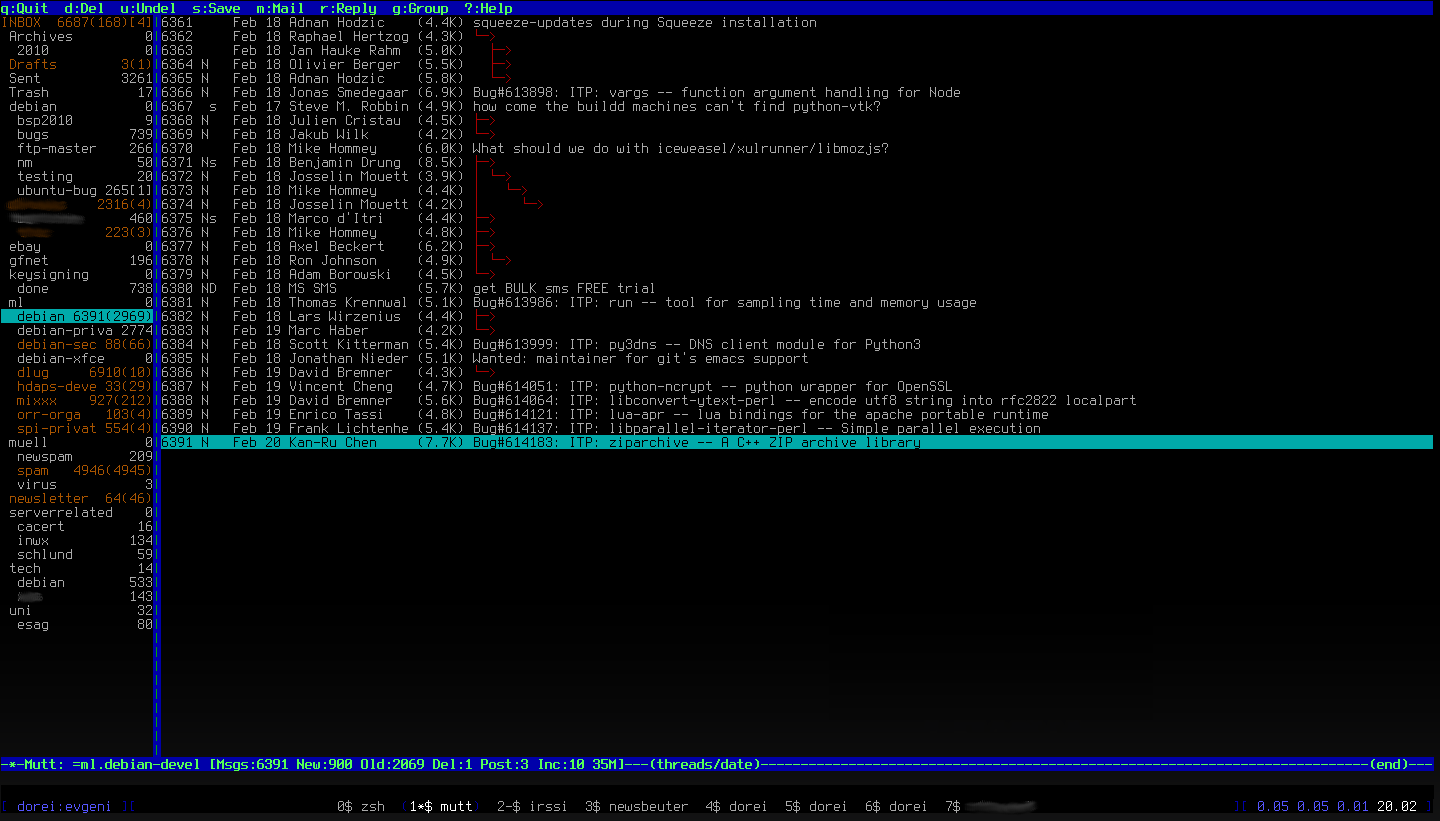
C est tout! That is my personal mutt configuration, you can download it as one file here: my .muttrc. And as everyone loves screenshots, here is one:the default view of my muttOh, the next chapter will be about irssi, but not before next Sunday (March 6th) as I ll be offline for a week, skiing in Austria :)

20 February 2011

Christoph Egger: CSSH but without X

There are many ways to run some commands simultaneously on multiple hosts like cssh or dsh. They come handy for example when you are installing software updates on a set of hosts. dsh is a rather simple comandline tool allowing to execute a command over ssh on multiple hosts. However it doesn't allow any interactive input -- so you can't look at the potentially upgrading packages and press y to accept and you can't go through debconf promts or similar. This is solved by cssh which opens a XTerm for every host and a input area that is broadcastet to all of them. this is working really well -- you can execute your update on all hosts and still do individual adjustments just as needed: switch focus from the broadcasted input to one of the terminal windows and anything you type just goes there. Now cssh has a big disadvantage: it requires a running X server (and doesn't do too well with a fullscreen windowmanager). Requiring X is quite a blocker if you need to run that ssh multiplexer on a remote host, for example if the firewalling doesn't allow direct connections. Fortunately you can make tmux behave as we want -- in a simple terminal: First you need a script spawning the ssh sessions in separate tmux panes and direct input to all of them -- here called ssh-everywhere.sh (you could also write a tmux config I guess):
#/bin/sh
# ssh-everywhere.sh
for i in $HOSTS
do
  tmux splitw "ssh $i"
  tmux select-layout tiled
done
tmux set-window-option synchronize-panes on
Now start the whole thing:
tmux new 'exec sh ssh-everywhere.sh'
And be done. Update If you want to type in just one pane (on one host) you can do that as well: C-b : set-window-option synchronize-panes off and moving to the right pane (C-b + Arrow keys)

18 February 2011

Russell Coker: Sony Ericsson Xperia X10i First Experience

I have just got a new Xperia X10i for my wife. It s with Virgin who use the Optus network. Optus apparently have better coverage than Three (who we have been using for 6.5 years) and Virgin offers the best deals they have good phones on low monthly rates and do nice things like selling most phones unlocked (the Xperia is one that comes unlocked).I chose the phone for use in system administration work. A large screen should be good for reading email and running a ssh client. Hopefully I will be able to use the phone s Wifi to provide mobile net access to a laptop for any problem that can t be solved on a tiny screen. My wife doesn t do much sysadmin work nowadays, but it ll save some effort if we can both use the same model of phone. Also according to Amobil.no the Xperia X10 is the second best phone for camera-phone functionality [1], and my wife would really like to take some good pictures with her phone (she loves the LG U990 Viewty that she has right now).ScreenOne major reason for choosing this phone is that it has the biggest and highest resolution of any phone that doesn t cost a huge amount of money. It does well in this regard, the screen is very good to look at. However it is apparently not particularly sensitive and we still have the protective cover on the screen which makes the swipe to unlock operation quite difficult. My wife generally likes to keep the protective plastic on such screens for a while to prevent damage, but she may take this off sooner than on other devices.Sony FoolishnessOne reason that this phone is cheaper than any other phone with similar specs is that it s made by Sony. Sony won t provide updates to Android 2.2 or better and they have their own stupid applications installed in an intrusive manner. The main screen of the phone has a large icon for the Sony Timescape program. If you choose a background image of a person s face then the Timescape logo is in the ideal location to obscure the person s eyes. Generally it s not desired to have the person in your phone background look like Zorro. Fortunately you can delete icons from the home screen, you just have to press and hold the icon until a trash-can appears at the bottom of the screen and then drag it to the trash.Phone BookThe core phone functionality is fairly important for a mobile phone. But it seems that every modern phone has some serious failings in this regard. The Xperia comes with a phone book that is reasonably good for managing contacts and partially coalesces multiple entries with the same name which is convenient as I somehow managed to import 3 copies of each entry in my wife s phone book. The down-side is that the multiple entries are still stored, so when it comes time to update someone s phone number my wife will have to separate the entries and then delete all but one of them, adding probably a minute of effort for each one. With 60 phone book entries that s probably an hour of wasted time during the course of her phone use.They really should do a time based analysis of phone use and optimise the UI for efficiently performing common tasks. I think that an ideal design would start off by asking the user to rate the importance of phone functionality, camera, facebook, twitter, etc and then give a UI that matches the important tasks. A device that has 384M of RAM, 1G of built-in Flash storage, and an 8G micro-SD card (which Virgin provided with the phone) should be able to offer a selection of UIs.CameraThe configuration for the camera allows some settings to be changed easily and others have to be changed through the advanced settings which requires one more button press and a few extra taps on the screen. One real stupidity is to have the phone light be in the advanced settings, so if the room happens to be a little darker than expected you suddenly need to go to a lot of extra effort to turn on the light.Finally it would be really good to be able to take a quick picture. I would like to be able to be able to press a combination of buttons and have it immediately take a picture regardless of what had been running before. Not press the main menu button, the camera icon (which I made a link from the home screen), wait a second for it to load, and then press the shutter button. Ideally I would like to press a combination of hardware buttons to have it immediately take a picture even when the screen is locked. I don t want to wait for the screen unlock process, sometimes the perfect shot is only available for a second.WifiIt doesn t support ad-hoc networks. This is really annoying for me as I don t own an access point and I don t plan to buy one just for a phone. My laptop (Thinkpad T61 with Intel Corporation PRO/Wireless 3945ABG [Golan]) doesn t seem to support running as an access point, and my EeePC 701 with an Atheros AR5001 has the same problem, here is the error message:# iwconfig wlan0 mode master essid x
Error for wireless request Set Mode (8B06) :
SET failed on device wlan0 ; Invalid argument.I have a cheap Realtec USB Wifi device that claims to support being an access point but just fails when I try it. So presumably it doesn t really support it but the driver is buggy.It seems that I may need to put a custom Android installation on it to get ad-hoc working.Also it s apparently necessary to root the Xperia to get Wifi tethering to work for providing net access to a laptop. So I guess I ll hacking it soon.Internet AccessThe Virgin web site couldn t help me set up the Internet access because I ported a phone number from another Telco. I had to use the phone number supplied by Virgin to login to their web site and the site then wanted to sent (probably SMS) the settings to my phone, but of course it couldn t SMS to that number as I ve got the Three number active. Presumably they were expecting that customers would setup Internet access before porting their old number.I phoned the Virgin tech support and used the settings they suggested, but it didn t work. Then I took the phone to a Virgin store and it started working after they rebooted it with no changes to settings. Just like Windows used to be. :(Email Access Default AppThe email setup defaults to port 143 IMAP access, so even when a mail server provides access on port 993 for IMAPS and on port 995 for POP3S probably most users will not use any encryption because their phone doesn t default to it. Also one annoying feature is that when I gave it the email address test@coker.com.au it decided to use test as the user-name for IMAP by default. It seems that a very large portion of the active email accounts nowadays are on systems that handle multiple domains and thus require the domain name in authentication, and a large portion of the remainder accept domain names even when they aren t required. Besides it s a lot easier to delete a domain name when it s not needed than to type it in when it is.The default hostname for sending and receiving mail is the domain name, if the MUA configuration program had checked the MX record it would have known that smtp.sws.net.au is a better default choice for the mail server. I ve now started the practice of creating a CNAME entry named m in every domain I run, so when someone is setting up a mobile phone they just have to add m. to the start of the default hostname to use for sending and receiving mail. By doing this I can probably save an average user at least 30 seconds of typing, which is particularly important if I happen to be talking them through the process!The MUA uses IMAP commands to load the text of the message without attachments and then loads attachments on demand, this will be handy for when people attach unreasonably large files. With IMAP caching and partial loads the core functionality seems OK, and some quick tests of standard but not commonly used IMAP functions such as noticing that mail has been deleted by another client seemed to work well. The performance of loading a new mailbox with 369 message was quite poor, I m not sure how much of this is due to the network connection and how much is due to the client implementation. This is a real concern for me as I typically have about 7,000 messages in my IMAP account and 3,000 unread messages most of which are in two folders.Another problem is the fact that there seems to be no way of searching in the list of messages, sorting/grouping by subject or sender, or showing unread messages. This makes the Xperia unsuitable for the task of reading mailing lists when on public transport. I would really like to be able to sort through a folder of mailing-list mail, delete messages that I don t need to keep and flag ones that need attention when I have the resources of a desktop system when I m on a tram or in other situations where a laptop can be inconvenient.One undeniable bug I discovered (as opposed to the missing features I listed) is that when a message has a line with a URL followed by many spaces it won t load correctly in the web browser, the spaces will be treated as part of the URL. I ve changed the default signature in my email to have a description followed by a URL to avoid triggering this bug. Presumably other Android phones are bug for bug compatible. :(Moxier MailThere is a complete set of email and calendaring applications preloaded from Moxier.com. The Moxier mail client uses company.com as an example domain name (they should use example.com does no-one read the RFCs?). It s nice that they verify the SSL certificate and display the details when it s not signed.Unfortunately Moxier doesn t support anything other than Exchange, and I can t delete it either as it s part of the base set of applications from Sony.SMSThe SMS application is supposedly conversation based. This doesn t seem like a benefit to me, it s a pity that there is no option to make it act more like every other SMS implementation I ve used over the last 12 years.BatteryThe battery is described as having a capacity of 1500mAh, for comparison a AA rechargeable batteries have capacities ranging from 1800mAh to 2800mAh. My first mobile phone had a rechargeable battery that took the same space as 4*AA batteries and the phone was designed to run on AA batteries if the main battery wasn t charged. I would like to have an Android phone that had a battery pack of similar size to at least 2*AA batteries, and 4*AA would be OK too.The Xperia battery was reported as being half discharged after playing with the phone for less than an hour. Basically when doing anything with the phone that is remotely intensive I need to have it plugged in. Unless of course I m using one of the star-chart applications LightsThere are two white leds in the gaps between the keys for Settings, Main-Menu, and Back on the front. They are quite bright and annoying to look into at night.SSHSSH was one of the reasons for getting an Android phone, but it was one of the last things I worked on because everything else was so much fun. I m currently using ConnectBot, it supports storing ssh host keys, generating a key-pair from random screen touches, locking and unlocking the key-pair (with a pass-phrase) and pasting the public key to an open window. All the basic functions just work although it s rather inconvenient to enter the CTRL keys.The next thing to investigate is a small and light Bluetooth keyboard. Using an external hardware keyboard will save me from the pain of entering CTRL keys (which is even worse than the pain of entering passwords that contain digits and mixed case). It will also allow me to type a lot faster and use the entire screen for the ssh session.Current Bug SummaryWifi doesn t do ad-hoc mode or tethering.MUA doesn t correctly handle URLs in messages if many spaces follow the URL and is also unsuitable for mailing list mail.Sometimes requires a reboot to make Internet access settings take affect.Camera light can t be easily turned on and off.This isn t too bad.ConclusionMost things do what I want. Once I get a MUA working with all my email, Wifi doing what I want, and a Bluetooth keyboard it ll be a fairly ideal mobile sysadmin terminal. I ll probably order one for myself this weekend.

16 February 2011

Steve Kemp: Upgrading from Lenny to Squeeze

Rather than waiting for a few months, as I typically do, I decided to be brave and upgrade my main virtual machine from Lenny to Squeeze. That host runs QPSMTPD, Apache, thttpd, and my blogspam server; nothing too complex or atypical. The upgrade was mostly painless; I was interrupted several times by debconf asking me if I wished to replace configuration files I'd modified, but otherwise there were only two significant messages in the process:
crm114
crm114 warned me that its spam database and/or configuration files had changed and would most likely result in brokenness, post-upgrade, and I should do something to stop avoiding lost mail. Happily this was expected.
sysv-rc
It transpired I had a couple of local init scripts which didn't have dependency information succesfully encoded into them; so I couldn't migrate to dependency-based bootup. Given that this server gets a reboot maybe once every six months that wasn't really worth telling me about; but nevermind. No harm done.
That aside there were no major surprises; all services seemed to start normally and my use of locally-compiled backports meant that custom services largely upgraded in a clean fashion. The only exception was my patched copy of mutt which was replaced unexpectedly. That meant my lovely mutt-sidebar was horribly full of mailboxes, rather than showing only new messages. I created a hasty backported mutt package for Squeeze and made it available. (This patch a) enables the side-bar, and b) allows you to toggle between the display of all mailboxes and those with only new mail in them. It is buggy if you're using IMAP; but works for me. I would not choose to live without it.) Now that I've had a quick scan over the machine the only other significant change was an upgrade of the mercurial revision control system, the updated templates broke my custom look & feel and also required some Apache mod_rewrite updates to allow simple clones via HTTP. (e.g. "hg clone http://asql.repository.steve.org.uk/"). So in conclusion:
  • The upgrade from Lenny to Squeeze (i386) worked well.
  • Before you begin running "iptables -I INPUT -p tcp --dport 25 -j REJECT" will avoid some potential surprises
    • There are probably other services worth neutering, but I tend to only do this for SMTP.
  • Keeping notes of updated template files will be useful if you make such system-wide changes. (e.g. hgwebdir templates)
ObQuote - "Hmm, upgrades " - The Matrix Reloaded (shudder).

Stefano Zacchiroli: in the news - Debian and the FreedomBox

Fellow geeks who have attended FOSDEM this year probably remember Eben Moglen's announcement about the creation of a foundation to support the development of FreedomBox-es. The FreedomBox foundation and its goals have been featured in a New York Times article appeared yesterday, together with a nice Debian mention which points to our wiki. Debian is also prominently present on the (ikiwiki-powered) website of the foundation. Yet another reason why I'm proud of being part of Debian.
(thanks to Faidon for the heads up)
  • update: this blog post by the FreedomBox foundation contains more "in the press" pointers (to both the foundation and Debian), including an article in the Wall Street Journal
  • update: the article on NYT website is indeed intermittently payware/accessible. For future reference, I've made available an HTML-only static version of the article here (may NYT forgive me).

10 February 2011

Russell Coker: LCA2011, Harassment, etc

The conference LCA 2011 had an anti-harassment policy [1] which was violated by a keynote speech. The speaker and the conference organisers apologised, but of course the matter didn t end there.Discussion continued on the lca-chat list (for conference delegates) [2], on the Linux-aus list (for members of Linux Australia the parent body of the LCA conference) [3], and in some blog posts.There is also some discussion on an LWN article that is linked from an ITWire article [4].I think that the policy was reasonable and from all the descriptions it seems to have worked reasonably well. With such things there are always possibilities to tweak things, so probably there will be future policies which are better in some ways, but it seemed to do the job. The way that the LCA organisers handled the situation was appropriate. In the discussion there were some comments with logical failures that I think need further analysis, I ll summarise them one per paragraph with the heading being a para-phrase of the claim.Is it Offensive?A particularly relevant blog post is Skud s post about avoiding the use of the word offense [5]. In the various discussions about the speech in question most of the people who disapprove of the erotic images don t use the word offense , this is presumably due in part to the influence of Skud s post. This hasn t stopped people claiming that the debate is about whether the images are offensive, I m not sure if this is a deliberate straw-man attack or just cluelessness.The anti-harassment policy does use the word offensive in two places, I think that this was a mistake but it doesn t detract from the overall meaning of the document.Is it Harassment?There was some discussion about whether the actions in question were harassment. Wordnet s definition of harassment includes the act of tormenting by continued persistent attacks and criticism . It seems unlikely that any of the people in the audience who objected to the erotic content in the lecture slides had never seen unwanted erotic material before. So I think that it s worth considering this incident as just another entry in a list of similar incidents that some of the delegates have experienced, and thus as a continuation of persistent attacks IE harassment. Melissa McEwan s post about the variety of harassment that she has received from men is worth reading in this regard [6].I think that a reasonable analogy here is the school bullying campaigns that were experienced by many members of the Linux community when they were younger. School bullying in most cases is not about a small number of extreme incidents, but about a large number of small incidents each of which when considered independently can be rationalised as something that isn t significant (excusing such incidents independently is what allows bullying to be rife in most schools). In many cases of high school bullying the victim is blamed for supposedly over-reacting after a reaction is compared to some small incident at the end of a long harassment campaign, some of the criticism of the Geek Feminists seems to echo this pattern.It seems to me that some of the more dismissive comments which demonstrated a lack of regard for the experiences of other people can reasonably be considered as harassment too (which is also something that Melissa McEwan mentions). Note that I am specifically not advocating that the discussion be shut down, merely that the people who claim that it s only the (supposed) opinion of the majority that matters are part of the problem. However the fact that the apology for the talk received applause from the majority of the audience seems to indicate that the majority is in fact in favor of the anti-harassment policy.Derald Wing Sue, Ph.D. and David P. Rivera (a doctoral candidate in counseling psychology) have written a couple of interesting short articles about this for Psychology Today. Bullying and Microaggressions describes bullying as more than physical violence and also discusses adult bullies [7]. The Power to Define Reality describes the way that the experiences of people who lack power can have the reality of their experiences denied [8] this one really relates to some of the discussions about harassment.But it s Legal!It has been claimed that the legal system works well in Australia and that Australian law should be the only necessary guide to content. A trivial counter-case that was noted in the discussion is the fact that pure sales presentations are not accepted at LCA and such presentations are certainly legal! There is a good precedent for prohibiting things that are legal as part of the conference speaker agreement.More generally the legal system changes slowly and still infringes on what many people in our community regard as basic human rights. There is no reason why an Australian conference should have as it s standards the bare minimum that is required by Australian law.It was pointed out that workplace social norms translate well between cultures, they are usually more stringent than Australian law requires and Australian workplace law is a lot more stringent than the laws relating to conferences and other public events. It seems to me that a presentation which would result in a visit from HR if given at the office shouldn t be regarded as suitable for a conference such as LCA.But there is a Balance of Men and Women in Erotic Pictures!The complaints are not about a lack of balance in the erotic material, but it s presence there at all. Defending the slides on the basis that there was a supposed balance of male and female misses the point that most people just want no erotic material in presentations at conferences.Also it seems to me that if there are pictures which aren t offensive then the way to demonstrate this would be to publish them and say look, they aren t offensive . If it takes 600 words in a blog post to justify the use of some images then that alone seems to be evidence that the images were poorly chosen.But the talk was EffectiveSome of the people who have commented on this issue mentioned that they couldn t remember what was said when the images in question were displayed. When images from the talk are remembered and the main content of the talk isn t that seems to be a failure of the talk.When a major sponsor of the conference complains and requests that the talk video never be published that also seems like a major failure of the talk.I think that the effective talks are ones that educate people and inspire them to do something positive and useful. A talk that inspires a discussion about whether the speaker deserves censure doesn t seem effective.There are claims that there is no way the talk could have made the point as well if it wasn t for the images in question. But I can t believe that someone who is capable enough to get awarded a keynote speaking position at a conference such as LCA is incapable of finding other images to make the same point.But Similar Images are on MTVWhen people want MTV content they can watch MTV.Why Can t we just try Educating Men?It was claimed that education works in dealing with such issues in corporate environments and sporting clubs. My observation of the corporate environment is that such training must be extremely rare in Australia, the Netherlands, and probably the UK due to the fact that none of my employers have done it. I have heard first-hand reports of diversity training from people who work in the US. I expect that the fact that people who fail diversity training in a corporate environment get a meeting with HR is a major factor in it s effectiveness.The long email discussions and blog comment threads when these incidents happen could theoretically be used as training. But when you have some men using multiple mailing lists and dozens of posts arguing without appearing to learn it seems clear that they are not about to learn anything no matter what education is offered. It seems to me that you could broadly divide the free software community into two groups, those who want to learn how to do things better (but who are unlikely to make gross errors anyway), and those who won t learn.Besides, having a keynote speaker at a major conference apologise should be educational.But Clueless Nerds Hit on GirlsI don t know why every discussion about the treatment of women ends up getting a mention of this supposed issue.But Women Could make False AccusationsIn any classification system you have to make some sort of balance between false-positives and false-negatives. If the aim is to get zero false-positives then the incidence of false-negatives will increase. So if the aim was to never ever have a false accusation brought against a man for sexual harassment then the vast majority of real harassment cases would result in no action at all.I don t think it s reasonable to expect that most women who are mistreated should suffer in silence just to reduce the possibility that men might be falsely accused.The Rape Statistics cited in the discussion may be InaccurateThere is no possible way of interpreting rape statistics to make it not be a serious problem, now matter how you analyse the available information it happens far too often and has a significant impact on the victim. Also the suggested reinterpretation of the statistics didn t contradict the claim that it is likely that there are multiple rape victims attending LCA. So interpreting the statistics in a different way to get different numbers doesn t change anything. Trying to diminish the significance of rape generally doesn t support any other arguments that you might make.There are things that you can just discuss for the heck of it and things which should be discussed with care (if at all) to avoid needlessly hurting people. In these sorts of discussions the right thing to do is to avoid debating the numbers as much as possible.I think that the numbers produced by RAINN [9] are as good as we can get.But I am very supportive of women in our communityIf you spend all your time arguing with women and don t listen to what they have to say then you really aren t supporting them.ConclusionAfter publishing this post I ll email the URL to a few of the men who helped inspire it, I will explain how disappointed I am and how I expect better from them. I encourage others to do the same.Also when such discussions happen I encourage men to vote in favor of the positions advocated by women. Writing a message that addresses points in the debate can be difficult and if the debate is rapid then you may find that every point that you might make has been made by someone else. But in that case just posting to agree with the women can really mean a lot.

8 February 2011

Mike Hommey: Knowing how much disk seeks hurt

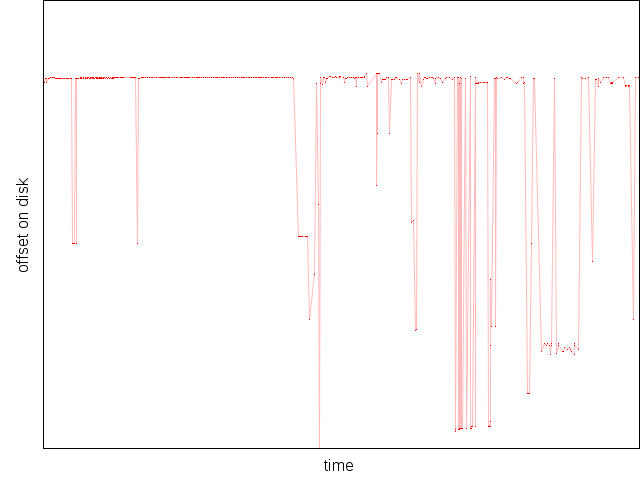
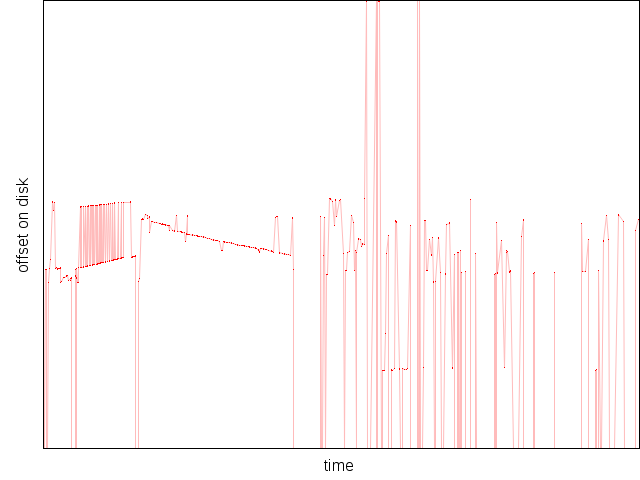
We all know disk seeks hurt. But we usually don t have a precise idea how much. How about getting that idea? Here is a little experiment I ran a few days ago. I took the output from the systemtap script tracking I/O I wrote, on a Firefox startup after boot. Each line of that output, which gives a timestamp (which we don t care about here), a file name, and an offset, represents a 4096 bytes read (one page). The first set of data points I got is how much time it takes to reproduce this read pattern after a reboot, and how that compares to Firefox startup time. For what it s worth, I did group following reads, to avoid doing too many system calls, and also avoided kernel readahead by using direct I/O, meaning I would only read exactly what the kernel reads when Firefox normally starts. All the following tests were done under the usual conditions (see previous posts), but I limited the tests to the x86-64 architecture, because all that really matters is the disk. I ll mention, however, that the amount of data read in these tests is 34,729,984 bytes, and that the original I/O pattern looks like this: Zooming around the main location where most I/O happen, we can see the pattern is still bumpy: This somehow looks familiar, doesn t it? We already know for a fact that even these patterns that, on the whole disk, look like pretty much insignificant, have an important impact on startup time. Try to imagine what kind of difference could be observed if we were reordering all these reads. Anyways, back to that I/O simulation, we first need to see how far it is from the actual Firefox startup. We would rather that simulated I/O + warm startup/hot cache end up close to the real thing. However, we need to keep in mind, as we saw in a previous post, that CPU scaling, when mixed with I/O, has an influence on startup time. Warm startup not involving I/O, the CPU can run at maximum speed the whole time. As such, for a fair comparison, we need to compare to cold startup time with the CPU forced at maximum speed, which we saw is faster than startup time with CPU scaling.
Average time (ms)
Simulated cold startup 2,764.26 0.42%
Warm startup 250.74 0.18%
Simulated cold + warm 3015
Real cold startup 3087.47 0.31%
Difference 72.47 (2.35%)
Close enough, I d say. The difference is most probably caused by metadata reads and a few other things, that isn t in the systemtap script scope. Now we know our simulated I/O is close to reality, what happens if we reorder all these reads according to the position on disk?
Average time (ms) Corresponding transfer rate
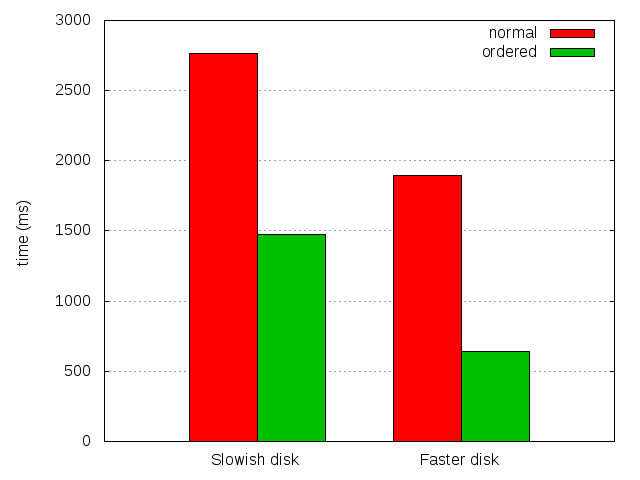
Simulated I/O 2,764.26 0.42% 12.56 MB/s
Reordered I/O 1,473.34 0.43% 23.57 MB/s
Difference 1,290.92 (46.7%) n/a
That s almost twice as fast ! And the disk doesn t even have a big throughput (around 30MB/s). Let s see what it does with a disk with a bigger throughput (85MB/s).
Average time (ms) Corresponding transfer rate
Simulated I/O 1,898.66 0.16% 18.29 MB/s
Reordered I/O 644.0 0.15% 53.93 MB/s
Difference 1,254.66 (66.08%) n/a
That s almost three times as fast ! The faster the disk, the bigger the improvement we can get by reordering and grouping I/O, which is not unexpected, but here we can see how much having to go back and forth on the disk hurt badly. Obviously, the numbers from the faster disk can t be directly compared to the ones from the slower disk, because the data was not arranged the same way on the disk, and file system fragmentation, as well as how the file system is filled also have their own share to add to the problem. And because it s more impressive to see on a graph than in a result table: Disks seeks hurt. Badly.

7 February 2011

Matthew Garrett: Hardware vexation

My laptop (an HP 2530p) gets quite a lot of abuse. It's been with me enough to have done the equivalent of going round the world 4 or 5 times, and it's typically just thrown in a bag without any particular care or attention being given to its care or wellbeing. It's been dropped a couple of times with the only damage being some corners that aren't really as even as they should be. All in all, it's survived amazingly well. But it recently started refusing to boot, merely flashing its LEDs. After finally finding a list of what these mean, I narrowed it down to the memory. Taking it apart and putting it back together again got things working for a while, but then it happened again. And again. So, since I have one memory module and two slots, I decided to just move the RAM in the hope that there's something physically wrong with the slot. It worked! Until I got to the BIOS splash and it informed me that Intel AMT requires that there be memory in slot 0. And didn't give me an opportunity to continue without AMT.

My hardware is conspiring against me.

Jonathan McDowell: Why Linux? (Part 6: Freedom)

(This is part of a series of posts on Why Linux?) I think of myself as reasonably pragmatic in my approach to Free/Open Source software. I don't get worked up over which set of language people want to use. I use devices that require binary firmware to be downloaded to them (because just because I can't see it doesn't mean it doesn't exist). I have non-free in my sources.list. And yet, talking to other Linux users these days, I realize I'm much more of a Freedom nut job than average. I want the source, be it for a driver, a minor widget, or a full app. I don't buy nVidia. I will sacrifice a degree of functionality in order to get Free. And while I think WINE is an excellent piece of software, I think the best end result is that it's no longer necessary, not that it's a perfect implementation of the ABI. How does any of this help justify my use of Linux in the work place? As previously mentioned, I'm a developer. Most developers don't operate in a vacuum; they have to inter-operate with other ecosystems. And usually somewhere along the line there's a failure to document exactly how something is handled, or an ambiguity about what exact choice might be taken. If I have access to the source then I can check that out for myself. If I don't, I have to guess. As an example, a long time ago I was involved in writing a serial console driver for QNX. There came a point where the behaviour wasn't quite as we'd expect. Although the organisation had a license for the source, I wasn't allowed to look at it. Instead I had to come up with a series of suitable questions that someone who could look at the source could answer without violating any NDAs. If I'd been able to look at the source directly we'd have all saved a lot of time. And that's an example where someone could look at the source, rather than having to make a bunch of guesses and instrument tests to see which was right. Access to the Linux source has helped me in other commercial contexts too. At Black Cat we were able to take advantage of patches like grsecurity in order to tighten up shell account boxes. I wrote the IPv6 support for l2tpns, because we had access to the source and could. I've been able to look at the source to understand exactly what SCSI responses are sent in certain circumstances too (or understand exactly what the error that a user land test program was getting back meant). Also I'm a big believe in Linus' Law. I do think that good Free software is much better than proprietary software (there's some really bad Free software out there though, I'm not disputing that). The fact that smart people can look at it and scratch whatever their itch is means that we get a gradual process of improvement that can't be ignored. Equally as long as someone has an interest in the software, end users can't be left high and dry by organisations abandoning still users applications. I think that should be a powerful driver to business to look towards Free software. (Before my more astute readers point it out; yes, I am employed writing non-free software. See the first sentence. One day I'll find a job working on Free software that ticks enough of the other boxes to be viable.)

5 February 2011

Craig Small: Syntax Highlighting with Mid-Century themes

As a site that discusses a variety of programming languages, I thought it would be good to have syntax highlighting for the code snippets. This blog runs Movable Type so it had to fit in with the setup I have already. So I found the Syntax Highlighter module ok and the initial installation went fine, it was simply:
  1. Download the .zip archive
  2. Unzip the archive into a temporary directory
  3. Copy the plugins/SyntaxHighlighter directory to my plugins directory
  4. Copy the mt-static/plugins/SyntaxHighlighter directory to static/plugins
You then need to edit the HTML Head template and add to the bottom of it the following line:
<$MTSyntaxHighlighterInclude$>
Next, I like to use Markdown as my markup language. But you can only have one type text filter. Another plugin called FormatStack solves this. Create a new stack and put Syntax Highlighter before Markdown. You can then create documents with both sorts of tags and it works quite nicely, well almost. Mid Century Problems This is probably not a Mid-Century specific problem but the modern templates or styles may cause a problem. You ll find you switch styles and suddenly, no more syntax highlighting. The problem is the onLoad functions get overloaded. Some styles have an onload property on their body. You ll see lines similiar to
 <body id="blogbase" class="whatever" onload="mtEntryOnLoad">
This onload event stops other onload events, which means Syntax Highlighter cannot do its thing. The fix is rather simple, you just adjust the templates so they look like the following:
<body id="blogbase" class="mt-entry-archive layout-wtt">
<script type="text/javascript">
 mtAttachEvent("load", mtEntryOnLoad);
</script> 
After doing this and publishing it all worked! You may also see this sort of problem with other plugins that use the mtAttachEvent() Javascript call. Reducing Includes By default, the script includes all syntaxes it knows. If you want to only include some, you do this by specifying what brushes you want. For example if you only will highlight perl and python scripts then you can change the line to:
<$MTSyntaxHighlighterInclude brush="perl,python"$>
Syntax Themes The other attribute the Include line will take is theme. There are several themes but default is alternating white on grey with the rest being variations on light text on a dark background.

Next.

Previous.