
It all started with the big bang! We nearly lost 33 of 36 disks on a
Proxmox/
Ceph Cluster; this is the story of how we recovered them.
At the end of 2020,
we eventually had a long outstanding maintenance window for taking care of system upgrades at a customer. During this maintenance window, which involved reboots of server systems, the involved Ceph cluster unexpectedly went into a critical state. What was planned to be a few hours of checklist work in the early
evening turned out to be an emergency case; let s call it a
nightmare (not only because it included a big part of the night). Since we have learned a few things from our post mortem and
RCA, it s worth sharing those with others. But first things first, let s step back and clarify what we had to deal with.
The system and its upgrade
One part of the upgrade included 3 Debian servers (we re calling them server1, server2 and server3 here), running on Proxmox v5 + Debian/stretch with 12 Ceph
OSDs each (65.45TB in total), a so-called Proxmox Hyper-Converged Ceph Cluster.
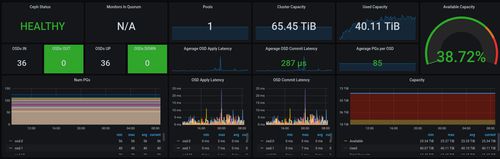
First, we went for upgrading the Proxmox v5/stretch system to
Proxmox v6/buster, before updating Ceph Luminous v12.2.13 to the latest v14.2 release, supported by Proxmox v6/buster. The Proxmox upgrade included updating corosync from v2 to v3. As part of this upgrade, we had to apply some configuration changes, like adjust
ring0 + ring1 address settings and add a
mon_host configuration to the Ceph configuration.
During the first two servers reboots, we noticed configuration glitches. After fixing those, we went for a reboot of the third server as well. Then we noticed that several Ceph OSDs were unexpectedly down. The NTP service wasn t working as expected after the upgrade. The underlying issue is a race condition of ntp with systemd-timesyncd (see
#889290). As a result, we had clock skew problems with Ceph, indicating that the Ceph monitors clocks aren t running in sync (which is essential for proper Ceph operation). We initially assumed that our Ceph OSD failure derived from this clock skew problem, so we took care of it. After yet another round of reboots, to ensure the systems are running all with identical and sane configurations and services, we noticed
lots of failing OSDs. This time all but three OSDs (19, 21 and 22) were down:
% sudo ceph osd tree
ID CLASS WEIGHT   TYPE NAME      STATUS REWEIGHT PRI-AFF
-1       65.44138 root default
-2       21.81310     host server1
 0   hdd  1.08989         osd.0    down  1.00000 1.00000
 1   hdd  1.08989         osd.1    down  1.00000 1.00000
 2   hdd  1.63539         osd.2    down  1.00000 1.00000
 3   hdd  1.63539         osd.3    down  1.00000 1.00000
 4   hdd  1.63539         osd.4    down  1.00000 1.00000
 5   hdd  1.63539         osd.5    down  1.00000 1.00000
18   hdd  2.18279         osd.18   down  1.00000 1.00000
20   hdd  2.18179         osd.20   down  1.00000 1.00000
28   hdd  2.18179         osd.28   down  1.00000 1.00000
29   hdd  2.18179         osd.29   down  1.00000 1.00000
30   hdd  2.18179         osd.30   down  1.00000 1.00000
31   hdd  2.18179         osd.31   down  1.00000 1.00000
-4       21.81409     host server2
 6   hdd  1.08989         osd.6    down  1.00000 1.00000
 7   hdd  1.08989         osd.7    down  1.00000 1.00000
 8   hdd  1.63539         osd.8    down  1.00000 1.00000
 9   hdd  1.63539         osd.9    down  1.00000 1.00000
10   hdd  1.63539         osd.10   down  1.00000 1.00000
11   hdd  1.63539         osd.11   down  1.00000 1.00000
19   hdd  2.18179         osd.19     up  1.00000 1.00000
21   hdd  2.18279         osd.21     up  1.00000 1.00000
22   hdd  2.18279         osd.22     up  1.00000 1.00000
32   hdd  2.18179         osd.32   down  1.00000 1.00000
33   hdd  2.18179         osd.33   down  1.00000 1.00000
34   hdd  2.18179         osd.34   down  1.00000 1.00000
-3       21.81419     host server3
12   hdd  1.08989         osd.12   down  1.00000 1.00000
13   hdd  1.08989         osd.13   down  1.00000 1.00000
14   hdd  1.63539         osd.14   down  1.00000 1.00000
15   hdd  1.63539         osd.15   down  1.00000 1.00000
16   hdd  1.63539         osd.16   down  1.00000 1.00000
17   hdd  1.63539         osd.17   down  1.00000 1.00000
23   hdd  2.18190         osd.23   down  1.00000 1.00000
24   hdd  2.18279         osd.24   down  1.00000 1.00000
25   hdd  2.18279         osd.25   down  1.00000 1.00000
35   hdd  2.18179         osd.35   down  1.00000 1.00000
36   hdd  2.18179         osd.36   down  1.00000 1.00000
37   hdd  2.18179         osd.37   down  1.00000 1.00000
Our blood pressure increased
slightly! Did we just lose all of our cluster? What happened, and how can we get all the other OSDs back?
We stumbled upon this beauty in our logs:
kernel: [   73.697957] XFS (sdl1): SB stripe unit sanity check failed
kernel: [   73.698002] XFS (sdl1): Metadata corruption detected at xfs_sb_read_verify+0x10e/0x180 [xfs], xfs_sb block 0xffffffffffffffff
kernel: [   73.698799] XFS (sdl1): Unmount and run xfs_repair
kernel: [   73.699199] XFS (sdl1): First 128 bytes of corrupted metadata buffer:
kernel: [   73.699677] 00000000: 58 46 53 42 00 00 10 00 00 00 00 00 00 00 62 00  XFSB..........b.
kernel: [   73.700205] 00000010: 00 00 00 00 00 00 00 00 00 00 00 00 00 00 00 00  ................
kernel: [   73.700836] 00000020: 62 44 2b c0 e6 22 40 d7 84 3d e1 cc 65 88 e9 d8  bD+.."@..=..e...
kernel: [   73.701347] 00000030: 00 00 00 00 00 00 40 08 00 00 00 00 00 00 01 00  ......@.........
kernel: [   73.701770] 00000040: 00 00 00 00 00 00 01 01 00 00 00 00 00 00 01 02  ................
ceph-disk[4240]: mount: /var/lib/ceph/tmp/mnt.jw367Y: mount(2) system call failed: Structure needs cleaning.
ceph-disk[4240]: ceph-disk: Mounting filesystem failed: Command '['/bin/mount', '-t', u'xfs', '-o', 'noatime,inode64', '--', '/dev/disk/by-parttypeuuid/4fbd7e29-9d25-41b8-afd0-062c0ceff05d.cdda39ed-5
ceph/tmp/mnt.jw367Y']' returned non-zero exit status 32
kernel: [   73.702162] 00000050: 00 00 00 01 00 00 18 80 00 00 00 04 00 00 00 00  ................
kernel: [   73.702550] 00000060: 00 00 06 48 bd a5 10 00 08 00 00 02 00 00 00 00  ...H............
kernel: [   73.702975] 00000070: 00 00 00 00 00 00 00 00 0c 0c 0b 01 0d 00 00 19  ................
kernel: [   73.703373] XFS (sdl1): SB validate failed with error -117.
The same issue was present for the other failing OSDs. We hoped, that the data itself was still there, and only the mounting of the XFS partitions failed. The Ceph cluster was initially installed in 2017 with Ceph jewel/10.2 with the OSDs on
filestore (nowadays being a legacy approach to storing objects in Ceph). However, we migrated the disks to
bluestore since then (with
ceph-disk and
not yet via ceph-volume what s being used nowadays). Using ceph-disk introduces these 100MB XFS partitions containing basic metadata for the OSD.
Given that we had three working OSDs left, we decided to investigate how to rebuild the failing ones. Some folks on #ceph (thanks T1, ormandj + peetaur!) were kind enough to share how working XFS partitions looked like for them. After creating a backup (via dd), we tried to re-create such an XFS partition on server1. We noticed that even mounting a freshly created XFS partition failed:
synpromika@server1 ~ % sudo mkfs.xfs -f -i size=2048 -m uuid="4568c300-ad83-4288-963e-badcd99bf54f" /dev/sdc1
meta-data=/dev/sdc1              isize=2048   agcount=4, agsize=6272 blks
         =                       sectsz=4096  attr=2, projid32bit=1
         =                       crc=1        finobt=1, sparse=1, rmapbt=0
         =                       reflink=0
data     =                       bsize=4096   blocks=25088, imaxpct=25
         =                       sunit=128    swidth=64 blks
naming   =version 2              bsize=4096   ascii-ci=0, ftype=1
log      =internal log           bsize=4096   blocks=1608, version=2
         =                       sectsz=4096  sunit=1 blks, lazy-count=1
realtime =none                   extsz=4096   blocks=0, rtextents=0
synpromika@server1 ~ % sudo mount /dev/sdc1 /mnt/ceph-recovery
SB stripe unit sanity check failed
Metadata corruption detected at 0x433840, xfs_sb block 0x0/0x1000
libxfs_writebufr: write verifer failed on xfs_sb bno 0x0/0x1000
cache_node_purge: refcount was 1, not zero (node=0x1d3c400)
SB stripe unit sanity check failed
Metadata corruption detected at 0x433840, xfs_sb block 0x18800/0x1000
libxfs_writebufr: write verifer failed on xfs_sb bno 0x18800/0x1000
SB stripe unit sanity check failed
Metadata corruption detected at 0x433840, xfs_sb block 0x0/0x1000
libxfs_writebufr: write verifer failed on xfs_sb bno 0x0/0x1000
SB stripe unit sanity check failed
Metadata corruption detected at 0x433840, xfs_sb block 0x24c00/0x1000
libxfs_writebufr: write verifer failed on xfs_sb bno 0x24c00/0x1000
SB stripe unit sanity check failed
Metadata corruption detected at 0x433840, xfs_sb block 0xc400/0x1000
libxfs_writebufr: write verifer failed on xfs_sb bno 0xc400/0x1000
releasing dirty buffer (bulk) to free list!releasing dirty buffer (bulk) to free list!releasing dirty buffer (bulk) to free list!releasing dirty buffer (bulk) to free list!found dirty buffer (bulk) on free list!bad magic number
bad magic number
Metadata corruption detected at 0x433840, xfs_sb block 0x0/0x1000
libxfs_writebufr: write verifer failed on xfs_sb bno 0x0/0x1000
releasing dirty buffer (bulk) to free list!mount: /mnt/ceph-recovery: wrong fs type, bad option, bad superblock on /dev/sdc1, missing codepage or helper program, or other error.
Ouch. This very much looked related to the actual issue we re seeing. So we tried to execute mkfs.xfs with a bunch of different sunit/swidth settings. Using
-d sunit=512 -d swidth=512 at least worked then, so we decided to force its usage in the creation of our OSD XFS partition. This brought us a working XFS partition. Please note, sunit must
not be larger than swidth (more on that later!).
Then we reconstructed how to restore all the metadata for the OSD (
activate.monmap, active, block_uuid, bluefs, ceph_fsid, fsid, keyring, kv_backend, magic, mkfs_done, ready, require_osd_release, systemd, type, whoami). To identify the UUID, we can read the data from
ceph --format json osd dump , like this for all our OSDs (Zsh syntax ftw!):
synpromika@server1 ~ % for f in  0..37  ; printf "osd-$f: %s\n" "$(sudo ceph --format json osd dump   jq -r ".osds[]   select(.osd==$f)   .uuid")"
osd-0: 4568c300-ad83-4288-963e-badcd99bf54f
osd-1: e573a17a-ccde-4719-bdf8-eef66903ca4f
osd-2: 0e1b2626-f248-4e7d-9950-f1a46644754e
osd-3: 1ac6a0a2-20ee-4ed8-9f76-d24e900c800c
[...]
Identifying the corresponding raw device for each OSD UUID is possible via:
synpromika@server1 ~ % UUID="4568c300-ad83-4288-963e-badcd99bf54f"
synpromika@server1 ~ % readlink -f /dev/disk/by-partuuid/"$ UUID "
/dev/sdc1
The OSD s key ID can be retrieved via:
synpromika@server1 ~ % OSD_ID=0
synpromika@server1 ~ % sudo ceph auth get osd."$ OSD_ID " -f json 2>/dev/null   jq -r '.[]   .key'
AQCKFpZdm0We[...]
Now we also need to identify the underlying block device:
synpromika@server1 ~ % OSD_ID=0
synpromika@server1 ~ % sudo ceph osd metadata osd."$ OSD_ID " -f json   jq -r '.bluestore_bdev_partition_path'
/dev/sdc2
With all of this, we reconstructed the
keyring, fsid, whoami, block + block_uuid files. All the other files inside the XFS metadata partition are identical on each OSD. So after placing and adjusting the corresponding metadata on the XFS partition for Ceph usage, we got a working OSD hurray! Since we had to fix yet another 32 OSDs, we decided to automate this XFS partitioning and metadata recovery procedure.
We had a network share available on
/srv/backup for storing backups of existing partition data. On each server, we tested the procedure with one single OSD before iterating over the list of remaining failing OSDs. We started with a shell script on server1, then adjusted the script for server2 and server3.
This is the script, as we executed it on the 3rd server.
Thanks to this, we managed to get the Ceph cluster up and running again. We didn t want to continue with
the Ceph upgrade itself during the night though, as we wanted to know exactly what was going on and why the system behaved like that. Time for
RCA!
Root Cause Analysis
So all but three OSDs on server2 failed, and the problem seems to be related to XFS. Therefore, our starting point for the RCA was, to identify what was different on server2, as compared to server1 + server3. My initial assumption was that this was related to some firmware issues with the involved controller (and as it turned out later, I was right!). The disks were attached as JBOD devices to a ServeRAID M5210 controller (with a stripe size of 512). Firmware state:
synpromika@server1 ~ % sudo storcli64 /c0 show all   grep '^Firmware'
Firmware Package Build = 24.16.0-0092
Firmware Version = 4.660.00-8156
synpromika@server2 ~ % sudo storcli64 /c0 show all   grep '^Firmware'
Firmware Package Build = 24.21.0-0112
Firmware Version = 4.680.00-8489
synpromika@server3 ~ % sudo storcli64 /c0 show all   grep '^Firmware'
Firmware Package Build = 24.16.0-0092
Firmware Version = 4.660.00-8156
This looked very promising, as server2 indeed runs with a different firmware version on the controller. But how so? Well, the motherboard of server2 got replaced by a Lenovo/IBM technician in January 2020, as we had a failing memory slot during a memory upgrade. As part of this procedure, the Lenovo/IBM technician installed the latest firmware versions. According to our documentation, some OSDs were rebuilt (due to the filestore->bluestore migration) in March and April 2020. It turned out that precisely those OSDs were the ones that survived the upgrade. So the surviving drives were created with a different firmware version running on the involved controller. All the other OSDs were created with an older controller firmware. But what difference does this make?
Now let s check
firmware changelogs. For the 24.21.0-0097 release we found this:
- Cannot create or mount xfs filesystem using xfsprogs 4.19.x kernel 4.20(SCGCQ02027889)
- xfs_info command run on an XFS file system created on a VD of strip size 1M shows sunit and swidth as 0(SCGCQ02056038)
Our XFS problem certainly was related to the controller s firmware. We also recalled that our monitoring system reported different
sunit settings for the OSDs that were rebuilt in March and April. For example, OSD 21 was recreated and got different sunit settings:
WARN server2.example.org Mount options of /var/lib/ceph/osd/ceph-21 WARN - Missing: sunit=1024, Exceeding: sunit=512
We compared the new OSD 21 with an existing one (OSD 25 on server3):
synpromika@server2 ~ % systemctl show var-lib-ceph-osd-ceph\\x2d21.mount   grep sunit
Options=rw,noatime,attr2,inode64,sunit=512,swidth=512,noquota
synpromika@server3 ~ % systemctl show var-lib-ceph-osd-ceph\\x2d25.mount   grep sunit
Options=rw,noatime,attr2,inode64,sunit=1024,swidth=512,noquota
Thanks to our documentation, we could compare execution logs of their creation:
% diff -u ceph-disk-osd-25.log ceph-disk-osd-21.log
-synpromika@server2 ~ % sudo ceph-disk -v prepare --bluestore /dev/sdj --osd-id 25
+synpromika@server3 ~ % sudo ceph-disk -v prepare --bluestore /dev/sdi --osd-id 21
[...]
-command_check_call: Running command: /sbin/mkfs -t xfs -f -i size=2048 -- /dev/sdj1
-meta-data=/dev/sdj1              isize=2048   agcount=4, agsize=6272 blks
[...]
+command_check_call: Running command: /sbin/mkfs -t xfs -f -i size=2048 -- /dev/sdi1
+meta-data=/dev/sdi1              isize=2048   agcount=4, agsize=6336 blks
          =                       sectsz=4096  attr=2, projid32bit=1
          =                       crc=1        finobt=1, sparse=0, rmapbt=0, reflink=0
-data     =                       bsize=4096   blocks=25088, imaxpct=25
-         =                       sunit=128    swidth=64 blks
+data     =                       bsize=4096   blocks=25344, imaxpct=25
+         =                       sunit=64     swidth=64 blks
 naming   =version 2              bsize=4096   ascii-ci=0 ftype=1
 log      =internal log           bsize=4096   blocks=1608, version=2
          =                       sectsz=4096  sunit=1 blks, lazy-count=1
 realtime =none                   extsz=4096   blocks=0, rtextents=0
[...]
So back then, we even tried to track this down but couldn t make sense of it
yet. But
now this sounds
very much like it is related to the problem we saw with this Ceph/XFS failure. We follow
Occam s razor, assuming the simplest explanation is usually the right one, so let s check the disk properties and see what differs:
synpromika@server1 ~ % sudo blockdev --getsz --getsize64 --getss --getpbsz --getiomin --getioopt /dev/sdk
4685545472
2398999281664
512
4096
524288
262144
synpromika@server2 ~ % sudo blockdev --getsz --getsize64 --getss --getpbsz --getiomin --getioopt /dev/sdk
4685545472
2398999281664
512
4096
262144
262144
See the difference between server1 and server2 for identical disks? The
getiomin option now reports something different for them:
synpromika@server1 ~ % sudo blockdev --getiomin /dev/sdk
524288
synpromika@server1 ~ % cat /sys/block/sdk/queue/minimum_io_size
524288
synpromika@server2 ~ % sudo blockdev --getiomin /dev/sdk
262144
synpromika@server2 ~ % cat /sys/block/sdk/queue/minimum_io_size
262144
It doesn t make sense that the minimum I/O size (iomin, AKA
BLKIOMIN) is
bigger than the optimal I/O size (ioopt, AKA
BLKIOOPT). This leads us to
Bug 202127 cannot mount or create xfs on a 597T device, which matches our findings here. But why did this XFS partition work in the past and fails now with the newer kernel version?
The XFS behaviour change
Now given that we have backups of all the XFS partition, we wanted to track down, a) when this XFS behaviour was introduced, and b) whether, and if so how it would be possible to reuse the XFS partition without having to rebuild it from scratch (e.g. if you would have no working Ceph OSD or backups left).
Let s look at such a failing XFS partition with the
Grml live system:
root@grml ~ # grml-version
grml64-full 2020.06 Release Codename Ausgehfuahangl [2020-06-24]
root@grml ~ # uname -a
Linux grml 5.6.0-2-amd64 #1 SMP Debian 5.6.14-2 (2020-06-09) x86_64 GNU/Linux
root@grml ~ # grml-hostname grml-2020-06
Setting hostname to grml-2020-06: done
root@grml ~ # exec zsh
root@grml-2020-06 ~ # dpkg -l xfsprogs util-linux
Desired=Unknown/Install/Remove/Purge/Hold
  Status=Not/Inst/Conf-files/Unpacked/halF-conf/Half-inst/trig-aWait/Trig-pend
 / Err?=(none)/Reinst-required (Status,Err: uppercase=bad)
 / Name           Version      Architecture Description
+++-==============-============-============-=========================================
ii  util-linux     2.35.2-4     amd64        miscellaneous system utilities
ii  xfsprogs       5.6.0-1+b2   amd64        Utilities for managing the XFS filesystem
There it s failing, no matter which mount option we try:
root@grml-2020-06 ~ # mount ./sdd1.dd /mnt
mount: /mnt: mount(2) system call failed: Structure needs cleaning.
root@grml-2020-06 ~ # dmesg   tail -30
[...]
[   64.788640] XFS (loop1): SB stripe unit sanity check failed
[   64.788671] XFS (loop1): Metadata corruption detected at xfs_sb_read_verify+0x102/0x170 [xfs], xfs_sb block 0xffffffffffffffff
[   64.788671] XFS (loop1): Unmount and run xfs_repair
[   64.788672] XFS (loop1): First 128 bytes of corrupted metadata buffer:
[   64.788673] 00000000: 58 46 53 42 00 00 10 00 00 00 00 00 00 00 62 00  XFSB..........b.
[   64.788674] 00000010: 00 00 00 00 00 00 00 00 00 00 00 00 00 00 00 00  ................
[   64.788675] 00000020: 32 b6 dc 35 53 b7 44 96 9d 63 30 ab b3 2b 68 36  2..5S.D..c0..+h6
[   64.788675] 00000030: 00 00 00 00 00 00 40 08 00 00 00 00 00 00 01 00  ......@.........
[   64.788675] 00000040: 00 00 00 00 00 00 01 01 00 00 00 00 00 00 01 02  ................
[   64.788676] 00000050: 00 00 00 01 00 00 18 80 00 00 00 04 00 00 00 00  ................
[   64.788677] 00000060: 00 00 06 48 bd a5 10 00 08 00 00 02 00 00 00 00  ...H............
[   64.788677] 00000070: 00 00 00 00 00 00 00 00 0c 0c 0b 01 0d 00 00 19  ................
[   64.788679] XFS (loop1): SB validate failed with error -117.
root@grml-2020-06 ~ # mount -t xfs -o rw,relatime,attr2,inode64,sunit=1024,swidth=512,noquota ./sdd1.dd /mnt/
mount: /mnt: wrong fs type, bad option, bad superblock on /dev/loop1, missing codepage or helper program, or other error.
32 root@grml-2020-06 ~ # dmesg   tail -1
[   66.342976] XFS (loop1): stripe width (512) must be a multiple of the stripe unit (1024)
root@grml-2020-06 ~ # mount -t xfs -o rw,relatime,attr2,inode64,sunit=512,swidth=512,noquota ./sdd1.dd /mnt/
mount: /mnt: mount(2) system call failed: Structure needs cleaning.
32 root@grml-2020-06 ~ # dmesg   tail -14
[   66.342976] XFS (loop1): stripe width (512) must be a multiple of the stripe unit (1024)
[   80.751277] XFS (loop1): SB stripe unit sanity check failed
[   80.751323] XFS (loop1): Metadata corruption detected at xfs_sb_read_verify+0x102/0x170 [xfs], xfs_sb block 0xffffffffffffffff
[   80.751324] XFS (loop1): Unmount and run xfs_repair
[   80.751325] XFS (loop1): First 128 bytes of corrupted metadata buffer:
[   80.751327] 00000000: 58 46 53 42 00 00 10 00 00 00 00 00 00 00 62 00  XFSB..........b.
[   80.751328] 00000010: 00 00 00 00 00 00 00 00 00 00 00 00 00 00 00 00  ................
[   80.751330] 00000020: 32 b6 dc 35 53 b7 44 96 9d 63 30 ab b3 2b 68 36  2..5S.D..c0..+h6
[   80.751331] 00000030: 00 00 00 00 00 00 40 08 00 00 00 00 00 00 01 00  ......@.........
[   80.751331] 00000040: 00 00 00 00 00 00 01 01 00 00 00 00 00 00 01 02  ................
[   80.751332] 00000050: 00 00 00 01 00 00 18 80 00 00 00 04 00 00 00 00  ................
[   80.751333] 00000060: 00 00 06 48 bd a5 10 00 08 00 00 02 00 00 00 00  ...H............
[   80.751334] 00000070: 00 00 00 00 00 00 00 00 0c 0c 0b 01 0d 00 00 19  ................
[   80.751338] XFS (loop1): SB validate failed with error -117.
Also xfs_repair doesn t help either:
root@grml-2020-06 ~ # xfs_info ./sdd1.dd
meta-data=./sdd1.dd              isize=2048   agcount=4, agsize=6272 blks
         =                       sectsz=4096  attr=2, projid32bit=1
         =                       crc=1        finobt=1, sparse=0, rmapbt=0
         =                       reflink=0
data     =                       bsize=4096   blocks=25088, imaxpct=25
         =                       sunit=128    swidth=64 blks
naming   =version 2              bsize=4096   ascii-ci=0, ftype=1
log      =internal log           bsize=4096   blocks=1608, version=2
         =                       sectsz=4096  sunit=1 blks, lazy-count=1
realtime =none                   extsz=4096   blocks=0, rtextents=0
root@grml-2020-06 ~ # xfs_repair ./sdd1.dd
Phase 1 - find and verify superblock...
bad primary superblock - bad stripe width in superblock !!!
attempting to find secondary superblock...
..............................................................................................Sorry, could not find valid secondary superblock
Exiting now.
With the SB stripe unit sanity check failed message, we could easily track this down to the following
commit fa4ca9c:
% git show fa4ca9c5574605d1e48b7e617705230a0640b6da   cat
commit fa4ca9c5574605d1e48b7e617705230a0640b6da
Author: Dave Chinner <dchinner@redhat.com>
Date:   Tue Jun 5 10:06:16 2018 -0700

    xfs: catch bad stripe alignment configurations

    When stripe alignments are invalid, data alignment algorithms in the
    allocator may not work correctly. Ensure we catch superblocks with
    invalid stripe alignment setups at mount time. These data alignment
    mismatches are now detected at mount time like this:

    XFS (loop0): SB stripe unit sanity check failed
    XFS (loop0): Metadata corruption detected at xfs_sb_read_verify+0xab/0x110, xfs_sb block 0xffffffffffffffff
    XFS (loop0): Unmount and run xfs_repair
    XFS (loop0): First 128 bytes of corrupted metadata buffer:
    0000000091c2de02: 58 46 53 42 00 00 10 00 00 00 00 00 00 00 10 00  XFSB............
    0000000023bff869: 00 00 00 00 00 00 00 00 00 00 00 00 00 00 00 00  ................
    00000000cdd8c893: 17 32 37 15 ff ca 46 3d 9a 17 d3 33 04 b5 f1 a2  .27...F=...3....
    000000009fd2844f: 00 00 00 00 00 00 00 04 00 00 00 00 00 00 06 d0  ................
    0000000088e9b0bb: 00 00 00 00 00 00 06 d1 00 00 00 00 00 00 06 d2  ................
    00000000ff233a20: 00 00 00 01 00 00 10 00 00 00 00 01 00 00 00 00  ................
    000000009db0ac8b: 00 00 03 60 e1 34 02 00 08 00 00 02 00 00 00 00  ... .4..........
    00000000f7022460: 00 00 00 00 00 00 00 00 0c 09 0b 01 0c 00 00 19  ................
    XFS (loop0): SB validate failed with error -117.

    And the mount fails.

    Signed-off-by: Dave Chinner <dchinner@redhat.com>
    Reviewed-by: Carlos Maiolino <cmaiolino@redhat.com>
    Reviewed-by: Darrick J. Wong <darrick.wong@oracle.com>
    Signed-off-by: Darrick J. Wong <darrick.wong@oracle.com>
diff --git fs/xfs/libxfs/xfs_sb.c fs/xfs/libxfs/xfs_sb.c
index b5dca3c8c84d..c06b6fc92966 100644
--- fs/xfs/libxfs/xfs_sb.c
+++ fs/xfs/libxfs/xfs_sb.c
@@ -278,6 +278,22 @@ xfs_mount_validate_sb(
                return -EFSCORRUPTED;


+       if (sbp->sb_unit)
+               if (!xfs_sb_version_hasdalign(sbp)
+                   sbp->sb_unit > sbp->sb_width
+                   (sbp->sb_width % sbp->sb_unit) != 0)
+                       xfs_notice(mp, "SB stripe unit sanity check failed");
+                       return -EFSCORRUPTED;
+
+         else if (xfs_sb_version_hasdalign(sbp))
+               xfs_notice(mp, "SB stripe alignment sanity check failed");
+               return -EFSCORRUPTED;
+         else if (sbp->sb_width)
+               xfs_notice(mp, "SB stripe width sanity check failed");
+               return -EFSCORRUPTED;
+
+
+
        if (xfs_sb_version_hascrc(&mp->m_sb) &&
            sbp->sb_blocksize < XFS_MIN_CRC_BLOCKSIZE)
                xfs_notice(mp, "v5 SB sanity check failed");
This change is included in kernel versions 4.18-rc1 and newer:
% git describe --contains fa4ca9c5574605d1e48
v4.18-rc1~37^2~14
Now let s try with an older kernel version (4.9.0), using old Grml 2017.05 release:
root@grml ~ # grml-version
grml64-small 2017.05 Release Codename Freedatensuppe [2017-05-31]
root@grml ~ # uname -a
Linux grml 4.9.0-1-grml-amd64 #1 SMP Debian 4.9.29-1+grml.1 (2017-05-24) x86_64 GNU/Linux
root@grml ~ # lsb_release -a
No LSB modules are available.
Distributor ID: Debian
Description:    Debian GNU/Linux 9.0 (stretch)
Release:        9.0
Codename:       stretch
root@grml ~ # grml-hostname grml-2017-05
Setting hostname to grml-2017-05: done
root@grml ~ # exec zsh
root@grml-2017-05 ~ #
root@grml-2017-05 ~ # xfs_info ./sdd1.dd
xfs_info: ./sdd1.dd is not a mounted XFS filesystem
1 root@grml-2017-05 ~ # xfs_repair ./sdd1.dd
Phase 1 - find and verify superblock...
bad primary superblock - bad stripe width in superblock !!!
attempting to find secondary superblock...
..............................................................................................Sorry, could not find valid secondary superblock
Exiting now.
1 root@grml-2017-05 ~ # mount ./sdd1.dd /mnt
root@grml-2017-05 ~ # mount -t xfs
/root/sdd1.dd on /mnt type xfs (rw,relatime,attr2,inode64,sunit=1024,swidth=512,noquota)
root@grml-2017-05 ~ # ls /mnt
activate.monmap  active  block  block_uuid  bluefs  ceph_fsid  fsid  keyring  kv_backend  magic  mkfs_done  ready  require_osd_release  systemd  type  whoami
root@grml-2017-05 ~ # xfs_info /mnt
meta-data=/dev/loop1             isize=2048   agcount=4, agsize=6272 blks
         =                       sectsz=4096  attr=2, projid32bit=1
         =                       crc=1        finobt=1 spinodes=0 rmapbt=0
         =                       reflink=0
data     =                       bsize=4096   blocks=25088, imaxpct=25
         =                       sunit=128    swidth=64 blks
naming   =version 2              bsize=4096   ascii-ci=0 ftype=1
log      =internal               bsize=4096   blocks=1608, version=2
         =                       sectsz=4096  sunit=1 blks, lazy-count=1
realtime =none                   extsz=4096   blocks=0, rtextents=0
Mounting there indeed works! Now, if we mount the filesystem with new and
proper sunit/swidth settings using the older kernel, it should rewrite them on disk:
root@grml-2017-05 ~ # mount -t xfs -o sunit=512,swidth=512 ./sdd1.dd /mnt/
root@grml-2017-05 ~ # umount /mnt/
And indeed, mounting this rewritten filesystem then also works with newer kernels:
root@grml-2020-06 ~ # mount ./sdd1.rewritten /mnt/
root@grml-2020-06 ~ # xfs_info /root/sdd1.rewritten
meta-data=/dev/loop1             isize=2048   agcount=4, agsize=6272 blks
         =                       sectsz=4096  attr=2, projid32bit=1
         =                       crc=1        finobt=1, sparse=0, rmapbt=0
         =                       reflink=0
data     =                       bsize=4096   blocks=25088, imaxpct=25
         =                       sunit=64    swidth=64 blks
naming   =version 2              bsize=4096   ascii-ci=0, ftype=1
log      =internal log           bsize=4096   blocks=1608, version=2
         =                       sectsz=4096  sunit=1 blks, lazy-count=1
realtime =none                   extsz=4096   blocks=0, rtextents=0
root@grml-2020-06 ~ # mount -t xfs
/root/sdd1.rewritten on /mnt type xfs (rw,relatime,attr2,inode64,logbufs=8,logbsize=32k,sunit=512,swidth=512,noquota)
FTR: The
sunit=512,swidth=512 from the xfs mount option is identical to xfs_info s output
sunit=64,swidth=64 (because mount.xfs s sunit value is given in 512-byte block units, see
man 5 xfs, and the xfs_info output reported here is in blocks with a block size (bsize) of 4096, so
sunit = 512*512 := 64*4096 ).
mkfs uses minimum and optimal sizes for stripe unit and stripe width; you can check this e.g. via (note that server2 with fixed firmware version reports proper values, whereas server3 with broken controller firmware reports non-sense):
synpromika@server2 ~ % for i in /sys/block/sd*/queue/ ; do printf "%s: %s %s\n" "$i" "$(cat "$i"/minimum_io_size)" "$(cat "$i"/optimal_io_size)" ; done
[...]
/sys/block/sdc/queue/: 262144 262144
/sys/block/sdd/queue/: 262144 262144
/sys/block/sde/queue/: 262144 262144
/sys/block/sdf/queue/: 262144 262144
/sys/block/sdg/queue/: 262144 262144
/sys/block/sdh/queue/: 262144 262144
/sys/block/sdi/queue/: 262144 262144
/sys/block/sdj/queue/: 262144 262144
/sys/block/sdk/queue/: 262144 262144
/sys/block/sdl/queue/: 262144 262144
/sys/block/sdm/queue/: 262144 262144
/sys/block/sdn/queue/: 262144 262144
[...]
synpromika@server3 ~ % for i in /sys/block/sd*/queue/ ; do printf "%s: %s %s\n" "$i" "$(cat "$i"/minimum_io_size)" "$(cat "$i"/optimal_io_size)" ; done
[...]
/sys/block/sdc/queue/: 524288 262144
/sys/block/sdd/queue/: 524288 262144
/sys/block/sde/queue/: 524288 262144
/sys/block/sdf/queue/: 524288 262144
/sys/block/sdg/queue/: 524288 262144
/sys/block/sdh/queue/: 524288 262144
/sys/block/sdi/queue/: 524288 262144
/sys/block/sdj/queue/: 524288 262144
/sys/block/sdk/queue/: 524288 262144
/sys/block/sdl/queue/: 524288 262144
/sys/block/sdm/queue/: 524288 262144
/sys/block/sdn/queue/: 524288 262144
[...]
This is the underlying reason why the initially created XFS partitions were created with incorrect
sunit/swidth settings. The broken firmware of server1 and server3 was the cause of the incorrect settings they were ignored by old(er) xfs/kernel versions, but treated as an error by new ones.
Make sure to also read
the XFS FAQ regarding How to calculate the correct sunit,swidth values for optimal performance . We also stumbled upon two interesting reads in RedHat s knowledge base:
5075561 +
2150101 (requires an active subscription, though) and
#1835947.
Am I affected? How to work around it?
To check whether your XFS mount points are affected by this issue, the following command line should be useful:
awk '$3 == "xfs" print $2 ' /proc/self/mounts while read mount ; do echo -n "$mount " ; xfs_info $mount awk '$0 ~ "swidth" gsub(/.*=/,"",$2); gsub(/.*=/,"",$3); print $2,$3 ' awk ' if ($1 > $2) print "impacted"; else print "OK" ' ; done
If you run into the above situation, the only known solution to get your original XFS partition working again, is to boot into an older kernel version again (4.17 or older), mount the XFS partition with correct sunit/swidth settings and then boot back into your new system (kernel version wise).
Lessons learned
- document everything and ensure to have all relevant information available (including actual times of changes, used kernel/package/firmware/ versions. The thorough documentation was our most significant asset in this case, because we had all the data and information we needed during the emergency handling as well as for the post mortem/RCA)
- if something changes unexpectedly, dig deeper
- know who to ask, a network of experts pays off
- including timestamps in your shell makes reconstruction easier (the more people and documentation involved, the harder it gets to wade through it)
- keep an eye on changelogs/release notes
- apply regular updates and don t forget invisible layers (e.g. BIOS, controller/disk firmware, IPMI/OOB (ILO/RAC/IMM/ ) firmware)
- apply regular reboots, to avoid a possible delta becoming bigger (which makes debugging harder)
Thanks: Darshaka Pathirana, Chris Hofstaedtler and Michael Hanscho.
Looking for help with your IT infrastructure?
Let us know!
 Got a new machine Lenovo ThinkCenter M75s gen2, and installed Debian on it.
I wanted to try out the ryzen CPU.
I haven't used a physical x86-64 Debian desktop machine since I threw away my Athlon 64 machine (dx5150), so that's like 15 years?
Since then my main devices were macbooks and virtual machines (on GCE and Sakura) and raspberry pi.
I got buster installed just fine. Finding the right
keystrokes after boot was challenging because the graphical
UI doesn't say anything. For BIOS set up to disable secure
boot (F1 to enter set up: I wanted to play with kernel) and
finding the keystroke to choose the boot disk (F10 to enter
the dialog; I needed to choose the one labeled USB CD drive
although I put in a USB SD card reader with installer
image).
The installation went fine for console, but getting X up was
tricky, the support for the graphics (Renoir) part of the
chip was added in kernel 5.5. Bullseye was 4.19 and I wasn't
too comfortable with just updating the kernel.
I ended up going for dist-upgrade to Bullseye.
With Bullseye default kernel 5.10, X started without problems.
So far I only tried out Emacs.
Got a new machine Lenovo ThinkCenter M75s gen2, and installed Debian on it.
I wanted to try out the ryzen CPU.
I haven't used a physical x86-64 Debian desktop machine since I threw away my Athlon 64 machine (dx5150), so that's like 15 years?
Since then my main devices were macbooks and virtual machines (on GCE and Sakura) and raspberry pi.
I got buster installed just fine. Finding the right
keystrokes after boot was challenging because the graphical
UI doesn't say anything. For BIOS set up to disable secure
boot (F1 to enter set up: I wanted to play with kernel) and
finding the keystroke to choose the boot disk (F10 to enter
the dialog; I needed to choose the one labeled USB CD drive
although I put in a USB SD card reader with installer
image).
The installation went fine for console, but getting X up was
tricky, the support for the graphics (Renoir) part of the
chip was added in kernel 5.5. Bullseye was 4.19 and I wasn't
too comfortable with just updating the kernel.
I ended up going for dist-upgrade to Bullseye.
With Bullseye default kernel 5.10, X started without problems.
So far I only tried out Emacs.
 I had a twitter fight few days back with a gentleman and the article is a result of that fight. Sadly, I do not know the name of the gentleman as he goes via a psuedo name and then again I ve not taken permission from him to quote him in either way. So I will just state the observations I was able to make from the conversations we had. As people who read this blog regularly would know, I am and have been against Railway Privatization which is happening in India. And will be sharing some of the case studies from other countries as to how it panned out for them.
 UK railway map with operators
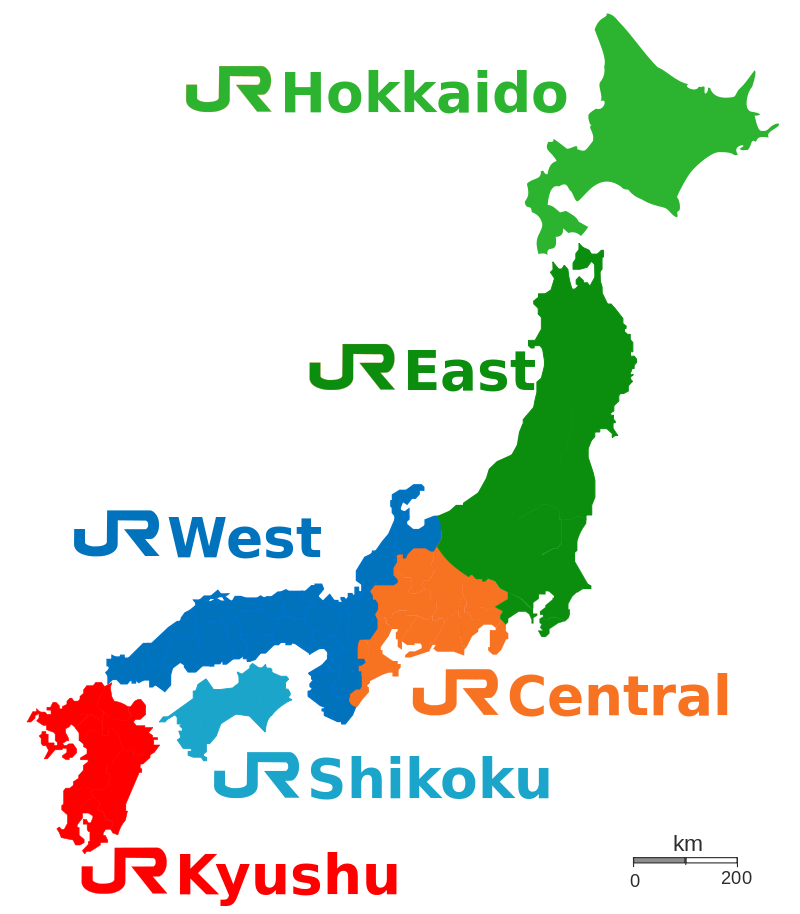 Railway map of Japan with private ownership courtesy Wikimedia commons


 I ve mostly had the preference of controlling my data rather than depend on someone else. That s one reason why I still believe email to be my most reliable medium for data storage, one that is not plagued/locked by a single entity. If I had the resources, I d prefer all digital data to be broken down to its simplest form for storage, like email format, and empower the user with it i.e. their data.
Yes, there are free services that are indirectly forced upon common users, and many of us get attracted to it. Many of us do not think that the information, which is shared for the free service in return, is of much importance. Which may be fair, depending on the individual, given that they get certain services without paying any direct dime.
I ve mostly had the preference of controlling my data rather than depend on someone else. That s one reason why I still believe email to be my most reliable medium for data storage, one that is not plagued/locked by a single entity. If I had the resources, I d prefer all digital data to be broken down to its simplest form for storage, like email format, and empower the user with it i.e. their data.
Yes, there are free services that are indirectly forced upon common users, and many of us get attracted to it. Many of us do not think that the information, which is shared for the free service in return, is of much importance. Which may be fair, depending on the individual, given that they get certain services without paying any direct dime.

 A new version of the

 The red commemorative plaque not only limits Orwell's tenure to the time he was permanently in the village, it omits all reference to his first wife, Eileen O'Shaughnessy, whom he married in the village church in 1936.
 Wallington's Manor Farm, the inspiration for the farm in Animal Farm. The lower sign enjoins the public to inform the police "if you see anyone on the [church] roof acting suspiciously". Non-UK-residents may be surprised to learn about the systematic theft of lead.
 In the past, I've talked about building a Z80-based computer. I made some progress towards that goal, in the sense that I took the initial (trivial steps) towards making something:

















 One of my goals for