Search Results: "agi"

5 April 2020

Vincent Bernat: Safer SSH agent forwarding

ssh-agent is a program to hold in memory the private keys used by SSH for public-key authentication. When the agent is running, ssh forwards to it the signature requests from the server. The agent performs the private key operations and returns the results to ssh. It is useful if you keep your private keys encrypted on disk and you don t want to type the password at each connection. Keeping the agent secure is critical: someone able to communicate with the agent can authenticate on your behalf on remote servers. ssh also provides the ability to forward the agent to a remote server. From this remote server, you can authenticate to another server using your local agent, without copying your private key on the intermediate server. As stated in the manual page, this is dangerous!
Agent forwarding should be enabled with caution. Users with the ability to bypass file permissions on the remote host (for the agent s UNIX-domain socket) can access the local agent through the forwarded connection. An attacker cannot obtain key material from the agent, however they can perform operations on the keys that enable them to authenticate using the identities loaded into the agent. A safer alternative may be to use a jump host (see -J).
As mentioned, a better alternative is to use the jump host feature: the SSH connection to the target host is tunneled through the SSH connection to the jump host. See the manual page and this blog post for more details.
If you really need to use SSH agent forwarding, you can secure it a bit through a dedicated agent with two main attributes: The following alias around the ssh command will spawn such an ephemeral agent:
alias assh="ssh-agent ssh -o AddKeysToAgent=confirm -o ForwardAgent=yes"
With the -o AddKeysToAgent=confirm directive, ssh adds the unencrypted private key to the agent but each use must be confirmed.1 Once connected, you get a password prompt for each signature request:2
ssh-agent prompt confirmation with fingerprint and yes/no buttons
Request for the agent to use the specified private key
But, again, avoid using agent forwarding!

Update (2020-04) In a previous version of this article, the wrapper around the ssh command was a more complex function. Alexandre Oliva was kind enough to point me to the simpler solution above.

Update (2020-04) Guardian Agent is an even safer alternative: it shows and ensures the usage (target and command) of the requested signature. There is also a wide range of alternative solutions to this problem. See for example SSH-Ident, Wikimedia solution and solo-agent.


  1. Alternatively, you can add the keys with ssh-add -c.
  2. Unfortunately, the dialog box default answer is Yes.

4 April 2020

Thorsten Alteholz: My Debian Activities in March 2020

FTP master This month I accepted 156 packages and rejected 26. The overall number of packages that got accepted was 203. Debian LTS This was my sixty ninth month that I did some work for the Debian LTS initiative, started by Raphael Hertzog at Freexian. This month my all in all workload has been 30h. During that time I did LTS uploads of: Also my work on graphicsmagic was accepted which resulted in: Further I sent debdiffs of weechat/stretch, weechat/buster, e2fsprogs/stretch to the corresponding maintainers but got no feedback yet. As there have been lots of no-dsa-CVEs accumulated for wireshark, I started to work on them but could not upload yet. Last but not least I did some days of frontdesk duties. Debian ELTS This month was the twenty first ELTS month. During my really allocated time I uploaded: I also did some days of frontdesk duties. Other stuff Unfortunately this month again strange things happened outside Debian and the discussions within Debian did not stop. Nonetheless I got some stuff done. I improved packaging of I sponsored uploads of Sorry to all people who also requested sponsoring, but sometimes things happen and your upload might be delayed. I uploaded new upstream versions of On my Go challenge I uploaded:
golang-github-dreamitgetit-statuscake, golang-github-ensighten-udnssdk, golang-github-apparentlymart-go-dump, golang-github-suapapa-go-eddystone, golang-github-joyent-gosdc, golang-github-nrdcg-goinwx, golang-github-bmatcuk-doublestar, golang-github-go-xorm-core, golang-github-svanharmelen-jsonapi, golang-github-goji-httpauth, golang-github-phpdave11-gofpdi

2 April 2020

Dirk Eddelbuettel: RQuantLib 0.4.12: Small QuantLib 1.18 update

A new release 0.4.12 of RQuantLib arrived on CRAN today, and was uploaded to Debian as well. QuantLib is a very comprehensice free/open-source library for quantitative finance; RQuantLib connects it to the R environment and language. This version does relatively little. When QuantLib 1.18 came out, I immediately did my usual bit of packaging it for Debian as well creating binaries via my Ubuntu PPA so that I could test the package against it. And a few call from RQuantLib are now hitting interface functions marked as deprecated leading to compiler nags. So I fixed that in PR #146. And today CRAN sent me email to please fix in the released version so I rolled this up as 0.4.12. Not other changes.

Changes in RQuantLib version 0.4.12 (2020-04-01)
  • Changes in RQuantLib code:
    • Calls deprecated-in-QuantLib 1.18 were updated (Dirk in #146).

Courtesy of CRANberries, there is also a diffstat report for the this release. As always, more detailed information is on the RQuantLib page. Questions, comments etc should go to the new rquantlib-devel mailing list. Issue tickets can be filed at the GitHub repo. If you like this or other open-source work I do, you can now sponsor me at GitHub. For the first year, GitHub will match your contributions.

This post by Dirk Eddelbuettel originated on his Thinking inside the box blog. Please report excessive re-aggregation in third-party for-profit settings.

1 April 2020

Joachim Breitner: 30 years of Haskell

Vitaly Bragilevsky, in a mail to the GHC Steering Committee, reminded me that the first version of the Haskell programming language was released exactly 30 years ago. On April 1st. So that raises the question: Was Haskell just an April fool's joke that was never retracted?
The cover of the 1.0 Haskell report

The cover of the 1.0 Haskell report

My own first exposure to Haskell was in April 2005; the oldest piece of Haskell I could find on my machine is this part of a university assignment from April:
> pascal 1 = [1]
> pascal (n+1) = zipWith (+) (x ++ [0]) (0 : x) where x = pascal n
This means that I now have witnessed half of Haskell's existence. I have never regretted getting into Haskell, and every time I come back from having worked in other languages (which all have their merits too), I greatly enjoy the beauty and elegance of expressing my ideas in a lazy and strictly typed language with a concise syntax. I am looking forward to witnessing (and, to a very small degree, shaping) the next 15 years of Haskell.

Sylvain Beucler: Debian LTS and ELTS - March 2020

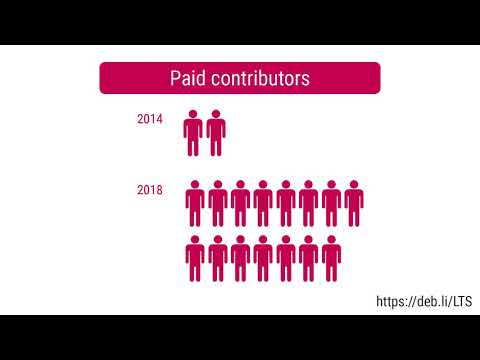
Debian LTS Logo Here is my transparent report for my work on the Debian Long Term Support (LTS) and Debian Extended Long Term Support (ELTS), which extend the security support for past Debian releases, as a paid contributor. In March, the monthly sponsored hours were split evenly among contributors depending on their max availability - I was assigned 30h for LTS (out of 30 max; all done) and 20h for ELTS (out of 20 max; I did 0). Most contributors claimed vulnerabilities by performing early CVE monitoring/triaging on their own, making me question the relevance of the Front-Desk role. It could be due to a transient combination of higher hours volume and lower open vulnerabilities. Working as a collective of hourly paid freelancers makes it more likely to work in silos, resulting in little interaction when raising workflow topics on the mailing list. Maybe we're reaching a point where regular team meetings will be benefical. As previously mentioned, I structure my work keeping the global Debian security in mind. It can be stressful though, and I believe current communication practices may deter such initiatives. ELTS - Wheezy LTS - Jessie Documentation/Scripts

Mike Gabriel: My Work on Debian LTS (March 2020)

In March 2020, I have worked on the Debian LTS project for 10.25 hours (of 10.25 hours planned). LTS Work Other security related work for Debian Credits A very big thanks goes to Utkarsh Gupta, a colleague from the Debian LTS team, who sponsored all my uploads and who sent the DLA mails on my behalf, while I was (and still am) in self-induced GPG lockdown (I forgot to update my GPG public key in Debian's GPG keyring). Thanks, Utkarsh! References

Paul Wise: FLOSS Activities March 2020

Changes

Issues

Review

Administration
  • Debian wiki: approve accounts

Communication

Sponsors The dh-make-perl feature requests, file bug report, File::Libmagic changes, autoconf-archive change, libpst work and the purple-discord upload were sponsored by my employer. All other work was done on a volunteer basis.

Jonathan Wiltshire: neuraldak

We are proud to announce that dak, the Debian Archive Kit, has been replaced by a neural network for processing package uploads and other archive maintenance. All FTP masters and assistants have been re-deployed to concentrate on managing neuraldak. neuraldak is an advanced machine learning algorithm which has been taught about appropriate uploads, can write to maintainers about their bugs and can automatically make an evaluation about suitable licenses and code quality. Any uploads which do not meet its standards will be rejected with prejudice. We anticipate that neuraldak will also monitor social media for discontent about package uploads, and train itself to do better with its decisions. In terms of licensing , neuraldak has been seeded only with the GPL license. This we consider the gold standard of licenses, and its clauses will be the basis for neuraldak evaluating other licenses as it is exposed to them. Over the course of the next few weeks, neuraldak will also learn to manage the testing suite. Once it is established, we expect to be able to make a full stable release of Debian approximately every six weeks. We have therefore also re-purposed Janelle Shane s cat name algorithm to invent suitable release names, since the list of Toy Story names is likely to be exhausted before 2021. neuraldak is an independent software project. Rumours of it being derived from Skynet are entirely unfounded. The post neuraldak appeared first on jwiltshire.org.uk.

31 March 2020

Chris Lamb: Free software activities in March 2020

Here is my monthly update covering what I have been doing in the free software world during March 2020 (previous month): In addition, I did even more hacking on the Lintian static analysis tool for Debian packages, including:
Reproducible builds One of the original promises of open source software is that distributed peer review and transparency of process results in enhanced end-user security. However, whilst anyone may inspect the source code of free and open source software for malicious flaws, almost all software today is distributed as pre-compiled binaries. This allows nefarious third-parties to compromise systems by injecting malicious code into ostensibly secure software during the various compilation and distribution processes. The motivation behind the Reproducible Builds effort is to ensure no flaws have been introduced during this compilation process by promising identical results are always generated from a given source, thus allowing multiple third-parties to come to a consensus on whether a build was compromised. The initiative is proud to be a member project of the Software Freedom Conservancy, a not-for-profit 501(c)(3) charity focused on ethical technology and user freedom. Conservancy acts as a corporate umbrella allowing projects to operate as non-profit initiatives without managing their own corporate structure. If you like the work of the Conservancy or the Reproducible Builds project, please consider becoming an official supporter. This month, I: In our tooling, I also made the following changes to diffoscope, our in-depth and content-aware diff utility that can locate and diagnose reproducibility issues, including preparing and uploading version 138 to Debian: The Reproducible Builds project also operates a fully-featured and comprehensive Jenkins-based testing framework that powers tests.reproducible-builds.org. This month, I reworked the web-based package rescheduling tool to:
Debian LTS This month I have worked 18 hours on Debian Long Term Support (LTS) and 8 hours on its sister Extended LTS project. You can find out more about the Debian LTS project via the following video:
Debian Uploads For the Debian Privacy Maintainers team I requested that the pyptlib package be removed from the archive (#953429) as well as uploading onionbalance (0.1.8-6) to fix test failures under Pytest 3.x (#953535) and a new upstream release of nautilus-wipe. Finally, I sponsored an upload of bilibop (0.6.1) on behalf of Yann Amar.

Norbert Preining: Fixing the Breeze Dark theme for gtk3 apps

It has been now about two weeks that I switched to KDE/Plasma on all my desktops, and to my big surprise, that went much more smooth than I thought. There are only a few glitches with respect to the gtk3 part of the Breeze Dark theme I am using, which needed fixup.
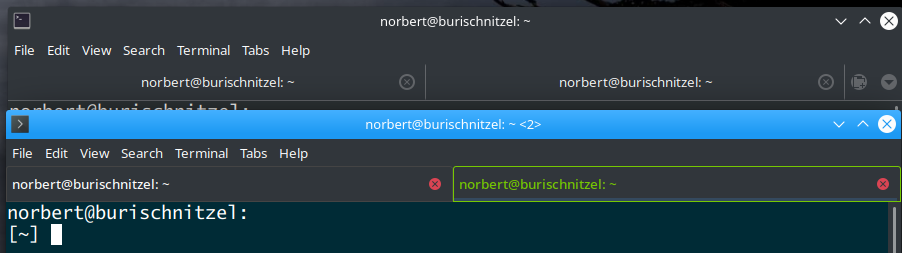
Tab distinction As I wrote already in a previous blog, the active tab in all kinds of terminal emulators, but in fact everything that uses the gtk3 notebook widget, is not distinguishable from other tabs. It turned out that this fix is a bit convoluted, but still possible, see the linked blog. Just for completeness, here is the CSS code I use in ~/.config/gtk-3.0/gtk.css:
notebook tab  
    /* background-color: #222; */
    padding: 0.4em;
    border: 0;
    border-color: #444;
    border-style: solid;
    border-width: 1px;
 
 
notebook tab:checked  
    /* background-color: #000; */
    background-image: none;
    border-color: #76C802;
 
 
notebook tab:checked label  
    color: #76C802;
    font-weight: 500;
 
 
notebook tab button  
    padding: 0;
    background-color: transparent;
    color: #ccc;
 
 
notebook tab button:hover  
  border: 0;
  background-image: none;
  border-color: #444;
  border-style: solid;
  border-width: 1px;
 
Scroll bars Another of the disturbing properties of the Breeze theme is the width-changing scroll bar. While not hovered upon, it is rather small, but when the mouse moves over it it expands its width. Now that might sound like a flashy cool idea, but in fact it is nothing but a PITA: When used with a terminal emulator, the result is that the line length changes when the mouse moves over the vertical scroll bar, and thus suddenly the layout (line break) changes for instant, which is really really disturbing. I can t imagine why developers ever come up with such a stupid idea. Anyway, the fix is not that difficult again, simply put the following into your ~/.config/gtk-3.0/gtk.css (adjusting the width to your liking) and all will be fine:
.scrollbar.vertical slider, scrollbar.vertical slider  
        min-width: 10px;
 
Not that bad, right? Other than this I haven t found any disturbing issue with using the Breeze theme with gtk3 (and gtk2) apps! Hope that helps

30 March 2020

Mike Gabriel: UBports: Packaging of Lomiri Operating Environment for Debian (part 02)

Before and during FOSDEM 2020, I agreed with the people (developers, supporters, managers) of the UBports Foundation to package the Unity8 Operating Environment for Debian. Since 27th Feb 2020, Unity8 has now become Lomiri. Recent Uploads to Debian related to Lomiri Over the past 7-8 weeks the packaging progress has been slowed down due to other projects I am working on in parallel. However, quite a few things have been achieved: The packages qtsystems, qtfeedback, and qtpim are no official Qt5 components, and so I had to package Git snapshots of them; with all implicit consequences regarding ABI and API compatibilities, possibly Debian-internal library transitions, etc. Esp. packaging qtsystems was pretty tricky due to a number of failing unit tests when the package had been built in a clean chroot (like it is the case on Debian's buildd infrastructure). I learned a lot about DBus and DBus mocking while working on all those unit tests to finally pass in chrooted builds. Unfortunately, the Lomiri App Launch component still needs more work due to (finally only) one unit test (jobs-systemd) not always passing. Sometimes, the test gets stucks and then fails after having reached a time out. I'll add it to my list of those unreproducible build failures I have recently seen in several GTest related unit test scenarios. Sigh... Credits A great thanks goes to Lisandro Perez Meyer from the Debian KDE/Qt Team for providing an intro and help on Qt Debian packaging and an intro on symbols handling with C++ projects. Another big thanks goes to Dmitry Shachnev from the Debian KDE/Qt Team for doing a sponsored upload [1] of qtpim (and also a nice package review). Also a big thanks goes to Marius Gripsgard for his work on forking the first Lomiri components on the UBports upstream side. Previous Posts about my Debian UBports Team Efforts References

24 March 2020

Dirk Eddelbuettel: New package RcppDate 0.0.1 now on CRAN!

A new small package with a new C++ header library is now on CRAN. It brings the date library by Howard Hinnant to R. This library has been in pretty wide-spread use for a while now, and adds to C++11/C++14/C++17 what will be (with minor modifications) the date library in C++20. I had been aware of it for a while, but not needed thanks to CCTZ library out of Google and our RcppCCTZ package. And like CCTZ, it builds upon std::chron adding a whole lot of functionality and useability enhancement. But a some upcoming (and quite exciting!) changes in nanotime required it, I had a reason to set about packaging it as RcppDate. And after a few days of gestation and review it is now available via CRAN. Two simple example files are included and can be accessed by Rcpp::sourceCpp(). Some brief excerpts follow. The first example shows three date constructors. Note how the month (and the leading digits) are literals. No quotes for strings anywhere. And no format (just like our anytime package for R).
  constexpr auto x1 = 2015_y/March/22;
  constexpr auto x2 = March/22/2015;
  constexpr auto x3 = 22_d/March/2015;
Note that these are constexpr that resolve at compile-time, and that the resulting year_month_day type is inferred via auto. A second example constructs the last day of the months similarly:
  constexpr auto x1 = 2015_y/February/last;
  constexpr auto x2 = February/last/2015;
  constexpr auto x3 = last/February/2015;
For more, see the copious date.h documentation. The (very bland first) NEWS entry (from a since-added NEWS file) for the initial upload follows.

Changes in version 0.0.1 (2020-01-17)
  • Initial CRAN upload of first version

If you like this or other open-source work I do, you can now sponsor me at GitHub. For the first year, GitHub will match your contributions.

This post by Dirk Eddelbuettel originated on his Thinking inside the box blog. Please report excessive re-aggregation in third-party for-profit settings.

23 March 2020

Dima Kogan: org-babel for documentation

So I just gave a talk at SCaLE 18x about numpysane and gnuplotlib, two libraries I wrote to make using numpy bearable. With these two, it's actually quite nice! Prior to the talk I overhauled the documentation for both these projects. The gnuplotlib docs now have a tutorial/gallery page, which is interesting-enough to write about. Check it out! Mostly it is a sequence of Clearly you want the plots in the documentation to correspond to the code, so you want something to actually run each code snippet to produce each plot. Automatically. I don't want to maintain these manually, and periodically discover that the code doesn't make the plot I claim it does or worse: that the code barfs. This is vaguely what Jupyter notebooks do, but they're ridiculous, so I'm doing something better: That's it. The git repo is hosted by github, which has a rudimentary renderer for .org documents. I'm committing the .svg files, so that's enough to get rendered documentation that looks nice. Note that the usual workflow is to use org to export to html, but here I'm outsourcing that job to github; I just make the .svg files, and that's enough. Look at the link again: gnuplotlib tutorial/gallery. This is just a .org file committed to the git repo. github is doing its normal org->html thing to display this file. This has drawbacks too: github is ignoring the :noexport: tag on the init section at the end of the file, so it's actually showing all the emacs lisp goop that makes this work (described below!). It's at the end, so I guess this is good-enough. Those of us that use org-mode would be completely unsurprised to hear that the talk is also written as .org document. And the slides that show gnuplotlib plots use the same org-babel system to render the plots. It's all oh-so-nice. As with anything as flexible as org-babel, it's easy to get into a situation where you're bending it to serve a not-quite-intended purpose. But since this all lives in emacs, you can make it do whatever you want with a bit of emacs lisp. I ended up advising a few things (mailing list post here). And I stumbled on an (arguable) bug in emacs that needed working around (mailing list post here). I'll summarize both here.

Handling large Local Variables blocks
The advises I ended up with ended up longer than emacs expected, which made emacs not evaluate them when loading the buffer. As I discovered (see the mailing list post) the loading code looks for the string Local Variables in the last 3000 bytes of the buffer only, and I exceeded that. Stefan Monnier suggested a workaround in this post. Instead of the normal Local Variables block at the end:
Local Variables:
eval: (progn ... ...
             ... ...
             LONG chunk of emacs-lisp
      )
End:
I do this:
(progn ;;local-config
   lisp lisp lisp
   as long as I want
)
Local Variables:
eval: (progn (re-search-backward "^(progn ;;local-config") (eval (read (current-buffer))))
End:
So emacs sees a small chunk of code that searches backwards through the buffer (as far back as needed) for the real lisp to evaluate. As an aside, this blog is also an .org document, and the lisp snippets above are org-babel blocks that I'm not evaluating. The exporter knows to respect the emacs-lisp syntax highlighting, however.

Advises
OK, so what was all the stuff I needed to tell org-babel to do specially here? First off, org needed to be able to communicate to the Python session the name of the file to write the plot to. I do this by making the whole plist for this org-babel snippet available to python:
;; THIS advice makes all the org-babel parameters available to python in the
;; _org_babel_params dict. I care about _org_babel_params['_file'] specifically,
;; but everything is available
(defun dima-org-babel-python-var-to-python (var)
  "Convert an elisp value to a python variable.
  Like the original, but supports (a . b) cells and symbols
"
  (if (listp var)
      (if (listp (cdr var))
          (concat "[" (mapconcat #'org-babel-python-var-to-python var ", ") "]")
        (format "\"\"\"%s\"\"\"" var))
    (if (symbolp var)
        (format "\"\"\"%s\"\"\"" var)
      (if (eq var 'hline)
          org-babel-python-hline-to
        (format
         (if (and (stringp var) (string-match "[\n\r]" var)) "\"\"%S\"\"" "%S")
         (if (stringp var) (substring-no-properties var) var))))))
(defun dima-alist-to-python-dict (alist)
  "Generates a string defining a python dict from the given alist"
  (let ((keyvalue-list
         (mapcar (lambda (x)
                   (format "%s = %s, "
                           (replace-regexp-in-string
                            "[^a-zA-Z0-9_]" "_"
                            (symbol-name (car x)))
                           (dima-org-babel-python-var-to-python (cdr x))))
                 alist)))
    (concat
     "dict( "
     (apply 'concat keyvalue-list)
     ")")))
(defun dima-org-babel-python-pass-all-params (f params)
  (cons
   (concat
    "_org_babel_params = "
    (dima-alist-to-python-dict params))
   (funcall f params)))
(unless
    (advice-member-p
     #'dima-org-babel-python-pass-all-params
     #'org-babel-variable-assignments:python)
  (advice-add
   #'org-babel-variable-assignments:python
   :around #'dima-org-babel-python-pass-all-params))
So if there's a :file plist key, the python code can grab that, and write the plot to that filename. But I don't really want to specify an output file for every single org-babel snippet. All I really care about is that each plot gets a unique filename. So I omit the :file key entirely, and use this advice to generate one for me:
;; This sets a default :file tag, set to a unique filename. I want each demo to
;; produce an image, but I don't care what it is called. I omit the :file tag
;; completely, and this advice takes care of it
(defun dima-org-babel-python-unique-plot-filename
    (f &optional arg info params)
  (funcall f arg info
           (cons (cons ':file
                       (format "guide-%d.svg"
                               (condition-case nil
                                   (setq dima-unique-plot-number (1+ dima-unique-plot-number))
                                 (error (setq dima-unique-plot-number 0)))))
                 params)))
(unless
    (advice-member-p
     #'dima-org-babel-python-unique-plot-filename
     #'org-babel-execute-src-block)
  (advice-add
   #'org-babel-execute-src-block
   :around #'dima-org-babel-python-unique-plot-filename))
This uses the dima-unique-plot-number integer to keep track of each plot. I increment this with each plot. Getting closer. It isn't strictly required, but it'd be nice if each plot had the same output filename each time I generated it. So I want to reset the plot number to 0 each time:
;; If I'm regenerating ALL the plots, I start counting the plots from 0
(defun dima-reset-unique-plot-number
    (&rest args)
    (setq dima-unique-plot-number 0))
(unless
    (advice-member-p
     #'dima-reset-unique-plot-number
     #'org-babel-execute-buffer)
  (advice-add
   #'org-babel-execute-buffer
   :after #'dima-reset-unique-plot-number))
Finally, I want to lie to the user a little bit. The code I'm actually executing writes each plot to an .svg. But the code I'd like the user to see should use the default output: an interactive, graphical window. I do that by tweaking the python session to tell the gnuplotlib object to write to .svg files from org by default, instead of using the graphical terminal:
;; I'm using github to display guide.org, so I'm not using the "normal" org
;; exporter. I want the demo text to not contain the hardcopy= tags, but clearly
;; I need the hardcopy tag when generating the plots. I add some python to
;; override gnuplotlib.plot() to add the hardcopy tag somewhere where the reader
;; won't see it. But where to put this python override code? If I put it into an
;; org-babel block, it will be rendered, and the :export tags will be ignored,
;; since github doesn't respect those (probably). So I put the extra stuff into
;; an advice. Whew.
(defun dima-org-babel-python-set-demo-output (f body params)
  (with-temp-buffer
    (insert body)
    (beginning-of-buffer)
    (when (search-forward "import gnuplotlib as gp" nil t)
      (end-of-line)
      (insert
       "\n"
       "if not hasattr(gp.gnuplotlib, 'orig_init'):\n"
       "    gp.gnuplotlib.orig_init = gp.gnuplotlib.__init__\n"
       "gp.gnuplotlib.__init__ = lambda self, *args, **kwargs: gp.gnuplotlib.orig_init(self, *args, hardcopy=_org_babel_params['_file'] if 'file' in _org_babel_params['_result_params'] else None, **kwargs)\n"))
    (setq body (buffer-substring-no-properties (point-min) (point-max))))
  (funcall f body params))
(unless
    (advice-member-p
     #'dima-org-babel-python-set-demo-output
     #'org-babel-execute:python)
  (advice-add
   #'org-babel-execute:python
   :around #'dima-org-babel-python-set-demo-output))
)
And that's it. The advises in the talk are slightly different, in uninteresting ways. Some of this should be upstreamed to org-babel somehow. Now entirely clear which part, but I'll cross that bridge when I get to it.

16 March 2020

Ulrike Uhlig: Deconstructing the term control freak

Control freaks. You may have called people like this. Or you may have been called one yourself. Maybe you got angry. Or, on the contrary, you felt like being a control freak is a feature, because who would notice all these little details that are not exactly perfect if not you? This post is an attempt to deconstruct the term. Etymological considerations Control - from latin contra- rotulus - refers to the copy of an account register as a means of verification of the original register. So control is about keeping track, not making mistakes, i.e. it's about doing a perfect calculation. The meaning of control in our society is linked to authority, or to policing like in crowd control. What English calls an inspector, is a Kontrolleur in German or contr leur in French. The word is also linked to manufacturing, as in quality control. We also talk about being in control, which is linked to the desire of being autonomous, to be able to act on one's own account. Being in control can also designate a need to preserve one's own integrity: if I have integrity (in the sense of feeling whole), I can self-determine, which is the most fundamental requirement for having one's own identity. Freak - refers to someone who does not fit the norm. Calling someone a freak is per se problematic, because it blames a person for being atypical, abnormal. Freak is a word that, while pointing a finger at difference, at the same time denies people the right to be different and diverse. People can reappropriate such words to make it clear that not fitting the norm is a wanted expression of their diversity we can see that if we follow the history of the word queer for an example. Types of control freaking To me, being a control freak is mostly a feature, if it's about controlling my own life and my own effectiveness. Control freaking becomes troublesome when it's about controlling other people's effectiveness. And it becomes highly problematic when it's about controlling other people's lives. Controlling one's own life Having control over one's own life is a basic human need. In particular people who are part of minorities, people who face discrimination and oppression every day have an increased need for self-determination, and the need to see their existence and their identity acknowledged and accepted by the rest of the world. Too often do we experience that other people (generally the ones with privilege, or not facing the same oppression) try to own the narrative over our lives (1)(2). Calling this control freakish is missing the point, and is probably a sign of looking at it from a perspective of privilege. Controlling one's own effectiveness People produce things. People write code, make ceramics, or write texts, for example. People have a need to control their own effectiveness: they set up routines, product tests, documentation. This type of control is a feature, and can help to release better software, better texts, or perfectly burnt clay pots ultimately controlling one's own effectiveness helps to learn from one's mistakes and to improve routines over time. The grey zone The grey zone describes the zone in between wanting to control one's own effectiveness and wanting to control other people's effectiveness. Here we could situate the type of control freak who does not delegate tasks to others for fear of seeing them done differently then they had expected them to be done. This can be harmful particularly to the person who does not delegate: they can get overworked or burnt out. This type of control freakism might be linked to perfectionism. Controlling other people's effectiveness When we work with other people, our own effectiveness might get in the way of other people's effectiveness, or vice versa. Indeed, it happens - not only in work contexts - that people find themselves in setups in which mutual responsibilities and autonomies conflict with one another because one person is dependent on the other for making decisions or moving things forward as they see fit. (There is generally a relation of dependency between two conflicting parties that is worth looking at (3).) Add to this the fact that, when delegating a task, some people have a hard time also delegating the responsibility and autonomy needed to resolve the task. They lack trust that another person can also do the work, or want that person to do the work exactly in the same way they would do it. (In some cases this can be related to Founder's Syndrome and can result in organizations staying stuck with one or a small group of founders holding knowledge and power, and preventing the organization from growing. Page 11 in the booklet "Working with conflict in our groups" describes how such an informal hierarchy can come into being in grassroot groups.) The (perfectly valid) need behind this type of control freaking could be to make sure that a group of people builds a successful product, releases a fact-checked documentary, or creates a publication without mistakes. But controlling other people's effectiveness as a strategy to satisfy this need can create a non-cooperative climate in which people do not meet each other on eye level, but are dependent on each other, experience a lack autonomy, a break of boundaries, or sometimes feel authority to be overexerted. Acknowledging the need to build a good product, it is possible to create the appropriate strategies to guarantee that the involved people can meet each other on eye level: for example by clearly defining and documenting role-responsibility-accountability along with appropriate decision making processes, or by distributing leadership ( you should totally click on that link!), by looking at inclusive leadership models, by learning from past mistakes, by instating feedback cycles, by making boundaries between the direction of an organization and the day-to-day work clear. An organization I work with has the rule that people can make decisions for themselves if the decision only affects their work, while decisions that affect a team should be made with the team, and decisions that affect the organization as a whole need to be made at the organizational level. They call that a no-brainer, but in organizations with traditional hierarchies, or in grown grassroot environments that have never clearly defined and assigned responsibilities and accountabilities (aka "functional roles") this is not so obvious at all. Controlling someone else's life This type of control freak does not only desire to control their own life but for a reason or another wants to know and control what other people do, think (especially about the control freak), decide, or how they live. In some cases, this type of control freak might even want to force upon others things they should do as a way to be accepted by the control freak. It's what we call narcissism, harassment, abuse. It is unacceptable. Conclusion In summary, the distinctions I came up with in this post describe the boundaries along which control freakism takes hold of someone else's effectiveness or life and ultimately prevents them from self-determining. In German we have the word bergriffig which describes that someone is infringing someone else's boundaries they are over - grabbing, seizing, grasping, taking hold of. Which type of control freak are you, if any?

(1) Like when a West-Berliner in a round of 15 East Germans arrogantly talks about the time when the wall came down and tells the story that he could not go shopping between Thursdays and Sundays because the East Germans bought too many products in the supermarkets while this event marked an unimaginable rift in the biographies of 17 million East Germans, 15 of whom are sitting right in front of him. Thirty years after 1989, many of us are finally starting to question this publicly ( links in German language).

(2) Women experience it similary regularly, see Men Explain Things to me, a book by Rebecca Solnit.

(3) By the way, rather than having "recruited the wrong person" conflict may intrinsically arise as part of certain work relationships, simply due to the inter-dependencies of roles or workers, like in a delivery chain.

15 March 2020

Antoine Beaupr : Remote presence tools for social distancing

As a technologist, I've been wondering how I can help people with the rapidly spreading coronavirus pandemic. With the world entering the "exponential stage" (e.g. Canada, the USA and basically all of Europe), everyone should take precautions and limit practice Social Distancing (and not dumbfuckery). But this doesn't mean we should dig ourselves in a hole in our basement: we can still talk to each other on the internet, and there are great, and free, tools available to do this. As part of my work as a sysadmin, I've had to answer questions about this a few times and I figured it was useful to share this more publicly.

Just say hi using whatever First off, feel free to use the normal tools you normally use: Signal, Facetime, Skype, Zoom, and Discord can be fine to connect with your folks, and since it doesn't take much to make someone's day please do use those tools to call your close ones and say "hi". People, especially your older folks, will feel alone and maybe scared in those crazy times. Every little bit you can do will help, even if it's just a normal phone call, an impromptu balcony fanfare, a remote workout class, or just a sing-along from your balcony, anything goes. But if those tools don't work well for some reason, or you want to try something new, or someone doesn't have an iPad, or it's too dang cold to go on your balcony, you should know there are other alternatives that you can use.

Jitsi We've been suggesting our folks use a tool called "Jitsi". Jitsi is a free software platform to host audio/video conferences. It has a web app which means anyone with a web browser can join a session. It can also do "screen sharing" if you need to work together on a project. There are many "instances", but here's a subset I know about: You can connect to those with your web browser directly. If your web browser doesn't work, try switching to another (e.g. if Firefox doesn't work, try Chrome and vice-versa). There are also apps for desktop and mobile apps (F-Droid, Google Play, Apple Store) that will work better than just using your browser. Jitsi should scale for small meetings up to a dozen people.

Mumble ... but beyond that, you might have trouble doing a full video-conference with a lot of people anyways. If you need to have a large conference with a lot of people, or if you have bandwidth and reliability problems with Jitsi, you can also try Mumble. Mumble is an audio-only conferencing service, similar to Discord or Teamspeak, but made with free software. It requires users to install an app but there are clients for every platform out there (F-Droid, Google Play, Apple Store). Mumble is harder to setup, but is much more efficient in terms of bandwidth and latency. In other words, it will just scale and sound better. Mumble ships with a list of known servers, but you can also connect to those trusted ones:
  • mumble.mayfirst.org - Mayfirst (see also their instructions on how to use it, hosted in New York city
  • mumble.riseup.net - Riseup, an autonomous collective, hosted in Seattle (ask me if you need their password) not a public service
  • talk.systemli.org - systemli, a left-wing network and technics-collective, hosted in Berlin

Live streaming If for some reason those tools still don't scale, you might have a bigger problem on your hands. If your audience is over 100 people, you will not be able to all join in the same conference together. And besides, maybe you just want to broadcast some news and do not need audio or video feedback from the audience. In this case, you need "live streaming". Here, proprietary services are Twitch, Livestream.com and Youtube. But the community also provides alternatives to those. This is more complicated to setup, but just to get you started, I'll link to: For either of those tools, you need an app on your desktop. The Mayfirst instructions use OBS Studio for this, but it might be possible to hotwire VLC to stream video from your computer as well.

Text chat When all else fails, text should go through. Slack, Twitter and Facebook are the best known alternatives here, obviously. I would warn against spending too much time on those, as they can foment harmful rumors and can spread bullshit like a virus on any given day. The situation does not make that any better. But it can be a good way to keep in touch with your loved ones. But if you want to have a large meetings with a crazy number of people, text can actually accomplish wonders. Internet Relay Chat also known as "IRC" (and which oldies might have experienced for a bit as mIRC) is, incredibly, still alive at the venerable age of 30 years old. It is mainly used by free software projects, but can be used by anyone. Here are some networks you can try: Those are all web interface to the IRC networks, but there are also a plenitude of IRC apps you can install on your desktop if you want the full experience.

Whiteboards and screensharing I decided to add this section later on because it's a frequently mentioned "oh but you forgot..." comment I get from this post.
  • Big Blue Button - seems to check all the boxes: free software, VoIP integration, whiteboarding and screen sharing, works from a web browser
  • CodiMD: collaborative text editor with UML and diagrams support
  • Excalidraw: (collaborative) whiteboard tool that lets you easily sketch diagrams that have a hand-drawn feel
I'll also mention that collaborative editors, in general, like Etherpad are just great for taking minutes because you don't have that single person with the load of writing down what people are saying and is too busy to talk. Google Docs and Nextcloud have similar functionality, of course. Update, public Big Blue Button instances: BBB requires one user to register to start the conference, but once that's done, anyone with the secret URL can join.

Common recommendations Regardless of the tools you pick, audio and video streaming is a technical challenge. A lot of things happen under the hood when you pick up your phone and dial a number, and sometimes using a desktop, it can be difficult to get everything "just right". Some advice:
  1. get a good microphone and headset: good audio really makes a difference in how pleasing the experience will be, both for you and your peers. good hardware will reduce echo, feedback and other audio problems. (see also my audio docs)
  2. check your audio/video setup before joining the meeting, ideally with another participant on the same platform you will use
  3. find a quiet place to meet: even a good microphone will pick up noises from the environment, if you reduce this up front, everything will sound better. if you do live streaming and want high quality recording, considering setting up a smaller room to do recording. (tip: i heard of at least one journalist hiding in a closer full of clothes to make recordings, as it dampens the sound!)
  4. mute your microphone when you are not speaking (spacebar in Jitsi, follow the "audio wizard" in Mumble)
If you have questions or need help, feel free to ask! Comment on this blog or just drop me an email (see contact), I'd be happy to answer your questions.

Other ideas Inevitably, when I write a post like this, someone writes something like "I can't believe you did not mention APL!" Here's a list of tools I have not mentioned here, deliberately or because I forgot:
  • Nextcloud Talk - needs access to a special server, but can be used for small meetings (less than 5, or so i heard)
  • Jabber/XMPP - yes, I know, XMPP can do everything and it's magic. but I've given up a while back, and I don't think setting up audio conferences with multiple enough is easy enough to make the cut here
  • Signal - signal is great. i use it every day. it's the primary way I do long distance, international voice calls for free, and the only way I do video-conferencing with family and friends at all. but it's one to one only, and the group (text) chat kind of sucks
Also, all the tools I recommend above are made of free software, which means they can be self-hosted. If things go bad and all those services stop existing, it should be possible for you to run your own instance. Let me know if I forgot anything, but in a friendly way. And stay safe out there. Update: a similar article from the good folks at systemli also recommends Mastodon, Ticker, Wikis and Etherpad. Update 2: same, at SFC, which also mentions Firefox Send and Etherpad (and now I wish I did).

12 March 2020

Dirk Eddelbuettel: RInside 0.2.16

A new release 0.2.16 of RInside arrived on CRAN and in Debian today. This comes almost exactly one year after the previous release 0.2.15. RInside provides a set of convenience classes which facilitate embedding of R inside of C++ applications and programs, using the classes and functions provided by Rcpp. This release brings one new feature, contributed by Lance Bachmeier (with some additional post-processing by me). It adds the ability to embed and call R from C programs and applications. The interface is more limited as we do not get Rcpp for automagic conversion. But this offers the door to a number of applications supporting plain C interface, and the new examples directory for example shows one for ruby. We may add others. The short list of changes since the last release were:

Changes in RInside version 0.2.16 (2020-03-12)
  • RInside is now embeddable (with a reduced interface) from C applications thanks to Lance Bachmeier (who is now co-author) plus some polish by Dirk in #43)
  • Added R_SESSION_INIIALIZED to list of excluded variables.
  • Added simple diagnostics function to have a registered function.

CRANberries also provides a short report with changes from the previous release. More information is on the RInside page. Questions, comments etc should go to the rcpp-devel mailing list off the Rcpp R-Forge page, or to issues tickets at the GitHub repo. If you like this or other open-source work I do, you can now sponsor me at GitHub. For the first year, GitHub will match your contributions.

This post by Dirk Eddelbuettel originated on his Thinking inside the box blog. Please report excessive re-aggregation in third-party for-profit settings.

Julien Danjou: One year of Mergify

One year of MergifyIt has been close to a year now that I've incorporated my new company, Mergify. I've been busy, and I barely wrote anything about it so far. Now is an excellent time to take a break and reflect a bit on what happened during those last 12 months.
One year of Mergify

What problem does Mergify solve?Mergify is a powerful automation engine for GitHub pull requests. It allows you to automate everything and especially merging. You write rules, and it handles the rest.
One year of MergifyExample of rule matching returned in GitHub checks
For example, let's say you want your pull request to be merged, e.g., once your CI passes and the pull request has been approved. You just write such a rule, and our engine merges the pull request as soon as it's ready.We also deal with more advanced use cases. For instance, we provide a merge queue so your pull requests are merged serially and tested by your CI one after another avoiding any regression in your code.Our goal is to make pull request management and automation easy. You can use your bot to trigger a rebase of your pull requests, or a backport to a different branch, just with a single comment.
One year of MergifySome people like to make bots talk to each other.

A New AdventureMergify is the first company that I ever started. I did run some personal businesses before, created non-profit organizations, built FOSS projects but I never created a company from scratch, even less with an associate.Indeed, I've chosen to build the company with my old friend Mehdi. We've known each others for 7 years now, and have worked together all that time on different open-source projects. Having worked with each other for so long has probably been a critical factor in the success of our venture so far.I had little experience sharing the founding seats with someone, and tons of reading seemed to indicate that it would be a tough ride. Picking the right business partner(s) can be a hard task. Luckily, after working so much time together, Mehdi and I both know our strengths and weaknesses well enough to be able to circumvent them. On the other hand, we both have similar backgrounds as software engineers. That does not help to cover all the hats you need to wear when building a company. Over time, we found arrangements to cover most of those equally between us.We don't have any magical advice to give on this. As in every relationship, communication is the key, and the #1 factor of success.

Getting UsersI don't know if we got lucky, but we got users and customers pretty early. We used a few cooperative projects as guinea pigs first, and they were brave enough to try our service and give us feedback. No repository has been harmed during this first phase!Then, as soon as we managed to get our application on the GitHub Marketplace, we saw a steady number of users coming to us.This has been fantastic as it allowed us to get feedback rapidly. We set up a form asking users for feedback after they used Mergify for a couple of weeks. What we hear is that users were happy, that the documentation was confusing and that some features were buggy or missing. We planned all of those ideas as our future work in our roadmap, using the principles we described a few months ago.
How we handle our roadmap for Mergify
Whatever you re building a company, a product, or a house a time comes where you need planning. Pushing random buttons to move forward does not work anymore. You need to take a step back to
One year of Mergify
If you're curious, you can read this article.
We tried various strategies to get new users, but so far, organic growth has been our #1 way of onboarding new users. Like many small startups out there, we're not that good at marketing and executing strategies.We provide our service for free for open-source projects We are now powering many organizations, such as Mozilla, Amazon Web Services, Ceph and Fedora.

Working with GitHubWorking with GitHub has been complicated. When you build an application for a marketplace, your business is entirely dependent on the platform you develop for both in terms of features and quality of service.In our case, we hit quite many bugs with GitHub. Their support has mostly been fast to answer, but some significant issues are still opened months later. The truth is that the GitHub API could deserve more love and care from GitHub. For example, their GraphQL API is a work in progress for years and miss out many essential features.
One year of MergifyGitHub service status is not always green.
We dealt and still deal with all those issues. It obviously impacts our operations and decreases our overall velocity. We regularly have to find new ways to sidestep GitHub limitations.You have no idea how we wished for GitHub to be open-source. The idea of not having access to their code and understand how it works is so frustrating that we publish our engine as an open-source project. That allows all of our users to see how it works and even propose enhancements.
One year of Mergify

Automate all the wayWe're a tiny startup, and we decided to bootstrap our company. We never took any funding. From the beginning, it has been clear to us that we had to think and act like we had no resources. We're built around a scarcity mindset. Every decision we make is based on the assumption that we basically are very limited in terms of money and time.We basically act like any wrong choice we do could (virtually) kill the company. We only do what is essential, we ship fast, and we automate everything.For example, we have built our whole operation about CI/CD systems, and pushing any new fix or feature in production is done in a matter of minutes. It's not uncommon for us to push a fix from our phone, just by reviewing some code or editing a file.

GrowthWe're extremely happy with our steady growth and more users using our service. We now manage close to 30k repositories and merge 15k pull requests per month for our users.That's a lot of mouse clicks saved!If you want to try Mergify yourself, it's a single click log-in using your GitHub account. Check it out!

8 March 2020

Enrico Zini: Self perception links

Self-handicapping - Wikipedia
empowerment archive.org
Self-handicapping is a cognitive strategy by which people avoid effort in the hopes of keeping potential failure from hurting self-esteem.[1] It was first theorized by Edward E. Jones and Steven Berglas,[2] according to whom self-handicaps are obstacles created, or claimed, by the individual in anticipation of failing performance.[3]
Learned Helplessness is behaviour exhibited by a subject after enduring repeated aversive stimuli beyond their control. It was initially thought to be caused from the subject's acceptance of their powerlessness: discontinuing attempts to escape or avoid the aversive stimulus, even when such alternatives are unambiguously presented. Upon exhibiting such behavior, the subject was said to have acquired learned helplessness.[1][2] Over the past few decades, neuroscience has provided insight into learned helplessness and shown that the original theory actually had it backwards: the brain's default state is to assume that control is not present, and the presence of "helpfulness" is what is actually learned.[3]
One of the "classics" of Magic literature. Stuck In The Middle With Bruce by John F. Rizzo.

Ulrike Uhlig: Implementing feedback into our work culture

Everywhere I worked in the past, the only feedback that was asked of employees was during a yearly evaluation meeting. These meetings always felt to me like talking to Santa Claus and his Knecht Ruprecht. I was asked: Were you a good employee last year? If yes, we might give you a raise. If no, admit all your mistakes now, even if we already know everything, ho ho ho. And don't you talk about your feelings, or your well-being, or say anything about the organization's (invisible) hierarchies, otherwise we will put you on the "naughty list", and that's it with candy. The yearly evaluation set aside, there was no other place to give feedback (except by escalating a matter by involving the Labour Court, if you happen to work in France, or going on strike, also mostly part of French culture). Feedback allows to reflect on work processes, to situate oneself, and to get closure. How surprised was I when, some years ago, I received an email from a collaborator asking me: kindly for just few paragraphs (doesn t have to be anything long) to hear from you about the process, your work, challenges you had, or anything else you want to mention there.. Wow!
This simple email allowed me to reflect about: How do we get to a feedback culture? How do we get from German Christmas folklore, protestant work ethics, and the deeply rooted principles of disciplining and punishing to a feedback culture on eye level? It sounds a bit like going from the dark ages to a really cool science fiction utopia with universal peace, telepathy, and magic between all sentient beings on all inhabited planets in the cosmos at least that's how I imagined it as a child, just like some of my heroes did: the cosmonaut girl who saves Earth, the boy who talks to space flowers that give him the capacity to fly, and the little onion who fights for justice (the Italian author was so popular on our side of the iron curtain that a soviet astronomer named a minor planet after him. His wife meanwhile immortalized Karl Marx.) and some romantic part of me hangs on to these ideas. Feedback is not always easy to hear and to give. I-Statements Giving and receiving feedback is hard in a culture where people learnt that when they made a mistake they won't get candy. Or that they have to constantly please other people because they are not worthy by themselves. This can lead to people putting mistakes on one another. Every sentence that starts with You are has the potential of creating a lot of hurt, and anger. Have you heard of I-Statements? They have very powerfully changed my world view, as they shift from accusation to ownership of feelings. So instead of telling someone Your writing style is impossible! You really need to change the way you write., with an I-Statement one could say I have a hard time understanding that part of the text. I-Statements make cooperation possible. Listening actively Feedback is not about being right or wrong, it's first of all about being able to see how another person has experienced a situation. Active listening is a tool that helps with understanding. It might seem easy, but needs quite some practice and a safe space. One part of active listening is to restate what you hear the other person say (by mirroring, or paraphrasing), to make sure you understood, and make sure they know you understood what they were trying to say. You can practise this: in a circle of three people, have one person tell how they experienced a (possibly conflictual) situation, have one person do the active listening, and the third person observing in order to give feedback to the active listener about how they did. Then switch roles, for example clockwise, until everyone has had every role. Encouraging continuous feedback A working feedback culture does not take place only once a year. It needs to be a continuous process and therefore implemented in meetings, teams, eventually on the level of a project. Making clear: Who can I talk to if I experience an issue? is not different than telling developers and users where and how they can report a bug, or request a feature. A safe space to express feedback is key. Encouraging multiple feedback channels Some people might feel less empowered or more vulnerable over a channel than others. Make sure to have different channels for receiving feedback such as email, a point on each meeting agenda, a one-to-one meeting, or a poll. Giving and receiving feedback on eye level In a workplace that does not have a working feedback culture, feedback is easily perceived as policing. If your feedback process consists of asking people to upload a form to a cloud server every 3 months, and you notice that some people don't do it, you could ask yourself if there is an issue with how your colleagues perceive giving feedback in your organization. Do you meet your colleagues on eye level when it comes to feedback? Do you take feedback seriously and act on it? How do you deal with unpleasant feedback? How do you react when colleagues don't meet your expectations? Can people participate in the feedback process within their paid work time? Did everybody understand what the feedback process is about? Don't jump to conclusions Humans are problem solving animals. When someone comes to us with a problem, the first thing we want to do is to solve it, to help them. But sometimes this is uncalled for, it can be disempowering, or prevent people from acquiring competences themselves, and it can even break people's boundaries. So instead of asking What can I do for you?, try asking What do you need right now? People will often reply something that you did not expect at all. Acting on feedback Make sure you have a process to collect feedback (possibly anonymized) and to regularly evaluate if the organization needs to implement changes to thrive. Conclusion I stumbled upon Hans-Christian Dany's critique of feedback again recently, therefore I need to make it clear: I'm not interested in improving capitalist work culture by using cybernetic principles of self-regulation through feedback. Instead, I am interested in improving cooperation between people who work either individually or in organizations on eye level. In this framework, I see feedback processes as profoundly anti-capitalist methods to improve cooperation while working towards common good. Implementing these ideas should be doable: there are organizations who provide feedback training for example. This document, initially aiming at people in cooperatives, gives many insights on communication skills and feedback, the agile and UX worlds do feedback "retrospectives". and otherwise I'll have to go and write science fiction stories for children myself.

7 March 2020

Matthias Klumpp: Introducing the MetaInfo Creator

This year s FOSDEM conference was a lot of fun one of the things I always enjoy most about this particular conference (besides having some of the outstanding food you can get in Brussels and meeting with friends from the free software world) is the ability to meet a large range of new people who I wouldn t usually have interacted with, or getting people from different communities together who otherwise would not meet in person as each bigger project has their own conference (for example, the amount of VideoLAN people is much lower at GUADEC and Akademy compared to FOSDEM). It s also really neat to have GNOME and KDE developers within reach at the same place, as I care about both desktops a lot. An unexpected issue This blog post however is not about that. It s about what I learned when talking to people there about AppStream, and the outcome of that. Especially when talking to application authors but also to people who deal with larger software repositories, it became apparent that many app authors don t really want to deal with the extra effort of writing metadata at all. This was a bit of a surprise to me, as I thought that there would be a strong interest for application authors to make their apps look as good as possible in software catalogs. A bit less surprising was the fact that people apparently don t enjoy reading a large specification, reading a long-ish intro guide with lots of dos and don ts or basically reading any longer text at all before being able to create an AppStream MetaInfo/AppData file describing their software. Another common problem seems to be that people don t immediately know what a reverse-DNS ID is, the format AppStream uses for uniquely identifying each software component. So naturally, people either have to read about it again (bah, reading!  ) or make something up, which occasionally is wrong and not the actual component-ID their software component should have. The MetaInfo Creator It was actually suggested to me twice that what people really would like to have is a simple tool to put together a MetaInfo file for their software. Basically a simple form with a few questions which produces the final file. I always considered this a nice to have, but not essential feature, but now I was convinced that this actually has a priority attached to it. So, instead of jumping into my favourite editor and writing a bunch of C code to create this make MetaInfo file form as part of appstreamcli, this time I decided to try what the cool kids are doing and make a web application that runs in your browser and creates all metadata there. So, behold the MetaInfo Creator! If you click this link, you will end up at an Angular-based web application that will let you generate MetaInfo/AppData files for a few component-types simply by answering a set of questions. The intent was to make this tool as easy to use as possible for someone who basically doesn t know anything about AppStream at all. Therefore, the tool will: For the Meson feature, the tool simply can not generate a use this and be done script, as each Meson snippet needs to be adjusted for the individual project. So this option is disabled by default, but when enabled, a few simple Meson snippets will be produced which can be easily adjusted to the project they should be part of. The tool currently does not generate any release information for a MetaInfo file at all, This may be added in future. The initial goal was to have people create any MetaInfo file in the first place, having projects also ship release details would be the icing on the cake. I hope people find this project useful and use it to create better MetaInfo files, so distribution repositories and Flatpak repos look better in software centers. Also, since MetaInfo files can be used to create an inventory of software and to install missing stuff as-needed, having more of them will help to build smarter software managers, create smaller OS base installations and introspect what software bundles are made of easily. I welcome contributions to the MetaInfo Creator! You can find its source code on GitHub. This is my first web application ever, the first time I wrote TypeScript and the first time I used Angular, so I d bet a veteran developer more familiar with these tools will cringe at what I produced. So, scratch that itch and submit a PR!  Also, if you want to create a form for a new component type, please submit a patch as well. C developer s experience notes for Angular, TypeScript, NodeJS This section is just to ramble a bit about random things I found interesting as a developer who mostly works with C/C++ and Python and stepped into the web-application developer s world for the first time. For a project like this, I would usually have gone with my default way of developing something for the web: Creating a Flask-based application in Python. I really love Python and Flask, but of course using them would have meant that all processing would have had to be done on the server. One the one hand I could have used libappstream that way to create the XML, format it and validate it, but on the other hand I would have had to host the Python app on my own server, find a place at Purism/Debian/GNOME/KDE or get it housed at Freedesktop somehow (which would have taken a while to arrange) and I really wanted to have a permanent location for this application immediately. Additionally, I didn t want people to send the details of new unpublished software to my server. TypeScript I must say that I really like TypeScript as a language compared to JavaScript. It is not really revolutionary (I looked into Dart and other ways to compile $stuff to JavaScript first), but it removes just enough JavaScript weirdness to be pleasant to use. At the same time, since TS is a superset of JS, JavaScript code is valid TypeScript code, so you can integrate with existing JS code easily. Picking TS up took me much less than an hour, and most of its features you learn organically when working on a project. The optional type-safety is a blessing and actually helped me a few times to find an issue. It being so close to JS is both a strength and weakness: On the one hand you have all the JS oddities in the language (implicit type conversion is really weird sometimes) and have to basically refrain from using them or count on the linter to spot them, but on the other hand you can immediately use the massive amount of JavaScript code available on the web. Angular The Angular web framework took a few hours to pick up there are a lot of concepts to understand. But ultimately, it s manageable and pretty nice to use. When working at the system level, a lot of complexity is in understanding how the CPU is processing data, managing memory and using the low-level APIs the operating system provides. With the web application stuff, a lot of the complexity for me was in learning about all the moving parts the system is comprised of, what their names are, what they are, and what works with which. And that is not a flat learning curve at all. As C developer, you need to know how the computer works to be efficient, as web developer you need to know a bunch of different tools really well to be productive. One thing I am still a bit puzzled about is the amount of duplicated HTML templates my project has. I haven t found a way to reuse template blocks in multiple components with Angular, like I would with Jinja2. The documentation suggests this feature does not exist, but maybe I simply can t find it or there is a completely different way to achieve the same result. NPM Ecosystem The MetaInfo Creator application ultimately doesn t do much. But according to GitHub, it has 985 (!!!) dependencies in NPM/NodeJS. And that is the bare minimum! I only added one dependency myself to it. I feel really uneasy about this, as I prefer the Python approach of having a rich standard library instead of billions of small modules scattered across the web. If there is a bug in one of the standard library functions, I can submit a patch to Python where some core developer is there to review it. In NodeJS, I imagine fixing some module is much harder. That being said though, using npm is actually pretty nice there is a module available for most things, and adding a new dependency is easy. NPM will also manage all the details of your dependency chain, GitHub will warn about security issues in modules you depend on, etc. So, from a usability perspective, there isn t much to complain about (unlike with Python, where creating or using a module ends up as a fight the system event way too often and the question which random file do I need to create now to achieve what I want? always exists. Fortunately, Poetry made this a bit more pleasant for me recently). So, tl;dr for this section: The web application development excursion was actually a lot of fun, and I may make more of those in future, now that I learned more about how to write web applications. Ultimately though, I enjoy the lower-level software development and backend development a bit more. Summary Check out the MetaInfo Creator and its source code, if you want to create MetaInfo files for a GUI application, console application, addon or service component quickly.

Next.

Previous.