Search Results: "angel"

11 November 2008

Daniel Burrows: aptitude 0.5.0 released

I've released version 0.5.0 of the aptitude package manager (release notes). Once the mirrors have synced, you should be able to download it from Debian's experimental distribution, or manually from the aptitude package page.
[Edit] This release was uploaded to experimental because it is not a final release. aptitude follows the Linux version numbering scheme in which an odd second digit indicates an unstable development version. DO NOT INSTALL THIS VERSION IF YOU WANT STABLE SOFTWARE; IT IS INCOMPLETE, INADEQUATE, AND PROBABLY INCORRECT. To reply to some questions that several people have asked me:
  1. The final release of aptitude 0.6.0 will be split into two packages, one containing only the traditional text interface and named aptitude-curses, and one containing the GUI binary named aptitude-gtk, with both of them providing the aptitude binary through Debian's alternatives mechanism. This release wasn't split because the code to drop GTK+ support was buggy and I discovered this fact halfway through assembling the release. It's fixed now.
  2. To run the traditional curses interface, pass the --no-gui command-line parameter or set the option Aptitude::Start-Gui to false in /etc/apt/apt.conf. Unless you want to test that the curses frontend isn't broken, though, there won't be much for you in this release: the only change affecting it is Xapian support, and that currently breaks incremental search. (see the note above about this being an unstable release)
Also, another feature that I suspect might be bothersome is the behavior of updating the package lists and downloading changelogs on startup. There's no switch for changelogs yet, but you can disable the package list update by setting Aptitude::Update-On-Startup to false.
The main change in this release is the new GTK+ frontend, designed and implemented by Obey Arthur Liu with funding from the 2008 edition of Google's Summer of Code. aptitude 0.5.0 screenshot The new frontend is is an effort to bring some of the design principles of the curses frontend to a GUI environment, while also exploiting the unique features a GUI gives us and exploring ways to deal with changes in the environment in the nine years since aptitude was first designed. For instance, it is no longer reasonable for the user to actually read the entire package list (when I first installed Debian, you could read through the whole package list in a single sitting). So instead of basing the interface around a list of all the packages, we based it around the ability to search for the packages you're interested in. This version of aptitude also introduces Xapian searching:
daniel@emurlahn:~$ aptitude search "apt package manager"
i   apt                                  - Advanced front-end for dpkg
p   apt-dater                            - terminal-based remote package update manager
p   apt-dater-dbg                        - terminal-based remote package update manager (d
i   aptitude                             - terminal-based package manager
i   aptitude-dbg                         - Debug symbols for the aptitude package manager
p   createrepo                           - generates the metadata necessary for a RPM pack
p   gnome-apt                            - graphical package manager
p   smartpm                              - An alternative package manager that works with
p   smartpm-core                         - An alternative package manager that works with
i   synaptic                             - Graphical package manager
i A update-manager-core                  - APT update manager core functionality
You might ask why I didn't search for just package manager. The reason is simple: aptitude doesn't yet sort by relevance, and that second search gave me screenfuls of packages whose description contains both package and manager, including addressmanager.app (a PIM for GNUstep), compiz-gtk (a piece of eye candy), and wterm (an X terminal emulator). However, it is worth noting that Xapian searches are fully integrated into the aptitude search language, so they can be combined with non-Xapian search terms in just the way you would expect:
daniel@emurlahn:~$ aptitude search "?installed apt package manager"
i   apt                                  - Advanced front-end for dpkg
i   aptitude                             - terminal-based package manager
i   aptitude-dbg                         - Debug symbols for the aptitude package manager
i   synaptic                             - Graphical package manager
i A update-manager-core                  - APT update manager core functionality
So, all the basic functionality that the GUI version needs is in place; the next step is to start polishing it and filling in the gaps that are left. And, of course, suggestions and bug reports are welcome, so we know where the rough spots and the gaps are. Please send your comments to aptitude-devel@lists.alioth.debian.org so that they are part of the public record and so that people besides me can read them. :-) Happy package managing!

John Goerzen: Review: Silicon Mechanics

After some hilariously frightening reactions from Dell support to simple problems, and HP becoming aggressively competitive on price, we've been using HP servers for a few years now. The hardware is good, and the support, while reasonable, always... pauses... when I mention that we're running Debian. I try not to let it slip if I don't have to.

We put in some HP blades a couple of years ago, and I was annoyed to discover that they have discontinued that enclosure and all the blades in it. I decided this was a good time to look at their newer options, as well as at other companies.

Back in July, I had noticed a Silicon Mechanics booth at OSCon. I noticed their slogan "experts included." That sounds great; we've got software experts here, but not hardware experts, and I'd enjoy dealing with a company that knows more about their hardware than I do. I went up to their booth and asked what they'd say about us running Debian on their hardware. "That would be just fine." "So you'd fully support it when I'm running Debian?" "Sure." "What about management software - do you have any of that which I'd find annoying to port to Debian?" "Our servers don't need any management software other than what comes with your kernel." Good answers.

So, when it came time for us to decide what to do about getting a new server in here, I figured I'd call up Silicon Mechanics and see what they'd recommend. They put me on a conference call with a sales rep and an IT engineer, and wound up recommending a 1U server for us to start with, and an iSCSI storage device to address some of the storage needs we have (both for that server and others). I had heard of iSCSI only vaguely, and asked how it worked, and what the performance would be like compared to our 2Gb FC SAN. I got back intelligent (and correct) answers.

They probably spent 2 hours with me on the phone before we placed an order. I was incredibly happy with their service, level of expertise, and helpfulness. They even did a webinar to demo the management interface on the storage unit for me.

Today, the 1U server arrived. I unboxed it and set it on my desk to configure. First item: set an IP address for the IPMI card. That's the device that lets me connect to it over a web browser and interact with the console, power cycle it, etc. as if I was there. I set an IP, but somehow couldn't seem to figure out the username and password for the web interface.

So I called Silicon Mechanics support at the number that was included on the fridge magnet (!) that came with the shipment. Phone rang once. Then a live, capable American answered. No menus, no fuss. I asked my question. He apologized, saying, "I should know that, but I'll have to look it up... hold on just a bit." I had my answer about 90 seconds later. He offered to send me the full docs for the IPMI card if I wanted as well.

So I've been very impressed with them so far. From what I've heard, their iSCSI enclosure ought to be quite something as well. They even helped us spec out a switch that supports trunking for use with it.

I'll give them a "highly recommended".

10 November 2008

John Goerzen: Looking back at Wordpress

I've hosted this blog on three different platforms: Drupal, Wordpress, and at present, Serendipity.

Back in 2006, I rejected Wordpress, noting that most of its plugins were incompatible with the current version, its main anti-spam software wasn't Free, there was no central plugin directory. And, while Wordpress supported PostgreSQL, many plugins didn't.

Serendipity, at the time, had none of those problems.

However, I've been having other problems with Serendipity since then. People have repeatedly had trouble with captchas. The RSS feeds have long had subtle incompatibilities with certain aggregators, leading to duplicate posts.

I'm looking back at Wordpress now. It looks like it is a lot more mature than it was 2.5 years ago. Perhaps it's time to switch back.

I hope it will support PostgreSQL better now, but I note that its website seems to list MySQL only these days. Ah well, can't have it all, I guess.

7 November 2008

John Goerzen: Search for Backup Tools

Since the last time I went looking for backup software, I've still be using rdiff-backup.

It's nice, except for one thing: it always keeps an uncompressed copy of your current state on the disk. This is becoming increasingly annoying.

I did some tests with dar and BackupPC, and both saved considerable disk space over rdiff-backup. The problem with dar, or compressed full/incrementals with tar, is that eventually you have to make a new full backup. You have to do that, *then* delete all your old fulls and incrementals, so there will be times when you have to store a full backup twice.

The hardlinking approach sounds good. It's got a few problems, too. One is that it can lose metadata about, ironically enough, hard links. Another is that few of the hard linking programs offer a compressed on-disk format. Here's what I've been looking at:

BackupPC

Nice on the service. I'm a bit annoyed that it's web-driven rather than commandline-driven, but I can look past that. I can also look past that it won't let me clamp down on ssh access as much as I'd like.

BackupPC writes metadata to disk alongside files, so it can restore hard links, symlinks, device entries, and the like. It also has the nice feature of being able to hard link identical files across machines, so if you're backing up /usr on a bunch of machines and have the same files installed, you save space. Nice.

BackupPC also can compress the files on your disk. It uses pre-compression md5sums for identifying files to hard link, which is nice.

Here's where I get nervous.

BackupPC doesn't just use regular compression, from say gzip or bzip2. It uses its own low-level algorithm centered around the Perl deflate library. And it does it in a nonstandard way owing to a supposed memory issue with zlib. Why they don't just pipe it through gzip or equivalent is beyond me.

This means that, first off, it's using a nonstandard compression format, which makes me nervous to begin with. If that weren't annoying enough, you have to install Perl plus a bunch of modules to extract the thing. This makes me nervous too.

Dirvish

Doesn't support compression.

faubackup

Doesn't support compression.

rdup

Supports compression and encryption. Does not preserve ownership of things unless the destination filesystem does (meaning you must run as root to store your backups.)

Killer lack of feature: it does not preserve knowledge about what was hardlinked on the source system, so when you restore your backup, all hardlinks are lost. Epic fail.

rsnapshot

Doesn't support compression.

StoreBackup

Does support compression, appears to restore metadata in a sane way. Supports backing up to a different machine on the LAN, but only if you set up NFS. Looks inappropriate for doing backups over VPN. Comprehensive, though confusing, manual. Looks like an oddball design with an oddball manual.

So, any suggestions?

John Goerzen: Wow

People often talk about "memorable moments" -- times where pretty much everybody in the country remembers where they were at that exact time.

There are probably only two of those moments I can remember: the 1989 earthquake during the World Series and the time 9/11 happened. My car was in for service that day, and I was sitting in the lobby of the mechanics watching it on TV.

So now I have a third: watching Barack Obama win the presidency.

We were installing some new blinds in the kitchen while listening to the coverage on NPR, periodically going over to the office to watch the TV coverage on the computer. (Our TV is upstairs right now, so that was more convenient.)

A few minutes before the election was called, I remember Brian Williams saying something like "We're going to go to local stations now, but you better not walk away. We'll have some amazing news at the top of the hour."

We watched that announcement, then saw McCain's speech, and finally Obama's speech (missed the first minute or two of it actually). What an amazing evening.

Then seeing the stories of people celebrating all around the country and around the world: the impromptu party in front of the White House Tuesday night, the small gathering at the Lincoln Memorial Wednesday morning, the Obama parties all around the world. And we watched it on TV in our house while Jacob slept. I feel like I missed out somehow.

4 November 2008

John Goerzen: Why I Hope

And to all those who have wondered if America s beacon still burns as bright, tonight we proved once more that the true strength of our nation comes not from the might of our arms or the scale of our wealth, but from the enduring power of our ideals: democracy, liberty, opportunity and unyielding hope.

For that is the true genius of America: that America can change. Our union can be perfected.


-- Barack Obama, Nov. 4, 2008

Russell Coker: Basics of EC2

I have previously written about my work packaging the tools to manage Amazon EC2 [1]. First you need to login and create a certificate (you can upload your own certificate - but this is probably only beneficial if you have two EC2 accounts and want to use the same certificate for both). Download the X509 private key file (named pk-X.pem) and the public key (named cert-X.pem). My Debian package of the EC2 API tools will look for the key files in the ~/.ec2 and /etc/ec2 directories and will take the first one it finds by default. To override the certificate (when using my Debian package) or to just have it work when using the code without my package you set the variables EC2_PRIVATE_KEY and EC2_CERT. This Amazon page describes some of the basics of setting up the client software and RSA keys [2]. I will describe some of the most important things now: The command “ec2-add-keypair gsg-keypair > id_rsa-gsg-keypair” creates a new keypair for logging in to an EC2 instance. The public key goes to amazon and the private key can be used by any ssh client to login as root when you creat an instance. To create an instance with that key you use the “-k gsg-keypair” option, so it seems a requirement to use the same working directory for creating all instances. Note that gsg-keypair could be replaced by any other string, if you are doing something really serious with EC2 you might use one account to create instances that are run by different people with different keys. But for most people I think that a single key is all that is required. Strangely they don’t provide a way of getting access to the public key, you have to create an instance and then copy the /root/.ssh/authorized_keys file for that. This Amazon page describes how to set up sample images [3]. The first thing it describes is the command ec2-describe-images -o self -o amazon which gives a list of all images owned by yourself and all public images owned by Amazon. It’s fairly clear that Amazon doesn’t expect you to use their images. The i386 OS images that they have available are Fedora Core 4 (four configurations with two versions of each) and Fedora 8 (a single configuration with two versions) as well as three other demo images that don’t indicate the version. The AMD64 OS images that they have available are Fedora Core 6 and Fedora Core 8. Obviously if they wanted customers to use their own images (which seems like a really good idea to me) they would provide images of CentOS (or one of the other recompiles of RHEL) and Debian. I have written about why I think that this is a bad idea for security [4], please make sure that you don’t use the ancient Amazon images for anything other than testing! To test choose an i386 image from Amazon’s list, i386 is best for testing because it allows the cheapest instances (currently $0.10 per hour). Before launching an instance allow ssh access to it with the command “ec2-authorize default -p 22“. Note that this command permits access for the entire world. There are options to limit access to certain IP address ranges, but at this stage it’s best to focus on getting something working. Of course you don’t want to actually use your first attempt at creating an instance, I think that setting up an instance to run in a secure and reliable manner would require many attempts and tests. As all the storage of the instance is wiped when it terminates (as we aren’t using S3 yet) and you won’t have any secret data online security doesn’t need to be the highest priority. A sample command to run an instance is “ec2-run-instances ami-2b5fba42 -k gsg-keypair” where ami-2b5fba42 is a public Fedora 8 image available at this moment. This will give output similar to the following: RESERVATION r-281fc441 999999999999 default
INSTANCE i-0c999999 ami-2b5fba42 pending gsg-keypair 0 m1.small 2008-11-04T06:03:09+0000 us-east-1c aki-a71cf9ce ari-a51cf9cc The parameter after the word INSTANCE is the serial number of the instance. The command “ec2-describe-instances i-0c999999” will provide information on the instance, once it is running (which may be a few minutes after you request it) you will see output such as the following: RESERVATION r-281fc441 999999999999 default
INSTANCE i-0c999999 ami-2b5fba42 ec2-10-11-12-13.compute-1.amazonaws.com domU-12-34-56-78-9a-bc.compute-1.internal running gsg-keypair 0 m1.small 2008-11-04T06:03:09+0000 us-east-1c aki-a71cf9ce ari-a51cf9cc The command “ssh -i id_rsa-gsg-keypair root@ec2-10-11-12-13.compute-1.amazonaws.com” will then grant you root access. The part of the name such as 10-11-12-13 is the public IP address. Naturally you won’t see 10.11.12.13, it will instead be public addresses in the Amazon range - I replaced the addresses to avoid driving bots to their site. The name domU-12-34-56-78-9a-bc.compute-1.internal is listed in Amazon’s internal DNS and returns the private IP address (in the 10.0.0.0/8 range) which is used for the instance. The instance has no public IP address, all connections (both inbound and outbound) run through some sort of NAT. This shouldn’t be a problem for HTTP, SMTP, and most protocols that are suitable for running on such a service. But for FTP or UDP based services it might be a problem. The part of the name such as12-34-56-78-9a-bc is the MAC address of the eth0 device. To halt a service you can run shutdown or halt as root in the instance, or run the ec2-terminate-instances command and give it the instance ID that you want to terminate. It seems to me that the best way of terminating an instance would be to run a script that produces a summary of whatver the instance did (you might not want to preserve all the log data, but some summary information would be useful), and give all operations that are in progress time to stop before running halt. A script could run on the management system to launch such an orderly shutdown script on the instance and then uses ec2-terminate-instances if the instance does not terminate quickly enough. In the near future I will document many aspects of using EC2. This will include dynamic configuration of the host, dynamic DNS, and S3 storage among other things.

3 November 2008

Russell Coker: Christian Principles in an Election Year

The National Council of Churches in the US [1] has produced some advice for Christian voters titled Christian Principles in an Election Year [2]. It starts by saying “Your church, your communion, and the National Council of Churches USA do not endorse any political party or any candidate” (which is in bold in their text) and then lists 10 issues that Christians should consider when voting. Here are the 10 section headings, the full article has a sentence or two explaining each one. I think that most good people (regardless of religion) will agree with all of this - maybe substitute “God” with the name of some other entity that has not been proven to exist or with “humanity”.

  1. War is contrary to the will of God.

  2. God calls us to live in communities shaped by peace and cooperation.

  3. God created us for each other, and thus our security depends on the well being of our global neighbors.

  4. God calls us to be advocates for those who are most vulnerable in our society.

  5. Each human being is created in the image of God and is of infinite worth.

  6. The earth belongs to God and is intrinsically good.

  7. Christians have a biblical mandate to welcome strangers.

  8. Those who follow Christ are called to heal the sick.

  9. Because of the transforming power of God s grace, all humans are called to be in right relationship with each other.

  10. Providing enriched learning environments for all of God s children is a moral imperative.

The Blogger Joy Reid [3] often uses the term “Matthew Christian” to refer to Christians who follow the book of Matthew and act in ways that would be considered to be good by most people regardless of belief. This is in stark contrast to some of the nasty people who call themselves Christian and who promote hatred, inequality, and war - such people give all Christians a bad reputation (see the comment section of any blog post concerning religion for examples). John Goerzen’s post titled Politics and the Church (which references the NCCUSA article [4]) is also worth reading. Interestingly his blog post had a Google advert for “Christian Masturbation” when I viewed it. John also has a good post explaning why he is voting for Obama - based on his Christian beliefs and “Traditional Values” [5].

2 November 2008

John Goerzen: What magazine to subscribe to?

A few years ago, I -- yes -- subscribed to a paper magazine (US News). I didn't continue my subscription because I stopped reading it. I stopped reading it because, frankly, there wasn't that much worth reading a week after I heard it on NPR.

I find I spend entirely too much time reading at a computer and far too little time reading elsewhere. I want to subscribe to a magazine that will actually be interesting. Thought-provoking. Challenging, even.

So here's what I'm considering, just looking at their websites:

The New Yorker

Seems to have articles with a lot of depth, some interesting fiction in each issue. I guess I'd call it literary. I like what they have to say and the intelligence behind it.

It seems I've got to love it for its use of diaeresis marks in print.

The others I'm looking at include The Atlantic Monthly, The New Republic, and The Nation. Of these, The Nation perhaps looks the most interesting. But I'm leaning towards The New Yorker right now.

Suggestions?

John Goerzen: Politics and the Church

My church is one in which politics are checked at the door. Some church members wear their politics on their yard, or on their blog -- and just about every opinion is represented in the church. But you rarely hear politics mentioned in church. When it is mentioned, it's issue-oriented rather than candidate-oriented or policy-oriented -- we'll hear updates on efforts to create a peace tax fund, for instance.

But today, hearing about politics is just about unavoidable.

The relationship between Christianity and government has been uneasy and troubled all the way back to the religion's founding. Many Christians, and I count myself in this, believe that our first loyalty is to Jesus, and on those grounds, refuse to say the pledge of allegiance. What, we wonder, would our word be worth if we were forced to disobey our government because of a law that was unjust or immoral? How could we even say the words "one nation, under God, with liberty and justice for all" when those words were written at a time when the KKK was active, lynchings were common, and are said today at a time when people treat Muslims and immigrants with modern disdain?

In short, we believe we are called to be citizens of a different kingdom first.

So, today, our pastor deliberately picked a difficult scripture passage for us: Romans 13:1-7, which reads, in part:

Everyone must submit himself to the governing authorities. . . The authorities that exist have been established by God. . . Consequently, he who rebels against the authority is rebelling against what God has instituted, and those who do so will bring judgment on themselves. For rulers hold no terror for those who do right, but for those who do wrong. . . Therefore, it is necessary to submit to the authorities, not only because of possible punishment but also because of conscience.


What an extraordinary set of statements. This was written during the time of the Roman Empire, which could hardly be said to have been a just and benign government. It's hard for me to imagine the Roman Legion being established by God.

In more modern times, it would seem to denounce the American revolution as a rebellion against authority and therefore a rebellion against God. It would also seem to denounce the protests that we see all over the world -- striking workers in France, human rights seekers in Burma, war protesters in the United States. Would it even have condemned the protests in the 1960s over civil rights in this country, or the protests against war today?

One commentator notes that "Paul is not stating that this will always be true but is describing the proper, ideal function of rulers. When civil rulers overstep their proper function, the Christian is to obey God rather than human authorities" -- a theme Paul mentioned more than once in Acts.

What relevance does this have for us today? It seems that we are to help our rulers act in a just way, even if we disagree with them -- no matter who wins the election. It is also a reminder that a superficial reading of the Bible, taken out of context and without a deep understanding to understand the author's point, can potentially lead to very strange conclusions.

The American National Council of Churches has issued a non-partisan voting guide, which we found in our bulletin today. It is an interesting read, and probably not what you think; it begins with, "War is contrary to the will of God." Thought-provoking stuff.

I find it interesting that there are a lot of people out there that say that religion is responsible for a lot of ill in this country, then proceed to hold pretty much the same opinions I do for pretty much the same reasons. I just point out that the Bible is deeper than intolerance and submission.

Clint Adams: Third-party affirmative action

I have no good reason to participate in a system I believe to be so flawed it should be replaced entirely. However, I am still going to vote, and since people have already threatened to pay me to vote for Obama, I have concocted this little solicitation scheme to justify my trip to the polls. I don't believe in the free market any more than I believe in the crap that is Keynesianism, so the following offsets will be subtracted from the final totals.
$0.00 Barr / Root
$0.00 Calero / Kennedy
$0.00 La Riva / Puryear
$0.00 McKinney / Clemente
$0.00 Nader / Gonzalez
$0.01 Obama / Biden
$1,000,001 McCain / Palin
Bribes will be kept anonymous, and should there be an inquest, I will deny all of this. Everything must be prepaid to count. Should there be any ties after the adjustments, decisions will be made through a game of mumblety-peg with an effeminate Texan. Whining and FUD about how not voting for one of the two mainstream parties causes simultaneously global warming and the heat death of the universe will be met with the skepticism appropriate for the PR drivel paid for by those two parties. If you want something inspirational instead, read John Goerzen.

1 November 2008

John Goerzen: Today

It's been a full day. We started with a visit to Tattered Rose antiques in Goessel. It's one of those places that is open only a few days each year. Jacob would normally be OK with going there, but he knew he would be visiting his Uncle Peter and Aunt Katherine later in the day, and although he knew we'd go to the antique store first, he was still very displeased when the car pulled up there instead of Peter and Katherine's place.

So we went in, and he was rather grumpy. Despite that, the owner came over and commented on him being one of the best behaved 2-year-olds that's ever been in her store. She gave him some wood pieces painted to look like watermelon slices, and box perfect for putting them in and shaking. Meanwhile, Terah and I browsed, and wound up walking out with an old "machine table" complete with flywheel for a sewing machine, and a German wall painting thingy. Not quite sure how to describe that.

Jacob said "ready go?" many times, and so we went home, dropped off the purchases, then took him to Peter and Katherine's place. He walked in, looked around, and made himself at home right away. "Candles - FIRE!" he exclaimed, as he saw some (unlit) candles within reach. Jacob spent the afternoon with them, and Terah and I drove up to Abilene.

We visited 4 or 5 different antique stores there. Lots of interesting things to look at, but we only wound up purchasing a wooden duck. Then dinner at the Brookville Hotel (fried chicken and excellent coleslaw), and back to pick up Jacob.

He was so excited he didn't take a nap, or sleep at all, even though it was well past his bedtime when we got there. We heard of him getting a ride behind a bicycle in a child trailer, shoving a big ball down the stairs and then watching as it bounces down, and watching Uncle Peter dunk a roll in his soup and copying him by dunking a roll in his water glass. But Jacob was "ready go" so we went on home.

He fell asleep about a minute before we got home. He stayed asleep while his car seat was unbuckled, while he was carried inside, while his diaper and clothes were changed, while he was laid down in his crib, and even while the vacuum cleaner was run right outside his door. A sure sign he had a fun day.

Asheesh Laroia: Mouse cursors

John Goerzen was surprised by a mouse pointer change. His mouse changed from X.org's class black mouse pointer to the new GNOME translucent set. Upset, he wrote:
I noticed that my beloved standard X11 cursors had been replaced by some ugly antialiased white cursor theme. I felt as if XP had inched closer to taking over my machine.
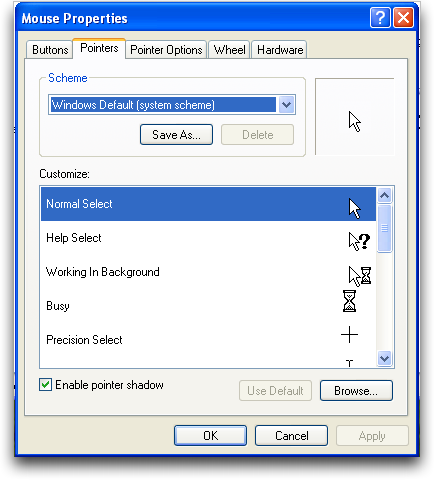
Windows users seem to place similar importance on that clicky thing. A recent PC Magazine article writes, "Few things are more important in Windows than the mouse pointers." Dave Taylor discussed mouse pointers once, showing this picture of Windows XP's mouse pointers: Windows XP's mouse pointer, then, doesn't look like the one John Goerzen got. They look like a bent version of the normal X11 pointers with inverted colors. Windows Vista's mouse cursors do look like GNOME's (via a BlogIsEverything post): For this reason, Windows Vista feels like a cheap knock-off of GNOME to me whenever I use it.


31 October 2008

John Goerzen: Biking in the dark, 45 degrees F

I've been telling people that I plan to keep bicycling into the winter. I think about half the people I've told to don't really believe it. And the last two weeks, I haven't been able to ride to work due to muddy roads and scheduling conflicts. But today I did.

I left while it was still dark and 45 degrees outside (7C for the Fahrenheit-impaired). I think that's the coldest bike ride for me yet. I wore my regular shorts, shoes, and socks. I had my regular shirt on, plus a long-sleeve thicker shirt on above it.

It was cold the first few minutes, but this was pretty much the right outfit. Once I got going and got some heat built up, I was doing fine. In fact, I had to unzip my outer layer because I was getting hot.

So. I figure that if I can do 45 with shorts, then I ought to be able to take on 20 with proper winter gear.

Either that, or I've now dug myself a nice big hole if I wimp out.

25 October 2008

John Goerzen: A Tale of Three Monitors

For quite a few years now, I've been using a Dell 2001FP 20" LCD. Aside from the fact that this is the monitor that has apparently placed me on Dell's "permanently harass with paper catalogs" list (BTW, USPS has sent them a nasty enforcement letter over that), and the fact that when it needed warranty repair, Dell didn't know how to do it because it wasn't connected to a Dell computer, it's been a good monitor.

With Terah's recent conversion to Linux, she needed a monitor. We decided she could use the 20" LCD, and I'd get a new monitor. I have a nice 24" HP LP2465 at work, 1920x1200, so I thought I'd hop on newegg and see what 24" monitors I could find.

I found a Samsung T240 over there. Apparently Samsung's premium "touch of color" line. I did some research. It got glowing reviews -- people seemed to think the display was brilliant, and the only problem was that its stand wasn't height-adjustable. It got rave reviews on Newegg. It was $400 after rebate. And it arrived here Thursday.

I opened up the box, and I have to tell you that it looks beautiful. The bezel is this reflective black with a hint of dark red at the bottom. I put it together, hooked it up, and...

Well, let's just say that "Touch of Color" isn't all that accurate. "Touch of Crap" is more like it.

As I write this, my Firefox window covers half the screen. The center part of it is this brilliant color. The lower part has the white faded to this sickening blue, and the bottom right corner has almost turned to a black-and-white image. While the top part of my screen simply is more contrasty, except for the very top of the screen, which has half an inch of brighter area than anywhere else.

In short, the viewing angle on here is so bad that sitting directly in front of the screen gives significant color variations. An xterm with a black background maximized to fill the screen has a black background some places and a gray background others. My solid midnightblue background looks more sky blue at some places and more... really dark blue... at others. And of course, moving my head slightly varies the color that I see. Also, on photos, there is very visible horizontal banding in them -- apparently some sort of dithering going on since this is only a 6-bit display. Ugh.

How on earth this monitor got glowing reviews, I have no idea. I learned a bit about LCD panel types. Apparently the T240 is a TN display. The horror. I'll never buy another one of those again.

The HP LP2465 that I have at work, and which is great with solid colors all across it, is an S-PVA. So I'm buying one of those for home. It's more expensive, but -- it's a good display.

I am still trying to figure out exactly who thinks this is a good monitor. I tried games on it. It was responsive, but again, colors were distorted due to viewing angle. And this distortion means it's completely useless for photo editing, where precise colors are important.

I bought it from Newegg, and their policy generally prohibits refunds on LCDs. I called them, explained the situation, and told them that I wanted to buy an HP LP2465 from them to replace it. After being on hold for a few minutes, they agreed to waive their policy -- and even the 15% restocking fee, once I placed the order for the HP monitor. Classy show, Newegg. That's the one bright spot in all this.

John Goerzen: Crazy Cursor Conspiracy Finally Fully Fixed

So lately I had the bad fortune to type in apt-get install gnome-control-center on my workstation. It pulled in probably a hundred dependencies, but I confirmed installing it, never really looking at that list.

The next day, I had a reason to reboot. When I logged back in, I noticed that my beloved standard X11 cursors had been replaced by some ugly antialiased white cursor theme. I felt as if XP had inched closer to taking over my machine.

I grepped all over $HOME for some indication of what happened. I played with the cursor settings in gnome-control-center's appearance thing, which didn't appear to have any effect. When I logged out, I noticed that the cursor was messed up in kdm of all things, and no amount of restarting it could fix it.

After some grepping in /etc, I realized that I could fix it with this command:

update-alternatives --config x-cursor-theme

And I set it back to /etc/X11/cursors/core.theme. Ahh, happiness restored.

I guess that'll teach me to install bits of gnome on my box. Maybe.

24 October 2008

John Goerzen: The End of an Era

I bought my first Apple hardware a number of years ago -- a 400MHz titanium Powerbook. The thing came with Mac OS X preloaded, but it was so slow that it was unusable. I put Debian on it, and was mostly happy with it -- until the titanium case started coming apart. Oh, and the small detail that the built-in wifi reception was so poor that I had to use a PCMCIA card to get a signal in some parts of my house.

But ever since then, we've always had some piece of Apple hardware in active use in our house.

About 7 years ago, my main workstation was a rapidly-aging 600MHz Alpha with -- gasp -- PCI video. It was OK for programming but really awfully slow at anything graphical. I was wanting to get into video editing, and we bought an 800 MHz iMac. The kind with the inverted-bowl base. A nice machine at the time. This was going to be my main workstation.

When it arrived at home, I unpacked it. Terah walked in and said, "Wow, my new computer is cute!" So it became *her* computer, and has been ever since.

It's rather old and is showing its age. Its wifi card died a couple of years ago. The 800MHz CPU is slow with today's websites.

So yesterday, we clicked on the apple and shutdown for the last time. It left her desk, replaced with a Linux desktop with a 20" 1600x1200 LCD (replacing the 15" 1024x768). I had assembled this Linux desktop out of spare parts in our basement, with a 4-year-old Athlon XP CPU. It's still faster than her Core 2 Duo work laptop running Vista, but that's another story.

I put Debian lenny on it. And I've got to say -- wow -- the utility of Debian as a desktop OS for the non-geeky has taken an incredible turn for the better in the last few years. Terah was fine with switching to Linux. I set it up for her -- Firefox for web, Thunderbird for mail, J-Pilot for syncing to her Palm, OpenOffice, gajim, etc.

Her concerns were: having Thunderbird make a nice "whoosh" sound when it successfully finished transmitting an email, having desktop gadgets (I installed screenlets, which I think she likes a lot), and.... I don't think I remember any others.

So now we both run Linux on our desktops.

Oh, and on her laptop, I poked around in the Vista control panels (I must have "authorized it to display this panel" a dozen times, stupid thing), and eventually found a box where I could optimize for visual effects or optimize for performance. I hit optimize for performance, and it transformed its interface into approximately Windows 2000 after a couple of seconds. I think that change made it a lot faster. It's now about as fast as the 25%-as-fast Linux box. I guess that's good for Vista.

Holger Levsen: Dear DSA FTPMaster Keyring-Maint Secretary FrontDesk DPL

For one, I think it might be a good idea to pause this proposal now. (Reason: lenny)

And I definitly think you should develop it using the DEP procedure. (And not a series of mails to different lists and some blog posts, which is very hard to follow.) And most probably this "you" (delegates) should become a "we" (Debian).

Love, Holger.

P.S.: my changelog form blog engine looks cool, but fails with commata in titles. Gah.

21 October 2008

Michal Čihař: Double check what you do

I just wanted to fix some RC bugs till I'll go home, so I looked at the list of open ones and randomly chosen two bugs about roxen fonts which looked like low hanging fruits. Both were in fact same issue, just copied to two packages. I worked on the fix, creating some intermediate version and then I finally wanted to upload the package. Unfortunately in this step I somehow managed to use the intermediate version, which did not really fix the issue. As packages were already uploaded, there was not much I could do except yet another NMU, now with full set of changes. Just as accepted emails arrived I also noticed that I messed up bug numbers in changelog - I used same bug number in both changelogs. Okay, manually closing the bug worked around this. But now I'm afraid what else did I mess up. Probably it's time to go for a dinner and stop working on computer for now :-).

20 October 2008

John Goerzen: Tabor's Centennial

You know you've got a bunch of Mennonites together when the pastor spontaneously asks the church to sing "Jesus Loves Me" while the children walk up for their children's story. And, without music, everybody spontaneously breaks into beautiful 4-part harmony. It must be genetic or something.

It was a day of beautiful singing of hymns a week ago for Tabor Mennonite Church's centennial. It's hard to write about that weekend, in fact -- it was such a nice experience.

Sunday ended with opening the box sealed in the church's cornerstone back in 1965 when the current building was built. Rudy Schmidt, the person that sealed it up back then, was on hand to open it back up. They took out the stone and removed the box. Before the box was opened, Rudy told a story:

Back in 1965, I was the one to solder this box shut. While I was doing this, all of a sudden I smelled burning from inside. I figured I must have caught something inside on fire. I asked Jake Koehn (another person on the building committee) what to do. Jake said, "Nobody will ever see it again, just put it in." So let's open it!


I think Rudy has been wondering all these years whether he set it on fire or not.

The box was opened, and other than a few scorch marks on an envelope, was completely intact and in good shape. There was a copy of a local newspaper from 1965 with a headline about Goldwater, copies of programs of dedication for the new building and parsonage, a Bible, copies of the church constitution, and all sorts of other interesting things. To that we will add a copy of our centennial book (which I helped develop), CDs with recordings of our centennial activities, programs from the centennial celebration, and photos of the weekend.

Earlier on Sunday, we had a long but good worship service with sermons from two former pastors. The choir sang, including a song commissioned for the occasion by Larry Nickel. We got applause after that one (which happens occasionally, but not regularly, in our church). All the living former pastors, and the widow of one of them, served communion as well.

The service ended with the congregation singing the "Mennonite Anthem". I think it was the most beautiful singing of that song I've ever heard. We had 352 people in church that day, and it seemed that not one person was going to let the moment go by without singing.

Saturday had started off with outdoor activities in the church park. There was old-fashioned soap making, remembering how church members used to store fat all year, then get together to make soap for use in their homes and to donate to the needy. There was rope making, wool spinning, and rides for the children. Under the tent, we had some great music the local Greenhorns band, and the former pastors all shared some memories and stories about their time here.

On Saturday evening, we had a meal and a drama -- and managed to somehow fit 321 people into the church basement for the meal. We think that's a record! The drama was written for the occasion by one of our members. John Gaeddert, a pastor here in the early 1970s, has become an expert wood carver in his spare time. He had carved a piece for us to celebrate the occasion, and presented it during the drama. That fit right in, because the drama was called "Bring Your Own Hedgepost" -- back in the early days of the church, each member was supposed to do just that so they would have a place to tie their horses.

Friday night was a lecture by James Juhnke about our first paster, P. H. Richert, who was pastor for nearly 40 years. Quite entertaining and interesting.

I think the highlight of the weekend for me was getting to talk to some of the former pastors I never knew well. I had a few minutes to chat with John Gaeddert. I introduced myself, and he said, "Oh! I don't think I've met you, but I've heard your name a few times this weekend. You're on the centennial committee, right?" Yes indeed. I was born after he left this church, but he knew my grandparents -- which means he also knows exactly where we live. John and his wife Mary are both such warm and friendly people that it feels like I've known them much longer than a few days!

I got to chat with Jim Schrag too. He was pastor at Tabor until I was about 5 or 6. He didn't remember me specifically, but he was also interesting to talk with. He was one of the people that worked on a detailed history book in 1983 for the church's 75th anniversary. He told me that he processed most of the black and white photos for that book in a darkroom in his basement. I hadn't known that -- and mentioned I had found all those photos in the church archives and had scanned them all in. Jim requested a copy.

Terah found Lenore Waltner, wife of former pastor James Waltner, who passed away about a year ago. James had started his career as a pastor at Tabor, and ended it at College Mennonite Church in Goshen, IN, where Terah grew up. So she knew him, but I didn't. Terah introduced herself to Lenore, who seemed quite excited to make this sort of family connection!

And Brenda Martin Hurst, another former pastor, found Terah and introduced herself. Terah said that Brenda said something like, "Hi, I'm Brenda, and I don't think I know you!" These pastors all want to get to know everybody, I think!

Next.

Previous.