Search Results: "ag"

30 April 2012

Cyril Brulebois: Debian XSF News #11

Long time no see Summary Anyway, here are some quick news from the X packaging front, focussing on the past few weeks.
  1. While I was busy doing other things, Julien took care of uploading lots of libraries (making most of them multiarch-aware) along with our usual meta-packages (like x11-apps, x11-utils, etc.), preparing for the upcoming 7.7 katamari.
  2. Mesa 8.0.2 was finally uploaded to experimental, where it seems to be building fine, and working fine, at least for me.
  3. Accordingly, I m planning an upload to unstable very soon, and I won t be disabling wayland support this time, since wayland/weston reached their first milestone with a public release (0.85). There s nothing very interesting to see here, but since wayland support doesn t really hurt, I thought I d just keep it. That s why wayland hit unstable yesterday; weston should follow after mesa. (In case somebody is in a hurry, they have been in experimental for quite some time already.)
  4. Scrolling issues with the synaptics driver seem to be finally fixed thanks to rc4: #665004 was confirmed as fixed by many reporters (thanks everyone for the quick feedback after my ping). Accordingly, I ve pinged the release team to get an age-days 3 to make it migrate faster, and a kind RM added that hint to his file, so testing is getting the fixed package thanks to this midnight s britney run.
  5. libcairo2/server/EXA/ati/nouveau fun: will be added through an edition of this post. Executive summary: downgrade libcairo2 to testing s version if you re seeing text corruptions.
Upcoming X server transition X server 1.12 has been prepared in experimental for a while, from release candidates to the first stable release from server-1.12-branch. Since a bunch of drivers were uploaded to cope with that version when it shows up, we should be able to upload xorg-server 1.12 to unstable VERY SOON. What does that mean? Basically, that s a transition. In details:
  1. We upload xorg-server, and wait for it to be built everywhere, then we trigger binNMUs for all architectures at once when it s ready on all of them.
  2. Unlike shared libraries, there s no old and new library packages (old+new SONAME); instead, the server itself provides different packages (because of the different input and video ABI). That means that drivers won t be installable until they are rebuilt against the new server. Usually, we re talking about a few dinstall runs, meaning less than a day.
Frequently Yelled Phrases:
  1. Upgrades are broken! No, it just means you can t upgrade the server alone, you need the drivers too (see above).
  2. Installations are broken! Well, that s unstable, and you probably know installability-related issues are trivially solved by pulling packages from testing when needed. This is such a case.
Please don t report bugs on this topic, thanks already, and enjoy that new server.

Lars Wirzenius: Obnam 0.27 released (backup software)

I've just released version 0.27 of Obnam, my backup application. The relevant part of NEWS:

Petter Reinholdtsen: Cutting it short - and picking the right tool for the job

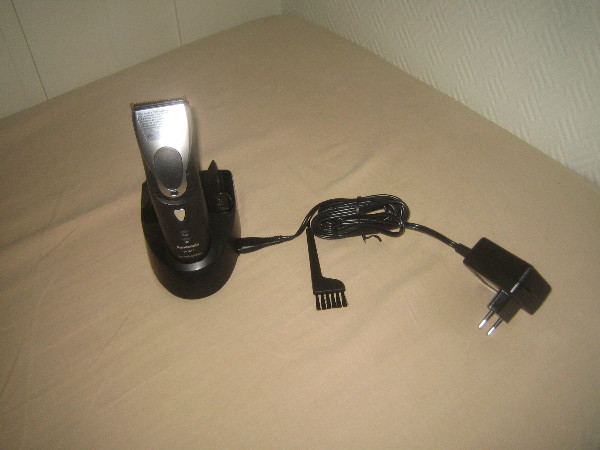
I normally cut my hair short, and my tool of choice has been a common hair/beard cutter, bought in a electrical shop here in Norway. But the last ones have not really been up to the task. My last cutter, some model from Braun, could only cut a few of my hairs at the time, and cutting my head took forever. And the one before that did not work very well either. We have looked for something better for a while, but it was not until I ended up visiting a hairdresser that we discovered that there are indeed better tools available. But these are not marketed and sold to "regular consumers". The hair saloons can get them through their suppliers, but their suppliers only sell companies. The models they sell, are very different from the ones available from Elkj p and Lefdal. The main difference is their efficiency. It would cut my hair in 5 minutes, instead of the 30-40 minutes required by my impotent Braun. The hairdresser I visited had a Panasonic ER160, which unfortunately is no longer available from the producer. But I found it had a successor, the Panasonic ER1611. The next step was to find somewhere to buy it. This was not straight forward. The list of suppliers I got from the hairdresser did not want to sell anything to me. But searching for the model on the web we found a supplier in Norway willing to sell it to us for around NOK 4000,-. This was a bit much. We kept searching and finally found a Danish supplier selling it for around NOK 1800,-. We ordered one, and it arrived a few days ago. The instructions said it had to charge for 8 hours when we started to use it, so we left it charging over night. Normally it will only need one hour to charge. The following evening we successfully tested it, and I can warmly recommend it to anyone looking for a real hair cutter. The ones we have used until now have been hair cutter toys.

John Goerzen: Review: Amateur Radio Handhelds (HTs), APRS, and Battery Tuning Tips

There are a lot of opinions about handhelds for amateur radio users (these handhelds are often known as HTs). I ve used three of them, two with APRS capability, and thought it s about time I write about them. First, I ll talk about the units in particular, then I ll get to some broader Yaesu vs. Kenwood generalizations and conclusions. Yaesu VX-7R a rugged first HT without APRS Cost: $350 as of 4/30/2012 This was the first HT I got as a ham, at the suggestion of Mike AE0MW. It truly does make a great first handheld for a ham. Radio-wise, one unique feature is a receive that s wideband enough to cover both broadcast FM and broadcast AM, the various ham bands, and plenty of others besides. The battery life quoted in the manual is 6 hours on 2m and 5.5 hours on 440 (using standard 6s TX / 6s RX / 48s squelched metric), and in my experience it seems it must be even better in some cases. The real piece of news about this unit, though, is just how rugged it is. It says submersible across the front and I absolutely believe it. I have personal experience with its ruggedness. I once was at an event and put the radio on my car roof while helping one of my children into the car. I then started driving home and forgot it there. When we got home, I realized what had happened, and also realized what that mysterious CLUNK along the busy county road was. So I drove 45 minutes back to where I heard the clunk, and found the VX-7R still lying in the roadway, where it had been for 1.5 hours on the 55 MPH road. The thing was really beat up. It had obviously been hit by numerous vehicles. The antenna was ripped off, taking the SMA mount with it. But wouldn t you know it, the darn thing still powered up. I took it to a local amateur radio shop, and about $80 later it was repaired. Incredible. The only real problem was the antenna connector. I took this radio with me on my bicycle many days, mounted on my handlebars. It got bounced around, but still worked great. Some days I listened to FM radio from it while riding my bike, monitoring a local repeater while I rode. Other days, I spent most of my ride (about an hour each way) chatting with people on the repeaters I have a mobile antenna mounted on the bike, fed to the VX-7R, and a headset. It all worked fine never a problem at all. The ruggedness has its downside. All of the connectors on the radio, except for DC in, are screw-down even the speaker/mic connector. This obviously helps keep water out, but means that it can take a lot longer than normal to do a simple thing like plug in a speaker/mic. It doesn t need any tools, but can get a little annoying. The radio physically is small (unless you install the belt clip, which has an odd peg-based mechanism that protrudes unnecessarily far and is surprisingly non-rugged). It can easily fit into a pocket. The other downsides of the VX-7R mostly surround its interface. I m not one of the Yaesu haters that seem to be so common. I find the interface usable if you read the manual; it seems a lot of people that complain about it don t. But it is quirky. The SET mode is one long menu in sort of a ring. You scroll with the knob, and when you get to the end, it repeats to the beginning. There are one or two shortcut keys to a specific setting, but overall either you use the thing so much you know exactly where you re going, or you re twisting the knob for awhile until the option you want rolls around. (I know of nobody that uses it so much they know exactly where they re going.) They do have options grouped into categories, but it doesn t help much because there s no quick way to skip between categories. The dual transceivers work less elegantly than on the TH-D72A or VX-8GR. Instead of being two equal transceivers A and B, they are main and sub . The sub transceiver is not broadband receive like the main receiver is. But there are also other limitations that have no apparent logic. For instance, you can program memory groups into the device putting, say, all the local repeaters into a certain group, or all the public safety frequencies (to use as a scanner). You can go to the special set menu, select group, then activate SCAN, and it will scan only the memories in that group. But you can t select the special group mode on the sub transceiver for no apparent reason. One other complaint is that the AC charger introduces so much noise to a transmission that you cannot really use the VX-7R to transmit while the charger is connected. Yaesu sells a programming cable that plugs into the speaker/mic port on one end, and a DB-9 serial port on the other, and includes programming software. For an incredibly high price. For far less, I found a similar cable on eBay that has a USB port on the other end (with a built-in USB/serial converter), and used VX-7R Commander though now that Chirp is available for Linux, I ll probably switch to it. I would probably continue to recommend this transceiver for a new ham. The ruggedness, plus the broadband RX, are features that should make it appealing. It is an excellent emergency preparedness/response radio due to those properties; having TX and RX on ham bands, plus RX on broadcast and public safety could be quite the asset. However, for someone that has any interest in APRS, one of the other two radios I mention is probably a better choice. At only $10 more, the VX-8GR sacrifices ruggedness and broadband receive for APRS functionality and could make a compelling alternative to the VX-7R at the same price point. The very low-power transmit at 50MHz and 220MHz on the VX-7R strikes me as a gimmick feature at best that has very little actual use. Shipped battery: FNB-80LI, 7.4V, 1400 mAh, lithium-ion Kenwood TH-D72A / D72E The Cadillac HT, with APRS and GPS Cost: $464 as of April 30, 2012 It s hard to use any word but incredible to describe this HT, though it does have its own rough edges. Starting with the basics, it has dual transceivers with full duplex (meaning you can be transmitting on one band while receiving on another). Its stored memory system and memory bank scanning system are both a lot easier and faster to use than Yaesu s, and work the same on both transceivers A and B, though perhaps offer slightly less flexibility than Yaesu s (on the VX-7R, a single memory can be a member of more than one group). The quoted operating time is 6 hours, which is probably accurate with APRS and GPS off, matching (or nearly matching) the VX-7R. The TH-D72A has the usual mic and speaker ports. Unlike Yaesu, Kenwood has used the same jack for years, so it is not necessary to purchase new accessories with each upgrade. The unit also has both serial (Kenwood connector) and standard mini USB ports, and even ships with a USB cable. The USB port is designed to interface to a PC, and the radio presents itself as a serial-over-USB device. Kenwood also includes MCP-4A, the programming software for the unit, free. This is one example of several things that Kenwood includes for free but are costly add-ons with Yaesu. Kenwood s configuration menu system is hierarchical. You can scroll through the four top-level menus (RADIO, GPS, APRS, and SKY), then navigate through sub menus. The result is that it s both faster and easier to find what you want than on the Yaesu menus. Plus, as you navigate, the radio shows you the shortcut key to get to a particular option (each level of menu is numbered starting) so, for instance, Menu-1-1-0 takes me directly to the configuration for RX battery saver interval far faster than I could get there on the VX-7R or VX-8GR. Only the APRS menu gets a bit crowded with this setup. The D72A supports Kenwood s Sky Command II an intriguing way of making it essentially a remote for a Kenwood HF rig such as the TS-2000. It works by engaging a crossband repeater for the audio, and setting up a AX.25 packet link for the control. It works, but as the response time to frequency adjustments is measured in seconds, is klunky for tuning around a HF band. A nifty, though perhaps not supremely useful, feature with some hackable potential that I haven t explored yet. The TH-D72A is one of only two shipping general-purpose amateur radios that have a built-in GPS the other is the Yaesu VX-8GR, which I ll review below. The GPS works well, and can get a fix indoors if desired. It has a system of saving waypoints, which you can then navigate back to later (using distance/bearing indicators). It also has a track log. While the track log can t be viewed on the unit, it can be downloaded with the included MCP-4A software and saved in a variety of formats including Google s KML for later importing into Google Maps or Google Earth. I enjoy this feature on trips to see where I went later on. There is also a GPS-only mode, which disables all of the other radio circuitry on the radio for very low power consumption. The GPS navigation screens all support heading-up or north-up indicators. But where this radio really shines is APRS. The D72 has all the basics you d expect sending and receiving beacons, sending and receiving messages and bulletins, etc. It has built-in support for being a digipeater in many different ways, including new-N UI-Trace. Coupled with an MFJ VHF amplifier, this could make a nice temporary (or even permanent) digi. The message interface permits sending, receiving, and shortcuts for replying to messages. Beacon transmission can be completely manual, at set intervals, or using SmartBeaconing. Outbound beacons also support proportional pathing (meaning adjusting via-path to not have wide coverage with every transmission). Also, if not using SmartBeaconing, a decay algorithm can be used to send beacons less frequently when the station s location isn t changing. An alternative tells the system to transmit a beacon every time PTT is released, subject to rate limiting by interval. So lots of choices there. For incoming beacons, there are various filters by callsign pattern, packet type, etc. that control whether they will be processed at all, and what kind of alert (visual or audible) to present. Beacons are also placed in a received beacon list, sorted with the most recent at the top (duplicates from the same station are always removed, so only the most recent is presented.) A long press of the LIST button shows time received and type of device next to the callsign. Selecting a specific beacon shows status text, comment, device type, bearing/distance (with graphical north-up or heading-up display), telemetry (weather information and the like), and a little bit of info about the via-path. Pretty nice to see weather reports from local weather stations on there. You can sort the list by received time, station call, or distance from your position but it doesn t stay sorted by anything other than received time, and takes several seconds to re-sort. Seems like a bit of an oversight there. The D72A supports QSY information in beacons. This can automatically insert the frequency of the other band on the transceiver into your transmitted beacons for you, or give you a quick way to tune to the frequency mentioned on others beacons. Either way, a nice touch. The D72 also supports query packets, such as packets asking your station to transmit its position right now. The TH-D72A can directly interface with several types of weather stations via serial link to read weather sensor information and transmit it into APRS packets directly, with no need for a PC to be in the picture at all. But if you do hook up a PC to it, there are quite a few more possibilities. You can hook it up to PC APRS software (or a hardware device such as the AVMAP) to see locations of other APRS stations on a map. It can emit APRS packets, plus even GPS sentences, down the USB port to the PC. Moreover, in PACKET mode, it acts as a full TNC, with a fairly robust TNC command set. In short, it can do more than APRS; it can also do regular AX.25 such as DX clusters, BBS, nodes, etc. As far as I know, this is the only HT that can interface with a PC in this manner, and only Kenwood s mobile D710 has the same kind of feature set at that. Kenwood includes a lot of documentation with the TH-D72A. The 51-page printed manual is a summary or introductory guide. The included CD-ROM supplies another 75 pages of detailed reference material, and the 92-page in-depth APRS manual has a level of detail that true geeks like me appreciate. I ve referred to Kenwood s documentation more than once while figuring out things about the VX-8GR (which woefully under-documents things like SmartBeaconing). That said, it appears that at least some of the documentation has been copied from the earlier TH-D7A. Page 4 of the printed book is a good example. It talks about the memory effect of the battery, and warns against unplugging and replugging the charger because the charge cycle will be reset and the battery will be over-charged (I find it hard to believe that a Li-Ion charge controller would be that stupid, and furthermore direct observation suggests that it isn t.) Parts of the in-depth APRS guide appear to have been written for the D710, but that s a really minor nit. Unlike Yaesu, Kenwood issues periodic firmware updates to the D72A, which you can apply over USB. They have fixed bugs and added features to the unit over time. Now onto the things that aren t so good about the D72A. I ll start with the battery system, since we were already discussing it. Despite shipping with a much larger battery than the VX-8GR (1800 mAh vs. 1100 mAh), it only manages roughly equal battery life with APRS and GPS engaged. (It will probably do better as a simple voice unit, however.) This has been confirmed by numerous reports on the Internet. I will discuss this topic more below. There is very little else to fault the D72A on, feature-wise. I have a minor nit in that it is impossible to cause the keylock feature to also lock PTT. It would be nice to be able to see raw APRS packets on beacons and messages. Other than that, I can t think of a feature it really lacks. Compared to the VX-7R and VX-8GR, the TH-D72A is significantly larger physically, in every dimension. It is not uncomfortably large, and still fits in my hand fine. But its size is enough different that it feels like the design is dated and could have been more compact if Kenwood would have bothered. It s a nit, sure, but a nontrivial one. With the single exception of the sturdy metal belt clip, the D72 doesn t feel nearly as rugged as the VX-7R, and not even as rugged as the VX-8GR. The keys have a squishy feel to them, the PTT button works fine but has a cheap plastic design (as opposed to the rubberized versions on Yaesu s HTs). The manual doesn t mention it, but one Kenwood brochure mentions and IP54 weatherproofing. That means it is protected against limited ingress of dust and against water sprayed from all directions limited ingress permitted. Contrast that to the VX-7R, which is rated for 30 minutes of submersion at 3ft and has a magnesium case. It seems to be specced similarly to the VX-8GR, though the VX-8GR certainly feels a lot more solid. I have no proof, as I m not about to sacrifice my HTs for science, but I doubt that the TH-D72A would have survived over an hour on a busy road as well as the VX-7R did, and probably not even as well as the VX-8GR would. The case is plastic a stout plastic, but still plastic. Like the VX-8GR, and unlike the VX-7R, the D72A does not have broadband receive. It can receive some bands adjacent to the ham bands it supports, which includes a lot of bands of interest to people with scanners, but still can t receive broadcast FM signals like the VX-7R. Shipped battery: PB-45L, 1800 mAh, lithium-ion Yaesu VX-8GR: Cheaper APRS & GPS Cost: $360 as of 4/30/2012 One could probably call this Yaesu s closest competitor to the D72A. At about $100 cheaper, it doesn t have a featureset that matches Kenwood s, but it does have a few innovations that the D72A lacks. Starting with the basics, it lacks the VX-7R s broadband receive, with the receive roughly matching the TH-D72A s. The 8GR is a dual-transceiver HT, and it works this effectively (moreso than the VX-7R). Yaesu has a bad habit of changing connectors on radios with regularity, and charging an arm and a leg for accessories to boot. Even within the VX-8 line, the 8GR uses different accessories than the 8DR, and of course has different plugs than the 7R (though it appears that the DC power plug is the same, and with some luck you might be able to use a VX-7R speaker/mic on the 8GR, though not the reverse). The menu system on the 8GR is still similar to the 7R, though Yaesu has done several things to improve it. For one, scrolling through the menu now shows several lines of context on the screen at once, making it faster to scan. Also, there are more ways to jump into the menu at a certain location than before and even a small bit of clumsily-implemented hierarchy (there are several settings on the SmartBeaconing page, for instance). The menu key now toggles between various displays: the default frequency/status display, a GPS display, an APRS staion list, and an APRS message list. Just about everything operationally takes more keypresses than the D72A. On the D72A, it s one or two keys (a physical button or F+button) to do almost everything: toggle GPS state, change TNC/APRS state (turn on or off), etc. All of that is in the scrolling menus on the 8GR. The quickest way there, which is documented in the manual, is to press MENU until a certain screen comes up, then press and hold MENU to bring up the settings (defaulting to a certain APRS-related category), then scroll and change settings. It s a pain to turn APRS on and off, because you have to do this process for both the GPS and the APRS modem. Inexplicably, there is a hotkey to change the APRS beacon method (manual, auto, or SmartBeaconing) but not to turn APRS itself on or off. (The D72A has a hotkey to toggle the beaconing, though not to change its method; though in truth, if you do it frequently, the menu shortcuts will get you there rapidly.) Physically, the VX-8GR is closer to the size of the 7R than the size of the D72A, and notably is significantly smaller than the D72A (at least with the standard battery). As noted in the D72A review, the VX-8GR feels more rugged than the D72A, though whether that is actually true or not is hard to pin down. It is definitely less rugged than the VX-7R. The keys require more pressure than the D72A, and in this they are similar to the 7R, but feel satisfyingly solid. Unlike the other radios here, the 8GR does not have a dedicated volume knob, having only one dial on the top. To adjust volume, you hold the volume button on the left while twisting the knob. In practice, this is probably not usually very annoying, but if the radio is on your belt or otherwise not in your hand, this would be a frustration. (I think it would be particularly annoying if using it with a speaker/mic). Setting 99 will let you change the key so you don t have to hold it in, which could probably go a long way to making the situation more tolerable. One unique feature of the VX-8GR, as far as I know completely unique to it, is a vibrating alert. This would most frequently be used with APRS to provide a nearly-silent alert of incoming messages and the like. The screen of the 8G, while similar in size to both the D72A and the 7R, appears to be higher-resolution (or if not, they make better use of it). More information is packed onto the screen at once, and although the D72A does have a small font, it uses it so rarely that lots of scrolling is needed. The 8GR uses a smaller font than the D72A to show content of messages and the like, which makes a much faster experience since there is a lot less scrolling. Neither radio has a setting to change this behavior, so if your eyesight isn t good, you may prefer the D72A anyhow. The VX-8GR supports a heading-up or a north-up view of the received GPS data, but strangely it does not support this when navigating to a received beacon (north-up is the only option). Unlike the TH-D72A, you can engage keylock on the 8GR while someone s beacon is on the display. Also unlike the TH-D72A, you can lock out the PTT key on the 8GR. However, the keylock feature is just a quick press of the power button, which makes me a bit nervous. And worse, if you tell it to lock the PTT key, then it also won t transmit any automatic APRS beacons! There are a lot of things the D72A supports in the APRS area that the 8GR doesn t. Here s a summary of features missing in the 8GR compared to the D72A: voice alert (can t even do it manually since tone/CTCSS are locked out in APRS mode), quick replying to messages, TNC mode (meaning you can t use it with PC-based APRS programs), full AX.25 packet mode, full PC linking, weather station inputs, built-in digipeater mode, heading-up display, GPS track logs, QSY in beacons, quick tuning to others QSY info, responding to position queries, proportional pathing, automatic decay, beaconing on PTT release, sorting of beacon list, hotkey access to many features, and I m sure the list goes on. On the flipside, the only thing feature-wise that you get on the 8GR s APRS implementation that the D72A lacks is ability to inspect raw APRS packets. The VX-8GR has the lowest-capacity battery of the three radios covered in this post, and this is an oft-cited problem for users of the unit. Yeasu does seem to do a much better job of power management than Kenwood, though, so in full APRS and GPS mode, the battery life is roughly the same, amazingly enough. It is unlikely that the talk time on the 8GR would match either the 7R or the D72A, however. Kenwood and Yaesu both have a battery saver feature which cuts power to the RX circuit except for brief checks for signals. Yaesu completely disables this while the APRS modem is on (and STILL matches Kenwood s battery life, despite the smaller battery!) Kenwood doesn t, though recommends changing the signal-check interval from 0.2s to 0.03s in order to avoid truncating APRS packets. Yaesu offers an 1800 mAh extended-life battery which should significantly exceed Kenwood s battery life. Aftermarket vendors have 2000 mAh batteries as well. Either way, expect APRS to be a drain on batteries. More on that below. Although Yaesu includes 168 pages of documentation with the 8GR, don t expect it to match the quality and detail of Kenwood s 218 pages. There are a lot of gimmicky/useless features on the 8GR (WIRES, for one) that get extensive treatment, and there is a fair bit of repetition. I particularly single out the SmartBeaconing documentation on the 8GR as being, at best, woefully incomplete and probably also inaccurate to boot. Read the D72A manuals to figure out how that feature works on your 8GR. I bought the VX-8GR intending it to be something akin to a more versatile TinyTrak. On that score, it mostly succeeds. It may be my go-to rig for use at bicycle rides, marathons, emergencies, etc., while the D72A will probably be the one that goes with me on trips. Shipped battery: FNB-101LI, 7.4V, 1100 mAh, lithium-ion Not covered: VX-8DR poor value for the dollar Cost: $434 ($550 with GPS and GPS connector) Yaesu s top-of-the-line HT is sometimes considered to be the VX-8DR. It maintains the broadband capability of the 7R, is probably almost as rugged as the 7R, and has APRS built in, like the 8GR. It even has an option to add a Bluetooth board. What is doesn t have built-in is a GPS. You can add one on for $77 for the FGPS-2 plus $39 for the CT-136 connector which connects the GPS to the unit. But then you have a unit a lot less rugged than even the D72A (that s a small connector for the GPS), a lot less small, with the same APRS featureset as the 8GR (meaning a lot less than the D72A), which costs about $100 more than the D72A. Frankly I think this makes for a poor APRS package, and would probably only be reasonable for someone that wants other 8DR features and has a desire for some very occasionaly APRS work. Battery Life and APRS One of my first surprises with APRS HTs was the poor battery life I saw. Doing my research seemed to suggest that, contrary to popular opinion, the transmitted beacons were not the culiprit, but the receive circuits were to blame. Because it is not acceptable to cut off the first 200ms of an AX.25 packet like it is with a repeater, the RX circuit is either engaged much more frequently (Kenwood) or continuously (Yaesu), putting a lot more drain on the battery. (This has also been confirmed by multiple others that have done testing) The GPS receiver also adds drain, and on the D72A, so does the TNC, which is always active when APRS is. If you don t care about received beacons, you can dramatically raise the battery life on the D72A by setting the power saver to 1 second or greater as high as 14 hours by one report. On either unit, raising the squelch should have some effect (though not as much; but in any case, weak packets won t decode anyhow, so there s no sense in letting them in.) On the 8GR, getting the extended life 1800 mAh (or aftermarket version) could produce battery life in nearly that same region, without compromising on the RX side of things. Conclusions If you want a HT capable of APRS, seriously think of the TH-D72A before anything else. It is $100 more expensive than the 8GR, but has more than $100 worth of extra features (and included things, like PC link cable and software, that are extra on the 8GR), so it has a better value. If you re particularly budget-conscious or want the most ruggedness you can find, the 7R and 8GR are solid contenders if you can sacrifice the extra APRS features. Update May 1: Clarified what the lack of TNC mode on the VX-8GR means, and also how the VX-8GR PTT keylock also locks out APRS transmissions.

Pietro Abate: unburden my home dir

Today I installed unburden-home-dir and I'm very please with it. It's a simple script that takes care of your temporary files to move them outside your home directory. The main reason why I installed it is to minimize the number of read/writes of iceweasel. My favorite browser is apparently the culprit of 80% of read / write operations on disk even when it is idle... Moving the cache to tmpfs, I hope to reduce the IO on disk and to extend my battery life. Using a SSD I haven't noticed any remarkable benefits regarding performances, but I hope I'll manage to squeeze a bit more from my battery. Installing and configuring unburden-home-dir is straightforward. It is packaged for debian (experimental at the time of writing), and it is very easy to configure. Remember that if you want to have your cache on tmpfs, you need to ether mount a tmpfs-enabled file system somewhere or enable RAMTMP=yes in /etc/default/rcS (default in wheezy). After installing unburden-home-dir iotop shows a delightful page full of zeros :) ps: if you use duplicity, remember to specify the option --archive-dir to move the duplicity cache somewhere else...

Russell Coker: The Royal Caribbean Official Android app

I ve just played with the official Android app [1] for the Royal Carribean cruise line [2]. The cruise line is apparently great (I ve never been on one of their ships but the reviews are good) but the Android app isn t. Net Access The most obvious and significant problem with this app is that it s entirely useless without net access. All data of note comes from the Internet which means that the program is useless in any location where Internet access is unavailable (or unreasonably expensive). They wrote an app about cruising that can t be used on a cruise ship! Did they even think about what they were doing? The correct thing to do when writing such an application is to have all basic data about all ships included in the app. This means that when they change the deck plan of a ship they need to release a new version of the app and have people download it. Having done a lot of software development I understand that forcing software updates (even updates to included data files) involves some effort and expense. But when they spend $20,000,000 to update a ship (which is about the minimum that is spent for a major ship in dry-dock according to TV documentaries I ve watched) it seems quite reasonable to budget $10,000 to release new software. Also one benefit of updating the software is that it can promote the changes, after spending tens of millions of dollars improving a ship they probably want to promote that to customers and pushing a new app update with adverts for the improved ship seems like a good way of doing that. There is some data that can t reasonably be included in the app due to size constraints with photos of ships being the most notable example. The solution to this is to provide an option for the user to cache the data that interests them. For example if I was meeting some people to discuss the possibility of a group cruise on a RCL ship then I could download all the pictures of that ship on my home Wifi network and then have them all available with no delay or 3G costs. Also the app seems to hang if net access is temporarily interrupted. As phones are expected to have unreliable net access this is also a significant flaw. Maps The maps of the ships are comprised of a series of pictures which each show one deck. In addition to being downloaded (not cached or included in the app) they aren t scalable (they should be SVG or at least allow zooming the high resolution pictures) and they don t allow a 3D view. The paper maps used to promote cruises (including RCI cruises) and which are given to all passengers on Princess cruises (I m not sure about other lines) show a side cutaway view of the ship which is handy for working out which things are near where you are. It seems that an ideal cruise ship mapping program would have some sort of 3D component, maybe X3D. My experience is that a two night cruise isn t long enough to become familiar with one of the smaller cruise ships. Using a map is essential and a smart phone is a good way of managing such a map as typical 2D paper maps just aren t good enough for such a large and complex structure. Photos One of the significant things that is wrong with the app is a lack of care in displaying the photos of ships. They display three pictures of the Allure of the Seas (one of the two newest, biggest, and most luxurious ships in their fleet), but one of those three photos is actually of the Oasis of the Seas. The fact that the two ships are almost identical is no excuse, there is a principle at stake! Also only having three pictures is pretty poor, there is no way that less than 50 pictures could do justice to such a big ship! A Google search for the words cruise and photos turns up many sites with pictures of cruise ships and it s not particularly difficult to find pictures of any particular ship. Photographs by customers are often of high quality as some of the better DSLR cameras are in the same price range as some of the cheaper tickets for cruise ships. Probably the best thing that RCI could do is to run a contest and allow their customers to enter photos and vote towards the winning entries. That would get them photos that aren t as sterile as the official photos and which include the things that are of most interest to customers. Finally in terms of caching, pictures are the most easily cached source of data and as phones get higher resolution they keep getting bigger. The storage space for a modern phone is equivalent to the entire 3G download quota for about a year on an affordable Australian 3G plan. When dealing with photos downloaded from the net the default should be to cache everything. Navigation Navigating a smart-phone app is a lot more difficult than navigating the same data on a desktop system (which would be in a web browser). Users can compensate for some deficiencies with web site organisation by using a large monitor and having several web browser windows with multiple tabs. But with a phone it should be possible to switch between things quickly. The main menu has a View Our Ships option (which allows viewing deck plans and pictures) and a View Our Staterooms option which offers a list of ships and then describes the state rooms available for each one. This means that you can t see all the information about a ship in one place and even worse you can t easily compare ships. As it seems likely that people will want to use this app for selecting a cruise it should be possible to select a few ships that are of interest and then quickly flip between them. For example the Rhapsody of the Seas and the Voyager of the Seas are cruising in my part of the world so it would be nice if I could tell the app to compare those ships and then allow me to view a page about one ship and then flick to the equivalent page about the other ship. Another notable problem is that the ships are listed in alphabetical order. The sensible thing to do is to list them by class going from biggest to smallest. Lessons to be Learned These problems aren t specific to the RCI app, many other Android apps have the same flaws. For example the Google Play market app doesn t cache the icons of the installed apps so every time I want to see a list of installed apps it goes slow and wastes some of my bandwidth. Doing something wrong in the same way as Google isn t necessarily a great mistake, although using the Google Play market on a cruise ship is probably very uncommon. Probably the biggest problem is a lack of testing. They should have sent the developers on a cruise as a live test. Every cruise ship has a sales desk for booking future cruises so it wouldn t be difficult to have a dozen Android phones at the sales desk to see how real customers who really want to book a cruise find it. I presume that even if net access was available then such a test would fail dismally. If a 3D display of a ship combined with all the data management capabilities of a modern smart phone (which is a lot more powerful than the desktop systems I used prior to 2000) can t at least be a useful supplement to a stack of paper brochures then it s probably a failure. I think that the RCI app is an example of how to make an Android app which doesn t fall into the more common failings (such as being a quick and dirty port from iOS) but yet still isn t useful to customers. I recommend that people who develop apps which have an objective of imparting information to users try it out as an example of what not to do. Try a few basic tasks like comparing the three biggest classes of RCI ships in terms of features, after failing to do that with the app you can then use Wikipedia to get the result. But don t use the Wikipedia client apps, use a tabbed browser such as Opera Mini. Related posts:
  1. An Introduction to Android I gave a brief introductory talk about Android at this...
  2. Choosing an Android Phone My phone contract ends in a few months, so I m...
  3. Galaxy S vs Xperia X10 and Android Network Access Galaxy S Review I ve just been given an indefinite loan...

29 April 2012

Peter Eisentraut: Setting the time zone on remote SSH hosts

The tasks: I have one or more desktop/laptop machines with varying local time zones (because the persons using them are actually in different time zones, or because the one person using them travels). I also have a number of servers configured in some random time zones. (It could be the time zone where they are physically located, or the time zone of the person who installed it, or UTC for neutrality.) Now what I would like to have happen is that if I log in using SSH from a desktop to a server, I see time on that server in my local time zone. For things like ls -l, for example. Obviously, this illusion will never be perfect. Nothing (except something very complicated) will adjust the time stamps in the syslog output, for example. But the ls -l case in particular seems to come up a lot, to check how long ago was this file modified. This should be completely doable in principle, because you can set the TZ environment variable to any time zone you like, and it will be used for things like ls -l. But how do you get the TZ setting from here to there? First, you have to make the remote SSH server accept the TZenvironment variable. At least on Debian, this is not done by default. So make a setting like this in /etc/ssh/sshd_config:
# Allow client to pass locale environment variables
AcceptEnv LANG LC_* TZ
You also need to make the equivalent setting on the client side, either in /etc/ssh/ssh_config or in ~/.ssh/config:
SendEnv LANG LC_* TZ
Which leaves the question, how do you get your local time zone into the TZ variable to pass to the remote server? The actual time zone configuration is the file /etc/localtime, which belongs to glibc. In current Debian, this is (normally) a copy of some file under /usr/share/zoneinfo/. In the distant past, it was a symlink, which would have made things easier, but now it's a copy, so you don't know where it came from. But the name of the time zone is also written to /etc/timezone, so you can use that. The format of the TZ environment variable can be found in the glibc documentation. If you skip past most of the text, you will see the relevant parts:
The third format looks like this: :CHARACTERS Each operating system interprets this format differently; in the GNU C library, CHARACTERS is the name of a file which describes the time zone.
So what you could do is set
TZ=":$(cat /etc/timezone)"
Better yet, for hopping through multiple SSH hosts in particular, make sure to preserve an already set TZ:
TZ=$ TZ:-":$(cat /etc/timezone)" 
And finally, how does one hook this into ssh? The best I could think of is a shell alias:
alias ssh='TZ=$ TZ:-":$(cat /etc/timezone)"  ssh'
Now this set up has a number of flaws, including: But it practice it has turned out to be quite useful. Comments? Improvements? Better ideas? Related thoughts:

28 April 2012

Jose Luis Rivas Contreras: Tracker eating my memory cache

UPDATE I removed tracker, when I rebooted my machine again my memory cache got ~1000M again, and again, and again. I didn t knew it existed until recently, that I saw all my memory was eaten up and suddenly I was using my SWAP instead of my memory, and it was fully loaded. What s my surprise? I have 2G in memory and 1113M of it was cache, and 1G of swap full as well. The worst thing is that I reboot my machine and without starting anything I get 903M of cache full, out of nowhere! I start to track what s the issue, where s the leak, and found that if I killed tracker-store early then my memory stopped being loaded of cache. There s a bug, already reported, it s #612242 and the workaround given is to nuke the database with tracker-control -r. It worked. Now my cache is not full, but since I just did it I don t know if in some days my tracker-cache will be full again and eating all my memory. Just wanted people know there was a work-around at least and you could use your computer again.

Paul Tagliamonte: Transparency Camp (Day 1)

I m at Transparency Camp, so if you re around, feel free to find me and say hi! I ve been pretty much off the radar completely, so this is just to say I m alive and doing well :) For those who don t know, Transparency Camp is an unconference on open government, government transparency and all that good stuff.

Andrew Cater: Raspberry Pi - shipping in volume

Farnell are now shipping in volume worldwide and will shortly be relaxing the restriction to one Raspberry Pi per customer: RS are also in the process of inviting those with expressions of interest in time order.

The OS of choice is currently Debian - the developers at Broadcom in Cambridge are releasing SD card images fairly regularly at the moment.

There is a large amount of interest worldwide and this before release for education - this can only be good.

[Mine is due week beginning 28 May :) ]

Russell Coker: Nando s Voucher Interpretation

Every year my parents buy a book of vouchers for various businesses in Victoria. It s one of those deals where businesses (mostly restaurants) pay for advertising space to have their tear-off vouchers in the book (which typically allow a discount of between $5 and $30) and the customers buy the book for something like $40 (I m not really sure as I don t pay). Every year I take my pick of the vouchers that don t suit my parents, the Nando s chain of chicken and chips restaurants that specialises in Peri-Peri spicy sauce [1] is one that doesn t suit my parents (they prefer the traditional English-Australian food). The Nando s vouchers say Enjoy one complimentary 1/4 flame-grilled peri-peri chicken item when another 1/4 flame-grilled peri-peri chicken item is purchased with no explanation of exactly what an item is. Every Nando s store that I ve been to in the past has interpreted item as chicken and chips, usually they include the drink that comes with the quarter chicken meal in the item that is free. I can do without a second soda as it s really cheap from the supermarket and I m not going to drink two at one meal anyway so I m not bothered when someone interprets the voucher as not involving a free drink. But the lack of chips is annoying. At the Nando s store on Swanston St between La Trobe St and Little Lonsdale St they interpret item as being just the 1/4 chicken. I think that most people would regard this as an unusual interpretation. If the intent was to only offer 1/4 chicken then the voucher could have stated that a free 1/4 chicken was offered and removed all doubt. The fact that the voucher says a free 1/4 flame-grilled peri-peri chicken item instead of offering a free Quarter Chicken (which is the description for chicken on it s own on the Nandos menus) seems to be a reasonable indication that more than just the free chicken is offered. I won t be attending the Nandos store on Swanston St again and recommend that others avoid it too. Failing to offer the full value on the voucher is annoying, it decreases the value for money (which is a problem given how expensive Nandos is), and it makes me wonder what other cost-saving measures might be used at that store. I ve got a stack of vouchers (many of which will expire before being used) and the Melbourne CBD has many places to eat. No related posts.

Christian Perrier: 2012 update 21 for Debian Installer localization

Status for D-I level 1 (core D-I files): Status for D-I level 2 (packages that have localized material that may appear during default installs, such as iso-codes, tasksel, etc.): Status for D-I level 3 (packages that have localized material that may appear during non-default installs, such as win32-loader) Full 100% completeness (hall of fame) for 22 languages: Asturian, Belarusian, Bulgarian, Catalan, Czech, German, Esperanto, Spanish, French, Indonesian, Italian, Japanese, Kazakh, Khmer, Dutch, Polish, Portuguese, Russian, Slovak, Swedish, Turkish, Simplified Chinese

27 April 2012

Richard Hartmann: , ,

I have no idea if the literal translation carries over, but to be on the safe side: I like what I've seen up to now. First impressions are always the most honest (and I may have sketchy access to the Internet at best in the coming days) so here goes. I haven't even been here for 24 hours so take everything I say with a sack of salt.

Ana Beatriz Guerrero Lopez: Debian in the Google Summer of Code 2012

This year our efforts have paid off and despite there being more mentoring organizations than there were in 2011 (175 in 2011 and 180 in 2012), this year in Debian we got 81 submissions versus 43 submissions in 2011.
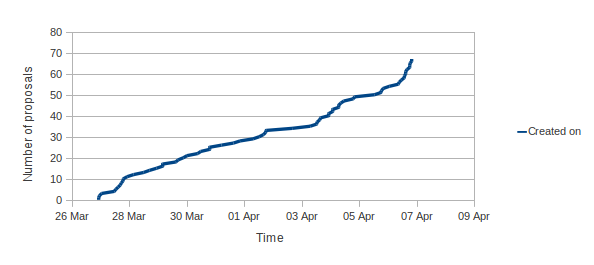
You can see here the graphs of applications against time from this year: 2012 The result is this year we ll have 15 students in Debian versus 9 students last year! Without further ado, here is the list of projects and student who will be working with us this summer: If you want to know more about these projects, follow the links and ask the students (and mentors)!

Riku Voipio

Cross Compiling with MultiArch Congrats to the Ubuntu Folk for the new LTS release. Incidentally this is also the first release where our work on MultiArch bears fruit. We can now cross-compile relatively easily without resorting to hacks like scratchbox, qemu chroot or dpkg-cross/xdeb. Lets show short practical guide on cross-building Qemu for armhf. The instructions refer to precise, but the goodiness is on the way to Debian as well. Biggest missing piece being the cross-compiler packages, which we have an Summer of Code project. The example is operated in a chroot to avoid potentially messing up your working machine. Qemu-linaro is not a shining example, as cross-building it doesn't work out of box. But that is educational, it allows me to show what kind of issues you can bump into, and how to fix them.

$ sudo debootstrap --variant=buildd precise /srv/precise
Edit the /srv/precise/etc/apt.sources.list to the following (replace amd64 with i386 if you made an i386 chroot)

deb [arch=amd64] http://archive.ubuntu.com/ubuntu precise main universe
deb [arch=armhf] http://ports.ubuntu.com/ubuntu-ports precise main universe
deb-src http://archive.ubuntu.com/ubuntu precise main universe
Edit the /srv/precise/etc/dpkg/dpkg.cfg.d/multiarch by adding the following line:

foreign-architecture armhf
Finally disable install of recommends by editing /srv/precise/etc/apt/apt.conf.d/10local:

APT::Install-Recommends "0";
APT::Install-Suggests "0";
Install the armhf crosscompiler the chroot

$ sudo chroot /srv/precise/
# unset LANG LANGUAGE
# mount -t proc proc /proc
# apt-get update
# apt-get install g++-arm-linux-gnueabihf pkg-config-arm-linux-gnueabihf
Get the sources and try to install the cross-buildeps:

# cd /tmp
# apt-get source qemu-linaro
# cd qemu-linaro-*
# apt-get build-dep -aarmhf qemu-linaro
As we see, the build-dep bombs out ugly, with a them of "perl" being unable to be installed. This is because apt-get can't figure out if we should install and armhf or amd64 version of perl. We don't use the required syntax yet in Build-Dep line, "perl:any", as dpkg and apt in previous released don't support it. Thus back porting would no longer be possible. One way to fix it, would be to drop perl build-dep, as perl is already pulled by other build-deps. But lets instead show howto install it the build-deps manually. First we build system build-deps, then target architecture ones:

# apt-get install debhelper texinfo
# apt-get install zlib1g-dev:armhf libasound2-dev:armhf libsdl1.2-dev:armhf libx11-dev:armhf libpulse-dev:armhf libncurses5-dev:armhf libbrlapi-dev:armhf libcurl4-gnutls-dev:armhf libgnutls-dev:armhf libsasl2-dev:armhf uuid-dev:armhf libvdeplug2-dev:armhf libbluetooth-dev:armhf
And try the build[1]:

# dpkg-buildpackage -aarmhf -B
Which sadly errors out. Turns out the cross-build support in debian/rules is broken. Instead of --cc we need to feed an --cross-prefix to the ./configure of qemu. Edit the debian/rules with replacing

- conf_arch += --cc=$(DEB_HOST_GNU_TYPE)-gcc --cpu=$(QEMU_CPU)
+ conf_arch += --cross-prefix=$(DEB_HOST_GNU_TYPE)-
Optional: Since we are cross-compiling from a multicore machine, lets also add parallel building support, by changing the override_dh_auto_build: rule to have --parallel flags in debian/rules as well:

override_dh_auto_build:
# system build
dh_auto_build -B system-build --parallel
ifeq ($(DEB_HOST_ARCH_OS),linux)
# user build
dh_auto_build -B user-build --parallel

# static user build
dh_auto_build -B user-static-build --parallel

Try the build again:

# export DEB_BUILD_OPTIONS=parallel=4 # I have dual-core hyperthreading machine, build with all four threads
# time dpkg-buildpackage -aarmhf -B
...
dpkg-buildpackage: binary only upload (no source included)

real 18m53.425s
user 65m42.570s
sys 2m50.383s
The Native build of qemu-linaro took 4h 11min. [1] You should not build as root - but to keep instructions short, I'm not explaining howto add and use a unprivileged user in a chroot. Do as I *say*, not as I *do*!

Stefano Zacchiroli: interview for la Repubblica

Debian, free software, and critical consumption As mentioned in my last report, about a month ago I've been interviewed (in Italian) for la Repubblica, a major general-interest Italian newspaper. Matteo Cortese has kindly contributed an English translation of the interview (thanks!), which I've just made available. If you're a Free Software enthusiast, there is probably nothing new in there for you. But for a different public the story is quite another. In many countries it is still very difficult to find room on general-interest newspapers to explain why Free Software matter to people, and how not caring about it will lead consumers to progressively lose their rights while software become more and more common in the stuff they buy. So many thanks to journalist like Giulia Belardelli who show a genuine interest in these topics and try to bring them "to the masses".

Pietro Abate: Learning from the Future of Component Repositories - CBSE 2012

Learning from the Future of Component Repositories ( Pietro Abate, Roberto Di Cosmo, Ralf Treinen and Stefano Zacchiroli ) has been accepted to be presented at CBSE 2012 (26-28 June, Bertinoro, Italy)

Abstract
  An important aspect of the quality assurance of large component repositories
  is the logical coherence of component metadata. We argue that it is possible
  to identify certain classes of such problems by checking relevant properties
  of the possible future repositories into which the current
  repository may evolve. In order to make a complete analysis of all possible
  futures effective however, one needs a way to construct a finite set of
  representatives of this infinite set of potential futures. We define a class
  of properties for which this can be done.
  We illustrate the practical usefulness of the approach with two quality
  assurance applications: (i) establishing the amount of  forced upgrades''
  induced by introducing new versions of existing components in a repository,
  and (ii) identifying outdated components that need to be upgraded in order to
  ever be installable in the future. For both applications we provide
  experience reports obtained on the Debian distribution.
The tools presented in this paper (outdated and challenges) are already in Debian as part of the 'dose-extra' package.

Russell Coker: BTRFS and ZFS as Layering Violations

LWN has an interesting article comparing recent developments in the Linux world to the Unix Wars that essentially killed every proprietary Unix system [1]. The article is really interesting and I recommend reading it, it s probably only available to subscribers at the moment but should be generally available in a week or so (I used my Debian access sponsored by HP to read it). A comment on that article cites my previous post about the reliability of RAID [2] and then goes on to disagree with my conclusion that using the filesystem for everything is the right thing to do. The Benefits of Layers I don t believe as strongly in the BTRFS/ZFS design as the commentator probably thinks. The current way my servers (and a huge number of other Linux systems) work of having RAID to form a reliable array of disks from a set of cheap disks for the purpose of reliability and often capacity or performance is a good thing. I have storage on top of the RAID array and can fix the RAID without bothering about the filesystem(s) and have done so in the past. I can also test the RAID array without involving any filesystem specific code. Then I have LVM running on top of the RAID array in exactly the same way that it runs on top of a single hard drive or SSD in the case of a laptop or netbook. So Linux on a laptop is much the same as Linux on a server in terms of storage once we get past the issue of whether a single disk or a RAID array is used for the LVM PV, among other things this means that the same code paths are used and I m less likely to encounter a bug when I install a new system. LVM provides multiple LVs which can be used for filesystems, swap, or anything else that uses storage. So if a filesystem gets badly corrupted I can umount it, create an LVM snapshot, and then take appropriate measures to try and fix it without interfering with other filesystems. When using layered storage I can easily add or change layers when it s appropriate. For example I have encryption on only some LVs on my laptop and netbook systems (there is no point encrypting the filesystem used for .iso files of Linux distributions) and on some servers I use RAID-0 for cached data. When using a filesystem like BTRFS or ZFS which includes subvolumes (similar in result to LVM in some cases) and internal RAID you can t separate the layers. So if something gets corrupted then you have to deal with all the complexity of BTRFS or ZFS instead of just fixing the one layer that has a problem. Update: One thing I forgot to mention when I first published this is the benefits of layering for some uncommon cases such as network devices. I can run an Ext4 filesystem over a RAID-1 array which has one device on NBD on another system. That s a bit unusual but it is apparently working well for some people. The internal RAID on ZFS and BTRFS doesn t support such things and using software RAID underneath ZFS or BTRFS loses some features. When using DRBD you might have two servers with local RAID arrays, DRBD on top of that, and then an Ext4 filesystem. As any form of RAID other than internal RAID loses reliability features for ZFS and BTRFS that means that no matter how you might implement those filesystems with DRBD it seems that you will lose somehow. It seems that neither BTRFS nor ZFS supports a disconnected RAID mode (like a Linux software RAID with a bitmap so it can resync only the parts that didn t change) so it s not possible to use BTRFS or ZFS RAID-1 with an NBD device. The only viable way of combining ZFS data integrity features with DRBD replication seems to be using a zvol for DRBD and then running Ext4 on top of that. The Benefits of Integration When RAID and the filesystem are separate things (with some added abstraction from LVM) it s difficult to optimise the filesystem for RAID performance at the best of times and impossible in many cases. When the filesystem manages RAID it can optimise it s operation to match the details of the RAID layout. I believe that in some situations ZFS will use mirroring instead of RAID-Z for small writes to reduce the load and that ZFS will combine writes into a single RAID-Z stripe (or set of contiguous RAID-Z stripes) to improve write performance. It would be possible to have a RAID driver that includes checksums for all blocks, it could then read from another device when a checksum fails and give some of the reliability features that ZFS and BTRFS offer. Then to provide all the reliability benefits of ZFS you would at least need a filesystem that stores multiple copies of the data which would of course need checksums (because the filesystem could be used on a less reliable block device) and therefore you would end up with two checksums on the same data. Note that if you want to have a RAID array with checksums on all blocks then ZFS has a volume management feature (which is well described by Mark Round) [3]. Such a zvol could be used for a block device in a virtual machine and in an ideal world it would be possible to use one as swap space. But the zvol is apparently managed with all the regular ZFS mechanisms so it s not a direct list of blocks on disk and thus can t be extracted if there is a problem with ZFS. Snapshots are an essential feature by today s standards. The ability to create lots of snapshots with low overhead is a significant feature of filesystems like BTRFS and ZFS. Now it is possible to run BTRFS or ZFS on top of a volume manager like LVM which does snapshots to cover the case of the filesystem getting corrupted. But again that would end up with two sets of overhead. The way that ZFS supports snapshots which inherit encryption keys is also interesting. Conclusion It s technically possible to implement some of the ZFS features as separate layers, such as a software RAID implementation that put checksums on all blocks. But it appears that there isn t much interest in developing such things. So while people would use it (and people are using ZFS ZVols as block devices for other filesystems as described in a comment on Mark Round s blog) it s probably not going to be implemented. Therefore we have a choice of all the complexity and features of BTRFS or ZFS, or the current RAID+LVM+Ext4 option. While the complexity of BTRFS and ZFS is a concern for me (particularly as BTRFS is new and ZFS is really complex and not well supported on Linux) it seems that there is no other option for certain types of large storage at the moment. ZFS on Linux isn t a great option for me, but for some of my clients it seems to be the only option. ZFS on Solaris would be a better option in some ways, but that s not possible when you have important Linux software that needs fast access to the storage. Related posts:
  1. Starting with BTRFS Based on my investigation of RAID reliability [1] I have...
  2. ZFS vs BTRFS on Cheap Dell Servers I previously wrote about my first experiences with BTRFS [1]....
  3. Reliability of RAID ZDNet has an insightful article by Robin Harris predicting the...

Christian Perrier: 17 languages to be deactivated in Debian Installer

Some more progress since my last entry.... Hungarian, Hebrew, Lao, Marathi completed. Got signs of life from Galician, Croatian, Georgian, Malayalam, Nepali translators. Got offers to help for Welsh, Lithuanian, Romanian. At this very moment, it means that I would deactivate 17 languages:

26 April 2012

Wouter Verhelst: Switching to duckduckgo

In the late 90s, google became popular for one reason: because they had a no-nonsense frontpage that loaded quickly and didn't try to play with your mind. Well, at least that was my motivation for switching. The fact that they were using a revolutionary new search algorithm which changed the way you search the web had nothing to do with it, but was a nice extra. Over the years, that small hand-written frontpage has morphed into something else. A behind-the-scenes look at the page shows that it's no longer the hand-written simple form of old, but something horrible that went through a minifier (read: obfuscator). Even so, a quick check against the Internet Wayback machine shows that the size of that page has increased twenty-fold, which is a lot. But I could live with that, since at least it looked superficially similar. Recently, however, they've changed their frontpage so that search-as-you-type is enabled by default. Switching that off requires you to log in. So, you have a choice between giving up your privacy by logging in before you enter a search term, or by having everything you type, including any typos and stuff you may not have confirmed yet, be sent over to a data center god knows where. Additionally, at the first character you type, the front page switches away to the results page, causing me to go "uh?!?" as I try to find where they moved my cursor to. This is annoying. Duckduckgo doesn't do these things; and since they also don't do things like combining my typing skills, phone contact list, calendar, and chat history to figure out that I might be interested in a date, I'm a lot more comfortable using them. So a few days ago, I decided to switch my default search engine in chromium to duckduckgo. It still feels a bit weird, to be using a browser written by one search engine to search something on another; but all in all, it's been a positive experience. And the fact that wikipedia results are shown first, followed by (maybe) one ad, followed by other search results, is refreshing. We'll see how far this gets us.

Next.

Previous.