Search Results: "ag"

14 May 2012

Riku Voipio: Mosh - better remote shell

In this age of 3d accelerated desktops and all that fancy stuff, one does not expect practical innovation happening in the remote terminal emulation area. But it has just happened. It is called Mosh, a shorthand for "Mobile Shell". What does it do better than ssh we have learned to love? It doesn't replace ssh, as it still borrows authentication from ssh. But that's cool, as you can keep your ssh authorized keys. Available in Debian unstable,testing and Backports today, and many other systems as well. Hopefully an Android client comes available soon, as the above mentioned advantages seem really tailored for android like mobile systems. Caveat: This is new stuff, and thus hasn't quite been proven to be secure.

13 May 2012

Jamie McClelland: Sparkleshare

Sparkleshare is a file sharing utility that keeps folders in sync on multiple computers in a similar fashion to the commercial and proprietary Dropbox. Sparkleshare recently released a Windows client, finally allowing me to start switching my co-workers at the Progressive Technology Project away from Dropbox. Overall, I'm very impressed. In particular, I appreciate the Sparkleshare authors' decision to build on top of existing tools (git for storage and revision control, ssh for transport, and ssh public key infrastructure for authorization and authentication). That means I don't have to learn new tools and protocols to debug and it means Sparkleshare can focus on the file sharing pieces. Despite my overall enthusiasm, I do have some serious concerns. Protecting your credentials A researcher found a startling security flaw in Dropbox - if you can copy a particular file from a user's computer to your own computer, you can impersonate them flawlessly, accessing all their Dropbox files without having to know the user's password. Unfortunately, Sparkleshare suffers from this same vulnerability if you use the default configuration. When you first install Sparkleshare, it creates a password-less ssh private/public key pair and then makes the public part easily accessible to you so you can add it to your server (or gitorious account, etc). Very convenient. But it also means that all an attacker needs to do is copy your private key (and your Sparkleshare configuration file) and they get complete control over your files. This problem is easily avoided. If you are running Linux or Mac OS X and you have your own key loaded in your ssh agent, Sparkleshare will happily use that key. So - simply by using your existing (presumably password-protected key) on your remote Sparkleshare servers, you can mitigate this problem. Sparkleshare will still load your Sparkleshare generated key, but if you don't provide that key with access to anything, no harm is done. Confirming each use of your key However... that leads to a new problem. If you are like me, your ssh agent is configured to ask for a confirmation every time your key is used. And, Sparkleshare regularly polls the remote git repository for changes. At best repeatedly clicking to confirm is tedious. At worst, it prevents you from intelligently rejecting malicious requests, thus defeating the whole purpose of the check. It is possible to launch Sparkleshare via ssh-agent in an environment in which you are not requiring the confirmation when Sparkleshare uses your key, but still requiring it for all other uses. However, given the trade offs, I've decided to add a password to my Sparkleshare provided ssh key rather than using my existing key: ssh-keygen -p -f ~/.config/sparkleshare/sparkleshare.jamie@progressivetech.org.key Now, I am prompted to enter my passphrase when I start Sparkleshare and don't have to confirm every use of the key. And, I continue to confirm each use of my main key. git was designed to store code, not documents Just because something is designed for one purpose doesn't mean it can't be used for another. However, there are a few limitations. Large files are one. git can handle files over 100MB, but may run into memory problems. I had to alter the git windowMemory setting, raising it higher than the size of the largest file. Another problem is disk space. Since git keeps full revision history on every machine, you have to download more data than just the files that are checked out. The more edits you make to a repository, the more disk space beyond what is checked out is needed (and deleting files won't help). Lastly, you can't use file modification times. With git, the file modification time will depend on when you checkout the files. With some fancy hook writing, you could tweak things so that the file modification date is the same as the commit date, but that still won't help you if you add an existing directory to Sparkleshare because all the files will have the same commit time. This "bug" has been reported to git and it has been rejected because mucking with the modification time of files can have bad results when you are using make to compile code. As Linus colorfully put it:
I'm sorry. If you don't see how it's WRONG to set a datestamp back to something that will make a simple "make" miscompile your source tree, 
I don't know what definition of "wrong" you are talking about.
It's WRONG.
It's STUPID.
And it's totally INFEASIBLE to implement.
Well, did I mention that git was designed for source code? No server validation Of all the problems I encountered, this one is by far the most serious. Perusing ~/.config/sparkleshare/debug.log is very informative. On a default installation, after you have added a project, you'll see:
19:32:27 [Fetcher][/home/jamie/SparkleShare/.tmp/bar] Fetching folder: ssh://foo@bar.org/foo/bar
19:32:27 [Fetcher] Disabled host key checking for bar.org
Wah. Once the project is added, whatever key fingerprint is given is stuffed into your ~/.ssh/known_hosts file. Host key checking is only disabled when you initially create the project, so if you connect to the proper server the first time, you are protected from subsequent man-in-the-middle attacks. However... if the initial fingerprint is wrong, your personal ssh configuration is now poisoned. This seems like a very bad idea. I've opened a debian bug to address it.

Petter Reinholdtsen: Debian Edu interview: J rgen Leibner

It has been a few busy weeks for me, but I am finally back to publish another interview with the people behind Debian Edu and Skolelinux. This time it is one of our German developers, who have helped out over the years to make sure both a lot of major but also a lot of the minor details get right before release. Who are you, and how do you spend your days? My name is J rgen Leibner, I'm 49 years old and living in Bielefeld, a town in northern Germany. I worked nearly 20 years as certified engineer in the department for plant design and layout of an international company for machinery and equipment. Since 2011 I'm a certified technical writer (tekom e.V.) and doing technical documentations for a steam turbine manufacturer. From April this year I will manage the department of technical documentation at a manufacturer of automation and assembly line engineering. My first contact with linux was around 1993. Since that time I used it at work and at home repeatedly but not exclusively as I do now at home since 2006. How did you get in contact with the Skolelinux/Debian Edu project? Once a day in the early year of 2001 when I wanted to fetch my daughter from primary school, there was a teacher sitting in the middle of 20 old computers trying to boot them and he failed. I helped him to get them booting. That was seen by the school director and she asked me if I would like to manage that the school gets all that old computers in use. I answered: "Yes". Some weeks later every of the 10 classrooms had one computer running Windows98. I began to collect old computers and equipment as gifts and installed the first computer room with a peer-to-peer network. I did my work at school without being payed in my spare time and with a lot of fun. About one year later the school was connected to Internet and a local area network was installed in the school building. That was the time to have a server and I knew it must be a Linux server to be able to fulfil all the wishes of the teachers and being able to do this in a transparent and economic way, without extra costs for things like licence and software. So I searched for a school server system running under Linux and I found a couple of people nearby who founded 'skolelinux.de'. It was the Skolelinux prerelease 32 I first tried out for being used at the school. I managed the IT of that school until the municipal authority took over the IT management and centralised the services for all schools in Bielefeld in December of 2006. What do you see as the advantages of Skolelinux/Debian Edu? When I'm looking back to the beginning, there were other advantages for me as today. In the past there were advantages like: Today some of the advantages has been lost, changed or new ones came up in this way: What do you see as the disadvantages of Skolelinux/Debian Edu? Which free software do you use daily? I use Debian stable on my home server and on my little desktop computer. On my laptop I use Debian testing/sid. The applications I use on my laptop and my desktop are Open/Libre-office, Iceweasel, KMail, DigiKam, Amarok, Dolphin, okular and all the other programs I need from the KDE environment. On console I use newsbeuter, mutt, screen, irssi and all the other famous and useful tools. My home server provides mail services with exim, dovecot, roundcube and mutt over ssh on the console, file services with samba, NFS, rsync, web services with apache, moinmoin-wiki, multimedia services with gallery2 and mediatomb and database services with MySQL for me and the whole family. I probably forgot something. Which strategy do you believe is the right one to use to get schools to use free software? I believe, we should provide concepts for IT companies to integrate Debian Edu into their product portfolio with use cases for different countries and areas all over the world.

Gregor Herrmann: RC bugs 2012/19

like in the last two weeks, this week's bug squashing was mostly related to the gcc 4.7 FTBFS bugs:
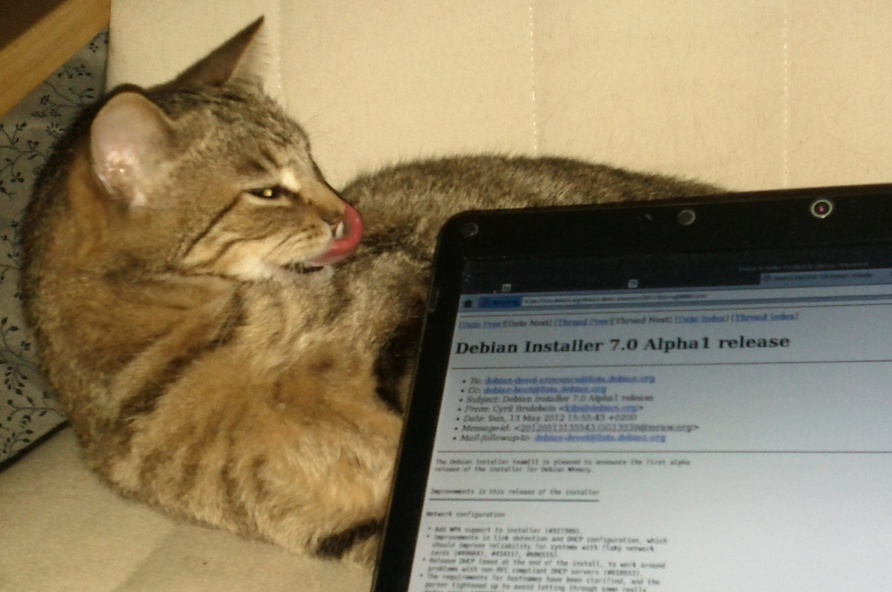
Cyril Brulebois: D-I Wheezy Alpha1

Get it while it s hot: Debian Installer 7.0 Alpha1 release. See how yummy it is:

Russell Coker: What I REALLY Want from the NBN

Generally I haven t had a positive attitude towards the NBN. It doesn t seem likely to fulfill the claims of commercial success and would be a really bad thing to privatise anyway. Also it hasn t seemed to offer any great benefits either. The claim that it will enable lots of new technical developments which we can t even imagine yet that aren t possible with 25Mb/s ADSL but which also don t require more than the 100Mb/s speed of the NBN never convinced me. But one thing it could really do well is to give better Internet access in remote areas. Ideally with static or near-static IPv6 addresses (because we have already run out of IPv4 addresses). Currently 3G networks do all sorts of nasty NAT things to deal with the lack of IPv4 addresses which causes a lot of needless pain if you have a server connected via 3G. One of the NBN plans is for wireless net access to remote homes, with some sanity among the people designing the network such NBN connections would all have static IPv6 subnets as long as they don t move. I m currently working on a project that involves servers on 3G links. I don t have a lot of options on implementation due to hardware and software constraints. So if the ISPs using the NBN and the NBN itself (for the wireless part) could just give us all IPv6 static ranges then lots of problems would be solved. Of course I don t have high hopes for this. One of the many ways that the NBN has been messed up is in allowing the provision of lower speed connections. As having an ADSL2+ speed NBN connection is the cheapest option a lot of people will choose it. Therefore the organisations providing services will have to do so with the expectation that most NBN customers have ADSL2+ speed and thus they won t provide services to take advantage of higher speeds. Related posts:
  1. RPC and SE Linux One ongoing problem with TCP networking is the combination of...
  2. A New Strategy for Xen MAC Allocation When installing Xen servers one issue that arises is how...
  3. New Net Connections On Thursday my new InterNode ADSL2+ service was connected [1]....

Matthew Palmer: vmdksync helps you escape from VMware

When I wrote lvmsync late last year, I didn t realise I was being typecast. Before too long, I realised that the logic that I d implemented for lvmsync would also help me with a separate migration project I d been dreading getting the day job off VMware. Back in the early days of virtualisation, management made the decision to run VMware, for all the usual reasons ( commercially supported! , industry standard! , and so on). Unsurprisingly (to me, anyway) it didn t take too long for management to realise that it wasn t the best choice for us. When you ve got umpty-billion dollars to spend on hardware, software, and support, VMware might be the right option (although Amazon doesn t seem to think so). Anchor s company culture, on the other hand, is build around smart staff, simple systems over dumb staff, smart vendors , because no vendor is ever going to care about our customers as much as we do. So VMware was never going to work for us. Unfortunately, as happens all too often, once VMware was in place, there was very little motivation to get rid of it and move those customers onto the chosen replacement (that we were deploying all new customers on). I happen to think this is a terrible attitude in general one that makes life so much harder in the long term. I believe strongly in retrofitting old systems to keep them up-to-date with the current state of the art, and keeping technical debt under control. But, I wasn t running the show back when we stopped putting new customers on VMware, so the few VMware servers we had stayed around far longer than they should have. Recently, though, bad things started to happen. The VMware servers were starting to fall apart. The Windows machine we had to keep around to use the VMware management console started crapping out, and when the choice was between doing unspeakable things to Windows, and just ditching VMware well, it wasn t much of a choice. The only remaining question was how to do the migration off VMware with the least amount of downtime to our customers. I was really quite surprised that nobody out in Internet land appeared to have come up with a simple, robust tool to do this. Sure, some vendors had all-singing, all-dancing toolkits that cost ridiculous amounts of money, required you to install their agent on the machine involved, and promised the earth, but it all smelt of snakeoil and bullshit. In true hacker style, then, I decided to write something myself. The model I came up with mirrored lvmsync s quite closely because that one worked, and it turned out to be surprisingly easy to implement once I managed to reverse-engineer the file format (VMware has a PDF spec of a bunch of it s file formats, but whoever wrote it was enough of an evil genius to make it utterly incomprehensible to anyone who doesn t already know the file format, whilst making perfect sense to anyone who already does). The result: vmdksync. It is nothing but 80-odd lines of ruby whose sole purpose is to take a delta.vmdk file and write the changes that are stored in that file to a file or block device that is a copy of the flat.vmdk file that you can copy while the VM is still running (after you ve made a snapshot, of course). It helped me provide a painless migration path away from VMware, and I d be really pleased if it helped some other people do the same. Share and enjoy!

12 May 2012

DebConf team: Report from our visit to Managua, Nicaragua (Posted by Holger Levsen)

I ve send a mail today with a summary of some of my experiences in Managua and tiny bits of Nicaragua late April / early May 2012. If you are considering going to DebConf12 (which you obviously should do as you are reading this!) go and read this mail, as it includes a thematically sorted list of impressions and advice written by Gunnar, Norman, Leo, Felix and myself, which should give you some better idea about DebConf12 in Managua! While I spent 14 days in Nicaragua in total, for the last three days I was joined by Gunnar Wolf, to make sure my impressions about the local team, the status of the preparations and everything were correct. Our visit also seems to have been very motivating to local team members, whom I ve seen really enthusiastic to welcome a huge Debian crowd for the first DebConf in Central America in just a few weeks! At the last DebConf12 IRC meeting I summarized it like this: in very short: my two weeks were great, I had a great vacation, met many members of the localteam, which is way bigger then it seems on irc, saw and liked UCA (Universidad Centroamericana, the DebConf12 venue), had zillions of reunions (meetings, see schedule wiki page) and met many nice people and a very hot & interesting country+capital with great countryside. The deadline for sponsored accomodation ends in three days - so if you haven t registered yet, hurry up, DebCamp starts in 49 days! :-) (After that registration is still possible, but you will need to pay for your costs yourself.) We re looking forward to see you there and have a great DebConf together! Hopefully we sweat together while Wheezy is frozen :-D

Joey Hess: popcon graphs for tasks

Last year I was able to switch tasksel to using metapackages, instead of the weird non-package task things that had been used before Debian supported Recommends fields well. An unanticipated result of the new task packages is that I have this nice popcon data available for them, so can get graphs like these. For new installs of testing, KDE and Xfce are neck and neck. With Gnome being the default, it's hard to say which desktop users really prefer. My feeling is that it's probably nearly evenly split now. (I installed Xfce on my sister's laptop last week, and anticipate moving all my family to it, rather than Gnome 3.) The above graph also shows a surprisingly large number of ssh server task installs. In fact, it's the most often manually installed task. Probably many of those are server machines, and so I'm considering having tasksel automatically select ssh on systems where it doesn't automatically select a desktop. Language data is also available. Taskel uses language tasks internally, without exposing an interface, so this will be almost entirely users who did an install of testing localised to their language. Interesting data can be teased out of this too. For example there seem more installs in Catalan than Chinese ... and at least 10 Esperanto users. (As with any popcon number, this is a lower bound, to be multiplied by the scaling guesstimate of your choice.)

By the way, I've got a new vanity domain for my blog and wiki: http://joeyh.name/ The old http://kitenet.net/~joey/ will continue to work, like it has since 1997. But the new is easier to type. And it let me move my site to Branchable, at last.

Iustin Pop: Rant: webfonts, github, icons

Note: this is a rant. For year, I've browsed the web with Firefox set to Allow pages to choose their own fonts: no . It worked everywhere very well, and I had a consistent style across pages, and I wasn't forced to see the (IMHO) very ugly Microsoft-fonts look-alikes. That all changed until GitHub introduced their Octicons font, and represent icons with characters, instead of actual icons. Now I either am forced to: Grr At least they added text labels too, so at least I get a small box with F044 and label Admin .

Jonathan McDowell: Going to DebConf 12

DebConf12.png
Meant to post this a while ago when I booked the tickets, but life has a habit of being busy at present. I'm pleased to say I'm going to DebConf 12 in Managua. In the off-chance someone else might be on some of the same flights as me, here's what I've booked: Outbound:
2012-07-07 00:15 SFO -> 08:12 CLT US466
2012-07-07 11:40 CLT -> 13:44 MIA US1831
2012-07-07 16:07 MIA -> 16:45 MGA US4925
Inbound:
2012-07-14 21:15 MGA -> 01:50 MIA US4944
2012-07-15 06:15 MIA -> 08:19 CLT US1800
2012-07-15 09:40 CLT -> 12:08 SFO US1485
There were some single stop options but the timings didn't them any quicker, they weren't any cheaper, and these times worked better for me anyway.

Tanguy Ortolo: Signing-party and crypto conference in Paris

Statue of Saint Peter holding the heaven's key Monday 21st during at 18:45, in Paris, there will be a conference organized by Parinux, where I will explain the principles of cryptography and their application in the SSL and PGP systems. This conference will be followed at 20:30 by a signing-party PGP et CAcert. For the signing-party, I will ask participants to:
  1. generate a key pair if you do not already have one;
  2. send me you public key and register;
  3. print some copies of your key fingerprint;
  4. print the list of participants I will send you;
  5. come with all that stuff and one or two identity documents.
This is a partial translation of the full article I wrote in French, in case foreigners could attend. Sorry for the very late notice

Ben Armstrong: Collaborative editing, the missing Vim feature (pentadactyl + etherpad?)

Do you wish, like I do, you could edit collaboratively in Vim? This feature is number 10 on the Vim voting page, so it seems I m not alone. How about Pentadactyl coupled with any of the existing web-based collaborative editors, such as Etherpad? OK, so it s not quite Vim, and there are some rough edges to this particular pairing, but I m finding it s good enough for my needs. It even gives me a Vim-like editing experience while other participants use the default Etherpad editor. Yes, I know about whiteboard.debian.net, but for the past three years I have been using a single instance of Etherpad with my family to maintain a shopping list to which we all make contributions. First of all, that s not a Debian activity, so to make the switch, I d need to make a personal clone of the service for our personal use. But more importantly, we find Etherpad features such as colours for different participants and the timeline are just too useful to give up on. On the other hand, the less the web editor interferes with your web browser s default textarea behaviour, the easier time Pentadactyl is going to have. Indeed, I asked on #pentadactyl @ irc.oftc.net about some problems I was having and I was told flat out that Pentadactyl does not work with graphical web editors. So, you may wish to use another web-based collaborative editor for this reason. That being said, I did learn a few things about helping Pentadactyl get along better with Etherpad, so if you would like to try it yourself, read on. The key to getting started was to enter text edit mode within the textarea with <C-t>. For the most part, this behaves like Vim normal mode . I am still learning, but many basic motion and editing keys behave just as they would in Vim. Fantastic! However, the moment I tried to :undo I hit my first problem. Using the latest release version of Pentadactyl (1.0rc1 at time of writing), pressing "u" to :undo produced no visible result. I tried the latest daily build as well, and only saw a marginally more helpful "Node not found" error message displayed in the status area. But it turns out you can use passthrough mode to use the textarea s own undo. Just :tmap u <C-v><C-z> and we re back in business again. I m still experimenting with this setup, so the jury s still out on whether I ll stick with it, or whether the remaining incompatibilities between Pentadactyl and Etherpad will drive me nuts. But it looks promising. Clearly, judicious use of :autocmd to always start in text edit mode and bind that undo key whenever I enter the site will help make the experience even better. If you try it out yourself, I d love to hear how things went for you. Or if you have found an even better solution that works for you, do share.

Joachim Breitner: 10 years of using Debian

Today, it must have been exactly 10 years that I started using Debian. The story of how I came to Debian shows some of its strengths, so I ll use this occasion to share it. I spent the first half of 2002 as an high-school exchange student in Wenatchee, USA. I was already a user of Linux at that time: I made my first contact roughly in 1996 and did my first installation at home two years later, but all that time I was dual-booting and my main system was a well-arranged Windows 98. The machine was a regular tower PC, but nevertheless I put the computer into my trunk when I flew to the US. It took away most of the space, and I had to put some of my cloths inside the case. So I was there, happily using my Windows and my manually set up Linux From Scratch until one day the inevitable happened; inevitable at least until you start doing backups: On April 30th, my hard drive crashed, and took the two systems together with 4 years of personal data with it. Two weeks later I had a new hard drive and was pondering my options. I did plan to install Windows again; at that time Windows XP was just released. But I wanted a German version of Windows, which would be hard to get there. Also, I did not want to use Linux from Scratch any more, and wanted to make a well-founded choice of a distribution. On the other hand, I really wanted to get my machine up and running quickly, to be able to read my mail more comfortably. I had heard that Debian had good support for network installations (downloading a full 700MB CD was something to avoid at that time), so I grabbed some netinst images, burned a CD, and quickly installed Debian. I was planning to use the system for about two weeks. I did not pay any particular attention to the setup. Heck, I even picked from my Simpsons sidekick machine naming scheme one that I would not miss being used up ( barney ). Nevertheless, I was using this installation for many years (and many upgrades), until I eventually switched to using laptops. In fact, that very installation is still on the machine somewhere and works. I did install Windows XP a few weeks later as well, but hardly used it. So May 12th of 2002 was when I turned into a full-time Linux and Debian user. I soon became interested in Debian the project and started to contribute. But that is another story for another ten year anniversary blog post, most likely on October 21, 2013...

Flattr this post

Christian Perrier: 2012 update 22 for Debian Installer localization

Status for D-I level 1 (core D-I files): Status for D-I level 2 (packages that have localized material that may appear during default installs, such as iso-codes, tasksel, etc.): Status for D-I level 3 (packages that have localized material that may appear during non-default installs, such as win32-loader) Full 100% completeness (hall of fame) for 23 languages: Asturian, Belarusian, Bulgarian, Catalan, Czech, German, Esperanto, Spanish, French, Indonesian, Italian, Japanese, Kazakh, Khmer, Dutch, Polish, Portuguese, Russian, Slovak, Slovenian, Swedish, Turkish, Simplified Chinese

Steve Kemp: On working from home

Recently an ex-colleague of mine changed jobs and suggested that I write something about the pros and cons of working from home. I've thought about this subject, off and on, for a few years and frustratingly I think most of the pros and the cons are the same: I live in a two-bedroom flat in Edinburgh. (Having just spent thousands on a new bathroom I don't expect I'll be moving any time soon. A rough budget of 40-50,000 would let me convert my attic into two/three rooms. So there is growth potential!) In my flat I have made one of the bedrooms an office. The office contains: One PC is for work. One PC is for me. One phone is for work. One phone is my own. Every working day I switch on the work router, the work phone, the work PC around 09:30. I then work, taking a lunch-break between either 12:00-13:00 or 13:00-14:00, until 18:00 at which point I switch off the work toys. I ignore my personal PC during the working day with the exception that it is the source of my music. I can reach across and hit the appropriate multi-media keys to select Play/Pause/Next Track/Previous Track/Volume Up/Volume Down. (When thenever the work-phone rings the first ring is ignored as I scramble to hit "Mute" or "Pause"..!) So what are some of the advantages/drawbacks? Well I'm at home. So the environment is one that I've made myself, and enjoy. The music is mine. The colour-scheme is mine. The pictures on the walls are mine. I have a Steve-loving chair. There is no soulless air-conditioning, no horrible cubicles, and no noisy people talking. The downside? No people talking. If I didn't leave my house at lunchtime I'd speak to zero people face to face in an average working day. That took a while for me to notice, but it is not nice. Since I work from home "the commute" takes seconds. I tend to get out of bed and wander straight to the desk. I'll work non-stop, then get dressed around lunchtime so that I can go out for lunch. Hail, Rain, Snow, or Sunshine I leave the house for lunch every single day (unless waiting for an atypical delivery). Because if I didn't I'd have no human contact. In the afternoon if it is a nice day I'll get undressed again, because I can, so why the hell not? Providing you're focussed working from home has several advantages that I can think of - I've no qualms about setting the washing machine going before I start work knowing that I can "spare" five minutes to empty it later in the day. Similarly I've no concern about ordering (even large) items, because I know what time the postman comes, and I know I'm never going to be out and miss a delivery. When I first started working from home I had a laptop instead of a PC and there were mornings when I worked, lazily, from my bed, or from my sofa whilst watching TV. That didn't last for long because I just didn't do a good job. I think I got away with it in the sense that I don't think people noticed, but I expect if it had lasted for longer it would have been quickly apparent. I stopped because the line was blurring between "home life" and "work life". Having a dedicated working area is essential in keeping me focussed. I don't do "home things" when I'm in "work time" - with very rare exceptions. Yes I wander around and pace if I'm thinking, yes I make more tea and coffee than I would in a real office, and yes I might open windows, phone a friend, read my gas meter, washup dishes, or similar as I'm "making coffee". But on the whole it only works if I work when I'm working. I could save money by using my work-internet instead of paying for personal-internet, but keeping the two links separate is another way of being focussed. I don't do "dodgy" things on the internet, on the whole (haha), but if I do I'd want to be damn sure that that was via my link and not the work-link - and having two PCs and two network links I know that is the case. There have been times when the work link has broken and I've used my personal link + openvpn to continue working, or at the very least re-join our internal chatroom and say "Internet down, brb". As a system administrator there are times when I have to do things either early in the morning, late at night, or even during a weekend. I guess a final advantage is that this is not a struggle - providing I don't schedule such operations at times when I'm in the pub, meeting friends, or taking pictures of cute strangers, it isn't a struggle to say "I'll do this after 8pm tonight", or set the alarm early. No long walk to an office, and if I've already got food cooking for my tea I can eat it nearby whilst still configuring things and testing sites/services/machines. So pros: I'm in my own environment, I don't worry about receiving parcels, meter-readings, and have wonderfully pleasant music all day. Ancillory bonuses are really side-effects of being in my environment: I have my good coffee, my nice cups, I can eat food I enjoy. etc, etc. Cons: You must be dedicated. You must be focussed lest you give in to temptation and cease working for minutes/hours at a time. You lose part of your home space - I can't turn this room into a childrens bedroom, for example. Nothing earth-shattering. I've done this for five years now, and although I was a little skeptical initially I thought "Why not?" It has worked out well and I think if I ever did need to leave my current position I'd have no hesitation about working from home in the future. Finally it has to be said that when I've had partners in my life they've traditionally been the type to wake up later than me. I get significant brownie points for being able to wake them up around 10/11AM with a cup of hot coffee & breakfast in bed every morning. By virtue of having a separate space I can close the door and not be disturbed by them walking around. I'm sure I've forgotten things - but as an initial pass the benefits and disadvantages of working from home are the same: You're in your own house. ObQuote: "Explorers in the further regions of experience." - HellRaiser

11 May 2012

Andrew Pollock: [life] Zoe at 24 months

Once again, another 3 months have flown by. Honestly, it's been a total blur. What on earth has happened since February? Well, heaps more travel of course. There was the trip to New Orleans, which I already wrote about. The other big trip we did was to Washington D.C. for a week, which I'm yet to write up. We stayed with friends in Alexandria for the week. Unfortunately, Zoe came down with conjunctivitis before Sarah's very eyes on the flight over (I'd been in North Carolina for work the week before, so they flew without me and I flew up to D.C. to meet them). She also developed an ear infection and a general cough/cold. Fortunately, we caught it all pretty much as soon as it happened, and spent Easter Sunday at an Urgent Care in Virginia getting antibiotics for her, but her sleep was not so great the whole time we were in D.C. Other than that, we've just been doing the normal stuff. Swimming classes have continued (she's very confident in the water now). Her speech continues developing well. Toilet training is continuing to go very well. There haven't been very many accidents at all. She's really loving the "new" day care. It was definitely the right thing to do to move her. Physically, she's in the 80th percentile for height and the 50th percentile for weight, so I guess she's currently tracking to be on the tall and thin side of things. We had another birthday party in the park behind our home, and this year the weather was much nicer, so we had people hanging around until about 7pm, and a good time was had by all. Zoe even successfully blew out her candle on the first attempt. Her two-year molars still haven't come through. They seem to go through various stages of giving her a lot of grief, and then they stop messing with her sleep. I was beginning to think we'd never get back to an uninterrupted night's sleep ever again. It's still a bit hit and miss, but she usually settles down again fairly quickly if she does wake up, and doesn't always require intervention from us. I've arrived at the theory that the "terrible twos" are largely the fault of trying to cut these two year molars. Her tantrums are so much worse when her teeth are actively giving her trouble. If she's had a good night's sleep and her teeth aren't driving her crazy, she's still pretty well behaved. If she's been awake half the night and her teeth are hurting during the day, she can be quite difficult. We seem to be currently at a point where they're not causing too much trouble at night, but she'll chew on her fingers like crazy if given the chance during the day. I think seasonal allergies are also messing with her a bit. After she got over the cold she came down with in Washington D.C., she's still had a runny nose and a bit of a cough, but I don't think she's actually "sick" I think it's more related to allergies. She passed on whatever she had to me, and since I've recovered from it I'm also not feeling quite right. I read somewhere that pollen counts are off the charts this year due to the weird weather, and Sarah's having a bit of a hard time as well, so I think we're all going to just have to ride it out with the judicious use of antihistamines. Speaking of allergies, it's about time to re-test her for her egg allergy. We'll have to try that at a point when she's not regularly taking antihistamines for seasonal allergies, so it might be a while yet before we can do that. I guess the next big development will be graduating from the crib to a toddler bed. I'm not in any hurry to do that though, so as long as she's not escaping the crib, her sleeping arrangements can stay the way they are. It'd be nice if she can cut her teeth first and then once she's sleeping properly, we can try converting the crib into a toddler bed. Zoe walking down Castro Street in Mountain View

Michal &#268;iha&#345;: Pootle vs. Weblate

As Weblate 1.0 is out, it's time to compare it to existing solutions. As first I've chosen Pootle as this is tool which we have been using for quite some time and I used it as an inspiration for Weblate. First of all, both Weblate and Pootle use same backend for manipulating with translation files - Translate Toolkit. On the way I've learned that I've chosen different way of manipulating with backend files, what seem to lead to much smaller changes (no more reformatting of whole po file as Pootle does). Also Weblate does not suffer from some Pootle issues like not properly handling changes to fuzzy flag, which has bitten us several times at phpMyAdmin. Another shared thing is web framework Django. For me it was obvious choice as I like writing application with it. The biggest difference here is that Weblate relies on Django admin interface for maintenance, while Pootle has everything in it's interface. Pootle has great advantage here for having consistent interface for everything, what was sacrificed in Weblate for less code to maintain (while having powerful Django admin interface). Also sharing same framework allows quite easy migration of user accounts. Now let's functional side of things - this is where I've tried to take all good things I've seen in Pootle, while adding features I've missed there. What makes biggest difference here are project/subproject classification in Weblate, which was originally started as way to handle more project branches, but proved to be useful for translating related projects as well. This allows automatic propagation of changes across project, what is really great for translating more branches of same program or different interfaces to same functionality (eg. GUI application and command line tool). The other big difference (and I would say key feature of Weblate) is Git integration - all changes are commited to Git with correct authorship, it can help in merging po files or automatically pull upstream changes (eg. from GitHub). This all makes integration into (Git based) development process really easy. Other features like consistency checks or dictionary (terminology) are quite similar, though different. There is more consistency checks in Pootle, but the main reason was that I found some of them too annoying. User dictionaries are still pretty basic in Weblate and that's definitely something what should improve in future versions. On configuration side, Pootle is much more flexible. The main reason here is that I've never used most of the options there. So there are no per project settings of checks or privileges. There is also no way to add language from Weblate - usually adding translation is not just matter of adding appropriate po file, but also other steps, which anyway had to be done manually. So Weblate leaves this up to user. On the other side as soon as new language pops up in Git repository, it is shown in the interface. Both projects have quite good documentation - Pootle has most things covered on wiki while Weblate relies on separate documentation. However there are definitely some bits missing on both sides. PS: If you want to want to have more "facts" in comparison, you can check Ohloh :-).

Filed under: English Weblate 0 comments Flattr this!

Alexander Reichle-Schmehl: Release Critical Bug report for Week 19

The bug webinterface of the Ultimate Debian Database currently knows about the following release critical bugs:
In Total:1609
Affecting Wheezy:1136
Wheezy only:206
Remaining to be fixed in Wheezy:930
Of these 930 bugs, the following tags are set:
Pending in Wheezy:83
Patched in Wheezy:208
Duplicates in Wheezy:46
Can be fixed in a security Update:27
Contrib or non-free in Wheezy:12
Claimed in Wheezy:2
Delayed in Wheezy:31
Otherwise fixed in Wheezy:61
Ignoring all the above (multiple tags possible) 556 bugs need to be fixed by Debian Contributors to get Debian 7.0 Wheezy released. However, with the view of the Release Managers, 1025 need to be dealt with for the release to happen. Please see Interpreting the release critical bug statistics for an explanation of the different numbers.

Paul Tagliamonte: gcc 4.7 patchathon part V

Another day, s more patches. Consider helping out!

Next.

Previous.
