Search Results: "tg"

30 July 2008

Joerg Jaspert: Argentina - Mar del Plata

After a night at Tinchos place, then driving and walking around Buenos Aires a day and finally taking a 5hours bus trip, Mark, Stephen and I arrived in Mar del Plata early this morning, at around 05:30AM. Brr, early. We could checkin to the Hotel at 06:30. During checkin we discovered that Stephen and my birthday are, in absolute numbers, 6 years, 6 months and 6 days apart, ie. 666. And we are managing the evil, I mean, the network for DebConf. HA. HAHA. HAHAHAHAHAHAHAHAHAHAHAHA. Ignoring that - stuff looks pretty nice over here. Most machines are working, most services we (as in admins, not video team) care about are setup or will be ready within the next 2 days, the Hotel stuff is doing the last preparations, it all looks great. There hasn’t been a DebConf that was that prepared, ever. We currently have a local smtp server accessible for everyone here (no direct outgoing smtp, we firewall that), a local OFTC IRC Server (Freenode IRCd is in setup), soon a full (pushed) mirror, preparing an upload queue for ftp-master, a schedule announce bot is also ready to run, most of the building has good wireless covering (and the rest is scheduled to get better soon). And lots of other nice things that are surely there and I just forgot to mention but which we will mention in some wiki page in time for you. (Oh, and make sure to listen to what DHCP tells your machine, all the various services get send to you :) ). Comments: 0

23 July 2008

Adrian von Bidder: Mediawiki

PostgreSQL upgrade from 8.2 to 8.3. This really should be automated (... but I guess I understand why it's not.) At least it does work as advertised, thanks a lot to Julien Danjou. And thanks to Martin Pitt and the PostgreSQL developers for making it so painless to run several PostgreSQL versions side by side. Now there's a serious database.

19 July 2008

William Pitcock: PGSQL support in dsyslog? It s more likely than you think.

dsyslog 0.3 has been released, with support for postgresql logging targets, and much more. The development of postgresql support, and extensive documentation, has been made possible by Google’s summer of code program sponsorship of Jeff Katz, who intends to contribute even more code to 0.4. It’s presently sitting in NEW, but if you want it now, you can grab it from the dsyslog website.

14 July 2008

Cyril Brulebois: Package updates

This (extended) weekend features: pkg-phototools collab-maint More to come

11 July 2008

Joey Hess: Harvest Table restaurant

We tried the Harvest Table restaurant in Meadowview, Barbara Kingsolver's place and an outgrowth of her book Animal, Vegetable, Miracle: A Year of Food Life (which I have yet to read). All the food is local (or as close as possible) and seasonal. A great time was had by all, and the food was amazingly flavorful and fresh. Nicest of all was that we kept finding ingredients that you just don't normally find in restaurant food -- because typical restaurant's don't bother using quirky local produce. For example, I'd not expect to find lamb sausage in a burrito. Looking forward to going back and enjoying whatever's in season once my wallet has recovered.

8 July 2008

Russell Coker: Is a GPG pass-phrase Useful?

Does a GPG pass-phrase provide a real benefit to the majority of users? It seems that there will be the following categories of attack which result in stealing the secret-key data:

  1. User-space compromise of account (EG exploiting a bug in a web browser or IRC client).
  2. System compromise (EG compromising a local account and exploiting a kernel vulnerability to get root access).
  3. Theft of the computer system while powered down when the system was configured to not use swap or to encrypt the swap space with a random key at boot time.

  4. Theft of a computer system while running or that did not have encrypted swap.

  5. Theft of unencrypted backup media.

Category 1 will permit an attacker to monitor user processes and intercept one that asks for a GPG pass-phrase as well as to copy the secret key. Category 2 will do the same but for all users on the system. Category 3 will give the potential for stealing the private key (if it’s not encrypted) but no direct potential for getting the pass-phrase. Category 4 has the potential for copying a pass-phrase from memory or swap. I am inclined to trust Werner Koch (and anyone else who submitted code to the GPG project) to have written code to correctly lock memory and scrub pass-phrase data and decrypted private key data from memory after use. But I really doubt the ability of most people who write code to interface with GPG to do the same. So every time that a GUI program prompts for a GPG pass-phrase I think that there is the potential for it to be stored in swap or to remain indefinitely in RAM. Therefore stealing a machine that does not have it’s swap-space encrypted with a random key (which is the most practical way of encrypting swap) or stealing a running machine (as mentioned in a previous post [1]) can potentially grant a hostile party access to the pass-phrase. So it seems to me that out of all the possible ways of getting access to a GPG private key, the only ones where a pass-phrase ones is going to really do some good are categories 3 and 5. While it’s good to protect against those situations, it seems to me that the greatest risk to a GPG key is from category 1, with category 2 following close behind. I previously wrote about the slow progress towards using SE Linux and GPG code changes to make it more difficult to steal the secret key [2] - something that I’ve been occasionally working on over the last 6 years. Now it seems to me that the same benefits can and should be made available to people who don’t use SE Linux. If a system directory such as /var/spool/gpg was mode 1770 then gpg could be setgid to group “gpg” so that it could create and access secret keys for users under /var/spool/gpg while the users in question could not directly access them. Then the sys-admin would be responsible for backing up GPG keys. Of course it would probably be ideal to have an option as to whether a new secret key would be created in the system spool or in the user home directory, and migrating the key from the user home directory to the system spool would be supported (but not migrating it back). This would mean that an attacker who compromised a local user account (maybe through a vulnerability in a web browser or MUA) would not be able to get the GPG secret key. They could probably get the pass-phrase by ptracing the MUA (or some other GUI process that calls GPG) but without the secret key itself that would not do as much good - of course once they had the pass-phrase and local access they could use the machine so sign and decrypt data which would still be a bad thing. But it would not have the same scope as stealing the secret key and the pass-phrase. I look forward to reading comments on this post.

6 July 2008

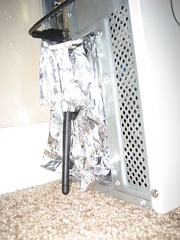
Ian Wienand: Netgear WG311 shielding

I recently picked up the Netgear WG311 V3 very cheap from Office Depot. The card seems to work fine with ndiswrapper; there are other guides on getting it working. The first problem was the reception was, in a word, rubbish. After putting the box back in it's usual home the house wireless was lucky to get a 7/100 signal rating. I found a work-around while the cheap external antenna I ordered is arriving; shield the antenna with foil. This increased signal to between 30-40/100, a considerable boost making it actually useful. Cheap RF Shielding The second problem was coming to terms with wpa_supplicant, of which the details often become very confusing very quickly. Here's the Debian 2-second guide for a simple, standard WPA network I was looking for:
  1. Add to /etc/network/interfaces
    iface wlan0 inet dhcp
    # Useful with ifup -v 
    #    wpa-debug-level 3
         wpa-conf /etc/wpa_supplicant.conf
    
  2. /etc/wpa_supplicant.conf should look like:
    network= 
            ssid="your_ssid"
            psk="your_password"
            key_mgmt=WPA-PSK
            proto=WPA


30 June 2008

Riku Voipio: Creating community friendly embedded systems

Netgear has jumped the bandwagon and released Open Source Wireless-G Router (WGR614L). Like the earlier Linksys WRT54GL, it's an existing model with a Linux "L" added to end. It does not really add any hardware to make it community friendly, the "open source" part feels like just a marketing gimmick.

With just a couple of small features, these devices could really become community friendly:


Not as necessary, but nice to have features for a community-oriented product:

28 June 2008

Martin F. Krafft: Shortcomings of the Nokia E51

I put the Nokia E51, which I had previously acquired, onto Ebay last night, and it sold within minutes. Even though I made a 50 loss on the whole affair, this made me very happy! The phone is crap in so many ways that it made me quite angry. I now consider those 50 the investment I had to make to bring you this post: First of all, the reason why I bought the phone was because it sports wireless LAN as well as Voice-over-IP. Since I ve recently gotten into VoIP, I was looking for reasonable VoIP phones and even though the Siemens C450IP DECT phone works very well, it only does so at home, or where I find a switch port for it. So my theory was to get this Wifi+VoIP phone and be able to use my VoIP infrastructure from anywhere around the world. Penny has the Nokia E65 and loves it, so I went for the E51, a newer model that promised to address some of the issues she had with hers. All of the following is based on the E51 with the 100.34.20 firmware dated 29 September 2007, which runs the (crippled) Symbian S60r3 operating system.

Good things Let s start with the few good things up front: the E51 comes with a regular USB jack, allowing you to plug it into any computer and use it as mass storage device without the need for any Nokia-specific cables. I also liked the remote lock functionality: in the event of a stolen phone, you could send it a pre-defined passphrase that would cause the phone to lock itself. Also, the phone could be configured to lock itself (like a screensaver) after a given amount of idle time. Other than that, I could not find anything outstanding, so let s turn to the downsides, of which there are many more:

VoIP/SIP shortcomings I had previously dismissed the E series phones for good reasons, but both the E65 and the E51 improved their SIP clients a fair bit, and with the SIP VoIP settings utility, it was even possible to configure STUN. But unfortunately, the SIP client, while a nice toy, ended up being unusable in production. Here are some of the reasons: I got VoIP working at home and in some other places, but definitely not everywhere. It may be that some of those networks blocked the SIP port (5060/udp), or that the phone didn t feel well on the day, but in the majority of cases, I could not get the SIP client to connect. And there was no way to find out what was going on, as the client would just claim that registration failed without any additional information. It was also hard to retry, often requiring the phone to be restarted. Whenever if failed, the client would helpfully tell me that it could not establish a connection to the connection network . To get the phone to log on to the SIP server automatically, I had to define a home network for the SIP profile. Changing the access point for that network required a phone reboot to get SIP working again. It was possible to define multiple SIP profiles with different access points and add them all to the one, global VoIP profile, and theoretically get auto-login to work across multiple Wifi networks; unfortunately, I cannot say that this worked, there were always some problems requiring me to change defaults and shift things around. Also, after I had defined a few of those profiles and needed to make a change to the SIP settings (move the SIP port to 53/udp), I had to modify all profiles in turn; it was not possible to share settings. On the other hand, NAT traversal settings and timeouts, which can only be configured with the aforementioned SIP VoIP settings utility, applied to a VoIP profile and thus to all SIP profiles, without exception. I found it mildly annoying that I couldn t use # and * as part of the number/SIP address to call, nor was it possible to dial single-digit extensions the phone will ask you to associate a quick dial number with the key, even if quick dial has been explicitly disabled). I could also not dial a SIP address ad-hoc if I wanted to call sip:someone@sip.somewhere.org, I had to define a contact and add the Internet phone address. One can define Internet calls to be the default call type, thus routing all calls via VoIP if available. Unfortunately, once I dialed a number, the event was hardwired to the call type: I could not redial a number used previously for a VoIP call when all I had available was GSM coverage.

Gripes with the IMAP client The IMAP client, while an interesting addition to my day, turned out to be pretty unusable. The first mistake I made was to tell it to synchronise all messages in some of my larger mailboxes, which caused the phone to take tens of seconds until it switched a folder, and a few seconds just to scroll to the next screen in any given folder. I found that once any mailbox accumulates more than 100 messages, the client turns useless (Nokia s default is to synchronise 30 messages). I could tell the client to synchronise every hour, but only if I locked it to an access point, the home network . If I roamed to a different Wifi network, I could no longer connect to the IMAP server, as this access point would not be found. The phone would not let me use a different access point unless I changed the home access point, but changing that turned off the automatic mail sycnhronisation. If I say mail synchronisation, I mean header synchronisation. Even though there is an option for Headers only , it only applies to POP3; it is impossible to have the phone download message bodies automatically, only manually and then only per-message or per-folder, not for all folders at once. The IMAP client could delete messages, but it could not move a message to a different folder, nor create or delete folders. And even though I could turn off the message tone the phone would play when it received new email, it insisted on vibrating nevertheless. The only other IMAP client I found for Symbian phones is ProfiMail, which looked interesting and much more powerful, but which would randomly crash on me while browsing or operating on larger mailboxes.

Connection hickups While the an application was running that was using the network, the Wifi connection stayed open, but I could not make it stay open between sessions. The phone would obtains an IP, do what I asked it to, and then immediately close the connection. From a power management perspective, this makes sense, but not from the usability angle. I could not make the phone connect to a Wifi network that advertised both, WPA and WPA2 and had to disable WPA at home to let it connect. At times, it was not possible to reuse an existing connection. I haven t been able to figure out the details, but it seemed to me that whenever an application like the IMAP client was locked to an access point, it would be unable to make a connection to the IMAP server, even if e.g. the VoIP client was connected to the server by way of exactly the same access point. The phone would just say that a connection was already active and that I should close it and try again . I had a really hard time working with SSL-enabled websites and IMAP servers, because even though the phone presented me with the server certificate and offered the choice of accepting it permanently, it didn t and would ask the question again and again (which made the phone pretty unusable if the IMAP client was running in the background). Only after I had found out how to import the CACert root certificates, did this problem become irrelevant.

Other pet-peeves The phone came with a lot of smaller issues that made me ask the question of whether its designed ever had to use it too often. Possibly the most annoying aspect of the phone was its speed. It s a lot faster than the E61, but it still takes on the order of seconds to update screens or display simple text messages. Speaking of text messages, I am a little spoiled by the Sony Ericsson K610i (to which I now return), which would offer the contacts with whom I d recently interacted instead of presenting me with the full list, like the E51 does. I could filter the full list, but only by typing the start of the name substring matching was not implemented. It was impossible to receive text files via bluetooth and have them put onto the filesystem. On receipt, the phone just said text file saved , and it took me a while to figure out that it had stored them into the notepad, from where it could not be exported. To get my SSH identity onto the filesystem for PuTTY to use required me to access the phone via USB. The phone could receive vCards with new contacts, but it only offered to import the first contact, even though the standard allows for an arbitrary number of contacts per file. What s even worse though is that the phone silently failed to import contacts with non-ASCII characters in their name, such as or they just didn t show up even though the phone gave every indication of a successful import; creating such contacts on the phone worked, on the other hand. Each time I started the phone, the Nokia greeting screen would show up, accompanied with the Nokia tune, which could not be disabled. Enough said. The last problem I feel worth mentioning is hardly a Nokia or Symbian problem: battery life. With Wifi turned on, the phone would last about 24 hours on standby, which makes it pretty unusable for roaming Wifi or even VoIP usage.

Summing up I am happy to have sold the phone and look forward to returning to my Sony Ericsson K610i. After checking out the E61/E71 a bit, playing with the E65, and trying the E51 out for several weeks, I can conclude that Nokia has a long way to go before they can offer a usable smartphone with Wifi/VoIP capability. It would be a good step forward if they would open-source the Symbian operating system, but until that s done, I am going to look at the OpenMoko FreeRunner next. The E51 once again made it perfectly clear for me that proprietary software is no alternative for my use case. NP: Fat Freddy s Drop: Live at the Matterhorn

25 June 2008

Adrian von Bidder: Sometimes providers do get better...

Christian, I used to block quite aggressively (essentially blocking all IPs sending me spam for a few months) and remember seeing free.fr very, very often. Apparently this was before the block outgoing port 25 policy — I just had a grep through my log and see almost no spam coming in from free.fr. So, as I've said just recently, this is a note to all ISP: please, please, please block port 25! (ISP who don't offer unblocking will obviously lose the techie clients, but that's their own thing to decide...)

23 June 2008

Steve Kemp: There is something evil there

So I've had a hectic few days, and I'm getting close to having caught up with the things that I've been sitting on whilst I've been away.

ObRandom: Several people, independantly, have told me within the past few days that "whilst" is not a real word. it is. End of ..
Some interesting things I've been working upon recently include a fun little firewall tool. Once upon a time I wrote a firewall script which worked like this:
firewall/
 -- incoming.d
     -- smtp
     -- ssh
     -- www
 -- outgoing.d
     -- ssh
     -- smtp
     -- dns
     -- icmp
When you executed the magic firewall script it would scan the incoming.d directory, and for each file it found lookup the relevant port in /etc/services. These port numbers would then be opened. And at the end you'd just have a "-j DROP". After a long phone conversation to a colleague on Thursday/Friday of last week I've now reworked this idea anew. There is still the notion of filenames referring to what is allowed for a pair of directories (incoming.d/ + outgoing.d/) but even more flexability and no hardwired use of /etc/servvices. I guess some ideas are just too simple to give up ..? Anyway there are a plethora of different firewall applications of varying sophistication and complexity in the world. I don't really want to go out of my way to promote this one - but at the same time it might be a useful idea for somebody? The next (work) job I have is determining how to make a "kernel" + "kernel-dev" RPM package based on Debian sources. Joy. Actually the more I look around the more fiddly, annoying, and troublesome I suspect this is going to be. Sigh. ObQuote: The Grudgy

19 June 2008

Martin F. Krafft: IPv6 with Debian

Even though I ve dealt with IPv6 for almost a decade, have delivered presentations, and given multi-day courses on IPv6 security aspects, I ve never actually added IPv6 to my own server/home network infrastructure because it seemed that Linux and/or Debian just weren t ready for it. This seems to have changed (although there are still a number of problems) and in less than a day, I put a few of my machines online. In the following, I d like to share with you how I did it.

Kernel versions and stateful connection tracking Unfortunately, I have to start off with some bad news: even though Debian etch, our current stable release, which uses a Linux kernel version 2.6.18, speaks IPv6, I cannot recommend it for deployment, as the 2.6.18 kernel does not support proper stateful connection tracking for IPv6, and thus makes it impossible to firewall hosts in a sensible manner (I always add local packet filters to all my hosts, and if only to guard against the situation when a user installs a malicious programme to listen on a high port). Of course, it is possible to configure a packet filter statelessly in an acceptable manner once you know the use case, so do with this information what you wish; I prefer to stay general for now. For me, a remedy is almost around the corner: the 2.6.24 kernel seems to support stateful connection tracking for IPv6, and it s even available for etch as it will be included in the upcoming etch-and-a-half release. I simply ended up using the kernel packages pre-release, and so far have not had a problem with it. To do so, add the following line to your /etc/apt/sources.list, making sure to use a close archive mirror:
deb http://ftp.xx.debian.org/debian etch-proposed-updates main

I then just upgraded the system and pulled in all proposed updates. As that may have let in software that won t be part of etch-and-a-half, or even lenny, you may want to pin the archive and only upgrade the kernel packages, by adding to /etc/apt/preferences (replacing amd64 with your architecture):
Package: *
Pin: release a=proposed-updates
Pin-Priority: -1
Package: linux-image-2.6.24-etchnhalf.1-amd64
Pin: release a=proposed-updates
Pin-Priority: 600

Alternatively, you could use the 2.6.24 linux kernel packages on backports.org.

Xen and IPv6 One drawback of switching to 2.6.24 is that you cannot run a dom0 on that machine any longer, so by practical extension, you cannot connect it to the IPv6 network with a packet filter in place. Supposedly, running 2.6.24 instances on a 2.6.18 dom0 is reported to work, however.

Configuring the packet filter The first thing I did was to configure the packet filter on each host appropriately. Unfortunately, this is harder than it should be, because to quote one of the netfilter developers when ip6tables was conceived, someone had a big bad brainfart : rather than adding IPv6 rules to your existing iptables ruleset, you have to create a new ruleset, duplicate all chains, networks, hosts, and individual rules, and maintain the two in parallel. Even though there are efforts of unification on the way, I speculate it ll take another couple of years until PF_INET6 will be fused into PF_INET and one will be able to do sensible cross-address-family packet filtering with Linux. Since I ve recently started to look (again) at pyroman, maybe the most logical way forward would be to extend it to write both, IPv4 and IPv6 rulesets from its knowledge about the hosts and networks you configured. Anyway, we want to get stuff working now! Thus, let s configure ourselves a packet filter. (Almost) all IPv6-related filtering must be configured via ip6tables (read on further down about IPv6 in IPv4 tunneling, the reason I said almost ). The following is a simple default ruleset to start with, which I put into /etc/network/ip6tables to load with ip6tables-restore:
*filter
:INPUT REJECT [0:0]
:FORWARD REJECT [0:0]
:OUTPUT ACCEPT [0:0]
:in-new - [0:0]
### INPUT chain
# allow all loopback traffic
-A INPUT -i lo -j ACCEPT
# RT0 processing is disabled since 2.6.20.9
#-A INPUT -m rt --rt-type 0 -j REJECT
# allow all ICMP traffic
-A INPUT -p icmpv6 -j ACCEPT
# packets belonging to an establish connection or related to one can pass
-A INPUT -m state --state RELATED,ESTABLISHED -j ACCEPT
# packets that are out-of-sequence are silently dropped
-A INPUT -m state --state INVALID -j DROP
# new connections unknown to the kernel are handled in a separate chain
-A INPUT -m state --state NEW -j in-new
# pass SYN packets for SSH
-A in-new -p tcp -m tcp --dport 22 --syn -j ACCEPT
# log everything else
-A INPUT -m limit --limit 3/min --limit-burst 10 -j LOG --log-prefix "[INPUT6]: "
### OUTPUT chain
# RT0 processing is disabled since 2.6.20.9
#-A OUTPUT -m rt --rt-type 0 -j REJECT
# allow outgoing traffic, explicitly (despite chain policy)
-A OUTPUT -j ACCEPT
### FORWARD chain
# RT0 processing is disabled since 2.6.20.9
#-A FORWARD -m rt --rt-type 0 -j REJECT
# disallow forwarded traffic, explicitly (despite chain policy)
-A FORWARD -j REJECT
COMMIT

Note that this recipe is pretty much unusable on pre-2.6.20 kernels due to their broken implementation of stateful connection tracking. The ruleset should be fairly obvious, but you might wonder about my use of REJECT and allowing all ICMP after all, you ve heard for the past 30 years that ICMP is a bad hacker protocol , and Internet security is no domain for being nice to people, so to prevent any information disclosure, you should DROP connections, not let people know that they re simply not allowed. Well, to hell with all that! I don t see a single reason or attack vector that is foiled by DROP or disallowing ICMP. In fact, it s just security by obscurity, and might inconvenient at the same time. ICMP is also much more important with IPv6 than with IPv4 (it replaces ARP, for instance), and it s actually useful to be able to ping hosts, or get back informational messages on why something failed. Finally, rejecting traffic rather than dropping it doesn t suggest to a hacker that something s hidden here. Then there is RFC 4890, which almost made me puke. This document is part of the reason why I say: let s fix problems in the kernel, rather than shielding them with unreadable and unmanageable rulesets!

Getting connected If you already have an IPv6 address, you re basically ready to go, but may want to read further down on how to connect your local network to the IPv6 Internet as well. If you are searching for a provider, have a look at the list of providers with native IPv6 connectivity over at sixxs.net. If you are reading up to here, I assume you are connected to the Net with IPv4. There are two ways for you to move towards IPv6: 6to4 or by way of a tunnel provider. A Kiwi website explains how to setting up 6to4 connectivity, and thus I will concentrate only on the tunnel approach. Even though everyone can set up 6to4 in a breeze without any accounts or waiting, there are a number of security considerations, it s pretty ugly to debug (due in part to asymmetric routing), and makes your life unnecessarily difficult when all you have is a dynamic IP that changes from time to time. If you are stuck behind a NAT gateway, you cannot use 6to4 either. Thus, I prefer the tunnel approach. With the tunnel approach, IPv6 packets are wrapped up in IPv4 packets on your host, and sent to the IPv4 address of your tunnel provider, who has native IPv6 connectivity. The tunnel provider unwraps your packet and shoves the contained IPv6 packet onto the backbone. The IPv6 address you used as source address is routed to the tunnel provider, so any replies arrive at their machines, where they re again wrapped into IPv4 packets and sent to your (publicly-accessible) IPv4 address. Those IPv4 packets specify payload type 41 ( ipv6 ), which is why we need those -p ipv6 -j ACCEPT rules in the iptables ruleset. There are a few tunnel providers out there. I chose SixXS and have not regretted my choice. I shall thus assume that you do the same: sign up for an account right now, so that you have it by the time you finished reading this document! SixXS works on a credit system: tunnels and subnets cost credits, which you can accumulate by maintaining your tunnels properly. This ensures that everyone can play around, but to do more advanced stuff, you need to first display competence with the basic concepts. Your first step with SixXS will be to request a tunnel. SixXS offers three types of tunnels:
  • static tunnels, for those with static IPs,
  • heartbeat tunnels, for those with dynamic IPs, and
  • AYIYA tunnels, for those behind NAT gateways.
Each of these tunnels have advantages and disadvantages, as everything does: the first two types of tunnels use IP protocol 41 packets to encapsulate the IPv6 packets. As such, there are security considerations involving the impersonation by spoofing, and all upstream firewalls must let protocol 41 pass. AYIYA addresses these problems by using signed packets, but that solution comes with extra computation overhead and smaller MTUs. I suggest to use the first type of tunnel that fits your situation. Debian s aiccu package can take care of heartbeat and AYIYA tunnels for you, and it can even set up static ones. During registration, you will also need to choose a PoP , which stands for Point of Presence . If your country only has a single PoP, that s the one you will end up using (unless you have a good reason for another one), but if there are more options, I strongly suggest that you go through the list of PoPs and select the one with the best roundtrip time and lowest latency from your location! Note that you must answer ping requests (ICMP echo-request) from the PoP you chose, or else the tunnel will not be created. Once your tunnel request gets approved, you ll get a /64 prefix, in which you only use two addresses: the PoP will configure the :1 address and you need to configure your host to use the :2 address on the tunnel interface. You ll also be told the IPv4 address of your PoP endpoint . Joey Hess taught me that aiccu can set up the interface for you, using the data it queries from the SixXS registration (TIC) server. I tried it, and it works. However, I prefer the pure ifupdown approach, as it makes things explicit and allows me to use the hooks for stuff like loading the packet filter. So in my /etc/network/interfaces, you can find:
auto sixxs
iface sixxs inet6 v4tunnel
  endpoint 194.1.163.40
  address 2001:41e0:ff00:3b::2
  netmask 64
  gateway 2001:41e0:ff00:3b::1
  ttl 64
  pre-up ip6tables-restore < /etc/network/ip6tables
  up ip link set mtu 1480 dev $IFACE
  up invoke-rc.d aiccu start
  down invoke-rc.d aiccu stop

Make sure to read about MTU values of the tunnel and adjust the 1480 value in the above to your tunnel settings and ISP connectivity. Also set ipv6_interface sixxs in /etc/aiccu.conf, if you are using aiccu, or else aiccu will bring up a duplicate/additional interface. If you tell it to use the same interface, it will actually execute all the same commands (which will fail), but won t report any errors. A future version will have a switch to prevent it from configuring the interface. Unfortunately, this will probably not work. The reason is that your regular IP packet filter (iptables, without the 6) doesn t let those encapsulating IPv4 packets pass, unless we tell it to; we probably want to do this early on in the chain, and also limit it to our tunnel peer, so:
iptables -I INPUT -p ipv6 -s 194.1.163.40/32 -j ACCEPT

For AYIYA, you need to open port 5072, either for UDP, TCP, or SCTP, depending on how you configured it. Also have a look at this FAQ entry on what a firewall needs to pass. If it still doesn t work, you have an upstream packet filter that needs some of those holes poked. Good luck. In most situations, the FORWARD chain does not get such a rule, since the tunnel terminates at the gateway, which routes to a native IPv6 network, or another tunnel. Allowing tunnels through a gateway is almost always a bad thing, as it would allow undetected and untraceable traffic from compromised boxes in the local network. The OUTPUT chain also does not need such a rule, if you have configured stateful filtering properly. Now bring up the interface and verify the connection:
# ifup sixxs
# ping6 -nc1 2001:41e0:ff00:3b::1
PING 2001:41e0:ff00:3b::1(2001:41e0:ff00:3b::1) 56 data bytes
64 bytes from 2001:41e0:ff00:3b::1: icmp_seq=1 ttl=64 time=74.0 ms
[...]
# ping6 -nc1 ipv6.aerasec.de
PING ipv6.aerasec.de(2001:a60:9002:1::184:1) 56 data bytes
64 bytes from 2001:a60:9002:1::184:1: icmp_seq=1 ttl=55 time=91.5 ms
[...]

Welcome to the Internet of the future!

Setting up an IPv6-capable gateway Your IPv6 connection works, but it s limited to a single address, and you do not get to specify the reverse DNS PTR record for it. Since the concept of NAT is mostly absent from IPv6 (thanks! thanks! thanks!), you will not be able to connect any other hosts to the IPv6 network. If your local network has a few hosts behind a gateway, you will need to request a subnet from SixXS and configure your gateway (which has the tunnel connection) appropriately. Don t worry, this is not really very difficult. First, request a subnet for your tunnel from your PoP via your SixXS homepage. Once approved, you will get a /48 prefix for your own use: 2^80 1.2 heptillion addresses which are yours to assign to every dust particle in your office or home, if you so desire. The way I set it up is to add the first of these addresses to your internal interface on the gateway, by adding the following two lines to the interface s stanza in /etc/network/interfaces; you will need the iproute package installed (which you should be using for everything network-related anyway):
up ip -6 addr add 2001:41e0:ff12::1/64 dev $IFACE
down ip -6 addr del 2001:41e0:ff12::1/64 dev $IFACE

Instead of bringing the interface down and up, just run ip -6 addr add 2001:41e0:ff12::1/64 dev eth0. Note the use of the /64 prefix instead of the /48 that got assigned, leaving only 20 pentillion addresses. Oh no! The reason for this is buried in the specs: basically, /48 is a site prefix, but individual networks should not be larger than /64, which is the prefix length of links in the IPv6 domain. Now is also a good time to enable IPv6 forwarding, e.g. like so:
# echo net.ipv6.conf.all.forwarding = 1 >> /etc/sysctl.conf
# sysctl -p /etc/sysctl.conf

Obviously, you will also need to change the policy on the ip6tables FORWARD chain. For now, let s just set it to accept. You should later create a proper ruleset, though!
# ip6tables -I FORWARD -j ACCEPT

Bringing IPv6 to your local network The final step is to spread the love to your local network. Refrain from selecting addresses from your subnet and assigning them to the local hosts, or wondering how to configure the DHCP server, because IPv6 does it differently: your gateway will advertise its routes (which includes a default route) to your network, and each host will pick an address based on its MAC address (unless it already has an EUI-64 address assigned. This all happens automagically, at least with current Debian and Windows machines. On the gateway, you need to install radvd and simply tell it which prefix to use on which interface. My /etc/radvd looks like this, and I won t explain it:
interface eth0
 
  AdvSendAdvert on;
  prefix 2001:41e0:ff12::/64
   
   ;
 ;

Note again how we advertise a /64 network rather than the /48 we own . You cannot advertise smaller networks if you want automatic configuration to work, and you should not use networks larger than /64 in any case. If 2^64 addresses are not enough for you, I trust you ll be able to figure out how to advertise another of your 65536 /64 prefixes in the /48 subnet to appropriate hosts. Restart radvd and run over to another host to witness how it automagically gets connected to the IPv6 network by scanning /var/log/kern.log and watching the output of ip -6 addr and ip -6 route. Try ping6ing from there! Find the dancing turtle! It should all work. If you don t like the automagic aspect of this, look into stateful configuration, using DHCPv6, as provided by dibbler-server and ?wide-dhcpv6-server.

Resolving names Take note of the IPv6 address of each host. There s a way to determine it given the host s MAC address, but this is easier (ipv6calc is also useful). You might want to let your local DNS server know by adding AAAA records in parallel to the existing A records, and possibly even adding PTR entries. If you re serious about IPv6, you can tell SixXS to delegate reverse lookups for the IPv6 addresses to your DNS servers, but you ought to refrain from polluting the DNS namespace. Note that bind9-host provides an improved host tool, which fetches all kinds of information about names, not just the one single information configured as default:
% host pulse.madduck.net
pulse.madduck.net has address 130.60.75.74
pulse.madduck.net has IPv6 address 2001:41e0:ff1a::1
pulse.madduck.net mail is handled by 99 b.mx.madduck.net.
pulse.madduck.net mail is handled by 10 a.mx.madduck.net.
% host 2001:41e0:ff1a::1
1.0.0.0.0.0.0.0.0.0.0.0.0.0.0.0.0.0.0.0.a.1.f.f.0.e.1.4.1.0.0.2.ip6.arpa
domain name pointer pulse.madduck.net.

Oh, and if you re really that curious about how IPv6 addresses are computed from MAC addresses, read RFC 2464. Basically, given a prefix 2001:41e0:ff1a:: and a MAC address aa:bb:cc:dd:ee:ff, the resulting IPv6 address is obtained by:
  1. inserting ff:fe into the middle of the MAC address to yield aa:bb:cc:ff:fe:dd:ee:ff;
  2. flipping the second lowest bit of the first octet to yield a8:bb:cc:ff:fe:dd:ee:ff;
  3. removing the odd colons to yield a8bb:ccff:fedd:eeff, the EUI-64;
  4. concatenating the prefix and this result to get 2001:41e0:ff1a::a8bb:ccff:fedd:eeff.
If you find your (Windows) IPv6 addresses changing all the time, you might be faced by privacy features .

Remaining issues Even though my IPv6 connectivity works, I have two remaining issues.

Sending larger amounts of data to the network I am experiencing a curious issue where outgoing ssh IPv6 connections time out and outgoing data transfers hiccup. I have yet to find out what s going on.

Mapping names to laptops Laptops generally have two interfaces, one with a cable, and the other wireless. Both of these interfaces will have separate MAC addresses, and by extension, the laptop will have different IPv6 addresses depending on how it is connected to the local network. I want to be able to connect to laptops without knowing the medium they use to connect to the network. Unfortunately, there seems to be no feasible way. The solutions I see are:
  • override the MAC address of one interface with that of the other, which is going to cause bgi problems in the case when the laptop (accidentally) gets connected to the same network twice;
  • add both IPv6 addresses as AAAA records to the laptop s DNS name, which will cause random delays when connecting as the resolver may return the currently inactive address first;
  • set up mobile IPv6, e.g. by following this Mobile IPv6 how-to, which would allow accessing the laptop uniformly, no matter where in the world it is. Unfortunately, Debian s support for Mobile IPv6 is severly lacking at time of writing. Also, Yves-Alexis Perez notes that this how-to is horribly outdated and promised to tend to it Real Soon Now .
The second solution works for me for now, but I am interested in the third. In response to this document, Andreas Henriksson has suggested the replace the stateless configuration (radvd) with stateful configuration, using DHCPv6. I have yet to investigate this option. Jeroen Massar suggests to unite cable and wireless into a bridged interface, which seems like a very good idea.

Credits Thanks to Bernhard Schmidt, William Boughton, and Jeroen Massar, and everyone on #ipv6/irc.freenode.org for their help over the past few weeks, and all those who fed back comments in response to this document!

17 June 2008

Decklin Foster: Dealing with it

I had this crazy idea a few months ago which Joey's post about muscle memory reminded me of. For those not in the US, our keyboards have and ~ on the key to the left of 1. I prefer this key to be Esc. Long ago I simply swapped the two keys, but the original "Esc" key is always in some weird and inconsistent place and reaching for ~ became as annoying as reaching for Esc. (I suppose I might not care if I didn't use a unix shell or regular expressions or bit masks or...) So, noting that I mostly only wanted that key for ~, and not , I came up with the following (in xmodmap form):
keycode 49 = Escape asciitilde grave Escape
This means: if you just hit the key, it does the Right Thing (Esc, as if I were on a real unixy keyboard). If you hold Shift and press the key, it also does the Right Thing (~, as if I were on a PC). But what to do about , or Shift-Esc, which are no longer possible? We make them the alternate graphs (just old down AltGr. I think the xkb option to put this on right Alt is "grp:switch"). I honestly use those two infrequently enough that I don't care about having to remember the extra bucky. (I tend to type $(cmd) in the shell, and not cmd , because I use the former in scripts and I always found the latter harder to read. I suppose I would care more if I used Lisp or Haskell or...) What I like most about this solution is that it lets me use the same muscle memory on all my hardware. Never mind weird Esc positions; laptop vendors still can't agree on the correct order of Fn and Control. But you don't have to care if you put Control on Caps Lock. Same idea. It does feel a bit like cheating, but it has made my wrists far more comfortable. Oh, and to wean myself off the key way out in the corner:
keycode 9 = NoSymbol
Now the question, of course (getting back to Joey), is what would happen if my "new" Escape key broke. I guess I'd have to keep the laptop at home and plug in my Happy Hacking Keyboard :-)

Enrico Zini: Passing values to turbogears widgets at display time (the general case)

Passing values to turbogears widgets at display time (the general case) Last time I dug this up I was not clear enough in documenting my findings, so I had to find them again. Here is the second attempt. In Turbogears, in order to pass parameters to arbitrary widgets in a compound widget, the syntax is:
form.display(PARAMNAME=dict(WIDGETNAME=VALUE))
And if you have more complex nested widgets and would like to know what goes on, this monkey patch is good for inspecting the params lookup functions:
import turbogears.widgets.forms
old_rpbp = turbogears.widgets.forms.retrieve_params_by_path
def inspect_rpbp(params, path):
    print "RPBP", repr(params), repr(path)
    res = old_rpbp(params, path)
    print "RPBP RES", res
    return res
turbogears.widgets.forms.retrieve_params_by_path = inspect_rpbp
The code for the lookup itself is, as the name suggests, in the retrieve_params_by_path function in the file widgets/forms.py in the Turbogears source code.

15 June 2008

Matthew Garrett: Nvidia resume

As I've mentioned before, one of the major problems facing reliable suspend/resume is graphics reinitialisation. Modern AMD and Nvidia chipsets contain a set of bytecode scripts making up information on how to program a specific card. At boot time the BIOS executes a small native interpreter that runs these. After boot, the driver can execute the scripts itself. This removes the need to have the driver make BIOS calls, and also means that the driver can filter out commands that it feels are undesirable at the time.

The nouveau project have reverse engineered the majority of the BIOS script format for older nvidia hardware. I've stolenmade use of their code by wedging it into a kernel module. On suspend various bits of register state are saved - on resume, they're poked back into the card and the init scripts are run. This is enough to get me some semblance of graphics back on my nvidia laptop, which previously didn't support this at all.

There's a few caveats. First, it doesn't support nv50 based hardware (8000 series and above). There's a hacky alternative method that basically works there for now. Secondly, it doesn't restore text mode correctly. Your consoles won't work again. Thirdly, it doesn't reinitialise the 3D core at all. If you're using nouveau then this means that it'll wedge itself unless you disable acceleration (option "NoAccel" "true" in xorg.conf). If you do use it with nouveau, you need to load the nv_bios module before the nouveau module is probed, since otherwise it'll grab the PCI device. And fourthly, this obviously won't work at all with the binary nvidia drivers. They ought to be doing much the same thing anyway.

The code's here, and I'm interested in finding out how well it works. Especially on desktops, which I can't test myself.

Thanks go to Stuart Bennett, who not only took a painfully bad laptop off my hands but also helped me hugely in working out why the existing code didn't quite work on my hardware (the ptimer values need saving and restoring, for those who have an excessive degree of interest)

9 June 2008

Wouter Verhelst: Grmbl

wouter@country:~$ for i in $(seq 1 64)
> do
>  killall -$i firefox-bin
> done
I know it makes no sense, but goddammit.

8 June 2008

Wouter Verhelst: Awtch

Lessons learned: no unicode in filenames on my blog. I had the great idea, a few days ago, to write a short blog post about my trip to Cologne, and to give the file a name with a UTF-8 character in it (the , to be exact). Except that I forgot how my blog actually works... I use blosxom to manage my RSS feed and other parts of the blog; but to integrate it properly in my website, I wrote a whole lot of stuff around that. It's not just blosxom: Apparently, however, subversion thinks differently about UTF-8 filenames if you do a checkout from a repository when using a http:// or a file:// URL. As a result, there were some issues in the post-commit subversion hook that I wrote, resulting in the svn up part of the post-commit not entirely succeeding. Or some such. Then, the touch is done, and the svn up doesn't work at all, anymore. In short, things started to break horribly, resulting in empty posts (because the files were created by touch rather than svn up), the comment thing being confused about filenames (and, as a result, postgres complaining about incorrect UTF-8 encodings), and similar other ugliness. So, I just renamed the file, and did a cleanup of the subversion checkout in /var/local/blosxom. I'll just have to cope with the fact that my setup doesn't like unicode, I guess. Or, perhaps, finally switch to ikiwiki some day, which I've been thinking about ever since Joey first blogged about it a few years ago. But that's not urgent...

6 June 2008

Adrian von Bidder: Blocking outgoing port 25

For once, the the action of an otherwise stupid ISP, namely blocking port 25 outgoing, was probably the right thing to do. Yes, in comcasts case, it apparently was communicated badly, and of course you have to be able to get it unblocked easily, but I think if all big providers would either block 25 outgoing alltogether for their consumer offerings or would block it for hosts they see spamming (pattern: smtp connections to more than 20 hosts within one minute perhaps?) the world would be a better place. OTOH spammers are already reacting: the percentage of spam I'm receiving through regular MXen (as per reverse DNS), including Yahoo and Google, (but not gmx so far, interestingly) is increasing markedly these months.

4 June 2008

Juan Luis Belmonte: update-nsswitch issues to fix. never things are as quick as we think they will


Yesterday, excited, I’ve packed up libnss-ldap with the tool and a “quick & dirty” postinst script. I’ve packaged it not as a final version, even I’m not brave enough to check it with Linitan :) , But It doesn’t really matter, now I’m not worrying about the correction of the package. This is just a quick solution to test how the tool update-nsswitch works in a real environment. well… dpkg -i libpam-libnss-260.deb YEAH, It doesn’t work!!! Why? some Troubles have been found on our update-nsswitch.pl
  • - Cannot recognize and manage, when you try to use a DB that it doesn’t exist in the local nsswitch.conf
passwd: compat
group: compat
shadow: compat
hosts: files dns
networks: files
protocols: db files
services: db files
ethers: db files
rpc: db files
netgroup: nis
Here is a really common nsswitch.conf. If you use the tool calling it for updating the database (e.g sendmailvars) with the source (ldap) in the last position. The database doesn’t exist as seen above. Finish with non result without errors.
  • When using an “after” or “before” source to determine the position of our new source, the pattern “match too much”. What’s that? If we have two sources with the pattern as part of its name, we have a trouble.
This is just an example, files3 and filesauth, are not a valid or real sources
hosts: files dns files3 filesauth
If we try to update the hosts database positioning ldap before files
update-nsswitch –database=hosts –before=files –add ldap
The result is.
hosts: ldap files dns ldap files3 ldap filesauth
  • If we use an “after” or “before” source that it doesn’t exist at the line, it doesn’t do anything.
This condition will include that source in a default action that will be to be the last source on the line. After this propably the tool will be 99.9% working. Except if any of my fixes make something buggy, this afternoon will be finished and tested, into the package we were talking about before. Probably some issues have to be fixed with the other tool update-pam.d but now the work is to have a polite nsswitch updater and good postinst scripts.

3 June 2008

Jonathan McDowell: See you in Mar del Plata

I'm going to Debconf8

I'd been putting off booking flights for Debconf8 while the house wasn't sold, as I just couldn't justify the money when I wasn't sure what my outgoings would be like. However today I finally got round to booking something, figuring that I either needed to do so now or the prices would go up far too much for me to be able to. My flights are as follows:

DUB->MAD 2008-08-07 18:25 -> 2008-08-07 21:50
MAD->EZE 2008-08-08 01:25 -> 2008-08-08 08:40

EZE->MAD 2008-08-17 21:25 -> 2008-08-18 14:30
MAD->DUB 2008-08-18 16:10 -> 2008-08-18 17:35


This does mean I'm arriving a day early, but it halved the cost of the flights and hopefully paying for an extra night won't cost that much...

Next.

Previous.