Search Results: "tar"

27 August 2023

Gunnar Wolf: Interested in adopting the RPi images for Debian?

Back in June 2018, Michael Stapelberg put the Raspberry Pi image building up for adoption. He created the first set of unofficial, experimental Raspberry Pi images for Debian. I promptly answered to him, and while it took me some time to actually warp my head around Michael s work, managed to eventually do so. By December, I started pushing some updates. Not only that: I didn t think much about it in the beginning, as the needed non-free pacakge was called raspi3-firmware, but By early 2019, I had it running for all of the then-available Raspberry families (so the package was naturally renamed to raspi-firmware). I got my Raspberry Pi 4 at DebConf19 (thanks to Andy, who brought it from Cambridge), and it soon joined the happy Debian family. The images are built daily, and are available in https://raspi.debian.net. In the process, I also adopted Lars great vmdb2 image building tool, and have kept it decently up to date (yes, I m currently lagging behind, but I ll get to it soonish ). Anyway This year, I have been seriously neglecting the Raspberry builds. I have simply not had time to regularly test built images, nor to debug why the builder has not picked up building for trixie (testing). And my time availability is not going to improve any time soon. We are close to one month away from moving for six months to Paran (Argentina), where I ll be focusing on my PhD. And while I do contemplate taking my Raspberries along, I do not forsee being able to put much energy to them. So This is basically a call for adoption for the Raspberry Debian images building service. I do intend to stick around and try to help. It s not only me (although I m responsible for the build itself) we have a nice and healthy group of Debian people hanging out in the #debian-raspberrypi channel in OFTC IRC. Don t be afraid, and come ask. I hope giving this project in adoption will breathe new life into it!

26 August 2023

Andrew Cater: 20230826 - OMGWTFBBQ - BBQ still in full swing

There's been a very successful barbeque running in the garden: burgers, sausages, beer, vegetarian dishes and then ice cream.The chance to catch up with people you only meet in IRC. Talking and laughter - and probably a couple of games of Mao.Thanks also to our sponsors - Collabora, Codethink and RattusRattus for contributions to food and drink.

Andrew Cater: 20230826 OMGWTFBBQ - Cambridge is waking up

The meat has been fetched: those of us in the house are about to get bacon sandwiches. Pepper the dog is in the garden. Time for the mayhem to start, I think.
Various folk are travelling here so it will soon be crowded: the weather is sunny but cool and it looks good for a three day weekend.

This is a huge effort that falls to Steve and Jo and a huge disruption for them each year - for which many thanks, as ever. [And, as is traditional on this blog, the posts only ever seem to appear from Cambridge].

25 August 2023

Scarlett Gately Moore: KDE Snaps Weekly report, Debian recommenced!

Now that all the planets are fixed, please see what you missed here! /https://www.scarlettgatelymoore.dev/kde-a-day-in-the-life-the-kde-snapcrafter-part-2/ EXTREMELY IMPORTANT: I am still looking for a super awesome team lead for a super amazing project involving KDE and Snaps. Time is running out and well the KDE world will be a better a better place if this project goes through! I would like to clarify, this is a paid position! A current KDE developer would be ideal as it is a small team so your time will be split managing and coding alike. If you or anyone you know might be interested please contact me ASAP! Lots of news on the snap front 23.04.3 is now complete with new snaps! I know, just in time for 23.08.0. I have fixed some major issues in this release, 23.08 should go much quicker. Even quicker if my per repo snapcraft files gets approved! We have more PIM snaps, however I am waiting for reserved name approvals from the snap store. I was approached to decouple qt and frameworks sdk snaps and I have agreed for the fact that security updates are near impossible when new versions are released. Conversation here: https://forum.snapcraft.io/t/proposal-for-changes-to-kde-content-snap-and-extension I have started qt5 here https://github.com/ScarlettGatelyMoore/qt-5-15-10-snap And some exciting news I have started the KF6 content pack! I am doing like above and I am using the qt6 content pack Jarred Wilson has made. This is a requirement to start the plasma snap. Progress can be tracked here: https://github.com/ScarlettGatelyMoore/kf6-snap I am still have on on going request for snapcraft files in their respective repositories. While defending my request I have tested some options. Snapcraft files in the repository does allow for proper snap recipes in launchpad by mirroring the repo in launchpad -> create snap recipe. I created a recipe based on stable branch and it created and published the snap as expected. After being pointed to the flatpak workflow I discovered snaps has a similiar store feature with github, however I will need to create a github repo for each snap, which is tempting. I want to avoid duplication of snapcraft files, but I guess this is what they do for flatpak? I never received an answer. Snapcraft: Some more tidying of the qmake plugin and resolved some review conversations. Debian! I am back to getting things in Debian proper, starting with the golang packages I was working on for bubble-gum a cool console beautification application. As each one passes through NEW I will keep uploading. I will be checking in with the qt-kde team to see what needs doing. I am looking into seeing if openvoices is still a viable replacement for mycroft, hopefully all that work isn t wasted time. And finally, I do hate having to ask, but as we quickly approach September, I have not come close to enough to pay my pesky bills, required to have a place to live and eat! I am seeking employment as a backup if my amazing project falls through. I tried to enable ads, but that broke my planet feeds, I can t have that! So without further ado Anything helps! Also please share! Thanks for your consideration.

Ian Jackson: I cycled to all the villages in alphabetical order

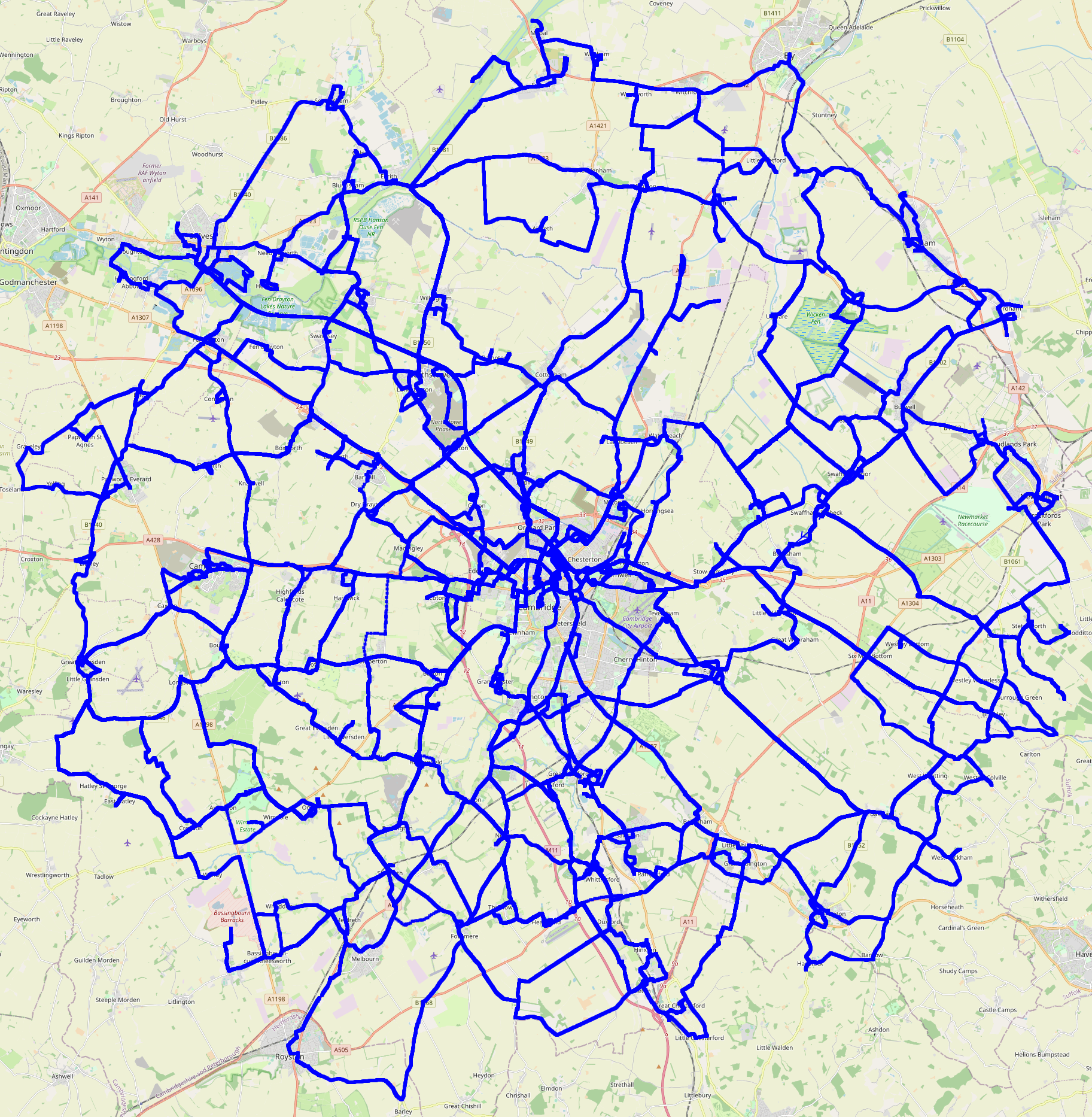
This last weekend I completed a bike rides project I started during the first Covid lockdown in 2020: I ve cycled to every settlement (and radio observatory) within 20km of my house, in alphabetical order. Stir crazy In early 2020, during the first lockdown, I was going a bit stir crazy. Clare said you re going very strange, you have to go out and get some exercise . After a bit of discussion, we came up with this plan: I d visit all the local villages, in alphabetical order. Choosing the radius I decided that I would pick a round number of kilometers, as the crow flies, from my house. 20km seemed about right. 25km would have included Ely, which would have been nice, but it would have added a great many places, all of them quite distant. Software I wrote a short Rust program to process OSM data into a list of places to visit, and their distances and bearings. You can download a tarball of the alphabetical villages scanner. (I haven t published the git history because it has my house s GPS coordinates in it, and because I committed the output files from which that location can be derived.) The Rides I set off on my first ride, to Aldreth, on Sunday the 31st of May 2020. The final ride collected Yelling, on Saturday the 19th of August 2023. I did quite a few rides in June and July 2020 - more than one a week. (I d read the lockdown rules, and although some of the government messaging said you should stay near your house, that wasn t in the legislation. Of course I didn t go into any buildings or anything.) I m not much of a morning person, so I often set off after lunch. For the longer rides I would usually pack a picnic. Almost all of the rides I did just by myself. There were a handful where I had friends along: Dry Drayton, which I collected with Clare, at night. I held my bike up so the light shone at the village sign, so we could take a photo of it. Madingley, Melbourn and Meldreth, which was quite an expedition with my friend Ben. We went out as far as Royston and nearby Barley (both outside my radius and not on my list) mostly just so that my project would have visited Hertfordshire. The Hemingfords, where I had my friend Matthew along, and we had a very nice pub lunch. Girton and Wilburton, where I visited friends. Indeed, I stopped off in Wilburton on one or two other occasions. And, of course, Yelling, for which there were four of us, again with a nice lunch (in Eltisley). I had relatively little mechanical trouble. My worst ride for this was Exning: I got three punctures that day. Luckily the last one was close to home. I often would stop to take lots of photos en-route. My mum in particular appreciated all the pretty pictures. Rules I decided on these rules: I would cycle to each destination, in order, and it would count as collected if I rode both there and back. I allowed collecting multiple villages in the same outing, provided I did them in the right order. (And obviously I was allowed to pass through places out of order, without counting them.) I tried to get a picture of the village sign, where there was one. Failing that, I got a picture of something in the village with the village s name on it. I think the only one I didn t manage this for was Westley Bottom; I had to make do with the word Westley on some railway level crossing equipment. In Barway I had to make do with a planning application, stuck to a pole. I tried not to enter and leave a village by the same road, if possible. Edge cases I had to make some decisions: I decided that I would consider the project complete if I visited everywhere whose centre was within my radius. But the centre of a settlement is rather hard to define. I needed a hard criterion for my OpenStreetMap data mining: a place counted if there was any node, way or relation, with the relevant place tag, any part of which was within my ambit. That included some places that probably oughtn t to have counted, but, fine. I also decided that I wouldn t visit suburbs of Cambridge, separately from Cambridge itself. I don t consider them separate settlements, at least, not if they re conurbated with Cambridge. So that excluded Trumpington, for example. But I decided that Girton and Fen Ditton were (just) separable. Although the place where I consider Girton and Cambridge to nearly touch, is administratively well inside Girton, I chose to look at land use (on the ground, and in OSM data), rather than administrative boundaries. But I did visit both Histon and Impington, and all each of the Shelfords and Stapleford, as separate entries in my list. Mostly because otherwise I d have to decide whether to skip (say) Impington, or Histon. Whereas skipping suburbs of Cambridge in favour of Cambridge itself was an easy decision, and it also got rid of a bunch of what would have been quite short, boring, urban expeditions. I sorted all the Greats and Littles under G and L, rather than (say) Shelford, Great , which seemed like it would be cheating because then I would be able to do Shelford, Great and Shelford, Little in one go. Northstowe turned from mostly a building site into something that was arguably a settlement, during my project. It wasn t included in the output of my original data mining. Of course it s conurbated with Oakington - but happily, Northstowe inserts right before Oakington in the alphabetical list, so I decided to add it, visiting both the old and new in the same day. There are a bunch of other minor edge cases. Some villages have an outlying hamlet. Mostly I included these. There are some individual farms, which I generally didn t count. Some stats I visited 150 villages plus the Lords Bridge radio observatory. The project took 3 years and 3 months to complete. There were 96 rides, totalling about 4900km. So my mean distance was around 51km. The median distance per ride was a little higher, at around 52 km, and the median duration (including stoppages) was about 2h40. The total duration, if you add them all up, including stoppages, was about 275h, giving a mean speed including photo stops, lunches and all, of 18kph. The longest ride was 89.8km, collecting Scotland Farm, Shepreth, and Six Mile Bottom, so riding across the Cam valley. The shortest ride was 7.9km, collecting Cambridge (obviously); and I think that s the only one I did on my Brompton. The rest were all on my trusty Thorn Audax. My fastest ride (ranking by distance divided by time spent in motion) was to collect Haddenham, where I covered 46.3km in 1h39, giving an average speed in motion of 28.0kph. The most I collected in one day was 5 places: West Wickham, West Wratting, Westley Bottom, Westley Waterless, and Weston Colville. That was the day of the Wests. (There s only one East: East Hatley.) Map Here is a pretty picture of all of my tracklogs:
Edited 2023-08-25 01:32 BST to correct a slip.


comment count unavailable comments

22 August 2023

Scarlett Gately Moore: KDE: A Day in the Life the KDE Snapcrafter Part 2

KDE MascotKDE Mascot
Much to my dismay, I figured out that my blog has been disabled on the Ubuntu planet since May. If you are curious about what I have been up to, please go to the handy links -> and read up! This post is a continuation of last weeks https://www.scarlettgatelymoore.dev/kde-a-day-in-the-life-of-the-kde-snapcrafter/ IMPORTANT: I am still looking for a super awesome team lead for a super amazing project involving KDE and Snaps. Time is running out and well the KDE world will be a better a better place if this project goes through! I would like to clarify, this is a paid position! A current KDE developer would be ideal as it is a small team so your time will be split managing and coding alike. If you or anyone you know might be interested please contact me ASAP! Snaps: I am wrapping up the 23.04.3 KDE applications release! Head on over to https://snapcraft.io/search?q=KDE and enjoy! We are now up to 180 snaps! PIM snaps will be slowly rolling in as they go through manual reviews for D-Bus. Snapcraft: minor fix in qmake plugin found by ruff. Launchpad: I almost have approval for per application repository snapcraft files, but I have to prove it will work to our benefit and not cause loads of polling etc. So I have been testing various methods of achieving such a task, and so far I have come up with launchpads ability to watch and download release tarballs into a project. I will then need to script getting the tarball and pushing it to a bzr branch from which I can create a proper snap recipe. Unfortunately, my proper snap recipe fails! Hopefully a very helpful cjwatson will chime in, or if anyone wants to take a gander please chime in here: https://bugs.launchpad.net/launchpad/+bug/2031307 As reality sets in that my project may not happen if I don t find anyone, I need help surviving until I find work or funding to continue my snap work ( still much to do! ) If you or anyone else you know enjoys our snaps please consider a donation, anything helps! Please share! Thank you for your consideration!

21 August 2023

Melissa Wen: AMD Driver-specific Properties for Color Management on Linux (Part 1)

TL;DR: Color is a visual perception. Human eyes can detect a broader range of colors than any devices in the graphics chain. Since each device can generate, capture or reproduce a specific subset of colors and tones, color management controls color conversion and calibration across devices to ensure a more accurate and consistent color representation. We can expose a GPU-accelerated display color management pipeline to support this process and enhance results, and this is what we are doing on Linux to improve color management on Gamescope/SteamDeck. Even with the challenges of being external developers, we have been working on mapping AMD GPU color capabilities to the Linux kernel color management interface, which is a combination of DRM and AMD driver-specific color properties. This more extensive color management pipeline includes pre-defined Transfer Functions, 1-Dimensional LookUp Tables (1D LUTs), and 3D LUTs before and after the plane composition/blending.
The study of color is well-established and has been explored for many years. Color science and research findings have also guided technology innovations. As a result, color in Computer Graphics is a very complex topic that I m putting a lot of effort into becoming familiar with. I always find myself rereading all the materials I have collected about color space and operations since I started this journey (about one year ago). I also understand how hard it is to find consensus on some color subjects, as exemplified by all explanations around the 2015 online viral phenomenon of The Black and Blue Dress. Have you heard about it? What is the color of the dress for you? So, taking into account my skills with colors and building consensus, this blog post only focuses on GPU hardware capabilities to support color management :-D If you want to learn more about color concepts and color on Linux, you can find useful links at the end of this blog post.

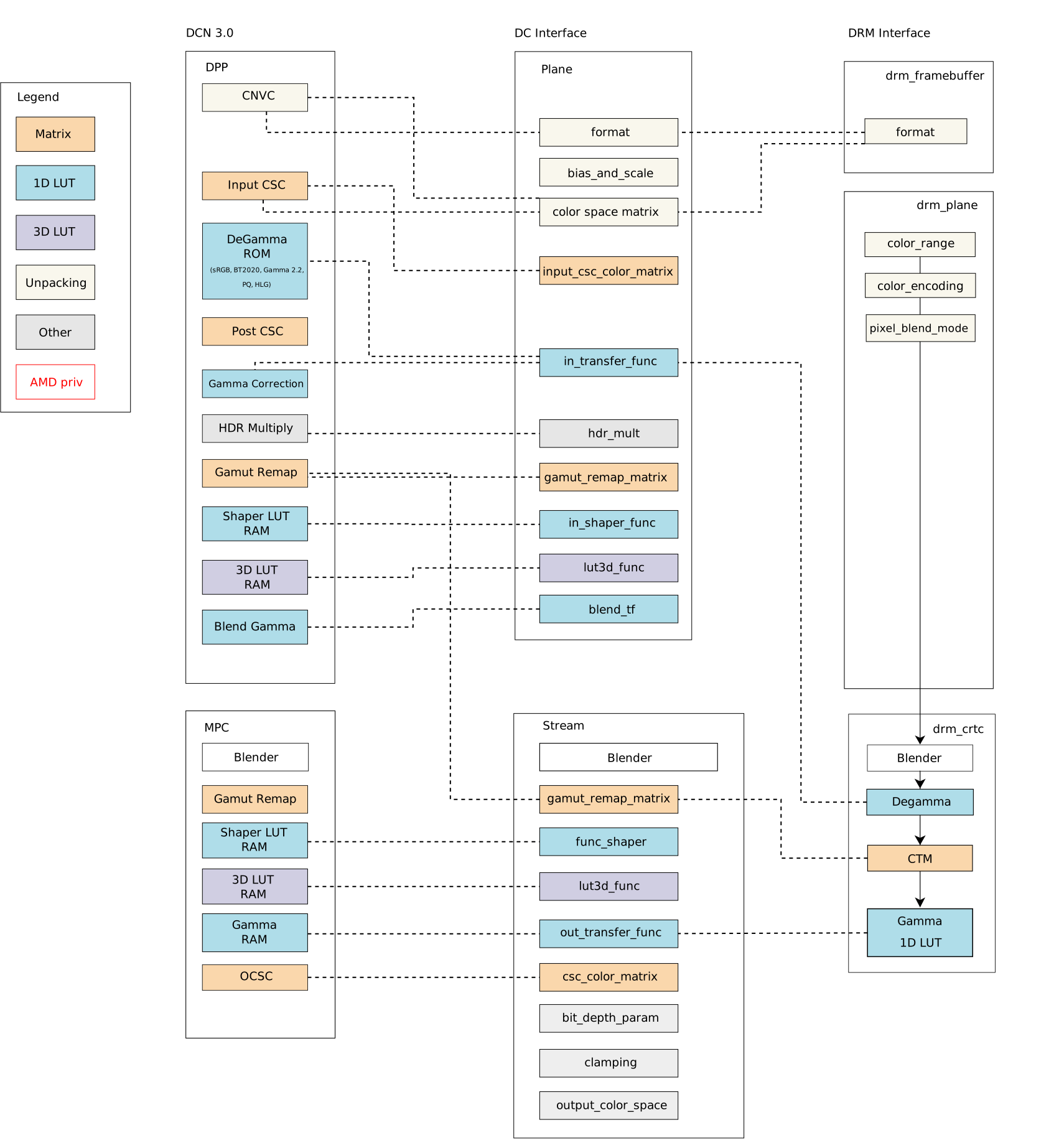
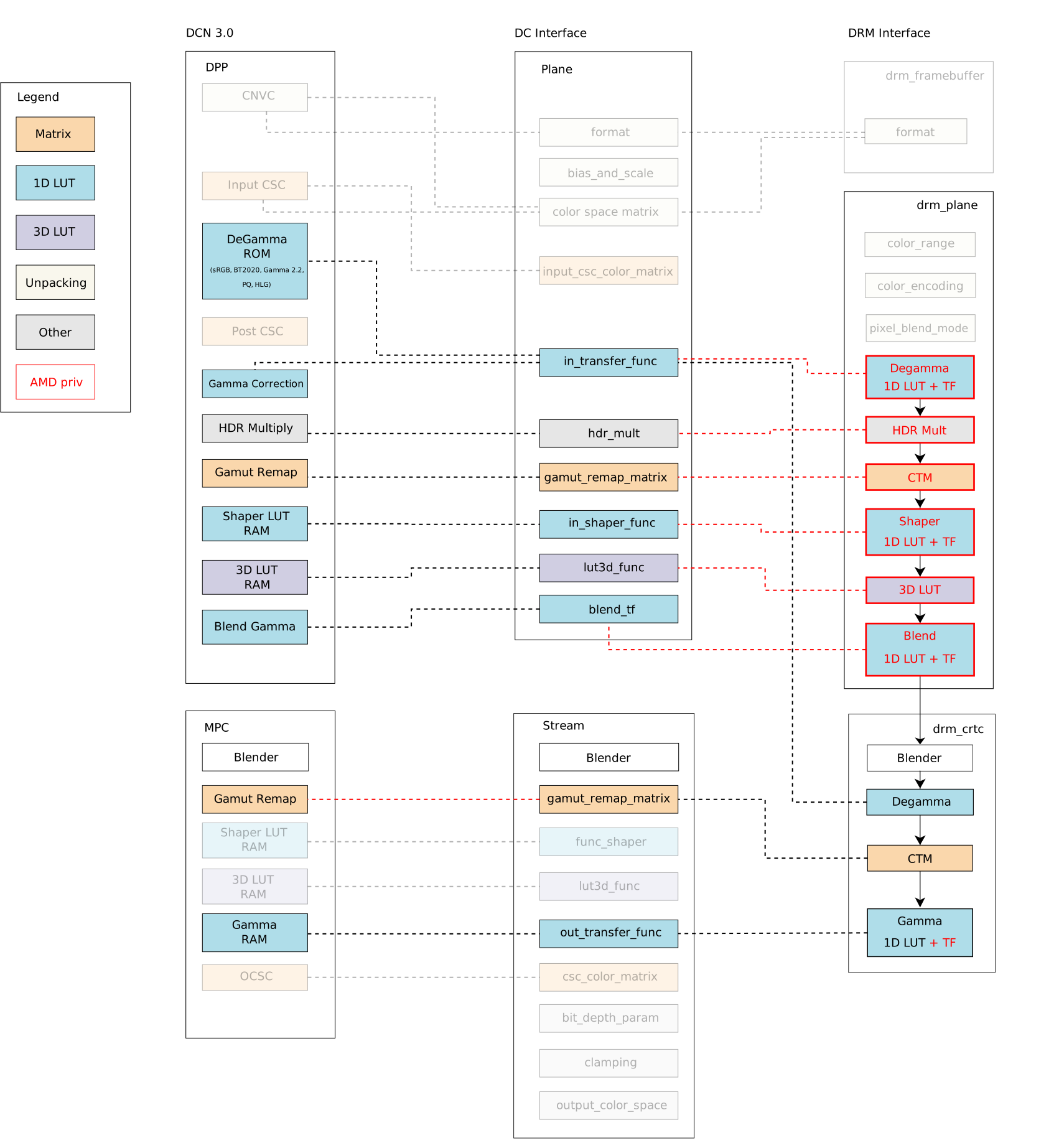
Linux Kernel, show me the colors ;D DRM color management interface only exposes a small set of post-blending color properties. Proposals to enhance the DRM color API from different vendors have landed the subsystem mailing list over the last few years. On one hand, we got some suggestions to extend DRM post-blending/CRTC color API: DRM CRTC 3D LUT for R-Car (2020 version); DRM CRTC 3D LUT for Intel (draft - 2020); DRM CRTC 3D LUT for AMD by Igalia (v2 - 2023); DRM CRTC 3D LUT for R-Car (v2 - 2023). On the other hand, some proposals to extend DRM pre-blending/plane API: DRM plane colors for Intel (v2 - 2021); DRM plane API for AMD (v3 - 2021); DRM plane 3D LUT for AMD - 2021. Finally, Simon Ser sent the latest proposal in May 2023: Plane color pipeline KMS uAPI, from discussions in the 2023 Display/HDR Hackfest, and it is still under evaluation by the Linux Graphics community. All previous proposals seek a generic solution for expanding the API, but many seem to have stalled due to the uncertainty of matching well the hardware capabilities of all vendors. Meanwhile, the use of AMD color capabilities on Linux remained limited by the DRM interface, as the DCN 3.0 family color caps and mapping diagram below shows the Linux/DRM color interface without driver-specific color properties [*]: Bearing in mind that we need to know the variety of color pipelines in the subsystem to be clear about a generic solution, we decided to approach the issue from a different perspective and worked on enabling a set of Driver-Specific Color Properties for AMD Display Drivers. As a result, I recently sent another round of the AMD driver-specific color mgmt API. For those who have been following the AMD driver-specific proposal since the beginning (see [RFC][V1]), the main new features of the latest version [v2] are the addition of pre-blending Color Transformation Matrix (plane CTM) and the differentiation of Pre-defined Transfer Functions (TF) supported by color blocks. For those who just got here, I will recap this work in two blog posts. This one describes the current status of the AMD display driver in the Linux kernel/DRM subsystem and what changes with the driver-specific properties. In the next post, we go deeper to describe the features of each color block and provide a better picture of what is available in terms of color management for Linux.

The Linux kernel color management API and AMD hardware color capabilities Before discussing colors in the Linux kernel with AMD hardware, consider accessing the Linux kernel documentation (version 6.5.0-rc5). In the AMD Display documentation, you will find my previous work documenting AMD hardware color capabilities and the Color Management Properties. It describes how AMD Display Manager (DM) intermediates requests between the AMD Display Core component (DC) and the Linux/DRM kernel interface for color management features. It also describes the relevant function to call the AMD color module in building curves for content space transformations. A subsection also describes hardware color capabilities and how they evolve between versions. This subsection, DC Color Capabilities between DCN generations, is a good starting point to understand what we have been doing on the kernel side to provide a broader color management API with AMD driver-specific properties.

Why do we need more kernel color properties on Linux? Blending is the process of combining multiple planes (framebuffers abstraction) according to their mode settings. Before blending, we can manage the colors of various planes separately; after blending, we have combined those planes in only one output per CRTC. Color conversions after blending would be enough in a single-plane scenario or when dealing with planes in the same color space on the kernel side. Still, it cannot help to handle the blending of multiple planes with different color spaces and luminance levels. With plane color management properties, userspace can get a more accurate representation of colors to deal with the diversity of color profiles of devices in the graphics chain, bring a wide color gamut (WCG), convert High-Dynamic-Range (HDR) content to Standard-Dynamic-Range (SDR) content (and vice-versa). With a GPU-accelerated display color management pipeline, we can use hardware blocks for color conversions and color mapping and support advanced color management. The current DRM color management API enables us to perform some color conversions after blending, but there is no interface to calibrate input space by planes. Note that here I m not considering some workarounds in the AMD display manager mapping of DRM CRTC de-gamma and DRM CRTC CTM property to pre-blending DC de-gamma and gamut remap block, respectively. So, in more detail, it only exposes three post-blending features:
  • DRM CRTC de-gamma: used to convert the framebuffer s colors to linear gamma;
  • DRM CRTC CTM: used for color space conversion;
  • DRM CRTC gamma: used to convert colors to the gamma space of the connected screen.

AMD driver-specific color management interface We can compare the Linux color management API with and without the driver-specific color properties. From now, we denote driver-specific properties with the AMD prefix and generic properties with the DRM prefix. For visual comparison, I bring the DCN 3.0 family color caps and mapping diagram closer and present it here again: Mixing AMD driver-specific color properties with DRM generic color properties, we have a broader Linux color management system with the following features exposed by properties in the plane and CRTC interface, as summarized by this updated diagram: The blocks highlighted by red lines are the new properties in the driver-specific interface developed by me (Igalia) and Joshua (Valve). The red dashed lines are new links between API and AMD driver components implemented by us to connect the Linux/DRM interface to AMD hardware blocks, mapping components accordingly. In short, we have the following color management properties exposed by the DRM/AMD display driver:
  • Pre-blending - AMD Display Pipe and Plane (DPP):
    • AMD plane de-gamma: 1D LUT and pre-defined transfer functions; used to linearize the input space of a plane;
    • AMD plane CTM: 3x4 matrix; used to convert plane color space;
    • AMD plane shaper: 1D LUT and pre-defined transfer functions; used to delinearize and/or normalize colors before applying 3D LUT;
    • AMD plane 3D LUT: 17x17x17 size with 12 bit-depth; three dimensional lookup table used for advanced color mapping;
    • AMD plane blend/out gamma: 1D LUT and pre-defined transfer functions; used to linearize back the color space after 3D LUT for blending.
  • Post-blending - AMD Multiple Pipe/Plane Combined (MPC):
    • DRM CRTC de-gamma: 1D LUT (can t be set together with plane de-gamma);
    • DRM CRTC CTM: 3x3 matrix (remapped to post-blending matrix);
    • DRM CRTC gamma: 1D LUT + AMD CRTC gamma TF; added to take advantage of driver pre-defined transfer functions;
Note: You can find more about AMD display blocks in the Display Core Next (DCN) - Linux kernel documentation, provided by Rodrigo Siqueira (Linux/AMD display developer) in a 2021-documentation series. In the next post, I ll revisit this topic, explaining display and color blocks in detail.

How did we get a large set of color features from AMD display hardware? So, looking at AMD hardware color capabilities in the first diagram, we can see no post-blending (MPC) de-gamma block in any hardware families. We can also see that the AMD display driver maps CRTC/post-blending CTM to pre-blending (DPP) gamut_remap, but there is post-blending (MPC) gamut_remap (DRM CTM) from newer hardware versions that include SteamDeck hardware. You can find more details about hardware versions in the Linux kernel documentation/AMDGPU Product Information. I needed to rework these two mappings mentioned above to provide pre-blending/plane de-gamma and CTM for SteamDeck. I changed the DC mapping to detach stream gamut remap matrixes from the DPP gamut remap block. That means mapping AMD plane CTM directly to DPP/pre-blending gamut remap block and DRM CRTC CTM to MPC/post-blending gamut remap block. In this sense, I also limited plane CTM properties to those hardware versions with MPC/post-blending gamut_remap capabilities since older versions cannot support this feature without clashes with DRM CRTC CTM. Unfortunately, I couldn t prevent conflict between AMD plane de-gamma and DRM plane de-gamma since post-blending de-gamma isn t available in any AMD hardware versions until now. The fact is that a post-blending de-gamma makes little sense in the AMD color pipeline, where plane blending works better in a linear space, and there are enough color blocks to linearize content before blending. To deal with this conflict, the driver now rejects atomic commits if users try to set both AMD plane de-gamma and DRM CRTC de-gamma simultaneously. Finally, we had no other clashes when enabling other AMD driver-specific color properties for our use case, Gamescope/SteamDeck. Our main work for the remaining properties was understanding the data flow of each property, the hardware capabilities and limitations, and how to shape the data for programming the registers - AMD color block capabilities (and limitations) are the topics of the next blog post. Besides that, we fixed some driver bugs along the way since it was the first Linux use case for most of the new color properties, and some behaviors are only exposed when exercising the engine. Take a look at the Gamescope/Steam Deck Color Pipeline[**], and see how Gamescope uses the new API to manage color space conversions and calibration (please click on the image for a better view): In the next blog post, I ll describe the implementation and technical details of each pre- and post-blending color block/property on the AMD display driver. * Thank Harry Wentland for helping with diagrams, color concepts and AMD capabilities. ** Thank Joshua Ashton for providing and explaining Gamescope/Steam Deck color pipeline. *** Thanks to the Linux Graphics community - explicitly Harry, Joshua, Pekka, Simon, Sebastian, Siqueira, Alex H. and Ville - to all the learning during this Linux DRM/AMD color journey. Also, Carlos and Tomas for organizing the 2023 Display/HDR Hackfest where we have a great and immersive opportunity to discuss Color & HDR on Linux.

Russ Allbery: Review: Some Desperate Glory

Review: Some Desperate Glory, by Emily Tesh
Publisher: Tordotcom
Copyright: 2023
ISBN: 1-250-83499-6
Format: Kindle
Pages: 438
Some Desperate Glory is a far-future space... opera? That's probably the right genre classification given the setting, but this book is much more intense and character-focused than most space opera. It is Emily Tesh's first novel, although she has two previous novellas that were published as books. The alien majo and their nearly all-powerful Wisdom have won the war by destroying Earth with an antimatter bomb. The remnants of humanity were absorbed into the sprawling majo civilization. Gaea Station is the lone exception: a marginally viable station deep in space, formed from a lifeless rocky planetoid and the coupled hulks of the last four human dreadnoughts. Gaea Station survives on military discipline, ruthless use of every available resource, and constant training, raising new generations of soldiers for the war that it refuses to let end. While Earth's children live, the enemy shall fear us. Kyr is a warbreed, one of a genetically engineered line of soldiers that, following an accident, Gaea Station has lost the ability to make except the old-fashioned way. Among the Sparrows, her mess group, she is the best at the simulated combat exercises they use for training. She may be the best of her age cohort except her twin Magnus. As this novel opens, she and the rest of the Sparrows are about to get their adult assignments. Kyr is absolutely focused on living up to her potential and the attention of her uncle Jole, the leader of the station. Kyr's future will look nothing like what she expects. This book was so good, and I despair of explaining why it was so good without unforgivable spoilers. I can tell you a few things about it, but be warned that I'll be reduced to helpless gestures and telling you to just go read it. It's been a very long time since I was this surprised by a novel, possibly since I read Code Name: Verity for the first time. Some Desperate Glory follows Kyr in close third-person throughout the book, which makes the start of this book daring. If you're getting a fascist vibe from the setup, you're not wrong, and this is intentional on Tesh's part. But Kyr is a true believer at the start of the book, so the first quarter has a protagonist who is sometimes nasty and cruel and who makes some frustratingly bad decisions. Stay with it, though; Tesh knows exactly what she's doing. This is a coming of age story, in a way. Kyr has a lot to learn and a lot to process, and Some Desperate Glory is about that process. But by the middle of part three, halfway through the book, I had absolutely no idea where Tesh was going with the story. She then pulled the rug out from under me, in the best way, at least twice more. Part five of this book is an absolute triumph, the payoff for everything that's happened over the course of the novel, and there is no way I could have predicted it in advance. It was deeply satisfying in that way where I felt like I learned some things along with the characters, and where the characters find a better ending than I could possibly have worked out myself. Tesh does use some world-building trickery, which is at its most complicated in part four. That was the one place where I can point to a few chapters where I thought the world-building got a bit too convenient in order to enable the plot. But it also allows for some truly incredible character work. I can't describe that in detail because it would be a major spoiler, but it's one of my favorite tropes in fiction and Tesh pulls it off beautifully. The character growth and interaction in this book is just so good: deep and complicated and nuanced and thoughtful in a way that revises reader impressions of earlier chapters. The other great thing about this book is that for a 400+ page novel, it moves right along. Both plot and character development is beautifully paced with only a few lulls. Tesh also doesn't belabor conversations. This is a book that provides just the right amount of context for the reader to fully understand what's going on, and then trusts the reader to be following along and moves straight to the next twist. That makes it propulsively readable. I had so much trouble putting this book down at any time during the second half. I can't give any specifics, again because of spoilers, but this is not just a character story. Some Desperate Glory has strong opinions on how to ethically approach the world, and those ethics are at the center of the plot. Unlike a lot of books with a moral stance, though, this novel shows the difficulty of the work of deriving that moral stance. I have rarely read a book that more perfectly captures the interior experience of changing one's mind with all of its emotional difficulty and internal resistance. Tesh provides all the payoff I was looking for as a reader, but she never makes it easy or gratuitous (with the arguable exception of one moment at the very end of the book that I think some people will dislike but that I personally needed). This is truly great stuff, probably the best science fiction novel that I've read in several years. Since I read it (I'm late on reviews again), I've pushed it on several other people, and I've not had a miss yet. The subject matter is pretty heavy, and this book also uses several tropes that I personally adore and am therefore incapable of being objective about, but with those caveats, this gets my highest possible recommendation. Some Desperate Glory is a complete story in one novel with a definite end, although I love these characters so much that I'd happily read their further adventures, even if those are thematically unnecessary. Content warnings: Uh, a lot. Genocide, suicide, sexual assault, racism, sexism, homophobia, misgendering, and torture, and I'm probably forgetting a few things. Tesh doesn't linger on these long, but most of them are on-screen. You may have to brace yourself for this one. Rating: 10 out of 10

20 August 2023

Russell Coker: GPT Systems and Relationships

Sam Hartman wrote an interesting blog post about his work as a sex and intimacy educator and how GPT systems could impact that [1]. I ve read some positive reviews of Replika a commercial system that is somewhat promoted as a counsellor [2], so I decided to try it out. In my brief trial it seemed to be using all the methods that Android pay to play games are known for. Having multiple types of in-game currency, pay to buy new clothes etc for your friend, etc. Basically it seems pretty horrible. I didn t pay for it and the erotic and romantic features all require payment so I didn t test that. When thinking about this logically, having a system designed to deal with people when they are vulnerable (either being in a romantic relationship or getting counselling) that uses manipulative techniques to get money from them can t have a good result. So a free software system seems the best option. When I first learned of virtual girlfriends I never thought I would feel compelled to advocate for a free software virtual dating program, but that s where the world has got to. Virtual girlfriends have been around for years now. Several years ago I watched a documentary about their use in Japan. It seemed a bit strange when a group of men who had virtual girlfriends had a dinner party with their tablets and phones propped up so their girlfriends could join in as they all appeared to be dating the same girl. The documentary didn t go in to enough detail to cover whether the girlfriend app could learn or be customised enough that they would seem to have different personalities. Virtual boyfriends have also been around for a while apparently without most people noticing. I just Googled it and found a review of a virtual boyfriend app published in 2016! One thing that will probably concern people is the possibility for virtual dating systems to be used for inappropriate things. That is a reasonable thing to be concerned about but I don t think it s possible to prevent technology that has already been released from doing such things. As a general rule technology can always be used for good and bad things so we need to just make it easy to do good things and let the legal system develop ways of dealing with the bad things.

18 August 2023

Scarlett Gately Moore: KDE: A day in the life of the KDE snapcrafter!

KDE MascotKDE Mascot
As mentioned last week, I am still looking for a super awesome team lead for a super amazing project involving KDE and Snaps. Time is running out and well the KDE world will be a better a better place if this project goes through! I would like to clarify, this is a paid position! A current KDE developer would be ideal as it is a small team so your time will be split managing and coding alike. If you or anyone you know might be interested please contact me ASAP! On to snappy things I have achieved this week: Most 23.04.3 is done, I am just testing them now. New applications: kmymoney ( Thanks Carlos! ), kde-dev-utils, and kxstitch ( Thanks Jeremy! ) With that said, I have seen on the internets candidate channel apps being promoted. Please use this channel with utmost care as they are being tested and could quite possibly be very broken! Still working on some QML issues with kirigami platform not found. I have begun the launchpad build issues journey and have been kindly pointed to using snap recipes on launchpad so we aren t doing public uploads which creates temporary recipes to build and cannot be bumped priority wise. So I have sent the request into the kde-devel arena to revisit having per repository snapcraft files ( rejected in the past ) as they do with flatpak files. So far I am getting positive feedback and hopefully this will go through. Once it does I can move forward with fully automating application new releases. Hooray! This week I jumped into the xdg-desktop-portals rabbithole while working on https://bugs.kde.org/show_bug.cgi?id=473003 for neochat. After fixing it with adding plug password-manager-service I am told that auto-connect on that one is discouraged and the libsecret should work out of the box with portals. I found and joined just in time a snapcrafter google meet and we had a long conversation spitballing and testing our portal support. At least in Neon it appears to be broken. I now have some things to do and test to see that we get this functional. Most of our online apps are affected. For now though snap connect neochat:password-manager-service :password-manager-service does work. Auto-connect was rejected as it exposes to much. Understandable. I have started a new thread on the KDE forums for users to ask any questions, or let me know of any issues you may have related to snaps here: https://discuss.kde.org/t/all-things-snaps-questions-concerns-praise/4033 come join the conversation! In the snapcraft arena I have fixed my PR for the much needed qmake plugin! This should be merged and rolled out in the very near future! I would like to continue my hard work on snap things regardless of the project going through. Unfortunately, to do so, I must ask for donations as life isn t free. I am working on self sufficiency but even that costs money to get started! KDE snaps are used by 1.7 million active devices! I do ask that if you use KDE snaps and find my work useful, or know someone that does, to please consider donating to keep my momentum going. There is still much work to be done with Qt6 rolling out. I would like to work on the KDE Plasma snap and KDE PIM suite of apps ( I have started on this ). Even if you can t help, please share! Thank you for your consideration! I have a new donation form for anyone that doesn t like gofundme here:
Gofund me:

17 August 2023

Jonathan Carter: Debian 30th Birthday: Local Group event and Interview

Inspired by the fine Debian Local Groups all over the world, I ve long since wanted to start one in Cape Town. Unfortunately, there s been many obstacles over the years. Shiny distractions, an epidemic, DPL terms these are just some of the things that got in the way. Fortunately, things are starting to gain traction, and we re well on our way to forming a bona fide local group for South Africa. We got together at Woodstock Grill, they have both a nice meeting room, and good food and beverage, also reasonably central for most of us.

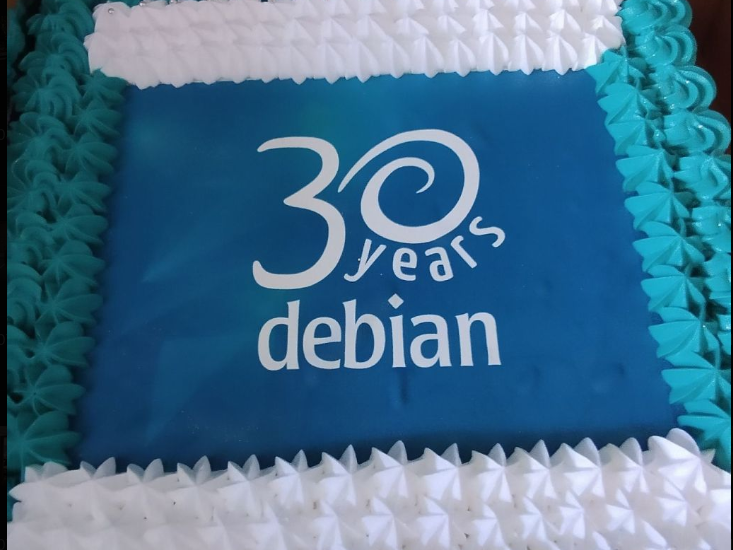
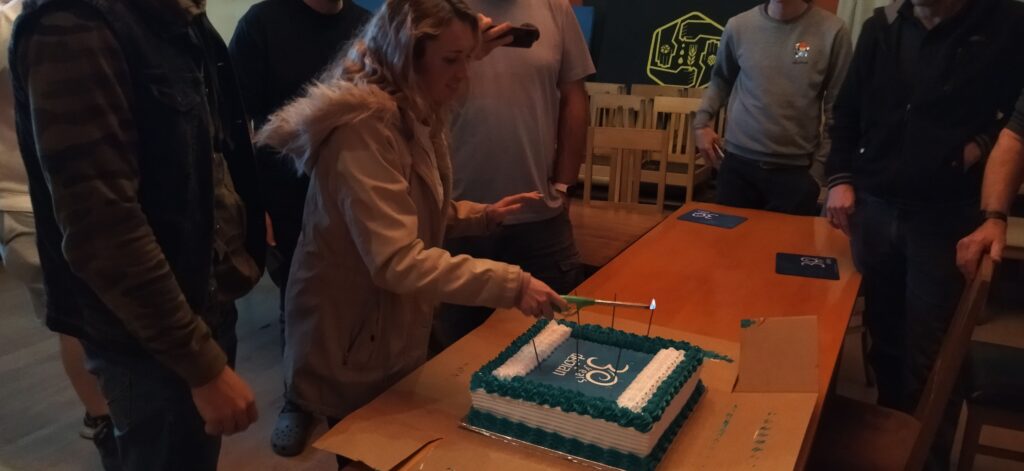
Cake Starting with the important stuff, we got this Debian cake made that ended up much bigger than we expected, at least we all got to take some home too! (it tasted great too)

Yes, cake.

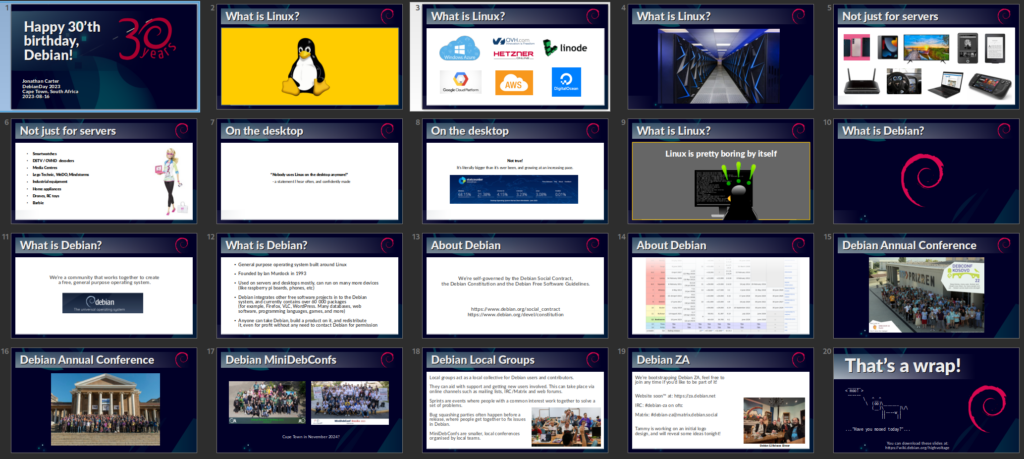
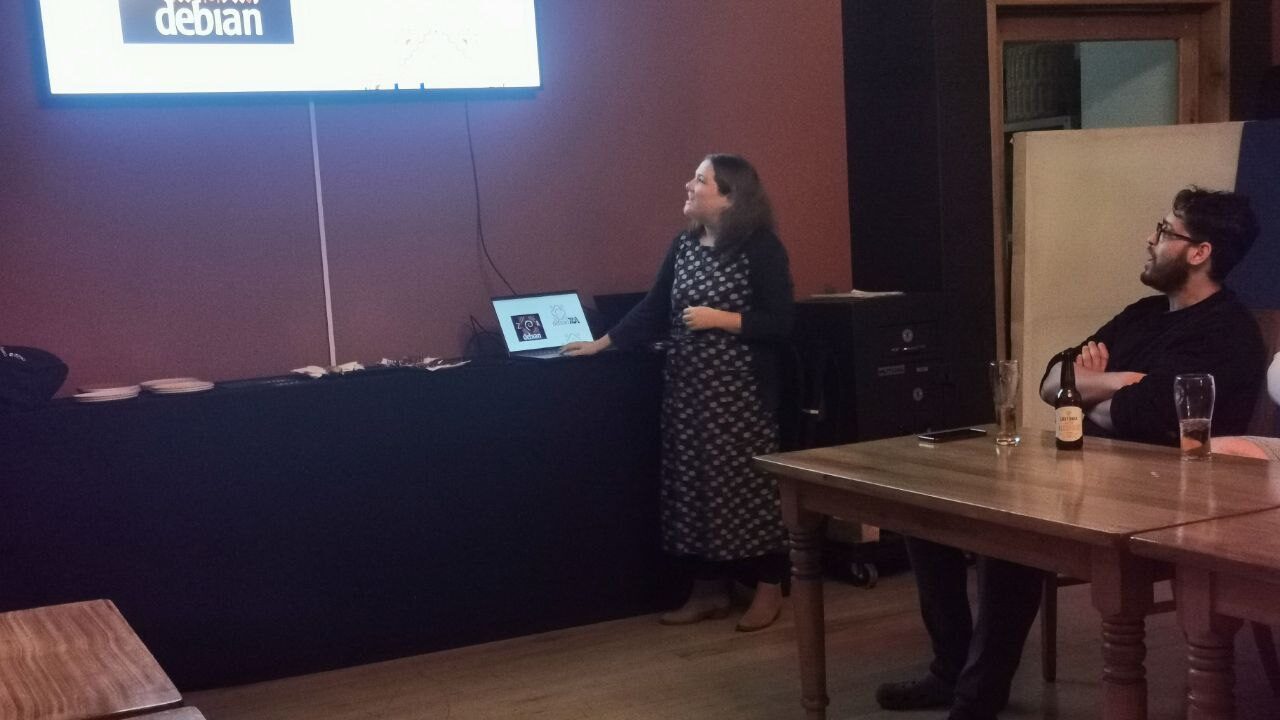
Talk This event was planned very last minute, so we didn t do any kind of RSVP and I had no idea who exactly would show up, so I went ahead and prepared one of my usual introduction to Linux and Debian talks, and how these things are having an impact on the world out there. I also talked a bit about the community and how we intend to grow our local team here in South Africa. It turned out most of the audience were already experienced Linux users, but I was happy to see that they were very enthusiastic about the local group concept!
While reading through some material to find some inspiration for this talk, I came across an old quote from the original Debian Manifesto that I found very poignant again, so I feel compelled to share (didn t use it in my talk this time though since I didn t cover much current events): The time has come to concentrate on the future of Linux rather than on the destructive goal of enriching oneself at the expense of the entire Linux community and its future. Ian Murdock, 1994

Debian-ZA logo Tammy spent some time creating a whole bunch of logo concepts, that she presented to us. They aren t meant as final logo choices, but as initial concepts, and they worked well to invoke a very lively discussion about logos and design!
Here are just some of her designs that I cherry picked since they were the most discussed. We still haven t decided if it will be Debian ZA or Debian-ZA or Debian South Africa, although the latter will probably cause least confusion internationally.
Personally, the last one on this image that I referred to as the carpet is my personal favourite :-)

Happy Birthday Song John and Heila wrote a happy birthday song. After seeing the lyrics (and considering myself an amateur lyricist) I thought it was way too tacky and I told John to put it away. But when the cake came out, someone said we should sing! and the lyrics quickly re-emerged and was handed out to everyone. It s also meant to be a loopy clip for the upcoming DebConf23. I ll concede that it worked out alright in the end! You judge for yourself:

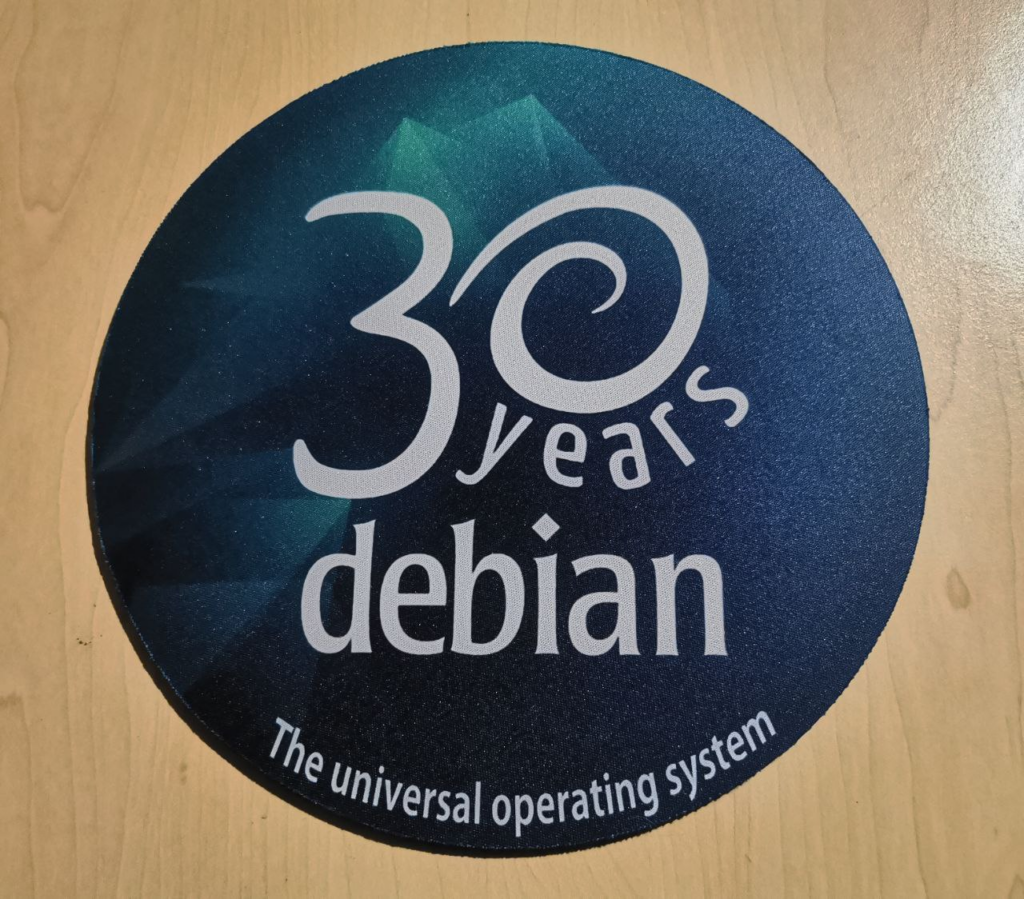
Mousepads People still use mousepads? That was my initial reaction when Heila told me that she was going to make some commemorative 30 year Debian mousepads for our birthday event, and they ended up being popular. It s probably a safer surface to put dev boards on than on my desk directly, so at least I do have a use for one!

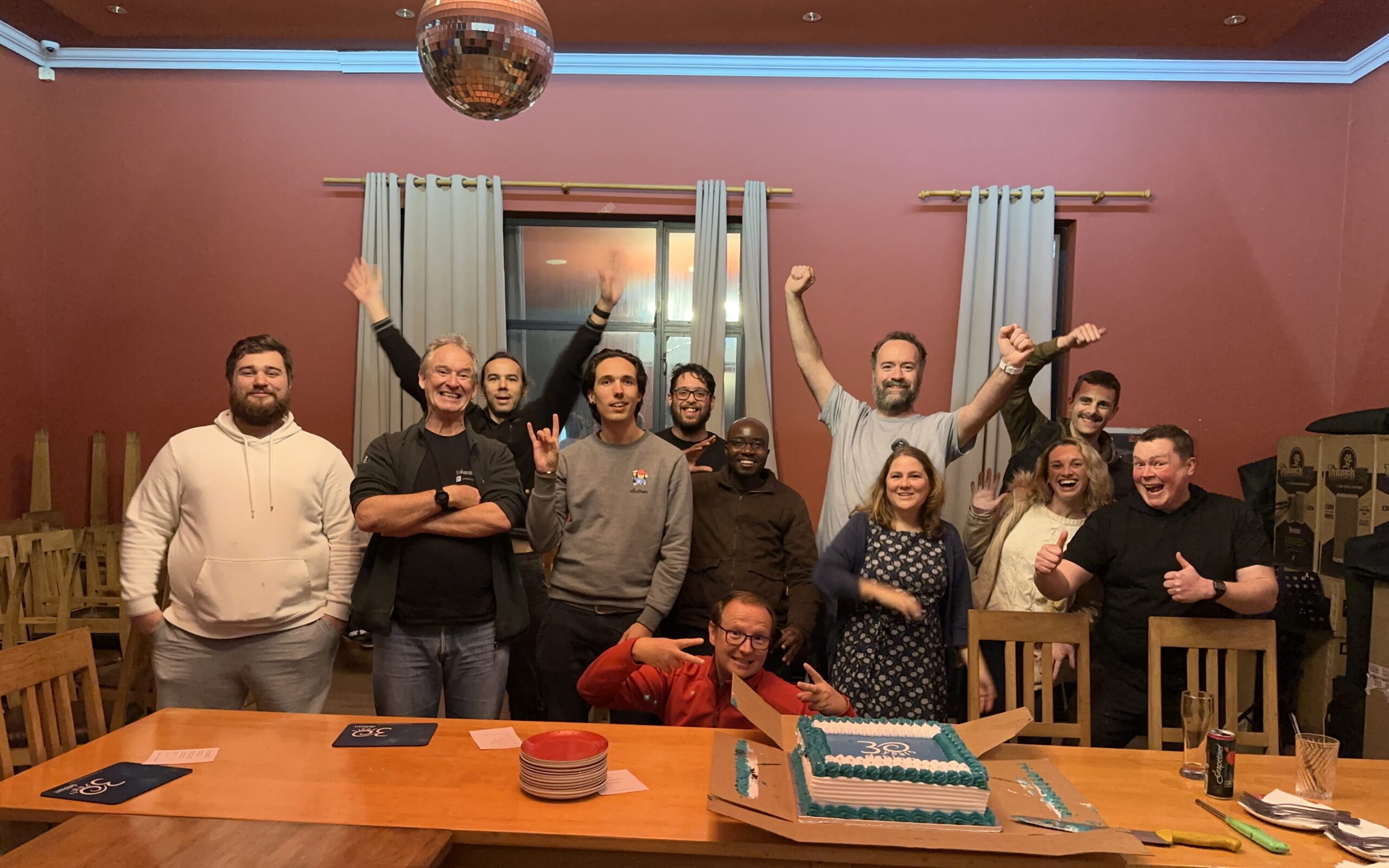
Group Photo The group photo, complete with disco ball! We should ve taken this earlier because it was already getting late and some people had to head back home. Lesson learned for next time!

30th Birthday Interview with The Changelog I also did an interview with The Changelog for Debian s 30th birthday. It was late, and I haven t had a chance to listen to it yet, so I hope their producers managed to edit something coherent out of my usual Debian babbling:

More later There s so much more I d like to say about Debian, the last 30 years, local groups, the eco-system that we find ourselves in. And, Lemmy! But I ll see if I can get an instance up over the weekend and will then talk about that some more another time.

16 August 2023

Sam Hartman: A First Exercise with AI Training

Taking a hands-on low-level approach to learning AI has been incredibly rewarding. I wanted to create an achievable task that would motivate me to learn the tools and get practical experience training and using large language models. Just at the point when I was starting to spin up GPU instances, Llama2 was released to the public. So I elected to start with that model. As I mentioned, I m interested in exploring how sex-positive AI can help human connection in positive ways. For that reason, I suspected that Llama2 might not produce good results without training: some of Meta s safety goals run counter to what I m trying to explore. I suspected that there might be more attention paid to safety in the chat variants of Llama2 rather than the text generation variants, and working against that might be challenging for a first project, so I started with Llama-2-13b as a base. Preparing a Dataset I elected to generate a fine tuning dataset using fiction. Long term, that might not be a good fit. But I ve always wanted to understand how an LLM s tone is adjusted how you get an LLM to speak in a different voice. So much of fine tuning focuses on examples where a given prompt produces a particular result. I wanted to understand how to bring in data that wasn t structured as prompts. The Huggingface course actually gives an example of how to adjust a model set up for masked language modeling trained on wikitext to be better at predicting the vocabulary of movie reviews. There though, doing sample breaks in the dataset at movie review boundaries makes sense. There s another example of training an LLM from scratch based on a corpus of python code. Between these two examples, I figured out what I needed. It was relatively simple in retrospect: tokenize the whole mess, and treat everything as output. That is, compute loss on all the tokens. Long term, using fiction as a way to adjust how the model responds is likely to be the wrong starting point. However, it maximized focus on aspects of training I did not understand and allowed me to satisfy my curiosity. Rangling the Model I decided to actually try and add additional training to the model directly rather than building an adapter and fine tuning a small number of parameters. Partially this was because I had enough on my mind without understanding how LoRA adapters work. Partially, I wanted to gain an appreciation for the infrastructure complexity of AI training. I have enough of a cloud background that I ought to be able to work on distributed training. (As it turned out, using BitsAndBytes 8-bit optimizer, I was just able to fit my task onto a single GPU). I wasn t even sure that I could make a measurable difference in Llama-2-13b running 890,000 training tokens through a couple of training epochs. As it turned out I had nothing to fear on that front. Getting everything to work was more tricky than I expected. I didn t have an appreciation for exactly how memory intensive training was. The Transformers documentation points out that with typical parameters for mixed-precision training, it takes 18 bytes per model parameter. Using bfloat16 training and an 8-bit optimizer was enough to get things to fit. Of course then I got to play with convergence. My initial optimizer parameters caused the model to diverge, and before I knew it, my model had turned to NAN, and would only output newlines. Oops. But looking back over the logs, watching what happened to the loss, and looking at the math in the optimizer to understand how I ended up getting something that rounded to a divide by zero gave me a much better intuition for what was going on. The results. This time around I didn t do anything in the way of quantitative analysis of what I achieved. Empirically I definitely changed the tone of the model. The base Llama-2 model tends to steer away from sexual situations. It s relatively easy to get it to talk about affection and sometimes attraction. Unsurprisingly, given the design constraints, it takes a bit to get it to wonder into sexual situations. But if you hit it hard enough with your prompt, it will go there, and the results are depressing. At least for prompts I used, it tended to view sex fairly negatively. It tended to be less coherent than with other prompts. One inference managed to pop out in the middle of some text that wasn t hanging together well, Chapter 7 - Rape. With my training, I did manage to achieve my goal of getting the model to use more positive language and emotional signaling when talking about sexual situations. More importantly, I gained a practical understanding of many ways training can go wrong. A lot of articles I ve been reading about training make more sense. I have better intuition for why you might want to do training a certain way, or why mechanisms for countering some problem will be important. Future Activities:

comment count unavailable comments

Bits from Debian: Debian Celebrates 30 years!

Debian 30 years by Jeff Maier Over 30 years ago the late Ian Murdock wrote to the comp.os.linux.development newsgroup about the completion of a brand-new Linux release which he named "The Debian Linux Release". He built the release by hand, from scratch, so to speak. Ian laid out guidelines for how this new release would work, what approach the release would take regarding its size, manner of upgrades, installation procedures; and with great care of consideration for users without Internet connection. Unaware that he had sparked a movement in the fledgling F/OSS community, Ian worked on and continued to work on Debian. The release, now aided by volunteers from the newsgroup and around the world, grew and continues to grow as one of the largest and oldest FREE operating systems that still exist today. Debian at its core is comprised of Users, Contributors, Developers, and Sponsors, but most importantly, People. Ians drive and focus remains embedded in the core of Debian, it remains in all of our work, it remains in the minds and hands of the users of The Universal Operating System. The Debian Project is proud and happy to share our anniversary not exclusively unto ourselves, instead we share this moment with everyone, as we come together in celebration of a resounding community that works together, effects change, and continues to make a difference, not just in our work but around the world. Debian is present in cluster systems, datacenters, desktop computers, embedded systems, IoT devices, laptops, servers, it may possibly be powering the web server and device you are reading this article on, and it can also be found in Spacecraft. Closer to earth, Debian fully supports projects for accessibility: Debian Edu/Skolelinux - an operating system designed for educational use in schools and communities, Debian Science - providing free scientific software across many established and emerging fields, Debian Hamradio - for amateur radio enthusiasts, Debian-Accessibility - a project focused on the design of an operating system suited to fit the requirements of people with disabilites, and Debian Astro - focused on supporting professional and hobbyist astronomers. Debian strives to give, reach, embrace, mentor, share, and teach with internships through many programs internally and externally such as the Google Summer of Code, Outreachy, and the Open Source Promotion Plan. None of this could be possible without the vast amount of support, care, and contributions from what started as and is still an all volunteer project. We celebrate with each and every one who has helped shape Debian over all of these years and toward the future. Today we all certainly celebrate 30 years of Debian, but know that Debian celebrates with each and every one of you all at the same time. Over the next few days Celebration parties are planned to take place in Austria, Belgium, Bolivia, Brazil, Bulgaria, Czech Republic, France, Germany (CCCcamp), India, Iran, Portugal, Serbia, South Africa, and Turkey. You are of course, invited to join us! Check out, attend, or form your very own DebianDay 2023 Event. See you then! Thank you, thank you all so very much. With Love, The Debian Project

Wouter Verhelst: Perl test suites in GitLab

I've been maintaining a number of Perl software packages recently. There's SReview, my video review and transcoding system of which I split off Media::Convert a while back; and as of about a year ago, I've also added PtLink, an RSS aggregator (with future plans for more than just that). All these come with extensive test suites which can help me ensure that things continue to work properly when I play with things; and all of these are hosted on salsa.debian.org, Debian's gitlab instance. Since we're there anyway, I configured GitLab CI/CD to run a full test suite of all the software, so that I can't forget, and also so that I know sooner rather than later when things start breaking. GitLab has extensive support for various test-related reports, and while it took a while to be able to enable all of them, I'm happy to report that today, my perl test suites generate all three possible reports. They are: Additionally, I also store the native perl Devel::Cover report as job artifacts, as they show some information that GitLab does not. It's important to recognize that not all data is useful. For instance, the JUnit report allows for a test name and for details of the test. However, the module that generates the JUnit report from TAP test suites does not make a distinction here; both the test name and the test details are reported as the same. Additionally, the time a test took is measured as the time between the end of the previous test and the end of the current one; there is no "start" marker in the TAP protocol. That being said, it's still useful to see all the available information in GitLab. And it's not even all that hard to do:
test:
  stage: test
  image: perl:latest
  coverage: '/^Total.* (\d+.\d+)$/'
  before_script:
    - cpanm ExtUtils::Depends Devel::Cover TAP::Harness::JUnit Devel::Cover::Report::Cobertura
    - cpanm --notest --installdeps .
    - perl Makefile.PL
  script:
    - cover -delete
    - HARNESS_PERL_SWITCHES='-MDevel::Cover' prove -v -l -s --harness TAP::Harness::JUnit
    - cover
    - cover -report cobertura
  artifacts:
    paths:
    - cover_db
    reports:
      junit: junit_output.xml
      coverage_report:
        path: cover_db/cobertura.xml
        coverage_format: cobertura
Let's expand on that a bit. The first three lines should be clear for anyone who's used GitLab CI/CD in the past. We create a job called test; we start it in the test stage, and we run it in the perl:latest docker image. Nothing spectacular here. The coverage line contains a regular expression. This is applied by GitLab to the output of the job; if it matches, then the first bracket match is extracted, and whatever that contains is assumed to contain the code coverage percentage for the code; it will be reported as such in the GitLab UI for the job that was ran, and graphs may be drawn to show how the coverage changes over time. Additionally, merge requests will show the delta in the code coverage, which may help deciding whether to accept a merge request. This regular expression will match on a line of that the cover program will generate on standard output. The before_script section installs various perl modules we'll need later on. First, we intall ExtUtils::Depends. My code uses ExtUtils::MakeMaker, which ExtUtils::Depends depends on (no pun intended); obviously, if your perl code doesn't use that, then you don't need to install it. The next three modules -- Devel::Cover, TAP::Harness::JUnit and Devel::Cover::Report::Cobertura are necessary for the reports, and you should include them if you want to copy what I'm doing. Next, we install declared dependencies, which is probably a good idea for you as well, and then we run perl Makefile.PL, which will generate the Makefile. If you don't use ExtUtils::MakeMaker, update that part to do what your build system uses. That should be fairly straightforward. You'll notice that we don't actually use the Makefile. This is because we only want to run the test suite, which in our case (since these are PurePerl modules) doesn't require us to build the software first. One might consider that this makes the call of perl Makefile.PL useless, but I think it's a useful test regardless; if that fails, then obviously we did something wrong and shouldn't even try to go further. The actual tests are run inside a script snippet, as is usual for GitLab. However we do a bit more than you would normally expect; this is required for the reports that we want to generate. Let's unpack what we do there:
cover -delete
This deletes any coverage database that might exist (e.g., due to caching or some such). We don't actually expect any coverage database, but it doesn't hurt.
HARNESS_PERL_SWITCHES='-MDevel::Cover'
This tells the TAP harness that we want it to load the Devel::Cover addon, which can generate code coverage statistics. It stores that in the cover_db directory, and allows you to generate all kinds of reports on the code coverage later (but we don't do that here, yet).
prove -v -l -s
Runs the actual test suite, with verbose output, shuffling (aka, randomizing) the test suite, and adding the lib directory to perl's include path. This works for us, again, because we don't actually need to compile anything; if you do, then -b (for blib) may be required. ExtUtils::MakeMaker creates a test target in its Makefile, and usually this is how you invoke the test suite. However, it's not the only way to do so, and indeed if you want to generate a JUnit XML report then you can't do that. Instead, in that case, you need to use the prove, so that you can tell it to load the TAP::Harness::JUnit module by way of the --harness option, which will then generate the JUnit XML report. By default, the JUnit XML report is generated in a file junit_output.xml. It's possible to customize the filename for this report, but GitLab doesn't care and neither do I, so I don't. Uploading the JUnit XML format tells GitLab which tests were run and Finally, we invoke the cover script twice to generate two coverage reports; once we generate the default report (which generates HTML files with detailed information on all the code that was triggered in your test suite), and once with the -report cobertura parameter, which generates the cobertura XML format. Once we've generated all our reports, we then need to upload them to GitLab in the right way. The native perl report, which is in the cover_db directory, is uploaded as a regular job artifact, which we can then look at through a web browser, and the two XML reports are uploaded in the correct way for their respective formats. All in all, I find that doing this makes it easier to understand how my code is tested, and why things go wrong when they do.

15 August 2023

Dirk Eddelbuettel: #41: Using r2u in Codespaces

Welcome to the 41th post in the $R^4 series. This post draws on joint experiments first started by Grant building on the lovely work done by Eitsupi as part of our Rocker Project. In short, r2u is an ideal match for Codespaces, a Microsoft/GitHub service to run code locally but in the cloud via browser or Visual Studio Code. This posts co-serves as the README.md in the .devcontainer directory as well as a vignette for r2u. So let us get into it. Starting from the r2u repository, the .devcontainer directory provides a small self-containted file devcontainer.json to launch an executable environment R using r2u. It is based on the example in Grant McDermott s codespaces-r2u repo and reuses its documentation. It is driven by the Rocker Project s Devcontainer Features repo creating a fully functioning R environment for cloud use in a few minutes. And thanks to r2u you can add easily to this environment by installing new R packages in a fast and failsafe way.

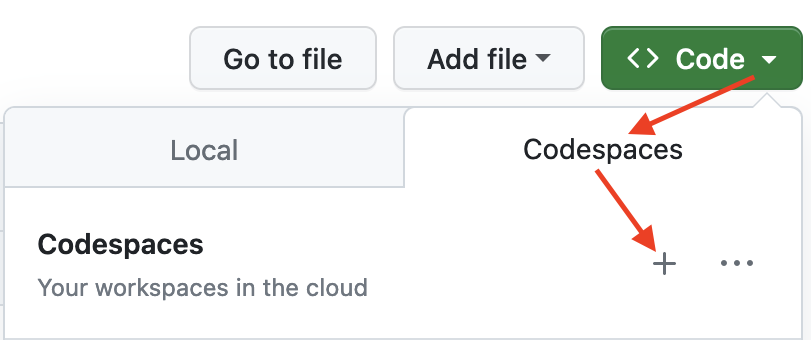
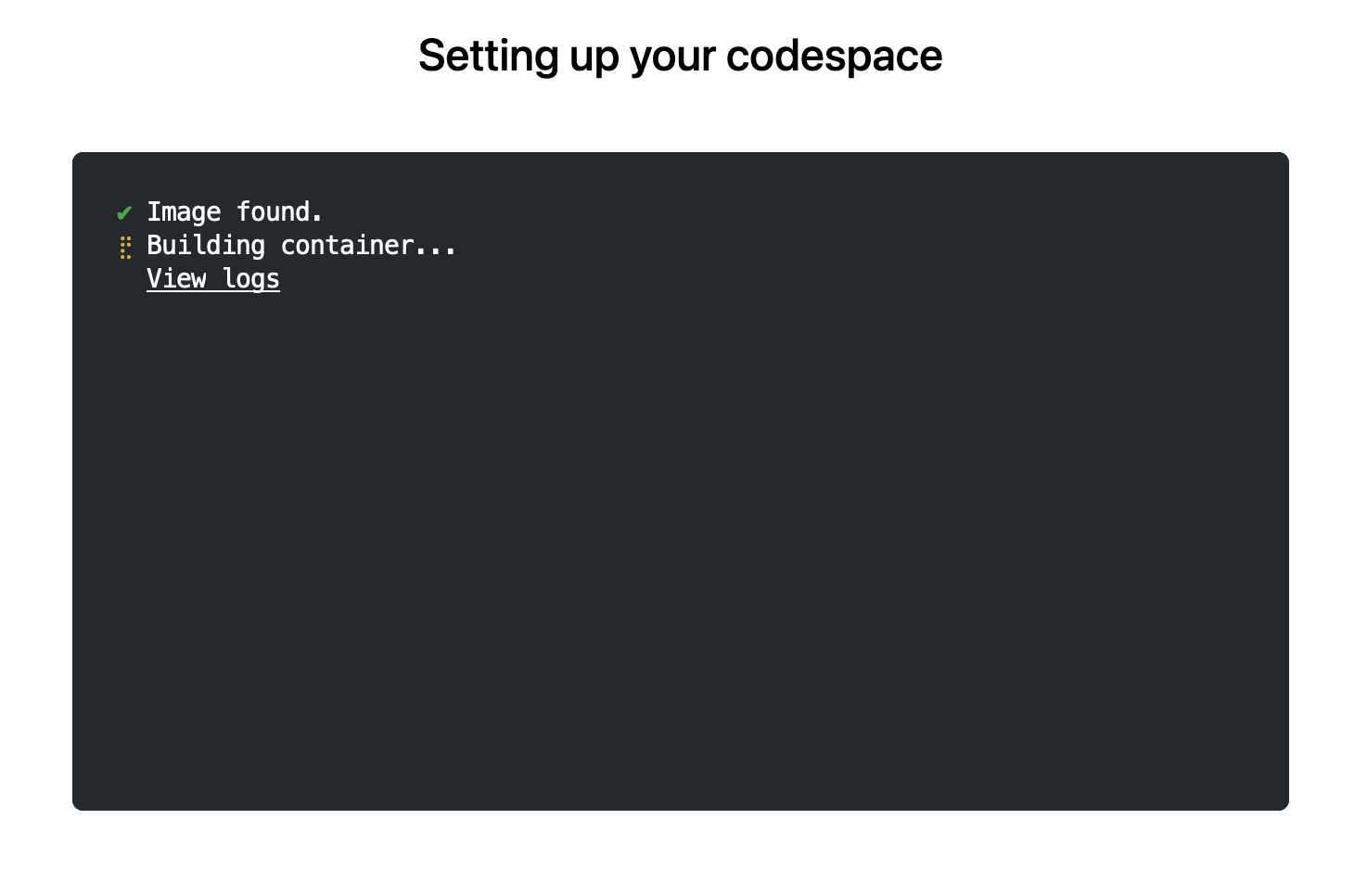
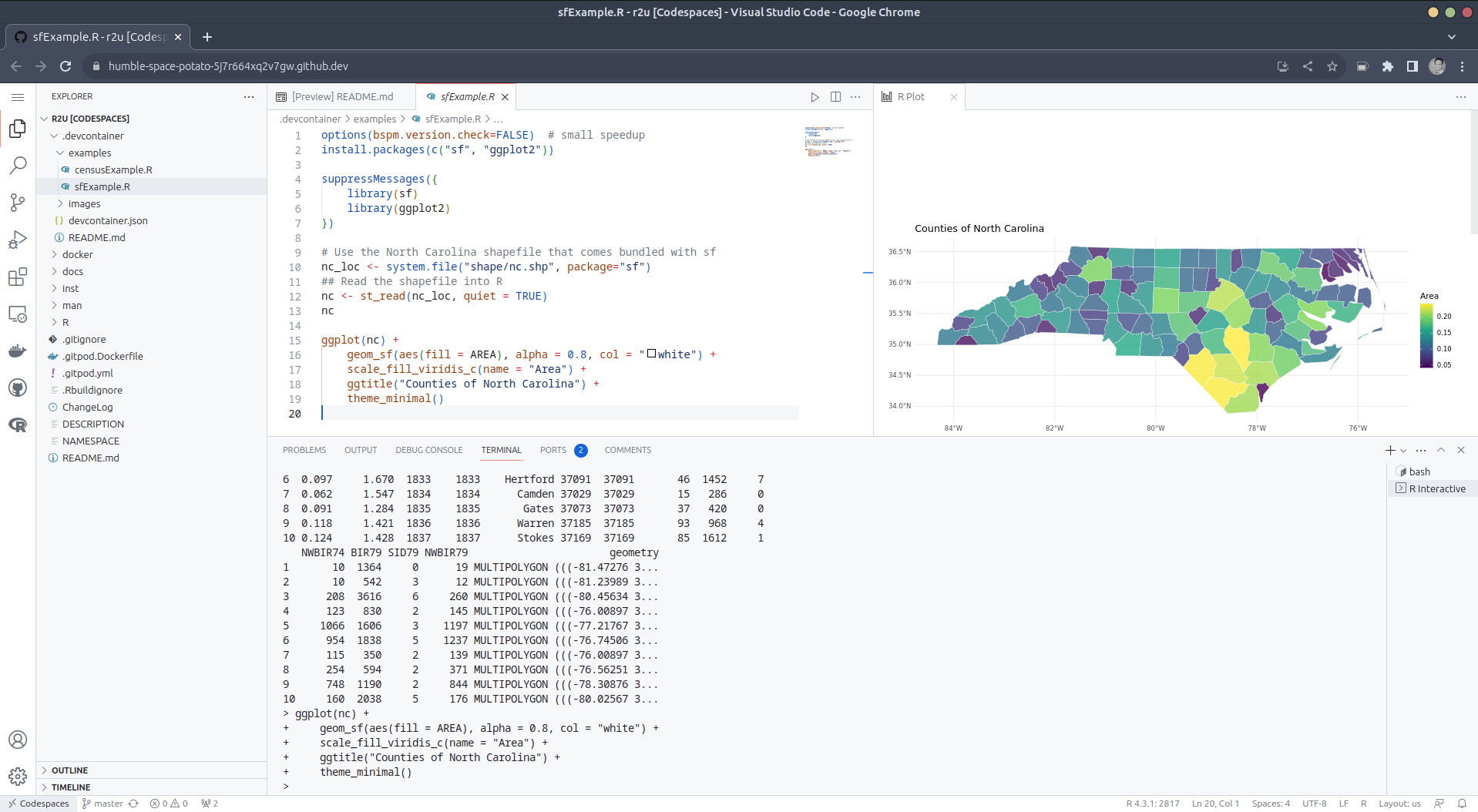
Try it out To get started, simply click on the green Code button at the top right. Then select the Codespaces tab and click the + symbol to start a new Codespace. The first time you do this, it will open up a new browser tab where your Codespace is being instantiated. This first-time instantiation will take a few minutes (feel free to click View logs to see how things are progressing) so please be patient. Once built, your Codespace will deploy almost immediately when you use it again in the future. After the VS Code editor opens up in your browser, feel free to open up the examples/sfExample.R file. It demonstrates how r2u enables us install packages and their system-dependencies with ease, here installing packages sf (including all its geospatial dependencies) and ggplot2 (including all its dependencies). You can run the code easily in the browser environment: Highlight or hover over line(s) and execute them by hitting Cmd+Return (Mac) / Ctrl+Return (Linux / Windows). (Both example screenshots reflect the initial codespaces-r2u repo as well as personal scratchspace one which we started with, both of course work here too.) Do not forget to close your Codespace once you have finished using it. Click the Codespaces tab at the very bottom left of your code editor / browser and select Close Current Codespace in the resulting pop-up box. You can restart it at any time, for example by going to https://github.com/codespaces and clicking on your instance.
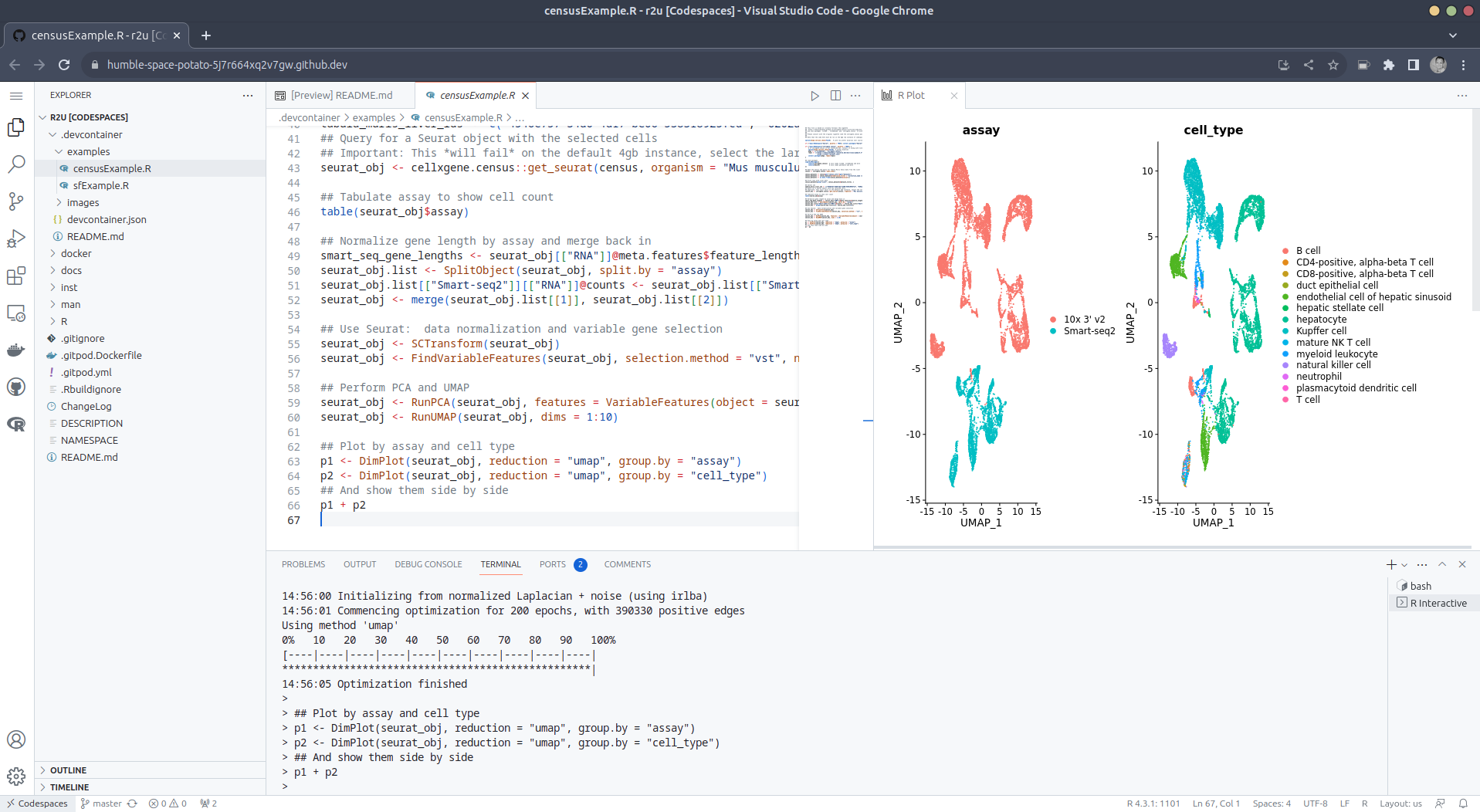
Extend r2u with r-universe r2u offers fast, easy, reliable access to all of CRAN via binaries for Ubuntu focal and jammy. When using the latter (as is the default), it can be combined with r-universe and its Ubuntu jammy binaries. We demontrates this in a second example file examples/censusExample.R which install both the cellxgene-census and tiledbsoma R packages as binaries from r-universe (along with about 100 dependencies), downloads single-cell data from Census and uses Seurat to create PCA and UMAP decomposition plots. Note that in order run this you have to change the Codespaces default instance from small (4gb ram) to large (16gb ram).

Local DevContainer build Codespaces are DevContainers running in the cloud (where DevContainers are themselves just Docker images running with some VS Code sugar on top). This gives you the very powerful ability to edit locally but run remotely in the hosted codespace. To test this setup locally, simply clone the repo and open it up in VS Code. You will need to have Docker installed and running on your system (see here). You will also need the Remote Development extension (you will probably be prompted to install it automatically if you do not have it yet). Select Reopen in Container when prompted. Otherwise, click the >< tab at the very bottom left of your VS Code editor and select this option. To shut down the container, simply click the same button and choose Reopen Folder Locally . You can always search for these commands via the command palette too (Cmd+Shift+p / Ctrl+Shift+p).

Use in Your Repo To add this ability of launching Codespaces in the browser (or editor) to a repo of yours, create a directory .devcontainers in your selected repo, and add the file .devcontainers/devcontainer.json. You can customize it by enabling other feature, or use the postCreateCommand field to install packages (while taking full advantage of r2u).

Acknowledgments There are a few key plumbing pieces that make everything work here. Thanks to:

Colophon More information about r2u is at its site, and we answered some question in issues, and at stackoverflow. More questions are always welcome! If you like this or other open-source work I do, you can now sponsor me at GitHub.

This post by Dirk Eddelbuettel originated on his Thinking inside the box blog. Please report excessive re-aggregation in third-party for-profit settings.

Originally posted 2023-08-13, minimally edited 2023-08-15 which changed the timestamo and URL.

13 August 2023

Gunnar Wolf: Back to online teaching

Mexico s education sector had one of the longest lockdowns due to COVID: As everybody, we went virtual in March 2020, and it was only by late February 2022 that I went back to teach presentially at the University. But for the semester starting next Tuesday, I m going back to a full-online mode. Why? Because me and my family will be travelling to Argentina for six months, starting this October and until next March. When I went to ask for my teaching to be frozen for two semesters, the Head of Division told me he was actually looking for teachers wanting to do distance-teaching With a student population of >380,000 students, and not being able to grow the physical infrastructure, and with such a big city as Mexico City, where a person can take ove 2hr to commute daily It only makes sense to offer part of the courses online. To be honest, I m a bit nervous about this. The past couple of days, I ve been setting up again the technological parts (i.e. spinning up a Jitsi instance, remembering my usual practices and programs). But Well, I know that being videoconference-bound, my teaching will lose the dynamism that comes from talking face to face with students. I think I will miss it! (but at the same time, I m happy to try this anew: to go virtual, but where students choosing this modality do so by choice rather than because the world forced them to)

Fran ois Marier: Using iptables with systemd-networkd

I used to rely on ifupdown to bring up my iptables firewall automatically using a config like this in /etc/network/interfaces:
allow-hotplug eno1
iface eno1 inet dhcp
    pre-up iptables-restore /etc/network/iptables.up.rules
iface eno1 inet6 dhcp
    pre-up ip6tables-restore /etc/network/ip6tables.up.rules
but I wanted to modernize my network configuration and make use of systemd-networkd after upgrading one of my servers to Debian bookworm. Since I already wrote an iptables dispatcher script for NetworkManager, I decided to follow the same approach for systemd-networkd. I started by installing networkd-dispatcher:
apt install networkd-dispatcher
and then adding a script for the routable state in /etc/networkd-dispatcher/routable.d/iptables:
#!/bin/sh
LOGFILE=/var/log/iptables.log
if [ "$IFACE" = lo ]; then
    echo "$0: ignoring $IFACE for \ $STATE'" >> $LOGFILE
    exit 0
fi
case "$STATE" in
    routable)
        echo "$0: restoring iptables rules for $IFACE" >> $LOGFILE
        /sbin/iptables-restore /etc/network/iptables.up.rules >> $LOGFILE 2>&1
        /sbin/ip6tables-restore /etc/network/ip6tables.up.rules >> $LOGFILE 2>&1
        ;;
    *)
        echo "$0: nothing to do with $IFACE for \ $STATE'" >> $LOGFILE
        ;;
esac
before finally making that script executable (otherwise it won't run):
chmod a+x /etc/NetworkManager/dispatcher.d/pre-up.d/iptables
With this in place, I can put my iptables rules in the usual place (/etc/network/iptables.up.rules and /etc/network/ip6tables.up.rules) and use the handy iptables-apply and ip6tables-apply commands to test any changes to my firewall rules. Looking at /var/log/iptables.log confirms that it is being called correctly for each network interface as they are started.

Jonathan Dowland: Terrain base for 3D castle

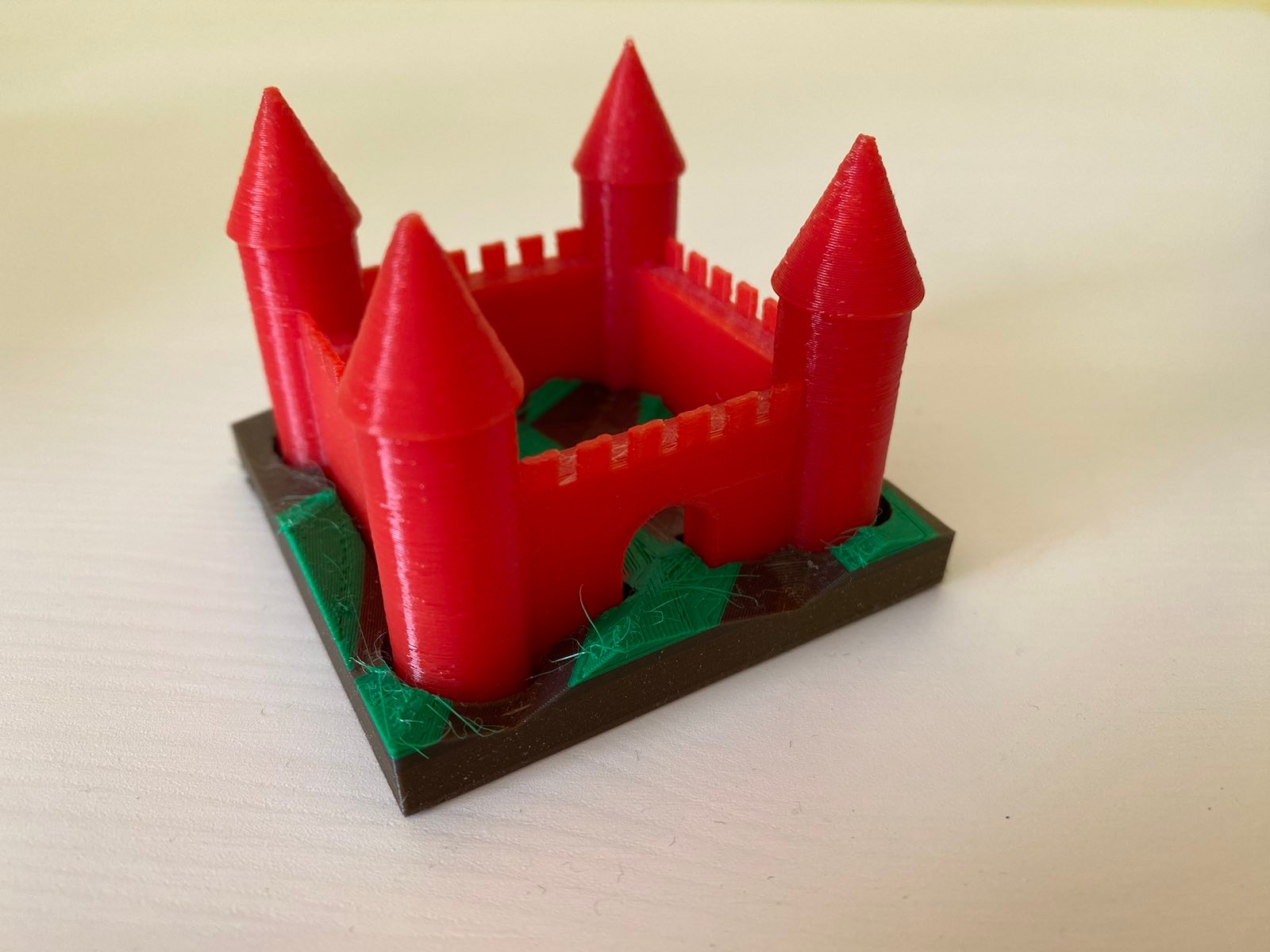
terrain base for the castle
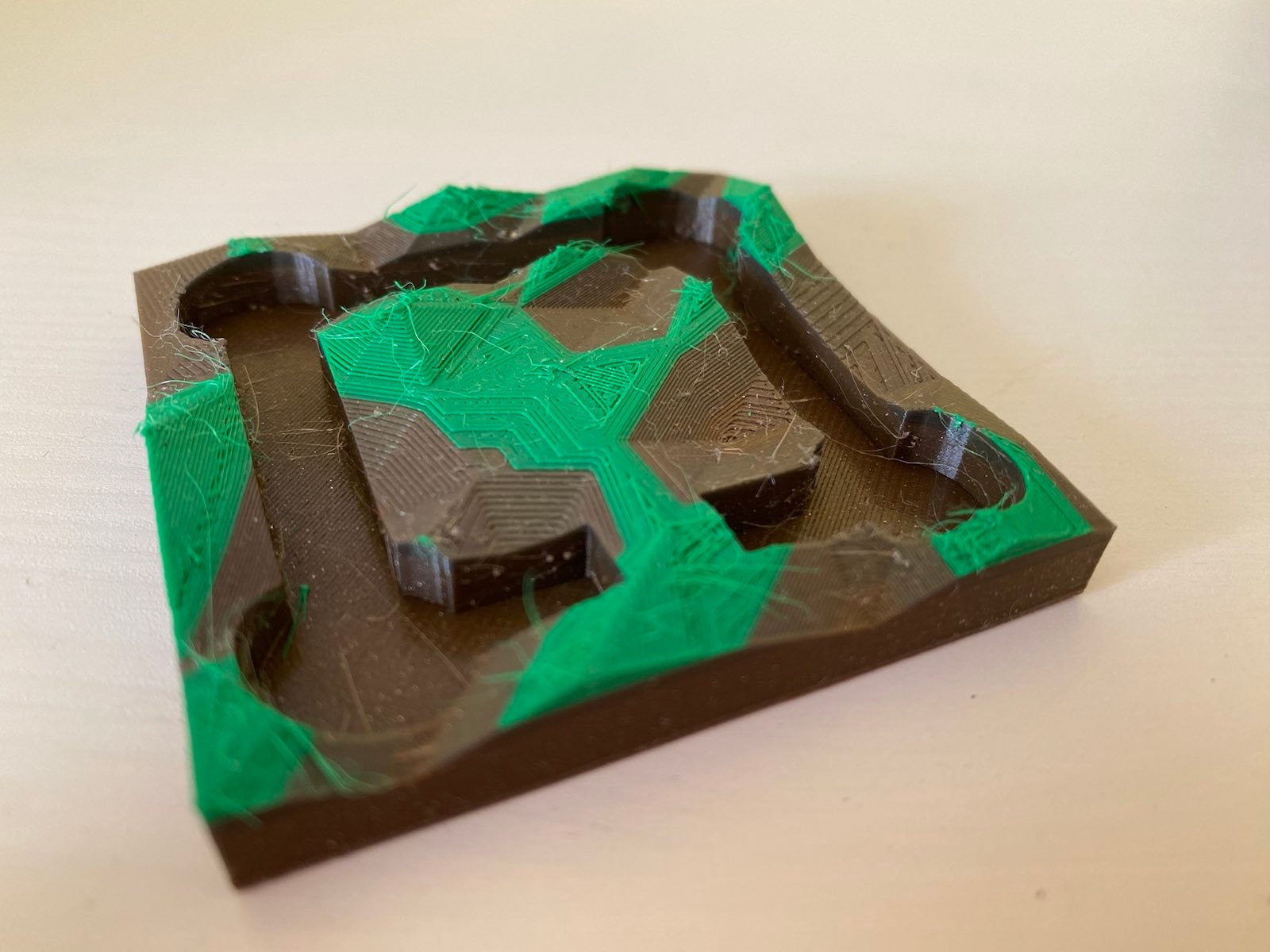
I designed and printed a "terrain" base for my 3D castle in OpenSCAD. The castle was the first thing I designed and printed on our (then new) office 3D printer. I use it as a test bed if I want to try something new, and this time I wanted to try procedurally generating a model. I've released the OpenSCAD source for the terrain generator under the name Zarchscape. mid 90s terrain generation
Lots of mid-90s games had very boxy floors Lots of mid-90s games had very boxy floors
Terrain generation, 90s-style. From [this article](https://web.archive.org/web/19990822085321/http://www.gamedesign.net/tutorials/pavlock/cool-ass-terrain/) Terrain generation, 90s-style. From this article
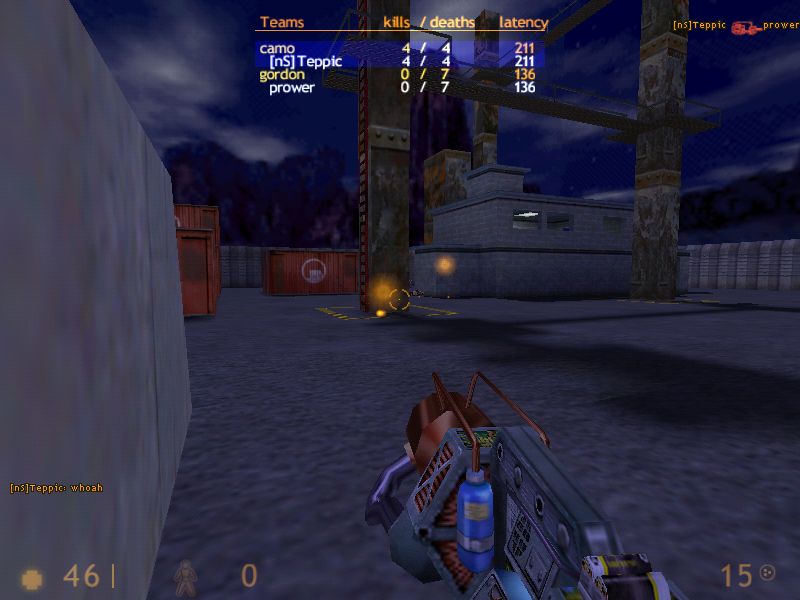
Back in the 90s I spent some time designing maps/levels/arenas for Quake and its sibling games (like Half-Life), mostly in the tool Worldcraft. A lot of beginner maps (including my own), ended up looking pretty boxy. I once stumbled across an article blog post that taught my a useful trick for making more natural-looking terrain. In brief: tessellate the floor region with triangle polygons, then randomly add some jitter to the z-dimension for their vertices. A really simple technique with fairly dramatic results. OpenSCAD Doing the same in OpenSCAD stretched me, and I think stretched OpenSCAD. It left me with some opinions which I'll try to write up in a future blog post. Final results
multicolour
I've generated and printed the result a couple of times, including an attempt a multicolour print. At home, I have a large spool of brown-coloured recycled PLA, and many small lengths of samples in various colours (that I picked up at Maker Faire Czech Republic last year), including some short lengths of green. My home printer is a Prusa Mini, and I cheaped out and didn't buy the filament runout sensor, which would detect when the current filament ran out and let me handle the situation gracefully. Instead, I added several colour change instructions to the g-code at various heights, hoping that whatever plastic I loaded for each layer was enough to get the print to the next colour change instruction. The results are a little mixed I think. I didn't catch the final layer running out in time (forgetting that the Bowden tube also means I need to catch it running out before the loading gear, a few inches earlier than the nozzle), so the final lush green colour ends prematurely. I've also got a fair bit of stringing to clean up. Finally, all these non-flat planes really show up some of the limitations of regular Slicing. It would be interesting to try this with a non-planar Slicer.

Dirk Eddelbuettel: #41: Using r2u in Codespaces

Welcome to the 41th post in the $R^4 series. This post draws on joint experiments first started by Grant building on the lovely work Eitsupi as part of our Rocker Project. In short, r2u is an ideal match for Codesspaces, a Microsoft/GitHub service to run code locally but in the cloud via browser or Visual Studio Code. This posts co-serves as the README.md in the .devcontainer directory as well as a vignette for r2u. So let us get into it. Starting from the r2u repository, the .devcontainer directory provides a small self-containted file devcontainer.json to launch an executable environment R using r2u. It is based on the example in Grant McDermott s codespaces-r2u repo and reuses its documentation. It is driven by the Rocker Project s Devcontainer Features repo creating a fully functioning R environment for cloud use in a few minutes. And thanks to r2u you can add easily to this environment by installing new R packages in a fast and failsafe way.

Try it out To get started, simply click on the green Code button at the top right. Then select the Codespaces tab and click the + symbol to start a new Codespace. The first time you do this, it will open up a new browser tab where your Codespace is being instantiated. This first-time instantiation will take a few minutes (feel free to click View logs to see how things are progressing) so please be patient. Once built, your Codespace will deploy almost immediately when you use it again in the future. After the VS Code editor opens up in your browser, feel free to open up the examples/sfExample.R file. It demonstrates how r2u enables us install packages and their system-dependencies with ease, here installing packages sf (including all its geospatial dependencies) and ggplot2 (including all its dependencies). You can run the code easily in the browser environment: Highlight or hover over line(s) and execute them by hitting Cmd+Return (Mac) / Ctrl+Return (Linux / Windows). (Both example screenshots reflect the initial codespaces-r2u repo as well as personal scratchspace one which we started with, both of course work here too.) Do not forget to close your Codespace once you have finished using it. Click the Codespaces tab at the very bottom left of your code editor / browser and select Close Current Codespace in the resulting pop-up box. You can restart it at any time, for example by going to https://github.com/codespaces and clicking on your instance.

Extend r2u with r-universe r2u offers fast, easy, reliable access to all of CRAN via binaries for Ubuntu focal and jammy. When using the latter (as is the default), it can be combined with r-universe and its Ubuntu jammy binaries. We demontrates this in a second example file examples/censusExample.R which install both the cellxgene-census and tiledbsoma R packages as binaries from r-universe (along with about 100 dependencies), downloads single-cell data from Census and uses Seurat to create PCA and UMAP decomposition plots. Note that in order run this you have to change the Codespaces default instance from small (4gb ram) to large (16gb ram).

Local DevContainer build Codespaces are DevContainers running in the cloud (where DevContainers are themselves just Docker images running with some VS Code sugar on top). This gives you the very powerful ability to edit locally but run remotely in the hosted codespace. To test this setup locally, simply clone the repo and open it up in VS Code. You will need to have Docker installed and running on your system (see here). You will also need the Remote Development extension (you will probably be prompted to install it automatically if you do not have it yet). Select Reopen in Container when prompted. Otherwise, click the >< tab at the very bottom left of your VS Code editor and select this option. To shut down the container, simply click the same button and choose Reopen Folder Locally . You can always search for these commands via the command palette too (Cmd+Shift+p / Ctrl+Shift+p).

Use in Your Repo To add this ability of launching Codespaces in the browser (or editor) to a repo of yours, create a directory .devcontainers in your selected repo, and add the file .devcontainers/devcontainer.json. You can customize it by enabling other feature, or use the postCreateCommand field to install packages (while taking full advantage of r2u).

Acknowledgments There are a few key plumbing pieces that make everything work here. Thanks to:

Colophon More information about r2u is at its site, and we answered some question in issues, and at stackoverflow. More questions are always welcome! If you like this or other open-source work I do, you can now sponsor me at GitHub.

This post by Dirk Eddelbuettel originated on his Thinking inside the box blog. Please report excessive re-aggregation in third-party for-profit settings.

11 August 2023

Ian Jackson: Private posts

I have started to make private posts, accessible only to my Dreamwidth access list. If you re a friend of mine and would like to be on that list, please contact me with your Dreamwidth username (or your OpenID).

comment count unavailable comments

Next.

Previous.