After Jesse Frazelle blogged about the online abuse she receives, a common reaction in various forums[1] was "This isn't a tech industry problem - this is what being on the internet is like"[2]. And yes, they're right. Abuse of women on the internet isn't limited to people in the tech industry. But the severity of a problem is a product of two separate factors: its prevalence and what impact it has on people.
Much of the modern tech industry relies on our ability to work with people outside our company. It relies on us interacting with a broader community of contributors, people from a range of backgrounds, people who may be upstream on a project we use, people who may be employed by competitors, people who may be spending their spare time on this. It means listening to your users, hearing their concerns, responding to their feedback. And, distressingly, there's significant overlap between that wider community and the people engaging in the abuse. This abuse is often partly technical in nature. It demonstrates understanding of the subject matter. Sometimes it can be directly tied back to people actively involved in related fields. It's from people who might be at conferences you attend. It's from people who are participating in your mailing lists. It's from people who are reading your blog and using the advice you give in their daily jobs. The abuse is coming from inside the industry.
Cutting yourself off from that community impairs your ability to do work. It restricts meeting people who can help you fix problems that you might not be able to fix yourself. It results in you missing career opportunities. Much of the work being done to combat online abuse relies on protecting the victim, giving them the tools to cut themselves off from the flow of abuse. But that risks restricting their ability to engage in the way they need to to do their job. It means missing meaningful feedback. It means passing up speaking opportunities. It means losing out on the community building that goes on at in-person events, the career progression that arises as a result. People are forced to choose between putting up with abuse or compromising their career.
The abuse that women receive on the internet is unacceptable in every case, but we can't ignore the effects of it on our industry simply because it happens elsewhere. The development model we've created over the past couple of decades is just too vulnerable to this kind of disruption, and if we do nothing about it we'll allow a large number of valuable members to be driven away. We owe it to them to make things better.
FTP assistant
This month I marked 539 packages for accept, rejected 61 of them and had to send 24 emails to maintainers. This is a new personal record. Even in the month before the Jessie freeze I accepted only 407 packages. So, very well done (self-laudation has to happen from time to time ).
Another record was broken as well. After 19 month of doing this kind of work, I got my first insulting email. I would prefer to wait another 19 month before I get the next one
Squeeze LTS
This was my twelfth month that I did some work for the Squeeze LTS initiative, started by Raphael Hertzog at Freexian.
This month I got assigned a workload of only 14.5h and I spent most of it to work on a new upload of php5. Unfortunately there have been so many CVEs comming in, that I didn t do an upload yet.
Other stuff I uploaded was
[DLA 258-1] jqueryui security update
[DLA 262-1] libcrypto++ security update
This month I also had my first one and a half weeks of doing frontdesk work. As introduced in this email, every member of the LTS team should do some LTS CVE triage. Up to now it was mainly done by Raphael and he wants to share this task with everybody else. So I answered questions on the IRC channel, on the LTS list and looked for CVEs that are important for Squeeze LTS or could be ignored.
Other stuff
This month I also uploaded a new version of harminv and wondered why the package didn t move to testing. Of course there is a document how to do a transition of a library properly. But hey, it is me, I know everything better and of course I can use a shortcut. Oh boy, I was wrong. So I also uploaded new versions of meep, meep-lam4, meep-openmpi, meep-mpi-default and meep-mpich2.
And the moral of the story: If you don t understand why something should be done in a specific way, you shouldn t try to do it different.
Donations
Again, thanks alot to all donors. I really appreciate this and hope that everybody is pleased with my commitment. Don t hesitate to make suggestions for improvements.
Several people contacted me after my previous blog post about my
need for a new laptop, and provided very useful feedback. I wish to
thank every one of these. Several pointed me to the possibility of
fixing my X230, and I am already in the process of getting Lenovo to
do so thanks to the on site, next day support contract covering the
machine. But the battery is almost useless (I expect to replace it
with a non-official battery) and I do not expect the machine to live
for many more years, so it is time to plan its replacement. If I did
not have a support contract, it was suggested to find replacement parts
using FrancEcrans, but it
might present a language barrier as I do not understand French.
One tip I got was to use the
Skinflint web service to
compare laptop models. It seem to have more models available than
prisjakt.no. Another tip I got from someone I know have similar
keyboard preferences was that the HP EliteBook 840 keyboard is not
very good, and this matches my experience with earlier EliteBook
keyboards I tested. Because of this, I will not consider it any further.
When I wrote my blog post, I was not aware of Thinkpad X250, the
newest Thinkpad X model. The keyboard reintroduces mouse buttons
(which is missing from the X240), and is working fairly well with
Debian Sid/Unstable according to
Corsac.net. The reports I
got on the keyboard quality are not consistent. Some say the keyboard
is good, others say it is ok, while others say it is not very good.
Those with experience from X41 and and X60 agree that the X250
keyboard is not as good as those trusty old laptops, and suggest I
keep and fix my X230 instead of upgrading, or get a used X230 to
replace it. I'm also told that the X250 lack leds for caps lock, disk
activity and battery status, which is very convenient on my X230. I'm
also told that the CPU fan is running very often, making it a bit
noisy. In any case, the X250 do not work out of the box with Debian
Stable/Jessie, one of my requirements.
I have also gotten a few vendor proposals, one was
Pro-Star, another was
Libreboot.
The latter look very attractive to me.
Again, thank you all for the very useful feedback. It help a lot
as I keep looking for a replacement.
Update 2015-07-06: I was recommended to check out the
lapstore.de web shop for used laptops. They got several
different
old
thinkpad X models, and provide one year warranty.
Last oktober I was involved on behalf of
NUUG with recording the talks at
MakerCon Nordic, a conference for
the Maker movement. Since then it has been the plan to publish the
recordings on Frikanalen, which
finally happened the last few days. A few talks are missing because
the speakers asked the organizers to not publish them, but most of the
talks are available. The talks are being broadcasted on RiksTV
channel 50 and using multicast on Uninett, as well as being available
from the Frikanalen web site. The unedited recordings are
available on
Youtube too.
This is the list of talks available at the moment. Visit the
Frikanalen video
pages to view them.
Evolutionary algorithms as a design tool - from art
to robotics (Kyrre Glette)
Make and break (Hans Gerhard Meier)
Making a one year school course for young makers
(Olav Helland)
Innovation Inspiration - IPR Databases as a Source of
Inspiration (Hege Langlo)
Making a toy for makers (Erik Torstensson)
How to make 3D printer electronics (Elias Bakken)
Hovering Clouds: Looking at online tool offerings for Product
Design and 3D Printing (William Kempton)
Travelling maker stories ( yvind Nydal Dahl)
Making the first Maker Faire in Sweden (Nils Olander)
Breaking the mold: Printing 1000 s of parts (Espen Sivertsen)
Ultimaker and open source 3D printing (Erik de Bruijn)
Autodesk s 3D Printing Platform: Sparking innovation (Hilde
Sevens)
How Making is Changing the World and How You Can Too!
(Jennifer Turliuk)
Open-Source Adventuring: OpenROV, OpenExplorer and the Future of
Connected Exploration (David Lang)
Making in Norway (Haakon Karlsen Jr., Graham Hayward and Jens
Dyvik)
The Impact of the Maker Movement (Mike Senese)
Part of the reason this took so long was that the scripts NUUG had
to prepare a recording for publication were five years old and no
longer worked with the current video processing tools (command line
argument changes). In addition, we needed better audio normalization,
which sent me on a detour to
package
bs1770gain for Debian. Now this is in place and it became a lot
easier to publish NUUG videos on Frikanalen.
I have just released version 1.10 of Obnam, my backup program. See the
website at http://obnam.org for details on what it does. The new
version is available from git (see http://git.liw.fi) and as Debian
packages from http://code.liw.fi/debian, and uploaded to Debian,
hopefully soon in unstable.
The NEWS file extract below gives the highlights of what's new in this
version.
Version 1.10, released 2015-07-01
Major bug fixes:
Lars Wirzenius fixed the obnam backup command to lock the whole
repository, the same way as obnam forget does, when it removes
checkpoint generations. This means that during checkpoint removal,
no other client can make a backup, which is unfortunate. To avoid
that, set leave-checkpoints = yes in the configuration. That will
prevent obnam backup from removing checkpoints.
Minor new features:
Lars Wirzenius added the obnam list-formats command to list all
repository formats.
The default value for the upload-queue-size setting is now 1024,
chosen based on some benchmarking made by Lars Wirzenius to balance
speed and memory use.
An EXPERIMENTAL new repository format, green-albatross, as been
introduced. It is not ready for actual use, and is only added so
that its code doesn't diverge far from the main line of development.
Teemu Hukkanen reported that the Synology NAS device returns EACCES
instead of ENOENT when user tries to remove a non-existent file.
Obnam now copes with either error code.
Minor fixes:
python setup.py build no longer formats the manual page into plain
text. This is now done in python setup.py docs instead. The latter
is an optional build step, and probably only works on Debian.
obnam restore --to=DIR now requires that the directory DIR
either doesn't exist, or it is empty when the restore starts. This
is to prevent users from restore on top of a running system.
What happened about the reproducible
builds effort this week:
Toolchain fixes
Norbert Preining uploaded texinfo/6.0.0.dfsg.1-2 which makes texinfo indices reproducible. Original patch by Chris Lamb.
Lunar submitted recently rebased patches to make the file order of files inside .deb stable.
akira filled #789843 to make tex4ht stop printing timestamps in its HTML output by default.
Dhole wrote a patch for xutils-dev to prevent timestamps when creating gzip compresed files.
Reiner Herrmann sent a follow-up patch for wheel to use UTC as timezone when outputing timestamps.
Mattia Rizzolo started a discussion regarding the failure to build from source of subversion when -Wdate-time is added to CPPFLAGS which happens when asking dpkg-buildflags to use the reproducible profile. SWIG errors out because it doesn't recognize the aforementioned flag.
Trying to get the .buildinfo specification to more definitive state, Lunar started a discussion on storing the checksums of the binary package used in dpkg status database.
akira discovered while proposing a fix for simgrid that CMake internal command to create tarballs would record a timestamp in the gzip header. A way to prevent it is to use the GZIP environment variable to ask gzip not to store timestamps, but this will soon become unsupported. It's up for discussion if the best place to fix the problem would be to fix it for all CMake users at once.
Infrastructure-related work
Andreas Henriksson did a delayed NMU upload of pbuilder which adds minimal support for build profiles and includes several fixes from Mattia Rizzolo affecting reproducibility tests.
Neils Thykier uploaded lintian which both raises the severity of package-contains-timestamped-gzip and avoids false positives for this tag (thanks to Tomasz Buchert).
Petter Reinholdtsen filled #789761 suggesting that how-can-i-help should prompt its users about fixing reproducibility issues.
Packages fixed
The following packages became reproducible due to changes in their
build dependencies:
autorun4linuxcd,
libwildmagic,
lifelines,
plexus-i18n,
texlive-base,
texlive-extra,
texlive-lang.
The following packages became reproducible after getting fixed:
Patches submitted which have not made their way to the archive yet:
#789648 on apt-dater by Dhole: allow the build date to be set externally and set it to the time of the latest debian/changelog entry.
#789715 on simgrid by akira: fix doxygen and patch CMakeLists.txt to give GZIP=-n for tar.
#789728 on aegisub by Juan Picca: get rid of __DATE__ and __TIME__ macros.
#789747 on dipy by Juan Picca: set documentation date for Sphinx.
#789748 on jansson by Juan Picca: set documentation date for Sphinx.
#789799 on tmexpand by Chris Lamb: remove timestamps, hostname and username from the build output.
#789804 on libevocosm by Chris Lamb: removes generated files which include extra information about the build environment.
#789963 on qrfcview by Dhole: removes the timestamps from the the generated PNG icon.
#789965 on xtel by Dhole: removes extra timestamps from compressed files by gzip and from the PNG icon.
#790010 on simbody by akira: set HTML_TIMESTAMP=NO in Doxygen configuration.
#790023 on stx-btree by akira: pass HTML_TIMESTAMP=NO to Doxygen.
#790034 on siscone by akira: removes $datetime from footer.html used by Doxygen.
#790035 on thepeg by akira: set HTML_TIMESTAMP=NO in Doxygen configuration.
#790072 on libxray-spacegroup-perl by Chris Lamb: set $Storable::canonical = 1 to make space_groups.db.PL output deterministic.
#790074 on visp by akira: set HTML_TIMESTAMP=NO in Doxygen configuration.
#790081 on wfmath by akira: set HTML_TIMESTAMP=NO in Doxygen configuration.
#790082 on wreport by akira: set HTML_TIMESTAMP=NO in Doxygen configuration.
#790088 on yudit by Chris Lamb: removes timestamps from the build system by passing a static comment.
#790122 on clblas by akira: set HTML_TIMESTAMP=NO in Doxygen configuration.
#790133 on dcmtk by akira: set HTML_TIMESTAMP=NO in Doxygen configuration.
#790139 on glfw3 by akira: patch for Doxygen timestamps further improved by James Cowgill by removing $datetime from the footer.
#790228 on gtkspellmm by akira: set HTML_TIMESTAMP=NO in Doxygen configuration.
#790232 on ucblogo by Reiner Herrmann: set LC_ALL to C before sorting.
#790235 on basemap by Juan Picca: set documentation date for Sphinx.
#790258 on guymager by Reiner Herrmann: use the date from the latest debian/changelog as build date
#790309 on pelican by Chris Lamb: removes useless (and unreproducible) tests.
debbindiff development
debbindiff/23 includes a few bugfixes by Helmut Grohne that result in a significant speedup (especially on larger files). It used to exhibit the quadratic time string concatenation antipattern.
Version 24 was released on June 23rd in a hurry to fix an undefined variable introduced in the previous version. (Reiner Herrmann)
debbindiff now has a test suite! It is written using the PyTest framework (thanks Isis Lovecruft for the suggestion). The current focus has been on the comparators, and we are now at 93% of code coverage for these modules.
Several problems were identified and fixed in the process: paths appearing in output of javap, readelf, objdump, zipinfo, unsqusahfs; useless MD5 checksum and last modified date in javap output; bad handling of charsets in PO files; the destination path for gzip compressed files not ending in .gz; only metadata of cpio archives were actually compared. stat output was further trimmed to make directory comparison more useful.
Having the test suite enabled a refactoring of how comparators were written, switching from a forest of differences to a single tree. This helped removing dust from the oldest parts of the code.
Together with some other small changes, version 25 was released on June 27th. A follow up release was made the next day to fix a hole in the test suite and the resulting unidentified leftover from the comparator refactoring. (Lunar)
Documentation update
Ximin Luo improved code examples for some proposed environment variables for reference timestamps. Dhole added an example on how to fix timestamps C pre-processor macros by adding a way to set the build date externally. akira documented her fix for tex4ht timestamps.
Package reviews
94 obsolete
reviews have
been removed, 330 added and 153 updated this week.
Hats off for Chris West (Faux) who investigated many fail to build from source issues and reported the relevant bugs.
Slight improvements were made to the scripts for editing the review database, edit-notes and clean-notes. (Mattia Rizzolo)
Meetings
A meeting was held on June 23rd. Minutes are available.
The next meeting will happen on Tuesday 2015-07-07 at 17:00 UTC.
Misc.
The Linux Foundation announced that it was funding the work of Lunar and h01ger on reproducible builds in Debian and other distributions. This was further relayed in a Bits from Debian blog post.
Thorsten Glaser reported Debian bug
#780000 on Saturday March 7th 2015, against the gcc-4.9 package.
Bug #770000 was reported as of November 18th so there have been 10,000
bugs in about 3.5 months, which was significantly slower than earlier.
Matthew Vernon reported Debian bug
#790000 on Friday June 26th 2015, against the pcre3 package.
Thus, there have been 10,000
bugs in 3.5 months again. It seems that the bug report rate stabilized
again.
Sorry for missing bug #780000 annoucement. I'm doing this
since....November 2007 for bug #450000 and it seems that this lack of
attention is somehow significant wrt my involvment in Debian. Still,
this involvment is still here and I'll try to "survive" in the project
until we reach bug #1000000...:-)
See you for bug #800000 annoucement and the result of the bets we
placed on the date it would happen.
debtags rewritten in python3
In my long quest towards closing #540218, I
have uploaded a new libept to experimental.
Then I tried to build debtags on a sid+experimental chroot and the result runs
but has libc's free() print existential warnings about whatevers.
At a quick glance, there are now things around like a new libapt, gcc 5 with
ABI changes, and who knows what else. I figured how much time it'd take me to
debug something like that, and I've used that time to rewrite debtags in
python3. It took 8 hours, 5 of pleasant programming and the usual tax of
another 3 of utter frustration packaging the results. I guess I gained over the
risk of spending an unspecified amount of hours of just pure frustration.
So from now on debtags is going to be a pure python3 package, with dependencies
on only python3-apt and python3-debian. 700 lines of python instead of several
C++ files built on 4 layers of libraries. Hopefully, this is the last of the
big headaches I get from hacking on this package. Also, one less package using
libept.
What happened about the reproducible
builds effort for this week:
Toolchain fixes
Guillem Jover uploaded dpkg/1.18.0 which now uses an approximation to compute Installed-Size, making it indpendent from the underlying filesystem. It now always sort the Dpkg::Dist::Files files list on output to make the output stable with parallel builds.
Lunar uploaded mozilla-devscripts/0.40 which told xpi-pack to skip saving extra zip attributes when making jar.
Patches submitted which did not make their way to the archive yet:
#775531 on console-setup by Reiner Herrmann: update and split patch written in January.
#785535 on maradns by Reiner Herrmann: use latest entry in debian/changelog as build date.
#785549 on dist by Reiner Herrmann: set hostname and domainname to predefined value.
#785583 on s5 by Juan Picca: set timezone to UTC when unzipping files.
#785617 on python-carrot by Juan Picca: use latest entry in debian/changelog as documentation build date.
#785774 on afterstep by Juan Picca: modify documentation generator to allow a build date to be set instead of the current time, then use latest entry in debian/changelog as reference.
#786508 on ttyload by Juan Picca: remove timestamp from documentation.
#786568 on linux-minidisc by Lunar: use latest entry in debian/changelog as build date.
#786615 on kfreebsd-10 by Steven Chamberlain: make order of file in source tarballs stable.
#786633 on webkit2pdf by Reiner Herrmann: use latest entry in debian/changelog as documentation build date.
reproducible.debian.net
Holger Levsen made several small bug fixes and a few more visible changes:
For packages in testing, comparisions will be done using the sid version
of debbindiff.
The scheduler will now schedule old packages from sid twice often as the
ones in testing as we care more about the former at the moment.
More statistics are now visible
and the layout has been improved.
Variations between the first and second build are now explained on the statistics
page.
strip-nondeterminism
Version 0.007-1 of
strip-nondeterminism the
tool to post-process various file formats to normalize them has been uploaded
by Holger Levsen. Version 0.006-1 was already in the reproducible repository,
the new version mainly improve the detection of Maven's pom.properties files.
debbindiff development
At the request of Emmanuel Bourg, Reiner Herrmann added a comparator for Java
.class files.
Documentation update
Christoph Berg created a new page for the timestamps in manpages created by
Doxygen.
Package reviews
93 obsolete
reviews have
been removed, 76 added and 43 updated this week.
New identified issues: timestamps in manpages generated by Doxygen, modification time differences in files extracted by unzip, tstamp task used in Ant build.xml, timestamps in documentation generated by ASDocGen. The description for build id related issues has been clarified.
Meetings
Holger Levsen announced a first
meeting on Wednesday,
June 3rd, 2015, 19:00 UTC. The agenda is amendable on the wiki.
Misc.
Lunar worked on a proof-of-concept script to import the build environment found
in .buildinfo
files to
UDD. Lucas Nussbaum has positively reviewed the
proposed schema.
Holger Levsen cleaned up various experimental toolchain repositories, marking
merged brances as such.
The recent AWS introduction of the Elastic File System gives you an automatic grow-and-shrink capability as an NFS mount, an exciting option that takes away the previous overhead in creating shared block file systems for EC2 instances.
However it should be noted that the same auto-management of capacity is not true in the EC2 instance s Elastic Block Store (EBS) block storage disks; sizing (and resizing) is left to the customer. With current 2015 EBS, one cannot simply increase the size of an EBS Volume as the storage becomes full; (as at June 2015) an EBS volume, once created, has fixed size. For many applications, that lack of resize function on its local EBS disks is not a problem; many server instances come into existence for a brief period, process some data and then get Terminated, so long term managment is not needed.
However for a long term data store on an instance (instead of S3, which I would recommend looking closely at from a durability and pricing fit), and where I want to harness the capacity to grow (or shrink) disk for my data, then I will need to leverage some slightly more advanced disk management. And just to make life interesting, I wish to do all this while the data is live and in-use, if possible.
Enter: Logical Volume Management, or LVM. It s been around for a long, long time: LVM 2 made a debut around 2002-2003 (2.00.09 was Mar 2004) and LVM 1 was many years before that so it s pretty mature now. It s a powerful layer that sits between your raw storage block devices (as seen by the operating system), and the partitions and file systems you would normally put on them.
In this post, I ll walk through the process of getting set up with LVM on Debian in the AWS EC2 environment, and how you d do some basic maintenance to add and remove (where possible) storage with minimal interruption.
Getting Started
First a little prep work for a new Debian instance with LVM.
As I d like to give the instance its own ability to manage its storage, I ll want to provision an IAM Role for EC2 Instances for this host. In the AWS console, visit IAM, Roles, and I ll create a new Role I ll name EC2-MyServer (or similar), and at this point I ll skip giving it any actual privileges (later we ll update this). As at this date, we can only associate an instance role/profile at instance launch time.
Now I launch a base image Debian EC2 instance launched with this IAM Role/Profile; the root file system is an EBS Volume. I am going to put data that I ll be managing on a separate disk from the root file system.
First, I need to get the LVM utilities installed. It s a simple package to install: the lvm2 package. From my EC2 instance I need to get root privileges (sudo -i) and run:
apt update && apt install lvm2
After a few moments, the package is installed. I ll choose a location that I want my data to live in, such as /opt/. I want a separate disk for this task for a number of reasons:
Root EBS volumes cannot currently be encrypted using Amazon s Encrypted EBS Volumes at this point in time. If I want to also use AWS encryption option, it ll have to be on a non-root disk. Note that instance-size restrictions also exist for EBS Encrypted Volumes.
It s possibly not worth make a snapshot of the Operating System at the same time as the user content data I am saving. The OS install (except the /etc/ folder) can almost entirely be recreated from a fresh install. so why snapshot that as well (unless that s your strategy for preserving /etc, /home, etc).
The type of EBS volume that you require may be different for different data: today (Apr 2015) there is a choice of Magnetic, General Purpose 2 (GP2) SSD, and Provisioned IO/s (PIOPS) SSD, each with different costs; and depending on our volume, we may want to select one for our root volume (operating system), and something else for our data storage.
I may want to use EBS snapshots to clone the disk to another host, without the base OS bundled in with the data I am cloning.
I will create this extra volume in the AWS console and present it to this host. I ll start by using a web browser (we ll use CLI later) with the EC2 console.
The first piece of information we need to know is where my EC2 instance is running. Specifically, the AWS Region and Availability Zone (AZ). EBS Volumes only exist within the one designated AZ. If I accidentally make the volume(s) in the wrong AZ, then I won t be able to connect them to my instance. It s not a huge issue, as I would just delete the volume and try again.
I navigate to the Instances panel of the EC2 Console, and find my instance in the list:
A (redacted) list of instance from the EC2 console.
Here I can see I have located an instance and it s running in US-East-1A: that s AZ A in Region US-East-1. I can also grab this with a wget from my running Debian instance by asking the MetaData server:
The returned text is simply: us-east-1a .
Time to navigate to Elastic Block Store , choose Volumes and click Create :
Creating a volume in AWS EC2: ensure the AZ is the same as your instance
You ll see I selected that I wanted AWS to encrypt this and as noted above, at this time that doesn t include the t2 family. However, you have an option of using encryption with LVM where the customer looks after the encryption key see LUKS.
What s nice is that I can do both have AWS Encrypted Volumes, and then use encryption on top of this, but I have to manage my own keys with LUKS, and should I lose them, then I can keep all the cyphertext!
I deselected this for my example (with a t2.micro), and continue; I could see the new volume in the list as creating , and then shortly afterwards as available . Time to attach it: select the disk, and either right-click and choose Attach , or from the menu at the top of the list, chose Actions -> Attach (both do the same thing).
Attaching a volume to an instance: you ll be prompted for the compatible instances in the same AZ.
At this point in time your EC2 instance will now notice a new disk; you can confirm this with dmesg tail , and you ll see something like:
[1994151.231815] xvdg: unknown partition table
(Note the time-stamp in square brackets will be different).
Previously at this juncture you would format the entire disk with your favourite file system, mount it in the desired location, and be done. But we re adding in LVM here between this raw device, and the filesystem we are yet to make .
Marking the block device for LVM
Our first operation with LVM is to put a marker on the volume to indicate it s being use for LVM so that when we scan the block device, we know what it s for. It s a really simple command:
pvcreate /dev/xvdg
The device name above (/dev/xvdg) should correspond to the one we saw from the dmesg output above. The output of the above is rather straight forward:
Physical volume "/dev/xvdg" successfully created
Checking our EBS Volume
We can check on the EBS volume which LVM sees as a Physical Volume using the pvs command.
Here we see the entire disk is currently unused.
Creating our First Volume Group
Next step, we need to make an initial LVM Volume Group which will use our Physical volume (xvdg). The Volume Group will then contain one (or more) Logical Volumes that we ll format and use. Again, a simple command to create a volume group by giving it its first physical device that it will use:
# vgcreate  OptVG /dev/xvdg
  Volume group "OptVG" successfully created
And likewise we can check our set of Volume Groups with vgs :
The Attribute flags here indicate this is writable, resizable, and allocating extents in normal mode. Lets proceed to make our (first) Logical Volume in this Volume Group:
# lvcreate -n OptLV -L 4.9G OptVG
  Rounding up size to full physical extent 4.90 GiB
  Logical volume "OptLV" created
You ll note that I have created our Logical Volume as almost the same size as the entire Volume Group (which is currently one disk) but I left some space unused: the reason for this comes down to keeping some space available for any jobs that LVM may want to use on the disk and this will be used later when we want to move data between raw disk devices.
If I wanted to use LVM for Snapshots, then I d want to leave more space free (unallocated) again.
We can check on our Logical Volume:
The attribytes indicating that the Logical Volume is writeable, is allocating its data to the disk in inherit mode (ie, as the Volume Group is doing), and that it is active. At this stage you may also discover we have a device /dev/OptVG/OptLV, and this is what we re going to format and mount. But before we do, we should review what file system we ll use.
Filesystems
Popular Linux file systems
Name
Shrink
Grow
Journal
Max File Sz
Max Vol Sz
btrfs
Y
Y
N
16 EB
16 EB
ext3
Y off-line
Y
Y
2 TB
32 TB
ext4
Y off-line
Y
Y
16 TB
1 EB
xfs
N
Y
Y
8 EB
8 EB
zfs*
N
Y
Y
16 EB
256 ZB
For more details see Wikipedia comparison. Note that ZFS requires 3rd party kernel module of FUSE layer, so I ll discount that here. BTRFS only went stable with Linux kernel 3.10, so with Debian Jessie that s a possibility; but for tried and trusted, I ll use ext4.
The selection of ext4 also means that I ll only be able to shrink this file system off-line (unmounted).
I ll make the filesystem:
# mkfs.ext4 /dev/OptVG/OptLV
mke2fs 1.42.12 (29-Aug-2014)
Creating filesystem with 1285120 4k blocks and 321280 inodes
Filesystem UUID: 4f831d17-2b80-495f-8113-580bd74389dd
Superblock backups stored on blocks:
  32768, 98304, 163840, 229376, 294912, 819200, 884736
Allocating group tables: done
Writing inode tables: done
Creating journal (32768 blocks): done
Writing superblocks and filesystem accounting information: done
And now mount this volume and check it out:
# mount /dev/OptVG/OptLV /opt/
# df -HT /opt
Filesystem  Type  Size  Used Avail Use% Mounted on
/dev/mapper/OptVG-OptLV ext4  5.1G  11M  4.8G  1% /opt
Lastly, we want this to be mounted next time we reboot, so edit /etc/fstab and add the line:
/dev/OptVG/OptLV /opt ext4 noatime,nodiratime 0 0
With this in place, we can now start using this disk. I selected here not to update the filesystem every time I access a file or folder updates get logged as normal but access time is just ignored.
Time to expand
After some time, our 5 GB /opt/ disk is rather full, and we need to make it bigger, but we wish to do so without any downtime. Amazon EBS doesn t support resizing volumes, so our strategy is to add a new larger volume, and remove the older one that no longer suits us; LVM and ext4 s online resize ability will allow us to do this transparently.
For this example, we ll decide that we want a 10 GB volume. It can be a different type of EBS volume to our original we re going to online-migrate all our data from one to the other.
As when we created the original 5 GB EBS volume above, create a new one in the same AZ and attach it to the host (perhaps a /dev/xvdh this time). We can check the new volume is visible with dmesg again:
[1999786.341602] xvdh: unknown partition table
And now we initalise this as a Physical volume for LVM:
# pvcreate /dev/xvdh
  Physical volume "/dev/xvdh" successfully created
And then add this disk to our existing OptVG Volume Group:
# vgextend OptVG /dev/xvdh
  Volume group "OptVG" successfully extended
We can now review our Volume group with vgs, and see our physical volumes with pvs:
There are now 2 Physical Volumes we have a 4.9 GB filesystem taking up space, so 10.09 GB of unallocated space in the VG.
Now its time to stop using the /dev/xvgd volume for any new requests:
# pvchange -x n /dev/xvdg
  Physical volume "/dev/xvdg" changed
  1 physical volume changed / 0 physical volumes not changed
At this time, our existing data is on the old disk, and our new data is on the new one. Its now that I d recommend running GNU screen (or similar) so you can detach from this shell session and reconnect, as the process of migrating the existing data can take some time (hours for large volumes):
During the move, checking the Monitoring tab in the AWS EC2 Console for the two volumes should show one with a large data Read metric, and one with a large data Write metric clearly data should be flowing off the old disk, and on to the new.
A note on disk throughput
The above move was a pretty small, and empty volume. Larger disks will take longer, naturally, so getting some speed out of the process maybe key. There s a few things we can do to tweak this:
EBS Optimised: a launch-time option that reserves network throughput from certain instance types back to the EBS service within the AZ. Depending on the size of the instance this is 500 MB/sec up to 4GB/sec. Note that for the c4 family of instances, EBS Optimised is on by default.
Size of GP2 disk: the larger the disk, the longer it can sustain high IO throughput but read this for details.
Size and speed of PIOPs disk: if consistent high IO is required, then moving to Provisioned IO disk may be useful. Looking at the (2 weeks) history of Cloudwatch logs for the old volume will give me some idea of the duty cycle of the disk IO.
Back to the move
Upon completion I can see that the disk in use is the new disk and not the old one, using pvs again:
So all 5 GB is now unused (compare to above, where only 96 MB was PFree). With that disk not containing data, I can tell LVM to remove the disk from the Volume Group:
# vgreduce OptVG /dev/xvdg
  Removed "/dev/xvdg" from volume group "OptVG"
Then I cleanly wipe the labels from the volume:
# pvremove /dev/xvdg
  Labels on physical volume "/dev/xvdg" successfully wiped
If I really want to clean the disk, I could choose to use shred(1) on the disk to overwrite with random data. This can take a lng time
Now the disk is completely unused and disassociated from the VG, I can return to the AWS EC2 Console, and detach the disk:
Detach an EBS volume from an EC2 instance
Wait for a few seconds, and the disk is then shown as available ; I then chose to delete the disk in the EC2 console (and stop paying for it).
Back to the Logical Volume it s still 4.9 GB, so I add 4.5 GB to it:
# lvresize -L +4.5G /dev/OptVG/OptLV
  Size of logical volume OptVG/OptLV changed from 4.90 GiB (1255 extents) to 9.40 GiB (2407 extents).
  Logical volume OptLV successfully resized
We now have 0.6GB free space on the physical volume (pvs confirms this).
Finally, its time to expand out ext4 file system:
# resize2fs /dev/OptVG/OptLV
resize2fs 1.42.12 (29-Aug-2014)
Filesystem at /dev/OptVG/OptLV is mounted on /opt; on-line resizing required
old_desc_blocks = 1, new_desc_blocks = 1
The filesystem on /dev/OptVG/OptLV is now 2464768 (4k) blocks long.
And with df we can now see:
# df -HT /opt/
Filesystem  Type  Size  Used Avail Use% Mounted on
/dev/mapper/OptVG-OptLV ext4  9.9G  12M  9.4G  1% /opt
Automating this
The IAM Role I made at the beginning of this post is now going to be useful. I ll start by adding an IAM Policy to the Role to permit me to List Volumes, Create Volumes, Attach Volumes and Detach Volumes to my instance-id. Lets start with creating a volume, with a policy like this:
This policy puts some restrictions on the volumes that this instance can create: only within the given Availability Zone (matching our instance), only GP2 SSD (no PIOPs volumes), and size no more than 250 GB. I ll add another policy to permit this instance role to tag volumes in this AZ that don t yet have a tag called InstanceId:
Now that I can create (and then tag) volumes, this becomes a simple procedure as to what else I can do to this volume. Deleting and creating snapshots of this volume are two obvious options, and the corresponding policy:
Of course it would be lovely if I could use a variable inside the policy condition instead of the literal string of the instance ID, but that s not currently possible.
Clearly some of the more important actions I want to take are to attach and detach a volume to my instance:
Now with this in place, we can start to fire up the AWS CLI we spoke of. We ll let the CLI inherit its credentials form the IAM Instance Role and the polices we just defined.
and at this stage, the above manipulation of the raw block device with LVM can begin. Likewise you can then use the CLI to detach and destroy any unwanted volumes if you are migrating off old block devices.
I've recently found myself explaining polkit (formerly PolicyKit) to one of
Collabora's clients, and thought that
blogging about the same topic might be useful for
other people who are confused by it;
so, here is why udisks2 and polkit are the way they are.
As always, opinions in this blog are my own, not Collabora's.
Privileged actions
Broadly, there are two ways a process can do something: it can do it
directly (i.e. ask the kernel directly), or it can use inter-process
communication to ask a service to do that operation on its behalf.
If it does it directly, the components that say whether it can succeed
are the Linux kernel's normal permissions checks
(DAC),
and if configured, AppArmor, SELinux or a similar
MAC layer.
All very simple so far.
Unfortunately, the kernel's relatively coarse-grained checks are not sufficient
to express the sorts of policies that exist on a desktop/laptop/mobile
system. My favourite example for this sort of thing is mounting filesystems.
If I plug in a USB stick with a FAT filesystem, it's reasonable to expect
my chosen user interface to either mount it automatically, or
let me press a button to mount it. Similarly, to avoid data loss, I
should be able to unmount it when I'm finished with it.
However, mounting and unmounting a USB stick is fundamentally the same
system call as mounting and unmounting any other filesystem - and if
ordinary users can do arbitrary mount system calls, they can cause all
sorts of chaos, for instance by mounting a filesystem that contains setuid
executables (privilege escalation), or umounting a critical OS filesystem
like /usr (denial of service). Something needs to arbitrate: you can mount
filesystems, but only under certain conditions .
The kernel developer motto for this sort of thing is mechanism, not policy :
they are very keen to avoid encoding particular environments' policies
(the sort of thing you could think of as business rules ) in the kernel,
because that makes it non-generic and hard to maintain. As a result,
direct mount/unmount actions are only allowed by privileged processes,
and it's up to user-space processes to arrange for a privileged process
to make the desired mount syscall.
Here are some other privileged actions which laptop/desktop users can
reasonably expect to just work , with or without requiring a sysadmin-like
(root-equivalent) user:
reconfiguring networking (privileged because, in the general case, it's an
availability and potentially integrity issue)
installing, upgrading or removing packages (privileged because, in the
general case, it can result in arbitrary root code execution)
suspending or shutting down the system (privileged because you wouldn't
want random people doing this on your server, but should normally be
allowed on e.g. laptops for people with physical access, because they could
just disconnect the power anyway)
In environments that use a MAC framework like AppArmor, actions that
would normally be allowed can become privileged: for instance, in a
framework for sandboxed applications, most apps shouldn't be allowed to
record audio. This prevents carrying out these actions directly,
again resulting in the only way to achieve them being to ask a service
to carry out the action.
Ask a system service to do it
On to the next design, then: I can submit a request to a privileged process,
which does some checks to make sure I'm not trying to break the system
(or alternatively, that I have enough sysadmin rights that I'm allowed
to break the system if I want to), and then does the privileged
action for me.
You might think I'm about to start discussing D-Bus and daemons, but
actually, a prominent earlier implementation of this was mount(8), which
is normally setuid root:
% ls -l /bin/mount
-rwsr-xr-x 1 root root 40000 May 22 11:37 /bin/mount
If you look at it from an odd angle, this is inter-process communication
across a privilege boundary: I run the setuid executable, creating a
process. Because the executable has the setuid bit set, the kernel makes
the process highly privileged: its effective uid is root, and it has
all the necessary capabilities to mount filesystems. I submit the request
by passing it in the command-line arguments. mount does some checks -
specifically, it looks in /etc/fstab to see whether the filesystem I'm
trying to mount has the user or users flag - then carries out the
mount system call.
There are a few obvious problems with this:
When machines had
a static set of hardware devices
(and a sysadmin who knew how to configure them), it might have
made sense to list them all in /etc/fstab; but this is not a useful
solution if you can plug in any number of USB drives, or if you are
a non-expert user with Linux on your laptop. The decision
ought to be based on general attributes of devices, such as is removable? ,
and on the role of the machine.
One fact that a reasonable security policy might include is users who
are logged in remotely should have less control over physically present
devices than those who are physically present - but that sort of thing
can't be checked by mount(8) without specifically teaching the
mount binary about it.
Ask a system service to do it, via D-Bus or other IPC
To avoid the issues of setuid, we could use inter-process communication in
the traditional sense: run a privileged daemon (on boot or on-demand),
make it listen for requests, and use the IPC channel as our privilege boundary.
udisks2 is one such privileged daemon, which uses D-Bus as its IPC channel.
D-Bus is a commonly-used inter-process system; one of its
intended/designed uses is to let user processes and system services
communicate, especially this sort of communication between a privileged
daemon and its less-privileged clients.
People sometimes criticize D-Bus as not doing anything you couldn't do yourself
with some AF_UNIX sockets. Well, no, of course it doesn't - the important
bit of the reference implementation and the various interoperable
reimplementations consists of a daemon and some AF_UNIX sockets, and the
rest is
a simple matter of programming.
However, it's sufficient for most uses in its problem space, and is usually better than inventing your
own.
The advantage of D-Bus over doing your own thing is precisely that you
are not doing your own thing: good IPC design is hard, and D-Bus makes
some structural decisions so that fewer application
authors have to think about them. For instance, it has a central hub daemon
(the dbus-daemon, or message bus ) so that n communicating applications
don't need O(n ) sockets; it uses the dbus-daemon to provide a
total message ordering
so you don't have to think about message reordering; it has a distributed
naming model (which can also be used as a distributed mutex) so you don't
have to design that; it has a serialization format and a type system so you
don't have to design one of those; it has a framework for activating"
run-on-demand daemons so they don't have to use resources initially,
implemented using a setuid helper and/or systemd; and so on.
If you have religious objections to D-Bus, you can mentally replace
D-Bus with AF_UNIX or something and most of this article will
still be true.
Is this OK?
In either case - exec'ing a privileged helper, or submitting a request to a
privileged daemon via IPC - the privileged process has two questions that
it needs to answer before it does its work:
what am I being asked to do?
should I do it?
It needs to make some sort of decision on the latter based on the
information available to it. However, before we even get there, there is
another layer:
did the request get there at all?
In the setuid model, there is a simple security check that you can
apply: you can make /bin/mount only executable by a particular group,
or only executable by certain AppArmor profiles, or similar. That works
up to a point, but cannot distinguish between physically-present and
not-physically-present users, or other facts that might be interesting
to your local security policy.
Similarly, in the IPC model, you can make certain communication channels
impossible, for instance by using dbus-daemon's ability to decide which
messages to deliver, or AF_UNIX sockets' filesystem permissions,
or a MAC framework like AppArmor.
Both of these are quite coarse-grained checks which don't really
understand the finer details of what is going on. If the answer to
"is this safe? is something of the form maybe, it depends on... ,
then they can't do the right thing: they must either let it through
and let the domain-specific privileged process do the check, or deny it
and lose potentially useful functionality.
For instance, in an AppArmor environment, some applications have absolutely no
legitimate reason to talk to udisks2, so the AppArmor policy can just
block it altogether. However, once again, this is a coarse-grained
check: the kernel has mechanism, not policy, and it doesn't know what
the service does or why. If the application does need to be able to talk
to the service at all, then finer-grained access control
(obeying some, but not all, requests) has to be the service's job.
dbus-daemon does have the ability to match messages in a relatively
fine-grained way, based on the object path, interface and member in
the message, as well as the routing information that it uses itself
(i.e. the source and destination). However, it is not clear that this
makes a great deal of sense conceptually: these are facts about the
mechanics of the IPC, not facts about the domain-specific request
(because the mechanics of the IPC are all that dbus-daemon understands).
For instance, taking the udisks2 example again, dbus-daemon can't
distinguish between an attempt to adjust mount options for a USB stick
(probably fine) and an attempt to adjust mount options for /usr (not good).
To have a domain-specific security policy, we need a domain-specific
component, for instance udisks2, to get involved. Unlike dbus-daemon,
udisks2 knows that not all disks are equal, knows which
categories make sense to distinguish, and can identify which categories
a particular disk is in. So udisks2 can make a more informed decision.
So, a naive approach might be to write a function in udisks2 that looks
something like this pseudocode:
may_i_mount_this_disk (user, disk, mount options)   boolean

    if (user is root   user is root-equivalent)
        return true;
    if (disk is not removable)
       return false;
    if (mount options are scary)
       return false;
    if (user is in  manipulate non-local disks  group)
        return true;
    if (user is not logged-in locally)
       return false;
    # https://en.wikipedia.org/wiki/Multiseat_configuration
    if (user is not logged-in on the same seat where the disk is
            plugged in)
       return false;
    return true;
Delegating the security policy to something central
The pseudocode security policy outlined above is reasonably
complicated already, and doesn't necessarily cover everything that you
might want to consider.
Meanwhile, not every system is the same. A general-purpose Linux
distribution like Debian might run on server/mainframe systems with only
remote users, personal laptops/desktops with one root-equivalent user,
locked-down corporate laptops/desktops, mobile devices and so on; these
systems should not necessarily all have the same security policy.
Another interesting factor is that for some privileged operations, you
might want to carry out interactive authorization: ask the requesting user
to confirm that the action (which might have come from a background
process) should take place (like Windows'
UAC),
or to prove that the person currently at the keyboard is the same as
the person who logged in by giving their password
(like sudo).
We could in principle write code for all of this in udisks2, and in
NetworkManager, and in systemd, ... - but that clearly doesn't scale,
particularly if you want the security policy to be configurable.
Enter polkit
(formerly PolicyKit), a system service for applying security policies
to actions.
The way polkit works is that the application does its domain-specific
analysis of the request - in the case of udisks2, whether the device to
be mounted is removable, whether the mount options are reasonable, etc. -
and converts it into an action. The action gives polkit a way to
distinguish between things that are conceptually different, without
needing to know the specifics. For instance, udisks2 currently divides
up filesystem-mounting into org.freedesktop.udisks2.filesystem-mount,
org.freedesktop.udisks2.filesystem-mount-fstab,
org.freedesktop.udisks2.filesystem-mount-system and
org.freedesktop.udisks2.filesystem-mount-other-seat.
The application also finds the identity of the user making the request.
Next, the application sends the action, the identity of the requesting
user, and any other interesting facts to polkit. As currently implemented,
polkit is a D-Bus service, so this is an IPC request via D-Bus.
polkit consults its database of policies in order to choose one of several
results:
yes, allow it
no, do not allow it
ask the user to either authenticate as themselves or as a privileged
(sysadmin) user to allow it, or cancel authentication to not allow it
ask the user to authenticate the first time, but if they do, remember
that for a while and don't ask again
So how does polkit decide this? The first thing is that it reads the
machine-readable description of the actions, in /usr/share/polkit-1/actions,
which specifies a default policy. Next, it evaluates a local security policy
to see what that says. In the current version of polkit, the local security
policy is configured by writing JavaScript in /etc/polkit-1/rules.d
(local policy) and /usr/share/polkit-1/rules.d (OS-vendor defaults).
In older versions such as the one currently shipped in Debian unstable,
there was a plugin architecture; but in practice
nobody wrote plugins for it, and instead everyone used the
example local authority shipped with polkit, which was configured
via files in /etc/polkit-1/localauthority and
/etc/polkit-1/localauthority.d.
These policies can take into account useful facts like:
what is the action we're talking about?
is the user logged-in locally? are they active, i.e. they are not just on a
non-current virtual console?
is the user in particular groups?
For instance, gnome-control-center on Debian installs this snippet:
which is reasonably close to being pseudocode for active local users in the
sudo group may set the system locale, keyboard layout, hostname and time,
without needing to authenticate . A system administrator could of course
override that by dropping a higher-priority policy for some or all of these
actions into /etc/polkit-1/rules.d.
Summary
Kernel-based permission checks are not sufficiently fine-grained to be able
to express some quite reasonable security policies
Fine-grained access control needs domain-specific understanding
The kernel doesn't have that information (and neither does dbus-daemon)
The privileged service that does the domain-specific thing can provide the
domain-specific understanding to turn the request into an action
polkit evaluates a configurable policy to determine whether privileged
services should carry out requested actions
This was my first month as a Freexian sponsored LTS contributor. I was assigned 4 hours which was enough for me to update clamav to the current upstream version, 0.98.7. This resolves a stack of CVEs and enables LTS users to take advantage of the latest anti-virus signatures and features clamav offers. This is consistent with the way clamav is updated for Debian supported releases through proposed-updates. This is covered under DLA 233-1.
The latest stable release of Mono has happened, the first bugfix update to our 4.0 branch. Here are the release highlights, and some other goodies.
Stable Packages
This release covers Mono 4.0.1, and MonoDevelop 5.9. As promised last time, this includes builds for RPM-based x64 systems (CentOS 7 minimum), Debian-based x64, i386, ARMv5 Soft Float, and ARMv7 Hard Float systems (Debian 7/Ubuntu 12.04 minimum).
Version numbering
From now on, we re going to be clearer with our version numbering scheme. Historically, we ve shipped, say, 4.0.0 to the public internally, there have been a lot of builds on this target branch, all of which get an internal revision number. 4.0.0 as-shipped was in fact 4.0.0.143 internally that was the first 4.0.0 branch release approved of for stable release.
This release is the first service release on the 4.0.0 branch, numbered 4.0.1.44 it ll be officially referred to as 4.0.1 in some places, but isn t the same as 4.0.1.0, which already released on Linux/Windows a while back, to include an emergency bugfix for those platforms.
That was sorta a screwup really. Using the 4-part version removes the ambiguity, rather than having 44 different 4.0.1 s in existence. And we ll aim to be clearer in future about what is alpha, what is beta, and what is final (and what is a random emergency snapshot).
Alpha Linux packages
Want to see things earlier? We ve now got the structure in place to provide Linux packages (and source releases) to mirror what we do on Mac. When we upload a prospective package to our Mac customers, we will automatically trigger builds for Linux too. See http://www.mono-project.com/download/alpha/
Beta Linux packages
See above. s/alpha/beta/.
Weekly git Master snapshots
We already have packages in place for every git commit, which parallel-install Mono into /opt. This is different.
Weekly (or, right now, when I manually run the requisite Jenkins job), the latest Mac build of Mono git master from our internal CI system will be copied to a public location just for you, a source tarball generated, and packages built. See here for info on making use of that. directhex@marceline:~$ mono --version
Mono JIT compiler version 4.3.0 (Nightly 4.3.0.21/88d2b9d Thu May 28 10:54:32 UTC 2015)
FTP assistant
This month I marked 235 packages for accept and rejected 44 of them. I know, the NEW-queue is rather large, but the numbers are showing a downward trend again.
In the light of recent events I would like to cite two things. The US Copyright Office Circular 14 says about derivative work:
A typical example of a derivative work received for registration in the Copyright Office is one that is primarily a new work but incorporates some previously published material. This previously published material makes the work a derivative work under the copyright law. To be copyrightable, a derivative work must be different enough from the original to be regarded as a new work or must contain a substantial amount of new material. Making minor changes or additions of little substance to a preexisting work will not qualify the work as a new version for copyright purposes. The new material must be original and copyrightable in itself. Titles, short phrases, and format, for example, are not copyrightable.
The copyright in a compilation or derivative work extends only to the material contributed by the author of such work, as distinguished from the preexisting material employed in the work, and does not imply any exclusive right in the preexisting material. The copyright in such work is independent of, and does not affect or enlarge the scope, duration, ownership, or subsistence of, any copyright protection in the preexisting material.
Squeeze LTS
This was my eleventh month that I did some work for the Squeeze LTS initiative, started by Raphael Hertzog at Freexian.
This month I got assigned a workload of only 10.25h and I spent most of it to prepare a new upload of ruby1.9.1. The other stuff I uploaded was
[DLA 222-1] commons-httpclient security update
[DLA 226-1] ntfs-3g security update
[DLA 226-2] ntfs-3g regression update
[DLA 235-1] ruby1.9.1 security update
[DLA 222-1 has been only a sponsored upload, where Markus Koschany prepared the patches. [DLA-226] needed two uploads as the first patch turned out to be incomplete. I also marked CVEs in the security tracker as for Squeeze or added notes for future processing.
The next big adventure in June will be another upload of PHP5.
Other stuff
This month I also uploaded feynmf to take care of the new TDS tree (#766287).
Donations
Again, thanks alot to all donors. I really appreciate this and hope that everybody is pleased with my commitment. Don t hesitate to make suggestions for improvements.
I have posted a view times (here and here) about how to get a multi-boot/multi-purpose USB stick working. Now that TAILS has seens a major upgrade, and Debian 8.0 Jessie has been released, I think it is time to update the procedure to reflect the latest releases. That turned out to be a painful experience, in particular since Debian removed support for any reasonable boot method.
(Update: See this post for fixes to get Debian working again)
So going through these explanations one will end up with a usable USB stick that can boot you into TAILS, System Rescue CD, GNU Parted Live CD, but unfortunately not anymore to boot into an installation of Debian 8.0 Jessie installation. But the USB stick will still be usable as normal media.
Let us repeat some things from the original post concerning the wishlist and the main players:
I have a long wishlist of items a boot stick should fulfill
allows installation of Debian (not possible anymore) (again possible: this post)
if possible, preserve already present user data on the stick
This time I have added the GNOME/GNU Partition Editor gparted as it came in useful at times.
Requirements
A USB stick, the iso images of TAILS 1.4, SystemRescueCD 4.5.2, GParted Lice CD 0.22.0, and some tool to access iso images, for example ISOmaster (often available from your friendly Linux distribution).
I assume that you have already an USB stick prepared as described previously. If this is not the case, please go there and follow the section on preparing your usb stick.
Two types of boot options
We will employ two different approaches to boot special systems: the one is directly from an iso image, the other via extraction of the necessary kernels and images.
At the moment we have the following status with respect to boot methods:
Booting directly from ISO image: System Rescue CD and GNOME Parted Live CD
Extraction of kernels/images: TAILS (Debian Jessie does not work in any way)
What is a pity is that during the testing phase, booting and installation from testing images worked for Debian as documented previously. But with the final images (and my guess it has to do with systemd, wouldn t surprise me), there is no Debian CD detected as it cannot find the iso image on the USB stick. Bummer. That means that for having a Debian/USB stick you need a dedicated one.
Booting from ISO image
Grub has gained quite some time ago the ability to boot directly from an ISO image. In this case the iso image is mounted via loopback, and the kernel and initrd are specified relatively to the iso image root.
For both SystemRescueCD and GNOME Partition Live CD, just drop the iso files into /boot/iso/, in my case /boot/iso/systemrescuecd-x86-4.5.2.iso and /boot/iso/gparted-live-0.22.0-1-i586.iso.
After that, entries like the following have to be added to grub.cfg. For the full list see grub.cfg:
submenu "System Rescue CD 4.5.2 (via ISO) ---> "
  set isofile="/boot/iso/systemrescuecd-x86-4.5.2.iso"
  menuentry "SystemRescueCd (64bit, default boot options)"
        set gfxpayload=keep
        loopback loop (hd0,1)$isofile
        linux   (loop)/isolinux/rescue64 isoloop=$isofile
        initrd  (loop)/isolinux/initram.igz

  ...


submenu "GNU/Gnome Parted Live CD 0.22.0 (via ISO) ---> "
  set isofile="/boot/iso/gparted-live-0.22.0-1-i586.iso"
  menuentry "GParted Live (Default settings)"
    loopback loop (hd0,1)$isofile
    linux (loop)/live/vmlinuz boot=live username=user config components quiet noswap noeject  ip=  nosplash findiso=$isofile
    initrd (loop)/live/initrd.img

  ...
Note the added isoloop=$isofile and findiso=$isofile that helps the installer find the iso images.
Booting via extraction of kernels and images
This is a bit more tedious, but still not too bad.
Installation of TAILS files
Assuming you have access to the files on the TAILS CD via the directory ~/tails, execute the following commands:
mkdir -p /usbstick/boot/tails
cp -a ~/tails/live/* /usbstick/boot/tails/
The grub.cfg entries look now similar to the following:
The important part here is the live-media-path=/boot/tails, otherwise TAILS will not find the correct files for booting. The rest of the information was extracted from the boot setup of TAILS itself.
Current status of USB stick
Just to make sure, the usb stick should contain at the current stage the following files:
/boot/
    iso/
        gparted-live-0.22.0-1-i586.iso
        systemrescuecd-x86-4.5.2.iso
    tails/
        vmlinuz Tails.module initrd.img ....
    grub/
        fonts/
            lots of files
        locale/
            lots of files
        x86_64-efi/
            lots of files
        font.pf2
        grubenv
        grub.cfg            *this file we create in the next step!!*
/EFI
    BOOT/
        BOOTX64.EFI
The Grub config file grub.cfg
The final step is to provide a grub config file in /usbstick/boot/grub/grub.cfg. I created one by looking at the isoboot.cfg files both in the SystemRescueCD, TAILS iso images, GParted iso image, and the Debian/Jessie image, and converting them to grub syntax. Excerpts have been shown above in the various sections.
I spare you all the details, grab a copy here: grub.cfg
Conclusion
That s it. Now you can anonymously provide data about your evil government, rescue your friends computer, fix a forgotten Windows password, and above all, install a proper free operating system.
If you have any comments, improvements or suggestions, please drop me a comment. I hope this helps a few people getting a decent USB boot stick running.
Enjoy.
Postscriptum concerning Debian/Jessie
Working method is now described in this post.
So I have first tried to boot directly into the Debian Jessie firmware ISO image by dropping the ISO into /boot/iso/firmware-8.0.0-amd64-i386-netinst.iso and adding a grub entry like:
submenu "Debian 8.0 Jessie NetInstall ---> "
    set isofile="/boot/iso/firmware-8.0.0-amd64-i386-netinst.iso"

    menuentry '64 bit Install'
        set background_color=black
        loopback loop (hd0,1)$isofile
        linux    (loop)/install.amd/vmlinuz iso-scan/ask_second_pass=true iso-scan/filename=$isofile vga=788 -- quiet
        initrd   (loop)/install.amd/initrd.gz

    ...
That was a no go. I have added the iso-scan/ask_second_pass=true iso-scan/filename=$isofile thingy after some research in forum and web, without any change. Of course I have also tried the official ISO image debian-8.0.0-amd64-netinst.iso, with the same effect.
Although I was sure it doesn t make any difference, I have also tried to extract the kernel and initrd, and boot directly from it, i.e., copying the files to /usbstick/boot/debian/ as follows:
mkdir -p /usbstick/boot/debian
cp -a ~/tails/install.amd /usbstick/boot/debian/
cp -a ~/tails/install.386 /usbstick/boot/debian/
In addition, copy the iso image itself into /usbstick/boot/iso (or directly into the root of the usb stick, didn t change anything), and added a grub.cfg entry as follows:
submenu "Debian 8.0 Jessie NetInstall ---> "
  menuentry '64 bit Install'
    set background_color=black
    linux    /boot/debian/install.amd/vmlinuz vga=788 -- quiet
    initrd   /boot/debian/install.amd/initrd.gz

  ...
All these were without success, always ending up in error messages like: Mounting sdb, this is not a Debian Installation CD, etc etc.
I have also submitted a bug report to the installation reports, unfortunately no answer (not that I expected one). In case someone has a better idea, please let me know!
It is very sad that these kind of support is removed. The Installation Manual lists some options to install from USB, and the only difference is that there syslinux on a FAT16 system is used. This restricts the USB stick size a lot, and does not allow for easy multi boot via grub.
As reported here, I had this actually running. Unfortunately, I stupidly removed the old iso image and replaced it with the current Jessie ISO image, assuming that there will be no regression. Wrong assumption. Now I cannot even investigate the changes by looking into the initrd. Looking at the date of the original post I see that it is more or less one year ago, so before the Systemd introduction. I don t know whether this has any effect, I doubt, as the installer is separate. But something happened in the mean time. Bad for us.
About 2 months ago I set a goal to run some kind of BSD on the spare Linksys NSLU2 I had. This was driven mostly by curiosity, after listening to a few BSDNow episodes and becoming a regular listener, but it was a really interesting experience (it was also somewhat frustrating, mostly due to lacking documentation or proprietary code).
I was very impressed by the NetBSD build.sh script which can be used to cross-compile the entire NetBSD system - to do that, it also builds the appropriate toolchain - NetBSD kernel and the base system, even when ran on a Linux host. Having some experience with cross compilation for GNU/Linux embedded systems I can honestly say this is immensely impressive, well done NetBSD!
Gone were a few failed attempts to properly follow the instruction and lots of hours of (re)building, but then I had the kernel and the sets (the NetBSD system is split into several parts which are grouped by functionality, these are the sets), so I was in the position to have to set things up to be able to net boot - kernel loading via TFTP and rootfs on NFS.
But it wouldn't be challenging if the instructions were followed to the letter, so the first thing I wanted to change was that I didn't want to run dhcpd just to pass the DHCP boot configuration to the NSLU2, that seemed like a waste of resources since I already had dnsmasq running.
Setting up NFS wasn't a problem, but, when trying to boot, I found that I managed to misread at least 3 or 4 times some of the NSLU2 related information on the NetBSD wiki. To be able to debug what was happening I concluded the slug should have a serial console attached to it, which helped a lot.
Still the result was that I wasn't able to boot the trunk version of the NetBSD code on my NSLU2.
Long story short, with the help of some people from the #netbsd IRC channel on Freenode and from the port-arm NetBSD mailing list I found out that I might have a better chance with specific older versions. In practice what really worked was the code from the netbsd_6_1 branch.
And since I concluded this would be a good occasion to learn a few details about NetBSD, I set out to git bisect through the trunk history to identify when this happened. But that meant being able to easily load kernels and run them from TFTP, which was not how the RedBoot bootloader flashed into the slug behaves by default.
Be default, the RedBoot bootloader flashed into the NSLU2 waits for 2 seconds for a manual interaction (it waits for a ^C) on the serial console or on the telnet RedBoot prompt, then, if no such event happens, it copies the Linux image it has in flash starting with adress 0x50060000 into RAM at address 0x01d00000 (after stripping the Sercomm header) and then executes the copied code from RAM.
Of course, this is not a very handy way to try to boot things from TFTP, so my first idea to overcome this limitation was to use a second stage bootloader which would do the loading via TFTP of the NetBSD kernel, then execute it from RAM. Flashing this second stage bootloader instead of the Linux kernel at 0x50060000 would make sure that no manual intervention except power on would be necessary when a new kernel+userspace pair is ready to be tested.
Another advantage was that I would not risk bricking the NSLU2 since I would not be changing RedBoot, the original bootloader.
My first disappointment was that Apex was did not support receiving the boot parameters via DHCP, but only via RARP (it was clear it was less tested with BOOTP or DHCP) and TFTP was documented in the code as being problematic. That meant that I would have to hard code the boot configuration or configure RARP, but that wasn't too bad.
Later I found out that I wasted time on that avenue because the network driver in Apex was some Intel code (NPE Access Library) which can't be freely distributed, but could have been downloaded from Intel's site back in 2008-2009. The bad news was that current versions did not work at all with the old patch work that was done in Apex to allow for the driver made for Linux to compile in a world of its own so it could be incorporated in Apex.
I was stuck and the only options I were:
Fight with the available Intel code and make it compile in Apex
Incorporate the NPE driver from NetBSD into a rump kernel which will be included in Apex, since I knew the NetBSD driver only needed a very easily obtainable binary blob, instead of the entire driver as was in Apex before
Hack together an Apex version that simulates the typing of the necessary commands to load the netbsd-nfs.bin image inside RedBoot, or in other words, call from Apex the RedBoot functions necessary to load from TFTP and execute NetBSD.
Option 1 did not look that appealing after looking into the horrible Intel build system and its endless dependencies into a specific Linux kernel version.
Option 2 was more appealing, but since I didn't knew NetBSD and only tried once to build and run a NetBSD rump kernel, it seemed like a doable project only for an experienced NetBSD developer or at least an experienced NetBSD user, which I was not.
So I was left with option 3, which meant I had to do some reverse engineering of the code, because, although RedBoot is GPL, Linksys did not publish the source from which the running RedBoot was built from.
I manage a few servers for myself, friends and
family
as well as for the Libravatar project. Here is
how I customize recent releases of Debian on those servers.
Prior to spending any time configuring a new physical server, I like to
ensure that the hardware is fine.
To check memory, I boot into memtest86+ from the grub menu and let it run
overnight.
Then I check the hard drives using:
smartctl -t long /dev/sdX
badblocks -swo badblocks.out /dev/sdX
Configuration
apt-get install etckeepr git sudo vim
To keep track of the configuration changes I make in /etc/, I use etckeeper
to keep that directory in a git repository and make the following changes to
the default /etc/etckeeper/etckeeper.conf:
turn off daily auto-commits
turn off auto-commits before package installs
To get more control over the various packages I install, I change the
default debconf level to medium:
dpkg-reconfigure debconf
Since I use vim for all of my configuration file editing, I make it the
default editor:
update-alternatives --config editor
ssh
apt-get install openssh-server mosh fail2ban
Since most of my servers are set to UTC time, I like to use my local
timezone
when sshing into them. Looking at file timestamps is much less
confusing that way.
I also ensure that the locale I use is available on the server by adding it
the list of generated locales:
dpkg-reconfigure locales
Other than that, I harden the ssh configuration
and end up with the following settings in /etc/ssh/sshd_config (jessie):
HostKey /etc/ssh/ssh_host_ed25519_key
HostKey /etc/ssh/ssh_host_rsa_key
HostKey /etc/ssh/ssh_host_ecdsa_key
KexAlgorithms curve25519-sha256@libssh.org,ecdh-sha2-nistp521,ecdh-sha2-nistp384,ecdh-sha2-nistp256,diffie-hellman-group-exchange-sha256
Ciphers chacha20-poly1305@openssh.com,aes256-ctr,aes192-ctr,aes128-ctr
MACs hmac-sha2-512-etm@openssh.com,hmac-sha2-256-etm@openssh.com,umac-128-etm@openssh.com,hmac-sha2-512,hmac-sha2-256,umac-128@openssh.com
UsePrivilegeSeparation sandbox
AuthenticationMethods publickey
PasswordAuthentication no
PermitRootLogin no
AcceptEnv LANG LC_* TZ
LogLevel VERBOSE
AllowGroups sshuser
Then I remove the "Accepted" filter in /etc/logcheck/ignore.d.server/ssh
(first line) to get a notification whenever anybody successfully logs into
my server.
I also create a new group and add the users that need ssh access to it:
addgroup sshuser
adduser francois sshuser
and add a timeout for root sessions by putting this in /root/.bash_profile:
Logcheck is the main tool I use to keep an eye on log files, which is why I
add a few additional log files to the default list in
/etc/logcheck/logcheck.logfiles:
To keep the system clock accurate and increase the amount of entropy
available to the server, I install the above packages and add the tpm_rng
module to /etc/modules.
Preventing mistakes
apt-get install molly-guard safe-rm sl
The above packages are all about catching mistakes (such as
accidental deletions).
However, in order to extend the molly-guard protection to mosh sessions, one needs to
manually apply a patch.
These tools help me keep packages up to date and remove unnecessary or
obsolete packages from servers. On Rackspace servers, a small configuration
change
is needed to automatically update the monitoring tools.
In addition to this, I use the update-notifier-common package along with
the following cronjob in /etc/cron.daily/reboot-required:
Most of these tools are configure-free, except for sysstat, which requires
enabling data collection in /etc/default/sysstat to be useful.
Apache configuration
apt-get install apache2-mpm-event
While configuring apache is often specific to each server and the services
that will be running on it, there are a few common changes I make.
I enable these in /etc/apache2/conf.d/security:
<Directory />
    AllowOverride None
    Order Deny,Allow
    Deny from all
</Directory>
ServerTokens Prod
ServerSignature Off
and remove cgi-bin directives from /etc/apache2/sites-enabled/000-default.
I also create a new /etc/apache2/conf.d/servername which contains:
ServerName machine_hostname
Mail
apt-get install postfix
Configuring mail properly is tricky but the following has worked for me.
In /etc/hostname, put the bare hostname (no domain), but in
/etc/mailname put the fully qualified hostname.
Change the following in /etc/postfix/main.cf:
before running newaliases to update the aliases database.
Create a new cronjob (/etc/cron.hourly/checkmail):
#!/bin/sh
ls /var/mail
to ensure that email doesn't accumulate unmonitored on this box.
Finally, set reverse DNS for the server's IPv4 and IPv6 addresses and then
test the whole setup using mail root.
This is a note for my future self: When writing an email with only charset=US-ASCII , alpine creates an email with:
Content-Type: TEXT/PLAIN; format=flowed; charset=US-ASCII
and everything is fine.
In case of UTF-8 characters inside the text, alpine creates something like:
Content-Type: MULTIPART/MIXED; BOUNDARY="705298698-1667814148-1432049085=:28313"
and the only available part contains:
Content-Type: TEXT/PLAIN; format=flowed; charset=UTF-8

Content-Transfer-Encoding: 8BIT
Google tells me that the reason for this is:
Alpine uses a single part MULTIPART/MIXED to apply a protection wrapper around QUOTED-PRINTABLE and BASE64 content to prevent it from being corrupted by various mail delivery systems that append little (typically advertising) things at the end of the message.
Ok, this behavior might come from bad experiences and it seems to work most of the time. Unfortunately if one sends a signed email to a Debian list that checks whether the signature is valid (like for example debian-lts-announce), such an email will be rejected with:
Failed to understand the email or find a signature: UDFormatError:
Cannot handle multipart messages not of type multipart/signed
Like each month, here comes a report about the work of paid contributors to Debian LTS.
Individual reports
In April, 81.75 work hours have been dispatched among 5 paid contributors (20.75 hours where unused hours of Ben and Holger that were re-dispatched to other contributors). Their reports are available:
Evolution of the situation
May has seen a small increase in terms of sponsored hours (66.25 hours per month) and June is going to do even better with at least a new gold sponsor. We will have no problems sustaining the increased workload it implies since three Debian developers joined the team of contributors paid by Freexian (Antoine Beaupr , Santiago Ruano Rinc n, Scott Kitterman).
The Jessie release probably shed some light on the Debian LTS project since we announced that Jessie will benefit from 5 years of support. Let s hope that the trend will continue in the following months and that we reach our first milestone of funding the equivalent of a half-time position.
In terms of security updates waiting to be handled, the situation is a bit contrasted: the dla-needed.txt file lists 28 packages awaiting an update (12 less than last month), the list of open vulnerabilities in Squeeze shows about 60 affected packages in total (4 more than last month). The extra hours helped to make a good stride in the packages awaiting an update but there are many new vulnerabilities waiting to be triaged.
Thanks to our sponsors
The new sponsors of the month are in bold.
 After Jesse Frazelle blogged about the online abuse she receives, a common reaction in various forums[1] was "This isn't a tech industry problem - this is what being on the internet is like"[2]. And yes, they're right. Abuse of women on the internet isn't limited to people in the tech industry. But the severity of a problem is a product of two separate factors: its prevalence and what impact it has on people.
 ).
Another record was broken as well. After 19 month of doing this kind of work, I got my first insulting email. I would prefer to wait another 19 month before I get the next one
Squeeze LTS
This was my twelfth month that I did some work for the
 I have just released version 1.10 of Obnam, my backup program. See the
website at
 What happened about the
 Thorsten Glaser reported Debian
 The recent
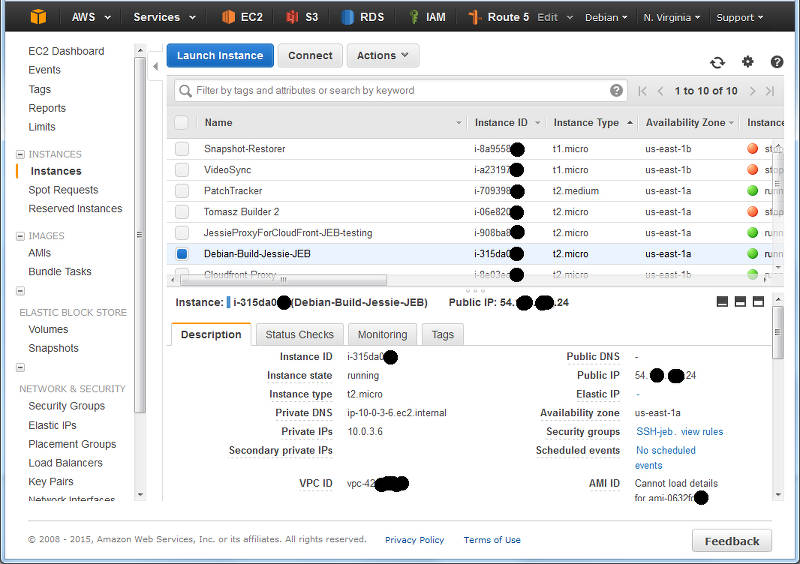
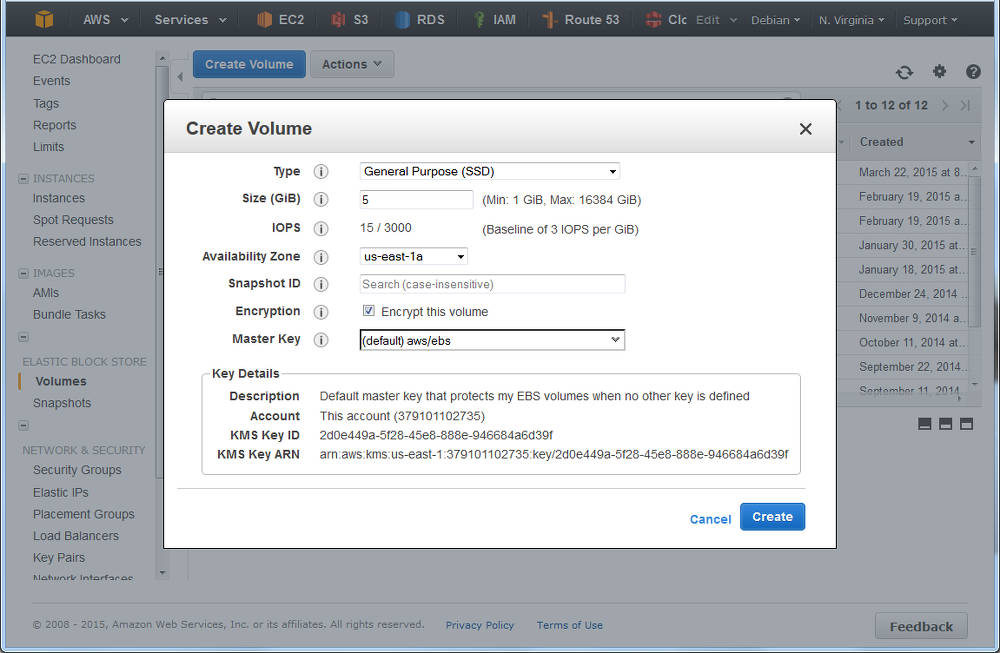
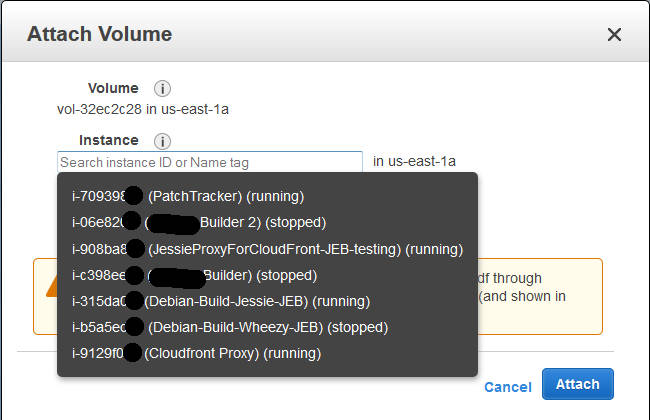
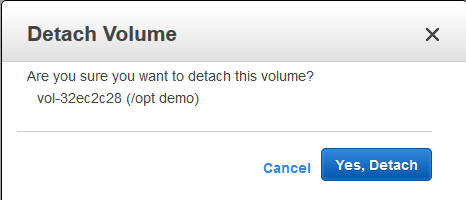
 I've recently found myself explaining
 The latest stable release of Mono has happened, the first bugfix update to our 4.0 branch. Here are the release highlights, and some other goodies.
Stable Packages
This release covers Mono 4.0.1, and MonoDevelop 5.9. As promised last time, this includes builds for RPM-based x64 systems (CentOS 7 minimum), Debian-based x64, i386, ARMv5 Soft Float, and ARMv7 Hard Float systems (Debian 7/Ubuntu 12.04 minimum).
Version numbering
From now on, we re going to be clearer with our version numbering scheme. Historically, we ve shipped, say, 4.0.0 to the public internally, there have been a lot of builds on this target branch, all of which get an internal revision number. 4.0.0 as-shipped was in fact 4.0.0.143 internally that was the first 4.0.0 branch release approved of for stable release.
This release is the first service release on the 4.0.0 branch, numbered 4.0.1.44 it ll be officially referred to as 4.0.1 in some places, but isn t the same as 4.0.1.0, which already released on Linux/Windows a while back, to include an emergency bugfix for those platforms.
That was sorta a screwup really. Using the 4-part version removes the ambiguity, rather than having 44 different 4.0.1 s in existence. And we ll aim to be clearer in future about what is alpha, what is beta, and what is final (and what is a random emergency snapshot).
Alpha Linux packages
Want to see things earlier? We ve now got the structure in place to provide Linux packages (and source releases) to mirror what we do on Mac. When we upload a prospective package to our Mac customers, we will automatically trigger builds for Linux too. See http://www.mono-project.com/download/alpha/
Beta Linux packages
See above. s/alpha/beta/.
Weekly git Master snapshots
We already have packages in place for every git commit, which parallel-install Mono into /opt. This is different.
Weekly (or, right now, when I manually run the requisite Jenkins job), the latest Mac build of Mono git master from our internal CI system will be copied to a public location just for you, a source tarball generated, and packages built. See
 I have posted a view times (
 So going through these explanations one will end up with a usable USB stick that can boot you into
 About 2 months ago I set a goal to run some kind of BSD on the spare Linksys NSLU2 I had. This was driven mostly by curiosity, after listening to a few
 I manage a few servers for myself,

 Like
 Like