Shirish Agarwal: Rama II, Arthur C. Clarke, Aliens


 In June I travelled to see Nine Inch Nails perform two nights at the Eden
Project in Cornwall. It'd been eight
years since I last saw them live and when they announced
the Eden shows, I thought it might be the only chance I'd get to see them for a
long time. I committed, and sods law, a week or so later they announced a
handful of single-night UK club shows. On the other hand, on previous tours
where they'd typically book two club nights in each city, I've attended one
night and always felt I should have done both, so this time I was making that
happen.
Newquay
In June I travelled to see Nine Inch Nails perform two nights at the Eden
Project in Cornwall. It'd been eight
years since I last saw them live and when they announced
the Eden shows, I thought it might be the only chance I'd get to see them for a
long time. I committed, and sods law, a week or so later they announced a
handful of single-night UK club shows. On the other hand, on previous tours
where they'd typically book two club nights in each city, I've attended one
night and always felt I should have done both, so this time I was making that
happen.
Newquay
 approach by air
 Towan Beach (I think)
 the Eden Project

 Via (with crab hat), Sarah, me (behind). pic by kraw
 with Elliot, before
 Yep I was this close
 A fuckin' rainbow! Photo by "Lazereth of Nazereth"
 Afterwards
root@foo:~# apt-get update
root@foo:~# apt-get install -y apache2 libapache2-mod-auth-gssapi gssproxy curlfoo.sjd.se in this writeup.
root@foo:~# curl --head http://foo.sjd.se/
HTTP/1.1 200 OK
kadmin ktadd or ipa-getkeytab), but use the string HTTP/foo.sjd.se and then confirm using something like the following.root@foo:~# ls -la /etc/gssproxy/httpd.keytab
-rw------- 1 root root 176 Sep 18 06:44 /etc/gssproxy/httpd.keytab
root@foo:~# klist -k /etc/gssproxy/httpd.keytab -e
Keytab name: FILE:/etc/gssproxy/httpd.keytab
KVNO Principal
---- --------------------------------------------------------------------------
2 HTTP/foo.sjd.se@GSSPROXY.EXAMPLE.ORG (aes256-cts-hmac-sha1-96)
2 HTTP/foo.sjd.se@GSSPROXY.EXAMPLE.ORG (aes128-cts-hmac-sha1-96)
root@foo:~# /etc/krb5.keytab location, so Apache s libapache2-mod-auth-gssapi will have to use gssproxy to use it.root@foo:~# cat<<EOF > /etc/gssproxy/80-httpd.conf
[service/HTTP]
mechs = krb5
cred_store = keytab:/etc/gssproxy/httpd.keytab
cred_store = ccache:/var/lib/gssproxy/clients/krb5cc_%U
euid = www-data
process = /usr/sbin/apache2
EOFgssproxy logging:
root@foo:~# cat<<EOF > /etc/gssproxy/gssproxy.conf
[gssproxy]
debug_level = 1
EOF
root@foo:~#root@foo:~# tail -F /var/log/syslog &
root@foo:~# systemctl restart gssproxySep 18 07:03:15 foo gssproxy[4076]: [2022/09/18 05:03:15]: Exiting after receiving a signalThe NFS-related errors is due to a default gssproxy configuration file, it is harmless and if you don t use NFS with GSS-API you can silence it like this:
Sep 18 07:03:15 foo systemd[1]: Stopping GSSAPI Proxy Daemon
Sep 18 07:03:15 foo systemd[1]: gssproxy.service: Deactivated successfully.
Sep 18 07:03:15 foo systemd[1]: Stopped GSSAPI Proxy Daemon.
Sep 18 07:03:15 foo gssproxy[4092]: [2022/09/18 05:03:15]: Debug Enabled (level: 1)
Sep 18 07:03:15 foo systemd[1]: Starting GSSAPI Proxy Daemon
Sep 18 07:03:15 foo gssproxy[4093]: [2022/09/18 05:03:15]: Kernel doesn't support GSS-Proxy (can't open /proc/net/rpc/use-gss-proxy: 2 (No such file or directory))
Sep 18 07:03:15 foo gssproxy[4093]: [2022/09/18 05:03:15]: Problem with kernel communication! NFS server will not work
Sep 18 07:03:15 foo systemd[1]: Started GSSAPI Proxy Daemon.
Sep 18 07:03:15 foo gssproxy[4093]: [2022/09/18 05:03:15]: Initialization complete.
root@foo:~# rm /etc/gssproxy/24-nfs-server.conf
root@foo:~# systemctl try-reload-or-restart gssproxySep 18 07:18:59 foo systemd[1]: Reloading GSSAPI Proxy DaemonTo instruct Apache or actually, the MIT Kerberos V5 GSS-API library used by mod_auth_gssap loaded by Apache to use gssproxy instead of using
Sep 18 07:18:59 foo gssproxy[4182]: [2022/09/18 05:18:59]: Received SIGHUP; re-reading config.
Sep 18 07:18:59 foo gssproxy[4182]: [2022/09/18 05:18:59]: Service: HTTP, Keytab: /etc/gssproxy/httpd.keytab, Enctype: 18
Sep 18 07:18:59 foo gssproxy[4182]: [2022/09/18 05:18:59]: New config loaded successfully.
Sep 18 07:18:59 foo systemd[1]: Reloaded GSSAPI Proxy Daemon.
/etc/krb5.keytab as usual, Apache needs to be started in an environment that has GSS_USE_PROXY=1 set. The background is covered by the gssproxy-mech(8) man page and explained by the gssproxy README.root@foo:~# mkdir -p /etc/systemd/system/apache2.service.d
root@foo:~# cat<<EOF > /etc/systemd/system/apache2.service.d/gssproxy.conf
[Service]
Environment=GSS_USE_PROXY=1
EOF
root@foo:~# systemctl daemon-reloadroot@foo:~# cat<<EOF > /etc/apache2/conf-available/private.conf
<Location /private>
AuthType GSSAPI
AuthName "GSSAPI Login"
Require valid-user
</Location>GSS_USE_PROXY variable. This just applies to the first time, after the first restart you may use reload again.
root@foo:~# a2enconf privateWhen you have debug messages enabled, the log may look like this:
Enabling conf private.
To activate the new configuration, you need to run:
systemctl reload apache2
root@foo:~# systemctl restart apache2
Sep 18 07:32:23 foo systemd[1]: Stopping The Apache HTTP ServerFinally, set up a dummy test page on the server:
Sep 18 07:32:23 foo gssproxy[4182]: [2022/09/18 05:32:23]: Client [2022/09/18 05:32:23]: (/usr/sbin/apache2) [2022/09/18 05:32:23]: connected (fd = 10)[2022/09/18 05:32:23]: (pid = 4651) (uid = 0) (gid = 0)[2022/09/18 05:32:23]:
Sep 18 07:32:23 foo gssproxy[4182]: message repeated 4 times: [ [2022/09/18 05:32:23]: Client [2022/09/18 05:32:23]: (/usr/sbin/apache2) [2022/09/18 05:32:23]: connected (fd = 10)[2022/09/18 05:32:23]: (pid = 4651) (uid = 0) (gid = 0)[2022/09/18 05:32:23]:]
Sep 18 07:32:23 foo systemd[1]: apache2.service: Deactivated successfully.
Sep 18 07:32:23 foo systemd[1]: Stopped The Apache HTTP Server.
Sep 18 07:32:23 foo systemd[1]: Starting The Apache HTTP Server
Sep 18 07:32:23 foo gssproxy[4182]: [2022/09/18 05:32:23]: Client [2022/09/18 05:32:23]: (/usr/sbin/apache2) [2022/09/18 05:32:23]: connected (fd = 10)[2022/09/18 05:32:23]: (pid = 4657) (uid = 0) (gid = 0)[2022/09/18 05:32:23]:
root@foo:~# Sep 18 07:32:23 foo gssproxy[4182]: message repeated 8 times: [ [2022/09/18 05:32:23]: Client [2022/09/18 05:32:23]: (/usr/sbin/apache2) [2022/09/18 05:32:23]: connected (fd = 10)[2022/09/18 05:32:23]: (pid = 4657) (uid = 0) (gid = 0)[2022/09/18 05:32:23]:]
Sep 18 07:32:23 foo systemd[1]: Started The Apache HTTP Server.
root@foo:~# echo OK > /var/www/html/private"--negotiate" enables SPNEGO and "--user :" asks curl to use username from the environment.
root@foo:~# klist
Ticket cache: FILE:/tmp/krb5cc_0
Default principal: jas@GSSPROXY.EXAMPLE.ORG
Valid starting Expires Service principal
09/18/22 07:40:37 09/19/22 07:40:37 krbtgt/GSSPROXY.EXAMPLE.ORG@GSSPROXY.EXAMPLE.ORG
root@foo:~# curl --negotiate --user : http://foo.sjd.se/private
OK
root@foo:~#Sep 18 07:56:00 foo gssproxy[4872]: [2022/09/18 05:56:00]: Client [2022/09/18 05:56:00]: (/usr/sbin/apache2) [2022/09/18 05:56:00]: connected (fd = 10)[2022/09/18 05:56:00]: (pid = 5042) (uid = 33) (gid = 33)[2022/09/18 05:56:00]:The Apache log will look like this, notice the authenticated username shown.
Sep 18 07:56:00 foo gssproxy[4872]: [CID 10][2022/09/18 05:56:00]: gp_rpc_execute: executing 6 (GSSX_ACQUIRE_CRED) for service "HTTP", euid: 33,socket: (null)
Sep 18 07:56:00 foo gssproxy[4872]: [CID 10][2022/09/18 05:56:00]: gp_rpc_execute: executing 6 (GSSX_ACQUIRE_CRED) for service "HTTP", euid: 33,socket: (null)
Sep 18 07:56:00 foo gssproxy[4872]: [CID 10][2022/09/18 05:56:00]: gp_rpc_execute: executing 1 (GSSX_INDICATE_MECHS) for service "HTTP", euid: 33,socket: (null)
Sep 18 07:56:00 foo gssproxy[4872]: [CID 10][2022/09/18 05:56:00]: gp_rpc_execute: executing 6 (GSSX_ACQUIRE_CRED) for service "HTTP", euid: 33,socket: (null)
Sep 18 07:56:00 foo gssproxy[4872]: [CID 10][2022/09/18 05:56:00]: gp_rpc_execute: executing 9 (GSSX_ACCEPT_SEC_CONTEXT) for service "HTTP", euid: 33,socket: (null)
127.0.0.1 - jas@GSSPROXY.EXAMPLE.ORG [18/Sep/2022:07:56:00 +0200] "GET /private HTTP/1.1" 200 481 "-" "curl/7.81.0"Congratulations, and happy hacking!
 I today released version 0.06.4
of my WAP WML browser wApua and also uploaded that release to Debian Unstable.
It s a bugfix release and the first upstream release since 2017.
It fixes the recognition of WAP WML pages with more recent DTD
location URLs ending in
I today released version 0.06.4
of my WAP WML browser wApua and also uploaded that release to Debian Unstable.
It s a bugfix release and the first upstream release since 2017.
It fixes the recognition of WAP WML pages with more recent DTD
location URLs ending in .dtd instead of .xml
(and some other small difference). No idea when these URLs changed,
but I assume they have been changed to look more like the URLs of
other DTDs. The old URLs of the DTD still work, but more recent WAP
pages (yes, they do exist :-) seem to use the new DTD URLs, so there
was a need to recognise them instead of throwing an annoying warning.
Thanks to Lian Begett for the bug report!
Back in November I wrote up a list of 25 things I would 3D print.
Let's revisit the list and see how things have developed.
Stuff I won't print
It was pointed out to me that you can't safely print things to store food in with most materials, as their porous/layered nature facilitates the growth of bacteria. So, I'll rule out those items.
- Some kind of 45 leaning prong to dry bottles and flasks on
- A tea tray and coasters
- Small tins to keep loose-leaf tea in
A vinyl record.The size of the grooves in a vinyl record are smaller than conventional FDM printers can achieve. Things I've printed
a replacement prop arm/foot for my computer keyboardSomeone has modelled the exact part I need, and it worked great: https://www.printables.com/model/59132-lenovo-keyboard-kt-1255
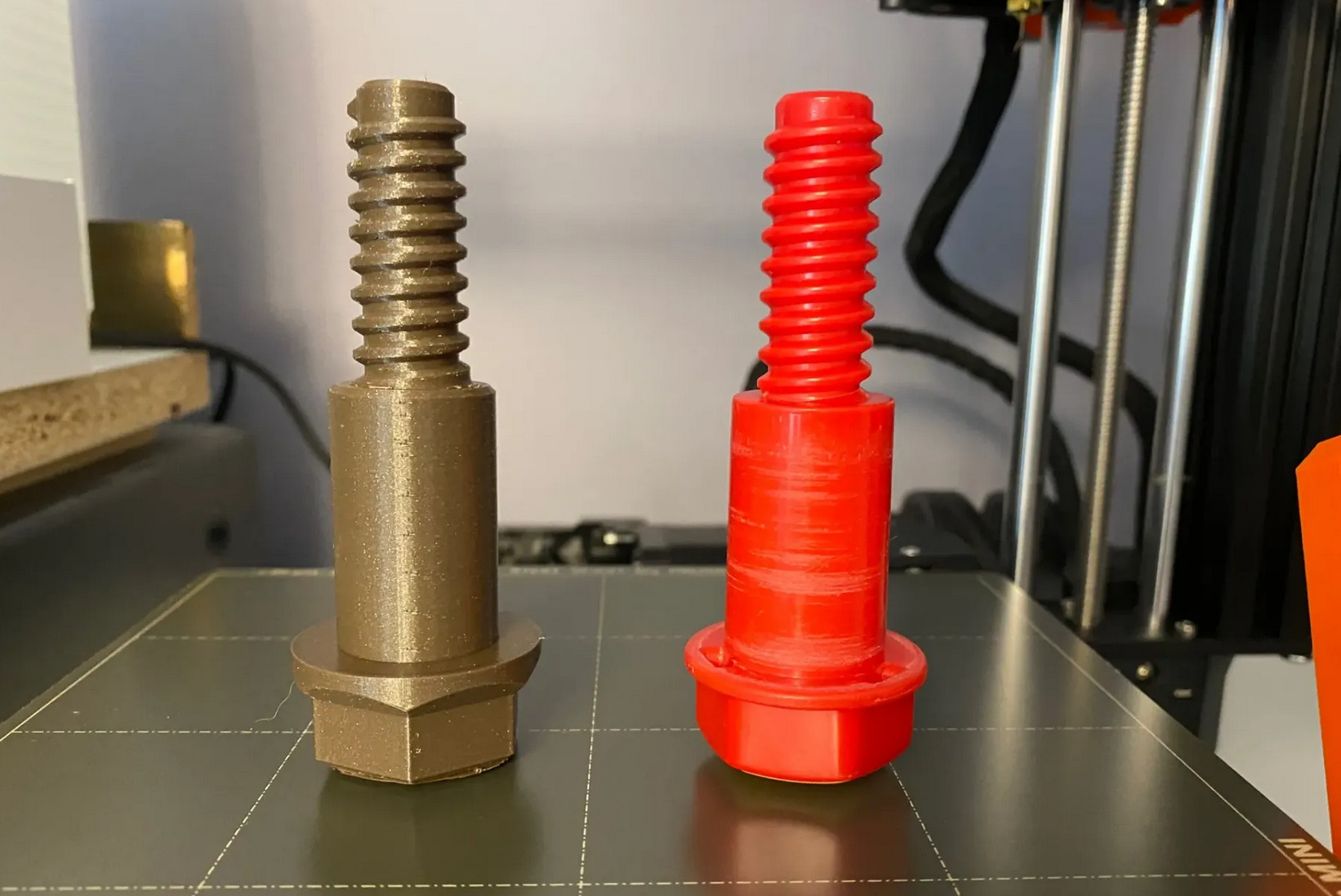 replacement toy bolt
replacement bits for an Early Learning Centre Build It Deluxe SetI was amazed to find that someone has already modelled one of these, too, and it worked beautifully: https://www.printables.com/model/79243-elc-build-it-compatible-bolt
Little kids trinkets. Pacman ghosts
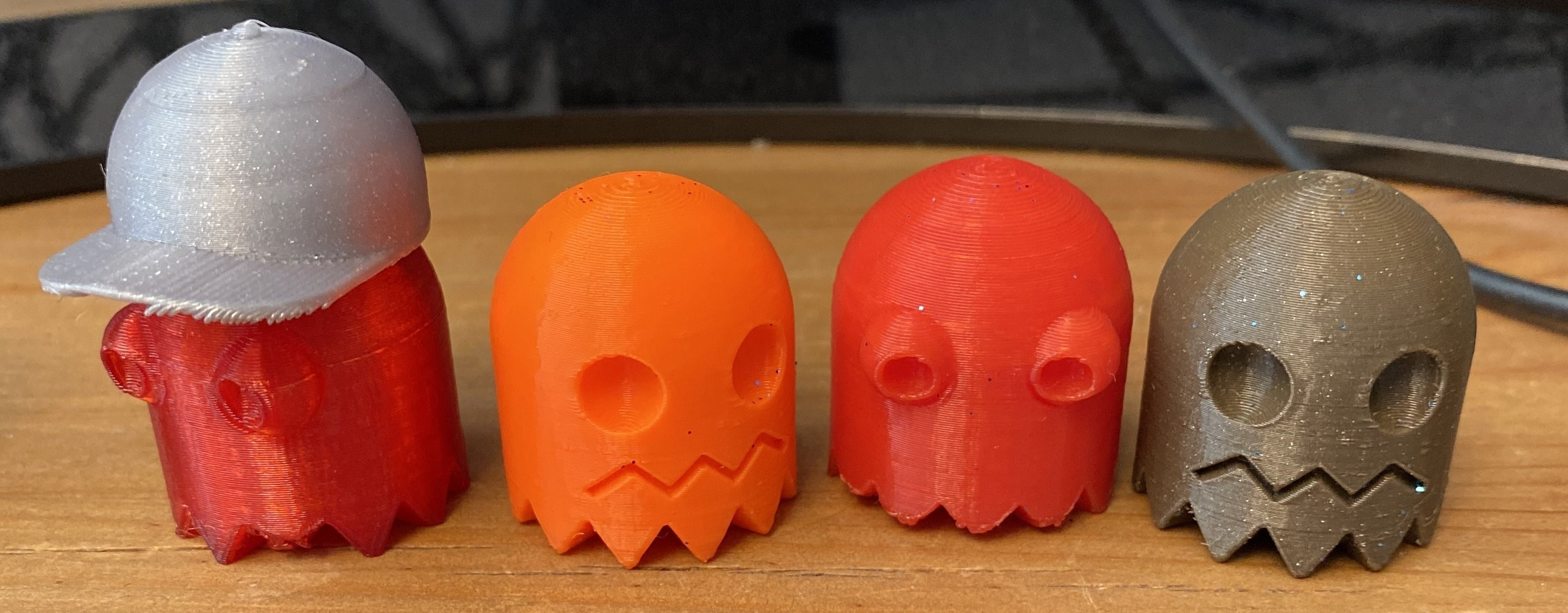 The Pacman ghost family so far
I learned about a Slicer setting sometimes called "Vase mode" and found this interesting system of modular drawers that are designed to be printed in Vase mode, so I gave them a go: https://www.printables.com/model/139570-fast-printing-modular-drawer-system-vase-mode I printed one and four drawers for it and gave it to my daughter. It might be used for sorting Lego, or possibly as a chest-of-drawers for a dolls house.
- Lego storage/sorters
- DIY bits-and-bobs sorter/storage (nuts and bolts etc)
A free-standing inclined vinyl record display standhttps://www.printables.com/model/174711-vinyl-stand-for-kallax
A bracket to install a Gotek drive in my Amiga 500https://www.thingiverse.com/thing:2745049 Summary From my original list of 25 things to print, I've done 7 of them and determined 4 are not viable. The things in this list I've printed have been off-the-shelf models that other people have constructed. The things I haven't printed are designs I will do myself, which is one reason I haven't printed them yet: building your own designs is the hard part!
 More ICFP-inspired experiments using the
 rec-def library: In Norman Ramsey s very nice talk about his Functional Pearl Beyond Relooper: Recursive Translation of Unstructured Control Flow to Structured Control Flow , he had the following slide showing the equation for the dominators of a node in a graph:
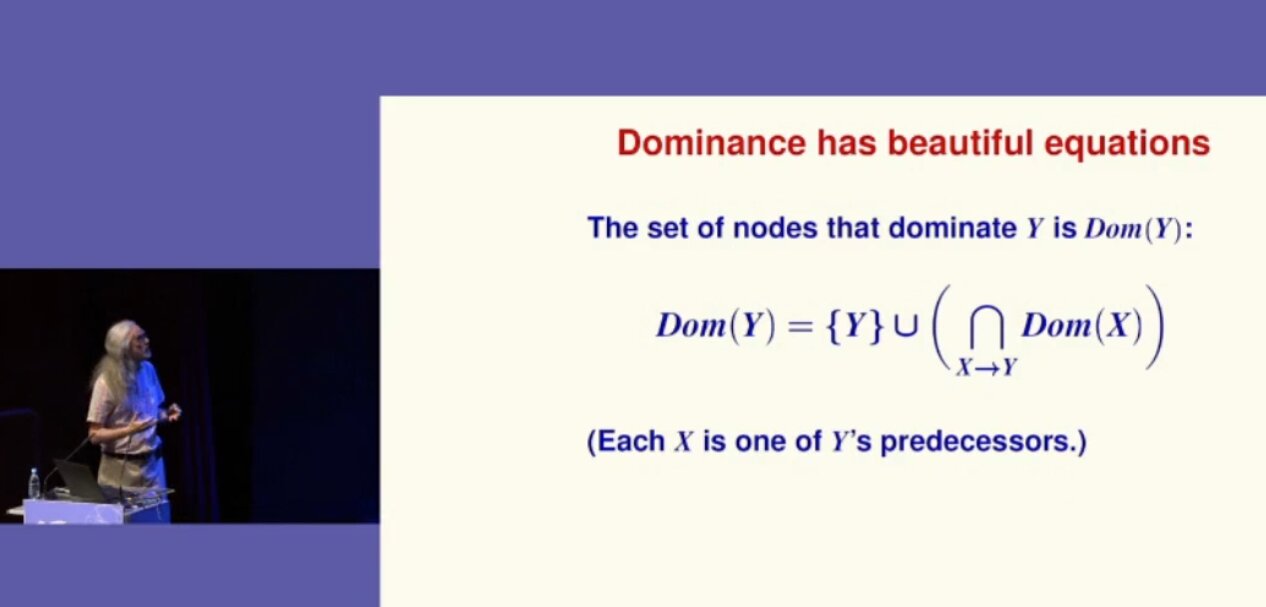 Norman Ramsey shows a formula
Data.Set, and also a function to find the predecessors of a node in a graph:
import qualified Data.Set as S
import qualified Data.Map as M

intersections :: [S.Set Int] -> S.Set Int
intersections [] = S.empty
intersections xs = foldl1 S.intersection xs

preds :: [(Int,Int)] -> M.Map Int [Int]
preds edges = M.fromListWith (<>) $
    [ (v1, [])     (v1, _) <- edges ] ++ -- to make the map total
[ (v2, [v1]) (v1, v2) <- edges ]domintors1 :: [(Int,Int)] -> M.Map Int [Int] domintors1 edges = fmap S.toList doms where doms :: M.Map Int (S.Set Int) doms = M.mapWithKey (\v vs -> S.insert v (intersections [ doms M.! v' v' <- vs])) (preds edges)
ghci> domintors1 []
fromList []
ghci> domintors1 [(1,2)]
fromList [(1,[1]),(2,[1,2])]
ghci> domintors1 [(1,2),(1,3),(2,4),(3,4)]
fromList [(1,[1]),(2,[1,2]),(3,[1,3]),(4,[1,4])]
Data.Recursive.Set.
import qualified Data.Recursive.Set as RS

intersections :: [RS.RSet Int] -> RS.RSet Int
intersections [] = RS.empty
intersections xs = foldl1 RS.intersection xs

domintors2 :: [(Int,Int)] -> M.Map Int [Int]
domintors2 edges = fmap (S.toList . RS.get) doms
  where
    doms :: M.Map Int (RS.RSet Int)
    doms = M.mapWithKey
        (\v vs -> RS.insert v (intersections [ doms M.! v'   v' <- vs]))
(preds edges)Data.Recursive.Set calculates, as documented, the least fixed point.
What now? Until the library has code for RDualSet a, we can work around this by using the dual formula to calculate the non-dominators. To do this, we
S.empty, use the set of all nodes (which requires some extra plumbing)unions' :: S.Set Int -> [RS.RSet Int] -> RS.RSet Int unions' univ [] = mkR univ unions' _ xs = foldl1 RS.union xs domintors3 :: [(Int,Int)] -> M.Map Int [Int] domintors3 edges = fmap (S.toList . S.difference nodes . RS.get) nonDoms where nodes = S.fromList [v (v1,v2) <- edges, v <- [v1,v2]] nonDoms :: M.Map Int (RS.RSet Int) nonDoms = M.mapWithKey (\v vs -> RS.delete v (unions' nodes [ nonDoms M.! v' v' <- vs])) (preds edges)
ghci> domintors3 [(1,2),(1,3),(2,4),(3,4),(4,3)]
fromList [(1,[1]),(2,[1,2]),(3,[1,3]),(4,[1,4])]rec-def Haskell library to a few people. As this crowd appreciates writing compilers, and example from the realm of program analysis is quite compelling.
env which of the variables may throw an exception:
canThrow1 :: Exp -> Bool
canThrow1 = go M.empty
  where
    go :: M.Map Var Bool -> Exp -> Bool
    go env (Var v)       = env M.! v
    go env Throw         = True
    go env (Catch e)     = False
    go env (Lam v e)     = go (M.insert v False env) e
    go env (App e1 e2)   = go env e1   go env e2
    go env (Let v e1 e2) = go env' e2
      where
        env_bind = M.singleton v (go env e1)
        env' = M.union env_bind env
Let, where we extend the environment env with the information about the additional variable env_bind, which is calculated from analyzing the right-hand side e1.
So far so good:
ghci> someVal = Lam "y" (Var "y")
ghci> canThrow1 $ Throw
True
ghci> canThrow1 $ Let "x" Throw someVal
False
ghci> canThrow1 $ Let "x" Throw (App (Var "x") someVal)
TruecanThrow1? Let use naively follow the pattern used for Let: Calculate the analysis information for the variables in env_bind, extend the environment with that, and pass it down:
    go env (LetRec binds e) = go env' e
      where
        env_bind = M.fromList [ (v, go env' e)   (v,e) <- binds ]
        env' = M.union env_bind env
env', and not just env, when analyzing the right-hand sides. It has to be that way, as all the variables are in scope in all the right-hand sides.
In a strict language, such a mutually recursive definition, where env_bind uses env' which uses env_bind is basically unthinkable. But in a lazy language like Haskell, it might just work.
Unfortunately, it works only as long as the recursive bindings are not actually recursive, or if they are recursive, they are not used:
ghci> canThrow1 $ LetRec [("x", Throw)] (Var "x")
True
ghci> canThrow1 $ LetRec [("x", App (Var "y") someVal), ("y", Throw)] (Var "x")
True
ghci> canThrow1 $ LetRec [("x", App (Var "x") someVal), ("y", Throw)] (Var "y")
Trueghci> canThrow1 $ LetRec [("x", App (Var "x") someVal), ("y", Throw)] (Var "x")
^CInterrupted.RBool from Data.Recursive.Bool instead of Bool, we can write the exact same code, as follows:
import qualified Data.Recursive.Bool as RB

canThrow2 :: Exp -> Bool
canThrow2 = RB.get . go M.empty
  where
    go :: M.Map Var RBool -> Exp -> R Bool
    go env (Var v)       = env M.! v
    go env Throw         = RB.true
    go env (Catch e)     = RB.false
    go env (Lam v e)     = go (M.insert v RB.false env) e
    go env (App e1 e2)   = go env e1 RB.  go env e2
    go env (Let v e1 e2) = go env' e2
      where
        env_bind = M.singleton v (go env e1)
        env' = M.union env_bind env
    go env (LetRec binds e) = go env' e
      where
        env_bind = M.fromList [ (v, go env' e)   (v,e) <- binds ]
env' = M.union env_bind envghci> canThrow2 $ LetRec [("x", App (Var "x") someVal), ("y", Throw)] (Var "x")
False
ghci> canThrow2 $ LetRec [("x", App (Var "x") Throw), ("y", Throw)] (Var "x")
TrueLetRec independently: Not only is all that extra work hidden from the programmer, but now also a single traversal of the syntax tree creates, thanks to the laziness, a graph of RBool values, which are then solved under the hood .
canThrow2 fails to produce a result in case we hit x=x:
ghci> canThrow2 $ LetRec [("x", Var "x")] (Var "x")
^CInterrupted.ghci> let x = x in RB.get (x :: RBool)
^CInterrupted.rec-def machinery can only kick in if at least one of its function is used on any such cycle, even if it is just a form of identity (which I ~ought to add to the library~ since have added to the library):
ghci> idR x = RB.false   x
ghci> let x = idR x in getR (x :: R Bool)
FalseidR in the line
then our analyzer will no longer stumble over these nasty recursive equations:
ghci> canThrow2 $ LetRec [("x", Var "x")] (Var "x")
Falsedef-rec library expects the programmer to have a similar level of sophistication as other tie-the-know tricks with laziness (where you also have to ensure that your definitions are productive and that the sharing is not accidentally lost).
 Introduction: an immutable OS
The Steam Deck runs SteamOS, a single-user operating system based on Arch Linux. Although derived from a standard package-based distro, the OS in the Steam Deck is immutable and system updates replace the contents of the root filesystem atomically instead of using the package manager.
An immutable OS makes the system more stable and its updates less error-prone, but users cannot install additional packages to add more software. This is not a problem for most users since they are only going to run Steam and its games (which are stored in the home partition). Nevertheless, the OS also has a desktop mode which provides a standard Linux desktop experience, and here it makes sense to be able to install more software.
How to do that though? It is possible for the user to become root, make the root filesytem read-write and install additional software there, but any changes will be gone after the next OS update. Modifying the rootfs can also be dangerous if the user is not careful.
Ways to add additional software
The simplest and safest way to install additional software is with Flatpak, and that s the method recommended in the Steam Deck Desktop FAQ. Flatpak is already installed and integrated in the system via the Discover app so I won t go into more details here.
However, while Flatpak works great for desktop applications not every piece of software is currently available, and Flatpak is also not designed for other types of programs like system services or command-line tools.
Fortunately there are several ways to add software to the Steam Deck without touching the root filesystem, each one with different pros and cons. I will probably talk about some of them in the future, but in this post I m going to focus on one that is already available in the system:
Introduction: an immutable OS
The Steam Deck runs SteamOS, a single-user operating system based on Arch Linux. Although derived from a standard package-based distro, the OS in the Steam Deck is immutable and system updates replace the contents of the root filesystem atomically instead of using the package manager.
An immutable OS makes the system more stable and its updates less error-prone, but users cannot install additional packages to add more software. This is not a problem for most users since they are only going to run Steam and its games (which are stored in the home partition). Nevertheless, the OS also has a desktop mode which provides a standard Linux desktop experience, and here it makes sense to be able to install more software.
How to do that though? It is possible for the user to become root, make the root filesytem read-write and install additional software there, but any changes will be gone after the next OS update. Modifying the rootfs can also be dangerous if the user is not careful.
Ways to add additional software
The simplest and safest way to install additional software is with Flatpak, and that s the method recommended in the Steam Deck Desktop FAQ. Flatpak is already installed and integrated in the system via the Discover app so I won t go into more details here.
However, while Flatpak works great for desktop applications not every piece of software is currently available, and Flatpak is also not designed for other types of programs like system services or command-line tools.
Fortunately there are several ways to add software to the Steam Deck without touching the root filesystem, each one with different pros and cons. I will probably talk about some of them in the future, but in this post I m going to focus on one that is already available in the system: systemd-sysext.
About systemd-sysext
This is a tool included in recent versions of systemd and it is designed to add additional files (in the form of system extensions) to an otherwise immutable root filesystem. Each one of these extensions contains a set of files. When extensions are enabled (aka merged ) those files will appear on the root filesystem using overlayfs. From then on the user can open and run them normally as if they had been installed with a package manager. Merged extensions are seamlessly integrated with the rest of the OS.
Since extensions are just collections of files they can be used to add new applications but also other things like system services, development tools, language packs, etc.
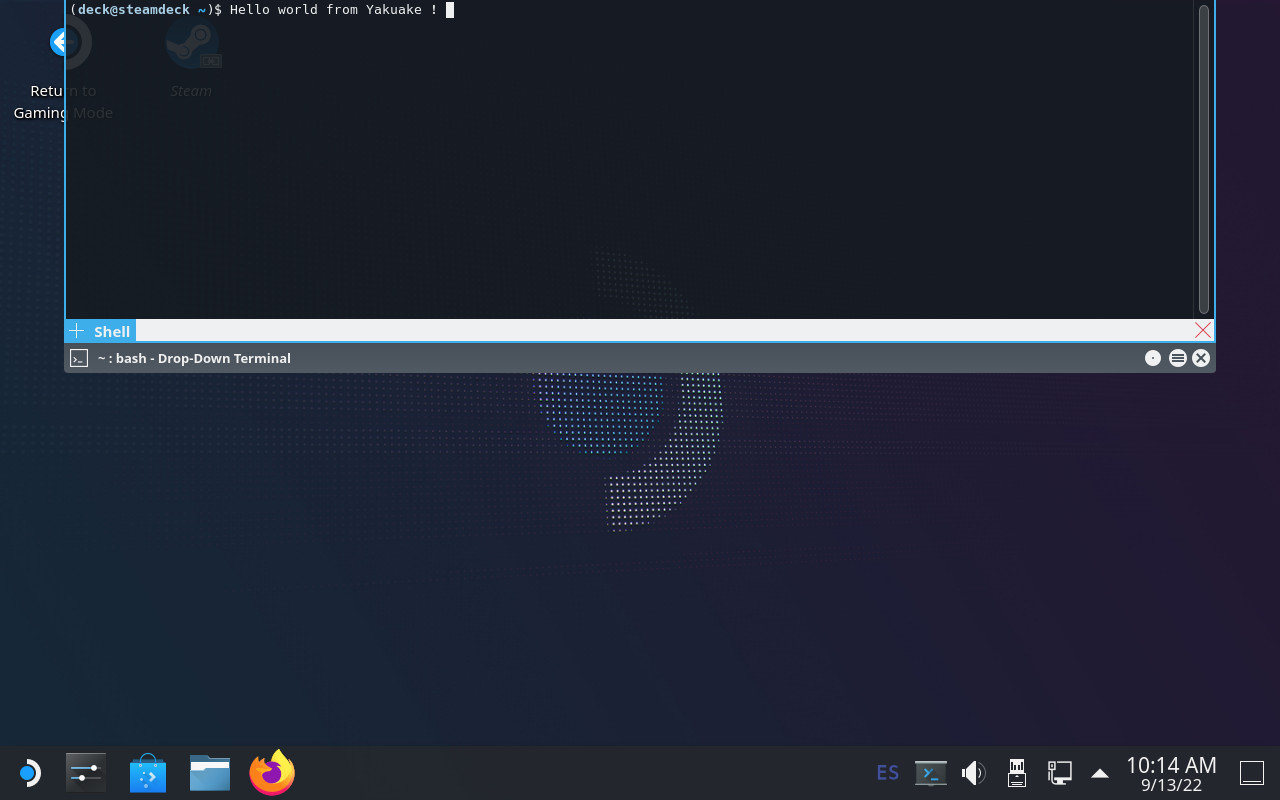
Creating an extension: yakuake
I m using yakuake as an example for this tutorial since the extension is very easy to create, it is an application that some users are demanding and is not easy to distribute with Flatpak.
So let s create a yakuake extension. Here are the steps:
1) Create a directory and unpack the files there:
$ mkdir yakuake
$ wget https://steamdeck-packages.steamos.cloud/archlinux-mirror/extra/os/x86_64/yakuake-21.12.1-1-x86_64.pkg.tar.zst
$ tar -C yakuake -xaf yakuake-*.tar.zst usr
extension-release.NAME under usr/lib/extension-release.d with the fields ID and VERSION_ID taken from the Steam Deck s /etc/os-release file.
$ mkdir -p yakuake/usr/lib/extension-release.d/
$ echo ID=steamos > yakuake/usr/lib/extension-release.d/extension-release.yakuake
$ echo VERSION_ID=3.3.1 >> yakuake/usr/lib/extension-release.d/extension-release.yakuake
$ mksquashfs yakuake yakuake.raw
.raw suffix and, despite the name, they can contain any filesystem that the OS can mount. In this example I used SquashFS but other alternatives like EroFS or ext4 are equally valid.
NOTE: systemd-sysext can also use extensions from plain directories (i.e skipping the mksquashfs part). Unfortunately we cannot use them in our case because overlayfs does not work with the casefold feature that is enabled on the Steam Deck.
Using the extension
Once the extension is created you simply need to copy it to a place where systemd-systext can find it. There are several places where they can be installed (see the manual for a list) but due to the Deck s partition layout and the potentially large size of some extensions it probably makes more sense to store them in the home partition and create a link from one of the supported locations (/var/lib/extensions in this example):
(deck@steamdeck ~)$ mkdir extensions
(deck@steamdeck ~)$ scp user@host:/path/to/yakuake.raw extensions/
(deck@steamdeck ~)$ sudo ln -s $PWD/extensions /var/lib/extensions
(deck@steamdeck ~)$ sudo systemctl enable systemd-sysext
(deck@steamdeck ~)$ sudo systemctl start systemd-sysext
/usr/bin/yakuake. The files should remain there from now on, also if you reboot the device. You can see what extensions are enabled with this command:
$ systemd-sysext status
HIERARCHY EXTENSIONS SINCE
/opt      none       -
/usr      yakuake    Tue 2022-09-13 18:21:53 CEST
systemd-sysext refresh is enough to apply the changes.
Unfortunately, and unlike distro packages, extensions don t have any kind of post-installation hooks or triggers, so in the case of Yakuake you probably won t see an entry in the KDE application menu immediately after enabling the extension. You can solve that by running kbuildsycoca5 once from the command line.
Limitations and caveats
Using systemd extensions is generally very easy but there are some things that you need to take into account:

ID and VERSION_ID of each extension must match the values from /etc/os-release. If the fields don t match then the extension will be ignored. This is to be expected because there s no guarantee that a particular extension is going to work with a different version of the OS. This can happen after a system update. In the best case one simply needs to update the extension s VERSION_ID, but in some cases it might be necessary to create the extension again with different/updated files./usr and /opt. Any other file in the image will be ignored. This can be a problem if a particular piece of software needs files in other directories./usr and /opt directories become read-only because they are now part of an overlayfs. They will remain read-only even if you run steamos-readonly disable !!. If you really want to make the rootfs read-write you need to disable the extensions (systemd-sysext unmerge) first.
 Armadillo is a powerful and expressive C++ template library for linear algebra and scientific computing. It aims towards a good balance between speed and ease of use, has a syntax deliberately close to Matlab, and is useful for algorithm development directly in C++, or quick conversion of research code into production environments. RcppArmadillo integrates this library with the R environment and language and is widely used by (currently) 1016 packages other packages on CRAN, downloaded 26.2 million times (per the partial logs from the cloud mirrors of CRAN), and the CSDA paper (preprint / vignette) by Conrad and myself has been cited 493 times according to Google Scholar.
This new release (made yesterday) brings three changes. First, it updates the release to the upstream 11.2.4 bugfix release made days ago by Conrad. Second, it contains support for the deprecation transition we are managing in issue #391. In short, the (convenient but non-standard) initialization via use of
Armadillo is a powerful and expressive C++ template library for linear algebra and scientific computing. It aims towards a good balance between speed and ease of use, has a syntax deliberately close to Matlab, and is useful for algorithm development directly in C++, or quick conversion of research code into production environments. RcppArmadillo integrates this library with the R environment and language and is widely used by (currently) 1016 packages other packages on CRAN, downloaded 26.2 million times (per the partial logs from the cloud mirrors of CRAN), and the CSDA paper (preprint / vignette) by Conrad and myself has been cited 493 times according to Google Scholar.
This new release (made yesterday) brings three changes. First, it updates the release to the upstream 11.2.4 bugfix release made days ago by Conrad. Second, it contains support for the deprecation transition we are managing in issue #391. In short, the (convenient but non-standard) initialization via use of << has been deprecated upstream. Until all packages are updated, we override this in the RcppArmadillo but aim to become compliant . Out of the over 1000 packages, a mere 25 need small adjustments. I reached out email and PRs, and the response has been great. Eight packages are already updated on CRAN, and several others have already in integrated or merged the change. Lastly, Conrad pointed out that the fastLm() example and application can be written more concisely by using arma::dot().
The full set of changes (since the last CRAN release 0.11.2.3.1) follows.
Courtesy of my CRANberries, there is a diffstat report relative to previous release. More detailed information is on the RcppArmadillo page. Questions, comments etc should go to the rcpp-devel mailing list off the R-Forge page. If you like this or other open-source work I do, you can sponsor me at GitHub.Changes in RcppArmadillo version 0.11.2.4.0 (2022-09-09)
- Upgraded to Armadillo release 11.2.4 (Classic Roast)
- fix handling of
std::move()involving matrices constructed with auxiliary memory- In the
fastLm()examples, usearma::dot()to compute to the inner product (as proposed by Conrad), plus small edits- Support optional
#definenamedRCPPARMADILLO_FORCE_DEPRECATEto suppress use ofARMA_IGNORE_DEPRECATED_MARKERpermitting use and development under deprecation
This post by Dirk Eddelbuettel originated on his Thinking inside the box blog. Please report excessive re-aggregation in third-party for-profit settings.
Edit Addition 11th September Seems Kosovo isn t unique in that situation, there are 3-4 states like that. A brief look at worldpopulationreview tells you there are many more.
In diplomacy, countries use leverage. Sadly, we let go of some of our most experienced negotiators in 2014 and since then have been singing in the wind
| Series: | Discworld #20 |
| Publisher: | Harper |
| Copyright: | 1996 |
| Printing: | February 2014 |
| ISBN: | 0-06-227628-X |
| Format: | Mass market |
| Pages: | 402 |
"Look at it this way, then," she said, and took a deep mental breath. "Wherever people are obtuse and absurd... and wherever they have, by even the most generous standards, the attention span of a small chicken in a hurricane and the investigative ability of a one-legged cockroach... and wherever people are inanely credulous, pathetically attached to the certainties of the nursery and, in general, have as much grasp of the physical universe as an oyster has of mountaineering... yes, Twyla: there is a Hogfather.Meanwhile, the Auditors, last seen meddling with Death in Reaper Man, approach the Assassin's Guild in Ankh-Morpork to hire the assassination of the Hogfather. This rather unusual assignment falls to Mister Teatime, an orphan who was taken in by the guild at an early age and trained to be an assassin. Teatime is a little unnerving, mostly because he enjoys being an assassin. Rather a lot. Hogfather has two major things to recommend it: it's a Death novel, and it features Susan, who is one of my favorite Discworld characters. It also has two major strikes against it, at least for me. The first is relatively minor but, for me, the most irritating. A bit of the way into the story, Pratchett introduces the Oh God of Hangovers fair, that's a good pun and then decides that's a good excuse for nausea and vomiting jokes. A lot of nausea and vomiting jokes. Look. I know a lot of people don't mind this. But I beg authors (and, even more so, filmmakers and cartoonists) to consider whether a joke that some of your audience might like is worth making other parts of your audience feel physically ill while trying to enjoy your work. It's not at all a pleasant experience, and while I handle it better in written form, it still knocks me out of the story and makes me want to skip over scenes with the obnoxious character who won't shut up about it. Thankfully this does stop by the end of the book, but there are several segments in the middle that were rather unpleasant. The second is that Pratchett tries to convince the reader of the mythical importance of the Santa Claus myth (for which Hogfather is an obvious stand-in, if with a Discworld twist), an effort for which I am a highly unsympathetic audience. I'm with Susan above, with an extra helping of deep dislike for telling children who trust you something that's literally untrue. Pratchett does try: he has Death makes a memorable and frequently-quoted point near the end of the book (transcribed below) that I don't entirely agree with but still respect. But still, the book is very invested in convincing Susan that people believing mythology is critically important to humanity, and I have so many problems with the literalness of "believing" and the use of trusting children for this purpose by adults who know better. There are few topics that bring out my grumpiness more than Santa Claus. Grumbling aside, though, I did enjoy this book anyway. Susan is always a delight, and I could read about her adventures as a governess for as long as Pratchett wanted to write them. Death is filling in for the Hogfather for most of the book, which is hilarious because he's far too good at it, in his painfully earnest and literal way, to be entirely safe. I was less fond of Albert's supporting role (who I am increasingly coming to dislike as a character), but the entire scene of Death as a mall Santa is brilliant. And Teatime is an effective, creepy villain, something that the Discworld series doesn't always deliver. The powers arrayed on Discworld are so strong that it can be hard to design a villain who effectively challenges them, but Teatime has a sociopathic Professor Moriarty energy with added creepiness that fills that role in this book satisfyingly. As is typical for Pratchett (at least for me), the plot was serviceable but not the highlight. Pratchett plays in some interesting ways with a child's view of the world, the Unseen University bumbles around as a side plot, and it comes together at the end in a way that makes sense, but the journey is the fun of the story. The conclusion felt a bit gratuitous, there mostly to wrap up the story than something that followed naturally from the previous plot. But it does feature one of the most quoted bits in Discworld:
"All right," said Susan. "I'm not stupid. You're saying humans need... fantasies to make life bearable." REALLY? AS IF IT WAS SOME KIND OF PINK PILL? NO. HUMANS NEED FANTASY TO BE HUMAN. TO BE THE PLACE WHERE THE FALLING ANGEL MEETS THE RISING APE. "Tooth fairies? Hogfathers? Little " YES. AS PRACTICE. YOU HAVE TO START OUT LEARNING TO BELIEVE THE LITTLE LIES. "So we can believe the big ones?" YES. JUSTICE. MERCY. DUTY. THAT SORT OF THING. "They're not the same at all!" YOU THINK SO? THEN TAKE THE UNIVERSE AND GRIND IT DOWN TO THE FINEST POWDER AND SIEVE IT THROUGH THE FINEST SIEVE AND THEN SHOW ME ONE ATOM OF JUSTICE, ONE MOLECULE OF MERCY. AND YET Death waved a hand. AND YET YOU ACT AS IF THERE IS SOME IDEAL ORDER IN THE WORLD, AS IF THERE IS SOME...SOME RIGHTNESS IN THE UNIVERSE BY WHICH IT MAY BE JUDGED. "Yes, but people have got to believe that, or what's the point " MY POINT EXACTLY.Here's the thing, though: Susan is right. They're not the same sort of thing at all, and Pratchett doesn't present an argument that they are. Death's response is great, but it's also a non sequitur: it is true and correct but has nothing to do with Susan's argument. Justice is not a lie in the sense that Santa Claus is a lie: justice is something that humans can create, just like humans can create gift-giving or a tradition of imaginative story-telling. But this is not at all the same thing as encouraging children to believe in the literal existence of a fat man in red who comes down chimneys to deliver gifts by magic. And Death isn't even correct in Discworld! If one pays careful attention to the story, the consequences he's thinks would follow from the Auditors' attempt on the Hogfather not only don't happen, the exact opposite happens. This is the point of the Unseen University subplot, and it's also what happened in Reaper Man. The Auditors may be trying to kill mythology, but what the books show is that the real danger comes from the backlash. The force they're meddling with is far more powerful and persistent than they are. Death appears to be, by the stated events of the story, completely incorrect in his analysis of Discworld's metaphysics. Maybe Pratchett knows this? He did write a story that contradicts Death's analysis if one reads it carefully. But if so, this is not obvious from the text, or from Susan's reaction to Death's speech, which makes the metaphysics weirdly unsatisfying. So, overall, a mixed bag. Most of the book is very fun, but the metaphysics heavily rest on a pet peeve of mine, and I really could have done without the loving descriptions of the effects of hangovers. This is one of the more famous Discworld novels for the above quote, and on its own this is deserved (it's a great quote), but I think the logic is muddled and the story itself contradicts the implications. A rather odd reading experience. Followed by Jingo in publication order, and Thief of Time thematically. Rating: 7 out of 10
gitlab-foss and gitlab-ee,
but whatever). CE was taking up roughly 1GB and EE was taking up the
rest.
So I deleted both repos, which means that the next time I want to
contribute a fix to their documentation which is as far as I managed
to contribute to GitLab I will need to re-fork those humongous
repositories.
Maybe I'm reading this wrong. Maybe there's a bug in the quotas
system. Or, if I'm reading this right, GitLab is actually
double-billing people: once for the source repository, and once for
the fork. Because surely repos are not duplicating all those blobs
on disk... right? RIGHT?
Either case, that's rather a bad move on their part, I feel like. With
GitHub charging 4$/user/month, it feels like GitLab is going to
have to trouble to compete by charging 20$/user/month as a
challenger...
(Update: as noted in the comments by Jim Sorenson, this is actually an
issue with older versions of GitLab. Deleting and re-forking the repos
will actually fix the issue so, in a way, I did exactly what I
should. Another workaround is to run the housekeeping jobs on the
repo, although I cannot confirm this works myself.)
But maybe it's just me: I'm not an economist, surely there's some
brilliant plan here I'm missing...
In the meantime, free-ish alternatives include Quay.io (currently
free for public repos) and sr.ht (2$/mth, but at least not
open-core, unfortunately no plan for a container registry). And
of course, you can painfully self-host GitLab, sr.ht, gitea,
pagure, or whatever it is the current fancy gitweb.
 Our local Debian user group gathered on Sunday August 28th1 at the very
hackish Foulab for the August 2022 edition of our "Debian & Stuff"
meetings.
As always, the event was a success and we had lots of fun. Nine people showed
up, including some new faces and people I hadn't seen in a while:
On my side, although I was badly sleep-deprived 2, I still managed to be
somewhat productive!
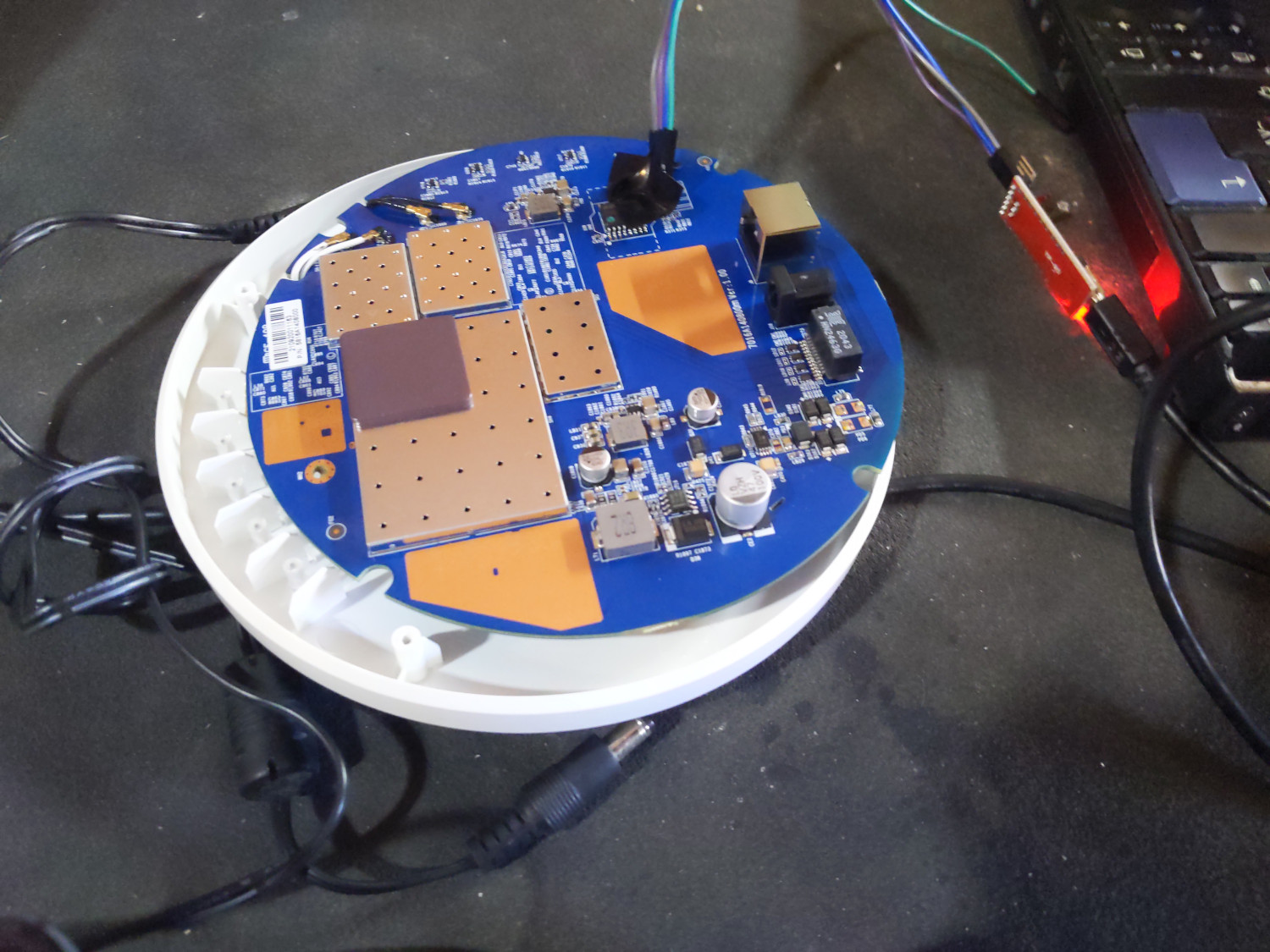
One of the WiFi Access Points we use in our 4-apartment LAN had been
boot-looping for a few weeks, after a failed sysupgrade to the latest version
of OpenWRT. lavamind and I suspect the flash got corrupted in a way or another
during the upgrade process...
Lucky for us, this model has a serial port and runs U-Boot. After a
bit of tinkering, some electrical tape and two different serial
adapters3, we managed to identify the pin layout and got a shell on the
machine. The device has a reset button, but since the kernel panic was
happening too soon in the boot process, we weren't able to get into OpenWRT's
failsafe mode this way.
Our local Debian user group gathered on Sunday August 28th1 at the very
hackish Foulab for the August 2022 edition of our "Debian & Stuff"
meetings.
As always, the event was a success and we had lots of fun. Nine people showed
up, including some new faces and people I hadn't seen in a while:
On my side, although I was badly sleep-deprived 2, I still managed to be
somewhat productive!
One of the WiFi Access Points we use in our 4-apartment LAN had been
boot-looping for a few weeks, after a failed sysupgrade to the latest version
of OpenWRT. lavamind and I suspect the flash got corrupted in a way or another
during the upgrade process...
Lucky for us, this model has a serial port and runs U-Boot. After a
bit of tinkering, some electrical tape and two different serial
adapters3, we managed to identify the pin layout and got a shell on the
machine. The device has a reset button, but since the kernel panic was
happening too soon in the boot process, we weren't able to get into OpenWRT's
failsafe mode this way.
 Once we had serial access, wiping the flash and re-installing OpenWRT fixed our
problem. A quick
Once we had serial access, wiping the flash and re-installing OpenWRT fixed our
problem. A quick ansible-playbook run later, the device was back to being
usable and configured :)
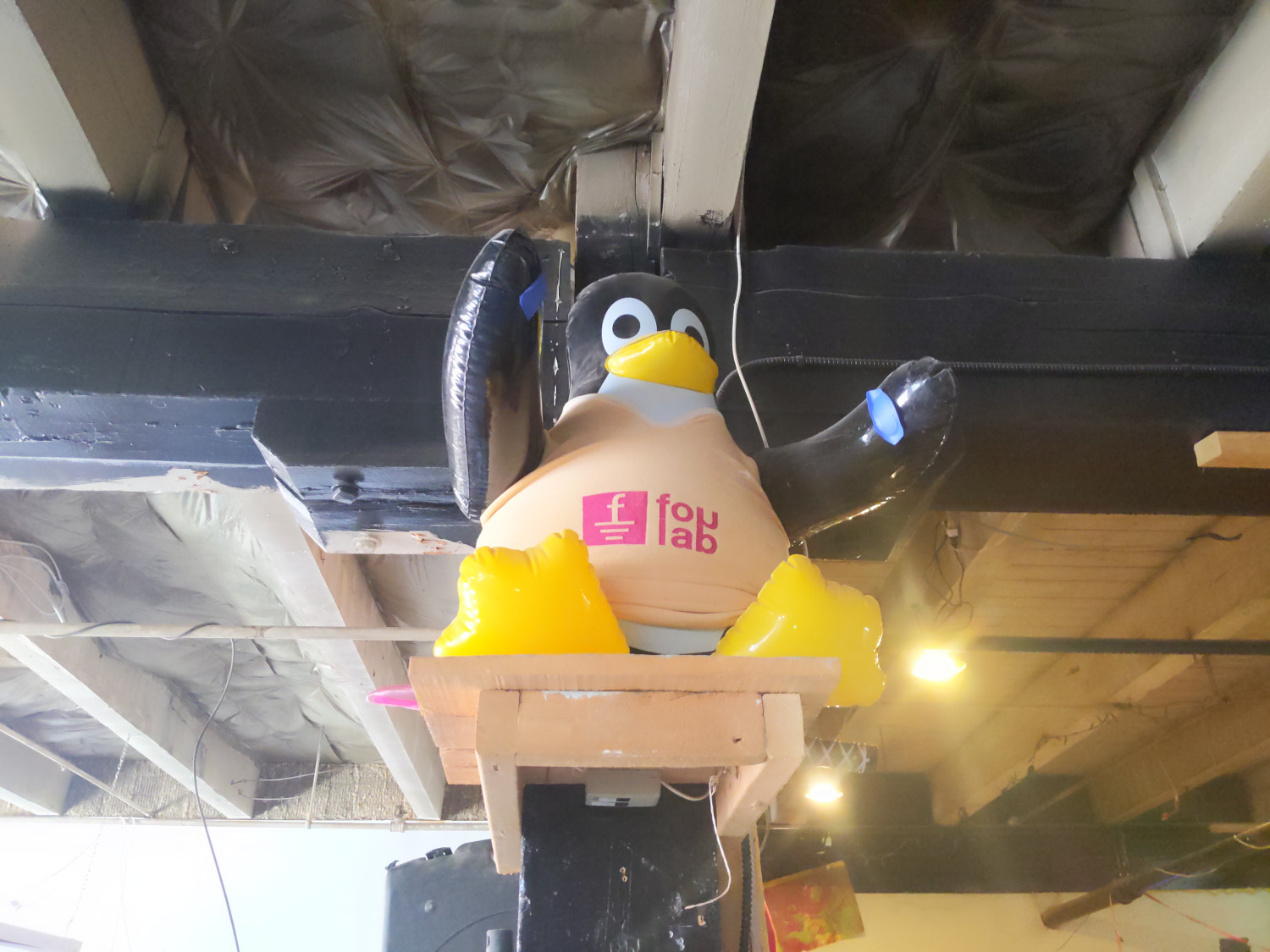
I was too tired to keep track of what others did, but I took some nice pictures
of the pizza we got, and of this nice blow-up Tux wearing a Foulab t-shirt. Enjoy!
 As always, thanks to the Debian project for granting us a budget to rent the
venue and to buy some food.
. The system talks about a back key but what back key I have no clue.
As always, thanks to the Debian project for granting us a budget to rent the
venue and to buy some food.
. The system talks about a back key but what back key I have no clue.
nncp-xfer -rx to process incoming packets from the USB (or other media) device. This moves them into the NNCP inbound queue, deleting them from the media device, and verifies the packet integrity.nncp-ack -node $NODE to create ACK packets responding to the packets we just loaded into the rx queue. It writes a list of generated ACKs onto fd 4, which we save off for later use.nncp-toss -seen to process the incoming queue. The use of -seen causes NNCP to remember the hashes of packets seen before, so a duplicate of an already-seen packet will not be processed twice. This command also processes incoming ACKs for packets we ve sent out previously; if they pass verification, the relevant packets are removed from the local machine s tx queue.nncp-xfer -keep -tx -mkdir -node $NODE to send outgoing packets to a given node by writing them to a given directory on the media device. -keep causes them to remain in the outgoing queue.nncp-rm -node $NODE -pkt < $FILE to remove those specific packets from the outbound queue. The reason is that there will never be an ACK of ACK packet (that would create an infinite loop), so if we don t delete them in this manner, they would hang around forever.nncp-toss, there is a chance of a race condition between steps 1 and 2 (if nncp-toss gets to it first, it might not get an ack generated). This would sort itself out eventually, presumably, as the sender would retransmit and it would be ACKed later.
#!/bin/bash
set -eo pipefail
MEDIABASE="/media/$USER"
# The local node name
NODENAME=" hostname "
# All nodes.  NODENAME should be in this list.
ALLNODES="node1 node2 node3"
RUNNNCP=""
# If you need to sudo, use something like RUNNNCP="sudo -Hu nncp"
NNCPPATH="/usr/local/nncp/bin"
ACKPATH=" mktemp -d "
# Process incoming packets.
#
# Parameters: $1 - the path to scan.  Must contain a directory
# named "nncp".
procrxpath ()
    while [ -n "$1" ]; do
        BASEPATH="$1/nncp"
        shift
        if ! [ -d "$BASEPATH" ]; then
            echo "$BASEPATH doesn't exist; skipping"
            continue
        fi
        echo " *** Incoming: processing $BASEPATH"
        TMPDIR=" mktemp -d "
        # This rsync and the one below can help with
        # certain permission issues from weird foreign
        # media.  You could just eliminate it and
        # always use $BASEPATH instead of $TMPDIR below.
        rsync -rt "$BASEPATH/" "$TMPDIR/"
        # You may need these next two lines if using sudo as above.
        # chgrp -R nncp "$TMPDIR"
        # chmod -R g+rwX "$TMPDIR"
        echo "     Running nncp-xfer -rx"
        $RUNNNCP $NNCPPATH/nncp-xfer -progress -rx "$TMPDIR"
        for NODE in $ALLNODES; do
                if [ "$NODE" != "$NODENAME" ]; then
                        echo "     Running nncp-ack for $NODE"
                        # Now, we generate ACK packets for each node we will
                        # process.  nncp-ack writes a list of the created
                        # ACK packets to fd 4.  We'll use them later.
                        # If using sudo, add -C 5 after $RUNNNCP.
                        $RUNNNCP $NNCPPATH/nncp-ack -progress -node "$NODE" \
                           4>> "$ACKPATH/$NODE"
                fi
        done
        rsync --delete -rt "$TMPDIR/" "$BASEPATH/"
        rm -fr "$TMPDIR"
    done

proctxpath ()
    while [ -n "$1" ]; do
        BASEPATH="$1/nncp"
        shift
        if ! [ -d "$BASEPATH" ]; then
            echo "$BASEPATH doesn't exist; skipping"
            continue
        fi
        echo " *** Outgoing: processing $BASEPATH"
        TMPDIR=" mktemp -d "
        rsync -rt "$BASEPATH/" "$TMPDIR/"
        # You may need these two lines if using sudo:
        # chgrp -R nncp "$TMPDIR"
        # chmod -R g+rwX "$TMPDIR"
        for DESTHOST in $ALLNODES; do
            if [ "$DESTHOST" = "$NODENAME" ]; then
                continue
            fi
            # Copy outgoing packets to this node, but keep them in the outgoing
            # queue with -keep.
            $RUNNNCP $NNCPPATH/nncp-xfer -keep -tx -mkdir -node "$DESTHOST" -progress "$TMPDIR"
            # Here is the key: that list of ACK packets we made above - now we delete them.
            # There will never be an ACK for an ACK, so they'd keep sending forever
            # if we didn't do this.
            if [ -f "$ACKPATH/$DESTHOST" ]; then
                echo "nncp-rm for node $DESTHOST"
                $RUNNNCP $NNCPPATH/nncp-rm -debug -node "$DESTHOST" -pkt < "$ACKPATH/$DESTHOST"
            fi
        done
        rsync --delete -rt "$TMPDIR/" "$BASEPATH/"
        rm -rf "$TMPDIR"
        # We only want to write stuff once.
        return 0
    done

procrxpath "$MEDIABASE"/*
echo " *** Initial tossing..."
# We make sure to use -seen to rule out duplicates.
$RUNNNCP $NNCPPATH/nncp-toss -progress -seen
proctxpath "$MEDIABASE"/*
echo "You can unmount devices now."
echo "Done."

 Mahendra, Akshat, Shirish and Sagar Sukhose (Mangesh s friend) at Bal Gandharva..
  Electric scooter as shared by Akshat seen in Albania
  Somebody making a real-life replica of Wall Street on F.C. Road (Commercial, all glass)
 Ganesh Idol near my house
 Wearing new clothes


Next.