Antoine Beaupr : A short history of password hashers
These are notes from my research that led to the publication of the
password hashers article. This article
is more technical than the previous ones and compares the various
cryptographic primitives and algorithms used in the various software I
have reviewed. The criteria for inclusion on this list is fairly
vague: I mostly included a password hasher if it was significantly
different from the previous implementations in some way, and I have
included all the major ones I could find as well.
The first password hashers
Nic Wolff claims to be the first to have written such a
program, all the way back in 2003. Back then the hashing algorithm
was MD5, although Wolff has now updated the algorithm to
use SHA-1 and still maintains his webpage for public use. Another
ancient but unrelated implementation, is the Standford University
Applied Cryptography's pwdhash software. That implementation
was published in 2004 and unfortunately, that implementation was
not updated and still uses MD5 as an hashing algorithm, but at least
it uses HMAC to generate tokens, which makes the use
of rainbow tables impractical. Those implementations are the
simplest password hashers: the inputs are simply the site URL and a
password. So the algorithms are, basically, for Wolff's:
The first password hashers
Nic Wolff claims to be the first to have written such a
program, all the way back in 2003. Back then the hashing algorithm
was MD5, although Wolff has now updated the algorithm to
use SHA-1 and still maintains his webpage for public use. Another
ancient but unrelated implementation, is the Standford University
Applied Cryptography's pwdhash software. That implementation
was published in 2004 and unfortunately, that implementation was
not updated and still uses MD5 as an hashing algorithm, but at least
it uses HMAC to generate tokens, which makes the use
of rainbow tables impractical. Those implementations are the
simplest password hashers: the inputs are simply the site URL and a
password. So the algorithms are, basically, for Wolff's:
token = base64(SHA1(password + domain))
And for Standford's PwdHash:
token = base64(HMAC(MD5, password, domain)))
SuperGenPass
Another unrelated implementation that is still around
is supergenpass is a bookmarklet that was created around 2007,
originally using MD5 as well but now supports SHA512 now although
still limited to 24 characters like MD5 (which needlessly limits
the entropy of the resulting password) and still defaults MD5
with not enough rounds (10, when key derivation recommendations
are more generally around 10 000, so that it's slower to bruteforce).
Note that Chris Zarate, the supergenpass author, actually credits Nic
Wolff as the inspiration for his implementation. Supergenpass is still
in active development and is available for the browser (as
a bookmarklet) or mobile (as an webpage). Supergenpass allows
you to modify the password length, but also add an extra profile
secret which adds to the password and generates a
personalized identicon presumably to prevent phishing but it also
introduces the interesting protection, the profile-specific secret
only found later in Password Hasher Plus. So
the Supergenpass algorithm looks something like this:
token = base64(SHA512(password + profileSecret + ":" + domain, rounds))
The Wijjo Password Hasher
Another popular implementation is the Wijjo Password
Hasher, created around 2006. It was probably the first shipped as
a browser extension which greatly improved the security of the
product as users didn't have to continually download the software on
the fly. Wijjo's algorithm also improved on the above algorithms, as
it uses HMAC-SHA1 instead of plain SHA-1 or HMAC-MD5, which makes it
harder to recover the plaintext. Password Hasher allows you to set
different password policies (use digits, punctuation, mixed case,
special characters and password length) and saves the site names it
uses for future reference. It also happens that the Wijjo Password
Hasher, in turn, took its inspiration on different
project, hashapass.com, created in 2006 and also based on
HMAC-SHA-1. Indeed, hashapass "can easily be generated on almost
any modern Unix-like system using the following command line pattern":
echo -n parameter \
  openssl dgst -sha1 -binary -hmac password \
  openssl enc -base64 \
  cut -c 1-8
So the algorithm here is obviously:
token = base64(HMAC(SHA1, password, domain + ":" + counter)))[:8]
... although in the case of Password Hasher, there is a special
routine that takes the token and inserts random characters in locations
determined by the sum of the values of the characters in the token.
Password Hasher Plus
Years later, in 2010, Eric Woodruff ported the Wijjo Password Hasher
to Chrome and called it
Password Hasher Plus.
Like the original Password Hasher, the "plus" version also keeps those
settings in the extension and uses HMAC-SHA-1 to generate the
password, as it is designed to be backwards-compatible with the Wijjo
Password Hasher. Woodruff did add one interesting feature: a
profile-specific secret key that gets mixed in to create the security
token, like what SuperGenPass does now. Stealing the master password is therefore not enough to
generate tokens anymore. This solves one security concern with
Password Hasher: an hostile page could watch your keystrokes and steal
your master password and use it to derive passwords on other
sites. Having a profile-specific secret key, not accessible to the
site's Javascript works around that issue, but
typing the master password directly in the password field, while
convenient, is just a bad idea, period. The final
algorithm looks something like:
token = base64(HMAC(SHA1, password, base64(HMAC(SHA1, profileSecret, domain + ":" + counter))))
Honestly, that seems rather strange, but it's what I read from the
source code, which is available only after decompressing the extension
nowadays. I would have expected the simplest version:
token = base64(HMAC(SHA1, HMAC(SHA1, profileSecret, password), domain + ":" + counter))
The idea here would be "hide" the master password from bruteforce
attacks as soon as possible... But maybe this is all equivalent.
Regardless, Password Hasher Plus then takes the token and applies the
same special character insertion routine as the Password Hasher.
LessPass
Last year, Guillaume Vincent a french self-described "humanist and
scuba diving fan" released the lesspass extension for Chrome,
Firefox and Android. Lesspass introduces several interesting
features. It is probably the first to include
a commandline version. It also uses a more robust key
derivation algorithm (PBKDF2) and takes into account the username
on the site, allowing multi account support. The original release
(version 1) used only 8192 rounds which is
now considered too low. In the bug report it was interesting
to note that LessPass couldn't do the usual practice of running the
key derivation for 1 second to determine the number of rounds needed
as the results need to be deterministic.
At first glance, the LessPass source code
seems clear and easy to read which is always a good sign, but of
course, the devil is in the details. One key feature that is missing
from Password Hasher Plus is the profile-specific seed, although it
should be impossible, for a hostile web page to steal keystrokes
from a browser extension, as far as I know.
The algorithm then gets a little more interesting:
entropy = PBKDF2(SHA256, masterPassword, domain + username + counter, rounds, length)
where
    rounds=10000
    length=32
entropy is then used to pick characters to match the chosen profile.
Regarding code readability, I got quickly confused by
the PBKDF2 implementation: SubtleCrypto.ImportKey() doesn't
seem to support PBKDF2 in the API, yet it's how it is used there... Is
it just something to extract key material? We see later what looks
like a more standard AES-based PBKDF2 implementation, but this code
looks just strange to me. It could be me unfamilarity with newer
Javascript coding patterns, however.
There is also a lesspass-specific character picking routing that
is also not base64, and different from the original Password Hasher
algorithm.
Master Password
A review of password hashers would hardly be complete without
mentioning the Master Password and
its elaborate algorithm. While the applications surrounding the
project are not as refined (there is no web browser plugin and
the web interface can't be easily turned into a bookmarklet), the
algorithm has been well developed. Of all the password managers
reviewed here, Master Password uses one of the strongest key
derivation algorithms out there, scrypt:
key = scrypt( password, salt, cost, size, parallelization, length )
where
salt = "com.lyndir.masterpassword" + len(username) + name
cost = 32768
size = 8
parallelization = 2
length = 64
entropy = hmac-sha256(key, "com.lyndir.masterpassword" + len(domain) + domain + counter )
Master Password the uses one of 6 sets of "templates" specially
crafted to be "easy for a user to read from a screen and type using a
keyboard or smartphone" and "compatible with most site's password
policies", our "transferable" criteria defined
in the first passwords article. For example, the default template
mixes vowels, consonants, numbers and symbols, but carefully avoiding
possibly visibly similar characters like O and 0 or i and 1
(although it does mix 1 and l, oddly enough).
The main strength of Master Password seems to be the clear definition
of its algorithm (although Hashpass.com does give out OpenSSL
commandline examples...), which led to its reuse in another
application called freepass. The Master Password app also
doubles as a stateful password manager...
Other implementations
I have also considered including easypasswords, which uses
PBKDF2-HMAC-SHA1, in my list of recommendations. I discovered only
recently that the author wrote a detailed review of many more
password hashers and scores them according to their relative
strength. In the end, I ended up covering more LessPass since the
design is very similar and LessPass does seem a bit more
usable. Covering LessPass also allowed me to show the contrast and
issues regarding the algorithm changes, for example.
It is also interesting to note that the EasyPasswords author
has criticized the Master Password algorithm quite severely:
[...] scrypt isn t being applied correctly. The initial scrypt hash
calculation only depends on the username and master password. The
resulting key is combined with the site name via SHA-256 hashing
then. This means that a website only needs to break the SHA-256
hashing and deduce the intermediate key as long as the username
doesn t change this key can be used to generate passwords for other
websites. This makes breaking scrypt unnecessary[...]
During a discussion with the Master Password author, he outlined that
"there is nothing "easy" about brute-force deriving a 64-byte key
through a SHA-256 algorithm." SHA-256 is used in the last stage
because it is "extremely fast". scrypt is used as a key derivation
algorithm to generate a large secret and is "intentionnally slow":
"we don't want it to be easy to reverse the master password from a
site password". "But it' unnecessary for the second phase because
the input to the second phase is so large. A master password is tiny,
there are only a few thousand or million possibilities to try. A
master key is 8^64, the search space is huge. Reversing that doesn't
need to be made slower. And it's nice for the password generation to
be fast after the key has been prepared in-memory so we can display
site passwords easily on a mobile app instead of having to lock the UI
a few seconds for every password."
Finally, I considered covering Blum's Mental Hash
(also covered here and elsewhere). This consists of an algorithm
that can basically be ran by the human brain directly. It's not for
the faint of heart, however: if I understand it correctly, it will
require remembering a password that is basically a string of 26
digits, plus compute modulo arithmetics on the outputs. Needless to
say, most people don't do modulo arithmetics every day...
token = base64(SHA1(password + domain))
token = base64(HMAC(MD5, password, domain)))
token = base64(SHA512(password + profileSecret + ":" + domain, rounds))
The Wijjo Password Hasher
Another popular implementation is the Wijjo Password
Hasher, created around 2006. It was probably the first shipped as
a browser extension which greatly improved the security of the
product as users didn't have to continually download the software on
the fly. Wijjo's algorithm also improved on the above algorithms, as
it uses HMAC-SHA1 instead of plain SHA-1 or HMAC-MD5, which makes it
harder to recover the plaintext. Password Hasher allows you to set
different password policies (use digits, punctuation, mixed case,
special characters and password length) and saves the site names it
uses for future reference. It also happens that the Wijjo Password
Hasher, in turn, took its inspiration on different
project, hashapass.com, created in 2006 and also based on
HMAC-SHA-1. Indeed, hashapass "can easily be generated on almost
any modern Unix-like system using the following command line pattern":
echo -n parameter \
openssl dgst -sha1 -binary -hmac password \
openssl enc -base64 \
cut -c 1-8
So the algorithm here is obviously:
token = base64(HMAC(SHA1, password, domain + ":" + counter)))[:8]
... although in the case of Password Hasher, there is a special
routine that takes the token and inserts random characters in locations
determined by the sum of the values of the characters in the token.
Password Hasher Plus
Years later, in 2010, Eric Woodruff ported the Wijjo Password Hasher
to Chrome and called it
Password Hasher Plus.
Like the original Password Hasher, the "plus" version also keeps those
settings in the extension and uses HMAC-SHA-1 to generate the
password, as it is designed to be backwards-compatible with the Wijjo
Password Hasher. Woodruff did add one interesting feature: a
profile-specific secret key that gets mixed in to create the security
token, like what SuperGenPass does now. Stealing the master password is therefore not enough to
generate tokens anymore. This solves one security concern with
Password Hasher: an hostile page could watch your keystrokes and steal
your master password and use it to derive passwords on other
sites. Having a profile-specific secret key, not accessible to the
site's Javascript works around that issue, but
typing the master password directly in the password field, while
convenient, is just a bad idea, period. The final
algorithm looks something like:
token = base64(HMAC(SHA1, password, base64(HMAC(SHA1, profileSecret, domain + ":" + counter))))
Honestly, that seems rather strange, but it's what I read from the
source code, which is available only after decompressing the extension
nowadays. I would have expected the simplest version:
token = base64(HMAC(SHA1, HMAC(SHA1, profileSecret, password), domain + ":" + counter))
The idea here would be "hide" the master password from bruteforce
attacks as soon as possible... But maybe this is all equivalent.
Regardless, Password Hasher Plus then takes the token and applies the
same special character insertion routine as the Password Hasher.
LessPass
Last year, Guillaume Vincent a french self-described "humanist and
scuba diving fan" released the lesspass extension for Chrome,
Firefox and Android. Lesspass introduces several interesting
features. It is probably the first to include
a commandline version. It also uses a more robust key
derivation algorithm (PBKDF2) and takes into account the username
on the site, allowing multi account support. The original release
(version 1) used only 8192 rounds which is
now considered too low. In the bug report it was interesting
to note that LessPass couldn't do the usual practice of running the
key derivation for 1 second to determine the number of rounds needed
as the results need to be deterministic.
At first glance, the LessPass source code
seems clear and easy to read which is always a good sign, but of
course, the devil is in the details. One key feature that is missing
from Password Hasher Plus is the profile-specific seed, although it
should be impossible, for a hostile web page to steal keystrokes
from a browser extension, as far as I know.
The algorithm then gets a little more interesting:
entropy = PBKDF2(SHA256, masterPassword, domain + username + counter, rounds, length)
where
rounds=10000
length=32
entropy is then used to pick characters to match the chosen profile.
Regarding code readability, I got quickly confused by
the PBKDF2 implementation: SubtleCrypto.ImportKey() doesn't
seem to support PBKDF2 in the API, yet it's how it is used there... Is
it just something to extract key material? We see later what looks
like a more standard AES-based PBKDF2 implementation, but this code
looks just strange to me. It could be me unfamilarity with newer
Javascript coding patterns, however.
There is also a lesspass-specific character picking routing that
is also not base64, and different from the original Password Hasher
algorithm.
Master Password
A review of password hashers would hardly be complete without
mentioning the Master Password and
its elaborate algorithm. While the applications surrounding the
project are not as refined (there is no web browser plugin and
the web interface can't be easily turned into a bookmarklet), the
algorithm has been well developed. Of all the password managers
reviewed here, Master Password uses one of the strongest key
derivation algorithms out there, scrypt:
key = scrypt( password, salt, cost, size, parallelization, length )
where
salt = "com.lyndir.masterpassword" + len(username) + name
cost = 32768
size = 8
parallelization = 2
length = 64
entropy = hmac-sha256(key, "com.lyndir.masterpassword" + len(domain) + domain + counter )
Master Password the uses one of 6 sets of "templates" specially
crafted to be "easy for a user to read from a screen and type using a
keyboard or smartphone" and "compatible with most site's password
policies", our "transferable" criteria defined
in the first passwords article. For example, the default template
mixes vowels, consonants, numbers and symbols, but carefully avoiding
possibly visibly similar characters like O and 0 or i and 1
(although it does mix 1 and l, oddly enough).
The main strength of Master Password seems to be the clear definition
of its algorithm (although Hashpass.com does give out OpenSSL
commandline examples...), which led to its reuse in another
application called freepass. The Master Password app also
doubles as a stateful password manager...
Other implementations
I have also considered including easypasswords, which uses
PBKDF2-HMAC-SHA1, in my list of recommendations. I discovered only
recently that the author wrote a detailed review of many more
password hashers and scores them according to their relative
strength. In the end, I ended up covering more LessPass since the
design is very similar and LessPass does seem a bit more
usable. Covering LessPass also allowed me to show the contrast and
issues regarding the algorithm changes, for example.
It is also interesting to note that the EasyPasswords author
has criticized the Master Password algorithm quite severely:
[...] scrypt isn t being applied correctly. The initial scrypt hash
calculation only depends on the username and master password. The
resulting key is combined with the site name via SHA-256 hashing
then. This means that a website only needs to break the SHA-256
hashing and deduce the intermediate key as long as the username
doesn t change this key can be used to generate passwords for other
websites. This makes breaking scrypt unnecessary[...]
During a discussion with the Master Password author, he outlined that
"there is nothing "easy" about brute-force deriving a 64-byte key
through a SHA-256 algorithm." SHA-256 is used in the last stage
because it is "extremely fast". scrypt is used as a key derivation
algorithm to generate a large secret and is "intentionnally slow":
"we don't want it to be easy to reverse the master password from a
site password". "But it' unnecessary for the second phase because
the input to the second phase is so large. A master password is tiny,
there are only a few thousand or million possibilities to try. A
master key is 8^64, the search space is huge. Reversing that doesn't
need to be made slower. And it's nice for the password generation to
be fast after the key has been prepared in-memory so we can display
site passwords easily on a mobile app instead of having to lock the UI
a few seconds for every password."
Finally, I considered covering Blum's Mental Hash
(also covered here and elsewhere). This consists of an algorithm
that can basically be ran by the human brain directly. It's not for
the faint of heart, however: if I understand it correctly, it will
require remembering a password that is basically a string of 26
digits, plus compute modulo arithmetics on the outputs. Needless to
say, most people don't do modulo arithmetics every day...
echo -n parameter \
openssl dgst -sha1 -binary -hmac password \
openssl enc -base64 \
cut -c 1-8
token = base64(HMAC(SHA1, password, domain + ":" + counter)))[:8]
token = base64(HMAC(SHA1, password, base64(HMAC(SHA1, profileSecret, domain + ":" + counter))))
token = base64(HMAC(SHA1, HMAC(SHA1, profileSecret, password), domain + ":" + counter))
LessPass
Last year, Guillaume Vincent a french self-described "humanist and
scuba diving fan" released the lesspass extension for Chrome,
Firefox and Android. Lesspass introduces several interesting
features. It is probably the first to include
a commandline version. It also uses a more robust key
derivation algorithm (PBKDF2) and takes into account the username
on the site, allowing multi account support. The original release
(version 1) used only 8192 rounds which is
now considered too low. In the bug report it was interesting
to note that LessPass couldn't do the usual practice of running the
key derivation for 1 second to determine the number of rounds needed
as the results need to be deterministic.
At first glance, the LessPass source code
seems clear and easy to read which is always a good sign, but of
course, the devil is in the details. One key feature that is missing
from Password Hasher Plus is the profile-specific seed, although it
should be impossible, for a hostile web page to steal keystrokes
from a browser extension, as far as I know.
The algorithm then gets a little more interesting:
entropy = PBKDF2(SHA256, masterPassword, domain + username + counter, rounds, length)
where
rounds=10000
length=32
entropy is then used to pick characters to match the chosen profile.
Regarding code readability, I got quickly confused by
the PBKDF2 implementation: SubtleCrypto.ImportKey() doesn't
seem to support PBKDF2 in the API, yet it's how it is used there... Is
it just something to extract key material? We see later what looks
like a more standard AES-based PBKDF2 implementation, but this code
looks just strange to me. It could be me unfamilarity with newer
Javascript coding patterns, however.
There is also a lesspass-specific character picking routing that
is also not base64, and different from the original Password Hasher
algorithm.
Master Password
A review of password hashers would hardly be complete without
mentioning the Master Password and
its elaborate algorithm. While the applications surrounding the
project are not as refined (there is no web browser plugin and
the web interface can't be easily turned into a bookmarklet), the
algorithm has been well developed. Of all the password managers
reviewed here, Master Password uses one of the strongest key
derivation algorithms out there, scrypt:
key = scrypt( password, salt, cost, size, parallelization, length )
where
salt = "com.lyndir.masterpassword" + len(username) + name
cost = 32768
size = 8
parallelization = 2
length = 64
entropy = hmac-sha256(key, "com.lyndir.masterpassword" + len(domain) + domain + counter )
Master Password the uses one of 6 sets of "templates" specially
crafted to be "easy for a user to read from a screen and type using a
keyboard or smartphone" and "compatible with most site's password
policies", our "transferable" criteria defined
in the first passwords article. For example, the default template
mixes vowels, consonants, numbers and symbols, but carefully avoiding
possibly visibly similar characters like O and 0 or i and 1
(although it does mix 1 and l, oddly enough).
The main strength of Master Password seems to be the clear definition
of its algorithm (although Hashpass.com does give out OpenSSL
commandline examples...), which led to its reuse in another
application called freepass. The Master Password app also
doubles as a stateful password manager...
Other implementations
I have also considered including easypasswords, which uses
PBKDF2-HMAC-SHA1, in my list of recommendations. I discovered only
recently that the author wrote a detailed review of many more
password hashers and scores them according to their relative
strength. In the end, I ended up covering more LessPass since the
design is very similar and LessPass does seem a bit more
usable. Covering LessPass also allowed me to show the contrast and
issues regarding the algorithm changes, for example.
It is also interesting to note that the EasyPasswords author
has criticized the Master Password algorithm quite severely:
[...] scrypt isn t being applied correctly. The initial scrypt hash
calculation only depends on the username and master password. The
resulting key is combined with the site name via SHA-256 hashing
then. This means that a website only needs to break the SHA-256
hashing and deduce the intermediate key as long as the username
doesn t change this key can be used to generate passwords for other
websites. This makes breaking scrypt unnecessary[...]
During a discussion with the Master Password author, he outlined that
"there is nothing "easy" about brute-force deriving a 64-byte key
through a SHA-256 algorithm." SHA-256 is used in the last stage
because it is "extremely fast". scrypt is used as a key derivation
algorithm to generate a large secret and is "intentionnally slow":
"we don't want it to be easy to reverse the master password from a
site password". "But it' unnecessary for the second phase because
the input to the second phase is so large. A master password is tiny,
there are only a few thousand or million possibilities to try. A
master key is 8^64, the search space is huge. Reversing that doesn't
need to be made slower. And it's nice for the password generation to
be fast after the key has been prepared in-memory so we can display
site passwords easily on a mobile app instead of having to lock the UI
a few seconds for every password."
Finally, I considered covering Blum's Mental Hash
(also covered here and elsewhere). This consists of an algorithm
that can basically be ran by the human brain directly. It's not for
the faint of heart, however: if I understand it correctly, it will
require remembering a password that is basically a string of 26
digits, plus compute modulo arithmetics on the outputs. Needless to
say, most people don't do modulo arithmetics every day...
entropy = PBKDF2(SHA256, masterPassword, domain + username + counter, rounds, length)
where
rounds=10000
length=32
key = scrypt( password, salt, cost, size, parallelization, length )
where
salt = "com.lyndir.masterpassword" + len(username) + name
cost = 32768
size = 8
parallelization = 2
length = 64
entropy = hmac-sha256(key, "com.lyndir.masterpassword" + len(domain) + domain + counter )
O and 0 or i and 1
(although it does mix 1 and l, oddly enough).
The main strength of Master Password seems to be the clear definition
of its algorithm (although Hashpass.com does give out OpenSSL
commandline examples...), which led to its reuse in another
application called freepass. The Master Password app also
doubles as a stateful password manager...
 I was wondering why my Termux is so slow. ARM might be slow but not this slow.
Maybe I have too high expectations on interactivity of a local development environment.
I was wondering why my Termux is so slow. ARM might be slow but not this slow.
Maybe I have too high expectations on interactivity of a local development environment.
 Here is my monthly update covering what I have been doing in the free software world (
 For those who haven t heard,
  I'm currently developing an nRF51822-based embedded device. Being one the Qt/Qt Creator maintainers in Debian I would of course try to use it for the development. Turns out it works pretty good... with some caveats.
 I've begun to listen to BBC4's "More Or Less" Podcast. They recently had an
episode covering the
I've begun to listen to BBC4's "More Or Less" Podcast. They recently had an
episode covering the 
 Around 2 decades back and a bit more I was introduced to computers. The top-line was 386DX which was mainly used as fat servers and some lucky institutions had the 386SX where IF we were lucky we could be able to play some games on it. I was pretty bad at Prince of Persia or most of the games of the era as most of the games depended on lightning reflexes which I didn t possess. Then 1997 happened and I was introduced to GNU/Linux but my love of/for games still continued even though I was bad at most of them. The only saving grace was turn-based RPG s (role-playing games) which didn t have permadeath, so you could plan your next move. Sometimes a wrong decision would lead to getting a place from where it was impossible to move further. As the decision was taken far far break which lead to the tangent, the only recourse was to replay the game which eventually lead to giving most of those kind of games.
Then in/around 2000 Maxis came out with
Around 2 decades back and a bit more I was introduced to computers. The top-line was 386DX which was mainly used as fat servers and some lucky institutions had the 386SX where IF we were lucky we could be able to play some games on it. I was pretty bad at Prince of Persia or most of the games of the era as most of the games depended on lightning reflexes which I didn t possess. Then 1997 happened and I was introduced to GNU/Linux but my love of/for games still continued even though I was bad at most of them. The only saving grace was turn-based RPG s (role-playing games) which didn t have permadeath, so you could plan your next move. Sometimes a wrong decision would lead to getting a place from where it was impossible to move further. As the decision was taken far far break which lead to the tangent, the only recourse was to replay the game which eventually lead to giving most of those kind of games.
Then in/around 2000 Maxis came out with 


 More and more packages, be it for
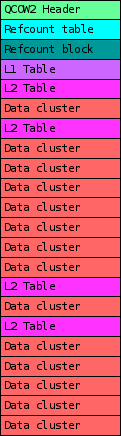
 When choosing a disk image format for your virtual machine one of the factors to take into considerations is its I/O performance. In this post I ll talk a bit about the internals of qcow2 and about one of the aspects that can affect its performance under QEMU: its consistency checks.
As you probably know, qcow2 is QEMU s native file format. The first thing that I d like to highlight is that this format is perfectly fine in most cases and its I/O performance is comparable to that of a raw file. When it isn t, chances are that this is due to an insufficiently large L2 cache. In one of my previous blog posts I wrote about
When choosing a disk image format for your virtual machine one of the factors to take into considerations is its I/O performance. In this post I ll talk a bit about the internals of qcow2 and about one of the aspects that can affect its performance under QEMU: its consistency checks.
As you probably know, qcow2 is QEMU s native file format. The first thing that I d like to highlight is that this format is perfectly fine in most cases and its I/O performance is comparable to that of a raw file. When it isn t, chances are that this is due to an insufficiently large L2 cache. In one of my previous blog posts I wrote about