Search Results: "mt"

19 July 2011

John Goerzen: Trains and Birthdays

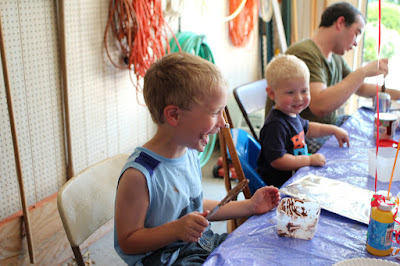
This weekend, the boys got what they ve been waiting for: another trip on Amtrak. For the last week or so, Jacob has had a morning ritual. He ll look at the calendar, figure out what today is, figure out when we ll get on the train, and then figure out how many days it will be. As the number gets lower, the excitement gets higher, of course. Friday morning, we woke the boys at 2:30AM to get to the train station. The only Amtrak trains through our area are middle of the night departures. Jacob is normally hard to wake up, but when I tell him that I m waking him up to go to the train station, he wakes up faster than I ve ever seen him before. It takes about 3 seconds for him to process that in his groggy state, and then he sits up straight, throws off the covers, and is instantly ready to go. Both boys were excited even in the station waiting room. Oliver has been on an Amtrak train before, but it s been awhile and he probably doesn t remember it. He constantly talked about it, jabbering as much as his vocabulary lets him. Once we were on the train, Terah and I would have liked to get some more sleep. The boys, on the other hand, were now wide awake, and didn t fall back asleep until about 5:30. That means Terah and I didn t, either. Here s what it usually looks like: When it came time for breakfast, we went to the dining car as usual. Jacob had already been telling us for days what he would eat for breakfast on the train: I always have French toast on the train, dad. And so he did. A few minutes later, I heard the waitress telling other people they were out of French toast, so I was glad I didn t have to disappoint Jacob over that! But it was Oliver that really came alive on this trip. I don t think I ve ever seen him so excited. It was almost constant. He happily talked about anything he could see or touch. But he also listened to other conversations, and would frequently pick out one word from a sentence and try to say it. He does that at home too, but not nearly so often as on the train. Both boys wanted to go exploring a lot my word for taking them for a walk in the train and seeing what they might find. We walked up and down the train several times, Jacob excited over opening the doors between the cars, and Oliver excited just to be there. Oliver s excitement kept him from sleeping well. He did eventually get a short nap, but that wasn t quite enough to avert a couple of tantrums later in the day. The reason for the trip was the 80th birthday party for Terah s grandpa. And it so happened that Oliver s 2nd birthday would be over the same time. So, Saturday morning, we all went for breakfast at Das Dutchman Essenhaus, one of the favorite local restaurants in northern Indiana. After that, it was over to a relative s place for some birthday festivities. The children got mini cakes to decorate as rail cars. There was frosting and all sorts of toppings. Great fun was had by all, and it was wise that this activity took place in a garage rather than indoors. Yes, that is a marshmallow stuck to Jacob s nose. Then in the evening, it was off to another relative s place for some more family time. Jacob had a great time all day, and was in high spirits. He asked me to sit by him at dinner, and started one of the longest conversations I ve had with him in some time. We just talked about the things that happened in the day, but it was nice when I told him, I like sitting by you, Jacob, and he said, Dad, me too! The big highlight for the day happened in the evening. We were gathered around a fire with a guitar to do some singing. Jacob was happily perched in his lawn chair, but got very excited when he saw some lightweight airplanes flying overhead. These kept flying at some distance, and he kept pointing them out to us. But that wasn t even the most exciting part. That came when the fireflies came out. Jacob ran around, catching them in his hands, and excitedly showing them to whatever person happened to be closest. He was laughing with joy for such a long time. At one point, someone asked him if the bugs were tickling his hands. He said, evidentally just realizing it, Oh yes, they ARE tickling my hands! He was one very happy boy. Sunday I had to leave to get back home, while Terah and the boys will return a couple of days later. Although I do sort of look forward to a train trip that I can relax without having to manage two young boys, I do miss them already and will be happy to have everyone back home in a few days. (This post written during the trip and posted a week later after arriving home)

15 July 2011

Jon Dowland: puppet revisited

In an earlier post, I asked a number of questions, most of which are now answered. Here's a recap: I wrote
I stumbled across some CF Engine-style definitions for puppet in a Debian Administration article (taken originally from puppet's own wiki, which have since been moved/deleted)
Perhaps it was removed with good reason This is a fairly horrid solution to the problem. Phil was the first to suggest investigating Augeas, a neat tool that abstracts away the nasty specifics of parsing the myriad configuration file formats and provides a unified, tree-like interface for adjusting configurations. The interface reminds me of manipulating XML via the DOM. More on Augeas in a later blog post I also wrote
package [foo,bar]: syntax worked fine, but is a little verbose and the package list is awkward to maintain buried inside the puppet syntax. I spent some time trying to see whether I could populate a puppet list based on the contents of a file: then I could list the packages one-per-line in a separate file. I haven't found a way of doing that yet.
I haven't found a more concise way of solving this problem, but as I have grown more familiar with puppet's syntax I have become less bothered by it. I igo suggested pre-processing the puppet configuration, but I'd rather not complicate my provisioning approach (VCS hooks) by attempting that. Finally I wrote
Using my laptop as a second node also exposed some interesting puppet client behaviour. Once I went off-site, the laptop tried to look up puppet on foreign networks (such as my home network). I would have assumed that, once the strong SSL association had been made, the client would try to connect to the FQDN of the server. This probably isn't a serious problem in practice, as we probably won't need to rely on nodes off-site talking to the configuration server, but I hope that the client doesn't trust any host that happens to answer to puppet...
I'm pleased to report that the client is at least this clever: it refused to talk to a local puppetmaster that I setup at home.

Jon Dowland: puppet packages

Puppet lets you install packages on your system, like this:
package   'foo': ensure => installed  
You can also ask it to make sure that the package is kept up-to-date:
package   'foo': ensure => latest  
What does "latest" mean? How does this interact with a mixed repository sources.list on Debian? It turns out that both ensure => installed and ensure => latest honour pinning. For example: if you have a stable system; sid in your sources.list and pinning set up; either of the above will install stable's version of foo. I think ensure => latest is less useful than it might initially appear. If you install a package foo and use ensure => latest, but foo depends on packages bar and baz, it will only ensure that foo is up-to-date, not bar or baz. Similarly any other packages that you have not installed with puppet will not be kept up-to-date unless you name them explicitly. If you want to automatically take all updates from your distributor, you need to use another mechanism to do so.

Dirk Eddelbuettel: MCMC and faster Gibbs Sampling using Rcpp

Sanjog Misra, who uses Rcpp for Monte Carlo Markov Chain (MCMC) analyses in quantitative marketing, kindly set me a short example of Rcpp use. The example is based on a blog post by Darren Wilkinson which itself discusses and compares the suitability of R, Python, Java or C for MCMC analysis, using the Gibbs sampler as a concrete example. Darren's post is worth checking out: he stresses the rather pragmatic aspects of how fast and/or easy it is to write the code, rather than just the mere runtime. As such, he is not too concerned with a speed advantage of Python over R which he sees at a factor of around 2.4, leaving him to continue to prototype in R. Similarly, with C 'only' being faster than Java by a factor of two, he prefers Java for the numerically more demanding parts. We do of course advocate the use of Rcpp to combine the best aspects of R and C++, respectively. This Gibbs sampler example provides a nice backdrop. So working with Darren's example, consider the same Gibbs sampler for a bivariate distribution (and apologies for the lack of latex typesetting on my blog)
f(x,y) = k x^2 exp( -x y^2 - y^2 + 2y - 4x)
where the conditional distributions are
f(x y) = (x^2)*exp(-x*(4+y*y))               ## a Gamma density kernel
f(y x) = exp(-0.5*2*(x+1)*(y^2 - 2*y/(x+1))  ## a Gaussian kernel
Sanjog then spotted and corrected a small error in the variance expression in Darren's derivation; this is now acknowledged on Darren's website. Full details are in the R script now committed in SVN. The R code for the Gibbs sample can therefore be written as follows below. Note that this uses thinning to minimize serial correlation in the conditional densities--which renders the computation more demanding as 'N times thin' draws have to be generated:
## Here is the actual Gibbs Sampler
## This is Darren Wilkinsons R code (with the corrected variance)
## But we are returning only his columns 2 and 3 as the 1:N sequence
## is never used below
Rgibbs <- function(N,thin)  
    mat <- matrix(0,ncol=2,nrow=N)
    x <- 0
    y <- 0
    for (i in 1:N)  
        for (j in 1:thin)  
            x <- rgamma(1,3,y*y+4)
            y <- rnorm(1,1/(x+1),1/sqrt(2*(x+1)))
         
        mat[i,] <- c(x,y)
     
    mat
 
A second variant can be computed using the R bytecode compiler which appeared with the recent release of R 2.13.0 (and which we analysed in this blog post from April). This is as easy as
## We can also try the R compiler on this R function
RCgibbs <- cmpfun(Rgibbs)
Thanks to Rcpp and the inline package, we can also write a C++ variant that can be built and launched from R with ease. The C++ code is assigned to an R text variable gibbscode. (And we used to typeset such code on the blog as a character string, ie in a faint red color---but have now switched to highlight it as if it were freestanding C++ code. It really is passed as a single string to R which then uses the cxxfunction() to compile, link and load a C++ function built around the code. See previous posts on the inline package for more.)
## Now for the Rcpp version -- Notice how easy it is to code up!
gibbscode <- '

  using namespace Rcpp;   // inline does that for us already
  // n and thin are SEXPs which the Rcpp::as function maps to C++ vars
  int N   = as<int>(n);
  int thn = as<int>(thin);
  int i,j;
  NumericMatrix mat(N, 2);
  RNGScope scope;         // Initialize Random number generator
  // The rest of the code follows the R version
  double x=0, y=0;
  for (i=0; i<N; i++)  
    for (j=0; j<thn; j++)  
      x = ::Rf_rgamma(3.0,1.0/(y*y+4));
      y = ::Rf_rnorm(1.0/(x+1),1.0/sqrt(2*x+2));
     
    mat(i,0) = x;
    mat(i,1) = y;
   
  return mat;             // Return to R
'
# Compile and Load
RcppGibbs <- cxxfunction(signature(n="int", thin = "int"),
                         gibbscode, plugin="Rcpp")
It is noteworthy how the code logic is essentially identical between the basic R version, and the C++ version. Two nested loops control draws of x from a Gamma distribution, conditional on y, as well as draws of y from a Normal, conditional on x. Add a small amount of parameter passing to obtain the parameters N and thin, allocation of a results matrix and setup of the random number generator state to remain consistent with R, as well as a return of the matrix---and that is all. As Darren's code uses the GNU GSL in its C variant, I also became interested in seeing how a C/C++ hybrid variant using our RcppGSL package would fare. The code is below.
gslgibbsincl <- '
  #include <gsl/gsl_rng.h>
  #include <gsl/gsl_randist.h>
  using namespace Rcpp;  // just to be explicit
'
gslgibbscode <- '
  int N = as<int>(ns);
  int thin = as<int>(thns);
  int i, j;
  gsl_rng *r = gsl_rng_alloc(gsl_rng_mt19937);
  double x=0, y=0;
  NumericMatrix mat(N, 2);
  for (i=0; i<N; i++)  
    for (j=0; j<thin; j++)  
      x = gsl_ran_gamma(r,3.0,1.0/(y*y+4));
      y = 1.0/(x+1)+gsl_ran_gaussian(r,1.0/sqrt(2*x+2));
     
    mat(i,0) = x;
    mat(i,1) = y;
   
  gsl_rng_free(r);
  return mat;           // Return to R
'
## Compile and Load
GSLGibbs <- cxxfunction(signature(ns="int", thns = "int"),
                        body=gslgibbscode, includes=gslgibbsincl,
                        plugin="RcppGSL")
This code is similar to the version using just Rcpp, but we need to allocate space for the GSL random generator object (and later release that memory allocation), and we do of course call the GSL functions. This also necessitates declaring the function using the two header files listed as arguments for the include argument of cxxfunction(). So how is the performance? The script (now committed in Rcpp's SVN repo as examples/RcppGibbs/RcppGibbs.R, and also part of the next release) creates the output below when running in non-interactive mode (whereas interactive mode creates a few charts too):
edd@max:~/svn/rcpp/pkg/Rcpp/inst/examples/RcppGibbs$ r RcppGibbs.R
Replication # 1 complete 
Replication # 2 complete 
Replication # 3 complete 
Replication # 4 complete 
                    N=1000 N=5000 N=10000 N=20000
Elasped Time (R)     0.124  2.650  10.511  41.773
Elasped Time (RC)    0.081  1.916   7.594  30.280
Elapsed Time (Rcpp)  0.003  0.076   0.306   1.221
Elapsed Time (Rgsl)  0.002  0.049   0.196   0.784
SpeedUp Rcomp.       1.530  1.380   1.380   1.380
SpeedUp Rcpp        41.330 34.870  34.350  34.210
SpeedUp GSL         62.000 54.080  53.630  53.280
               test replications elapsed  relative user.self sys.self
4  GSLGibbs(N, thn)           10   7.845  1.000000      7.84        0
3 RcppGibbs(N, thn)           10  12.218  1.557425     12.22        0
2   RCgibbs(N, thn)           10 312.296 39.808286    311.98        0
1    Rgibbs(N, thn)           10 420.953 53.658764    420.59        0
The first block is a hand-computed comparison using four sets of parameters; the second block uses the excellent rbenchmark package to compare ten runs at twenty-thousand draws. We see a nominal increase in performance due to the bytecode compiler, saving roughly 38 percent which seems appropriate given that the R code mostly controls the loops; actual work in undertaken in the already compiled RNG functions. The Rcpp variant is about 34 times faster than the pure R code. Sanjog reported higher increases on his OS X machines (and Darren's post echos a similar order of magnitude). However, on my i7 running Linux I always obtained an improvement in the mid- to high thirties. That is certainly already a rather pleasant result. What surprised and stunned me at first was that the GSL solution scores an improvement of around 53 times (close to the factor of 60 reported by Darren). A closer look at the code (shown above) makes it clear that there are very few compute-intensive operations outside of the RNG draws. I validated this further with a second study timing just one million draws each from a Gaussian and Gamma using R via Rcpp, and using the GSL. It turns out that the R code is about 2.5 times slower for random draws from the Gamma distribution than the GSL. Inspection of the source code---in files src/nmath/rgamma.c for R and randist/gamma.c for the GSL shows why. R uses a much more complex (and presumably more precise) algorithm. I may follow up with Martin Maechler to see if we can illustrative the numerical benefits of this more expensive approach---this blog entry is getting long enough already. So to sum up: Gibbs sampling is a somewhat resource-heavy Monte Carlo Markov Chain method for investigating multivariate distributions. R excels at quick and simple explorations, albeit at somewhat slower execution speed. The Rcpp package can help by providing easy means to accelerate simulations by a significant factor. The example discussed here is now in SVN repository for Rcpp and will be part of the next release.

Updated 2011-07-16: Darren has just updated his comparison; fixed two typos here too.

11 July 2011

Thorsten Glaser: [Update] Hilfe gesucht: Mitarbeiter berwachung

Deutsche Version dieses Postings read the English Version instead Der Leiter der Abteilung Systemadministration einer Firma, welche in diesem Artikel ungenannt bleiben soll, wo der Zufall es will, da ich f r sie arbeite, m chte uns Mitarbeiter dazu zwingen, das Feature der persistenten Historie (also einen niedergeschriebenen Verlauf der abgesetzten Befehle) der Shell (Kommandozeile) auf allen Systemen zu benutzen. Nun hat die mksh dies vern nftigerweise, w hrend immer noch verf gbar, standardm ig aus Gr nden der Privatsph re deaktiviert, und ich finde, dies sollte sich nicht ndern. Es kann ja nicht sein, da man mir beim Arbeiten ber die Schulter guckt; was kommt als n chstes, Video berwachung der B ros? (Seine Argumentation l uft darauf hinaus, da er nachvollziehen/verstehen kann, wie ich (ha! ich! nicht die anderen, nein, ich!) ein Problem das letzte Mal gel st habe; es ist aber nichts anderes als rekonstru eren zu k nnen, wer wann was eingetippt/gemacht hat. Naja, Argumentationen sind eh relativ, andere jagen Flugzeuge in ihre eigenen Verteidigungsministerien, welche gerade zuf llig umgebaut werden ) Ich habe dies nat rlich in die F hrungsetage eskaliert, und unser Gesch ftsf hrer versteht meine Bedenken und m chte nun ein Gespr ch anraunen, um eine L sung zu finden. Die meisten meiner Kollegen im Bereich Systemadministration denken leider nichtmals dr ber nach, obschon ich in anderen Bereichen Gleichgesinnte gefunden habe. Einen Betriebsrat haben wir auch gro er Fehler, ich wei nicht (aber ich s e eh nicht drin, ich hasse Politik jeder Art). Dies l t mich in dringender Not, Argumente wider diese Total berwachung aller (insbesondere auf der Kommandozeile arbeitenden also besonders mich) Kollegen zu finden, idealerweise solche, die durch deutsches Recht gest tzt sind. Wenn ihr solche habt, bitte mailt die schnell an meine eMail-Adresse, welche da nicht junk@mirbsd.org lautet, sondern mit einem tg vor dem Klammeraffen (dies dient der Abwehr unerw nschter Werbemails). Vielen Dank bereits im Voraus! Update 12.07.2011: Wir haben geredet, und wie viele kommentierten keine L sung auf rechtlicher Ebene gefunden, sondern stattdessen, nachdem wir festgestellt hatten, da mir dieses Problem sehr am Herzen liegt, nach anderen L sungen f r das eigentliche Ziel des Chefadmins gesucht; dies z hlt als ein Entgegenkommen auf Seiten der Firma. Ich habe zugestimmt, meine L sungen in kleine Skripte zu verpacken und ins VCS zu committen f r das Herausfinden, wann was auf einem Server ge ndert wurde, im Fehlerfall, denken wir uns gerade ohnehin was aus. Danke an alle, die kommentiert haben!

7 July 2011

Joerg Jaspert: Life is like chocolate - if you don't try it, you don't know it

So lets try this: DSC02384.JPG DSC02385.JPG

3 July 2011

Benjamin Drung: Symptoms of a dying graphic card

All started in December last year. I saw a red and a green pixel on my monitor. Moving the window containing the wrong-colors pixels corrected them. The wrong-colored pixels reappear from time to time in increased quantity. Then a second symptom appeared: The screen went black and came back one second later. This was triggered by moving a window and scrolling. I wasn t sure what the reason was. Either it was a bug somewhere in the X stack or some hardware was dying. dmesg showed multiple problems with the radeon driver:
[283808.667454] radeon 0000:01:00.0: ffff88021f815c00 unpin not necessary
[283808.667820] radeon 0000:01:00.0: GPU softreset
[283808.667823] radeon 0000:01:00.0: R_008010_GRBM_STATUS=0xE57024A4
[283808.667825] radeon 0000:01:00.0: R_008014_GRBM_STATUS2=0 00330302
[283808.667826] radeon 0000:01:00.0: R_000E50_SRBM_STATUS=0x200000C0
[283808.667832] radeon 0000:01:00.0: R_008020_GRBM_SOFT_RESET=0x00007FEE
[283808.682844] radeon 0000:01:00.0: R_008020_GRBM_SOFT_RESET=0 00000001
[283808.698840] radeon 0000:01:00.0: R_008010_GRBM_STATUS=0 00003028
[283808.698843] radeon 0000:01:00.0: R_008014_GRBM_STATUS2=0 00000002
[283808.698845] radeon 0000:01:00.0: R_000E50_SRBM_STATUS=0x200000C0
[283808.699845] radeon 0000:01:00.0: GPU reset succeed
[283808.717570] [drm] Clocks initialized !
[283808.765829] [drm] ring test succeeded in 0 usecs
[283808.765838] [drm] ib test succeeded in 1 usecs
[283808.765840] [drm] Enabling audio support
[283812.521265] radeon 0000:01:00.0: GPU lockup CP stall for more than 1000msec
[283812.521269] [ cut here ]
[283812.521294] WARNING: at /build/buildd/linux-2.6.35/drivers/gpu/drm/radeon/radeon_fence.c:235 radeon_fence_wait+0 365/0x3d0 [radeon]()
[283812.521297] Hardware name:
[283812.521299] GPU lockup (waiting for 0x00AE670A last fence id 0x00AE6705)
[283812.521301] Modules linked in: btrfs zlib_deflate crc32c libcrc32c ufs qnx4 hfsplus hfs minix ntfs vfat msdos fat jfs xfs exportfs reiserfs nls_utf8 udf ip6table_filter ip6_tables binfmt_misc ipt_MASQUERADE iptable_nat nf_nat nf_conntrack_ipv4 nf_defrag_ipv4 xt_state nf_conntrack ipt_REJECT xt_tcpudp iptable_filter ip_tables x_tables bridge stp kvm_intel kvm parport_pc ppdev snd_emu10k1_synth snd_emux_synth snd_seq_virmidi snd_seq_midi_emul snd_emu10k1 snd_ac97_codec ac97_bus snd_pcm snd_page_alloc snd_util_mem snd_hwdep snd_seq_midi radeon snd_rawmidi snd_seq_midi_event snd_seq snd_timer snd_seq_device ttm snd pl2303 drm_kms_helper coretemp usbserial joydev psmouse soundcore drm serio_raw intel_agp i2c_algo_bit lp parport hid_cherry usbhid hid firewire_ohci firewire_core usb_storage crc_itu_t e1000e ahci libahci pata_marvell
[283812.521360] Pid: 2194, comm: compiz Tainted: G W 2.6.35-24-generic #42-Ubuntu
[283812.521362] Call Trace:
[283812.521370] [<ffffffff8106089f>] warn_slowpath_common+0x7f/0xc0
[283812.521374] [<ffffffff81060996>] warn_slowpath_fmt+0 46/0 50
[283812.521390] [<ffffffffa01bd775>] radeon_fence_wait+0 365/0x3d0 [radeon]
[283812.521394] [<ffffffff8107f730>] ? autoremove_wake_function+0 0/0 40
[283812.521410] [<ffffffffa01bdf71>] radeon_sync_obj_wait+0 11/0 20 [radeon]
[283812.521418] [<ffffffffa01751a3>] ttm_bo_wait+0 103/0x1c0 [ttm]
[283812.521435] [<ffffffffa01d4e1a>] radeon_gem_wait_idle_ioctl+0x9a/0 150 [radeon]
[283812.521447] [<ffffffffa010f433>] drm_ioctl+0 463/0 520 [drm]
[283812.521465] [<ffffffffa01d4d80>] ? radeon_gem_wait_idle_ioctl+0 0/0 150 [radeon]
[283812.521470] [<ffffffff81162f0d>] vfs_ioctl+0x3d/0xd0
[283812.521473] [<ffffffff811637e1>] do_vfs_ioctl+0 81/0 340
[283812.521477] [<ffffffff811535f1>] ? vfs_read+0 181/0x1a0
[283812.521480] [<ffffffff81163b21>] sys_ioctl+0 81/0xa0
[283812.521484] [<ffffffff8100a0f2>] system_call_fastpath+0 16/0x1b
[283812.521487] [ end trace 6d5e03bab743abfa ]
[283812.521493] [drm] Disabling audio support
[283812.525575] [drm:radeon_ib_schedule] *ERROR* radeon: couldn t schedule IB(10).
[283812.525579] [drm:radeon_cs_ioctl] *ERROR* Faild to schedule IB !
[283812.527021] [drm:radeon_ib_schedule] *ERROR* radeon: couldn t schedule IB(11).
[283812.527024] [drm:radeon_cs_ioctl] *ERROR* Faild to schedule IB !
[283812.527921] [drm:radeon_ib_schedule] *ERROR* radeon: couldn t schedule IB(12).
[283812.527923] [drm:radeon_cs_ioctl] *ERROR* Faild to schedule IB !
The time between going black reduces every time. The system wasn t usable any more in the end. After testing that the screen was going blank on other systems like a live CD of Ubuntu and a not noteworthy proprietary system, it was clear that some hardware component was dying. My first assumption was verified after replacing it: My graphic card, a Radeon HD 4670, died. This was three weeks ago and around 25 month after I bought the graphics card. So I didn t have to worry if replacing the fan voided the guarantee, because the guarantee lasts only 24 month. Conclusion:
  1. Not every error is a software bug.
  2. The hardware component with the highest failure rate is the graphics card, followed by the motherboard. Four graphics cards died last year (in four different systems owned by four different people, in three different households).
  3. Not every error is a software bug.

29 June 2011

Vincent Bernat: Alternate Android firmware on Samsung Galaxy S

I have bought a Samsung Galaxy S Android phone some time ago. One of the first thing that you try to do with such a phone is to switch to some alternate firmware (the coined term is ROM ), like CyanogenMod. Flashing a firmware is a whole new universe. You are told about a lot of proprietary tools, you need to download a lot of things from MegaUpload and friends and nobody really explains what s going on under the hood. I was a bit lost at first. I will not provide a step-by-step guide since I cannot afford to stay up-to-date. Such a guide is usually posted on some forum. It assumes you are running Windows and provides appropriate download links. You must follow it (and check that it is recent enough). I will just provide you some background to understand those guides.

Android firmwares There are several Android firmwares. Most of them are specific to a given phone (or its close variations). They can be sorted in three categories:
  1. Official firmwares from the phone manufacturer include a kernel with appropriate drivers and, usually, a customized interface (HTC Sense for HTC, TouchWiz for Samsung). Some manufacturers will lag a lot behind Android schedule and you may not get all the new shiny features.
  2. Modified firmwares are built from the official firmwares. They usually add a lot of hacks on top of the original firmware, remove some cruft but are still closely related to the official firmware.
  3. Firmwares built from Android Open Source Project (the open source version of Android) do not share nothing with the official firmware except some bits related to the kernel (drivers, hacks).

Darky ROM Darky ROM is a modified firmware. It takes the original firmware from Samsung, adds a custom kernel (based on the source of the official kernel), adds a lot of hacks, some additional applications and removes some unwanted cruft. This is a very nice firmware which is quite snappy. This is a drop-in replacement for the default firmware: you will only get improvements. The latest version is 10.1 and there is a neat guide on how to install it.

CyanogenMod CyanogenMod is a firmware built from AOSP. It supports several devices and provide an unified firmware on all of them. Support for the Samsung Galaxy S is recent and is not present in the stable build. However, some RC build is now available. Be sure to read the FAQ (most notably the part saying that you need to install from Froyo 2.2 because the bootloader provided by Samsung with Gingerbread 2.3 is not compatible). You can also grab some information from the wiki. The major drawback of using this firmware instead of going for a modified firmware like Darky ROM is that the battery life may suck. I now need to charge my phone every day instead of once every two days. On the plus side, you get a very clean firmware with a lot of features and almost no cruft. For example, the notification bar can be customized and OpenVPN is available out of the box. Moreover, almost everything is open source (if you don t install Google apps). You can see this firmware as an open source distribution for your phone. There is no need to download random files linked from a random forum to make it work. There is no package manager, though. Despite the bad battery life, I prefer this firmware.

Prerequisites Before trying to flash a new firmware, there are some tools that you need to have. Note that you don t need root access to flash a new firmware.

Download & recovery mode Before trying to install any firmware, you must check that your phone can access download and recovery modes. The download mode allows to flash any new firmware, even if the current firmware does not boot at all. As long as this mode is available, there is very little chance that you brick your phone. To access those modes, you need to use the three-button combo . Here are the steps (your phone should not be plugged):
  1. Power off the phone (wait for the phone to vibrate).
  2. Hold the Volume down button for download mode. Hold the Volume up button for recovery mode.
  3. Hold the Home button.
  4. Hold the Power button. The phone will start.
  5. Once you have the Samsung logo displayed on the screen, release the Power button.
  6. Only release the two other buttons when you enter the recovery mode or download mode. The recovery mode displays a menu. The download mode displays a big yellow Android logo.
If after ten tries, you are unable to access those modes, maybe they have been disabled. Keep reading, there is a solution.

Heimdall Heimdall is a tool to flash a new firmware to your phone. This is not a mandatory tool but you will have to use it if something goes wrong. Most guides will tell you to use Odin. It is a leaked Samsung tool running on Windows only. You can use Heimdall instead.
$ git clone https://github.com/Benjamin-Dobell/Heimdall.git
Cloning into Heimdall...
remote: Counting objects: 423, done.
remote: Compressing objects: 100% (271/271), done.
remote: Total 423 (delta 220), reused 332 (delta 138)
Receiving objects: 100% (423/423), 5.91 MiB   962 KiB/s, done.
Resolving deltas: 100% (220/220), done.
$ cd Heimdall/heimdall
$ sudo apt-get install libusb-1.0-0-dev
$ ./configure && make
[...]
$ sudo cp 60-heimdall-galaxy-s.rules /etc/udev/rules.d
$ sudo /etc/init.d/udev reload
You need to use this tool while in download mode. You can test it, while in download mode, with:
$ ./heimdall print-pit
This will display the partition table of your phone. This is enlightening to know what it contains:
  • IBL+PBL is the boot loader, be extra careful with it;
  • PIT is the partition table;
  • EFS contains some important data like IEMEI, be extra careful with it;
  • SBL is the second boot loader;
  • SBL2 is the backup of the second boot loader;
  • PARAM contains some images used as various stage of the boot process;
  • KERNEL is the kernel;
  • RECOVERY is the backup of the kernel;
  • FACTORYFS contains /system file system which is some kind of root file system;
  • DBDATA contains /data file system which is the database to store application parameters;
  • CACHE contains /cache file system which contains the Dalvik cache;
  • MODEM contains the firmware for the modem.
As we will see, Heimdall is able to flash any of those partitions with flash subcommand.

adb adb stands for Android Debug Bridge. Among other things, this tool allow you to drive your phone through the USB connection. You can get a shell, reboot into download or recovery mode, push files to your Android device, etc. To get this tool, you need to download the full Android SDK.
$ tar zxvf ~/download/android-sdk_r11-linux_x86.tgz
$ cd android-sdk-linux_x86
$ tools/android update sdk
[select Android SDK Platform-tools]
$ platform-tools/adb shell
# uname -a
Linux localhost 2.6.35.7-I9000XWJVH-CL184813 #Dark_Core_2.4 PREEMPT Mon May 16 15:02:38 EEST 2011 armv7l GNU/Linux
The important commands are:
  • shell to get a shell on the device;
  • reboot recovery to reboot in recovery mode;
  • reboot download to reboot in download mode;
  • push to put a file on the phone;
  • pull to retrieve a file;
  • install to install an application from its APK;
  • logcat to see the logs and what happens, very useful!

Restore download mode If your phone is missing download mode, you can recover it with the help of adb and heimdall. You need to grab some official firmware and extract boot.bin and Sbl.bin from it.
$ adb reboot download
$ heimdall flash --primary-boot ~/download/boot.bin --secondary-boot ~/download/Sbl.bin
Be extra careful here. You may brick your phone. Double check that you grab the correct files and that they are really for your phone (there exists some variants). It worked for me.

Installing a new firmware While you can switch from one firmware to another without losing your data, it is better to wipe your system and your data before switching firmware. This means that you will lose all your applications and the data inside them (list of contacts, SMS, preferences). However, nothing will ever modify your data in the internal SD card or in the external SD card (which are both inside the phone). They usually contains your music and your photos. There are two ways to install a firmware:
  1. via Heimdall, or
  2. using the recovery.

Heimdall When a guide tells you to use Odin, you can use Heimdall instead. Odin takes a TAR file. You should untar it and uses its content with Heimdall. For example:
$ ./heimdall flash --repartition --pit s1_odin_20100512.pit \
>                  --factoryfs factoryfs.rfs \
>                  --cache cache.rfs --dbdata dbdata.rfs \
>                  --param param.lfs --modem modem.bin \
>                  --kernel zImage --secondary-boot Sbl.bin 
Claiming interface again...   Success
Setting up interface...   Success
Beginning session...
Handshaking with Loke...   Success
Uploading PIT
PIT upload successful
Uploading SBL
100%
SBL upload successful
Uploading KERNEL
100%
KERNEL upload successful
Uploading MODEM
100%
MODEM upload successful
Uploading PARAM
100%
PARAM upload successful
Uploading FACTORYFS
100%
FACTORYFS upload successful
Uploading DBDATAFS
100%
DBDATAFS upload successful
Uploading CACHE
100%
CACHE upload successful
Ending session...
Rebooting device...
You may be interested to update your modem using Heimdall. This is usually independent of the firmware you want to use. Also, no need to provide a PIT file if you don t want to repartition. Heimdall can read the current one and flash only one of the partitions.

Recovery mode The base recovery shipped with the Samsung Galaxy S does not have a lot of options. Moreover, it may be locked and will accept to install only signed firmwares. Most firmwares come with ClockWorkMod, a more advanced recovery. Once you get it, you will be able to use any ZIP file to install a new firmware. My advice is to try to get ClockWorkMod as soon as possible. If you are root, you can install ROM Manager that will install it for you. If you are not root, most custom firmwares will provide ClockWorkMod. Therefore, you can just install a custom firmware with Heimdall. There exists special firmwares just for this, like EZbase. If you want to install CyanogenMod, be sure to download a Froyo firmware, not a Gingerbread one. Keep in mind that the recovery is located inside the kernel. It is not self-contained in the bootloader (unlike download mode). If you don t want to flash a whole firmware (and lose everything on your phone) just to get the recovery, you can just flash the kernel. The ClockWorkMod recovery comes with an utility to backup your whole phone. This way, you can easily restore your previous firmware if you don t like the current one. This is what is called a Nandroid backup.

Lagfix A lot of guides will tell you to enable or disable lagfix. Samsung shipped the Galaxy S with some crappy filesystem called RFS (which is some kind of enhanced FAT). It is slow and seems responsible for some lags that may happen on the interface. A lagfix is a way to replace this filesystem by something better, like EXT4 or YAFFS2. The process is pretty straighforward and consist to backup all the partition to the SD card, reformat it with another filesystem and restore the backup. The lagfix may be applied automatically with some firmware (like CyanogenMod) or you may request it in the recovery mode (most modified firmwares work this way). In this case, it will be applied automatically on the next boot. You should disable it before installing another firmware with the recovery mode (no need if you install it with Heimdall).

Applications You can find many free (as in free speech) applications for Android. Unfortunately, Android Market does not allow to use this criteria as a filter. F-Droid is an alternate market featuring only FOSS applications. Here is a short selection of free applications:
  • ADW.Launcher is a home replacement app. It is very configurable and themable.
  • K-9 Mail is a very nice email client.
  • Xabber is a XMPP/Jabber client.
  • ConnectBot is an SSH client (as well as a terminal).
  • DroidWall is an application firewall (using Netfilter). It lets you select which application can access to Internet depending on your connection (wifi or 3G).
  • Barcode Scanner decodes 1D/2D barcode including QR codes.
  • OsmAnd is a replacement for Google Maps using OpenStreetMap. The free version on Android Market is out-dated. Buy the plus version or download it throught F-Droid.
Another must-have application is Titanium Backup which allows to backup any application with data. Unfortunately, this is not a free (as in free speech) application.

Vincent Bernat: Alternate Android firmware on Samsung Galaxy S

I have bought a Samsung Galaxy S Android phone some time ago. One of the first thing that you try to do with such a phone is to switch to some alternate firmware (the coined term is ROM ), like CyanogenMod. Flashing a firmware is a whole new universe. You are told about a lot of proprietary tools, you need to download a lot of things from MegaUpload and friends and nobody really explains what s going on under the hood. I was a bit lost at first. I will not provide a step-by-step guide since I cannot afford to stay up-to-date. Such a guide is usually posted on some forum. It assumes you are running Windows and provides appropriate download links. You must follow it (and check that it is recent enough). I will just provide you some background to understand those guides.

Android firmwares There are several Android firmwares. Most of them are specific to a given phone (or its close variations). They can be sorted in three categories:
  1. Official firmwares from the phone manufacturer include a kernel with appropriate drivers and, usually, a customized interface (HTC Sense for HTC, TouchWiz for Samsung). Some manufacturers will lag a lot behind Android schedule and you may not get all the new shiny features.
  2. Modified firmwares are built from the official firmwares. They usually add a lot of hacks on top of the original firmware, remove some cruft but are still closely related to the official firmware.
  3. Firmwares built from Android Open Source Project (the open source version of Android) do not share nothing with the official firmware except some bits related to the kernel (drivers, hacks).

Darky ROM Darky ROM is a modified firmware. It takes the original firmware from Samsung, adds a custom kernel (based on the source of the official kernel), adds a lot of hacks, some additional applications and removes some unwanted cruft. This is a very nice firmware which is quite snappy. This is a drop-in replacement for the default firmware: you will only get improvements. The latest version is 10.1 and there is a neat guide on how to install it.

CyanogenMod CyanogenMod is a firmware built from AOSP. It supports several devices and provide an unified firmware on all of them. Support for the Samsung Galaxy S is recent and is not present in the stable build. However, some RC build is now available. Be sure to read the FAQ (most notably the part saying that you need to install from Froyo 2.2 because the bootloader provided by Samsung with Gingerbread 2.3 is not compatible). You can also grab some information from the wiki. The major drawback of using this firmware instead of going for a modified firmware like Darky ROM is that the battery life may suck. I now need to charge my phone every day instead of once every two days. On the plus side, you get a very clean firmware with a lot of features and almost no cruft. For example, the notification bar can be customized and OpenVPN is available out of the box. Moreover, almost everything is open source (if you don t install Google apps). You can see this firmware as an open source distribution for your phone. There is no need to download random files linked from a random forum to make it work. There is no package manager, though. Despite the bad battery life, I prefer this firmware.

Prerequisites Before trying to flash a new firmware, there are some tools that you need to have. Note that you don t need root access to flash a new firmware.

Download & recovery mode Before trying to install any firmware, you must check that your phone can access download and recovery modes. The download mode allows to flash any new firmware, even if the current firmware does not boot at all. As long as this mode is available, there is very little chance that you brick your phone. To access those modes, you need to use the three-button combo . Here are the steps (your phone should not be plugged):
  1. Power off the phone (wait for the phone to vibrate).
  2. Hold the Volume down button for download mode. Hold the Volume up button for recovery mode.
  3. Hold the Home button.
  4. Hold the Power button. The phone will start.
  5. Once you have the Samsung logo displayed on the screen, release the Power button.
  6. Only release the two other buttons when you enter the recovery mode or download mode. The recovery mode displays a menu. The download mode displays a big yellow Android logo.
If after ten tries, you are unable to access those modes, maybe they have been disabled. Keep reading, there is a solution.

Heimdall Heimdall is a tool to flash a new firmware to your phone. This is not a mandatory tool but you will have to use it if something goes wrong. Most guides will tell you to use Odin. It is a leaked Samsung tool running on Windows only. You can use Heimdall instead.
$ git clone https://github.com/Benjamin-Dobell/Heimdall.git
Cloning into Heimdall...
remote: Counting objects: 423, done.
remote: Compressing objects: 100% (271/271), done.
remote: Total 423 (delta 220), reused 332 (delta 138)
Receiving objects: 100% (423/423), 5.91 MiB   962 KiB/s, done.
Resolving deltas: 100% (220/220), done.
$ cd Heimdall/heimdall
$ sudo apt-get install libusb-1.0-0-dev
$ ./configure && make
[...]
$ sudo cp 60-heimdall-galaxy-s.rules /etc/udev/rules.d
$ sudo /etc/init.d/udev reload
You need to use this tool while in download mode. You can test it, while in download mode, with:
$ ./heimdall print-pit
This will display the partition table of your phone. This is enlightening to know what it contains:
  • IBL+PBL is the boot loader, be extra careful with it;
  • PIT is the partition table;
  • EFS contains some important data like IEMEI, be extra careful with it;
  • SBL is the second boot loader;
  • SBL2 is the backup of the second boot loader;
  • PARAM contains some images used as various stage of the boot process;
  • KERNEL is the kernel;
  • RECOVERY is the backup of the kernel;
  • FACTORYFS contains /system file system which is some kind of root file system;
  • DBDATA contains /data file system which is the database to store application parameters;
  • CACHE contains /cache file system which contains the Dalvik cache;
  • MODEM contains the firmware for the modem.
As we will see, Heimdall is able to flash any of those partitions with flash subcommand.

adb adb stands for Android Debug Bridge. Among other things, this tool allow you to drive your phone through the USB connection. You can get a shell, reboot into download or recovery mode, push files to your Android device, etc. To get this tool, you need to download the full Android SDK.
$ tar zxvf ~/download/android-sdk_r11-linux_x86.tgz
$ cd android-sdk-linux_x86
$ tools/android update sdk
[select Android SDK Platform-tools]
$ platform-tools/adb shell
# uname -a
Linux localhost 2.6.35.7-I9000XWJVH-CL184813 #Dark_Core_2.4 PREEMPT Mon May 16 15:02:38 EEST 2011 armv7l GNU/Linux
The important commands are:
  • shell to get a shell on the device;
  • reboot recovery to reboot in recovery mode;
  • reboot download to reboot in download mode;
  • push to put a file on the phone;
  • pull to retrieve a file;
  • install to install an application from its APK;
  • logcat to see the logs and what happens, very useful!

Restore download mode If your phone is missing download mode, you can recover it with the help of adb and heimdall. You need to grab some official firmware and extract boot.bin and Sbl.bin from it.
$ adb reboot download
$ heimdall flash --primary-boot ~/download/boot.bin --secondary-boot ~/download/Sbl.bin
Be extra careful here. You may brick your phone. Double check that you grab the correct files and that they are really for your phone (there exists some variants). It worked for me.

Installing a new firmware While you can switch from one firmware to another without losing your data, it is better to wipe your system and your data before switching firmware. This means that you will lose all your applications and the data inside them (list of contacts, SMS, preferences). However, nothing will ever modify your data in the internal SD card or in the external SD card (which are both inside the phone). They usually contains your music and your photos. There are two ways to install a firmware:
  1. via Heimdall, or
  2. using the recovery.

Heimdall When a guide tells you to use Odin, you can use Heimdall instead. Odin takes a TAR file. You should untar it and uses its content with Heimdall. For example:
$ ./heimdall flash --repartition --pit s1_odin_20100512.pit \
>                  --factoryfs factoryfs.rfs \
>                  --cache cache.rfs --dbdata dbdata.rfs \
>                  --param param.lfs --modem modem.bin \
>                  --kernel zImage --secondary-boot Sbl.bin 
Claiming interface again...   Success
Setting up interface...   Success
Beginning session...
Handshaking with Loke...   Success
Uploading PIT
PIT upload successful
Uploading SBL
100%
SBL upload successful
Uploading KERNEL
100%
KERNEL upload successful
Uploading MODEM
100%
MODEM upload successful
Uploading PARAM
100%
PARAM upload successful
Uploading FACTORYFS
100%
FACTORYFS upload successful
Uploading DBDATAFS
100%
DBDATAFS upload successful
Uploading CACHE
100%
CACHE upload successful
Ending session...
Rebooting device...
You may be interested to update your modem using Heimdall. This is usually independent of the firmware you want to use. Also, no need to provide a PIT file if you don t want to repartition. Heimdall can read the current one and flash only one of the partitions.

Recovery mode The base recovery shipped with the Samsung Galaxy S does not have a lot of options. Moreover, it may be locked and will accept to install only signed firmwares. Most firmwares come with ClockWorkMod, a more advanced recovery. Once you get it, you will be able to use any ZIP file to install a new firmware. My advice is to try to get ClockWorkMod as soon as possible. If you are root, you can install ROM Manager that will install it for you. If you are not root, most custom firmwares will provide ClockWorkMod. Therefore, you can just install a custom firmware with Heimdall. There exists special firmwares just for this, like EZbase. If you want to install CyanogenMod, be sure to download a Froyo firmware, not a Gingerbread one. Keep in mind that the recovery is located inside the kernel. It is not self-contained in the bootloader (unlike download mode). If you don t want to flash a whole firmware (and lose everything on your phone) just to get the recovery, you can just flash the kernel. The ClockWorkMod recovery comes with an utility to backup your whole phone. This way, you can easily restore your previous firmware if you don t like the current one. This is what is called a Nandroid backup.

Lagfix A lot of guides will tell you to enable or disable lagfix. Samsung shipped the Galaxy S with some crappy filesystem called RFS (which is some kind of enhanced FAT). It is slow and seems responsible for some lags that may happen on the interface. A lagfix is a way to replace this filesystem by something better, like EXT4 or YAFFS2. The process is pretty straighforward and consist to backup all the partition to the SD card, reformat it with another filesystem and restore the backup. The lagfix may be applied automatically with some firmware (like CyanogenMod) or you may request it in the recovery mode (most modified firmwares work this way). In this case, it will be applied automatically on the next boot. You should disable it before installing another firmware with the recovery mode (no need if you install it with Heimdall).

Applications You can find many free (as in free speech) applications for Android. Unfortunately, Android Market does not allow to use this criteria as a filter. F-Droid is an alternate market featuring only FOSS applications. Here is a short selection of free applications:
  • ADW.Launcher is a home replacement app. It is very configurable and themable.
  • K-9 Mail is a very nice email client.
  • Xabber is a XMPP/Jabber client.
  • ConnectBot is an SSH client (as well as a terminal).
  • DroidWall is an application firewall (using Netfilter). It lets you select which application can access to Internet depending on your connection (wifi or 3G).
  • Barcode Scanner decodes 1D/2D barcode including QR codes.
  • OsmAnd is a replacement for Google Maps using OpenStreetMap. The free version on Android Market is out-dated. Buy the plus version or download it throught F-Droid.
Another must-have application is Titanium Backup which allows to backup any application with data. Unfortunately, this is not a free (as in free speech) application.

Dominique Dumont: New configuration editor for LCDPROC

Hello The last version (1.247, available in Debian unstable as libconfig-model-perl) of Config::Model provides a brand new model for /etc/LCDd.conf. With this model, you can edit or validate your lcdproc configuration. To edit this configuration the first time, you will have to run:
config-edit -application lcdproc -force
The -force option is required to load the file the first time. (because the default LCDd.conf file contains configuration options for all drivers, even though only one them if usefull). You will get this screen:
lcdproc configuration editor

config-edit on lcdproc configuration

In this screen, you can setup the driver for your adress with a right click on Driver parameter. Once youv e selected the driver and clicked on store , the driver will be listed in the left part of the window so you can tune the parameters of this specific driver:

editing imonclcd paramaters

In this screen, I ve turned the backlight off and added a small note to remember why. This small note will be writted in a comment in /etc/LCDd.conf. Once all required modifications are done, it s time to save the configuration file using the menu entry File -> save Now, let s see the resulting file (which is a bit long due to the amount of comments in the original LCDd.conf file):
## This file was written by Config::Model
## You may modify the content of this file. Configuration
## modifications will be preserved. Modifications in
## comments may be mangled.
# LCDd.conf -- configuration file for the LCDproc server daemon LCDd
#
# This file contains the configuration for the LCDd server.
#
# The format is ini-file-like. It is divided into sections that start at
# markers that look like [section]. Comments are all line-based comments,
# and are lines that start with '
#
# The server has a 'central' section named [server]. For the menu there is
# a section called [menu]. Further each driver has a section which
# defines how the driver acts.
#
# The drivers are activated by specifiying them in a driver= line in the
# server section, like:
#
#   Driver=curses
#
# This tells LCDd to use the curses driver.
# The first driver that is loaded and is capable of output defines the
# size of the display. The default driver to use is curses.
# If the driver is specified using the -d  command line option,
# the Driver= options in the config file are ignored.
#
# The drivers read their own options from the respective sections.
[server]
# Where can we find the driver modules ?
# IMPORTANT: Make sure to change this setting to reflect your
#            specific setup! Otherwise LCDd won't be able to find
#            the driver modules and will thus not be able to
#            function properly.
# NOTE: Always place a slash as last character !
DriverPath=/usr/lib/lcdproc/
# Tells the server to load the given drivers. Multiple lines can be given.
# The name of the driver is case sensitive and determines the section
# where to look for further configuration options of the specific driver
# as well as the name of the dynamic driver module to load at runtime.
# The latter one can be changed by giving af File= directive in the
# driver specific section.
#
# The following drivers are supported:
#   bayrad, CFontz, CFontz633, CFontzPacket, curses, CwLnx, ea65,
#   EyeboxOne, g15, glcdlib, glk, hd44780, icp_a106, imon, imonlcd,
#   IOWarrior, irman, joy, lb216, lcdm001, lcterm, lirc, lis, MD8800,
#   mdm166a, ms6931, mtc_s16209x, MtxOrb, mx5000, NoritakeVFD, picolcd,
#   pyramid, sed1330, sed1520, serialPOS, serialVFD, shuttleVFD, sli,
#   stv5730, svga, t6963, text, tyan, ula200, xosd
Driver=imonlcd
# Tells the driver to bind to the given interface
Bind=127.0.0.1
# Listen on this specified port; defaults to 13666.
Port=13666
ReportLevel=3
# Sets the reporting level; defaults to 2 (warnings and errors only).
# ReportLevel=3
# Should we report to syslog instead of stderr ? [default: no; legal: yes, no]
# ReportToSyslog=yes
# User to run as.  LCDd will drop its root priviledges, if any,
# and run as this user instead.
User=nobody
Foreground=no
Hello=    Hello
Hello=    LCDproc!
GoodBye=    GoodBye
GoodBye=    LCDproc!
# The server will stay in the foreground if set to true.
# Foreground=no
# Hello message: each entry represents a display line; default: builtin
# Hello="  Welcome to"
# Hello="   LCDproc!"
# GoodBye message: each entry represents a display line; default: builtin
# GoodBye="Thanks for using"
# GoodBye="   LCDproc!"
# Sets the default time in seconds to displays a screen.
WaitTime=5
# If yes, the the serverscreen will be rotated as a usual info screen. If no,
# it will be a background screen, only visible when no other screens are
# active. The special value 'blank' is similar to no, but only a blank screen
# is displayed. [default: on; legal: on, off, blank]
# ServerScreen=no
# Set master backlight setting. If set to 'open' a client may control the
# backlight for its own screens (only). [default: open; legal: off, open, on]
# Backlight=open
# Set master heartbeat setting. If set to 'open' a client may control the
# heartbeat for its own screens (only). [default: open; legal: off, open, on]
# Heartbeat=open
# set title scrolling speed [default: 10; legal: 0-10]
# TitleSpeed=10
# The "...Key=" lines define what the server does with keypresses that
# don't go to any client.
# These are the defaults:
ToggleRotateKey=Enter
PrevScreenKey=Left
NextScreenKey=Right
ScrollUpKey=Up
ScrollDownKey=Down
# ScrollUpKey=Up
# ScrollDownKey=Down
# If you have only 4 keys, you can choose to use this:
# ToggleRotateKey=Enter
# PrevScreenKey=Up
# NextScreenKey=Down
# If you have only 3 keys, you can choose to use this:
# ToggleRotateKey=Enter
# PrevScreenKey=Up
[menu]
# You can configure what keys the menu should use. Note that the MenuKey
# will be reserved exclusively, the others work in shared mode.
# The following works excellent with 4 keys or more.
MenuKey=Escape
EnterKey=Enter
UpKey=Up
DownKey=Down
LeftKey=Left
RightKey=Right
[imonlcd]
Protocol=0
OnExit=2
Device=/dev/lcd0
# My fishes dont like the glow
Backlight=off
DiscMode=0
You will notice a few things: If you need to update the file, you will have to run:
sudo config-edit -application lcdproc
The -force option is no longer needed. If you don t like to click, you can run:
config-edit -application lcdproc -ui none -save
For instance:
config-edit -application lcdproc -ui none -save 'server driver=imonlcd - imonlcd Device="/dev/lcd1" '
Further reading If you want to know more about lcdproc model, you can view: Under the hood I was too lazy to write myself the models of all drivers (about 3500 lines for them all). All models were generated from the LCDd.conf template file provided by lcdproc project. This blog explains how this was done. But the result is far from perfect. Event though LCDd.conf comments give a lot of semantic information, parameter types could be better adjusted and some of the examples provided in LCDd.conf confuse the model generator.
So the current comments are good, but not enough. In the future, we could decide on better structural conventions for the comments that would give users the information they need and give a model generator enough information to generate better models. This will hopefully be the topic of yet another blog All the best

20 June 2011

Christian Perrier: 2011 week 24 Debian work

I uploaded a new upstream version of the ttf-oldstandard font. The new version is a real 2.2 while the former was numbered 2.02 by upstream but got accidentally numbered 2.2 by us, packagers.. The occasion was good and I renamed the source package to follow the "yes-yes-yes-soon-to-be-published" fonts packaging policy for naming. The new package is "fonts-oldstandard". A new upstream version of samba was released and I packaged it just after the last 3.5.8 package entered testing. Samba is now 3.5.9 in unstable. I should work on backporting (for backport.debian.org) what's entered in testing, by the way. I sent l10n NMU proposals for unattended-upgrades, memtest86+, cacti. I also NMUed memtest86 (still in DELAYED).

17 June 2011

John Goerzen: APRS: World s Best Social Mapping and Wide-Area Ad-Hoc Wireless Mesh Network

That was quite a headline, and I m going to try to back it up below. APRS is the Automatic Packet Reporting System. It s a system for exchanging brief packets of information. It is most frequently used for mapping applications, but it really does a lot more than that. It has its biggest home in the amateur radio world, but isn t limited to that, either. The most common way to use APRS is to have some device hooked up to a GPS transmit packets with the GPS information in them. These packets can then be plotted on a map in real-time or with history. That in itself isn t particularly newsworthy these days. An interesting thing about APRS is that it s not just positioning. Let s say that there was a search-and-rescue operation. A person could draw a rectangle on the map indicating the search area, and within about 3 seconds everyone else s map also shows that rectangle. People have even been known to play chess by sharing and moving objects on APRS! The next piece that makes this interesting is that APRS is an ad-hoc mesh network. In its traditional implementation, VHF amateur radio, a radio emits a packet with a geolocation in it (a beacon ) and any other radio within direct range of that can receive it. Radios can display basic information (such as distance to the other radio, heading, etc.) or hooked up to a laptop or mapping device for a better display. So if everyone is within a few miles, APRS works without any pre-existing infrastructure at all. This makes it wonderful for use in disaster areas, and was put to heavy use in Joplin after the tornado there. But what about radios that are too far away? Any APRS station could also be a digipeater. When a packet is transmitted, it has a maximum hop count. A digipeater hears the packet, decrements the maximum hop count, and re-transmits it. With this mechanism, packets can travel hundreds of miles. It creates a highly resilient network, one that can route around trouble without even having to have an explicit backup route. I could bring in a digipeater in my car it can be small enough to hold in my hand and instantly improve APRS reception in an area. One interesting aspect is that packets can be digipeated more than the maximum hop count. For instance, if a packet leaves my radio and is picked up by a digipeater to my west and one to my east, it can keep on traveling in both directions. This is part of what leads to resiliency. APRS also functions over the Internet. There is a large network of interconnected Internet servers that exchange all global APRS traffic amongst themselves. Gateways between the radio (RF) and Internet (APRS-IS) services exist, and are called iGates. They are not generally required, but make useful websites like aprs.fi and email gateways possible. As long as an iGate is within a reasonable number of hops from you, you re effectively linked. And again, if one iGate drops off, another iGate is probably monitoring your traffic too and you never notice. It s an ad-hoc mesh network that is actually reliable how about that? On the PC side, there are many programs for using APRS. The most common one for Windows is called UI-View, but I don t use Windows so I can t comment. On Linux, there are programs (such as aprx) for running your digipeater, but the best-known program is Xastir. Xastir lets you download map files to your local disk, and can interface with the APRS-IS Internet service, radios, weather stations, or simply other arbitrary machines to exchange information. Xastir is a very nice program and is well worth the install, despite its somewhat dated-looking interface. APRS clients, such as APRSDroid, exist for Android and iOS platforms as well. So let s say you re doing something like helping handle food/water stations for a long bike ride. Even if you don t have anybody with an amateur radio license, you can use APRS to great effect. At your headquarters, you can run Xastir and turn on its server mode . This puts everyone on a map. Then you can have everyone turn on APRS on their phone, and have it report to your custom server instead of APRS-IS. Now you have instant visibility into your entire team s location and status. If you have transport people driving supplies between locations, that s especially helpful. In an amateur radio scenario, you would instead have people with radios at each location, and one laptop hooked up to a radio at HQ. This provides an added bonus of not relying on third-party infrastructure such as cellphone towers. APRS also has a messaging system, similar in concept to text messaging. It works the same as other things. If I want to send a message to Jane, my radio simply emits a packet that lists the message and Jane as a recipient. It s digipeated up to its maximum hop count. If Jane is within RF range of one of those digipeaters, she gets the message and her radio ACKs it. Otherwise, it s delivered into the APRS-IS network probably several times, which isn t a problem and the APRS-IS network delivers it to the iGate closest to her, and from there it gets digipeated the rest of the way to her. Here s an example of something created with APRS. While I was on a bus choir tour last weekend, I had a radio with me that was beaconing all the while. Now it was a small handheld radio inside a large metal bus, so it didn t always have a digipeater in range. But still, you can go see a detailed map with the trail and even see exactly what path each packet took before it hit the Internet. If you want to try out Xastir, please grab at least version 2.0 the version in squeeze has some bugs.

13 June 2011

Joachim Breitner: 401 page family book published

Over the course of the last five years, some relatives of me and I have been working on a family book which lists all descendants of my grandgrandgrandgrandfather Isaak Riehm, born 1799, and his wife Charlotte. My task was everything related to maintaining the data, running the infrastructure and generating the final book. In the end, we have collected biographical details, often with the person s live story, of 703 descendants, 285 partners and 416 parents-in-law. Together with an extensive preface the book now has a respectable size of 401 pages, includes 144 pictures and maps and over 200 copies have been printed and sold through the family.

The book cover
Although I do not think that the details of the lives of my family is very interesting for the general public, or even suitable for general release, I do want to show the fruit of our work. Therefore, I have created a stripped-down on-line version that only covers the first four generations. I bundled the book body with the cover and the end sheets into one complete PDF file (caution, large: 54MB, and of course in German). Some nifty embellishments of the book that I especially like are the abstract looking descendant fan in the front-end and back-end sheets, the separating bars between the persons which indicate the livespan of that person between 1799 and 2011 and the maps of the birth places and Isaak s travel destinations in the preface. Now to the technical details: Naturally, I used only Free Software in the genesis of the work (The cover is an exception, as it was not created by me). The most important is definitely gramps, a free genealogy system that held all our data. It is written in python and extensible with plug-ins, so I was able to create a custom report that takes the data relevant for us, filters for people who have agreed to appear in the book, and then generate LaTeX code that typesets the book, ready to be printed. I learned a great deal of LaTeX for this project, which uses over 30 different packages and required me to create a font of my own (which, as a side product, lead to a publication in the Linux-Magazin). For the maps I found the Generic Mapping Tools (GMT) and the freely available data for that of great use. I still had to manually collect the coordinates for all the places I wanted to show up in the map. Here, I relied mostly on Wikipedia. The fan which appears in the end sheets is laid out using a Haskell program (naturally, I have to use Haskell somewhere).
The front-end sheet
Of course, generating the book is only one side of the story; first, the data has to be collected and edited. For that, I wrote a plug-in to gramps that creates forms for each person. These forms contain the current known data and are used to correct and extend our knowledge. One variant of the form, created using LaTeX, was printed and mailed by snail-mail around the country and beyond, for those who are not reachable by mail. The other variant is an HTML form, hosted on a password-protected web site. Changes to that form cause the server to send an e-mail with a description of the changes (and only the changes, not the fields that are left untouched) to the mailing list of our team. There, the changes can be reviewed, e.g. for spelling and stylistic issues, and finally I copy n pasted them into gramps. These parts are implemented in python as well. Since genealogical data is never complete or up-to-date, I have set up a password-protected mediawiki based web site for the book where we collect corrections and additions to the data in the book. We have never anticipated that it would be so much work and that it would take us so long to finish this project, but we pulled it through and we are very happy with the result. Also, the reception has been very good and it was definitely a success. At this point I d like to express my gratitude to the hundreds of Free Software developers out there whose code we used and without whom it would not have been possible publish the book in the current form at all! Update: Due to some requests, I am making the code that I wrote available. You can download the tarball. Note that the code is a big mess and will not be usable right away. I guess if you can get the code to run and actually adjust to your needs, then you can as well write it yourself. Nevertheless it might be useful as inspiration or reference.

11 June 2011

Martin Zobel-Helas: I am going to DebConf11

DC11_web_120x240_03.pngI am going to DebCamp11 and DebConf11. I hope I can do some productive work with the website team, as well for the DSA team. Maybe I can find someone for a little skill-exchange regarding pylons.

During DebCamp I will most probably helping setting up the local infrastructure, esp for video streaming. Maybe I will also find some time for OpenStreetMap during DebCamp.

Let's hope for a good and productive DebConf with all the other DDs I haven't seen for years.

10 June 2011

Lars Wirzenius: Train coding: summain speed

I was travelling on a train today, and got a seat at a table, with a power socket. I decided to do some coding to pass the time, and picked the task of measuring the speed of summain, my tool for generating manifests of directory trees. Think md5sum or sha1sum, but printing out much of the inode information: the goal being that if I can diff manifests before a backup and after a restore and see that everything is OK. So I wrote a little script to time any checksummer for a particular set of files, and got the following results:
113 ./summain
112 md5sum
114 sha1sum
121 sha512sum
It doesn't look like I need to actually optimize it at all: it's already as fast as md5sum and sha1sum, even though it's written in pure Python. (That's cause it uses the Python standard library module hashlib, which is, of course, pure C.) Here's a sample output from summain, for the curious:
Name: README
Mtime: 2011-02-13 09:59:09.000000 +0000
Mode: 100644
Ino: 1
Dev: 1
Nlink: 1
Size: 1256
Uid: 1000
Username: liw
Gid: 1000
Group: liw
Sha-1: b7fa5517ea20311d13128312456c0dba3da3b11d
Luckily I had some other things I could work on, so the rest of the train ride wasn't too boring.

8 June 2011

Joey Hess: date formats of a decade of usenet

I've finished importing the usenet archive for oldusenet. The fun part was parsing the dates to put the posts in order. No date format was really required on usenet, and so a wide variery of formats were used. Some posts didn't have a Date, but a guess could be made from their Message-ID. Some posts had absurd dates (ie, 1969, 1995), others had dates that were correct in every way.. except the year was left out (oops). One early post had a date of "_". Still, this excerpt of my code managed to parse the rest and so gives a fairly complete picture of how messy dates can possibly be. Read and weep.

  p anyzone "%d %b %y %T"       "15 Jun 88 02:27:41 GMT"
, p anyzone "%a, %d %b %y %T"       "Thu, 22 Jun 89 20:02:03 GMT"
, p anyzone "%a, %d-%b-%y %T"       "Thu, 15-Jun-89 18:01:56 EDT"
, p anyzone "%d %b %y %T"       "8 Jan 90 14:07:27 -0400"
, p anyzone "%d %b %y %H:%M"        "4 Oct 89 19:56 GMT"
, p anyzone "%a, %d %b %y %H:%M"    "Thu, 23 May 91 02:13 PDT"
, p anyzone "%a, %d %b %Y %T"       "Thu, 23 May 1991 07:07:00 -0400"
, p anyzone "%a, %d %b %Y %H:%M"    "Sat, 18 May 1991 17:28 CDT"
, p anyzone "%d %b %Y %T"       "11 Apr 1991 12:02:01 GMT"
, p anyzone "%d-%b-%y %H:%M"        "24-Mar-90 14:22 CST"
, p anyzone "%d %b %y, %T"      "22 May 91, 16:31:37 EST"
, p anyzone "%d %b %Y %H:%M"        "30 June 1991 17:15 -0400"
, p anyzone "%a, %d %b T  %T"       "Fri, 8 Feb T  09:49:39 EST"
-- special cases
, p (tzconst est) "%a %b %d %T EST %Y"  "Tue Jan 11 12:44:36 EST 1983"
, p (tzconst est) "%a %b %d %T EST %y"  "Tue Jan 11 12:44:36 EST 83"
, p (tzconst edt) "%a %b %d %T EDT %Y"  "Tue Jan 11 12:44:36 EDT 1983"
, p (tzconst edt) "%a %b %d %T EDT %y"  "Tue Jan 11 12:44:36 EDT 83"
, p (tzconst utc) "%a %b %d %T GMT %Y"  "Thu Nov  1 23:14:37 GMT 1990"
, p (tzconst pdt) "%d %b %y %T -7"  "11 Jun 91 15:41:21 -7"
-- dates with no timezone specified are guessed
, p nozone "%d %b %y %T"        "9 Jan 90 09:33:59"
, p nozone "%d %b %Y %T"        "10 APR 1990 05:25:28"
, p nozone "%a %b %d %T %Y"     "Fri Feb  6 00:19:47 1981"
, p nozone "%a %b %d %T %y"     "Fri Feb  6 00:19:47 81"
, p nozone "%Y-%m-%d %T"        "1981-11-12 18:31:01"
, p nozone "%y-%m-%d %T"        "81-11-12 18:31:01"
, p nozone "%a, %d %b %y %T"        "Sat, 13 Apr 91 08:37:57"
, p nozone "%a, %d %b %Y %T"        "Sun, 16 Jun 1991 13:23:02"
, p nozone "%d %b, %Y %T"       "1 May, 1991 00:00:00"
, p nozone "%d %b %y %H:%M"     "8 Jan 88 18:03"
, p nozone "%a, %d %b %y %H:%M"     "Wed, 29 May 91 17:14"
, p nozone "1 %b %d %T %Y"      "1 Jan 08 20:59:08 1991"
-- this has to come near the end, as it matches greedily
, g nozone "%a %b %d %T %Y ("       "Wed Oct 27 17:02:46 1982 (Tuesday)"
, g nozone "%a, %d %b %y %T +"      "Tue, 21 May 91 16:46:01 +22323328"
-- extract date from message-id headers
-- (used for messages with no Date field)
, g nozone "<%Y%b%d.%H%M%S."        "<1989Jul6.214048.28313@jarvis.csri.toronto.edu>"
(Parsing the often ambiguous, malformed, etc timezones was fun all its own too, of course.)

Lars Wirzenius: Test driven distribution development

Disclaimer: There is a huge discussion going on right now in the debian-devel mailing list, about different ways to rearrange how Debian development happens, and maybe to provide a Debian users with an additional release. This blog entry is not a comment on that discussion, which I am ignoring. The discussion did, however, prompt a dent about "test driven development". That prompted a short exchange of thoughts with Tom Marble, and this blog post is a cleaned up version of my part in that discussion.
Currently Debian development happens roughly like this: all packages are uploaded to a part of the Debian archive called unstable. Once they've been in use for a while without serious problems, they get automatically copied into another part called testing. Every year or two, testing is frozen and any remaining problems are fixed, after which all of testing gets copied into yet another part of the archive called stable, and that's the actual release. There is a little bit of automatic testing, but only a little. Almost all testing is done by people, by them using unstable or testing on their usual computers. If they have problems, they report them. Contrast this with development using Test Driven Development, or TDD, and other modern development methodologies. Here's a rough summary of what I do when I write (much) of my software. In addition, I measure coverage to make sure all parts of the code gets tested. I usually aim for 100% coverage, except for those parts that very hard or quite pointless to test. (That's easier to achieve than you'd think, but that's the topic of another blog post.) This all sounds like a lot of bureaucratic nonsense, but what I get out of this is this: once all tests pass, I have a strong confidence that the software works. As soon as I've added all the features I want to have for a release, I can push a button to push it out. (Well, actually there's a little bit more to it.) This does mean I never have bugs in my software. Of course I do. However, there's a lot fewer of them. In fact, there's so few of them, after tests pass, that I would almost be happy to make an automatic release after every successful run of "make check". Another aspect of the way I do development is distributed version control. The relevant feature is powerful branching and merging. Most things I develop happen in short-lived single-purpose branches: whenever I start work on a feature or bugfix, I create a branch for it. (Unless I'm feeling particularly lazy, which happens more often than you'd think.) When I've finished the feature, or fixed the bug, I merge the branch back into the trunk branch. This way, the trunk is always in releaseable state. It might not have all the features I want for the next release, but the features that are there, do work. The branch probably has bugs, but if I've written tests that are good enough, I know the software works well enough. Or that's the idea. Sometimes things go wrong. Then I write more tests and the next time goes better. (It doesn't have to be perfect, as long as it gets better every time.) See the contrast between automatic tests with good coverage, and the Debian style of relying on user feedback? There's no need to wait for user feedback with automatic tests. This speeds up development, makes releasing easier, but most importantly takes away any reason to fear making changes, even big changes. Automatic tests and good test coverage are easy achieve in small projects. For a system as huge as Debian, good test coverage is quite hard to achieve. The thing about automatic tests, though, is that even a little bit of it is helpful, and after you have a few tests, it gets easier to add more. The first test is the hardest to get done, since you need to set up all the infrastructure for it. Debian does do a bit of automatic testing already. (See lintian, piuparts, autopkgtest, edos, etc.) I don't want to belittle that, but I think we could do better. Here's what I would love to see: Since full test coverage is going to be impossible for Debian, some subset should be targeted. Perhaps something like this would suffice to start with: These tests would not guarantee that a set of changes would not break Debian, but they would give a high confidence that at least basic stuff would still work after the changes. Now, obviously implementing all of this I'm dreaming of (it is just past midnight, after all) is going to be impossible. There's way too much work to do, there's not enough tools for writing tests, and it would require too much computing power to run, and so on and so forth. But it's late, and I've had a bad day, and I might as well dream of something nice. Anyway, anyone interested in these things should perhaps help drive DEP8.

4 June 2011

Christian Perrier: [life] [running] April/May update

My last update about running activities is dated back to Paris Marathon (April 10th). Time for a new update, then. After a very busy end March-early April, with that crazy succession of 55km Ecotrail and 42km Paris marathon with only two weeks between both, I needed a kind of "break". Moreover, I had another goal set with the 35m trail race named "Trail des Cerfs", on May 15th, in my neighbourhood. So, end of April was a little bit quieter. Still, one week after Paris marathon, I completed a very hard trail run in Seine Valley: only 18km, but about 600-700m positive slope. That was indeed a good moutain-style run (yes, in Seine valley....) and a good way to check that I recovered quite well. Later on, I slowed down a little with even a Sunday (24th) where I *didn't run at all*..:-).. Just a few short uns during the week and a short Saturday run. Well, that was indeed Easter Sunday and Monday is a holiday in France, so I ran an half-marathon on 25th...:-)...on a loop where I already have some references, the fastest being 1h46. This time it was 1h52'...but, well, that was two weeks after a marathon... Still, a small pain at the back of my ankle decided me to stop running long distances until May 15th. So, I only did short trainings up to no more than 12km, even during my stay in Germany for SambaXP. As a consequence, I was very well for the 35km (600m positive slope) Trail des Cerfs, which I completed in 3h31', 168th out of 328 runners. More interestingly, I completed it in negative split with a much faster second half, ending up at about 12km/h. For seomthing that (given the slope and the nature of the paths) is comparable to a marathon, that's very promising. The rest of May was spent quietly with a standard training and progressively resuming longer distances. I originally planned to do my spring solo marathon on May 28th in Versailles Castle park, but I stopped at km28 and completed the distance two days after with a 14km run..:-)... Stopping was wiser as I was feeling that the last loop would have been a great pain. That was indeed the first time I give up on a marathon. I prefer this to happen for a non official race, after all! June will not see any "big goal". I might be running one race somewhere in my neighbourhood but the point will mostly be accumulating kilometers before summer. Summer (which includes DebConf that makes training a little bit more hectic) will not see any race, probably (unless I find one in banja Luka!) but more some specific preparation for Berlin marathon. Here, the "safe" target for me is, first, breaking my record. I'm probably not ready for 3h30 and even 3h35 might be difficult. It seems that I'm now reaching a barrier where progress becomes harder. Before Berlin, I'll run the Bois d'Arcy half-marathon, two weeks before. Last year, I managed to set a very good mark, there, with 1h37. Not sure that i'll try to break this only two weeks before Berlin. After Berlin? We'll see, but my last big goal of the year will be the 67km "Le Puy-Firminy" night race, in November (no web site, this is indeed a "small" local race). Yet another adventure beyond marathon distances, in the unknown...

31 May 2011

Guido G nther: GNOME Prepaid Manager, ModemManager and Huawei modems

I've made a first release of GNOME Prepaid Manager a couple of days ago after switching to GTK+3, GSettings and PyGObject's GObject introspection but it still wasn't that useful since the very common Huawei chipsets (present in many UMTS USB sticks) weren't working due to some missing code in ModemManager. GNOME Prepaid Manager screenshot Thanks to Dan's great description I just got around to add that which should make ppm useful to more people. This blog is flattr enabled.

30 May 2011

Christoph Egger: Maintaining kFreeBSD buildds since one month

At April 30, I took over maintenance of of Debian's kFreeBSD autobuilders. Means getting something like 4,5k e-Mails this month (gladly no need to sign all those 4k successful builds any more!), filling nearly 30 RC Bugs (quite a lot of which got fixed just within hours after filling, wow!), investigating some of the more strange build failures and such stuff. In general it turned out to be quite some fun. Quite interesting which libraries turn out to be rather central to the Archive. I wouldn't have guessed that a uninstallable libmtp would prevent a reasonable fraction of the builds to fail -- including packages like subversion. Packages builds failing because the disk space is exhausted may be something most of us have already witnessed, especially those here that use one of these small notebook hard drives. Build failures caused by a lack of RAM might certainly be imaginable as well, especially on highly parallel builds. But have you ever seen gcc fail because the virtual address space was exhausted on 32 bit architectures? Also there's a interesting lot of packages with misspelled build dependencies which sbuild can't find and therefore can't build the package. Maybe having a lintian check for some of these problems would be a good idea? I'm also regularly seeing build failures that look easy enough to fix -- like some glob in a *.install for some python package matching lib.linux*. I try to fix some of these as I see them but my time is unfortunately limited as well. Someone interested in quick&easy noticed about these kind of issues? I could put URLs to build-logs on identi.ca or somewhere on IRC. There are also some really strange failures like llvm, which builds flawlessly on my local kFreeBSD boxes all the time, inside and outside schroot but hangs all the time in the same testcase when building on any of the autobuilders (any hints welcome!) or perl failing on kfreebsd-amd64 selectively but all the time.

Next.

Previous.