Simon McVittie: GNOME Developer Experience hackfest: xdg-app + Debian
 Over the last few days I've been at the GNOME Developer Experience hackfest
in Brussels, looking into
xdg-app
and how best to use it in Debian and Debian derivatives.
xdg-app is basically a way to run "non-core" software on Linux distributions,
analogous to apps on Android and iOS. It doesn't replace distributions
like Debian or packaging systems, but it adds a layer above them. It's
mostly aimed towards third-party apps obtained from somewhere that isn't
your distribution vendor, aiming to address a few long-standing problems in
that space:
- There's no single ABI that can be called "a standard Linux system" in the same way there would be for Windows or OS X or Android or whatever, apart from LSB which is rather limited. Testing that a third-party app "works on Linux", or even "works on stable Linux releases from 2015", involves a combinatorial explosion of different distributions, desktop environments and local configurations. Steam uses the Steam Runtime, a chroot environment closely resembling Ubuntu 12.04 LTS; other vendors tend to test on a vaguely recent Ubuntu LTS and leave it at that.
- There's no widely-supported mechanism for installing third-party
applications as an ordinary user. gog.com
used to distribute Ubuntu- and Debian-compatible
.debfiles, but installing a.debinvolves running arbitrary vendor-supplied scripts as root, which should worry anyone who wants any sort of privilege-separation. (They have now switched to executable self-extracting installers, which involve running arbitrary vendor-supplied scripts as an ordinary user... better, but not perfect.) - Relatedly, the third-party application itself runs with the user's full privileges: a malicious or security-buggy third-party application can do more or less anything, unless you either switch to a different uid to run third-party apps, or use a carefully-written, app-specific AppArmor profile or equivalent.
- https://anonscm.debian.org/cgit/users/smcv/libgsystem.git
- https://anonscm.debian.org/cgit/users/smcv/ostree.git
- https://anonscm.debian.org/cgit/users/smcv/xdg-app.git
deb https://people.debian.org/~smcv/xdg-app xdg-app main
- enable unprivileged user namespaces via sysctl:
sudo sysctl kernel.unprivileged_userns_clone=1 - make xdg-app root-privileged (it will keep
CAP_SYS_ADMINand drop the rest):sudo dpkg-statoverride --update --add root root 04755 /usr/bin/xdg-app-helper - make xdg-app slightly less privileged:
sudo setcap cap_sys_admin+ep /usr/bin/xdg-app-helper
$ wget http://sdk.gnome.org/keys/gnome-sdk.gpg
$ xdg-app remote-add --user --gpg-import=gnome-sdk.gpg gnome \
    http://sdk.gnome.org/repo/
$ xdg-app remote-ls --user gnome
...
org.freedesktop.Platform
...
org.freedesktop.Platform.Locale.cy
...
org.freedesktop.Sdk
...
org.gnome.Platform
...
$ xdg-app install --user gnome org.gnome.Platform 3.18
$ wget http://209.132.179.2/keys/nightly.gpg
$ xdg-app remote-add --user --gpg-import=nightly.gpg nightly \
    http://209.132.179.2/repo/
$ xdg-app install --user nightly org.mypaint.MypaintDevel
$ xdg-app list
org.mypaint.MypaintDevel
$ xdg-app run org.mypaint.MypaintDevel
[you see a GUI window]
ostree tool, from the package of the same name, can be
used to inspect them.
$ sudo apt install ostree
$ ostree refs --repo ~/.local/share/xdg-app/repo
gnome:runtime/org.gnome.Platform/x86_64/3.18
nightly:app/org.mypaint.MypaintDevel/x86_64/master
ostree can list the directory tree that it represents:
$ ostree ls --repo ~/.local/share/xdg-app/repo \
    runtime/org.gnome.Platform/x86_64/3.18
d00755 0 0      0 /
-00644 0 0    493 /metadata
d00755 0 0      0 /files
$ ostree ls --repo ~/.local/share/xdg-app/repo \
    runtime/org.gnome.Platform/x86_64/3.18 /files
d00755 0 0      0 /files
l00777 0 0      0 /files/local -> ../var/usrlocal
l00777 0 0      0 /files/sbin -> bin
d00755 0 0      0 /files/bin
d00755 0 0      0 /files/cache
d00755 0 0      0 /files/etc
d00755 0 0      0 /files/games
d00755 0 0      0 /files/include
d00755 0 0      0 /files/lib
d00755 0 0      0 /files/lib64
d00755 0 0      0 /files/libexec
d00755 0 0      0 /files/share
d00755 0 0      0 /files/src
/files in a runtime is basically a copy of /usr.
This is not coincidental: the runtime's /files gets mounted at /usr
inside the xdg-app container. There is also some metadata, which is in
the ini-like syntax seen in .desktop files:
$ ostree cat --repo ~/.local/share/xdg-app/repo \
    runtime/org.gnome.Platform/x86_64/3.18 /metadata
[Runtime]
name=org.gnome.Platform/x86_64/3.16
runtime=org.gnome.Platform/x86_64/3.16
sdk=org.gnome.Sdk/x86_64/3.16
[Extension org.freedesktop.Platform.GL]
version=1.2
directory=lib/GL
[Extension org.freedesktop.Platform.Timezones]
version=1.2
directory=share/zoneinfo
[Extension org.gnome.Platform.Locale]
directory=share/runtime/locale
subdirectories=true
[Environment]
GI_TYPELIB_PATH=/app/lib/girepository-1.0
GST_PLUGIN_PATH=/app/lib/gstreamer-1.0
LD_LIBRARY_PATH=/app/lib:/usr/lib/GL
$ ostree ls --repo ~/.local/share/xdg-app/repo \
    app/org.mypaint.MypaintDevel/x86_64/master
d00755 0 0      0 /
-00644 0 0    258 /metadata
d00755 0 0      0 /export
d00755 0 0      0 /files
/files maps to what will become /app for the application, which
was compiled with --prefix=/app:
$ ostree ls --repo ~/.local/share/xdg-app/repo \
    app/org.mypaint.MypaintDevel/x86_64/master /files
d00755 0 0      0 /files
-00644 0 0   4599 /files/manifest.json
d00755 0 0      0 /files/bin
d00755 0 0      0 /files/lib
d00755 0 0      0 /files/share
/export directory, which is made visible to the host system
so that the contained app can appear as a "first-class citizen" in menus:
$ ostree ls --repo ~/.local/share/xdg-app/repo \
    app/org.mypaint.MypaintDevel/x86_64/master /export
d00755 0 0      0 /export
d00755 0 0      0 /export/share
user@debian:~$ ostree ls --repo ~/.local/share/xdg-app/repo \
    app/org.mypaint.MypaintDevel/x86_64/master /export/share
d00755 0 0      0 /export/share
d00755 0 0      0 /export/share/app-info
d00755 0 0      0 /export/share/applications
d00755 0 0      0 /export/share/icons
user@debian:~$ ostree ls --repo ~/.local/share/xdg-app/repo \
    app/org.mypaint.MypaintDevel/x86_64/master /export/share/applications
d00755 0 0      0 /export/share/applications
-00644 0 0    715 /export/share/applications/org.mypaint.MypaintDevel.desktop
$ ostree cat --repo ~/.local/share/xdg-app/repo \
    app/org.mypaint.MypaintDevel/x86_64/master \
    /export/share/applications/org.mypaint.MypaintDevel.desktop
[Desktop Entry]
Version=1.0
Name=(Nightly) MyPaint
TryExec=mypaint
Exec=mypaint %f
Comment=Painting program for digital artists
...
Comment[zh_HK]=
GenericName=Raster Graphics Editor
GenericName[fr]= diteur d'Image Matricielle
MimeType=image/openraster;image/png;image/jpeg;
Type=Application
Icon=org.mypaint.MypaintDevel
StartupNotify=true
Categories=Graphics;GTK;2DGraphics;RasterGraphics;
Terminal=false
$ ostree cat --repo ~/.local/share/xdg-app/repo \
    app/org.mypaint.MypaintDevel/x86_64/master /metadata
[Application]
name=org.mypaint.MypaintDevel
runtime=org.gnome.Platform/x86_64/3.18
sdk=org.gnome.Sdk/x86_64/3.18
command=mypaint
[Context]
shared=ipc;
sockets=x11;pulseaudio;
filesystems=host;
[Extension org.mypaint.MypaintDevel.Debug]
directory=lib/debug
$ sudo install -d -o$(id -nu) /srv/xdg-apps
$ ostree init --repo /srv/xdg-apps
/usr
because that's what xdg-app expects, hence usrmerge:
$ sudo mount -t tmpfs -o mode=0755 tmpfs /mnt
$ sudo debootstrap --arch=amd64 --include=libx11-6,usrmerge \
    --variant=minbase stretch /mnt http://192.168.122.1:3142/debian
$ sudo mkdir /mnt/runtime
$ sudo mv /mnt/usr /mnt/runtime/files
$ sudo sh -c 'cat > /mnt/runtime/metadata'
[Runtime]
name=org.debian.Debootstrap/x86_64/8.20160130
runtime=org.debian.Debootstrap/x86_64/8.20160130
$ ostree commit --repo /srv/xdg-apps \
    --branch runtime/org.debian.Debootstrap/x86_64/8.20160130 \
    /mnt/runtime
$ fakeroot ostree commit --repo /srv/xdg-apps \
    --branch runtime/org.debian.Debootstrap/x86_64/8.20160130
$ fakeroot xdg-app build-update-repo /srv/xdg-apps
$ xdg-app remote-add --user --no-gpg-verify local file:///srv/xdg-apps
$ xdg-app remote-ls --user local
org.debian.Debootstrap
./configure --prefix=/app && make && make install. I'm not going to do that,
because simplicity is nice, and I'm reasonably sure xvt doesn't actually
hard-code /usr into the binary:
$ install -d xvt-app/files/bin
$ sudo apt-get --download-only install xvt
$ dpkg-deb --fsys-tarfile /var/cache/apt/archives/xvt_2.1-20.1_amd64.deb \
      tar -xvf - ./usr/bin/xvt
./usr/
./usr/bin/
./usr/bin/xvt
...
$ mv usr xvt-app/files
$ cat > xvt-app/metadata
[Application]
name=org.debian.packages.xvt
runtime=org.debian.Debootstrap/x86_64/8.20160130
command=xvt
[Context]
sockets=x11;
$ fakeroot ostree commit --repo /srv/xdg-apps \
    --branch app/org.debian.packages.xvt/x86_64/2.1-20.1 xvt-app
$ fakeroot xdg-app build-update-repo /srv/xdg-apps
Updating appstream branch
No appstream data for runtime/org.debian.Debootstrap/x86_64/8.20160130
No appstream data for app/org.debian.packages.xvt/x86_64/2.1-20.1
Updating summary
$ xdg-app remote-ls --user local
org.debian.Debootstrap
org.debian.packages.xvt
$ xdg-app install --user local org.debian.Debootstrap 8.20160130
$ xdg-app install --user local org.debian.packages.xvt 2.1-20.1
$ xdg-app run --branch=2.1-20.1 org.debian.packages.xvt
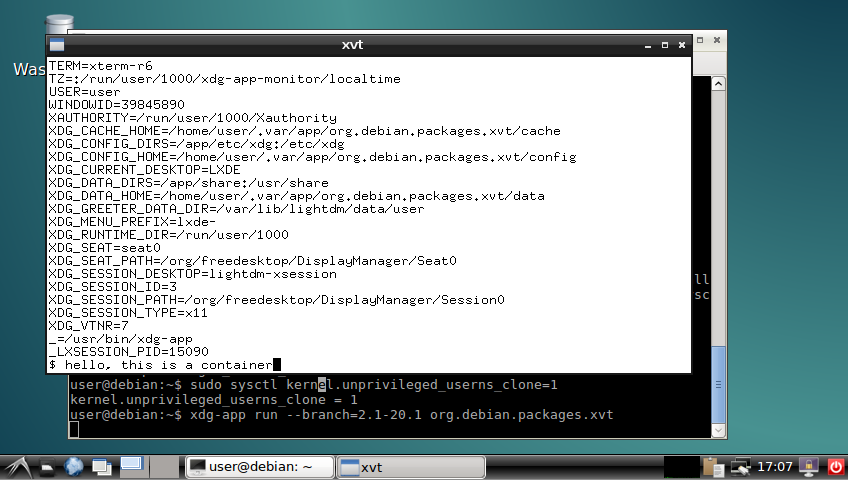 and you can play around with the shell in the
xvt and see what you
can and can't do in the container.
I'm sure there were better ways to do most of this, but I think there's value
in having such a simplistic demo to go alongside the various GNOMEish apps.
Acknowledgements:
- Betacowork Coworking Brussels and ICAB Business & Technology Incubator hosted the hackfest, with Collabora providing snacks, and the GNOME Foundation supporting the hackfest in general;
- Collabora also sponsored my travel, accommodation and time;
- my colleague Philip Withnall organised the hackfest.
 It was more that one and a half years ago when I
 update 1: Some packages like dpkg-dev are not installable, I m working on them.

 About one month has passed and here is the usual updated of TeX Live packages for Debian, this time also with an update to biber to accompany the updated version of biblatex. Nothing spectacular here besides fixes for some broken links of fonts.
 As a bonus this time, I provide (auto-generated) links to the packages on CTAN, so that one can check the package descriptions and manuals.
Updated packages
 When I was thinking about using
 The comparison of Germany and Japan with respect to their recent history as laid out in Buruma s book throws a spotlight on various aspects of the psychology of German and Japanese population, while at the same time not falling into the easy trap of explaining everything with difference in the guilt culture. A book of great depth and broad insights everyone having even the slightest interest in these topics should read.
 People these days often do think about what worked well in the last year that they are proud of, what didn't work so well and what they plan to change the coming year. For me a fair amount of the resolutions were about my name. One of them was getting rid of my old name from the
 I am happy to share here a project I was a part of during last year, that ended up being a complete success and now stands to be repeated: The diploma course on embedded Linux, taught at
 Back in November, we
 Those of you not interested in boring and melancholic look-back onto history can safely skip reading this one. For those a bit interested in the history of TeX in Debian, please read on.
Debian releases and TeX systems
The TeX system of choice has been for long years
 Development over the years
TeX Live 2005 was just another TeX system but not the preferred one in Debian Etch and beyond. But then in May 2006, Thomas Esser announced the end of development of teTeX, which cleared the path for TeX Live as main TeX system in Debian (and the world!). The next release of Debian, Lenny (1/2009), already carried only TeX Live. Unfortunately it was only TeX Live 2007 and not 2008, mostly due to me having been involved in rewriting the upstream infrastructure based on Debian package files instead of the notorious xml files. This took quite a lot of attention and time from Debian away to upstream development, but this will be discussed in a different post.
Similarly, the release of TeX Live included in Debian Squeeze (released 2/2011) was only TeX Live 2009 (instead of 2010), but since then (Wheezy and Jessie) the releases of TeX Live in Debian were always the latest released ones.
Current status
Since about 2013 I am trying to keep a regular schedule of new TeX Live packages every month. These helps me to keep up with the changes in upstream packaging and reduces the load of packaging a new release of TeX Live. It also bring to users of unstable and testing a very up-to-date TeX system, where packages at most lack 1 month of behind the TeX Live net updates.
Future
As most of the readers here know, besides caring for TeX (Live) and related packages in Debian, I am also responsible for the TeX Live Manager (tlmgr) and most of upstream s infrastructure including network distribution. Thus, my (spare, outside work) time needs to be distributed between all these projects (and some others) which leaves less and less time for Debian packaging. Fortunately the packaging is in a state that making regular updates once a month is less of a burden, since most steps are automatized. What is still a bit of a struggle is adapting the binary package (

 During the summer, the private mailing list for a large online community discussed the mental illness of a contributor to a project. Various people expressed opinions that appeared to be generalizations about all those with mental illness. Some people hinted the illness was a lie to avoid work while others speculated about options for treatment. Nobody involved mentioned having any medical expertise.
It is ironic that on the one hand, we have the dramatic example of an aircraft crashing at the hands of somebody who is declared unfit to work but working anyway and on the other hand when somebody else couldn't do something, the diagnosis is being disputed by people who find it inconvenient or don't understand it.
More recently, there has been openly public discussion about whether another developer may have had mental illness. Once again, there doesn't appear to be any evidence from people with any medical expertise or documentation whatsoever. Some of the comments appear to be in the context of a grudge or justifying some other opinion.
What's worse, some comments appear to suggest that mental illness can be blamed for anything else that goes wrong in somebody's life. If somebody is shot and bleeds to death, do you say low blood pressure killed him or do you just say he was shot? Likewise, if somebody is subject to some kind of bullying and abused, does this have no interaction with mental illness? In fact, Google reveals
 This is not a new world, this is simply an extension of the old one. I'm not going to write here about sweeping changes that are happening now, but changes that have been taking place in plain sight for many decades. No one has flipped a switch, only tweaked and tuned variables here and there to lead us down this path. I'd like to reflect on where we are now but there is no way I could describe how it is we got here, the journey was far too complex and filled with ommissions, half-truths and outright lies. It's likely we will never know what has brought us here.
I live in Scotland, a country that is a part of the United Kingdom and a member of the European Union. We have a Scottish Government, although certain matters are still handled by the UK Government. The European Government also handles some matters and these can take effect across the entire European Union. I do not feel that I can hold trust in any of these bodies anymore.
The European Convention on Human Rights was, for me at least, a beacon of hope. A series of fundamental rights guaranteed to be upheld for every person within the European Union. A series of fundamental rights that has been ignored by governments repeatedly:
 So what has happened? Many themes use the
 Fortunately, with the help of some good souls and the technical support I finally got IPv6 connectivity on both my server, as well as at home, up.
Server
So my server is still running wheezy, which is a bit old, but upgrading with lots of hand-installed stuff is a bit a pain. The network interface was configured via a static IPv4 address, and no traces of IPv6 for now. Simple minded as I am, I assumed that this is the problem and started playing around with all kind of IPv6 configurations in the interfaces file, from using dhcp, and static configuration. The static configuration somehow worked out, but I never got a proper default route set. So I was really puzzled.
In addition, at home I don t have IPv6, my provider is not distributing IPv6, so I couldn t test it (but on this a bit later). Fortunately, the good soul from the Netherland Filip B., did a lot of testing and also send permanent suggestions and analysis of the IPv6 situation, I am very much indebted to him.
Anyway, his last advice about the problem with the default route was contacting the technical support of my provider, who within a very short time sent me an answer which made it clear to me: My firewall was blocking some ports that are necessary for IPv6 route autonegotiation.
As firewall I use
 Which gadgets does Bond bring to Switzerland?
 Time for freedom
How would you live for a day or a weekend or an entire holiday without your mobile phone? There are many small frustrations you may experience but the biggest one and the indirect cause of many other problems you will experience may be the inability to tell the time.
Many people today have

 With the world
