Search Results: "sten"

26 August 2015

Raphaël Hertzog: Freexian s report about Debian Long Term Support, July 2015

A Debian LTS logoLike each month, here comes a report about the work of paid contributors to Debian LTS. Individual reports In July, 79.50 work hours have been dispatched among 7 paid contributors. Their reports are available: Evolution of the situation August has seen a small decrease in terms of sponsored hours (71.50 hours per month) because two sponsors did not pay their renewal invoice on time. That said they reconfirmed their willingness to support us and things should be fixed after the summer. And we should be able to reach our first milestone of funding the equivalent of a half-time position, in particular since a new platinum sponsor might join the project. DebConf 15 happened this month and Debian LTS was featured in a talk and in a work session. Have a look at the video recordings: In terms of security updates waiting to be handled, the situation is better than last month: the dla-needed.txt file lists 20 packages awaiting an update (4 less than last month), the list of open vulnerabilities in Squeeze shows about 22 affected packages in total (11 less than last month). The new LTS frontdesk ensures regular triage of CVE reports and the difference between both counts dropped significantly. That s good! Thanks to our sponsors Thanks to Sig-I/O, a new bronze sponsor, which joins our 35 other sponsors.

One comment Liked this article? Click here. My blog is Flattr-enabled.

24 August 2015

Iustin Pop: Finally, systemd!

Even though Debian has moved to systemd as default a long while ago now, I've stayed with sysv as I have somewhat custom setups (self-built trimmed down kernels, separate /usr not pre-mounted by initrd, etc.). After installing a new system with Jessie and playing a bit with systemd on it a couple of months ago, I said it's finally time to upgrade. Easier said than starting to actually do it . The first system I upgraded was a recent (~1 year old) install. It was a trimmed-down system with Debian's kernel, so everything went smoothly. So smoothly that I soon forgot I made the change, and didn't do any more switches for a while. Systemd was therefore out of my mind until this recent Friday when I got a bug report about mt's rcS init script and shipping a proper systemd unit. The first step should be to actually start using systemd, so I said - let's convert some more things! During the weekend I upgraded one system, still a reasonably small install, but older - probably 6-7 years. First reboot into systemd flagged the fact that I had some forced-load modules which no longer exist, fact that was too easy to ignore with sysv. Nice! The only downside was that there seems to be some race condition between and ntp, as it fails to start on boot (port listen conflict). I'll see if it repeats. Another small issue is that systemd doesn't like duplicate fstab entries (i.e. two devices which both refer to the same mount point), while this works fine for mount itself (when specifying the block device). I said that after that system, I'll wait a while until to upgrade the next. But so it happened that today another system had an issue and I had to reboot it (damn lost uptimes!). The kernel was old so I booted into a newer one (this time compiled with the required systemd options), so I had a though - what if I take the opportunity and also switch to systemd on this system? Caution said to wait, since this was the oldest system - installed sometime during or before 2004. Plus it doesn't use an initrd (long story), and it has a split /usr. Caution excitement caution lost and I proceeded. It turns out that systemd does warn about split /usr but itself has no problems. I learned that I also had very old sysfs entries that no longer exist, and which I didn't know about as sysv doesn't make it obvious. I also had a crypttab entry which was obsolete, and I forgot about it, until I met the nice red moving ASCII bar which fortunately had a timeout. To be honest, I believed I'll have to rescue boot and fix things on this "always-unstable" machine, on which I install and run random things, and which has a hackish /etc/fstab setup. I'm quite surprised it just worked. On unstable. So thanks a lot to the Debian systemd team. It was much simpler than I thought, and now, on to exploring systemd! P.S.: the sad part is that usually I'm a strong proponent of declarative configuration, but for some reason I was reluctant to migrate to systemd also on account on losing the "power" of shell scripts. Humans

18 August 2015

Russell Coker: BTRFS Training

Some years ago Barwon South Water gave LUV 3 old 1RU Sun servers for any use related to free software. We gave one of those servers to the Canberra makerlab and another is used as the server for the LUV mailing lists and web site and the 3rd server was put aside for training. The servers have hot-swap 15,000rpm SAS disks IE disks that have a replacement cost greater than the budget we have for hardware. As we were given a spare 70G disk (and a 140G disk can replace a 70G disk) the LUV server has 2*70G disks and the 140G disks (which can t be replaced) are in the server for training. On Saturday I ran a BTRFS and ZFS training session for the LUV Beginners SIG. This was inspired by the amount of discussion of those filesystems on the mailing list and the amount of interest when we have lectures on those topics. The training went well, the meeting was better attended than most Beginners SIG meetings and the people who attended it seemed to enjoy it. One thing that I will do better in future is clearly documenting commands that are expected to fail and documenting how to login to the system. The users all logged in to accounts on a Xen server and then ssh d to root at their DomU. I think that it would have saved a bit of time if I had aliased commands like btrfs to echo you must login to your virtual server first or made the shell prompt at the Dom0 include instructions to login to the DomU. Each user or group had a virtual machine. The server has 32G of RAM and I ran 14 virtual servers that each had 2G of RAM. In retrospect I should have configured fewer servers and asked people to work in groups, that would allow more RAM for each virtual server and also more RAM for the Dom0. The Dom0 was running a BTRFS RAID-1 filesystem and each virtual machine had a snapshot of the block devices from my master image for the training. Performance was quite good initially as the OS image was shared and fit into cache. But when many users were corrupting and scrubbing filesystems performance became very poor. The disks performed well (sustaining over 100 writes per second) but that s not much when shared between 14 active users. The ZFS part of the tutorial was based on RAID-Z (I didn t use RAID-5/6 in BTRFS because it s not ready to use and didn t use RAID-1 in ZFS because most people want RAID-Z). Each user had 5*4G virtual disks (2 for the OS and 3 for BTRFS and ZFS testing). By the end of the training session there was about 76G of storage used in the filesystem (including the space used by the OS for the Dom0), so each user had something like 5G of unique data. We are now considering what other training we can run on that server. I m thinking of running training on DNS and email. Suggestions for other topics would be appreciated. For training that s not disk intensive we could run many more than 14 virtual machines, 60 or more should be possible. Below are the notes from the BTRFS part of the training, anyone could do this on their own if they substitute 2 empty partitions for /dev/xvdd and /dev/xvde. On a Debian/Jessie system all that you need to do to get ready for this is to install the btrfs-tools package. Note that this does have some risk if you make a typo. An advantage of doing this sort of thing in a virtual machine is that there s no possibility of breaking things that matter.
  1. Making the filesystem
    1. Make the filesystem, this makes a filesystem that spans 2 devices (note you must use the-f option if there was already a filesystem on those devices):
      mkfs.btrfs /dev/xvdd /dev/xvde
    2. Use file(1) to see basic data from the superblocks:
      file -s /dev/xvdd /dev/xvde
    3. Mount the filesystem (can mount either block device, the kernel knows they belong together):
      mount /dev/xvdd /mnt/tmp
    4. See a BTRFS df of the filesystem, shows what type of RAID is used:
      btrfs filesystem df /mnt/tmp
    5. See more information about FS device use:
      btrfs filesystem show /mnt/tmp
    6. Balance the filesystem to change it to RAID-1 and verify the change, note that some parts of the filesystem were single and RAID-0 before this change):
      btrfs balance start -dconvert=raid1 -mconvert=raid1 -sconvert=raid1 force /mnt/tmp
      btrfs filesystem df /mnt/tmp
    7. See if there are any errors, shouldn t be any (yet):
      btrfs device stats /mnt/tmp
    8. Copy some files to the filesystem:
      cp -r /usr /mnt/tmp
    9. Check the filesystem for basic consistency (only checks checksums):
      btrfs scrub start -B -d /mnt/tmp
  2. Online corruption
    1. Corrupt the filesystem:
      dd if=/dev/zero of=/dev/xvdd bs=1024k count=2000 seek=50
    2. Scrub again, should give a warning about errors:
      btrfs scrub start -B /mnt/tmp
    3. Check error count:
      btrfs device stats /mnt/tmp
    4. Corrupt it again:
      dd if=/dev/zero of=/dev/xvdd bs=1024k count=2000 seek=50
    5. Unmount it:
      umount /mnt/tmp
    6. In another terminal follow the kernel log:
      tail -f /var/log/kern.log
    7. Mount it again and observe it correcting errors on mount:
      mount /dev/xvdd /mnt/tmp
    8. Run a diff, observe kernel error messages and observe that diff reports no file differences:
      diff -ru /usr /mnt/tmp/usr/
    9. Run another scrub, this will probably correct some errors which weren t discovered by diff:
      btrfs scrub start -B -d /mnt/tmp
  3. Offline corruption
    1. Umount the filesystem, corrupt the start, then try mounting it again which will fail because the superblocks were wiped:
      umount /mnt/tmp
      dd if=/dev/zero of=/dev/xvdd bs=1024k count=200
      mount /dev/xvdd /mnt/tmp
      mount /dev/xvde /mnt/tmp
    2. Note that the filesystem was not mountable due to a lack of a superblock. It might be possible to recover from this but that s more advanced so we will restore the RAID.
      Mount the filesystem in a degraded RAID mode, this allows full operation.
      mount /dev/xvde /mnt/tmp -o degraded
    3. Add /dev/xvdd back to the RAID:
      btrfs device add /dev/xvdd /mnt/tmp
    4. Show the filesystem devices, observe that xvdd is listed twice, the missing device and the one that was just added:
      btrfs filesystem show /mnt/tmp
    5. Remove the missing device and observe the change:
      btrfs device delete missing /mnt/tmp
      btrfs filesystem show /mnt/tmp
    6. Balance the filesystem, not sure this is necessary but it s good practice to do it when in doubt:
      btrfs balance start /mnt/tmp
    7. Umount and mount it, note that the degraded option is not needed:
      umount /mnt/tmp
      mount /dev/xvdd /mnt/tmp
  4. Experiment
    1. Experiment with the btrfs subvolume create and btrfs subvolume delete commands (which act like mkdir and rmdir).
    2. Experiment with btrfs subvolume snapshot SOURCE DEST and btrfs subvolume snapshot -r SOURCE DEST for creating regular and read-only snapshots of other subvolumes (including the root).

14 August 2015

Tiago Bortoletto Vaz: c3video for debconf #5

This is a follow-up to my previous post related the DebConf videoteam using a new software stack for the next conferences: http://acaia.ca/~tiago/posts/c3video-for-dc-take-4/. This is about the encoding step from C3TT, mostly done by the script named D-encoding. We can have many different encoding templates in the system. They're XSLT files which will generate the XML needed to create the local encoding commands. We can have more than one encoding template assigned for a conference.
/images/c3tt_encoding.png

XSLT encoding templates

A general comment: each meta ticket (say, the original ticket with meta info about the talk) will generate two children tickets over time, a recording one and a encoding one, with their own states. If things go wrong, a ingest ticket is created. More details can be checked here.
/images/c3tt_children_tickets.png

Children tickets

So I've got the proper encoded files in my Processing.Path.Output directory. The ticket is marked as encoded by the script. There's also a postencoding step, executed by E-postencoding. As I could understand, it's intended to be a general post-processing hook for encoded files. For instance, it can produces an audio file and make it available on Auphonic service. As we won't use that, we may want to set the property Processing.Auphonic.Enable to no. The next step starts from the operator side. Just going to the Releasing tab in the web interface, choosing the ticket to check and doing a quick review in the encoded file:
/images/c3tt_releasing.png

Releasing tab

Then, if everything looks fine, click Everthing's fine:
/images/c3tt_check.png

Check encoded file

From this point the ticket will be marked as checked and the next script (F-postprocessing) will take care of pushing the video(s)/audio(s) to the target place, as defined by Publishing.UploadTarget. I had to set myself the encoding template property EncodingProfile.Extension. We can optionally set Publishing.UploadOptions. (keep that in mind, seems not documented elsewhere) So I have now the first DebCamp encoded video file uploaded to an external host, entirely processed using the C3TT software stack. We may also want to use a very last script to release the videos (eg. as torrents, to different mirrors and other onlive services) if needed. This is script-G-release.pl, which unlike others, won't be run by the screen UI in the sequence. It has some parameters hardcoded on it, although code is very clear and ready to be hacked. It'll also mark the ticket as Released.
/images/c3tt_released.png

Released!

That's all for now! In summary: I've been able to install and set C3TT up during a few days in DebCamp, and will be playing with it during DebConf. In case things go well we'll probably be using this system as our video processing environment for the next events. We can access most CCC VoC software from https://github.com/voc. By having a look at what they're developing I feel that we (DebConf and CCC) share quite the same technical needs. And most important, the same spirit of community work for bringing part of the conference to those unable to attend. DebCamp was warm!

12 August 2015

Tiago Bortoletto Vaz: c3video for debconf #3

This is a follow-up to my previous post related the DebConf videoteam using a new software stack for the next conferences: http://acaia.ca/~tiago/posts/c3video-for-dc-take-2/. An outdated documentation for current subject is available at https://wiki.fem.tu-ilmenau.de/streaming/projekte/c3/28c3/crs/pipeline. Although the system may work differently nowadays, the basic idea remains the same. A newer, but incomplete documentation can be found in https://repository.fem.tu-ilmenau.de/trac/c3tt/wiki. Btw, CCC people from #voc at hackint.eu have been very kind and supportive. I've set an instance of C3TT for DebConf15 in http://c3tt.acaia.ca/. If you want to play with it just ping me in #debconf-video at oftc. As you can see, we can keep a single external C3TT server for all Debian events, without much work left to the local side, doesn't it sound amazing?
Setting a new conference Go to Projects, then Create. In the project area we'll need to import the Tickets. Tickets will come from the schedule file, which is a XML as generated from frab. With a minor hack we've been able to make the schedule XML from DebConf Summit quite compatible to it (kudos cate!):
/images/import_tickets.png

Importing tickets

By importing the schedule from https://summit.debconf.org/debconf15.xml we'll be asked from which rooms we want to import the events. Usually those that have video coverage will be selected:
/images/chosing_rooms.png

Choosing rooms

Then, we may want to exclude some talks that we won't provide video:
/images/chosing_talks.png

Choosing talks

We're also required to adjust some Properties for a given conference. An example with some explanation of these properties is availabe at https://c3voc.de/wiki/c3tracker. For my initial tests the ones below seem to be enough:
/images/c3tt_properties.png

Setting properties

The backend: basic understand The screen UI mentioned above will run a set of scripts in background which will automate most of the tasks, preparing videos for cutting to deploying them in different online services. Tab 0: A-recording-scheduler Each 30 seconds it will check if there's any ticket in the state scheduled or recording. It's based in the start/end datetime of the talk, so the ticket will be kept as scheduled (current < talk start), or marked as recording (start => current =< end) or recorded (current > end). Tab 1: B-mount4cut Each 30 seconds it will check if there's any ticket in the state recorded. That means the talk is already finished, and the raw video file is available in the path which has previously been set as a property (Path.Capture) in the web interface. For each ticket marked as recorded it will try to find the related video file in the capture path. The file format should be <room>-YYYY-MM-DD_HH-MM-SS.<extension>. The script will then use fuse-vdv to create a custom filesystem with some needed files for human interaction (fancy stuff!). Here's an example of talks in a room called Heidelberg, after being recorded and auto-mounted by the B-mount4cut script:
/images/c3tt_fuse.png

Mounting custom fuse FS

The human interaction is just a short review process using Kdenlive. The reviewers will access these files via a glusterFS network share. There's even a Debian Virtualbox image provided for that, including all the necessary tools. I'm going into this right now and will report what I get in the next hours. Hopefully the following scripts will also be covered, very soon-ish :) Tab 2: C-cut-postprocessor Tab 3: D-encoding Tab 4: E-postencoding (auphonic) Tab 5: F-postprocessing(upload) DebCamp is fun.

Daniel Pocock: Recording live events like a pro (part 2: video)

In the first blog in this series, we looked at how to capture audio effectively for a range of different events. While recording audio appears less complicated than video, it remains fundamental to a good recording. For some types of event, like a speech or a debate, you can have quite a bad video with poor lighting and other defects but people will still be able to watch it if the audio is good. Therefore, if you haven't already looked at the previous blog, please do so now. As mentioned in the earlier blog, many people now have high quality equipment for recording both audio and video and a wide range of opportunities to use it, whether it is a talk at a conference, a wedding or making a Kickstarter video. The right camera for video recording The fundamental piece of equipment is the camera itself. You may have a DSLR camera that can record video or maybe you have a proper handheld video camera. The leading DSLR cameras, combined with a good lens, make higher quality recordings than many handheld video cameras. Unfortunately, although you pay good money to buy a very well engineered DSLR that could easily record many hours of video, most DSLRs are crippled to record a maximum of 30 minutes in one recording. This issue and some workarounds are discussed later in this blog. If you don't have any camera at all you need to think carefully about which type to buy. If you are only going to use it once you may want to consider renting or borrowing or asking for other people attending the event to bring whatever cameras they have to help make multiple recordings (the crowdsourcing solution). If you are a very keen photographer then you will probably have a preference for a DSLR. Accessories Don't just look at the cost of your camera and conclude that is all the budget you need. For professional quality video recording, you will almost certainly need some accessories. You may find they are overpriced at the retail store where you bought your camera, but you still need some of them, so have a look online.
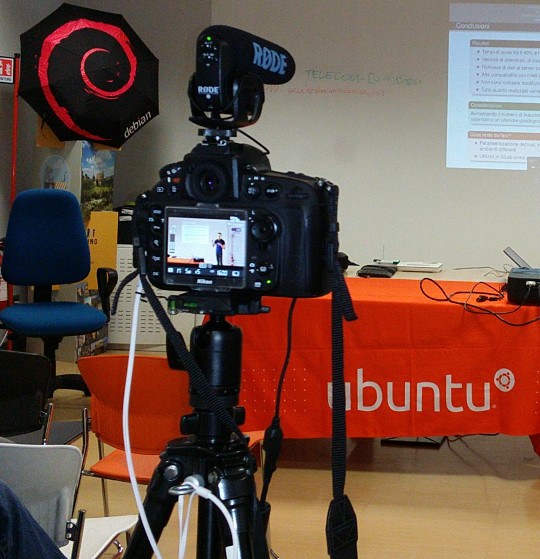
Recording a talk at a free software event with a Nikon D800 on a very basic tripod with Rode VideoMic Pro, headphones (white cable) and external power (black cable) If you want to capture audio with the camera and record it in the video file (discussed in more detail below), you will need to purchase a microphone that mounts on the camera. The built-in microphones on cameras are often quite bad, even on the most expensive cameras. If you are just using the built-in microphone for reference audio (to help with time synchronization when you combine different audio files with the video later) then the built-in microphone may be acceptable. Camera audio is discussed in more detail below. If your camera has a headphone socket, get some headphones for listening to the audio. Make sure you have multiple memory cards. Look carefully at the speed of the memory cards, slow ones are cheaper but they can't keep up with the speed of writing 1080p video. At a minimum, you should aim to buy memory cards that can handle one or two days worth of data for whatever it is you do. A tripod is essential for most types of video. If you use a particularly heavy camera or lens or if you are outdoors and it may be windy you will need a heavier tripod for stability. For video, it is very useful to have a tripod with a handle for panning left and right but if the camera will be stationary for the whole recording then the handle is not essential. Carrying at least one spare battery is another smart move. On one visit to the Inca Trail in Peru, we observed another member of our group hiking up and down the Andes with a brand new DSLR that they couldn't use because the battery was flat. For extended periods of recording, batteries will not be sufficient and you will need to purchase a mains power supply (PSU). These are available for most types of DSLR and video camera. The camera vendors typically design cameras with unusual power sockets so that you can only use a very specific and heavily overpriced PSU from the same company. Don't forget a surge protector too. There are various smartphone apps that allow you to remotely control the camera from the screen of your phone, such as the qDslrDashboard app. These often give a better preview than the screen built-in to the camera and may even allow you to use the touch screen to focus more quickly on a specific part of the picture. A regular USB cable is not suitable for this type of app, you need to buy a USB On-The-Go (OTG) cable.
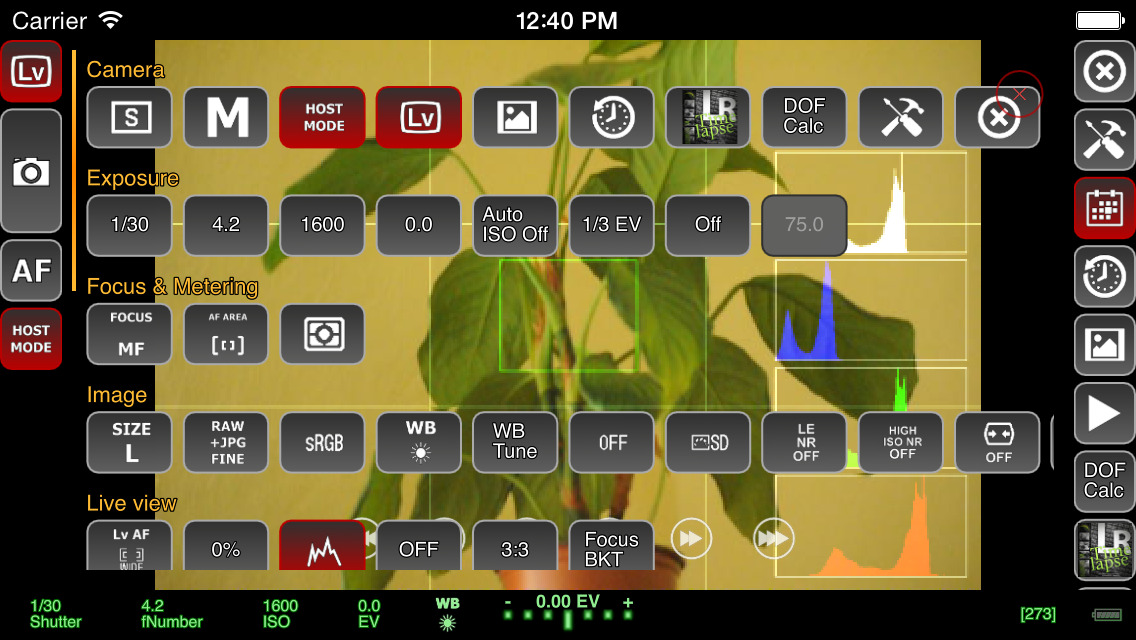
Screenshot of qDslrDashboard app on a smartphone, controlling a DSLR camera If you plan to copy the video from the camera to a computer at the event, you will need to make sure you have a fast memory card reader. The memory card readers in some laptops are quite slow and others can be quite fast so you may not need to buy an extra card reader. Camera audio Most cameras, including DSLRs, have a built-in microphone and a socket for connecting an external microphone. The built-in microphones obtain very poor quality sound. For many events, it is much better to have independent microphones, such as a lapel microphone attached to a smartphone or wireless transmitter. Those solutions are described in part one of this blog series. Nonetheless, there are still some benefits of capturing audio in the camera. The biggest benefit is the time synchronization: if you have audio recordings in other devices, you will need to align them with the video using post-production software. If the camera recorded an audio stream too, even if the quality is not very good, you can visualize the waveform on screen and use it to align the other audio recordings much more easily and precisely. If the camera will be very close to the people speaking then it may be acceptable to use a microphone mounted on the camera. This will be convenient for post-production because the audio will be synchronized with the video. It may still not be as good as a lapel microphone though, but the quality of these camera-mounted microphones is still far higher than the built-in microphones. I've been trying the Rode VideoMic Pro, it is definitely better than recording with the built-in microphone on the camera and also better than the built-in microphone on my phone. One problem that most people encounter is the sound of the lens autofocus mechanism being detected by the microphone. This occurs with both the built-in microphone and any other microphone you mount on the camera. A microphone mounted on top of the camera doesn't detect this noise with the same intensity as the built-in microphone but it is still present in the recordings. If using a camera-mounted microphone to detect the audio from an audience, you may need to have an omnidirectional microphone. Many camera-mounted microphones are directional and will not detect very much sound from the sides or behind the camera. When using any type of external microphone with the camera, it is recommend to disable automatic gain control (AGC) in the camera settings and then manually adjust the microphone sensitivity/volume level. Use headphones A final word on audio - most good cameras have an audio output socket. Connect headphones and wear them, to make sure you are always capturing audio. Otherwise, if the microphone's battery goes flat or if a wireless microphone goes out of range you may not notice. Choosing a lens The more light you get, the better. Bigger and more expensive lenses allow more light into the camera. Many of the normal lenses sold with a DSLR camera are acceptable but if it is a special occasion you may want to rent a more expensive lens for the day. If you already have a lens, it is a very good idea to test it in conditions similar to those you expect for the event you want to record. Recording duration limits Most DSLR cameras with video capability impose a 30 minute maximum recording duration This is basically the result of a friendly arrangement between movie studios and politicians to charge an extra tax on video recording technology and potentially make the movie studio bosses richer, supposedly justified by the fact that a tiny but exaggerated number of people use their cameras to record movies at the cinema. As a consequence, most DSLR manufacturers limit the duration of video recording so their product won't be subject to the tax, ensuring the retail price is lower and more attractive. On top of this, many DSLR cameras also have a 4GB file size limit if they use the FAT filesystem. Recording 1080p video at a high frame rate may hit the file size limit in 10 minutes, well before you encounter the 30 minute maximum recording duration. To deal with the file size issue, you can record at 720p instead of 1080p and use the frame rate 24fps. For events longer than 30 minutes or where you really want 1080p or a higher frame rate, there are some other options you can consider:
  • Buy or rent a proper video camera instead of using a DSLR camera
  • Using multiple cameras that can stop and be restarted at different times.
  • Manually stopping and restarting the camera if there are breaks in the event where it is safe to do so.
  • Use an app to control the camera and program it to immediately restart the recording each time it stops
  • Extract the raw output from the camera's HDMI socket and record into some other device or computer. There are several purpose-built devices
    that can be used this way with an embedded SSD for storage.
  • There are also some people distributing unofficial/alternative firmware images that remove the artificial 30 minute recording limit.
Camera settings There are many online tutorials and demonstration videos on YouTube that will help you optimize the camera settings for video. You may have already made recordings using the automatic mode. Adjusting some or all of the settings manually may help you create a more optimal recording. You will need to spend some time familiarizing yourself with the settings first. The first thing to check is white balance. This tells the camera the type of lighting in the location. If you set this incorrectly then the colours will be distorted. Many cameras have the ability to automatically set the white balance. For video, you may be able to change one or more settings that control the recording quality. These settings control the file compression ratio and image size. Typical image size settings are 720p and 1080p. Compression ratio may be controlled by a high/medium/low quality setting. Choosing the highest quality and biggest picture requires more space on the memory card and also means you reach the 4GB file size limit more quickly. A higher quality setting also implies a faster memory card is required, because the rate of megabytes per second written to the memory card is higher. Next you need to think about the frame rate. Events that involve fast moving subjects, such as sports, typically benefit from a higher frame rate. For other events it is quite acceptable to use 24 frames per second (fps). Higher frame rates also imply bigger file size and a requirement for a faster memory card. Once you have decided on the frame rate, the next thing to do is set the shutter speed. Use a shutter speed that is double the frame rate. For example, if using 24fps or 25fps, use a 1/50 shutter speed. The final two settings you need to adjust are the ISO and aperture. Set these based on the lighting conditions and extent to which the subjects are moving. For example, if the setting is dark or if you are trying to record fast moving subjects like athletes, vehicles or animals, use an ISO value of 800 or higher. Once you have chosen ISO, adjust the aperture to ensure the picture is sufficiently illuminated. Aperture also has a significant impact on the depth of field. Operating the camera: zoom and focus Many people use zoom lenses. It is not always necessary to change the zoom while recording a video, you can use software to zoom in and out on individual parts of the picture when editing it in post-production. If you do change the zoom while recording, it may be more difficult to maintain focus. Almost all lenses support manual focus (turning the focus ring by hand) and many support automatic focus. When shooting photographs with a DSLR, the mirror is down and the camera can use dedicated sensors for focus and light sensing. When shooting video, the mirror is up and the camera can not use the same focus sensors that are used in photography. Video recording uses a digital focussing algorithm based on contrast in the picture. If you take a lot of photos you are probably quite accustomed to the fast and precise autofocus for photography and you will notice that keeping a video in focus is more challenging. As mentioned already, one of the first things you can do to keep focus simple is to avoid zooming while recording. Record in a higher resolution than you require and then zoom with software later. Some people record using 4k resolution even when they only want to produce a 720p video, as they can digitally zoom in to different parts of the 4k recording without losing detail. If the subject is very stationary (people sitting at a desk for an interview is a typical example), you may be able to set the camera to manual focus and not change it at all while recording. If you choose to enable autofocus while recording, any built-in camera microphone or microphone mounted on the camera is likely to detect sounds from the motorized focus system. Ultimately, the autofocus mechanism is not accurate for all subjects and you may be unable to stop them moving around so you will need to change the focus manually while recording. It requires some practice to be able to do this quickly without overshooting the right focus. To make life more tricky, Nikon and Canon focus rings rotate in the opposite direction, so if you are proficient using one brand you may feel awkward if you ever have to use the other. A good way to practice this skill is to practice while in the car or on the train, pointing at different subjects outside the window and trying to stay in focus as you move from one subject to the next. Make a trial run Many events, from weddings right up to the Olympic Games opening ceremony, have a trial run the day before. One reason for that is to test the locations and settings of all the recording and broadcasting equipment. If a trial run isn't possible for your event, you may find some similar event to practice recording and test your equipment. For example, if you are planning to record a wedding, you could try and record a Sunday mass in the same church. Backup and duplicate the recordings before leaving the event If you only have one copy of the recordings and the equipment is stolen or damaged you may be very disappointed. Before your event, make a plan to duplicate the raw audio and video recordings so that several people can take copies away with them. Decide in advance who will be responsible for this, ensure there will be several portable hard disks and estimate how much time it will take to prepare the copies and factor this into the schedule. Conclusion All the products described can be easily purchased from online retailers. You may not need every accessory that is mentioned as it depends on the type of event you record. The total cost of buying or renting the necessary accessories may be as much as the cost of the camera itself so if you are new to this you may need to think carefully about making a budget with a spreadsheet to do it correctly. Becoming familiar with the camera controls and practicing the techniques for manual focus and zoom can take weeks or months. If you enjoy photography this can be time well spent but if you don't enjoy it then you may not want to commit the time necessary to make good quality video. Don't rule out options like renting equipment instead of buying it or crowdsourcing, asking several participants or friends to help make recordings with their own equipment. For many events, audio is far more indispensable than video and as emphasizing at the beginning of this article, it is recommended that you should be one hundred percent confident in your strategy for recording audio before you start planning to record video.


10 August 2015

Lunar: Reproducible builds: week 15 in Stretch cycle

What happened in the reproducible builds effort this week: Toolchain fixes Guillem Jover uploaded dpkg/1.18.2 which makes dependency comparisons deep by comparing not only the first dependency alternative, to get them sorted in a reproducible way. Original patch by Chris Lamb. Dhole updated the patch adding support for SOURCE_DATE_EPOCH in gettext. A modified package is in the experimental reproducible repository. Valentin Lorentz submitted a patch adding support for SOURCE_DATE_EPOCH to ocamldoc. Valentin Lorentz also opened a bug about the inability to set an arbitrary RNG seed for ocamlopt which would be a way to fix an issue affecting many OCaml packages. Dhole submitted a patch adding support for SOURCE_DATE_EPOCH in qhelpgenerator. A modified package has been sent to the experimental repository as well. Several packages have been updated for the experimental toolchain: doxygen (akira), and dpkg (h01ger). Also, h01ger has built and uploaded all experimental packages having arch:any packages for armhf: dpkg, gettext, doxygen, fontforge, libxslt and texlive-bin. We are now providing our toolchain for armhf and amd64. Packages fixed As you might have noticed, Debian sid is currently largely uninstallable, due to the GCC 5 transition, which also can be see in our reproducibility test setup. Please help! The following packages became reproducible due to changes in their build dependencies: glosstex, indent, ktikz, liblouis, libmicrohttpd, linkchecker, multiboot, qterm, rrep, trueprint, twittering-mode. The following packages became reproducible after getting fixed: Patches submitted which have not made their way to the archive yet: Lunar reported an issue on an unstable ABI from a generated header in icedove reminding of an issue affecting libical-dev. The bug has since been fixed by Carsten Schoenert. akira identified an unreferenced embeded code copy (causing unreproducibility!) in gperf. reproducible.debian.net The scheduler has temporarily been changed to not schedule any already tested packages for sid and experimental, due to the the GCC 5 transitions, which are well visible in our graphs now. On the plus side this has caused our stretch testing to catch up (and improve stats). (h01ger) depwait packages (packages where the Build-Depends cannot be satisfied) are now listed in the last 24h and last 48h pages (Mattia Rizzolo) Two new amd64 build nodes (with 8 cores and 32 GB RAM each) have been added, kindly sponsored by Profitbricks. (h01ger) The 4 armhf (setup last week by Vagrant Cascadian) and 2 amd64 build nodes have been made available to Jenkins. Remote job scheduling has been implemented and 35 new jobs have been added for pbuilder and schroot creation and maintenance of the nodes. (h01ger) The manual scheduler gained a flag (-a/--architecture) to select which arch to schedule in. (Mattia Rizzolo) armhf will only be testing stretch for now, due to limited hardware ressources. (h01ger) The page listing maintainers of unreproducible packages gained internal anchors. As an example, one can now link to unreproducible orphaned packages. (Mattia Rizzolo) Packages with a bug tagged pending are marked using a new symbol: a brown P (Mattia Rizzolo) diffoscope development debbindiff is now called diffoscope! It also has a website at diffoscope.org. The name was changed to better reflect that it became a general purpose tool, capable of comparing many different archive formats, or directories. Version 29 is the renaming release. Amongst a couple of other cosmetic changes a favicon showing the new logo has been added to the generated HTML reports. Version 30 replaces the file matching algorithm for files listed in .changes to a smarter one that removes only the version number. It also fixes a bug where squashfs directories were being extracted even if their content was being compared at a later stage. It also fixes an issue with the test suite that was detected by debci. Documentation update More rationale have been added for supporting SOURCE_DATE_EPOCH The unfinished Reproducible Builds HOWTO is now visible on the web, feedback and patches most welcome. Package reviews 261 obsolete reviews have been removed, 73 added and 145 updated this week.

Mirco Bauer: Smuxi 1.0 "Finally" Release

And here we go again! We're proud to announce the new version of Smuxi, release 1.0 "Finally". During the development, 20 bug reports and 10 feature requests in 285 commits were worked on.

Finally 1.0 Smuxi is celebrating its 10th anniversary! 10 years ago, Mirco Bauer made the first commit to the Smuxi source code repository and is still very committed to it. He started the Gnosmirc project in 2005 when the only way a 24/7 "always-on" experience with IRC meant you had to use a console based IRC client like bitchx, irssi or epic combined with screen and SSH. This looks very practical at first and is a powerful Unix-ish way of accomplishing that job, but it has the big downside that it doesn't integrate with a desktop environment like GNOME. A bit later the Gnosmirc project was renamed to Smuxi when the new code architecture allowed other frontend implementations besides the GNOME one. The ncurses/STFL based text frontend was later implemented and is considered stable and useful enough for day to day use, but still has some rough edges. WinForms and WPF frontends also exist but need more work to reach a usable state. At this point Smuxi 1.0 contains all features that we could have imagined and even goes beyond with very advanced features like message patterns or language agnostic scripting.

Changes since Smuxi 0.11

Message Persistence One of the biggest drawbacks of the IRC protocol ever was that messages can't be retrieved from the IRC server because the IRC server is simply relaying messages to the connected clients. So, if an IRC client is freshly started and connects it starts to receive new messages, but all message you had received before are no longer available. This always made IRC in a way "volatile" unlike other communication systems like email where messages are relayed and stored on the client side. One common approach for IRC clients is to store log files in a text file. This is a simple feature and gives the user the possibility to read older conversations. Smuxi also supports text file logging like other IRC clients but it has a big user experience drawback as you need to open the file from the disk outside of the IRC client. In Smuxi 1.0 messages sent and received are now stored on the disk in a way they can automatically be retrieved/loaded when you restart Smuxi. It is like you have never closed Smuxi! This feature was already available in Smuxi for some time as a technical preview and it used the Db4o object database, but we were never happy about the performance neither with the stability so it always stayed an optional feature you need to enable. This year we tried a new message buffer backend using the famous SQLite database and it works much faster and stable as a rock. So finally we can enable this feature by default because it just works and enhanced your experience. We hope you enjoy it. Documentation of how you can change Smuxi message buffer backend and behavior can be found here. For instructions how to convert your existing db4o history to SQLite can be found in the "smuxi-message-buffer tool" section.

User Interface Enhancements
  • Synced message markers: the position of of the seen/unseen messages marker is pushed to the smuxi-server and remembered when the frontend reconnects. (Sebastian Poeplau)
  • Persistent message markers: the message marker position is also remembered across Smuxi(-server) restarts.
  • Message Counter: in addition to the highlight counter next to a chat new/unseen messages are also counted. This makes it easy to identify chats with much traffic.
  • Single application instance support. If you start Smuxi again from the menu it will bring the existing instance into the foreground. This makes the Ubuntu Messaging Menu much nicer.
  • The command/message entry is alignment with the messages. (Lex Berezhny)

Text Frontend Enhancements
  • The console background color can now be configured using: /config set STFL/Interface/TerminalBackgroundColor = #000000 (Ond ej Ho ek)
  • The text color contrast if nicks with the background is now ensured (Ond ej Ho ek) #1033
  • Messages containing images will not be skipped but their alternative text is shown instead (Ond ej Ho ek) #1035

New smuxi-message-buffer tool This is a new commandline tool that allows you to convert and export the message history of Smuxi message buffer files. This can be used to convert your existing Db4o history to SQLite like this for example:
for DB_DB4O in $HOME/.local/share/smuxi/buffers/*/*/*/*.db4o; do
    DB_SQLITE=$ DB_DB4O/.db4o/.sqlite3 
    smuxi-message-buffer convert $DB_DB4O $DB_SQLITE
done
Smuxi shouldn't be running when using this tool.

Scripting Enhancements

New Hook Points Smuxi 1.0 supports with the following new hook points:
  • engine/protocol-manager/on-presence-status-changed/ This hook point is raised when the presence status of a protocol manager changes. This happens for example when an IRC connection toggles the away state.
  • engine/session/on-event-message/ This hook point raises event messages that usually begin with "-!-". This can be useful to track state changes that are shown as a message without having a dedicated hook point for it.
  • engine/session/command-$cmd/ This hook point is raised on the engine side for commands, e.g. /some_command that isn't handled by the frontend or engine built-in commands. This is useful for commands that should be available for all frontends and isn't specific to the frontend environment.

New Plugins The following new plugins are supported by Smuxi 1.0:
  • topic-diff: Shows the word differences of the topic after topic changes. (meebey)
  • away-nick: Automatically appends and removes $AWAY_SUFFIX to/from the nick name when you go away using the /away command or by disconnecting all frontends from the smuxi-server. (meebey)
  • system-info: Shows system info. Includes system kernel version, distro name, and CPU vendor information. (AK0)
  • now-playing: This plugin is not new but was rewritten in Python to get rid of the spaghetti code monster which was written in Bash. (jamesaxl)

IRC Enhancements
  • NICKSERV support Notices from Nick/ChanServ are no longer shown on all channels as they like to send greeting messages and other spam which is annoying to see on all channels. #868
  • Automatic rejoin of channels protected with a key works as expected again
  • Connecting to irc.gitter.im is now supported. Gitter's IRCd implementation has a bug in the IRC protocol which is now tolerated.

Twitter Enhancements
  • The /search command shows tweets as live stream
  • Added /delete, /favorite and /unfavorite commands

Behind the Scenes
  • Re-licensed smuxi-common from GPLv2 to MIT/X11

Contributors Contributors to this release are the following people:
  • Mirco Bauer (199 commits)
  • Carlos Mart n Nieto (15 commits)
  • Andr s G. Aragoneses (14 commits)
  • Piotr Dr g (12 commits)
  • Ond ej Ho ek (11 commits)
  • Oliver Schneider (5 commits)
  • Calvin B (4 commits)
  • Victor Seva (3 commits)
  • Will Johansson (2 commits)
  • Sebastian Poeplau (2 commits)
  • Julian Taylor (2 commits)
  • James Axl (2 commits)
  • Daniel Mustieles (2 commits)
  • Christopher James Halse Rogers (2 commits)
  • . Uzun (1 commit)
  • Lex Berezhny (1 commit)
  • Kalle Kaitala (1 commit)
  • Jordi Mas (1 commit)
  • Joe Hansen (1 commit)
  • Jimmie Elvenmark (1 commit)
  • Dimitris Spingos (1 commit)
  • Dean Lee (1 commit)
  • Cl ment Bourgeois (1 commit)
  • Carlos Hernandez (1 commit)
Thank you very much for your contributions to Smuxi! Want this? Go here and grab it right now!

Posted Sun Aug 9 17:48:18 2015

9 August 2015

Thorsten Alteholz: My Debian Activities in July 2015

FTP assistant This month I marked 485 packages for accept, rejected 87 of them and had to send 18 emails to maintainers. The NEW-queue is below 100 again, but you hardworking fellows don t make a break, but start the GCC5 transition. This is so much fun :-) . Squeeze LTS This was my thirteens month that I did some work for the Squeeze LTS initiative, started by Raphael Hertzog at Freexian. This month I got assigned a workload of 15h and I spent again most of it to work on a new upload of php5. I finally prepared the patches for the CVEs and realized only then that the number of failed tests drastically increased. So return to beginning and checking why everything is broken now :-( . The patch for [DLA 269-1] was prepared by Mats Erik Andersson. This month I also had another term of doing frontdesk work. So I answered questions on the IRC channel and looked for CVEs that are important for Squeeze LTS or could be ignored. Other stuff This month I could finally finish the harminv transition and all affected packages migrated to testing meanwhile. I also uploaded a new version for pipexec. Donations Again, thanks alot to all donors. I really appreciate this and hope that everybody is pleased with my commitment. Don t hesitate to make suggestions for improvements.

8 August 2015

Wouter Verhelst: Backing up with tar

The tape archiver, better known as tar, is one of the older backup programs in existence. It's not very good at automated incremental backups (for which bacula is a good choice), but it can be useful for "let's take a quick snapshot of the current system" type of situations. As I'm preparing to head off to debconf tomorrow, I'm taking a backup of my n-1 laptop (which still contains some data that I don't want to lose) so it can be reinstalled and used by the Debconf video team. While I could use a "proper" backup system, running tar to a large hard disk is much easier. By default, however, tar won't preserve everything, so it is usually a good idea to add some extra options. This is what I' mrunning currently:
sudo tar cvpaSf player.local:carillon.tgz --rmt-command=/usr/sbin/rmt --one-file-system /
which breaks down to create tar archive, verbose output, preserve permissions, automatically determine compression based on file extension, handle Sparse files efficiently, write to a file on a remote host using /usr/sbin/rmt as the rmt program, don't descend into a separate filesystem (since I don't want /proc and /sys etc to be backed up), and back up my root partition. Since I don't believe there's any value to separate file systems on a laptop, this will back up the entire contents of my n-1 laptop to the carillon.tgz in my home directory on player.local.

3 August 2015

Jamie McClelland: Docker: evil spawn or useful tool

There are plenty of criticisms of docker, the system for building a container-based virtual machine running just a single application. I've read many of them have have consistently been either in agreement or at least amused. The most relevant criticism is about the basic approach of building single-application virtual machines. To understand this criticism, let's remember - in traditional application deployment there are at least three distinct jobs: These three groups have lived in happy tension for years. Now we have containers. The problem with containers is that suddenly the system administrators are out entirely and the distribution developers' role may have been dramatically minimized or circumvented altogether. Meanwhile, the application developer is both liberated from any constraints imposed by either the system administrator or the distribution developers (hooray!) but is also sadled with the enormous responsibilities of these two roles - which may not be apparent to the application developer at first. I have practically no distribution developer experience and have considerable experience as a system administrator and an application developer. And, it took me months to sort through how to properly develop and deploy an application using docker in a way that I thought was responsible and secure. I started by learning about how docker wants you to deploy images - by downloading them from their shared regisry. As I mentioned, I have very little experience in the realm of distribution development, but I at least know enough about Debian to know that a lot of time and thought has gone into cryptographically verifying packages that I install, which apparently is not done at all with Docker images. Is that obvious to everyone using Docker?? Fortunately, you can work around this problem by creating your own base image which is trivially easy. So, now I build all images, from scratch, locally. That helps put Debian developers back into the mix. Next, I started looking at Docker Files that I could use to construct my images and discovered something else troubling. Take, for example, the official nginx Docker image. It is based on Debian Jessie (hooray - our distribution developers are in the mix!). However, it then proceeds to install nginx from the nginx repository, not the debian repository. Well, I guess if you are nginx you want to have full control, but still, the Debian developers version of nginx has been vetted to ensure it works with Debian Jessie, so you are really losing something here. So... my next break from Docker convention is to use all Debian packages in my Docker files. Once my images were built and my application was tested and running, I was done, right? Wrong. Well, I would have been done if I didn't care about upgrading my systems, backing up my data or running cron jobs. Remember those things? Those are things that distribution developers and system administrators have been perfecting for decades. And, they are not trivial. I then built a series of scripts to help alert me when a image I am using has updates (you can't just use cron-apt any more since cron isn't running in your container) and help me update the image and deploy it to all my applications (which involves restarting the application). Backing up data is a whole different can of worms - sometimes involving interacting with your container (if it's a database container, you have to launch a database dump) or simply copying files from the host, assuming you got the right Docker volume strategy (which took me days to fully understand). Lastly, I had to run a cron job from the host that then runs whatever commands are needed on each of my containers. This was complicated. In the end, was it worth it? Yes, I think so. However, not because it was simple, which seems to be the Docker mantra. I think it's worth it because I can run 100 instances of my application using significantly less resources than when I was using full virtualization and because I can more easily and flexibly adjust the resource allocation. However, check in with me in a year and I'll probably have a different opinion.

Jamie McClelland: Agents, the kinds that work for us.

I recently decided I wanted to adjust how long my gpg password cache lasts and realized I had no idea how either my ssh-agent or gpg-agent was being launched or even which programs were being used as the agent for which protocol. While I appreciate that everthing just works based on blind faith, I decided to investigate more closely. I started by reading the man pages for ssh-agent and gpg-agent and discovered that gpg-agent could be used for providing ssh-agent. Since I run openbox, I decided to dig through my ~/.config/openbox/autostart file and discovered that I was also launching gnome-keyring-daemon, which provides both an ssh-agent and a gpg-agent. This is getting confusing. I then examined the output of ps -eFH and found this:
jamie    28499 28489  0  1082  1516   1 10:06 tty1     00:00:00     /bin/sh /usr/bin/startx
jamie    28542 28499  0  3987  1912   1 10:06 tty1     00:00:00       xinit /etc/X11/xinit/xinitrc -- /etc/X11/xinit/xserverrc :0 vt1 -auth /tmp/serverauth.gn3C5pYbPc
root     28543 28542  0 58065 25036   3 10:06 tty1     00:00:05         /usr/bin/X -nolisten tcp :0 vt1 -auth /tmp/serverauth.gn3C5pYbPc
jamie    28548 28542  0 69563 19980   0 10:06 tty1     00:00:00         /usr/bin/openbox --startup /usr/lib/x86_64-linux-gnu/openbox-autostart OPENBOX
jamie    28604 28548  0  2774   348   1 10:06 ?        00:00:00           /usr/bin/ssh-agent /usr/bin/gpg-agent --daemon --sh --write-env-file=/home/jamie/.gnupg/gpg-agent-info-animal /usr/bin/dbus-launch --exit-with-session /usr/bin/monkeysphere-validation-agent /usr/bin/im-launch /home/jamie/.xsession
jamie    28605 28548  0  4915   248   0 10:06 ?        00:00:00           /usr/bin/gpg-agent --daemon --sh --write-env-file=/home/jamie/.gnupg/gpg-agent-info-animal /usr/bin/dbus-launch --exit-with-session /usr/bin/monkeysphere-validation-agent /usr/bin/im-launch /home/jamie/.xsession
jamie    28610 28548  0 22402 34456   0 10:06 tty1     00:00:00           /usr/bin/perl -wT /usr/bin/monkeysphere-validation-agent /usr/bin/im-launch /home/jamie/.xsession
Further down (and not nested under the xinit process), I found my gnome-keyring-daemon process. I started by removing my own call to gnome-keyring-daemon and realized that everything still worked fine (both gpg and ssh). I must have added that line before things were configured system-wide to run automatically. Then, I saw that the gpg-agent was being launched without the --enable-ssh-support option (and ssh-agent was running), so looks like ssh is handled by ssh-agent and gpg is handled by gpg-agent. So far so good. Now, how do they get launched?? I start my graphical session by logging in at a console and running exec startx. In my home directory, I have ~/.xsession which contains the line exec /usr/bin/openbox-session. Therefore, I started by scouring all things openbox on my system and couldn't find any reference to these agents. Next, I turned my attention to X. Based on my ps -eFH output, I started with /etc/X11/xinit/xinitrc, which led me to /etc/X11/Xsession which led me to /etc/X11/Xsession.d and presto, I found my answer: a series of shell scripts that modify a global variable STARTUP which is executed by X. Thanks Debian developers for making it all work out of the box!

Lunar: Reproducible builds: week 14 in Stretch cycle

What happened in the reproducible builds effort this week: Toolchain fixes akira submitted a patch to make cdbs export SOURCE_DATE_EPOCH. She uploded a package with the enhancement to the experimental reproducible repository. Packages fixed The following 15 packages became reproducible due to changes in their build dependencies: dracut, editorconfig-core, elasticsearch, fish, libftdi1, liblouisxml, mk-configure, nanoc, octave-bim, octave-data-smoothing, octave-financial, octave-ga, octave-missing-functions, octave-secs1d, octave-splines, valgrind. The following packages became reproducible after getting fixed: Some uploads fixed some reproducibility issues but not all of them: In contrib, Dmitry Smirnov improved libdvd-pkg with 1.3.99-1-1. Patches submitted which have not made their way to the archive yet: reproducible.debian.net Four armhf build hosts were provided by Vagrant Cascadian and have been configured to be used by jenkins.debian.net. Work on including armhf builds in the reproducible.debian.net webpages has begun. So far the repository comparison page just shows us which armhf binary packages are currently missing in our repo. (h01ger) The scheduler has been changed to re-schedule more packages from stretch than sid, as the gcc5 transition has started This mostly affects build log age. (h01ger) A new depwait status has been introduced for packages which can't be built because of missing build dependencies. (Mattia Rizzolo) debbindiff development Finally, on August 31st, Lunar released debbindiff 27 containing a complete overhaul of the code for the comparison stage. The new architecture is more versatile and extensible while minimizing code duplication. libarchive is now used to handle cpio archives and iso9660 images through the newly packaged python-libarchive-c. This should also help support a couple other archive formats in the future. Symlinks and devices are now properly compared. Text files are compared as Unicode after being decoded, and encoding differences are reported. Support for Sqlite3 and Mono/.NET executables has been added. Thanks to Valentin Lorentz, the test suite should now run on more systems. A small defiency in unquashfs has been identified in the process. A long standing optimization is now performed on Debian package: based on the content of the md5sums control file, we skip comparing files with matching hashes. This makes debbindiff usable on packages with many files. Fuzzy-matching is now performed for files in the same container (like a tarball) to handle renames. Also, for Debian .changes, listed files are now compared without looking the embedded version number. This makes debbindiff a lot more useful when comparing different versions of the same package. Based on the rearchitecturing work has been done to allow parallel processing. The branch now seems to work most of the time. More test needs to be done before it can be merged. The current fuzzy-matching algorithm, ssdeep, has showed disappointing results. One important use case is being able to properly compare debug symbols. Their path is made using the Build ID. As this identifier is made with a checksum of the binary content, finding things like CPP macros is much easier when a diff of the debug symbols is available. Good news is that TLSH, another fuzzy-matching algorithm, has been tested with much better results. A package is waiting in NEW and the code is ready for it to become available. A follow-up release 28 was made on August 2nd fixing content label used for gzip2, bzip2 and xz files and an error on text files only differing in their encoding. It also contains a small code improvement on how comments on Difference object are handled. This is the last release name debbindiff. A new name has been chosen to better reflect that it is not a Debian specific tool. Stay tuned! Documentation update Valentin Lorentz updated the patch submission template to suggest to write the kind of issue in the bug subject. Small progress have been made on the Reproducible Builds HOWTO while preparing the related CCCamp15 talk. Package reviews 235 obsolete reviews have been removed, 47 added and 113 updated this week. 42 reports for packages failing to build from source have been made by Chris West (Faux). New issue added this week: haskell_devscripts_locale_substvars. Misc. Valentin Lorentz wrote a script to report packages tested as unreproducible installed on a system. We encourage everyone to run it on their systems and give feedback!

31 July 2015

Rapha&#235;l Hertzog: My Free Software Activities in July 2015

My monthly report covers a large part of what I have been doing in the free software world. I write it for my donators (thanks to them!) but also for the wider Debian community because it can give ideas to newcomers and it s one of the best ways to find volunteers to work with me on projects that matter to me. Debian LTS This month I have been paid to work 15 hours on Debian LTS. In that time I did the following: Kali Linux / Debian Stretch work kaliKali Linux wants to experiment something close to Debian Constantly Usable Testing: we have a kali-rolling release that is based on Debian Testing and we want to take a new snapshot every 4 months (in order to have 3 releases per year). More specifically we have a kali-dev repository which is exactly Debian Stretch + our own Kali packages (the kali package take precedence) updated 4 times a day, just like testing is. And we have a britney2 setup that generates kali-rolling out of kali-dev (without any requirement in terms of delay/RC bugs, it just ensures that dependencies are not broken), also 4 times a day. We have jenkins job that ensures that our metapackages are installable in kali-dev (and kali-rolling) and that we can build our ISO images. When things break, I have to fix them and I try to fix them on the Debian side first. So here are some examples of stuff I did in response to various failures: If you analyze this list, you will see that a large part of the issues we had come down to package getting removed from testing due to RC bugs. We should be able to anticipate those issues and monitor the packages that have an impact on Kali. We will probably add new jenkins job that installs all the metapackages and then run how-can-i-help -s testing-autorm --old I just submitted #794238 as a wishlist against how-can-i-help. At the same time, there are bugs that make it into testing and that I fix / work around on the Kali side. But those fixes / work around might be more useful if they were pushed to testing via testing-proposed-updates. I tried to see whether other derivatives had similar needs to see if derivatives could join their efforts at this level but it does not look like so for now. Last but not least, bugs reported on the Kali side also resulted in Debian improvements: Other Debian work Sponsorship. I sponsored multiple packages for Daniel Stender who is packaging prospector, a software that I requested earlier (through RFP bug). So I reviewed and uploaded python-requirements-detector, python-setoptconf, pylint-celery and pylint-common. During a review I also discovered a nice bug in dh-python (#793609a comment in the middle of a Build-Depends could break a package). I also sponsored an upload of notmuch-addrlookup (new package requested by a Freexian customer). Packaging. I uploaded python-django 1.7.9 in unstable and 1.8.3 in experimental to fix security issues. I uploaded a new upstream release of ditaa through a non-maintainer uploaded (again at the request of a Freexian customer). Distro Tracker. Beside the work to integrate detailed security status, I fixed the code to be compatible with Django 1.8 and modified the tox configuration to ensure that the test suite is regularly run against Django 1.8. I also merged multiple patches of Christophe Siraut (cf #784151 and #754413). Thanks See you next month for a new summary of my activities.

2 comments Liked this article? Click here. My blog is Flattr-enabled.

26 July 2015

Lunar: Reproducible builds: week 13 in Stretch cycle

What happened in the reproducible builds effort this week: Toolchain fixes akira uploaded a new version of doxygen in the experimental reproducible repository incorporating upstream patch for SOURCE_DATE_EPOCH, and now producing timezone independent timestamps. Dhole updated Peter De Wachter's patch on ghostscript to use SOURCE_DATE_EPOCH and use UTC as a timezone. A modified package is now being experimented. Packages fixed The following 14 packages became reproducible due to changes in their build dependencies: bino, cfengine2, fwknop, gnome-software, jnr-constants, libextractor, libgtop2, maven-compiler-plugin, mk-configure, nanoc, octave-splines, octave-symbolic, riece, vdr-plugin-infosatepg. The following packages became reproducible after getting fixed: Some uploads fixed some reproducibility issues but not all of them: Patches submitted which have not made their way to the archive yet: reproducible.debian.net Packages identified as failing to build from source with no bugs filed and older than 10 days are scheduled more often now (except in experimental). (h01ger) Package reviews 178 obsolete reviews have been removed, 59 added and 122 updated this week. New issue identified this week: random_order_in_ruby_rdoc_indices. 18 new bugs for packages failing to build from sources have been reported by Chris West (Faux), and h01ger.

19 July 2015

Gregor Herrmann: RC bugs 2015/17-29

after the release is before the release. or: long time no RC bug report. after the jessie release I spent most of my Debian time on work in the Debian Perl Group. we tried to get down the list of new upstream releases (from over 500 to currently 379; unfortunately the CPAN never sleeps), we were & still are busy preparing for the Perl 5.22 transition (e.g. we uploaded something between 300 & 400 packages to deal with Module::Build & CGI.pm being removed from perl core; only team-maintained packages so far), & we had a pleasant & productive sprint in Barcelona in May. & I also tried to fix some of the RC bugs in our packages which popped up over the previous months. yesterday & today I finally found some time to help with the GCC 5 transition, mostly by making QA or Non-Maintainer Uploads with patches that already were in the BTS. a big thanks especially to the team at HP which provided a couple dozens patches! & here's the list of RC bugs I've worked on in the last 3 months:

16 July 2015

Rapha&#235;l Hertzog: Freexian s report about Debian Long Term Support, June 2015

A Debian LTS logoLike each month, here comes a report about the work of paid contributors to Debian LTS. Individual reports In June, 73.50 work hours have been dispatched among 7 paid contributors. Their reports are available: Evolution of the situation July has seen a nice increase in terms of sponsored hours (79.50 hours per month) but the trend is unlikely to continue for the next month, worse it might be negative. While most sponsors who joined us last year in July will renew their support, there are a few where I have no confirmation yet. Many thanks to those who confirmed early: Universit Lille 3, MyTux. Our first milestone of funding the equivalent of a half-time position is unlikely to be reached before DebConf or even this summer. If you want to prove me wrong, it s time to get in touch with your management and convince your company to contribute a small amount. In terms of security updates waiting to be handled, the situation is similar to last month: the dla-needed.txt file lists 24 packages awaiting an update (5 more than last month), the list of open vulnerabilities in Squeeze shows about 33 affected packages in total (3 less than last month). Thanks to our sponsors There are no new sponsors this month. But I decided to include the number of months that the sponsor has been with us. Since we value long-lasting relations, it seemed quite natural to add this.

No comment Liked this article? Click here. My blog is Flattr-enabled.

14 July 2015

Scott Kitterman: Debian LTS Work June 2015

This was my second month as a Freexian sponsored LTS contributor. I was assigned 4 hours which was enough for me to update libclamunrar to the latest version we have, 0.98.5. This aligns libclamunrar with last month s clamav update and resolved a potentially concerning double free error. This is consistent with the way clamav and its components are updated for Debian supported releases through proposed-updates. This is covered under DLA 250-1. This update took longer than expected due to time spent wrestling with the git repository for the packaging, but that s resolved now, so if future updates are needed, it should be much easier.

13 July 2015

Dirk Eddelbuettel: RcppGSL 0.2.5

A new version of RcppGSL arrived on CRAN a couple of days ago. This package provides an interface from R to the GNU GSL using our Rcpp package. In the course of preparation for the higher-performance R via C++ course I gave in Zuerich last month, I overhauled this package, its embedded package (!!) showing how to build a package which uses R, C++ and the GSL (and which can serve as a fine example of how to build and R and C++ package using an external library), and also overhauled the vignette which discusses all these aspect. All examples now consistently use Rcpp Attributes. The NEWS file entries follows below:
Changes in version 0.2.5 (2015-07-05)
  • The colnorm function in the included example package was rewritten to use Rcpp Attributes, the example package was updated and its version number increased to 0.0.3.
  • The unit tests also use the updated version of the example package.
  • The package, and the included example package, were updated throughout to conform to the current R CMD check standards.
  • The RcppGSL-intro vignette was updated throughout.
  • The Travis CI integration now uses r-cran-* packages which leads to faster tests.
Courtesy of CRANberries, a summary of changes to the most recent release is available. More information is on the RcppGSL page. Questions, comments etc should go to the rcpp-devel mailing list off the R-Forge page.

This post by Dirk Eddelbuettel originated on his Thinking inside the box blog. Please report excessive re-aggregation in third-party for-profit settings.

7 July 2015

Lunar: Reproducible builds: week 10 in Stretch cycle

What happened about the reproducible builds effort this week: Media coverage Daniel Stender published an English translation of the article which originally appeared in Linux Magazin in Admin Magazine. Toolchain fixes Fixes landed in the Debian archive: Lunar submitted to Debian the patch already sent upstream adding a --clamp-mtime option to tar. Patches have been submitted to add support for SOURCE_DATE_EPOCH to txt2man (Reiner Herrmann), epydoc (Reiner Herrmann), GCC (Dhole), and Doxygen (akira). Dhole uploaded a new experimental debhelper to the reproducible repository which exports SOURCE_DATE_EPOCH. As part of the experiment, the patch also sets TZ to UTC which should help with most timezone issues. It might still be problematic for some packages which would change their settings based on this. Mattia Rizzolo sent upstream a patch originally written by Lunar to make the generate-id() function be deterministic in libxslt. While that patch was quickly rejected by upstream, Andrew Ayer came up with a much better one which sadly could have some performance impact. Daniel Veillard replied with another patch that should be deterministic in most cases without needing extra data structures. It's impact is currently being investigated by retesting packages on reproducible.debian.net. akira added a new option to sbuild for configuring the path in which packages are built. This will be needed for the srebuild script. Niko Tyni asked Perl upstream about it using the __DATE__ and __TIME__ C processor macros. Packages fixed The following 143 packages became reproducible due to changes in their build dependencies: alot, argvalidate, astroquery, blender, bpython, brian, calibre, cfourcc, chaussette, checkbox-ng, cloc, configshell, daisy-player, dipy, dnsruby, dput-ng, dsc-statistics, eliom, emacspeak, freeipmi, geant321, gpick, grapefruit, heat-cfntools, imagetooth, jansson, jmapviewer, lava-tool, libhtml-lint-perl, libtime-y2038-perl, lift, lua-ldoc, luarocks, mailman-api, matroxset, maven-hpi-plugin, mknbi, mpi4py, mpmath, msnlib, munkres, musicbrainzngs, nova, pecomato, pgrouting, pngcheck, powerline, profitbricks-client, pyepr, pylibssh2, pylogsparser, pystemmer, pytest, python-amqp, python-apt, python-carrot, python-crypto, python-darts.lib.utils.lru, python-demgengeo, python-graph, python-mock, python-musicbrainz2, python-pathtools, python-pskc, python-psutil, python-pypump, python-repoze.sphinx.autointerface, python-repoze.tm2, python-repoze.what-plugins, python-repoze.what, python-repoze.who-plugins, python-xstatic-term.js, reclass, resource-agents, rgain, rttool, ruby-aggregate, ruby-archive-tar-minitar, ruby-bcat, ruby-blankslate, ruby-coffee-script, ruby-colored, ruby-dbd-mysql, ruby-dbd-odbc, ruby-dbd-pg, ruby-dbd-sqlite3, ruby-dbi, ruby-dirty-memoize, ruby-encryptor, ruby-erubis, ruby-fast-xs, ruby-fusefs, ruby-gd, ruby-git, ruby-globalhotkeys, ruby-god, ruby-hike, ruby-hmac, ruby-integration, ruby-ipaddress, ruby-jnunemaker-matchy, ruby-memoize, ruby-merb-core, ruby-merb-haml, ruby-merb-helpers, ruby-metaid, ruby-mina, ruby-net-irc, ruby-net-netrc, ruby-odbc, ruby-packet, ruby-parseconfig, ruby-platform, ruby-plist, ruby-popen4, ruby-rchardet, ruby-romkan, ruby-rubyforge, ruby-rubytorrent, ruby-samuel, ruby-shoulda-matchers, ruby-sourcify, ruby-test-spec, ruby-validatable, ruby-wirble, ruby-xml-simple, ruby-zoom, ryu, simplejson, spamassassin-heatu, speaklater, stompserver, syncevolution, syncmaildir, thin, ticgit, tox, transmissionrpc, vdr-plugin-xine, waitress, whereami, xlsx2csv, zathura. The following packages became reproducible after getting fixed: Some uploads fixed some reproducibility issues but not all of them: Patches submitted which have not made their way to the archive yet: reproducible.debian.net A new package set for the X Strike Force has been added. (h01ger) Bugs tagged with locale are now visible in the statistics. (h01ger) Some work has been done add tests for NetBSD. (h01ger) Many changes by Mattia Rizzolo have been merged on the whole infrastructure: debbindiff development Version 26 has been released on June 28th fixing the comparison of files of unknown format. (Lunar) A missing dependency identified in python-rpm affecting debbindiff installation without recommended packages was promptly fixed by Michal iha . Lunar also started a massive code rearchitecture to enhance code reuse and enable new features. Nothing visible yet, though. Documentation update josch and Mattia Rizzolo documented how to reschedule packages from Alioth. Package reviews 142 obsolete reviews have been removed, 344 added and 107 updated this week. Chris West (Faux) filled 13 new bugs for packages failing to build from sources. The following new issues have been added: snapshot_placeholder_replaced_with_timestamp_in_pom_properties, different_encoding, timestamps_in_documentation_generated_by_org_mode and timestamps_in_pdf_generated_by_matplotlib.

Next.

Previous.