Search Results: "rul"

3 May 2013

Richard Hartmann: Release Critical Bug report for Week 18

Releezy Tomorrow morning at around 0900 UTC, a lot of very dedicated people will start working on the actual release of Debian 7.0 (wheezy). A huge thank you to everyone who worked on getting Debian to this point. I for one welcome our new penguin overlord! Housekeeping These will obviously be the last rc bug stats in this release cycle. I am still unsure what to do with this particular series until the next freeze and feedback would be appreciated. Possible approaches are continuing as is, putting this into its own specific feed, decreasing the frequency to once a month, or to simply stop until jessie is frozen. An ikiwiki poll may be overkill. Or not. Remaining bugs As of right now, there are two bugs open: Both relate to weird behaviour by apt when upgrading from squeeze to wheezy. These bugs will not be truly closed, but merely ignored, for wheezy's release. If you happen to encounter the message above, it's best to consult the release notes for possible workarounds. Stats The UDD bugs interface currently knows about the following release critical bugs: How do we compare to the Squeeze release cycle?
Week Squeeze Wheezy Diff
43 284 (213+71) 468 (332+136) +184 (+119/+65)
44 261 (201+60) 408 (265+143) +147 (+64/+83)
45 261 (205+56) 425 (291+134) +164 (+86/+78)
46 271 (200+71) 401 (258+143) +130 (+58/+72)
47 283 (209+74) 366 (221+145) +83 (+12/+71)
48 256 (177+79) 378 (230+148) +122 (+53/+69)
49 256 (180+76) 360 (216+155) +104 (+36/+79)
50 204 (148+56) 339 (195+144) +135 (+47/+90)
51 178 (124+54) 323 (190+133) +145 (+66/+79)
52 115 (78+37) 289 (190+99) +174 (+112/+62)
1 93 (60+33) 287 (171+116) +194 (+111/+83)
2 82 (46+36) 271 (162+109) +189 (+116/+73)
3 25 (15+10) 249 (165+84) +224 (+150/+74)
4 14 (8+6) 244 (176+68) +230 (+168/+62)
5 2 (0+2) 224 (132+92) +222 (+132/+90)
6 release! 212 (129+83) +212 (+129/+83)
7 release+1 194 (128+66) +194 (+128/+66)
8 release+2 206 (144+62) +206 (+144/+62)
9 release+3 174 (105+69) +174 (+105/+69)
10 release+4 120 (72+48) +120 (+72/+48)
11 release+5 115 (74+41) +115 (+74/+41)
12 release+6 93 (47+46) +93 (+47/+46)
13 release+7 50 (24+26) +50 (+24/+26)
14 release+8 51 (32+19) +51 (+32/+19)
15 release+9 39 (32+7) +39 (+32/+7)
16 release+10 20 (12+8) +20 (+12/+8)
17 release+11 24 (19+5) +24 (+19/+5)
18 release+12 2 (2+0) +2 (+2/+0)
Graphical overview of bug stats thanks to azhag:

1 May 2013

Raphaël Hertzog: My Free Software Activities in April 2013

This is my monthly summary of my free software related activities. If you re among the people who made a donation to support my work (102.70 , thanks everybody!), then you can learn how I spent your money. Otherwise it s just an interesting status update on my various projects. Debian France Work on Galette. I spent quite some time on Debian France s galette installation (the web application handling its member database), first converting its Postgres database to UTF-8, then upgrading to 0.7.4 while working-around many known problems. I also created Debian packages of three Galette plugins that we have been using (galette-plugin-paypal, galette-plugin-admintools, galette-plugin-fullcard). But every time I use galette, I tend to find something to report. This month I filed 5 tickets: I tested quite some fixes prepared by the upstream author (3 of the above bugs are already fixed) and this lead to the 0.7.4.1 bugfix release. Preliminary work on new bylaws. I have setup a git repository to make it easier to collaborate on new versions of our bylaws and internal rules. The goal is to make Debian France a trusted organization of Debian and to update everything to be compliant with the association 1901 law (we currently have a special statute reserved to associations from Alsace/Moselle). Kali Linux Improve accessibility support in Debian Wheezy. Offensive Security wanted Kali Linux to be fully accessible to disabled people. Since Wheezy was suffering from some serious regressions in that area, we hired Emilio Pozuelo Monfort to fix #680636 and #689559 in gdm3. On my side, I updated debian-installer s finish-install to correctly pre-configure the system when you make an install with speech synthesis (patch submitted in #705599).
Thanks to accommodating release managers, this work has already been integrated in Wheezy and won t have to wait the first point release. Fix bugs in Debian s live desktop installer. We also wanted to enable the desktop installer in the Kali live DVD. While our first tries a few months ago failed, this time it worked almost out of the box (thanks to Ben Armstrong who fixed it). I still identified a few issues that I fixed in debian-installer-launcher s git repository. Packaging and misc Debian work I also spent a significant number of hours to answer questions of students who want to participate in Google s summer of code and who are interested by the rewrite of the Package Tracking System with Python and Django. Some of the discussions happened on debian-qa@lists.debian.org. Thanks See you next month for a new summary of my activities.

One comment Liked this article? Click here. My blog is Flattr-enabled.

29 April 2013

Wouter Verhelst: Linux 3.9

... has been released yesterday, apparently. This wouldn't be very special, except that it carries a 'patch' by yours truly. It isn't earthshattering, but hey, I can run 'git log' and find myself, now, in a released kernel. If that isn't nice.

Thomas Goirand: Jenkins: building debian packages after a git push (my 2cents of a howto)

The below is written in the hope it will be helpful for my fellow DDs. Why using build after push ? Simple answer: to save time, to always use a clean build environment, to automate more tests. Real answer: because you are lazy, and tired of always having to type these build commands, and that watching the IRC channel is more fun than watching the build process. Other less important answers: building takes some CPU time, and makes your computer run slower for other tasks. It is really nice that building doesn t consume CPU cycles on your workstation/laptop, and that a server does the work, not disturbing you while you are working. It is also super nice that it can maintain a Debian repository for you after a successful build, available for everyone to use and test, which would be harder to achieve on your work machine (which may be behind a router doing NAT, or even sometimes turned off, etc.). It s also kind of fun to have an IRC robot telling everyone when a build is successful, so that you don t have to tell them, they can see it and start testing your work. Install a SID box that can build with cowbuilder
Install Jenkins WARNING: Probably, before really installing, you should read what s bellow (eg: Securing Jenkins). Simply apt-get install jenkins from experimental (the SID version has some security issues, and has been removed from Wheezy, on a request of the maintainer). Normally, after installing jenkins, you can access it through:
http://<ip-of-your-server>:8080/
There is no auth by default, so anyone will be able to access your jenkins web GUI and start any script under the jenkins user (sic!). Jenkins auth
Before doing anything else, you have to enable Jenkins auth, otherwise, you have everything accessible from the outside, meaning that more or less, anyone browsing your jenkins server could be allowed to run any command. It might sound simple, but in fact, Jenkins auth is tricky to activate, and it is very easy to get yourself locked out, with no working web access. So here s the steps: 1. Click on Manage Jenkins then on Configure system 2. Check the enable security checkbox 3. Under security realm select Jenkins s own user database and leave allow users to sign up . Important: leave Anyone can do anything for the moment (otherwise, you will lock yourself out). 5. At the bottom of the screen, click on the SAVE button. 6. On the top right, click to login / create an account. Create yourself an account, and stay logged in. 7. Once logged-in, go back again in the Manage Jenkins -> Configure system , under security. 8. Switch to Project based matrix authentication strategy . Under User/group to add , enter the new login you ve just created, and click on Add . 9. Select absolutely all checkboxes for that user, so that you make yourself an administrator. 10. For the Anonymous user, for Job, check Read, Build and Workspace. For Overall select Read. 11. At the bottom of the screen, hit save again. Now, anonymous (eg: not logged-in) users should be able to see all projects, and be able to click on the build now button. Note that if you lock yourself out, the way to fix is to turn off Jenkins, edit config.xml, remove the useSecurity thing, and all what is in authorizationStragegy and securityRealm , then restart Jenkins. I had to do that multiple times until I had it right (as it isn t really obvious you got to leave Jenkins completely insecure when creating a new user). Securing Jenkins: Proxy Jenkins through apache to use it over SSL
When doing a quick $search-engine search, you will see lots of tutorials to use apache as a proxy, which seems to be the standard way to run Jenkins. Add the following to /etc/apache2/sites-available/default-ssl:
ProxyPass / http://localhost:8080/
ProxyPassReverse / http://localhost:8080/
ProxyRequests Off
Then perform the following commands on the shell:
htpasswd -c /etc/apache2/jenkins_htpasswd <your-jenkins-username>
a2enmod proxy
a2enmod proxy_http
a2enmod ssl
a2ensite default-ssl
a2dissite default
apache2ctl restart
Then disable access to the port 8080 of jenkins from outside:
iptables -I INPUT -d <ip-of-your-server> -p tcp --dport 8080 -j REJECT
Of course, this doesn t mean you shouldn t take the steps to activate Jenkins own authentication, which is disabled by default (sic!). Build a script to build packages in a cowbuilder I thought it was hard. In fact it was not. All together, this was kind of fun to hack. Yes hack. What I did yet another kind of 10km ugly shell script. The way to use it is simply: build-openstack-pkg <package-name>. On my build server, I have put that script in /usr/bin, so that it is accessible from the default path.Ugly, but it does the job! Jenkins build script for openstack At the end of the script, scan_repo() generates the necessary files for a Debian repository to work under /home/ftp. I use pure-ftpd to serve it. /home/ftp must be owned by jenkins:jenkins so that the build script can copy packages in it. This build script is by no mean state of the art, and in fact, it s quite hack-ish (so I m not particularly proud of it, but it does its job ). If I am showing it in this blog post, it is just to show an example of what can be done. It is left as an exercise to the reader to create another build script adapted to its own needs, and write something cleaner and more modular. Dependency building Let s say that you are using the Built-Using: field, and that package B needs to be built if package A changes. Well, Jenkins can be configured to do that. Simply edit the configuration of project B (you will find it, it s easy ). My use case: In my case, for building Glance, Heat, Keystone, Nova, Quantum, Cinder and Ceilometer, which are all components of Openstack, I have written a small (about 500 lines) library of shell functions, and an also small (90 lines) Makefile, which are packaged in openstack-pkg-tools (so Nova, Glance, etc. all build-depends on openstack-pkg-tools). The shell functions are included in each maintainer scripts (debian/*.config and debian/*.postinst mainly) to avoid having some pre-depends that would break debconf flow. The Makefile of openstack-pkg-tools is included in debian/rules of each packages. In such a case, trying to manage the build process by hand is boring and time consuming (spending your time watching the build process of package A, so that you can manually start the build of package B, then wait again ). But it is also error prone: it is easy to do a mistakes in the build order, you can forget to dpkg -i the new version of package A, etc. But that s not it. Probably at some point, you will want Jenkins to rebuild everything. Well, that s easy to do. Simply create a dummy project, and have other project to build after that one. The build steps could simply be: echo Dummy project as a shell script (I m not even sure that s needed ). Configuring git to start a build on each push In Jenkins, pass your mouse over the Build now URL. Well, we just need to wget that URL in your Alioth repository. A small drawing is better than long explanation:
for i in  ls /git/openstack  ; do
    echo "wget -q --no-check-certificate \
    https://<ip-of-your-server>/job/$ PROJ_NAME /build?delay=0sec \
    -O /dev/null" >/git/openstack/$ i /hooks/post-receive \
        && chmod 0770 /git/openstack/$ i /hooks/post-receive;
done
The chmod 0770 is necessary if you don t want every Alioth users to have access to your Jenkins server web interface and see an eventual htpassword protection that you can add to your jenkins box (I m not covering that, but it is fairly easy to add such protection). Note that all of the members of your Alioth group will then have access to this post-receive hook, containing the password of your htaccess, so you must trust everyone in your Alioth group to not do nasty things with your Jenkins. Bonus point: IRC robot If you would like to see the result of your build published on IRC, Jenkins can do that. Click on Manage Jenkins , then on Manage Plugins . Then click on available and check the box in front of IRC plugin . Go at the bottom of the screen and click on Add . Then check the box to restart Jenkins automatically. Once it is restarted, go again under Manage jenkins then Configure system . Select the IRC Notification and configure it to join the network and the channel you want. Click on Advanced to select the IRC nick name of your bot, and make sure you change the port (by default jenkins has 194, when IRC normally uses 6667). Be patient when waiting for the IRC robot to connect / disconnect, this can take some time. Now, for each jenkins Job, you can tick the IRC Notification option. Doing piuparts after build One nice thing with automated builds, is that most of the time, you don t need to wait starring at them. So you can add as many tests as you want, the Jenkins IRC robot will anyway let you know sooner or later the result of your build. So adding piuparts tests in the build script seems the correct thing to do. Though that is still on my todo, so maybe that will be for my next blog post.

Mart&iacute;n Ferrari: Setting up my server: netfilter

I was going to start this series with explaining how I did the remote set-up, but instead I will share something that happened today. One of the first things you want to do when putting a server directly connected to the Internet is some filtering. You don't want to have an application listening on the network by mistake, so a simple netfilter firewall is a good way to ensure you are only accepting connections on ports you explicitly allowed. I have been a long-time user of ferm, a simple tool that will read a configuration file written in a special structured syntax, and generates iptables commands from it. I have used it successfully to build very complex firewalls in previous jobs, and it had the huge benefit of keeping your firewall description readable and easy to modify by other people. This time I thought I may go with something simpler, as I only wanted a handful of very simple netfilter rules. I looked at Shorewall, and browsed a bit a few others. But in the end I decided against them: there was the need to learn the tools' concepts about different parts of the network, or there were more slanted towards command-line commands, so your actual configuration will be some files in /var/lib, totally managed by the tool. With ferm, I just need to write a very small configuration file, which reads almost like iptables commands, and that's it. In fact, the default configuration placed by the Debian package, already did 90% of what I wanted: accept incoming SSH connections, ICMP packets, and reject everything else. I took the example IPv6 configuration from /usr/share/doc/ferm/examples/ipv6.ferm and in 10 minutes it was ready:
table filter  
    chain INPUT  
        policy DROP;
        mod state state INVALID DROP;
        mod state state (ESTABLISHED RELATED) ACCEPT;
        interface lo ACCEPT;
        proto icmp ACCEPT; 
        # allow IPsec
        proto udp dport 500 ACCEPT;
        proto (esp ah) ACCEPT;
        proto tcp dport ssh ACCEPT;
        proto tcp dport (http https) ACCEPT;
     
    chain OUTPUT policy ACCEPT;
    chain FORWARD policy DROP;
 
domain ip6 table filter  
    chain INPUT  
        policy DROP;
        mod state state INVALID DROP;
        mod state state (ESTABLISHED RELATED) ACCEPT;
        interface lo ACCEPT;
        proto ipv6-icmp ACCEPT;
        proto tcp dport ssh ACCEPT;
        proto tcp dport (http https) ACCEPT;
     
    chain OUTPUT policy ACCEPT;
    chain FORWARD policy DROP;
 
It is important to note than when doing this kind of thing on a remote machine, you want to make sure you don't get locked out by accident. My method is that before activating any dangerous change, I drop an at job to disable the firewall in a few minutes:
# echo /etc/init.d/ferm stop   at now +10min
warning: commands will be executed using /bin/sh
job 4 at Mon Apr 29 02:47:00 2013
And if everything goes well, I just remove the job:
# atrm 4
Update: As paravoid pointed out in the comments, now (read: since many years ago, but I've never noticed) ferm has a --interactive mode which will revert the changes if you get locked out, much like the screen resolution changing dialog in Gnome.
Another thing that you definitely want to do, is to have some kind of protection against the almost constant influx of brute-force attacks against SSH. Apart from the obvious PermitRootLogin=no setting, there are a couple of popular methods to stop people probing random username/password combinations (I am assuming here that you actually have sensible passwords, or no passwords at all): running SSH in a non-standard port, and the great fail2ban daemon. Since I don't like non-standard stuff, I installed fail2ban, which by default it will inspect /var/log/auth.log for SSH login failures and insert netfilter rules to block the offenders. Problem is, I don't like much how fail2ban inserts rules and chains into my very tidy netfilter configuration which I had just created. So, I added an "action" to do things my way: only create a service-related chain and insert rules there, I will call that chain from my main ferm.conf. Ferm runs early in the boot sequence, so this won't be a problem during normal operation. The only caveat is that after changing a configuration in ferm, I need to restart fail2ban so it will recreate the netfilter chains and rules, which were wiped by ferm. This is my configuration, note that I am ignoring the port and protocol: the whole IP is blocked for a few minutes.
# cat /etc/fail2ban/jail.local 
[DEFAULT]
action = iptables-fixed[name=%(__name__)s]
# cat /etc/fail2ban/action.d/iptables-fixed.conf
[Definition]
actionstart = iptables -N fail2ban-<name>
              iptables -I fail2ban -j fail2ban-<name>
actionstop = iptables -D fail2ban -j fail2ban-<name>
             iptables -F fail2ban-<name>
             iptables -X fail2ban-<name>
actioncheck = iptables -n -L   grep -q fail2ban-<name>
actionban = iptables -I fail2ban-<name> 1 -s <ip> -j DROP
actionunban = iptables -D fail2ban-<name> -s <ip> -j DROP
[Init]
name = default

26 April 2013

Bits from Debian: Last days for the DebConf13 matching fund!

As part of the DebConf13 fundraising efforts, Brandorr Group is funding a matching initiative for DebConf13, which will be in place for 4 more days (through April 30th). You can donate here! Please consider donating $100, or even $5 or any amount in between, as we can use all the help we can get to reach our fundraising target. The rules are simple: This generous offer will only stay in place through the end of April 30th. Please act quickly, and help spread the world!

Jon Dowland: Debian Day #13

Wow, my first "Debian day" in 2013, but it's a bit of a misnomer because I didn't do any Debian work tonight. I spent some time poking at geary, Yorba's new email client which looks promising. I haven't managed to get it working much, though. Someone packaged an old version in Debian but it wouldn't work with either my home or my work IMAP/SMTP servers for various reasons. I did get a git checkout to build in March or April but that stopped working on Debian when they dropped "Precise" support (It seems they were backporting various GIR/Webkit bits and pieces into their own code and didn't want to carry that around any more). They've currently got a fundraiser going, they're aiming for $100k and (at the time of writing) need half of that with only 10 hours to go. Recently I've also been trying to fix a rockbox bug on Sansa Fuze v1 which really cripples writing onto the Fuze. The original firmware does not support microsd capacities >32G which rules it out for me. Sadly the v1 version of the Fuze is uncommon enough that I don't think this bug is getting much attention. My investigations have been limited to fairly dumb bisect-like approaches, combined with lots of writing onto a microsd card (which will probably be killed dead by all this). My initial attempts at a bisect have failed as it turns out the problem is the inverse of a regression: it bizarrely seems as if the bug was fixed in a version-branch, rather than stopped working in one, so it has never been squashed in the main branch at all. Furthermore, the commit that seems to fix the problem is a totally benign version bump, and almost certainly hasn't fixed the bug. So with sufficient further testing I'll probably just prove that this bug has never been fixed. It might be time to switch tack and look into diagnosing the bug rather than trying to side-step it. Or perhaps just spend 15 on a Sansa Clip Zip and forget all about the Fuze v1. Either way I hope someone releases a 128G microsd card this year! Every now and then I wonder whether it would make sense to package rockbox in Debian in some way. Probably not.

22 April 2013

Dmitrijs Ledkovs: abi-compliance-checker & dh / cdbs integration

dh-autoreconf is an amazing addon for running autoreconf, I just love it.
abi-compliance-checker is an amazing tool for tracking API/ABI.
Wouldn't it be great to glue abi-compliance-checker into dh / cdbs packaging?!
abi-compliance-checker (1.98.8-1~exp1) experimental; urgency=low
.
* New upstream release
* Add dh_acc to generate and compare library dumps at build time,
together with addons for dh(7) and cdbs.
* Bump standards version, bump debhelper to 9, use 3.0 (quilt) format,
update Vcs-Svn field to canonical form, remove obsolete
DM-Upload-Allowed.
* Apply a patch to allow suffixes on a-c-c abi dumps.
Horay! So how does one use it?

  • build-depend on dh-acc
  • In your debian/rules
    • call dh_acc somewhere appropriate
    • dh $@ --with acc
    • include /usr/share/cdbs/1/rules/acc.mk
  • In your debian/libpackage-dev.acc
    • Write a abi-compliance-checker descriptor (no need to include version)
  • Build your package
  • Copy the generated /usr/lib/$(multiarch)/dh-acc/*.abi.tar.gz as ./debian/lib-package-dev.abi.tar.gz.ARCH
  • Now at each build ABI/API checks will be executed and compat reports will be generated
An example xml descriptor for libapt-pkg-dev is:
<?xml version="1.0" encoding="utf-8"?>
<descriptor>
<headers>
./build/include/apt-pkg/
</headers>
<libs>
./build/bin/
</libs>
<skip_types>
SubstVar
</skip_types>
</descriptor>
I wonder if things can be improved, for example:
  • For trivial packages, don't require .acc at all & simply point abi-compiance-checker at ./debian/tmp/
  • I think logs currently pollute the unpacked source package
  • Multiple "base" ABI need checking. E.g. given versions A, B, C one can introduce a new symbol in B and drop it in C. Both B & C are compatible with A, but C is not compatible with B, thus an API/ABI break got introduced into the distribution if all A,B,C were ever published in the archive.
  • Maybe run these as DEP-8 autopkgtests as well?
On a wider scope of things abi-compliance-checker allows to create "system" abi dumps & also check applications for ABI/API compliance. For example, one could scan deb packages to see if they are still compatible between major Debian Releases for some known install type (e.g. a default full Gnome Desktop), or we could scan proprietary packages to see if they are compatible (e.g. games delivered via Steam by Valve to multiple Ubuntu releases), and we can continuously monitor OS ABI to make sure we don't unknowingly break it with security and bugfix updates.

Please, play around with dh-acc and let me know what you think =)

20 April 2013

Ulrich Dangel: Analyzing rc bug messages

Michael Stapelberg recently posted a blog post about looking into the number of Debian Developers actively working on RC bugs for the upcoming wheezy release. In this blog post I analyze the data shared by Michael and provide the R commands used to generate the plots & findings. If you are interested into looking into the data yourself, but don t like R, I suggest using ipython notebook + numpy instead.

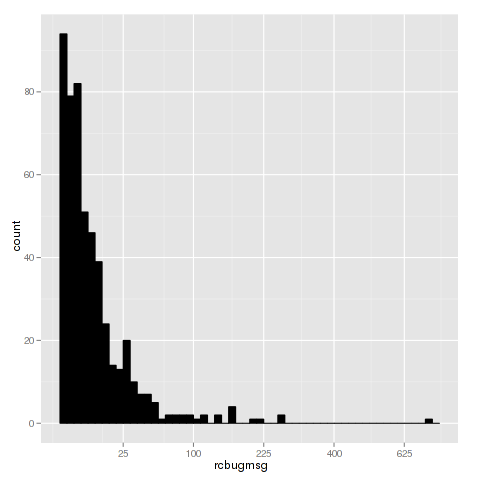
Analysis After parsing the data file we typically want to get an understanding of the data, by using summary(bugs) we get the minimum(1), median(5), mean(15.4), max(716) and quantiles of the data. This shows that the number of messages is wide-spread and a few people contribute a lot. To visualize the dispersion of the data we can create a box plot showing the range of messages: boxplot As the first and third quantile are close together we can assume that the majority of the work is done by a few, especially since the second quantile is 5. This is supported by the histogram below, where the x axis is the number of recorded messages and y is the number of developers. histogram
Top 10 contributors The TOP 10 contributors, according to the dataset, are:
  1. Lucas Nussbaum - 716 messages
  2. Gregor Herrmann - 270 messages
  3. Jakub Wilk - 270 messages
  4. Andreas Beckmann - 225 messages
  5. Julien Cristau - 205 messages
  6. Cyril Brulebois - 169 messages
  7. Moritz Muehlenhoff - 162 messages
  8. Michael Biebl - 159 messages
  9. Salvatore Bonaccorso - 158 messages
  10. Christoph Egger - 142 messages

r commands These are the commands used to generate the plots and information in this plot:
bugs <- read.csv("by-msg.csv")
summary(bugs)
boxplot(bugs$rcbugmsg, log='y', range=0, ylab="# bugs")
quantile(bugs$rcbugmsg)
0%  25%  50%  75% 100%
1    2    5   12  716
# create histogram
llibrary('ggplot2')
ggplot(bugs, aes(x=rcbugmsg)) + geom_histogram(binwidth=.5, colour="black", fill="black") + scale_x_sqrt()
top10 <- tail(bugs[order(bugs$rcbugmsg),], 10)
top10

Ulrich Dangel: Analyzing rc bug messages

Michael Stapelberg recently posted a blog post about looking into the number of Debian Developers actively working on RC bugs for the upcoming wheezy release. In this blog post I analyze the data shared by Michael and provide the R commands used to generate the plots & findings. If you are interested into looking into the data yourself, but don t like R, I suggest using ipython notebook + numpy instead.

Analysis After parsing the data file we typically want to get an understanding of the data, by using summary(bugs) we get the minimum(1), median(5), mean(15.4), max(716) and quantiles of the data. This shows that the number of messages is wide-spread and a few people contribute a lot. To visualize the dispersion of the data we can create a box plot showing the range of messages: boxplot As the first and third quantile are close together we can assume that the majority of the work is done by a few, especially since the second quantile is 5. This is supported by the histogram below, where the x axis is the number of recorded messages and y is the number of developers. histogram

Top 10 contributors The TOP 10 contributors, according to the dataset, are:
  1. Lucas Nussbaum - 716 messages
  2. Gregor Herrmann - 270 messages
  3. Jakub Wilk - 270 messages
  4. Andreas Beckmann - 225 messages
  5. Julien Cristau - 205 messages
  6. Cyril Brulebois - 169 messages
  7. Moritz Muehlenhoff - 162 messages
  8. Michael Biebl - 159 messages
  9. Salvatore Bonaccorso - 158 messages
  10. Christoph Egger - 142 messages

r commands These are the commands used to generate the plots and information in this plot:
bugs <- read.csv("by-msg.csv")
summary(bugs)
boxplot(bugs$rcbugmsg, log='y', range=0, ylab="# bugs")
quantile(bugs$rcbugmsg)
0%  25%  50%  75% 100%
1    2    5   12  716
# create histogram
llibrary('ggplot2')
ggplot(bugs, aes(x=rcbugmsg)) + geom_histogram(binwidth=.5, colour="black", fill="black") + scale_x_sqrt()
top10 <- tail(bugs[order(bugs$rcbugmsg),], 10)
top10

16 April 2013

Stefano Zacchiroli: bits from the DPL for March-April 2013

Dear Project Members,
   "Now that I have your attention, I would like to make the following
delegations:"

... nah, scrap that. In my last day in office I first of all owe you a report of DPL activities for the last reporting period of this term, i.e. March 8th until today. Here it is! Highlights Talks Over the past month or so I've attended and spoken on behalf of Debian in the following occasions: Assets I've approved the budget for the following forthcoming sprints: Also, we've bought a 3-year warranty pack for the disk array that powers ftp-master.d.o (~900 USD). On the income side, Brian Gupta has started an interesting matching fund experiment, in order to raise funds for the forthcoming DebConf13. The matching fund will be open until April 30th, so your help in spreading news would be welcome. Many thanks to Brian for the idea and to his company, Brandorr Group, for funding it. DPL helpers Three more DPL helpers IRC meetings have been held; minutes are available at the usual place. Legal Spring Cleaning I've finally cleaned up the pile of pending legal matters (but I'm sure new ones will show up for the delight of the next DPL :-P) Once again, I'd like to thank SFLC for the pro bono and very high quality legal advice they keep on offering to Debian. Miscellaneous
Now, before I get sentimental, let me thank Gergely, Lucas, and Moray for running in the recently concluded DPL election. Only thinking of running and then go through a campaign denote a very high commitment to the Project; we should all be thankful to them. Then I'd like to congratulate Lucas for his election. I've known him for a long time, and I can testify about his clear vision of the role Debian has to play in Free Software and on what Debian needs to improve to do so. Best wishes for the term ahead, Lucas! Finally, I'd like to thank you all for the support you've shown me over the past 3 years. Serving as DPL is a great honor, but also a very demanding job. Thank to you all, and to how cool Debian is, it has been for me an incredibly rewarding experience. I had no idea what I were doing when I embarked on this adventure, but in hindsight I don't regret any of it. See you around, as I don't plan to be anywhere far away from Debian anytime soon. Cheers.
PS the day-to-day activity logs for March and April 2013 are available at the usual place master:/srv/leader/news/bits-from-the-DPL.txt.20130 3,4

Hideki Yamane: make package modern 40% faster

Does your package still use old debhelper style? How about considering to make it modern.

I've tried to make fontforge package cleanup and use dh style since it fails with -j4 build option. And as the result, its debian/rules file become 1/3 (187 53) and it reduces build time 40% with parallel option.
  • before
    • real 5m13.605s
  • after
    • real 3m24.121s
(both cowbuilder on tmpfs)

14 April 2013

Vasudev Kamath: Handling C++ symbols that vary across architectures

Disclaimer I'm no symbol expert and dealing with symbol files for first time from the time I started packaging. What I did here is depending on some suggestions I got in #debian-mentors. If you think what I did was wrong please enlighten me :-). Problem Recently 2 of my library packages pugixml and ctpp2 got accepted into Debian archive and when buildd tried to build them on remaining architectures other than one for which I uploaded (amd64) builds failed. This was expected as symbols file which I generated was for amd64. As usual I got 2 serious bug reports #704718 and #705135. Solution First I was not sure how to handle this. I read article on symbols files handling by rra [1] and tried to use pkgkde-symbolshelper tool only to quickly figure out that I need to use pkgkde_symbolshelper addon for dh sequencer. But this was not possible for me as I was using CDBS for packaging. I did a quick chat on #debian-mentors and some one suggested me to tag symbols which vary across architecture with (c++) tag. First I was not sure but after reading dpkg-gensymbols man page understood that I need to replace the entire mangled symbols lines with de-mangled version tagged with (c++) in the beginning. But this was hectic job searching for each deleted symbols and replacing it. So I thought of writing a script to do the job and after struggling for 3 days (yeah I was bit dumb that I didn't read manual date: "2013-04-14 18:39:20 +0530" pugixml and ctpp2 package using it, which is now waiting for Jonas for uploading it. Here is the script

#!/bin/bash
set +x
if [ $# -lt 3 ]; then
    echo "Usage: $0 failed_buildlogs_directory symbols_file package_version"
    exit 2
fi
    
BUILD_LOG_DIRECTORY=$1
SYMBOLS_FILE=$2
PACKAGE_VERSION=$3
VERSION_TO_REPLACE=" $PACKAGE_VERSION\""
for LOGFILE in $(ls $BUILD_LOG_DIRECTORY/*.build); do
    for i in $(grep '^-\s_Z' $LOGFILE   perl -pe 's/-//g;'); do
        if [ $i = $PACKAGE_VERSION ];then
            continue
        fi
        demangled_version="\""$(echo $i" "$PACKAGE_VERSION   c++filt)"\""
        tagged_version="(c++)"$ demangled_version%$VERSION_TO_REPLACE "\" "$PACKAGE_VERSION
        escaped_tagged_version=$(echo $tagged_version   sed 's/\&/\\\&/')
        sed -i "s#$i $PACKAGE_VERSION#$escaped_tagged_version#" $SYMBOLS_FILE
   done
done
So basically to make this work we need all buildlogs to be downloaded from buildd's again this was easy thanks to rra for developing pkgkde-getbuildlogs :-). Once you have build logs directory run the above script as follows
cppsymbol_replace.sh path_to_buildlogs path_to_symbol_file upstream_version
After replacing symbols I tried to build package on i386 chroot and build passed successfully but lintian told me that there are symbols which have Debian version appended to it and this might lead to date: "2013-04-14 18:42:42 +0530" back to mentors :-). It is this time I really understood concept of mangled names generated by compiler and why it vary across the architecture ;-). This time some one by nick pochu suggested me to pass option -v with package version to dpkg-gensymbols to make it generate symbols with package version and not Debian version. The following probably needs to be done if package uses dh sequencer but I'm not sure as I've not tested it. If wrong please correct me.
override_dh_makeshlibs:
    dh_makeshlibs -- -v$PACKAGEVERION #package version needs to be either extracted using parsechangelog or manually fed
If you are using CDBS this is pretty simple. Just add following to rules
DEB_DH_MAKESHLIBS_ARGS_$(pkgname) += -- -v$(DEB_UPSTREAM_VERSION)
I noticed that when I provide (c++) tagged de-mangled name dpkg-gensymbols simply replaces it with proper mangled name but the deletion doesn't trigger an error in dpkg-gensymbols. This script me allowed to replace 128 symbols which were very tricky and long with de-mangled and tagged version in ctpp2, so I hope it should work across different packages without any problem. Only silly mistake I did was occurrence of & symbol in function making sed go mad which I took one full day to debug :facepalm:. So that's it folks, if you see something wrong in what I did please let me know through the comments. [1] http://www.eyrie.org/~eagle/journal/2012-01/008.html

11 April 2013

Russ Allbery: Review: Familiar

Review: Familiar, by J. Robert Lennon
Publisher: Greywolf
Copyright: 2012
ISBN: 1-55597-535-6
Format: Hardcover
Pages: 205
This is the first book of an experiment. I'm fairly well-read in science fiction and fantasy and increasingly well-read in non-fiction of interest (although there's always far more of that than I'll get to in a lifetime), but woefully unfamiliar with what's called "mainstream" literature. Under the principal that things people are excited about are probably exciting, I've wanted to read more and understand the appeal. Powell's, which I like to support anyway, has a very nice (albeit somewhat expensive) book club called Indiespensable, which sends its subscribers very nice editions of new works that Powell's thinks are interesting, with a special focus on independent publishers. So I signed up and hope to stick with it for at least a year. (The trick will be fitting these books in amongst my regular reading.) Familiar is the first feature selection I received. Elisa Brown is a mother with a dead son and a living one, a failing marriage, an affair, and a life that is, in short, falling apart. Then, while driving back from her annual pilgrimage from her son's grave, the world seems to twist and change. She finds herself dressed for business, wearing a nametag and apparently coming back from a work-related convention, driving a car that's entirely unfamiliar to her. When she gets home, everything else has changed too: her marriage seems to be on firmer ground, but based on rules she doesn't understand. She has a different job, different clothes, a different body in some subtle ways. And both of her sons are alive. I'm going to have to have a long argument with myself about where to (meaninglessly) categorize this on my review site, since in construction it is an alternate reality story and therefore a standard SF trope. Any SF reader is going to immediately assume Elisa has somehow been transported into an alternate reality with a key divergence point from her own. But that's not Lennon's focus. He stays ambiguous on the question of whether this is really happening or whether Elisa had some sort of nervous breakdown, and while some amount of investigation of the situation does take place, it's the sort of investigation that an average person with no access to special resources or scientific knowledge and a completely unbelievable story would be able to do: Internet conspiracy chatrooms and some rather dodgy characters. The focus is instead on Elisa's reaction to the situation, her choices about how to treat this new life, and on how she processes her complex emotions about her family and herself. I had profoundly mixed feelings about this book when I finished it, and revisiting it to review it, I still do. The writing is excellent: spare, evocative, and enjoyable to read. Lennon has a knack for subjective description of emotion and physical experience. The reader feels Elisa's deep discomfort with her changed body and her changed car, her swings between closed-off emotions and sudden emotional connection with a specific situation, and her struggle with the baffling question of how to come to terms with a whole new life. The part of the book from about the middle to nearly the end is excellent. Video games make an appearance and are handled surprisingly well. And when Elisa starts being blunt with people, I found myself both liking her and caring about what happens to her. On the other hand, Familiar also has some serious problems, and one of the biggest is the reaction I feared I'd have to mainstream literature: until Elisa started opening up and taking action, I found it extremely difficult to care about anyone in this book. They're all so profoundly petty, so closed off and engrossed in what seem like depressing and utterly boring lives. I'm sure that some of this is intentional and is there to lay the groundwork for Elisa's own self-discovery, but even towards the end of that self-discovery, everything here is so relentlessly middle-class suburbia that I felt stifled just reading about it. I think it's telling that no one in this book ever seems to have any substantial problem with money, or even with work. Elisa walks into a job that she's never done before and within a few weeks is doing it so well that she can take large amounts of time to wander around for plot purposes. This is a book about highly privileged people being miserable in a bubble. While those people certainly do exist, and I can believe that they act like this, I'm not sure how much I want to read about them. Thankfully, the plot does lead Elisa to poke some holes in that bubble, if never get out of it entirely. This is also another one of those stories in which every character has massive communication problems. Now, this deserves some caveats: Elisa's communication problems with her husband are part of the problem that starts the book and are clearly intentional, as are her communication difficulties with her children. And she's not really close enough to anyone to confide in them. But even with those caveats, no one in this book really talks to anyone else. It's amazing that anyone forms any connections at all, given how many walls and barriers they have around themselves. As someone with a bit of a thing for communication, this drove me nuts to read about, particularly in the first half of the book. But the worst problem is that Lennon completely blows the ending. And by that I don't just mean that I disliked the ending. I mean the ending is so unbelievable and so contrary to the entire rest of the book, at least the way I was reading and understanding it, that I think Familiar is a much better novel if you just remove the final scene entirely. It was such a bizarre and unnecessary twist that I found it infuriating. I don't want to spoil an ending, even a bad ending, so I'll only say this: it felt to me like Lennon just wasn't comfortable with his setting and plot driver and couldn't leave it alone. I think an experienced SF author wouldn't have made this mistake. There were two obvious possible conclusions to draw from the setting, plus a few interesting combinations, and I think someone comfortable with this sort of alternate reality story would have taken one of those options, any of which would have been a reasonable dismount for the plot. Alternately, they could have left it entirely ambiguous to the end and explored why the explanation may not actually matter. But Lennon seemed to me to have a tin ear for plausibility and for the normal flow of this sort of story and seems to have taken it as license for arbitrary events, thus completely violating the internal consistency and emergent rules that he'd spent the rest of the book building. I've mostly talked about my reactions to the characters and the writing and have not said much about the plot. That's somewhat intentional, since figuring out where the story will go is one of the best parts of this book. It's surprisingly tense and well-crafted for not having that much inherent dramatic tension. The excellent writing kept me reading through the first part, when I hated everyone in the story, and then Elisa started taking responsibility for her own life and actions and I started really enjoying the book while being constantly surprised. I think it's the sort of story that's best to take without too much foreknowledge of where it's going. I'm going to call this first experiment a qualfied success. Familiar was certainly interesting to read, and quite different from what I normally read despite the SF premise. If it weren't for the ending, I'd be recommending it to other people. Rating: 6 out of 10

10 April 2013

Lars Wirzenius: Machine-parseable embedded license summary information

There is no common way to express license information in each source file at the moment. Some people embed license information in each file, others keep it in README or another file at the top of the source tree. Worse, there is no common syntax to express the license information in a machine-parseable way. If we had this, we could have tools that, for example, tell you if you're trying to merge code that has an incompatible license. Obviously, this kind of thing can never work perfectly. People keep inventing new licenses, and it is not possible for a computer program to fully understand any license. It is not clear humans can do that, either. However, it would be possible to do it to a number of well-known licenses, which would help most of the time. A classic 20/80 situation. I would like to suggest a syntax, similar to Emacs's "Hey Emacs" modelines, for embedding a summary of the license, or licenses, for a source file, in such a way that it can be programmatically extracted and parsed and analysed. With this syntax, one could then write a tool to ensure that all files in a project have the same license, or that all licenses are compatible with the project's overall license. Such a tool will, of course, rely on heuristics and assumptions. For example, it needs to assume the machine-parseable license summary is correct, and rely on a ruleset on what licenses are compatible with what licenses. Things can go wrong. That's life. Remember, this is aiming at doing the 20% of the work that will work 80% of the time, not perfection. I don't have a tool written, but I have a suggestion for the syntax.

/*
 * Copyright 2013 Lars Wirzenius
 *
 * tl;dr =*= Licenses: GPL-3+ or Expat, and Artistic =*=
 *
 * Blah. Blah. Blah. Imagine long, boring license texts 
 * here.
 */
The important part is this:
=*= Licenses: GPL-3+ or Expat, and Artistic =*=
The =*= prefix and suffix and the word Licenses are there to make grepping reasonably reliable without too many false positives, and to allow comment characters and other text on the same line. The actual license summary follows the syntax and semantics of the Debian copyright-format 1.0 specification, which I chose because it exists and has had a fair bit of review so far, and is reasonably expressive. The license summaries can be extracted with the following GNU sed invocation:
sed -n '/.*=\*= [Ll]icen[cs]es\?: \(.*\)=\*=.*/s//\1/p'
I allowed various forms of the word license, since it's a word that a lot of people will get wrong, and it's easy to catch all four common forms. So, does anyone else think this might be useful? Would you use it in your own projects?

5 April 2013

Matthew Garrett: Update on leaked UEFI signing keys - probably no significant risk

According to the update here, the signing keys are supposed to be replaced by the hardware vendor. If vendors do that, this ends up being uninteresting from a security perspective - you could generate a signed image, but nothing would trust it. It should be easy enough to verify, though. Just download a firmware image from someone using AMI firmware, pull apart the capsule file, decompress everything and check whether the leaked public key is present in the binaries.

The real risk here is that even if most vendors have replaced that key, some may not have done. There's certainly an argument that shipping test keys at all increases the probability that a vendor will accidentally end up using those rather than generating their own, and it's difficult to rule out the possibility that that's happened.

comment count unavailable comments

Lior Kaplan: The commit police: reference you bugs properly

Besides my RTL work on Libreoffice, every once in a while I just go over the regular commit log to see what have changed. I don t necessary understand each line in the commit, but do get the general idea from the commit message. Being more dependent on the commit messages makes me review them more thoroughly (hence the topic of this post). As many projects, Libreoffice has notifications of commits related to bugs reports when the bug number is properly mentioned in the commit message. This is very useful for other developers and also for QA people. After verification of a bug is fixed, I often use the commits listed on the bug report to cherry pick them to an older branch. Going to search for an unreferenced commit isn t much fun. One of the things I notice is different ways people reference bugs from not referencing them at all to referencing them in various ways like linking to the bugs system, just writing the number (without the fdo# prefix) and other creative ways This is also true for first time contributors, which might not know the standards or the rules . When I see such a case I usually put a manual notification in the bug report, and mail the author of doing so. For new or sporadic contributors this is also an opportunity to welcome and thank them for the commit and even encourage future contributions. I have been asked why aren t that info on the wiki, so I went looking and found out the info is in the right place under the Development/GetInvolved page. The relevant part is:
When you type a commit message:
  • start the first line with a bug reference like fdo#12345, if you have one for your commit (see details below)
  • use the rest of the first line as a concise summary of your changes
  • the 2nd line remains empty
  • and starting on the 3rd line you can explain how and what changes have been made for what reasons.
Thanks in advance and happy coding (:
Filed under: LibreOffice

Michal &#268;iha&#345;: Unknown phpMyAdmin features - server monitoring

phpMyAdmin has in last year received various useful features, which are not that well known. I've decided to give them some promotion before releasing phpMyAdmin 4.0. The server monitoring part is already present since phpMyAdmin 3.5, but some of the parts were further improved in 4.0. Server monitor Server monitor (as you can see on picture above or on demo server) allows you to follow server status in real time. Besides predefined charts, you can choose to follow any of MySQL server status variables or some system parameters. If you see something weird in the charts, you can select interval and inspect slow or general query log (if you have enabled it). This can help you finding most problematic queries for your server. Server configuration advisor Advisor (on picture above or on demo server) is another way to improve server performance - it comes with extensive set of rules, which can help you tuning performance for your workload. Your server has to be running for significant time to give some reasonable recommendations (so don't expect these on the demo server, which is restarted quite often). However it is still recommended to read server documentation before doing any adjustments, as the setting might have some side effects, which will affect your workload as well. Of course these are not magic pill to cure your unresponsive server, but can help you a lot in finding possible bottlenecks.

Filed under: English Phpmyadmin 0 comments Flattr this!

4 April 2013

Bernhard R. Link: Git package workflows

Given the recent discussions on planet.debian.org I use the opportunity to describe how you can handle upstream history in a git-dpm workflow. One of the primary points of git-dpm is that you should be able to just check out the Debian branch, get the .orig.tar file(s) (for example using pristine-tar, by git-dpm prepare or by just downloading them) and then calling dpkg-buildpackage. Thus the contents of the Debian branch need to be clean from dpkg-source's point of view, that is do not contain any files the .orig.tar file(s) contains not nor any modified files. The easy way The easiest way to get there is by importing the upstream tarball(s) as a git commit, which one will usually do with git-dpm import-new-upstream as that also does some of the bookkeeping. This new git commit will have (by default) the previous upstream commit and any parent you give with -p as parents. (i.e. with -p it will be a merge commit) and its content will be the contents of the tarball (with multiple orig files, it gets more complicated). The idea is of course that you give the upstream tag/commit belonging to this release tarball with -p so that it becomes part of your history and so git blame can find those commits. Thus you get a commit with the exact orig contents (so pristine-tar can more easily create small deltas) and the history combined.. Sometimes there are files in the upstream tarball that you do not want to have in your Debian branch (as you remove them in debian/rules clean), then when using this method you will have those files in the upstream branch but you delete them in the Debian branch. (This is why git-dpm merge-patched (the operation to merge a new branch with upstream + patches with your previous debian/ directory) will look which files relative to the previous upstream branch are deleted and delete them also in the newly merged branch by default). The complicated way There is only a way without importing the .orig.tar file(s), though that is a bit more complicated: The idea is that if your upstream's git repository contains all the files needed for building your Debian package (for example if you call autoreconf in your Debian package and clean all the generated files in the clean target, or if upstream has a less sophisticated release process and their .tar contains only stuff from the git repository), you can just use the upstream git commit as base for your Debian branch. Thus you can make upstream's commit/tag your upstream branch, by recording it with git-dpm new-upstream together with the .orig.tar it belongs to (Be careful, git-dpm does not check if that branch contains any files different than your .orig.tar and could not decide if it misses any files you need to build even if it tried to tell). Once that is merged with the debian/ directory to create the Debian branch, you run dpkg-buildpackage, which will call dpkg-source which compares your working directory with the contents of the .orig.tar with the patches applied. As it will only see files not there but no files modified or added (if everything was done correctly), one can work directly in the git checkout without needing to import the .orig.tar files at all (altough the pristine-tar deltas might get a bit bigger).

Daniel Pocock: Comparing packaging workflows in Debian and beyond

My blog post yesterday about Debian's git packaging workflows was meant to help fill some gaps in the documentation of this process, one of the most significant being the diagram. I was surprised to find that some people felt my post argues that distribution tarballs are a must-have or that separate repositories are the optimal solution. In fact, my post was more a reflection of how things are being done, and it is great to see contributions from Joey, Russ and Thomas proposing ways to integrate the workflow in a single repository and also raising questions about the future of tarballs. Some of the changes outlined by Russ only entered the tools after many people were already using the workflow I have described. Given the rise of collaboration, through collab-maint and packaging teams, it is more important than ever that workflows and tools are easily understood and documented. This lets new contributors (including people new to Debian) jump in more quickly and with less risk of disruption. It would be great to see some of these latest ideas covered more thoroughly with diagrams and I'm happy for people to rip-off my dia source file for my own diagram and amend it as they please (under the generous terms of the GPL v3) A look at other packaging systems With the role of the tarball in people's sights, it's worth looking outside Debian for a moment:
  • Android packaging is radically different. All packages have a single integer version number. The pretty version number displayed to the user is meaningless. Due to the continuously increasing integer version, and the way that database schemas are versioned, it is not really possible to even keep multiple release branches in a repository. For an example, see the version in the Lumicall AndroidManifest.xml and the database upgrade function. Google Play/Android Market makes no rules about how a project manages its code. f-droid, the open source market for apps, builds projects like Lumicall directly from git, it relies on them having an ant build file in the standard format generated by the SDK.
  • OpenCSW does not keep upstream tarballs at all. They keep a single git repository for tracking all packages. Each package is built from a Makefile (sample), and their tool suite takes care of downloading the upstream sources (using a URL specified in the Makefile) and verifying against checksums tracked in the repository (sample). The common style of the Makefiles makes it very easy for somebody familiar with the tools to work on just about any of the packages, and anybody who knows how to write a Makefile can start quickly.
Of course, these are just a few examples. These days, software is distributed in many different ways, whether it is a runnable VM image or an embedded device implanted during surgery.

Next.

Previous.


