Search Results: "xam"

11 August 2020

Dirk Eddelbuettel: RcppSimdJson 0.1.1: More Features

A first update following for the exciting RcppSimdJson 0.1.0 release last month is now on CRAN. Version 0.1.1 brings further enhancements such direct parsing of raw chars, working with compressed files as well as much expanded querying ability all thanks to Brendan, some improvements to our demos thanks to Daniel as well as a small fix via a one-liner borrowed from upstream for a reported UBSAN issue. RcppSimdJson wraps the fantastic and genuinely impressive simdjson library by Daniel Lemire and collaborators. Via very clever algorithmic engineering to obtain largely branch-free code, coupled with modern C++ and newer compiler instructions, it results in parsing gigabytes of JSON parsed per second which is quite mindboggling. The best-case performance is faster than CPU speed as use of parallel SIMD instructions and careful branch avoidance can lead to less than one cpu cycle use per byte parsed; see the video of the talk by Daniel Lemire at QCon (also voted best talk). The detailed list of changes follows.

Changes in version 0.1.1 (2020-08-10)
  • Corrected incorrect file deletion when mixing local and remote files (Brendan in #34) closing #33.
  • Added support for raw vectors, compressed files, and compressed downloads (Dirk and Brendan in #36, #39, and #45 closing #35 and addressing issues raised in #40 and #44).
  • Examples in two demos are now more self-sufficient (Daniel Lemire and Dirk in #42).
  • Expanded query functionality to include single, flat, and nested queries (Brendan in #45 closing #43).
  • Split error handling parameters from error_ok/on_error into parse_error_ok/on_parse_error and query_error_ok/on_query_error (Brendan in #45).
  • One-line upstream change to address sanitizer error on cast.

Courtesy of CRANberries, there is also a diffstat report for this release. For questions, suggestions, or issues please use the issue tracker at the GitHub repo. If you like this or other open-source work I do, you can now sponsor me at GitHub. For the first year, GitHub will match your contributions.

This post by Dirk Eddelbuettel originated on his Thinking inside the box blog. Please report excessive re-aggregation in third-party for-profit settings.

Jonathan Carter: GameMode in Debian

What is GameMode, what does it do? About two years ago, I ran into some bugs running a game on Debian, so installed Windows 10 on a spare computer and ran it on there. I learned that when you launch a game in Windows 10, it automatically disables notifications, screensaver, reduces power saving measures and gives the game maximum priority. I thought Oh, that s actually quite nice, but we probably won t see that kind of integration on Linux any time soon . The very next week, I read the initial announcement of GameMode, a tool from Feral Interactive that does a bunch of tricks to maximise performance for games running on Linux. When GameMode is invoked it:

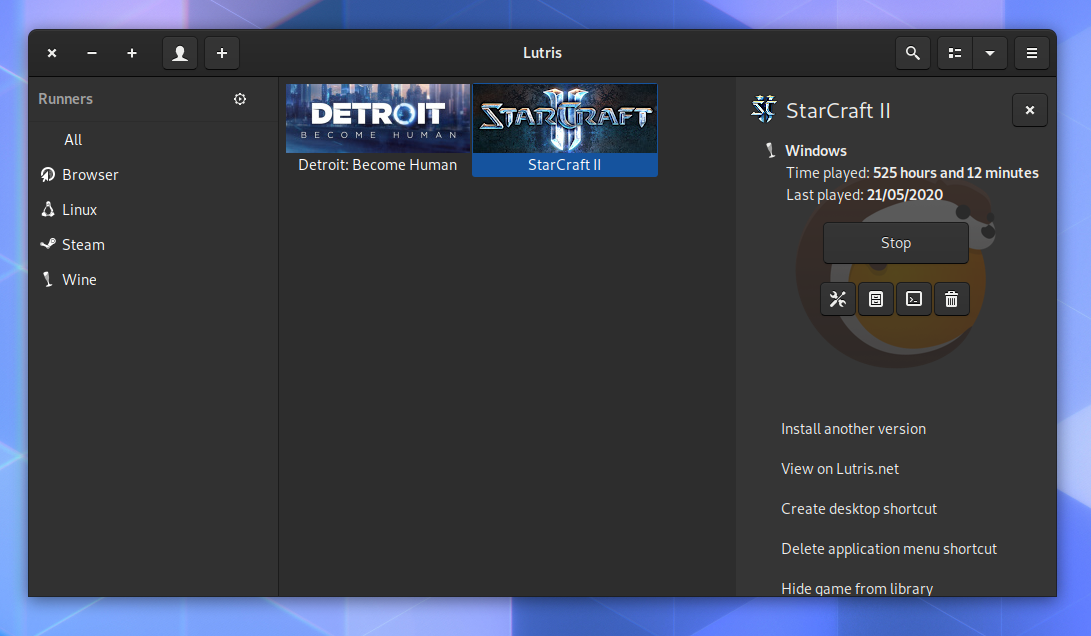
How GameMode is invoked Some newer games (proprietary games like Rise of the Tomb Raider , Total War Saga: Thrones of Britannia , Total War: WARHAMMER II , DiRT 4 and Total War: Three Kingdoms ) will automatically invoke GameMode if it s installed. For games that don t, you can manually evoke it using the gamemoderun command. Lutris is a tool that makes it easy to install and run games on Linux, and it also integrates with GameMode. (Lutris is currently being packaged for Debian, hopefully it will make it in on time for Bullseye).

Screenshot of Lutris, a tool that makes it easy to install your non-Linux games, which also integrates with GameMode.

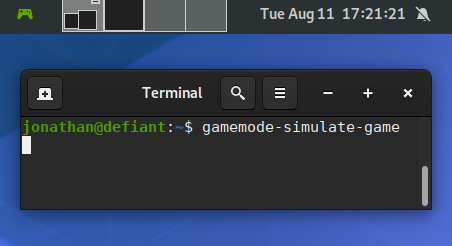
GameMode in Debian The latest GameMode is packaged in Debian (Stephan Lachnit and I maintain it in the Debian Games Team) and it s also available for Debian 10 (Buster) via buster-backports. All you need to do to get up and running with GameMode is to install the gamemode package. GameMode in Debian supports 64 bit and 32 bit mode, so running it with older games (and many proprietary games) still work. Some distributions (like Arch Linux), have dropped 32 bit support, so 32 bit games on such systems lose any kind of integration with GameMode even if you can get those games running via other wrappers on such systems. We also include a binary called gamemode-simulate-game (installed under /usr/games/). This is a minimalistic program that will invoke gamemode automatically for 10 seconds and then exit without an error if it was successful. Its source code might be useful if you d like to add GameMode support to your game, or patch a game in Debian to automatically invoke it. In Debian we install Gamemode s example config file to /etc/gamemode.ini where a user can customise their system-wide preferences, or alternatively they can place a copy of that in ~/.gamemode.ini with their personal preferences. In this config file, you can also choose to explicitly allow or deny games. GameMode might also be useful for many pieces of software that aren t games. I haven t done any benchmarks on such software yet, but it might be great for users who use CAD programs or use a combination of their CPU/GPU to crunch a large amount of data. I ve also packaged an extension for GNOME called gamemode-extension. The Debian package is called gnome-shell-extension-gamemode . You ll need to enable it using gnome-tweaks after installation, it will then display a green controller in your notification area whenever GameMode is active. It s only in testing/bullseye since it relies on a newer gnome-shell than what s available in buster.

Running gamemode-simulate-game, with the shell extension showing that it s activated in the top left corner.

10 August 2020

Dirk Eddelbuettel: nanotime 0.3.1: Misc Build Fixes for Yuge New Features!

The nanotime 0.3.0 release four days ago was so exciting that we decided to do it again! Kidding aside, and fairly extensive tests notwithstanding we were bitten by a few build errors: who knew clang on macOS needed extra curlies to be happy, another manifestation of Solaris having no idea what a timezone setting America/New_York is, plus some extra pickyness from the SAN tests and whatnot. So Leonardo and I gave it some extra care over the weekend, uploaded it late yesterday and here we are with 0.3.1. Thanks again to CRAN for prompt processing even though they are clearly deluged shortly before their (brief) summer break. nanotime relies on the RcppCCTZ package for (efficient) high(er) resolution time parsing and formatting up to nanosecond resolution, and the bit64 package for the actual integer64 arithmetic. Initially implemented using the S3 system, it has benefitted greatly from work by Leonardo Silvestri who rejigged internals in S4 and now added new types for periods, intervals and durations. The NEWS snippet adds full details.

Changes in version 0.3.1 (2020-08-09)
  • Several small cleanups to ensure a more robust compilation (Leonardo and Dirk in #75 fixing #74).
  • Show Solaris some extra love by skipping tests and examples with a timezone (Dirk in #76).

Thanks to CRANberries there is also a diff to the previous version. More details and examples are at the nanotime page; code, issue tickets etc at the GitHub repository. If you like this or other open-source work I do, you can now sponsor me at GitHub. For the first year, GitHub will match your contributions.

This post by Dirk Eddelbuettel originated on his Thinking inside the box blog. Please report excessive re-aggregation in third-party for-profit settings.

Arnaud Rebillout: GoAccess 1.4, a detailed tutorial

GoAccess v1.4 was just released a few weeks ago! Let's take this chance to write a loooong tutorial. We'll go over every steps to install and operate GoAccess. This is a tutorial aimed at those who don't play sysadmin every day, and that's why it's so long, I did my best to provide thorough explanations all along, so that it's more than just a "copy-and-paste" kind of tutorial. And for those who do play sysadmin everyday: please try not to fall asleep while reading, and don't hesitate to drop me an e-mail if you spot anything inaccurate in here. Thanks! Introduction So what's GoAccess already? GoAccess is a web log analyzer, and it allows you to visualize the traffic for your website, and get to know a bit more about your visitors: how many visitors and hits, for which pages, coming from where (geolocation, operating system, web browser...), etc... It does so by parsing the access logs from your web server, be it Apache, NGINX or whatever. GoAccess gives you different options to display the statistics, and in this tutorial we'll focus on producing a HTML report. Meaning that you can see the statistics for your website straight in your web browser, under the form of a single HTML page. For an example, you can have a look at the stats of my blog here: http://goaccess.arnaudr.io. GoAccess is written in C, it has very few dependencies, it had been around for about 10 years, and it's distributed under the MIT license. Assumptions This tutorial is about installing and configuring, so I'll assume that all the commands are run as root. I won't prefix each of them with sudo. I use the Apache web server, running on a Debian system. I don't think it matters so much for this tutorial though. If you're using NGINX it's fine, you can keep reading. Also, I will just use the name SITE for the name of the website that we want to analyze with GoAccess. Just replace that with the real name of your site. I also assume the following locations for your stuff: If you have your stuff in /srv/SITE/ log,www instead, no worries, just adjust the paths accordingly, I bet you can do it. Installation The latest version of GoAccess is v1.4, and it's not yet available in the Debian repositories. So for this part, you can follow the instructions from the official GoAccess download page. Install steps are explained in details, so there's nothing left for me to say :) When this is done, let's get started with the basics. We're talking about the latest version v1.4 here, let's make sure:
$ goaccess --version
GoAccess - 1.4.
...
Now let's try to create a HTML report. I assume that you already have a website up and running. GoAccess needs to parse the access logs. These logs are optional, they might or might not be created by your web server, depending on how it's configured. Usually, these log files are named access.log, unsurprisingly. You can check if those logs exist on your system by running this command:
find /var/log -name access.log
Another important thing to know is that these logs can be in different formats. In this tutorial we'll assume that we work with the combined log format, because it seems to be the most common default. To check what kind of access logs your web server produces, you must look at the configuration for your site. For an Apache web server, you should have such a line in the file /etc/apache2/sites-enabled/SITE.conf:
CustomLog $ APACHE_LOG_DIR /SITE/access.log combined
For NGINX, it's quite similar. The configuration file would be something like /etc/nginx/sites-enabled/SITE, and the line to enable access logs would be something like:
access_log /var/log/nginx/SITE/access.log
Note that NGINX writes the access logs in the combined format by default, that's why you don't see the word combined anywhere in the line above: it's implicit. Alright, so from now on we assume that yes, you have access log files available, and yes, they are in the combined log format. If that's the case, then you can already run GoAccess and generate a report, for example for the log file /var/log/apache2/access.log
goaccess \
    --log-format COMBINED \
    --output /tmp/report.html \
    /var/log/apache2/access.log
It's possible to give GoAccess more than one log files to process, so if you have for example the file access.log.1 around, you can use it as well:
goaccess \
    --log-format COMBINED \
    --output /tmp/report.html \
    /var/log/apache2/access.log \
    /var/log/apache2/access.log.1
If GoAccess succeeds (and it should), you're on the right track! All is left to do to complete this test is to have a look at the HTML report created. It's a single HTML page, so you can easily scp it to your machine, or just move it to the document root of your site, and then open it in your web browser. Looks good? So let's move on to more interesting things. Web server configuration This part is very short, because in terms of configuration of the web server, there's very little to do. As I said above, the only thing you want from the web server is to create access log files. Then you want to be sure that GoAccess and your web server agree on the format for these files. In the part above we used the combined log format, but GoAccess supports many other common log formats out of the box, and even allows you to parse custom log formats. For more details, refer to the option --log-format in the GoAccess manual page. Another common log format is named, well, common. It even has its own Wikipedia page. But compared to combined, the common log format contains less information, it doesn't include the referrer and user-agent values, meaning that you won't have it in the GoAccess report. So at this point you should understand that, unsurprisingly, GoAccess can only tell you about what's in the access logs, no more no less. And that's all in term of web server configuration. Configuration to run GoAccess unprivileged Now we're going to create a user and group for GoAccess, so that we don't have to run it as root. The reason is that, well, for everything running unattended on your server, the less code runs as root, the better. It's good practice and common sense. In this case, GoAccess is simply a log analyzer. So it just needs to read the logs files from your web server, and there is no need to be root for that, an unprivileged user can do the job just as well, assuming it has read permissions on /var/log/apache2 or /var/log/nginx. The log files of the web server are usually part of the adm group (though it might depend on your distro, I'm not sure). This is something you can check easily with the following command:
ls -l /var/log   grep -e apache2 -e nginx
As a result you should get something like that:
drwxr-x--- 2 root adm 20480 Jul 22 00:00 /var/log/apache2/
And as you can see, the directory apache2 belongs to the group adm. It means that you don't need to be root to read the logs, instead any unprivileged user that belongs to the group adm can do it. So, let's create the goaccess user, and add it to the adm group:
adduser --system --group --no-create-home goaccess
addgroup goaccess adm
And now, let's run GoAccess unprivileged, and verify that it can still read the log files:
setpriv \
    --reuid=goaccess --regid=goaccess \
    --init-groups --inh-caps=-all \
    -- \
    goaccess \
    --log-format COMBINED \
    --output /tmp/report2.html \
    /var/log/apache2/access.log
setpriv is the command used to drop privileges. The syntax is quite verbose, it's not super friendly for tutorials, but don't be scared and read the manual page to learn what it does. In any case, this command should work, and at this point, it means that you have a goaccess user ready, and we'll use it to run GoAccess unprivileged. Integration, option A - Run GoAccess once a day, from a logrotate hook In this part we wire things together, so that GoAccess processes the log files once a day, adds the new logs to its internal database, and generates a report from all that aggregated data. The result will be a single HTML page. Introducing logrotate In order to do that, we'll use a logrotate hook. logrotate is a little tool that should already be installed on your server, and that runs once a day, and that is in charge of rotating the log files. "Rotating the logs" means moving access.log to access.log.1 and so on. With logrotate, a new log file is created every day, and log files that are too old are deleted. That's what prevents your logs from filling up your disk basically :) You can check that logrotate is indeed installed and enabled with this command (assuming that your init system is systemd):
systemctl status logrotate.timer
What's interesting for us is that logrotate allows you to run scripts before and after the rotation is performed, so it's an ideal place from where to run GoAccess. In short, we want to run GoAccess just before the logs are rotated away, in the prerotate hook. But let's do things in order. At first, we need to write a little wrapper script that will be in charge of running GoAccess with the right arguments, and that will process all of your sites. The wrapper script This wrapper is made to process more than one site, but if you have only one site it works just as well, of course. So let me just drop it on you like that, and I'll explain afterward. Here's my wrapper script:
 1
 2
 3
 4
 5
 6
 7
 8
 9
10
11
12
13
14
15
16
17
18
19
20
21
22
23
24
25
26
27
28
29
30
31
32
33
34
35
36
37
38
39
40
41
42
43
44
45
46
47
48
49
50
#!/bin/bash
# Process log files /var/www/apache2/SITE/access.log,
# only if /var/lib/goaccess-db/SITE exists.
# Create HTML reports in $1, a directory that must exist.
set -eu
OUTDIR=
LOGDIR=/var/log/apache2
DBDIR=/var/lib/goaccess-db
fail()   echo >&2 "$@"; exit 1;  
[ $# -eq 1 ]   fail "Usage: $(basename $0) OUTPUT_DIRECTORY"
OUTDIR=$1
[ -d "$OUTDIR" ]   fail "'$OUTDIR' is not a directory"
[ -d "$LOGDIR" ]   fail "'$LOGDIR' is not a directory"
[ -d "$DBDIR"  ]   fail "'$DBDIR' is not a directory"
for d in $(find "$LOGDIR" -mindepth 1 -maxdepth 1 -type d); do
    site=$(basename "$sitedir")
    dbdir=$DBDIR/$site
    logfile=$d/access.log
    outfile=$OUTDIR/$site.html
    if [ ! -d "$dbdir" ]   [ ! -e "$logfile" ]; then
        echo "  Skipping site '$site'"
        continue
    else
        echo "  Processing site '$site'"
    fi
    setpriv \
        --reuid=goaccess --regid=goaccess \
        --init-groups --inh-caps=-all \
        -- \
    goaccess \
        --agent-list \
        --anonymize-ip \
        --persist \
        --restore \
        --config-file /etc/goaccess/goaccess.conf \
        --db-path "$dbdir" \
        --log-format "COMBINED" \
        --output "$outfile" \
        "$logfile"
done
So you'd install this script at /usr/local/bin/goaccess-wrapper for example, and make it executable:
chmod +x /usr/local/bin/goaccess-wrapper
A few things to note: As is, the script makes the assumption that the logs for your site are logged in a sub-directory /var/log/apache2/SITE/. If it's not the case, adjust that in the wrapper accordingly. The name of this sub-directory is then used to find the GoAccess database directory /var/lib/goaccess-db/SITE/. This directory is expected to exist, meaning that if you don't create it yourself, the wrapper won't process this particular site. It's a simple way to control which sites are processed by this GoAccess wrapper, and which sites are not. So if you want goaccess-wrapper to process the site SITE, just create a directory with the name of this site under /var/lib/goaccess-db:
mkdir -p /var/lib/goaccess-db/SITE
chown goaccess:goaccess /var/lib/goaccess-db/SITE
Now let's create an output directory:
mkdir /tmp/goaccess-reports
chown goaccess:goaccess /tmp/goaccess-reports
And let's give a try to the wrapper script:
goaccess-wrapper /tmp/goaccess-reports
ls /tmp/goaccess-reports
Which should give you:
SITE.html
At the same time, you can check that GoAccess populated the database with a bunch of files:
ls /var/lib/goaccess-db/SITE
Setting up the logrotate prerotate hook At this point, we have the wrapper in place. Let's now add a pre-rotate hook so that goaccess-wrapper runs once a day, just before the logs are rotated away. The logrotate config file for Apache2 is located at /etc/logrotate.d/apache2, and for NGINX it's at /etc/logrotate.d/nginx. Among the many things you'll see in this file, here's what is of interest for us: In the config file, there is also this snippet:
prerotate
    if [ -d /etc/logrotate.d/httpd-prerotate ]; then \
        run-parts /etc/logrotate.d/httpd-prerotate; \
    fi; \
endscript
It indicates that scripts in the directory /etc/logrotate.d/httpd-prerotate/ will be executed before the rotation takes place. Refer to the man page run-parts(8) for more details... Putting all of that together, it means that logs from the web server are rotated once a day, and if we want to run scripts just before the rotation, we can just drop them in the httpd-prerotate directory. Simple, right? Let's first create this directory if it doesn't exist:
mkdir -p /etc/logrotate.d/httpd-prerotate/
And let's create a tiny script at /etc/logrotate.d/httpd-prerotate/goaccess:
1
2
#!/bin/sh
exec goaccess-wrapper /tmp/goaccess-reports
Don't forget to make it executable:
chmod +x /etc/logrotate.d/httpd-prerotate/goaccess
As you can see, the only thing that this script does is to invoke the wrapper with the right argument, ie. the output directory for the HTML reports that are generated. And that's all. Now you can just come back tomorrow, check the logs, and make sure that the hook was executed and succeeded. For example, this kind of command will tell you quickly if it worked:
journalctl   grep logrotate
Integration, option B - Run GoAccess once a day, from a systemd service OK so we've just seen how to use a logrotate hook. One downside with that is that we have to drop privileges in the wrapper script, because logrotate runs as root, and we don't want to run GoAccess as root. Hence the rather convoluted syntax with setpriv. Rather than embedding this kind of thing in a wrapper script, we can instead run the wrapper script from a [systemd][] service, and define which user runs the wrapper straight in the systemd service file. Introducing systemd niceties So we can create a systemd service, along with a systemd timer that fires daily. We can then set the user and group that execute the script straight in the systemd service, and there's no need for setpriv anymore. It's a bit more streamlined. We can even go a bit further, and use systemd parameterized units (also called templates), so that we have one service per site (instead of one service that process all of our sites). That will simplify the wrapper script a lot, and it also looks nicer in the logs. With this approach however, it seems that we can't really run exactly before the logs are rotated away, like we did in the section above. But that's OK. What we'll do is that we'll run once a day, no matter the time, and we'll just make sure to process both log files access.log and access.log.1 (ie. the current logs and the logs from yesterday). This way, we're sure not to miss any line from the logs. Note that GoAccess is smart enough to only consider newer entries from the log files, and discard entries that are already in the database. In other words, it's safe to parse the same log file more than once, GoAccess will do the right thing. For more details see "INCREMENTAL LOG PROCESSING" from man goaccess. systemd]: https://freedesktop.org/wiki/Software/systemd/ Implementation And here's how it all looks like. First, a little wrapper script for GoAccess:
 1
 2
 3
 4
 5
 6
 7
 8
 9
10
11
12
13
14
15
16
17
18
19
20
21
22
23
24
25
26
27
28
29
30
31
32
#!/bin/bash
# Usage: $0 SITE DBDIR LOGDIR OUTDIR
set -eu
SITE=$1
DBDIR=$2
LOGDIR=$3
OUTDIR=$4
LOGFILES=()
for ext in log log.1; do
    logfile="$LOGDIR/access.$ext"
    [ -e "$logfile" ] && LOGFILES+=("$logfile")
done
if [ $ #LOGFILES[@]  -eq 0 ]; then
    echo "No log files in '$LOGDIR'"
    exit 0
fi
goaccess \
    --agent-list \
    --anonymize-ip \
    --persist \
    --restore \
    --config-file /etc/goaccess/goaccess.conf \
    --db-path "$DBDIR" \
    --log-format "COMBINED" \
    --output "$OUTDIR/$SITE.html" \
    "$ LOGFILES[@] "
This wrapper does very little. Actually, the only thing it does is to check for the existence of the two log files access.log and access.log.1, to be sure that we don't ask GoAccess to process a file that does not exist (GoAccess would not be happy about that). Save this file under /usr/local/bin/goaccess-wrapper, don't forget to make it executable:
chmod +x /usr/local/bin/goaccess-wrapper
Then, create a systemd parameterized unit file, so that we can run this wrapper as a systemd service. Save it under /etc/systemd/system/goaccess@.service:
[Unit]
Description=Update GoAccess report - %i
ConditionPathIsDirectory=/var/lib/goaccess-db/%i
ConditionPathIsDirectory=/var/log/apache2/%i
ConditionPathIsDirectory=/tmp/goaccess-reports
PartOf=goaccess.service
[Service]
Type=oneshot
User=goaccess
Group=goaccess
Nice=19
ExecStart=/usr/local/bin/goaccess-wrapper \
 %i \
 /var/lib/goaccess-db/%i \
 /var/log/apache2/%i \
 /tmp/goaccess-reports
So, what is a systemd parameterized unit? It's a service to which you can pass an argument when you enable it. The %i in the unit definition will be replaced by this argument. In our case, the argument will be the name of the site that we want to process. As you can see, we use the directive ConditionPathIsDirectory= extensively, so that if ever one of the required directories does not exist, the unit will just be skipped (and marked as such in the logs). It's a graceful way to fail. We run the wrapper as the user and group goaccess, thanks to User= and Group=. We also use Nice= to give a low priority to the process. At this point, it's already possible to test. Just make sure that you created a directory for the GoAccess database:
mkdir -p /var/lib/goaccess-db/SITE
chown goaccess:goaccess /var/lib/goaccess-db/SITE
Also make sure that the output directory exists:
mkdir /tmp/goaccess-reports
chown goaccess:goaccess /tmp/goaccess-reports
Then reload systemd and fire the unit to see if it works:
systemctl daemon-reload
systemctl start goaccess@SITE.service
journalctl   tail
And that should work already. As you can see, the argument, SITE, is passed in the systemctl start command. We just append it after the @, in the name of the unit. Now, let's create another GoAccess service file, which sole purpose is to group all the parameterized units together, so that we can start them all in one go. Note that we don't use a systemd target for that, because ultimately we want to run it once a day, and that would not be possible with a target. So instead we use a dummy oneshot service. So here it is, saved under /etc/systemd/system/goaccess.service:
[Unit]
Description=Update GoAccess reports
Requires= \
 goaccess@SITE1.service \
 goaccess@SITE2.service
[Service]
Type=oneshot
ExecStart=true
As you can see, we simply list the sites that we want to process in the Requires= directive. In this example we have two sites named SITE1 and SITE2. Let's ensure that everything is still good:
systemctl daemon-reload
systemctl start goaccess.service
journalctl   tail
Check the logs, both sites SITE1 and SITE2 should have been processed. And finally, let's create a timer, so that systemd runs goaccess.service once a day. Save it under /etc/systemd/system/goaccess.timer.
[Unit]
Description=Daily update of GoAccess reports
[Timer]
OnCalendar=daily
RandomizedDelaySec=1h
Persistent=true
[Install]
WantedBy=timers.target
Finally, enable the timer:
systemctl daemon-reload
systemctl enable --now goaccess.timer
At this point, everything should be OK. Just come back tomorrow and check the logs with something like:
journalctl   grep goaccess
Last word: if you have only one site to process, of course you can simplify, for example you can hardcode all the paths in the file goaccess.service instead of using a parameterized unit. Up to you. Daily operations So in this part, we assume that you have GoAccess all setup and running, once a day or so. Let's just go over a few things worth noting. Serve your report Up to now in this tutorial, we created the reports in /tmp/goaccess-reports, but that was just for the sake of the example. You will probably want to save your reports in a directory that is served by your web server, so that, well, you can actually look at it in your web browser, that was the point, right? So how to do that is a bit out of scope here, and I guess that if you want to monitor your website, you already have a website, so you will have no trouble serving the GoAccess HTML report. However there's an important detail to be aware of: GoAccess shows all the IP addresses of your visitors in the report. As long as the report is private it's OK, but if ever you make your GoAccess report public, then you should definitely invoke GoAccess with the option --anonymize-ip. Keep an eye on the logs In this tutorial, the reports we create, along with the GoAccess databases, will grow bigger every day, forever. It also means that the GoAccess processing time will grow a bit each day. So maybe the first thing to do is to keep an eye on the logs, to see how long it takes to GoAccess to do its job every day. Also, maybe you'd like to keep an eye on the size of the GoAccess database with:
du -sh /var/lib/goaccess-db/SITE
If your site has few visitors, I suspect it won't be a problem though. You could also be a bit pro-active in preventing this problem in the future, and for example you could break the reports into, say, monthly reports. Meaning that every month, you would create a new database in a new directory, and also start a new HTML report. This way you'd have monthly reports, and you make sure to limit the GoAccess processing time, by limiting the database size to a month. This can be achieved very easily, by including something like YEAR-MONTH in the database directory, and in the HTML report. You can handle that automatically in the wrapper script, for example:
sfx=$(date +'%Y-%m')
mkdir -p $DBDIR/$sfx
goaccess \
    --db-path $DBDIR/$sfx \
    --output "$OUTDIR/$SITE-$sfx.html" \
    ...
You get the idea. Further notes Migration from older versions With the --persist option, GoAccess keeps all the information from the logs in a database, so that it can re-use it later. In prior versions, GoAccess used the Tokyo Cabinet key-value store for that. However starting from v1.4, GoAccess dropped this dependency and now uses its own database format. As a result, the previous database can't be used anymore, you will have to remove it and restart from zero. At the moment there is no way to convert the data from the old database to the new one. If you're interested, this is discussed upstream at [#1783][bug-1783]. Another thing that changed with this new version is the name for some of the command-line options. For example, --load-from-disk was dropped in favor of --restore, and --keep-db-files became --persist. So you'll have to look at the documentation a bit, and update your script(s) accordingly. Other ways to use GoAccess It's also possible to do it completely differently. You could keep GoAccess running, pretty much like a daemon, with the --real-time-html option, and have it process the logs continuously, rather than calling it on a regular basis. It's also possible to see the GoAccess report straight in the terminal, thanks to libncurses, rather than creating a HTML report. And much more, GoAccess is packed with features. Conclusion I hope that this tutorial helped some of you folks. Feel free to drop an e-mail for comments.

Arnaud Rebillout: GoAccess 1.4, a detailed tutorial

GoAccess v1.4 was just released a few weeks ago! Let's take this chance to write a loooong tutorial. We'll go over every steps to install and operate GoAccess. This is a tutorial aimed at those who don't play sysadmin every day, and that's why it's so long, I did my best to provide thorough explanations all along, so that it's more than just a "copy-and-paste" kind of tutorial. And for those who do play sysadmin everyday: please try not to fall asleep while reading, and don't hesitate to drop me an e-mail if you spot anything inaccurate in here. Thanks! Introduction So what's GoAccess already? GoAccess is a web log analyzer, and it allows you to visualize the traffic for your website, and get to know a bit more about your visitors: how many visitors and hits, for which pages, coming from where (geolocation, operating system, web browser...), etc... It does so by parsing the access logs from your web server, be it Apache, NGINX or whatever. GoAccess gives you different options to display the statistics, and in this tutorial we'll focus on producing a HTML report. Meaning that you can see the statistics for your website straight in your web browser, under the form of a single HTML page. For an example, you can have a look at the stats of my blog here: https://goaccess.arnaudr.io. GoAccess is written in C, it has very few dependencies, it had been around for about 10 years, and it's distributed under the MIT license. Assumptions This tutorial is about installing and configuring, so I'll assume that all the commands are run as root. I won't prefix each of them with sudo. I use the Apache web server, running on a Debian system. I don't think it matters so much for this tutorial though. If you're using NGINX it's fine, you can keep reading. Also, I will just use the name SITE for the name of the website that we want to analyze with GoAccess. Just replace that with the real name of your site. I also assume the following locations for your stuff: If you have your stuff in /srv/SITE/ log,www instead, no worries, just adjust the paths accordingly, I bet you can do it. Installation The latest version of GoAccess is v1.4, and it's not yet available in the Debian repositories. So for this part, you can follow the instructions from the official GoAccess download page. Install steps are explained in details, so there's nothing left for me to say :) When this is done, let's get started with the basics. We're talking about the latest version v1.4 here, let's make sure:
$ goaccess --version
GoAccess - 1.4.
...
Now let's try to create a HTML report. I assume that you already have a website up and running. GoAccess needs to parse the access logs. These logs are optional, they might or might not be created by your web server, depending on how it's configured. Usually, these log files are named access.log, unsurprisingly. You can check if those logs exist on your system by running this command:
find /var/log -name access.log
Another important thing to know is that these logs can be in different formats. In this tutorial we'll assume that we work with the combined log format, because it seems to be the most common default. To check what kind of access logs your web server produces, you must look at the configuration for your site. For an Apache web server, you should have such a line in the file /etc/apache2/sites-enabled/SITE.conf:
CustomLog $ APACHE_LOG_DIR /SITE/access.log combined
For NGINX, it's quite similar. The configuration file would be something like /etc/nginx/sites-enabled/SITE, and the line to enable access logs would be something like:
access_log /var/log/nginx/SITE/access.log
Note that NGINX writes the access logs in the combined format by default, that's why you don't see the word combined anywhere in the line above: it's implicit. Alright, so from now on we assume that yes, you have access log files available, and yes, they are in the combined log format. If that's the case, then you can already run GoAccess and generate a report, for example for the log file /var/log/apache2/access.log
goaccess \
    --log-format COMBINED \
    --output /tmp/report.html \
    /var/log/apache2/access.log
It's possible to give GoAccess more than one log files to process, so if you have for example the file access.log.1 around, you can use it as well:
goaccess \
    --log-format COMBINED \
    --output /tmp/report.html \
    /var/log/apache2/access.log \
    /var/log/apache2/access.log.1
If GoAccess succeeds (and it should), you're on the right track! All is left to do to complete this test is to have a look at the HTML report created. It's a single HTML page, so you can easily scp it to your machine, or just move it to the document root of your site, and then open it in your web browser. Looks good? So let's move on to more interesting things. Web server configuration This part is very short, because in terms of configuration of the web server, there's very little to do. As I said above, the only thing you want from the web server is to create access log files. Then you want to be sure that GoAccess and your web server agree on the format for these files. In the part above we used the combined log format, but GoAccess supports many other common log formats out of the box, and even allows you to parse custom log formats. For more details, refer to the option --log-format in the GoAccess manual page. Another common log format is named, well, common. It even has its own Wikipedia page. But compared to combined, the common log format contains less information, it doesn't include the referrer and user-agent values, meaning that you won't have it in the GoAccess report. So at this point you should understand that, unsurprisingly, GoAccess can only tell you about what's in the access logs, no more no less. And that's all in term of web server configuration. Configuration to run GoAccess unprivileged Now we're going to create a user and group for GoAccess, so that we don't have to run it as root. The reason is that, well, for everything running unattended on your server, the less code runs as root, the better. It's good practice and common sense. In this case, GoAccess is simply a log analyzer. So it just needs to read the logs files from your web server, and there is no need to be root for that, an unprivileged user can do the job just as well, assuming it has read permissions on /var/log/apache2 or /var/log/nginx. The log files of the web server are usually part of the adm group (though it might depend on your distro, I'm not sure). This is something you can check easily with the following command:
ls -l /var/log   grep -e apache2 -e nginx
As a result you should get something like that:
drwxr-x--- 2 root adm 20480 Jul 22 00:00 /var/log/apache2/
And as you can see, the directory apache2 belongs to the group adm. It means that you don't need to be root to read the logs, instead any unprivileged user that belongs to the group adm can do it. So, let's create the goaccess user, and add it to the adm group:
adduser --system --group --no-create-home goaccess
addgroup goaccess adm
And now, let's run GoAccess unprivileged, and verify that it can still read the log files:
setpriv \
    --reuid=goaccess --regid=goaccess \
    --init-groups --inh-caps=-all \
    -- \
    goaccess \
    --log-format COMBINED \
    --output /tmp/report2.html \
    /var/log/apache2/access.log
setpriv is the command used to drop privileges. The syntax is quite verbose, it's not super friendly for tutorials, but don't be scared and read the manual page to learn what it does. In any case, this command should work, and at this point, it means that you have a goaccess user ready, and we'll use it to run GoAccess unprivileged. Integration, option A - Run GoAccess once a day, from a logrotate hook In this part we wire things together, so that GoAccess processes the log files once a day, adds the new logs to its internal database, and generates a report from all that aggregated data. The result will be a single HTML page. Introducing logrotate In order to do that, we'll use a logrotate hook. logrotate is a little tool that should already be installed on your server, and that runs once a day, and that is in charge of rotating the log files. "Rotating the logs" means moving access.log to access.log.1 and so on. With logrotate, a new log file is created every day, and log files that are too old are deleted. That's what prevents your logs from filling up your disk basically :) You can check that logrotate is indeed installed and enabled with this command (assuming that your init system is systemd):
systemctl status logrotate.timer
What's interesting for us is that logrotate allows you to run scripts before and after the rotation is performed, so it's an ideal place from where to run GoAccess. In short, we want to run GoAccess just before the logs are rotated away, in the prerotate hook. But let's do things in order. At first, we need to write a little wrapper script that will be in charge of running GoAccess with the right arguments, and that will process all of your sites. The wrapper script This wrapper is made to process more than one site, but if you have only one site it works just as well, of course. So let me just drop it on you like that, and I'll explain afterward. Here's my wrapper script:
 1
 2
 3
 4
 5
 6
 7
 8
 9
10
11
12
13
14
15
16
17
18
19
20
21
22
23
24
25
26
27
28
29
30
31
32
33
34
35
36
37
38
39
40
41
42
43
44
45
46
47
48
49
50
#!/bin/bash
# Process log files /var/www/apache2/SITE/access.log,
# only if /var/lib/goaccess-db/SITE exists.
# Create HTML reports in $1, a directory that must exist.
set -eu
OUTDIR=
LOGDIR=/var/log/apache2
DBDIR=/var/lib/goaccess-db
fail()   echo >&2 "$@"; exit 1;  
[ $# -eq 1 ]   fail "Usage: $(basename $0) OUTPUT_DIRECTORY"
OUTDIR=$1
[ -d "$OUTDIR" ]   fail "'$OUTDIR' is not a directory"
[ -d "$LOGDIR" ]   fail "'$LOGDIR' is not a directory"
[ -d "$DBDIR"  ]   fail "'$DBDIR' is not a directory"
for d in $(find "$LOGDIR" -mindepth 1 -maxdepth 1 -type d); do
    site=$(basename "$sitedir")
    dbdir=$DBDIR/$site
    logfile=$d/access.log
    outfile=$OUTDIR/$site.html
    if [ ! -d "$dbdir" ]   [ ! -e "$logfile" ]; then
        echo "  Skipping site '$site'"
        continue
    else
        echo "  Processing site '$site'"
    fi
    setpriv \
        --reuid=goaccess --regid=goaccess \
        --init-groups --inh-caps=-all \
        -- \
    goaccess \
        --agent-list \
        --anonymize-ip \
        --persist \
        --restore \
        --config-file /etc/goaccess/goaccess.conf \
        --db-path "$dbdir" \
        --log-format "COMBINED" \
        --output "$outfile" \
        "$logfile"
done
So you'd install this script at /usr/local/bin/goaccess-wrapper for example, and make it executable:
chmod +x /usr/local/bin/goaccess-wrapper
A few things to note: As is, the script makes the assumption that the logs for your site are logged in a sub-directory /var/log/apache2/SITE/. If it's not the case, adjust that in the wrapper accordingly. The name of this sub-directory is then used to find the GoAccess database directory /var/lib/goaccess-db/SITE/. This directory is expected to exist, meaning that if you don't create it yourself, the wrapper won't process this particular site. It's a simple way to control which sites are processed by this GoAccess wrapper, and which sites are not. So if you want goaccess-wrapper to process the site SITE, just create a directory with the name of this site under /var/lib/goaccess-db:
mkdir -p /var/lib/goaccess-db/SITE
chown goaccess:goaccess /var/lib/goaccess-db/SITE
Now let's create an output directory:
mkdir /tmp/goaccess-reports
chown goaccess:goaccess /tmp/goaccess-reports
And let's give a try to the wrapper script:
goaccess-wrapper /tmp/goaccess-reports
ls /tmp/goaccess-reports
Which should give you:
SITE.html
At the same time, you can check that GoAccess populated the database with a bunch of files:
ls /var/lib/goaccess-db/SITE
Setting up the logrotate prerotate hook At this point, we have the wrapper in place. Let's now add a pre-rotate hook so that goaccess-wrapper runs once a day, just before the logs are rotated away. The logrotate config file for Apache2 is located at /etc/logrotate.d/apache2, and for NGINX it's at /etc/logrotate.d/nginx. Among the many things you'll see in this file, here's what is of interest for us: In the config file, there is also this snippet:
prerotate
    if [ -d /etc/logrotate.d/httpd-prerotate ]; then \
        run-parts /etc/logrotate.d/httpd-prerotate; \
    fi; \
endscript
It indicates that scripts in the directory /etc/logrotate.d/httpd-prerotate/ will be executed before the rotation takes place. Refer to the man page run-parts(8) for more details... Putting all of that together, it means that logs from the web server are rotated once a day, and if we want to run scripts just before the rotation, we can just drop them in the httpd-prerotate directory. Simple, right? Let's first create this directory if it doesn't exist:
mkdir -p /etc/logrotate.d/httpd-prerotate/
And let's create a tiny script at /etc/logrotate.d/httpd-prerotate/goaccess:
1
2
#!/bin/sh
exec goaccess-wrapper /tmp/goaccess-reports
Don't forget to make it executable:
chmod +x /etc/logrotate.d/httpd-prerotate/goaccess
As you can see, the only thing that this script does is to invoke the wrapper with the right argument, ie. the output directory for the HTML reports that are generated. And that's all. Now you can just come back tomorrow, check the logs, and make sure that the hook was executed and succeeded. For example, this kind of command will tell you quickly if it worked:
journalctl   grep logrotate
Integration, option B - Run GoAccess once a day, from a systemd service OK so we've just seen how to use a logrotate hook. One downside with that is that we have to drop privileges in the wrapper script, because logrotate runs as root, and we don't want to run GoAccess as root. Hence the rather convoluted syntax with setpriv. Rather than embedding this kind of thing in a wrapper script, we can instead run the wrapper script from a [systemd][] service, and define which user runs the wrapper straight in the systemd service file. Introducing systemd niceties So we can create a systemd service, along with a systemd timer that fires daily. We can then set the user and group that execute the script straight in the systemd service, and there's no need for setpriv anymore. It's a bit more streamlined. We can even go a bit further, and use systemd parameterized units (also called templates), so that we have one service per site (instead of one service that process all of our sites). That will simplify the wrapper script a lot, and it also looks nicer in the logs. With this approach however, it seems that we can't really run exactly before the logs are rotated away, like we did in the section above. But that's OK. What we'll do is that we'll run once a day, no matter the time, and we'll just make sure to process both log files access.log and access.log.1 (ie. the current logs and the logs from yesterday). This way, we're sure not to miss any line from the logs. Note that GoAccess is smart enough to only consider newer entries from the log files, and discard entries that are already in the database. In other words, it's safe to parse the same log file more than once, GoAccess will do the right thing. For more details see "INCREMENTAL LOG PROCESSING" from man goaccess. systemd]: https://freedesktop.org/wiki/Software/systemd/ Implementation And here's how it all looks like. First, a little wrapper script for GoAccess:
 1
 2
 3
 4
 5
 6
 7
 8
 9
10
11
12
13
14
15
16
17
18
19
20
21
22
23
24
25
26
27
28
29
30
31
32
#!/bin/bash
# Usage: $0 SITE DBDIR LOGDIR OUTDIR
set -eu
SITE=$1
DBDIR=$2
LOGDIR=$3
OUTDIR=$4
LOGFILES=()
for ext in log log.1; do
    logfile="$LOGDIR/access.$ext"
    [ -e "$logfile" ] && LOGFILES+=("$logfile")
done
if [ $ #LOGFILES[@]  -eq 0 ]; then
    echo "No log files in '$LOGDIR'"
    exit 0
fi
goaccess \
    --agent-list \
    --anonymize-ip \
    --persist \
    --restore \
    --config-file /etc/goaccess/goaccess.conf \
    --db-path "$DBDIR" \
    --log-format "COMBINED" \
    --output "$OUTDIR/$SITE.html" \
    "$ LOGFILES[@] "
This wrapper does very little. Actually, the only thing it does is to check for the existence of the two log files access.log and access.log.1, to be sure that we don't ask GoAccess to process a file that does not exist (GoAccess would not be happy about that). Save this file under /usr/local/bin/goaccess-wrapper, don't forget to make it executable:
chmod +x /usr/local/bin/goaccess-wrapper
Then, create a systemd parameterized unit file, so that we can run this wrapper as a systemd service. Save it under /etc/systemd/system/goaccess@.service:
[Unit]
Description=Update GoAccess report - %i
ConditionPathIsDirectory=/var/lib/goaccess-db/%i
ConditionPathIsDirectory=/var/log/apache2/%i
ConditionPathIsDirectory=/tmp/goaccess-reports
PartOf=goaccess.service
[Service]
Type=oneshot
User=goaccess
Group=goaccess
Nice=19
ExecStart=/usr/local/bin/goaccess-wrapper \
 %i \
 /var/lib/goaccess-db/%i \
 /var/log/apache2/%i \
 /tmp/goaccess-reports
So, what is a systemd parameterized unit? It's a service to which you can pass an argument when you enable it. The %i in the unit definition will be replaced by this argument. In our case, the argument will be the name of the site that we want to process. As you can see, we use the directive ConditionPathIsDirectory= extensively, so that if ever one of the required directories does not exist, the unit will just be skipped (and marked as such in the logs). It's a graceful way to fail. We run the wrapper as the user and group goaccess, thanks to User= and Group=. We also use Nice= to give a low priority to the process. At this point, it's already possible to test. Just make sure that you created a directory for the GoAccess database:
mkdir -p /var/lib/goaccess-db/SITE
chown goaccess:goaccess /var/lib/goaccess-db/SITE
Also make sure that the output directory exists:
mkdir /tmp/goaccess-reports
chown goaccess:goaccess /tmp/goaccess-reports
Then reload systemd and fire the unit to see if it works:
systemctl daemon-reload
systemctl start goaccess@SITE.service
journalctl   tail
And that should work already. As you can see, the argument, SITE, is passed in the systemctl start command. We just append it after the @, in the name of the unit. Now, let's create another GoAccess service file, which sole purpose is to group all the parameterized units together, so that we can start them all in one go. Note that we don't use a systemd target for that, because ultimately we want to run it once a day, and that would not be possible with a target. So instead we use a dummy oneshot service. So here it is, saved under /etc/systemd/system/goaccess.service:
[Unit]
Description=Update GoAccess reports
Requires= \
 goaccess@SITE1.service \
 goaccess@SITE2.service
[Service]
Type=oneshot
ExecStart=true
As you can see, we simply list the sites that we want to process in the Requires= directive. In this example we have two sites named SITE1 and SITE2. Let's ensure that everything is still good:
systemctl daemon-reload
systemctl start goaccess.service
journalctl   tail
Check the logs, both sites SITE1 and SITE2 should have been processed. And finally, let's create a timer, so that systemd runs goaccess.service once a day. Save it under /etc/systemd/system/goaccess.timer.
[Unit]
Description=Daily update of GoAccess reports
[Timer]
OnCalendar=daily
RandomizedDelaySec=1h
Persistent=true
[Install]
WantedBy=timers.target
Finally, enable the timer:
systemctl daemon-reload
systemctl enable --now goaccess.timer
At this point, everything should be OK. Just come back tomorrow and check the logs with something like:
journalctl   grep goaccess
Last word: if you have only one site to process, of course you can simplify, for example you can hardcode all the paths in the file goaccess.service instead of using a parameterized unit. Up to you. Daily operations So in this part, we assume that you have GoAccess all setup and running, once a day or so. Let's just go over a few things worth noting. Serve your report Up to now in this tutorial, we created the reports in /tmp/goaccess-reports, but that was just for the sake of the example. You will probably want to save your reports in a directory that is served by your web server, so that, well, you can actually look at it in your web browser, that was the point, right? So how to do that is a bit out of scope here, and I guess that if you want to monitor your website, you already have a website, so you will have no trouble serving the GoAccess HTML report. However there's an important detail to be aware of: GoAccess shows all the IP addresses of your visitors in the report. As long as the report is private it's OK, but if ever you make your GoAccess report public, then you should definitely invoke GoAccess with the option --anonymize-ip. Keep an eye on the logs In this tutorial, the reports we create, along with the GoAccess databases, will grow bigger every day, forever. It also means that the GoAccess processing time will grow a bit each day. So maybe the first thing to do is to keep an eye on the logs, to see how long it takes to GoAccess to do its job every day. Also, maybe you'd like to keep an eye on the size of the GoAccess database with:
du -sh /var/lib/goaccess-db/SITE
If your site has few visitors, I suspect it won't be a problem though. You could also be a bit pro-active in preventing this problem in the future, and for example you could break the reports into, say, monthly reports. Meaning that every month, you would create a new database in a new directory, and also start a new HTML report. This way you'd have monthly reports, and you make sure to limit the GoAccess processing time, by limiting the database size to a month. This can be achieved very easily, by including something like YEAR-MONTH in the database directory, and in the HTML report. You can handle that automatically in the wrapper script, for example:
sfx=$(date +'%Y-%m')
mkdir -p $DBDIR/$sfx
goaccess \
    --db-path $DBDIR/$sfx \
    --output "$OUTDIR/$SITE-$sfx.html" \
    ...
You get the idea. Further notes Migration from older versions With the --persist option, GoAccess keeps all the information from the logs in a database, so that it can re-use it later. In prior versions, GoAccess used the Tokyo Cabinet key-value store for that. However starting from v1.4, GoAccess dropped this dependency and now uses its own database format. As a result, the previous database can't be used anymore, you will have to remove it and restart from zero. At the moment there is no way to convert the data from the old database to the new one. If you're interested, this is discussed upstream at [#1783][bug-1783]. Another thing that changed with this new version is the name for some of the command-line options. For example, --load-from-disk was dropped in favor of --restore, and --keep-db-files became --persist. So you'll have to look at the documentation a bit, and update your script(s) accordingly. Other ways to use GoAccess It's also possible to do it completely differently. You could keep GoAccess running, pretty much like a daemon, with the --real-time-html option, and have it process the logs continuously, rather than calling it on a regular basis. It's also possible to see the GoAccess report straight in the terminal, thanks to libncurses, rather than creating a HTML report. And much more, GoAccess is packed with features. Conclusion I hope that this tutorial helped some of you folks. Feel free to drop an e-mail for comments.

8 August 2020

Reproducible Builds: Reproducible Builds in July 2020

Welcome to the July 2020 report from the Reproducible Builds project. In these monthly reports, we round-up the things that we have been up to over the past month. As a brief refresher, the motivation behind the Reproducible Builds effort is to ensure no flaws have been introduced from the original free software source code to the pre-compiled binaries we install on our systems. (If you re interested in contributing to the project, please visit our main website.)

General news At the upcoming DebConf20 conference (now being held online), Holger Levsen will present a talk on Thursday 27th August about Reproducing Bullseye in practice , focusing on independently verifying that the binaries distributed from ftp.debian.org were made from their claimed sources. Tavis Ormandy published a blog post making the provocative claim that You don t need reproducible builds , asserting elsewhere that the many attacks that have been extensively reported in our previous reports are fantasy threat models . A number of rebuttals have been made, including one from long-time contributor Reproducible Builds contributor Bernhard Wiedemann. On our mailing list this month, Debian Developer Graham Inggs posted to our list asking for ideas why the openorienteering-mapper Debian package was failing to build on the Reproducible Builds testing framework. Chris Lamb remarked from the build logs that the package may be missing a build dependency, although Graham then used our own diffoscope tool to show that the resulting package remains unchanged with or without it. Later, Nico Tyni noticed that the build failure may be due to the relationship between the FILE C preprocessor macro and the -ffile-prefix-map GCC flag. An issue in Zephyr, a small-footprint kernel designed for use on resource-constrained systems, around .a library files not being reproducible was closed after it was noticed that a key part of their toolchain was updated that now calls --enable-deterministic-archives by default. Reproducible Builds developer kpcyrd commented on a pull request against the libsodium cryptographic library wrapper for Rust, arguing against the testing of CPU features at compile-time. He noted that:
I ve accidentally shipped broken updates to users in the past because the build system was feature-tested and the final binary assumed the instructions would be present without further runtime checks
David Kleuker also asked a question on our mailing list about using SOURCE_DATE_EPOCH with the install(1) tool from GNU coreutils. When comparing two installed packages he noticed that the filesystem birth times differed between them. Chris Lamb replied, realising that this was actually a consequence of using an outdated version of diffoscope and that a fix was in diffoscope version 146 released in May 2020. Later in July, John Scott posted asking for clarification regarding on the Javascript files on our website to add metadata for LibreJS, the browser extension that blocks non-free Javascript scripts from executing. Chris Lamb investigated the issue and realised that we could drop a number of unused Javascript files [ ][ ][ ] and added unminified versions of Bootstrap and jQuery [ ].

Development work

Website On our website this month, Chris Lamb updated the main Reproducible Builds website and documentation to drop a number of unused Javascript files [ ][ ][ ] and added unminified versions of Bootstrap and jQuery [ ]. He also fixed a number of broken URLs [ ][ ]. Gonzalo Bulnes Guilpain made a large number of grammatical improvements [ ][ ][ ][ ][ ] as well as some misspellings, case and whitespace changes too [ ][ ][ ]. Lastly, Holger Levsen updated the README file [ ], marked the Alpine Linux continuous integration tests as currently disabled [ ] and linked the Arch Linux Reproducible Status page from our projects page [ ].

diffoscope diffoscope is our in-depth and content-aware diff utility that can not only locate and diagnose reproducibility issues, it provides human-readable diffs of all kinds. In July, Chris Lamb made the following changes to diffoscope, including releasing versions 150, 151, 152, 153 & 154:
  • New features:
    • Add support for flash-optimised F2FS filesystems. (#207)
    • Don t require zipnote(1) to determine differences in a .zip file as we can use libarchive. [ ]
    • Allow --profile as a synonym for --profile=-, ie. write profiling data to standard output. [ ]
    • Increase the minimum length of the output of strings(1) to eight characters to avoid unnecessary diff noise. [ ]
    • Drop some legacy argument styles: --exclude-directory-metadata and --no-exclude-directory-metadata have been replaced with --exclude-directory-metadata= yes,no . [ ]
  • Bug fixes:
    • Pass the absolute path when extracting members from SquashFS images as we run the command with working directory in a temporary directory. (#189)
    • Correct adding a comment when we cannot extract a filesystem due to missing libguestfs module. [ ]
    • Don t crash when listing entries in archives if they don t have a listed size such as hardlinks in ISO images. (#188)
  • Output improvements:
    • Strip off the file offset prefix from xxd(1) and show bytes in groups of 4. [ ]
    • Don t emit javap not found in path if it is available in the path but it did not result in an actual difference. [ ]
    • Fix ... not available in path messages when looking for Java decompilers that used the Python class name instead of the command. [ ]
  • Logging improvements:
    • Add a bit more debugging info when launching libguestfs. [ ]
    • Reduce the --debug log noise by truncating the has_some_content messages. [ ]
    • Fix the compare_files log message when the file does not have a literal name. [ ]
  • Codebase improvements:
    • Rewrite and rename exit_if_paths_do_not_exist to not check files multiple times. [ ][ ]
    • Add an add_comment helper method; don t mess with our internal list directly. [ ]
    • Replace some simple usages of str.format with Python f-strings [ ] and make it easier to navigate to the main.py entry point [ ].
    • In the RData comparator, always explicitly return None in the failure case as we return a non-None value in the success one. [ ]
    • Tidy some imports [ ][ ][ ] and don t alias a variable when we do not use it. [ ]
    • Clarify the use of a separate NullChanges quasi-file to represent missing data in the Debian package comparator [ ] and clarify use of a null diff in order to remember an exit code. [ ]
  • Other changes:
    • Profile the launch of libguestfs filesystems. [ ]
    • Clarify and correct our contributing info. [ ][ ][ ][ ][ ][ ]
Jean-Romain Garnier also made the following changes:
  • Allow passing a file with a list of arguments via diffoscope @args.txt. (!62)
  • Improve the output of side-by-side diffs by detecting added lines better. (!64)
  • Remove offsets before instructions in objdump [ ][ ] and remove raw instructions from ELF tests [ ].

Other tools strip-nondeterminism is our tool to remove specific non-deterministic results from a completed build. It is used automatically in most Debian package builds. In July, Chris Lamb ensured that we did not install the internal handler documentation generated from Perl POD documents [ ] and fixed a trivial typo [ ]. Marc Herbert added a --verbose-level warning when the Archive::Cpio Perl module is missing. (!6) reprotest is our end-user tool to build same source code twice in widely differing environments and then checks the binaries produced by each build for any differences. This month, Vagrant Cascadian made a number of changes to support diffoscope version 153 which had removed the (deprecated) --exclude-directory-metadata and --no-exclude-directory-metadata command-line arguments, and updated the testing configuration to also test under Python version 3.8 [ ].

Distributions

Debian In June 2020, Timo R hling filed a wishlist bug against the debhelper build tool impacting the reproducibility status of hundreds of packages that use the CMake build system. This month however, Niels Thykier uploaded debhelper version 13.2 that passes the -DCMAKE_SKIP_RPATH=ON and -DBUILD_RPATH_USE_ORIGIN=ON arguments to CMake when using the (currently-experimental) Debhelper compatibility level 14. According to Niels, this change:
should fix some reproducibility issues, but may cause breakage if packages run binaries directly from the build directory.
34 reviews of Debian packages were added, 14 were updated and 20 were removed this month adding to our knowledge about identified issues. Chris Lamb added and categorised the nondeterministic_order_of_debhelper_snippets_added_by_dh_fortran_mod [ ] and gem2deb_install_mkmf_log [ ] toolchain issues. Lastly, Holger Levsen filed two more wishlist bugs against the debrebuild Debian package rebuilder tool [ ][ ].

openSUSE In openSUSE, Bernhard M. Wiedemann published his monthly Reproducible Builds status update. Bernhard also published the results of performing 12,235 verification builds of packages from openSUSE Leap version 15.2 and, as a result, created three pull requests against the openSUSE Build Result Compare Script [ ][ ][ ].

Other distributions In Arch Linux, there was a mass rebuild of old packages in an attempt to make them reproducible. This was performed because building with a previous release of the pacman package manager caused file ordering and size calculation issues when using the btrfs filesystem. A system was also implemented for Arch Linux packagers to receive notifications if/when their package becomes unreproducible, and packagers now have access to a dashboard where they can all see all their unreproducible packages (more info). Paul Spooren sent two versions of a patch for the OpenWrt embedded distribution for adding a build system revision to the packages manifest so that all external feeds can be rebuilt and verified. [ ][ ]

Upstream patches The Reproducible Builds project detects, dissects and attempts to fix as many currently-unreproducible packages as possible. We endeavour to send all of our patches upstream where appropriate. This month, we wrote a large number of these patches, including: Vagrant Cascadian also reported two issues, the first regarding a regression in u-boot boot loader reproducibility for a particular target [ ] and a non-deterministic segmentation fault in the guile-ssh test suite [ ]. Lastly, Jelle van der Waa filed a bug against the MeiliSearch search API to report that it embeds the current build date.

Testing framework We operate a large and many-featured Jenkins-based testing framework that powers tests.reproducible-builds.org. This month, Holger Levsen made the following changes:
  • Debian-related changes:
    • Tweak the rescheduling of various architecture and suite combinations. [ ][ ]
    • Fix links for 404 and not for us icons. (#959363)
    • Further work on a rebuilder prototype, for example correctly processing the sbuild exit code. [ ][ ]
    • Update the sudo configuration file to allow the node health job to work correctly. [ ]
    • Add php-horde packages back to the pkg-php-pear package set for the bullseye distribution. [ ]
    • Update the version of debrebuild. [ ]
  • System health check development:
    • Add checks for broken SSH [ ], logrotate [ ], pbuilder [ ], NetBSD [ ], unkillable processes [ ], unresponsive nodes [ ][ ][ ][ ], proxy connection failures [ ], too many installed kernels [ ], etc.
    • Automatically fix some failed systemd units. [ ]
    • Add notes explaining all the issues that hosts are experiencing [ ] and handle zipped job log files correctly [ ].
    • Separate nodes which have been automatically marked as down [ ] and show status icons for jobs with issues [ ].
  • Misc:
    • Disable all Alpine Linux jobs until they are or Alpine is fixed. [ ]
    • Perform some general upkeep of build nodes hosted by OSUOSL. [ ][ ][ ][ ]
In addition, Mattia Rizzolo updated the init_node script to suggest using sudo instead of explicit logout and logins [ ][ ] and the usual build node maintenance was performed by Holger Levsen [ ][ ][ ][ ][ ][ ], Mattia Rizzolo [ ][ ] and Vagrant Cascadian [ ][ ][ ][ ].

If you are interested in contributing to the Reproducible Builds project, please visit our Contribute page on our website. However, you can get in touch with us via:

Fran ois Marier: Setting the default web browser on Debian and Ubuntu

If you are wondering what your default web browser is set to on a Debian-based system, there are several things to look at:
$ xdg-settings get default-web-browser
brave-browser.desktop
$ xdg-mime query default x-scheme-handler/http
brave-browser.desktop
$ xdg-mime query default x-scheme-handler/https
brave-browser.desktop
$ ls -l /etc/alternatives/x-www-browser
lrwxrwxrwx 1 root root 29 Jul  5  2019 /etc/alternatives/x-www-browser -> /usr/bin/brave-browser-stable*
$ ls -l /etc/alternatives/gnome-www-browser
lrwxrwxrwx 1 root root 29 Jul  5  2019 /etc/alternatives/gnome-www-browser -> /usr/bin/brave-browser-stable*

Debian-specific tools The contents of /etc/alternatives/ is system-wide defaults and must therefore be set as root:
sudo update-alternatives --config x-www-browser
sudo update-alternatives --config gnome-www-browser
The sensible-browser tool (from the sensible-utils package) will use these to automatically launch the most appropriate web browser depending on the desktop environment.

Standard MIME tools The others can be changed as a normal user. Using xdg-settings:
xdg-settings set default-web-browser brave-browser-beta.desktop
will also change what the two xdg-mime commands return:
$ xdg-mime query default x-scheme-handler/http
brave-browser-beta.desktop
$ xdg-mime query default x-scheme-handler/https
brave-browser-beta.desktop
since it puts the following in ~/.config/mimeapps.list:
[Default Applications]
text/html=brave-browser-beta.desktop
x-scheme-handler/http=brave-browser-beta.desktop
x-scheme-handler/https=brave-browser-beta.desktop
x-scheme-handler/about=brave-browser-beta.desktop
x-scheme-handler/unknown=brave-browser-beta.desktop
Note that if you delete these entries, then the system-wide defaults, defined in /etc/mailcap, will be used, as provided by the mime-support package. Changing the x-scheme-handler/http (or x-scheme-handler/https) association directly using:
xdg-mime default brave-browser-nightly.desktop x-scheme-handler/http
will only change that particular one. I suppose this means you could have one browser for insecure HTTP sites (hopefully with HTTPS Everywhere installed) and one for HTTPS sites though I'm not sure why anybody would want that.

Summary In short, if you want to set your default browser everywhere (using Brave in this example), do the following:
sudo update-alternatives --config x-www-browser
sudo update-alternatives --config gnome-www-browser
xdg-settings set default-web-browser brave-browser.desktop

7 August 2020

Antonio Terceiro: When community service providers fail

I'm starting a new blog, and instead of going into the technical details on how it's made, or on how I migrated my content from the previous ones, I want focus on why I did it. It's been a while since I have written a blog post. I wanted to get back into it, but also wanted to finally self-host my blog/homepage because I have been let down before. And sadly, I was not let down by a for-profit, privacy invading corporation, but by a free software organization. The sad story of wiki.softwarelivre.org My first blog that was hosted in a blog engine written by me, which was hosted in a TWiki, and later Foswiki instance previously available at wiki.softwarelivre.org, hosted by ASL.org. I was the one who introduced the tool to the organization in the first place. I had come from a previous, very fruitful experience on the use of wikis for creation of educational material while in university, which ultimately led me to become a core TWiki, and then Foswiki developer. In 2004, I had just moved to Porto Alegre, got involved in ASL.org, and there was a demand for a tool like that. 2 years later, I left Porto Alegre, and some time after that the daily operations of ASL.org when it became clear that it was not really prepared for remote participation. I was still maintaing the wiki software and the OS for quite some years after, until I wasn't anymore. In 2016, the server that hosted it went haywire, and there were no backups. A lot of people and free software groups lost their content forever. My blog was the least important content in there. To mention just a few examples, here are some groups that lost their content in there: Some of this can still be reached via the Internet Archive Wayback Machine, but that is only useful for recovering content, not for it to be used by the public. The announced tragedy of softwarelivre.org My next blog after that was hosted at softwarelivre.org, a Noosfero instance also hosted by ASL.org. When it was introduced in 2010, this Noosfero instance became responsible for the main domain softwarelivre.org name. This was a bold move by ASL.org, and was a demonstration of trust in a local free software project, led by a local free software cooperative (Colivre). I was a lead developer in the Noosfero project for a long time, and I was also involved in maintaining that server as well. However, for several years there is little to no investment in maintaining that service. I already expect that it will probably blow up at some point as the wiki did, or that it may be just shut down on purpose. On the responsibility of organizations Today, a large part of wast mot people consider "the internet" is controlled by a handful of corporations. Most popular services on the internet might look like they are gratis (free as in beer), but running those services is definitely not without costs. So when you use services provided by for-profit companies and are not paying for them with money, you are paying with your privacy and attention. Society needs independent organizations to provide alternatives. The market can solve a part of the problem by providing ethical services and charging for them. This is legitimate, and as long as there is transparency about how peoples' data and communications are handled, there is nothing wrong with it. But that only solves part of the problem, as there will always be people who can't afford to pay, and people and communities who can afford to pay, but would rather rely on a nonprofit. That's where community-based services, provided by nonprofits, are also important. We should have more of them, not less. So it makes me worry to realize ASL.org left the community in the dark. Losing the wiki wasn't even the first event of its kind, as the listas.softwarelivre.org mailing list server, with years and years of community communications archived in it, broke with no backups in 2012. I do not intend to blame the ASL.org leadership personally, they are all well meaning and good people. But as an organization, it failed to recognize the importance of this role of service provider. I can even include myself in it: I was member of the ASL.org board some 15 years ago; I was involved in the deployment of both the wiki and Noosfero, the former as a volunteer and the later professionally. Yet, I did nothing to plan the maintenance of the infrastructure going forward. When well meaning organizations fail, people who are not willing to have their data and communications be exploited for profit are left to their own devices. I can afford a virtual private server, and have the technical knowledge to import my old content into a static website generator, so I did it. But what about all the people who can't, or don't? Of course, these organizations have to solve the challenge of being sustainable, and being able to pay professionals to maintain the services that the community relies on. We should be thankful to these organizations, and their leadership needs to recognize the importance of those services, and actively plan for them to be kept alive.

Antonio Terceiro: When community service providers fail

I'm starting a new blog, and instead of going into the technical details on how it's made, or on how I migrated my content from the previous ones, I want to focus on why I did it. It's been a while since I have written a blog post. I wanted to get back into it, but also wanted to finally self-host my blog/homepage because I have been let down before. And sadly, I was not let down by a for-profit, privacy invading corporation, but by a free software organization. The sad story of wiki.softwarelivre.org My first blog that was hosted in a blog engine written by me, which was hosted in a TWiki, and later Foswiki instance previously available at wiki.softwarelivre.org, hosted by ASL.org. I was the one who introduced the tool to the organization in the first place. I had come from a previous, very fruitful experience on the use of wikis for creation of educational material while in university, which ultimately led me to become a core TWiki, and then Foswiki developer. In 2004, I had just moved to Porto Alegre, got involved in ASL.org, and there was a demand for a tool like that. 2 years later, I left Porto Alegre, and some time after that the daily operations of ASL.org when it became clear that it was not really prepared for remote participation. I was still maintaing the wiki software and the OS for quite some years after, until I wasn't anymore. In 2016, the server that hosted it went haywire, and there were no backups. A lot of people and free software groups lost their content forever. My blog was the least important content in there. To mention just a few examples, here are some groups that lost their content in there: Some of this can still be reached via the Internet Archive Wayback Machine, but that is only useful for recovering content, not for it to be used by the public. The announced tragedy of softwarelivre.org My next blog after that was hosted at softwarelivre.org, a Noosfero instance also hosted by ASL.org. When it was introduced in 2010, this Noosfero instance became responsible for the main domain softwarelivre.org name. This was a bold move by ASL.org, and was a demonstration of trust in a local free software project, led by a local free software cooperative (Colivre). I was a lead developer in the Noosfero project for a long time, and I was also involved in maintaining that server as well. However, for several years there is little to no investment in maintaining that service. I already expect that it will probably blow up at some point as the wiki did, or that it may be just shut down on purpose. On the responsibility of organizations Today, a large part of wast mot people consider "the internet" is controlled by a handful of corporations. Most popular services on the internet might look like they are gratis (free as in beer), but running those services is definitely not without costs. So when you use services provided by for-profit companies and are not paying for them with money, you are paying with your privacy and attention. Society needs independent organizations to provide alternatives. The market can solve a part of the problem by providing ethical services and charging for them. This is legitimate, and as long as there is transparency about how peoples' data and communications are handled, there is nothing wrong with it. But that only solves part of the problem, as there will always be people who can't afford to pay, and people and communities who can afford to pay, but would rather rely on a nonprofit. That's where community-based services, provided by nonprofits, are also important. We should have more of them, not less. So it makes me worry to realize ASL.org left the community in the dark. Losing the wiki wasn't even the first event of its kind, as the listas.softwarelivre.org mailing list server, with years and years of community communications archived in it, broke with no backups in 2012. I do not intend to blame the ASL.org leadership personally, they are all well meaning and good people. But as an organization, it failed to recognize the importance of this role of service provider. I can even include myself in it: I was member of the ASL.org board some 15 years ago; I was involved in the deployment of both the wiki and Noosfero, the former as a volunteer and the later professionally. Yet, I did nothing to plan the maintenance of the infrastructure going forward. When well meaning organizations fail, people who are not willing to have their data and communications be exploited for profit are left to their own devices. I can afford a virtual private server, and have the technical knowledge to import my old content into a static website generator, so I did it. But what about all the people who can't, or don't? Of course, these organizations have to solve the challenge of being sustainable, and being able to pay professionals to maintain the services that the community relies on. We should be thankful to these organizations, and their leadership needs to recognize the importance of those services, and actively plan for them to be kept alive.

6 August 2020

Dirk Eddelbuettel: nanotime 0.3.0: Yuge New Features!

A fresh major release of the nanotime package for working with nanosecond timestamps is hitting CRAN mirrors right now. nanotime relies on the RcppCCTZ package for (efficient) high(er) resolution time parsing and formatting up to nanosecond resolution, and the bit64 package for the actual integer64 arithmetic. Initially implemented using the S3 system, it has benefitted greatly from work by Leonardo Silvestri who rejigged internals in S4 and now added new types for periods, intervals and durations. This is what is commonly called a big fucking deal!! So a really REALLY big thank you to my coauthor Leonardo for all these contributions. With all these Yuge changes patiently chisseled in by Leonardo, it took some time since the last release and a few more things piled up. Matt Dowle corrected something we borked for integration with the lovely and irreplacable data.table. We also switched to the awesome yet minimal tinytest package by Mark van der Loo, and last but not least we added the beginnings of a proper vignette currently at nine pages but far from complete. The NEWS snippet adds full details.

Changes in version 0.3.0 (2020-08-06)
  • Use tzstr= instead of tz= in call to RcppCCTZ::parseDouble()) (Matt Dowle in #49).
  • Add new comparison operators for nanotime and charcters (Dirk in #54 fixing #52).
  • Switch from RUnit to tinytest (Dirk in #55)
  • Substantial functionality extension in with new types nanoduration, nanoival and nanoperiod (Leonardo in #58, #60, #62, #63, #65, #67, #70 fixing #47, #51, #57, #61, #64 with assistance from Dirk).
  • A new (yet still draft-ish) vignette was added describing the four core types (Leonardo and Dirk in #71).
  • A required compilation flag for Windows was added (Leonardo in #72).
  • RcppCCTZ function are called in new 'non-throwing' variants to not trigger exeception errors (Leonardo in #73).

We also have a diff to the previous version thanks to CRANberries. More details and examples are at the nanotime page; code, issue tickets etc at the GitHub repository. If you like this or other open-source work I do, you can now sponsor me at GitHub. For the first year, GitHub will match your contributions.

This post by Dirk Eddelbuettel originated on his Thinking inside the box blog. Please report excessive re-aggregation in third-party for-profit settings.

Chris Lamb: The Bringers of Beethoven

This is a curiously poignant work to me that I doubt I would ever be able to communicate. I found it about fifteen years ago, along with a friend who I am quite regrettably no longer in regular contact with, so there was some complicated nostalgia entangled with rediscovering it today. What might I say about it instead? One tell-tale sign of 'good' art is that you can find something new in it, or yourself, each time. In this sense, despite The Bringers of Beethoven being more than a little ridiculous, it is somehow 'good' music to me. For example, it only really dawned on me now that the whole poem is an allegory for a GDR-like totalitarianism. But I also realised that it is not an accident that it is Beethoven himself (quite literally the soundtrack for Enlightenment humanism) that is being weaponised here, rather than some fourth-rate composer of military marches or one with a problematic past. That is to say, not only is the poem arguing that something universally recognised as an unalloyed good can be subverted for propagandistic ends, but that is precisely the point being made by the regime. An inverted Clockwork Orange, if you like. Yet when I listen to it again I can't help but laugh. I think of the 18th-century poet Alexander Pope, who first used the word bathos to refer to those abrupt and often absurd transitions from the elevated to the ordinary, contrasting it with the concept of pathos, the sincere feeling of sadness and tragedy. I can't think of two better words.

Christian Kastner: My new favorite utility: autojump

Like any developer, I have amassed an impressive collection of directory trees both broad and deep. Navigating these trees became increasingly cumbersome, and setting CDPATH, using auto-completion, and working with the readline history search alleviated this only somewhat. Enter autojump, from the package of the same name. Whatever magic it uses is unbelievably effective. I estimate that in at least 95% of my cases, typing j <name-fragment> changes to the directory I was actually thinking of. Say I'm working on package scikit-learn. My clone of the Salsa repo is in ~/code/pkg-scikit-learn/scikit-learn. Changing to that directory is trivial, I only need to specify a name fragment:
$ j sci
/home/christian/code/pkg-scikit-learn/scikit-learn
christian@workstation:~/code/pkg-scikit-learn/scikit-learn
But what if I want to work on scikit-learn upstream, to prepare a patch, for example? That repo has been cloned to ~/code/github/scikit-learn. No problem at all, just add another name fragment:
$ j gi sci
/home/christian/code/github/scikit-learn
christian@workstation:~/code/github/scikit-learn
The magic, however, is most evident with directory trees I rarely enter. As in: I have a good idea of the directory name I wish to change to, but I don't really recall its exact name, nor where (in the tree) it is located. I used to rely on autocomplete to somehow get there which can involve hitting the [TAB] key far too many times, and falling back to find in the worst case, but now, autojump always seems gets me there on first try. I can't believe that this has been available in Debian for 10 years and I only discovered it now.

5 August 2020

Dirk Eddelbuettel: RcppCCTZ 0.2.8: Minor API Extension

A new minor release 0.2.8 of RcppCCTZ is now on CRAN. RcppCCTZ uses Rcpp to bring CCTZ to R. CCTZ is a C++ library for translating between absolute and civil times using the rules of a time zone. In fact, it is two libraries. One for dealing with civil time: human-readable dates and times, and one for converting between between absolute and civil times via time zones. And while CCTZ is made by Google(rs), it is not an official Google product. The RcppCCTZ page has a few usage examples and details. This package was the first CRAN package to use CCTZ; by now at least three others do using copies in their packages which remains less than ideal. This version adds three no throw variants of three existing functions, contributed again by Leonardo. This will be used in an upcoming nanotime release which we are finalising now.

Changes in version 0.2.8 (2020-08-04)
  • Added three new nothrow variants (for win32) needed by the expanded nanotime package (Leonardo in #37)

We also have a diff to the previous version thanks to CRANberries. More details are at the RcppCCTZ page; code, issue tickets etc at the GitHub repository. If you like this or other open-source work I do, you can now sponsor me at GitHub. For the first year, GitHub will match your contributions.

This post by Dirk Eddelbuettel originated on his Thinking inside the box blog. Please report excessive re-aggregation in third-party for-profit settings.

4 August 2020

Osamu Aoki: exim4 configuration for Desktop (better gmail support)

Since gmail rewrites "From:" address now (2020) and keep changing access limitation, it is wise not to use it as smarthost any more. (If you need to access multiple gmail addresses from mutt etc, use esmtp etc.)

---
For most of our Desktop PC running with stock exim4 and mutt, I think sending out mail is becoming a bit rough since using random smarthost causes lots of trouble due to the measures taken to prevent spams.

As mentioned in Exim4 user FAQ , /etc/hosts should have FQDN with external DNS resolvable domain name listed instead of localdomain to get the correct EHLO/HELO line. That's the first step.

The stock configuration of exim4 only allows you to use single smarthost for all your mails. I use one address for my personal use which is checked by my smartphone too. The other account is for subscribing to the mailing list. So I needed to tweak ...

Usually, mutt is smart enough to set the From address since my .muttrc has

# Set default for From: for replyes for alternates.
set reverse_name

So how can I teach exim4 to send mails depending on the mail accounts listed in the From header.

For my gmail accounts, each mail should be sent to the account specific SMTP connection matching your From header to get all the modern SPAM protection data in right state. DKIM, SPF, DMARC... (Besides, they overwrite From: header anyway if you use wrong connection.)

For my debian.org mails, mails should be sent from my shell account on people.debian.org so it is very unlikely to be blocked. Sometimes, I wasn't sure some of these debian.org mails sent through my ISP's smarthost are really getting to the intended person.

To these ends, I have created small patches to the /etc/exim4/conf.d files and reported it to Debian BTS: #869480 Support multiple smarthosts (gmail support). These patches are for the source package.

To use my configuration tweak idea, you have easier route no matter which exim version you are using. Please copy and read pertinent edited files from my github site to your installed /etc/exim4/conf.d files and get the benefits.
If you really wish to keep envelope address etc. to match From: header, please rewite agressively using the From: header using eddited rewrite/31_exim4-config_rewriting as follows:

 .ifndef NO_EAA_REWRITE_REWRITE
*@+local_domains "$ lookup $ local_part lsearch /etc/email-addresses \
$value fail " f
# identical rewriting rule for /etc/mailname
*@ETC_MAILNAME "$ lookup $ local_part lsearch /etc/email-addresses \
$value fail " f
.endif
* "$h_from:" Frs

So far its working fine for me but if you find bug, let me know.

Osamu

3 August 2020

Arnaud Rebillout: GoAccess 1.4, a detailed tutorial

GoAccess v1.4 was just released a few weeks ago! Let's take this chance to write a loooong tutorial. We'll go over every steps to install and operate GoAccess. This is a tutorial aimed at those who don't play sysadmin every day, and that's why it's so long, I did my best to provide thorough explanations all along, so that it's more than just a "copy-and-paste" kind of tutorial. And for those who do play sysadmin everyday: please try not to fall asleep while reading, and don't hesitate to drop me an e-mail if you spot anything inaccurate in here. Thanks! Introduction So what's GoAccess already? GoAccess is a web log analyzer, and it allows you to visualize the traffic for your website, and get to know a bit more about your visitors: how many visitors and hits, for which pages, coming from where (geolocation, operating system, web browser...), etc... It does so by parsing the access logs from your web server, be it Apache, NGINX or whatever. GoAccess gives you different options to display the statistics, and in this tutorial we'll focus on producing a HTML report. Meaning that you can see the statistics for your website straight in your web browser, under the form of a single HTML page. For an example, you can have a look at the stats of my blog here: http://goaccess.arnaudr.io. GoAccess is written in C, it has very few dependencies, it had been around for about 10 years, and it's distributed under the MIT license. Assumptions This tutorial is about installing and configuring, so I'll assume that all the commands are run as root. I won't prefix each of them with sudo. I use the Apache web server, running on a Debian system. I don't think it matters so much for this tutorial though. If you're using NGINX it's fine, you can keep reading. Also, I will just use the name SITE for the name of the website that we want to analyze with GoAccess. Just replace that with the real name of your site. I also assume the following locations for your stuff: If you have your stuff in /srv/SITE/ log,www instead, no worries, just adjust the paths accordingly, I bet you can do it. Installation The latest version of GoAccess is v1.4, and it's not yet available in the Debian repositories. So for this part, you can follow the instructions from the official GoAccess download page. Install steps are explained in details, so there's nothing left for me to say :) When this is done, let's get started with the basics. We're talking about the latest version v1.4 here, let's make sure:
$ goaccess --version
GoAccess - 1.4.
...
Now let's try to create a HTML report. I assume that you already have a website up and running. GoAccess needs to parse the access logs. These logs are optional, they might or might not be created by your web server, depending on how it's configured. Usually, these log files are named access.log, unsurprisingly. You can check if those logs exist on your system by running this command:
find /var/log -name access.log
Another important thing to know is that these logs can be in different formats. In this tutorial we'll assume that we work with the combined log format, because it seems to be the most common default. To check what kind of access logs your web server produces, you must look at the configuration for your site. For an Apache web server, you should have such a line in the file /etc/apache2/sites-enabled/SITE.conf:
CustomLog $ APACHE_LOG_DIR /SITE/access.log combined
For NGINX, it's quite similar. The configuration file would be something like /etc/nginx/sites-enabled/SITE, and the line to enable access logs would be something like:
access_log /var/log/nginx/SITE/access.log
Note that NGINX writes the access logs in the combined format by default, that's why you don't see the word combined anywhere in the line above: it's implicit. Alright, so from now on we assume that yes, you have access log files available, and yes, they are in the combined log format. If that's the case, then you can already run GoAccess and generate a report, for example for the log file /var/log/apache2/access.log
goaccess \
    --log-format COMBINED \
    --output /tmp/report.html \
    /var/log/apache2/access.log
It's possible to give GoAccess more than one log files to process, so if you have for example the file access.log.1 around, you can use it as well:
goaccess \
    --log-format COMBINED \
    --output /tmp/report.html \
    /var/log/apache2/access.log \
    /var/log/apache2/access.log.1
If GoAccess succeeds (and it should), you're on the right track! All is left to do to complete this test is to have a look at the HTML report created. It's a single HTML page, so you can easily scp it to your machine, or just move it to the document root of your site, and then open it in your web browser. Looks good? So let's move on to more interesting things. Web server configuration This part is very short, because in terms of configuration of the web server, there's very little to do. As I said above, the only thing you want from the web server is to create access log files. Then you want to be sure that GoAccess and your web server agree on the format for these files. In the part above we used the combined log format, but GoAccess supports many other common log formats out of the box, and even allows you to parse custom log formats. For more details, refer to the option --log-format in the GoAccess manual page. Another common log format is named, well, common. It even has its own Wikipedia page. But compared to combined, the common log format contains less information, it doesn't include the referrer and user-agent values, meaning that you won't have it in the GoAccess report. So at this point you should understand that, unsurprisingly, GoAccess can only tell you about what's in the access logs, no more no less. And that's all in term of web server configuration. Configuration to run GoAccess unprivileged Now we're going to create a user and group for GoAccess, so that we don't have to run it as root. The reason is that, well, for everything running unattended on your server, the less code runs as root, the better. It's good practice and common sense. In this case, GoAccess is simply a log analyzer. So it just needs to read the logs files from your web server, and there is no need to be root for that, an unprivileged user can do the job just as well, assuming it has read permissions on /var/log/apache2 or /var/log/nginx. The log files of the web server are usually part of the adm group (though it might depend on your distro, I'm not sure). This is something you can check easily with the following command:
ls -l /var/log   grep -e apache2 -e nginx
As a result you should get something like that:
drwxr-x--- 2 root adm 20480 Jul 22 00:00 /var/log/apache2/
And as you can see, the directory apache2 belongs to the group adm. It means that you don't need to be root to read the logs, instead any unprivileged user that belongs to the group adm can do it. So, let's create the goaccess user, and add it to the adm group:
adduser --system --group --no-create-home goaccess
addgroup goaccess adm
And now, let's run GoAccess unprivileged, and verify that it can still read the log files:
setpriv \
    --reuid=goaccess --regid=goaccess \
    --init-groups --inh-caps=-all \
    -- \
    goaccess \
    --log-format COMBINED \
    --output /tmp/report2.html \
    /var/log/apache2/access.log
setpriv is the command used to drop privileges. The syntax is quite verbose, it's not super friendly for tutorials, but don't be scared and read the manual page to learn what it does. In any case, this command should work, and at this point, it means that you have a goaccess user ready, and we'll use it to run GoAccess unprivileged. Integration, option A - Run GoAccess once a day, from a logrotate hook In this part we wire things together, so that GoAccess processes the log files once a day, adds the new logs to its internal database, and generates a report from all that aggregated data. The result will be a single HTML page. Introducing logrotate In order to do that, we'll use a logrotate hook. logrotate is a little tool that should already be installed on your server, and that runs once a day, and that is in charge of rotating the log files. "Rotating the logs" means moving access.log to access.log.1 and so on. With logrotate, a new log file is created every day, and log files that are too old are deleted. That's what prevents your logs from filling up your disk basically :) You can check that logrotate is indeed installed and enabled with this command (assuming that your init system is systemd):
systemctl status logrotate.timer
What's interesting for us is that logrotate allows you to run scripts before and after the rotation is performed, so it's an ideal place from where to run GoAccess. In short, we want to run GoAccess just before the logs are rotated away, in the prerotate hook. But let's do things in order. At first, we need to write a little wrapper script that will be in charge of running GoAccess with the right arguments, and that will process all of your sites. The wrapper script This wrapper is made to process more than one site, but if you have only one site it works just as well, of course. So let me just drop it on you like that, and I'll explain afterward. Here's my wrapper script:
 1
 2
 3
 4
 5
 6
 7
 8
 9
10
11
12
13
14
15
16
17
18
19
20
21
22
23
24
25
26
27
28
29
30
31
32
33
34
35
36
37
38
39
40
41
42
43
44
45
46
47
48
49
50
#!/bin/bash
# Process log files /var/www/apache2/SITE/access.log,
# only if /var/lib/goaccess-db/SITE exists.
# Create HTML reports in $1, a directory that must exist.
set -eu
OUTDIR=
LOGDIR=/var/log/apache2
DBDIR=/var/lib/goaccess-db
fail()   echo >&2 "$@"; exit 1;  
[ $# -eq 1 ]   fail "Usage: $(basename $0) OUTPUT_DIRECTORY"
OUTDIR=$1
[ -d "$OUTDIR" ]   fail "'$OUTDIR' is not a directory"
[ -d "$LOGDIR" ]   fail "'$LOGDIR' is not a directory"
[ -d "$DBDIR"  ]   fail "'$DBDIR' is not a directory"
for d in $(find "$LOGDIR" -mindepth 1 -maxdepth 1 -type d); do
    site=$(basename "$sitedir")
    dbdir=$DBDIR/$site
    logfile=$d/access.log
    outfile=$OUTDIR/$site.html
    if [ ! -d "$dbdir" ]   [ ! -e "$logfile" ]; then
        echo "  Skipping site '$site'"
        continue
    else
        echo "  Processing site '$site'"
    fi
    setpriv \
        --reuid=goaccess --regid=goaccess \
        --init-groups --inh-caps=-all \
        -- \
    goaccess \
        --agent-list \
        --anonymize-ip \
        --persist \
        --restore \
        --config-file /etc/goaccess/goaccess.conf \
        --db-path "$dbdir" \
        --log-format "COMBINED" \
        --output "$outfile" \
        "$logfile"
done
So you'd install this script at /usr/local/bin/goaccess-wrapper for example, and make it executable:
chmod +x /usr/local/bin/goaccess-wrapper
A few things to note: As is, the script makes the assumption that the logs for your site are logged in a sub-directory /var/log/apache2/SITE/. If it's not the case, adjust that in the wrapper accordingly. The name of this sub-directory is then used to find the GoAccess database directory /var/lib/goaccess-db/SITE/. This directory is expected to exist, meaning that if you don't create it yourself, the wrapper won't process this particular site. It's a simple way to control which sites are processed by this GoAccess wrapper, and which sites are not. So if you want goaccess-wrapper to process the site SITE, just create a directory with the name of this site under /var/lib/goaccess-db:
mkdir -p /var/lib/goaccess-db/SITE
chown goaccess:goaccess /var/lib/goaccess-db/SITE
Now let's create an output directory:
mkdir /tmp/goaccess-reports
chown goaccess:goaccess /tmp/goaccess-reports
And let's give a try to the wrapper script:
goaccess-wrapper /tmp/goaccess-reports
ls /tmp/goaccess-reports
Which should give you:
SITE.html
At the same time, you can check that GoAccess populated the database with a bunch of files:
ls /var/lib/goaccess-db/SITE
Setting up the logrotate prerotate hook At this point, we have the wrapper in place. Let's now add a pre-rotate hook so that goaccess-wrapper runs once a day, just before the logs are rotated away. The logrotate config file for Apache2 is located at /etc/logrotate.d/apache2, and for NGINX it's at /etc/logrotate.d/nginx. Among the many things you'll see in this file, here's what is of interest for us: In the config file, there is also this snippet:
prerotate
    if [ -d /etc/logrotate.d/httpd-prerotate ]; then \
        run-parts /etc/logrotate.d/httpd-prerotate; \
    fi; \
endscript
It indicates that scripts in the directory /etc/logrotate.d/httpd-prerotate/ will be executed before the rotation takes place. Refer to the man page run-parts(8) for more details... Putting all of that together, it means that logs from the web server are rotated once a day, and if we want to run scripts just before the rotation, we can just drop them in the httpd-prerotate directory. Simple, right? Let's first create this directory if it doesn't exist:
mkdir -p /etc/logrotate.d/httpd-prerotate/
And let's create a tiny script at /etc/logrotate.d/httpd-prerotate/goaccess:
1
2
#!/bin/sh
exec goaccess-wrapper /tmp/goaccess-reports
Don't forget to make it executable:
chmod +x /etc/logrotate.d/httpd-prerotate/goaccess
As you can see, the only thing that this script does is to invoke the wrapper with the right argument, ie. the output directory for the HTML reports that are generated. And that's all. Now you can just come back tomorrow, check the logs, and make sure that the hook was executed and succeeded. For example, this kind of command will tell you quickly if it worked:
journalctl   grep logrotate
Integration, option B - Run GoAccess once a day, from a systemd service OK so we've just seen how to use a logrotate hook. One downside with that is that we have to drop privileges in the wrapper script, because logrotate runs as root, and we don't want to run GoAccess as root. Hence the rather convoluted syntax with setpriv. Rather than embedding this kind of thing in a wrapper script, we can instead run the wrapper script from a [systemd][] service, and define which user runs the wrapper straight in the systemd service file. Introducing systemd niceties So we can create a systemd service, along with a systemd timer that fires daily. We can then set the user and group that execute the script straight in the systemd service, and there's no need for setpriv anymore. It's a bit more streamlined. We can even go a bit further, and use systemd parameterized units (also called templates), so that we have one service per site (instead of one service that process all of our sites). That will simplify the wrapper script a lot, and it also looks nicer in the logs. With this approach however, it seems that we can't really run exactly before the logs are rotated away, like we did in the section above. But that's OK. What we'll do is that we'll run once a day, no matter the time, and we'll just make sure to process both log files access.log and access.log.1 (ie. the current logs and the logs from yesterday). This way, we're sure not to miss any line from the logs. Note that GoAccess is smart enough to only consider newer entries from the log files, and discard entries that are already in the database. In other words, it's safe to parse the same log file more than once, GoAccess will do the right thing. For more details see "INCREMENTAL LOG PROCESSING" from man goaccess. systemd]: https://freedesktop.org/wiki/Software/systemd/ Implementation And here's how it all looks like. First, a little wrapper script for GoAccess:
 1
 2
 3
 4
 5
 6
 7
 8
 9
10
11
12
13
14
15
16
17
18
19
20
21
22
23
24
25
26
27
28
29
30
31
32
#!/bin/bash
# Usage: $0 SITE DBDIR LOGDIR OUTDIR
set -eu
SITE=$1
DBDIR=$2
LOGDIR=$3
OUTDIR=$4
LOGFILES=()
for ext in log log.1; do
    logfile="$LOGDIR/access.$ext"
    [ -e "$logfile" ] && LOGFILES+=("$logfile")
done
if [ $ #LOGFILES[@]  -eq 0 ]; then
    echo "No log files in '$LOGDIR'"
    exit 0
fi
goaccess \
    --agent-list \
    --anonymize-ip \
    --persist \
    --restore \
    --config-file /etc/goaccess/goaccess.conf \
    --db-path "$DBDIR" \
    --log-format "COMBINED" \
    --output "$OUTDIR/$SITE.html" \
    "$ LOGFILES[@] "
This wrapper does very little. Actually, the only thing it does is to check for the existence of the two log files access.log and access.log.1, to be sure that we don't ask GoAccess to process a file that does not exist (GoAccess would not be happy about that). Save this file under /usr/local/bin/goaccess-wrapper, don't forget to make it executable:
chmod +x /usr/local/bin/goaccess-wrapper
Then, create a systemd parameterized unit file, so that we can run this wrapper as a systemd service. Save it under /etc/systemd/system/goaccess@.service:
[Unit]
Description=Update GoAccess report - %i
ConditionPathIsDirectory=/var/lib/goaccess-db/%i
ConditionPathIsDirectory=/var/log/apache2/%i
ConditionPathIsDirectory=/tmp/goaccess-reports
PartOf=goaccess.service
[Service]
Type=oneshot
User=goaccess
Group=goaccess
Nice=19
ExecStart=/usr/local/bin/goaccess-wrapper \
 %i \
 /var/lib/goaccess-db/%i \
 /var/log/apache2/%i \
 /tmp/goaccess-reports
So, what is a systemd parameterized unit? It's a service to which you can pass an argument when you enable it. The %i in the unit definition will be replaced by this argument. In our case, the argument will be the name of the site that we want to process. As you can see, we use the directive ConditionPathIsDirectory= extensively, so that if ever one of the required directories does not exist, the unit will just be skipped (and marked as such in the logs). It's a graceful way to fail. We run the wrapper as the user and group goaccess, thanks to User= and Group=. We also use Nice= to give a low priority to the process. At this point, it's already possible to test. Just make sure that you created a directory for the GoAccess database:
mkdir -p /var/lib/goaccess-db/SITE
chown goaccess:goaccess /var/lib/goaccess-db/SITE
Also make sure that the output directory exists:
mkdir /tmp/goaccess-reports
chown goaccess:goaccess /tmp/goaccess-reports
Then reload systemd and fire the unit to see if it works:
systemctl daemon-reload
systemctl start goaccess@SITE.service
journalctl   tail
And that should work already. As you can see, the argument, SITE, is passed in the systemctl start command. We just append it after the @, in the name of the unit. Now, let's create another GoAccess service file, which sole purpose is to group all the parameterized units together, so that we can start them all in one go. Note that we don't use a systemd target for that, because ultimately we want to run it once a day, and that would not be possible with a target. So instead we use a dummy oneshot service. So here it is, saved under /etc/systemd/system/goaccess.service:
[Unit]
Description=Update GoAccess reports
Requires= \
 goaccess@SITE1.service \
 goaccess@SITE2.service
[Service]
Type=oneshot
ExecStart=true
As you can see, we simply list the sites that we want to process in the Requires= directive. In this example we have two sites named SITE1 and SITE2. Let's ensure that everything is still good:
systemctl daemon-reload
systemctl start goaccess.service
journalctl   tail
Check the logs, both sites SITE1 and SITE2 should have been processed. And finally, let's create a timer, so that systemd runs goaccess.service once a day. Save it under /etc/systemd/system/goaccess.timer.
[Unit]
Description=Daily update of GoAccess reports
[Timer]
OnCalendar=daily
RandomizedDelaySec=1h
Persistent=true
[Install]
WantedBy=timers.target
Finally, enable the timer:
systemctl daemon-reload
systemctl enable --now goaccess.timer
At this point, everything should be OK. Just come back tomorrow and check the logs with something like:
journalctl   grep goaccess
Last word: if you have only one site to process, of course you can simplify, for example you can hardcode all the paths in the file goaccess.service instead of using a parameterized unit. Up to you. Daily operations So in this part, we assume that you have GoAccess all setup and running, once a day or so. Let's just go over a few things worth noting. Serve your report Up to now in this tutorial, we created the reports in /tmp/goaccess-reports, but that was just for the sake of the example. You will probably want to save your reports in a directory that is served by your web server, so that, well, you can actually look at it in your web browser, that was the point, right? So how to do that is a bit out of scope here, and I guess that if you want to monitor your website, you already have a website, so you will have no trouble serving the GoAccess HTML report. However there's an important detail to be aware of: GoAccess shows all the IP addresses of your visitors in the report. As long as the report is private it's OK, but if ever you make your GoAccess report public, then you should definitely invoke GoAccess with the option --anonymize-ip. Keep an eye on the logs In this tutorial, the reports we create, along with the GoAccess databases, will grow bigger every day, forever. It also means that the GoAccess processing time will grow a bit each day. So maybe the first thing to do is to keep an eye on the logs, to see how long it takes to GoAccess to do its job every day. Also, maybe you'd like to keep an eye on the size of the GoAccess database with:
du -sh /var/lib/goaccess-db/SITE
If your site has few visitors, I suspect it won't be a problem though. You could also be a bit pro-active in preventing this problem in the future, and for example you could break the reports into, say, monthly reports. Meaning that every month, you would create a new database in a new directory, and also start a new HTML report. This way you'd have monthly reports, and you make sure to limit the GoAccess processing time, by limiting the database size to a month. This can be achieved very easily, by including something like YEAR-MONTH in the database directory, and in the HTML report. You can handle that automatically in the wrapper script, for example:
sfx=$(date +'%Y-%m')
mkdir -p $DBDIR/$sfx
goaccess \
    --db-path $DBDIR/$sfx \
    --output "$OUTDIR/$SITE-$sfx.html" \
    ...
You get the idea. Further notes Migration from older versions With the --persist option, GoAccess keeps all the information from the logs in a database, so that it can re-use it later. In prior versions, GoAccess used the Tokyo Cabinet key-value store for that. However starting from v1.4, GoAccess dropped this dependency and now uses its own database format. As a result, the previous database can't be used anymore, you will have to remove it and restart from zero. At the moment there is no way to convert the data from the old database to the new one. If you're interested, this is discussed upstream at [#1783][bug-1783]. Another thing that changed with this new version is the name for some of the command-line options. For example, --load-from-disk was dropped in favor of --restore, and --keep-db-files became --persist. So you'll have to look at the documentation a bit, and update your script(s) accordingly. Other ways to use GoAccess It's also possible to do it completely differently. You could keep GoAccess running, pretty much like a daemon, with the --real-time-html option, and have it process the logs continuously, rather than calling it on a regular basis. It's also possible to see the GoAccess report straight in the terminal, thanks to libncurses, rather than creating a HTML report. And much more, GoAccess is packed with features. Conclusion I hope that this tutorial helped some of you folks. Feel free to drop an e-mail for comments.

2 August 2020

Enrico Zini: Libreoffice presentation tips

Snap guides Dragging from the rulers does not always create snap guides. If it doesn't, click on the slide background, "Snap guides", "Insert snap guide". In my case, after the first snap guide was manually inserted, it was possible to drag new one from the rulers. Master slides How to edit a master slide Change styles in master slide Do not change properties of text by selecting placeholder text in the Master View. Instead, open the Styles and formatting sidebar, and edit the styles in there. This means the style changes are applied to pages in all layouts, not just the "Title, Content" layout that is the only one editable in the "Master View". How to duplicate a master slide There seems to be no feature implemented for this, but you can do it, if you insist: It's needed enough that someone made a wikihow: https://www.wikihow.com/Copy-a-LibreOffice-Impress-Master-Slide. How to change the master slide for a layout that is not "Title, Content" I could not find a way to do it, but read on for a workaround. I found an ask.libreoffice.org question that went unanswered. I asked on #libreoffice on IRC and got no answer:
Hello. I'm doing the layout for a presentation in impress, and I can edit all sorts of aspects of the master slide. It seems that I can only edit the "Title, Content" layout of the master slide, though. I'd like to edit, for example, the "Title only" layout so that the title appears in a different place than the top of the page. Is it possible to edit specific layouts in a master page? In the master slide editor it seems impossible to select a layout, for example. Alternatively I tried creating multiple master slides, but then if I want to create a master slide for a title page, there's no way to remove the outline box, or the title box.
My work around has been to create multiple master slides, one for each layout. For a title layout, I moved the outline box into a corner, and one has to remove it manually after create a new slide. There seems to be no way of changing the position of elements not found in the "Title, Content" layout, like "Subtitle". On the other hand, given that one's working with an entirely different master slide, one can abuse the outline box as a subtitle. Note that if you later decide to change a style element for all the slides, you'll need to go propagate the change to the "Styles and Formatting" menu of all master slides you're using.

1 August 2020

Paul Wise: FLOSS Activities July 2020

Focus This month I didn't have any particular focus. I just worked on issues in my info bubble.

Changes

Issues

Review

Administration
  • Debian wiki: unblock IP addresses, approve accounts, reset email addresses

Communication

Sponsors The purple-discord, ifenslave and psqlodbc work was sponsored by my employer. All other work was done on a volunteer basis.

29 July 2020

Dima Kogan: An awk corner case?

So even after years and years of experience, core tools still find ways to surprise me. Today I tried to do some timestamp comparisons with mawk (vnl-filter, to be more precise), and ran into a detail of the language that made it not work. Not a bug, I guess, since both mawk and gawk are affected. I'll claim "language design flaw", however. Let's say I'm processing data with unix timestamps in it (seconds since the epoch). gawk and recent versions of mawk have strftime() for that:
$ date
Wed Jul 29 15:31:13 PDT 2020
$ date +"%s"
1596061880
$ date +"%s"   mawk ' print strftime("%H",$1) '
15
And let's say I want to do something conditional on them. I want only data after 9:00 each day:
$ date +"%s"   mawk 'strftime("%H",$1) >= 9  print "Yep. After 9:00" '
That's right. No output. But it is 15:31 now, and I confirmed above that strftime() reports the right time, so it should know that it's after 9:00, but it doesn't. What gives? As we know, awk (and perl after it) treat numbers and strings containing numbers similarly: 5+5 and ="5"+5= both work the same, which is really convenient. This can only work if it can be inferred from context whether we want a number or a string; it knows that addition takes two numbers, so it knows to convert ="5"= into a number in the example above. But what if an operator is ambiguous? Then it picks a meaning based on some internal logic that I don't want to be familiar with. And apparently awk implements string comparisons with the same < and > operators, as numerical comparisons, creating the ambiguity I hit today. strftime returns strings, and you get silent, incorrect behavior that then demands debugging. How to fix? By telling awk to treat the output of strftime() as a number:
$ date +"%s"   mawk '0+strftime("%H",$1) >= 9  print "Yep. After 9:00" '
Yep. After 9:00
With the benefit of hindsight, they really should not have reused any operators for both number and string operations. Then these ambiguities wouldn't occur, and people wouldn't be grumbling into their blogs decades after these decisions were made.

28 July 2020

Chris Lamb: Pop culture matters

Many people labour under the assumption that pop culture is trivial and useless while only 'high' art can grant us genuine and eternal knowledge about the world. Given that we have a finite time on this planet, we are all permitted to enjoy pop culture up to a certain point, but we should always minimise our interaction with it, and consume more moral and intellectual instruction wherever possible. Or so the theory goes. What these people do not realise is that pop and mass culture can often provide more information about the world, humanity in general and what is even more important ourselves. This is not quite the debate around whether high art is artistically better, simply that pop culture can be equally informative. Jeremy Bentham argued in the 1820s that "prejudice apart, the game of push-pin is of equal value with the arts and sciences of music and poetry", that it didn't matter where our pleasures come from. (John Stuart Mill, Bentham's intellectual rival, disagreed.) This fundamental question of philosophical utilitarianism will not be resolved here. However, what might begin to be resolved is our instinctive push-back against pop culture. We all share an automatic impulse to disregard things we do not like and to pretend they do not exist, but this wishful thinking does not mean that these cultural products do not continue to exist when we aren't thinking about them and, more to our point, continue to influence others and even ourselves. Take, for example, the recent trend for 'millennial pink'. With its empty consumerism, faux nostalgia, reductive generational stereotyping, objectively ugly sthetics and tedious misogyny (photographed with Rose Gold iPhones), the very combination appears to have been deliberately designed to annoy me, curiously providing circumstantial evidence in favour of intelligent design. But if I were to immediately dismiss millennial pink and any of the other countless cultural trends I dislike simply because I find them disagreeable, I would be willingly keeping myself blind to their underlying ideology, their significance and their effect on society at large. If I had any ethical or political reservations I might choose not to engage with them economically or to avoid advertising them to others, but that is a different question altogether. Even if we can't notice this pattern within ourselves we can first observe it in others. We can all recall moments where someone has brushed off a casual reference to pop culture, be it Tiger King, TikTok, team sports or Taylor Swift; if you can't, simply look for the abrupt change of tone and the slightly-too-quick dismissal. I am not suggesting you attempt to dissuade others or even to point out this mental tic, but merely seeing it in action can be highly illustrative in its own way. In summary, we can simultaneously say that pop culture is not worthy of our time relative to other pursuits while consuming however much of it we want, but deliberately dismissing pop culture doesn't mean that a lot of other people are not interacting with it and is therefore undeserving of any inquiry. And if that doesn't convince you, just like the once-unavoidable millennial pink, simply sticking our collective heads in the sand will not mean that wider societal-level ugliness is going to disappear anytime soon. Anyway, that's a very long way of justifying why I plan to re-watch TNG.

Steve Kemp: I'm a bit of a git (hacker?)

Sometimes I enjoy reading the source code to projects I like, use, or am about to install for the first time. This was something I used to do on a very regular basis, looking for security issues to report. Nowadays I don't have so much free time, but I still like to inspect the source code to new applications I install, and every now and again I'll find the time to look at the source to random projects. Reading code is good. Reading code is educational. One application I've looked at multiple times is redis, which is a great example of clean and well-written code. That said when reading the redis codebase I couldn't help noticing that there were a reasonably large number of typos/spelling mistakes in the comments, so I submitted a pull-request: Sadly that particular pull-request didn't receive too much attention, although a previous one updating the configuration file was accepted. I was recently reminded of these pull-requests when I was when I was doing some other work. So I figured I'd have a quick scan of a couple of other utilities. In the past I'd just note spelling mistakes when I came across them, usually I'd be opening each file in a project one by one and reading them from top to bottom. (Sometimes I'd just open files in emacs and run "M-x ispell-comments-and-strings", but more often I'd just notice them with my eyes). It did strike me that if I were to do this in a more serious fashion it would be good to automate it. So this time round I hacked up a simple "dump comments" utility, which would scan named files and output the contents of any comments (be they single-line, or multi-line). Once I'd done that I could spell-check easily:
 $ go run dump-comments.go *.c > comments
 $ aspell -c comments
Anyway the upshot of that was a pull-request against git: We'll see if that makes its way live sometime. In case I get interested in doing this again I've updated my sysbox-utility collection to have a comments sub-command. That's a little more robust and reliable than my previous hack:
$ sysbox comments -pretty=true $(find . -name '*.c')
..
..
The comments sub-command has support for: Adding new support would be trivial, I just need a start and end pattern to search against. Pull-requests welcome:

Next.

Previous.