Search Results: "don"

19 July 2023

Ian Jackson: Installing Debian bookworm without systemd

Instructions
  1. Get the official installation image from the usual locations. I got the netinst CD image via BitTorrent.
  2. Boot from the image and go through the installation in the normal way.
    1. You may want to select an alternative desktop environment (and unselect GNOME). These steps have been tested with MATE.
    2. Stop when you are asked to remove the installation media and reboot.
  3. Press Alt + Right arrow to switch to the text VC. Hit return to activate the console and run the following commands (answering yes as appropriate):
chroot /target bash
apt-get install sysvinit-core elogind ntp dbus-x11
apt-get autoremove
exit
  1. Observe the output from the apt-get install. If your disk arrangements are unusual, that may generate some error messages from update-initramfs.
  2. Go back to the installer VC with Alt + Left arrow. If there were no error messages above, you may tell it to reboot.
  3. If there were error messages (for example, I found that if there was disk encryption, alarming messages were printed), tell the installer to go Back . Then ask it to Install GRUB bootloader (again). After that has completed, you may reboot.
  4. Enjoy your Debian system without systemd.
Discussion This is pleasingly straightforward, albeit with an ugly wart. This recipe was not formally developed and tested; it s just what happened when I tried to actually perform this task. The official installation guide has similar instructions although they don t seem to have the initramfs workaround. update-initramfs The need to go back and have the installer reinstall grub is because if your storage is not very straightforward, the update-initramfs caused by apt-get install apparently doesn t have all the right context. I haven t investigated this at all; indeed, I don t even really know that the initramfs generated in step 3 above was broken, although the messages did suggest to me that important pieces or config might have been omitted. Instead, I simply chose to bet that it might be broken, but that the installer would know what to do. So I used the installer s install GRUB bootloader option, which does regenerate the initramfs. So, I don t know that step 6 is necessary. In principle it would be better to do the switch from systemd to sysvinit earlier in the installation process, and under the control of the installer. But by default the installer goes straight from the early setup questions through to the set the time or reboot questions, without stopping. One could use the expert mode, or modify the command line, or something, but all of those things are, in practice, a lot more typing and/or interaction. And as far as I m aware the installer doesn t have an option for avoiding systemd . The apt-get install line sysvinit-core is the principal part of the sysvinit init system. Asking to install that causes the deinstallation of systemd s init and ancillary packages. systemd refuses to allow itself to be deinstalled, if it is already running, so if you boot into the systemd system you can t then switch init system. This is why the switch is best done at install time. If you re too late, there are instructions for changing init system post-installation. elogind is a forked version of some of systemd s user desktop session functionality. In practice modern desktop environments need this; without it, apt will want to remove things you probably want to keep. Even if you force it, you may find that your desktop environment can t adjust the audio volume, etc. ntp is needed because nowadays the default network time client is systemd-timesyncd (which is a bad idea even on systems with systemd as init). We need to specify it because the package dependencies don t automatically give you any replacement for systemd-timesyncd. dbus-x11 is a glue component. In theory it ought to be installed automatically. However, there have been problems with the dependencies that meant that (for example) asking for emacs would try to switch the init system. Specifying dbus-x11 explicitly is a workaround for that, which I nowadays adopt out of caution. Perhaps it is no longer needed. (On existing systems, it may be necessary to manually install orphan-sysvinit-scripts, which exists as a suboptimal technical workaround for the sociopolitical problems of hostile package maintainers and Debian s governance failures. The recipe above seems to install this package automatically.) usrmerge This recipe results in a system which has merged-/usr via symlinks. This configuration is a bad one. Ideally usrmerge-via-symlinks would be avoided. The un-merged system is declared not officially supported by Debian and key packages try very hard to force it on users. However, merged-/usr-via-symlinks is full of bugs (mostly affecting package management) which are far too hard to fix (a project by some folks to try to do so has given up). I suspect un-merged systems will suffer from fewer bugs in practice. But I don t know how to persuade d-i to make one. Installer images I think there is room in the market for an unofficial installer image which installs without systemd and perhaps without usrmerge. I don t have the effort for making such a thing myself. Conclusion Installing Debian without systemd is fairly straightforward. Operating Debian without systemd is a pleasure and every time one of my friends has some systemd-induced lossage I get to feel smug.

comment count unavailable comments

18 July 2023

Sergio Talens-Oliag: Testing cilium with k3d and kind

This post describes how to deploy cilium (and hubble) using docker on a Linux system with k3d or kind to test it as CNI and Service Mesh. I wrote some scripts to do a local installation and evaluate cilium to use it at work (in fact we are using cilium on an EKS cluster now), but I thought it would be a good idea to share my original scripts in this blog just in case they are useful to somebody, at least for playing a little with the technology.

InstallationFor each platform we are going to deploy two clusters on the same docker network; I ve chosen this model because it allows the containers to see the addresses managed by metallb from both clusters (the idea is to use those addresses for load balancers and treat them as if they were public). The installation(s) use cilium as CNI, metallb for BGP (I tested the cilium options, but I wasn t able to configure them right) and nginx as the ingress controller (again, I tried to use cilium but something didn t work either). To be able to use the previous components some default options have been disabled on k3d and kind and, in the case of k3d, a lot of k3s options (traefik, servicelb, kubeproxy, network-policy, ) have also been disabled to avoid conflicts. To use the scripts we need to install cilium, docker, helm, hubble, k3d, kind, kubectl and tmpl in our system. After cloning the repository, the sbin/tools.sh script can be used to do that on a linux-amd64 system:
$ git clone https://gitea.mixinet.net/blogops/cilium-docker.git
$ cd cilium-docker
$ ./sbin/tools.sh apps
Once we have the tools, to install everything on k3d (for kind replace k3d by kind) we can use the sbin/cilium-install.sh script as follows:
$ # Deploy first k3d cluster with cilium & cluster-mesh
$ ./sbin/cilium-install.sh k3d 1 full
[...]
$ # Deploy second k3d cluster with cilium & cluster-mesh
$ ./sbin/cilium-install.sh k3d 2 full
[...]
$ # The 2nd cluster-mesh installation connects the clusters
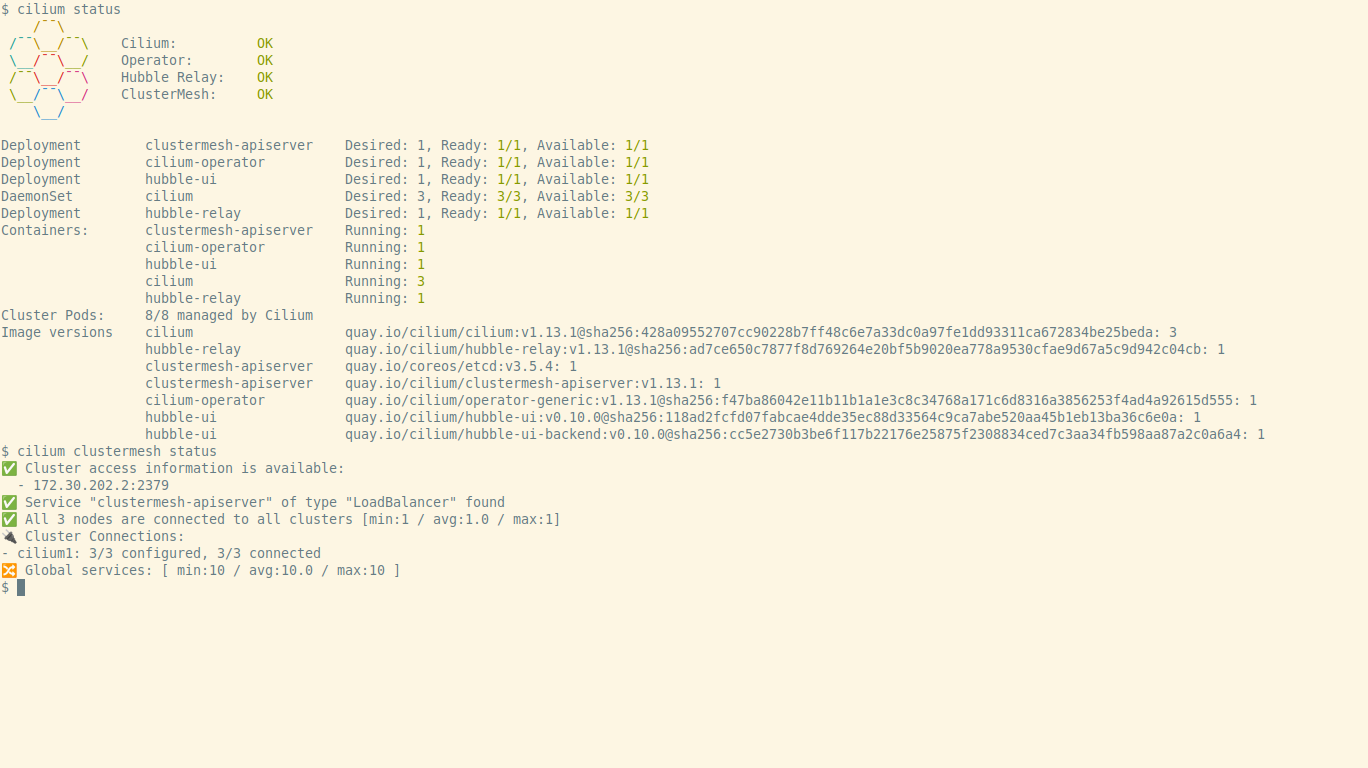
If we run the command cilium status after the installation we should get an output similar to the one seen on the following screenshot:
cilium status
The installation script uses the following templates:
Once we have finished our tests we can remove the installation using the sbin/cilium-remove.sh script.

Some notes about the configuration
  • As noted on the documentation, the cilium deployment needs to mount the bpffs on /sys/fs/bpf and cgroupv2 on /run/cilium/cgroupv2; that is done automatically on kind, but fails on k3d because the image does not include bash (see this issue).To fix it we mount a script on all the k3d containers that is executed each time they are started (the script is mounted as /bin/k3d-entrypoint-cilium.sh because the /bin/k3d-entrypoint.sh script executes the scripts that follow the pattern /bin/k3d-entrypoint-*.sh before launching the k3s daemon). The source code of the script is available here.
  • When testing the multi-cluster deployment with k3d we have found issues with open files, looks like they are related to inotify (see this page on the kind documentation); adding the following to the /etc/sysctl.conf file fixed the issue:
    # fix inotify issues with docker & k3d
    fs.inotify.max_user_watches = 524288
    fs.inotify.max_user_instances = 512
  • Although the deployment theoretically supports it, we are not using cilium as the cluster ingress yet (it did not work, so it is no longer enabled) and we are also ignoring the gateway-api for now.
  • The documentation uses the cilium cli to do all the installations, but I noticed that following that route the current version does not work right with hubble (it messes up the TLS support, there are some notes about the problems on this cilium issue), so we are deploying with helm right now.The problem with the helm approach is that there is no official documentation on how to install the cluster mesh with it (there is a request for documentation here), so we are using the cilium cli for now and it looks that it does not break the hubble configuration.

TestsTo test cilium we have used some scripts & additional config files that are available on the test sub directory of the repository:
  • cilium-connectivity.sh: a script that runs the cilium connectivity test for one cluster or in multi cluster mode (for mesh testing).If we export the variable HUBBLE_PF=true the script executes the command cilium hubble port-forward before launching the tests.
  • http-sw.sh: Simple tests for cilium policies from the cilium demo; the script deploys the Star Wars demo application and allows us to add the L3/L4 policy or the L3/L4/L7 policy, test the connectivity and view the policies.
  • ingress-basic.sh: This test is for checking the ingress controller, it is prepared to work against cilium and nginx, but as explained before the use of cilium as an ingress controller is not working as expected, so the idea is to call it with nginx always as the first argument for now.
  • mesh-test.sh: Tool to deploy a global service on two clusters, change the service affinity to local or remote, enable or disable if the service is shared and test how the tools respond.

Running the testsThe cilium-connectivity.sh executes the standard cilium tests:
$ ./test/cilium-connectivity.sh k3d 12
   Monitor aggregation detected, will skip some flow validation
steps
  [k3d-cilium1] Creating namespace cilium-test for connectivity
check...
  [k3d-cilium2] Creating namespace cilium-test for connectivity
check...
[...]
  All 33 tests (248 actions) successful, 2 tests skipped,
0 scenarios skipped.
To test how the cilium policies work use the http-sw.sh script:
kubectx k3d-cilium2 # (just in case)
# Create test namespace and services
./test/http-sw.sh create
# Test without policies (exaust-port fails by design)
./test/http-sw.sh test
# Create and view L3/L4 CiliumNetworkPolicy
./test/http-sw.sh policy-l34
# Test policy (no access from xwing, exaust-port fails)
./test/http-sw.sh test
# Create and view L7 CiliumNetworkPolicy
./test/http-sw.sh policy-l7
# Test policy (no access from xwing, exaust-port returns 403)
./test/http-sw.sh test
# Delete http-sw test
./test/http-sw.sh delete
And to see how the service mesh works use the mesh-test.sh script:
# Create services on both clusters and test
./test/mesh-test.sh k3d create
./test/mesh-test.sh k3d test
# Disable service sharing from cluster 1 and test
./test/mesh-test.sh k3d svc-shared-false
./test/mesh-test.sh k3d test
# Restore sharing, set local affinity and test
./test/mesh-test.sh k3d svc-shared-default
./test/mesh-test.sh k3d svc-affinity-local
./test/mesh-test.sh k3d test
# Delete deployment from cluster 1 and test
./test/mesh-test.sh k3d delete-deployment
./test/mesh-test.sh k3d test
# Delete test
./test/mesh-test.sh k3d delete

Lukas M rdian: A declarative approach to Linux networking with Netplan

Photo by Taylor Vick (Unsplash)
Linux networking can be confusing due to the wide range of technology stacks and tools in use, in addition to the complexity of the surrounding network environment. The configuration of bridges, bonds, VRFs or routes can be done programmatically, declaratively, manually or with automated with tools like ifupdown, ifupdown2, ifupdown-ng, iproute2, NetworkManager, systemd-networkd and others. Each of these tools use different formats and locations to store their configuration files. Netplan, a utility for easily configuring networking on a Linux system, is designed to unify and standardise how administrators interact with these underlying technologies. Starting from a YAML description of the required network interfaces and what each should be configured to do, Netplan will generate all the necessary configuration for your chosen tool. In this article, we will provide an overview of how Ubuntu uses Netplan to manage Linux networking in a unified way. By creating a common interface across two disparate technology stacks, IT administrators benefit from a unified experience across both desktops and servers whilst retaining the unique advantages of the underlying tech. But first, let s start with a bit of history and show where we are today.

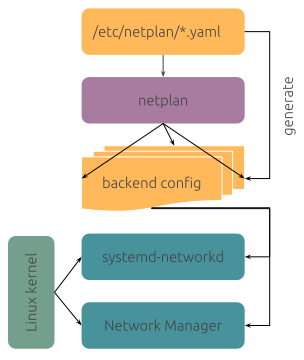
The history of Netplan in Ubuntu Starting with Ubuntu 16.10 and driven by the need to express network configuration in a common way across cloud metadata and other installer systems, we had the opportunity to switch to a network stack that integrates better with our dependency-based boot model. We chose systemd-networkd on server installations for its active upstream community and because it was already part of Systemd and therefore included in any Ubuntu base installation. It has a much better outlook for the future, using modern development techniques, good test coverage and CI integration, compared to the ifupdown tool we used previously. On desktop installations, we kept using NetworkManager due to its very good integration with the user interface. Having to manage and configure two separate network stacks, depending on the Ubuntu variant in use, can be confusing, and we wanted to provide a streamlined user experience across any flavour of Ubuntu. Therefore, we introduced Netplan.io as a control layer above systemd-networkd and NetworkManager. Netplan takes declarative YAML files from /etc/netplan/ as an input and generates corresponding network configuration for the relevant network stack backend in /run/systemd/network/ or /run/NetworkManager/ depending on the system configuration. All while keeping full flexibility to control the underlying network stack in its native way if need be.
Design overview (netplan.io)

Who is using Netplan? Recent versions of Netplan are available and ready to be installed on many distributions, such as Ubuntu, Fedora, RedHat Enterprise Linux, Debian and Arch Linux.

Ubuntu As stated above, Netplan has been installed by default on Ubuntu systems since 2016 and is therefore being used by millions of users across multiple long-term support versions of Ubuntu (18.04, 20.04, 22.04) on a day-to-day basis. This covers Ubuntu server scenarios primarily, such as bridges, bonding, VLANs, VXLANs, VRFs, IP tunnels or WireGuard tunnels, using systemd-networkd as the backend renderer. On Ubuntu desktop systems, Netplan can be used manually through its declarative YAML configuration files, and it will handle those to configure the NetworkManager stack. Keep reading to get a glimpse of how this will be improved through automation and integration with the desktop stack in the future.

Cloud It might not be as obvious, but many people have been using Netplan without knowing about it when configuring a public cloud instance on AWS, Google Cloud or elsewhere through cloud-init. This is because cloud-init s Networking Config Version 2 is a passthrough configuration to Netplan, which will then set up the underlying network stack on the given cloud instance. This is why Netplan is also a key package on the Debian distribution, for example, as it s being used by default on Debian cloud images, too.

Our vision for Linux networking We know that Linux networking can be a beast, and we want to keep simple things simple. But also allow for custom setups of any complexity. With Netplan, the day-to-day networking needs are covered through easily comprehensible and nicely documented YAML files, that describe the desired state of the local network interfaces, which will be rendered into corresponding configuration files for the relevant network stack and applied at (re-)boot or at runtime, using the netplan apply CLI. For example /etc/netplan/lan.yaml:
network:
  version: 2
  renderer: networkd
  ethernets:
    enp3s0:
      dhcp4: true
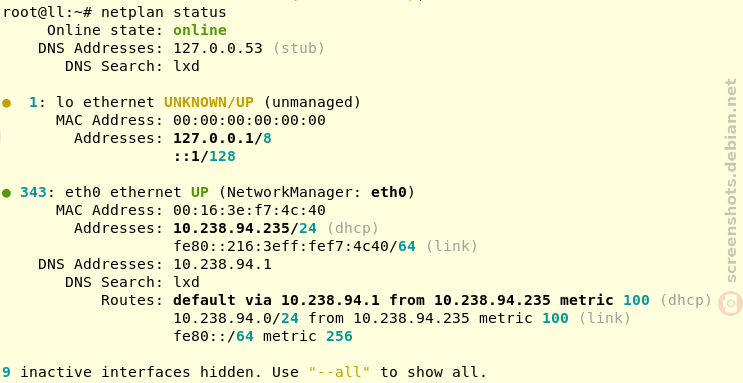
Having a single source of truth for network configuration is also important for administrators, so they do not need to understand multiple network stacks, but can rely on the declarative data given in /etc/netplan/ to configure a system, independent of the underlying network configuration backend. This is also very helpful to seed the initial network configuration for new Linux installations, for example through installation systems such as Subiquity, Ubuntu s desktop installer or cloud-init across the public and private clouds. In addition to describing and applying network configuration, the netplan status CLI can be used to query relevant data from the underlying network stack(s), such as systemd-networkd, NetworkManager or iproute2, and present them in a unified way.
Netplan status (Debian)
At the Netplan project we strive for very high test automation and coverage with plenty of unit tests, integration tests and linting steps, across multiple Linux distros, which gives high confidence in also supporting more advanced networking use cases, such as Open vSwitch or SR-IOV network virtualization, in addition to normal wired (static IP, DHCP, routing), wireless (e.g. wwan modems, WPA2/3 connections, WiFi hotspot, controlling the regulatory domain, ) and common server scenarios. Should there ever be a scenario that is not covered by Netplan natively, it allows for full flexibility to control the underlying network stack directly through systemd override configurations or NetworkManager passthrough settings in addition to having manual configuration side-by-side with interfaces controlled through Netplan.

The future of Netplan desktop integration On workstations, the most common scenario is for end users to configure NetworkManager through its user interface tools, instead of driving it through Netplan s declarative YAML files, which makes use of NetworkManager s native configuration files. To avoid Netplan just handing over control to NetworkManager on such systems, we re working on a bidirectional integration between NetworkManager and Netplan to further improve the single source of truth use case on Ubuntu desktop installations. Netplan is shipping a libnetplan library that provides an API to access Netplan s parser and validation internals, that can be used by NetworkManager to write back a network interface configuration. For instance, configuration given through NetworkManager s UI tools or D-Bus API can be exported to Netplan s native YAML format in the common location at /etc/netplan/. This way, administrators just need to care about Netplan when managing a fleet of Desktop installations. This solution is currently being used in more confined environments, like Ubuntu Core, when using the NetworkManager snap, and we will deliver it to generic Ubuntu desktop systems in 24.04 LTS. In addition to NetworkManager, libnetplan can also be used to integrate with other tools in the networking space, such as cloud-init for improved validation of user data or installation systems when seeding new Linux images.

Conclusion Overall, Netplan can be considered to be a good citizen within a network environment that plays hand-in-hand with other networking tools and makes it easy to control modern network stacks, such as systemd-networkd or NetworkManager in a common, streamlined and declarative way. It provides a single source of truth to network administrators about the network state, while keeping simple things simple, but allowing for arbitrarily complex custom setups.
If you want to learn more, feel free to follow our activities on Netplan.io, GitHub, Launchpad, IRC or our Netplan Developer Diaries blog on discourse.

Russ Allbery: Review: Legends & Lattes

Review: Legends & Lattes, by Travis Baldree
Series: Legends & Lattes #1
Publisher: Tor
Copyright: 2022
ISBN: 1-250-88609-0
Format: Kindle
Pages: 293
Legends & Lattes is a sword and sorcery fantasy novel of the RPG-inspired, post-Dungeons-and-Dragons subtype. It was Travis Baldree's first novel. Viv is an orc, the heavy muscle for a roving band of adventurers who take jobs for hire in a way familiar to any Dungeons and Dragons player. As this book opens, she's been an adventurer for twenty-two years, and she's done. Her band have defeated the Scalvert Queen and gained its hoard, but all that Viv wants is the stone in its head. With that in hand and some vague lore about how to use it, Viv leaves, rather abruptly, and heads for the city of Thune to chase a dream she's never told anyone else about. Viv wants to start a coffee shop. Legends & Lattes is an unapologetic comfort story. Viv doesn't entirely know what she's doing, but she has a lot of experience hiring people, negotiating, and figuring things out, and she's willing to do a lot of hard work. She's blunt and a bit rough, but she's ethical and kind, which lets her attract and retain her first two employees: a taciturn expert carpenter Viv picks out by watching people work at the docks, and a succubus she hires as a barista. From there, the story slowly turns into a found family dynamic, full of people that you like and are rooting for. There is one actual villain who shows up towards the end of the book to give it some conflict, but mostly this is the story of Viv building a small business while being a good employer and friend. The subtitle of "a novel of high fantasy and low stakes" is therefore an excellent description. (Pedantic aside: This is "high fantasy" in the literary sense of not involving an otherwise-normal world, not "high" in the RPG sense of having less realistic, more mythic characters.) You are not going to be surprised by the outcome of the story, or even most of the events along the way. It's a book full of basically good people trying to do the right thing, largely succeeding, and building a community in the process. If that feels relaxing and fun, you have precisely the right idea. Sometimes you want a book in which good things happen to good people, and that's exactly what Baldree delivers. There are also a lot of specific details about explaining coffee to everyone and setting up a portion of the menu of a modern coffee shop in a fantasy world, and those parts I found less interesting. Baldree uses the handwave of gnomish machinery to import big chunks of 2020s coffee technology wholesale, which felt oddly out of step with the vaguely medieval-ish Dungeons and Dragons world. This is also one of those books where the characters independently reinvent multiple ideas that historically came from different regions and slow processes of refinement. Here it's drinks and pastries rather than major technological advances, which I guess is a little bit better, but I find this style of world-building grating. The obligatory coffee shop cat is delightfully strange and suits the fantasy setting. I wish more of the coffee shop trappings had similar twists. That said, everything else about the book worked for me, and the characters are thankfully more central to the book than the coffee shop trappings. I liked all of them and had no trouble rooting for them. The found family bits worked for me and the character relationships developed slowly enough to be believable but fast enough to be satisfying. Viv is refreshingly blunt, so I wasn't annoyed by communication failures. And the succubus, Tandri, is a fun, complex character and a great counterpoint to Viv. If you're looking for something challenging or deep, this isn't the book, but if you're in the mood for a predictable comfort read, this hit the spot. Recommended. Followed by Bookshops & Bonedust (not yet published), but Legends & Lattes is a complete story. My edition has a novella (maybe a novelette) at the end of the short novel. "Pages to Fill": This is a prelude to the novel, telling the story of Viv's first encounter with a coffee shop and the point where she made the decision to stop adventuring. That's not the main plot of the story, though. She and her team are pursuing a shapeshifting thief, which leads to Viv having some unexpected reactions. This was fairly slight and predictable, but once you've read the novel, it's fun to see how the story began. The best part is seeing more of Gallina, the gnome who was by far my favorite of Viv's old team. (6) Rating: 8 out of 10

17 July 2023

Ben Hutchings: FOSS activity in June 2023

Shirish Agarwal: WordPress Cookies, Debdelta, RISC, Manipur, Libraries in Kerala.

WordPress Cookies, Debdelta One of the most irritating things about WordPress is whenever I start a firefox session, WordPress aks for cookie selection. I make my choices but it s not persistent. The next session the same thing happens again. It does keep my identity but for some unknown reason doesn t respect the Cookie selection. I usually use Firefox ESR (102.13.0esr-1) on Testing. Also, for more than a week I have found debdelta not working as it should. To give a brief history, the idea of debdelta is to save bandwidth, whether it 100 kbps or 1 mbit or whatever, the moment you give debdelta-upgrade it will try to see if there is a delta of the debs that you want to upgrade. The sequence is as follows or at least that is what I do
  1. $sudo apt update (updates the index files of apt and tells you how many packages are upgradable). IIRC, every 4-5 hours there is an index runs that basically catches any new debian packages. You can see the index generated dynamically each time you run the above command in /var/lib/apt/lists
2. $ sudo debdelta-upgrade Now the debdelta algorithim goes to work. Debdelta has its own mirror. I think sometime after the indexes are updated, debdelta does it own run, probably an hour or two later. The algorithim sees how big the diff between the two packages and generates a delta. If the generated delta (diff.) between the old and the new is less than 70% then the generated delta is kept or otherwise thrown. The delta is kept in debdelta mirror. You can from 1 day history how big it is. And AFAIK, it is across all the hardware and platforms that Debian supports. My issue has been simply that debdelta just doesn t work and even after debdelta-upgrade I am forced to get all the files from the server. Have shared more details here. 3. The last step is $ sudo aptitude upgrade or $ sudo aptitude install and give package names if you know some packages are broken or non-resolvable or have some bugs.

RISC I had shared about RISC chips couple of weeks back. One of the things that I had forgotten to share that Android is also supporting RISC-V few months back. How I forgot that crucial bit of info. is beyond me. There are number of RISC-V coming out in the next few months to early 2024. One of the more interesting boards that came up in 2021/2022 was HiFive Unmatched. The problem is that the board although interesting on specs is out of reach of most Indians. I am sure most people would be aware of the chicken and egg problem and that is where it is. Pricing will be key component. If they get the pricing right and are able to produce in good numbers, we might see more of these boards soon. At least with Android that issue gets somewhat resolved. There is possibility that we may see more Android set-top boxes and whatnot paired with RISC paving more money for RISC development and a sort of virtuous cycle. While I m in two minds, I decide not to share what chips are coming unless and until we know what the pricing is, otherwise they just become part of a hype cycle. But it s definitely something to watch out for. One of the more interesting articles that I read last week also tells how Linux has crossed 3% desktop space and his views on the same. I do very much agree with his last paragraph but at the same time biased as am an old time desktop user. I just don t find myself happy on small factor keyboards. I will leave the rest for some other time depending how things happen.

Manipur Before I start sharing about Manipur, I should thank Praveen A. few years back, Praveen wanted to see the 7 sisters and in fact had even proposed to partially sponsor me so that we could together visit the 7 states of North-East. For reasons I don t remember, I just wasn t able to go. Probably some work and responsibilities at home. For almost 2.5 months now, Manipur, one of the States in the 7 states has been burning. There have been talks and sharing of genocidial murder of Christians in Manipur. This is not just me or some random person talking about, even BJP (the ruling party in the Center), their functionaries both in Manipur and its neighboring state Mizoram have been sharing. Mizoram s State BJP President in fact resigned just few days back saying it s state sponsored activity. Couple of days back, European Parliament held a session about Manipur and even passed a resolution. The BJP tried to hit back saying Colonial Mindset but when asked if it s the same when India invited European Parliamentarians to visit Kashmir in 2019, the silence is deafening. The Wire has interviewed all the prominent leaders and sort of players in Manipur politics but apart from calling Kukis foreigners they have no proof. In one of the interviews one of the Meitei leaders calls Kuki s foreigners but doesn t have any Government data to support his belief. The census of India was last held in 2011. People from the civil society have time and again asked the Government to do the census but GOI has been giving one excuse after another. They in fact, wanted to do a caste census but that too they themselves took on back foot probably as they believe that both census may give results not to their liking. In fact, this Government is also known as No Data Government as almost in everything, it denies data. I am not going to go to that otherwise would not be able to complete blog post till couple of days. I will just share this bit of info. that this Govt. hasn t given Household Consumption Survey data for last four years. Going back to the topic though, neither the Prime Minister, the Home Minister, the Defence Minister nobody has been able to utter the word Manipur till date. I have no idea when they will wake up. People from all ethnicities have tried to make representations to GOI but no one has been able to meet them, neither the Kukis, nor the Nagas, nor the Meiteis even though it is a sensitive border area.

Libraries in Kerala I wanted to end on a somewhat positive note. So just a few days back, the Miinistry of Culture shared the number of Libraries per state. As can be seen from the infographic, Kerala is a giant in that. If I do find a table, would share that as well, so those who can t see can hear the data. Till later.

12 July 2023

Matt Brown: 2023 Mid Year Review

I m six months into my journey of building a business which means its time to reflect and review the goals I set for the year.
No further investment in co2mon.nz In March I made the decision to focus on completing the market research for co2mon.nz. The results of that research led to two key conclusions:
  1. Indoor air quality/ventilation is not a problem many people are actively thinking about or looking to spend money to improve.
  2. Even when introduced to the problem and educated about the need, most people are looking for a one-off expense or solution (e.g. the physical monitor) and are much less interested in a monitoring software service.
Based on that, it was clear that this is not an opportunity that I should continue pursuing and I ve put co2mon.nz into maintenance mode. I ve committed to maintaining the infrastructure to support existing customers, but I won t be investing time or energy in developing it further.

Discipline in selecting product opportunities The decision to stop investing more time into co2mon.nz was straightforward given the results of the research, but it was also painful given the time I ve already sunk into it. I hindsight it s clear that my enthusiasm to solve a problem with technology I enjoyed was my driving force rather than a deep understanding of the wants and needs of potential customers. I don t entirely regret trying my luck once - but it s not time efficient and I know that following that pattern again is not a sustainable or viable path to building a successful business. I ve decided to use the following list of questions to bring more discipline to how I evaluate product opportunities in future:
  1. Problem: Is this something that a sizeable number of people are struggling with AND are willing to spend money solving?
  2. Capability: Can I deliver a solution that solves the problem in a reliable and cost-effective way?
  3. Excitement: Am I excited and motivated to invest time in building the solution to this problem?
  4. Trust: Do I have the expertise and experience to be trusted to solve the problem by potential customers?
  5. Execution: Can I package, market and sell that solution in a profitable manner?
My plan is to answer these questions and then make an evaluation of the potential before I commit time to building any part of a product. As an example of how I think that will help, here s what I think the answer to those questions for ventilation monitoring would have been:
  1. Problem: No - as the market research eventually showed.
  2. Capability: Low - The part of the solution which customers primarily value (the hardware) is complex and outside of my core experience. The software I can easily deliver is not where the value is seen.
  3. Excitement: Yes - this was the primary driver of starting the project.
  4. Trust: Low - I m trusted to build software, but cannot claim any specific expertise in air quality and ventilation.
  5. Execution: Low confidence - These skills are not ones I ve exercised a lot in my career to date.
What these answers point to is that identifying the problem alone is not enough. I don t expect every question to have a perfect answer, but I want to hold myself to only pursuing opportunities where there s only one major area of doubt. In this case, even had the market research demonstrated a problem that many customers would pay to solve, there were still some big answers missing to the trust, capability and execution questions. Overall my conclusion is that co2mon.nz was not the ideal business to start my journey with given the number of open questions in the plan. I like to think that conclusion would also have been clear to me six months ago had I taken the time to go through this process then!

Prioritising areas of growth Applying those questions to my other product ideas results in a lot of I don t know yet answers to the problem and capability questions, further reinforcing the lesson that I need to spend more understanding if there is a problem with a viable business model attached in those areas before progressing any of those ideas. Beyond that lesson, a more interesting observation comes from the last question regarding execution. My answers to the first four questions vary between ideas, but my answers to this last question are always the same - I don t have a lot of confidence in my sales and marketing skills to sell a product. That s not a surprise. My career to date has been focused on software development and leadership, I don t have a lot of experience with sales and marketing. The opportunity to grow and develop those skills is actually a large part of my motivation for choosing the path of building my own business. But seeing that this is a common factor that will need significant investment regardless of which opportunity I pursue sends me a strong signal that I should focus on growth in this area as a priority. Following that logic through to the next step of what creating that focus would look like reveals a conflict: The nature of the mission I ve set for myself draws me to products in areas that are new to me, which means there s also a need to invest in building expertise in those areas. Again not a surprise, but the time and focus required to develop that expertise competes with time spent growing my sales and marketing skills. So I have a prioritisation problem. Solving it is going to require changing the type of product I m trying to build in the short term: I need to build a product that uses my existing expertise and strengths as much as possible, so that I can put the majority of my energy into growing the core business skills where my confidence is currently lacking. Trying to deliver meaningful improvements to a big problem in an area I don t have past experience in while also learning how to sell and market a product is biting off more than I chew right away.

Changing the goal posts With those lessons in hand I m making three changes to my 2023 Goals:
  1. Reducing the product development goal from several ideas to two. The first was co2mon.nz. The second will be drawn from my existing expertise - not one of the previously stated ideas that require me to develop expertise in a new area.
  2. Moving the consulting and product development goals to be alternatives - I expect I can achieve at most one of them this year.
  3. Reducing the publishing target for this site from at least once a week to once a month . I thought I d have more to say this year, but the words are coming very slowly to me.
Reducing scope and ambition is humbling, but that s reality. I hope it turns out to be a case of slow down and lay the foundations in order to then move faster. The good news is that I don t feel the need to make any changes to the vision, mission and strategy I m following - I think they re still the right destination and overall path for me even though the first six months has proven bumpy. I just need to be a bit more realistic on the short-term goals that will feed into them.

The next few months I m choosing to prioritise the product development goal. I m aiming to complete the market research/problem definition phase for a product opportunity I ve identified in the SRE/DevOps space (where my previous experience is) and make a decision on whether to start development by mid August. In making that decision I plan to gather the answers to my questions, and then diligently evaluate whether the opportunity is worth committing to or not. I will write more about this process in coming weeks. If I decide to proceed that gives me 2-3 months to get an MVP in the hands of customers and get concrete validation of whether the product has revenue and growth potential before the end of the year. Tight, but if things go well, and I don t take any further consulting work, there s a reasonable chance I can complete the revised goal successfully. In the event that I decide the product opportunity I m currently researching is not the right one to commit to, I will likely revert to focusing on my consulting goal in the remaining 2-3 months of the year rather than attempt a third product development iteration. Thanks for reading this far! As always, I d love your thoughts and feedback.

Appendix: Revised 2023 Goals Putting all that together, the ultimate outcome of this review (including updated progress scoring) looks like:
  1. Execute a series of successful consulting engagements, building a reputation for myself and leaving happy customers willing to provide testimonials that support a pipeline of future opportunities. Score: 3/10 - I focused entirely on co2mon.nz during April, May and June to the detriment of my pipeline of consulting work. This score is unlikely to improve given the above plan unless I decide not to commit to developing the idea I m currently investigating.
  2. Grow my product development skill set by taking two ideas (co2mon.nz, an SRE/DevOps focused product) to MVP stage with customer feedback received, and generate revenue and has growth potential from one of them. Score: 4/10 - I launched co2mon.nz and got feedback, I discovered it didn t solve a problem relevant to customers and therefore did not generate substantial revenue or growth potential. Idea number two is in still in progress.
  3. Develop and maintain a broad professional network.
    1. To build a professional relationship with at least 30 new people this year. Score: 6/10 - This is going well. On track for a 10/10 score.
    2. To publish a piece of writing on this site once a month and for many of those to generate interesting conversations and feedback. Score: 6/10 - 4 out of 6 months have featured a post meeting this goal so far.
    3. To support the growth of my local technical community by volunteering my experience and knowledge with others. Score: 5/10 - I ve given one talk and helped with SREcon23 APAC, but not as much other work in this area as I d like.

John Goerzen: Backing Up and Archiving to Removable Media: dar vs. git-annex

This is the fourth in a series about archiving to removable media (optical discs such as BD-Rs and DVD+Rs or portable hard drives). Here are the first three parts: I want to state at the outset that this is not a general review of dar or git-annex. This is an analysis of how those tools stack up to a particular use case. Neither tool focuses on this use case, and I note it is particularly far from the more common uses of git-annex. For instance, both tools offer support for cloud storage providers and special support for ssh targets, but neither of those are in-scope for this post. Comparison Matrix As part of this project, I made a comparison matrix which includes not just dar and git-annex, but also backuppc, bacula/bareos, and borg. This may give you some good context, and also some reference for other projects in this general space. Reviewing the Goals I identified some goals in part 1. They are all valid. As I have thought through the project more, I feel like I should condense them into a simpler ordered list, with the first being the most important. I omit some things here that both dar and git-annex can do (updates/incrementals, for instance; see the expanded goals list in part 1). Here they are:
  1. The tool must not modify the source data in any way.
  2. It must be simple to create or update an archive. Processes that require a lot of manual work, are flaky, or are difficult to do correctly, are unlikely to be done correctly and often. If it s easy to do right, I m more likely to do it. Put another way: an archive never created can never be restored.
  3. The chances of a successful restore by someone that is not me, that doesn t know Linux, and is at least 10 years in the future, should be maximized. This implies a simple toolset, solid support for dealing with media errors or missing media, etc.
  4. Both a partial point-in-time restore and a full restore should be possible. The full restore must, at minimum, provide a consistent directory tree; that is, deletions, additions, and moves over time must be accurately reflected. Preserving modification times is a near-requirement, and preserving hard links, symbolic links, and other POSIX metadata is a significant nice-to-have.
  5. There must be a strategy to provide redundancy; for instance, a way for one set of archive discs to be offsite, another onsite, and the two to be periodically swapped.
  6. Use storage space efficiently.
Let s take a look at how the two stack up against these goals. Goal 1: Not modifying source data With dar, this is accomplished. dar --create does not modify source data (and even has a mode to avoid updating atime) so that s done. git-annex normally does modify source data, in that it typically replaces files with symlinks into its hash-indexed storage directory. It can instead use hardlinks. In either case, you will wind up with files that have identical content (but may have originally been separate, non-linked files) linked together with git-annex. This would cause me trouble, as well as run the risk of modifying timestamps. So instead of just storing my data under a git-annex repo as is its most common case, I use the directory special remote with importtree=yes to sort of import the data in. This, plus my desire to have the repos sensible and usable on non-POSIX operating systems, accounts for a chunk of the git-annex complexity you see here. You wouldn t normally see as much complexity with git-annex (though, as you will see, even without the directory special remote, dar still has less complexity). Winner: dar, though I demonstrated a working approach with git-annex as well. Goal 2: Simplicity of creating or updating an archive Let us simply start by recognizing this: Both tools have a lot of power, but I must say, it is easier to wrap my head around what dar is doing than what git-annex is doing. Everything dar does is with files: here are the files to archive, here is an archive file, here is a detached (isolated) catalog. It is very straightforward. It took me far less time to develop my dar page than my git-annex page, despite having existing familiarity with both tools. As I pointed out in part 2, I still don t fully understand how git-annex syncs metadata. Unsolved mysteries from that post include why the two git-annex drives had no idea what was on the other drives, and why the export operation silenty did nothing. Additionally, for the optical disc case, I had to create a restricted-size filesystem/dataset for git-annex to write into in order to get the desired size limit. Looking at the optical disc case, dar has a lot of nice infrastructure built in. With pause and execute, it can very easily be combined with disc burning operations. slice will automatically limit the size of a given slice, regardless of how much disk space is free, meaning that the git-annex tricks of creating smaller filesystems/datasets are unnecessary with dar. To create an initial full backup with dar, you just give it the size of the device, and it will automatically split up the archive, with hooks to integrate for burning or changing drives. About as easy as you could get. With git-annex, you would run the commands to have it fill up the initial filesystem, then burn the disc (or remove the drive), then run the commands to create another repo on the second filesystem, and so forth. With hard drives, with git-annex you would do something similar; let it fill up a repo on a drive, and if it exits with a space error, swap in the next. With dar, you would slice as with an optical disk. Dar s slicing is less convenient in this case, though, as it assumes every drive is the same size and yours may not be. You could work around that by using a slice size no bigger than the smallest drive, and putting multiple slices on larger drives if need be. If a single drive is large enough to hold your entire data set, though, you need not worry about this with either tool. Here s a warning about git-annex: it won t store anything beneath directories named .git. My use case doesn t have many of those. If your use case does, you re going to have to figure out what to do about it. Maybe rename them to something else while the backup runs? In any case, it is simply a fact that git-annex cannot back up git repositories, and this cuts against being able to back up things correctly. Another point is that git-annex has scalability concerns. If your archive set gets into the hundreds of thousands of files, you may need to split it into multiple distinct git-annex repositories. If this occurs and it will in my case it may serve to dull the shine of some of git-annex s features such as location tracking. A detour down the update strategies path Update strategies get a little more complicated with both. First, let s consider: what exactly should our update strategy be? For optical discs, I might consider doing a monthly update. I could burn a disc (or more than one, if needed) regardless of how much data is going to go onto it, because I want no more than a month s data lost in any case. An alternative might be to spool up data until I have a disc s worth, and then write that, but that could possibly mean months between actually burning a disc. Probably not good. For removable drives, we re unlikely to use a new drive each month. So there it makes sense to continue writing to the drive until it s full. Now we have a choice: do we write and preserve each month s updates, or do we eliminate intermediate changes and just keep the most recent data? With both tools, the monthly burn of an optical disc turns out to be very similar to the initial full backup to optical disc. The considerations for spanning multiple discs are the same. With both tools, we would presumably want to keep some metadata on the host so that we don t have to refer to a previous disc to know what was burned. In the dar case, that would be an isolated catalog. For git-annex, it would be a metadata-only repo. I illustrated both of these in parts 2 and 3. Now, for hard drives. Assuming we want to continue preserving each month s updates, with dar, we could just write an incremental to the drive each month. Assuming that the size of the incremental is likely far smaller than the size of the drive, you could easily enough do this. More fancily, you could look at the free space on the drive and tell dar to use that as the size of the first slice. For git-annex, you simply avoid calling drop/dropunused. This will cause the old versions of files to accumulate in .git/annex. You can get at them with git annex commands. This may imply some degree of elevated risk, as you are modifying metadata in the repo each month, which with dar you could chmod a-w or even chattr +i the archive files once written. Hopefully this elevated risk is low. If you don t want to preserve each month s updates, with dar, you could just write an incremental each month that is based on the previous drive s last backup, overwriting the previous. That implies some risk of drive failure during the time the overwrite is happening. Alternatively, you could write an incremental and then use dar to merge it into the previous incremental, creating a new one. This implies some degree of extra space needed (maybe on a different filesystem) while doing this. With git-annex, you would use drop/dropunused as I demonstrated in part 2. The winner for goal 2 is dar. The gap is biggest with optical discs and more narrow with hard drives, thanks to git-annex s different options for updates. Still, I would be more confident I got it right with dar. Goal 3: Greatest chance of successful restore in the distant future If you use git-annex like I suggested in part 2, you will have a set of discs or drives that contain a folder structure with plain files in them. These files can be opened without any additional tools at all. For sheer ability to get at raw data, git-annex has the edge. When you talk about getting a consistent full restore without multiple copies of renamed files or deleted files coming back then you are going to need to use git-annex to do that. Both git-annex and dar provide binaries. Dar provides a win64 version on its Sourceforge page. On the author s releases site, you can find the win64 version in addition to a statically-linked x86_64 version for Linux. The git-annex install page mostly directs you to package managers for your distribution, but the downloads page also lists builds for Linux, Windows, and Mac OS X. The Linux version is dynamic, but ships most of its .so files alongside. The Windows version requires cygwin.dll, and all versions require you to also install git itself. Both tools are in package managers for Mac OS X, Debian, FreeBSD, and so forth. Let s just say that you are likely to be able to run either one on a future Windows or Linux system. There are also GUI frontends for dar, such as DARGUI and gdar. This can increase the chances of a future person being able to use the software easily. git-annex has the assistant, which is based on a different use case and probably not directly helpful here. When it comes to doing the actual restore process using software, dar provides the easier process here. For dealing with media errors and the like, dar can integrate with par2. While technically you could use par2 against the files git-annex writes, that s more cumbersome to manage to the point that it is likely not to be done. Both tools can deal reasonably with missing media entirely. I m going to give the edge on this one to git-annex; while dar does provide the easier restore and superior tools for recovering from media errors, the ability to access raw data as plain files without any tools at all is quite compelling. I believe it is the most critical advantage git-annex has, and it s a big one. Goal 4: Support high-fidelity partial and full restores Both tools make it possible to do a full restore reflecting deletions, additions, and so forth. Dar, as noted, is easier for this, but it is possible with git-annex. So, both can achieve a consistent restore. Part of this goal deals with fidelity of the restore: preserving timestamps, hard and symbolic links, ownership, permissions, etc. Of these, timestamps are the most important for me. git-annex can t do any of that. dar does all of it. Some of this can be worked around using mtree as I documented in part 2. However, that implies a need to also provide mtree on the discs for future users, and I m not sure mtree really exists for Windows. It also cuts against the argument that git-annex discs can be used without any tools. It is true, they can, but all you will get is filename and content; no accurate date. Timestamps are often highly relevant for everything from photos to finding an elusive document or record. Winner: dar. Goal 5: Supporting backup strategies with redundancy My main goal here is to have two separate backup sets: one that is offsite, and one that is onsite. Depending on the strategy and media, they might just always stay that way, or periodically rotate. For instance, with optical discs, you might just burn two copies of every disc and store one at each place. For hard drives, since you will be updating the content of them, you might swap them periodically. This is possible with both tools. With both tools, if using the optical disc scheme I laid out, you can just burn two identical copies of each disc. With the hard drive case, with dar, you can keep two directories of isolated catalogs, one for each drive set. A little identifier file on each drive will let you know which set to use. git-annex can track locations itself. As I demonstrated in part 2, you can make each drive its own repo, add all drives from a given drive set to a git-annex group. When initializing a drive, you tell git-annex what group it s a prt of. From then on, git-annex knows what content is in each group and will add whatever a given drive s group needs to that drive. It s possible to do this with both, but the winner here is git-annex. Goal 6: Efficient use of storage Here are situations in which one or the other will be more efficient: The winner depends on your particular situation. Other notes While not part of the goals above, dar is capable of using tapes directly. While not as common, they are often used in communities of people that archive lots of data. Conclusions Overall, dar is the winner for me. It is simpler in most areas, easier to get correct, and scales very well. git-annex does, however, have some quite compelling points. Being able to access files as plain files is huge, and its location tracking is nicer than dar s, even when using dar_manager. Both tools are excellent and I recommend them both and for more than the particular scenario shown here. Both have fantastic and responsive authors.

11 July 2023

Simon Josefsson: Coping with non-free software in Debian

A personal reflection on how I moved from my Debian home to find two new homes with Trisquel and Guix for my own ethical computing, and while doing so settled my dilemma about further Debian contributions. Debian s contributions to the free software community has been tremendous. Debian was one of the early distributions in the 1990 s that combined the GNU tools (compiler, linker, shell, editor, and a set of Unix tools) with the Linux kernel and published a free software operating system. Back then there were little guidance on how to publish free software binaries, let alone entire operating systems. There was a lack of established community processes and conflict resolution mechanisms, and lack of guiding principles to motivate the work. The community building efforts that came about in parallel with the technical work has resulted in a steady flow of releases over the years. From the work of Richard Stallman and the Free Software Foundation (FSF) during the 1980 s and early 1990 s, there was at the time already an established definition of free software. Inspired by free software definition, and a belief that a social contract helps to build a community and resolve conflicts, Debian s social contract (DSC) with the free software community was published in 1997. The DSC included the Debian Free Software Guidelines (DFSG), which directly led to the Open Source Definition.

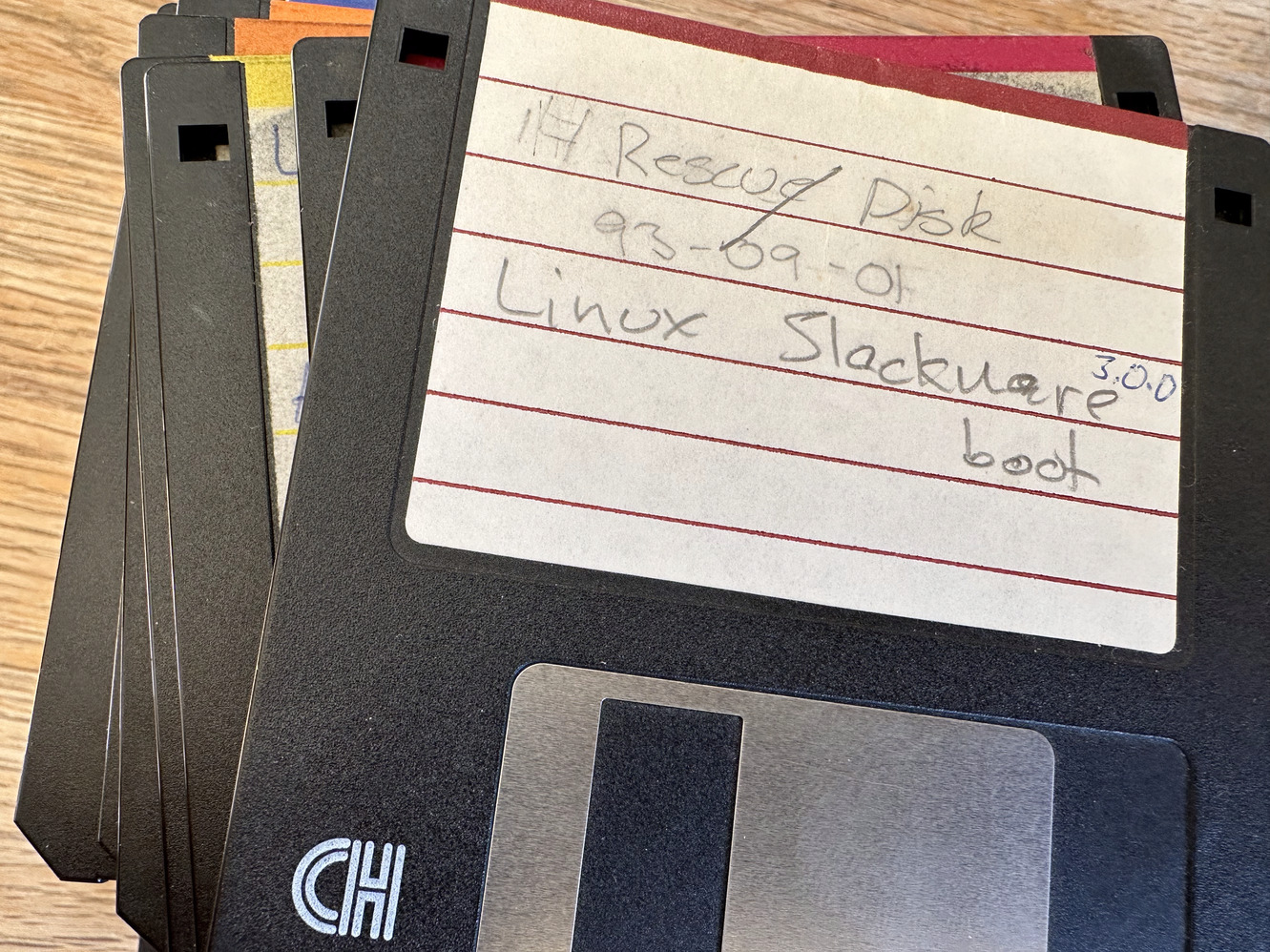
Slackware 3.5" disksOne of my earlier Slackware install disk sets, kept for nostalgic reasons.

I was introduced to GNU/Linux through Slackware in the early 1990 s (oh boy those nights calculating XFree86 modeline s and debugging sendmail.cf) and primarily used RedHat Linux during ca 1995-2003. I switched to Debian during the Woody release cycles, when the original RedHat Linux was abandoned and Fedora launched. It was Debian s explicit community processes and infrastructure that attracted me. The slow nature of community processes also kept me using RedHat for so long: centralized and dogmatic decision processes often produce quick and effective outcomes, and in my opinion RedHat Linux was technically better than Debian ca 1995-2003. However the RedHat model was not sustainable, and resulted in the RedHat vs Fedora split. Debian catched up, and reached technical stability once its community processes had been grounded. I started participating in the Debian community around late 2006. My interpretation of Debian s social contract is that Debian should be a distribution of works licensed 100% under a free license. The Debian community has always been inclusive towards non-free software, creating the contrib/non-free section and permitting use of the bug tracker to help resolve issues with non-free works. This is all explained in the social contract. There has always been a clear boundary between free and non-free work, and there has been a commitment that the Debian system itself would be 100% free. The concern that RedHat Linux was not 100% free software was not critical to me at the time: I primarily (and happily) ran GNU tools on Solaris, IRIX, AIX, OS/2, Windows etc. Running GNU tools on RedHat Linux was an improvement, and I hadn t realized it was possible to get rid of all non-free software on my own primary machine. Debian realized that goal for me. I ve been a believer in that model ever since. I can use Solaris, macOS, Android etc knowing that I have the option of using a 100% free Debian. While the inclusive approach towards non-free software invite and deserve criticism (some argue that being inclusive to non-inclusive behavior is a bad idea), I believe that Debian s approach was a successful survival technique: by being inclusive to and a compromise between free and non-free communities, Debian has been able to stay relevant and contribute to both environments. If Debian had not served and contributed to the free community, I believe free software people would have stopped contributing. If Debian had rejected non-free works completely, I don t think the successful Ubuntu distribution would have been based on Debian. I wrote the majority of the text above back in September 2022, intending to post it as a way to argue for my proposal to maintain the status quo within Debian. I didn t post it because I felt I was saying the obvious, and that the obvious do not need to be repeated, and the rest of the post was just me going down memory lane. The Debian project has been a sustainable producer of a 100% free OS up until Debian 11 bullseye. In the resolution on non-free firmware the community decided to leave the model that had resulted in a 100% free Debian for so long. The goal of Debian is no longer to publish a 100% free operating system, instead this was added: The Debian official media may include firmware . Indeed the Debian 12 bookworm release has confirmed that this would not only be an optional possibility. The Debian community could have published a 100% free Debian, in parallel with the non-free Debian, and still be consistent with their newly adopted policy, but chose not to. The result is that Debian s policies are not consistent with their actions. It doesn t make sense to claim that Debian is 100% free when the Debian installer contains non-free software. Actions speaks louder than words, so I m left reading the policies as well-intended prose that is no longer used for guidance, but for the peace of mind for people living in ivory towers. And to attract funding, I suppose. So how to deal with this, on a personal level? I did not have an answer to that back in October 2022 after the vote. It wasn t clear to me that I would ever want to contribute to Debian under the new social contract that promoted non-free software. I went on vacation from any Debian work. Meanwhile Debian 12 bookworm was released, confirming my fears. I kept coming back to this text, and my only take-away was that it would be unethical for me to use Debian on my machines. Letting actions speak for themselves, I switched to PureOS on my main laptop during October, barely noticing any difference since it is based on Debian 11 bullseye. Back in December, I bought a new laptop and tried Trisquel and Guix on it, as they promise a migration path towards ppc64el that PureOS do not. While I pondered how to approach my modest Debian contributions, I set out to learn Trisquel and gained trust in it. I migrated one Debian machine after another to Trisquel, and started to use Guix on others. Migration was easy because Trisquel is based on Ubuntu which is based on Debian. Using Guix has its challenges, but I enjoy its coherant documented environment. All of my essential self-hosted servers (VM hosts, DNS, e-mail, WWW, Nextcloud, CI/CD builders, backup etc) uses Trisquel or Guix now. I ve migrated many GitLab CI/CD rules to use Trisquel instead of Debian, to have a more ethical computing base for software development and deployment. I wish there were official Guix docker images around. Time has passed, and when I now think about any Debian contributions, I m a little less muddled by my disappointment of the exclusion of a 100% free Debian. I realize that today I can use Debian in the same way that I use macOS, Android, RHEL or Ubuntu. And what prevents me from contributing to free software on those platforms? So I will make the occasional Debian contribution again, knowing that it will also indirectly improve Trisquel. To avoid having to install Debian, I need a development environment in Trisquel that allows me to build Debian packages. I have found a recipe for doing this: # System commands:
sudo apt-get install debhelper git-buildpackage debian-archive-keyring
sudo wget -O /usr/share/debootstrap/scripts/debian-common https://sources.debian.org/data/main/d/debootstrap/1.0.128%2Bnmu2/scripts/debian-common
sudo wget -O /usr/share/debootstrap/scripts/sid https://sources.debian.org/data/main/d/debootstrap/1.0.128%2Bnmu2/scripts/sid
# Run once to create build image:
DIST=sid git-pbuilder create --mirror http://deb.debian.org/debian/ --debootstrapopts "--exclude=usr-is-merged" --basepath /var/cache/pbuilder/base-sid.cow
# Run in a directory with debian/ to build a package:
gbp buildpackage --git-pbuilder --git-dist=sid
How to sustainably deliver a 100% free software binary distributions seems like an open question, and the challenges are not all that different compared to the 1990 s or early 2000 s. I m hoping Debian will come back to provide a 100% free platform, but my fear is that Debian will compromise even further on the free software ideals rather than the opposite. With similar arguments that were used to add the non-free firmware, Debian could compromise the free software spirit of the Linux boot process (e.g., non-free boot images signed by Debian) and media handling (e.g., web browsers and DRM), as Debian have already done with appstore-like functionality for non-free software (Python pip). To learn about other freedom issues in Debian packaging, browsing Trisquel s helper scripts may enlight you. Debian s setback and the recent setback for RHEL-derived distributions are sad, and it will be a challenge for these communities to find internally consistent coherency going forward. I wish them the best of luck, as Debian and RHEL are important for the wider free software eco-system. Let s see how the community around Trisquel, Guix and the other FSDG-distributions evolve in the future. The situation for free software today appears better than it was years ago regardless of Debian and RHEL s setbacks though, which is important to remember! I don t recall being able install a 100% free OS on a modern laptop and modern server as easily as I am able to do today. Happy Hacking! Addendum 22 July 2023: The original title of this post was Coping with non-free Debian, and there was a thread about it that included feedback on the title. I do agree that my initial title was confrontational, and I ve changed it to the more specific Coping with non-free software in Debian. I do appreciate all the fine free software that goes into Debian, and hope that this will continue and improve, although I have doubts given the opinions expressed by the majority of developers. For the philosophically inclined, it is interesting to think about what it means to say that a compilation of software is freely licensed. At what point does a compilation of software deserve the labels free vs non-free? Windows probably contains some software that is published as free software, let s say Windows is 1% free. Apple authors a lot of free software (as a tangent, Apple probably produce more free software than what Debian as an organization produces), and let s say macOS contains 20% free software. Solaris (or some still maintained derivative like OpenIndiana) is mostly freely licensed these days, isn t it? Let s say it is 80% free. Ubuntu and RHEL pushes that closer to let s say 95% free software. Debian used to be 100% but is now slightly less at maybe 99%. Trisquel and Guix are at 100%. At what point is it reasonable to call a compilation free? Does Debian deserve to be called freely licensed? Does macOS? Is it even possible to use these labels for compilations in any meaningful way? All numbers just taken from thin air. It isn t even clear how this can be measured (binary bytes? lines of code? CPU cycles? etc). The caveat about license review mistakes applies. I ignore Debian s own claims that Debian is 100% free software, which I believe is inconsistent and no longer true under any reasonable objective analysis. It was not true before the firmware vote since Debian ships with non-free blobs in the Linux kernel for example.

Matthew Garrett: Roots of Trust are difficult

The phrase "Root of Trust" turns up at various points in discussions about verified boot and measured boot, and to a first approximation nobody is able to give you a coherent explanation of what it means[1]. The Trusted Computing Group has a fairly wordy definition, but (a) it's a lot of words and (b) I don't like it, so instead I'm going to start by defining a root of trust as "A thing that has to be trustworthy for anything else on your computer to be trustworthy".
(An aside: when I say "trustworthy", it is very easy to interpret this in a cynical manner and assume that "trust" means "trusted by someone I do not necessarily trust to act in my best interest". I want to be absolutely clear that when I say "trustworthy" I mean "trusted by the owner of the computer", and that as far as I'm concerned selling devices that do not allow the owner to define what's trusted is an extremely bad thing in the general case)

Let's take an example. In verified boot, a cryptographic signature of a component is verified before it's allowed to boot. A straightforward implementation of a verified boot implementation has the firmware verify the signature on the bootloader or kernel before executing it. In this scenario, the firmware is the root of trust - it's the first thing that makes a determination about whether something should be allowed to run or not[2]. As long as the firmware behaves correctly, and as long as there aren't any vulnerabilities in our boot chain, we know that we booted an OS that was signed with a key we trust.

But what guarantees that the firmware behaves correctly? What if someone replaces our firmware with firmware that trusts different keys, or hot-patches the OS as it's booting it? We can't just ask the firmware whether it's trustworthy - trustworthy firmware will say yes, but the thing about malicious firmware is that it can just lie to us (either directly, or by modifying the OS components it boots to lie instead). This is probably not sufficiently trustworthy!

Ok, so let's have the firmware be verified before it's executed. On Intel this is "Boot Guard", on AMD this is "Platform Secure Boot", everywhere else it's just "Secure Boot". Code on the CPU (either in ROM or signed with a key controlled by the CPU vendor) verifies the firmware[3] before executing it. Now the CPU itself is the root of trust, and, well, that seems reasonable - we have to place trust in the CPU, otherwise we can't actually do computing. We can now say with a reasonable degree of confidence (again, in the absence of vulnerabilities) that we booted an OS that we trusted. Hurrah!

Except. How do we know that the CPU actually did that verification? CPUs are generally manufactured without verification being enabled - different system vendors use different signing keys, so those keys can't be installed in the CPU at CPU manufacture time, and vendors need to do code development without signing everything so you can't require that keys be installed before a CPU will work. So, out of the box, a new CPU will boot anything without doing verification[4], and development units will frequently have no verification.

As a device owner, how do you tell whether or not your CPU has this verification enabled? Well, you could ask the CPU, but if you're doing that on a device that booted a compromised OS then maybe it's just hotpatching your OS so when you do that you just get RET_TRUST_ME_BRO even if the CPU is desperately waving its arms around trying to warn you it's a trap. This is, unfortunately, a problem that's basically impossible to solve using verified boot alone - if any component in the chain fails to enforce verification, the trust you're placing in the chain is misplaced and you are going to have a bad day.

So how do we solve it? The answer is that we can't simply ask the OS, we need a mechanism to query the root of trust itself. There's a few ways to do that, but fundamentally they depend on the ability of the root of trust to provide proof of what happened. This requires that the root of trust be able to sign (or cause to be signed) an "attestation" of the system state, a cryptographically verifiable representation of the security-critical configuration and code. The most common form of this is called "measured boot" or "trusted boot", and involves generating a "measurement" of each boot component or configuration (generally a cryptographic hash of it), and storing that measurement somewhere. The important thing is that it must not be possible for the running OS (or any pre-OS component) to arbitrarily modify these measurements, since otherwise a compromised environment could simply go back and rewrite history. One frequently used solution to this is to segregate the storage of the measurements (and the attestation of them) into a separate hardware component that can't be directly manipulated by the OS, such as a Trusted Platform Module. Each part of the boot chain measures relevant security configuration and the next component before executing it and sends that measurement to the TPM, and later the TPM can provide a signed attestation of the measurements it was given. So, an SoC that implements verified boot should create a measurement telling us whether verification is enabled - and, critically, should also create a measurement if it isn't. This is important because failing to measure the disabled state leaves us with the same problem as before; someone can replace the mutable firmware code with code that creates a fake measurement asserting that verified boot was enabled, and if we trust that we're going to have a bad time.

(Of course, simply measuring the fact that verified boot was enabled isn't enough - what if someone replaces the CPU with one that has verified boot enabled, but trusts keys under their control? We also need to measure the keys that were used in order to ensure that the device trusted only the keys we expected, otherwise again we're going to have a bad time)

So, an effective root of trust needs to:

1) Create a measurement of its verified boot policy before running any mutable code
2) Include the trusted signing key in that measurement
3) Actually perform that verification before executing any mutable code

and from then on we're in the hands of the verified code actually being trustworthy, and it's probably written in C so that's almost certainly false, but let's not try to solve every problem today.

Does anything do this today? As far as I can tell, Intel's Boot Guard implementation does. Based on publicly available documentation I can't find any evidence that AMD's Platform Secure Boot does (it does the verification, but it doesn't measure the policy beforehand, so it seems spoofable), but I could be wrong there. I haven't found any general purpose non-x86 parts that do, but this is in the realm of things that SoC vendors seem to believe is some sort of value-add that can only be documented under NDAs, so please do prove me wrong. And then there are add-on solutions like Titan, where we delegate the initial measurement and validation to a separate piece of hardware that measures the firmware as the CPU reads it, rather than requiring that the CPU do it.

But, overall, the situation isn't great. On many platforms there's simply no way to prove that you booted the code you expected to boot. People have designed elaborate security implementations that can be bypassed in a number of ways.

[1] In this respect it is extremely similar to "Zero Trust"
[2] This is a bit of an oversimplification - once we get into dynamic roots of trust like Intel's TXT this story gets more complicated, but let's stick to the simple case today
[3] I'm kind of using "firmware" in an x86ish manner here, so for embedded devices just think of "firmware" as "the first code executed out of flash and signed by someone other than the SoC vendor"
[4] In the Intel case this isn't strictly true, since the keys are stored in the motherboard chipset rather than the CPU, and so taking a board with Boot Guard enabled and swapping out the CPU won't disable Boot Guard because the CPU reads the configuration from the chipset. But many mobile Intel parts have the chipset in the same package as the CPU, so in theory swapping out that entire package would disable Boot Guard. I am not good enough at soldering to demonstrate that.

comment count unavailable comments

10 July 2023

Shirish Agarwal: PLIO, Mum, Debconf, Pressure Cooker, RISC-V,

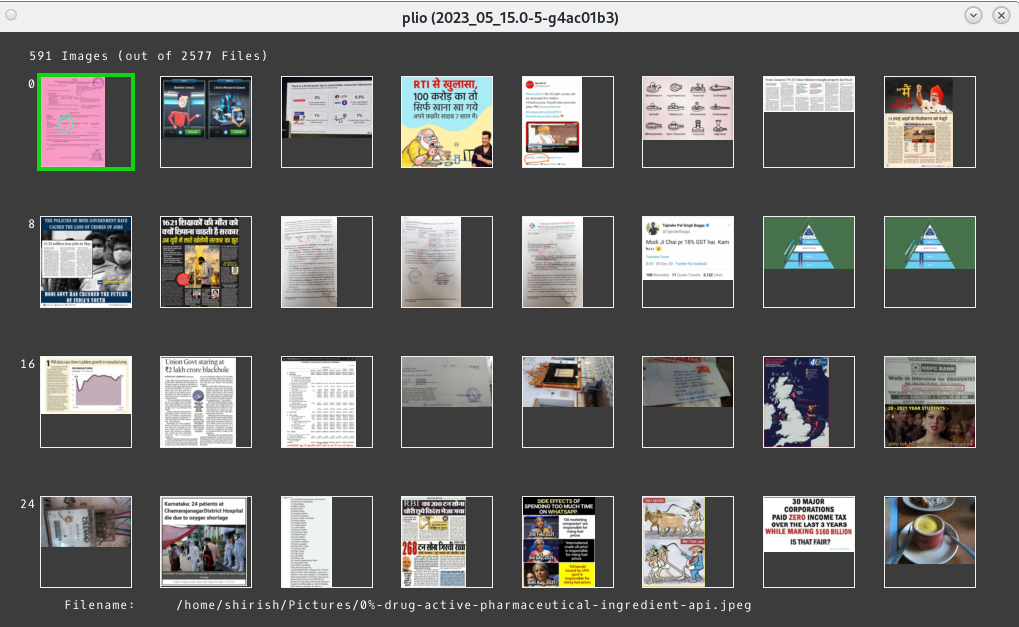
PLIO I have been looking for an image viewer that can view images via modification date by default. The newer, the better. Alas, most of the image viewers do not do that. Even feh somehow fails. What I need is default listing of images as thumbnails by modification date. I put it up on Unix Stackexchange couple of years ago. Somebody shared ristretto but that just gives listing and doesn t give the way I want it. To be more illustrative, maybe this may serve as a guide to what I mean.
There is an RFP for it. While playing with it, I also discovered another benefit of the viewer, a sort of side-benefit, it tells you if any images have gone corrupt or whatever and you get that info. on the CLI so you can try viewing that image with the path using another viewer or viewers before deleting them. One of the issues is there doesn t seem to be a magnify option by default. While the documentation says use the ^ key to maximize it, it doesn t maximize. Took me a while to find it as that isn t a key that I use most of the time. Ironically, that is the key used on the mobile quite a bit. Anyways, so that needs to be fixed. Sadly, it doesn t have creation date or modification date sort, although the documentation does say it does (at least the modification date) but it doesn t show at my end. I also got Warning: UNKNOWN command detected! but that doesn t tell me enough as to what the issue is. Hopefully the developer will fix the issues and it will become part of Debian as many such projects are. Compiling was dead easy even with gcc-12 once I got freeimage-dev.

Mum s first death anniversary I do not know where the year went by or how. The day went in a sort of suspended animation. The only thing I did was eat and sleep that day, didn t feel like doing anything. Old memories, even dreams of fighting with her only to realize in the dream itself it s fake, she isn t there anymore  Something that can never be fixed

Debconf Kochi I should have shared it few days ago but somehow slipped my mind. While it s too late for most people to ask for bursary for Debconf Kochi, if you are anywhere near Kochi in the month of September between the dates. September 3 to September 17 nearby Infopark, Kochi you could walk in and talk to people. This would be for people who either have an interest in free software, FOSS or Debian specific. For those who may not know, while Debian is a Linux Distribution having ports to other kernels as well as well as hardware. While I may not be able to provide the list of all the various flavors as well as hardware, can say it is quite a bit. For e.g. there is a port to RISC-V that was done few years back (2018). Why that is needed will be shared below. There is always something new to look forward in a Debconf.

Pressure Cooker and Potatoes This was asked to me in the last Debconf (2016) by few people. So as people are coming to India, it probably is a good time to sort of reignite the topic :). So a Pressure Cooker boils your veggies and whatnot while still preserving the nutrients. While there are quite a number of brands I would suggest either Prestige or Hawkins, I have had good experience with both. There are also some new pressure cookers that have come that are somewhat in the design of the Thai Wok. So if that is something that you are either comfortable with or looking for, you could look at that. One of the things that you have to be sort of aware of and be most particular is the pressure safety valve. Just putting up pressure cooker safety valve in your favorite search-engine should show you different makes and whatnot. While they are relatively cheap, you need to see it is not cracked, used or whatever. The other thing is the Pressure Cooker whistle as well. The easiest thing to cook are mashed potatoes in a pressure cooker. A pressure Cooker comes in Litres, from 1 Ltr. to 20 Ltr. The larger ones are obviously for hotels or whatnot. General rule of using Pressure cooker is have water 1/4th, whatever vegetable or non-veg you want to boil 1/2 and let the remaining part for the steam. Now the easiest thing to do is have wash the potatoes and put 1/4th water of the pressure cooker. Then put 1/2 or less or little bit more of the veggies, in this instance just Potatoes. You can put salt to or that can be done later. The taste will be different. Also, there are various salts so won t really go into it as spices is a rabbit hole. Anyways, after making sure that there is enough space for the steam to be built, Put the handle on the cooker and basically wait for 5-10 minutes for the pressure to be built. You will hear a whistling sound, wait for around 5 minutes or a bit more (depends on many factors, kind of potatoes, weather etc.) and then just let it cool off naturally. After 5-10 minutes or a bit more, the pressure will be off. Your mashed potatoes are ready for either consumption or for further processing. I am assuming gas, induction cooking will have its own temperature, have no idea about it, hence not sharing that. Pressure Cooker, first put on the heaviest settings, once it starts to whistle, put it on medium for 5-10 minutes and then let it cool off. The first time I had tried that, I burned the cooker. You understand things via trial and error.

Poha recipe This is a nice low-cost healthy and fulfilling breakfast called Poha that can be made anytime and requires at the most 10-15 minutes to prepare with minimal fuss. The main ingredient is Poha or flattened rice. So how is it prepared. I won t go into the details of quantity as that is upto how hungry people are. There are various kinds of flattened rice available in the market, what you are looking for is called thick Poha or zhad Poha (in Marathi). The first step is the trickiest. What do you want to do is put water on Poha but not to let it be soggy. There is an accessory similar to tea filter but forgot the name, it basically drains all the extra moisture and you want Poha to be a bit fluffy and not soggy. The Poha should breathe for about 5 minutes before being cooked. To cook, use a heavy bottomed skillet, put some oil in it, depends on what oil you like, again lot of variations, you can use ground nut or whatever oil you prefer. Then use single mustard seeds to check temperature of the oil. Once the mustard seeds starts to pop, it means it s ready for things. So put mustard seeds in, finely chopped onion, finely chopped coriander leaves, a little bit of lemon juice, if you want potatoes, then potatoes too. Be aware that Potatoes will soak oil like anything, so if you are going to have potatoes than the oil should be a bit more. Some people love curry leaves, others don t. I like them quite a bit, it gives a slightly different taste. So the order is
  1. Oil
  2. Mustard seeds (1-2 teaspoon)
  3. Curry leaves 5-10
  4. Onion (2-3 medium onions finely chopped, onion can also be used as garnish.)
  5. Potatoes (2-3 medium ones, mashed)
  6. Small green chillies or 1-2 Red chillies (if you want)
  7. Coriander Leaves (one bunch finely chopped)
  8. Peanuts (half a glass)
Make sure that you are stirring them quite a bit. On a good warm skillet, this should hardly take 5 minutes. Once the onions are slighly brown, you are ready to put Poha in. So put the poha, add turmeric, salt, and sugar. Again depends on number of people. If I made for myself and mum, usually did 1 teaspoon of salt, not even one fourth of turmeric, just a hint, it is for the color, 1 to 2 teapoons of sugar and mix them all well at medium flame. Poha used to be two or three glasses. If you don t want potato, you can fry them a bit separately and garnish with it, along with coriander, coconut and whatnot. In Kerala, there is possibility that people might have it one day or all days. It serves as a snack at anytime, breakfast, lunch, tea time or even dinner if people don t want to be heavy. The first few times I did, I did manage to do everything wrong. So, if things go wrong, let it be. After a while, you will find your own place. And again, this is just one way, I m sure this can be made as elaborate a meal as you want. This is just something you can do if you don t want noodles or are bored with it. The timing is similar. While I don t claim to be an expert in cooking in anyway or form, if people have questions feel free to ask. If you are single or two people, 2 Ltr. Pressure cooker is enough for most Indians, Westerners may take a slightly bit larger Pressure Cooker, maybe a 3 Ltr. one may be good for you. Happy Cooking and Experimenting  I have had the pleasure to have Poha in many ways. One of my favorite ones is when people have actually put tadka on top of Poha. You do everything else but in a slight reverse order. The tadka has all the spices mixed and is concentrated and is put on top of Poha and then mixed. Done right, it tastes out of this world. For those who might not have had the Indian culinary experience, most of which is actually borrowed from the Mughals, you are in for a treat. One of the other things I would suggest to people is to ask people where there can get five types of rice. This is a specialty of South India and a sort of street food. I know where you can get it Hyderabad, Bangalore, Chennai but not in Kerala, although am dead sure there is, just somehow have missed it. If asked, am sure the Kerala team should be able to guide. That s all for now, feeling hungry, having dinner as have been sharing about cooking.

RISC-V There has been lot of conversations about how India could be in the microprocesor spacee. The x86 and x86-64 is all tied up in Intel and AMD so that s a no go area. Let me elaborate a bit why I say that. While most of the people know that IBM was the first producers of transistors as well as microprocessors. Coincidentally, AMD and Intel story are similar in some aspects but not in others. For a long time Intel was a market leader and by hook or crook it remained a market leader. One of the more interesting companies in the 1980s was Cyrix which sold lot of low-end microprocessors. A lot of that technology also went into Via which became a sort of spiritual successor of Cyrix. It is because of Cyrix and Via that Intel was forced to launch the Celeron model of microprocessors.

Lawsuits, European Regulation For those who have been there in the 1990s may have heard the term Wintel that basically meant Microsoft Windows and Intel and they had a sort of monopoly power. While the Americans were sorta ok with it, the Europeans were not and time and time again they forced both Microsoft as well as Intel to provide alternatives. The pushback from the regulators was so great that Intel funded AMD to remain solvent for few years. The successes that we see today from AMD is Lisa Su s but there is a whole lot of history as well as bad blood between the two companies. Lot of lawsuits and whatnot. Lot of cross-licensing agreements between them as well. So for any new country it would need lot of cash just for licensing all the patents there are and it s just not feasible for any newcomer to come in this market as they would have to fork the cash for the design apart from manufacturing fab.

ARM Most of the mobiles today sport an ARM processor. At one time it meant Advanced RISC Machines but now goes by Arm Ltd. Arm itself licenses its designs and while there are lot of customers, you are depending on ARM and they can change any of the conditions anytime they want. You are also hoping that ARM does not steal your design or do anything else with it. And while people trust ARM, it is still a risk if you are a company.

RISC and Shakti There is not much to say about RISC other than this article at Register. While India does have large ambitions, executing it is far trickier than most people believe as well as complex and highly capital intensive. The RISC way could be a game-changer provided India moves deftly ahead. FWIW, Debian did a RISC port in 2018. From what I can tell, you can install it on a VM/QEMU and do stuff. And while RISC has its own niches, you never know what happens next.One can speculate a lot and there is certainly a lot of momentum behind RISC. From what little experience I have had, where India has failed time and time again, whether in software or hardware is support. Support is the key, unless that is not fixed, it will remain a dream  On a slightly sad note, Foxconn is withdrawing from the joint venture it had with Vedanta.

Lukas M rdian: Netplan and systemd-networkd on Debian Bookworm

Debian s cloud-images are using systemd-networkd as their default network stack in Bookworm. A slim and feature rich networking daemon that comes included with Systemd itself. Debian s cloud-images are deploying Netplan on top of this as an easy-to-use, declarative control layer. If you want to experiment with systemd-networkd and Netplan on Debian, this can be done easily in QEMU using the official images. To start, you need to download the relevant .qcow2 Debian cloud-image from: https://cloud.debian.org/images/cloud/bookworm/latest/
$ wget https://cloud.debian.org/images/cloud/bookworm/latest/debian-12-generic-amd64.qcow2

Prepare a cloud image Next, you need to prepare some configuration files for cloud-init and Netplan, to prepare a data-source (seed.img) for your local cloud-image.
$ cat > meta.yaml <<EOF
instance-id: debian01
local-hostname: cloudimg
EOF
$ cat > user.yaml <<EOF
#cloud-config
ssh_pwauth: true
password: test
chpasswd:
  expire: false
EOF
$ cat > netplan.yaml <<EOF
network:
  version: 2
  ethernets:
    id0:
      match:
        macaddress: "ca:fe:ca:fe:00:aa"
      dhcp4: true
      dhcp6: true
      set-name: lan0
EOF
Once all configuration is prepared, you can create the local data-source image, using the cloud-localds tool from the cloud-image-utils package:
$ cloud-localds --network-config=netplan.yaml seed.img user.yaml meta.yaml

Launch the local VM Now, everything is prepared to launch a QEMU VM with two NICs and do some experimentation! The following command will launch an ephemeral environment for you, keeping the original Debian cloud-image untouched. If you want to preserve any changes on disk, you can remove the trailing -snapshot parameter.
$ qemu-system-x86_64 \
  -machine accel=kvm,type=q35 \
  -cpu host \
  -m 2G \
  -device virtio-net-pci,netdev=net0,mac=ca:fe:ca:fe:00:aa \
  -netdev user,id=net0,hostfwd=tcp::2222-:22 \
  -nic user,model=virtio-net-pci,mac=f0:0d:ca:fe:00:bb \
  -drive if=virtio,format=qcow2,file=debian-12-generic-amd64.qcow2 \
  -drive if=virtio,format=raw,file=seed.img -snapshot
We set up the default debian user account through cloud-init s user-data configuration above, so you can now login to the system, using that user with the (very unsafe!) password test .
$ ssh -o "StrictHostKeyChecking=no" -o "UserKnownHostsFile=/dev/null" -p 2222 debian@localhost # password: test

Experience Netplan and systemd-networkd Once logged in successfully, you can execute the netplan status command to check the system s network configuration, as configured through cloud-init s netplan.yaml passthrough. So you ve already used Netplan at this point implicitly and it did all the configuration of systemd-networkd for you in the background!
debian@cloudimg:~$ sudo netplan status -a
     Online state: online
    DNS Addresses: 10.0.2.3 (compat)
       DNS Search: .
   1: lo ethernet UNKNOWN/UP (unmanaged)
      MAC Address: 00:00:00:00:00:00
        Addresses: 127.0.0.1/8
                   ::1/128
           Routes: ::1 metric 256
   2: enp0s2 ethernet DOWN (unmanaged)
      MAC Address: f0:0d:ca:fe:00:bb (Red Hat, Inc.)
   3: lan0 ethernet UP (networkd: id0)
      MAC Address: ca:fe:ca:fe:00:aa (Red Hat, Inc.)
        Addresses: 10.0.2.15/24 (dhcp)
                   fec0::c8fe:caff:fefe:aa/64
                   fe80::c8fe:caff:fefe:aa/64 (link)
    DNS Addresses: 10.0.2.3
           Routes: default via 10.0.2.2 from 10.0.2.15 metric 100 (dhcp)
                   10.0.2.0/24 from 10.0.2.15 metric 100 (link)
                   10.0.2.2 from 10.0.2.15 metric 100 (dhcp, link)
                   10.0.2.3 from 10.0.2.15 metric 100 (dhcp, link)
                   fe80::/64 metric 256
                   fec0::/64 metric 100 (ra)
                   default via fe80::2 metric 100 (ra)
As you can see from this output, the lan0 interface is configured via the id0 Netplan ID to be managed by systemd-networkd. Compare this data to the netplan.yaml file above, the networkctl output, the local Netplan configuration in /etc/netplan/ and the auto-generated systemd-networkd configuration.
debian@cloudimg:~$ networkctl 
IDX LINK   TYPE     OPERATIONAL SETUP     
  1 lo     loopback carrier     unmanaged
  2 enp0s2 ether    off         unmanaged
  3 lan0   ether    routable    configured
3 links listed.
debian@cloudimg:~$ cat /etc/netplan/50-cloud-init.yaml 
# [...]
network:
    ethernets:
        id0:
            dhcp4: true
            dhcp6: true
            match:
                macaddress: ca:fe:ca:fe:00:aa
            set-name: lan0
    version: 2

debian@cloudimg:~$ ls -l /run/systemd/network/
total 8
-rw-r--r-- 1 root root  78 Jul  5 15:23 10-netplan-id0.link
-rw-r--r-- 1 root root 137 Jul  5 15:23 10-netplan-id0.network
Now you can go ahead and try something more advanced, like link aggregation, using the second NIC that you configured for this QEMU VM and explore all the possibilities of Netplan on Debian, by checking the Netplan YAML documentation.

9 July 2023

Russell Coker: Matrix

Introduction In 2020 I first setup a Matrix [1] server. Matrix is a full featured instant messaging protocol which requires a less stringent definition of instant , messages being delayed for minutes aren t that uncommon in my experience. Matrix is a federated service where the servers all store copies of the room data, so when you connect your client to it s home server it gets all the messages that were published while you were offline, it is widely regarded as being IRC but without a need to be connected all the time. One of it s noteworthy features is support for end to end encryption (so the server can t access cleartext messages from users) as a core feature. Matrix was designed for bridging with other protocols, the most well known of which is IRC. The most common Matrix server software is Synapse which is written in Python and uses a PostgreSQL database as it s backend [2]. My tests have shown that a lightly loaded Synapse server with less than a dozen users and only one or two active users will have noticeable performance problems if the PostgreSQL database is stored on SATA hard drives. This seems like the type of software that wouldn t have been developed before SSDs became commonly affordable. The matrix-synapse is in Debian/Unstable and the backports repositories for Bullseye and Buster. As Matrix is still being very actively developed you want to have a recent version of all related software so Debian/Buster isn t a good platform for running it, Bullseye or Bookworm are the preferred platforms. Configuring Synapse isn t really hard, but there are some postential problems. The first thing to do is to choose the DNS name, you can never change it without dropping the database (fresh install of all software and no documented way of keeping user configuration) so you don t want to get it wrong. Generally you will want the Matrix addresses at the top level of the domain you choose. When setting up a Matrix server for my local LUG I chose the top level of their domain luv.asn.au as the DNS name for the server. If you don t want to run a server then there are many open servers offering free account. Server Configuration Part of doing this configuration required creating the URL https://luv.asn.au/.well-known/matrix/client with the following contents so clients know where to connect. Note that you should not setup Jitsi sections without first discussing it with the people who run the Jitsi server in question.
 
  "m.homeserver":  
    "base_url": "https://luv.asn.au"
   
  "jitsi":  
    "preferredDomain": "jitsi.perthchat.org"
   
  "im.vector.riot.jitsi":  
    "preferredDomain": "jitsi.perthchat.org"
   
 
Also the URL https://luv.asn.au/.well-known/matrix/server for other servers to know where to connect:
 
  "m.server": "luv.asn.au:8448"
 
If the base_url or the m.server points to a name that isn t configured then you need to add it to the web server configuration. See section 3.1 of the documentation about well known Matrix client fields [3]. The SE Linux specific parts of the configuration are to run the following commands as Bookworm and Bullseye SE Linux policy have support for Synapse:
setsebool -P httpd_setrlimit 1
setsebool -P httpd_can_network_relay 1
setsebool -P matrix_postgresql_connect 1
To configure apache you have to enable proxy mode and SSL with the command a2enmod proxy ssl proxy_http and add the line Listen 8443 to /etc/apache2/ports.conf and restart Apache. The command chmod 700 /etc/matrix-synapse should probably be run to improve security, there s no reason for less restrictive permissions on that directory. In the /etc/matrix-synapse/homeserver.yaml file the macaroon_secret_key is a random key for generating tokens. To use the matrix.org server as a trusted key server and not receive warnings put the following line in the config file:
suppress_key_server_warning: true
A line like the following is needed to configure the baseurl:
public_baseurl: https://luv.asn.au:8448/
To have Synapse directly accept port 8448 connections you have to change bind_addresses in the first section of listeners to the global listen IPv6 and IPv4 addresses. The registration_shared_secret is a password for adding users. When you have set that you can write a shell script to add new users such as:
#!/bin/bash
# usage: matrix_new_user USER PASS
synapse_register_new_matrix_user -u $1 -p $2 -a -k THEPASSWORD
You need to set tls_certificate_path and tls_private_key_path to appropriate values, usually something like the following:
tls_certificate_path: "/etc/letsencrypt/live/www.luv.asn.au-0001/fullchain.pem"
tls_private_key_path: "/etc/letsencrypt/live/www.luv.asn.au-0001/privkey.pem"
For the database section you need something like the following which matches your PostgreSQL setup:
  name: "psycopg2"
  args:
    user: WWWWWW
    password: XXXXXXX
    database: YYYYYYY
    host: ZZZZZZ
    cp_min: 5
    cp_max: 10
You need to run psql commands like the following to set it up:
create role WWWWWW login password 'XXXXXXX';
create database YYYYYYY with owner WWWWWW ENCODING 'UTF8' LOCALE 'C' TEMPLATE 'template0';
For the Apache configuration you need something like the following for the port 8448 web server:
<VirtualHost *:8448>
  SSLEngine on
...
  ServerName luv.asn.au;
  AllowEncodedSlashes NoDecode
  ProxyPass /_matrix http://127.0.0.1:8008/_matrix nocanon
  ProxyPassReverse /_matrix http://127.0.0.1:8008/_matrix
  AllowEncodedSlashes NoDecode
  ProxyPass /_matrix http://127.0.0.1:8008/_matrix nocanon
  ProxyPassReverse /_matrix http://127.0.0.1:8008/_matrix
</VirtualHost>
Also you must add the ProxyPass section to the port 443 configuration (the server that is probably doing other more directly user visible things) for most (all?) end-user clients:
  ProxyPass /_matrix http://127.0.0.1:8008/_matrix nocanon
This web page can be used to test listing rooms via federation without logging in [4]. If it gives the error Can t find this server or its room list then you must set allow_public_rooms_without_auth and allow_public_rooms_over_federation to true in /etc/matrix-synapse/homeserver.yaml. The Matrix Federation Tester site [5] is good for testing new servers and for tests after network changes. Clients The Element (formerly known as Riot) client is the most common [6]. The following APT repository will allow you to install Element via apt install element-desktop on Debian/Buster.
deb https://packages.riot.im/debian/ default main
The Debian backports repository for Buster has the latest version of Quaternion, apt install quaternion should install that for you. Quaternion doesn t support end to end encryption (E2EE) and also doesn t seem to have good support for some other features like being invited to a room. My current favourite client is Schildi Chat on Android [7], which has a notification message 24*7 to reduce the incidence of Android killing it. Eventually I want to go to PinePhone or Librem 5 for all my phone use so I need to find a full featured Linux client that works on a small screen. Comparing to Jabber I plan to keep using Jabber for alerts because it really does instant messaging, it can reliably get the message to me within a matter of seconds. Also there are a selection of command-line clients for Jabber to allow sending messages from servers. When I first investigated Matrix there was no program suitable for sending messages from a script and the libraries for the protocol made it unreasonably difficult to write one. Now there is a Matrix client written in shell script [8] which might do that. But the delay in receiving messages is still a problem. Also the Matrix clients I ve tried so far have UIs that are more suited to serious chat than to quickly reading a notification message. Bridges Here is a list of bridges between Matrix and other protocols [9]. You can run bridges yourself for many different messaging protocols including Slack, Discord, and Messenger. There are also bridges run for public use for most IRC channels. Here is a list of integrations with other services [10], this is for interacting with things other than IM systems such as RSS feeds, polls, and other things. This also has some frameworks for writing bots. More Information The Debian wiki page about Matrix is good [11]. The view.matrix.org site allows searching for public rooms [12].

Vasudev Kamath: Using LUKS-Encrypted USB Stick with TPM2 Integration

I use a LUKS-encrypted USB stick to store my GPG and SSH keys, which acts as a backup and portable key setup when working on different laptops. One inconvenience with LUKS-encrypted USB sticks is that you need to enter the password every time you want to mount the device, either through a Window Manager like KDE or using the cryptsetup luksOpen command. Fortunately, many laptops nowadays come equipped with TPM2 modules, which can be utilized to automatically decrypt the device and subsequently mount it. In this post, we'll explore the usage of systemd-cryptenroll for this purpose, along with udev rules and a set of scripts to automate the mounting of the encrypted USB. First, ensure that your device has a TPM2 module. You can run the following command to check:

sudo journalctl -k --grep=tpm2
The output should resemble the following:
Jul 08 18:57:32 bhairava kernel: ACPI: SSDT 0x00000000BBEFC000 0003C6 (v02
LENOVO Tpm2Tabl 00001000 INTL 20160422) Jul 08 18:57:32 bhairava kernel:
ACPI: TPM2 0x00000000BBEFB000 000034 (v03 LENOVO TP-R0D 00000830
PTEC 00000002) Jul 08 18:57:32 bhairava kernel: ACPI: Reserving TPM2 table
memory at [mem 0xbbefb000-0xbbefb033]
You can also use the systemd-cryptenroll command to check for the availability of a TPM2 device on your laptop:
systemd-cryptenroll --tpm2-device=list
The output will be something like following:
blog git:(master) systemd-cryptenroll --tpm2-device=list
PATH        DEVICE      DRIVER
/dev/tpmrm0 MSFT0101:00 tpm_tis
   blog git:(master)
Next, ensure that you have connected your encrypted USB device. Note that systemd-cryptenroll only works with LUKS2 and not LUKS1. If your device is LUKS1-encrypted, you may encounter an error while enrolling the device, complaining about the LUKS2 superblock not found. To determine if your device uses a LUKS1 header or LUKS2, use the cryptsetup luksDump <device> command. If it is LUKS1, the header will begin with:
LUKS header information for /dev/sdb1
Version:        1
Cipher name:    aes
Cipher mode:    xts-plain64
Hash spec:      sha256
Payload offset: 4096
Converting from LUKS1 to LUKS2 is a simple process, but for safety, ensure that you backup the header using the cryptsetup luksHeaderBackup command. Once backed up, use the following command to convert the header to LUKS2:
sudo cryptsetup convert --type luks2 /dev/sdb1
After conversion, the header will look like this:
Version:        2
Epoch:          4
Metadata area:  16384 [bytes]
Keyslots area:  2064384 [bytes]
UUID:           000b2670-be4a-41b4-98eb-9adbd12a7616
Label:          (no label)
Subsystem:      (no subsystem)
Flags:          (no flags)
The next step is to enroll the new LUKS key for the encrypted device using systemd-cryptenroll. Run the following command:
sudo systemd-cryptenroll --tpm2-device=/dev/tpmrm0 --tpm2-pcrs="0+7" /dev/sdb1
This command will prompt you to provide the existing key to unseal the device. It will then add a new random key to the volume, allowing it to be unlocked in addition to the existing keys. Additionally, it will bind this new key to PCRs 0 and 7, representing the system firmware and Secure Boot state. If there is only one TPM device on the system, you can use --tpm2-device=auto to automatically select the device. To confirm that the new key has been enrolled, you can dump the LUKS configuration and look for a systemd-tpm2 token entry, as well as an additional entry in the Keyslots section. To test the setup, you can use the /usr/lib/systemd/systemd-cryptsetup command. Additionally, you can check if the device is unsealed by using lsblk:
sudo /usr/lib/systemd/systemd-cryptsetup attach GPG_USB "/dev/sdb1" - tpm2-device=auto
lsblk
The lsblk command should display the unsealed and mounted device, like this:
NAME        MAJ:MIN RM   SIZE RO TYPE  MOUNTPOINTS
sda           8:0    0 223.6G  0 disk
 sda1        8:1    0   976M  0 part  /boot/efi
 sda2        8:2    0 222.6G  0 part
   root    254:0    0 222.6G  0 crypt /
sdb           8:16   1   7.5G  0 disk
 sdb1        8:17   1   7.5G  0 part
   GPG_USB 254:1    0   7.5G  0 crypt /media/vasudev/GPG_USB
Auto Mounting the device Now that we have solved the initial problem of unsealing the USB device using TPM2 instead of manually entering the key, the next step is to automatically mount the device upon insertion and remove the mapping when the device is removed. This can be achieved using the following udev rules:
ACTION=="add", KERNEL=="sd*", ENV DEVTYPE =="partition", ENV ID_BUS =="usb", ENV SYSTEMD_WANTS ="mount-gpg-usb@$env DEVNAME .service"
ACTION=="remove", KERNEL=="sd*", ENV DEVTYPE =="partition", ENV ID_BUS =="usb", RUN+="/usr/local/bin/umount_enc_usb.sh '%E ID_FS_UUID '"
When a device is added, a systemd service is triggered to mount the device at a specific location. Initially, I used a script with the RUN directive, but it resulted in an exit code of 32. This might be due to systemd-cryptsetup taking some time to return, causing udev to time out. To address this, I opted to use a systemd service instead. For device removal, even though the physical device is no longer present, the mapping may still remain, causing issues upon reinsertion. To resolve this, I created a script to close the luks mapping upon device removal. Below are the systemd service and script files: mount_enc_usb.sh:
#!/bin/bash
set -x
if [[ "$#" -ne 1 ]]; then
    echo "$(basename $0) <device>"
    exit 1
fi
device_uuid="$(blkid --output udev $1   grep ID_FS_UUID=   cut -d= -f2)"
if [[ "$device_uuid" == 000b2670-be4a-41b4-98eb-9adbd12a7616 ]]; then
    # Found our device, let's trigger systemd-cryptsetup
    /usr/lib/systemd/systemd-cryptsetup attach GPG_USB "$1" - tpm2-device=auto
    [[ -d /media/vasudev/GPG_USB ]]   (mkdir -p /media/vasudev/GPG_USB/ && chown vasudev:vasudev /media/vasudev/GPG_USB)
    mount /dev/mapper/GPG_USB /media/vasudev/GPG_USB
else
    echo "Not the interested device. Ignoring."
    exit 0
fi
umount_enc_usb.sh:
#!/bin/bash
if [[ "$#" -ne 1 ]]; then
  echo "$(basename $0) <fsuuid>"
  exit 1
fi
if [[ "$1" == "000b2670-be4a-41b4-98eb-9adbd12a7616" ]]; then
  # Our device is removed, let's close the luks mapping
  [[ -e /dev/mapper/GPG_USB ]] && cryptsetup luksClose /dev/mapper/GPG_USB
else
  echo "Not our device."
  exit 0
fi
mount-gpg-usb@.service:
[Unit]
Description=Mount the encrypted USB device service
[Service]
Type=simple
ExecStart=/usr/local/bin/mount_enc_usb.sh
With this setup, plugging in the USB device will automatically unseal and mount it, and upon removal, the luks mapping will be closed.

Note

This can be even done for LUKS2 encrypted root disk but will need some tweaking in initramfs.

8 July 2023

Russell Coker: Sandboxing Phone Apps

As a follow up to Wayland [1]: A difficult problem with Linux desktop systems (which includes phones and tablets) is restricting application access so that applications can t mess with each other s data or configuration but also allowing them to share data as needed. This has been mostly solved for Android but that involved giving up all legacy Linux apps. I think that we need to get phones capable of running a full desktop environment and having Android level security on phone apps and regular desktop apps. My interest in this is phones running Debian and derivatives such as PureOS. But everything I describe in this post should work equally well for all full featured Linux distributions for phones such as Arch, Gentoo, etc and phone based derivatives of those such as Manjaro. It may be slightly less applicable to distributions such as Alpine Linux and it s phone derivative PostmarketOS, I would appreciate comments from contributors to PostmarketOS or Alpine Linux about this. I ve investigated some of the ways of solving these problems. Many of the ways of doing this involves namespaces. The LWN articles about namespaces are a good background to some of these technologies [2]. The LCA keynote lecture Containers aka crazy user space fun by Jess Frazelle has a good summary of some of the technology [3]. One part that I found particularly interesting was the bit about recognising the container access needed at compile time. This can also be part of recognising bad application design at compile time, it s quite common for security systems to flag bad security design in programs. Firejail To sandbox applications you need to have some method of restricting what they do, this means some combination of namespaces and similar features. Here s an article on sandboxing with firejail [4]. Firejail uses namespaces, seccomp-bpf, and capabilities to restrict programs. It allows bind mounts if run as root and if not run as root it can restrict file access by name and access to networking, system calls, and other features. It has a convenient learning mode that generates policy for you, so if you have a certain restricted set of tasks that an application is to perform you can run it once and then force it to do only the same operations in future. I recommend that everyone who is still reading at this point try out firejail. Here s an example of what you can do:
# create a profile
firejail --build=xterm.profile xterm
# now this run can only do what the previous run did
firejail --profile=xterm.profile xterm
Note that firejail is SETUID root so can potentially reduce system security and it has had security issues in the past. In spite of that it can be good for allowing a trusted user to run programs with less access to the system. Also it is a good way to start learning about such things. I don t think it s a good solution for what I want to do. But I won t rule out the possibility of using it at some future time for special situations. Bubblewrap I tried out firejail with the browser Epiphany (Debian package epiphany-browser) on my Librem5, but that didn t work as Epiphany uses /usr/bin/bwrap (bubblewrap) for it s internal sandboxing (here is an informative blog post about the history of bubblewrap AKA xdg-app-helper which was developed as part of flatpak [5]). The Epiphany bubblewrap sandbox is similar to the situation with Chrome/Chromium which have internal sandboxing that s incompatible with firejail. The firejail man page notes that it s not compatible with Snap, Flatpack, and similar technologies. One issue this raises is that we can t have a namespace based sandboxing system applied to all desktop apps with no extra configuration as some desktop apps won t work with it. Bubblewrap requires setting kernel.unprivileged_userns_clone=1 to run as non-root (IE provide the normal and expected functionality) which potentially reduces system security. Here is an example of a past kernel bug that was exploitable by creating a user namespace with CAP_SYS_ADMIN [6]. But it s the default in recent Debian kernels which means that the issues have been reviewed and determined to be a reasonable trade-off and also means that many programs will use the feature and break if it s disabled. Here is an example of how to use Bubblewrap on Debian, after installing the bubblewrap run the following command. Note that the new-session option (to prevent injecting characters in the keyboard buffer with TIOCSTI) makes the session mostly unusable for a shell.
bwrap --ro-bind /usr /usr --symlink usr/lib64 /lib64 --symlink usr/lib /lib --proc /proc --dev /dev --unshare-pid --die-with-parent bash
Here is an example of using Bubblewrap to sandbox the game Warzone2100 running with Wayland/Vulkan graphics and Pulseaudio sound.
bwrap --bind $HOME/.local/share/warzone2100 $HOME/.local/share/warzone2100 --bind /run/user/$UID/pulse /run/user/$UID/pulse --bind /run/user/$UID/wayland-0 /run/user/$UID/wayland-0 --bind /run/user/$UID/wayland-0.lock /run/user/$UID/wayland-0.lock --ro-bind /usr /usr --symlink usr/bin /bin --symlink usr/lib64 /lib64 --symlink usr/lib /lib --proc /proc --dev /dev --unshare-pid --dev-bind /dev/dri /dev/dri --ro-bind $HOME/.pulse $HOME/.pulse --ro-bind $XAUTHORITY $XAUTHORITY --ro-bind /sys /sys --new-session --die-with-parent warzone2100
Here is an example of using Bubblewrap to sandbox the Debian bug reporting tool reportbug
bwrap --bind /tmp /tmp --ro-bind /etc /etc --ro-bind /usr /usr --ro-bind /var/lib/dpkg /var/lib/dpkg --symlink usr/sbin /sbin --symlink usr/bin /bin --symlink usr/lib64 /lib64 --symlink usr/lib /lib --symlink /usr/lib32 /lib32 --symlink /usr/libx32 /libx32 --proc /proc --dev /dev --die-with-parent --unshare-ipc --unshare-pid reportbug
Here is an example shell script to wrap the build process for Debian packages. This needs to run with unshare-user and specifying the UID as 0 because fakeroot doesn t work in the container, I haven t worked out why but doing it through the container is a better method anyway. This script shares read-write the parent of the current directory as the Debian build process creates packages and metadata files in the parent directory. This will prevent the automatic signing scripts which is a feature not a bug, so after building packages you have to sign the .changes file with debsign. One thing I just learned is that the Debian build system Sbuild can use chroots for building packages for similar benefits [7]. Some people believe that sbuild is the correct way of doing it regardless of the chroot issue. I think it s too heavy-weight for most of my Debian package building, but even if I had been convinced I d still share the information about how to use bwrap as Debian is about giving users choice.
#!/bin/bash
set -e
BUILDDIR=$(realpath $(pwd)/..)
exec bwrap --bind /tmp /tmp --bind $BUILDDIR $BUILDDIR --ro-bind /etc /etc --ro-bind /usr /usr --ro-bind /var/lib/dpkg /var/lib/dpkg --symlink usr/bin /bin --symlink usr/lib64 /lib64 --symlink usr/lib /lib --proc /proc --dev /dev --die-with-parent --unshare-user --unshare-ipc --unshare-net --unshare-pid --new-session --uid 0 --gid 0 $@
Here is an informative blog post about using Bubblewrap with Seccomp (BPF) [8]. In a future post I ll write about how to get this sort of thing going but I ll just leave the URL here for people who want to do it on their own. The source for the flatpak-run program is the only example I could find of using Seccomp with Bubblewrap [9]. A lot of that code is worth copying for application sandboxing, maybe the entire program. Unshare The unshare command from the util-linux package has a large portion of the Bubblewrap functionality. The things that it doesn t do like creating a new session can be done by other utilities. Here is an example of creating a container with unshare and then using cgroups with it [10]. systemd --user Recent distributions have systemd support for running a user session, the Arch Linux Wiki has a good description of how this works [11]. The units for a user are .service files stored in /usr/lib/systemd/user/ (distribution provided), ~/.local/share/systemd/user/ (user installed applications in debian a link to ~/.config/systemd/user/), ~/.config/systemd/user/ (for manual user config), and /etc/systemd/user/ (local sysadmin provided) Here are some example commands for manipulating this:
# show units running for the current user
systemctl --user
# show status of one unit
systemctl --user status kmail.service
# add an environment variable to the list for all user units
systemctl --user import-environment XAUTHORITY
# start a user unit
systemctl --user start kmail.service
# analyse security for all units for the current user
systemd-analyze --user security
# analyse security for one unit
systemd-analyze --user security kmail.service
Here is a test kmail.service file I wrote to see what could be done for kmail, I don t think that kmail is the app most needing to be restricted it is in more need of being protected from other apps but it still makes a good test case. This service file took it from the default risk score of 9.8 (UNSAFE) to 6.3 (MEDIUM) even though I was getting the error code=exited, status=218/CAPABILITIES when I tried anything that used capabilities (apparently due to systemd having some issue talking to the kernel).
[Unit]
Description=kmail
[Service]
ExecStart=/usr/bin/kmail
# can not limit capabilities (code=exited, status=218/CAPABILITIES)
#CapabilityBoundingSet=~CAP_SYS_TIME CAP_SYS_PACCT CAP_KILL CAP_WAKE_ALARM CAP_DAC_OVERRIDE CAP_DAC_READ_SEARCH CAP_FOWNER CAP_IPC_OWNER CAP_LINUX_IMMUTABLE CAP_IPC_LOCK CAP_SYS_MODULE CAP_SYS_TTY_CONFIG CAP_SYS_BOOT CAP_SYS_CHROOT CAP_BLOCK_SUSPEND CAP_LEASE CAP_MKNOD CAP_CHOWN CAP_FSETID CAP_SETFCAP CAP_SETGID CAP_SETUID CAP_SETPCAP CAP_SYS_RAWIO CAP_SYS_PTRACE CAP_SYS_NICE CAP_SYS_RESOURCE CAP_NET_ADMIN CAP_NET_BIND_SERVICE CAP_NET_BROADCAST CAP_NET_RAW CAP_SYS_ADMIN CAP_SYSLOG
# also 218 for ProtectKernelModules PrivateDevices ProtectKernelLogs ProtectClock
# MemoryDenyWriteExecute stops it displaying message content (bad)
# needs @resources and @mount to startup
# needs @privileged to display message content
SystemCallFilter=~@cpu-emulation @debug @raw-io @reboot @swap @obsolete
SystemCallArchitectures=native
UMask=077
NoNewPrivileges=true
ProtectControlGroups=true
PrivateMounts=false
RestrictNamespaces=~user pid net uts mnt cgroup ipc
RestrictSUIDSGID=true
ProtectHostname=true
LockPersonality=true
ProtectKernelTunables=true
RestrictAddressFamilies=~AF_PACKET
RestrictRealtime=true
ProtectSystem=strict
ProtectProc=invisible
PrivateUsers=true
[Install]
When I tried to use the TemporaryFileSystem=%h directive (to make the home directory a tmpfs the most basic step in restricting what a regular user application can do) I got the error (code=exited, status=226/NAMESPACE) . So I don t think the systemd user setup competes with bubblewrap for restricting user processes. But if anyone else can start where I left off and go further then that will be interesting. Systemd-run The following shell script runs firefox as a dynamic user via systemd-run, running this asks for the root password and any mechanism for allowing that sort of thing opens potential security holes. So at this time while it s an interesting feature I don t think it is suitable for running regular applications on a phone or Linux desktop.
#!/bin/bash
# systemd-run Firefox with DynamicUser and home directory.
#
# Run as a non-root user.
# Or, run as root and change $USER below.
SANDBOX_MINIMAL=(
    --property=DynamicUser=1
    --property=StateDirectory=openstreetmap
    # --property=RootDirectory=/debian_sid
)
SANDBOX_X11=(
    # Sharing Xorg always defeats security, regardless of any sandboxing tech,
    # but the config is almost ready for Wayland, and there's Xephyr.
#    --property=LoadCredential=.ICEauthority:/home/$USER/.ICEauthority
    --property=LoadCredential=.Xauthority:/home/$USER/.Xauthority
    --property=Environment=DISPLAY=:0
)
SANDBOX_FIREFOX=(
    # hardware-accelerated rendering
    --property=BindPaths=/dev/dri
    # webcam
    # --property=SupplementaryGroups=video
)
systemd-run  \
    "$ SANDBOX_MINIMAL[@] "  "$ SANDBOX_X11[@] " "$ SANDBOX_FIREFOX[@] " \
    bash -c '
        export XAUTHORITY="$CREDENTIALS_DIRECTORY"/.Xauthority
        export ICEAUTHORITY="$CREDENTIALS_DIRECTORY"/.ICEauthority
        export HOME="$STATE_DIRECTORY"/home
        firefox --no-remote about:blank
    '
Qubes OS Here is an interesting demo video of QubesOS [12] which shows how it uses multiple VMs to separate different uses. Here is an informative LCA presentation about Qubes which shows how it asks the user about communication between VMs and access to hardware [13]. I recommend that everyone who hasn t seen Qubes in operation watch the first video and everyone who isn t familiar with the computer science behind it watch the second video. Qubes appears to be a free software equivalent to NetTop as far as I can tell without ever being able to use NetTop. I don t think Qubes is a good match for my needs in general use and it definitely isn t a good option for phones (VMs use excessive CPU on phones). But it s methods for controlling access have some ideas that are worth copying. File Access XDG Desktop Portal One core issue for running sandboxed applications is to allow them to access files permitted by the user but no other files. There are two main parts to this problem, the easier one is to have each application have it s own private configuration directory which can be addressed by bind mounts, MAC systems, running each application under a different UID or GID, and many other ways. The hard part of file access is to allow the application to access random files that the user wishes. For example I want my email program, IM program, and web browser to be able to save files and also to be able to send arbitrary files via email, IM, and upload to web sites. But I don t want one of those programs to be able to access all the files from the others if it s compromised. So only giving programs access to arbitrary files when the user chooses such a file makes sense. There is a package xdg-desktop-portal which provides a dbus interface for opening files etc for a sandboxed application [14]. This portal has backends for KDE, GNOME, and Wayland among others which allow the user to choose which file or files the application may access. Chrome/Chromium is one well known program that uses the xdg-desktop-portal and does it s own sandboxing. To use xdg-desktop-portal an application must be modified to use that interface instead of opening files directly, so getting this going with all Internet facing applications will take some work. But the documentation notes that the portal API gives a consistent user interface for operations such as opening files so it can provide benefits even without a sandboxed environment. This technology was developed for Flatpak and is now also used for Snap. It also has a range of APIs for accessing other services [15]. Flatpak Flatpack is a system for distributing containerised versions of applications with some effort made to improve security. Their development of bubblewrap and xdg-desktop-portal is really good work. However the idea of having software packaged with all libraries it needs isn t a good one, here s a blog post covering some of the issues [16]. The web site flatkill.org has been registered to complain about some Flatpak problems [17]. They have some good points about the approach that Flatpak project developers have taken towards some issues. They also make some points about the people who package software not keeping up to date with security fixes and not determining a good security policy for their pak. But this doesn t preclude usefully using parts of the technology for real security benefits. If parts of Flatpak like Bubblewrap and xdg-portal are used with good security policies on programs that are well packaged for a distribution then these issues would be solved. The Flatpak app author s documentation about package requirements [18] has an overview of security features that is quite reasonable. If most paks follow that then it probably isn t too bad. I reviewed the manifests of a few of the recent paks and they seemed to have good settings. In the amount of time I was prepared to spend investigating this I couldn t find evidence to support the Flatkill claim about Flatpaks granting obviously inappropriate permissions. But the fact that the people who run Flathub decided to put a graph of installs over time on the main page for each pak while making the security settings only available by clicking the Manifest github link, clicking on a JSON or YAML file, and then searching for the right section in that shows where their priorities lie. The finish-args section of the Flatpak manifest (the section that describes the access to the system) seems reasonably capable and not difficult for users to specify as well as being in common use. It seems like it will be easy enough to take some code from Flatpak for converting the finish-args into Bubblewrap parameters and then use the manifest files from Flathub as a starting point for writing application security policy for Debian packages. Snap Snap is developed by Canonical and seems like their version of Flatpak with some Docker features for managing versions, the Getting Started document is worth reading [19]. They have Connections between different snaps and the system where a snap registers a plug that connects to a socket which can be exposed by the system (EG the camera socket) or another snap. The local admin can connect and disconnect them. The connections design reminds me of the Android security model with permitting access to various devices. The KDE Neon extension [20] has been written to add Snap support to KDE. Snap seems quite usable if you have an ecosystem of programs using it which Canonical has developed. But it has all the overheads of loopback mounts etc that you don t want on a mobile device and has the security issues of libraries included in snaps not being updated. A quick inspection of an Ubuntu 22.04 system I run (latest stable release) has Firefox 114.0.2-1 installed which includes libgcrypt.so.20.2.5 which is apparently libgcrypt 1.8.5 and there are CVEs relating to libgcrypt versions before 1.9.4 and 1.8.x versions before 1.8.8 which were published in 2021 and updated in 2022. Further investigation showed that libgcrypt came from the gnome-3-38-2004 snap (good that it doesn t require all shared objects to be in the same snap, but that it has old versions in dependencies). The gnome-3-38-2004 snap is the latest version so anyone using the Snap of Firefox seems to have no choice but to have what appears to be insecure libraries. The strict mode means that the Snap in question has no system access other than through interfaces [21]. SE Linux and Apparmor The Librem5 has Apparmor running by default. I looked into writing Apparmor policy to prevent Epiphany from accessing all files under the home directory, but that would be a lot of work. Also at least one person has given up on maintaining an Epiphany profile for Apparmor because it changes often and it s sandbox doesn t work well with Apparmor [22]. This was not a surprise to me at all, SE Linux policy has the same issues as Apparmor in this regard. The Ubuntu Security Team Application Confinement document [23] is worth reading. They have some good plans for using AppArmor as part of solving some of these problems. I plan to use SE Linux for that. Slightly Related Things One thing for the future is some sort of secure boot technology, the LCA lecture Becoming a tyrant: Implementing secure boot in embedded devices [24] has some ideas for the future. The Betrusted project seems really interesting, see Bunnie s lecture about how to create a phone size security device with custom OS [25]. The Betrusted project web page is worth reading too [26]. It would be ironic to have a phone as your main PC that is the same size as your security device, but that seems to be the logical solution to several computing problems. Whonix is a Linux distribution that has one VM for doing Tor stuff and another VM for all other programs which is only allowed to have network access via the Tor VM [27]. Xpra does for X programs what screen/tmux do for text mode programs [28]. It allows isolating X programs from each other in ways that are difficult to impossible with a regular X session. In an ideal situation we could probably get the benefits we need with just using Wayland, but if there are legacy apps that only have X support this could help. Conclusion I think that currently the best option for confining desktop apps is Bubblewrap on Wayland. Maybe with a modified version of Flatpak-run to run it and with app modifications to use the xdg-portal interfaces as much as possible. That should be efficient enough in storage space, storage IO performance, memory use, and CPU use to run on phones while giving some significant benefits. Things to investigate are how much code from Flatpak to use, how to most efficiently do the configuration (maybe the Flatpak way because it s known and seems effective), how to test this (and have regression tests), and what default settings to use. Also BPF is a big thing to investigate.

6 July 2023

Thorsten Alteholz: My Debian Activities in June 2023

FTP master This month I accepted 221 and rejected 33 packages. The overall number of packages that got accepted was 221. Yeah, Bookworm was released this month. Thanks a lot to everybody who was involved in doing this. Debian LTS This was my hundred-eighth month that I did some work for the Debian LTS initiative, started by Raphael Hertzog at Freexian. This month my all in all workload has been 14h. During that time I uploaded: I also did some work on security-master to inject missing dependencies for some packages and processed NEW. Last but not least I did some days on frontdesk duties and took part in the LTS meeting. Debian ELTS This month was the fifty ninth ELTS month. I also made some progress with the openssl1.0 update. Last but not least I did some days on frontdesk duties. Debian Astro This month I uploaded some packages to fix one or the other issue: This month I even uploaded a new package c-munipack, which is more or less the successor of munipack, and can be used for example to analyse light curves of variable stars.
Another new package is virtualgps, where the name says it all. Debian Printing This month I did a security upload of cpdb-libs to fix a CVE in Unstable, Bookworm and Bullseye.
This work is generously funded by Freexian! Debian Mobcom This month I could upload a new version of: Other stuff This month I restarted DOPOM (Debian Orphaned Package Of the Month) and adopted: Hopefully this will result in a new upload of vdr-plugin-live. I would like to have this package for my personal VDR. I also did an upload of:

1 July 2023

Bastian Venthur: dotenv-cli update

Thanks to Nicholas Guriev, dotenv-cli now uses exec instead of popen to create the new process on POSIX systems. As a refresher, dotenv-cli is a package that provides the dotenv command. dotenv reads the .env file from the current directory, puts the contents in the environment variables, and executes the given command with the extra environment variables set. dotenv comes in handy if you follow the 12 factor app methodology or just need to run a program locally with specific environment variables set. With this new change, when you call
dotenv my_awesome_tool
instead of forking a new process for my_awesome_tool, effectively creating a child process of dotenv, dotenv now uses exec to become the new process. This is a bit cleaner, as there is no longer a dotenv-process running that you don t actually care about, and less-error prone when trying to send signals such as SIGTERM to the processes that runs my_awesome_tool. Unfortunately, exec does not work properly under Windows, so here we still fall back to using popen. This new feature is available in version 3.2.0 which is available on PyPI and debian/unstable.

Paul Wise: FLOSS Activities June 2023

Focus This month I didn't have any particular focus. I just worked on issues in my info bubble.

Changes

Issues

Review
  • Spam: reported 29 Debian mailing list posts
  • Debian wiki: RecentChanges for the month
  • Debian BTS usertags: changes for the month
  • Debian screenshots:
    • approved lsd stockfish x86dis
    • rejected libselinux1 (photo), stockfish (mobile app), php-bcmath (selfie), chromium-browser/binutils-alpha-linux-gnu (medical photo), weboob-qt (QR code)

Administration
  • Debian QA services: deploy changes
  • Debian IRC: updated #debian-live admin list
  • Debian mentors: investigate reason for missing package
  • Debian wiki: unblock IP addresses, approve accounts

Communication

Sponsors The sptag work was sponsored. All other work was done on a volunteer basis.

30 June 2023

Abhijith PA: Running Debian on my phone

You might have already read my blog titled Running PostmarketOS on my phone . After running pmOS on phone, my mind kept talking run Debian . So I started preparing for that. At the moment no straight way tool exist in Debian like postmarketOS s pmbootstrap. Well I can compile what is already available, do debootstrap rootfs. But I don t know how to build the final image that can be flashed from recovery. One crooked idea I had is, extract the pmOS image, find the packages and its configurations. For eg: usbmodem package in postmarketos are configured to connect to host network when plugged. I deboostrap ed the rootfs, compared with postmarketos and installed extra packages and copied configuration. I repacked and compressed to new image. Then flashed with twrp. The phone was booting. So I connected the usb cable and run,
ssh abhijith@172.16.42.1
abhijith@172.16.42.1's password: 
Linux arm64 3.10.107-Cherry #1-postmarketOS SMP PREEMPT Sat Dec 18 13:08:52 UTC 2021 aarch64
The programs included with the Debian GNU/Linux system are free software;
the exact distribution terms for each program are described in the
individual files in /usr/share/doc/*/copyright.
Debian GNU/Linux comes with ABSOLUTELY NO WARRANTY, to the extent
permitted by applicable law.
abhijith@arm64:$ 
Yay!. I have a working Debian phone. I quickly installed lxde and that is working perfectly. debian-leeco

Shirish Agarwal: Motherboard battery, Framework, VR headsets, Steam

Motherboard Battery You know you have become too old when you get stumped and the solution is simple and fixed by the vendor. About a week back, I was getting CPU Fan Error. It s a 6 year old desktop so I figured that the fan or the ball bearings on the fan must have worn out. I opened up the cabinet and I could see both the on cpu fan was working coolly as well as the side fan was working without an issue. So I couldn t figure out what was the issue. I had updated the BIOS/UEFI number of years ago so that couldn t be an issue. I fiddled with the boot menu and was able to boot into Linux but it was a pain that I had to do every damn time. As it is, it takes almost 2-3 minutes for the whole desktop to be ready and this extra step was annoying. I had bought a Mid-tower cabinet while the motherboard so there were alternate connectors I could try but still the issue persisted. And this workaround was heart-breaking as you boot the BIOS/UEFI and fix the boot menu each time even though it had Debian Boot Launcher and couple of virtual ones provided by the vendor (Asus) and they were hardwired. So failing all, went to my vendor/support and asked if he could find out what the issue is. It costed me $10, he did all the same things I did but one thing more, he changed the battery (cost less than 1USD) and presto all was right with the world again. I felt like a fool but a deal is a deal so paid the gentleman for his services. Now can again use the desktop and at least know about what s happening in the outside world.

Framework Laptops I have been seeing quite a few teardowns of Framework Laptops on Youtube and love it. More so, now that they have AMD in their arsenal. I do hope they work on their pricing and logistics and soon we have it here competing with others. If the pricing isn t substantial then definitely would be one of the first ones to order. India is and remains a very cost-conscious market and more so with the runaway prices that we have been seeing. In fact, the last 3 years have been pretty bad for the overall PC market declining 30% YoY for the last 3 years while prices have gone through the roof. Apart from the pricing from the vendors, taxation has been another hit as the current Govt. has been taxing anywhere from 30-100% taxes on various PC, desktop and laptop components. Think have shared Graphic cards for instance have 100% Duty apart from other taxes. I don t see the market picking up at least in the 24 to 36 months. Most of this year and next year, both AMD and Intel are doing refreshes so while there would be some improvements (probably 10-15%) not earth-shattering for the wider market to sit up and take notice. Intel has proposed a 64-bit architecture (only) about couple of months back, more on that later. As far as the Indian market is concerned, if you want the masses, then have lappies at around 40-50k ($600 USD) and there would be a mass takeup, if you want to be a Lenovo or something like that, then around a lakh or INR 100k ($1200 USD) or be an Apple which is around 150k INR or around 2000 USD. There are some clues as to what their plans but for that you have to trawl their forums and the knowledgebase. Seems some people are using freight forwarders to get around the hurdles but Framework doesn t want to do any shortcuts for the same. Everybody seems to be working on Vertical stacking of chips, whether it is the Chinese, or Belgian s or even AMD and Intel who have their own spins to it, but most of these technologies are at least 3-4 years out in the future (or more). India is a big laggard in this space with having knowledge of 45nm which in Aviation speak one could say India knows how to build 707 (one of the first Boeing commercial passenger carrying aircraft) while today it is Boeing 777x or Airbus 350. I have shared in the past how the Tata s have been trying to collaborate with the Japanese and get at least their 25nm chip technology but nothing has come of it to date. The only somewhat o.k. news has been the chip testing and packaging plant by Micron to be made in Gujarat. It doesn t do anything for us although we would be footing almost 70% of the plant s capital expenditure and the maximum India will get 4k jobs. Most of these plants are highly automated as dust is their mortal enemy so even the 4k jobs announced seem far-fetched. It would probably be less than half once production starts if it happens  but that is probably a story for another time. Just as a parting shot, even memory vendors are going highly automated factory lines.

VR Headsets I was stuck by how similar or where VR is when I was watching Made in Finland. I don t want to delve much into the series but it is a fascinating one. I was very much taken by the character of Kari Kairamo or the actor who played the character of him and was very much disappointed with the sad ending the gentleman got. It is implicated in the series that the banks implicitly forced him to commit suicide. There is also a lot of chaos as is normal in a big company having many divisions. It s only when Jorma Olila takes over, the company sheds a lot of dead weight was cut off with mobiles having the most funding which they didn t have before. I was also fascinated when I experienced pride when Nokia shows off its 1011 mobile phone when at that time phones were actually like bricks. My first Nokia was number of years later, Nokia 1800 and have to say those phones outlasted a long time than today s Samsung s. If only Nokia had read the tea leaves right  Back to the topic though, I have been wearing glasses since the age of 5 year old. They weigh less than 10 grams and you still get a nose dent. And I know enough people, times etc. when people have got headaches and whatnot from glasses. Unless the VR headsets become that size and don t cost an arm and leg (or a kidney or a liver) it would have niche use. While 5G and 6G would certainly push more ppl to get it it probably would take a few more years before we have something that is simple and doesn t need too much to get it rolling. The series I mentioned above is already over it s first season but would highly recommend it. I do hope the second season happens quickly and we do come to know why and how Nokia missed the Android train and their curious turn to get to Microsoft which sorta sealed their fate

Steam I have been following Steam, Luthris and plenty of other launchers on Debian. There also seems to some sort of an idea that once MESA 23.1.x or later comes into Debian at some point we may get Steam 64-bit and some people are hopeful that we may get it by year-end. There are a plethora of statistics that can be used to find status of Gaming on Linux. This is perhaps the best one I got so far. Valve also has its own share of stats that it shows here. I am not going to go into much detail except the fact that lutris has been there on Debian sometime now. And as and when Steam does go fully 64-bit, whole lot of multilib issues could be finally put to rest. Interestingly, Intel has quietly also shared details of only a 64-bit architecture PC. From what I could tell, it simply boots into 16-bit and then goes into 64-bit bypassing the 32-bit. In theory, it should remove whole lot code, make it safer as well as faster. If rival AMD was to play along things could move much faster. Now don t get me wrong, 32-bit was good, but for it s time. I m sure at some point in time even 64-bit would have its demise, and we would jump to 128-bit. Of course, in reality we aren t anywhere close to even 48-bit, leave alone 64-bit. Superuser gives a good answer on that. We may be a decade or more before we exhaust that but for sure there will be need for better, faster hardware especially as we use more and more of AI for good and bad things. I am curious to see how it pans out and how it will affect (or not) FOSS gaming. FWIW, I used to peruse freegamer.blogspot.com which kinda ended in 2021 and now use Lee Reilly blog posts to know what is happening in github as far as FOSS games are concerned. There is also a whole thing about handhelds and gaming but that probably would require its own blog post or two. There are just too many while at the same time too few (legally purchasable in India) to have its own blog post, maybe sometime in Future. Best way to escape the world. Till later.

Next.

Previous.