
My message
Intent to package a Debian control file grepper to WNPP and debian-devel is today a decade old. Apparently, the message predates the invention of the acronym ITP for Intent to Package (the first instance I can find is from
May 1999).
The
changelog reveals that the first
upload was on March 1st, 1999. There is unfortunately no record of when the package hit unstable the first time, since dinstall did not send Installed (or even the later Accepted) mails to an archived mailing list at that time. I suppose I might have it in some old private email archive, but more likely it s just gone. Similarly, the first fixed bug (#35527) predates BTS archiving and is now lost.
The grep-dctrl program came out of repeated awkward grepping of the dpkg available and status files. Eventually I decided there must be a better way, and failed to find any canned solutions (I was later pointed to sgrep, which didn t look useful enough, and even later to dpkg-awk, but I had already committed to my own solution by then). I wrote a simple C program that processed these files as a sequence of records and did simple substring searches in each record. I rapidly added support for field selection, regular expressions and output field selection. By version 1.3a of March 2000 (which was released with Debian 2.2 potato ), the program was as good as it was going to get with one exception.
Make disjunctive searches possible, said my TODO file those days. Conjunctive searches (that is, AND-searches) were possible even then by using more than one grep-dctrl command in a pipeline. Disjunctive (OR) was not possible. The problem was not so much that it would be hard to program (although the program s internal structure wasn t very good, to be honest, making extensive changes difficult), it was more a problem of coming up with a good command line syntax.
Another thing that bothered me with the old grep-dctrl was how to implement
Ben Armstrong s feature request. Again, the programming part wasn t the problem, the problem was coming up with a good, clean semantics for the feature.
It was finally the appearance of
ara in 2003 that got me moving again. Ara s author proudly compared eir program to grep-dctrl, claiming that my program did not do disjunctive searches while ara does. Competition being good for the soul, I took it as a challenge. In April 2003
I announced a complete rewrite of grep-dctrl, which was completed in January 2004 (the 2.0 release).
The rewrite changed the way the command line was handled even though the usual Unix switch style is still used, the command line is regarded as a language with a parser (
first an operator-precedence parser, then a recursive-descent one). The command line is transformed into an interpreted stack-based language which drives the actual grepping.
The rewrite also generalised the internal data structures into an internal library which could be used to write other tools. The first such tool was sort-dctrl (introcuded in 2.7, June 2005), which was soon followed by tbl-dctrl (2.8, July 2005). The later appearance of join-dctrl (2.11, August 2007) finally allowed me to close Ben Armstrong s longstanding feature request mentioned above.
The unpronounceable part of the names, dctrl , is an abbreviation for Debian control , which I decided to call the file format used by dpkg. Some people call it a RFC-822 format, but that really is a misnomer, since the differences between dctrl and RFC-822 outweigh the mainly superficial similarities (and the historical connection). I did consider calling my program dpkg-grep, but I didn t feel like I had the right to invade the dpkg namespace. The later rename to dctrl-tools reflects the fact that there are now several tools, grep-dctrl being just the oldest.
I have several plans for the dctrl-tools suite, but my time and energy are mostly claimed by other responsibilities. The suite is currently team-maintained, but unfortunately the team is not very active. I would love it if I weren t the most active one with my busy schedule! Feel free to pop in on
the dctrl-tools-devel mailing list, and to look at the
Git repository and the
todo list. If you decide to participate, please
follow the rules.
Yesterday, I posted
part 1 of how to think about compression. If you haven t read it already, take a look now, so this post makes sense.
Introduction
In the part 1 test, I compressed a 6GB tar file with various tools. This is a good test if you are writing an entire tar file to disk, or if you are writing to tape.
For part 2, I will be compressing each individual file contained in that tarball individually. This is a good test if you back up to hard disk and want quick access to your files. Quite a few tools take this approach rdiff-backup, rdup, and backuppc are among them.
We can expect performance to be worse both in terms of size and speed for this test. The compressor tool will be executed once per file, instead of once for the entire group of files. This will magnify any startup costs in the tool. It will also reduce compression ratios, because the tools won t have as large a data set to draw on to look for redundancy.
To add to that, we have the block size of the filesystem 4K on most Linux systems. Any file s actual disk consumption is always rounded up to the next multiple of 4K. So a 5-byte file takes up the same amount of space as a 3000-byte file. (This behavior is not unique to Linux.) If a compressor can t shrink enough space out of a file to cross at least one 4K barrier, it effectively doesn t save any disk space. On the other hand, in certain situations, saving one byte of data could free 4K of disk space.
So, for the results below, I use du to calculate disk usage, which reflects the actual amount of space consumed by files on disk.
The Tools
Based on comments in part 1, I added tests for lzop and xz to this iteration. I attempted to test pbzip2, but it would have taken 3 days to complete, so it is not included here more on that issue below.
The Numbers
Let s start with the table, using the same metrics as with
part 1:
| Tool |
MB saved |
Space vs. gzip |
Time vs. gzip |
Cost |
| gzip |
3081 |
100.00% |
100.00% |
0.41 |
| gzip -1 |
2908 |
104.84% |
82.34% |
0.36 |
| gzip -9 |
3091 |
99.72% |
141.60% |
0.58 |
| bzip2 |
3173 |
97.44% |
201.87% |
0.81 |
| bzip2 -1 |
3126 |
98.75% |
182.22% |
0.74 |
| lzma -1 |
3280 |
94.44% |
163.31% |
0.63 |
| lzma -2 |
3320 |
93.33% |
217.94% |
0.83 |
| xz -1 |
3270 |
94.73% |
176.52% |
0.68 |
| xz -2 |
3309 |
93.63% |
200.05% |
0.76 |
| lzop -1 |
2508 |
116.01% |
77.49% |
0.39 |
| lzop -2 |
2498 |
116.30% |
76.59% |
0.39 |
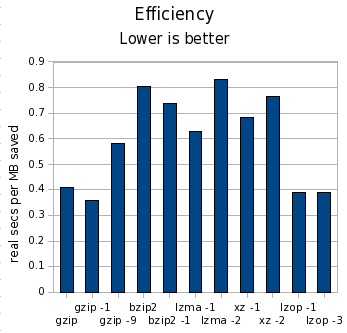
As before, in the MB saved column, higher numbers are better; in all other columns, lower numbers are better. I m using clock seconds here on a dual-core machine. The cost column is clock seconds per MB saved.
Let s draw some initial conclusions:
- lzma -1 continues to be both faster and smaller than bzip2. lzma -2 is still smaller than bzip2, but unlike the test in part 1, is now a bit slower.
- As you ll see below, lzop ran as fast as cat. Strangely, lzop -3 produced larger output than lzop -1.
- gzip -9 is probably not worth it it saved less than 1% more space and took 42% longer.
- xz -1 is not as good as lzma -1 in either way, though xz -2 is faster than lzma -2, at the cost of some storage space.
- Among the tools also considered for part 1, the difference in space and time were both smaller. Across all tools, the difference in time is still far more significant than the difference in space.
The Pretty Charts
Now, let s look at an illustration of this. As before, the sweet spot is the lower left, and the worst spot is the upper right. First, let s look at the compression tools themselves:
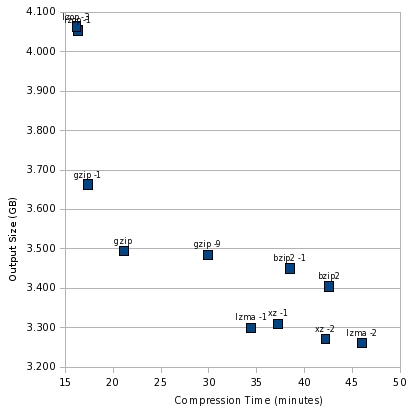
At the extremely fast, but not as good compression, end is lzop. gzip is still the balanced performer, bzip2 still looks really bad, and lzma -1 is still the best high-compression performer.
Now, let s throw cat into the mix:
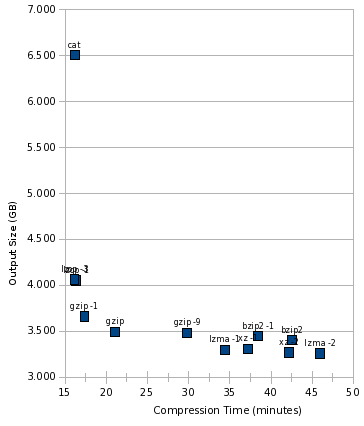
Here s something notable, that this graph makes crystal clear: lzop was just as fast as cat. In other words, it is likely that lzop was faster than the disk, and using lzop compression would be essentially free in terms of time consumed.
And finally, look at the cost:
What happened to pbzip2?
I tried the parallel bzip2 implementation just like last time, but it ran extremely slow. Interestingly, pbzip2 < notes.txt > notes.txt.bz2 took 1.002 wall seconds, but pbzip2 notes.txt finished almost instantaneously. This 1-second startup time for pbzip2 was a killer, and the test would have taken more than 3 days to complete. I killed it early and omitted it from my results. Hopefully this bug can be fixed. I didn t expect pbzip2 to help much in this test, and perhaps even to see a slight degradation, but not like THAT.
Conclusions
As before, the difference in time was far more significant than the difference in space. By compressing files individually, we lost about 400MB (about 7%) space compared to making a tar file and then combining that. My test set contained 270,101 files.
gzip continues to be a strong all-purpose contender, posting fast compression time and respectable compression ratios. lzop is a very interesting tool, running as fast as cat and yet turning in reasonable compression though 25% worse than gzip on its default settings. gzip -1 was almost as fast, though, and compressed better. If gzip weren t fast enough with -6, I d be likely to try gzip -1 before using lzop, since the gzip format is far more widely supported, and that s important to me for backups.
These results still look troubling for bzip2. lzma -1 continued to turn in far better times and compression ratios that bzip2. Even bzip2 -1 couldn t match the speed of lzma -1, and compressed barely better than gzip. I think bzip2 would be hard-pressed to find a comfortable niche anywhere by now.
As before, you can download
my spreadsheet with all the numbers behind these charts and the table.
and the case against bzip2
Compression is with us all the time. I want to talk about general-purpose lossless compression here.
There is a lot of agonizing over compression ratios: the size of output for various sizes of input. For some situations, this is of course the single most important factor. For instance, if you re Linus Torvalds putting your code out there for millions of people to download, the benefit of saving even a few percent of file size is well worth the cost of perhaps 50% worse compression performance. He compresses a source tarball once a month maybe, and we are all downloading it thousands of times a day.
On the other hand, when you re doing backups, the calculation is different. Your storage media costs money, but so does your CPU. If you have a large photo collection or edit digital video, you may create 50GB of new data in a day. If you use a compression algorithm that s too slow, your backup for one day may not complete before your backup for the next day starts. This is even more significant a problem when you consider enterprises backing up terabytes of data each day.
So I want to think of compression both in terms of resulting size and performance. Onward
Starting Point
I started by looking at the
practical compression test, which has some very useful charts. He has charted savings vs. runtime for a number of different compressors, and with the range of different settings for each.
If you look at his first chart, you ll notice several interesting things:
- gzip performance flattens at about -5 or -6, right where the manpage tells us it will, and in line with its defaults.
- 7za -2 (the LZMA algorithm used in 7-Zip and p7zip) is both faster and smaller than any possible bzip2 combination. 7za -3 gets much slower.
- bzip2 s performance is more tightly clustered than the others, both in terms of speed and space. bzip2 -3 is about the same speed as -1, but gains some space.
All this was very interesting, but had one limitation: it applied only to the gimp source tree, which is something of a best-case scenario for compression tools.
A 6GB Test
I wanted to try something a bit more interesting. I made an uncompressed tar file of /usr on my workstation, which comes to 6GB of data. My /usr contains highly compressible data such as header files and source code, ELF binaries and libraries, already-compressed documentation files, small icons, and the like. It is a large, real-world mix of data.
In fact, every compression comparison I saw was using data sets less than 1GB in size hardly representative of backup workloads.
Let s start with the numbers:
| Tool |
MB saved |
Space vs. gzip |
Time vs. gzip |
Cost |
| gzip |
3398 |
100.00% |
100.00% |
0.15 |
| bzip2 |
3590 |
92.91% |
333.05% |
0.48 |
| pbzip2 |
3587 |
92.99% |
183.77% |
0.26 |
| lzma -1 |
3641 |
91.01% |
195.58% |
0.28 |
| lzma -2 |
3783 |
85.76% |
273.83% |
0.37 |
In the MB saved column, higher numbers are better; in all other columns, lower numbers are better. I m using clock seconds here on a dual-core machine. The cost column is clock seconds per MB saved.
What does this tell us?
- bzip2 can do roughly 7% better than gzip, at a cost of a compression time more than 3 times as long.
- lzma -1 compresses better than bzip2 -9 in less than twice the time of gzip. That is, it is significantly faster and marginally smaller than bzip2.
- lzma -2 is significantly smaller and still somewhat faster than bzip2.
- pbzip2 achieves better wall clock performance, though not better CPU time performance, than bzip2 though even then, it is only marginally better than lzma -1 on a dual-core machine.
Some Pretty Charts
First, let s see how the time vs. size numbers look:
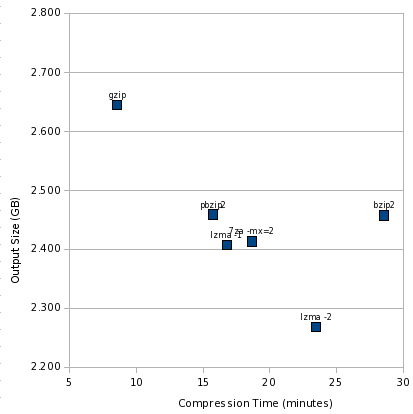
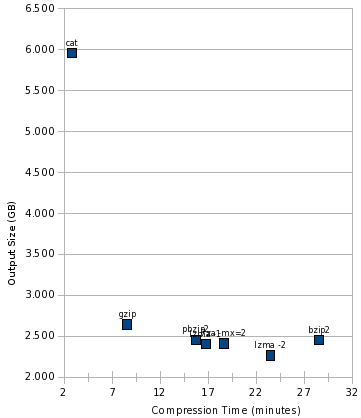
Like the other charts, the best area is the lower left, and worst is upper right. It s clear we have two outliers: gzip and bzip2. And a cluster of pretty similar performers.
This view somewhat magnifies the differences, though. Let s add cat to the mix:
And finally, look at the cost:
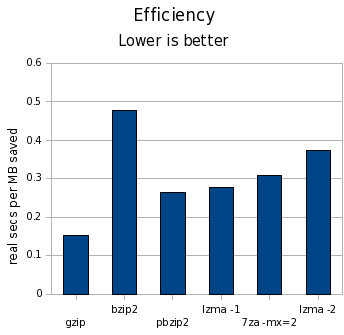
Conclusions
First off, the difference in time is far larger than the difference in space. We re talking a difference of 15% at the most in terms of space, but orders of magnitude for time.
I think this pretty definitively is a death knell for bzip2. lzma -1 can achieve better compression in significantly less time, and lzma -2 can achieve significantly better compression in a little less time.
pbzip2 can help even that out in terms of clock time on multicore machines, but 7za already has a parallel LZMA implementation, and it seems only a matter of time before /usr/bin/lzma gets it too. Also, if I were to chart CPU time, the numbers would be even less kind to pbzip2 than to bzip2.
bzip2 does have some interesting properties, such as resetting everything every 900K, which could provide marginally better safety than any other compressor here though I don t know if lzma provides similar properties, or could.
I think a strong argument remains that gzip is most suitable for backups in the general case. lzma -1 makes a good contender when space is at more of a premium. bzip2 doesn t seem to make a good contender at all now that we have lzma.
I have also made
my spreadsheet (OpenOffice format) containing the raw numbers and charts available for those interested.
Update
Part 2 of this story is now available, which considers more compression tools, and looks at performance compressing files individually rather than the large tar file.

Alright, Debian GNU/Linux 5.0
AKA as Lenny
has been released. Time for a Debian unstable unfreeze party!

What does the new stable release bring for system administrators? I ll give an overview what news you might expect when upgrading from Debian GNU/Linux 4.0, codename Etch (released on 8th April 2007) to the current version Debian GNU/Linux 5.0, codename
Lenny (released on
14th February 2009). I try to avoid duplicated information so make sure to read
the release announcement and
the official release notes for Lenny beforehand.
Noteworthy Changes
- initrd-tools got replaced by initramfs-tools
- netkit-inetd got replaced by openbsd-inetd
- the default syslog daemon sysklogd got replaced by rsyslog
- new defaults when creating ext2/ext3 file systems: dir_index and resize_inode feature enabled by default and use blocksize = 4096, inode_size = 256 and inode_ratio = 16384 (see /etc/mke2fs.conf)
- improved IPv6 support
- init.d-scripts for dependency-based init systems
- Debian-Volatile (hosting packages providing data that needs to be regularly updated over time, such as timezones definitions, anti-virus signature files, ) is an official service
- EVMS (Enterprise Volume Management System) was removed
- compatibility with the FHS v2.3
- software developed for version 3.2 of the LSB
- official Debian Lenny live systems for the amd64 and i386 architectures
- several new d-i features
Virtualisation
Virtualisation related new tools:
- ganeti: Cluster-based virtualization management software
- libvirt-bin: Libvirt is a C toolkit to interact with the virtualization capabilities of recent versions of Linux (and other OSes). The library aims at providing a long term stable C API for different virtualization mechanisms.
- virtinst: Programs to create and clone virtual machines
- virt-manager: desktop application for managing virtual machines
- xen-shell: Console based Xen administration utility
- xenstore-utils: Xenstore utilities for Xen
- xenwatch: Virtualization utilities, mostly for Xen
Desktop oriented packages like
virtualbox and
qemu are available as well of course.
Noteworthy Updates
This is a (selective) list of some noteworthy updates:
- apache2: upgrade from 2.2.3-4+etch6 to 2.2.9-10+lenny2
- apt: upgrade from version 0.6.46.4-0.1 to 0.7.20.1, bringing apt-get autoremove
- aptitude: upgrade from version 0.4.4-4 to 0.4.11.11-1~lenny1, bringing aptitude safe-upgrade which replaces aptitude upgrade and aptitude full-upgrade replacing aptitude dist-upgrade
- bash: upgrade from 3.1dfsg-8 to 3.2-4
- bind: upgrade from 1:8.4.7-1 / 1:9.3.4-2etch4 to 1:9.5.0.dfsg.P2-5.1
- cfengine: upgrade from 2.1.20-1 to 2.2.8-1
- courier: upgrade from 0.53.3-5 to 0.60.0-2
- dpkg: upgrade from 1.13.26 to 1.14.24, bringing dpkg triggers
- drbd: upgrade from 0.7.21-4 to 2:8.0.14-2
- dstat: upgrade from 0.6.3-2 to 0.6.7-1, the new version for example provides the topcpu and topmem modules so you can run dstat -c -M topcpu -dng -M topmem to identify cpu and memory intensive jobs
- fai: upgrade from 3.1.8 to version 3.2.16, see NEWS
- gcc/g++: upgrade from 4:4.1.1-15 to 4.3.2-1.1
- git: upgrade from 1:1.4.4.4-4+etch1 to 1:1.5.6.5-2
- initramfs-tools: upgrade from 0.85i to 0.92o, see new Lenny features
- iproute: upgrade from 20061002-3 to 20080725-2
- iptables: upgrade from 1.3.6.0debian1-5 to 1.4.2-5
- gnu libc: upgrade from 2.3.6.ds1-13etch9+b1 to 2.7-18
- lighttpd: upgrade from 1.4.13-4etch11 to 1.4.19-5
- linux-kernel: upgrade from kernel 2.6.18 to 2.6.26, see wiki.debian.org/KernelFAQ#new-features-in-lenny
- lvm2: upgrade from 2.02.06-4etch1 to 2.02.39-6
- mdadm: upgrade from 2.5.6-9 to 2.6.7.1-1, see README.upgrading-2.5.3
- mercurial: upgrade from 0.9.1-1+etch1 to 1.0.1-5.1
- mount: upgrade from 2.12r-19etch1 to 2.13.1.1-1, bringing read-only binds, make-shared, make-slave, make-private, make-unbindable
- mysql: upgrade from 5.0.32-7etch8 to 5.0.51a-23
- nagios: upgrade from 2.6-2+etch1 to 3.0.6-3, see Upgrading From Nagios 2.x and What s New in Nagios 3 for details
- openldap: upgrade from 2.3.30-5+etch2 to 2.4.11-1
- openssh: upgrade from 1:4.3p2-9etch3 to 1:5.1p1-5
- postgresql: upgrade from 7.5.22 / 8.1.15-0etch1 to 8.3.5-1
- perl: upgrade from 5.8.8-7etch6 to 5.10.0-19
- php: upgrade from 5.2.0-8+etch13 to 5.2.6.dfsg.1-1+lenny2
- postfix: upgrade from 2.3.8-2+etch1 to 2.5.5-1.1
- puppet: upgrade from 0.20.1-1 to 0.24.5-3
- python: upgrade from 2.4.4-2 to 2.5.2-3
- ruby: upgrade from 1.8.5-4etch4 to 1.8.7.72-3
- samba: upgrade from 3.0.24-6etch10 to 2:3.2.5-4
- subversion: upgrade from 1.4.2dfsg1-2 to 1.5.1dfsg1-2
- tcl/tk: upgrade from 8.4.12-1etch2 to 8.5.3-4
- utilx-linux: upgrade from 2.12r-19etch1 to 2.13.1.1-1, brings new utilities like:
- chrt: manipulate real-time attributes of a process
- ionice: get/set program io scheduling class and priority
- rename.ul: rename the specified files by replacing the first occurrence of from in their name by to
- taskset: retrieve or set a process s CPU affinity
- zsh: upgrade from 4.3.2-25 to 4.3.6-6
New packages
Lenny ships over
7000 new packages. Lists of new/removed/replaced packages
are available online. I ll name
238 sysadmin related packages that might be worth a look. (Note: I don t list addon stuff like optional server-modules, docs-only and kernel-source related packages. I plan to present some of the following packages in more detail in separate blog entries.)
- ack-grep: A grep-like program specifically for large source trees
- acpitail: Show ACPI information in a tail-like style
- adns-tools: Asynchronous-capable DNS client library and utilities
- aggregate: ipv4 cidr prefix aggregator
- aosd-cat: an on screen display tool which uses libaosd
- apt-cacher-ng: Caching proxy for distribution of software packages
- apt-cross: retrieve, build and install libraries for cross-compiling
- aptfs: FUSE filesystem for APT source repositories
- apt-p2p: apt helper for peer-to-peer downloads of Debian packages
- apt-transport-https: APT https transport, use deb https://foo distro main lines in the sources.list
- arp-scan: arp scanning and fingerprinting tool
- array-info: command line tool reporting RAID status for several RAID types
- balance: Load balancing solution and generic tcp proxy
- bash-completion: programmable completion for the bash shell
- blktrace: utilities for block layer IO tracing
- daemonlogger: simple network packet logger and soft tap daemon
- daemontools: a collection of tools for managing UNIX services
- dbndns: Debian fork of djbdns, a collection of Domain Name System tools
- dcfldd: enhanced version of dd for forensics and security
- dctrl2xml: Debian control data to XML converter
- debomatic: automatic build machine for Debian source packages
- desproxy: tunnel TCP traffic through a HTTP proxy
- detox: utility to replace problematic characters in filenames
- di-netboot-assistant: Debian-Installer netboot assistant
- dish: the diligence/distributed shell for parallel sysadmin
- djbdns: a collection of Domain Name System tools
- dns2tcp: TCP over DNS tunnel client and server
- dnscache-run: djbdns dnscache service
- dnshistory: Translating and storing of IP addresses from log files
- dnsproxy: proxy for DNS queries
- dsyslog: advanced modular syslog daemon
- etckeeper: store /etc in git, mercurial, or bzr
- ext3grep: Tool to help recover deleted files on ext3 filesystems
- fair: high availability load balancer for TCP connections
- fatresize: FAT16/FAT32 filesystem resizer
- flog: dump STDIN to file and reopen on SIGHUP
- freeradius-utils: FreeRadius client utilities
- ganeti: Cluster-based virtualization management software
- gfs2-tools: Red Hat cluster suite - global file system 2 tools
- gitosis: git repository hosting application
- gptsync: GPT and MBR partition tables synchronisation tool
- grokevt: scripts for reading Microsoft Windows event log files
- grub2: GRand Unified Bootloader, version 2
- gt5: shell program to display visual disk usage with navigation
- haproxy: fast and reliable load balancing reverse proxy
- havp: HTTP Anti Virus Proxy
- heirloom-mailx: feature-rich BSD mail(1)
- hfsprogs: mkfs and fsck for HFS and HFS+ file systems
- hinfo: Check address ownership and DNSBL listings for spam reporting
- hlbr: IPS that runs over layer 2 (no TCP/IP stack required)
- hobbit: monitoring system for systems, networks and applications - server
- hotwire: Extensible graphical command execution shell
- hunchentoot: the Common Lisp web server formerly known as TBNL
- ifupdown-extra: Network scripts for ifupdown
- ike: Shrew Soft VPN client - Daemon and libraries
- incron: cron-like daemon which handles filesystem events
- inoticoming: trigger actions when files hit an incoming directory
- iodine: tool for tunneling IPv4 data through a DNS server
- iotop: simple top-like I/O monitor
- ipplan: web-based IP address manager and tracker
- ips: Intelligent process status
- iscsitarget: iSCSI Enterprise Target userland tools
- isns: Internet Storage Naming Service
- itop: simple top-like interrupt load monitor
- iwatch: realtime filesystem monitoring program using inotify
- jetring: gpg keyring mantainance using changesets
- john: active password cracking tool
- kanif: cluster management and administration swiss army knife
- keepassx: Cross Platform Password Manager
- keysafe: A safe to put your passwords in
- killer: Background job killer
- kpartx: create device mappings for partitions
- kvm: Full virtualization on x86 hardware
- latencytop: A tool for developers to visualize system latencies
- lbcd: Return system load via UDP for remote load balancers
- ldb-tools: LDAP-like embedded database - tools
- ldnsutils: ldns library for DNS programming
- lfhex: large file hex editor
- live-helper: Debian Live build scripts
- live-magic: GUI frontend to create Debian LiveCDs, netboot images, etc.
- logapp: supervise execution of applications producing heavy output
- lsat: Security auditor tool
- lustre-utils: Userspace utilities for the Lustre filesystem
- lwat: LDAP Web-based Administration Tool
- maatkit: Command-line utilities for MySQL
- mantis: web-based bug tracking system
- memdump: memory dumper
- memlockd: daemon to lock files into RAM
- metainit: Generates init scripts
- mirmon: monitor the state of mirrors
- mkelfimage: utility to create ELF boot images from Linux kernel images
- mongrel: A small fast HTTP library and server for Ruby
- monkey: fast, efficient, small and easy to configure web server
- monkeytail: tail variant designed for web developers monitoring logfiles
- mpy-svn-stats: Simple and easy to use svn statistics generator
- mr: a Multiple Repository management tool
- msr-tools: Utilities for modifying MSRs from userspace
- mtd-utils: Memory Technology Device Utilities
- munge: authentication service to create and validate credentials
- mxallowd: Anti-Spam-Daemon using nolisting/iptables
- mylvmbackup: quickly creating backups of MySQL server s data files
- myrescue: rescue data from damaged harddisks
- mysql-proxy: high availability, load balancing and query modification for mysql
- mysqltuner: high-performance MySQL tuning script
- nagvis: Visualization addon for Nagios
- ncdu: ncurses disk usage viewer
- netrw: netcat like tool with nice features to transport files over network
- netsend: a speedy filetransfer and network diagnostic program
- network-config: Simple network configuration tool
- nfdump: netflow capture daemon
- ngetty: getty replacement - one single daemon for all consoles
- nilfs2-tools: Continuous Snapshotting Log-structured Filesystem
- ninja: Privilege escalation detection system for GNU\Linux
- noip2: client for dynamic DNS service
- nsd3: authoritative domain name server (3.x series)
- ntfs-3g: read-write NTFS driver for FUSE
- nulog: Graphical firewall log analysis interface
- nuttcp: network performance measurement tool
- ocsinventory-server: Hardware and software inventory tool (Communication Server)
- odt2txt: simple converter from OpenDocument Text to plain text
- olsrd: optimized link-state routing daemon (unik-olsrd)
- onesixtyone: fast and simple SNMP scanner
- openais: Standards-based cluster framework (daemon and modules)
- opencryptoki: PKCS#11 implementation for Linux (daemon)
- openvas-client: Remote network security auditor, the client
- ophcrack: Microsoft Windows password cracker using rainbow tables
- op: sudo like controlled privilege escalation
- otpw-bin: OTPW programs for generating OTPW lists
- packeth: Ethernet packet generator
- paperkey: extract just the secret information out ouf OpenPGP secret key
- paris-traceroute: New version of well known tool traceroute
- password-gorilla: a cross-platform password manager
- pathfinderd: Daemon for X.509 Path Discovery and Validation
- pathfinder-utils: Utilities to use with the Pathfinder Daemon
- pcaputils: specialized libpcap utilities
- pcp: System level performance monitoring and performance management
- perlconsole: small program that lets you evaluate Perl code interactively
- pgloader: loads flat data files into PostgreSQL
- pgpool2: connection pool server and replication proxy for PostgreSQL
- pgsnap: PostgreSQL report tool
- pmailq: postfix mail queue manager
- pnputils: Plug and Play BIOS utilities
- policykit: framework for managing administrative policies and privileges
- postfwd: Postfix policyd to combine complex restrictions in a ruleset
- postpone: schedules commands to be executed later
- powertop: Linux tool to find out what is using power on a laptop
- prayer: standalone IMAP-based webmail server
- prelude-correlator: Hybrid Intrusion Detection System [ Correlator ]
- privbind: Allow unprivileged apps to bind to a privileged port
- pssh: Parallel versions of SSH-based tools
- ptop: PostgreSQL performance monitoring tool akin to top
- pyftpd: ftp daemon with advanced features
- rancid-core: rancid Really Awesome New Cisco confIg Differ
- rancid-util: Utilities for rancid
- rdnssd: IPv6 recursive DNS server discovery daemon
- rdup: utility to create a file list suitable for making backups
- reglookup: utility to read and query Windows NT/2000/XP registry
- rgmanager: Red Hat cluster suite - clustered resource group manager
- rinse: RPM installation environment
- rofs: Read-Only Filesystem for FUSE
- rsyslog: enhanced multi-threaded syslogd
- safe-rm: wrapper around the rm command to prevent accidental deletions
- samba-tools: tools provided by the Samba suite
- samdump2: Dump Windows 2k/NT/XP password hashes
- scalpel: A Frugal, High Performance File Carver
- scamper: advanced traceroute and network measurement utility
- scanmem: Locate and modify a variable in a running process
- schedtool: Queries/alters process scheduling policy and CPU affinity
- screenie: a small and lightweight GNU screen(1) wrapper
- scrounge-ntfs: Data recovery program for NTFS filesystems
- ser: Sip Express Router, very fast and configurable SIP proxy
- serverstats: a simple tool for creating graphs using rrdtool
- shutdown-at-night: System to shut down clients at night, and wake them in the morning
- sipcrack: SIP login dumper/cracker
- sks: Synchronizing OpenPGP Key Server
- slack: configuration management program for lazy admin
- sma: Sendmail log analyser
- smbind: PHP-based tool for managing DNS zones for BIND
- smbnetfs: User-space filesystem for SMB/NMB (Windows) network servers and shares
- softflowd: Flow-based network traffic analyser
- speedometer: measure and display the rate of data across a network connection
- spf-milter-python: RFC 4408 compliant Python SPF Milter for Sendmail and Postfix
- spf-tools-perl: SPF tools (spfquery, spfd) based on the Mail::SPF Perl module
- spf-tools-python: sender policy framework (SPF) tools for Python
- sqlgrey: Postfix Greylisting Policy Server
- ssdeep: Recursive piecewise hashing tool
- sshfp: DNS SSHFP records generator
- sshm: A command-line tool to manage your ssh servers
- sshproxy: ssh gateway to apply ACLs on ssh connections
- sslscan: Fast SSL scanner
- strace64: A system call tracer for 64bit binaries
- sucrack: multithreaded su bruteforcer
- supercat: program that colorizes text for terminals and HTML
- superiotool: Super I/O detection tool
- system-config-lvm: A utility for graphically configuring Logical Volumes
- system-config-printer: graphical interface to configure the printing system
- tack: terminfo action checker
- taktuk: efficient, large scale, parallel remote execution of commands
- tcpwatch-httpproxy: TCP monitoring and logging tool with support for HTTP 1.1
- terminator: Multiple GNOME terminals in one window
- timelimit: Simple utility to limit a process s absolute execution time
- tipcutils: TIPC utilities
- tor: anonymizing overlay network for TCP
- tpm-tools: Management tools for the TPM hardware (tools)
- tracker-utils: metadata database, indexer and search tool - commandline tools
- tumgreyspf: external policy checker for the postfix mail server
- ucspi-tcp: command-line tools for building TCP client-server applications
- unbound: validating, recursive, caching DNS resolver
- unhide: Forensic tool to find hidden processes and ports
- uniutils: Tools for finding out what is in a Unicode file
- unsort: reorders lines in a file in semirandom ways
- uphpmvault: upload recovery images to HP MediaVault2 via Ethernet
- usermode: Graphical tools for certain user account management tasks
- utf8-migration-tool: Debian UTF-8 migration wizard
- uuid-runtime: universally unique id library
- vblade-persist: create/manage supervised AoE exports
- vde2: Virtual Distributed Ethernet
- vdmfec: recover lost blocks using Forward Error Correction
- virtinst: Programs to create and clone virtual machines
- virt-manager: desktop application for managing virtual machines
- virtualbox-ose: x86 virtualization solution - binaries
- virt-viewer: Displaying the graphical console of a virtual machine
- watchupstream: Look for newer upstream releases
- whirlpool: Implementation of the whirlpool hash algorithm
- win32-loader: Debian-Installer loader for win32
- xavante: Lua HTTP 1.1 Web server
- xdelta3: A diff utility which works with binary files
- xen-shell: Console based Xen administration utility
- xenstore-utils: Xenstore utilities for Xen
- xenwatch: Virtualization utilities, mostly for Xen
- xfingerd: BSD-like finger daemon with qmail support
- xl2tpd: a layer 2 tunneling protocol implementation
- xrdp: Remote Desktop Protocol (RDP) server
- yersinia: Network vulnerabilities check software
- zerofree: zero free blocks from ext2/3 file-systems
- zipcmp: compare contents of zip archives
- zipmerge: merge zip archives
- ziproxy: compressing HTTP proxy server
Further Ressources
Last July, I
wrote about video uploading sites. Now that I m starting to get ready to post video online, some public but a lot of it just for friends or family, I ve taken another look. And I m disappointed in what I see.
Youtube has made the biggest improvements since then. Now, they can handle high-definition video, an intermediate HQ encoding, and the standard low-bandwidth encoding. Back then, there was no HD support, and I don t think any HQ support either.
There are two annoying things about Youtube. One is the 10 minute limit per video file, though that can be worked around. The other is the really quite terrible options for sharing non-public videos. In essence, the only way to do this is to, on each video, manually select which people you want to be able to see it. If suddenly a new person gets a Youtube account, you can t just give them access to the entire back library of videos. What I want it to tell Youtube that all people in a certain GROUP should have access, and then I can add people to the group as needed. That s a really quite terrible oversight.
Vimeo, on the other hand, has actually gotten worse. Back a year ago, they were an early adopter on the HD bandwagon. Now that they ve introduced their pay accounts, the free accounts have gotten worse than before. With a free Vimeo account, you can only upload 1 HD video a week. You also get dumped in the 4-hour encoding line, and get the low-quality encoding. Yes, it s noticeable, and much worse than Youtube HQ, let alone Youtube HD. You have no time limit, but a 500MB upload limit per week.
The sharing options with Vimeo are about what I d want.
blip.tv seems about the same, and I m still avoiding them because you have to pay $100/yr to be able to keep videos non-public.
Then there s viddler. I am not quite sure what to make of them. They seem to be, on the one hand, Linux fans with a clue. On the other hand, their site seems to be chock full of get-rich-quick and real estate scheme videos, despite a ToS that prohibits them. They allow you to upload HD videos but not view them. They have a limit of 500MB per video file, but no limits on how many files you can upload or the length of each one, and the sharing options seem good.
So I m torn. On the one hand, it would be easy to say, I ll just dump everything to viddler. On the other hand, are they going to do what Vimeo did, or worse, start overlaying ads on all my videos?
Any suggestions?
DDE, Debian Data Export
After testing the idea and the prototype with my presentation at
Fosdem, I'm proud to announce
DDE, Debian Data Export.
The problem
In Debian, we publish all sort of information, using all sorts
of data formats (often ad hoc and obscure), in obscure places. Try
to think of an application, for example, that wants to access all
this information together:
- Maintainer <-> Source package mapping
- Popcon rankings
- Changelogs
- .desktop files of packages not installed
- What is in the new queue
- Package screenshots
- Some
statistics
- Localisation information
- uscan status
- Buildd logs
- sloccount run results
- Debian Weather
- Debian Pure Blend specific information
A nightmare, uh?
The solution
DDE is a way to make it simple to publish and download data. The
aim is to be able to access all sorts of Debian information without
worrying about data formats, protocols and access control, and to
make it easy to discover what data is available.
DDE exports data as a big virtual tree. You can pick a node in
the tree by its URL and download all the data that it contains, in
a format of your choice: currently it supports JSON/JSONP, YAML,
CSV and Python pickled objects.
This means that you can now get Debian data using a trivial HTTP
client tool or library, and read it using commonly available
decoders: both should be available in almost any programming
language nowadays. Since JSON and JSONP are supported, this even
includes JavaScript in Ajaxy web pages.
DDE is not a competitor to
UDD: UDD is about creating a
central location where all the data can be accessed, while DDE is
about giving people a simple way to access data or subsets of
data.
In a way, DDE and UDD complete each other: the more data enters
UDD, the more data is available for DDE. In turn, DDE gives a
simple interface to the most popular and useful UDD queries.
The dream
Here are some hints at what can be done with this:
- Autocompletion in HTML fields
- Export data to feed external sites like or
- Have a way for package managers to easily access all sorts of
data
- Have a way to implement fancy tools that can query massive data
sets without needing to download them locally
A call for action
You can add data to the DDE tree by just putting a data file in
yaml, json or pickle format under
~/.dde (I've written
a specific
guide to this on the
Debian wiki).
If you wish to create new and fancy Debian statistics or compute
other sorts of data, or if you already maintain tools that generate
Debian data, including but not limited to, for example:
- Popcon rankings
- .desktop files of packages not installed
- Content of the new queue
- Screenshots
- All sorts of statistics
- Debian Weather
Then please have a look at
http://wiki.debian.org/DDE/StaticData
and try to publish your data in
~/.dde on
merkel.debian.org.
For more complicated cases (like accessing a remote database),
it is possible to extend DDE via
python plugins. You
can get in touch with me if you need to go that way.
We recently bought a Canon Vixia HG20 camcorder. The HG20 records in AVCHD format (MPEG-4 h.264) at up to 1920 1080. To get from the camcorder to a DVD (or something we can upload to the web), I need some sort of video editing software. This lets me trim out the boring bits, encode the video for DVD, etc.
Background
In addition to DVD creation and web uploading, I want the ability to burn high-definition video discs. 1920 1080 is significantly higher resolution than you get from a DVD. There are two main ways to go: a blu-ray format disc, or an AVCHD disc. A blu-ray disc has to be burned onto BD-R media, which costs about $5 each, using a blu-ray burner, which costs about $200. AVCHD discs use the same h.264 encoding that the camcorder does, meaning they have better compression and can be burned onto regular DVD+R media, fitting about 30 minutes onto a DVD. Moreover, it is possible to move AVCHD files directly from a camcorder to an AVCHD disc without re-encoding, resulting in higher quality and lower playing time. The nicer blu-ray players, such as the PS3, can play AVCHD discs.
AVCHD seems pretty clearly the direction the industry is moving. Compared to the tape-based HDV, ACVHD has higher quality with lower bitrates, better resolution, and much greater convenience. Hard disk or SD-based AVCHD camcorders are pretty competitive in terms of price by now too, often cheaper than tape-based ones.
The downside of AVCHD is that it takes more CPU power to process. Though as video tasks are often done in batch, that wouldn t have to be a huge downside. The bigger problem is that, though all the major video editing software claims to support AVCHD, nobody really supports it well yet.
The Contenders
Back when I got my first camcorder in about 2001 the one that I m replacing now you pretty much had to have a Mac to do any sort of reasonable consumer or prosumer-level video editing. We bought our first iMac back then to work with that, and it did work well with the MiniDV camera.
Today, there s a lot more competition out there. The Mac software stack has not really maintained its lead some would even say that it s regressed and the extremely high cost of buying a Mac capable of working with AVCHD, plus Final Cut Express, makes that option completely out of the question for me. It would be roughly $2500.
Nobody really supports AVCHD well yet, even on the Mac. Although most programs advertise support of smart rendering a technique that lets the software merely copy unchanged footage when outputting to the same format as the input none of them have smart rendering that actually works with AVCHD source material. Though this fact is never documented, though discussed on forums.
Another annoyance, having used Final Cut Express in the past, is that with these programs you can t just go to the timeline and say delete everything between 1:35 and 3:52 ; you have to go in and split up clips, then select and delete them. They seem to be way too concerned about dealing with individual clips.
I briefly used Cinelerra on Linux to do some video editing. It s a very powerful program, but geared at people that are far more immersed in video editing than I. For my needs, it didn t have enough automation and crashed too much and that was with MiniDV footage. It apparently does support AVCHD, but I haven t tried it.
I ve tried three programs and considered trying a fourth. Here are my experiences:
Ulead/Corel VideoStudio Pro X2
Commonly referenced as the go to program for video editing on Windows, I started with downloading the Free Trial of it from Corel. Corel claims that the free trial is full-featured all over on their website, but I could tell almost instantly that it wasn t. I wound up buying the full version, which came to about $65 after various discounts.
I wanted to like this program. Its output options include AVCHD disc, Blu-ray disc, DVD+R, and the like. Its input options include MiniDV, AVCHD, ripping from DVD, ripping from Bluray, and just about every other format you can think of. And it heavily advertised proxy editing , designed to let you edit a scaled-down version of AVCHD video with a low-CPU machine, but refer back to the original high-quality footage for the output.
It didn t pan out that way.
The biggest problem was the constant crashing. I really do mean constant. It probably crashed on me two dozen times in an hour. If you are thinking that means that it crashes pretty much as soon as I can get it re-opened, you d be correct. Click the Play button and it hangs. Click a clip and it hangs. Do anything and it hangs.
It did seem to work better with the parts of the source that had been converted to a low-res version with Smart Proxy, though it didn t eliminate the hangs, just reduced them. And every time I d have to End Task, it would forget what it had already converted via Smart Proxy even if I had recently saved the project and have to start over from scratch.
I spent some time trying to figure out why it always thought my project was 720 480 even when it was 1920 1080, and why the project properties box didn t even have an option for 1920 1080. After some forum searching, it turns out that the project properties box is totally irrelevant to the program. Yay for good design, anyone?
VideoStudio Pro X2 does have good output options, allowing combination of multiple source files onto a single DVD or AVCHD disc as separate titles. Unfortunately, its DVD/AVCHD rendering process also yes hangs more often than not.
The documentation for VideoStudio Pro X2 is of the useless variety. It s the sort of thing that feels like it s saying The trim tool is for trimming your clips without telling you what trimming your clips means, or making it obvious how to remove material from the middle of a clip.
The proxy editing feature isn t what it should be either. Instead of being something that just automatically happens and Works in the background, you have to manage its queue in the foreground and it forgets what it was doing whenever the program hangs.
On the rare occasion when pressing Play did not cause a hang, the AVCHD footage played back at about 0.5fps far, far worse than PowerDirector manages on the same machine. Bits that had been rendered for proxy editing did appear to play at full framerate.
I have applied for a refund for this purchase from Corel under their 30-day return policy, and have already uninstalled it from my disk. What a waste.
CyberLink PowerDirector 7 Ultra
This was the second program I tried, and the one I eventually bought. Its feature set is not quite as nice as Corel s, especially when it comes to versatility of output options. On the other hand, it feels done. It only crashed two or three times on me apparently that s GOOD on Windows? Things just worked. It appears to have proxy editing support, but it is completely transparent and plays back with a decent framerate even without it. It can output to AVCHD, Bluray, and DVD, though smart rendering doesn t work with AVCHD source material.
Its weakness compared to the Corel package is that it doesn t have as many options for formatting these discs. You can have only one title on a disc, though you can have many chapters. You have some, but not much, control over compression parameters. The same goes for exporting files for upload to the web or saving on your disk.
The documentation is polished and useful for the basics, though not extensive.
Overall, this package works, supports all the basics I wanted from it, so I m using it for now.
Adobe Premiere Elements 7
I downloaded the trial of this one too. I opened it up, and up popped a dialog box asking what resolution my project would be, interlacing settings, etc. I thought YES now that s the kind of program I want. As I tried out the interface, I kept thinking the same. This was a program not just for newbies, but for people that wanted a bit more control.
Until it came to the question of output. Premiere Elements 7 was the only package I looked at that had no option to burn an AVCHD disc. DVD or Blu-ray only. That s a deal-breaker for me. There s no excuse for a program in this price range to not support the only affordable HD disc option out there. So I didn t investigate very much farther.
Another annoying thing is that Adobe seems to treat all of their software as a commercial. I m a user, not an audience, dammit. I do not want to buy some photoshop.net subscription when I buy a video editing program. I do not want to see ads for stuff when I m reading PDFs. LEAVE ME ALONE, ADOBE.
I just felt sleazy even giving them my email address, let alone installing the program on my system. I think I will feel like a better person once I reboot into Windows and wipe it off my system.
Pinnacle Studio 12
Another program that comes highly rated. But I never installed it because its minimum system requirements state that it needs an Intel Core 2 Quad 2.66GHz or higher for 1920 1080 AVCHD editing. And I have only a Core 2 Duo 2.66GHz half the computing horsepower that it wants. And since they offer no free trial, I didn t bother even trying it, especially since PowerDirector got by fine with my CPU.
Conclusions
This seems to be a field where we can say all video editing software sucks; some just suck a little less. I m using PowerDirector for now, but all of the above programs should have new versions coming out this year, and I will be keeping a close eye to see if any of them stop being so bad.
Last week, we got a new HD camcorder. Jacob has really enjoyed watching video of himself on TV. He wants to watch it over and over. He ll start cackling when it gets close to the parts he thinks are funny. He ll jabber about it That Jacob funny! Sometimes when he hears a question that I asked him on the video, he ll answer it for himself now.
Today, I woke up feeling like vomiting. I haven t yet, but it s been really close. Terah and I explained to Jacob that my tummy hurts. Jacob came over to me and said kiss it! , and kissed me. (If he gets hurt, he wants a kiss where it hurts.)
I ve been in bed sometimes, at the desk sometimes, and at the couch sometimes. It s one of these annoying things where I can t sleep, but the only way I can not feel like vomiting in bed makes me sore after awhile, and sitting at the desk or reading something only works for a little while.
As I was sitting at the desk, Jacob came in and wanted to watch some train videos. See old train! See old train IN SNOW! He usually sits on my lap, his squirmy 2-year-old self, and watches the videos off Youtube. Today I told him he would have to be very still, and he did a very good job of it.
Later he saw me on the couch. Dad sleeping, he said. He gave me a hug, then said, I sleep there too. For about a minute, he had his head on the pillow facing me, with a big smile on his face. Then he was off to find a book or something. Dad have ouchies.
It s very sweet to see his sense of compassion developing already. Even if the bounciness sometimes made my stomach more queasy.
This is a giant rant with a small point at the end. So be warned.
Earlier this week, I booted up Windows for the first time in a few months. About 2 minutes after it came up, just after I had started up an app, it informed me that it desperately needed to restart because it had applied some updates, and unless I clicked cancel, it would. So I restarted.
The Saga Begins
Then I opened up the program for my negative scanner. This device has an infrared dust-detection system that is not well supported in SANE. I can insert a 6-frame negative, it will load it in, identify where the 6 frames are, and scan it at 4000 DPI. So anyhow, I opened it up and started scanning. Surprisingly, it was REALLY SLOW. Normally it takes about 3 minutes per frame, and I could tell it wasn t going to do that. It sounded as if the computer couldn t keep up with the scanner.
I tried to get Windows to tell me if it was talking to the scanner at USB 2.0 speeds, but this information was nowhere to be found. So I went down under my desk and moved some USB devices to different ports. Got back up from under the desk, and:
BLUE SCREEN OF DEATH was there.
Reboot. Scanner now works at normal speed. So I started it scanning, then went off to watch the Purdue game with Terah. Came back a little while later, expecting it to be ready for the next negative, only to manage to catch it in the nick of time before it helpfully rebooted my machine again due to yes more updates. So I saved, rebooted, and finally scanning worked after that. Also I disabled automatic installation of updates.
A Turn For The Worse
A few days later, I was getting expecting a new camcorder, and I was planning to use Windows for video editing. Originally, my hard disk had Windows, a Windows emergency recovery partition, and Linux on it. When I upgraded my motherboard and added a SATA HDD, I moved almost all of Linux to it. So there was now a lot of free space on that original drive, and the recovery partition is useless with the new motherboard anyhow.
So I figure: delete that recovery partition, and expand the NTFS partition to take up the whole of the disk. Easy enough, right?
So I do this, and much to my annoyance, Windows now refused to boot. It would just hang. No boot menu, no splash screen. Just hang. Linux saw and could access the NTFS partition just fine.
So I went hunting for my XP install CD. Finally found it. Boot off the thing. It spends 5 minutes loading drivers for all sorts of things I don t have off the CD, then promptly crashes, saying inaccessible boot device. A hunch or two later and I m twiddling bits in the BIOS to try to get it to see my SATA DVD burner properly. No luck. I finally download the drivers for my chipset from Gigabyte, have to use Wine to extract them, then scrounge up a working floppy to put them on. Reboot. Blue screen again but a different one. Twiddle some more bits in the BIOS. Reboot. Success! Recovery console is mine!
I run chkdsk, and fixboot, which everybody in the forums says will fix this.
Neither made any difference at all, but the recovery console could see the NTFS partition just fine. Grumble.
More googling, and I try testdisk for Linux. It twiddled some bits on the NTFS boot sector and my partition table. Reboot. And UGH. Now Linux won t even boot and Grub won t start. Download Debian live CD. Boot from it. Inspect disk with fdisk. Turns out testdisk just renumbered my partitions. Restore the previous numbering: Windows on partition 2, Linux /boot on partition 5. Save, reboot. Grub is back. Linux boots. Try Windows. And .
Still hangs, but this time only after saying that HAL.DLL is missing or corrupt.
Reboot into Linux. HAL.DLL is right there where it should be, and at the size it should be. Ponder this for a bit.
I then tried looking at boot.ini. On a lark, I wondered if deleting the recovery partition meant that boot.ini no longer considers Windows to be partition 2, even though that s what the partition table says. Change it to partition 1, save. Reboot. SUCCESS IS MINE! WINDOWS BOOTS! Only 4 hours after expanding its partition.
I told some friends about this trouble booting. What on earth did you do, John? I expanded the NTFS partition. And the response: Ahh. That ll do it.
Expanding a partition is something we do routinely on Linux. Even on running production servers. Even WHILE THEY RE RUNNING. And I never have a problem like this. And even if I did, I wouldn t have to use some tool written FOR A DIFFERENT OS to fix it.
Argh.
The Problems Multiply
A few days later, I got a new Canon Vixia HG20 camcorder. It shoots in
AVCHD format 1920 1280@60i, h.264, which is a standard format for hard disk or SD card HD camcorders. I needed some basic video editing software that would let me do simple edits and burn a BDMV or AVCHD disc onto DVD+R formats that Blu-ray players can play, yet are cheap to make.
After poking around, I decided to download the free trial of Ulead/Corel VideoStudio Pro X2. The free trial supposedly was the full version of the program, though it quite obviously wasn t after installing it. So I bought the full version and was greeted by about an 800MB download instead of the 120MB full version free trial download.
Now here s the thing about VideoStudio Pro X2. IT S CRAP. It has crashed on me at least two dozen times, usually when I click the Play button. Its interface is really clunky. There s no way to mark a start and an end point, and say just delete everything between there, regardless of what clips they re in. The AVCHD disc creator wants to re-encode the entire project, even though it s ALREADY IN AVCHD. Though you can work around that by exporting the entire project to an AVCHD *FILE* which is smart enough not to re-encode it then making a disc from that.
The project properties likes to say I m editing 720 480 even when I m editing 1920 1080, and doesn t even have a box for 1920 1080. Though after some Googling, it turns out that the project properties settings are irrelevant anyway. Yay for good design?
So after all this crashing, I went out and did some more Googling. I found this
lovely quote:
In short, every application I and our Labs tester tried iMovie, Pinnacle Studio, Ulead Video Studio, Sony Vegas and Avid Liquid at best could open but barely play some clips, and more often simply hung or crashed.
So what we have here is a whole culture of mediocrity. Everybody advertises that they work with AVCHD, yet nobody actually WORKS with AVCHD. And this is the format that the industry is rapidly moving to for HD HDV s days are quite numbered.
After everybody though that Midnight Commander is dead and the
next release of it will be released together with hurd, it is very
cool to announce that a new team of developers are active
again.
We've taken over officially the development in December and now,
after two months of work a new version of mc is available: 4.6.2.
This is mostly a bugfix release addressing several very nasty bugs
which are also present in the debian package. Here the notes what
has changed in this release:
- MC Core
- Changed HQ url to point to new website
www.midnight-commander.org (Closes: #137, #138)
- Added a micro helper library in order to go slowly avay from
glib (Closes: #157)
- Use static strings as section entries in ~/.mc/history
WARNING!: This will break old files (Closes: #50)
- Fixed a repaint issue when clicking on the "View" Button
instead of using F3 (Closes: #35)
- Removed obsolete autoconf macros (Closes: #133)
- Fix escaping for command line completion (Closes: #147)
- prevent mc from segfaulting when getting invalid timestamps on
files (Closes: #96)
- Fixed a keybord issue when running mc via a putty console
(Closes: #203)
- setted pty fd to closeonexec (on subshell) (Closes: #174)
- Fixed file renames, when copying/moving is performed into
deleted directories. (Closes: #181)
- Add an option to show executables first in the panels (Closes:
#173)
- Fixed concatdirand_file if there is a parameter = NULL
(Closes: #180)
- Allow out-of-tree builds (Closes: #224, #208)
-
Editor
- Syntax highlighting for:
- debian files (debian/changelog, debian/control,
debian/copyright, ..) (Closes: #142)
- updated sh syntax highlighting (Closes: #143)
- updated pascal syntax highlighting (Closes: #65)
- differentiate between c and cpp files for highlighting (Closes:
#16)
- updated python highlighting to support python 2.6 (Closes:
#216)
- Removed some unneeded variables (Closes: #168, #151)
- Do use a ro test if a file exists (Closes: #206)
- Fixes some missbehaviour in regex matching (Closes: #207, #211
)
- start at front of line and not on cursor position
- . shouldn't match a newline
-
VFS
- Fix some bashisms in some extfs scripts (Closes: #146)
- Fixed various problems with symlinks and files with chars which
needs escaping over fish (Closes: #10, #87, #149, #53)
- Added 7zip extfs descriptor (Closes: #92)
- Switched from o3totxt to odf2txt as o3totxt is outdated
(Closes: #218)
- Locale
- Updated german translation (Closes: #167)
- New Belarussian translation (Closes: #170)
- Updated russian translation (Closes: #159)
As you see.. quite a long list of fixes

Have fun and check
the new release out right
here!
Another Saturday, another Lintian release.
As has frequently been the case lately, much of the work was done by
Raphael Geissert, who provided several more patch sets fixing new problems
and old ones. I also finally got a chance to dig into the code that
generates the long tag descriptions and ended up rewriting it entirely,
which will remove some minor annoyances in the setup of Lintian on
lintian.debian.org.
I was expecting to have a chance to write a pile of pedantic checks, since
several of the old bug reports are easy checks to write and were just
waiting for the new tag status. I ended up working on other things and
merging patches instead, though. Maybe the next release.
One amusing note: the compressed Lintian changelog is 112KB (365KB
uncompressed). The tar.gz file for the entire Lintian release is 589KB.
So the changelog for Lintian is nearly 20% of the entire distribution.
Admittedly, we have a fairly verbose changelog style, but most Lintian
work involves large numbers of small tweaks and small patches. I think
most of the changelog size is unavoidable. I don't think this is a
problem Lintian is not the sort of thing that one runs in
an embedded environment and within reason it doesn't matter how large the
installed size is but it is rather funny.
I stopped the last archive-wide run because gluck was being rebooted with
a new kernel that didn't cause Perl to close huge numbers of file
descriptors on popen, and then due to other things going on my life,
didn't get a chance to restart the archive run until yesterday. It's on
binary packages starting with "p" now, so hopefully sometime tomorrow
there will be fresh Lintian results with 2.2.0 and I can post a bits from
the Lintian maintainers message.
A little while back, Terah was leaving the house one morning. On that particular morning, we had an unusually intense even for Kansas wind. It caught the storm door and whipped it around with such force that it bent the metal arm that goes into the pneumatic plunger, and even bent the bracket that the arm connects to. It was not possible to un-bend either of them with household tools, even with dad s help.
So I went to the hardware store and picked up a replacement. But I had been putting off actually replacing it because, well, the door almost closed automatically and there were more important things to get to.
Until yesterday. I got out the tools and went to work. Jacob was around and took an interest in the activity. I was stretched out on the floor on my stomach working with the drill to try to get out some extremely tight screws without stripping them. And Jacob, at one point, got down on the floor on his stomach right beside me, and proudly announced I (am) like dad!
Terah was working on something nearby, and noticed this, and went for the camera. Unfortunately, I had left its CF card in my digital audio recorder. She found the other card, and was hurrying to put it in so she could get the cute picture. Even more unfortunately, she inserted it sideways.
CF slots have 50 tiny pins in the space of 1.7 inches. The slots normally force the card to align properly, but not when the card is put in sideways. It slid back and bent a pin back. The slot is thus unusable.
I was going in to town anyway to pick up my bike from the bike shop, so I stopped at Moler s Camera on the way. This is my favorite camera shop it s the sort of place where you take a seat at the counter while they help you. I showed the sales guy the camera and he knew off the top of his head that the cost to fix it is $206. Which is pretty much in line with reports on the Internet.
The old camera is a Canon Digital Rebel XTi (EOS 400D). It s over 2 years old, so out of warranty, but I wasn t planning to upgrade soon. On the other hand, the camera shop estimated that they could buy the XTi from me for about $150 to $200, considering its condition, and a new XSi (EOS 450D) is $570 at B&H. So about $200 to fix the old one, or about $400 cost to us to get a new one and the next model up, which uses SD instead CF, and thus will never have a bent pin again. With that kind of cost, we decided to spring for the XSi. Plus, it would take about a month to get the repair on the XTi.
So there you have it. The wind can be expensive and cause camera upgrades.
About a week ago I updated the KDE 4.1 backports for Lenny with the fourth and last revision of KDE 4.1.
As previously announced, this will be the last update available at
http://kde4.debian.net
What is next?
The repository will continue there, so
Lenny users can choose between KDE 3.5.9+ and KDE 4.1.4. But since 4.1.4 packages are not official, they do not have support: no bugs in the BTS or security updates.
If you are using Debian Lenny for stability and security purposes, you should use KDE 3.5.
Testing users (future squeeze, current Lenny) can continue using them until KDE 4.2 reaches testing. Again, remember, no bugs in the BTS or security updates, but they will get a clean upgrade to KDE 4.2 in the near future.
Unstable users. I have found that there are people using unstable with the backports, when they should be using experimental KDE 4.1. If this is your case, you can stick with 4.1.4 until KDE 4.2 reaches unstable or switch to experimental in a few days and get KDE 4.2 (no yet! it needs to be released first :) ).
Last, but not less important, thanks to all the people helping with the backports: MoDaX for helping as backup and the rest of the Qt/KDE team who worked in the experimental packages. HE, zobel and aba for his sysadmin tasks. apol for allowing me torture his PowerPC machine. All those who translated the instructions into their languages and
helped to others users in mailing lists and forums.
A quick note about KDE 3.5 to be released in Lenny
As most of you have realized, the packages of KDE 3.5 in Lenny and unstable are a mixture of KDE 3.5.9 and 3.5.10. Given that KDE 3.5.10 was released after Lenny was frozen, we could not push this new version into Lenny, however the KDE 3.5 packages were patched about June last year with the latest changes in KDE 3.5 from the KDE subversion. This means some of the modules with the version 3.5.9 are exactly the same that is shipped as 3.5.10.
The only big stuff missing are the kicker improvements shipped in kdebase and some bug fixes in kdepim. But in global, it is closer to KDE 3.5.10 that to KDE 3.5.9. If you want to see what changes are you missing, check the
KDE 3.5.10 changelog.
This week's
emacs-snapshot release (20090118-1) reached a new milestone with more than 700 downloads in just under a week. I guess this is quite an achievement considering that not everyone wants to download 25MB of Emacs packages on a weekly basis, so thanks to all my users for their continued trust and support!
Here's a quick update on the status of the Emacs 23 release: the last remaining feature on the roadmap was finally completed this week with the merge of the rmail-mbox (pmail) branch into rmail. The pretest (GNU lingo for beta ) phase could start as early as
next week, which is not to say that the release itself is right around the corner since a few major tasks need to be finished first, like
updating the manuals. The release could also be delayed by the proposed (and long overdue) switch from CVS to
Bazaar, pushed by
newly-minted Launchpad evangelist
Karl Fogel.
That being said, aiming for a release in 2009 isn't entirely unrealistic, and I really can't wait to see Emacs 23 reach a wider audience. It is the culmination of many years of work in lots of areas (Unicode support, font backend, multi-tty, Cocoa, ...) and is by far the best Emacs version to date!
A few months ago, I
asked for suggestions for magazines to subscribe to. I got a lot of helpful suggestions, and subscribed to three: The New Yorker, The Atlantic, and The Economist.
Today, I m reviewing the only one of the three that I m disappointed in, and it s The Economist. This comes as something of a surprise, because so many people (with the exception of Bryan O Sullivan) recommended it.
Let s start with a quote from the issue that found its way to my mailbox this week:
A crowd of 2m or more is making its way to Washington, DC, to witness the inauguration of Mr Obama. Billions more will watch it on television. [link]
Every issue, I see this sort of thing all over. An estimate, or an opinion, presented as unquestioned fact, sometimes pretty clearly wrong or misleading. For weeks before Jan. 20, and even the day before, the widely-reported word from officials was that they had no idea what to expect, but if they had to guess, they d say that attendance would be between 1-2 million. In the end, the best estimates have placed attendance at 1.8 million.
Would it have killed them to state that most estimates were more conservative, and to cite the source of their particular estimate? That s all I want, really, when they do things like this.
I knew going into it that the magazine (to American eyes) essentially editorializes throughout, and I don t have a problem with that. But it engages in over-generalization far too often and that s just when I catch it. This was just a quick example from the first article I read in this issue; it s more blatant other places, but quite honestly I m too lazy to go look some more examples up at this hour. I do remember, though, them referring to members of Obama s cabinet as if they were certain to be, back before Obama had even announced their pick, let alone their confirmation hearings happening.
One of my first issues of The Economist had a lengthy section on the global automobile market. I learned a lot about how western companies broke into markets in Asia and South America. Or at least I think I did. I don t know enough about that subject to catch them if they are over-generalizing again.
The end result is that I read each issue with a mix of fascination and distrust; the topics are interesting, but I can never really tell if I m being given an accurate story. It often feels like the inside scoop, but then when I have some bit of knowledge of what the scoop is, it s often a much murkier shade of gray than The Economist s ever-confident prose lets on.
Don t get me wrong; there are things about the Economist I like. But not as much as with the New Yorker or the Atlantic, so I ll let my subscription lapse after 6 months but keep reading it until then.
Our power alone cannot protect us, nor does it entitle us to do as we please. . . Our security emanates from the justness of our cause; the force of our example; the tempering qualities of humility and restraint.
- Barack Obama, inaugural speech, Jan. 20, 2009
This, right here, is why, for the first time in my life, I actually feel good about an American president. Why I have hope about our government for the first time in years. Why I m glad I used a vacation day to sit on the couch and watch TV yesterday.
On the occasion, once every 4 or 8 years, that is a celebration of American strength, power, and pride, we see our new president speaking of humility, of peace, of moral leadership, this is something remarkable.
Past presidents have used occasions such as these to speak of crushing our enemies, of wanting people dead or alive, of grand government promises that turned out to triple the national debt.
Obama spoke of extending the hand of friendship to anyone that would unclench their fist.
He spoke that we had kicked the can down the road too far, and now we ve reached the end of the road. We have to stop thinking that we can have everything: low taxes, expensive programs, and a large military, simply by mortgaging our future.
And he leveled with us: we all are in this together, and all have to work to make it better.
Conventional politicians assumed it would be political suicide to say even half of what Obama has said. Yet he went out there and did it.
He was blasted during the campaign by people on both sides of the political spectrum for being just words . He s the first presidential candidate that meant what he said about bringing Americans, and their representatives, together. The shock in Washington has he invited gasp! both an openly gay bishop and an anti-gay evangelical minister to give prayers was telling. It s as if people were saying, Wait, he really MEANT that?
Yes, he did. Let s hope he can pull it off.
And as Rev. Lowry concluded with his benediction:
With your hands of power and your heart of love, help us then, now, Lord, to work for that day when nations shall not lift up sword against nation, when tanks will be beaten into tractors, when every man and every woman shall sit under his or her own vine and fig tree and none shall be afraid, when justice will roll down like waters and righteousness as a mighty stream. . .
Let all those who do justice and love mercy say Amen. (amen) Say Amen! (Amen!) Say Amen! (AMEN!)
It s been quite the day.
This evening, Jacob had a new first. He requested I read him an owner s manual for his bedtime story. Yes, I m sure years from now, he will still remember how to operate a Motorola W376g cell phone. He had found the manual in its box and had been carrying it around, reading it to himself for days already. I can feel him following in my footsteps - I remember pulling the car manual out of the glove box on long trips and reading it. For fun.
So yes, Jacob chose an owner s manual over nice children s bedtime books involving caterpillars.
This morning, I set out on what would be a 43-mile bike ride - home to Wichita. It was about 28F when I left. I had been wanting to ride from home to Wichita for some time now, and finally found the right day. The wind was at my back (mostly), the sun was shining (I even got burned a bit), and the ride was fun. It took me about 4.5 hours, including the 1.5 hours I spent for lunch and other breaks. I didn t take a completely direct route, but that was intentional.
This is my second-farthest ride in a day, behind the time I rode 55 miles in a day
for charity. But it is the farthest I ve gone in winter.
I was taking the bike to the bike shop for its free 6-month tuneup. So I even had the perfect excuse to ride it. I hope to ride it back home if the weather is cooperative.
As for the third milestone, while I was riding to Wichita, Barack Obama and Joe Biden were riding a train to Washington. I recorded it, and have been watching it this evening. Remembering all they said during the campaign, seeing how they act it really does give me some hope in this country s government, some hope that some important things will be accomplished in the future. One TV commentator pointed out that the Bush administration carefully avoided using the word recession as long as they possibly could, while Obama is trying as hard he can to be straight and direct with people about the situation. I appreciate that. What a milestone the next few days represent for the country.
(This post is somewhat late, the final release is in two days. However, we
still need testing and reports of possible issues.)
I am pleased to announce that darcs 2.2 is coming along nicely. I would like to
ask everyone to give a ride to darcs 2.2, release candidate 1. This release
again comes in two flavours:
- The source tarball, http://repos.mornfall.net/darcs/darcs-2.2.0rc1.tar.gz,
which can be built using the traditional autoconf-based buildsystem. This is
the fully supported version. After downloading and unpacking, you can issue:
$ ./configure
$ make
$ ./darcs --version
or
# make install
More detailed instructions inside the tarball (file README).
- Cabalised source. You can either download a tarball from
http://repos.mornfall.net/darcs/darcs-2.1.99.0.tar.gz and build manually
(see the build instructions in README inside the tarball), or,
alternatively, you can use cabal-install to obtain a copy (the release
candidate is now available on hackage):
$ cabal update
$ cabal install darcs
This should give you a darcs binary in ~/.cabal/bin you should probably
add that to your PATH.
This is a preliminary changelog since version 2.1.2 (released last November):
- In interactive record, it is now possible to get a list of
currently selected hunks (command
l). (Christian Kellermann)
- It is now possible to specify
--in-reply-to when using darcs send, to
generate correct references in the mail header. (Pavel Shramov)
- New repositories with
--no-pristine-tree can no longer be
created. This only has effect on legacy darcs-1 repositories.
- Improvements in Windows support. (Salvatore Insalaco)
- Performance improvements in
darcs repair and robustness improvements in darcs check. (Petr Ro kai)
- Extensive manual and online help improvements. (Trent W. Buck)
- Support for GHC 6.10.
- Overhaul of the make-based build system. (Trent W. Buck)
- Cabal is now supported as a build method for darcs. (Duncan Coutts, Petr
Ro kai, Gwern Branwen)
- First stab at libdarcs when building through Cabal, all of darcs
implementation is now exposed in modules. No API guarantees
whatsoever. (Eric Kow)
- Additions to Haddock documentation of the existing darcs modules for
improved development experience.
- Improvements in the testing infrastructure. (Christian Kellermann, Gwern
Branwen)
- Low-level optimisations in filesystem code. (Ganesh Sittampalam)
- Numerous major and minor bug fixes, refactorings and cleanups by David
Roundy, Eric Kow, Jason Dagit, Dmitry Kurochkin, Thorkil Naur, Salvatore
Insalaco, Christian Kellerman, Florent Becker, Duncan Coutts, Reinier
Lamers, Ganesh Sittampalam, Petr Ro kai.
Preliminary list of issues that have been fixed in darcs since version 2.1.2:
1223 sporadic init.sh test failure (2.1.1rc2+472)
525 amend-record => darcs patches show duplicate additions
1247 make TAGS is broken
1273 renameFile: does not exist (No such file or directory)
1165 get should print last gotten tag
1249 2.1.2 (+ 342 patches) local drive detection on Windows error
1238 wish: darcs help setpref should list all prefs
1199 Backup files darcs added after external merge
1043 pull => mergeAfterConflicting failed in geteff (2.0.2+)
1117 Whatsnew should warn on non-recorded files
1101 darcs send cc recipient not included in success message
Thanks to Thorkil Naur for compiling this list.
I would like to thank all contributors developers, testers, bystanders
for helping darcs get along further. It s been hard times recently for darcs,
as many of you probably know. Nevertheless, we are regaining confidence in
future darcs development. No way are we going to leave darcs fall by the
road. I am sure that this one time, I speak for everyone in our developer and
user community.


 The funniest thing I've heard about