Simon McVittie: GNOME Developer Experience hackfest: xdg-app + Debian
 Over the last few days I've been at the GNOME Developer Experience hackfest
in Brussels, looking into
xdg-app
and how best to use it in Debian and Debian derivatives.
xdg-app is basically a way to run "non-core" software on Linux distributions,
analogous to apps on Android and iOS. It doesn't replace distributions
like Debian or packaging systems, but it adds a layer above them. It's
mostly aimed towards third-party apps obtained from somewhere that isn't
your distribution vendor, aiming to address a few long-standing problems in
that space:
- There's no single ABI that can be called "a standard Linux system" in the same way there would be for Windows or OS X or Android or whatever, apart from LSB which is rather limited. Testing that a third-party app "works on Linux", or even "works on stable Linux releases from 2015", involves a combinatorial explosion of different distributions, desktop environments and local configurations. Steam uses the Steam Runtime, a chroot environment closely resembling Ubuntu 12.04 LTS; other vendors tend to test on a vaguely recent Ubuntu LTS and leave it at that.
- There's no widely-supported mechanism for installing third-party
applications as an ordinary user. gog.com
used to distribute Ubuntu- and Debian-compatible
.debfiles, but installing a.debinvolves running arbitrary vendor-supplied scripts as root, which should worry anyone who wants any sort of privilege-separation. (They have now switched to executable self-extracting installers, which involve running arbitrary vendor-supplied scripts as an ordinary user... better, but not perfect.) - Relatedly, the third-party application itself runs with the user's full privileges: a malicious or security-buggy third-party application can do more or less anything, unless you either switch to a different uid to run third-party apps, or use a carefully-written, app-specific AppArmor profile or equivalent.
- https://anonscm.debian.org/cgit/users/smcv/libgsystem.git
- https://anonscm.debian.org/cgit/users/smcv/ostree.git
- https://anonscm.debian.org/cgit/users/smcv/xdg-app.git
deb https://people.debian.org/~smcv/xdg-app xdg-app main
- enable unprivileged user namespaces via sysctl:
sudo sysctl kernel.unprivileged_userns_clone=1 - make xdg-app root-privileged (it will keep
CAP_SYS_ADMINand drop the rest):sudo dpkg-statoverride --update --add root root 04755 /usr/bin/xdg-app-helper - make xdg-app slightly less privileged:
sudo setcap cap_sys_admin+ep /usr/bin/xdg-app-helper
$ wget http://sdk.gnome.org/keys/gnome-sdk.gpg
$ xdg-app remote-add --user --gpg-import=gnome-sdk.gpg gnome \
    http://sdk.gnome.org/repo/
$ xdg-app remote-ls --user gnome
...
org.freedesktop.Platform
...
org.freedesktop.Platform.Locale.cy
...
org.freedesktop.Sdk
...
org.gnome.Platform
...
$ xdg-app install --user gnome org.gnome.Platform 3.18
$ wget http://209.132.179.2/keys/nightly.gpg
$ xdg-app remote-add --user --gpg-import=nightly.gpg nightly \
    http://209.132.179.2/repo/
$ xdg-app install --user nightly org.mypaint.MypaintDevel
$ xdg-app list
org.mypaint.MypaintDevel
$ xdg-app run org.mypaint.MypaintDevel
[you see a GUI window]
ostree tool, from the package of the same name, can be
used to inspect them.
$ sudo apt install ostree
$ ostree refs --repo ~/.local/share/xdg-app/repo
gnome:runtime/org.gnome.Platform/x86_64/3.18
nightly:app/org.mypaint.MypaintDevel/x86_64/master
ostree can list the directory tree that it represents:
$ ostree ls --repo ~/.local/share/xdg-app/repo \
    runtime/org.gnome.Platform/x86_64/3.18
d00755 0 0      0 /
-00644 0 0    493 /metadata
d00755 0 0      0 /files
$ ostree ls --repo ~/.local/share/xdg-app/repo \
    runtime/org.gnome.Platform/x86_64/3.18 /files
d00755 0 0      0 /files
l00777 0 0      0 /files/local -> ../var/usrlocal
l00777 0 0      0 /files/sbin -> bin
d00755 0 0      0 /files/bin
d00755 0 0      0 /files/cache
d00755 0 0      0 /files/etc
d00755 0 0      0 /files/games
d00755 0 0      0 /files/include
d00755 0 0      0 /files/lib
d00755 0 0      0 /files/lib64
d00755 0 0      0 /files/libexec
d00755 0 0      0 /files/share
d00755 0 0      0 /files/src
/files in a runtime is basically a copy of /usr.
This is not coincidental: the runtime's /files gets mounted at /usr
inside the xdg-app container. There is also some metadata, which is in
the ini-like syntax seen in .desktop files:
$ ostree cat --repo ~/.local/share/xdg-app/repo \
    runtime/org.gnome.Platform/x86_64/3.18 /metadata
[Runtime]
name=org.gnome.Platform/x86_64/3.16
runtime=org.gnome.Platform/x86_64/3.16
sdk=org.gnome.Sdk/x86_64/3.16
[Extension org.freedesktop.Platform.GL]
version=1.2
directory=lib/GL
[Extension org.freedesktop.Platform.Timezones]
version=1.2
directory=share/zoneinfo
[Extension org.gnome.Platform.Locale]
directory=share/runtime/locale
subdirectories=true
[Environment]
GI_TYPELIB_PATH=/app/lib/girepository-1.0
GST_PLUGIN_PATH=/app/lib/gstreamer-1.0
LD_LIBRARY_PATH=/app/lib:/usr/lib/GL
$ ostree ls --repo ~/.local/share/xdg-app/repo \
    app/org.mypaint.MypaintDevel/x86_64/master
d00755 0 0      0 /
-00644 0 0    258 /metadata
d00755 0 0      0 /export
d00755 0 0      0 /files
/files maps to what will become /app for the application, which
was compiled with --prefix=/app:
$ ostree ls --repo ~/.local/share/xdg-app/repo \
    app/org.mypaint.MypaintDevel/x86_64/master /files
d00755 0 0      0 /files
-00644 0 0   4599 /files/manifest.json
d00755 0 0      0 /files/bin
d00755 0 0      0 /files/lib
d00755 0 0      0 /files/share
/export directory, which is made visible to the host system
so that the contained app can appear as a "first-class citizen" in menus:
$ ostree ls --repo ~/.local/share/xdg-app/repo \
    app/org.mypaint.MypaintDevel/x86_64/master /export
d00755 0 0      0 /export
d00755 0 0      0 /export/share
user@debian:~$ ostree ls --repo ~/.local/share/xdg-app/repo \
    app/org.mypaint.MypaintDevel/x86_64/master /export/share
d00755 0 0      0 /export/share
d00755 0 0      0 /export/share/app-info
d00755 0 0      0 /export/share/applications
d00755 0 0      0 /export/share/icons
user@debian:~$ ostree ls --repo ~/.local/share/xdg-app/repo \
    app/org.mypaint.MypaintDevel/x86_64/master /export/share/applications
d00755 0 0      0 /export/share/applications
-00644 0 0    715 /export/share/applications/org.mypaint.MypaintDevel.desktop
$ ostree cat --repo ~/.local/share/xdg-app/repo \
    app/org.mypaint.MypaintDevel/x86_64/master \
    /export/share/applications/org.mypaint.MypaintDevel.desktop
[Desktop Entry]
Version=1.0
Name=(Nightly) MyPaint
TryExec=mypaint
Exec=mypaint %f
Comment=Painting program for digital artists
...
Comment[zh_HK]=
GenericName=Raster Graphics Editor
GenericName[fr]= diteur d'Image Matricielle
MimeType=image/openraster;image/png;image/jpeg;
Type=Application
Icon=org.mypaint.MypaintDevel
StartupNotify=true
Categories=Graphics;GTK;2DGraphics;RasterGraphics;
Terminal=false
$ ostree cat --repo ~/.local/share/xdg-app/repo \
    app/org.mypaint.MypaintDevel/x86_64/master /metadata
[Application]
name=org.mypaint.MypaintDevel
runtime=org.gnome.Platform/x86_64/3.18
sdk=org.gnome.Sdk/x86_64/3.18
command=mypaint
[Context]
shared=ipc;
sockets=x11;pulseaudio;
filesystems=host;
[Extension org.mypaint.MypaintDevel.Debug]
directory=lib/debug
$ sudo install -d -o$(id -nu) /srv/xdg-apps
$ ostree init --repo /srv/xdg-apps
/usr
because that's what xdg-app expects, hence usrmerge:
$ sudo mount -t tmpfs -o mode=0755 tmpfs /mnt
$ sudo debootstrap --arch=amd64 --include=libx11-6,usrmerge \
    --variant=minbase stretch /mnt http://192.168.122.1:3142/debian
$ sudo mkdir /mnt/runtime
$ sudo mv /mnt/usr /mnt/runtime/files
$ sudo sh -c 'cat > /mnt/runtime/metadata'
[Runtime]
name=org.debian.Debootstrap/x86_64/8.20160130
runtime=org.debian.Debootstrap/x86_64/8.20160130
$ ostree commit --repo /srv/xdg-apps \
    --branch runtime/org.debian.Debootstrap/x86_64/8.20160130 \
    /mnt/runtime
$ fakeroot ostree commit --repo /srv/xdg-apps \
    --branch runtime/org.debian.Debootstrap/x86_64/8.20160130
$ fakeroot xdg-app build-update-repo /srv/xdg-apps
$ xdg-app remote-add --user --no-gpg-verify local file:///srv/xdg-apps
$ xdg-app remote-ls --user local
org.debian.Debootstrap
./configure --prefix=/app && make && make install. I'm not going to do that,
because simplicity is nice, and I'm reasonably sure xvt doesn't actually
hard-code /usr into the binary:
$ install -d xvt-app/files/bin
$ sudo apt-get --download-only install xvt
$ dpkg-deb --fsys-tarfile /var/cache/apt/archives/xvt_2.1-20.1_amd64.deb \
      tar -xvf - ./usr/bin/xvt
./usr/
./usr/bin/
./usr/bin/xvt
...
$ mv usr xvt-app/files
$ cat > xvt-app/metadata
[Application]
name=org.debian.packages.xvt
runtime=org.debian.Debootstrap/x86_64/8.20160130
command=xvt
[Context]
sockets=x11;
$ fakeroot ostree commit --repo /srv/xdg-apps \
    --branch app/org.debian.packages.xvt/x86_64/2.1-20.1 xvt-app
$ fakeroot xdg-app build-update-repo /srv/xdg-apps
Updating appstream branch
No appstream data for runtime/org.debian.Debootstrap/x86_64/8.20160130
No appstream data for app/org.debian.packages.xvt/x86_64/2.1-20.1
Updating summary
$ xdg-app remote-ls --user local
org.debian.Debootstrap
org.debian.packages.xvt
$ xdg-app install --user local org.debian.Debootstrap 8.20160130
$ xdg-app install --user local org.debian.packages.xvt 2.1-20.1
$ xdg-app run --branch=2.1-20.1 org.debian.packages.xvt
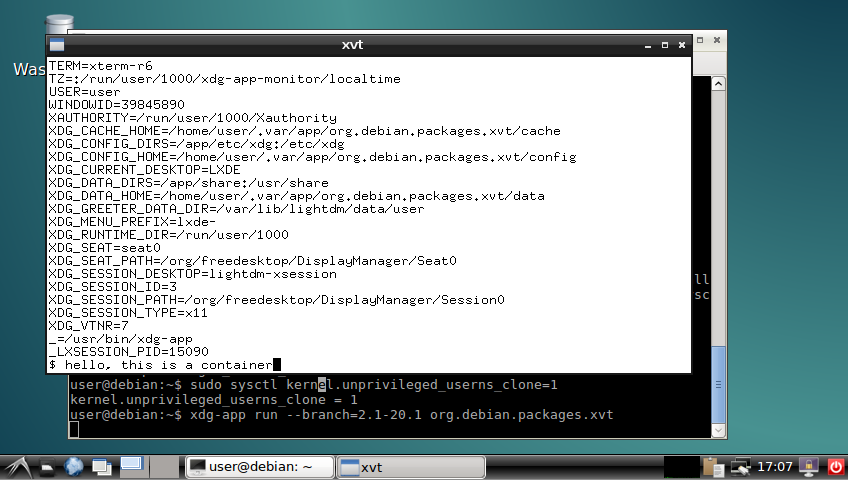 and you can play around with the shell in the
xvt and see what you
can and can't do in the container.
I'm sure there were better ways to do most of this, but I think there's value
in having such a simplistic demo to go alongside the various GNOMEish apps.
Acknowledgements:
- Betacowork Coworking Brussels and ICAB Business & Technology Incubator hosted the hackfest, with Collabora providing snacks, and the GNOME Foundation supporting the hackfest in general;
- Collabora also sponsored my travel, accommodation and time;
- my colleague Philip Withnall organised the hackfest.


 Sites like Twitter and Facebook are not fundamentally free platforms, despite the fact they don't ask their users for money. Look at how Facebook's censors
 Many marketing campaigns that have been successful today, whether they are crowdfunding, political activism or just finding a lost cat claim to have had great success because of Twitter or Facebook. Is this true? In reality, many users of those platforms follow hundreds of different friends and if they only check-in once a day, filtering algorithms show them only a small subset of what all their friends posted. Against these odds, just posting your great idea on Facebook doesn't mean that more than five people are actually going to see it. Those campaigns that have been successful have usually had something else going in their favour, perhaps it was a friend working in the media who gave their campaign a plug on his radio show or maybe they were lucky enough to be
 & another round of RC bug fixes, still related to the perl 5.22
transition (& yay, 5.22 is in testing since some days!):
 In my previous post, I talked about the udev hack I had used with the YubiKey and how it was not the correct way to do things. I recieved a lot of feedback on this post, and here I'm hoping to summarise what the correct way to do it is.
The rule I was originally using was:
 For the past few years all my important work has been stored in
git repositories. Thanks to the
 Note: 2015/10/16: I need to add some links but I won t delay this more, posting now, will edit later.
Summer ended long time ago, but believe me, I m still catching up with all the things that I began in June/July, all the things I left in August when I went holidays, and more things that appeared in August and September.
This is a long overdue post, I hope you bear with me for waiting so long, and writing (now) so long too!
June
In June, I was 100% sure that I would not attend


 Do not follow the advice of web sites that invite you to send pizza or anything else of value to prospective mentors.
Following the steps in this page doesn't guarantee selection. That said, people who do follow these steps are much more likely to be considered and interviewed than somebody who hasn't done any of the things in this list.
Understand what free software really is
You may hear terms like free software and open source software used interchangeably.
They don't mean exactly the same thing and many people use the term free software for the wrong things. Not all projects declaring themselves to be "free" or "open source" meet the definition of free software. Those that don't, usually as a result of deficiencies in their licenses, are fundamentally incompatible with the majority of software that does use genuinely free licenses.
Google Summer of Code is about both writing and publishing your code and it is also about community. It is fundamental that you know the basics of licensing and how to choose a free license that empowers the community to collaborate on your code well after GSoC has finished.
Please review the definition of free software early on and come back and review it from time to time. The
 Having a portfolio of free software that you have created or collaborated on and a wide network of professional contacts that you develop before, during and after GSoC will continue to pay you back for years to come. While other graduates are being screened through group interviews and testing days run by employers, people with a track record in a free software project often find they go straight to the final interview round.
Register your domain name and make a permanent email address
Free software is all about community and collaboration. Register your own domain name as this will become a focal point for your work and for people to get to know you as you become part of the community.
This is sound advice for anybody working in IT, not just programmers. It gives the impression that you are confident and have a long term interest in a technology career.
Choosing the provider: as a minimum, you want a provider that offers DNS management, static web site hosting, email forwarding and XMPP services all linked to your domain. You do not need to choose the provider that is linked to your internet connection at home and that is often not the best choice anyway. The XMPP foundation maintains a
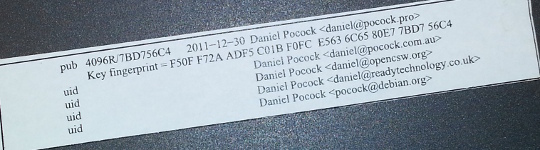 This is what my own PGP fingerprint slip looks like. You can also print the key fingerprint on a business card for a more professional look.
Using PGP, it is recommend that you sign any important messages you send but you do not have to encrypt the messages you send, especially if some of the people you send messages to (like family and friends) do not yet have the PGP software to decrypt them.
If using the
 Conclusion
Getting into the world of software engineering is much like joining any other profession or even joining a new hobby or sporting activity. If you run, you probably have various types of shoe and a running watch and you may even spend a couple of nights at the track each week. If you enjoy playing a musical instrument, you probably have a collection of sheet music, accessories for your instrument and you may even aspire to build a recording studio in your garage (or you probably know somebody else who already did that).
The things listed on this page will not just help you walk the walk and talk the talk of a software developer, they will put you on a track to being one of the leaders. If you look over the profiles of other software developers on the Internet, you will find they are doing most of the things on this page already. Even if you are not selected for GSoC at all or decide not to apply, working through the steps on this page will help you clarify your own ideas about your career and help you make new friends in the software engineering community.

 My monthly report covers a large part of what I have been doing in the free software world. I write it for
 For the concrete work I did during DebConf, I can only claim two schroot uploads to fix the lack of support of the new overlay filesystem that replaces aufs in the official Debian kernel, and some Distro Tracker work (fixing an issue that some people had when they were logged in via Debian s SSO).
While the numerous discussions I had during DebConf can t be qualified as work , they certainly contribute to build up work plans for the future:
As a Kali developer, I attended multiple sessions related to derivatives (notably the
 In order to
 This was my seventh month working on Debian LTS. I was assigned
14.75 hours of work
by
