Search Results: "philipp"

27 May 2013

Petter Reinholdtsen: How to install Linux on a Packard Bell Easynote LV preinstalled with Windows 8

Two days ago, I asked how I could install Linux on a Packard Bell EasyNote LV computer preinstalled with Windows 8. I found a solution, but am horrified with the obstacles put in the way of Linux users on a laptop with UEFI and Windows 8. I never found out if the cause of my problems were the use of UEFI secure booting or fast boot. I suspect fast boot was the problem, causing the firmware to boot directly from HD without considering any key presses and alternative devices, but do not know UEFI settings enough to tell. There is no way to install Linux on the machine in question without opening the box and disconnecting the hard drive! This is as far as I can tell, the only way to get access to the firmware setup menu without accepting the Windows 8 license agreement. I am told (and found description on how to) that it is possible to configure the firmware setup once booted into Windows 8. But as I believe the terms of that agreement are completely unacceptable, accepting the license was never an alternative. I do not enter agreements I do not intend to follow. I feared I had to return the laptops and ask for a refund, and waste many hours on this, but luckily there was a way to get it to work. But I would not recommend it to anyone planning to run Linux on it, and I have become sceptical to Windows 8 certified laptops. Is this the way Linux will be forced out of the market place, by making it close to impossible for "normal" users to install Linux without accepting the Microsoft Windows license terms? Or at least not without risking to loose the warranty? I've updated the Linux Laptop wiki page for Packard Bell EasyNote LV, to ensure the next person do not have to struggle as much as I did to get Linux into the machine. Thanks to Bob Rosbag, Florian Weimer, Philipp Kern, Ben Hutching, Michael Tokarev and others for feedback and ideas.

17 March 2013

Benjamin Mako Hill: Conversation on Freedom and Openness in Learning

On Monday, I was a visitor and guest speaker in a session on Open Learning in a class on Learning Creative Learning which aims to offer a course for designers, technologists, and educators. The class is being offered publicly by the combination surprising but very close to my heart of Peer 2 Peer University and the MIT Media Lab. The hour-long session was facilitated by Philipp Schmidt and was mostly structured around a conversation with Audrey Watters and myself. The rest of the course materials and other video lectures are on the course website. You can watch the video on YouTube or below. I thought it was a thought-provoking conversation! <iframe allowfullscreen="" frameborder="0" height="315" src="http://www.youtube.com/embed/l9HM80cv160" width="560"></iframe> If you re interested in alternative approaches to learning and free software philosophy, I would also urge you to check out an essay I wrote in 2002: The Geek Shall Inherit the Earth: My Story of Unlearning. Keep in mind that the essay is probably the most personal thing I have ever published and I wrote it more than a decade ago it as a twenty-one year old undergraduate at Hampshire College. Although I ve grown and learned enormously in the last ten years, and although I would not write the same document today, I am still proud of it.

3 March 2013

Philipp Kern: git-annex: encrypted remotes

Due to the data loss I blogged about, I had to reverse engineer the encryption used by git-annex for its encrypted special remotes. The file system on which the content lived has a bullet hole of 8 GB in it, which was helpfully discarded by pvmove. It's pretty unhappy about that fact, parts of the git repository are unusable and directories cannot be accessed anymore. git-annex cannot possibly run anymore.

However, I was still able to access the git-annex branch within said git repository (using porcelain). This branch contains a file called remote.log which contains the keys of the special remotes. There's one per remote, encrypted to a GPG key of your choice and all files within that remote are encrypted with the same symmetric key.

One small detail stopped me from getting the decryption right the first time, though. It seems that git-annex uses randomness generated by GPG and armored into base64. In my na vet I spotted the base64 and decoded it. Instead it's used verbatim: the first 256 bytes as HMAC key (which reduces randomness to 192 bytes) and the remaining bytes for the symmetric key used by GPG (which will do another key derivation for CAST5 with it). A bug about that just hit the git-annex wiki.

With that knowledge in mind I wrote a little tool that's able to generate encrypted content keys from the plain ones used in the symlinks. That helps you to locate the file in the encrypted remote. Fetch it and then use the tool to decrypt the file in question with the right key.

The lesson: Really backup the git repository used with git-annex and especially remote.log. I'm now missing most of the metadata but for some more important files it's luckily still present. Recovery of the file content does not depend on it if you can deduce the filename from the content. If you have many little files it might be a bit futile without it, though.

2 March 2013

Philipp Kern: PSA: LVM, pvmove and SSDs

If you use LVM with Wheezy on a solid-state drive, you really want to install the latest lvm2 update (i.e. 2.02.95-6, which contains the changes of -5). Otherwise, if you set issue_discards=1 in /etc/lvm/lvm.conf, you will experience severe data loss when using pvmove. Happened to me twice, once I didn't care (chroot data being lost), the second time (today) I did. Not fun, especially when the backup of the data was scheduled for the same day.

One has to wonder why it takes three months for a bug that trashes data to reach testing. (Obviously I know the answer, but they're not particularly good reasons.) Other distributions, like Ubuntu, were much quicker to notice and incorporate that fix. And in the case of the named distribution not because they auto-synced it from unstable. If somebody notices such a grave bug, please yell at people to get the fix out there to our users. Thanks.

8 February 2013

Philipp Kern: Mozilla's direction

Am I the only one who's disappointed with the route Mozilla's taking and left wondering what the direction is? First they killed off the development of Thunderbird because, as we all know, people mainly use webmail these days. Then they presented us their view that the big Certificate Authorities are too big to fail, as CAs gravely violated our trust (c.f. Trustwave and their MitM authority). And "now" they're also blocking the introduction of new formats into their browser because they cannot be the one who innovates. Instead Microsoft and Apple obviously need to take the lead in introducing a format into their browsers because otherwise it wouldn't be useful. Even though it's safe to say that Chrome and Firefox make up for more than half of the desktop browser market share. It might be that Chrome's nibbling from Firefox's, still IE seems to be in decline and Safari is rather a further mention than something many people would care strongly about.

There were of course some valid reasons for not supporting WebP yet. But most of them got fixed in the meantime and all we hear is the referal to proprietary vendors who need to move first. If I'd want to depend on such vendors I'd go with proprietary operating systems. (Having to deal with hardware products of proprietary vendors at $dayjob is enough.) So what's up Mozilla? The solution is to ignore your users and tag bugs with patches wontfix?

The only real advantage of Firefox over Chromium these days is the vast amount of plugins and extensions (e.g. Pentadactyl, for which there is no real equivalent available). Another sad fact is that you need to pull Firefox from a 3rd party repository (even though packages are coming from the 2nd party) to get a current version onto your Debian system to work with the web. But then it's not Mozilla who's to blame here. Maybe we should've introduced one Iceweasel version that's allowed to have reverse-dependencies and one that cannot.

(This post might contain hyberboles, which should be considered as such.)

5 February 2013

Antoine Beaupr : Why I don't like Pulseaudio

(This rant was originally part of the live streaming series, but I moved it to a separate article because people got stuck on it instead of responding to the actual subject of the article.) Before I get flamed for attacking Pulseaudio (PA), let's just settle this: I don't like it. I think PA is over-engineered and tries to do too many things at once. I used to (until just now) systematically purge pulseaudio-related packages from my system, mainly because PA has this awful tendency of automatically starting and staying around eternally, which wouldn't be so bad except PA has also the bad habit of hogging the audio device exclusively, which makes regular programs like mplayer, ogg123 fail to simply play audio, unless they go through the PA straight-jacket. (Update: this seems to be a bit better in newer versions of PA, where the audio device is released when sound is not being played. Thanks Philipp Kern for the correction.) In the GNU/Linux audio stack, we already have another system that supports multiple accesses: ALSA itself, so I believe that PA should at least behave nicely to other apps, and it seems I am always having problems with that. (The fact that ALSA itself is over-engineered is also telling of the poor state of the audio stack in GNU/Linux.) The other beef I have with PA is the Not Invented Here syndrome: instead of extending existing tools like ALSA or Jack, people just figured they could do everything better and start from scratch. So now we just have one more "standard" way of playing audio, good job Lennart.

27 January 2013

Russell Coker: LCA 2012

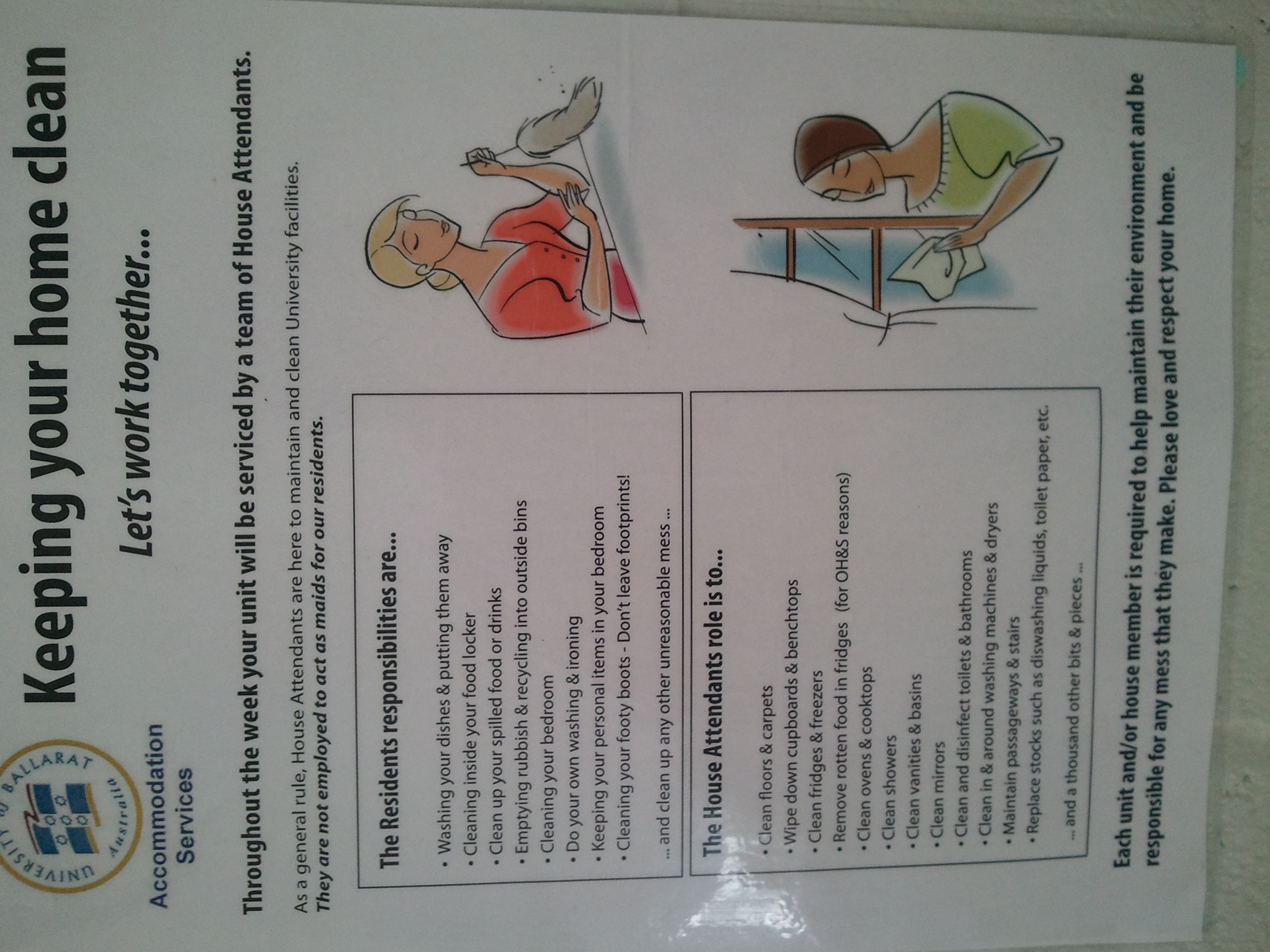
LCA 2013 [1] is starting so it seems like time to finish my write-up of LCA 2012. As usual it was a great conference, although I got sick immediately after getting there which reduced my ability to attend. Android A major unofficial theme of the conference was Android. Most delegates seemed to have Android phones, the Samsung Galaxy S and Galaxy Nexus seemed to be the most popular phones. Many delegates had two or more phones for development purposes. A large portion of the casual conversation at the conference concerned Android. There were a couple of really interesting talks about the Serval mesh networking project [2] which involves Android phones running in ad-hoc Wifi mode for long range communication without any official base station. Serval allows transferring messages, pictures, and voice calls. If you need to get longer range you can mount one phone in a convenient place and other phones will decide to use it as a relay there is no need to have a dedicated relay device (such as a mobile phone tower or Wifi access point). Serval is supposed to work with Wifi access points but due to Java not exposing some networking details to the higher levels of software the code that was available at the time of the conference didn t support networks other than a /24, which meant that the conference Wifi network didn t work with Serval. As an aside most people at the conference who installed Serval were using a development version that was newer than the version on the Android market. I can t remember what the extra features were though. Serval was designed for emergency situations, it can be installed on phones (and pushed to other phones via Wifi) in the field and allow communications when the infrastructure is broken. Also it s designed with some aim of circumventing censorship which among other things means that there are no facilities for tracking use. I think it would be really handy to be able to in some way track viewing of or interest in images that are transported via the mesh (maybe by something similar in concept to Google +1). Then in a crowd sourced environment people who take photos would be encouraged in their work by audience appreciation. One thing that interests me is the possibility of using Serval on a cruise ship. A cruise ship is an environment where mobile phone calls are unreasonably expensive, cabin phones aren t much use (who pays for a cruise and hangs out in their cabin?), and where there is usually a Wifi network installed. If a ship has a single bridged Wifi network that allows connecting to Wifi before authenticating for Internet access (which is probably the common case) then you could transport VOIP over that network without paying and without incurring any expense on the cruise company. One of the Serval developers assured me that this should be possible, of course a cruise ship with 3,000 passengers probably doesn t use a /24 for their Wifi so the current versions of Serval won t work At the geek my dinner event (a party where everyone brought $20 of food/drink which was cooked by volunteers) an artist showed me some art work that she created on her Samsung Galaxy Note (which was the biggest phone on sale at the time), it was very impressive. She recommended Picasso Mirror Draw, Sketch Free, Sketch Book Mobile Express, and Freenote as free graphical programs for Android. Samsung has a Noteworthy Project advertising campaign based on the artistic uses of the Galaxy Note which has some good videos of artists [3]. Chris Neugebauer and Paris Buttfield-Addison gave an informative and amusing talk about Android UI development (this link has the video) [4]. It s a pity that I missed seeing that one live but fortunately the video is of high quality. Accommodation picture of women cleaning As I ve become interested in Sociology I couldn t help but notice the pictures that accompanied the rules about cleaning the dormitory (which were displayed over the kitchen sink), it seems to imply that cleaning is only women s work. I wonder whether the people who created that poster deliberately chose pictures of women or whether they just chose the first available pictures from a collection of stock photos. Someone who was near my dorm room seemed to not realise how their alarm impacts other people. For the first two mornings I was woken repeatedly after 6AM by someone who was pressing the snooze button on their alarm. When sleeping in close proximity to other people the reasonable options involve some combination of having no loud alarm, immediately turning the alarm off and getting up (not pressing snooze to have it go off repeatedly), and setting the alarm for a time when almost everyone wants to get up (EG 1 hour before the first session). Networking Chris Neugebauer organised the Unprofessional Delegates Networking Session which was a great event. It was an event held at the same time as the Professional Delegates Networking Session with the difference being that you had to pay $5 for food and there was no free drink. A lot of great people attended the UPDNS so I m glad I don t pay for the PDNS. It seems that we won t have a UPDNS this year unfortunately. Conclusion LCA is always great fun and very educational. I recommend attending every year.

24 January 2013

Russell Coker: Power Supplies and Wires

For some time I ve been wondering how the wire size for power supplies limits the power. So I ve done some quick calculations to determine if it s a problem. The first type that is of interest are the Inverters that are used to convert 12VDC to 240VAC (mains power) to allow electric devices to be operated in a car. I ve seen some reports from dissatisfied user about Inverters not supplying as much power as expected and I ve had problems with my 150W Inverter not always supplying my Thinkpad (which definitely doesn t draw 150W). The second type is phone chargers as charging a phone in a reasonable amount of time is always a problem. Inverter Rating Fine Print vs Laptop PSU My Thinkpad Power Supply claims Efficiency Level IV which according to the US EPA document describing the efficiency marking protocol for external power supplies [1] means that it is at least 85% efficient when supplying 50W+. The peak output of the PSU is 4.5A at 20V which is 90W peak output, 90/0.85 == 106W power drawn. One would hope that wouldn t be a problem from a 150W PSU. But the fine print on the PSU says that it can provide 110W continuously and 150W for 10 minutes. So according to my calculations I m within 4W of overloading the PSU if my Thinkpad uses full power. It also says that it is designed for 13.8V input. I have no idea how the performance of the Inverter changes as the supply Voltage changes between the 12.6V that a 6 cell lead-acid battery is designed to provide and the 13.8V charge from the car alternator. But I have had occasions when my Inverter stopped working correctly presumably due to being unable to supply as much current as my Thinkpad draws. As an aside I measured the Voltage in my car (with the engine off) at 12.85V from the cigarette lighter socket and 13.02V directly from the battery. I wonder if there is some sort of overload protection on the cigarette lighter which has a side effect of reducing the Voltage. Resistance in wires reduces the Voltage, but all Voltage meters are designed to have a high resistance to prevent that from being an issue. If anyone has an explanation for the 0.17Volt drop then please write a comment! Can a Car Provide 130W from the Cigarette Lighter socket? If the Inverter is also 85% efficient (and it might be less as it has no indication of efficiency on the box) then when supplying 110W it would draw 110/0.85 == 129.4W (I ll round it up to 130W). The power in Watts is equal to the Voltage multiplied by the current in Amps (W=V*I). Therefore I=W/V so if the car battery was at 12.85V then 130W/12.85V == 10.12A will flow. The current that goes through a circuit is equal to the Voltage divided by the resistance (see the Wikipedia page on Ohm s law for more information). This also means that the resistance equals the Voltage divided by the current. 12.85V/10.12A == 1.27 Ohms. Note that this is the resistance of the entire circuit, all the wires going to the battery, the circuitry inside the Inverter, and the internal resistance of the battery. The Inverter s cable is 1M long (2 meters of wire) and each wire is about 3.5mm in diameter including the insulation which means that the copper wire is probably equivalent to a single core conductor that is about 1mm in diameter. According to one of the online guides to resistance [2] wire that is 1.02mm in diameter will have a resistance of 0.02 Ohms per meter which gives a resistance of 0.04 Ohms. 0.04 Ohms is 3% of the total resistance of the circuit which doesn t seem like it will be a real problem. In practice I ve noticed that the connector gets extremely hot when it s in use while the cable doesn t get warm enough to notice. I suspect that the quality of the connector limits the power that is available but I don t have an easy way of measuring this. Inverters that are rated at 300W are designed to attach directly to the battery. An Inverter that is rated at 300W would draw 300W/0.85 == 352W from the battery. That needs 352W/13.02V == 27.04A and therefore a circuit resistance of 13.02V/27.04A == 0.48 Ohms total resistance. I wonder whether dirt on the battery terminals would give a significant portion of that. Phone Charging I ve also been wondering about why mobile phones take so long to charge, and now I ve finally done the calculations. The latest standard for mobile phones is to use USB for charging. The Wikipedia page about USB says that the standard is for USB 2.0 to supply up to 500mA at 5V +-5%. That means 0.5A*5V == 2.5W +- 5%. If we assume that the internal power supply in a phone is also 85% efficient then that means 2.5*0.85 == 2.125W going to the battery. My Samsung Galaxy S3 has a battery which is rated at 7.98Wh. According to the Wikipedia page about Lithium Ion batteries the charge/discharge efficiency is 80% to 90% I ll assume that it s 85% for further calculations. If the battery in the phone is 85% efficient and the phone is doing nothing but charging then the charge time for a regular USB port would be 7.98Wh/0.85/2.125W == 4.42 hours (4 hours 25 minutes) of charge time. That probably means something closer to 5 hours to totally charge the phone while it s running. There are dedicated charging ports for USB which can supply up to 1.5A. The 3rd party charger which came with my phone was rated at 1A and would hopefully be capable of completely charging the phone in less than 3 hours (but in practice isn t). It s interesting to note that MacBooks expose the amount of current drawn from a USB port with a GUI, so it should be possible to measure a phone charge rate by connecting it to a MacBook (which is cheaper than cutting up a phone cable). My old Samsung Galaxy S has a battery which is rated at 5.55Wh, by the same calculations it would take slightly more than 3 hours to charge on a standard USB port or 1.5 hours on my newest USB charger. In practice it has never got anywhere close to that, I presume that the phone is designed to draw less than 500mA. Phone Cable Resistance The charger that came with my Galaxy S has a cable that is about 1.75M long, the cable is flat and measures just over 1mm thick and about 2mm wide. Presumably the wire is equivalent to a single core that s about 0.4mm in diameter thus giving it a resistance of about 0.134 Ohm per meter, or 1.75*2*0.134 == 0.469 Ohm for the cable. The charger is rated at 0.7A. To supply 0.7A at 5V the resistance would be 5V/0.7A == 7.143 Ohm so about 6.6% of the total resistance of the circuit would be in the wire from the charger to the phone. The charger that came with my Galaxy S3 has a round cable that s just over 3mm thick and about 90cm long. If each wire in the cable is equivalent to a solid wire that is 0.912mm in diameter then it would be 0.0264 Ohm per meter of wire or 0.9*2*0.0264 == 0.0475 Ohm. The total circuit resistance would be 5V/1A == 5 Ohm. So 0.0475 Ohm is less than 1% of the circuit resistance. Voltage Drop The Voltage across a part of a circuit is proportional to the resistance (see the Wikipedia page on Series and Parallel Circuits for a good explanation). Basically this means that if 1% of the resistance of a circuit is in the wire then 1% of the Voltage drop will also be in the wire, so if we have a 5V supply with my Galaxy S3 cable then each of the two wires in the cable will have a difference of about 0.025V between the ends and the phone will receive a supply of 4.95V, the difference isn t something that is worth worrying about. But the cable from my Galaxy S has a resistance equivalent to 6.6% of the circuit resistance which means that the theoretical charge time will be 6% longer than it might be or 6% more current will be drawn from the mains than should be needed. Conclusion The charger that came with my Samsung Galaxy S isn t much good. Wasting 6.6% of the power in the wire is unreasonable. Phones keep getting more power hungry and batteries keep getting larger. There are third party phone batteries and external batteries that are charged by USB which have more than twice the capacity of the stock phone batteries this means more than twice the charge time. This problem will keep getting worse. The problem of a phone in active use drawing more power than the charger can provide (and running out of battery while on the charger) seems likely to stay with us. So while an Android phone has the potential to be a great little embedded server it seems that hacking the power supply is going to be a required first step for realising that potential. The decision to make 5V the USB power standard was reasonable at the time as it was the voltage used for most things on the motherboard. The decision to use USB as the phone charging standard was also reasonable, it allows phones to be charged anywhere. The combination of those two decisions isn t good for the user. If a higher Voltage such as 12V was used then 5* the power could be supplied through the same wires at the same level of efficiency. It would be really good if cars came with built in Inverters and supplied 240VAC or 110VAC depending on the region they were manufactured for. It s becoming a fairly common feature to have a cigarette lighter port in the car boot as well as at least two ports inside the car. When a car has three sockets and only one device to actually light cigarettes (which I suspect is only provided to fill an empty socket) it s very obvious that people want to connect random devices. Also having USB charging ports inside the car would be a really good idea (one for each seat would be good for Ingress).

29 December 2012

Russell Coker: Samsung Galaxy Camera a Quick Review

I recently had a chance to briefly play with the new Samsung Galaxy Camera [1]. The Galaxy Camera is an Android device with a 4.8 display (the same size as the Samsung Galaxy S3) that has a fairly capable camera (IE nothing like a typical phone camera). It runs Android 4.1 (Jelly Bean) and the camera has 21* zoom with a 16 megapixel sensor. Camera Features It seems that professional photographers are often annoyed when they see someone with a DSLR set in auto mode. It s widely regarded that auto mode is a waste of a good camera, although the better lenses used with DSLRs will usually give a better result than any compact camera even when it s in auto mode. The problem is that photography is quite complex, in an earlier post about digital cameras I summarised some of the technical issues related to cameras and even without any great detail it became a complex issue [2]. The Galaxy Camera has a reasonably friendly GUI for changing camera settings which even includes help on some of the terms, I expect that most people who use it will end up using most of the features which could make it a good training camera for someone who is going to move to a DSLR. A DSLR version of the Galaxy Camera could also be an interesting product. The camera also has modes such as Waterfall and Panorama , hopefully the settings for those would be exposed to the user so they could devise their own similar groups of settings. I ve seen the phone criticised for the lack of physical controls as the expert mode in software is inherently slower than manually turning dials on a DSLR. But it seems obvious to me that anyone who knows how to use the controls manually should be using a DSLR or bridge camera and anyone who doesn t already know how to do such things will be better suited by the software controls. It supports 120fps video at 720*480 resolution (with a file format stating that it s 30fps to give 1/4 speed) which could be useful. I used to have a LG Viewty smart-phone that did 120fps video but the resolution was too low to be useful. 720*480 is enough resolution to see some detail and has the potential for some interesting video, one use that I ve heard of is filming athletes to allow them to analyse their performance in slow motion. It also does 60fps video at 720p (1280*720) resolution. One down-side to the device is that the lens cover doesn t seem particularly sturdy. It s quite OK for a device that will be stored in a camera case but not so good for a device that will be used as a tablet. I didn t get to poke at the lens cover (people don t like it if you mess with their Christmas presents) but it s design is a couple of thin flaps that automatically retract when the camera is enabled which looks quite weak. I d like to see something solid which doesn t look like it will slide back if the device is treated as roughly as a phone. I think that the lack of a solid lens cover could be the one factor that prevents it from being used as a replacement for a smart phone. Apart from that a Galaxy Camera and a cheap GSM phone could perform all the functions of a high end phone such as the Galaxy S3 while also producing great pictures. It would probably make sense for retailers to bundle a cheap phone with a Galaxy Camera for this purpose. Tablet Features The device boasts WiFi Direct to allow multiple cameras and phones to talk to each other without a regular WiFi access point [3]. I didn t test this and I don t think it would be particularly useful to me, but it seems like a handy feature for less technical users. It can connect to the Internet via Wifi or 3G, supports automatic upload of pictures (it comes with Dropbox support by default like the Galaxy S3), and has a suite of photo and video editing software. I don t expect that any photo editing software that runs on an Android device would be much good (I think that you really need fine cursor control with a mouse and a high resolution screen), but it would probably be handy for sending out a first draft of photos. Most Android apps should just work, the exceptions being apps that rely on a camera that faces the user or full phone functionality. So the Galaxy Camera can do almost anything that an Android phone or tablet can do. Value The RRP for the Galaxy Camera is $599, that puts it in the same price range as a DSLR with a single lens. While that s not a bad price when compared to smart-phones (it s cheaper than the LTE version of the Galaxy S3 phone) it s still quite expensive for a camera that s not a DSLR. Fortunately Kogan is selling it for $469 and has free shipping at the moment [4]. This still makes it more expensive than some of Bridge Cameras which probably have significantly better optical features, but in terms of what the typical user can do with a camera the Galaxy Camera will probably give a much better result. The sensor in the Galaxy Camera is smaller than that in the Nokia 808 PureView [5] (1/2.3 vs 1/1.2 ) so the Nokia PureView should be able to take better pictures in some situations. Unfortunately the Nokia 808 doesn t run Android, I d probably own one if it did. Some of the reviews are rather harsh, the Verge has a harsh but fair review by Aaron Souppouris which makes a number of negative comparisons to cheaper cameras [6]. I really recommend reading Aaron s review as there s a lot of good information there. But I think that Aaron is missing some things, for example he criticises the inclusion of ebook software by saying that he wouldn t read a book on a camera. But the device is a small tablet computer which also has a compact camera included. I can easily imagine someone reading a book or playing Angry Birds on their camera/tablet while in transit to where they are will photograph something. I can also imagine a Galaxy Camera being a valuable tool for a journalist who wants to be able to write short articles and upload pictures and video when out of the office. Aaron concludes by suggesting that the Galaxy Camera is a $200 camera with $300 of editing features. I think of it as $200 in camera hardware with software that allows less skilled users to take full advantage of the hardware and the ability to do all the software/Internet things that you would do on a $450+ smart-phone. Would I Buy One? No. The Galaxy Camera is among other things a great toy, I d love to have one to play with but I can t spare $469 on one. Part of the reason for this is that my wife just bought a DSLR and is getting lessons from a professional photographer, so I really won t get better pictures from a Galaxy Camera. The DSLR on auto mode will allow me to take pictures that will usually be better than a Galaxy Camera can achieve (sometimes you just can t beat a good lens). For more demanding pictures my wife can tweak the DSLR. The 120fps video is a really nice feature, I don t know if my wife s DSLR can do that, but it s a toy feature not something I really need. I ve just bought a Galaxy S3 which is a great little tablet computer (most of the time it won t be used for phone calls). I don t need another 4.8 tablet so a significant part of the use of the Galaxy Camera doesn t apply to me. I recommend the Galaxy Camera to anyone who wants to take good photos but can t get a DSLR and lessons on how to use it properly. But if you would rather get a 35mm camera with interchangeable lenses that runs Android then it might be worth waiting. I expect that the Galaxy Camera will be a great success in the market (it s something you will love when you see it). That will drive the development of similar products, if Samsung doesn t release a 35mm Android camera soon then someone else will (for example Sony develops both high end cameras and Android phones). If my wife didn t have a DSLR then I d probably have bought a Galaxy Camera already. I will recommend it to my parents and many other people I know who want an OK camera and can benefit from a tablet, but don t know how to use a DSLR properly (or don t want to carry a bulky camera).

28 December 2012

Russell Coker: SIM Annoyances

My new Samsung Galaxy S3 phone takes a micro-SIM (see the Wikipedia page about Subscriber Identity Modules for details [1]). All my other mobile devices take a mini-SIM so I can t just put the SIM from my old phone in my new phone. I ve just made my second application to Virgin Mobile for a new micro-SIM, the first time they sent me a nano-SIM by mistake. Also if my new phone breaks I will have difficulty in getting a micro-SIM to run in a mini-SIM device (it should be possible, but will be difficult at least). I may even have to ask my Telco to send me a new mini-SIM to allow the use of an older phone if my Galaxy S3 breaks. The difference between micro and mini SIMs is 25*15mm vs 15*12mm. For a phone with a 4.8 display this doesn t seem to be a great benefit. It doesn t seem that the phone would be much bigger if they had designed it for a mini-SIM. If they had used a nano-SIM which is 0.09mm thinner that might have allowed them to make the entire phone thinner, I think that such thin phones are a bad idea but the reviewers seem to like thin phones with small batteries. I think that any device which is large enough to have a speaker somewhere near my ear and a microphone somewhere near my mouth will be big enough to fit a 25mm long SIM card. It seems to have been a trend in Australia in the last few years towards only selling unlocked phones on contracts (relying on the contract terms to lock the customer in) and only use locked phones for discount sales for pre-paid use. Also the free phones in Australia are considerably more expensive than buying a phone outright [2]. So I m sure that most people have a collection of older phones which in future can t be easily interchanged with new phones due to SIM card size differences. This is more of a problem due to the fact that modern phones seem to have a low quality of hardware production, the majority of Android phones owned by my relatives have failed in some substantial way well within the two year replacement period. I don t believe that I can rely on my Galaxy S3 working until I want to buy something better, I expect that my old Galaxy S (which has a hardware fault that makes it crash regularly but is mostly usable) will be pressed into service again. In terms of phone purchases, buying a phone that takes a micro-SIM seems like a bad strategy as there is an even smaller nano-SIM available. For all I know Samsung will release a Galaxy S4 or Note3 that uses a nano-SIM and give me the same upgrade problem in a couple of years time. I wish that the people who reviewed phones would pay more attention to the real world use cases than to slightly better specifications. The micro and nano SIMs seem to provide no real benefit for users. Saving a fraction of a gram in device mass or a fraction of a millimeter in one dimension might seem nice when aggregated with other small savings, but for the user it s no real benefit. Being able to interchange a bunch of random phones is a real benefit. It s also a real benefit to be able to buy a phone and expect it to just work immediately. With the current state of the market one can t buy a phone and make any assumptions about the SIM size that it will accept, at best this requires some extra research before buying and at worst this could involve some time without phone service. I think that a major feature for a review of an important device like a modern smart phone should be how quickly and easily it can be deployed for full use. When SIM size issues prevent a new device from being used properly for over a week (as has happened for me) then it seems like a design failure.

20 December 2012

Russell Coker: Samsung Galaxy S3 First Review with Power Case

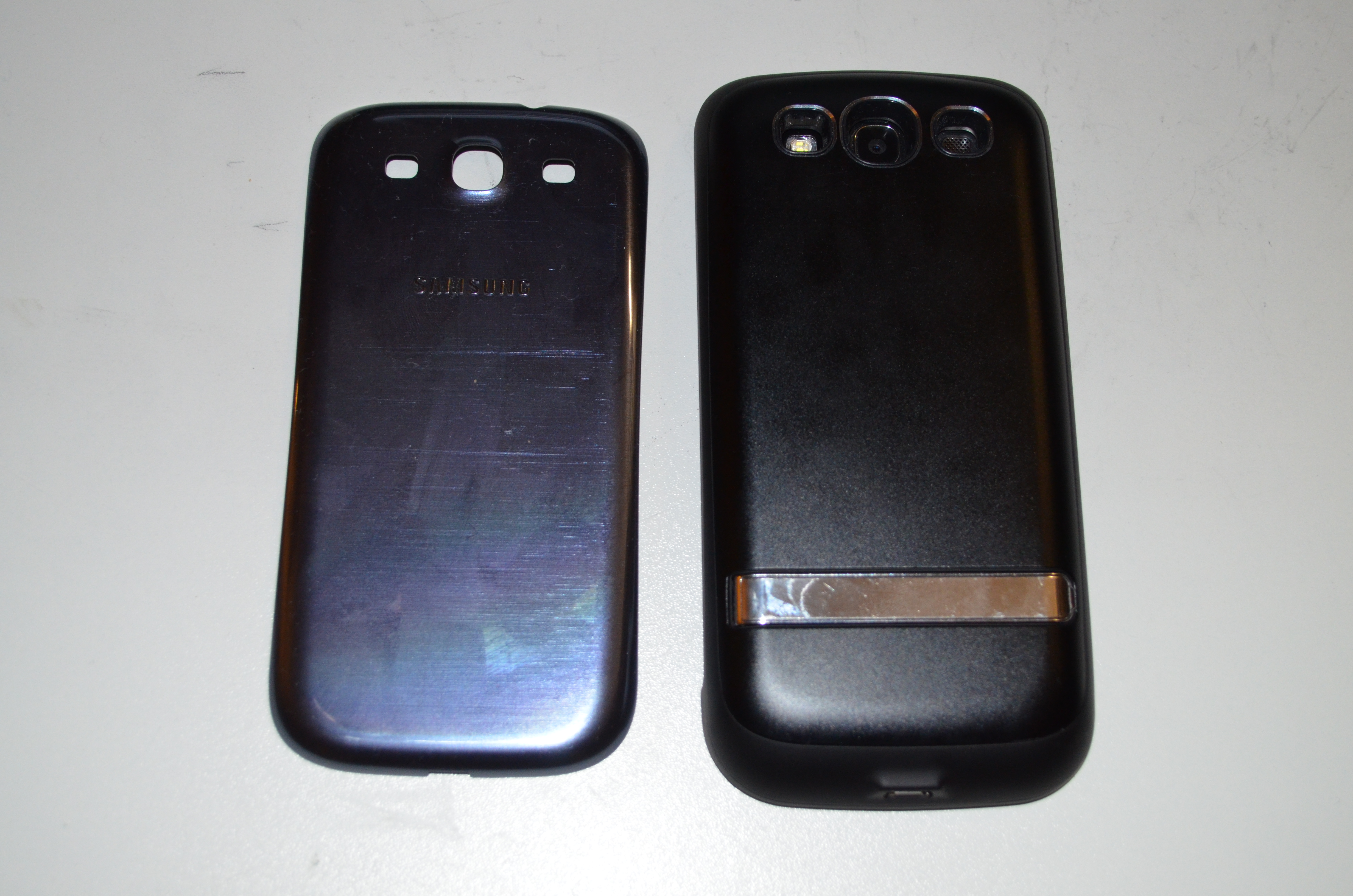
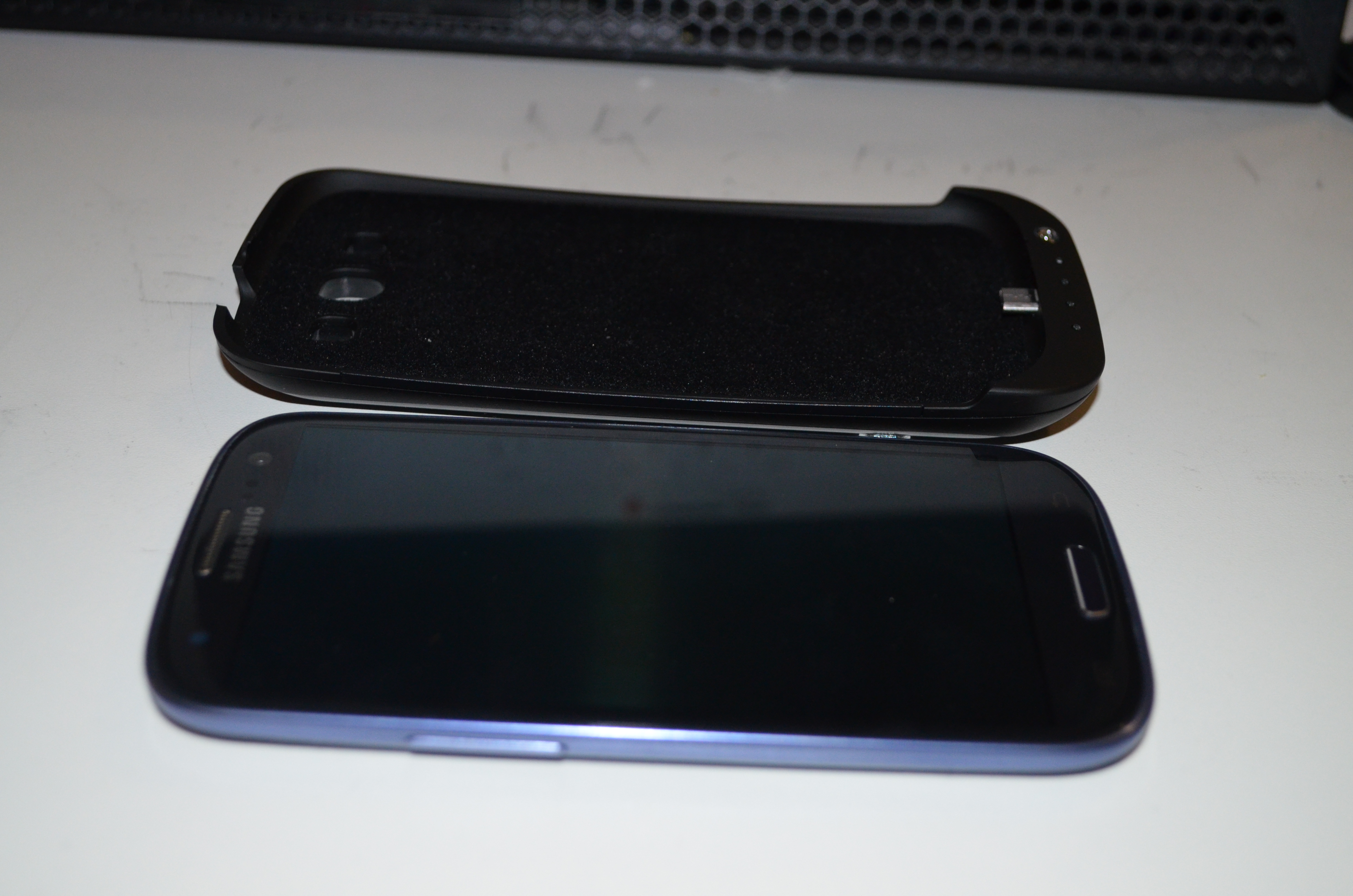
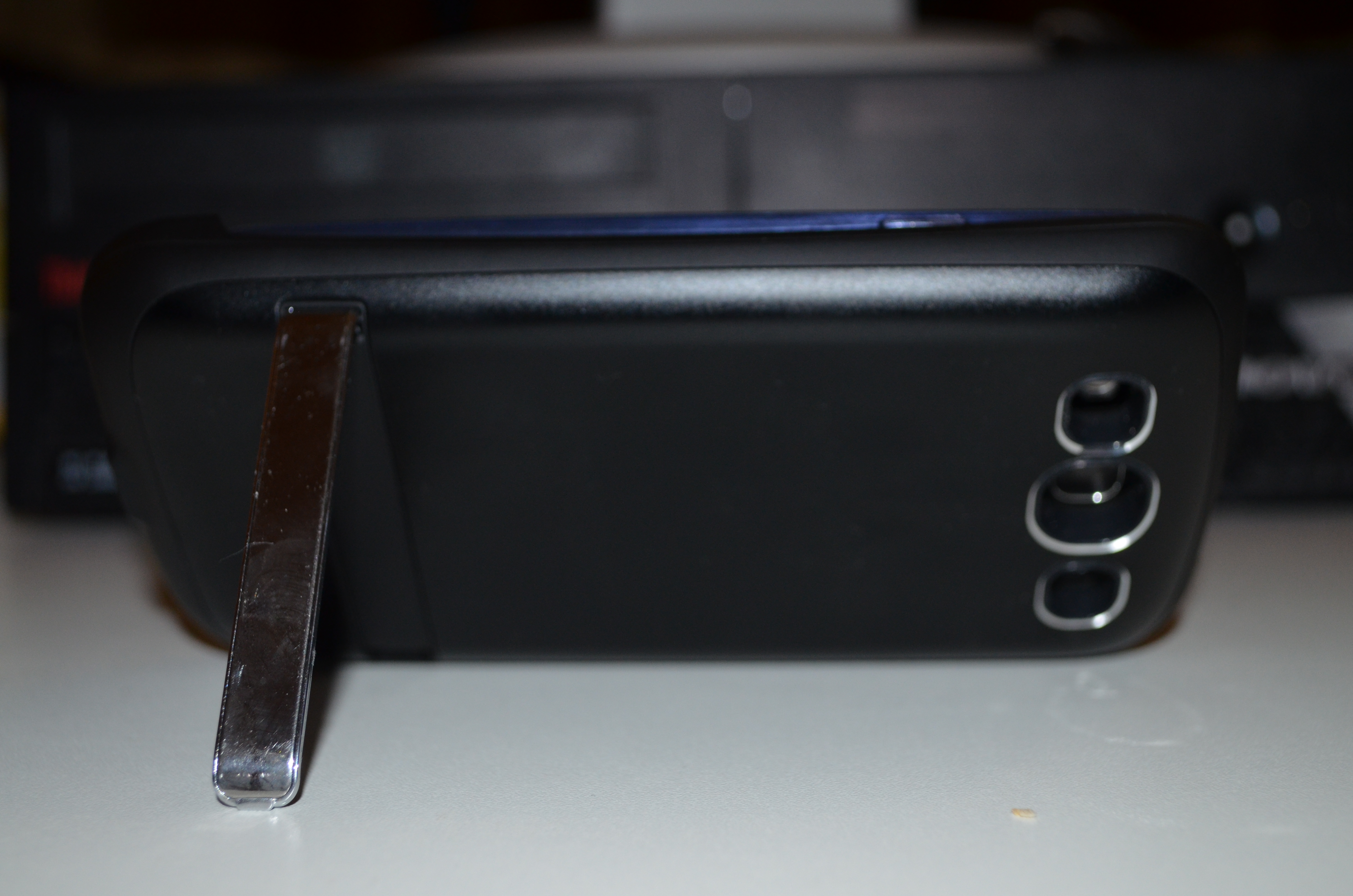
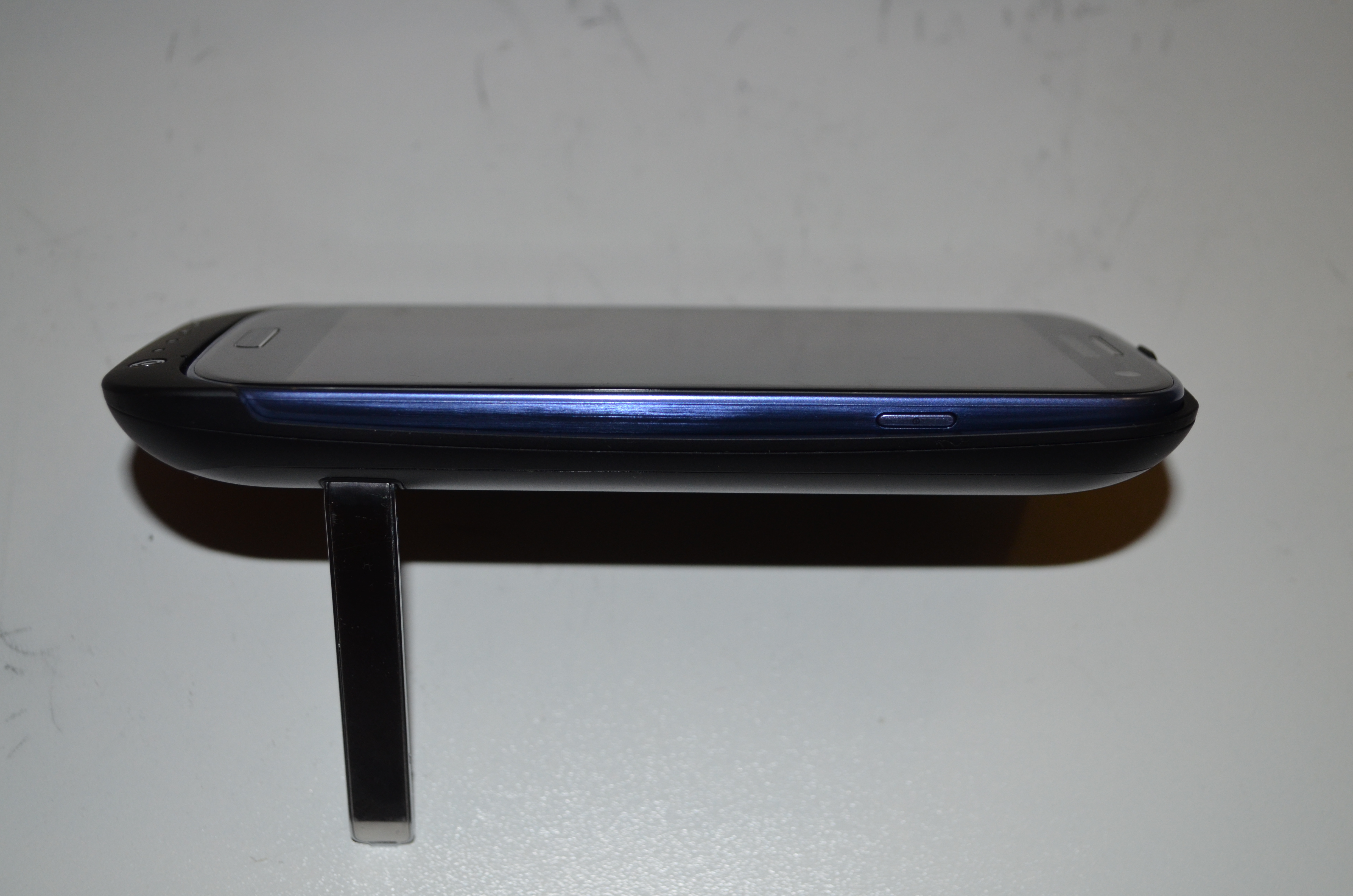
My new Samsung Galaxy S3 arrived a couple of days ago. Kogan added to the weirdness in their shipping that I documented in a previous post [1] by shipping the two phones on consecutive days with separate invoices for $789 each (as opposed to the $449 that I paid). This means that if customs were to track this down they could bust me for import duties (which apply whenever you order more than $1000 of electronics from another country) as multiple shipments in a small period of time are aggregated for tax purposes. It also means that it would be easy to defraud the tax office or an employer about the cost of the devices if I didn t blog about it Phone and Case Review back of power case with S3 installed next to back plastic of S3S3 and case next to each other To install the Samsung Galaxy S3 in the power case I bought from Kogan the back of the S3 has to be removed. One annoying implication of this is that when using the phone in it s case I will either have to carry the back of the phone with me or have no option of removing the case during the day. The phone has to slide in to the case from a small angle and if it s removed carelessly there seems to be a risk of breaking the power connector on the case. S3 on power case standedge view of S3 in power case stand The above photos show the kick-stand on the power case in use, I haven t yet had an opportunity to use the stand for anything other than photography and as it s made of thin plastic there s a reasonable chance that it will break off before I ever use it properly. One major deficiency of the power case is that it has no protection for the screen. The typical gel case will extend by about 2mm above the screen which means that you can place the phone screen-down on a table without a risk of scratching the screen. Also if a phone in a gel case is dropped on a hard surface it seems likely that the chance of the screen hitting a bump and cracking will be lower although I m not aware of any research regarding how well this theory works in practice. This combined with the fact that the power case is smooth and difficult to grip makes it quite unsuitable for regular use. I am concerned that the added mass of the power case would increase the risk of serious phone damage if it s dropped screen-down. I plan to buy a gel case ASAP which I will use most of the time. I will swap the gel case for the power case on the occasions when I expect to spend an extended period of time away from home or an office where I can charge my phone. The power case really should have been designed with a flange that extends above the level of the screen on all sites. It also shouldn t be smooth on the outside. Phone Review The Galaxy S3 equals the Galaxy S for the title of the most slippery phone I ve ever owned. This combined with the fact that the Galaxy S3 is slightly thinner and also 10% wider and longer makes it a more difficult phone to hold. It s a phone that really needs a case with a lot of grip. The camera is reasonable given the fact that any device that is 8.6mm thick will have a very small focal length and also a very small CCD for receiving light. The laws of physics just don t allow something the size of the Galaxy S3 to have a half-decent camera. My ideal mobile phone would be about the size of the Galaxy S3 with the power case, it would use the extra thickness for a big battery as well as a much longer focal length for the camera. I d like a phone to be about 16mm thick over most of it s area with a section that s 20mm for the camera. The burst shot mode (which allows you to take 20 pictures rapidly) is good for capturing certain types of relatively slow movement (EG someone s mouth moving when they talk). But it s no good at all if you try to pan the camera while doing burst mode. When I first started using the phone it gave me lots of hints about using various functions. This wasn t particularly useful for me as most things are obvious to anyone who has much experience with computers and the non-obvious things are probably going to be forgotten if you are doing something else when the help system prompts you. It will be useful for my sister in law who s getting the other phone, but the down-side of this is that I can t configure her phone before delivering it. She needs to use it first to see all the tips. The Galaxy S3 has a screen that s 4.8 diagonally which is slightly larger than the 4.0 screens of my previous Android phones (Sony Ericsson Xperia X10 and Samsung Galaxy S). That gives 44% more screen area which is a good thing. Unfortunately many apps seem to display the same amount of data, I had hoped that 44% more area and 140% more pixels would result in most apps displaying more data by default. Fortunately ConnectBot (my SSH client of choice) gives me 60 rows and 120 columns on the Galaxy S3 as opposed to the mere 31 rows and 80 columns on the Xperia X10. I don t use ConnectBot that often (a phone is a really bad ssh client no matter how you do it), but when I do it s really important and the extra space matters. The down-side of the larger screen for me is that the distance from the center of the palm of my hand to the end of my thumb is slightly less than 4.8 . This means that I can t hold the Galaxy S3 with one corner in the palm of my hand and still reach the far corner of the screen. So I am forced to hold the sides of the phone for one-handed use which means that it would be easier for it to slip out of my hand. A further complication is that the settings and back buttons are very close to the edge of the phone and can be hit by accident very easily. Hopefully a gel case will alleviate that. But I have never owned a hand-held device which was so difficult to hold in a stock configuration. According to AndroSensor (one of my favorite demo programs for showing useless things that a phone can do) the Galaxy S3 lacks support for measuring humidity and external temperature but it has all the other sensors. I think I can survive without knowing how hot and humid my pockets are, but it would still be nice to have every possible feature. The default partitioning of the phone storage is to have all internal storage used for applications and none used for a VFAT filesystem accessible over USB. It s nice that I won t run out of application storage space (a problem I ve had with every other Android device) but it does mean that I ll have to buy a micro SD card before I can use the phone properly. Micro SD storage costs about $1.50 per gig in the size range from 8G to 32G, it s not particularly expensive but it s annoying to have the phone not be fully usable right from the start. Without using a SD card I have to use gphoto2 to download pictures from the phone so it s fully usable in every way. But the cost of the power case, the gel case I m about to buy, and an SD card make the phone less of a bargain. The phone has more RAM, a faster CPU, and Android 4.1. These are all really good things, but nothing worth writing about in a review. Conclusions The power case is very poorly designed, I probably wouldn t buy it if I knew then what I know now. For one-handed phone use by someone like me with longer than average fingers a 4.0 phone is about the largest possible. This doesn t mean that phones should stay small, but it does mean that Apple weren t being entirely silly when they released all the 3.5 iPhones. Presumably a large portion of the population would find a 3.5 phone to be as usable as a 4.0 phone is for me. It now seems to me that as a 4.8 screen is going to be impractical for one-hand use by almost everyone the phone designers should concentrate more on larger phones similar to the Samsung Galaxy Note. I think that the 4.8 screen size may be ideal for some young children who could use it the way an adult might use a 7 tablet an Android phone seems to be a relatively common present for children in the 6-12 age range. Generally I think that no-one should ever buy a new phone or tablet without trying one of the same size. While I am happy with the S3 it really doesn t work in the way I expected. Having 2.9* as many characters on screen for ConnectBot is a massive benefit. If I ever write another magazine article on a hand-held device the extra size and resolution will really help if I found a suitable editor (please make suggestions in the comments). For the WordPress client to write long blog posts on it then the screen could potentially be reasonably useful, but so far it seems that it s more suited to reviewing posts and comments than to writing posts. Generally the Samsung Galaxy S3 is a good phone and I think it s great value for money when it s less than $500.

10 December 2012

Russell Coker: Returning the Aldi Tablet

I have decided to return the 7 Android tablet I bought from Aldi last week [1]. I still think that the tablet isn t all bad, but the main problem I had is the short battery life. The battery can be entirely exhausted in less than an hour s use. Another problem is the fact that most of the Angry Birds games just abort on startup, as my plans for the tablet involved some recreational use this is a significant problem. The final factor that made me decide to return it is the fact that Kogan offered a special deal on a Samsung Galaxy S3 [2] for $449. That ended up as $507 per phone for two phones that have PowerCases (which more than double the battery life as well as protecting the phone from being dropped). So a Galaxy S3 increments my Android device count and with a 4.8 720*1280 display will compete well with a low-end 7 tablet that only has a 800*480 display (the Galaxy S3 has 2.4* as many pixels). Aldi offers 60 days money back, so I ll return the tablet when my Galaxy S3 arrives.

22 November 2012

Philipp Kern: OpenClonk

The Free and Open successor to the Clonk computer game series OpenClonk is now available in Debian sid and Ubuntu raring: just use sudo apt-get install openclonk to install it (backports to Ubuntu precise and quantal can be found in the OpenClonk Releases PPA).

<iframe allowfullscreen="allowfullscreen" frameborder="0" height="236" src="https://www.youtube.com/embed/ykJZ9WsevGE" width="420">OpenClonk Beyond the Rocks Trailer</iframe>

It's still under development, but as you can see it's also already quite functional. The engine was made available freely under the ISC license after the original author of Clonk was no longer interested in creating new successors. Many of the old volunteer contributors then picked it up. Be aware that same computer multiplayer, which was available in the older parts of the series, is gone. If you play on the network, you need to ensure that both of you have the same version of the game.

2 October 2012

Philipp Kern: How to maintain an OpenWRT installation

I wondered how to properly maintain an OpenWRT installation that needs to track trunk for one reason or another. For instance the OpenWRT release pace is quite slow and "new" devices or various fixes are only available in this particular branch.

Now the OpenWRT project does offer snapshot builds. These are images built with the default config for the particular device type. You can even upgrade most models using sysupgrade, which preserves a list of configuration files you specify when flashing the new image, instead of doing a dreadful tftp upload. But you still lose all the packages you installed and accumulate a bit of cruft when reinstalling them. If you do not flash new images, you will be unable to install kernel modules after a while, because the kernel version they're based upon was updated.

So what's suggested is this:
The advantage of building an image that includes all the packages is that you don't get to reinstall them and due to the use of squashfs, all files provided by those packages are actually kept in compressed form in flash. The image I built has a size of about 7 MB and contains "heavyweight" packages like isc-dhcpd, bind, openvpn (using openssl), bash, vim-tiny, tcpdump-mini, luci, and a webserver with TLS support.

As always: Take great care when you're flashing devices. The devices I bought cannot be bricked, but this might not be true for all devices that run OpenWRT. You might need and go doing a tftp image upload if something goes wrong. Check the OpenWRT wiki for instructions and possibly make your computer ready for them before starting to play with your box. For my Buffalo WZR-HP-AG300H the sysupgrade procedure is stable.

23 September 2012

Philipp Kern: Call for testing: Upcoming Squeeze point release 6.0.6

We just sent out a new call for testing for the next point release of Debian Squeeze. The last one was back in May, hence there are a bunch of updates. Please test the packages in squeeze-proposed-updates on some machines running squeeze if possible, so that we don't screw up your production machines with bad updates in a week. The point release is scheduled for September 29th, i.e. next Saturday. Don't forget to copy the debian-release mailing list when you encounter regressions. Thanks for your efforts.

If you want to receive these notices by mail, please subscribe to the debian-stable-announce mailing list.

21 September 2012

Philipp Kern: IPv6 support in debian-installer, take 2

The IPv6 patch set for netcfg (part of debian-installer) has landed in Debian unstable. In follow-up uploads I diverged from the Ubuntu patch set a little bit:
Thanks to Michael Tokarev's recent upload of busybox, we now also have a more featureful ping and ping6 in debian-installer's environment.

Known bugs:
If you could take another look at a current d-i daily, install a system with it and look if the installed system has a correct network configuration, that would still be appreciated. I also need somebody to test the GNU/kFreeBSD image. I fixed it up to build there but the result might be entirely wrong.

My sincere thanks go to Bernhard Schmidt and Karsten Merker, who successfully completed installations over IPv6 in various environments!

12 September 2012

Patrick Matth i: Recent packaging updates 2012/09

What I have done (on my packages for Wheezy) in the last weeks? imvirt 0.9.4-3 and 0.9.4-4 adds two upstream patches to remove an applicable use of /proc in Perls procfs_read() method, which fixes LXC detection and another patch to not count the dmesg lines twice within the KVM detection module.
Much thanks to Thomas Liske! mlt The 0.8.0-4 upload also adds two upstream patches to fix an major memory leak in the mlt_cache function and a crash with LADSPA plugins on dlclose().
And here much thanks to Dan Dennedy!
I have also uploaded 0.8.2-1 to experimental. roaraudio 1.0~beta2-2 and 1.0~beta2-3 added a few upstream patches to fix security and major use problems. The debdiff was a bit huge so it took a bit more time to unblock/migrate.
1.0~beta5-1 is also available in experimental.
Much thanks for the patch support to Philipp Schafft! otrs2 With the 2.4.9+dfsg1-3+squeeze3 upload (DSA-2536-1) there was an security update for otrs2 on Squeeze which fixes a cross-site scripting issue and improved the e-mail filter to detect nested tags. Those with a few other fixes migrated with 3.1.7+dfsg1-5 to testing, while I also uploaded 3.1.10+dfsg1-1 to experimental.
Now I can focus on the upcoming 3.2.x packaging. :)

11 September 2012

Russell Coker: Back to the Xperia X10

10 months ago I was given a Samsung Galaxy S Android phone [1] to replace my Sony Ericsson Xperia X10. I also installed Cyanogenmod on it (here is a more detailed comparison of the phones with a focus on liberty [2]). But now I m using the Xperia X10 again. Hardware Reliability Some time ago a friend told me that he bought a Sony phone in preference to a Samsung phone because he didn t think that Samsung phones were reliable enough. I assured him that Samsung phones would be fine if you used a gel-case, but now I m not so sure. My mother in law has a Samsung Galaxy S which now has a single crack across the face, it doesn t appear that her phone was dropped, maybe it just bent a bit it s a fairly thin phone. My Galaxy S started crashing over the last few months and now many applications will crash any time I use 3G networking. Currently my Galaxy S is working well as a small Wifi tablet and hasn t crashed since I replaced the SIM with one that has expired. I wish that phone designers would make mode solid products with bigger batteries. The fact that the Xperia X10 weighs maybe 20g more than the Galaxy S (according to Wikipedia) isn t a problem for me. Even with the Mugen Power 1800mah battery [4] to replace the original 1500mah battery it s still nowhere near the limit of the phone mass that I m prepared to carry. Sony Upgrades Some time ago Sony released an Android 2.3.3 image for the Xperia X10. There is no Cyanogenmod image for the Xperia X10 because it has been locked down which greatly limits what can be done. Also Sony has a proprietary backup program on their Android 2.1 image which isn t supported on Android 2.3.3 this inspired my post about 5 principles of backup software [3]. Due to this pain I didn t even try to upgrade the Xperia X10 phones for me and my wife until recently. Before upgrading the Xperia X10 phones I was unable to use my wife s phone. The phone didn t seem to like recognising my touch so long touch actions (such as unlocking the phone) were almost impossible for me. I think that this is due to the fact that I have fairly dry skin which presumably gives me a higher capacitance. After the upgrade both phones are usable for me, so presumably either Sony or Google upgraded the algorithms for recognising touch to work better with varying screen quality. Comparing the Galaxy S and the Xperia X10 When I first started running Cyanogenmod on the Galaxy S I noticed that it was a lot faster than the Xperia X10 but I didn t know why. It was documented that there had been performance improvements in Android 2.2. Now that I m running Android 2.3.3 on the Xperia X10 I know that the performance difference is not due to the Android version. It could be due to Cyanogenmod optimisations or Sony stupidity, but it s most likely due to hardware differences. The Galaxy S has more RAM and storage which allows installing and running more applications. Now that I m using the Xperia X10 for the bare minimum applications (phone calls, SMS, camera, email, ssh, and web browsing) it works quite well. I still play games on the Galaxy S and use it for more serious web browsing via Wifi. I think that the value I m getting from the Galaxy S as a tiny wifi tablet is greater than the money I might get from selling a partially broken phone that s been obsoleted by two significantly better models. Conclusion The camera on the Xperia X10 is significantly better than the one on the Galaxy S, so going back to a phone that has a great camera is a real benefit. But being slow and locked down is a real drag. I was tempted to buy a Samsung Galaxy Note or Galaxy S3, but it seemed like a bad idea to buy a phone given that my contract comes up for renewal in about 6 months which means I ll be offered a free phone which while not really free is still going to be cheaper than buying a phone outright. Also in future given the low opinion I m now getting of smart phone reliability I ll try and keep a small stock of spare Android phones to cover the case of broken phones. Related posts:
  1. Galaxy S vs Xperia X10 and Android Network Access Galaxy S Review I ve just been given an indefinite loan...
  2. CyanogenMod and the Galaxy S Thanks to some advice from Philipp Kern I have now...
  3. Liberty and Mobile Phones I own two mobile phones at the moment, I use...

3 September 2012

Philipp Kern: IPv6 support in debian-installer

I tried to continue netcfg's journey to support IPv6 in debian-installer. Matt Palmer wrote a large patch set many moons ago (kudos!) and Colin Watson polished it and included it into Ubuntu. The reason for it not being merged into Debian first was ifupdown. Version 0.7 finally supports IPv6 and only entered Debian unstable by the end of May. Due to a bunch of changes to netcfg, one reason being a Summer of Code project on it, I had to forward-port those 50 patches and add two bug fixes on top. Hence it's possible that I introduced some breakage, even if the result works well for me (apart from one DHCPv6 oddity that cannot be seen from within KVM). The tree can be found in the people/pkern/ipv6 branch. I was unable to check if Ubuntu has introduced any additional patches on top of the old patch set, as I'm not used enough to bzr.

This mini.iso (detached signature) netinst image contains a debian-installer current as of today and two additional patched udebs: netcfg with the aforementioned IPv6 patch set and busybox with ping6 enabled. I'd appreciate if you could go and test it in one (or more) of the following environments: IPv4-only (DHCPv4 / static), wireless (IPv4 / IPv6 as desired, there has been some refactoring), stateless IPv6 autoconfiguration (it even supports RDNSS and DNSSL), stateless IPv6 autoconfiguration with stateless DHCPv6, and stateful DHCPv6. It will try to configure dual stack if possible. Please note that many Debian mirrors are not yet IPv6-enabled. Even prominent ftp.CC.debian.org hosts like ftp.de.debian.org still do not support it. So you'll have to pick one carefully if you want to try IPv6-only installation. (Which worked for me!)

If you have any feedback for me, please leave it here as a comment or mail me at pkern@d.o. Thanks!

14 August 2012

Philipp Kern: Debian s390x installation now working

With a current daily build of debian-installer you should now be able to install a VM with Debian s390x. I'm told that even installation within hercules works again. d-i's beta 1 for wheezy has a broken busybox and is hence unusable. But there were more issues:
The resulting installation even boots. But it shares some problems with squeeze's s390 port:
Tip of the day: If you see funny characters in x3270, then you maybe selected the wrong EBCDIC code page. If you use Linux you want to select CP1047 instead of the default CP037 in Options Character Set ( Euro). That's the target of the in-kernel ASCII to EBCDIC converter.

Next.

Previous.