Search Results: "oku"

6 July 2020

Jonathan Dowland: Review: Roku Express

I don't generally write consumer reviews, here or elsewhere; but I have been so impressed by this one I wanted to mention it. For Holly's birthday this year, taking place under Lockdown, we decided to buy a year's subscription to "Disney+". Our current TV receiver (A Humax Freesat box) doesn't support it so I needed to find some other way to get it onto the TV. After a short bit of research, I bought the "Roku Express" streaming media player. This is the most basic streamer that Roku make, bottom of their range. For a little bit more money you can get a model which supports 4K (although my TV obviously doesn't: it, and the basic Roku, top out at 1080p) and a bit more gets you a "stick" form-factor and a Bluetooth remote (rather than line-of-sight IR). I paid 20 for the most basic model and it Just Works. The receiver is very small but sits comfortably next to my satellite receiver-box. I don't have any issues with line-of-sight for the IR remote (and I rely on a regular IR remote for the TV itself of course). It supports Disney+, but also all the other big name services, some of which we already use (Netflix, YouTube BBC iPlayer) and some of which we didn't, since it was too awkward to access them (Google Play, Amazon Prime Video). It has now largely displaced the FreeSat box for accessing streaming content because it works so well and everything is in one place. There's a phone App that remote-controls the box and works even better than the physical remote: it can offer a full phone-keyboard at times when you need to input text, and can mute the TV audio and put it out through headphones attached to the phone if you want. My aging Plasma TV suffers from burn-in from static pictures. If left paused for a duration the Roku goes to a screensaver that keeps the whole frame moving. The FreeSat doesn't do this. My Blu Ray player does, but (I think) it retains some static elements.

1 June 2020

Paul Wise: FLOSS Activities May 2020

Focus This month I didn't have any particular focus. I just worked on issues in my info bubble.

Changes

Issues

Review

Administration
  • nsntrace: talk to upstream about collaborative maintenance
  • Debian: deploy changes, debug issue with GPS markers file generation, migrate bls/DUCK from alioth-archive to salsa
  • Debian website: ran map cron job, synced mirrors
  • Debian wiki: approve accounts, ping folks with bouncing email

Communication

Sponsors The apt-offline work and the libfile-libmagic-perl backports were sponsored. All other work was done on a volunteer basis.

27 May 2020

Kees Cook: security things in Linux v5.5

Previously: v5.4. I got a bit behind on this blog post series! Let s get caught up. Here are a bunch of security things I found interesting in the Linux kernel v5.5 release: restrict perf_event_open() from LSM
Given the recurring flaws in the perf subsystem, there has been a strong desire to be able to entirely disable the interface. While the kernel.perf_event_paranoid sysctl knob has existed for a while, attempts to extend its control to block all perf_event_open() calls have failed in the past. Distribution kernels have carried the rejected sysctl patch for many years, but now Joel Fernandes has implemented a solution that was deemed acceptable: instead of extending the sysctl, add LSM hooks so that LSMs (e.g. SELinux, Apparmor, etc) can make these choices as part of their overall system policy. generic fast full refcount_t
Will Deacon took the recent refcount_t hardening work for both x86 and arm64 and distilled the implementations into a single architecture-agnostic C version. The result was almost as fast as the x86 assembly version, but it covered more cases (e.g. increment-from-zero), and is now available by default for all architectures. (There is no longer any Kconfig associated with refcount_t; the use of the primitive provides full coverage.) linker script cleanup for exception tables
When Rick Edgecombe presented his work on building Execute-Only memory under a hypervisor, he noted a region of memory that the kernel was attempting to read directly (instead of execute). He rearranged things for his x86-only patch series to work around the issue. Since I d just been working in this area, I realized the root cause of this problem was the location of the exception table (which is strictly a lookup table and is never executed) and built a fix for the issue and applied it to all architectures, since it turns out the exception tables for almost all architectures are just a data table. Hopefully this will help clear the path for more Execute-Only memory work on all architectures. In the process of this, I also updated the section fill bytes on x86 to be a trap (0xCC, int3), instead of a NOP instruction so functions would need to be targeted more precisely by attacks. KASLR for 32-bit PowerPC
Joining many other architectures, Jason Yan added kernel text base-address offset randomization (KASLR) to 32-bit PowerPC. seccomp for RISC-V
After a bit of long road, David Abdurachmanov has added seccomp support to the RISC-V architecture. The series uncovered some more corner cases in the seccomp self tests code, which is always nice since then we get to make it more robust for the future! seccomp USER_NOTIF continuation
When the seccomp SECCOMP_RET_USER_NOTIF interface was added, it seemed like it would only be used in very limited conditions, so the idea of needing to handle normal requests didn t seem very onerous. However, since then, it has become clear that the overhead of a monitor process needing to perform lots of normal open() calls on behalf of the monitored process started to look more and more slow and fragile. To deal with this, it became clear that there needed to be a way for the USER_NOTIF interface to indicate that seccomp should just continue as normal and allow the syscall without any special handling. Christian Brauner implemented SECCOMP_USER_NOTIF_FLAG_CONTINUE to get this done. It comes with a bit of a disclaimer due to the chance that monitors may use it in places where ToCToU is a risk, and for possible conflicts with SECCOMP_RET_TRACE. But overall, this is a net win for container monitoring tools. EFI_RNG_PROTOCOL for x86
Some EFI systems provide a Random Number Generator interface, which is useful for gaining some entropy in the kernel during very early boot. The arm64 boot stub has been using this for a while now, but Dominik Brodowski has now added support for x86 to do the same. This entropy is useful for kernel subsystems performing very earlier initialization whre random numbers are needed (like randomizing aspects of the SLUB memory allocator). FORTIFY_SOURCE for MIPS
As has been enabled on many other architectures, Dmitry Korotin got MIPS building with CONFIG_FORTIFY_SOURCE, so compile-time (and some run-time) buffer overflows during calls to the memcpy() and strcpy() families of functions will be detected. limit copy_ to,from _user() size to INT_MAX
As done for VFS, vsnprintf(), and strscpy(), I went ahead and limited the size of copy_to_user() and copy_from_user() calls to INT_MAX in order to catch any weird overflows in size calculations. Other things
Alexander Popov pointed out some more v5.5 features that I missed in this blog post. I m repeating them here, with some minor edits/clarifications. Thank you Alexander! Edit: added Alexander Popov s notes That s it for v5.5! Let me know if there s anything else that I should call out here. Next up: Linux v5.6.

2020, Kees Cook. This work is licensed under a Creative Commons Attribution-ShareAlike 3.0 License.
Creative Commons License

24 May 2020

Fran ois Marier: Printing hard-to-print PDFs on Linux

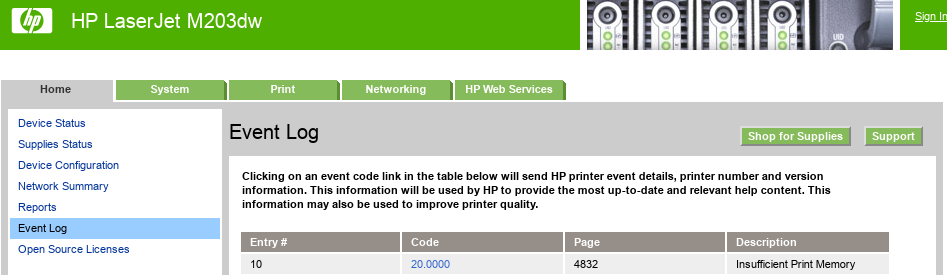
I recently found a few PDFs which I was unable to print due to those files causing insufficient printer memory errors: I found a detailed explanation of what might be causing this which pointed the finger at transparent images, a PDF 1.4 feature which apparently requires a more recent version of PostScript than what my printer supports. Using Okular's Force rasterization option (accessible via the print dialog) does work by essentially rendering everything ahead of time and outputing a big image to be sent to the printer. The quality is not very good however.

Converting a PDF to DjVu The best solution I found makes use of a different file format: .djvu Such files are not PDFs, but can still be opened in Evince and Okular, as well as in the dedicated DjVuLibre application. As an example, I was unable to print page 11 of this paper. Using pdfinfo, I found that it is in PDF 1.5 format and so the transparency effects could be the cause of the out-of-memory printer error. Here's how I converted it to a high-quality DjVu file I could print without problems using Evince:
pdf2djvu -d 1200 2002.04049.pdf > 2002.04049-1200dpi.djvu

Converting a PDF to PDF 1.3 I also tried the DjVu trick on a different unprintable PDF, but it failed to print, even after lowering the resolution to 600dpi:
pdf2djvu -d 600 dow-faq_v1.1.pdf > dow-faq_v1.1-600dpi.djvu
In this case, I used a different technique and simply converted the PDF to version 1.3 (from version 1.6 according to pdfinfo):
ps2pdf13 -r1200x1200 dow-faq_v1.1.pdf dow-faq_v1.1-1200dpi.pdf
This eliminates the problematic transparency and rasterizes the elements that version 1.3 doesn't support.

10 May 2020

NOKUBI Takatsugu: Virtual Background using webcam

I made a webpage to produce virtual background with webcam. https://knok.github.io/virtbg/ Sorcecode:
https://github.com/knok/knok.github.io/tree/master/virtbg Some online meeting software (Zoom, Microsoft Teams) supports virtual background, but I want to use other software like Jitsi (or google meet), so I made it. To make this, I referred the article Open Source Virtual Background .
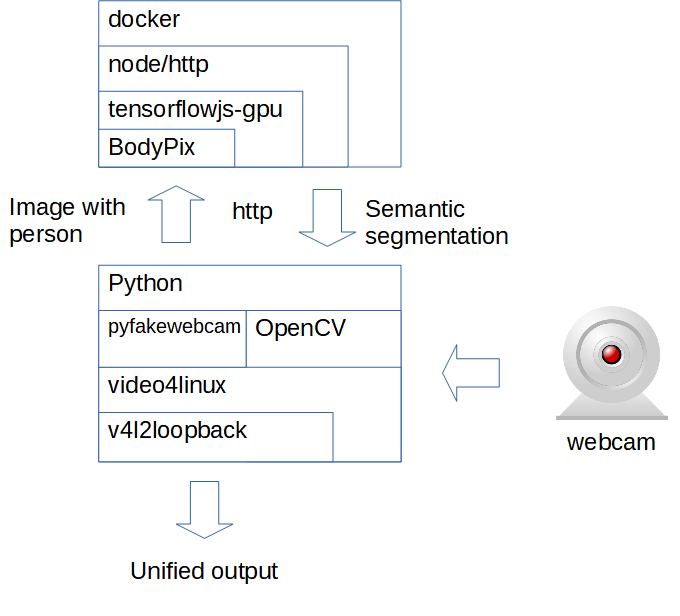
The following figure is the diagram.
It depends on docker, GPU, v4l2loopback (only works on Linux), so I want to make more generic solution. To make as a webpage, and using OBS
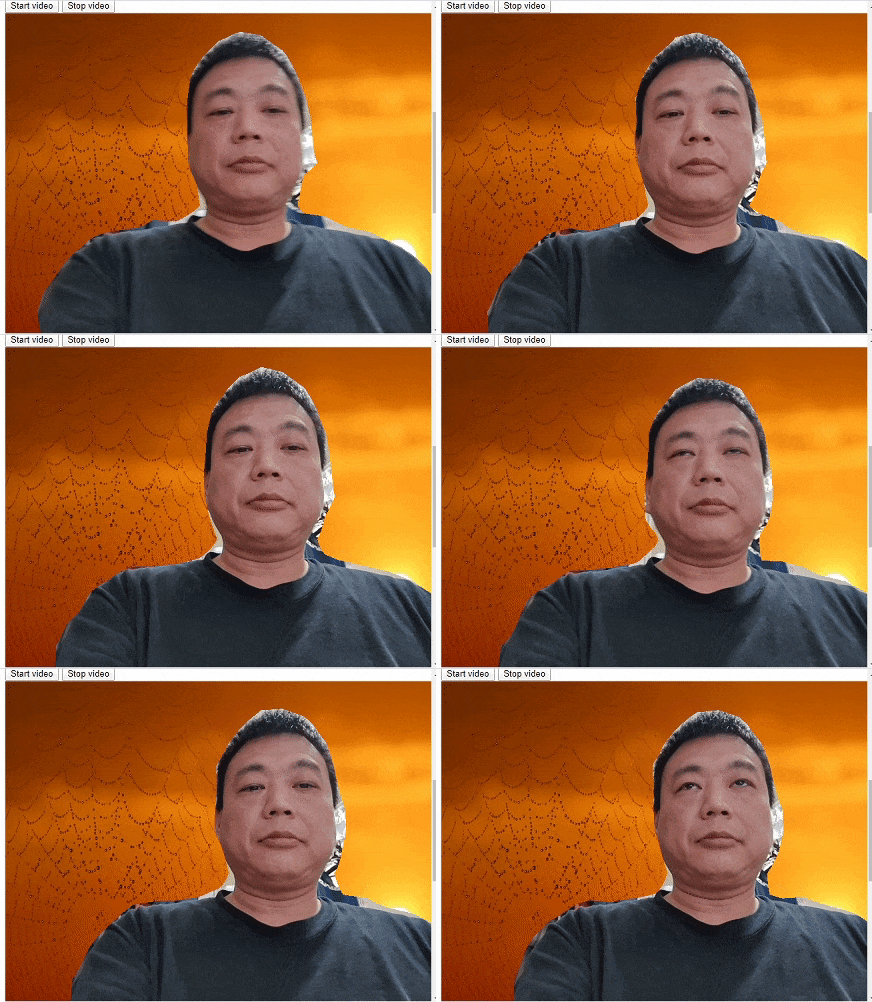
Studio with plugins (obs-v4l2sink, OBS-VirtualCam or OBS (macOS) Virtual Camera) you can use the solution on more platforms. To make as a single webpage, I can reduce overhead using inter-process commuication using http via docker. This is an example animation:
y4069-ju7wv.gif
Using jisti snapshot:
image.png
Unfortunately, BodyPix releases only pretraind models, no training data. I need more improvements:

27 April 2020

Norbert Preining: KDE Apps 20.04 (and Plasma) for Debian

A few days ago KDE Apps 20.04 were released, and I am happy that thanks to the openSUSE Build Service (and a lot of scripting and some hand-work), packages for Debian Unstable and Testing are available in by repositories!
The previous location (debian-plasma at OBS) should be replaced by the following entries in /etc/apt/sources.list.d/obs-npreining-kde.list: For Unstable:
deb https://download.opensuse.org/repositories/home:/npreining:/debian-kde:/other-deps/Debian_Unstable/ ./
deb https://download.opensuse.org/repositories/home:/npreining:/debian-kde:/frameworks/Debian_Unstable/ ./
deb https://download.opensuse.org/repositories/home:/npreining:/debian-kde:/plasma/Debian_Unstable/ ./
deb https://download.opensuse.org/repositories/home:/npreining:/debian-kde:/apps/Debian_Unstable/ ./
deb https://download.opensuse.org/repositories/home:/npreining:/debian-kde:/other/Debian_Unstable/ ./
For Testing:
deb https://download.opensuse.org/repositories/home:/npreining:/debian-kde:/other-deps/Debian_Testing/ ./
deb https://download.opensuse.org/repositories/home:/npreining:/debian-kde:/frameworks/Debian_Testing/ ./
deb https://download.opensuse.org/repositories/home:/npreining:/debian-kde:/plasma/Debian_Testing/ ./
deb https://download.opensuse.org/repositories/home:/npreining:/debian-kde:/apps/Debian_Testing/ ./
deb https://download.opensuse.org/repositories/home:/npreining:/debian-kde:/other/Debian_Testing/ ./
The different repositories provide different package groups: To make these repositories work out of the box, you need to import my OBS gpg key: obs-npreining.asc, best to download it and put the file into /etc/apt/trusted.gpg.d/obs-npreining.asc. I don t provide an apt-gettable source archive anymore, in particular since one of the Debian KDE maintainers has rejected my help and told me Go away . So it seems that this convenience is not appreciated, and necessary. The source packages are available from the OBS web sites of the respective repositories. Well, if they are not doing the work, I cannot more than offer my help. Thanks Debian! Currently there are two packages missing: kio-extras and kdeconnect, both of which need new (hitherto unavailable) packages which I will hopefully package in the next days. Two other, juk and okular, are already at version 20.04 in Debian and co-installable. Enjoy!

19 April 2020

Enrico Zini: Little wonders

Gibbsdavidl/CatterPlots
devel
Did you ever wish you could make scatter plots with cat shaped points? Now you can! - Gibbsdavidl/CatterPlots
What is the best tool to use for drawing vector pictures? For me and probably for many others, the answer is pretty obvious: Illustrator, or, maybe, Inkscape.
A coloring book to help folks understand how SELinux works. - mairin/selinux-coloring-book
The EURion constellation (also known as Omron rings[1] or doughnuts[2]) is a pattern of symbols incorporated into a number of banknote designs worldwide since about 1996. It is added to help imaging software detect the presence of a banknote in a digital image. Such software can then block the user from reproducing banknotes to prevent counterfeiting using colour photocopiers. According to research from 2004, the EURion constellation is used for colour photocopiers but probably not used in computer software.[3] It has been reported that Adobe Photoshop will not allow editing of an image of a banknote, but in some versions this is believed to be due to a different, unknown digital watermark rather than the EURion constellation.[4][3]
This huge collection of non-scary optical illusions and fascinating visual phenomena emphasizes interactive exploration, beauty, and scientific explanation.
Generated photos are created from scratch by AI systems. All images can be used for any purpose without worrying about copyrights, distribution rights, infringement claims, or royalties.
Dokumentarfilm ber die Rangierer im Bahnhof Dresden-Friedrichstadt in der DDR aus dem Jahr 1984.
Il termine sardo femina accabadora, femina agabbad ra o, pi comunemente, agabbadora o accabadora (s'agabbad ra, lett. "colei che finisce", deriva dal sardo s'acabbu, "la fine" o dallo spagnolo acabar, "terminare") denota la figura storicamente incerta di una donna che si incaricava di portare la morte a persone di qualunque et , nel caso in cui queste fossero in condizioni di malattia tali da portare i familiari o la stessa vittima a richiederla. In realt non ci sono prove di tale pratica, che avrebbe riguardato alcune regioni sarde come Marghine, Planargia e Gallura[1]. La pratica non doveva essere retribuita dai parenti del malato poich il pagare per dare la morte era contrario ai dettami religiosi e della superstizione.
Alright the people have spoken and they want more cat genetics. So, I present to you all "Cat Coat Genetics 101: A Tweetorial", feat. pics of many real life cats (for science, of course...this baby is Caterpillar).

14 April 2020

Emmanuel Kasper: Recommended keyboard settings for Productivity and Usability, for European Programmers

TLDR: setxkbmap -layout us -variant altgr-intl and become a happier programmer.
The case for QWERTY for European ProgrammersIf you re working on Unix / Linux, or C based programming languages, it can make sense to switch to the qwerty(us) keyboard layout. Why ?
Unix, C, Perl, Java, and most of programming languages have been conceived on QWERTY keyboards.
So when the designers choose special characters to use for the language synthax, they simply choose what was easy to access on their own keyboard. This has been historically documented for the vi editor.

To give an example, using an Unix shell you have to type the dot . and slash / symbols quite often to navigate the filesystem. The two keys producing these symbols, are nicely aligned on a QWERTY layout and do not require a key combination to be entered. So you can quickly enter something like ../.. using a single hand.
Now using a QWERTZ layout, like in Germany / Austria, you have the . symbol easily accessible, but you need to combine two keys ( Shift + 7 ) to get a / .
And if you are a poor soul using an AZERTY layout, to get the . and / symbol you need each time a key combo.
The need of key combos is bad not only for speed (multiple keys to lookup) but also for usability, as you have to stretch your fingers to reach the key if using a single hand, provoking repetitive strain injury. You might be smiling but this is commonly known amongst Emacs Users, due to the prominent use of commands using Ctrl and Alt combos, and led to the creation of an Emacs Ergonomic wiki.

This goes as well for many symbol commonly used in programming languages, think for instance about the semicolon ; for terminating a statement, the [ , and ] symbols for defining an array, and the backslash \ for escaping.
All these keys are accessible via a single keypress on qwerty and require key combos on qwertz and azerty. No wonder Linux, Minix and BSD were invented on non-azerty layouts: in France we were still busy typing the path to the source code, when in other parts of the world people already had the file open in their editor.
You don t need to throw away your existing keyboards when learning the qwerty (us) layout: for a couple of euros, you can find on ebay alternate keys stickers to put on your laptop.
Accessing keys with diacritics with the AltGr International variantNow if you want to switch to a qwerty keyboard layout, and you re French or German, you might wonder how to access the characters with diacritics, the and of French and and of German.
Fortunately there is a very clever keyboard variant for the us layout who uses the AltGr key, to make all these keys accessible, just hiding them behind the AltGr key.
Need ? that s just AltGr + e away. Needs ? That s just AltGr + , Needs ? AltGr +p
See the coolness of that ? You can type all international diacritics in an easy way, and there are even keyboard stickers for that too.

Now how to access to this layout of wonder ?
You can configure the layout and variant in Xorg, in debian/ubuntu that would be entering in /etc/default/keyboard
XKBLAYOUT="us"
XKBVARIANT="altgr-intl"
After restarting the X server, you can check that the settings have been applied with
setxkbmap -print -verbose 10
If using Gnome, you can also set the keyboard layout and variant by changing the schema org.gnome.desktop-inputsources, which will override the desktop-agnostic settings of /etc/default/keyboard.
For this you can either call
dconf write /org/gnome/desktop/input-sources/sources "[('xkb', 'us+altgr-intl')]"
or navigate with the gui tool dconf-settings to org.gnome.desktop-inputsources and set the value there.

If you want to further improve your keyboard layout, you can also have a look at swapping Ctrl and Alt, as described here (French language article) Happy hacking !

7 April 2020

Reproducible Builds: Reproducible Builds in March 2020

Welcome to the March 2020 report from the Reproducible Builds project. In our reports we outline the most important things that we have been up to over the past month and some plans for the future.
What are reproducible builds? One of the original promises of open source software is that distributed peer review and transparency of process results in enhanced end-user security. However, whilst anyone may inspect the source code of free and open source software for malicious flaws, almost all software today is distributed as pre-compiled binaries. This allows nefarious third-parties to compromise systems by injecting malicious code into ostensibly secure software during the various compilation and distribution processes.

News The report from our recent summit in Marrakesh was published and is now available in both PDF and HTML formats. A sincere thank you to all of the Reproducible Builds community for the input to the event a sincere thank you to Aspiration for preparing and collating this report. Harmut Schorrig published a detailed document on how to compile Java applications in such as way that the .jar build artefact is reproducible across builds. A practical and hands-on guide, it details how to avoid unnecessary differences between builds by explicitly declaring an encoding as the default value differs across Linux and MS Windows systems and ensuring that the generated .jar a variant of a .zip archive does not embed any nondeterministic filesystem metadata, and so on. Janneke gave a quick presentation on GNU Mes and reproducible builds during the lighting talk session at LibrePlanet 2020. [ ] Vagrant Cascadian presented There and Back Again, Reproducibly! video at SCaLE 18x in Pasadena in California which generated some attention on Twitter. Herv Boutemy mentioned on our mailing list in a thread titled Rebuilding and checking Reproducible Builds from Maven Central repository that since the update of a central build script (the parent POM ) every Apache project using the Maven build system should build reproducibly. A follow-up discussion regarding how to perform such rebuilds was also started on the Apache mailing list. The Telegram instant-messaging platform announced that they had updated their iOS and Android OS applications and claim that they are reproducible according to their full instructions, verifying that its original source code is exactly the same code that is used to build the versions available on the Apple App Store and Google Play distribution platforms respectfully. Herv Boutemy also reported about a new project called reproducible-central which aims to allow anyone to rebuild a component from the Maven Central Repository that is expected to be reproducible and check that the result is as expected. In last month s report we detailed Omar Navarro Leija s work in and around an academic paper titled Reproducible Containers which describes in detail the workings of a user-space container tool called dettrace (PDF). Since then, the PhD student from the University Of Pennsylvania presented on this tool at the ASPLOS 2020 conference in Lausanne, Switzerland. Furthermore, there were contributions to dettrace from the Reproducible Builds community itself. [ ][ ]

Distribution work

openSUSE In openSUSE, Bernhard M. Wiedemann published his monthly Reproducible Builds status update as well as made the following changes within the distribution itself:

Debian Chris Lamb further refined his merge request for the debian-installer component to allow all arguments from sources.list files (such as [check-valid-until=no] ) in order that we can test the reproducibility of the installer images on the Reproducible Builds own testing infrastructure. (#13) Holger Levsen filed a number of bug reports against the debrebuild tool that attempts to rebuild a Debian package given a .buildinfo file as input, including: 48 reviews of Debian packages were added, 17 were updated and 34 were removed this month adding to our knowledge about identified issues. Many issue types were noticed, categorised and updated by Chris Lamb, including: Finally, Holger opened a bug report against the software running tracker.debian.org, a service for Debian Developers to follow the evolution of packages via web and email interfaces to request that they integrate information from buildinfos.debian.net (#955434) and Chris Lamb kept isdebianreproducibleyet.com up to date. [ ]

Software development

diffoscope Chris Lamb made the following changes to diffoscope, the Reproducible Builds project s in-depth and content-aware diff utility that can locate and diagnose reproducibility issues, including preparing and uploading version 138 to Debian:
  • Improvements:
    • Don t allow errors with R script deserialisation cause the entire operation to fail, for example if an external library cannot be loaded. (#91)
    • Experiment with memoising output from expensive external commands, eg. readelf. (#93)
    • Use dumppdf from the python3-pdfminer if we do not see any other differences from pdftext, etc. (#92)
    • Prevent a traceback when comparing two R .rdx files directly as the get_member method will return a file even if the file is missing. [ ]
  • Reporting:
    • Display the supported file formats into the package long description. (#90)
    • Print a potentially-helpful message if the PyPDF2 module is not installed. [ ]
    • Remove any duplicate comparator descriptions when formatting in the --help output or in the package long description. [ ]
    • Weaken Install the X package to get a better output message to may produce a better output as the former is not actually guaranteed. [ ]
  • Misc:
    • Ensure we only parse the recommended packages from --list-debian-substvars when we want them for debian/tests/control generation. [ ]
    • Add upstream metadata file [ ] and add a Lintian override for upstream-metadata-in-native-source as we are upstream. [ ]
    • Inline the RequiredToolNotFound.get_package method s functionality as it is only used once. [ ]
    • Drop the deprecated py36 = [..] argument in the pyproject.toml file. [ ]
In addition, Vagrant Cascadian updated diffoscope in GNU Guix to version 138 [ ], as well as updating reprotest our end-user tool to build same source code twice in widely differing environments and then checks the binaries produced by each build for any differences to version 0.7.14 [ ].

Upstream patches The Reproducible Builds project detects, dissects and attempts to fix as many currently-unreproducible packages as possible. We endeavour to send all of our patches upstream where appropriate. This month we wrote a large number of such patches, including:

Project documentation There was further work performed on our documentation and website this month including Alex Wilson adding a section regarding using Gradle for reproducible builds in JVM projects [ ] and Holger Levsen added the report from our recent summit in Marrakesh [ ][ ]. In addition, Chris Lamb made a number of changes, including correcting the syntax of some CSS class formatting [ ], improved some filed against copy a little better [ ] and corrected a reference to calendar.monthrange Python method in a utility function. [ ]

Testing framework We operate a large and many-featured Jenkins-based testing framework that powers tests.reproducible-builds.org that, amongst many other tasks, tracks the status of our reproducibility efforts as well as identifies any regressions that have been introduced. This month, Chris Lamb reworked the web-based package rescheduling tool to:
  • Require a HTTP POST method in the web-based scheduler as not only should HTTP GET requests be idempotent but this will allow many future improvements in the user interface. [ ][ ][ ]
  • Improve the authentication error message in said rescheduler to suggest that the developer s SSL certificate may have expired. [ ]
In addition, Holger Levsen made the following changes:
  • Add a new ath97 subtarget for the OpenWrt distribution.
  • Revisit ordering of Debian suites; sort the experimental distribution last and reverse the ordering of suites to prioritise the suites in development. [ ][ ][ ]
  • Schedule Debian buster and bullseye a little less in order to allow unstable to catch up on the i386 architecture. [ ][ ]
  • Various cosmetic changes to the web-based scheduler. [ ][ ][ ][ ]
  • Improve wordings in the node health maintenance output. [ ]
Lastly, Vagrant Cascadian updated a link to the (formerly) weekly news to our reports page [ ] and kpcyrd fixed the escaping in an Alpine Linux inline patch [ ]. The usual build nodes maintenance was performed by Holger Levsen [ ][ ], Mattia Rizzolo [ ] and Vagrant Cascadian [ ][ ].
If you are interested in contributing to the Reproducible Builds project, please visit our Contribute page on our website. However, you can get in touch with us via:

This month s report was written by Bernhard M. Wiedemann, Chris Lamb, Holger Levsen and Vagrant Cascadian. It was subsequently reviewed by a bunch of Reproducible Builds folks on IRC and the mailing list.

1 April 2020

Sylvain Beucler: Debian LTS and ELTS - March 2020

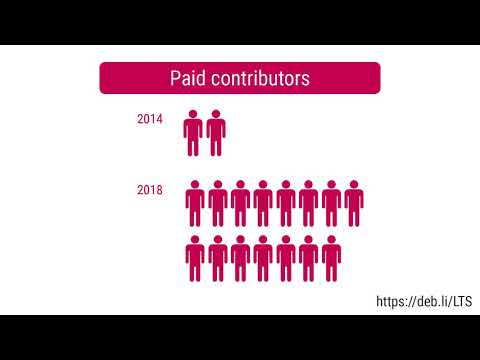
Debian LTS Logo Here is my transparent report for my work on the Debian Long Term Support (LTS) and Debian Extended Long Term Support (ELTS), which extend the security support for past Debian releases, as a paid contributor. In March, the monthly sponsored hours were split evenly among contributors depending on their max availability - I was assigned 30h for LTS (out of 30 max; all done) and 20h for ELTS (out of 20 max; I did 0). Most contributors claimed vulnerabilities by performing early CVE monitoring/triaging on their own, making me question the relevance of the Front-Desk role. It could be due to a transient combination of higher hours volume and lower open vulnerabilities. Working as a collective of hourly paid freelancers makes it more likely to work in silos, resulting in little interaction when raising workflow topics on the mailing list. Maybe we're reaching a point where regular team meetings will be benefical. As previously mentioned, I structure my work keeping the global Debian security in mind. It can be stressful though, and I believe current communication practices may deter such initiatives. ELTS - Wheezy LTS - Jessie Documentation/Scripts

31 March 2020

Chris Lamb: Free software activities in March 2020

Here is my monthly update covering what I have been doing in the free software world during March 2020 (previous month): In addition, I did even more hacking on the Lintian static analysis tool for Debian packages, including:
Reproducible builds One of the original promises of open source software is that distributed peer review and transparency of process results in enhanced end-user security. However, whilst anyone may inspect the source code of free and open source software for malicious flaws, almost all software today is distributed as pre-compiled binaries. This allows nefarious third-parties to compromise systems by injecting malicious code into ostensibly secure software during the various compilation and distribution processes. The motivation behind the Reproducible Builds effort is to ensure no flaws have been introduced during this compilation process by promising identical results are always generated from a given source, thus allowing multiple third-parties to come to a consensus on whether a build was compromised. The initiative is proud to be a member project of the Software Freedom Conservancy, a not-for-profit 501(c)(3) charity focused on ethical technology and user freedom. Conservancy acts as a corporate umbrella allowing projects to operate as non-profit initiatives without managing their own corporate structure. If you like the work of the Conservancy or the Reproducible Builds project, please consider becoming an official supporter. This month, I: In our tooling, I also made the following changes to diffoscope, our in-depth and content-aware diff utility that can locate and diagnose reproducibility issues, including preparing and uploading version 138 to Debian: The Reproducible Builds project also operates a fully-featured and comprehensive Jenkins-based testing framework that powers tests.reproducible-builds.org. This month, I reworked the web-based package rescheduling tool to:
Debian LTS This month I have worked 18 hours on Debian Long Term Support (LTS) and 8 hours on its sister Extended LTS project. You can find out more about the Debian LTS project via the following video:
Debian Uploads For the Debian Privacy Maintainers team I requested that the pyptlib package be removed from the archive (#953429) as well as uploading onionbalance (0.1.8-6) to fix test failures under Pytest 3.x (#953535) and a new upstream release of nautilus-wipe. Finally, I sponsored an upload of bilibop (0.6.1) on behalf of Yann Amar.

17 March 2020

Mike Gabriel: Time for home office! Time for X2Go?

Most of us IT people should be in home office by now. If not, make sure you'll arrange that with your employers, cooperation partners, contractors, etc. Please help flatten the curve. X2Go as your Home Office solution If your computer at work runs a GNU/Linux desktop and you can SSH into it, then it might be time for you to try out X2Go [1]. Remote desktop access under GNU/Linux. Free Support for simple Client-Server Setups If your daily work is related to health care, municipal work, medical research, etc. (all those fields that are currently working under very high demands), please join the #x2go IRC channel on Freenode [2] and I'll do my very best to help you with setting up X2Go. Professional Support for Large Scale Setups If you run a business and need X2Go support site-wide, brokerage support, etc. please consider asking for professional support [3]. References

15 March 2020

Antoine Beaupr : Remote presence tools for social distancing

As a technologist, I've been wondering how I can help people with the rapidly spreading coronavirus pandemic. With the world entering the "exponential stage" (e.g. Canada, the USA and basically all of Europe), everyone should take precautions and limit practice Social Distancing (and not dumbfuckery). But this doesn't mean we should dig ourselves in a hole in our basement: we can still talk to each other on the internet, and there are great, and free, tools available to do this. As part of my work as a sysadmin, I've had to answer questions about this a few times and I figured it was useful to share this more publicly.

Just say hi using whatever First off, feel free to use the normal tools you normally use: Signal, Facetime, Skype, Zoom, and Discord can be fine to connect with your folks, and since it doesn't take much to make someone's day please do use those tools to call your close ones and say "hi". People, especially your older folks, will feel alone and maybe scared in those crazy times. Every little bit you can do will help, even if it's just a normal phone call, an impromptu balcony fanfare, a remote workout class, or just a sing-along from your balcony, anything goes. But if those tools don't work well for some reason, or you want to try something new, or someone doesn't have an iPad, or it's too dang cold to go on your balcony, you should know there are other alternatives that you can use.

Jitsi We've been suggesting our folks use a tool called "Jitsi". Jitsi is a free software platform to host audio/video conferences. It has a web app which means anyone with a web browser can join a session. It can also do "screen sharing" if you need to work together on a project. There are many "instances", but here's a subset I know about: You can connect to those with your web browser directly. If your web browser doesn't work, try switching to another (e.g. if Firefox doesn't work, try Chrome and vice-versa). There are also apps for desktop and mobile apps (F-Droid, Google Play, Apple Store) that will work better than just using your browser. Jitsi should scale for small meetings up to a dozen people.

Mumble ... but beyond that, you might have trouble doing a full video-conference with a lot of people anyways. If you need to have a large conference with a lot of people, or if you have bandwidth and reliability problems with Jitsi, you can also try Mumble. Mumble is an audio-only conferencing service, similar to Discord or Teamspeak, but made with free software. It requires users to install an app but there are clients for every platform out there (F-Droid, Google Play, Apple Store). Mumble is harder to setup, but is much more efficient in terms of bandwidth and latency. In other words, it will just scale and sound better. Mumble ships with a list of known servers, but you can also connect to those trusted ones:
  • mumble.mayfirst.org - Mayfirst (see also their instructions on how to use it, hosted in New York city
  • mumble.riseup.net - Riseup, an autonomous collective, hosted in Seattle (ask me if you need their password) not a public service
  • talk.systemli.org - systemli, a left-wing network and technics-collective, hosted in Berlin

Live streaming If for some reason those tools still don't scale, you might have a bigger problem on your hands. If your audience is over 100 people, you will not be able to all join in the same conference together. And besides, maybe you just want to broadcast some news and do not need audio or video feedback from the audience. In this case, you need "live streaming". Here, proprietary services are Twitch, Livestream.com and Youtube. But the community also provides alternatives to those. This is more complicated to setup, but just to get you started, I'll link to: For either of those tools, you need an app on your desktop. The Mayfirst instructions use OBS Studio for this, but it might be possible to hotwire VLC to stream video from your computer as well.

Text chat When all else fails, text should go through. Slack, Twitter and Facebook are the best known alternatives here, obviously. I would warn against spending too much time on those, as they can foment harmful rumors and can spread bullshit like a virus on any given day. The situation does not make that any better. But it can be a good way to keep in touch with your loved ones. But if you want to have a large meetings with a crazy number of people, text can actually accomplish wonders. Internet Relay Chat also known as "IRC" (and which oldies might have experienced for a bit as mIRC) is, incredibly, still alive at the venerable age of 30 years old. It is mainly used by free software projects, but can be used by anyone. Here are some networks you can try: Those are all web interface to the IRC networks, but there are also a plenitude of IRC apps you can install on your desktop if you want the full experience.

Whiteboards and screensharing I decided to add this section later on because it's a frequently mentioned "oh but you forgot..." comment I get from this post.
  • Big Blue Button - seems to check all the boxes: free software, VoIP integration, whiteboarding and screen sharing, works from a web browser
  • CodiMD: collaborative text editor with UML and diagrams support
  • Excalidraw: (collaborative) whiteboard tool that lets you easily sketch diagrams that have a hand-drawn feel
I'll also mention that collaborative editors, in general, like Etherpad are just great for taking minutes because you don't have that single person with the load of writing down what people are saying and is too busy to talk. Google Docs and Nextcloud have similar functionality, of course. Update, public Big Blue Button instances: BBB requires one user to register to start the conference, but once that's done, anyone with the secret URL can join.

Common recommendations Regardless of the tools you pick, audio and video streaming is a technical challenge. A lot of things happen under the hood when you pick up your phone and dial a number, and sometimes using a desktop, it can be difficult to get everything "just right". Some advice:
  1. get a good microphone and headset: good audio really makes a difference in how pleasing the experience will be, both for you and your peers. good hardware will reduce echo, feedback and other audio problems. (see also my audio docs)
  2. check your audio/video setup before joining the meeting, ideally with another participant on the same platform you will use
  3. find a quiet place to meet: even a good microphone will pick up noises from the environment, if you reduce this up front, everything will sound better. if you do live streaming and want high quality recording, considering setting up a smaller room to do recording. (tip: i heard of at least one journalist hiding in a closer full of clothes to make recordings, as it dampens the sound!)
  4. mute your microphone when you are not speaking (spacebar in Jitsi, follow the "audio wizard" in Mumble)
If you have questions or need help, feel free to ask! Comment on this blog or just drop me an email (see contact), I'd be happy to answer your questions.

Other ideas Inevitably, when I write a post like this, someone writes something like "I can't believe you did not mention APL!" Here's a list of tools I have not mentioned here, deliberately or because I forgot:
  • Nextcloud Talk - needs access to a special server, but can be used for small meetings (less than 5, or so i heard)
  • Jabber/XMPP - yes, I know, XMPP can do everything and it's magic. but I've given up a while back, and I don't think setting up audio conferences with multiple enough is easy enough to make the cut here
  • Signal - signal is great. i use it every day. it's the primary way I do long distance, international voice calls for free, and the only way I do video-conferencing with family and friends at all. but it's one to one only, and the group (text) chat kind of sucks
Also, all the tools I recommend above are made of free software, which means they can be self-hosted. If things go bad and all those services stop existing, it should be possible for you to run your own instance. Let me know if I forgot anything, but in a friendly way. And stay safe out there. Update: a similar article from the good folks at systemli also recommends Mastodon, Ticker, Wikis and Etherpad. Update 2: same, at SFC, which also mentions Firefox Send and Etherpad (and now I wish I did).

11 March 2020

Axel Beckert: Backup over Tor with BackupPC

I have a Raspberry Pi at my parents home. They have internet access via some ISP using Carrier Grade NAT (CGN). Hence their home router is not reachable via IPv4 from the outside, they do have IPv6 and the devices can also be made accessible via IPv6 via the local router. Did that, was able to access my Raspberry Pi over IPv6 and SSH from the outside. So doing backup of that Raspberry Pi with BackupPC from the outside was a walk in the park. Unfortunately the IPv6 prefix seems to change occasionally and the router only allows to configure explicit IPv6 addresses in firewall rules so after a prefix change the configured rules no more match the devices IPv6 addresses. Meh. So there were multiple possibilities to work around these restrictions and access a devices behind the router: Enabling a Tor Hidden Service for port 22 is a no-brainer and was done most quickly (actually it already was in place as I already suspected that an IPv6 prefix change might happen) and I so far was too lazy to replace it with something more proper. But my backup was relying on direct SSH access via IPv6. So I needed to get that working over Tor, too. Here s what was needed for the host named sherpa (named after the Fiberfab Sherpa) to be backed up via Tor: That s it basically. Of course you also need to have the SSH public host key in the .ssh/known_hosts file also for the .onion hostname. And the Tor Hidden Service needs to be configured on the target device. But that s left as exercise for the reader. There s a lot of documentation about that on the internet, including slides and video recordings of talks and live demos I gave about this topic in German. Ah, and in case you might think that s unfair and misuse of the resources of the Tor Project: No, I explicitly asked and they said more or less any additional traffic helps to make it more difficult to analyse Tor traffic or to track Tor users and is hence welcome. Addendum: The last direct full backup of that Raspberry Pi (5.5 GB) took around 32 minutes. The first full backup over Tor (8.7 GB) took 341 minutes. Seems much slower, but there might be other factors as well: Most backups which ran last night were running at only 0.85 MB/s to 1 MB/s, probably because too many backups were running in parallel after a recent backup server downtime with file system check the backup server was probably the bottleneck. The backup of the Raspberry Pi over Tor ran at 0.42 MB/s, so about half the speed of the other backups. (Will probably add some more notes if I have more statistics over time.)

4 March 2020

Norbert Preining: Okular and restoration of tabs (plus Debian packages)

I have the need to restore my okular tab setup on restart, since I often have quite a lot of pdfs open to view at the same time. Unfortunately, the current okular doesn t provide this feature. There is a merge request by one of the main authors of okular, but it doesn t work for me in a stand-alone setup, that is not running KDE but only Okular. I developed a much simpler fix for the restoration problem (because most of the code is already there!), see this merge request, which although not perfect for sure does the trick for me. I have recently updated Okular for Debian in my private repository, which maybe has triggered an update of the maintainers of Okular to update the package in the main repository, too. Thanks a lot to the maintainers for their work. But since it does not contain my own tab-restore patches, I still provide NMU versioned Okular packages in my private repo:
deb https://www.preining.info/debian unstable main
deb-src https://www.preining.info/debian unstable main
and the git changes to it in this git repo. Enjoy.

2 March 2020

Petter Reinholdtsen: Nikita version 0.5 released - updated free software archive API server

Today, after many months of development, a new release of Nikita Noark 5 core project was finally announced on the project mailing list. The Nikita free software solution is an implementation of the Norwegian archive standard Noark 5 used by government offices in Norway. These were the changes in version 0.5 since version 0.4, see the email link above for links to a demo site: If free and open standardized archiving API sound interesting to you, please contact us on IRC (#nikita on irc.freenode.net) or email (nikita-noark mailing list). As usual, if you use Bitcoin and want to show your support of my activities, please send Bitcoin donations to my address 15oWEoG9dUPovwmUL9KWAnYRtNJEkP1u1b.

20 November 2017

NOKUBI Takatsugu: Debian seminar in Yokohama, 2017/11/18

I had attended to Tokyo area debian seminar #157. The day s special guest is Chris Lamb, the Debian Project Leader in 2017. He had attended to Open Compliance Summit, so we invited him as our guest. The following pdf file is the day s presentation: And Hideki Yamane(henrich) talked about a new idea of Debian distribution fresh , pull-based rolling release. The details would be published by him in a few days. There were some discussion, and we need to introduce more information aboud Japanese Debian/FLOSS scene, so now I am writing this article. Anything else, I ccould get good time with debian developers and community. Our community, especially in Japan, requires more new commers, young people.

31 October 2017

Norbert Preining: Debian/TeX Live 2017.20171031-1

Halloween is here, time to upload a new set of scary packages of TeX Live. About a month has passed, so there is the usual big stream up updates. There was actually an intermediate release to get out some urgent fixes, but I never reported the news here. So here are the accumulated changes and updates. My favorite this time is wallcalendar, a great class to design all kind of calendars, it looks really well done. I immediately will start putting one together. On the font side there is the new addition coelacanth. To quote from the README: Coelacanth is inspired by the classic Centaur type design of Bruce Rogers, described by some as the most beautiful typeface ever designed. It aims to be a professional quality type family for general book typesetting. And indeed it is beautiful! Other noteworthy addition is the Spark font that allows creating sparklines in the running text with LaTeX. Enjoy. New packages algobox, amscls-doc, beilstein, bib2gls, coelacanth, crossreftools, dejavu-otf, dijkstra, ducksay, dynkin-diagrams, eqnnumwarn, fetchcls, fixjfm, glossaries-finnish, hagenberg-thesis, hecthese, ifxptex, isopt, istgame, ku-template, limecv, mensa-tex, musicography, na-position, notestex, outlining, pdfreview, spark-otf, spark-otf-fonts, theatre, unitn-bimrep, upzhkinsoku, wallcalendar, xltabular. Updated packages acmart, amsmath, animate, arabluatex, arara, babel, babel-french, bangorexam, baskervillef, beebe, biblatex-philosophy, biblatex-source-division, bibletext, bidi, bxjaprnind, bxjscls, bxpapersize, bytefield, classicthesis, cochineal, complexity, cooking-units, curves, datetime2-german, dccpaper, doclicense, docsurvey, eledmac, epstopdf, eqparbox, esami, etoc, fbb, fei, fithesis, fmtcount, fnspe, fonts-tlwg, fontspec, genealogytree, glossaries, glossaries-extra, hecthese, hepthesis, hvfloat, ifplatform, ifptex, inconsolata, jfmutil, jsclasses, ketcindy, knowledge, koma-script, l3build, l3experimental, l3kernel, l3packages, langsci, latex2man, latexbug, lato, leadsheets, libertinust1math, listofitems, luatexja, luatexko, luatodonotes, lwarp, markdown, mcf2graph, media9, newtx, novel, numspell, ocgx2, overpic, philokalia, phonenumbers, platex, poemscol, pst-exa, pst-geometrictools, pst-ovl, pst-plot, pst-pulley, pst-tools, pst-vehicle, pst2pdf, pstool, pstricks, pstricks-add, pxchfon, pxjahyper, quran, randomlist, rec-thy, reledmac, robustindex, scratch, skrapport, spectralsequences, tcolorbox, tetex, tex4ht, texcount, texdoc, tikzducks, tikzsymbols, toptesi, translation-biblatex-de, unicode-math, updmap-map, uplatex, widetable, xcharter, xepersian, xetexko, xetexref, xsim, zhlipsum.

28 October 2017

Steinar H. Gunderson: Introducing Narabu, part 4: Decoding

Narabu is a new intraframe video codec. You probably want to read part 1, part 2 and part 3 first. So we're at the stage where the structure is in place. How do we decode? Once we have the structure, it's actually fairly straightforward: First of all, we need to figure out where each slice starts and ends. This is done on the CPU, but it's mostly just setting up pointers, so it's super-cheap. It doesn't see any pixels at all, just lengths and some probability distributions (those are decoded on the CPU, but they're only a few hundred values and no FP math is involved). Then, we set up local groups of size 64 (8x8) with 512 floats of shared memory. Each group will be used for decoding one slice (320 blocks), all coefficients. Each thread starts off doing rANS decoding (this involves a lookup into a small LUT, and of course some arithmetic) and dequantization of 8 blocks (for its coefficient); this means we now have 512 coefficients, so we add a barrier, do 64 horizontal IDCTs (one 8-point IDCT per thread), add a new barrier, do 64 vertical IDCTs, and then finally write out the data. We can then do the next 8 coefficients the same way (we kept the rANS decoding state), and so on. Note how the parallelism changes during the decoding; it's a bit counterintuitive at first, and barriers are not for free, but it avoids saving the coefficients to global memory (which is costly). First, the parallelism is over coefficients, then over horizontal DCT blocks, then over vertical DCT blocks, and then we start all over again. In CPU multithreading, this would be very tricky, and probably not worth it at all, but on the GPU, it gives us tons of parallelism. One problem is that the rANS work is going to be unbalanced within each warp. There's a lot more data (and thus more calculation and loading of compressed data from memory) in the lower-frequency coefficients, which means the other threads in the warp are wasting time doing nothing when they do more work. I tried various schemes to balance it better (like making even larger thread groups to get e.g. more coefficient 0s that could work together, or reordering the threads' coefficients in a zizag), but seemingly it didn't help any. Again, the lack of a profiler here is hampering effective performance investigations. In any case, the performance is reasonably good (my GTX 950 does 1280x720 luma-only in a little under 0.4 ms, which equates to ~1400 fps for full 4:2:2). As a side note, GoPro open-sourced their CineForm HD implementation the other day, and I guess it only goes to show that these kind of things really belong on the GPU; they claim similar performance numbers to what I get on my low-end NVIDIA GPU (923.6 fps for 1080p 4:2:2, which would be roughtly 1800 fps on 720p60), but that's on a 4GHz 8-core Broadwell-E, which is basically taking the most expensive enthusiast desktop CPU you can get your hands on and then overclocking it. Kudos to GoPro for freeing it, though (even under a very useful license), even though FFmpeg already had a working reverse-engineered implementation. :-) Next time, we'll look at the encoder, which is a bit more complicated. After that, we'll do some performance tests and probably wrap up the series. Stay tuned.

17 October 2017

Fran ois Marier: Checking Your Passwords Against the Have I Been Pwned List

Two months ago, Troy Hunt, the security professional behind Have I been pwned?, released an incredibly comprehensive password list in the hope that it would allow web developers to steer their users away from passwords that have been compromised in past breaches. While the list released by HIBP is hashed, the plaintext passwords are out there and one should assume that password crackers have access to them. So if you use a password on that list, you can be fairly confident that it's very easy to guess or crack your password. I wanted to check my active passwords against that list to check whether or not any of them are compromised and should be changed immediately. This meant that I needed to download the list and do these lookups locally since it's not a good idea to send your current passwords to this third-party service. I put my tool up on Launchpad / PyPI and you are more than welcome to give it a go. Install Postgres and Psycopg2 and then follow the README instructions to setup your database.

Next.

Previous.