Search Results: "mt"

5 July 2025

Taavi V n nen: Tracking my train travel by parsing tickets in emails

Rumour has it that I might be a bit of a train nerd. At least I want to collect various nerdy data about my travels. Historically that data has lived in manual form in several places,1 but over the past year and a half I've been working on a toy project to collect most of that information into a custom tool. That toy project2 uses various sources to get information about trains to fill up its database: for example, in Finland Fintraffic, the organization responsible for railway traffic management, publishes very comprehensive open data about almost everything that's moving on the Finnish railway network. Unfortunately, I cannot be on all of the trains.3 Thus I need to tell the system details about my journeys. The obvious solution is to make a form that lets me save that data. Which I did, but I got very quickly bored of filling out that form, and as regular readers of this blog know, there is no reason to settle for a simple but boring solution when the alternative is to make something that is ridiculously overengineered.

Parsing data out of my train tickets Finnish long-distance trains generally require train-specific seat reservations, which means VR (the train company) knows which trains I am on. We just need to find a way to extract that information in some machine-readable format. So my plan for the ridiculously overengineered solution was to parse the booking emails to get the details I need. Now, VR ticket emails include the data I want in a couple of different formats: they're included as text in the HTML email body, they're in the embedded calendar invite, as text in the included PDF ticket, and encoded in the Aztec Code in the included PDF ticket. I chose to parse the last option with the hopes of building something that could be ported to parse other operators' tickets with relative ease.
Example Aztec code
Example Aztec code
After a bit of digging (thank you to the KDE Itinerary people for documenting this!) I stumbled upon an European Union Agency for Railways PDF titled ELECTRONIC SEAT/BERTH RESERVATION AND ELECTRONIC PRODUCTION OF TRANSPORT DOCUMENTS - TRANSPORT DOCUMENTS (RCT2 STANDARD) which, in its Appendix C.1, describes how the information is encoded in the code.4 (As a side note, various sources call these codes SSB version 1 codes, although that term isn't used in this specification. So maybe there are more specifications about the format that I haven't discovered yet!) I then wrote a parser in Go for the binary data embedded in these codes. So far it works, although I wouldn't be surprised if there are some edge cases that it doesn't handle. In particular, the spec specifies a custom lookup table for converting between text and binary data, and that only has support for characters 0-9 and A-Z. But Finnish railway station codes can also use and .. maybe I need to buy a ticket to a station with one of those.

Extracting barcodes out of emails A parser just for the binary format isn't enough here if the intended source input is the emails that VR sends upon making a booking. Time to write a single-purpose email server! In short, the logic in the server, again written in Go and with the help of go-smtp and go-message, is:
  • Accept any mail with a reasonable body size
  • Process through all body parts
  • For all PDF parts, extract all images
  • For all images, run them through ZXing
  • For all decoded barcodes, try to parse them with my new ticket parsing library I mentioned earlier
  • If any tickets are found, send the data from them and any metadata to the main backend, which will save them to a database
The custom mail server exposes an LMTP interface over TCP for my internet-facing mail servers to forward to. I chose LMTP for this because it seemed like a better fit in theory than normal (E)SMTP. I've since discovered that curl doesn't support LMTP which makes development much harder, and in practice there's no benefit of LMTP here as all mails are being sent to the backend in a single request regardless of the number of recipients, so maybe I'll migrate it to regular SMTP at some point.

Side quest time The last missing part is automatically forwarding the ticket mails to the new service. I've routed a dedicated subdomain to the new service, and the backend is configured to allocate addresses like i2v44g2pygkcth64stjgyuqz@somedomain.example for each user. That's great if we wanted to manually forward mails to the service, but we can go one step above that. I created a dedicated email alias in my mail server config that routes both to my regular mailbox and the service address. That way I can update my VR account to use the alias and have mails automatically processed while still receiving backup copies of the tickets (and any other important mail that VR might send me). Unfortunately that last part turns out something that's easier said than done. Logging in on the website, I'm greeted by this text stating I need to contact customer service by phone to change the address associated with my account.5 After a bit of digging, I noticed that the mobile app suggests filling out a feedback form in order to change the address. So I filled that, and after a day or two I got a "confirm you want to change your email" mail. Success!

  1. Including (but not limited to): a page of this website, the notes app on my phone, and an uMap map.
  2. Which I'm not directly naming here because I still think it needs a lot more work before being presentable, but if you're really interested it's not that hard to find out.
  3. Someone should invent human cloning so that we can fix this.
  4. People who know much more about railway ticketing than I do were surprised when I told them this format is still in use somewhere. So, uh, sorry if you were expecting a nice universal worldwide standard!
  5. In case you have not guessed yet, I do not like making phone calls.

1 July 2025

David Bremner: Hibernate on the pocket reform 2/n

Context

Testing continued
  • following a suggestion of gordon1, unload the mediatek module first. The following seems to work, either from the console or under sway
echo devices >  /sys/power/pm_test
echo reboot > /sys/power/disk
rmmod mt76x2u
echo disk >  /sys/power/state
modprobe mt76x2u
  • It even works via ssh (on wired ethernet) if you are a bit more patient for it to come back.
  • replacing "reboot" with "shutdown" doesn't seem to affect test mode.
  • replacing "devices" with "platform" (or "processors") leads to unhappiness.
    • under sway, the screen goes blank, and it does not resume
    • same on console
previous episode next episode

30 June 2025

David Bremner: Hibernate on the pocket reform 1/n

Configuration
  • script: https://docs.kernel.org/power/basic-pm-debugging.html
  • kernel is 6.15.4-1~exp1+reform20250628T170930Z

State of things
  • normal reboot works
  • Either from the console, or from sway, the intial test of reboot mode hibernate fails. In both cases it looks very similar to halting.
    • the screen is dark (but not completely black)
    • the keyboard is still illuminated
    • the system-controller still seems to work, althought I need to power off before I can power on again, and any "hibernation state" seems lost.

Running tests
  • this is 1a from above
  • freezer test passes
  • devices test from console
    • console comes back (including input)
    • networking (both wired and wifi) seems wedged.
    • console is full of messages from mt76x2u about vendor request 06 and 07 failing. This seems related to https://github.com/morrownr/7612u/issues/17
    • at some point the console becomes non-responsive, except for the aforementioned messages from the wifi module.
  • devices test under sway
    • display comes back
    • keyboard/mouse seem disconnected
    • network down / disconnected?
next episode

Russell Coker: Links June 2025

Jonathan McDowell wrote part 2 of his blog series about setting up a voice assistant on Debian, I look forward to reading further posts [1]. I m working on some related things for Debian that will hopefully work with this. I m testing out OpenSnitch on Trixie inspired by this blog post, it s an interesting package [2]. Valerie wrote an informative article about creating mesh networks using LORA for emergency use [3]. Interesting article about Signal and Windows Recall. That gives us some things to consider regarding ML features on Linux systems [4]. Insightful article about AI and the end of prestige [5]. We should all learn about LLMs. Jonathan Dowland wrote an informative blog post about how to manage namespaces on Linux [6]. The Consumer Rights wiki is a great resource for raising awareness of corporations exploiting their customers for computer related goods and services [7]. Interesting article about Schizophrenia and the cliff-edge function of evolution [8].

27 June 2025

Jonathan Dowland: Viva

On Monday I had my Viva Voce (PhD defence), and passed (with minor corrections).
Post-viva refreshment Post-viva refreshment
It's a relief to have passed after 8 years of work. I'm not quite done of course, as I have the corrections to make! Once those are accepted I'll upload my thesis here.

24 June 2025

Evgeni Golov: Using LXCFS together with Podman

JP was puzzled that using podman run --memory=2G would not result in the 2G limit being visible inside the container. While we were able to identify this as a visualization problem tools like free(1) only look at /proc/meminfo and that is not virtualized inside a container, you'd have to look at /sys/fs/cgroup/memory.max and friends instead I couldn't leave it at that. And then I remembered there is actually something that can provide a virtual (cgroup-aware) /proc for containers: LXCFS! But does it work with Podman?! I always used it with LXC, but there is technically no reason why it wouldn't work with a different container solution cgroups are cgroups after all. As we all know: there is only one way to find out! Take a fresh Debian 12 VM, install podman and verify things behave as expected:
user@debian12:~$ podman run -ti --rm --memory=2G centos:stream9
bash-5.1# grep MemTotal /proc/meminfo
MemTotal:        6067396 kB
bash-5.1# cat /sys/fs/cgroup/memory.max
2147483648
And after installing (and starting) lxcfs, we can use the virtual /proc/meminfo it generates by bind-mounting it into the container (LXC does that part automatically for us):
user@debian12:~$ podman run -ti --rm --memory=2G --mount=type=bind,source=/var/lib/lxcfs/proc/meminfo,destination=/proc/meminfo centos:stream9
bash-5.1# grep MemTotal /proc/meminfo
MemTotal:        2097152 kB
bash-5.1# cat /sys/fs/cgroup/memory.max
2147483648
The same of course works with all the other proc entries lxcfs provides (cpuinfo, diskstats, loadavg, meminfo, slabinfo, stat, swaps, and uptime here), just bind-mount them. And yes, free(1) now works too!
bash-5.1# free -m
               total        used        free      shared  buff/cache   available
Mem:            2048           3        1976           0          67        2044
Swap:              0           0           0
Just don't blindly mount the whole /var/lib/lxcfs/proc over the container's /proc. It did work (as in: "bash and free didn't crash") for me, but with /proc/$PID etc missing, I bet things will go south pretty quickly.

19 June 2025

Russell Coker: Matching Intel CPUs

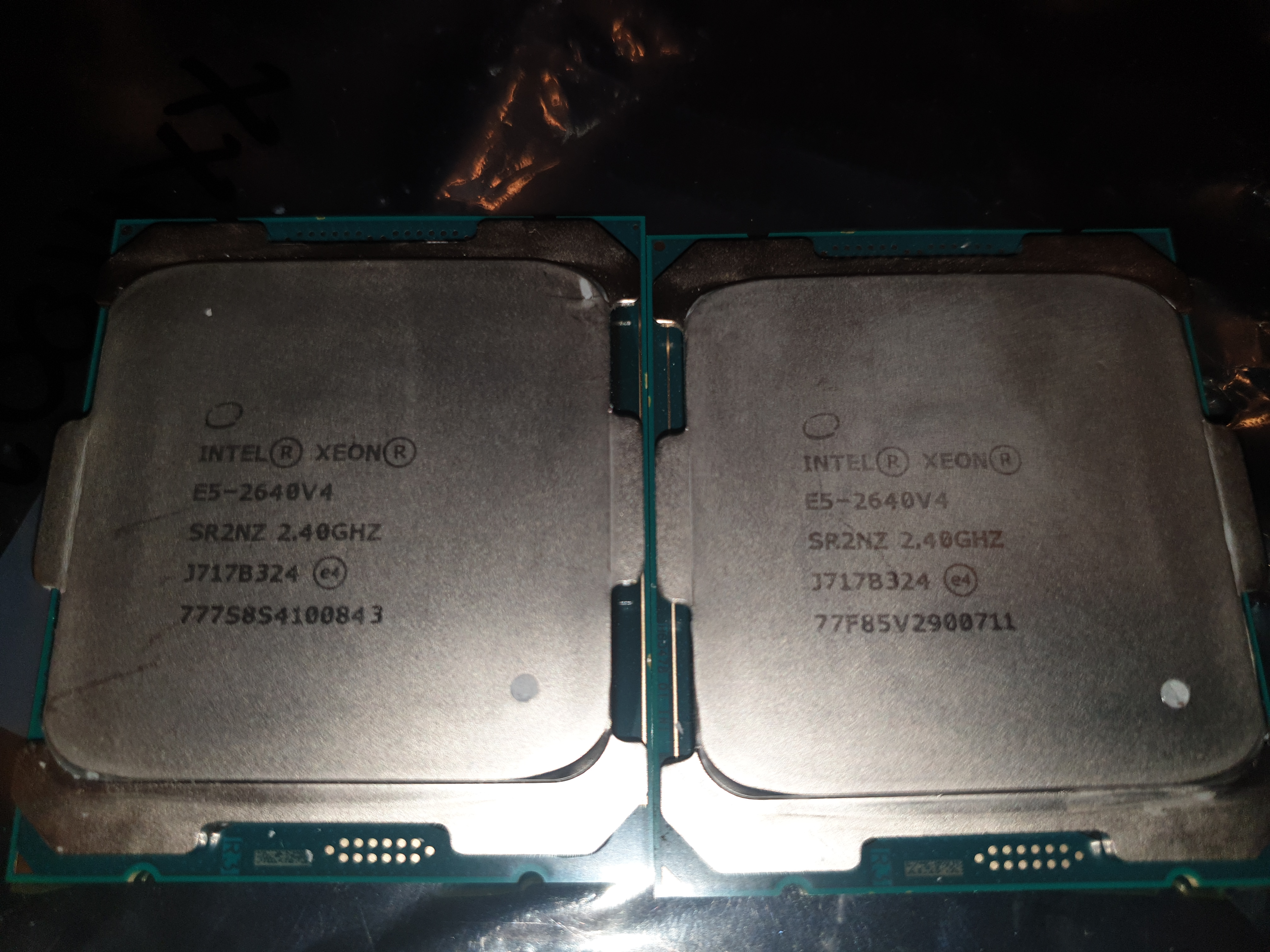
To run a SMP system with multiple CPUs you need to have CPUs that are identical , the question is what does identical mean. In this case I m interested in Intel CPUs because SMP motherboards and server systems for Intel CPUs are readily available and affordable. There are people selling matched pairs of CPUs on ebay which tend to be more expensive than randomly buying 2 of the same CPU model, so if you can identify 2 CPUs that are identical which are sold separately then you can save some money. Also if you own a two CPU system with only one CPU installed then buying a second CPU to match the first is cheaper and easier than buying two more CPUs and removing a perfectly working CPU. e5-2640 v4 cpus
Intel (R) Xeon (R)
E5-2640V4
SR2NZ 2.40GHZ
J717B324 (e4)
7758S4100843
Above is a pic of 2 E5-2640v4 CPUs that were in a SMP system I purchased along with a plain ASCII representation of the text on one of them. The bottom code (starting with 77 ) is apparently the serial number, one of the two codes above it is what determines how identical those CPUs are. The code on the same line as the nominal clock speed (in this case SR2NZ) is the spec number which is sometimes referred to as sspec [1]. The line below the sspec and above the serial number has J717B324 which doesn t have a google hit. I looked at more than 20 pics of E5-2640v4 CPUs on ebay, they all had the code SR2NZ but had different numbers on the line below. I conclude that the number on the line below probably indicates the model AND stepping while SR2NZ just means E5-2640v4 regardless of stepping. As I wasn t able to find another CPU on ebay with the same number on the line below the sspec I believe that it will be unreasonably difficult to get a match for an existing CPU. For the purpose of matching CPUs I believe that if the line above the serial number matches then the CPUs can be used together. I am not certain that CPUs with this number slightly mismatching won t work but I definitely wouldn t want to spend money on CPUs with this number being different.
smpboot: CPU0: Intel(R) Xeon(R) CPU E5-2699A v4 @ 2.40GHz (family: 0x6, model: 0x4f, stepping: 0x1)
When you boot Linux the kernel identifies the CPU in a manner like the above, the combination of family and model seem to map to one spec number. The combination of family, model, and stepping should be all that s required to have them work together. I think that Intel did the wrong thing in not making this clearer. It would have been very easy to print the stepping on the CPU case next to the sspec or the CPU model name. It also wouldn t have been too hard to make the CPU provide the magic number that is apparently the required match for SMP to the OS. Having the Intel web site provide a mapping of those numbers to steppings of CPUs also shouldn t be difficult for them. If anyone knows more about these issues please let me know.

6 June 2025

Reproducible Builds: Reproducible Builds in May 2025

Welcome to our 5th report from the Reproducible Builds project in 2025! Our monthly reports outline what we ve been up to over the past month, and highlight items of news from elsewhere in the increasingly-important area of software supply-chain security. If you are interested in contributing to the Reproducible Builds project, please do visit the Contribute page on our website. In this report:
  1. Security audit of Reproducible Builds tools published
  2. When good pseudorandom numbers go bad
  3. Academic articles
  4. Distribution work
  5. diffoscope and disorderfs
  6. Website updates
  7. Reproducibility testing framework
  8. Upstream patches

Security audit of Reproducible Builds tools published The Open Technology Fund s (OTF) security partner Security Research Labs recently an conducted audit of some specific parts of tools developed by Reproducible Builds. This form of security audit, sometimes called a whitebox audit, is a form testing in which auditors have complete knowledge of the item being tested. They auditors assessed the various codebases for resilience against hacking, with key areas including differential report formats in diffoscope, common client web attacks, command injection, privilege management, hidden modifications in the build process and attack vectors that might enable denials of service. The audit focused on three core Reproducible Builds tools: diffoscope, a Python application that unpacks archives of files and directories and transforms their binary formats into human-readable form in order to compare them; strip-nondeterminism, a Perl program that improves reproducibility by stripping out non-deterministic information such as timestamps or other elements introduced during packaging; and reprotest, a Python application that builds source code multiple times in various environments in order to to test reproducibility. OTF s announcement contains more of an overview of the audit, and the full 24-page report is available in PDF form as well.

When good pseudorandom numbers go bad Danielle Navarro published an interesting and amusing article on their blog on When good pseudorandom numbers go bad. Danielle sets the stage as follows:
[Colleagues] approached me to talk about a reproducibility issue they d been having with some R code. They d been running simulations that rely on generating samples from a multivariate normal distribution, and despite doing the prudent thing and using set.seed() to control the state of the random number generator (RNG), the results were not computationally reproducible. The same code, executed on different machines, would produce different random numbers. The numbers weren t just a little bit different in the way that we ve all wearily learned to expect when you try to force computers to do mathematics. They were painfully, brutally, catastrophically, irreproducible different. Somewhere, somehow, something broke.
Thanks to David Wheeler for posting about this article on our mailing list

Academic articles There were two scholarly articles published this month that related to reproducibility: Daniel Hugenroth and Alastair R. Beresford of the University of Cambridge in the United Kingdom and Mario Lins and Ren Mayrhofer of Johannes Kepler University in Linz, Austria published an article titled Attestable builds: compiling verifiable binaries on untrusted systems using trusted execution environments. In their paper, they:
present attestable builds, a new paradigm to provide strong source-to-binary correspondence in software artifacts. We tackle the challenge of opaque build pipelines that disconnect the trust between source code, which can be understood and audited, and the final binary artifact, which is difficult to inspect. Our system uses modern trusted execution environments (TEEs) and sandboxed build containers to provide strong guarantees that a given artifact was correctly built from a specific source code snapshot. As such it complements existing approaches like reproducible builds which typically require time-intensive modifications to existing build configurations and dependencies, and require independent parties to continuously build and verify artifacts.
The authors compare attestable builds with reproducible builds by noting an attestable build requires only minimal changes to an existing project, and offers nearly instantaneous verification of the correspondence between a given binary and the source code and build pipeline used to construct it , and proceed by determining that t he overhead (42 seconds start-up latency and 14% increase in build duration) is small in comparison to the overall build time.
Timo Pohl, Pavel Nov k, Marc Ohm and Michael Meier have published a paper called Towards Reproducibility for Software Packages in Scripting Language Ecosystems. The authors note that past research into Reproducible Builds has focused primarily on compiled languages and their ecosystems, with a further emphasis on Linux distribution packages:
However, the popular scripting language ecosystems potentially face unique issues given the systematic difference in distributed artifacts. This Systemization of Knowledge (SoK) [paper] provides an overview of existing research, aiming to highlight future directions, as well as chances to transfer existing knowledge from compiled language ecosystems. To that end, we work out key aspects in current research, systematize identified challenges for software reproducibility, and map them between the ecosystems.
Ultimately, the three authors find that the literature is sparse , focusing on few individual problems and ecosystems, and therefore identify space for more critical research.

Distribution work In Debian this month:
Hans-Christoph Steiner of the F-Droid catalogue of open source applications for the Android platform published a blog post on Making reproducible builds visible. Noting that Reproducible builds are essential in order to have trustworthy software , Hans also mentions that F-Droid has been delivering reproducible builds since 2015 . However:
There is now a Reproducibility Status link for each app on f-droid.org, listed on every app s page. Our verification server shows or based on its build results, where means our rebuilder reproduced the same APK file and means it did not. The IzzyOnDroid repository has developed a more elaborate system of badges which displays a for each rebuilder. Additionally, there is a sketch of a five-level graph to represent some aspects about which processes were run.
Hans compares the approach with projects such as Arch Linux and Debian that provide developer-facing tools to give feedback about reproducible builds, but do not display information about reproducible builds in the user-facing interfaces like the package management GUIs.
Arnout Engelen of the NixOS project has been working on reproducing the minimal installation ISO image. This month, Arnout has successfully reproduced the build of the minimal image for the 25.05 release without relying on the binary cache. Work on also reproducing the graphical installer image is ongoing.
In openSUSE news, Bernhard M. Wiedemann posted another monthly update for their work there.
Lastly in Fedora news, Jelle van der Waa opened issues tracking reproducible issues in Haskell documentation, Qt6 recording the host kernel and R packages recording the current date. The R packages can be made reproducible with packaging changes in Fedora.

diffoscope & disorderfs diffoscope is our in-depth and content-aware diff utility that can locate and diagnose reproducibility issues. This month, Chris Lamb made the following changes, including preparing and uploading versions 295, 296 and 297 to Debian:
  • Don t rely on zipdetails --walk argument being available, and only add that argument on newer versions after we test for that. [ ]
  • Review and merge support for NuGet packages from Omair Majid. [ ]
  • Update copyright years. [ ]
  • Merge support for an lzma comparator from Will Hollywood. [ ][ ]
Chris also merged an impressive changeset from Siva Mahadevan to make disorderfs more portable, especially on FreeBSD. disorderfs is our FUSE-based filesystem that deliberately introduces non-determinism into directory system calls in order to flush out reproducibility issues [ ]. This was then uploaded to Debian as version 0.6.0-1. Lastly, Vagrant Cascadian updated diffoscope in GNU Guix to version 296 [ ][ ] and 297 [ ][ ], and disorderfs to version 0.6.0 [ ][ ].

Website updates Once again, there were a number of improvements made to our website this month including:

Reproducibility testing framework The Reproducible Builds project operates a comprehensive testing framework running primarily at tests.reproducible-builds.org in order to check packages and other artifacts for reproducibility. However, Holger Levsen posted to our mailing list this month in order to bring a wider awareness to funding issues faced by the Oregon State University (OSU) Open Source Lab (OSL). As mentioned on OSL s public post, recent changes in university funding makes our current funding model no longer sustainable [and that] unless we secure $250,000 in committed funds, the OSL will shut down later this year . As Holger notes in his post to our mailing list, the Reproducible Builds project relies on hardware nodes hosted there. Nevertheless, Lance Albertson of OSL posted an update to the funding situation later in the month with broadly positive news.
Separate to this, there were various changes to the Jenkins setup this month, which is used as the backend driver of for both tests.reproducible-builds.org and reproduce.debian.net, including:
  • Migrating the central jenkins.debian.net server AMD Opteron to Intel Haswell CPUs. Thanks to IONOS for hosting this server since 2012.
  • After testing it for almost ten years, the i386 architecture has been dropped from tests.reproducible-builds.org. This is because that, with the upcoming release of Debian trixie, i386 is no longer supported as a regular architecture there will be no official kernel and no Debian installer for i386 systems. As a result, a large number of nodes hosted by Infomaniak have been retooled from i386 to amd64.
  • Another node, ionos17-amd64.debian.net, which is used for verifying packages for all.reproduce.debian.net (hosted by IONOS) has had its memory increased from 40 to 64GB, and the number of cores doubled to 32 as well. In addition, two nodes generously hosted by OSUOSL have had their memory doubled to 16GB.
  • Lastly, we have been granted access to more riscv64 architecture boards, so now we have seven such nodes, all with 16GB memory and 4 cores that are verifying packages for riscv64.reproduce.debian.net. Many thanks to PLCT Lab, ISCAS for providing those.

Outside of this, a number of smaller changes were also made by Holger Levsen:
  • reproduce.debian.net-related:
    • Only use two workers for the ppc64el architecture due to RAM size. [ ]
    • Monitor nginx_request and nginx_status with the Munin monitoring system. [ ][ ]
    • Detect various variants of network and memory errors. [ ][ ][ ][ ]
    • Add a prominent link to reproducible-builds.org. [ ]
    • Add a rebuilderd-cache-cleanup.service and run it daily via timer. [ ][ ][ ][ ][ ]
    • Be more verbose what sources are being downloaded. [ ]
    • Correctly deal with packages with an epoch in their version [ ] and deal with binNMUs versions with an epoch as well [ ][ ].
    • Document how to reschedule all other errors on all archs. [ ]
    • Misc documentation improvements. [ ][ ][ ][ ]
    • Include the $HOSTNAME variable in the rebuilderd logfiles. [ ]
    • Install the equivs package on all worker nodes. [ ][ ]
  • Jenkins nodes:
    • Permit the sudo tool to fix up permission issues. [ ][ ]
    • Document how to manage diskspace with OpenStack. [ ]
    • Ignore a number of spurious monitoring errors on riscv64, FreeBSD, etc.. [ ][ ][ ][ ]
    • Install ntpsec-ntpdate (instead of ntpdate) as the former is available on Debian trixie and bookworm. [ ][ ]
    • Use the same SSH ControlPath for all nodes. [ ]
    • Make sure the munin user uses the same SSH config as the jenkins user. [ ]
  • tests.reproducible-builds.org-related:
    • Disable testing of the i386 architecture. [ ][ ][ ][ ][ ]
    • Document the current disk usage. [ ][ ]
    • Address some image placement now that we only test three architectures. [ ]
    • Keep track of build performance. [ ]
  • Misc:
    • Fix a (harmless) typo in the multiarch_versionskew script. [ ]
In addition, Jochen Sprickerhof made a series of changes related to reproduce.debian.net:
  • Add out of memory detection to the statistics page. [ ]
  • Reverse the sorting order on the statistics page. [ ][ ][ ][ ]
  • Improve the spacing between statistics groups. [ ]
  • Update a (hard-coded) line number in error message detection pertaining to a debrebuild line number. [ ]
  • Support Debian unstable in the rebuilder-debian.sh script. [ ] ]
  • Rely on rebuildctl to sync only arch-specific packages. [ ][ ]

Upstream patches The Reproducible Builds project detects, dissects and attempts to fix as many currently-unreproducible packages as possible. This month, we wrote a large number of such patches, including:

Finally, if you are interested in contributing to the Reproducible Builds project, please visit our Contribute page on our website. However, you can get in touch with us via:

1 June 2025

Ben Hutchings: FOSS activity in May 2025

28 May 2025

Jonathan Dowland: Linux Mount Namespaces

I've been refreshing myself on the low-level guts of Linux container technology. Here's some notes on mount namespaces. In the below examples, I will use more than one root shell simultaneously. To disambiguate them, the examples will feature a numbered shell prompt: 1# for the first shell, and 2# for the second. Preliminaries Namespaces are normally associated with processes and are removed when the last associated process terminates. To make them persistent, you have to bind-mount the corresponding virtual file from an associated processes's entry in /proc, to another path1. The receiving path needs to have its "propogation" property set to "private". Most likely your system's existing mounts are mostly "public". You can check the propogation setting for mounts with
1# findmnt -o+PROPAGATION
We'll create a new directory to hold mount namespaces we create, and set its Propagation to private, via a bind-mount of itself to itself.
1# mkdir /root/mntns
1# mount --bind --make-private /root/mntns /root/mntns
The namespace itself needs to be bind-mounted over a file rather than a directory, so we'll create one.
1# touch /root/mntns/1
Creating and persisting a new mount namespace
1# unshare --mount=/root/mntns/1
We are now 'inside' the new namespace in a new shell process. We'll change the shell prompt to make this clearer
PS1='inside# '
We can make a filesystem change, such as mounting a tmpfs
inside# mount -t tmpfs /mnt /mnt
inside# touch /mnt/hi-there
And observe it is not visible outside that namespace
2# findmnt /mnt
2# stat /mnt/hi-there
stat: cannot statx '/mnt/hi-there': No such file or directory
Back to the namespace shell, we can find an integer identifier for the namespace via the shell processes /proc entry:
inside# readlink /proc/$$/ns/mnt
It will be something like mnt:[4026533646]. From another shell, we can list namespaces and see that it exists:
2# lsns -t mnt
        NS TYPE NPROCS   PID USER             COMMAND
 
4026533646 mnt       1 52525 root             -bash
If we exit the shell that unshare created,
inside# exit
running lsns again should2 still list the namespace, albeit with the NPROCS column now reading 0.
2# lsns -t mnt
We can see that a virtual filesystem of type nsfs is mounted at the path we selected when we ran unshare:
2# grep /root/mntns/1 /proc/mounts 
nsfs /root/mntns/1 nsfs rw 0 0
Entering the namespace from another process This is relatively easy:
1# nsenter --mount=/root/mntns/1
1# stat /mnt/hi-there
  File: /mnt/hi-there
 
More to come in future blog posts! References These were particularly useful in figuring this out:

  1. This feels really weird to me. At least at first. I suppose it fits with the "everything is a file" philosophy.
  2. I've found lsns in util-linux 2.38.1 (from 2022-08-04) doesn't list mount namespaces with no associated processes; but 2.41 (from 2025-03-18) does. The fix landed in 2022-11-08. For extra fun, I notice that a namespace can be held persistent with a file descriptor which is unlinked from the filesystem

14 May 2025

Jonathan Dowland: Orbital

Orbital at NX, Newcastle in 2023 Orbital at NX, Newcastle in 2023
I'm on a bit of an Orbital kick at the moment. Last year they re-issued their 1991 debut album with 43 extra tracks. Later this month they're doing the same for their 1993 sophomore album. I thought I'd try to narrow down some tracks to recommend. I seem to have settled on roughly 5 in previous posts (for Underworld, The Cure, Coil and Gazelle Twin). This time I've done 6 (I borrowed one from Underworld) As always it's a hard choice. I've tried to select some tracks I really enjoy that don't often come up on best-of compilation albums. For a more conventional choice of best-of tracks, I recommend the recent-ish 30 something "compilation" (of sorts, previously written about)
  1. The Naked and the Dead (1992) The Naked and the Dead by Orbital From an early EP Radiccio, which is being re-issued this month. Digital versions of the re-issue will feature a new recording "Deepest" featuring Tilda Swinton. Sadly this isn't making it onto the pressed version. She performed with them live at Glastonbury 2024. That entire performance was a real pick-me-up during my convolescence, and is recommended. Anyway I've now written more about a song I haven't recommended than the one I did
  2. Remind (1993) Remind by Orbital From the Brown Album, I first heard this as the Encore from their "final show", for John Peel, when they split up in 2004. "Remind" wasn't broadcast, but an audience recording was circulated on fan site Loopz. Remarkably, 21 years on, it's still there. In writing this I discovered that it's a re-working of a remix Orbital did for Meat Beat Manifesto: MindStream (Mind The Bend The Mind)
  3. You Lot (2004) From the unfairly-maligned "final" Blue album. Featuring a sample of pre-Doctor Who Christoper Eccleston, from another Russell T Davies production, Second Coming.
  4. Beached (2000) Beached (Long version) by Orbital, Angelo Badalamenti Co-written by Angelo Badalamenti, it's built around a sample of Badalamenti's score for the movie "The Beach". Orbital's re-work adds some grit to the orchestral instrumentation and opens with a monologue, delivered by Leonardo Di Caprio, sampled from the movie.
  5. Spare Parts Express (1999) Spare Parts Express by Orbital Critics had started to be quite unfair to Orbital by this point. The band themselves said that they'd ran out of ideas (pointing at album closer "Style", built around a Stylophone melody, as proof). Their malaise continued right up to the Blue Album, at which point the split up; ostensibly for good, before regrouping 8 years later. Spare Parts Express is a hatchet job of various bits that they didn't develop into full songs on their own. Despite this I think it works. I love long-form electronica, and this clocks in at 10:07. My favourite segment (06:37) is adjacent to a reference (05:05) to John Baker's theme for the BBC children's program Newsround (sadly they aren't using it today. Here's a rundown of Newsround themes over time)
  6. Attached (1994) Attached by Orbital This originally debuted on a Peel session before appearing on the subsequent album Snivilisation a few months later. An album closer, and a good come-down song to close this list.

9 May 2025

Dirk Eddelbuettel: RcppSpdlog 0.0.22 on CRAN: New Upstream

Version 0.0.22 of RcppSpdlog arrived on CRAN today and has been uploaded to Debian. RcppSpdlog bundles spdlog, a wonderful header-only C++ logging library with all the bells and whistles you would want that was written by Gabi Melman, and also includes fmt by Victor Zverovich. You can learn more at the nice package documention site. This release updates the code to the version 1.15.3 of spdlog which was released this morning, and includes version 1.12.0 of fmt. The NEWS entry for this release follows.

Changes in RcppSpdlog version 0.0.22 (2025-05-09)
  • Upgraded to upstream release spdlog 1.15.3 (including fmt 11.2.0)

Courtesy of my CRANberries, there is also a diffstat report detailing changes. More detailed information is on the RcppSpdlog page, or the package documention site.

This post by Dirk Eddelbuettel originated on his Thinking inside the box blog. If you like this or other open-source work I do, you can sponsor me at GitHub.

Abhijith PA: Bug squashing party, Kochi

Last weekend, 4 people (3 DDs and 1 soon to be, hopefully in coming months) sit together for a Bug squashing party in Kochi. We fixed lot of things including my broken autopkgtest setup. BSP-Kochi It all began from a discussion in #debian-in of not having any BSPs in the past in India. Then twisted in to hosting a BSP by me. I fixed the dates to 3rd & 4th May to get packages migrate naturally to testing with NMUs before the hard freeze on 15th May. Finding a venue was a huge challenge. Unlike other places, we have very limited options on hackerspaces. We also had some company spaces (if we asked), but we may have to follow their office timings and finding accommodation near by was also a challenge. Later we decided to go with a rental apartment where could hack all night and sleep. We booked a very bare minimal apartment for 3 nights and 3 days. I updated wiki page and sent announcement. Not even Wi-Fi was there in the apartment, so we setup everything by ourselves (DebConf style :p ). I short listed some newbie bugs, just in case if newcomers joined the party. But it was only we 4 people and Kathara who joined remotely. We started from May 2nd night, stacked our cabin with snacks, instant noodles and drinks. Arranged beds, tables and started hacking and having discussions. My autopkgtest-lxc setup was broken. I think its related to #1017753, which got fixed magically and now I started using autopkgtest-podman. stack I learned On last day, we went to a nice restaurant and had food. There was a church festival nearby, so we were able to watch wonderful procession and fireworks at night. food All in all we managed to touch 46 bugs of which 35 is now fixed/done and 11 is open, some of this get status done when it reaches testing. It was a fun and productive weekend. More importantly we had fun.

7 May 2025

Jonathan Dowland: procmail versus exim filters

I ve been using Procmail to filter mail for a long time. Reading Antoine s blog post procmail considered harmful, I felt motivated (and shamed) into migrating to something else. Luckily, Enrico's shared a detailed roadmap for moving to Sieve, in particular Dovecot's Sieve implementation (which provides "pipe" and "filter" extensions). My MTA is Exim, and for my first foray into this, I didn't want to change that1. Exim provides two filtering languages for users: an implementation of Sieve, and its own filter language. Requirements A good first step is to look at what I'm using Procmail for:
  1. I invoke external mail filters: processes which read the mail and emit a possibly altered mail (headers added, etc.). In particular, crm114 (which has worked remarkably well for me) to classify mail as spam or not, and dsafilter, to mark up Debian Security Advisories
  2. I file messages into different folders depending on the outcome of the above filters
  3. I drop mail ("killfile") some sender addresses (persistent pests on mailing lists); and mails containing certain hosts in the References header (as an imperfect way of dropping mailing list threads which are replies to someone I've killfiled); and mail encoded in a character set for a language I can't read (Russian, Korean, etc.), and several other simple static rules
  4. I move mailing list mail into folders, semi-automatically (see list filtering)
  5. I strip "tagged" subjects for some mailing lists: i.e., incoming mail has subjects like "[cs-historic-committee] help moving several tons of IBM360", and I don't want the "[cs-historic-committee]" bit.
  6. I file a copy of some messages, the name of which is partly derived from the current calendar year
Exim Filters I want to continue to do (1), which rules out Exim's implementation of Sieve, which does not support invoking external programs. Exim's own filter language has a pipe function that might do what I need, so let's look at how to achieve the above with Exim Filters. autolists Here's an autolist recipe for Debian's mailing lists, in Exim filter language. Contrast with the Procmail in list filtering:
if $header_list-id matches "(debian.*)\.lists\.debian\.org"
then
  save Maildir/l/$1/
  finish
endif
Hands down, the exim filter is nicer (although some of the rules on escape characters in exim filters, not demonstrated here, are byzantine). killfile An ideal chunk of configuration for kill-filing a list of addresses is light on boiler plate, and easy to add more addresses to in the future. This is the best I could come up with:
if foranyaddress "someone@example.org,\
                  another@example.net,\
                  especially-bad.example.com,\
                 "
   ($reply_address contains $thisaddress
    or $header_references contains $thisaddress)
then finish endif
I won't bother sharing the equivalent Procmail but it's pretty comparable: the exim filter is no great improvement. It would be lovely if the list of addresses could be stored elsewhere, such as a simple text file, one line per address, or even a database. Exim's own configuration language (distinct from this filter language) has some nice mechanisms for reading lists of things like addresses from files or databases. Sadly it seems the filter language lacks anything similar. external filters With Procmail, I pass the mail to an external program, and then read the output of that program back, as the new content of the mail, which continues to be filtered: subsequent filter rules inspect the headers to see what the outcome of the filter was (is it spam?) and to decide what to do accordingly. Crucially, we also check the return status of the filter, to handle the case when it fails. With Exim filters, we can use pipe to invoke an external program:
pipe "$home/mail/mailreaver.crm -u $home/mail/"
However, this is not a filter: the mail is sent to the external program, and the exim filter's job is complete. We can't write further filter rules to continue to process the mail: the external program would have to do that; and we have no way of handling errors. Here's Exim's documentation on what happens when the external command fails:
Most non-zero codes are treated by Exim as indicating a failure of the pipe. This is treated as a delivery failure, causing the message to be returned to its sender.
That is definitely not what I want: if the filter broke (even temporarily), Exim would seemingly generate a bounce to the sender address, which could be anything, and I wouldn't have a copy of the message. The documentation goes on to say that some shell return codes (defaulting to 73 and 75) cause Exim to treat it as a temporary error, spool the mail and retry later on. That's a much better behaviour for my use-case. Having said that, on the rare occasions I've broken the filter, the thing which made me notice most quickly was spam hitting my inbox, which my Procmail recipe achieves. removing subject tagging Here, Exim's filter language gets unstuck. There is no way to add or alter headers for a message in a user filter. Exim uses the same filter language for system-wide message filtering, and in that context, it has some extra functions: headers add <string>, headers remove <string>, but (for reasons I don't know) these are not available for user filters. copy mail to archive folder I can't see a way to derive a folder name from the calendar year. next steps Exim Sieve implementation and its filter language are ruled out as Procmail replacements because they can't do at least two of the things I need to do. However, based on Enrico's write-up, it looks like Dovecot's Sieve implementation probably can. I was also recommended maildrop, which I might look at if Dovecot Sieve doesn't pan out.

  1. I should revisit this requirement because I could probably reconfigure exim to run my spam classifier at the system level, obviating the need to do it in a user filter, and also raising the opportunity to do smtp-time rejection based on the outcome

2 May 2025

Jonathan Dowland: Korg Minilogue XD

I didn't buy the Arturia Microfreak or the Behringer Model-D; I bought a Korg Minilogue XD.
Korg Minilogue XD, and Zoom R8 Korg Minilogue XD, and Zoom R8
I wanted an all-in-one unit which meant a built-in keyboard. I was keen on analogue oscillators, partly for the sound, but mostly to ensure that most of the controls were immediately accessible. The Minilogue-XD has two analogue oscillators and an analogue filter. It also has some useful, pure digital stuff: post-effects (chorus, flanger, echo, etc.); and a third, digital oscillator. The digital oscillator is programmable. There's an SDK, shared between the Minilogue-XD and some other Korg synths (at least the Prologue and NTS-1). There's a cottage industry of independent musicians writing and selling digital patches, e.g. STRING User Oscillator. Here's an example of a drone programmed using the SDK for the NTS-1:
Eventually I expect to have fun exploring the SDK, but for now I'm keeping it firmly away from computers (hence the Zoom R8 multitrack recorder in the above image: more on that in a future blog post). The Korg has been gathering dust whilst I was writing up, but now I hope to find some time to play.

Ben Hutchings: FOSS activity in April 2025

I also co-organised a Debian BSP (Bug-Squashing Party) last weekend, for which I will post a separate report later.

24 April 2025

Jonathan McDowell: Local Voice Assistant Step 1: An ATOM Echo voice satellite

Back when I setup my home automation I ended up with one piece that used an external service: Amazon Alexa. I d rather not have done this, but voice control is extremely convenient, both for us, and guests. Since then Home Assistant has done a lot of work in developing the capability of a local voice assistant - 2023 was their Year of Voice. I ve had brief looks at this in the past, but never quite had the time to dig into setting it up, and was put off by the fact a lot of the setup instructions were just Download our prebuilt components . While I admire the efforts to get Home Assistant fully packaged for Debian I accept that s a tricky proposition, and settle for running it in a venv on a Debian stable container. Voice requires a lot more binary components, and I want to have voice satellites in more than one location, so I set about trying to understand a bit better what I was deploying, and actually building the binary bits myself. This is the start of a write-up of that. I ll break it into a bunch of posts, trying to cover one bit in each, because otherwise this will get massive. Let s start with some requirements: My house server is an AMD Ryzen 7 5700G, so my expectation was that I d have enough local processing power to be able to do this. That turned out to be a valid assumption - speech to text really has come a long way in recent years. I m still running Home Assistant 2024.3.3 - the last one that supports (but complains about) Python 3.11. Trixie has started the freeze process, so once it releases I ll look at updating the HA install. For now what I have has turned out to be Good Enough, but I know there have been improvements upstream I m missing. Finally, before I get into the details, I should point out that if you just want to get started with a voice assistant on Home Assistant and don t care about what s under the hood, there are a bunch of more user friendly details on Home Assistant s site itself, and they have pre-built images you can just deploy. My first step was sorting out a voice satellite . This is the device that actually has a microphone and speaker and communicates with the main Home Assistant setup. I d seen the post about a $13 voice assistant, and as a result had an ATOM Echo sitting on my desk I hadn t got around to setting up. Here, we ignore a bit about delving into exactly what s going on under the hood, even if we re compiling locally. This is a constrained embedded device and while I m familiar with the ESP32 IDF build system I just accepted that using ESPHome and letting it do it s thing was the quickest way to get up and running. It is possible to do this all via the web with a pre-built image, but I wanted to change the wake word to Hey Jarvis rather than the default Okay Nabu , and that was a good reason to bother doing a local build. We ll get into actually building a voice satellite on Debian in later posts. I started with the default upstream assistant config and tweaked it a little for my setup:
diff of my configuration tweaks
$ diff -u m5stack-atom-echo.yaml assistant.yaml
--- m5stack-atom-echo.yaml    2025-04-18 13:41:21.812766112 +0100
+++ assistant.yaml  2025-01-20 17:33:24.918585244 +0000
@@ -1,7 +1,7 @@
 substitutions:
-  name: m5stack-atom-echo
+  name: study-atom-echo
   friendly_name: M5Stack Atom Echo
-  micro_wake_word_model: okay_nabu  # alexa, hey_jarvis, hey_mycroft are also supported
+  micro_wake_word_model: hey_jarvis  # alexa, hey_jarvis, hey_mycroft are also supported
 
 esphome:
   name: $ name 
@@ -16,15 +16,26 @@
     version: 4.4.8
     platform_version: 5.4.0
 
+# Enable logging
 logger:
+
+# Enable Home Assistant API
 api:
+  encryption:
+    key: "TGlrZVRoaXNJc1JlYWxseUl0Rm9vbGlzaFBlb3BsZSE="
 
 ota:
   - platform: esphome
-    id: ota_esphome
+    password: "itsnotarealthing"
 
 wifi:
+  ssid: "My Wifi Goes Here"
+  password: "AndThePasswordGoesHere"
+
+  # Enable fallback hotspot (captive portal) in case wifi connection fails
   ap:
+    ssid: "Study-Atom-Echo Fallback Hotspot"
+    password: "ThisIsRandom"
 
 captive_portal:

(I note that the current upstream config has moved on a bit since I first did this, but I double checked the above instructions still work at the time of writing. I end up pinning ESPHome to the right version below due to that.) It turns out to be fairly easy to setup ESPHome in a venv and get it to build + flash the image for you:
Instructions for building + flashing ESPHome to ATOM Echo
noodles@sevai:~$ python3 -m venv esphome-atom-echo
noodles@sevai:~$ . esphome-atom-echo/bin/activate
(esphome-atom-echo) noodles@sevai:~$ cd esphome-atom-echo/
(esphome-atom-echo) noodles@sevai:~/esphome-atom-echo$  pip install esphome==2024.12.4
Collecting esphome==2024.12.4
  Using cached esphome-2024.12.4-py3-none-any.whl (4.1 MB)
 
Successfully installed FontTools-4.57.0 PyYAML-6.0.2 appdirs-1.4.4 attrs-25.3.0 bottle-0.13.2 defcon-0.12.1 esphome-2024.12.4 esphome-dashboard-20241217.1 freetype-py-2.5.1 fs-2.4.16 gflanguages-0.7.3 glyphsLib-6.10.1 glyphsets-1.0.0 openstep-plist-0.5.0 pillow-10.4.0 platformio-6.1.16 protobuf-3.20.3 puremagic-1.27 ufoLib2-0.17.1 unicodedata2-16.0.0
(esphome-atom-echo) noodles@sevai:~/esphome-atom-echo$ esphome compile assistant.yaml 
INFO ESPHome 2024.12.4
INFO Reading configuration assistant.yaml...
INFO Updating https://github.com/esphome/esphome.git@pull/5230/head
INFO Updating https://github.com/jesserockz/esphome-components.git@None
 
Linking .pioenvs/study-atom-echo/firmware.elf
/home/noodles/.platformio/packages/toolchain-xtensa-esp32@8.4.0+2021r2-patch5/bin/../lib/gcc/xtensa-esp32-elf/8.4.0/../../../../xtensa-esp32-elf/bin/ld: missing --end-group; added as last command line option
RAM:   [=         ]  10.6% (used 34632 bytes from 327680 bytes)
Flash: [========  ]  79.8% (used 1463813 bytes from 1835008 bytes)
Building .pioenvs/study-atom-echo/firmware.bin
Creating esp32 image...
Successfully created esp32 image.
esp32_create_combined_bin([".pioenvs/study-atom-echo/firmware.bin"], [".pioenvs/study-atom-echo/firmware.elf"])
Wrote 0x176fb0 bytes to file /home/noodles/esphome-atom-echo/.esphome/build/study-atom-echo/.pioenvs/study-atom-echo/firmware.factory.bin, ready to flash to offset 0x0
esp32_copy_ota_bin([".pioenvs/study-atom-echo/firmware.bin"], [".pioenvs/study-atom-echo/firmware.elf"])
==================================================================================== [SUCCESS] Took 130.57 seconds ====================================================================================
INFO Successfully compiled program.
(esphome-atom-echo) noodles@sevai:~/esphome-atom-echo$ esphome upload --device /dev/serial/by-id/usb-Hades2001_M5stack_9552AF8367-if00-port0 assistant.yaml 
INFO ESPHome 2024.12.4
INFO Reading configuration assistant.yaml...
INFO Updating https://github.com/esphome/esphome.git@pull/5230/head
INFO Updating https://github.com/jesserockz/esphome-components.git@None
 
INFO Upload with baud rate 460800 failed. Trying again with baud rate 115200.
esptool.py v4.7.0
Serial port /dev/serial/by-id/usb-Hades2001_M5stack_9552AF8367-if00-port0
Connecting....
Chip is ESP32-PICO-D4 (revision v1.1)
Features: WiFi, BT, Dual Core, 240MHz, Embedded Flash, VRef calibration in efuse, Coding Scheme None
Crystal is 40MHz
MAC: 64:b7:08:8a:1b:c0
Uploading stub...
Running stub...
Stub running...
Configuring flash size...
Auto-detected Flash size: 4MB
Flash will be erased from 0x00010000 to 0x00176fff...
Flash will be erased from 0x00001000 to 0x00007fff...
Flash will be erased from 0x00008000 to 0x00008fff...
Flash will be erased from 0x00009000 to 0x0000afff...
Compressed 1470384 bytes to 914252...
Wrote 1470384 bytes (914252 compressed) at 0x00010000 in 82.0 seconds (effective 143.5 kbit/s)...
Hash of data verified.
Compressed 25632 bytes to 16088...
Wrote 25632 bytes (16088 compressed) at 0x00001000 in 1.8 seconds (effective 113.1 kbit/s)...
Hash of data verified.
Compressed 3072 bytes to 134...
Wrote 3072 bytes (134 compressed) at 0x00008000 in 0.1 seconds (effective 383.7 kbit/s)...
Hash of data verified.
Compressed 8192 bytes to 31...
Wrote 8192 bytes (31 compressed) at 0x00009000 in 0.1 seconds (effective 813.5 kbit/s)...
Hash of data verified.
Leaving...
Hard resetting via RTS pin...
INFO Successfully uploaded program.

And then you can watch it boot (this is mine already configured up in Home Assistant):
Watching the ATOM Echo boot
$ picocom --quiet --imap lfcrlf --baud 115200 /dev/serial/by-id/usb-Hades2001_M5stack_9552AF8367-if00-port0
I (29) boot: ESP-IDF 4.4.8 2nd stage bootloader
I (29) boot: compile time 17:31:08
I (29) boot: Multicore bootloader
I (32) boot: chip revision: v1.1
I (36) boot.esp32: SPI Speed      : 40MHz
I (40) boot.esp32: SPI Mode       : DIO
I (45) boot.esp32: SPI Flash Size : 4MB
I (49) boot: Enabling RNG early entropy source...
I (55) boot: Partition Table:
I (58) boot: ## Label            Usage          Type ST Offset   Length
I (66) boot:  0 otadata          OTA data         01 00 00009000 00002000
I (73) boot:  1 phy_init         RF data          01 01 0000b000 00001000
I (81) boot:  2 app0             OTA app          00 10 00010000 001c0000
I (88) boot:  3 app1             OTA app          00 11 001d0000 001c0000
I (96) boot:  4 nvs              WiFi data        01 02 00390000 0006d000
I (103) boot: End of partition table
I (107) esp_image: segment 0: paddr=00010020 vaddr=3f400020 size=58974h (362868) map
I (247) esp_image: segment 1: paddr=0006899c vaddr=3ffb0000 size=03400h ( 13312) load
I (253) esp_image: segment 2: paddr=0006bda4 vaddr=40080000 size=04274h ( 17012) load
I (260) esp_image: segment 3: paddr=00070020 vaddr=400d0020 size=f5cb8h (1006776) map
I (626) esp_image: segment 4: paddr=00165ce0 vaddr=40084274 size=112ach ( 70316) load
I (665) boot: Loaded app from partition at offset 0x10000
I (665) boot: Disabling RNG early entropy source...
I (677) cpu_start: Multicore app
I (677) cpu_start: Pro cpu up.
I (677) cpu_start: Starting app cpu, entry point is 0x400825c8
I (0) cpu_start: App cpu up.
I (695) cpu_start: Pro cpu start user code
I (695) cpu_start: cpu freq: 160000000
I (695) cpu_start: Application information:
I (700) cpu_start: Project name:     study-atom-echo
I (705) cpu_start: App version:      2024.12.4
I (710) cpu_start: Compile time:     Apr 18 2025 17:29:39
I (716) cpu_start: ELF file SHA256:  1db4989a56c6c930...
I (722) cpu_start: ESP-IDF:          4.4.8
I (727) cpu_start: Min chip rev:     v0.0
I (732) cpu_start: Max chip rev:     v3.99 
I (737) cpu_start: Chip rev:         v1.1
I (742) heap_init: Initializing. RAM available for dynamic allocation:
I (749) heap_init: At 3FFAE6E0 len 00001920 (6 KiB): DRAM
I (755) heap_init: At 3FFB8748 len 000278B8 (158 KiB): DRAM
I (761) heap_init: At 3FFE0440 len 00003AE0 (14 KiB): D/IRAM
I (767) heap_init: At 3FFE4350 len 0001BCB0 (111 KiB): D/IRAM
I (774) heap_init: At 40095520 len 0000AAE0 (42 KiB): IRAM
I (781) spi_flash: detected chip: gd
I (784) spi_flash: flash io: dio
I (790) cpu_start: Starting scheduler on PRO CPU.
I (0) cpu_start: Starting scheduler on APP CPU.
[I][logger:171]: Log initialized
[C][safe_mode:079]: There have been 0 suspected unsuccessful boot attempts
[D][esp32.preferences:114]: Saving 1 preferences to flash...
[D][esp32.preferences:143]: Saving 1 preferences to flash: 0 cached, 1 written, 0 failed
[I][app:029]: Running through setup()...
[C][esp32_rmt_led_strip:021]: Setting up ESP32 LED Strip...
[D][template.select:014]: Setting up Template Select
[D][template.select:023]: State from initial (could not load stored index): On device
[D][select:015]: 'Wake word engine location': Sending state On device (index 1)
[D][esp-idf:000]: I (100) gpio: GPIO[39]  InputEn: 1  OutputEn: 0  OpenDrain: 0  Pullup: 0  Pulldown: 0  Intr:0 
[D][binary_sensor:034]: 'Button': Sending initial state OFF
[C][light:021]: Setting up light 'M5Stack Atom Echo 8a1bc0'...
[D][light:036]: 'M5Stack Atom Echo 8a1bc0' Setting:
[D][light:041]:   Color mode: RGB
[D][template.switch:046]:   Restored state ON
[D][switch:012]: 'Use listen light' Turning ON.
[D][switch:055]: 'Use listen light': Sending state ON
[D][light:036]: 'M5Stack Atom Echo 8a1bc0' Setting:
[D][light:047]:   State: ON
[D][light:051]:   Brightness: 60%
[D][light:059]:   Red: 100%, Green: 89%, Blue: 71%
[D][template.switch:046]:   Restored state OFF
[D][switch:016]: 'timer_ringing' Turning OFF.
[D][switch:055]: 'timer_ringing': Sending state OFF
[C][i2s_audio:028]: Setting up I2S Audio...
[C][i2s_audio.microphone:018]: Setting up I2S Audio Microphone...
[C][i2s_audio.speaker:096]: Setting up I2S Audio Speaker...
[C][wifi:048]: Setting up WiFi...
[D][esp-idf:000]: I (206) wifi:
[D][esp-idf:000]: wifi driver task: 3ffc8544, prio:23, stack:6656, core=0
[D][esp-idf:000]: 
[D][esp-idf:000][wifi]: I (1238) system_api: Base MAC address is not set
[D][esp-idf:000][wifi]: I (1239) system_api: read default base MAC address from EFUSE
[D][esp-idf:000][wifi]: I (1274) wifi:
[D][esp-idf:000][wifi]: wifi firmware version: ff661c3
[D][esp-idf:000][wifi]: 
[D][esp-idf:000][wifi]: I (1274) wifi:
[D][esp-idf:000][wifi]: wifi certification version: v7.0
[D][esp-idf:000][wifi]: 
[D][esp-idf:000][wifi]: I (1286) wifi:
[D][esp-idf:000][wifi]: config NVS flash: enabled
[D][esp-idf:000][wifi]: 
[D][esp-idf:000][wifi]: I (1297) wifi:
[D][esp-idf:000][wifi]: config nano formating: disabled
[D][esp-idf:000][wifi]: 
[D][esp-idf:000][wifi]: I (1317) wifi:
[D][esp-idf:000][wifi]: Init data frame dynamic rx buffer num: 32
[D][esp-idf:000][wifi]: 
[D][esp-idf:000][wifi]: I (1338) wifi:
[D][esp-idf:000][wifi]: Init static rx mgmt buffer num: 5
[D][esp-idf:000][wifi]: 
[D][esp-idf:000][wifi]: I (1348) wifi:
[D][esp-idf:000][wifi]: Init management short buffer num: 32
[D][esp-idf:000][wifi]: 
[D][esp-idf:000][wifi]: I (1368) wifi:
[D][esp-idf:000][wifi]: Init dynamic tx buffer num: 32
[D][esp-idf:000][wifi]: 
[D][esp-idf:000][wifi]: I (1389) wifi:
[D][esp-idf:000][wifi]: Init static rx buffer size: 1600
[D][esp-idf:000][wifi]: 
[D][esp-idf:000][wifi]: I (1399) wifi:
[D][esp-idf:000][wifi]: Init static rx buffer num: 10
[D][esp-idf:000][wifi]: 
[D][esp-idf:000][wifi]: I (1419) wifi:
[D][esp-idf:000][wifi]: Init dynamic rx buffer num: 32
[D][esp-idf:000][wifi]: 
[D][esp-idf:000]: I (1441) wifi_init: rx ba win: 6
[D][esp-idf:000]: I (1441) wifi_init: tcpip mbox: 32
[D][esp-idf:000]: I (1450) wifi_init: udp mbox: 6
[D][esp-idf:000]: I (1450) wifi_init: tcp mbox: 6
[D][esp-idf:000]: I (1460) wifi_init: tcp tx win: 5760
[D][esp-idf:000]: I (1471) wifi_init: tcp rx win: 5760
[D][esp-idf:000]: I (1481) wifi_init: tcp mss: 1440
[D][esp-idf:000]: I (1481) wifi_init: WiFi IRAM OP enabled
[D][esp-idf:000]: I (1491) wifi_init: WiFi RX IRAM OP enabled
[C][wifi:061]: Starting WiFi...
[C][wifi:062]:   Local MAC: 64:B7:08:8A:1B:C0
[D][esp-idf:000][wifi]: I (1513) phy_init: phy_version 4791,2c4672b,Dec 20 2023,16:06:06
[D][esp-idf:000][wifi]: I (1599) wifi:
[D][esp-idf:000][wifi]: mode : sta (64:b7:08:8a:1b:c0)
[D][esp-idf:000][wifi]: 
[D][esp-idf:000][wifi]: I (1600) wifi:
[D][esp-idf:000][wifi]: enable tsf
[D][esp-idf:000][wifi]: 
[D][esp-idf:000][wifi]: I (1605) wifi:
[D][esp-idf:000][wifi]: Set ps type: 1
[D][esp-idf:000][wifi]: 
[D][wifi:482]: Starting scan...
[D][esp32.preferences:114]: Saving 1 preferences to flash...
[D][esp32.preferences:143]: Saving 1 preferences to flash: 1 cached, 0 written, 0 failed
[W][micro_wake_word:151]: Wake word detection can't start as the component hasn't been setup yet
[D][esp-idf:000][wifi]: I (1646) wifi:
[D][esp-idf:000][wifi]: Set ps type: 1
[D][esp-idf:000][wifi]: 
[W][component:157]: Component wifi set Warning flag: scanning for networks
 
[I][wifi:617]: WiFi Connected!
 
[D][wifi:626]: Disabling AP...
[C][api:026]: Setting up Home Assistant API server...
[C][micro_wake_word:062]: Setting up microWakeWord...
[C][micro_wake_word:069]: Micro Wake Word initialized
[I][app:062]: setup() finished successfully!
[W][component:170]: Component wifi cleared Warning flag
[W][component:157]: Component api set Warning flag: unspecified
[I][app:100]: ESPHome version 2024.12.4 compiled on Apr 18 2025, 17:29:39
 
[C][logger:185]: Logger:
[C][logger:186]:   Level: DEBUG
[C][logger:188]:   Log Baud Rate: 115200
[C][logger:189]:   Hardware UART: UART0
[C][esp32_rmt_led_strip:187]: ESP32 RMT LED Strip:
[C][esp32_rmt_led_strip:188]:   Pin: 27
[C][esp32_rmt_led_strip:189]:   Channel: 0
[C][esp32_rmt_led_strip:214]:   RGB Order: GRB
[C][esp32_rmt_led_strip:215]:   Max refresh rate: 0
[C][esp32_rmt_led_strip:216]:   Number of LEDs: 1
[C][template.select:065]: Template Select 'Wake word engine location'
[C][template.select:066]:   Update Interval: 60.0s
[C][template.select:069]:   Optimistic: YES
[C][template.select:070]:   Initial Option: On device
[C][template.select:071]:   Restore Value: YES
[C][gpio.binary_sensor:015]: GPIO Binary Sensor 'Button'
[C][gpio.binary_sensor:016]:   Pin: GPIO39
[C][light:092]: Light 'M5Stack Atom Echo 8a1bc0'
[C][light:094]:   Default Transition Length: 0.0s
[C][light:095]:   Gamma Correct: 2.80
[C][template.switch:068]: Template Switch 'Use listen light'
[C][template.switch:091]:   Restore Mode: restore defaults to ON
[C][template.switch:057]:   Optimistic: YES
[C][template.switch:068]: Template Switch 'timer_ringing'
[C][template.switch:091]:   Restore Mode: always OFF
[C][template.switch:057]:   Optimistic: YES
[C][factory_reset.button:011]: Factory Reset Button 'Factory reset'
[C][factory_reset.button:011]:   Icon: 'mdi:restart-alert'
[C][captive_portal:089]: Captive Portal:
[C][mdns:116]: mDNS:
[C][mdns:117]:   Hostname: study-atom-echo-8a1bc0
[C][esphome.ota:073]: Over-The-Air updates:
[C][esphome.ota:074]:   Address: study-atom-echo.local:3232
[C][esphome.ota:075]:   Version: 2
[C][esphome.ota:078]:   Password configured
[C][safe_mode:018]: Safe Mode:
[C][safe_mode:020]:   Boot considered successful after 60 seconds
[C][safe_mode:021]:   Invoke after 10 boot attempts
[C][safe_mode:023]:   Remain in safe mode for 300 seconds
[C][api:140]: API Server:
[C][api:141]:   Address: study-atom-echo.local:6053
[C][api:143]:   Using noise encryption: YES
[C][micro_wake_word:051]: microWakeWord:
[C][micro_wake_word:052]:   models:
[C][micro_wake_word:015]:     - Wake Word: Hey Jarvis
[C][micro_wake_word:016]:       Probability cutoff: 0.970
[C][micro_wake_word:017]:       Sliding window size: 5
[C][micro_wake_word:021]:     - VAD Model
[C][micro_wake_word:022]:       Probability cutoff: 0.500
[C][micro_wake_word:023]:       Sliding window size: 5
[D][api:103]: Accepted 192.168.39.6
[W][component:170]: Component api cleared Warning flag
[W][component:237]: Component api took a long time for an operation (58 ms).
[W][component:238]: Components should block for at most 30 ms.
[D][api.connection:1446]: Home Assistant 2024.3.3 (192.168.39.6): Connected successfully
[D][ring_buffer:034]: Created ring buffer with size 2048
[D][micro_wake_word:399]: Resetting buffers and probabilities
[D][micro_wake_word:195]: State changed from IDLE to START_MICROPHONE
[D][micro_wake_word:107]: Starting Microphone
[D][micro_wake_word:195]: State changed from START_MICROPHONE to STARTING_MICROPHONE
[D][esp-idf:000]: I (11279) I2S: DMA Malloc info, datalen=blocksize=1024, dma_buf_count=4
[D][micro_wake_word:195]: State changed from STARTING_MICROPHONE to DETECTING_WAKE_WORD

That s enough to get a voice satellite that can be configured up in Home Assistant; you ll need the ESPHome Integration added, then for the noise_psk key you use the same string as I have under api/encryption/key in my diff above (obviously do your own, I used dd if=/dev/urandom bs=32 count=1 base64 to generate mine). If you re like me and a compulsive VLANer and firewaller even within your own network then you need to allow Home Assistant to connect on TCP port 6053 to the ATOM Echo, and also allow access to/from UDP port 6055 on the Echo (it ll send audio from that port to Home Assistant, then receive back audio to the same port). At this point you can now shout Hey Jarvis, what time is it? at the Echo, and the white light will turn flashing blue (indicating it s heard the wake word). Which means we re ready to teach Home Assistant how to do something with the incoming audio.

17 April 2025

Jonathan Dowland: Hledger UI themes

Last year I intended to write an update on my use of hledger, but that was waylaid for various reasons and I need to revisit how (if) I'm using it, so that's put off for longer. I do want to mention one contribution I made upstream: a dark theme for the UI, and some unfinished work on consistent colours. Consistent terminal colours are an interesting issue: the most common terminal colour modes (8 and 256) use indexing into a palette, but the definition of the colours is ambiguous: the 8-colour palette is formally specified by ANSI as names (red, green, etc.); the 256-colour palette is effectively defined by xterm (a useful chart) but I'm not sure all terminal emulators that support it have chosen the same colour values. A consequence of indexed-colour is that the end-user may redefine what the colour values are. Whether this is a good thing or a bad thing depends on your point of view. As an end-user, it's attractive to be able to tune the colour scheme; but as a software author, it means you have no real idea what your users are going to see, and matters like ensuring contrast are impossible. Some terminals support 24-bit "true" colour, in which the colours are specified as an RGB triplet. Using these mean the software author can be reasonably sure all users will see the same thing (for a fungible definition of "same"), at the cost of user configurability. However, since it's less well supported, we start having to worry about fallback behaviour. In the case of hledger-ui, which provides several colour schemes, that's probably OK, because the user configurability is achieved by choosing one of the schemes. (or writing your own, in extremis). However, the dark theme I contributed uses the 8-colour palette, in common with the other themes, and my explorations into using predictable colours are unfinished.

15 April 2025

Jonathan Dowland: submitted

Today I submitted my PhD thesis, 8 years since I started (give or take). Next step, Viva. Normal service may resume shortly

13 April 2025

Ben Hutchings: FOSS activity in March 2025

Next.

Previous.