Search Results: "mika"

3 July 2008

Russell Coker: Shared Context and Blogging

One interesting aspect of the TED conference [1] is the fact that they only run one stream. There is one lecture hall with one presentation and everyone sees the same thing. This is considerably different to what seems to be the standard practice for Linux conferences (as implemented by LCA, OLS, and Linux Kongress) where there are three or more lecture halls with talks in progress at any time. At a Linux conference you might meet someone for lunch and start a conversation by asking “did you attend the lecture on X“, as there are more than two lecture halls the answer is most likely to be “no“, which then means that you have to describe the talk in question before talking about what you might really want to discuss (such as how a point made in the lecture in question might impact the work of the people you are talking two). In the not uncommon situation where there is an interesting implication of combining the work described in two lectures it might be necessary to summarise both lectures before describing the implication of combining the work. Now there are very good reasons for running multiple lecture rooms at Linux conferences. The range of topics is quite large and probably very few delegates will be interested in the majority of the talks. Usually the conference organisers attempt to schedule things to minimise the incidence of people missing talks that interest them, one common way of doing so is to have conference “streams”. Of course when you have for example a “networking” stream, a “security” stream, and a “virtualisation” stream then you will have problems when people are interested in the intersection of some of those areas (virtual servers do change things when you are working on network security). There seem some obvious comparisons between Planet installations (as aggregates of RSS feeds) and conferences (as aggregates of lectures). On Planet Debian [2] there has traditionally been a strong shared context with many blog posts referring to the same topics - where one person’s post has inspired others to write about similar topics. After some discussion (on blogs and by email) it was determined that there would be no policy for Planet Debian and that anyone who doesn’t want to read some of the content should filter the feed. Of course this means that the number of people who read (or at least skim) the entire feed will drop and therefore we lose the shared context. Planet Linux Australia [3] currently has a discussion about the issue of what types of content to aggregate. Michael Davies has just blogged a survey about what types of content to include [4]. I think it’s unfortunate that he decided to name the post after one blogger who’s feed is aggregated on that Planet as that will encourage votes on the specific posts written by that person rather than the general issue. But I think it’s much better to tailor a Planet to the interests of the people who read it than to include everything and encourage readers to read a sub-set. When similar issues were in discussion about Planet Debian I wrote about my ideas on the topic [5]. In summary I think that the Gentoo idea of having two Planet installations (one for the content which is most relevant and one for everything that is written by members) is a really good one. It’s also a good thing to have a semi-formal document about the type of content that is expected - this would be useful both for using a limited feed for people who go significantly off-topic and as a guideline for people who want to write posts that will be appreciated by the majority of the readers. Planet Ubuntu has a guideline, but it was not very formal last time I checked. Finally in regard to short posts, they generally don’t interest me much. If I want to get a list of hot URLs then I could go to any social media site to find some. I write a list post at most once a month, and I generally don’t include a URL in the list unless I have a comment to make about it. I always try to describe each page that I link to in enough detail that if the reader can’t view it then they at least have some idea of what it is about (no “this is cool” or “this sucks” links).

2 July 2008

Andrew Pollock: [tech] On microblogging

Now that Tim Connors has taken the lid off it, I feel I should opine on the matter. Microblogging is just not terribly exciting for the reader. I don't see the point in aggregating it. I don't particularly find Mikal's blatherings terribly exciting reading. I don't find Stewart's twitterings much fun either. I think Facebook's status updates are a better way to poll such things, myself, and it's where I confine my "microblogging" to. I think one of the things that used to make reading blogs more worthwhile than reading mailing lists was the high signal-to-noise ratio. Back in the day, there was a bit of a "cost" or barrier to entry for writing a blog post. For most blogs, it wasn't as easy as writing an email. I still hand-craft my blog posts in HTML, so for me to write something, I have to have enough inclination to fire up an editor and write the words. Often I run out of motivation half way through a blog post, and just end up scrapping it. I'm sitting on a few more lengthy posts that I haven't managed to summon up the energy to write at all yet. I think some of the "push-button publishing" out there is rapidly commoditising blogging, to the point where it becomes as easy or easier than writing an email. And we all know what happened to email... Blogging for me is essentially a journal. I like to use it to refer back to. To share what I'm doing with others. Occasionally it can be cathartic. Often it's a substitute for going to work and telling my co-workers about what crazy geeky thing I've done in my spare time. Mostly it's for me. The fact that I choose to share it with the world is not really a primary motivating factor for me, it just makes it more accessible for me, and sometimes helpful for others.

8 April 2008

Michael Prokop: Re: I am only mad on IRC

Martin, sorry for calling you Madduck on the debian.ch-mailinglist. Luckily I didn’t use that name during our meeting in Zurich last week. *pfuh* ;) To take part in the pdo-game with my own name (being Michael Prokop ;-)): as many of you might know I’m known as Mika in the community. The name was invented for me around 1999 (IIRC) by a greek flat collegue who liked to call me “Mika” - refering to Mika H kkinen (for whatever reason). From that on several people started to call me that way. I’m signing mails “to the community” with that nick since many years as well as using it in usenet and on freenode (IRC); on OFTC (another IRC network) I’ve to use mikap instead because mika was registered by another user already. Outside “the community” I’m usually known as Michael, good friends also use Michi and the family of my girlfriend uses Michl when the sister of my girlfriend (named Michaela and known as Michi as well) is present. Oh, and during grammar school I was AKA Proke.</secret> 8-) So calling me Mika is perfectly fine because it’s a kind of uniqueness for me. There might be just too many Michaels around and at least in Austria my nickname is everything but common. Quoting the marketing department: Great trademark! ;) Oh and my speech parser knows to handle Michael, Michi and Michl as well - though it strongly depends on the situation, place, environment,…. Oh but using Proke is like talking to /dev/null - you’ve never heard of that name, ok?

19 March 2008

Benjamin Mako Hill: Geek Nutrition Survey

My partner Mika is doing a research project on geek nutrition. In addition to being a geek herself, she's got degrees in human nutrition and public health. She works at Harvard School of Public Health. So she seems pretty qualified and I'm looking forward to the results. She's trying to get a little bit of data on the food culture and eating habits of GNU/Linux's users and developers. If you can take a couple minutes to fill out a survey, it would be very helpful to her. The survey is anonymous and only takes results from the first 100 people. Analyzed anonymous results will posted publicly. Comments should be sent to 5colorsaday@gmail.com. The survey took me under 3 minutes to fill out. The survey itself is online here. Mika will present initial results and analysis on her blog and at Penguicon which both of us will be attending.

8 March 2008

Michael Prokop: google hack for your desktop: keyword correct

Do you know the situation where you just aren’t sure whether you are spelling a word the right way? If you know how to type the word pretty well, then a dictionary might work just fine. If you aren’t sure at all you might consider using Google’s ‘Did you mean’-feature. Check out a simple demonstration for the word Wondows, which could mean ‘Windows’. ;-) If you happen to use that google-feature just too many times you might be interested in my small hack:
wget -O google_correct.py http://grml.org/scripts/google_correct.txt
chmod +x google_correct.py
This small python script uses xsel (so it currently works only on systems providing xsel ;-)) to retrieve the currently selected word from your X selection, executes a google search and parses the output for the keyword inside the ‘Did you mean’ section. Finally it sets the corrected keyword as your current X selection. If you provide the keyword directly as an option, then the script just outputs the corrected keyword without touching your X selection so you can integrate it directly inside your $EDITOR as well as an option. This gives you the flexibility to use this feature globally(!) inside your preferred window manager. Select a word, press the keybinding for executing google_correct.py and now you’ve the corrected word available for further actions… Finally don’t forget to put the affected word (after double-checking it using a real dictionary of course) into your $EDITOR’s dictionary to keep such “help m0m, I can’t sp3ll w0rds anymore” situations at a minimum. I’m using a personal dictionary file and ‘iab wondows windows’ inside Vim to fix spelling errors for words I’m unsure how to spell or which I always get worng. A whishlist of further ideas/features for the script can be found in the header of the script itself. Further input welcome.

26 February 2008

Michael Prokop: Linux Live-CD grml 1.1 - Codename Skunk

It’s done, we have new releases of grml, the Debian-based Linux Live-CD for sysadmins and texttool users:
  • grml 1.1 (32bit) - Codename Skunk
  • grml64 0.2 (64bit) - Codename Schwammerlklauber
  • grml-medium 0.1 (32bit) / grml64-medium (64bit) - Codename Pfuh
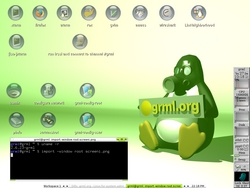
  • Screenshot von grml 1.1 It’s the first stable release being based on our new build-framework grml-live which itself is based on FAI (Fully Automatic Installation). Thanks to grml-live we can provide you a new grml flavour grml-medium which tries to close the gap between grml-small and grml. As usual you’ll get software and kernel updates, many new packages and features plus additional hardware support. We are using LZMA compression for squashfs and provide several additional kernel modules like atl2, iscsitarget, madwifi and (for the first time) loop-aes. Oh and the grml release is known to work fine on the Asus Eee PC - LAN, WLAN and webcam working out-of-the-box! Find all the glory details about the new releases in above mentioned release notes or just visit grml.org. For german readers there’s an article about the new release at pro-linux.de. BTW: On the next weekend (1st and 2nd of march) we - the grml team) - will present the new release on Chemnitzer Linuxdays at the grml booth. grml-CDs, grml-shirts und (new!) “ready to go grml-usb-pens” will be available as well as the chance to talk to us in reallife. 8-) So, we wish you a fast download and hope you enjoy the new release! :-)

    24 February 2008

    Michael Prokop: Why you shouldn t use copy/paste as root

    Title: How to subtile fsck your Apache setup. Solution (quoting the original command line):
    cd /etc/apache2/mods-enabled
    lrwxrwxrwx 1 root www-data 33 2007-09-28 15:23 auth_basic.load -> ../mods-available/auth_basic.load
    lrwxrwxrwx 1 root www-data 33 2007-09-28 15:23 authn_file.load -> ../mods-available/authn_file.load
    lrwxrwxrwx 1 root www-data 36 2007-09-28 15:23 authz_default.load -> ../mods-available/authz_default.load
    Disclaimer: no, it wasn’t me; it’s the log of a customer. Credits: thanks to monitoring and the use of mercurial in /etc locating and fixing the problem was a matter of seconds.

    4 January 2008

    Benjamin Mako Hill: Laptop Liberation in Nara

    I'm going to be giving a reprise of the Laptop Liberation talk I gave at Cornell University in November at the Nara Institute of Science and Technology in the Kansai region of Japan on January 7th. If you around, please feel free to show up. If you are in Osaka, Kyoto or Nara and would like to have lunch or dinner, please email me and we can try to arrange something. Details on the talk is online here in English and Japanese (thanks Mika!) although the talk itself will be in English.

    27 December 2007

    Benjamin Mako Hill: Japan Trip

    I'm going to be visiting Mika's family in Tokyo for the next two and half a weeks. We're planning a trip to Kansai at some point as well. Currently, I've got no free software related plans or meetings lined up but if folks in Kyoto, Osaka, or the greater Tokyo area would like to meet up for drinks, that would be great. Additionally, I'd be happy to put together something more organized (e.g., a short talk, workshop, etc). If you'll be around and are interested in either, contact me and let's figure something out.

    22 December 2007

    Michael Prokop: Make console work comfortable

    You like grml’s Zsh, GNU screen and Vim configuration? No problem to get that on non-grml/non-Debian/non-Linux/… systems as well. Just copy/paste the following lines which are stolen from one of my personal cheatsheets for working on foreign systems (being Linux as well as Solaris, BSD, Windows,…):
    # IMPORTANT: please notice that you might override existing
    # configuration files in the current working directory! =>
    wget -O .zshrc        http://hg.grml.org/grml-etc-core/raw-file/tip/etc/skel/.zshrc
    wget -O .zshrc.global http://hg.grml.org/grml-etc-core/raw-file/tip/etc/zsh/zshrc
    wget -O .screenrc     http://hg.grml.org/grml-etc-core/raw-file/tip/etc/grml/screenrc_generic
    wget -O .vimrc        http://hg.grml.org/grml-etc-core/raw-file/tip/etc/skel/.vimrc
    
    If you do not want to copy/paste just use the grml-config.sh script instead. Notice: the ‘tip’ inside the URL always points to the most recent version of the file(s), so it’s easy to stay up2date as well as checking out a very specific version of the configuration files. Just look at http://hg.grml.org/grml-etc-core. Disclaimer: If you notice any problems with the configuration files on your system/platform please let me know, it’s considered as a bug then. Any other feedback is welcome as well of course. :)

    15 December 2007

    Benjamin Mako Hill: Annual Free Software Foundation Fundraiser

    It's an end of year tradition for non-profit organizations to do big fund-raising and membership pushes. As I mentioned several days ago, I am personally giving to two organizations this year: the Wikimedia Foundation and the Free Software Foundation. The FSF has a goal of 500 associate members by year-end and it's an important goal that will sustain the foundation's activities. While membership dues keep the lights on, the fact that the foundation has a robust and growing membership is equally, if not more, important. FSF executive director Peter Brown put an appeal online in both video and text versions. In it, he lays out some of the most important issues for the next year. You should watch the video version in OGG Theora or this YouTube version (requires Gnash or non-free Flash). The appeal briefly lays out the FSF's plans for next year. My partner Mika Matsuzaki and my friend Oliver Day shot and edited the video. Please pass the link around to those you feel might be interested. Here's my appeal:
    Now is the time to join and give to Free Software Foundation. 2008 is going to be extraordinarily important year for free software. Eben Moglen likes to quote Gandhi's "first they ignore you, then they laugh at you, then they fight you, then you win" progression when describing the free software movement. As I pointed out when I joined the FSF board, we're beginning to see powerful interests fighting free software. It's going to increase in the next few years. Things will probably get a lot uglier for free software before they get better. We can win but things are far from settled. The FSF is the front-line organization in this fight and we need a robust and proactive foundation, and an active and involved membership, if we're going to win. Here are the issues that I'm going to pushing the FSF to pursue in the next year. Expanding activism outside our traditional technologist communities: In part through the work of projects like Defective By Design, we've seen the tide turn for DRM on music in what what may be the FSF's greatest success last year. I'm going to push the FSF to continue the campaign to attack DRM for video, eBooks, and the other places it is cropping up. The most remarkable thing to me about Defective By Design is that its participants and supporters are not, for the most part, people who develop or use GNU/Linux or even know what GNU is! If advocacy for software freedom involves a conversation we can only have with people who understand what POSIX is and how one uses it, we've already lost. Through DbD, BadVista, and other projects, the FSF has made major strides in the last year. It need to do much more and needs your support to do so. Get proactive about software patents: As a community, we've had our head in the sand about software patents for far too long. There are companies and patent trolls sitting on massive, growing piles of software patents. They are not our friends and they do not mean us well. One cannot write non-trivial software today without running a serious risk of infringing patents. The software patents minefield we've found ourselves in is a very fundamental threat to the success of free software and we've already begun to see the first casualties and costs. We must eliminate software patents. Now. The US is very important in this fight (much patent law is "exported" from the US) and almost no organization is working on software patent elimination there. Not enough people are thinking and acting strategically on this issue. The FSF is planning to make major steps in this fight in the coming year and we need your support to do so. Web services and the changing face of software: This last year, I worked to help launch the new version the AGPLv3. The license addresses the role of copyleft for software like web-services which, due to the legal particulars of the GPL, did not extend to the purveyors of web services. Of course, access to source code does not make the users of all web-services free (e.g., the GMails and the Facebooks). Nobody seems to know what freedom for webserver entails. There might not even be good answers. In the next year, I'm going to push the FSF to help start several conversation and to begin to follow up on what I think was an important first step with the AGPLv3. While this is not a major organizational priority yet, it's a major action item that I will be pursuing through the FSF. If you feel strongly about this issue, whatever your position, become a member, stay involved as these projects develop, and have your voice be heard. We don't know the answers yet and we need your input as much as we need your action.
    Please, support the FSF in the efforts listed above, and in others, by giving generously. If you're not a member, please join the FSF as an associate member. If you are already a member, please consider making a tax-deductible donation. The FSF is a very lean, very humble organization of passionate and dedicated individuals working tirelessly for software freedom. Every little bit helps. Members pays USD $120 ($10/month) and student members pay half that. FSF has members across the world -- where a weak dollar often makes it even cheaper. Member support and participation builds capacity and credibility for the foundation and keep the organization responsible, responsive, and in tune with our community.

    13 December 2007

    Michael Prokop: Checklist for 1:1 clone of a Debian system

    When cloning a Linux/Debian system 1:1 you should have a checklist of what’s important to change on the cloned system. For cloning I use the grml Linux Live-CD of course (the following tips are part of grml-tips as well). To create a 1:1 clone I boot grml on the systems (usually using the ssh=password bootoption to be able to access the system remotely as well) and use something like:
    Listener:
    # nc -vlp 30000 > /dev/sda1
    Source:
    # dd if=/dev/sda1 bs=$VALUE   nc -vq 0 $IP_OF_LISTENER 30000
    
    When I have to leave the place where the clone process is running and if the CD-ROM doesn’t reinsert CDs on reboot automatically (usually that’s the case for server systems) I can use my remote-reboot procedure via ssh later on like:
    eject &>/dev/null
    umount -l /cdrom
    eject /dev/cdrom
    echo b > /proc/sysrq-trigger
    
    But stop: before executing the last steps to reboot the server you should take care of a few important steps, otherwise rebooting might fail and you won’t be able to login via SSH. ;-) That’s my personal checklist: Tip: I highly recommend the use of a version controll system for maintaining /etc, for example etckeeper and mercurial should do the job for you.

    11 December 2007

    Nico Golde: grml-paste

    Today mika mentioned in the #grml channel that it would be nice to have a command line tool to paste to the online paste bot.

    I wrote a small ruby script for this today. Since it is pretty easy to adapt it for other paste bots like the Debian paste bot on paste.debian.net and mika reads this weblog as far as I know, the result is:
    http://nion.modprobe.de/grml-paste

    4 December 2007

    Michael Prokop: Power drain with Suspend-To-Disk?

    The battery of your laptop keeps getting drained even though you are using Suspend-To-Disk [STD]? (No, I’m not talking about Suspend-To-RAM!) That’s what happens at least on my Lenovo ThinkPad X61s notebook. Thankfully there exists a workaround: Check out what suspend method you use:
    # cat /sys/power/disk
    [platform] test testproc shutdown reboot
    
    So by default ‘platform’ is used, which corresponds with ACPI S4 and is fine if it works for you. What should fix your problem if you notice too much power drain with STD:
    # echo shutdown > /sys/power/disk
    
    Now you shouldn’t find any “blinking suspended leds” on your system any longer and no further power drain should happen. More details available at $LINUX_KERNEL/Documentation/power/.

    3 December 2007

    Michael Prokop: git[-svn] in 30 minutes

    … or something like that… I planned to write a short note about how to start with using git-svn so I can provide a pointer to some of my colleagues. It turned out that git has too many nice features that you should be aware of. :) Hopefully my notes (now being a reference for myself as well, thx to gebi for all the help and feedback) are useful anyway. If you think something (more or less essential, or at least something most of us should be aware of) is missing: please feel free to mention that in the comment section of my blog entry, thanks. Disclaimer: I’m still happy with mercurial for what I - and we at grml in general - use it: linear, but anyway distributed development. git on the other hand provides some really nice features. Rebasing and branching with git is really great - so non-linear development just works. As usual: use the right tool for the right job. git is a bit complicate to use. Not only but especially in the beginning. On the other hand I’m not such a big friend of subversion. If you wanthave to use subversion (Graz University of Technology for example provides a svn service to their students and employees) but prefer to work with git instead you should be aware of git-svn. git-svn gives you bidirectional operation between subversion and git. First of all make sure you have all you might need when working with git. Make sure to use a current version of git (I’m refering to version >=1.5.3). Just execute the following command line on your Debian system to install all relevant packages:
    aptitude install \
    git-buildpackage git-core git-cvs git-daemon-run \
    git-doc git-email git-gui git-load-dirs git-svn \
    gitk gitweb qgit
    
    Now let’s start with some general and basic configuration:
    # Remove directories from the SVN tree if there
    # are no files left behind, configure it globaly:
    git config --global svn.rmdir=true
    # Want some more global, personal git configuration?
    for line in  
      user.name=Michael Prokop 
      user.email=foo@example.invalid 
      color.diff=auto 
      color.diff.new=cyan 
      color.diff.old=magenta 
      color.diff.frag=yellow 
      color.diff.meta=green 
      color.diff.commit=normal 
    do
      git config --global $line
    done
    
    Check out man git-config for much more details about configuration options. First tip: set ‘g’ as an alias for git so you don’t have to type that much. I’ll write the long version in the following examples so copy/paste works for everyone. Make sure to use the short options of git itself as well: use ‘git co’ for example instead of ‘git checkout’. You can define your own aliases inside git as well - either manually in ~/.gitconfig or running something like:
    git config --global alias.st status
    
    Enough pre-configuration for now. It’s time to checkout the SVN repository:
    # Check out the SVN repository and set 'svn/' as
    # prefix for the branches:
    git svn clone -s --prefix=svn/ \
    https://svn.tugraz.at/svn/$project foobar && 
    cd foobar
    # Adjust svn:ignore settings within git:
    git svn show-ignore >> .git/info/exclude
    # List all branches:
    git branch -a
    # List all remote branches:
    git branch -r
    # Rebase your local changes against the
    # latest changes in SVN (kind of 'svn up'):
    git svn rebase
    # Checkout a specific branch:
    git checkout $branch
    
    Ok so far? But what do we have to do if we want to work on the upstream source and are allowed to commit/push directly to the repository? Let’s see how to work on that without using branches:
    # Hack:
    $EDITOR foobar
    # Check status
    git st[atus]
    # List diff:
    git diff [foobar]
    # Commit it with a commit message using $EDITOR:
    git commit -a
    # Now commit your changes (that were committed
    # previously using git) to SVN, as well as
    # automatically updating your working HEAD:
    git svn dcommit
    
    But what should we do if we do not have commit rights? Let’s create our own branch and send a patch via mail to upstream:
    # Make a new branch:
    git checkout -b mikas_demo_patch
    # and hack...
    $EDITOR
    # Commit all changes:
    git ci -a -m 'Best patch but worst commit msg ever'
    # ... and prepare patch[es]:
    git format-patch -s -p -n master
    # Now send mail(s) either use git-send-email:
    git send-email --to foo@example.invalid *.patch
    # ... or if you prefer mutt instead (short zsh syntax):
    for f in *.patch ; mutt -H $f
    
    You got a mail from someone else and would like to incorporate changes from the attached patch in your repository? Just store the mail in a seperate mailbox (use save-message in mutt for example, keybinding ’s’ by default), then execute:
    # Apply a [series of] patch[es] from a mailbox
    git am /path/to/mailbox
    
    Want to work on a seperate branch and rebase your work with upstream?
    # First of all make sure to use recent sources...
    # So pull when using plain git:
    git pull -u
    # .. or when using git-svn use:
    git svn rebase
    # Then create a new branch:
    git checkout -b mika
    # Hack:
    $EDITOR
    # Commit:
    git ci -a -m 'Best patch but worst commit msg ever'
    # Switch to master branch:
    git checkout master
    # Pull again when using plain git:
    git pull -u
    # .. or when using git-svn use:
    git svn rebase
    # Finally switch back
    git checkout mika
    # Now rebase it with plain git using:
    git rebase origin/master
    # ... or when using git-svn:
    git svn rebase
    # Now check out the last 5 commits:
    git log -n5
    
    Another branch-session might look like:
    git co -b foo
    $EDITOR
    git ci -a -m 'foo changes'
    git co master
    git co -b bar
    $EDITOR
    git ci -a -m 'bar changes''
    git co foo
    git rebase bar
    git log -n5
    git st
    git branch
    
    Pfuhhh? Right. :) Now it’s time to check out another cool feature: git stash, which is just great when pulling into a dirty tree or when suffering from interrupted workflow. Demo:
    git stash
    git pull / fetch+rebase
    $EDITOR # fix conflicts
    git commit -a -m "Fix in a hurry"
    git stash apply
    git stash clear # unless you want to keep the stash
    
    git reset rocks as well:
    # List all recent actions:
    git reflog
    # Now undo the last action:
    git reset --hard HEAD@ 0 
    
    How to get rid of branches?
    # Delete a branch. The branch must be fully merged:
    git branch -d remove_me_branch
    # Delete a branch irrespective of its index status:
    git branch -D remove_me_branch
    # Delete a remote branch:
    git push reponame :branch
    
    Repack a git repository to minimize its disk usage:
    git pack-refs --prune
    git reflog expire --all
    git repack -a -d -f -l
    git prune
    git rerere gc
    
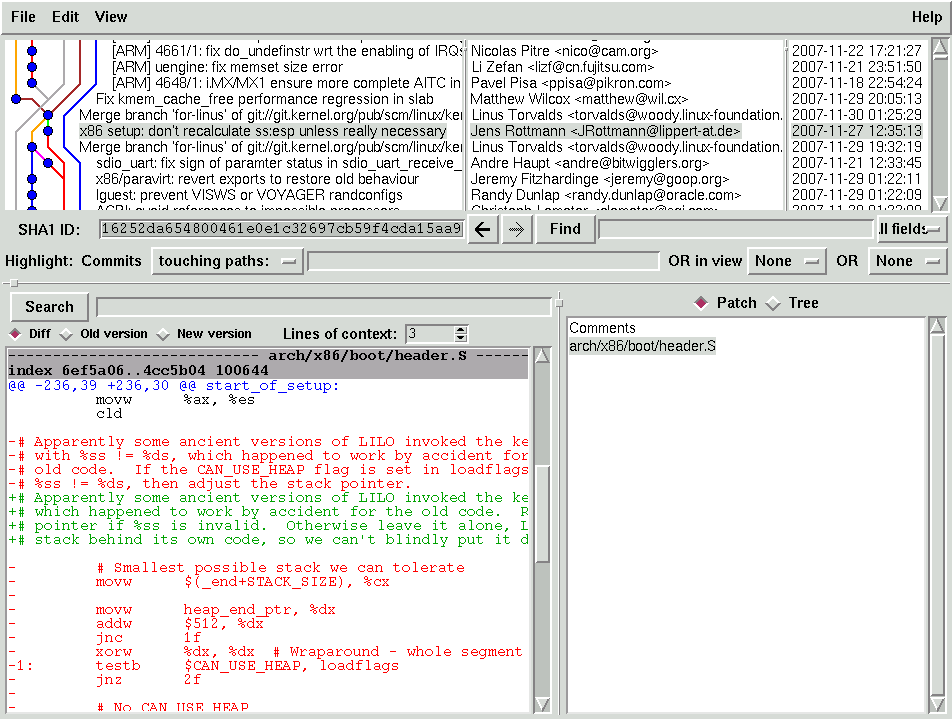
    Use git cherry to find commits not merged upstream. Another really cool feature is the interactive rebasing: git rebase –interactive Make sure you are aware of gitk: Screenshot of gitk … and don’t forget to set readable fonts for gitk, like:
    [ -r ~/.gitk ]   cat > ~/.gitk << EOF
    set mainfont  Arial 10 
    set textfont   Courier 10 
    set uifont  Arial 10 bold 
    EOF
    
    If you prefer a Qt based interface check out qgit. Useful ressources:

    28 October 2007

    Michael Prokop: Failed to bring up mika.

    No, not running out of coffee (well, maybe) - but:
    # ifup wlan=mika
    […]
    No DHCPOFFERS received.
    No working leases in persistent database. Exiting. Failed to bring up mika.
    :grin:

    27 October 2007

    Michael Prokop: Could not set non-blocking flag

    Looks like many people didn’t manage to solve this problem, so let’s feed google… If you notice the following error message when running apt-get:
    # apt-get update
    […]
    98% [Working]FATAL -> Could not set non-blocking flag Bad file descriptor
    E: Method http has died unexpectedly!
    # echo $?
    100
    … you forgot to mount the according partition using the dev mount option. So fix it via running something like:
    mount -o remount,dev /path/to/filesystem

    16 October 2007

    Benjamin Mako Hill: What I'm Up To

    So, I finished graduate school at MIT. I presented some of my thesis work at Wikimania and I'll be posting information, code, and the thesis itself, in the next weeks as I find time. I've decided to focus, at least in the immediate future, on several important projects. Here's what I'm up to: This is, of course, in addition to my work with FSF, Debian, and Ubuntu which I'll be continuing. And talks. And writing. (Yikes!) I'll be keeping my office at MIT (yes, like RMS) for the time being and sticking around Cambridge at least until Mika finishes her degree at Harvard School of Public Health. I'll be in wrapping up projects modes for the next few weeks and months and will be posting about them here as I go.

    21 September 2007

    Michael Prokop: grml-live - framework for building a live system

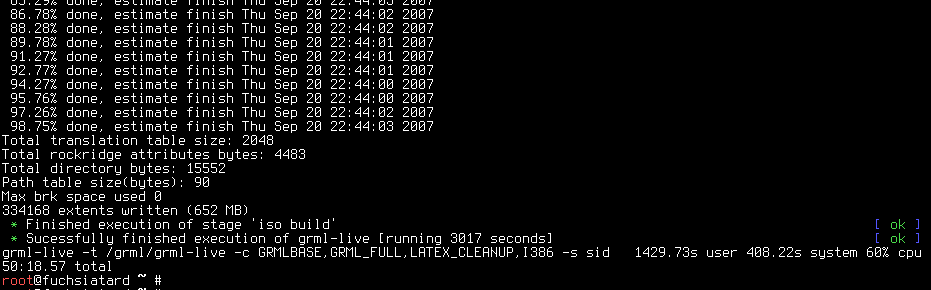
    [Gnaaaaa, sorry Planet Debian for sending a german article to you a few hours ago. I just chose the wrong category for the article. I removed the tag already and the article disappeared from Planet Debian right now; so if you don’t know what I’m talking about just don’t care. ;-) To the german readers: it’s just the same article as my previous one, but this time in english. :-)] grml-live is a framework which lets you build a grml/Debian based Linux Live-CD with one single command. grml-live is based on FAI (Fully Automatic Installation) and uses its class based concept: Screenshot: grml-live In this example I built a full grml-ISO. All I did was setting the Debian-Mirror in /etc/grml/grml-live.conf to my local one (to save traffic and time) and invoking the following command:
    # grml-live -t /grml/grml-live -c GRMLBASE,GRML_FULL,LATEX_CLEANUP,I386 -s sid
    
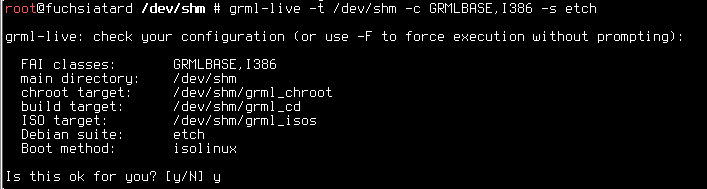
    About 50 minutes later I have a grml-ISO inside grml_isos at directory /grml/grml-live/ (-t …). It was built using the classes (-c …) GRMLBASE (all the core, essential stuff), GRML_FULL (software selection like official grml provides), LATEX_CLEANUP (clean up some very big LaTeX directories) and I386 (x86-specific packages like kernel). Debian unstable/sid was used as the suite (-s). And that’s it. You want a smaller grml-version using Debian/stable? No problem, let’s do it in shared memory (being very fast, and with enough RAM and mountoptions rw,suid,dev no problem at all): Screenshot grml-live: the beginning A ‘grml-live -t /dev/shm -c GRMLBASE,I386 -s etch’ and not even 5(!) minutes later I’ve my 135MB small grml: Screenshot grml-live: done So using grml-live you can build your own, customized Linux Live-CD without having to deal with remastering in detail. Via creating a new class (or just editing an existing one) its easy to include the software you would like to get. So, will the official grml-ISOs become obsolet? No, definitely not. The goal of grml-live is to give the grml-team a buildsystem providing exactly what we need. It should give us the possibility to concentrate on the important and interesting tasks, like: testing, bugfixing, implementing new features, working on the kernel, quality assurance, documentation,… grml-live should work on every Debian based system. If you want to give it a try just grab the Debian package from grml’s repository. The source is available (as usual) via mercurial. Find more details on the grml-live-webpage. If you have any further questions that aren’t answered by the docs yet, have feature requests, bugreports or patches: please let me know.

    20 September 2007

    Michael Prokop: grml-live - mach dir deine eigene Live-CD

    grml-live ist ein Framework, mit dessen Hilfe man mit nur 1 Kommando eine auf grml/Debian basierende Linux Live-CD bauen kann. grml-live baut auf FAI (Fully Automatic Installation) auf und nutzt dessen klassenbasiertes Konzept: Screenshot: grml-live In diesem Beispiel habe ich gerade ein gro es grml-ISO gebaut. Dabei habe ich einfach nur den Debian-Mirror in /etc/grml/grml-live.conf auf meinen lokalen Mirror gedreht (um Traffic und Zeit zu sparen) und dann folgendes Kommando aufgerufen:
    # grml-live -t /grml/grml-live -c GRMLBASE,GRML_FULL,LATEX_CLEANUP,I386 -s sid
    
    Ca. 50 Minuten sp ter habe ich im Ordner grml_isos unter /grml/grml-live/ (-t …) ein fertiges grml-ISO. Dieses wurde auf Basis der Klassen (-c …) GRMLBASE (da steckt alles essenzielle drin), GRML_FULL (Software-Auswahl wie auf der offiziellen gro en grml), LATEX_CLEANUP (ein paar sehr gro e LaTeX-Verzeichnisse aufr umen) und I386 (x86-spezifische Pakete wie z.B. der Kernel) gebaut. Als Debian-Suite (-s) wurde sid (unstable) ausgew hlt. Und das war es auch schon. Ein kleinere grml-Version auf Basis von Debian/stable gef llig? Kein Problem, machen wir es doch einfach mal im Shared-Memory (superschnell und mit genug RAM und den Mountoptionen rw,suid,dev auch kein Problem): Screenshot grml-live: der Start Ein ‘grml-live -t /dev/shm -c GRMLBASE,I386 -s etch’ und keine 5(!) Minuten sp ter hab ich dann mein 135MB kleines grml: Screenshot grml-live: done Mit grml-live kann man sich somit seine pers nlich angepasste Linux Live-CD erstellen, ohne sich erst mit Remastering im Detail besch ftigen zu m ssen. Auch muss man dabei nicht zwingend Debian/unstable nehmen, sondern kann auch Debian/stable als Basis ausw hlen. Durch das Erstellen einer neuen Klasse oder das Anpassen einer existierenden kann man auch spezielle Software-W nsche ganz einfach erf llen. Wird damit das offizielle grml-ISO etwa obsolet? Nein, auf keinen Fall. grml-live soll dem grml-Team als Buildsystem dienen (automatisierte Snapshots auf regelm iger Basis z.B. sind schon in Planung) und die langweilige Arbeit abnehmen, damit wir uns auf die wirklich wichtigen Sachen konzentrieren k nnen: Testen, Bugfixing, Implementieren von neuen Features, Arbeit am Kernel, Qualit tssicherung, Dokumentation,… grml-live hat den Anspruch, auf jedem Debian-basierten System zu funktionieren und wer Interesse daran gefunden hat, kann sich das Debian-Pakete aus dem grml-Repository holen. Den Quellcode gibt es nat rlich auf unserer Mercurial-Webseite. Wer jetzt noch Fragen hat oder mehr Details zu grml-live erfahren m chte, der m ge einfach auf die grml-live-Homepage schauen. Falls dort eine Frage noch nicht beantwortet sein sollte, jemand Feature-Requests, Bugreports oder Patches hat: meine Inbox freut sich ber Post! :-)

    Next.

    Previous.