Search Results: "eof"

16 September 2023

Sergio Talens-Oliag: GitLab CI/CD Tips: Using a Common CI Repository with Assets

This post describes how to handle files that are used as assets by jobs and pipelines defined on a common gitlab-ci repository when we include those definitions from a different project.

Problem descriptionWhen a .giltlab-ci.yml file includes files from a different repository its contents are expanded and the resulting code is the same as the one generated when the included files are local to the repository. In fact, even when the remote files include other files everything works right, as they are also expanded (see the description of how included files are merged for a complete explanation), allowing us to organise the common repository as we want. As an example, suppose that we have the following script on the assets/ folder of the common repository:
dumb.sh
#!/bin/sh
echo "The script arguments are: '$@'"
If we run the following job on the common repository:
job:
  script:
    - $CI_PROJECT_DIR/assets/dumb.sh ARG1 ARG2
the output will be:
The script arguments are: 'ARG1 ARG2'
But if we run the same job from a different project that includes the same job definition the output will be different:
/scripts-23-19051/step_script: eval: line 138: d./assets/dumb.sh: not found
The problem here is that we include and expand the YAML files, but if a script wants to use other files from the common repository as an asset (configuration file, shell script, template, etc.), the execution fails if the files are not available on the project that includes the remote job definition.

SolutionsWe can solve the issue using multiple approaches, I ll describe two of them:
  • Create files using scripts
  • Download files from the common repository

Create files using scriptsOne way to dodge the issue is to generate the non YAML files from scripts included on the pipelines using HERE documents. The problem with this approach is that we have to put the content of the files inside a script on a YAML file and if it uses characters that can be replaced by the shell (remember, we are using HERE documents) we have to escape them (error prone) or encode the whole file into base64 or something similar, making maintenance harder. As an example, imagine that we want to use the dumb.sh script presented on the previous section and we want to call it from the same PATH of the main project (on the examples we are using the same folder, in practice we can create a hidden folder inside the project directory or use a PATH like /tmp/assets-$CI_JOB_ID to leave things outside the project folder and make sure that there will be no collisions if two jobs are executed on the same place (i.e. when using a ssh runner). To create the file we will use hidden jobs to write our script template and reference tags to add it to the scripts when we want to use them. Here we have a snippet that creates the file with cat:
.file_scripts:
  create_dumb_sh:
    -  
      # Create dumb.sh script
      mkdir -p "$ CI_PROJECT_DIR /assets"
      cat >"$ CI_PROJECT_DIR /assets/dumb.sh" <<EOF
      #!/bin/sh
      echo "The script arguments are: '\$@'"
      EOF
      chmod +x "$ CI_PROJECT_DIR /assets/dumb.sh"
Note that to make things work we ve added 6 spaces before the script code and escaped the dollar sign. To do the same using base64 we replace the previous snippet by this:
.file_scripts:
  create_dumb_sh:
    -  
      # Create dumb.sh script
      mkdir -p "$ CI_PROJECT_DIR /assets"
      base64 -d >"$ CI_PROJECT_DIR /assets/dumb.sh" <<EOF
      IyEvYmluL3NoCmVjaG8gIlRoZSBzY3JpcHQgYXJndW1lbnRzIGFyZTogJyRAJyIK
      EOF
      chmod +x "$ CI_PROJECT_DIR /assets/dumb.sh"
Again, we have to indent the base64 version of the file using 6 spaces (all lines of the base64 output have to be indented) and to make changes we have to decode and re-code the file manually, making it harder to maintain. With either version we just need to add a !reference before using the script, if we add the call on the first lines of the before_script we can use the downloaded file in the before_script, script or after_script sections of the job without problems:
job:
  before_script:
    - !reference [.file_scripts, create_dumb_sh]
  script:
    - $ CI_PROJECT_DIR /assets/dumb.sh ARG1 ARG2
The output of a pipeline that uses this job will be the same as the one shown in the original example:
The script arguments are: 'ARG1 ARG2'

Download the files from the common repositoryAs we ve seen the previous solution works but is not ideal as it makes the files harder to read, maintain and use. An alternative approach is to keep the assets on a directory of the common repository (in our examples we will name it assets) and prepare a YAML file that declares some variables (i.e. the URL of the templates project and the PATH where we want to download the files) and defines a script fragment to download the complete folder. Once we have the YAML file we just need to include it and add a reference to the script fragment at the beginning of the before_script of the jobs that use files from the assets directory and they will be available when needed. The following file is an example of the YAML file we just mentioned:
bootstrap.yml
variables:
  CI_TMPL_API_V4_URL: "$ CI_API_V4_URL /projects/common%2Fci-templates"
  CI_TMPL_ARCHIVE_URL: "$ CI_TMPL_API_V4_URL /repository/archive"
  CI_TMPL_ASSETS_DIR: "/tmp/assets-$ CI_JOB_ID "
.scripts_common:
  bootstrap_ci_templates:
    -  
      # Downloading assets
      echo "Downloading assets"
      mkdir -p "$CI_TMPL_ASSETS_DIR"
      wget -q -O - --header="PRIVATE-TOKEN: $CI_TMPL_READ_TOKEN" \
        "$CI_TMPL_ARCHIVE_URL?path=assets&sha=$ CI_TMPL_REF:-main "  
        tar --strip-components 2 -C "$ASSETS_DIR" -xzf -
The file defines the following variables:
  • CI_TMPL_API_V4_URL: URL of the common project, in our case we are using the project ci-templates inside the common group (note that the slash between the group and the project is escaped, that is needed to reference the project by name, if we don t like that approach we can replace the url encoded path by the project id, i.e. we could use a value like $ CI_API_V4_URL /projects/31)
  • CI_TMPL_ARCHIVE_URL: Base URL to use the gitlab API to download files from a repository, we will add the arguments path and sha to select which sub path to download and from which commit, branch or tag (we will explain later why we use the CI_TMPL_REF, for now just keep in mind that if it is not defined we will download the version of the files available on the main branch when the job is executed).
  • CI_TMPL_ASSETS_DIR: Destination of the downloaded files.
And uses variables defined in other places:
  • CI_TMPL_READ_TOKEN: token that includes the read_api scope for the common project, we need it because the tokens created by the CI/CD pipelines of other projects can t be used to access the api of the common one.We define the variable on the gitlab CI/CD variables section to be able to change it if needed (i.e. if it expires)
  • CI_TMPL_REF: branch or tag of the common repo from which to get the files (we need that to make sure we are using the right version of the files, i.e. when testing we will use a branch and on production pipelines we can use fixed tags to make sure that the assets don t change between executions unless we change the reference).We will set the value on the .gitlab-ci.yml file of the remote projects and will use the same reference when including the files to make sure that everything is coherent.
This is an example YAML file that defines a pipeline with a job that uses the script from the common repository:
pipeline.yml
include:
  - /bootstrap.yaml
stages:
  - test
dumb_job:
  stage: test
  before_script:
    - !reference [.bootstrap_ci_templates, create_dumb_sh]
  script:
    - $ CI_TMPL_ASSETS_DIR /dumb.sh ARG1 ARG2
To use it from an external project we will use the following gitlab ci configuration:
gitlab-ci.yml
include:
  - project: 'common/ci-templates'
    ref: &ciTmplRef 'main'
    file: '/pipeline.yml'
variables:
  CI_TMPL_REF: *ciTmplRef
Where we use a YAML anchor to ensure that we use the same reference when including and when assigning the value to the CI_TMPL_REF variable (as far as I know we have to pass the ref value explicitly to know which reference was used when including the file, the anchor allows us to make sure that the value is always the same in both places). The reference we use is quite important for the reproducibility of the jobs, if we don t use fixed tags or commit hashes as references each time a job that downloads the files is executed we can get different versions of them. For that reason is not a bad idea to create tags on our common repo and use them as reference on the projects or branches that we want to behave as if their CI/CD configuration was local (if we point to a fixed version of the common repo the way everything is going to work is almost the same as having the pipelines directly in our repo). But while developing pipelines using branches as references is a really useful option; it allows us to re-run the jobs that we want to test and they will download the latest versions of the asset files on the branch, speeding up the testing process. However keep in mind that the trick only works with the asset files, if we change a job or a pipeline on the YAML files restarting the job is not enough to test the new version as the restart uses the same job created with the current pipeline. To try the updated jobs we have to create a new pipeline using a new action against the repository or executing the pipeline manually.

ConclusionFor now I m using the second solution and as it is working well my guess is that I ll keep using that approach unless giltab itself provides a better or simpler way of doing the same thing.

9 September 2023

Dirk Eddelbuettel: RcppFarmHash 0.0.3 on CRAN: Small Update

A minor maintenance release of the RcppFarmHash package is now on CRAN as version 0.0.3. RcppFarmHash wraps the Google FarmHash family of hash functions (written by Geoff Pike and contributors) that are used for example by Google BigQuery for the FARM_FINGERPRINT digest. This releases farms out the conversion to the integer64 add-on type in R to the new package RcppInt64 released a few days ago and adds some minor maintenance on continuous integration and alike. The brief NEWS entry follows:

Changes in version 0.0.3 (2023-09-09)
  • Rely on new RcppInt64 package and its header for conversion
  • Minor updates to continuous integration and README.md

If you like this or other open-source work I do, you can sponsor me at GitHub.

This post by Dirk Eddelbuettel originated on his Thinking inside the box blog. Please report excessive re-aggregation in third-party for-profit settings.

9 August 2023

Antoine Beaupr : OpenPGP key transition

This is a short announcement to say that I have changed my main OpenPGP key. A signed statement is available with the cryptographic details but, in short, the reason is that I stopped using my old YubiKey NEO that I have worn on my keyring since 2015. I now have a YubiKey 5 which supports ED25519 which features much shorter keys and faster decryption. It allowed me to move all my secret subkeys on the key (including encryption keys) while retaining reasonable performance. I have written extensive documentation on how to do that OpenPGP key rotation and also YubiKey OpenPGP operations.

Warning on storing encryption keys on a YubiKey People wishing to move their private encryption keys to such a security token should be very careful as there are special precautions to take for disaster recovery. I am toying with the idea of writing an article specifically about disaster recovery for secrets and backups, dealing specifically with cases of death or disabilities.

Autocrypt changes One nice change is the impact on Autocrypt headers, which are considerably shorter. Before, the header didn't even fit on a single line in an email, it overflowed to five lines:
Autocrypt: addr=anarcat@torproject.org; prefer-encrypt=nopreference;
 keydata=xsFNBEogKJ4BEADHRk8dXcT3VmnEZQQdiAaNw8pmnoRG2QkoAvv42q9Ua+DRVe/yAEUd03EOXbMJl++YKWpVuzSFr7IlZ+/lJHOCqDeSsBD6LKBSx/7uH2EOIDizGwfZNF3u7X+gVBMy2V7rTClDJM1eT9QuLMfMakpZkIe2PpGE4g5zbGZixn9er+wEmzk2mt20RImMeLK3jyd6vPb1/Ph9+bTEuEXi6/WDxJ6+b5peWydKOdY1tSbkWZgdi+Bup72DLUGZATE3+Ju5+rFXtb/1/po5dZirhaSRZjZA6sQhyFM/ZhIj92mUM8JJrhkeAC0iJejn4SW8ps2NoPm0kAfVu6apgVACaNmFb4nBAb2k1KWru+UMQnV+VxDVdxhpV628Tn9+8oDg6c+dO3RCCmw+nUUPjeGU0k19S6fNIbNPRlElS31QGL4H0IazZqnE+kw6ojn4Q44h8u7iOfpeanVumtp0lJs6dE2nRw0EdAlt535iQbxHIOy2x5m9IdJ6q1wWFFQDskG+ybN2Qy7SZMQtjjOqM+CmdeAnQGVwxowSDPbHfFpYeCEb+Wzya337Jy9yJwkfa+V7e7Lkv9/OysEsV4hJrOh8YXu9a4qBWZvZHnIO7zRbz7cqVBKmdrL2iGqpEUv/x5onjNQwpjSVX5S+ZRBZTzah0w186IpXVxsU8dSk0yeQskblrwARAQABzSlBbnRvaW5lIEJlYXVwcsOpIDxhbmFyY2F0QHRvcnByb2plY3Qub3JnPsLBlAQTAQgAPgIbAwULCQgHAwUVCgkICwUWAgMBAAIeAQIXgBYhBI3JAc5kFGwEitUPu3khUlJ7dZIeBQJihnFIBQkacFLiAAoJEHkhUlJ7dZIeXNAP/RsX+27l9K5uGspEaMH6jabAFTQVWD8Ch1om9YvrBgfYtq2k/m4WlkMh9IpT89Ahmlf0eq+V1Vph4wwXBS5McK0dzoFuHXJa1WHThNMaexgHhqJOs
 S60bWyLH4QnGxNaOoQvuAXiCYV4amKl7hSuDVZEn/9etDgm/UhGn2KS3yg0XFsqI7V/3RopHiDT+k7+zpAKd3st2V74w6ht+EFp2Gj0sNTBoCdbmIkRhiLyH9S4B+0Z5dUCUEopGIKKOSbQwyD5jILXEi7VTZhN0CrwIcCuqNo7OXI6e8gJd8McymqK4JrVoCipJbLzyOLxZMxGz8Ki0b9O844/DTzwcYcg9I1qogCsGmZfgVze2XtGxY+9zwSpeCLeef6QOPQ0uxsEYSfVgS+onCesSRCgwAPmppPiva+UlGuIMun87gPpQpV2fqFg/V8zBxRvs6YTGcfcQjfMoBHmZTGb+jk1//QAgnXMO7fGG38YH7iQSSzkmodrH2s27ZKgUTHVxpBL85ptftuRqbR7MzIKXZsKdA88kjIKKXwMmez9L1VbJkM4k+1Kzc5KdVydwi+ujpNegF6ZU8KDNFiN9TbDOlRxK5R+AjwdS8ZOIa4nci77KbNF9OZuO3l/FZwiKp8IFJ1nK7uiKUjmCukL0od/6X2rJtAzJmO5Co93ZVrd5r48oqUvjklzzsBNBFmeC3oBCADEV28RKzbv3dEbOocOsJQWr1R0EHUcbS270CrQZfb9VCZWkFlQ/1ypqFFQSjmmUGbNX2CG5mivVsW6Vgm7gg8HEnVCqzL02BPY4OmylskYMFI5Bra2wRNNQBgjg39L9XU4866q3BQzJp3r0fLRVH8gHM54Jf0FVmTyHotR/Xiw5YavNy2qaQXesqqUv8HBIha0rFblbuYI/cFwOtJ47gu0QmgrU0ytDjlnmDNx4rfsNylwTIHS0Oc7Pezp7MzLmZxnTM9b5VMprAXnQr4rewXCOUKBSto+j4rD5/77DzXw96bbueNruaupb2Iy2OHXNGkB0vKFD3xHsXE2x75NBovtABEBAAHCwqwEGAEIACAWIQSNyQHOZBRsBIrVD7t5IVJSe3WSHgUCWZ4LegIbAgFACRB5IV
 JSe3WSHsB0IAQZAQgAHRYhBHsWQgTQlnI7AZY1qz6h3d2yYdl7BQJZngt6AAoJED6h3d2yYdl7CowH/Rp7GHEoPZTSUK8Ss7crwRmuAIDGBbSPkZbGmm4bOTaNs/gealc2tsVYpoMx7aYgqUW+t+84XciKHT+bjRv8uBnHescKZgDaomDuDKc2JVyx6samGFYuYPcGFReRcdmH0FOoPCn7bMW5mTPztV/wIA80LZD9kPKIXanfUyI3HLP0BPwZG4WTpKzJaalR1BNwu2oF6kEK0ymH3LfDiJ5Sr6emI2jrm4gH+/19ux/x+ST4tvm2PmH3BSQOPzgiqDiFd7RZoAIhmwr3FW4epsK9LtSxsi9gZ2vATBKO1oKtb6olW/keQT6uQCjqPSGojwzGRT2thEANH+5t6Vh0oDPZhrKUXRAAxHMBNHEaoo/M0sjZo+5OF3Ig1rMnI6XbKskLv6hu13cCymW0w/5E4XuYnyQ1cNC3pLvqDQbDx5mAPfBVHuqxJdRLQ3yDM/D2QIsxnkzQwi0FsJuni4vuJzWK/NHHDCvxMCh0YmSgbptUtgW8/niatd2Y6MbfRGxUHoctKtzqzivC8hKMTFrj4AbZhg/e9QVCsh5zSXtpWP0qFDJsxRMx0/432n9d4XUiy4U672r9Q09SsynB3QN6nTaCTWCIxGxjIb+8kJrRqTGwy/PElHX6kF0vQUWZNf2ITV1sd6LK/s/7sH+x4rzgUEHrsKr/qPvY3rUY/dQLd+owXesY83ANOu6oMWhSJnPMksbNa4tIKKbjmw3CFIOfoYHOWf3FtnydHNXoXfj4nBX8oSnkfhLILTJgf6JDFXfw6mTsv/jMzIfDs7PO1LK2oMK0+prSvSoM8bP9dmVEGIurzsTGjhTOBcb0zgyCmYVD3S48vZlTgHszAes1zwaCyt3/tOwrzU5JsRJVns+B/TUYaR/u3oIDMDygvE5ObWxXaFVnCC59r+zl0FazZ0ouyk2AYIR
 zHf+n1n98HCngRO4FRel2yzGDYO2rLPkXRm+NHCRvUA/i4zGkJs2AV0hsKK9/x8uMkBjHAdAheXhY+CsizGzsKjjfwvgqf84LwAzSDdZqLVE2yGTOwU0ESiArJwEQAJhtnC6pScWjzvvQ6rCTGAai6hrRiN6VLVVFLIMaMnlUp92EtgVSNpw6kANtRTpKXUB5fIPZVUrVdfEN06t96/6LE42tgifDAFyFTZY5FdHHri1GG/Cr39MpW2VqCDCtTTPVWHTUlU1ZG631BJ+9NB+ce58TmLr6wBTQrT+W367eRFBC54EsLNb7zQAspCn9pw1xf1XNHOGnrAQ4r9BXhOW5B8CzRd4nLRQwVgtw/c5M/bjemAOoq2WkwN+0mfJe4TSfHwFUozXuN274X+0Gr10fhp8xEDYuQM0qu6W3aDXMBBwIu0jTNudEELsTzhKUbqpsBc9WjwNMCZoCuSw/RTpFBV35mXbqQoQgbcU7uWZslLl9Wvv/C6rjXgd+GeX8SGBjTqq1ZkTv5UXLHTNQzPnbkNEExzqToi/QdSjFMIACnakeOSxc0ckfnsd9pfGv1PUyPyiwrHiqWFzBijzGIZEHxhNGFxAkXwTJR7Pd40a7RDxwbO6p/TSIIum41JtteehLHwTRDdQNMoyfLxuNLEtNYS0uR2jYI1EPQfCNWXCdT2ZK/l6GVP6jyB/olHBIOr+oVXqJh+48ki8cATPczhq3fUr7UivmguGwD67/4omZ4PCKtz1hNndnyYFS9QldEGo+AsB3AoUpVIA0XfQVkxD9IZr+Zu6aJ6nWq4M2bsoxABEBAAHCwXYEGAEIACACGwwWIQSNyQHOZBRsBIrVD7t5IVJSe3WSHgUCWPerZAAKCRB5IVJSe3WSHkIgEACTpxdn/FKrwH0/LDpZDTKWEWm4416l13RjhSt9CUhZ/Gm2GNfXcVTfoF/jKXXgjHcV1DHjfLUPmPVwMdqlf5ACOiFqIUM2ag/OEARh356w
 YG7YEobMjX0CThKe6AV2118XNzRBw/S2IO1LWnL5qaGYPZONUa9Pj0OaErdKIk/V1wge8Zoav2fQPautBcRLW5VA33PH1ggoqKQ4ES1hc9HC6SYKzTCGixu97mu/vjOa8DYgM+33TosLyNy+bCzw62zJkMf89X0tTSdaJSj5Op0SrRvfgjbC2YpJOnXxHr9qaXFbBZQhLjemZi6zRzUNeJ6A3Nzs+gIc4H7s/bYBtcd4ugPEhDeCGffdS3TppH9PnvRXfoa5zj5bsKFgjqjWolCyAmEvd15tXz5yNXtvrpgDhjF5ozPiNp/1EeWX4DxbH2i17drVu4fXwauFZ6lcsAcJxnvCA28RlQlmEQu/gFOx1axVXf6GIuXnQSjQN6qJbByUYrdc/cFCxPO2/lGuUxnufN9Tvb51Qh54laPgGLrlD2huQeSD9Sxa0MNUjNY0qLqaReT99Ygb2LPYGSLoFVx9iZz6sZNt07LqCx9qNgsJwsdmwYsNpMuFbc7nkWjtlEqzsXZHTvYN654p43S+hcAhmmOzQZcew6h71fAJLciiqsPBnCEdgCGFAWhZZdPkMA==
After the change, the entire key fits on a single line, neat!
Autocrypt: addr=anarcat@torproject.org; prefer-encrypt=nopreference;
 keydata=xjMEZHZPzhYJKwYBBAHaRw8BAQdAWdVzOFRW6FYVpeVaDo3sC4aJ2kUW4ukdEZ36UJLAHd7NKUFudG9pbmUgQmVhdXByw6kgPGFuYXJjYXRAdG9ycHJvamVjdC5vcmc+wpUEExYIAD4WIQS7ts1MmNdOE1inUqYCKTpvpOU0cwUCZHZgvwIbAwUJAeEzgAULCQgHAwUVCgkICwUWAgMBAAIeAQIXgAAKCRACKTpvpOU0c47SAPdEqfeHtFDx9UPhElZf7nSM69KyvPWXMocu9Kcu/sw1AQD5QkPzK5oxierims6/KUkIKDHdt8UcNp234V+UdD/ZB844BGR2UM4SCisGAQQBl1UBBQEBB0CYZha2IMY54WFXMG4S9/Smef54Pgon99LJ/hJ885p0ZAMBCAfCdwQYFggAIBYhBLu2zUyY104TWKdSpgIpOm+k5TRzBQJkdlDOAhsMAAoJEAIpOm+k5TRzBg0A+IbcsZhLx6FRIqBJCdfYMo7qovEo+vX0HZsUPRlq4HkBAIctCzmH3WyfOD/aUTeOF3tY+tIGUxxjQLGsNQZeGrQI
Note that I have implemented my own kind of ridiculous Autocrypt support for the Notmuch Emacs email client I use, see this elisp code. To import keys, I pipe the message into this script which is basically just:
sq autocrypt decode   gpg --import
... thanks to Sequoia best-of-class Autocrypt support.

Note on OpenPGP usage While some have claimed OpenPGP's death, I believe those are overstated. Maybe it's just me, but I still use OpenPGP for my password management, to authenticate users and messages, and it's the interface to my YubiKey for authenticating with SSH servers. I understand people feel that OpenPGP is possibly insecure, counter-intuitive and full of problems, but I think most of those problems should instead be attributed to its current flagship implementation, GnuPG. I have tried to work with GnuPG for years, and it keeps surprising me with evilness and oddities. I have high hopes that the Sequoia project can bring some sanity into this space, and I also hope that RFC4880bis can eventually get somewhere so we have a more solid specification with more robust crypto. It's kind of a shame that this has dragged on for so long, but Update: there's a separate draft called openpgp-crypto-refresh that might actually be adopted as the "OpenPGP RFC" soon! And it doesn't keep real work from happening in Sequoia and other implementations. Thunderbird rewrote their OpenPGP implementation with RNP (which was, granted, a bumpy road because it lost compatibility with GnuPG) and Sequoia now has a certificate store with trust management (but still no secret storage), preliminary OpenPGP card support and even a basic GnuPG compatibility layer. I'm also curious to try out the OpenPGP CA capabilities. So maybe it's just because I'm becoming an old fart that doesn't want to change tools, but so far I haven't seen a good incentive in switching away from OpenPGP, and haven't found a good set of tools that completely replace it. Maybe OpenSSH's keys and CA can eventually replace it, but I suspect they will end up rebuilding most of OpenPGP anyway, just more slowly. If they do, let's hope they avoid the mistakes our community has done in the past at least...

29 July 2023

Shirish Agarwal: Manipur, Data Leakage, Aadhar, and IRCv3

Manipur Lot of news from Manipur. Seems the killings haven t stopped. In fact, there was a huge public rally in support of the rapists and murderers as reported by Imphal Free Press. The Ruling Govt. both at the Center and the State being BJP continuing to remain mum. Both the Internet shutdowns have been criticized and seems no effect on the Government. Their own MLA was attacked but they have chosen to also be silent about that. The opposition demanded that the PM come in both the houses and speak but he has chosen to remain silent. In that quite a few bills were passed without any discussions. If it was not for the viral videos nobody would have come to know of anything  . Internet shutdowns impact women disproportionately as more videos of assaults show  Of course, as shared before that gentleman has been arrested under Section 66A as I shared in the earlier blog post. In any case, in the last few years, this Government has chosen to pass most of its bills without any discussions. Some of the bills I will share below. The attitude of this Govt. can be seen through this cartoon
The above picture shows the disqualified M.P. Rahul Gandhi because he had asked what is the relationship between Adani and Modi. The other is the Mr. Modi, the Prime Minister who refuses to enter and address the Parliament. Prem Panicker shares how we chillingly have come to this stage when even after rapes we are silent

Data Leakage According to most BJP followers this is not a bug but a feature of this Government. Sucheta Dalal of Moneylife shared how the data leakage has been happening at the highest levels in the Government. The leakage is happening at the ministerial level because unless the minister or his subordinate passes a certain startup others cannot come to know. As shared in the article, while the official approval may take 3-4 days, within hours other entities start congratulating. That means they know that the person/s have been approved.While reading this story, the first thought that immediately crossed my mind was data theft and how easily that would have been done. There was a time when people would be shocked by articles such as above and demand action but sadly even if people know and want to do something they feel powerless to do anything

PAN Linking and Aadhar Last month GOI made PAN Linking to Aadhar a thing. This goes against the judgement given by the honored Supreme Court in September 2018. Around the same time, Moneylife had reported on the issue on how the info. on Aadhar cards is available and that has its consequences. But to date nothing has happened except GOI shrugging. In the last month, 13 crore+ users of PAN including me affected by it  I had tried to actually delink the two but none of the banks co-operated in the same  Aadhar has actually number of downsides, most people know about the AEPS fraud that has been committed time and time again. I have shared in previous blog posts the issue with biometric data as well as master biometric data that can and is being used for fraud. GOI either ignorant or doesn t give a fig as to what happens to you, citizen of India. I could go on and on but it would result in nothing constructive so will stop now

IRCv3 I had been enthused when I heard about IRCV3. While it was founded in 2016, it sorta came on in its own in around 2020. I did try matrix or rather riot-web and went through number of names while finally setting on element. While I do have the latest build 1.11.36 element just hasn t been workable for me. It is too outsized, and occupies much more real estate than other IM s (Instant Messengers and I cannot correct size it like I do say for qbittorrent or any other app. I had filed couple of bugs on it but because it apparently only affects me, nothing happened afterwards  But that is not the whole story at all. Because of Debconf happening in India, and that too Kochi, I decided to try out other tools to see how IRC is doing. While the Debian wiki page shares a lot about IRC clients and is also helpful in sharing stats by popcounter ( popularity-contest, thanks to whoever did that), it did help me in trying two of the most popular clients. Pidgin and Hexchat, both of which have shared higher numbers. This might be simply due to the fact that both get downloaded when you install the desktop version or they might be popular in themselves, have no idea one way or the other. But still I wanted to see what sort of experience I could expect from both of them in 2023. One of the other things I noticed is that Pidgin is not a participating organization in ircv3 while hexchat is. Before venturing in, I also decided to take a look at oftc.net. Came to know that for sometime now, oftc has started using web verify. I didn t see much of a difference between hcaptcha and gcaptcha other than that the fact that they looked more like oil paintings rather than anything else. While I could easily figure the odd man out or odd men out to be more accurate, I wonder how a person with low or no vision would pass that ??? Also much of our world is pretty much contextual based, figuring who the odd one is or are could be tricky. I do not have answers to the above other than to say more work needs to be done by oftc in that area. I did get a link that I verified. But am getting ahead of the story. Another thing I understood that for some reason oftc is also not particpating in ircv3, have no clue why not :(I

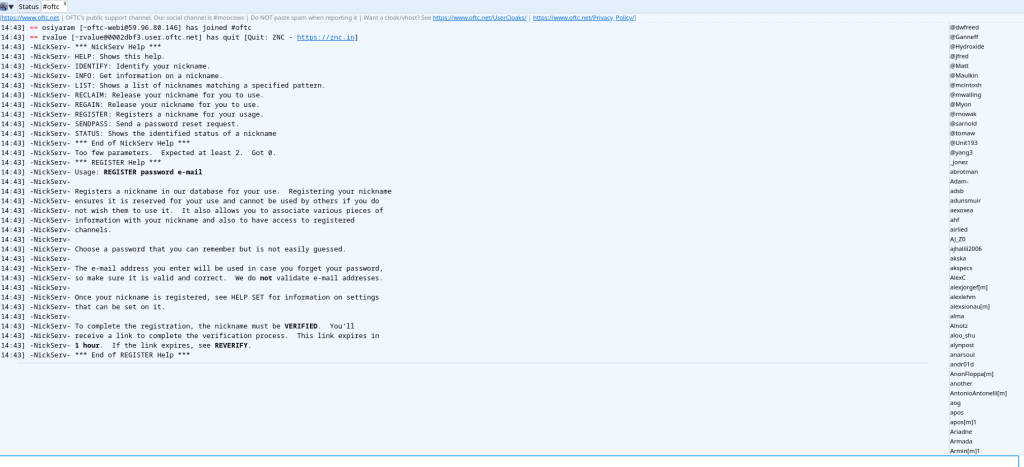
Account Registration in Pidgin and Hexchat This is the biggest pain point in both. I failed to register via either Pidgin or Hexchat. I couldn t find a way in either client to register my handle. I have had on/off relationships with IRC over the years, the biggest issue being IIRC is that if you stop using your handle for a month or two others can use it. IIRC, every couple of months or so, irc/oftc releases the dormant ones. Matrix/Vector has done quite a lot in that regard but that s a different thing altogether so for the moment will keep that aside. So, how to register for the network. This is where webchat.oftc.net comes in. You get a quaint 1970 s IRC window (probably emulated) where you call Nickserv to help you. As can be seen it one of the half a dozen bots that helps IRC. So the first thing you need to do is /msg nickserv help what you are doing is asking nickserv what services they have and Nickserv shares the numbers of services it offers. After looking into, you are looking for register /msg nickerv register Both the commands tell you what you need to do as can be seen by this
Let s say you are XYZ and your e-mail address is xyz@xyz.com This is just a throwaway id I am taking for the purpose of showing how the process is done. For this, also assume your passowrd is 1234xyz;0x something like this. I have shared about APG (Advanced Password Generator) before so you could use that to generate all sorts of passwords for yourself. So next would be /msg nickserv register 1234xyz;0x xyz@xyz.com Now the thing to remember is you need to be sure that the email is valid and in your control as it would generate a link with hcaptcha. Interestingly, their accessibility signup fails or errors out. I just entered my email and it errors out. Anyway back to it. Even after completing the puzzle, even with the valid username and password neither pidgin or hexchat would let me in. Neither of the clients were helpful in figuring out what was going wrong. At this stage, I decided to see the specs of ircv3 if they would help out in anyway and came across this. One would have thought that this is one of the more urgent things that need to be fixed, but for reasons unknown it s still in draft mode. Maybe they (the participants) are not in consensus, no idea. Unfortunately, it seems that the participants of IRCv3 have chosen a sort of closed working model as the channel is restricted. The only notes of any consequence are being shared by Ilmari Lauhakangas from Finland. Apparently, Mr/Ms/they Ilmari is also a libreoffice hacker. It is possible that their is or has been lot of drama before or something and that s why things are the way they are. In either way, doesn t tell me when this will be fixed, if ever. For people who are on mobiles and whatnot, without element, it would be 10x times harder. Update :- Saw this discussion on github. Don t see a way out  It seems I would be unable to unable to be part of Debconf Kochi 2023. Best of luck to all the participants and please share as much as possible of what happens during the event.

10 July 2023

Lukas M rdian: Netplan and systemd-networkd on Debian Bookworm

Debian s cloud-images are using systemd-networkd as their default network stack in Bookworm. A slim and feature rich networking daemon that comes included with Systemd itself. Debian s cloud-images are deploying Netplan on top of this as an easy-to-use, declarative control layer. If you want to experiment with systemd-networkd and Netplan on Debian, this can be done easily in QEMU using the official images. To start, you need to download the relevant .qcow2 Debian cloud-image from: https://cloud.debian.org/images/cloud/bookworm/latest/
$ wget https://cloud.debian.org/images/cloud/bookworm/latest/debian-12-generic-amd64.qcow2

Prepare a cloud image Next, you need to prepare some configuration files for cloud-init and Netplan, to prepare a data-source (seed.img) for your local cloud-image.
$ cat > meta.yaml <<EOF
instance-id: debian01
local-hostname: cloudimg
EOF
$ cat > user.yaml <<EOF
#cloud-config
ssh_pwauth: true
password: test
chpasswd:
  expire: false
EOF
$ cat > netplan.yaml <<EOF
network:
  version: 2
  ethernets:
    id0:
      match:
        macaddress: "ca:fe:ca:fe:00:aa"
      dhcp4: true
      dhcp6: true
      set-name: lan0
EOF
Once all configuration is prepared, you can create the local data-source image, using the cloud-localds tool from the cloud-image-utils package:
$ cloud-localds --network-config=netplan.yaml seed.img user.yaml meta.yaml

Launch the local VM Now, everything is prepared to launch a QEMU VM with two NICs and do some experimentation! The following command will launch an ephemeral environment for you, keeping the original Debian cloud-image untouched. If you want to preserve any changes on disk, you can remove the trailing -snapshot parameter.
$ qemu-system-x86_64 \
  -machine accel=kvm,type=q35 \
  -cpu host \
  -m 2G \
  -device virtio-net-pci,netdev=net0,mac=ca:fe:ca:fe:00:aa \
  -netdev user,id=net0,hostfwd=tcp::2222-:22 \
  -nic user,model=virtio-net-pci,mac=f0:0d:ca:fe:00:bb \
  -drive if=virtio,format=qcow2,file=debian-12-generic-amd64.qcow2 \
  -drive if=virtio,format=raw,file=seed.img -snapshot
We set up the default debian user account through cloud-init s user-data configuration above, so you can now login to the system, using that user with the (very unsafe!) password test .
$ ssh -o "StrictHostKeyChecking=no" -o "UserKnownHostsFile=/dev/null" -p 2222 debian@localhost # password: test

Experience Netplan and systemd-networkd Once logged in successfully, you can execute the netplan status command to check the system s network configuration, as configured through cloud-init s netplan.yaml passthrough. So you ve already used Netplan at this point implicitly and it did all the configuration of systemd-networkd for you in the background!
debian@cloudimg:~$ sudo netplan status -a
     Online state: online
    DNS Addresses: 10.0.2.3 (compat)
       DNS Search: .
   1: lo ethernet UNKNOWN/UP (unmanaged)
      MAC Address: 00:00:00:00:00:00
        Addresses: 127.0.0.1/8
                   ::1/128
           Routes: ::1 metric 256
   2: enp0s2 ethernet DOWN (unmanaged)
      MAC Address: f0:0d:ca:fe:00:bb (Red Hat, Inc.)
   3: lan0 ethernet UP (networkd: id0)
      MAC Address: ca:fe:ca:fe:00:aa (Red Hat, Inc.)
        Addresses: 10.0.2.15/24 (dhcp)
                   fec0::c8fe:caff:fefe:aa/64
                   fe80::c8fe:caff:fefe:aa/64 (link)
    DNS Addresses: 10.0.2.3
           Routes: default via 10.0.2.2 from 10.0.2.15 metric 100 (dhcp)
                   10.0.2.0/24 from 10.0.2.15 metric 100 (link)
                   10.0.2.2 from 10.0.2.15 metric 100 (dhcp, link)
                   10.0.2.3 from 10.0.2.15 metric 100 (dhcp, link)
                   fe80::/64 metric 256
                   fec0::/64 metric 100 (ra)
                   default via fe80::2 metric 100 (ra)
As you can see from this output, the lan0 interface is configured via the id0 Netplan ID to be managed by systemd-networkd. Compare this data to the netplan.yaml file above, the networkctl output, the local Netplan configuration in /etc/netplan/ and the auto-generated systemd-networkd configuration.
debian@cloudimg:~$ networkctl 
IDX LINK   TYPE     OPERATIONAL SETUP     
  1 lo     loopback carrier     unmanaged
  2 enp0s2 ether    off         unmanaged
  3 lan0   ether    routable    configured
3 links listed.
debian@cloudimg:~$ cat /etc/netplan/50-cloud-init.yaml 
# [...]
network:
    ethernets:
        id0:
            dhcp4: true
            dhcp6: true
            match:
                macaddress: ca:fe:ca:fe:00:aa
            set-name: lan0
    version: 2

debian@cloudimg:~$ ls -l /run/systemd/network/
total 8
-rw-r--r-- 1 root root  78 Jul  5 15:23 10-netplan-id0.link
-rw-r--r-- 1 root root 137 Jul  5 15:23 10-netplan-id0.network
Now you can go ahead and try something more advanced, like link aggregation, using the second NIC that you configured for this QEMU VM and explore all the possibilities of Netplan on Debian, by checking the Netplan YAML documentation.

11 June 2023

Thomas Lange: New FAI ISO images for bookworm available and FAI Live ISO

After Debian 12 aka bookworm was released yesterday, I've also created new FAI ISO images using Debian 12. The defaut ISO (large) uses FAI 6.0.3, kernel 6.1 and can install the XFCE and GNOME desktop without internet connection, since all needed packages are included into the ISO. Additional you can install Ubuntu 22.04 or Rocky Linux 9 with this FAI ISO. During these installations, the packages will be downloade via network. There's also the variant FAI ISO UBUNTU, which includes all Ubuntu packages needed for a Ubuntu server or Ubuntu desktop installation. If you need a small image, you can take the FAI ISO small, which only includes the packages for a XFCE desktop without LibreOffice. This ISO is only 880MB in size. Currently I'm working on a new feature, so FAI can create Live images, that are bootable. It's like the tool live-build which Debian uses for their official Debian Live images. A first verison of the ISO using the XFCE desktop can be downloaded from https://fai-project.org/fai-cd There you also find all other FAI ISOs.

2 June 2023

Matt Brown: Calling time on DNSSEC: The costs exceed the benefits

I m calling time on DNSSEC. Last week, prompted by a change in my DNS hosting setup, I began removing it from the few personal zones I had signed. Then this Monday the .nz ccTLD experienced a multi-day availability incident triggered by the annual DNSSEC key rotation process. This incident broke several of my unsigned zones, which led me to say very unkind things about DNSSEC on Mastodon and now I feel compelled to more completely explain my thinking: For almost all domains and use-cases, the costs and risks of deploying DNSSEC outweigh the benefits it provides. Don t bother signing your zones. The .nz incident, while topical, is not the motivation or the trigger for this conclusion. Had it been a novel incident, it would still have been annoying, but novel incidents are how we learn so I have a small tolerance for them. The problem with DNSSEC is precisely that this incident was not novel, just the latest in a long and growing list. It s a clear pattern. DNSSEC is complex and risky to deploy. Choosing to sign your zone will almost inevitably mean that you will experience lower availability for your domain over time than if you leave it unsigned. Even if you have a team of DNS experts maintaining your zone and DNS infrastructure, the risk of routine operational tasks triggering a loss of availability (unrelated to any attempted attacks that DNSSEC may thwart) is very high - almost guaranteed to occur. Worse, because of the nature of DNS and DNSSEC these incidents will tend to be prolonged and out of your control to remediate in a timely fashion. The only benefit you get in return for accepting this almost certain reduction in availability is trust in the integrity of the DNS data a subset of your users (those who validate DNSSEC) receive. Trusted DNS data that is then used to communicate across an untrusted network layer. An untrusted network layer which you are almost certainly protecting with TLS which provides a more comprehensive and trustworthy set of security guarantees than DNSSEC is capable of, and provides those guarantees to all your users regardless of whether they are validating DNSSEC or not. In summary, in our modern world where TLS is ubiquitous, DNSSEC provides only a thin layer of redundant protection on top of the comprehensive guarantees provided by TLS, but adds significant operational complexity, cost and a high likelihood of lowered availability. In an ideal world, where the deployment cost of DNSSEC and the risk of DNSSEC-induced outages were both low, it would absolutely be desirable to have that redundancy in our layers of protection. In the real world, given the DNSSEC protocol we have today, the choice to avoid its complexity and rely on TLS alone is not at all painful or risky to make as the operator of an online service. In fact, it s the prudent choice that will result in better overall security outcomes for your users. Ignore DNSSEC and invest the time and resources you would have spent deploying it improving your TLS key and certificate management. Ironically, the one use-case where I think a valid counter-argument for this position can be made is TLDs (including ccTLDs such as .nz). Despite its many failings, DNSSEC is an Internet Standard, and as infrastructure providers, TLDs have an obligation to enable its use. Unfortunately this means that everyone has to bear the costs, complexities and availability risks that DNSSEC burdens these operators with. We can t avoid that fact, but we can avoid creating further costs, complexities and risks by choosing not to deploy DNSSEC on the rest of our non-TLD zones.

But DNSSEC will save us from the evil CA ecosystem! Historically, the strongest motivation for DNSSEC has not been the direct security benefits themselves (which as explained above are minimal compared to what TLS provides), but in the new capabilities and use-cases that could be enabled if DNS were able to provide integrity and trusted data to applications. Specifically, the promise of DNS-based Authentication of Named Entities (DANE) is that with DNSSEC we can be free of the X.509 certificate authority ecosystem and along with it the expensive certificate issuance racket and dubious trust properties that have long been its most distinguishing features. Ten years ago this was an extremely compelling proposition with significant potential to improve the Internet. That potential has gone unfulfilled. Instead of maturing as deployments progressed and associated operational experience was gained, DNSSEC has been beset by the discovery of issue after issue. Each of these has necessitated further changes and additions to the protocol, increasing complexity and deployment cost. For many zones, including significant zones like google.com (where I led the attempt to evaluate and deploy DNSSEC in the mid 2010s), it is simply infeasible to deploy the protocol at all, let alone in a reliable and dependable manner. While DNSSEC maturation and deployment has been languishing, the TLS ecosystem has been steadily and impressively improving. Thanks to the efforts of many individuals and companies, although still founded on the use of a set of root certificate authorities, the TLS and CA ecosystem today features transparency, validation and multi-party accountability that comprehensively build trust in the ability to depend and rely upon the security guarantees that TLS provides. When you use TLS today, you benefit from:
  • Free/cheap issuance from a number of different certificate authorities.
  • Regular, automated issuance/renewal via the ACME protocol.
  • Visibility into who has issued certificates for your domain and when through Certificate Transparency logs.
  • Confidence that certificates issued without certificate transparency (and therefore lacking an SCT) will not be accepted by the leading modern browsers.
  • The use of modern cryptographic protocols as a baseline, with a plausible and compelling story for how these can be steadily and promptly updated over time.
DNSSEC with DANE can match the TLS ecosystem on the first benefit (up front price) and perhaps makes the second benefit moot, but has no ability to match any of the other transparency and accountability measures that today s TLS ecosystem offers. If your ZSK is stolen, or a parent zone is compromised or coerced, validly signed TLSA records for a forged certificate can be produced and spoofed to users under attack with minimal chances of detection. Finally, in terms of overall trust in the roots of the system, the CA/Browser forum requirements continue to improve the accountability and transparency of TLS certificate authorities, significantly reducing the ability for any single actor (say a nefarious government) to subvert the system. The DNS root has a well established transparent multi-party system for establishing trust in the DNSSEC root itself, but at the TLD level, almost intentionally thanks to the hierarchical nature of DNS, DNSSEC has multiple single points of control (or coercion) which exist outside of any formal system of transparency or accountability. We ve moved from DANE being a potential improvement in security over TLS when it was first proposed, to being a definite regression from what TLS provides today. That s not to say that TLS is perfect, but given where we re at, we ll get a better security return from further investment and improvements in the TLS ecosystem than we will from trying to fix DNSSEC.

But TLS is not ubiquitous for non-HTTP applications The arguments above are most compelling when applied to the web-based HTTP-oriented ecosystem which has driven most of the TLS improvements we ve seen to date. Non-HTTP protocols are lagging in adoption of many of the improvements and best practices TLS has on the web. Some claim this need to provide a solution for non-HTTP, non-web applications provides a motivation to continue pushing DNSSEC deployment. I disagree, I think it provides a motivation to instead double-down on moving those applications to TLS. TLS as the new TCP. The problem is that costs of deploying and operating DNSSEC are largely fixed regardless of how many protocols you are intending to protect with it, and worse, the negative side-effects of DNSSEC deployment can and will easily spill over to affect zones and protocols that don t want or need DNSSEC s protection. To justify continued DNSSEC deployment and operation in this context means using a smaller set of benefits (just for the non-HTTP applications) to justify the already high costs of deploying DNSSEC itself, plus the cost of the risk that DNSSEC poses to the reliability to your websites. I don t see how that equation can ever balance, particularly when you evaluate it against the much lower costs of just turning on TLS for the rest of your non-HTTP protocols instead of deploying DNSSEC. MTA-STS is a worked example of how this can be achieved. If you re still not convinced, consider that even DNS itself is considering moving to TLS (via DoT and DoH) in order to add the confidentiality/privacy attributes the protocol currently lacks. I m not a huge fan of the latency implications of these approaches, but the ongoing discussion shows that clever solutions and mitigations for that may exist. DoT/DoH solve distinct problems from DNSSEC and in principle should be used in combination with it, but in a world where DNS itself is relying on TLS and therefore has eliminated the majority of spoofing and cache poisoning attacks through DoT/DoH deployment the benefit side of the DNSSEC equation gets smaller and smaller still while the costs remain the same.

OK, but better software or more careful operations can reduce DNSSEC s cost Some see the current DNSSEC costs simply as teething problems that will reduce as the software and tooling matures to provide more automation of the risky processes and operational teams learn from their mistakes or opt to simply transfer the risk by outsourcing the management and complexity to larger providers to take care of. I don t find these arguments compelling. We ve already had 15+ years to develop improved software for DNSSEC without success. What s changed that we should expect a better outcome this year or next? Nothing. Even if we did have better software or outsourced operations, the approach is still only hiding the costs behind automation or transferring the risk to another organisation. That may appear to work in the short-term, but eventually when the time comes to upgrade the software, migrate between providers or change registrars the debt will come due and incidents will occur. The problem is the complexity of the protocol itself. No amount of software improvement or outsourcing addresses that. After 15+ years of trying, I think it s worth considering that combining cryptography, caching and distributed consensus, some of the most fundamental and complex computer science problems, into a slow-moving and hard to evolve low-level infrastructure protocol while appropriately balancing security, performance and reliability appears to be beyond our collective ability. That doesn t have to be the end of the world, the improvements achieved in the TLS ecosystem over the same time frame provide a positive counter example - perhaps DNSSEC is simply focusing our attention at the wrong layer of the stack. Ideally secure DNS data would be something we could have, but if the complexity of DNSSEC is the price we have to pay to achieve it, I m out. I would rather opt to remain with the simpler yet insecure DNS protocol and compensate for its short comings at higher transport or application layers where experience shows we are able to more rapidly improve and develop our security capabilities.

Summing up For the vast majority of domains and use-cases there is simply no net benefit to deploying DNSSEC in 2023. I d even go so far as to say that if you ve already signed your zones, you should (carefully) move them back to being unsigned - you ll reduce the complexity of your operating environment and lower your risk of availability loss triggered by DNS. Your users will thank you. The threats that DNSSEC defends against are already amply defended by the now mature and still improving TLS ecosystem at the application layer, and investing in further improvements here carries far more return than deployment of DNSSEC. For TLDs, like .nz whose outage triggered this post, DNSSEC is not going anywhere and investment in mitigating its complexities and risks is an unfortunate burden that must be shouldered. While the full incident report of what went wrong with .nz is not yet available, the interim report already hints at some useful insights. It is important that InternetNZ publishes a full and comprehensive review so that the full set of learnings and improvements this incident can provide can be fully realised by .nz and other TLD operators stuck with the unenviable task of trying to safely operate DNSSEC.

Postscript After taking a few days to draft and edit this post, I ve just stumbled across a presentation from the well respected Geoff Huston at last weeks RIPE86 meeting. I ve only had time to skim the slides (video here) - they don t seem to disagree with my thinking regarding the futility of the current state of DNSSEC, but also contain some interesting ideas for what it might take for DNSSEC to become a compelling proposition. Probably worth a read/watch!

1 June 2023

Jamie McClelland: Enough about the AI Apocalypse Already

After watching Democracy Now s segment on artificial intelligence I started to wonder - am I out of step on this topic? When people claim artificial intelligence will surpass human intelligence and thus threaten humanity with extinction, they seem to be referring specifically to advances made with large language models. As I understand them, large language models are probability machines that have ingested massive amounts of text scraped from the Internet. They answer questions based on the probability of one series of words (their answer) following another series of words (the question). It seems like a stretch to call this intelligence, but if we accept that definition then it follows that this kind of intelligence is nothing remotely like human intelligence, which makes the claim that it will surpass human intelligence confusing. Hasn t this kind of machine learning surpassed us decades ago? Or when we say surpass does that simply refer to fooling people into thinking an AI machine is a human via conversation? That is an important milestone, but I m not ready to accept the turing test as proof of equal intelligence. Furthermore, large language models hallucinate and also reflect the biases of their training data. The word hallucinate seems like a euphemism, as if it could be corrected with the right medication when in fact it seems hard to avoid when your strategy is to correlate words based on probability. But even if you could solve the here is a completely wrong answer presented with sociopathic confidence problem, reflecting the biases of your data sources seems fairly intractable. In what world would a system with built-in bias be considered on the brink of surpassing human intelligence? The danger from LLMs seems to be their ability to convince people that their answers are correct, including their patently wrong and/or biased answers. Why do people think they are giving correct answers? Oh right terrifying right wing billionaires (with terrifying agendas have been claiming AI will exceed human intelligence and threaten humanity and every time they sign a hyperbolic statement they get front page mainstream coverage. And even progressive news outlets are spreading this narrative with minimal space for contrary opinions (thank you Tawana Petty from the Algorithmic Justice League for providing the only glimpse of reason in the segment). The belief that artificial intelligence is or will soon become omnipotent has real world harms today: specifically it creates the misperception that current LLMs are accurate, which paves the way for greater adoption among police forces, social service agencies, medical facilities and other places where racial and economic biases have life and death consequences. When the CEO of OpenAI calls the technology dangerous and in need of regulation, he gets both free advertising promoting the power and supposed accuracy of his product and the possibility of freezing further developments in the field that might challenge OpenAI s current dominance. The real threat to humanity is not AI, it s massive inequality and the use of tactics ranging from mundane bureaucracy to deadly force and incarceration to segregate the affluent from the growing number of people unable to make ends meet. We have spent decades training bureaucrats, judges and cops to robotically follow biased laws to maintain this order without compassion or empathy. Replacing them with AI would be make things worse and should be stopped. But, let s be clear, the narrative that AI is poised to surpass human intelligence and make humanity extinct is a dangerous distraction that runs counter to a much more important story about the very real and very present exploitative practices of the [companies building AI], who are rapidly centralizing power and increasing social inequities. . Maybe we should talk about that instead?

1 May 2023

Paul Wise: FLOSS Activities April 2023

Focus This month I didn't have any particular focus. I just worked on issues in my info bubble.

Changes

Issues
  • Security issue in secret manager (sent privately)
  • Broken symlinks in opencpn
  • Test problem in SPTAG
  • Debian migration unblock needed for evolution

Review

Administration
  • Debian IRC: fixed the #debian-mips channel topic
  • Debian wiki: unblock IP addresses, approve accounts
  • Debian QA services: deploy changes, investigate SourceForge uscan issue

Communication
  • Respond to queries from Debian users and contributors on the mailing lists and IRC

Sponsors The SPTAG work was sponsored. All other work was done on a volunteer basis.

23 April 2023

Petter Reinholdtsen: Speech to text, she APTly whispered, how hard can it be?

While visiting a convention during Easter, it occurred to me that it would be great if I could have a digital Dictaphone with transcribing capabilities, providing me with texts to cut-n-paste into stuff I need to write. The background is that long drives often bring up the urge to write on texts I am working on, which of course is out of the question while driving. With the release of OpenAI Whisper, this seem to be within reach with Free Software, so I decided to give it a go. OpenAI Whisper is a Linux based neural network system to read in audio files and provide text representation of the speech in that audio recording. It handle multiple languages and according to its creators even can translate into a different language than the spoken one. I have not tested the latter feature. It can either use the CPU or a GPU with CUDA support. As far as I can tell, CUDA in practice limit that feature to NVidia graphics cards. I have few of those, as they do not work great with free software drivers, and have not tested the GPU option. While looking into the matter, I did discover some work to provide CUDA support on non-NVidia GPUs, and some work with the library used by Whisper to port it to other GPUs, but have not spent much time looking into GPU support yet. I've so far used an old X220 laptop as my test machine, and only transcribed using its CPU. As it from a privacy standpoint is unthinkable to use computers under control of someone else (aka a "cloud" service) to transcribe ones thoughts and personal notes, I want to run the transcribing system locally on my own computers. The only sensible approach to me is to make the effort I put into this available for any Linux user and to upload the needed packages into Debian. Looking at Debian Bookworm, I discovered that only three packages were missing, tiktoken, triton, and openai-whisper. For a while I also believed ffmpeg-python was needed, but as its upstream seem to have vanished I found it safer to rewrite whisper to stop depending on in than to introduce ffmpeg-python into Debian. I decided to place these packages under the umbrella of the Debian Deep Learning Team, which seem like the best team to look after such packages. Discussing the topic within the group also made me aware that the triton package was already a future dependency of newer versions of the torch package being planned, and would be needed after Bookworm is released. All required code packages have been now waiting in the Debian NEW queue since Wednesday, heading for Debian Experimental until Bookworm is released. An unsolved issue is how to handle the neural network models used by Whisper. The default behaviour of Whisper is to require Internet connectivity and download the model requested to ~/.cache/whisper/ on first invocation. This obviously would fail the deserted island test of free software as the Debian packages would be unusable for someone stranded with only the Debian archive and solar powered computer on a deserted island. Because of this, I would love to include the models in the Debian mirror system. This is problematic, as the models are very large files, which would put a heavy strain on the Debian mirror infrastructure around the globe. The strain would be even higher if the models change often, which luckily as far as I can tell they do not. The small model, which according to its creator is most useful for English and in my experience is not doing a great job there either, is 462 MiB (deb is 414 MiB). The medium model, which to me seem to handle English speech fairly well is 1.5 GiB (deb is 1.3 GiB) and the large model is 2.9 GiB (deb is 2.6 GiB). I would assume everyone with enough resources would prefer to use the large model for highest quality. I believe the models themselves would have to go into the non-free part of the Debian archive, as they are not really including any useful source code for updating the models. The "source", aka the model training set, according to the creators consist of "680,000 hours of multilingual and multitask supervised data collected from the web", which to me reads material with both unknown copyright terms, unavailable to the general public. In other words, the source is not available according to the Debian Free Software Guidelines and the model should be considered non-free. I asked the Debian FTP masters for advice regarding uploading a model package on their IRC channel, and based on the feedback there it is still unclear to me if such package would be accepted into the archive. In any case I wrote build rules for a OpenAI Whisper model package and modified the Whisper code base to prefer shared files under /usr/ and /var/ over user specific files in ~/.cache/whisper/ to be able to use these model packages, to prepare for such possibility. One solution might be to include only one of the models (small or medium, I guess) in the Debian archive, and ask people to download the others from the Internet. Not quite sure what to do here, and advice is most welcome (use the debian-ai mailing list). To make it easier to test the new packages while I wait for them to clear the NEW queue, I created an APT source targeting bookworm. I selected Bookworm instead of Bullseye, even though I know the latter would reach more users, is that some of the required dependencies are missing from Bullseye and I during this phase of testing did not want to backport a lot of packages just to get up and running. Here is a recipe to run as user root if you want to test OpenAI Whisper using Debian packages on your Debian Bookworm installation, first adding the APT repository GPG key to the list of trusted keys, then setting up the APT repository and finally installing the packages and one of the models:
curl https://geekbay.nuug.no/~pere/openai-whisper/D78F5C4796F353D211B119E28200D9B589641240.asc \
  -o /etc/apt/trusted.gpg.d/pere-whisper.asc
mkdir -p /etc/apt/sources.list.d
cat > /etc/apt/sources.list.d/pere-whisper.list <<EOF
deb https://geekbay.nuug.no/~pere/openai-whisper/ bookworm main
deb-src https://geekbay.nuug.no/~pere/openai-whisper/ bookworm main
EOF
apt update
apt install openai-whisper
The package work for me, but have not yet been tested on any other computer than my own. With it, I have been able to (badly) transcribe a 2 minute 40 second Norwegian audio clip to test using the small model. This took 11 minutes and around 2.2 GiB of RAM. Transcribing the same file with the medium model gave a accurate text in 77 minutes using around 5.2 GiB of RAM. My test machine had too little memory to test the large model, which I believe require 11 GiB of RAM. In short, this now work for me using Debian packages, and I hope it will for you and everyone else once the packages enter Debian. Now I can start on the audio recording part of this project. As usual, if you use Bitcoin and want to show your support of my activities, please send Bitcoin donations to my address 15oWEoG9dUPovwmUL9KWAnYRtNJEkP1u1b.

18 April 2023

Matt Brown: co2mon.nz: Ventilation monitoring as a service

Previously, I explained why ventilation monitoring is important, and the opportunity I see to help accelerate deployment of high quality ventilation monitoring for small businesses and organisations. In this post, I m going to discuss my plans to tackle that opportunity:

My journey to ventilation monitoring I started looking into ventilation monitoring in detail last year when I wanted to ensure that the classrooms of our local primary school were well ventilated during the Omicron outbreak. That research revealed that the existing products on offer were challenging to deploy in a school environment from a cost perspective while also not providing perfect functionality. I built and deployed a set of monitors to our local school, along with a corresponding set of software and web services that provide management of the monitors and visibility into the collected data and trends. The benefit of the monitoring is evident - CO2 concentration drops immediately after a notification occurs, indicating the intended action of increasing ventilation is taking place. Initially this occurred more frequently, but over time low concentrations of CO2, indicating good ventilation levels, are regularly achieved across the school day thanks to simple changes in routine being established, such as leaving windows cracked open. As the benefits of the project to the school became clear, my ambition and vision for ventilation monitoring grew from wanting to see my children learn in a safe and effective environment to desiring safe and effective learning, working, living and social spaces for everyone.

co2mon.nz: Ventilation monitoring as a service prototype co2mon.nz is the service that I have launched to explore this opportunity. Based on the same hardware and software that I used for the school deployment I am selling both a physical CO2 monitor and an ongoing subscription service for the management and monitoring. Together, the monitor and software provide an effective and affordable path to understanding indoor air quality and ventilation status that anyone can use.

CO2 monitor The CO2 monitor hardware and firmware are based on Oliver Seiler s design using a Sensirion SCD40 module for CO2 measurement and providing immediate in-room feedback via an on-monitor screen as well as a red/orange/green traffic light . In addition to the immediate feedback provided by the monitor itself, a WiFi connection can be configured allowing every measurement to be reported back to the supporting monitoring and management service. At the current prototype stage, I am building all the hardware, 3D printing the plastic cases and assembling the circuit board from purchased components through a production line in my home workshop. The monitor is powered via a standard USB cable and wall adaptor for simplicity. The first batch of monitors I built have been operating smoothly for nearly a year now. Further refinement and development of the design is required but already I am impressed with the potential this combination of easily accessible components provides to enable widespread adoption and deployment of ventilation monitoring.

Monitoring and management service The web service provides a historical record of CO2 levels from each monitor through a set of graphs and other dashboards and allows for this data to be shared or published. This is useful both for providing visibility into ventilation status to those not directly present in the space (e.g. across an entire school) and to allow insights into trends and patterns in ventilation to be observed and acted upon. When I began the project I approached the software side as an opportunity to explore the real-world equivalents of many of the internal tools and components that I was used to using within Google. That s been a fun process, even though it means I ve invested far more time on the software than the current number of customers or business state can really justify. Communication with the monitors occurs via MQTT into a custom Go service responsible for maintaining the fleet and exposing the measurement data to Prometheus which acts as the storage layer. A second service (based on the Buffalo web framework) is responsible for serving the web interface containing the dashboards and configuration options. Alongside these core components another small Golang service manages a private X509 certificate authority to provide monitor identity and encryption of the measurement data and an automated pipeline of scripts and triggers takes care of firmware provisioning, sensor calibration and burn-in/failure testing when building batches of monitors. While simple, the design is easy to manage and could scale to support many, many more monitors without significant effort. I m hosting the infrastructure on AWS, which I ve found pleasant and easy to use, and while not a typical choice, I m very pleased with the performance and flexibility that Prometheus offers as a data storage layer.

Areas of development The prototype has been effective in proving the feasibility of offering ventilation monitoring as a service, but to evolve the prototype into an actual business is going to require further effort in the following areas:

Finding product market fit I m confident that what co2mon.nz is offering could provide a useful and needed service for many small business owners and numerous others, but the question of whether it s sufficiently compelling that a sizeable group of customers see enough value that they re willing to regularly pay for it and therefore sustain a business providing the service is not yet proven. While initial feedback on the idea has been positive, much of it has been from family and friends and I ve spent more time building the software (which has been fun and educational) than I have talking to actual potential customers and understanding their needs and wants. This is a classic trap that technical founders fall into, and I m guilty despite my best intentions it s comfortable and easy for me to work on the parts where I have existing experience and neglect putting time into the customer-facing sales, marketing and research which are more uncomfortable, new and challenging!

Scaling monitor production Scaling from the current prototype batches I have built to even modest levels (e.g. hundreds) of sales will require outsourcing. There are several potential New Zealand and overseas providers I can work with which look very promising, but will require iteration of the hardware design (e.g. to remove through-hole components which add complexity and expense to the PCB assembly process). The lead times I ve been quoted for working with these outsourced providers are in the order of 1-2 months per batch, and on top of this there are a number of other risks in terms of component availability and regulatory compliance that may add additional delays or time to resolve, particularly as my experience leans towards the software rather than the hardware. It seems counter-intuitive to worry about how to scale to meet demand that doesn t yet provably exist, but given the potentially long lead times involved in establishing outsourced production I think it s worth taking some risk in starting this journey early.

Next steps My aim now is to intentionally change my focus from the software to learning about the market and finding the right product to offer via two channels:
  1. Via online marketing, to reach a wide range of potential customers and allow rapid iteration and testing of a variety of product/service combinations, including referral options for existing customers.
  2. In-person with small businesses in my local area to seek out direct feedback and thoughts on the general issue of ventilation monitoring and the specific service I m offering.
One concrete possibility I m keen to test via both channels is a simple monthly price for the combined service, rather than purchasing a monitor and separate software subscription. This has the potential to be both simpler to market and explain to customers, while also opening the possibility of short-term rental or evaluation to customers who are not willing to make a long-term investment or commitment. In parallel to the customer-focused discovery work, but as an explicit lower priority, I ll order an initial small batch of outsourced monitors to begin gaining experience with that process accepting the risk that the time and cost may turn out to be wasted if the product is wrong or not a good match for customers needs.

Matthew Garrett: PSA: upgrade your LUKS key derivation function

Here's an article from a French anarchist describing how his (encrypted) laptop was seized after he was arrested, and material from the encrypted partition has since been entered as evidence against him. His encryption password was supposedly greater than 20 characters and included a mixture of cases, numbers, and punctuation, so in the absence of any sort of opsec failures this implies that even relatively complex passwords can now be brute forced, and we should be transitioning to even more secure passphrases.

Or does it? Let's go into what LUKS is doing in the first place. The actual data is typically encrypted with AES, an extremely popular and well-tested encryption algorithm. AES has no known major weaknesses and is not considered to be practically brute-forceable - at least, assuming you have a random key. Unfortunately it's not really practical to ask a user to type in 128 bits of binary every time they want to unlock their drive, so another approach has to be taken.

This is handled using something called a "key derivation function", or KDF. A KDF is a function that takes some input (in this case the user's password) and generates a key. As an extremely simple example, think of MD5 - it takes an input and generates a 128-bit output, so we could simply MD5 the user's password and use the output as an AES key. While this could technically be considered a KDF, it would be an extremely bad one! MD5s can be calculated extremely quickly, so someone attempting to brute-force a disk encryption key could simply generate the MD5 of every plausible password (probably on a lot of machines in parallel, likely using GPUs) and test each of them to see whether it decrypts the drive.

(things are actually slightly more complicated than this - your password is used to generate a key that is then used to encrypt and decrypt the actual encryption key. This is necessary in order to allow you to change your password without having to re-encrypt the entire drive - instead you simply re-encrypt the encryption key with the new password-derived key. This also allows you to have multiple passwords or unlock mechanisms per drive)

Good KDFs reduce this risk by being what's technically referred to as "expensive". Rather than performing one simple calculation to turn a password into a key, they perform a lot of calculations. The number of calculations performed is generally configurable, in order to let you trade off between the amount of security (the number of calculations you'll force an attacker to perform when attempting to generate a key from a potential password) and performance (the amount of time you're willing to wait for your laptop to generate the key after you type in your password so it can actually boot). But, obviously, this tradeoff changes over time - defaults that made sense 10 years ago are not necessarily good defaults now. If you set up your encrypted partition some time ago, the number of calculations required may no longer be considered up to scratch.

And, well, some of these assumptions are kind of bad in the first place! Just making things computationally expensive doesn't help a lot if your adversary has the ability to test a large number of passwords in parallel. GPUs are extremely good at performing the sort of calculations that KDFs generally use, so an attacker can "just" get a whole pile of GPUs and throw them at the problem. KDFs that are computationally expensive don't do a great deal to protect against this. However, there's another axis of expense that can be considered - memory. If the KDF algorithm requires a significant amount of RAM, the degree to which it can be performed in parallel on a GPU is massively reduced. A Geforce 4090 may have 16,384 execution units, but if each password attempt requires 1GB of RAM and the card only has 24GB on board, the attacker is restricted to running 24 attempts in parallel.

So, in these days of attackers with access to a pile of GPUs, a purely computationally expensive KDF is just not a good choice. And, unfortunately, the subject of this story was almost certainly using one of those. Ubuntu 18.04 used the LUKS1 header format, and the only KDF supported in this format is PBKDF2. This is not a memory expensive KDF, and so is vulnerable to GPU-based attacks. But even so, systems using the LUKS2 header format used to default to argon2i, again not a memory expensive KDFwhich is memory strong, but not designed to be resistant to GPU attack (thanks to the comments pointing out my misunderstanding here). New versions default to argon2id, which is. You want to be using argon2id.

What makes this worse is that distributions generally don't update this in any way. If you installed your system and it gave you pbkdf2 as your KDF, you're probably still using pbkdf2 even if you've upgraded to a system that would use argon2id on a fresh install. Thankfully, this can all be fixed-up in place. But note that if anything goes wrong here you could lose access to all your encrypted data, so before doing anything make sure it's all backed up (and figure out how to keep said backup secure so you don't just have your data seized that way).

First, make sure you're running as up-to-date a version of your distribution as possible. Having tools that support the LUKS2 format doesn't mean that your distribution has all of that integrated, and old distribution versions may allow you to update your LUKS setup without actually supporting booting from it. Also, if you're using an encrypted /boot, stop now - very recent versions of grub2 support LUKS2, but they don't support argon2id, and this will render your system unbootable.

Next, figure out which device under /dev corresponds to your encrypted partition. Run

lsblk

and look for entries that have a type of "crypt". The device above that in the tree is the actual encrypted device. Record that name, and run

sudo cryptsetup luksHeaderBackup /dev/whatever --header-backup-file /tmp/luksheader

and copy that to a USB stick or something. If something goes wrong here you'll be able to boot a live image and run

sudo cryptsetup luksHeaderRestore /dev/whatever --header-backup-file luksheader

to restore it.

(Edit to add: Once everything is working, delete this backup! It contains the old weak key, and someone with it can potentially use that to brute force your disk encryption key using the old KDF even if you've updated the on-disk KDF.)

Next, run

sudo cryptsetup luksDump /dev/whatever

and look for the Version: line. If it's version 1, you need to update the header to LUKS2. Run

sudo cryptsetup convert /dev/whatever --type luks2

and follow the prompts. Make sure your system still boots, and if not go back and restore the backup of your header. Assuming everything is ok at this point, run

sudo cryptsetup luksDump /dev/whatever

again and look for the PBKDF: line in each keyslot (pay attention only to the keyslots, ignore any references to pbkdf2 that come after the Digests: line). If the PBKDF is either "pbkdf2" or "argon2i" you should convert to argon2id. Run the following:

sudo cryptsetup luksConvertKey /dev/whatever --pbkdf argon2id

and follow the prompts. If you have multiple passwords associated with your drive you'll have multiple keyslots, and you'll need to repeat this for each password.

Distributions! You should really be handling this sort of thing on upgrade. People who installed their systems with your encryption defaults several years ago are now much less secure than people who perform a fresh install today. Please please please do something about this.

comment count unavailable comments

14 April 2023

John Goerzen: Easily Accessing All Your Stuff with a Zero-Trust Mesh VPN

Probably everyone is familiar with a regular VPN. The traditional use case is to connect to a corporate or home network from a remote location, and access services as if you were there. But these days, the notion of corporate network and home network are less based around physical location. For instance, a company may have no particular office at all, may have a number of offices plus a number of people working remotely, and so forth. A home network might have, say, a PVR and file server, while highly portable devices such as laptops, tablets, and phones may want to talk to each other regardless of location. For instance, a family member might be traveling with a laptop, another at a coffee shop, and those two devices might want to communicate, in addition to talking to the devices at home. And, in both scenarios, there might be questions about giving limited access to friends. Perhaps you d like to give a friend access to part of your file server, or as a company, you might have contractors working on a limited project. Pretty soon you wind up with a mess of VPNs, forwarded ports, and tricks to make it all work. With the increasing prevalence of CGNAT, a lot of times you can t even open a port to the public Internet. Each application or device probably has its own gateway just to make it visible on the Internet, some of which you pay for. Then you add on the question of: should you really trust your LAN anyhow? With possibilities of guests using it, rogue access points, etc., the answer is probably no . We can move the responsibility for dealing with NAT, fluctuating IPs, encryption, and authentication, from the application layer further down into the network stack. We then arrive at a much simpler picture for all. So this page is fundamentally about making the network work, simply and effectively.

How do we make the Internet work in these scenarios? We re going to combine three concepts:
  1. A VPN, providing fully encrypted and authenticated communication and stable IPs
  2. Mesh Networking, in which devices automatically discover optimal paths to reach each other
  3. Zero-trust networking, in which we do not need to trust anything about the underlying LAN, because all our traffic uses the secure systems in points 1 and 2.
By combining these concepts, we arrive at some nice results:
  • You can ssh hostname, where hostname is one of your machines (server, laptop, whatever), and as long as hostname is up, you can reach it, wherever it is, wherever you are.
    • Combined with mosh, these sessions will be durable even across moving to other host networks.
    • You could just as well use telnet, because the underlying network should be secure.
  • You don t have to mess with encryption keys, certs, etc., for every internal-only service. Since IPs are now trustworthy, that s all you need. hosts.allow could make a comeback!
  • You have a way of transiting out of extremely restrictive networks. Every tool discussed here has a way of falling back on routing things via a broker (relay) on TCP port 443 if all else fails.
There might sometimes be tradeoffs. For instance:
  • On LANs faster than 1Gbps, performance may degrade due to encryption and encapsulation overhead. However, these tools should let hosts discover the locality of each other and not send traffic over the Internet if the devices are local.
  • With some of these tools, hosts local to each other (on the same LAN) may be unable to find each other if they can t reach the control plane over the Internet (Internet is down or provider is down)
Some other features that some of the tools provide include:
  • Easy sharing of limited access with friends/guests
  • Taking care of everything you need, including SSL certs, for exposing a certain on-net service to the public Internet
  • Optional routing of your outbound Internet traffic via an exit node on your network. Useful, for instance, if your local network is blocking tons of stuff.
Let s dive in.

Types of Mesh VPNs I ll go over several types of meshes in this article:
  1. Fully decentralized with automatic hop routing This model has no special central control plane. Nodes discover each other in various ways, and establish routes to each other. These routes can be direct connections over the Internet, or via other nodes. This approach offers the greatest resilience. Examples I ll cover include Yggdrasil and tinc.
  2. Automatic peer-to-peer with centralized control In this model, nodes, by default, communicate by establishing direct links between them. A regular node never carries traffic on behalf of other nodes. Special-purpose relays are used to handle cases in which NAT traversal is impossible. This approach tends to offer simple setup. Examples I ll cover include Tailscale, Zerotier, Nebula, and Netmaker.
  3. Roll your own and hybrid approaches This is a grab bag of other ideas; for instance, running Yggdrasil over Tailscale.

Terminology For the sake of consistency, I m going to use common language to discuss things that have different terms in different ecosystems:
  • Every tool discussed here has a way of dealing with NAT traversal. It may assist with establishing direct connections (eg, STUN), and if that fails, it may simply relay traffic between nodes. I ll call such a relay a broker . This may or may not be the same system that is a control plane for a tool.
  • All of these systems operate over lower layers that are unencrypted. Those lower layers may be a LAN (wired or wireless, which may or may not have Internet access), or the public Internet (IPv4 and/or IPv6). I m going to call the unencrypted lower layer, whatever it is, the clearnet .

Evaluation Criteria Here are the things I want to see from a solution:
  • Secure, with all communications end-to-end encrypted and authenticated, and prevention of traffic from untrusted devices.
  • Flexible, adapting to changes in network topology quickly and automatically.
  • Resilient, without single points of failure, and with devices local to each other able to communicate even if cut off from the Internet or other parts of the network.
  • Private, minimizing leakage of information or metadata about me and my systems
  • Able to traverse CGNAT without having to use a broker whenever possible
  • A lesser requirement for me, but still a nice to have, is the ability to include others via something like Internet publishing or inviting guests.
  • Fully or nearly fully Open Source
  • Free or very cheap for personal use
  • Wide operating system support, including headless Linux on x86_64 and ARM.

Fully Decentralized VPNs with Automatic Hop Routing Two systems fit this description: Yggdrasil and Tinc. Let s dive in.

Yggdrasil I ll start with Yggdrasil because I ve written so much about it already. It featured in prior posts such as:

Yggdrasil can be a private mesh VPN, or something more Yggdrasil can be a private mesh VPN, just like the other tools covered here. It s unique, however, in that a key goal of the project is to also make it useful as a planet-scale global mesh network. As such, Yggdrasil is a testbed of new ideas in distributed routing designed to scale up to massive sizes and all sorts of connection conditions. As of 2023-04-10, the main global Yggdrasil mesh has over 5000 nodes in it. You can choose whether or not to participate. Every node in a Yggdrasil mesh has a public/private keypair. Each node then has an IPv6 address (in a private address space) derived from its public key. Using these IPv6 addresses, you can communicate right away. Yggdrasil differs from most of the other tools here in that it does not necessarily seek to establish a direct link on the clearnet between, say, host A and host G for them to communicate. It will prefer such a direct link if it exists, but it is perfectly happy if it doesn t. The reason is that every Yggdrasil node is also a router in the Yggdrasil mesh. Let s sit with that concept for a moment. Consider:
  • If you have a bunch of machines on your LAN, but only one of them can peer over the clearnet, that s fine; all the other machines will discover this route to the world and use it when necessary.
  • All you need to run a broker is just a regular node with a public IP address. If you are participating in the global mesh, you can use one (or more) of the free public peers for this purpose.
  • It is not necessary for every node to know about the clearnet IP address of every other node (improving privacy). In fact, it s not even necessary for every node to know about the existence of all the other nodes, so long as it can find a route to a given node when it s asked to.
  • Yggdrasil can find one or more routes between nodes, and it can use this knowledge of multiple routes to aggressively optimize for varying network conditions, including combinations of, say, downloads and low-latency ssh sessions.
Behind the scenes, Yggdrasil calculates optimal routes between nodes as necessary, using a mesh-wide DHT for initial contact and then deriving more optimal paths. (You can also read more details about the routing algorithm.) One final way that Yggdrasil is different from most of the other tools is that there is no separate control server. No node is special , in charge, the sole keeper of metadata, or anything like that. The entire system is completely distributed and auto-assembling.

Meeting neighbors There are two ways that Yggdrasil knows about peers:
  • By broadcast discovery on the local LAN
  • By listening on a specific port (or being told to connect to a specific host/port)
Sometimes this might lead to multiple ways to connect to a node; Yggdrasil prefers the connection auto-discovered by broadcast first, then the lowest-latency of the defined path. In other words, when your laptops are in the same room as each other on your local LAN, your packets will flow directly between them without traversing the Internet.

Unique uses Yggdrasil is uniquely suited to network-challenged situations. As an example, in a post-disaster situation, Internet access may be unavailable or flaky, yet there may be many local devices perhaps ones that had never known of each other before that could share information. Yggdrasil meets this situation perfectly. The combination of broadcast auto-detection, distributed routing, and so forth, basically means that if there is any physical path between two nodes, Yggdrasil will find and enable it. Ad-hoc wifi is rarely used because it is a real pain. Yggdrasil actually makes it useful! Its broadcast discovery doesn t require any IP address provisioned on the interface at all (it just uses the IPv6 link-local address), so you don t need to figure out a DHCP server or some such. And, Yggdrasil will tend to perform routing along the contours of the RF path. So you could have a laptop in the middle of a long distance relaying communications from people farther out, because it could see both. Or even a chain of such things.

Yggdrasil: Security and Privacy Yggdrasil s mesh is aggressively greedy. It will peer with any node it can find (unless told otherwise) and will find a route to anywhere it can. There are two main ways to make sure you keep unauthorized traffic out: by restricting who can talk to your mesh, and by firewalling the Yggdrasil interface. Both can be used, and they can be used simultaneously. I ll discuss firewalling more at the end of this article. Basically, you ll almost certainly want to do this if you participate in the public mesh, because doing so is akin to having a globally-routable public IP address direct to your device. If you want to restrict who can talk to your mesh, you just disable the broadcast feature on all your nodes (empty MulticastInterfaces section in the config), and avoid telling any of your nodes to connect to a public peer. You can set a list of authorized public keys that can connect to your nodes listening interfaces, which you ll probably want to do. You will probably want to either open up some inbound ports (if you can) or set up a node with a known clearnet IP on a place like a $5/mo VPS to help with NAT traversal (again, setting AllowedPublicKeys as appropriate). Yggdrasil doesn t allow filtering multicast clients by public key, only by network interface, so that s why we disable broadcast discovery. You can easily enough teach Yggdrasil about static internal LAN IPs of your nodes and have things work that way. (Or, set up an internal gateway node or two, that the clients just connect to when they re local). But fundamentally, you need to put a bit more thought into this with Yggdrasil than with the other tools here, which are closed-only. Compared to some of the other tools here, Yggdrasil is better about information leakage; nodes only know details, such as clearnet IPs, of directly-connected peers. You can obtain the list of directly-connected peers of any known node in the mesh but that list is the public keys of the directly-connected peers, not the clearnet IPs. Some of the other tools contain a limited integrated firewall of sorts (with limited ACLs and such). Yggdrasil does not, but is fully compatible with on-host firewalls. I recommend these anyway even with many other tools.

Yggdrasil: Connectivity and NAT traversal Compared to the other tools, Yggdrasil is an interesting mix. It provides a fully functional mesh and facilitates connectivity in situations in which no other tool can. Yet its NAT traversal, while it exists and does work, results in using a broker under some of the more challenging CGNAT situations more often than some of the other tools, which can impede performance. Yggdrasil s underlying protocol is TCP-based. Before you run away screaming that it must be slow and unreliable like OpenVPN over TCP it s not, and it is even surprisingly good around bufferbloat. I ve found its performance to be on par with the other tools here, and it works as well as I d expect even on flaky 4G links. Overall, the NAT traversal story is mixed. On the one hand, you can run a node that listens on port 443 and Yggdrasil can even make it speak TLS (even though that s unnecessary from a security standpoint), so you can likely get out of most restrictive firewalls you will ever encounter. If you join the public mesh, know that plenty of public peers do listen on port 443 (and other well-known ports like 53, plus random high-numbered ones). If you connect your system to multiple public peers, there is a chance though a very small one that some public transit traffic might be routed via it. In practice, public peers hopefully are already peered with each other, preventing this from happening (you can verify this with yggdrasilctl debug_remotegetpeers key=ABC...). I have never experienced a problem with this. Also, since latency is a factor in routing for Yggdrasil, it is highly unlikely that random connections we use are going to be competitive with datacenter peers.

Yggdrasil: Sharing with friends If you re open to participating in the public mesh, this is one of the easiest things of all. Have your friend install Yggdrasil, point them to a public peer, give them your Yggdrasil IP, and that s it. (Well, presumably you also open up your firewall you did follow my advice to set one up, right?) If your friend is visiting at your location, they can just hop on your wifi, install Yggdrasil, and it will automatically discover a route to you. Yggdrasil even has a zero-config mode for ephemeral nodes such as certain Docker containers. Yggdrasil doesn t directly support publishing to the clearnet, but it is certainly possible to proxy (or even NAT) to/from the clearnet, and people do.

Yggdrasil: DNS There is no particular extra DNS in Yggdrasil. You can, of course, run a DNS server within Yggdrasil, just as you can anywhere else. Personally I just add relevant hosts to /etc/hosts and leave it at that, but it s up to you.

Yggdrasil: Source code, pricing, and portability Yggdrasil is fully open source (LGPLv3 plus additional permissions in an exception) and highly portable. It is written in Go, and has prebuilt binaries for all major platforms (including a Debian package which I made). There is no charge for anything with Yggdrasil. Listed public peers are free and run by volunteers. You can run your own peers if you like; they can be public and unlisted, public and listed (just submit a PR to get it listed), or private (accepting connections only from certain nodes keys). A peer in this case is just a node with a known clearnet IP address. Yggdrasil encourages use in other projects. For instance, NNCP integrates a Yggdrasil node for easy communication with other NNCP nodes.

Yggdrasil conclusions Yggdrasil is tops in reliability (having no single point of failure) and flexibility. It will maintain opportunistic connections between peers even if the Internet is down. The unique added feature of being able to be part of a global mesh is a nice one. The tradeoffs include being more prone to need to use a broker in restrictive CGNAT environments. Some other tools have clients that override the OS DNS resolver to also provide resolution of hostnames of member nodes; Yggdrasil doesn t, though you can certainly run your own DNS infrastructure over Yggdrasil (or, for that matter, let public DNS servers provide Yggdrasil answers if you wish). There is also a need to pay more attention to firewalling or maintaining separation from the public mesh. However, as I explain below, many other options have potential impacts if the control plane, or your account for it, are compromised, meaning you ought to firewall those, too. Still, it may be a more immediate concern with Yggdrasil. Although Yggdrasil is listed as experimental, I have been using it for over a year and have found it to be rock-solid. They did change how mesh IPs were calculated when moving from 0.3 to 0.4, causing a global renumbering, so just be aware that this is a possibility while it is experimental.

tinc tinc is the oldest tool on this list; version 1.0 came out in 2003! You can think of tinc as something akin to an older Yggdrasil without the public option. I will be discussing tinc 1.0.36, the latest stable version, which came out in 2019. The development branch, 1.1, has been going since 2011 and had its latest release in 2021. The last commit to the Github repo was in June 2022. Tinc is the only tool here to support both tun and tap style interfaces. I go into the difference more in the Zerotier review below. Tinc actually provides a better tap implementation than Zerotier, with various sane options for broadcasts, but I still think the call for an Ethernet, as opposed to IP, VPN is small. To configure tinc, you generate a per-host configuration and then distribute it to every tinc node. It contains a host s public key. Therefore, adding a host to the mesh means distributing its key everywhere; de-authorizing it means removing its key everywhere. This makes it rather unwieldy. tinc can do LAN broadcast discovery and mesh routing, but generally speaking you must manually teach it where to connect initially. Somewhat confusingly, the examples all mention listing a public address for a node. This doesn t make sense for a laptop, and I suspect you d just omit it. I think that address is used for something akin to a Yggdrasil peer with a clearnet IP. Unlike all of the other tools described here, tinc has no tool to inspect the running state of the mesh. Some of the properties of tinc made it clear I was unlikely to adopt it, so this review wasn t as thorough as that of Yggdrasil.

tinc: Security and Privacy As mentioned above, every host in the tinc mesh is authenticated based on its public key. However, to be more precise, this key is validated only at the point it connects to its next hop peer. (To be sure, this is also the same as how the list of allowed pubkeys works in Yggdrasil.) Since IPs in tinc are not derived from their key, and any host can assign itself whatever mesh IP it likes, this implies that a compromised host could impersonate another. It is unclear whether packets are end-to-end encrypted when using a tinc node as a router. The fact that they can be routed at the kernel level by the tun interface implies that they may not be.

tinc: Connectivity and NAT traversal I was unable to find much information about NAT traversal in tinc, other than that it does support it. tinc can run over UDP or TCP and auto-detects which to use, preferring UDP.

tinc: Sharing with friends tinc has no special support for this, and the difficulty of configuration makes it unlikely you d do this with tinc.

tinc: Source code, pricing, and portability tinc is fully open source (GPLv2). It is written in C and generally portable. It supports some very old operating systems. Mobile support is iffy. tinc does not seem to be very actively maintained.

tinc conclusions I haven t mentioned performance in my other reviews (see the section at the end of this post). But, it is so poor as to only run about 300Mbps on my 2.5Gbps network. That s 1/3 the speed of Yggdrasil or Tailscale. Combine that with the unwieldiness of adding hosts and some uncertainties in security, and I m not going to be using tinc.

Automatic Peer-to-Peer Mesh VPNs with centralized control These tend to be the options that are frequently discussed. Let s talk about the options.

Tailscale Tailscale is a popular choice in this type of VPN. To use Tailscale, you first sign up on tailscale.com. Then, you install the tailscale client on each machine. On first run, it prints a URL for you to click on to authorize the client to your mesh ( tailnet ). Tailscale assigns a mesh IP to each system. The Tailscale client lets the Tailscale control plane gather IP information about each node, including all detectable public and private clearnet IPs. When you attempt to contact a node via Tailscale, the client will fetch the known contact information from the control plane and attempt to establish a link. If it can contact over the local LAN, it will (it doesn t have broadcast autodetection like Yggdrasil; the information must come from the control plane). Otherwise, it will try various NAT traversal options. If all else fails, it will use a broker to relay traffic; Tailscale calls a broker a DERP relay server. Unlike Yggdrasil, a Tailscale node never relays traffic for another; all connections are either direct P2P or via a broker. Tailscale, like several others, is based around Wireguard; though wireguard-go rather than the in-kernel Wireguard. Tailscale has a number of somewhat unique features in this space:
  • Funnel, which lets you expose ports on your system to the public Internet via the VPN.
  • Exit nodes, which automate the process of routing your public Internet traffic over some other node in the network. This is possible with every tool mentioned here, but Tailscale makes switching it on or off a couple of quick commands away.
  • Node sharing, which lets you share a subset of your network with guests
  • A fantastic set of documentation, easily the best of the bunch.
Funnel, in particular, is interesting. With a couple of tailscale serve -style commands, you can expose a directory tree (or a development webserver) to the world. Tailscale gives you a public hostname, obtains a cert for it, and proxies inbound traffic to you. This is subject to some unspecified bandwidth limits, and you can only choose from three public ports, so it s not really a production solution but as a quick and easy way to demonstrate something cool to a friend, it s a neat feature.

Tailscale: Security and Privacy With Tailscale, as with the other tools in this category, one of the main threats to consider is the control plane. What are the consequences of a compromise of Tailscale s control plane, or of the credentials you use to access it? Let s begin with the credentials used to access it. Tailscale operates no identity system itself, instead relying on third parties. For individuals, this means Google, Github, or Microsoft accounts; Okta and other SAML and similar identity providers are also supported, but this runs into complexity and expense that most individuals aren t wanting to take on. Unfortunately, all three of those types of accounts often have saved auth tokens in a browser. Personally I would rather have a separate, very secure, login. If a person does compromise your account or the Tailscale servers themselves, they can t directly eavesdrop on your traffic because it is end-to-end encrypted. However, assuming an attacker obtains access to your account, they could:
  • Tamper with your Tailscale ACLs, permitting new actions
  • Add new nodes to the network
  • Forcibly remove nodes from the network
  • Enable or disable optional features
Of note is that they cannot just commandeer an existing IP. I would say the riskiest possibility here is that could add new nodes to the mesh. Because they could also tamper with your ACLs, they could then proceed to attempt to access all your internal services. They could even turn on service collection and have Tailscale tell them what and where all the services are. Therefore, as with other tools, I recommend a local firewall on each machine with Tailscale. More on that below. Tailscale has a new alpha feature called tailnet lock which helps with this problem. It requires existing nodes in the mesh to sign a request for a new node to join. Although this doesn t address ACL tampering and some of the other things, it does represent a significant help with the most significant concern. However, tailnet lock is in alpha, only available on the Enterprise plan, and has a waitlist, so I have been unable to test it. Any Tailscale node can request the IP addresses belonging to any other Tailscale node. The Tailscale control plane captures, and exposes to you, this information about every node in your network: the OS hostname, IP addresses and port numbers, operating system, creation date, last seen timestamp, and NAT traversal parameters. You can optionally enable service data capture as well, which sends data about open ports on each node to the control plane. Tailscale likes to highlight their key expiry and rotation feature. By default, all keys expire after 180 days, and traffic to and from the expired node will be interrupted until they are renewed (basically, you re-login with your provider and do a renew operation). Unfortunately, the only mention I can see of warning of impeding expiration is in the Windows client, and even there you need to edit a registry key to get the warning more than the default 24 hours in advance. In short, it seems likely to cut off communications when it s most important. You can disable key expiry on a per-node basis in the admin console web interface, and I mostly do, due to not wanting to lose connectivity at an inopportune time.

Tailscale: Connectivity and NAT traversal When thinking about reliability, the primary consideration here is being able to reach the Tailscale control plane. While it is possible in limited circumstances to reach nodes without the Tailscale control plane, it is a fairly brittle setup and notably will not survive a client restart. So if you use Tailscale to reach other nodes on your LAN, that won t work unless your Internet is up and the control plane is reachable. Assuming your Internet is up and Tailscale s infrastructure is up, there is little to be concerned with. Your own comfort level with cloud providers and your Internet should guide you here. Tailscale wrote a fantastic article about NAT traversal and they, predictably, do very well with it. Tailscale prefers UDP but falls back to TCP if needed. Broker (DERP) servers step in as a last resort, and Tailscale clients automatically select the best ones. I m not aware of anything that is more successful with NAT traversal than Tailscale. This maximizes the situations in which a direct P2P connection can be used without a broker. I have found Tailscale to be a bit slow to notice changes in network topography compared to Yggdrasil, and sometimes needs a kick in the form of restarting the client process to re-establish communications after a network change. However, it s possible (maybe even probable) that if I d waited a bit longer, it would have sorted this all out.

Tailscale: Sharing with friends I touched on the funnel feature earlier. The sharing feature lets you give an invite to an outsider. By default, a person accepting a share can make only outgoing connections to the network they re invited to, and cannot receive incoming connections from that network this makes sense. When sharing an exit node, you get a checkbox that lets you share access to the exit node as well. Of course, the person accepting the share needs to install the Tailnet client. The combination of funnel and sharing make Tailscale the best for ad-hoc sharing.

Tailscale: DNS Tailscale s DNS is called MagicDNS. It runs as a layer atop your standard DNS taking over /etc/resolv.conf on Linux and provides resolution of mesh hostnames and some other features. This is a concept that is pretty slick. It also is a bit flaky on Linux; dueling programs want to write to /etc/resolv.conf. I can t really say this is entirely Tailscale s fault; they document the problem and some workarounds. I would love to be able to add custom records to this service; for instance, to override the public IP for a service to use the in-mesh IP. Unfortunately, that s not yet possible. However, MagicDNS can query existing nameservers for certain domains in a split DNS setup.

Tailscale: Source code, pricing, and portability Tailscale is almost fully open source and the client is highly portable. The client is open source (BSD 3-clause) on open source platforms, and closed source on closed source platforms. The DERP servers are open source. The coordination server is closed source, although there is an open source coordination server called Headscale (also BSD 3-clause) made available with Tailscale s blessing and informal support. It supports most, but not all, features in the Tailscale coordination server. Tailscale s pricing (which does not apply when using Headscale) provides a free plan for 1 user with up to 20 devices. A Personal Pro plan expands that to 100 devices for $48 per year - not a bad deal at $4/mo. A Community on Github plan also exists, and then there are more business-oriented plans as well. See the pricing page for details. As a small note, I appreciated Tailscale s install script. It properly added Tailscale s apt key in a way that it can only be used to authenticate the Tailscale repo, rather than as a systemwide authenticator. This is a nice touch and speaks well of their developers.

Tailscale conclusions Tailscale is tops in sharing and has a broad feature set and excellent documentation. Like other solutions with a centralized control plane, device communications can stop working if the control plane is unreachable, and the threat model of the control plane should be carefully considered.

Zerotier Zerotier is a close competitor to Tailscale, and is similar to it in a lot of ways. So rather than duplicate all of the Tailscale information here, I m mainly going to describe how it differs from Tailscale. The primary difference between the two is that Zerotier emulates an Ethernet network via a Linux tap interface, while Tailscale emulates a TCP/IP network via a Linux tun interface. However, Zerotier has a number of things that make it be a somewhat imperfect Ethernet emulator. For one, it has a problem with broadcast amplification; the machine sending the broadcast sends it to all the other nodes that should receive it (up to a set maximum). I wouldn t want to have a lot of programs broadcasting on a slow link. While in theory this could let you run Netware or DECNet across Zerotier, I m not really convinced there s much call for that these days, and Zerotier is clearly IP-focused as it allocates IP addresses and such anyhow. Zerotier provides special support for emulated ARP (IPv4) and NDP (IPv6). While you could theoretically run Zerotier as a bridge, this eliminates the zero trust principle, and Tailscale supports subnet routers, which provide much of the same feature set anyhow. A somewhat obscure feature, but possibly useful, is Zerotier s built-in support for multipath WAN for the public interface. This actually lets you do a somewhat basic kind of channel bonding for WAN.

Zerotier: Security and Privacy The picture here is similar to Tailscale, with the difference that you can create a Zerotier-local account rather than relying on cloud authentication. I was unable to find as much detail about Zerotier as I could about Tailscale - notably I couldn t find anything about how sticky an IP address is. However, the configuration screen lets me delete a node and assign additional arbitrary IPs within a subnet to other nodes, so I think the assumption here is that if your Zerotier account (or the Zerotier control plane) is compromised, an attacker could remove a legit device, add a malicious one, and assign the previous IP of the legit device to the malicious one. I m not sure how to mitigate against that risk, as firewalling specific IPs is ineffective if an attacker can simply take them over. Zerotier also lacks anything akin to Tailnet Lock. For this reason, I didn t proceed much further in my Zerotier evaluation.

Zerotier: Connectivity and NAT traversal Like Tailscale, Zerotier has NAT traversal with STUN. However, it looks like it s more limited than Tailscale s, and in particular is incompatible with double NAT that is often seen these days. Zerotier operates brokers ( root servers ) that can do relaying, including TCP relaying. So you should be able to connect even from hostile networks, but you are less likely to form a P2P connection than with Tailscale.

Zerotier: Sharing with friends I was unable to find any special features relating to this in the Zerotier documentation. Therefore, it would be at the same level as Yggdrasil: possible, maybe even not too difficult, but without any specific help.

Zerotier: DNS Unlike Tailscale, Zerotier does not support automatically adding DNS entries for your hosts. Therefore, your options are approximately the same as Yggdrasil, though with the added option of pushing configuration pointing to your own non-Zerotier DNS servers to the client.

Zerotier: Source code, pricing, and portability The client ZeroTier One is available on Github under a custom business source license which prevents you from using it in certain settings. This license would preclude it being included in Debian. Their library, libzt, is available under the same license. The pricing page mentions a community edition for self hosting, but the documentation is sparse and it was difficult to understand what its feature set really is. The free plan lets you have 1 user with up to 25 devices. Paid plans are also available.

Zerotier conclusions Frankly I don t see much reason to use Zerotier. The virtual Ethernet model seems to be a weird hybrid that doesn t bring much value. I m concerned about the implications of a compromise of a user account or the control plane, and it lacks a lot of Tailscale features (MagicDNS and sharing). The only thing it may offer in particular is multipath WAN, but that s esoteric enough and also solvable at other layers that it doesn t seem all that compelling to me. Add to that the strange license and, to me anyhow, I don t see much reason to bother with it.

Netmaker Netmaker is one of the projects that is making noise these days. Netmaker is the only one here that is a wrapper around in-kernel Wireguard, which can make a performance difference when talking to peers on a 1Gbps or faster link. Also, unlike other tools, it has an ingress gateway feature that lets people that don t have the Netmaker client, but do have Wireguard, participate in the VPN. I believe I also saw a reference somewhere to nodes as routers as with Yggdrasil, but I m failing to dig it up now. The project is in a bit of an early state; you can sign up for an upcoming closed beta with a SaaS host, but really you are generally pointed to self-hosting using the code in the github repo. There are community and enterprise editions, but it s not clear how to actually choose. The server has a bunch of components: binary, CoreDNS, database, and web server. It also requires elevated privileges on the host, in addition to a container engine. Contrast that to the single binary that some others provide. It looks like releases are frequent, but sometimes break things, and have a somewhat more laborious upgrade processes than most. I don t want to spend a lot of time managing my mesh. So because of the heavy needs of the server, the upgrades being labor-intensive, it taking over iptables and such on the server, I didn t proceed with a more in-depth evaluation of Netmaker. It has a lot of promise, but for me, it doesn t seem to be in a state that will meet my needs yet.

Nebula Nebula is an interesting mesh project that originated within Slack, seems to still be primarily sponsored by Slack, but is also being developed by Defined Networking (though their product looks early right now). Unlike the other tools in this section, Nebula doesn t have a web interface at all. Defined Networking looks likely to provide something of a SaaS service, but for now, you will need to run a broker ( lighthouse ) yourself; perhaps on a $5/mo VPS. Due to the poor firewall traversal properties, I didn t do a full evaluation of Nebula, but it still has a very interesting design.

Nebula: Security and Privacy Since Nebula lacks a traditional control plane, the root of trust in Nebula is a CA (certificate authority). The documentation gives this example of setting it up:
./nebula-cert sign -name "lighthouse1" -ip "192.168.100.1/24"
./nebula-cert sign -name "laptop" -ip "192.168.100.2/24" -groups "laptop,home,ssh"
./nebula-cert sign -name "server1" -ip "192.168.100.9/24" -groups "servers"
./nebula-cert sign -name "host3" -ip "192.168.100.10/24"
So the cert contains your IP, hostname, and group allocation. Each host in the mesh gets your CA certificate, and the per-host cert and key generated from each of these steps. This leads to a really nice security model. Your CA is the gatekeeper to what is trusted in your mesh. You can even have it airgapped or something to make it exceptionally difficult to breach the perimeter. Nebula contains an integrated firewall. Because the ability to keep out unwanted nodes is so strong, I would say this may be the one mesh VPN you might consider using without bothering with an additional on-host firewall. You can define static mappings from a Nebula mesh IP to a clearnet IP. I haven t found information on this, but theoretically if NAT traversal isn t required, these static mappings may allow Nebula nodes to reach each other even if Internet is down. I don t know if this is truly the case, however.

Nebula: Connectivity and NAT traversal This is a weak point of Nebula. Nebula sends all traffic over a single UDP port; there is no provision for using TCP. This is an issue at certain hotel and other public networks which open only TCP egress ports 80 and 443. I couldn t find a lot of detail on what Nebula s NAT traversal is capable of, but according to a certain Github issue, this has been a sore spot for years and isn t as capable as Tailscale. You can designate nodes in Nebula as brokers (relays). The concept is the same as Yggdrasil, but it s less versatile. You have to manually designate what relay to use. It s unclear to me what happens if different nodes designate different relays. Keep in mind that this always happens over a UDP port.

Nebula: Sharing with friends There is no particular support here.

Nebula: DNS Nebula has experimental DNS support. In contrast with Tailscale, which has an internal DNS server on every node, Nebula only runs a DNS server on a lighthouse. This means that it can t forward requests to a DNS server that s upstream for your laptop s particular current location. Actually, Nebula s DNS server doesn t forward at all. It also doesn t resolve its own name. The Nebula documentation makes reference to using multiple lighthouses, which you may want to do for DNS redundancy or performance, but it s unclear to me if this would make each lighthouse form a complete picture of the network.

Nebula: Source code, pricing, and portability Nebula is fully open source (MIT). It consists of a single Go binary and configuration. It is fairly portable.

Nebula conclusions I am attracted to Nebula s unique security model. I would probably be more seriously considering it if not for the lack of support for TCP and poor general NAT traversal properties. Its datacenter connectivity heritage does show through.

Roll your own and hybrid Here is a grab bag of ideas:

Running Yggdrasil over Tailscale One possibility would be to use Tailscale for its superior NAT traversal, then allow Yggdrasil to run over it. (You will need a firewall to prevent Tailscale from trying to run over Yggdrasil at the same time!) This creates a closed network with all the benefits of Yggdrasil, yet getting the NAT traversal from Tailscale. Drawbacks might be the overhead of the double encryption and double encapsulation. A good Yggdrasil peer may wind up being faster than this anyhow.

Public VPN provider for NAT traversal A public VPN provider such as Mullvad will often offer incoming port forwarding and nodes in many cities. This could be an attractive way to solve a bunch of NAT traversal problems: just use one of those services to get you an incoming port, and run whatever you like over that. Be aware that a number of public VPN clients have a kill switch to prevent any traffic from egressing without using the VPN; see, for instance, Mullvad s. You ll need to disable this if you are running a mesh atop it.

Other

Combining with local firewalls For most of these tools, I recommend using a local firewal in conjunction with them. I have been using firehol and find it to be quite nice. This means you don t have to trust the mesh, the control plane, or whatever. The catch is that you do need your mesh VPN to provide strong association between IP address and node. Most, but not all, do.

Performance I tested some of these for performance using iperf3 on a 2.5Gbps LAN. Here are the results. All speeds are in Mbps.
Tool iperf3 (default) iperf3 -P 10 iperf3 -R
Direct (no VPN) 2406 2406 2764
Wireguard (kernel) 1515 1566 2027
Yggdrasil 892 1126 1105
Tailscale 950 1034 1085
Tinc 296 300 277
You can see that Wireguard was significantly faster than the other options. Tailscale and Yggdrasil were roughly comparable, and Tinc was terrible.

IP collisions When you are communicating over a network such as these, you need to trust that the IP address you are communicating with belongs to the system you think it does. This protects against two malicious actor scenarios:
  1. Someone compromises one machine on your mesh and reconfigures it to impersonate a more important one
  2. Someone connects an unauthorized system to the mesh, taking over a trusted IP, and uses the privileges of the trusted IP to access resources
To summarize the state of play as highlighted in the reviews above:
  • Yggdrasil derives IPv6 addresses from a public key
  • tinc allows any node to set any IP
  • Tailscale IPs aren t user-assignable, but the assignment algorithm is unknown
  • Zerotier allows any IP to be allocated to any node at the control plane
  • I don t know what Netmaker does
  • Nebula IPs are baked into the cert and signed by the CA, but I haven t verified the enforcement algorithm
So this discussion really only applies to Yggdrasil and Tailscale. tinc and Zerotier lack detailed IP security, while Nebula expects IP allocations to be handled outside of the tool and baked into the certs (therefore enforcing rigidity at that level). So the question for Yggdrasil and Tailscale is: how easy is it to commandeer a trusted IP? Yggdrasil has a brief discussion of this. In short, Yggdrasil offers you both a dedicated IP and a rarely-used /64 prefix which you can delegate to other machines on your LAN. Obviously by taking the dedicated IP, a lot more bits are available for the hash of the node s public key, making collisions technically impractical, if not outright impossible. However, if you use the /64 prefix, a collision may be more possible. Yggdrasil s hashing algorithm includes some optimizations to make this more difficult. Yggdrasil includes a genkeys tool that uses more CPU cycles to generate keys that are maximally difficult to collide with. Tailscale doesn t document their IP assignment algorithm, but I think it is safe to say that the larger subnet you use, the better. If you try to use a /24 for your mesh, it is certainly conceivable that an attacker could remove your trusted node, then just manually add the 240 or so machines it would take to get that IP reassigned. It might be a good idea to use a purely IPv6 mesh with Tailscale to minimize this problem as well. So, I think the risk is low in the default configurations of both Yggdrasil and Tailscale (certainly lower than with tinc or Zerotier). You can drive the risk even lower with both.

Final thoughts For my own purposes, I suspect I will remain with Yggdrasil in some fashion. Maybe I will just take the small performance hit that using a relay node implies. Or perhaps I will get clever and use an incoming VPN port forward or go over Tailscale. Tailscale was the other option that seemed most interesting. However, living in a region with Internet that goes down more often than I d like, I would like to just be able to send as much traffic over a mesh as possible, trusting that if the LAN is up, the mesh is up. I have one thing that really benefits from performance in excess of Yggdrasil or Tailscale: NFS. That s between two machines that never leave my LAN, so I will probably just set up a direct Wireguard link between them. Heck of a lot easier than trying to do Kerberos! Finally, I wrote this intending to be useful. I dealt with a lot of complexity and under-documentation, so it s possible I got something wrong somewhere. Please let me know if you find any errors.
This blog post is a copy of a page on my website. That page may be periodically updated.

8 April 2023

Evgeni Golov: Running autopkgtest with Docker inside Docker

While I am not the biggest fan of Docker, I must admit it has quite some reach across various service providers and can often be seen as an API for running things in isolated environments. One such service provider is GitHub when it comes to their Actions service. I have no idea what isolation technology GitHub uses on the outside of Actions, but inside you just get an Ubuntu system and can run whatever you want via Docker as that comes pre-installed and pre-configured. This especially means you can run things inside vanilla Debian containers, that are free from any GitHub or Canonical modifications one might not want ;-) So, if you want to run, say, lintian from sid, you can define a job to do so:
  lintian:
    runs-on: ubuntu-latest
    container: debian:sid
    steps:
      - [ do something to get a package to run lintian on ]
      - run: apt-get update
      - run: apt-get install -y --no-install-recommends lintian
      - run: lintian --info --display-info *.changes
This will run on Ubuntu (latest right now means 22.04 for GitHub), but then use Docker to run the debian:sid container and execute all further steps inside it. Pretty short and straight forward, right? Now lintian does static analysis of the package, it doesn't need to install it. What if we want to run autopkgtest that performs tests on an actually installed package? autopkgtest comes with various "virt servers", which are providing isolation of the testbed, so that it does not interfere with the host system. The simplest available virt server, autopkgtest-virt-null doesn't actually provide any isolation, as it runs things directly on the host system. This might seem fine when executed inside an ephemeral container in an CI environment, but it also means that multiple tests have the potential to influence each other as there is no way to revert the testbed to a clean state. For that, there are other, "real", virt servers available: chroot, lxc, qemu, docker and many more. They all have one in common: to use them, one needs to somehow provide an "image" (a prepared chroot, a tarball of a chroot, a vm disk, a container, , you get it) to operate on and most either bring a tool to create such an "image" or rely on a "registry" (online repository) to provide them. Most users of autopkgtest on GitHub (that I could find with their terrible search) are using either the null or the lxd virt servers. Probably because these are dead simple to set up (null) or the most "native" (lxd) in the Ubuntu environment. As I wanted to execute multiple tests that for sure would interfere with each other, the null virt server was out of the discussion pretty quickly. The lxd one also felt odd, as that meant I'd need to set up lxd (can be done in a few commands, but still) and it would need to download stuff from Canonical, incurring costs (which I couldn't care less about) and taking time which I do care about!). Enter autopkgtest-virt-docker, which recently was added to autopkgtest! No need to set things up, as GitHub already did all the Docker setup for me, and almost no waiting time to download the containers, as GitHub does heavy caching of stuff coming from Docker Hub (or at least it feels like that). The only drawback? It was added in autopkgtest 5.23, which Ubuntu 22.04 doesn't have. "We need to go deeper" and run autopkgtest from a sid container! With this idea, our current job definition would look like this:
  autopkgtest:
    runs-on: ubuntu-latest
    container: debian:sid
    steps:
      - [ do something to get a package to run autopkgtest on ]
      - run: apt-get update
      - run: apt-get install -y --no-install-recommends autopkgtest autodep8 docker.io
      - run: autopkgtest *.changes --setup-commands="apt-get update" -- docker debian:sid
(--setup-commands="apt-get update" is needed as the container comes with an empty apt cache and wouldn't be able to find dependencies of the tested package) However, this will fail:
# autopkgtest *.changes --setup-commands="apt-get update" -- docker debian:sid
autopkgtest [10:20:54]: starting date and time: 2023-04-07 10:20:54+0000
autopkgtest [10:20:54]: version 5.28
autopkgtest [10:20:54]: host a82a11789c0d; command line:
  /usr/bin/autopkgtest bley_2.0.0-1_amd64.changes '--setup-commands=apt-get update' -- docker debian:sid
Unexpected error:
Traceback (most recent call last):
  File "/usr/share/autopkgtest/lib/VirtSubproc.py", line 829, in mainloop
    command()
  File "/usr/share/autopkgtest/lib/VirtSubproc.py", line 758, in command
    r = f(c, ce)
        ^^^^^^^^
  File "/usr/share/autopkgtest/lib/VirtSubproc.py", line 692, in cmd_copydown
    copyupdown(c, ce, False)
  File "/usr/share/autopkgtest/lib/VirtSubproc.py", line 580, in copyupdown
    copyupdown_internal(ce[0], c[1:], upp)
  File "/usr/share/autopkgtest/lib/VirtSubproc.py", line 607, in copyupdown_internal
    copydown_shareddir(sd[0], sd[1], dirsp, downtmp_host)
  File "/usr/share/autopkgtest/lib/VirtSubproc.py", line 562, in copydown_shareddir
    shutil.copy(host, host_tmp)
  File "/usr/lib/python3.11/shutil.py", line 419, in copy
    copyfile(src, dst, follow_symlinks=follow_symlinks)
  File "/usr/lib/python3.11/shutil.py", line 258, in copyfile
    with open(dst, 'wb') as fdst:
         ^^^^^^^^^^^^^^^
FileNotFoundError: [Errno 2] No such file or directory: '/tmp/autopkgtest-virt-docker.shared.kn7n9ioe/downtmp/wrapper.sh'
autopkgtest [10:21:07]: ERROR: testbed failure: unexpected eof from the testbed
Running the same thing locally of course works, so there has to be something special about the setup at GitHub. But what?! A bit of digging revealed that autopkgtest-virt-docker tries to use a shared directory (using Dockers --volume) to exchange things with the testbed (for the downtmp-host capability). As my autopkgtest is running inside a container itself, nothing it tells the Docker deamon to mount will be actually visible to it. In retrospect this makes total sense and autopkgtest-virt-docker has a switch to "fix" the issue: --remote as the Docker deamon is technically remote when viewed from the place autopkgtest runs at. I'd argue this is not a bug in autopkgtest(-virt-docker), as the situation is actually cared for. There is even some auto-detection of "remote" daemons in the code, but that doesn't "know" how to detect the case where the daemon socket is mounted (vs being set as an environment variable). I've opened an MR (assume remote docker when running inside docker) which should detect the case of running inside a Docker container which kind of implies the daemon is remote. Not sure the patch will be accepted (it is a band-aid after all), but in the meantime I am quite happy with using --remote and so could you ;-)

1 April 2023

Paul Wise: FLOSS Activities March 2023

Focus This month I didn't have any particular focus. I just worked on issues in my info bubble.

Changes

Issues

Review

Administration
  • Debian QA services: disabled updating jessie as it was removed
  • Debian IRC: rescued #debian-s390x from inactive person
  • Debian servers: repair a /etc git repo
  • Debian wiki: unblock IP addresses, approve accounts

Communication
  • Respond to queries from Debian users and contributors on the mailing lists and IRC

Sponsors The gensim, sptag, purple-discord, harmony work was sponsored. All other work was done on a volunteer basis.

28 March 2023

Matt Brown: Ventilation Monitoring: Ensuring every space has clean, fresh air

The importance of clean, fresh indoor air is one of the most tangible takeaways of the Covid-19 pandemic. In addition to being an effective risk mitigation strategy for reducing the spread of respiratory illnesses, clean, fresh air is necessary to enable effective cognitive performance. Monitoring indoor air quality is relatively easy to do, but traditionally has not been a key focus. I believe air quality monitoring should be accessible for any indoor space, and for highly occupied indoor spaces should be provided on a continuous basis. This post explores the need and an opportunity for a business that can accelerate the adoption of ventilation monitoring through the following topics:

The importance of indoor air quality Clean, fresh air is fundamental to life and health. That might sound obvious, but unfortunately being obvious is not enough to ensure the air we breathe is in fact always clean and healthy. Repeated studies have revealed that in many cases the air you re breathing at school, in the bus or at work and probably also at home falls well below the ideal of what clean, fresh air should be. Unclean air has potential long-term health impacts and has also been shown to lower cognitive performance impacting the ability to learn and work as well as increasing the risk of transmission of respiratory illnesses like Covid-19 and the flu. Ventilation (replacing old stale air with clean fresh air) is the most effective and economical method of improving and maintaining high indoor air quality. Most New Zealand buildings (including schools and houses) are designed to rely on manual ventilation (opening windows), while newer buildings, often including larger or commercial buildings may use mechanical ventilation involving fans and ducts. Mechanical ventilation including filtration may also be required in situations where the outdoor air is not clean and fresh such as in a city or next to a busy intersection.

Observing the invisible Overall air quality is a complex topic involving many contributing factors, many of which are invisible and not perceptible to us until well after adverse effects or irritation occur. This complexity and lack of visible signal is a large contributing factor to the ignorance and lack of attention towards indoor air quality that is prevalent in most buildings and indoor spaces today. Our attention is biased towards the risks that we can see, and this default bias has not been helped by hesitation and resistance to the idea that aerosol transmission and air quality is an important factor in preventing disease transmission that has only recently started to change. Zeynep Tufekci has a great overview that provides fascinating context for how an overreaction to the early incorrect theories of bad air and miasma causing disease contributed to aerosol transmission and air quality being incorrectly neglected for so long. Correcting this history of inattention to indoor air quality is going to take time and effort, but one significant step that we can take to help start the journey to ensuring all indoor spaces have clean, healthy air is to make the invisible part visible. The concentration of carbon dioxide (CO2) in a space is an incredibly effective and easy to measure proxy for the ventilation of a space. The atmospheric background level of CO2 is around 420 parts per million (ppm), while our exhaled breath has concentrations as high as 40,000 ppm. Without effective ventilation, one or more people breathing in an enclosed space will rapidly lead to an observable increase in CO2 concentration, which in turn provides a signal that the ventilation is insufficient and needs to be improved. Monitoring CO2 and improving ventilation is not a panacea for all possible air quality issues, but for the majority of buildings and indoor spaces, using CO2 as a proxy for ventilation and increasing ventilation when CO2 levels rise above recommended levels is a simple, effective and achievable approach that will deliver improvements in cognitive performance and reduction in the risk of disease transmission with few, if any, downsides or risks. See this Public Health Communication Centre briefing for a more detailed explanation.

Adding clean air to our hygiene practices We have well established expectations of hygiene for the food we eat and the water we drink and these expectations are codified in regulations that ensure those providing these services do so in a way that gives us confidence that we re not going to be at risk of illness. You may recall seeing food grade ratings prominently displayed on the walls of restaurants and cafes that you visit as an example of this. Why should the air we breathe be treated any differently? I think there is a strong argument that indoor air quality deserves regulation, both of the absolute quality of the air and ensuring that the practices and achieved air quality are clearly advertised and available. Ventilation monitoring via measurement of CO2 concentration provides an effective and achievable method that can be used to achieve this, and countries like Belgium and Japan are already starting to regulate indoor air quality. In the UK, the independent SAGE group of scientists has published Scores on the Doors , a proposal which demonstrates how CO2 monitoring can be helpful in providing information about the air quality of indoor spaces. Unfortunately there is no movement in any of these directions in New Zealand yet, and no sign that regulation or even a basic campaign to raise awareness of ventilation and air quality is even being planned. This is disappointing, but even if such work was planned, it would still require appropriate ventilation monitoring products and services to enable it, and while there are some options available, it is not a fully solved space yet.

Existing ventilation monitoring options Until recently the available offerings for ventilation monitoring have sat at two distinct ends of the price and quality spectrum:
  • Handheld air quality meters advertised as measuring CO2, but in reality reporting only an approximation. These meters do not contain actual CO2 sensors, and only approximate CO2 levels based on measurements of other components of the air. While cheap (often less than $100), these meters are not useful for providing reliable data that can be systematically used to assess and improve ventilation and should be avoided.
  • High-end building management systems (BMS), and industrial measurement products targeted at large buildings such as offices or commercial applications such as food production. These systems require specialist installation, often integrated with large whole-building air conditioning systems. These systems, if appropriately configured, can be a great solution for the types of buildings and spaces that can afford them, but by their nature and cost, they do not offer a solution for the majority of smaller buildings and indoor spaces where we tend to spend a lot of our time.
Over the last few years a growing number of companies have developed products that fit in between the unreliable air quality meters and the expensive BMS/industrial measurement products. Promising NZ-based options in this space include Air Suite, Tether and Monkeytronics. These products are wall mountable, resemble a smoke alarm and utilise a WiFi network to report their measurements to a supporting web service. Pricing varies between $200 and $300 ex GST per unit. Aranet, while not NZ based, provides a handheld monitor the Aranet4 Home, which is well regarded for quality and accuracy. Aranet4 Home devices are the most expensive in this space, retailing at $386 ex GST and offer a clunkier and less convenient set of connectivity options via a Bluetooth connection to an associated phone. To obtain similar reporting functionality to the other products requires upgrading to their Pro model and purchasing a separate base station at a combined cost of $1255 ex GST. Outside the commercial product offerings are a number of open source DIY options, which can be built by anyone with basic electronics knowledge. AirGradient is a leading example based in Thailand, and within New Zealand Oliver Seiler s CO2 Monitor provides similar functionality. These open source options have a parts cost in the $100-$150 range, depending on volume built and provide high-quality measurements via trusted CO2 sensors while also offering huge flexibility in terms of how they operate, interact with users and potential supporting web services.

An opportunity: Small businesses and organisations While a growing number of high-quality CO2 monitors has the potential to help drive increased adoption of ventilation monitoring, the plethora of small businesses and organisations that own, operate and manage many of the indoor spaces we visit on a day-to-day basis do not appear to be well served by these existing products. To deploy ventilation monitoring a small business or organisation needs to first become aware of the need or demand for it, and then have a simple and easy path to acquire and install the monitor and access the data. Little to no marketing or demand generation appears to be targeted towards this market from the existing businesses and tellingly, several of the products are not directly available for sale, requiring interaction with a salesperson to purchase. This indicates a focus on selling to larger customers who have a campus or portfolio of buildings and will purchase in larger quantities than the typical small business or organisation will. Small businesses and organisations are likely to occupy smaller buildings and spaces where manual ventilation is the prevalent method of improving and maintaining air quality. Maintaining clean, fresh air via manual ventilation requires the occupants of the space to receive an obvious and straightforward signal when action (opening windows, etc) is required. While the products above all tend to provide some form of local feedback and display in the room, the indication provided and notification of when to take action is less obvious and prominent than would be ideal in a situation where manual ventilation is being relied upon. Informally testing this opportunity with family and friends running small businesses over the last few months has resulted in promising feedback. One particular success story was the discovery of a fresh air duct on the air conditioning unit in a small office that had never been connected to the outside air and was simply recirculating air from the ceiling space back into an office! The resulting stuffiness and poor air quality had been noticed, but without the clear indication from the CO2 monitor that the air conditioning was actually making things worse, rather than better, the underlying issue had not been understood. With the issue fixed and the duct now connected, that business is now enjoying much more productive and healthy working conditions.

Next steps Many small businesses and organisations are likely to have poor air quality and opportunities for improvement similar to the example above that are waiting to be found and fixed, and the existing products available are neither focused or ideal for the needs of this market. I have spent some time over the past six months building a basic CO2 monitoring service that I have used to deploy ventilation monitoring to our local school, and a few other local businesses. There are a number of challenges that still need to be addressed in order to scale the business up, but I think there is a reasonable chance that I can build a viable business that offers an attractive and useful solution that would accelerate the deployment of ventilation monitoring for small businesses and organisations. In an upcoming post, I will explain the foundations of the service that I have built to date, the challenges that need to be overcome and how I plan to evolve the service from the current prototype into a sustainable, bootstrapped business.

kpcyrd: Writing a Linux executable from scratch with x86_64-unknown-none and Rust

I recently mentioned on the internet I did work in this direction and a friend of mine asked me to write a blogpost on this. I didn t blog for a long time (keeping all the goodness for myself hehe), so here we go. To set the scene, let s assume we want to make an exectuable binary for x86_64 Linux that s supposed to be extremely portable. It should work on both Debian and Arch Linux. It should work on systems without glibc like Alpine Linux. It should even work in a FROM scratch Docker container. In a more serious setting you would statically link musl-libc with your Rust program, but today we re in a silly-goofy mood so we re going to try to make this work without a libc. And we re also going to use Rust for this, more specifically the stable release channel of Rust, so this blog post won t use any nightly-only features that might still change/break. If you re using a Rust 1.0 version that was recent at the time of writing or later (>= 1.68.0 according to my computer), you should be able to try this at home just fine . This tutorial assumes you have no prior programming experience in any programming language, but it s going to involve some x86_64 assembly. If you already know what a syscall is, you ll be just fine. If this is your first exposure to programming you might still be able to follow along, but it might be a wild ride. If you haven t already, install rustup (possibly also available in your package manager, who knows?)
# when asked, press enter to confirm default settings
curl --proto '=https' --tlsv1.2 -sSf https://sh.rustup.rs   sh
This is going to install everything you need to use Rust on Linux (this tutorial assumes you re following along on Linux btw). Usually it s still using a system linker (by calling the cc binary, and errors out if none is present), but instead we re going to use rustup to install an additional target:
rustup target add x86_64-unknown-none
I don t know if/how this is made available by Linux distributions, so I recommend following along with rust installed from rustup. Anyway, we re creating a new project with cargo, this creates a new directory that we can then change into (you might ve done this before):
cargo new hack-the-planet
cd hack-the-planet
There s going to be a file named Cargo.toml, we don t need to make any changes there, but the one that was auto-generated for me at the time of writing looks like this:
[package]
name = "hack-the-planet"
version = "0.1.0"
edition = "2021"
# See more keys and their definitions at https://doc.rust-lang.org/cargo/reference/manifest.html
[dependencies]
There s a second file named src/main.rs, it s going to contain some pre-generated hello world, but we re going to delete it and create a new, empty file:
rm src/main.rs
touch src/main.rs
Alrighty, leaving this file empty is not valid but we re going to walk through the individual steps so we re going to try to build with an empty file first. At this point I would like to credit this chapter of a fasterthanli.me series and a blogpost by Philipp Oppermann, this tutorial is merely an 2023 update and makes it work with stable Rust. Let s run the build:
$ cargo build --release --target x86_64-unknown-none
   Compiling hack-the-planet v0.1.0 (/hack-the-planet)
error[E0463]: can't find crate for  std 
   
  = note: the  x86_64-unknown-none  target may not support the standard library
  = note:  std  is required by  hack_the_planet  because it does not declare  #![no_std] 
error[E0601]:  main  function not found in crate  hack_the_planet 
   
  = note: consider adding a  main  function to  src/main.rs 
Some errors have detailed explanations: E0463, E0601.
For more information about an error, try  rustc --explain E0463 .
error: could not compile  hack-the-planet  due to 2 previous errors
Since this doesn t use a libc (oh right, I forgot to mention this up to this point actually), this also means there s no std standard library. Usually the standard library of Rust still uses the system libc to do syscalls, but since we specify our libc as none this means std won t be available (use std::fs::rename won t work). There are still other functions we can use and import, for example there s core that s effectively a second standard library, but much smaller. To opt-out of the std standard library, we can put #![no_std] into src/main.rs:
#![no_std]
Running the build again:
$ cargo build --release --target x86_64-unknown-none
   Compiling hack-the-planet v0.1.0 (/hack-the-planet)
error[E0601]:  main  function not found in crate  hack_the_planet 
 --> src/main.rs:1:11
   
1   #![no_std]
              ^ consider adding a  main  function to  src/main.rs 
For more information about this error, try  rustc --explain E0601 .
error: could not compile  hack-the-planet  due to previous error
Rust noticed we didn t define a main function and suggest we add one. This isn t what we want though so we ll politely decline and inform Rust we don t have a main and it shouldn t attempt to call it. We re adding #![no_main] to our file and src/main.rs now looks like this:
#![no_std]
#![no_main]
Running the build again:
$ cargo build
   Compiling hack-the-planet v0.1.0 (/hack-the-planet)
error:  #[panic_handler]  function required, but not found
error: language item required, but not found:  eh_personality 
   
  = note: this can occur when a binary crate with  #![no_std]  is compiled for a target where  eh_personality  is defined in the standard library
  = help: you may be able to compile for a target that doesn't need  eh_personality , specify a target with  --target  or in  .cargo/config 
error: could not compile  hack-the-planet  due to 2 previous errors
Rust is asking us for a panic handler, basically I m going to jump to this address if something goes terribly wrong and execute whatever you put there . Eventually we would put some code there to just exit the program, but for now an infinitely loop will do. This is likely going to get stripped away anyway by the compiler if it notices our program has no code-branches leading to a panic and the code is unused. Our src/main.rs now looks like this:
#![no_std]
#![no_main]
use core::panic::PanicInfo;
#[panic_handler]
fn panic(_info: &PanicInfo) -> !  
    loop  
 
Running the build again:
$ cargo build --release --target x86_64-unknown-none
   Compiling hack-the-planet v0.1.0 (/hack-the-planet)
    Finished release [optimized] target(s) in 0.16s
Neat, it worked! What happens if we run it?
$ target/x86_64-unknown-none/release/hack-the-planet
Segmentation fault (core dumped)
Oops. Let s try to disassemble it:
$ objdump -d target/x86_64-unknown-none/release/hack-the-planet
target/x86_64-unknown-none/release/hack-the-planet:     file format elf64-x86-64
Ok that looks pretty from scratch to me . The file contains no cpu instructions. Also note how our infinity loop is not present (as predicted).

Making a basic program and executing it Ok let s try to make a valid program that basically just cleanly exits. First let s try to add some cpu instructions and verify they re indeed getting executed. Lemme introduce, the INT 3 instruction in x86_64 assembly. In binary it s also known as the 0xCC opcode. It crashes our program in a slightly different way, so if the error message changes, we know it worked. The other tutorials use a #[naked] function for the entry point, but since this feature isn t stabilized at the time of writing we re going to use the global_asm! macro. Also don t worry, I m not going to introduce every assembly instruction individually. Our program now looks like this:
#![no_std]
#![no_main]
use core::arch::global_asm;
use core::panic::PanicInfo;
#[panic_handler]
fn panic(_info: &PanicInfo) -> !  
    loop  
 
global_asm!  
    ".global _start",
    "_start:",
    "int 3"
 
Running the build again (ok basically from now on the build is always going to be expected to work unless I say otherwise):
$ cargo build --release --target x86_64-unknown-none
   Compiling hack-the-planet v0.1.0 (/hack-the-planet)
    Finished release [optimized] target(s) in 0.11s
Let s try to disassemble the binary again:
$ objdump -d target/x86_64-unknown-none/release/hack-the-planet
target/x86_64-unknown-none/release/hack-the-planet:     file format elf64-x86-64
Disassembly of section .text:
0000000000001210 <_start>:
    1210:	cc                   	int3
And sure enough, there s a cc instruction that was identified as int3. Let s try to run this:
$ target/x86_64-unknown-none/release/hack-the-planet
Trace/breakpoint trap (core dumped)
The error message of the crash is now slightly different because it s hitting our breakpoint cpu instruction. Funfact btw, if you run this in strace you can see this isn t making any system calls (aka not talking to the kernel at all, it just crashes):
$ strace -f ./hack-the-planet
execve("./hack-the-planet", ["./hack-the-planet"], 0x74f12430d1d8 /* 39 vars */) = 0
--- SIGTRAP  si_signo=SIGTRAP, si_code=SI_KERNEL, si_addr=NULL  ---
+++ killed by SIGTRAP (core dumped) +++
[1]    2796457 trace trap (core dumped)  strace -f ./hack-the-planet
Let s try to make a program that does a clean shutdown. To do this we inform the kernel with a system call that we may like to exit. We can get more info on this with man 2 exit and it defines exit like this:
[[noreturn]] void _exit(int status);
On Linux this syscall is actually called _exit and exit is implemented as a libc function, but we don t care about any of that today, it s going to do the job just fine. Also note how it takes a single argument of type int. In C-speak this means signed 32 bit , i32 in Rust. Next we need to figure out the syscall number of this syscall. These numbers are cpu architecture specific for some reason (idk, idc). We re looking these numbers up with ripgrep in /usr/include/asm/:
$ rg __NR_exit /usr/include/asm
/usr/include/asm/unistd_64.h
64:#define __NR_exit 60
235:#define __NR_exit_group 231
/usr/include/asm/unistd_x32.h
53:#define __NR_exit (__X32_SYSCALL_BIT + 60)
206:#define __NR_exit_group (__X32_SYSCALL_BIT + 231)
/usr/include/asm/unistd_32.h
5:#define __NR_exit 1
253:#define __NR_exit_group 252
Since we re on x86_64 the correct value is the one in unistd_64.h, 60. Also, on x86_64 the syscall number goes into the rax cpu register, the status argument goes in the rdi register. The return value of the syscall is going to be placed in the rax register after the syscall is done, but for exit the execution is never given back to us. Let s try to write 60 into the rax register and 69 into the rdi register. To copy into registers we re going to use the mov destination, source instruction to copy from source to destination. With these registers setup we can use the syscall cpu instruction to hand execution over to the kernel. Don t worry, there s only one more assembly instruction coming and for everything else we re going to use Rust. Our code now looks like this:
#![no_std]
#![no_main]
use core::arch::global_asm;
use core::panic::PanicInfo;
#[panic_handler]
fn panic(_info: &PanicInfo) -> !  
    loop  
 
global_asm!  
    ".global _start",
    "_start:",
    "mov rax, 60",
    "mov rdi, 69",
    "syscall"
 
Build the binary, run it and print the exit code:
$ cargo build --release --target x86_64-unknown-none
$ target/x86_64-unknown-none/release/hack-the-planet; echo $?
69
Nice. Rust is quite literally putting these cpu instructions into the binary for us, nothing else.
$ objdump -d target/x86_64-unknown-none/release/hack-the-planet
target/x86_64-unknown-none/release/hack-the-planet:     file format elf64-x86-64
Disassembly of section .text:
0000000000001210 <_start>:
    1210:	48 c7 c0 3c 00 00 00 	mov    $0x3c,%rax
    1217:	48 c7 c7 45 00 00 00 	mov    $0x45,%rdi
    121e:	0f 05                	syscall
Running this with strace shows the program does exactly one thing.
$ strace -f ./hack-the-planet
execve("./hack-the-planet", ["./hack-the-planet"], 0x70699fe8c908 /* 39 vars */) = 0
exit(69)                                = ?
+++ exited with 69 +++

Writing Rust Ok but even though cpu instructions can be fun at times, I d rather not deal with them most of the time (this might strike you as odd, considering this blog post). Instead let s try to define a function in Rust and call into that instead. We re going to define this function as unsafe (btw none of this is taking advantage of the safety guarantees by Rust in case it wasn t obvious. This tutorial is mostly going to stick to unsafe Rust, but for bigger projects you can attempt to reduce your usage of unsafe to opt back into normal safe Rust), it also declares the function with #[no_mangle] so the function name is preserved as main and we can call it from our global_asm entry point. Lastely, when our program is started it s going to get the stack address passed in one of the cpu registers, this value is expected to be passed to our function as an argument. Our function declares ! as return type, which means it never returns:
#[no_mangle]
unsafe fn main(_stack_top: *const u8) -> !  
    // TODO: this is missing
 
This won t compile yet, we need to add our assembly for the exit syscall back in.
#[no_mangle]
unsafe fn main(_stack_top: *const u8) -> !  
    asm!(
        "syscall",
        in("rax") 60,
        in("rdi") 0,
        options(noreturn)
    );
 
This time we re using the asm! macro, this is a slightly more declarative approach. We want to run the syscall cpu instruction with 60 in the rax register, and this time we want the rdi register to be zero, to indicate a successful exit. We also use options(noreturn) so Rust knows it should assume execution does not resume after this assembly is executed (the Linux kernel guarantees this). We modify our global_asm! entrypoint to call our new main function, and to copy the stack address from rsp into the register for the first argument rdi because it would otherwise get lost forever:
global_asm!  
    ".global _start",
    "_start:",
    "mov rdi, rsp",
    "call main"
 
Our full program now looks like this:
#![no_std]
#![no_main]
use core::arch::asm;
use core::arch::global_asm;
use core::panic::PanicInfo;
#[panic_handler]
fn panic(_info: &PanicInfo) -> !  
    loop  
 
global_asm!  
    ".global _start",
    "_start:",
    "mov rdi, rsp",
    "call main"
 
#[no_mangle]
unsafe fn main(_stack_top: *const u8) -> !  
    asm!(
        "syscall",
        in("rax") 60,
        in("rdi") 0,
        options(noreturn)
    );
 
After building and disassembling this the Rust compiler is slowly starting to do work for us:
$ cargo build --release --target x86_64-unknown-none
$ objdump -d target/x86_64-unknown-none/release/hack-the-planet
target/x86_64-unknown-none/release/hack-the-planet:     file format elf64-x86-64
Disassembly of section .text:
0000000000001210 <_start>:
    1210:	48 89 e7             	mov    %rsp,%rdi
    1213:	e8 08 00 00 00       	call   1220 <main>
    1218:	cc                   	int3
    1219:	cc                   	int3
    121a:	cc                   	int3
    121b:	cc                   	int3
    121c:	cc                   	int3
    121d:	cc                   	int3
    121e:	cc                   	int3
    121f:	cc                   	int3
0000000000001220 <main>:
    1220:	50                   	push   %rax
    1221:	b8 3c 00 00 00       	mov    $0x3c,%eax
    1226:	31 ff                	xor    %edi,%edi
    1228:	0f 05                	syscall
    122a:	0f 0b                	ud2
The mov and syscall instructions are still the same, but it noticed it can XOR the rdi register with itself to set it to zero. It s using x86 assembly language (the 32 bit variant of x86_64, that also happens to work on x86_64) to do so, that s why the register is refered to as edi in the disassembly. You can also see it s inserting a bunch of 0xCC instructions (for alignment) and Rust puts the opcodes 0x0F 0x0B at the end of the function to force an invalid opcode exception so the program is guaranteed to crash in case the exit syscall doesn t do it. This code still executes as expected:
$ strace -f ./hack-the-planet
execve("./hack-the-planet", ["./hack-the-planet"], 0x72dae7e5dc08 /* 39 vars */) = 0
exit(0)                                 = ?
+++ exited with 0 +++

Adding functions Ok we re getting closer but we aren t quite there yet. Let s try to write an exit function for our assembly that we can then call like a normal function. Remember that it takes a signed 32 bit integer that s supposed to go into rdi.
unsafe fn exit(status: i32) -> !  
    asm!(
        "syscall",
        in("rax") 60,
        in("rdi") status,
        options(noreturn)
    );
 
Actually, since this function doesn t take any raw pointers and any i32 is valid for this syscall we re going to remove the unsafe marker of this function. When doing this we still need to use unsafe within the function for our inline assembly.
fn exit(status: i32) -> !  
    unsafe  
        asm!(
            "syscall",
            in("rax") 60,
            in("rdi") status,
            options(noreturn)
        );
     
 
Let s call this function from our main, and also remove the infinity loop of the panic handler with a call to exit(1):
#![no_std]
#![no_main]
use core::arch::asm;
use core::arch::global_asm;
use core::panic::PanicInfo;
#[panic_handler]
fn panic(_info: &PanicInfo) -> !  
    exit(1);
 
global_asm!  
    ".global _start",
    "_start:",
    "mov rdi, rsp",
    "call main"
 
fn exit(status: i32) -> !  
    unsafe  
        asm!(
            "syscall",
            in("rax") 60,
            in("rdi") status,
            options(noreturn)
        );
     
 
#[no_mangle]
unsafe fn main(_stack_top: *const u8) -> !  
    exit(0);
 
Running this still works, but interestingly the generated assembly didn t change at all:
$ cargo build --release --target x86_64-unknown-none
$ objdump -d target/x86_64-unknown-none/release/hack-the-planet
target/x86_64-unknown-none/release/hack-the-planet:     file format elf64-x86-64
Disassembly of section .text:
0000000000001210 <_start>:
    1210:	48 89 e7             	mov    %rsp,%rdi
    1213:	e8 08 00 00 00       	call   1220 <main>
    1218:	cc                   	int3
    1219:	cc                   	int3
    121a:	cc                   	int3
    121b:	cc                   	int3
    121c:	cc                   	int3
    121d:	cc                   	int3
    121e:	cc                   	int3
    121f:	cc                   	int3
0000000000001220 <main>:
    1220:	50                   	push   %rax
    1221:	b8 3c 00 00 00       	mov    $0x3c,%eax
    1226:	31 ff                	xor    %edi,%edi
    1228:	0f 05                	syscall
    122a:	0f 0b                	ud2
Rust noticed there s no need to make it a separate function at runtime and instead merged the instructions of the exit function directly into our main. It also noticed the 0 argument in exit(0) means rdi is supposed to be zero and uses the XOR optimization mentioned before. Since main is not calling any unsafe functions anymore we could mark it as safe too, but in the next few functions we re going to deal with file descriptors and raw pointers, so this is likely the only safe function we re going to write in this tutorial so let s just keep the unsafe marker.

Printing text Ok let s try to do a quick hello world, to do this we re going to call the write syscall. Looking it up with man 2 write:
ssize_t write(int fd, const void buf[.count], size_t count);
The write syscall takes 3 arguments and returns a signed size_t. In Rust this is called isize. In C size_t is an unsigned integer type that can hold any value of sizeof(...) for the given platform, ssize_t can only store half of that because it uses one of the bits to indicate an error has occured (the first s means signed, write returns -1 in case of an error). The arguments for write are:
  • the file descriptor to write to. stdout is located on file descriptor 1.
  • a pointer/address to some memory.
  • the number of bytes that should be written, starting at the given address.
Let s also lookup the syscall number of write:
% rg __NR_write /usr/include/asm
/usr/include/asm/unistd_64.h
5:#define __NR_write 1
24:#define __NR_writev 20
/usr/include/asm/unistd_32.h
8:#define __NR_write 4
150:#define __NR_writev 146
/usr/include/asm/unistd_x32.h
5:#define __NR_write (__X32_SYSCALL_BIT + 1)
323:#define __NR_writev (__X32_SYSCALL_BIT + 516)
The value we re looking for is 1. Let s write our write function (heh).
unsafe fn write(fd: i32, buf: *const u8, count: usize) -> isize  
    let r0;
    asm!(
        "syscall",
        inlateout("rax") 1 => r0,
        in("rdi") fd,
        in("rsi") buf,
        in("rdx") count,
        lateout("rcx") _,
        lateout("r11") _,
        options(nostack, preserves_flags)
    );
    r0
 
Now that s a lot of stuff at once. Since this syscall is actually going to hand execution back to our program we need to let Rust know which cpu registers the syscall is writing to, so Rust doesn t attempt to use them to store data (that would be silently overwritten by the syscall). inlateout("raw") 1 => r0 means we re writing a value to the register and want the result back in variable r0. in("rdi") fd means we want to write the value of fd into the rdi register. lateout("rcx") _ means the Linux kernel may write to that register (so the previous value may get lost), but we don t want to store the value anywhere (the underscore acts as a dummy variable name). This doesn t compile just yet though
$ cargo build --release --target x86_64-unknown-none
   Compiling hack-the-planet v0.1.0 (/hack-the-planet)
error: incompatible types for asm inout argument
  --> src/main.rs:35:26
    
35           inlateout("rax") 1 => r0,
                              ^    ^^ type  isize 
                               
                              type  i32 
    
   = note: asm inout arguments must have the same type, unless they are both pointers or integers of the same size
error: could not compile  hack-the-planet  due to previous error
Rust has inferred the type of r0 is isize since that s what our function returns, but the type of the input value for the register was inferred to be i32. We re going to select a specific number type to fix this.
unsafe fn write(fd: i32, buf: *const u8, count: usize) -> isize  
    let r0;
    asm!(
        "syscall",
        inlateout("rax") 1isize => r0,
        in("rdi") fd,
        in("rsi") buf,
        in("rdx") count,
        lateout("rcx") _,
        lateout("r11") _,
        options(nostack, preserves_flags)
    );
    r0
 
We can now call our new write function like this:
write(1, b"Hello world\n".as_ptr(), 12);
We need to set the number of bytes we want to write explicitly because there s no concept of null-byte termination in the write system call, it s quite literally write the next X bytes, starting from this address . Our program now looks like this:
#![no_std]
#![no_main]
use core::arch::asm;
use core::arch::global_asm;
use core::panic::PanicInfo;
#[panic_handler]
fn panic(_info: &PanicInfo) -> !  
    exit(1);
 
global_asm!  
    ".global _start",
    "_start:",
    "mov rdi, rsp",
    "call main"
 
fn exit(status: i32) -> !  
    unsafe  
        asm!(
            "syscall",
            in("rax") 60,
            in("rdi") status,
            options(noreturn)
        );
     
 
unsafe fn write(fd: i32, buf: *const u8, count: usize) -> isize  
    let r0;
    asm!(
        "syscall",
        inlateout("rax") 1isize => r0,
        in("rdi") fd,
        in("rsi") buf,
        in("rdx") count,
        lateout("rcx") _,
        lateout("r11") _,
        options(nostack, preserves_flags)
    );
    r0
 
#[no_mangle]
unsafe fn main(_stack_top: *const u8) -> !  
    write(1, b"Hello world\n".as_ptr(), 12);
    exit(0);
 
Let s try to build and disassemble it:
$ cargo build --release --target x86_64-unknown-none
$ objdump -d target/x86_64-unknown-none/release/hack-the-planet
target/x86_64-unknown-none/release/hack-the-planet:     file format elf64-x86-64
Disassembly of section .text:
0000000000001220 <_start>:
    1220:	48 89 e7             	mov    %rsp,%rdi
    1223:	e8 08 00 00 00       	call   1230 <main>
    1228:	cc                   	int3
    1229:	cc                   	int3
    122a:	cc                   	int3
    122b:	cc                   	int3
    122c:	cc                   	int3
    122d:	cc                   	int3
    122e:	cc                   	int3
    122f:	cc                   	int3
0000000000001230 <main>:
    1230:	50                   	push   %rax
    1231:	48 8d 35 d5 ef ff ff 	lea    -0x102b(%rip),%rsi        # 20d <_start-0x1013>
    1238:	b8 01 00 00 00       	mov    $0x1,%eax
    123d:	ba 0c 00 00 00       	mov    $0xc,%edx
    1242:	bf 01 00 00 00       	mov    $0x1,%edi
    1247:	0f 05                	syscall
    1249:	b8 3c 00 00 00       	mov    $0x3c,%eax
    124e:	31 ff                	xor    %edi,%edi
    1250:	0f 05                	syscall
    1252:	0f 0b                	ud2
This time there are 2 syscalls, first write, then exit. For write it s setting up the 3 arguments in our cpu registers (rdi, rsi, rdx). The lea instruction subtracts 0x102b from the rip register (the instruction pointer) and places the result in the rsi register. This is effectively saying an address relative to wherever this code was loaded into memory . The instruction pointer is going to point directly behind the opcodes of the lea instruction, so 0x1238 - 0x102b = 0x20d. This address is also pointed out in the disassembly as a comment. We don t see the string in our disassembly but we can convert our 0x20d hex to 525 in decimal and use dd to read 12 bytes from that offset, and sure enough:
$ dd bs=1 skip=525 count=12 if=target/x86_64-unknown-none/release/hack-the-planet
Hello world
12+0 records in
12+0 records out
Execute our binary with strace also shows the new write syscall (and the bytes that are being written mixed up in the output).
$ strace -f ./hack-the-planet
execve("./hack-the-planet", ["./hack-the-planet"], 0x74493abe64a8 /* 39 vars */) = 0
write(1, "Hello world\n", 12Hello world
)           = 12
exit(0)                                 = ?
+++ exited with 0 +++
After running strip on it to remove some symbols the binary is so small, if you open it in a text editor it fits on a screenshot:

22 March 2023

Michael Prokop: Automatically unlocking a LUKS encrypted root filesystem during boot

Update on 2023-03-23: thanks to Daniel Roschka for mentioning the Mandos and TPM approaches, which might be better alternatives, depending on your options and needs. Peter Palfrader furthermore pointed me towards clevis-initramfs and tang. A customer of mine runs dedicated servers inside a foreign data-center, remote hands only. In such an environment you might need a disk replacement because you need bigger or faster disks, though also a disk might (start to) fail and you need a replacement. One has to be prepared for such a scenario, but fully wiping your used disk then might not always be an option, especially once disks (start to) fail. On the other hand you don t want to end up with (partial) data on your disk handed over to someone unexpected. By encrypting the data on your disks upfront you can prevent against this scenario. But if you have a fleet of servers you might not want to manually jump on servers during boot and unlock crypto volumes manually. It s especially annoying if it s about the root filesystem where a solution like dropbear-initramfs needs to be used for remote access during initramfs boot stage. So my task for the customer was to adjust encrypted LUKS devices such that no one needs to manually unlock the encrypted device during server boot (with some specific assumptions about possible attack vectors one has to live with, see the disclaimer at the end). The documentation about this use-case was rather inconsistent, especially because special rules apply for the root filesystem (no key file usage), we see different behavior between what s supported by systemd (hello key file again), initramfs-tools and dracut, not to mention the changes between different distributions. Since tests with this tend to be rather annoying (better make sure to have a Grml live system available :)), I m hereby documenting what worked for us (Debian/bullseye with initramfs-tools and cryptsetup-initramfs). The system was installed with LVM on-top of an encrypted Software-RAID device, only the /boot partition is unencrypted. But even if you don t use Software-RAID nor LVM the same instructions apply. The system looks like this:
% mount -t ext4 -l
/dev/mapper/foobar-root_1 on / type ext4 (rw,relatime,errors=remount-ro)
% sudo pvs
  PV                    VG     Fmt  Attr PSize   PFree
  /dev/mapper/md1_crypt foobar lvm2 a--  445.95g 430.12g
% sudo vgs
  VG     #PV #LV #SN Attr   VSize   VFree
  foobar   1   2   0 wz--n- 445.95g 430.12g
% sudo lvs
  LV     VG     Attr       LSize   Pool Origin Data%  Meta%  Move Log Cpy%Sync Convert
  root_1 foobar -wi-ao---- <14.90g
% lsblk
NAME                  MAJ:MIN RM   SIZE RO TYPE  MOUNTPOINT
[...]
sdd                     8:48   0 447.1G  0 disk
 sdd1                  8:49   0   571M  0 part  /boot/efi
 sdd2                  8:50   0   488M  0 part
   md0                 9:0    0   487M  0 raid1 /boot
 sdd3                  8:51   0 446.1G  0 part
   md1                 9:1    0   446G  0 raid1
     md1_crypt       253:0    0   446G  0 crypt
       foobar-root_1 253:1    0  14.9G  0 lvm   /
[...]
sdf                     8:80   0 447.1G  0 disk
 sdf1                  8:81   0   571M  0 part
 sdf2                  8:82   0   488M  0 part
   md0                 9:0    0   487M  0 raid1 /boot
 sdf3                  8:83   0 446.1G  0 part
   md1                 9:1    0   446G  0 raid1
     md1_crypt       253:0    0   446G  0 crypt
       foobar-root_1 253:1    0  14.9G  0 lvm   /
The actual crypsetup configuration is:
% cat /etc/crypttab
md1_crypt UUID=77246138-b666-4151-b01c-5a12db54b28b none luks,discard
Now, to automatically open the crypto device during boot we can instead use:
% cat /etc/crypttab 
md1_crypt UUID=77246138-b666-4151-b01c-5a12db54b28b none luks,discard,keyscript=/etc/initramfs-tools/unlock.sh
# touch /etc/initramfs-tools/unlock.sh
# chmod 0700 /etc/initramfs-tools/unlock.sh
# $EDITOR etc/initramfs-tools/unlock.sh
# cat /etc/initramfs-tools/unlock.sh
#!/bin/sh
echo -n "provide_the_actual_password_here"
# update-initramfs -k all -u
[...]
The server will then boot without prompting for a crypto password. Note that initramfs-tools by default uses an insecure umask of 0022, resulting in the initrd being accessible to everyone. But if you have the dropbear-initramfs package installed, its /usr/share/initramfs-tools/conf-hooks.d/dropbear sets UMASK=0077 , so the resulting /boot/initrd* file should automatically have proper permissions (0600). The cryptsetup hook warns about a permissive umask configuration during update-initramfs runs, but if you want to be sure, explicitly set it via e.g.:
# cat > /etc/initramfs-tools/conf.d/umask << EOF
# restrictive umask to avoid non-root access to initrd:
UMASK=0077
EOF
# update-initramfs -k all -u
Disclaimer: Of course you need to trust users with access to /etc/initramfs-tools/unlock.sh as well as the initramfs/initrd on your system. Furthermore you should wipe the boot partition (to destroy the keyfile information) before handing over such a disk. But that is a risk my customer can live with, YMMV.

13 March 2023

Antoine Beaupr : Framework 12th gen laptop review

The Framework is a 13.5" laptop body with swappable parts, which makes it somewhat future-proof and certainly easily repairable, scoring an "exceedingly rare" 10/10 score from ifixit.com. There are two generations of the laptop's main board (both compatible with the same body): the Intel 11th and 12th gen chipsets. I have received my Framework, 12th generation "DIY", device in late September 2022 and will update this page as I go along in the process of ordering, burning-in, setting up and using the device over the years. Overall, the Framework is a good laptop. I like the keyboard, the touch pad, the expansion cards. Clearly there's been some good work done on industrial design, and it's the most repairable laptop I've had in years. Time will tell, but it looks sturdy enough to survive me many years as well. This is also one of the most powerful devices I ever lay my hands on. I have managed, remotely, more powerful servers, but this is the fastest computer I have ever owned, and it fits in this tiny case. It is an amazing machine. On the downside, there's a bit of proprietary firmware required (WiFi, Bluetooth, some graphics) and the Framework ships with a proprietary BIOS, with currently no Coreboot support. Expect to need the latest kernel, firmware, and hacking around a bunch of things to get resolution and keybindings working right. Like others, I have first found significant power management issues, but many issues can actually be solved with some configuration. Some of the expansion ports (HDMI, DP, MicroSD, and SSD) use power when idle, so don't expect week-long suspend, or "full day" battery while those are plugged in. Finally, the expansion ports are nice, but there's only four of them. If you plan to have a two-monitor setup, you're likely going to need a dock. Read on for the detailed review. For context, I'm moving from the Purism Librem 13v4 because it basically exploded on me. I had, in the meantime, reverted back to an old ThinkPad X220, so I sometimes compare the Framework with that venerable laptop as well. This blog post has been maturing for months now. It started in September 2022 and I declared it completed in March 2023. It's the longest single article on this entire website, currently clocking at about 13,000 words. It will take an average reader a full hour to go through this thing, so I don't expect anyone to actually do that. This introduction should be good enough for most people, read the first section if you intend to actually buy a Framework. Jump around the table of contents as you see fit for after you did buy the laptop, as it might include some crucial hints on how to make it work best for you, especially on (Debian) Linux.

Advice for buyers Those are things I wish I would have known before buying:
  1. consider buying 4 USB-C expansion cards, or at least a mix of 4 USB-A or USB-C cards, as they use less power than other cards and you do want to fill those expansion slots otherwise they snag around and feel insecure
  2. you will likely need a dock or at least a USB hub if you want a two-monitor setup, otherwise you'll run out of ports
  3. you have to do some serious tuning to get proper (10h+ idle, 10 days suspend) power savings
  4. in particular, beware that the HDMI, DisplayPort and particularly the SSD and MicroSD cards take a significant amount power, even when sleeping, up to 2-6W for the latter two
  5. beware that the MicroSD card is what it says: Micro, normal SD cards won't fit, and while there might be full sized one eventually, it's currently only at the prototyping stage
  6. the Framework monitor has an unusual aspect ratio (3:2): I like it (and it matches classic and digital photography aspect ratio), but it might surprise you

Current status I have the framework! It's setup with a fresh new Debian bookworm installation. I've ran through a large number of tests and burn in. I have decided to use the Framework as my daily driver, and had to buy a USB-C dock to get my two monitors connected, which was own adventure. Update: Framework just (2023-03-23) just announced a whole bunch of new stuff: The recording is available in this video and it's not your typical keynote. It starts ~25 minutes late, audio is crap, lightning and camera are crap, clapping seems to be from whatever staff they managed to get together in a room, decor is bizarre, colors are shit. It's amazing.

Specifications Those are the specifications of the 12th gen, in general terms. Your build will of course vary according to your needs.
  • CPU: i5-1240P, i7-1260P, or i7-1280P (Up to 4.4-4.8 GHz, 4+8 cores), Iris Xe graphics
  • Storage: 250-4000GB NVMe (or bring your own)
  • Memory: 8-64GB DDR4-3200 (or bring your own)
  • WiFi 6e (AX210, vPro optional, or bring your own)
  • 296.63mm X 228.98mm X 15.85mm, 1.3Kg
  • 13.5" display, 3:2 ratio, 2256px X 1504px, 100% sRGB, >400 nit
  • 4 x USB-C user-selectable expansion ports, including
    • USB-C
    • USB-A
    • HDMI
    • DP
    • Ethernet
    • MicroSD
    • 250-1000GB SSD
  • 3.5mm combo headphone jack
  • Kill switches for microphone and camera
  • Battery: 55Wh
  • Camera: 1080p 60fps
  • Biometrics: Fingerprint Reader
  • Backlit keyboard
  • Power Adapter: 60W USB-C (or bring your own)
  • ships with a screwdriver/spludger
  • 1 year warranty
  • base price: 1000$CAD, but doesn't give you much, typical builds around 1500-2000$CAD

Actual build This is the actual build I ordered. Amounts in CAD. (1CAD = ~0.75EUR/USD.)

Base configuration
  • CPU: Intel Core i5-1240P (AKA Alder Lake P 8 4.4GHz P-threads, 8 3.2GHz E-threads, 16 total, 28-64W), 1079$
  • Memory: 16GB (1 x 16GB) DDR4-3200, 104$

Customization
  • Keyboard: US English, included

Expansion Cards
  • 2 USB-C $24
  • 3 USB-A $36
  • 2 HDMI $50
  • 1 DP $50
  • 1 MicroSD $25
  • 1 Storage 1TB $199
  • Sub-total: 384$

Accessories
  • Power Adapter - US/Canada $64.00

Total
  • Before tax: 1606$
  • After tax and duties: 1847$
  • Free shipping

Quick evaluation This is basically the TL;DR: here, just focusing on broad pros/cons of the laptop.

Pros

Cons
  • the 11th gen is out of stock, except for the higher-end CPUs, which are much less affordable (700$+)
  • the 12th gen has compatibility issues with Debian, followup in the DebianOn page, but basically: brightness hotkeys, power management, wifi, the webcam is okay even though the chipset is the infamous alder lake because it does not have the fancy camera; most issues currently seem solvable, and upstream is working with mainline to get their shit working
  • 12th gen might have issues with thunderbolt docks
  • they used to have some difficulty keeping up with the orders: first two batches shipped, third batch sold out, fourth batch should have shipped (?) in October 2021. they generally seem to keep up with shipping. update (august 2022): they rolled out a second line of laptops (12th gen), first batch shipped, second batch shipped late, September 2022 batch was generally on time, see this spreadsheet for a crowdsourced effort to track those supply chain issues seem to be under control as of early 2023. I got the Ethernet expansion card shipped within a week.
  • compared to my previous laptop (Purism Librem 13v4), it feels strangely bulkier and heavier; it's actually lighter than the purism (1.3kg vs 1.4kg) and thinner (15.85mm vs 18mm) but the design of the Purism laptop (tapered edges) makes it feel thinner
  • no space for a 2.5" drive
  • rather bright LED around power button, but can be dimmed in the BIOS (not low enough to my taste) I got used to it
  • fan quiet when idle, but can be noisy when running, for example if you max a CPU for a while
  • battery described as "mediocre" by Ars Technica (above), confirmed poor in my tests (see below)
  • no RJ-45 port, and attempts at designing ones are failing because the modular plugs are too thin to fit (according to Linux After Dark), so unlikely to have one in the future Update: they cracked that nut and ship an 2.5 gbps Ethernet expansion card with a realtek chipset, without any firmware blob (!)
  • a bit pricey for the performance, especially when compared to the competition (e.g. Dell XPS, Apple M1)
  • 12th gen Intel has glitchy graphics, seems like Intel hasn't fully landed proper Linux support for that chipset yet

Initial hardware setup A breeze.

Accessing the board The internals are accessed through five TorX screws, but there's a nice screwdriver/spudger that works well enough. The screws actually hold in place so you can't even lose them. The first setup is a bit counter-intuitive coming from the Librem laptop, as I expected the back cover to lift and give me access to the internals. But instead the screws is release the keyboard and touch pad assembly, so you actually need to flip the laptop back upright and lift the assembly off (!) to get access to the internals. Kind of scary. I also actually unplugged a connector in lifting the assembly because I lifted it towards the monitor, while you actually need to lift it to the right. Thankfully, the connector didn't break, it just snapped off and I could plug it back in, no harm done. Once there, everything is well indicated, with QR codes all over the place supposedly leading to online instructions.

Bad QR codes Unfortunately, the QR codes I tested (in the expansion card slot, the memory slot and CPU slots) did not actually work so I wonder how useful those actually are. After all, they need to point to something and that means a URL, a running website that will answer those requests forever. I bet those will break sooner than later and in fact, as far as I can tell, they just don't work at all. I prefer the approach taken by the MNT reform here which designed (with the 100 rabbits folks) an actual paper handbook (PDF). The first QR code that's immediately visible from the back of the laptop, in an expansion cord slot, is a 404. It seems to be some serial number URL, but I can't actually tell because, well, the page is a 404. I was expecting that bar code to lead me to an introduction page, something like "how to setup your Framework laptop". Support actually confirmed that it should point a quickstart guide. But in a bizarre twist, they somehow sent me the URL with the plus (+) signs escaped, like this:
https://guides.frame.work/Guide/Framework\+Laptop\+DIY\+Edition\+Quick\+Start\+Guide/57
... which Firefox immediately transforms in:
https://guides.frame.work/Guide/Framework/+Laptop/+DIY/+Edition/+Quick/+Start/+Guide/57
I'm puzzled as to why they would send the URL that way, the proper URL is of course:
https://guides.frame.work/Guide/Framework+Laptop+DIY+Edition+Quick+Start+Guide/57
(They have also "let the team know about this for feedback and help resolve the problem with the link" which is a support code word for "ha-ha! nope! not my problem right now!" Trust me, I know, my own code word is "can you please make a ticket?")

Seating disks and memory The "DIY" kit doesn't actually have that much of a setup. If you bought RAM, it's shipped outside the laptop in a little plastic case, so you just seat it in as usual. Then you insert your NVMe drive, and, if that's your fancy, you also install your own mPCI WiFi card. If you ordered one (which was my case), it's pre-installed. Closing the laptop is also kind of amazing, because the keyboard assembly snaps into place with magnets. I have actually used the laptop with the keyboard unscrewed as I was putting the drives in and out, and it actually works fine (and will probably void your warranty, so don't do that). (But you can.) (But don't, really.)

Hardware review

Keyboard and touch pad The keyboard feels nice, for a laptop. I'm used to mechanical keyboard and I'm rather violent with those poor things. Yet the key travel is nice and it's clickety enough that I don't feel too disoriented. At first, I felt the keyboard as being more laggy than my normal workstation setup, but it turned out this was a graphics driver issues. After enabling a composition manager, everything feels snappy. The touch pad feels good. The double-finger scroll works well enough, and I don't have to wonder too much where the middle button is, it just works. Taps don't work, out of the box: that needs to be enabled in Xorg, with something like this:
cat > /etc/X11/xorg.conf.d/40-libinput.conf <<EOF
Section "InputClass"
      Identifier "libinput touch pad catchall"
      MatchIsTouchpad "on"
      MatchDevicePath "/dev/input/event*"
      Driver "libinput"
      Option "Tapping" "on"
      Option "TappingButtonMap" "lmr"
EndSection
EOF
But be aware that once you enable that tapping, you'll need to deal with palm detection... So I have not actually enabled this in the end.

Power button The power button is a little dangerous. It's quite easy to hit, as it's right next to one expansion card where you are likely to plug in a cable power. And because the expansion cards are kind of hard to remove, you might squeeze the laptop (and the power key) when trying to remove the expansion card next to the power button. So obviously, don't do that. But that's not very helpful. An alternative is to make the power button do something else. With systemd-managed systems, it's actually quite easy. Add a HandlePowerKey stanza to (say) /etc/systemd/logind.conf.d/power-suspends.conf:
[Login]
HandlePowerKey=suspend
HandlePowerKeyLongPress=poweroff
You might have to create the directory first:
mkdir /etc/systemd/logind.conf.d/
Then restart logind:
systemctl restart systemd-logind
And the power button will suspend! Long-press to power off doesn't actually work as the laptop immediately suspends... Note that there's probably half a dozen other ways of doing this, see this, this, or that.

Special keybindings There is a series of "hidden" (as in: not labeled on the key) keybindings related to the fn keybinding that I actually find quite useful.
Key Equivalent Effect Command
p Pause lock screen xset s activate
b Break ? ?
k ScrLk switch keyboard layout N/A
It looks like those are defined in the microcontroller so it would be possible to add some. For example, the SysRq key is almost bound to fn s in there. Note that most other shortcuts like this are clearly documented (volume, brightness, etc). One key that's less obvious is F12 that only has the Framework logo on it. That actually calls the keysym XF86AudioMedia which, interestingly, does absolutely nothing here. By default, on Windows, it opens your browser to the Framework website and, on Linux, your "default media player". The keyboard backlight can be cycled with fn-space. The dimmer version is dim enough, and the keybinding is easy to find in the dark. A skinny elephant would be performed with alt PrtScr (above F11) KEY, so for example alt fn F11 b should do a hard reset. This comment suggests you need to hold the fn only if "function lock" is on, but that's actually the opposite of my experience. Out of the box, some of the fn keys don't work. Mute, volume up/down, brightness, monitor changes, and the airplane mode key all do basically nothing. They don't send proper keysyms to Xorg at all. This is a known problem and it's related to the fact that the laptop has light sensors to adjust the brightness automatically. Somehow some of those keys (e.g. the brightness controls) are supposed to show up as a different input device, but don't seem to work correctly. It seems like the solution is for the Framework team to write a driver specifically for this, but so far no progress since July 2022. In the meantime, the fancy functionality can be supposedly disabled with:
echo 'blacklist hid_sensor_hub'   sudo tee /etc/modprobe.d/framework-als-blacklist.conf
... and a reboot. This solution is also documented in the upstream guide. Note that there's another solution flying around that fixes this by changing permissions on the input device but I haven't tested that or seen confirmation it works.

Kill switches The Framework has two "kill switches": one for the camera and the other for the microphone. The camera one actually disconnects the USB device when turned off, and the mic one seems to cut the circuit. It doesn't show up as muted, it just stops feeding the sound. Both kill switches are around the main camera, on top of the monitor, and quite discreet. Then turn "red" when enabled (i.e. "red" means "turned off").

Monitor The monitor looks pretty good to my untrained eyes. I have yet to do photography work on it, but some photos I looked at look sharp and the colors are bright and lively. The blacks are dark and the screen is bright. I have yet to use it in full sunlight. The dimmed light is very dim, which I like.

Screen backlight I bind brightness keys to xbacklight in i3, but out of the box I get this error:
sep 29 22:09:14 angela i3[5661]: No outputs have backlight property
It just requires this blob in /etc/X11/xorg.conf.d/backlight.conf:
Section "Device"
    Identifier  "Card0"
    Driver      "intel"
    Option      "Backlight"  "intel_backlight"
EndSection
This way I can control the actual backlight power with the brightness keys, and they do significantly reduce power usage.

Multiple monitor support I have been able to hook up my two old monitors to the HDMI and DisplayPort expansion cards on the laptop. The lid closes without suspending the machine, and everything works great. I actually run out of ports, even with a 4-port USB-A hub, which gives me a total of 7 ports:
  1. power (USB-C)
  2. monitor 1 (DisplayPort)
  3. monitor 2 (HDMI)
  4. USB-A hub, which adds:
  5. keyboard (USB-A)
  6. mouse (USB-A)
  7. Yubikey
  8. external sound card
Now the latter, I might be able to get rid of if I switch to a combo-jack headset, which I do have (and still need to test). But still, this is a problem. I'll probably need a powered USB-C dock and better monitors, possibly with some Thunderbolt chaining, to save yet more ports. But that means more money into this setup, argh. And figuring out my monitor situation is the kind of thing I'm not that big of a fan of. And neither is shopping for USB-C (or is it Thunderbolt?) hubs. My normal autorandr setup doesn't work: I have tried saving a profile and it doesn't get autodetected, so I also first need to do:
autorandr -l framework-external-dual-lg-acer
The magic:
autorandr -l horizontal
... also works well. The worst problem with those monitors right now is that they have a radically smaller resolution than the main screen on the laptop, which means I need to reset the font scaling to normal every time I switch back and forth between those monitors and the laptop, which means I actually need to do this:
autorandr -l horizontal &&
eho Xft.dpi: 96   xrdb -merge &&
systemctl restart terminal xcolortaillog background-image emacs &&
i3-msg restart
Kind of disruptive.

Expansion ports I ordered a total of 10 expansion ports. I did manage to initialize the 1TB drive as an encrypted storage, mostly to keep photos as this is something that takes a massive amount of space (500GB and counting) and that I (unfortunately) don't work on very often (but still carry around). The expansion ports are fancy and nice, but not actually that convenient. They're a bit hard to take out: you really need to crimp your fingernails on there and pull hard to take them out. There's a little button next to them to release, I think, but at first it feels a little scary to pull those pucks out of there. You get used to it though, and it's one of those things you can do without looking eventually. There's only four expansion ports. Once you have two monitors, the drive, and power plugged in, bam, you're out of ports; there's nowhere to plug my Yubikey. So if this is going to be my daily driver, with a dual monitor setup, I will need a dock, which means more crap firmware and uncertainty, which isn't great. There are actually plans to make a dual-USB card, but that is blocked on designing an actual board for this. I can't wait to see more expansion ports produced. There's a ethernet expansion card which quickly went out of stock basically the day it was announced, but was eventually restocked. I would like to see a proper SD-card reader. There's a MicroSD card reader, but that obviously doesn't work for normal SD cards, which would be more broadly compatible anyways (because you can have a MicroSD to SD card adapter, but I have never heard of the reverse). Someone actually found a SD card reader that fits and then someone else managed to cram it in a 3D printed case, which is kind of amazing. Still, I really like that idea that I can carry all those little adapters in a pouch when I travel and can basically do anything I want. It does mean I need to shuffle through them to find the right one which is a little annoying. I have an elastic band to keep them lined up so that all the ports show the same side, to make it easier to find the right one. But that quickly gets undone and instead I have a pouch full of expansion cards. Another awesome thing with the expansion cards is that they don't just work on the laptop: anything that takes USB-C can take those cards, which means you can use it to connect an SD card to your phone, for backups, for example. Heck, you could even connect an external display to your phone that way, assuming that's supported by your phone of course (and it probably isn't). The expansion ports do take up some power, even when idle. See the power management section below, and particularly the power usage tests for details.

USB-C charging One thing that is really a game changer for me is USB-C charging. It's hard to overstate how convenient this is. I often have a USB-C cable lying around to charge my phone, and I can just grab that thing and pop it in my laptop. And while it will obviously not charge as fast as the provided charger, it will stop draining the battery at least. (As I wrote this, I had the laptop plugged in the Samsung charger that came with a phone, and it was telling me it would take 6 hours to charge the remaining 15%. With the provided charger, that flew down to 15 minutes. Similarly, I can power the laptop from the power grommet on my desk, reducing clutter as I have that single wire out there instead of the bulky power adapter.) I also really like the idea that I can charge my laptop with a power bank or, heck, with my phone, if push comes to shove. (And vice-versa!) This is awesome. And it works from any of the expansion ports, of course. There's a little led next to the expansion ports as well, which indicate the charge status:
  • red/amber: charging
  • white: charged
  • off: unplugged
I couldn't find documentation about this, but the forum answered. This is something of a recurring theme with the Framework. While it has a good knowledge base and repair/setup guides (and the forum is awesome) but it doesn't have a good "owner manual" that shows you the different parts of the laptop and what they do. Again, something the MNT reform did well. Another thing that people are asking about is an external sleep indicator: because the power LED is on the main keyboard assembly, you don't actually see whether the device is active or not when the lid is closed. Finally, I wondered what happens when you plug in multiple power sources and it turns out the charge controller is actually pretty smart: it will pick the best power source and use it. The only downside is it can't use multiple power sources, but that seems like a bit much to ask.

Multimedia and other devices Those things also work:
  • webcam: splendid, best webcam I've ever had (but my standards are really low)
  • onboard mic: works well, good gain (maybe a bit much)
  • onboard speakers: sound okay, a little metal-ish, loud enough to be annoying, see this thread for benchmarks, apparently pretty good speakers
  • combo jack: works, with slight hiss, see below
There's also a light sensor, but it conflicts with the keyboard brightness controls (see above). There's also an accelerometer, but it's off by default and will be removed from future builds.

Combo jack mic tests The Framework laptop ships with a combo jack on the left side, which allows you to plug in a CTIA (source) headset. In human terms, it's a device that has both a stereo output and a mono input, typically a headset or ear buds with a microphone somewhere. It works, which is better than the Purism (which only had audio out), but is on par for the course for that kind of onboard hardware. Because of electrical interference, such sound cards very often get lots of noise from the board. With a Jabra Evolve 40, the built-in USB sound card generates basically zero noise on silence (invisible down to -60dB in Audacity) while plugging it in directly generates a solid -30dB hiss. There is a noise-reduction system in that sound card, but the difference is still quite striking. On a comparable setup (curie, a 2017 Intel NUC), there is also a his with the Jabra headset, but it's quieter, more in the order of -40/-50 dB, a noticeable difference. Interestingly, testing with my Mee Audio Pro M6 earbuds leads to a little more hiss on curie, more on the -35/-40 dB range, close to the Framework. Also note that another sound card, the Antlion USB adapter that comes with the ModMic 4, also gives me pretty close to silence on a quiet recording, picking up less than -50dB of background noise. It's actually probably picking up the fans in the office, which do make audible noises. In other words, the hiss of the sound card built in the Framework laptop is so loud that it makes more noise than the quiet fans in the office. Or, another way to put it is that two USB sound cards (the Jabra and the Antlion) are able to pick up ambient noise in my office but not the Framework laptop. See also my audio page.

Performance tests

Compiling Linux 5.19.11 On a single core, compiling the Debian version of the Linux kernel takes around 100 minutes:
5411.85user 673.33system 1:37:46elapsed 103%CPU (0avgtext+0avgdata 831700maxresident)k
10594704inputs+87448000outputs (9131major+410636783minor)pagefaults 0swaps
This was using 16 watts of power, with full screen brightness. With all 16 cores (make -j16), it takes less than 25 minutes:
19251.06user 2467.47system 24:13.07elapsed 1494%CPU (0avgtext+0avgdata 831676maxresident)k
8321856inputs+87427848outputs (30792major+409145263minor)pagefaults 0swaps
I had to plug the normal power supply after a few minutes because battery would actually run out using my desk's power grommet (34 watts). During compilation, fans were spinning really hard, quite noisy, but not painfully so. The laptop was sucking 55 watts of power, steadily:
  Time    User  Nice   Sys  Idle    IO  Run Ctxt/s  IRQ/s Fork Exec Exit  Watts
-------- ----- ----- ----- ----- ----- ---- ------ ------ ---- ---- ---- ------
 Average  87.9   0.0  10.7   1.4   0.1 17.8 6583.6 5054.3 233.0 223.9 233.1  55.96
 GeoMean  87.9   0.0  10.6   1.2   0.0 17.6 6427.8 5048.1 227.6 218.7 227.7  55.96
  StdDev   1.4   0.0   1.2   0.6   0.2  3.0 1436.8  255.5 50.0 47.5 49.7   0.20
-------- ----- ----- ----- ----- ----- ---- ------ ------ ---- ---- ---- ------
 Minimum  85.0   0.0   7.8   0.5   0.0 13.0 3594.0 4638.0 117.0 111.0 120.0  55.52
 Maximum  90.8   0.0  12.9   3.5   0.8 38.0 10174.0 5901.0 374.0 362.0 375.0  56.41
-------- ----- ----- ----- ----- ----- ---- ------ ------ ---- ---- ---- ------
Summary:
CPU:  55.96 Watts on average with standard deviation 0.20
Note: power read from RAPL domains: package-0, uncore, package-0, core, psys.
These readings do not cover all the hardware in this device.

memtest86+ I ran Memtest86+ v6.00b3. It shows something like this:
Memtest86+ v6.00b3        12th Gen Intel(R) Core(TM) i5-1240P
CLK/Temp: 2112MHz    78/78 C   Pass  2% #
L1 Cache:   48KB    414 GB/s   Test 46% ##################
L2 Cache: 1.25MB    118 GB/s   Test #3 [Moving inversions, 1s & 0s] 
L3 Cache:   12MB     43 GB/s   Testing: 16GB - 18GB [1GB of 15.7GB]
Memory  :  15.7GB  14.9 GB/s   Pattern: 
--------------------------------------------------------------------------------
CPU: 4P+8E-Cores (16T)    SMP: 8T (PAR))    Time:  0:27:23  Status: Pass     \
RAM: 1600MHz (DDR4-3200) CAS 22-22-22-51    Pass:  1        Errors: 0
--------------------------------------------------------------------------------
Memory SPD Information
----------------------
 - Slot 2: 16GB DDR-4-3200 - Crucial CT16G4SFRA32A.C16FP (2022-W23)
                          Framework FRANMACP04
 <ESC> Exit  <F1> Configuration  <Space> Scroll Lock            6.00.unknown.x64
So about 30 minutes for a full 16GB memory test.

Software setup Once I had everything in the hardware setup, I figured, voil , I'm done, I'm just going to boot this beautiful machine and I can get back to work. I don't understand why I am so na ve some times. It's mind boggling. Obviously, it didn't happen that way at all, and I spent the best of the three following days tinkering with the laptop.

Secure boot and EFI First, I couldn't boot off of the NVMe drive I transferred from the previous laptop (the Purism) and the BIOS was not very helpful: it was just complaining about not finding any boot device, without dropping me in the real BIOS. At first, I thought it was a problem with my NVMe drive, because it's not listed in the compatible SSD drives from upstream. But I figured out how to enter BIOS (press F2 manically, of course), which showed the NVMe drive was actually detected. It just didn't boot, because it was an old (2010!!) Debian install without EFI. So from there, I disabled secure boot, and booted a grml image to try to recover. And by "boot" I mean, I managed to get to the grml boot loader which promptly failed to load its own root file system somehow. I still have to investigate exactly what happened there, but it failed some time after the initrd load with:
Unable to find medium containing a live file system
This, it turns out, was fixed in Debian lately, so a daily GRML build will not have this problems. The upcoming 2022 release (likely 2022.10 or 2022.11) will also get the fix. I did manage to boot the development version of the Debian installer which was a surprisingly good experience: it mounted the encrypted drives and did everything pretty smoothly. It even offered me to reinstall the boot loader, but that ultimately (and correctly, as it turns out) failed because I didn't have a /boot/efi partition. At this point, I realized there was no easy way out of this, and I just proceeded to completely reinstall Debian. I had a spare NVMe drive lying around (backups FTW!) so I just swapped that in, rebooted in the Debian installer, and did a clean install. I wanted to switch to bookworm anyways, so I guess that's done too.

Storage limitations Another thing that happened during setup is that I tried to copy over the internal 2.5" SSD drive from the Purism to the Framework 1TB expansion card. There's no 2.5" slot in the new laptop, so that's pretty much the only option for storage expansion. I was tired and did something wrong. I ended up wiping the partition table on the original 2.5" drive. Oops. It might be recoverable, but just restoring the partition table didn't work either, so I'm not sure how I recover the data there. Normally, everything on my laptops and workstations is designed to be disposable, so that wasn't that big of a problem. I did manage to recover most of the data thanks to git-annex reinit, but that was a little hairy.

Bootstrapping Puppet Once I had some networking, I had to install all the packages I needed. The time I spent setting up my workstations with Puppet has finally paid off. What I actually did was to restore two critical directories:
/etc/ssh
/var/lib/puppet
So that I would keep the previous machine's identity. That way I could contact the Puppet server and install whatever was missing. I used my Puppet optimization trick to do a batch install and then I had a good base setup, although not exactly as it was before. 1700 packages were installed manually on angela before the reinstall, and not in Puppet. I did not inspect each one individually, but I did go through /etc and copied over more SSH keys, for backups and SMTP over SSH.

LVFS support It looks like there's support for the (de-facto) standard LVFS firmware update system. At least I was able to update the UEFI firmware with a simple:
apt install fwupd-amd64-signed
fwupdmgr refresh
fwupdmgr get-updates
fwupdmgr update
Nice. The 12th gen BIOS updates, currently (January 2023) beta, can be deployed through LVFS with:
fwupdmgr enable-remote lvfs-testing
echo 'DisableCapsuleUpdateOnDisk=true' >> /etc/fwupd/uefi_capsule.conf 
fwupdmgr update
Those instructions come from the beta forum post. I performed the BIOS update on 2023-01-16T16:00-0500.

Resolution tweaks The Framework laptop resolution (2256px X 1504px) is big enough to give you a pretty small font size, so welcome to the marvelous world of "scaling". The Debian wiki page has a few tricks for this.

Console This will make the console and grub fonts more readable:
cat >> /etc/default/console-setup <<EOF
FONTFACE="Terminus"
FONTSIZE=32x16
EOF
echo GRUB_GFXMODE=1024x768 >> /etc/default/grub
update-grub

Xorg Adding this to your .Xresources will make everything look much bigger:
! 1.5*96
Xft.dpi: 144
Apparently, some of this can also help:
! These might also be useful depending on your monitor and personal preference:
Xft.autohint: 0
Xft.lcdfilter:  lcddefault
Xft.hintstyle:  hintfull
Xft.hinting: 1
Xft.antialias: 1
Xft.rgba: rgb
It my experience it also makes things look a little fuzzier, which is frustrating because you have this awesome monitor but everything looks out of focus. Just bumping Xft.dpi by a 1.5 factor looks good to me. The Debian Wiki has a page on HiDPI, but it's not as good as the Arch Wiki, where the above blurb comes from. I am not using the latter because I suspect it's causing some of the "fuzziness". TODO: find the equivalent of this GNOME hack in i3? (gsettings set org.gnome.mutter experimental-features "['scale-monitor-framebuffer']"), taken from this Framework guide

Issues

BIOS configuration The Framework BIOS has some minor issues. One issue I personally encountered is that I had disabled Quick boot and Quiet boot in the BIOS to diagnose the above boot issues. This, in turn, triggers a bug where the BIOS boot manager (F12) would just hang completely. It would also fail to boot from an external USB drive. The current fix (as of BIOS 3.03) is to re-enable both Quick boot and Quiet boot. Presumably this is something that will get fixed in a future BIOS update. Note that the following keybindings are active in the BIOS POST check:
Key Meaning
F2 Enter BIOS setup menu
F12 Enter BIOS boot manager
Delete Enter BIOS setup menu

WiFi compatibility issues I couldn't make WiFi work at first. Obviously, the default Debian installer doesn't ship with proprietary firmware (although that might change soon) so the WiFi card didn't work out of the box. But even after copying the firmware through a USB stick, I couldn't quite manage to find the right combination of ip/iw/wpa-supplicant (yes, after repeatedly copying a bunch more packages over to get those bootstrapped). (Next time I should probably try something like this post.) Thankfully, I had a little USB-C dongle with a RJ-45 jack lying around. That also required a firmware blob, but it was a single package to copy over, and with that loaded, I had network. Eventually, I did managed to make WiFi work; the problem was more on the side of "I forgot how to configure a WPA network by hand from the commandline" than anything else. NetworkManager worked fine and got WiFi working correctly. Note that this is with Debian bookworm, which has the 5.19 Linux kernel, and with the firmware-nonfree (firmware-iwlwifi, specifically) package.

Battery life I was having between about 7 hours of battery on the Purism Librem 13v4, and that's after a year or two of battery life. Now, I still have about 7 hours of battery life, which is nicer than my old ThinkPad X220 (20 minutes!) but really, it's not that good for a new generation laptop. The 12th generation Intel chipset probably improved things compared to the previous one Framework laptop, but I don't have a 11th gen Framework to compare with). (Note that those are estimates from my status bar, not wall clock measurements. They should still be comparable between the Purism and Framework, that said.) The battery life doesn't seem up to, say, Dell XPS 13, ThinkPad X1, and of course not the Apple M1, where I would expect 10+ hours of battery life out of the box. That said, I do get those kind estimates when the machine is fully charged and idle. In fact, when everything is quiet and nothing is plugged in, I get dozens of hours of battery life estimated (I've seen 25h!). So power usage fluctuates quite a bit depending on usage, which I guess is expected. Concretely, so far, light web browsing, reading emails and writing notes in Emacs (e.g. this file) takes about 8W of power:
Time    User  Nice   Sys  Idle    IO  Run Ctxt/s  IRQ/s Fork Exec Exit  Watts
-------- ----- ----- ----- ----- ----- ---- ------ ------ ---- ---- ---- ------
 Average   1.7   0.0   0.5  97.6   0.2  1.2 4684.9 1985.2 126.6 39.1 128.0   7.57
 GeoMean   1.4   0.0   0.4  97.6   0.1  1.2 4416.6 1734.5 111.6 27.9 113.3   7.54
  StdDev   1.0   0.2   0.2   1.2   0.0  0.5 1584.7 1058.3 82.1 44.0 80.2   0.71
-------- ----- ----- ----- ----- ----- ---- ------ ------ ---- ---- ---- ------
 Minimum   0.2   0.0   0.2  94.9   0.1  1.0 2242.0  698.2 82.0 17.0 82.0   6.36
 Maximum   4.1   1.1   1.0  99.4   0.2  3.0 8687.4 4445.1 463.0 249.0 449.0   9.10
-------- ----- ----- ----- ----- ----- ---- ------ ------ ---- ---- ---- ------
Summary:
System:   7.57 Watts on average with standard deviation 0.71
Expansion cards matter a lot in the battery life (see below for a thorough discussion), my normal setup is 2xUSB-C and 1xUSB-A (yes, with an empty slot, and yes, to save power). Interestingly, playing a video in a (720p) window in a window takes up more power (10.5W) than in full screen (9.5W) but I blame that on my desktop setup (i3 + compton)... Not sure if mpv hits the VA-API, maybe not in windowed mode. Similar results with 1080p, interestingly, except the window struggles to keep up altogether. Full screen playback takes a relatively comfortable 9.5W, which means a solid 5h+ of playback, which is fine by me. Fooling around the web, small edits, youtube-dl, and I'm at around 80% battery after about an hour, with an estimated 5h left, which is a little disappointing. I had a 7h remaining estimate before I started goofing around Discourse, so I suspect the website is a pretty big battery drain, actually. I see about 10-12 W, while I was probably at half that (6-8W) just playing music with mpv in the background... In other words, it looks like editing posts in Discourse with Firefox takes a solid 4-6W of power. Amazing and gross. (When writing about abusive power usage generates more power usage, is that an heisenbug? Or schr dinbug?)

Power management Compared to the Purism Librem 13v4, the ongoing power usage seems to be slightly better. An anecdotal metric is that the Purism would take 800mA idle, while the more powerful Framework manages a little over 500mA as I'm typing this, fluctuating between 450 and 600mA. That is without any active expansion card, except the storage. Those numbers come from the output of tlp-stat -b and, unfortunately, the "ampere" unit makes it quite hard to compare those, because voltage is not necessarily the same between the two platforms.
  • TODO: review Arch Linux's tips on power saving
  • TODO: i915 driver has a lot of parameters, including some about power saving, see, again, the arch wiki, and particularly enable_fbc=1
TL:DR; power management on the laptop is an issue, but there's various tweaks you can make to improve it. Try:
  • powertop --auto-tune
  • apt install tlp && systemctl enable tlp
  • nvme.noacpi=1 mem_sleep_default=deep on the kernel command line may help with standby power usage
  • keep only USB-C expansion cards plugged in, all others suck power even when idle
  • consider upgrading the BIOS to latest beta (3.06 at the time of writing), unverified power savings
  • latest Linux kernels (6.2) promise power savings as well (unverified)
Update: also try to follow the official optimization guide. It was made for Ubuntu but will probably also work for your distribution of choice with a few tweaks. They recommend using tlpui but it's not packaged in Debian. There is, however, a Flatpak release. In my case, it resulted in the following diff to tlp.conf: tlp.patch.

Background on CPU architecture There were power problems in the 11th gen Framework laptop, according to this report from Linux After Dark, so the issues with power management on the Framework are not new. The 12th generation Intel CPU (AKA "Alder Lake") is a big-little architecture with "power-saving" and "performance" cores. There used to be performance problems introduced by the scheduler in Linux 5.16 but those were eventually fixed in 5.18, which uses Intel's hardware as an "intelligent, low-latency hardware-assisted scheduler". According to Phoronix, the 5.19 release improved the power saving, at the cost of some penalty cost. There were also patch series to make the scheduler configurable, but it doesn't look those have been merged as of 5.19. There was also a session about this at the 2022 Linux Plumbers, but they stopped short of talking more about the specific problems Linux is facing in Alder lake:
Specifically, the kernel's energy-aware scheduling heuristics don't work well on those CPUs. A number of features present there complicate the energy picture; these include SMT, Intel's "turbo boost" mode, and the CPU's internal power-management mechanisms. For many workloads, running on an ostensibly more power-hungry Pcore can be more efficient than using an Ecore. Time for discussion of the problem was lacking, though, and the session came to a close.
All this to say that the 12gen Intel line shipped with this Framework series should have better power management thanks to its power-saving cores. And Linux has had the scheduler changes to make use of this (but maybe is still having trouble). In any case, this might not be the source of power management problems on my laptop, quite the opposite. Also note that the firmware updates for various chipsets are supposed to improve things eventually. On the other hand, The Verge simply declared the whole P-series a mistake...

Attempts at improving power usage I did try to follow some of the tips in this forum post. The tricks powertop --auto-tune and tlp's PCIE_ASPM_ON_BAT=powersupersave basically did nothing: I was stuck at 10W power usage in powertop (600+mA in tlp-stat). Apparently, I should be able to reach the C8 CPU power state (or even C9, C10) in powertop, but I seem to be stock at C7. (Although I'm not sure how to read that tab in powertop: in the Core(HW) column there's only C3/C6/C7 states, and most cores are 85% in C7 or maybe C6. But the next column over does show many CPUs in C10 states... As it turns out, the graphics card actually takes up a good chunk of power unless proper power management is enabled (see below). After tweaking this, I did manage to get down to around 7W power usage in powertop. Expansion cards actually do take up power, and so does the screen, obviously. The fully-lit screen takes a solid 2-3W of power compared to the fully dimmed screen. When removing all expansion cards and making the laptop idle, I can spin it down to 4 watts power usage at the moment, and an amazing 2 watts when the screen turned off.

Caveats Abusive (10W+) power usage that I initially found could be a problem with my desktop configuration: I have this silly status bar that updates every second and probably causes redraws... The CPU certainly doesn't seem to spin down below 1GHz. Also note that this is with an actual desktop running with everything: it could very well be that some things (I'm looking at you Signal Desktop) take up unreasonable amount of power on their own (hello, 1W/electron, sheesh). Syncthing and containerd (Docker!) also seem to take a good 500mW just sitting there. Beyond my desktop configuration, this could, of course, be a Debian-specific problem; your favorite distribution might be better at power management.

Idle power usage tests Some expansion cards waste energy, even when unused. Here is a summary of the findings from the powerstat page. I also include other devices tested in this page for completeness:
Device Minimum Average Max Stdev Note
Screen, 100% 2.4W 2.6W 2.8W N/A
Screen, 1% 30mW 140mW 250mW N/A
Backlight 1 290mW ? ? ? fairly small, all things considered
Backlight 2 890mW 1.2W 3W? 460mW? geometric progression
Backlight 3 1.69W 1.5W 1.8W? 390mW? significant power use
Radios 100mW 250mW N/A N/A
USB-C N/A N/A N/A N/A negligible power drain
USB-A 10mW 10mW ? 10mW almost negligible
DisplayPort 300mW 390mW 600mW N/A not passive
HDMI 380mW 440mW 1W? 20mW not passive
1TB SSD 1.65W 1.79W 2W 12mW significant, probably higher when busy
MicroSD 1.6W 3W 6W 1.93W highest power usage, possibly even higher when busy
Ethernet 1.69W 1.64W 1.76W N/A comparable to the SSD card
So it looks like all expansion cards but the USB-C ones are active, i.e. they draw power with idle. The USB-A cards are the least concern, sucking out 10mW, pretty much within the margin of error. But both the DisplayPort and HDMI do take a few hundred miliwatts. It looks like USB-A connectors have this fundamental flaw that they necessarily draw some powers because they lack the power negotiation features of USB-C. At least according to this post:
It seems the USB A must have power going to it all the time, that the old USB 2 and 3 protocols, the USB C only provides power when there is a connection. Old versus new.
Apparently, this is a problem specific to the USB-C to USB-A adapter that ships with the Framework. Some people have actually changed their orders to all USB-C because of this problem, but I'm not sure the problem is as serious as claimed in the forums. I couldn't reproduce the "one watt" power drains suggested elsewhere, at least not repeatedly. (A previous version of this post did show such a power drain, but it was in a less controlled test environment than the series of more rigorous tests above.) The worst offenders are the storage cards: the SSD drive takes at least one watt of power and the MicroSD card seems to want to take all the way up to 6 watts of power, both just sitting there doing nothing. This confirms claims of 1.4W for the SSD (but not 5W) power usage found elsewhere. The former post has instructions on how to disable the card in software. The MicroSD card has been reported as using 2 watts, but I've seen it as high as 6 watts, which is pretty damning. The Framework team has a beta update for the DisplayPort adapter but currently only for Windows (LVFS technically possible, "under investigation"). A USB-A firmware update is also under investigation. It is therefore likely at least some of those power management issues will eventually be fixed. Note that the upcoming Ethernet card has a reported 2-8W power usage, depending on traffic. I did my own power usage tests in powerstat-wayland and they seem lower than 2W. The upcoming 6.2 Linux kernel might also improve battery usage when idle, see this Phoronix article for details, likely in early 2023.

Idle power usage tests under Wayland Update: I redid those tests under Wayland, see powerstat-wayland for details. The TL;DR: is that power consumption is either smaller or similar.

Idle power usage tests, 3.06 beta BIOS I redid the idle tests after the 3.06 beta BIOS update and ended up with this results:
Device Minimum Average Max Stdev Note
Baseline 1.96W 2.01W 2.11W 30mW 1 USB-C, screen off, backlight off, no radios
2 USB-C 1.95W 2.16W 3.69W 430mW USB-C confirmed as mostly passive...
3 USB-C 1.95W 2.16W 3.69W 430mW ... although with extra stdev
1TB SSD 3.72W 3.85W 4.62W 200mW unchanged from before upgrade
1 USB-A 1.97W 2.18W 4.02W 530mW unchanged
2 USB-A 1.97W 2.00W 2.08W 30mW unchanged
3 USB-A 1.94W 1.99W 2.03W 20mW unchanged
MicroSD w/o card 3.54W 3.58W 3.71W 40mW significant improvement! 2-3W power saving!
MicroSD w/ card 3.53W 3.72W 5.23W 370mW new measurement! increased deviation
DisplayPort 2.28W 2.31W 2.37W 20mW unchanged
1 HDMI 2.43W 2.69W 4.53W 460mW unchanged
2 HDMI 2.53W 2.59W 2.67W 30mW unchanged
External USB 3.85W 3.89W 3.94W 30mW new result
Ethernet 3.60W 3.70W 4.91W 230mW unchanged
Note that the table summary is different than the previous table: here we show the absolute numbers while the previous table was doing a confusing attempt at showing relative (to the baseline) numbers. Conclusion: the 3.06 BIOS update did not significantly change idle power usage stats except for the MicroSD card which has significantly improved. The new "external USB" test is also interesting: it shows how the provided 1TB SSD card performs (admirably) compared to existing devices. The other new result is the MicroSD card with a card which, interestingly, uses less power than the 1TB SSD drive.

Standby battery usage I wrote some quick hack to evaluate how much power is used during sleep. Apparently, this is one of the areas that should have improved since the first Framework model, let's find out. My baseline for comparison is the Purism laptop, which, in 10 minutes, went from this:
sep 28 11:19:45 angela systemd-sleep[209379]: /sys/class/power_supply/BAT/charge_now                      =   6045 [mAh]
... to this:
sep 28 11:29:47 angela systemd-sleep[209725]: /sys/class/power_supply/BAT/charge_now                      =   6037 [mAh]
That's 8mAh per 10 minutes (and 2 seconds), or 48mA, or, with this battery, about 127 hours or roughly 5 days of standby. Not bad! In comparison, here is my really old x220, before:
sep 29 22:13:54 emma systemd-sleep[176315]: /sys/class/power_supply/BAT0/energy_now                     =   5070 [mWh]
... after:
sep 29 22:23:54 emma systemd-sleep[176486]: /sys/class/power_supply/BAT0/energy_now                     =   4980 [mWh]
... which is 90 mwH in 10 minutes, or a whopping 540mA, which was possibly okay when this battery was new (62000 mAh, so about 100 hours, or about 5 days), but this battery is almost dead and has only 5210 mAh when full, so only 10 hours standby. And here is the Framework performing a similar test, before:
sep 29 22:27:04 angela systemd-sleep[4515]: /sys/class/power_supply/BAT1/charge_full                    =   3518 [mAh]
sep 29 22:27:04 angela systemd-sleep[4515]: /sys/class/power_supply/BAT1/charge_now                     =   2861 [mAh]
... after:
sep 29 22:37:08 angela systemd-sleep[4743]: /sys/class/power_supply/BAT1/charge_now                     =   2812 [mAh]
... which is 49mAh in a little over 10 minutes (and 4 seconds), or 292mA, much more than the Purism, but half of the X220. At this rate, the battery would last on standby only 12 hours!! That is pretty bad. Note that this was done with the following expansion cards:
  • 2 USB-C
  • 1 1TB SSD drive
  • 1 USB-A with a hub connected to it, with keyboard and LAN
Preliminary tests without the hub (over one minute) show that it doesn't significantly affect this power consumption (300mA). This guide also suggests booting with nvme.noacpi=1 but this still gives me about 5mAh/min (or 300mA). Adding mem_sleep_default=deep to the kernel command line does make a difference. Before:
sep 29 23:03:11 angela systemd-sleep[3699]: /sys/class/power_supply/BAT1/charge_now                     =   2544 [mAh]
... after:
sep 29 23:04:25 angela systemd-sleep[4039]: /sys/class/power_supply/BAT1/charge_now                     =   2542 [mAh]
... which is 2mAh in 74 seconds, which is 97mA, brings us to a more reasonable 36 hours, or a day and a half. It's still above the x220 power usage, and more than an order of magnitude more than the Purism laptop. It's also far from the 0.4% promised by upstream, which would be 14mA for the 3500mAh battery. It should also be noted that this "deep" sleep mode is a little more disruptive than regular sleep. As you can see by the timing, it took more than 10 seconds for the laptop to resume, which feels a little alarming as your banging the keyboard to bring it back to life. You can confirm the current sleep mode with:
# cat /sys/power/mem_sleep
s2idle [deep]
In the above, deep is selected. You can change it on the fly with:
printf s2idle > /sys/power/mem_sleep
Here's another test:
sep 30 22:25:50 angela systemd-sleep[32207]: /sys/class/power_supply/BAT1/charge_now                     =   1619 [mAh]
sep 30 22:31:30 angela systemd-sleep[32516]: /sys/class/power_supply/BAT1/charge_now                     =   1613 [mAh]
... better! 6 mAh in about 6 minutes, works out to 63.5mA, so more than two days standby. A longer test:
oct 01 09:22:56 angela systemd-sleep[62978]: /sys/class/power_supply/BAT1/charge_now                     =   3327 [mAh]
oct 01 12:47:35 angela systemd-sleep[63219]: /sys/class/power_supply/BAT1/charge_now                     =   3147 [mAh]
That's 180mAh in about 3.5h, 52mA! Now at 66h, or almost 3 days. I wasn't sure why I was seeing such fluctuations in those tests, but as it turns out, expansion card power tests show that they do significantly affect power usage, especially the SSD drive, which can take up to two full watts of power even when idle. I didn't control for expansion cards in the above tests running them with whatever card I had plugged in without paying attention so it's likely the cause of the high power usage and fluctuations. It might be possible to work around this problem by disabling USB devices before suspend. TODO. See also this post. In the meantime, I have been able to get much better suspend performance by unplugging all modules. Then I get this result:
oct 04 11:15:38 angela systemd-sleep[257571]: /sys/class/power_supply/BAT1/charge_now                     =   3203 [mAh]
oct 04 15:09:32 angela systemd-sleep[257866]: /sys/class/power_supply/BAT1/charge_now                     =   3145 [mAh]
Which is 14.8mA! Almost exactly the number promised by Framework! With a full battery, that means a 10 days suspend time. This is actually pretty good, and far beyond what I was expecting when starting down this journey. So, once the expansion cards are unplugged, suspend power usage is actually quite reasonable. More detailed standby tests are available in the standby-tests page, with a summary below. There is also some hope that the Chromebook edition specifically designed with a specification of 14 days standby time could bring some firmware improvements back down to the normal line. Some of those issues were reported upstream in April 2022, but there doesn't seem to have been any progress there since. TODO: one final solution here is suspend-then-hibernate, which Windows uses for this TODO: consider implementing the S0ix sleep states , see also troubleshooting TODO: consider https://github.com/intel/pm-graph

Standby expansion cards test results This table is a summary of the more extensive standby-tests I have performed:
Device Wattage Amperage Days Note
baseline 0.25W 16mA 9 sleep=deep nvme.noacpi=1
s2idle 0.29W 18.9mA ~7 sleep=s2idle nvme.noacpi=1
normal nvme 0.31W 20mA ~7 sleep=s2idle without nvme.noacpi=1
1 USB-C 0.23W 15mA ~10
2 USB-C 0.23W 14.9mA same as above
1 USB-A 0.75W 48.7mA 3 +500mW (!!) for the first USB-A card!
2 USB-A 1.11W 72mA 2 +360mW
3 USB-A 1.48W 96mA <2 +370mW
1TB SSD 0.49W 32mA <5 +260mW
MicroSD 0.52W 34mA ~4 +290mW
DisplayPort 0.85W 55mA <3 +620mW (!!)
1 HDMI 0.58W 38mA ~4 +250mW
2 HDMI 0.65W 42mA <4 +70mW (?)
Conclusions:
  • USB-C cards take no extra power on suspend, possibly less than empty slots, more testing required
  • USB-A cards take a lot more power on suspend (300-500mW) than on regular idle (~10mW, almost negligible)
  • 1TB SSD and MicroSD cards seem to take a reasonable amount of power (260-290mW), compared to their runtime equivalents (1-6W!)
  • DisplayPort takes a surprising lot of power (620mW), almost double its average runtime usage (390mW)
  • HDMI cards take, surprisingly, less power (250mW) in standby than the DP card (620mW)
  • and oddly, a second card adds less power usage (70mW?!) than the first, maybe a circuit is used by both?
A discussion of those results is in this forum post.

Standby expansion cards test results, 3.06 beta BIOS Framework recently (2022-11-07) announced that they will publish a firmware upgrade to address some of the USB-C issues, including power management. This could positively affect the above result, improving both standby and runtime power usage. The update came out in December 2022 and I redid my analysis with the following results:
Device Wattage Amperage Days Note
baseline 0.25W 16mA 9 no cards, same as before upgrade
1 USB-C 0.25W 16mA 9 same as before
2 USB-C 0.25W 16mA 9 same
1 USB-A 0.80W 62mA 3 +550mW!! worse than before
2 USB-A 1.12W 73mA <2 +320mW, on top of the above, bad!
Ethernet 0.62W 40mA 3-4 new result, decent
1TB SSD 0.52W 34mA 4 a bit worse than before (+2mA)
MicroSD 0.51W 22mA 4 same
DisplayPort 0.52W 34mA 4+ upgrade improved by 300mW
1 HDMI ? 38mA ? same
2 HDMI ? 45mA ? a bit worse than before (+3mA)
Normal 1.08W 70mA ~2 Ethernet, 2 USB-C, USB-A
Full results in standby-tests-306. The big takeaway for me is that the update did not improve power usage on the USB-A ports which is a big problem for my use case. There is a notable improvement on the DisplayPort power consumption which brings it more in line with the HDMI connector, but it still doesn't properly turn off on suspend either. Even worse, the USB-A ports now sometimes fails to resume after suspend, which is pretty annoying. This is a known problem that will hopefully get fixed in the final release.

Battery wear protection The BIOS has an option to limit charge to 80% to mitigate battery wear. There's a way to control the embedded controller from runtime with fw-ectool, partly documented here. The command would be:
sudo ectool fwchargelimit 80
I looked at building this myself but failed to run it. I opened a RFP in Debian so that we can ship this in Debian, and also documented my work there. Note that there is now a counter that tracks charge/discharge cycles. It's visible in tlp-stat -b, which is a nice improvement:
root@angela:/home/anarcat# tlp-stat -b
--- TLP 1.5.0 --------------------------------------------
+++ Battery Care
Plugin: generic
Supported features: none available
+++ Battery Status: BAT1
/sys/class/power_supply/BAT1/manufacturer                   = NVT
/sys/class/power_supply/BAT1/model_name                     = Framewo
/sys/class/power_supply/BAT1/cycle_count                    =      3
/sys/class/power_supply/BAT1/charge_full_design             =   3572 [mAh]
/sys/class/power_supply/BAT1/charge_full                    =   3541 [mAh]
/sys/class/power_supply/BAT1/charge_now                     =   1625 [mAh]
/sys/class/power_supply/BAT1/current_now                    =    178 [mA]
/sys/class/power_supply/BAT1/status                         = Discharging
/sys/class/power_supply/BAT1/charge_control_start_threshold = (not available)
/sys/class/power_supply/BAT1/charge_control_end_threshold   = (not available)
Charge                                                      =   45.9 [%]
Capacity                                                    =   99.1 [%]
One thing that is still missing is the charge threshold data (the (not available) above). There's been some work to make that accessible in August, stay tuned? This would also make it possible implement hysteresis support.

Ethernet expansion card The Framework ethernet expansion card is a fancy little doodle: "2.5Gbit/s and 10/100/1000Mbit/s Ethernet", the "clear housing lets you peek at the RTL8156 controller that powers it". Which is another way to say "we didn't completely finish prod on this one, so it kind of looks like we 3D-printed this in the shop".... The card is a little bulky, but I guess that's inevitable considering the RJ-45 form factor when compared to the thin Framework laptop. I have had a serious issue when trying it at first: the link LEDs just wouldn't come up. I made a full bug report in the forum and with upstream support, but eventually figured it out on my own. It's (of course) a power saving issue: if you reboot the machine, the links come up when the laptop is running the BIOS POST check and even when the Linux kernel boots. I first thought that the problem is likely related to the powertop service which I run at boot time to tweak some power saving settings. It seems like this:
echo 'on' > '/sys/bus/usb/devices/4-2/power/control'
... is a good workaround to bring the card back online. You can even return to power saving mode and the card will still work:
echo 'auto' > '/sys/bus/usb/devices/4-2/power/control'
Further research by Matt_Hartley from the Framework Team found this issue in the tlp tracker that shows how the USB_AUTOSUSPEND setting enables the power saving even if the driver doesn't support it, which, in retrospect, just sounds like a bad idea. To quote that issue:
By default, USB power saving is active in the kernel, but not force-enabled for incompatible drivers. That is, devices that support suspension will suspend, drivers that do not, will not.
So the fix is actually to uninstall tlp or disable that setting by adding this to /etc/tlp.conf:
USB_AUTOSUSPEND=0
... but that disables auto-suspend on all USB devices, which may hurt other power usage performance. I have found that a a combination of:
USB_AUTOSUSPEND=1
USB_DENYLIST="0bda:8156"
and this on the kernel commandline:
usbcore.quirks=0bda:8156:k
... actually does work correctly. I now have this in my /etc/default/grub.d/framework-tweaks.cfg file:
# net.ifnames=0: normal interface names ffs (e.g. eth0, wlan0, not wlp166
s0)
# nvme.noacpi=1: reduce SSD disk power usage (not working)
# mem_sleep_default=deep: reduce power usage during sleep (not working)
# usbcore.quirk is a workaround for the ethernet card suspend bug: https:
//guides.frame.work/Guide/Fedora+37+Installation+on+the+Framework+Laptop/
108?lang=en
GRUB_CMDLINE_LINUX="net.ifnames=0 nvme.noacpi=1 mem_sleep_default=deep usbcore.quirks=0bda:8156:k"
# fix the resolution in grub for fonts to not be tiny
GRUB_GFXMODE=1024x768
Other than that, I haven't been able to max out the card because I don't have other 2.5Gbit/s equipment at home, which is strangely satisfying. But running against my Turris Omnia router, I could pretty much max a gigabit fairly easily:
[ ID] Interval           Transfer     Bitrate         Retr
[  5]   0.00-10.00  sec  1.09 GBytes   937 Mbits/sec  238             sender
[  5]   0.00-10.00  sec  1.09 GBytes   934 Mbits/sec                  receiver
The card doesn't require any proprietary firmware blobs which is surprising. Other than the power saving issues, it just works. In my power tests (see powerstat-wayland), the Ethernet card seems to use about 1.6W of power idle, without link, in the above "quirky" configuration where the card is functional but without autosuspend.

Proprietary firmware blobs The framework does need proprietary firmware to operate. Specifically:
  • the WiFi network card shipped with the DIY kit is a AX210 card that requires a 5.19 kernel or later, and the firmware-iwlwifi non-free firmware package
  • the Bluetooth adapter also loads the firmware-iwlwifi package (untested)
  • the graphics work out of the box without firmware, but certain power management features come only with special proprietary firmware, normally shipped in the firmware-misc-nonfree but currently missing from the package
Note that, at the time of writing, the latest i915 firmware from linux-firmware has a serious bug where loading all the accessible firmware results in noticeable I estimate 200-500ms lag between the keyboard (not the mouse!) and the display. Symptoms also include tearing and shearing of windows, it's pretty nasty. One workaround is to delete the two affected firmware files:
cd /lib/firmware && rm adlp_guc_70.1.1.bin adlp_guc_69.0.3.bin
update-initramfs -u
You will get the following warning during build, which is good as it means the problematic firmware is disabled:
W: Possible missing firmware /lib/firmware/i915/adlp_guc_69.0.3.bin for module i915
W: Possible missing firmware /lib/firmware/i915/adlp_guc_70.1.1.bin for module i915
But then it also means that critical firmware isn't loaded, which means, among other things, a higher battery drain. I was able to move from 8.5-10W down to the 7W range after making the firmware work properly. This is also after turning the backlight all the way down, as that takes a solid 2-3W in full blast. The proper fix is to use some compositing manager. I ended up using compton with the following systemd unit:
[Unit]
Description=start compositing manager
PartOf=graphical-session.target
ConditionHost=angela
[Service]
Type=exec
ExecStart=compton --show-all-xerrors --backend glx --vsync opengl-swc
Restart=on-failure
[Install]
RequiredBy=graphical-session.target
compton is orphaned however, so you might be tempted to use picom instead, but in my experience the latter uses much more power (1-2W extra, similar experience). I also tried compiz but it would just crash with:
anarcat@angela:~$ compiz --replace
compiz (core) - Warn: No XI2 extension
compiz (core) - Error: Another composite manager is already running on screen: 0
compiz (core) - Fatal: No manageable screens found on display :0
When running from the base session, I would get this instead:
compiz (core) - Warn: No XI2 extension
compiz (core) - Error: Couldn't load plugin 'ccp'
Thanks to EmanueleRocca for figuring all that out. See also this discussion about power management on the Framework forum. Note that Wayland environments do not require any special configuration here and actually work better, see my Wayland migration notes for details.
Also note that the iwlwifi firmware also looks incomplete. Even with the package installed, I get those errors in dmesg:
[   19.534429] Intel(R) Wireless WiFi driver for Linux
[   19.534691] iwlwifi 0000:a6:00.0: enabling device (0000 -> 0002)
[   19.541867] iwlwifi 0000:a6:00.0: firmware: failed to load iwlwifi-ty-a0-gf-a0-72.ucode (-2)
[   19.541881] iwlwifi 0000:a6:00.0: firmware: failed to load iwlwifi-ty-a0-gf-a0-72.ucode (-2)
[   19.541882] iwlwifi 0000:a6:00.0: Direct firmware load for iwlwifi-ty-a0-gf-a0-72.ucode failed with error -2
[   19.541890] iwlwifi 0000:a6:00.0: firmware: failed to load iwlwifi-ty-a0-gf-a0-71.ucode (-2)
[   19.541895] iwlwifi 0000:a6:00.0: firmware: failed to load iwlwifi-ty-a0-gf-a0-71.ucode (-2)
[   19.541896] iwlwifi 0000:a6:00.0: Direct firmware load for iwlwifi-ty-a0-gf-a0-71.ucode failed with error -2
[   19.541903] iwlwifi 0000:a6:00.0: firmware: failed to load iwlwifi-ty-a0-gf-a0-70.ucode (-2)
[   19.541907] iwlwifi 0000:a6:00.0: firmware: failed to load iwlwifi-ty-a0-gf-a0-70.ucode (-2)
[   19.541908] iwlwifi 0000:a6:00.0: Direct firmware load for iwlwifi-ty-a0-gf-a0-70.ucode failed with error -2
[   19.541913] iwlwifi 0000:a6:00.0: firmware: failed to load iwlwifi-ty-a0-gf-a0-69.ucode (-2)
[   19.541916] iwlwifi 0000:a6:00.0: firmware: failed to load iwlwifi-ty-a0-gf-a0-69.ucode (-2)
[   19.541917] iwlwifi 0000:a6:00.0: Direct firmware load for iwlwifi-ty-a0-gf-a0-69.ucode failed with error -2
[   19.541922] iwlwifi 0000:a6:00.0: firmware: failed to load iwlwifi-ty-a0-gf-a0-68.ucode (-2)
[   19.541926] iwlwifi 0000:a6:00.0: firmware: failed to load iwlwifi-ty-a0-gf-a0-68.ucode (-2)
[   19.541927] iwlwifi 0000:a6:00.0: Direct firmware load for iwlwifi-ty-a0-gf-a0-68.ucode failed with error -2
[   19.541933] iwlwifi 0000:a6:00.0: firmware: failed to load iwlwifi-ty-a0-gf-a0-67.ucode (-2)
[   19.541937] iwlwifi 0000:a6:00.0: firmware: failed to load iwlwifi-ty-a0-gf-a0-67.ucode (-2)
[   19.541937] iwlwifi 0000:a6:00.0: Direct firmware load for iwlwifi-ty-a0-gf-a0-67.ucode failed with error -2
[   19.544244] iwlwifi 0000:a6:00.0: firmware: direct-loading firmware iwlwifi-ty-a0-gf-a0-66.ucode
[   19.544257] iwlwifi 0000:a6:00.0: api flags index 2 larger than supported by driver
[   19.544270] iwlwifi 0000:a6:00.0: TLV_FW_FSEQ_VERSION: FSEQ Version: 0.63.2.1
[   19.544523] iwlwifi 0000:a6:00.0: firmware: failed to load iwl-debug-yoyo.bin (-2)
[   19.544528] iwlwifi 0000:a6:00.0: firmware: failed to load iwl-debug-yoyo.bin (-2)
[   19.544530] iwlwifi 0000:a6:00.0: loaded firmware version 66.55c64978.0 ty-a0-gf-a0-66.ucode op_mode iwlmvm
Some of those are available in the latest upstream firmware package (iwlwifi-ty-a0-gf-a0-71.ucode, -68, and -67), but not all (e.g. iwlwifi-ty-a0-gf-a0-72.ucode is missing) . It's unclear what those do or don't, as the WiFi seems to work well without them. I still copied them in from the latest linux-firmware package in the hope they would help with power management, but I did not notice a change after loading them. There are also multiple knobs on the iwlwifi and iwlmvm drivers. The latter has a power_schmeme setting which defaults to 2 (balanced), setting it to 3 (low power) could improve battery usage as well, in theory. The iwlwifi driver also has power_save (defaults to disabled) and power_level (1-5, defaults to 1) settings. See also the output of modinfo iwlwifi and modinfo iwlmvm for other driver options.

Graphics acceleration After loading the latest upstream firmware and setting up a compositing manager (compton, above), I tested the classic glxgears. Running in a window gives me odd results, as the gears basically grind to a halt:
Running synchronized to the vertical refresh.  The framerate should be
approximately the same as the monitor refresh rate.
137 frames in 5.1 seconds = 26.984 FPS
27 frames in 5.4 seconds =  5.022 FPS
Ouch. 5FPS! But interestingly, once the window is in full screen, it does hit the monitor refresh rate:
300 frames in 5.0 seconds = 60.000 FPS
I'm not really a gamer and I'm not normally using any of that fancy graphics acceleration stuff (except maybe my browser does?). I installed intel-gpu-tools for the intel_gpu_top command to confirm the GPU was engaged when doing those simulations. A nice find. Other useful diagnostic tools include glxgears and glxinfo (in mesa-utils) and (vainfo in vainfo). Following to this post, I also made sure to have those settings in my about:config in Firefox, or, in user.js:
user_pref("media.ffmpeg.vaapi.enabled", true);
Note that the guide suggests many other settings to tweak, but those might actually be overkill, see this comment and its parents. I did try forcing hardware acceleration by setting gfx.webrender.all to true, but everything became choppy and weird. The guide also mentions installing the intel-media-driver package, but I could not find that in Debian. The Arch wiki has, as usual, an excellent reference on hardware acceleration in Firefox.

Chromium / Signal desktop bugs It looks like both Chromium and Signal Desktop misbehave with my compositor setup (compton + i3). The fix is to add a persistent flag to Chromium. In Arch, it's conveniently in ~/.config/chromium-flags.conf but that doesn't actually work in Debian. I had to put the flag in /etc/chromium.d/disable-compositing, like this:
export CHROMIUM_FLAGS="$CHROMIUM_FLAGS --disable-gpu-compositing"
It's possible another one of the hundreds of flags might fix this issue better, but I don't really have time to go through this entire, incomplete, and unofficial list (!?!). Signal Desktop is a similar problem, and doesn't reuse those flags (because of course it doesn't). Instead I had to rewrite the wrapper script in /usr/local/bin/signal-desktop to use this instead:
exec /usr/bin/flatpak run --branch=stable --arch=x86_64 org.signal.Signal --disable-gpu-compositing "$@"
This was mostly done in this Puppet commit. I haven't figured out the root of this problem. I did try using picom and xcompmgr; they both suffer from the same issue. Another Debian testing user on Wayland told me they haven't seen this problem, so hopefully this can be fixed by switching to wayland.

Graphics card hangs I believe I might have this bug which results in a total graphical hang for 15-30 seconds. It's fairly rare so it's not too disruptive, but when it does happen, it's pretty alarming. The comments on that bug report are encouraging though: it seems this is a bug in either mesa or the Intel graphics driver, which means many people have this problem so it's likely to be fixed. There's actually a merge request on mesa already (2022-12-29). It could also be that bug because the error message I get is actually:
Jan 20 12:49:10 angela kernel: Asynchronous wait on fence 0000:00:02.0:sway[104431]:cb0ae timed out (hint:intel_atomic_commit_ready [i915]) 
Jan 20 12:49:15 angela kernel: i915 0000:00:02.0: [drm] GPU HANG: ecode 12:0:00000000 
Jan 20 12:49:15 angela kernel: i915 0000:00:02.0: [drm] Resetting chip for stopped heartbeat on rcs0 
Jan 20 12:49:15 angela kernel: i915 0000:00:02.0: [drm] GuC firmware i915/adlp_guc_70.1.1.bin version 70.1 
Jan 20 12:49:15 angela kernel: i915 0000:00:02.0: [drm] HuC firmware i915/tgl_huc_7.9.3.bin version 7.9 
Jan 20 12:49:15 angela kernel: i915 0000:00:02.0: [drm] HuC authenticated 
Jan 20 12:49:15 angela kernel: i915 0000:00:02.0: [drm] GuC submission enabled 
Jan 20 12:49:15 angela kernel: i915 0000:00:02.0: [drm] GuC SLPC enabled
It's a solid 30 seconds graphical hang. Maybe the keyboard and everything else keeps working. The latter bug report is quite long, with many comments, but this one from January 2023 seems to say that Sway 1.8 fixed the problem. There's also an earlier patch to add an extra kernel parameter that supposedly fixes that too. There's all sorts of other workarounds in there, for example this:
echo "options i915 enable_dc=1 enable_guc_loading=1 enable_guc_submission=1 edp_vswing=0 enable_guc=2 enable_fbc=1 enable_psr=1 disable_power_well=0"   sudo tee /etc/modprobe.d/i915.conf
from this comment... So that one is unsolved, as far as the upstream drivers are concerned, but maybe could be fixed through Sway.

Weird USB hangs / graphical glitches I have had weird connectivity glitches better described in this post, but basically: my USB keyboard and mice (connected over a USB hub) drop keys, lag a lot or hang, and I get visual glitches. The fix was to tighten the screws around the CPU on the motherboard (!), which is, thankfully, a rather simple repair.

USB docks are hell Note that the monitors are hooked up to angela through a USB-C / Thunderbolt dock from Cable Matters, with the lovely name of 201053-SIL. It has issues, see this blog post for an in-depth discussion.

Shipping details I ordered the Framework in August 2022 and received it about a month later, which is sooner than expected because the August batch was late. People (including me) expected this to have an impact on the September batch, but it seems Framework have been able to fix the delivery problems and keep up with the demand. As of early 2023, their website announces that laptops ship "within 5 days". I have myself ordered a few expansion cards in November 2022, and they shipped on the same day, arriving 3-4 days later.

The supply pipeline There are basically 6 steps in the Framework shipping pipeline, each (except the last) accompanied with an email notification:
  1. pre-order
  2. preparing batch
  3. preparing order
  4. payment complete
  5. shipping
  6. (received)
This comes from the crowdsourced spreadsheet, which should be updated when the status changes here. I was part of the "third batch" of the 12th generation laptop, which was supposed to ship in September. It ended up arriving on my door step on September 27th, about 33 days after ordering. It seems current orders are not processed in "batches", but in real time, see this blog post for details on shipping.

Shipping trivia I don't know about the others, but my laptop shipped through no less than four different airplane flights. Here are the hops it took: I can't quite figure out how to calculate exactly how much mileage that is, but it's huge. The ride through Alaska is surprising enough but the bounce back through Winnipeg is especially weird. I guess the route happens that way because of Fedex shipping hubs. There was a related oddity when I had my Purism laptop shipped: it left from the west coast and seemed to enter on an endless, two week long road trip across the continental US.

Other resources

7 March 2023

Robert McQueen: Flathub in 2023

It s been quite a few months since the most recent updates about Flathub last year. We ve been busy behind the scenes, so I d like to share what we ve been up to at Flathub and why and what s coming up from us this year. I want to focus on: Today Flathub is going strong: we offer 2,000 apps from over 1,500 collaborators on GitHub. We re averaging 700,000 app downloads a day, with 898 million HTTP requests totalling 88.3 TB served by our CDN each day (thank you Fastly!). Flatpak has, in my opinion, solved the largest technical issue which has held back the mainstream growth and acceptance of Linux on the desktop (or other personal computing devices) for the past 25 years: namely, the difficulty for app developers to publish their work in a way that makes it easy for people to discover, download (or sideload, for people in challenging connectivity environments), install and use. Flathub builds on that to help users discover the work of app developers and helps that work reach users in a timely manner. Initial results of this disintermediation are promising: even with its modest size so far, Flathub has hundreds of apps that I have never, ever heard of before and that s even considering I ve been working in the Linux desktop space for nearly 20 years and spent many of those staring at the contents of dselect (showing my age a little) or GNOME Software, attending conferences, and reading blog posts, news articles, and forums. I am also heartened to see that many of our OS distributor partners have recognised that this model is hugely complementary and additive to the indispensable work they are doing to bring the Linux desktop to end users, and that having more apps available to your users is a value-add allowing you to focus on your core offering and not a zero-sum game that should motivate infighting. Ongoing Progress Getting Flathub into its current state has been a long ongoing process. Here s what we ve been up to behind the scenes: Development Last year, we concluded our first engagement with Codethink to build features into the Flathub web app to move from a build service to an app store. That includes accounts for users and developers, payment processing via Stripe, and the ability for developers to manage upload tokens for the apps they control. In parallel, James Westman has been working on app verification and the corresponding features in flat-manager to ensure app metadata accurately reflects verification and pricing, and to provide authentication for paying users for app downloads when the developer enables it. Only verified developers will be able to make direct uploads or access payment settings for their apps. Legal So far, the GNOME Foundation has acted as an incubator and legal host for Flathub even though it s not purely a GNOME product or initiative. Distributing software to end users along with processing and forwarding payments and donations also has a different legal profile in terms of risk exposure and nonprofit compliance than the current activities of the GNOME Foundation. Consequently, we plan to establish an independent legal entity to own and operate Flathub which reduces risk for the GNOME Foundation, better reflects the independent and cross-desktop interests of Flathub, and provides flexibility in the future should we need to change the structure. We re currently in the process of reviewing legal advice to ensure we have the right structure in place before moving forward. Governance As Flathub is something we want to set outside of the existing Linux desktop and distribution space and ensure we represent and serve the widest community of Linux users and developers we ve been working on a governance model that ensures that there is transparency and trust in who is making decisions, and why. We have set up a working group with myself and Mart n Abente Lahaye from GNOME, Aleix Pol Gonzalez, Neofytos Kolokotronis, and Timoth e Ravier from KDE, and Jorge Castro flying the flag for the Flathub community. Thanks also to Neil McGovern and Nick Richards who were also more involved in the process earlier on. We don t want to get held up here creating something complex with memberships and elections, so at first we re going to come up with a simple/balanced way to appoint people into a board that makes key decisions about Flathub and iterate from there. Funding We have received one grant for 2023 of $100K from Endless Network which will go towards the infrastructure, legal, and operations costs of running Flathub and setting up the structure described above. (Full disclosure: Endless Network is the umbrella organisation which also funds my employer, Endless OS Foundation.) I am hoping to grow the available funding to $250K for this year in order to cover the next round of development on the software, prepare for higher operations costs (e.g., accounting gets more complex), and bring in a second full-time staff member in addition to Bart omiej Piotrowski to handle enquiries, reviews, documentation, and partner outreach. We re currently in discussions with NLnet about funding further software development, but have been unfortunately turned down for a grant from the Plaintext Group for this year; this Schmidt Futures project around OSS sustainability is not currently issuing grants in 2023. However, we continue to work on other funding opportunities. Remaining Barriers My personal hypothesis is that our largest remaining barrier to Linux desktop scale and impact is economic. On competing platforms mobile or desktop a developer can offer their work for sale via an app store or direct download with payment or subscription within hours of making a release. While we have taken the time to first download time down from months to days with Flathub, as a community we continue to have a challenging relationship with money. Some creators are lucky enough to have a full-time job within the FLOSS space, while a few superstar developers are able to nurture some level of financial support by investing time in building a following through streaming, Patreon, Kickstarter, or similar. However, a large proportion of us have to make do with the main payback from our labours being a stream of bug reports on GitHub interspersed with occasional conciliatory beers at FOSDEM (other beverages and events are available). The first and most obvious consequence is that if there is no financial payback for participating in developing apps for the free and open source desktop, we will lose many people in the process despite the amazing achievements of those who have brought us to where we are today. As a result, we ll have far fewer developers and apps. If we can t offer access to a growing base of users or the opportunity to offer something of monetary value to them, the reward in terms of adoption and possible payment will be very small. Developers would be forgiven for taking their time and attention elsewhere. With fewer apps, our platform has less to entice and retain prospective users. The second consequence is that this also represents a significant hurdle for diverse and inclusive participation. We essentially require that somebody is in a position of privilege and comfort that they have internet, power, time, and income not to mention childcare, etc. to spare so that they can take part. If that s not the case for somebody, we are leaving them shut out from our community before they even have a chance to start. My belief is that free and open source software represents a better way for people to access computing, and there are billions of people in the world we should hope to reach with our work. But if the mechanism for participation ensures their voices and needs are never represented in our community of creators, we are significantly less likely to understand and meet those needs. While these are my thoughts, you ll notice a strong theme to this year will be leading a consultation process to ensure that we are including, understanding and reflecting the needs of our different communities app creators, OS distributors and Linux users as I don t believe that our initiative will be successful without ensuring mutual benefit and shared success. Ultimately, no matter how beautiful, performant, or featureful the latest versions of the Plasma or GNOME desktops are, or how slick the newly rewritten installer is from your favourite distribution, all of the projects making up the Linux desktop ecosystem are subdividing between ourselves an absolutely tiny market share of the global market of personal computers. To make a bigger mark on the world, as a community, we need to get out more. What s Next? After identifying our major barriers to overcome, we ve planned a number of focused initiatives and restructuring this year: Phased Deployment We re working on deploying the work we have been doing over the past year, starting first with launching the new Flathub web experience as well as the rebrand that Jakub has been talking about on his blog. This also will finally launch the verification features so we can distinguish those apps which are uploaded by their developers. In parallel, we ll also be able to turn on the Flatpak repo subsets that enable users to select only verified and/or FLOSS apps in the Flatpak CLI or their desktop s app center UI. Consultation We would like to make sure that the voices of app creators, OS distributors, and Linux users are reflected in our plans for 2023 and beyond. We will be launching this in the form of Flathub Focus Groups at the Linux App Summit in Brno in May 2023, followed up with surveys and other opportunities for online participation. We see our role as interconnecting communities and want to be sure that we remain transparent and accountable to those we are seeking to empower with our work. Whilst we are being bold and ambitious with what we are trying to create for the Linux desktop community, we also want to make sure we provide the right forums to listen to the FLOSS community and prioritise our work accordingly. Advisory Board As we build the Flathub organisation up in 2023, we re also planning to expand its governance by creating an Advisory Board. We will establish an ongoing forum with different stakeholders around Flathub: OS vendors, hardware integrators, app developers and user representatives to help us create the Flathub that supports and promotes our mutually shared interests in a strong and healthy Linux desktop community. Direct Uploads Direct app uploads are close to ready, and they enable exciting stuff like allowing Electron apps to be built outside of flatpak-builder, or driving automatic Flathub uploads from GitHub actions or GitLab CI flows; however, we need to think a little about how we encourage these to be used. Even with its frustrations, our current Buildbot ensures that the build logs and source versions of each app on Flathub are captured, and that the apps are built on all supported architectures. (Is 2023 when we add RISC-V? Reach out if you d like to help!). If we hand upload tokens out to any developer, even if the majority of apps are open source, we will go from this relatively structured situation to something a lot more unstructured and we fear many apps will be available on only 64-bit Intel/AMD machines. My sketch here is that we need to establish some best practices around how to integrate Flathub uploads into popular CI systems, encouraging best practices so that we promote the properties of transparency and reproducibility that we don t want to lose. If anyone is a CI wizard and would like to work with us as a thought partner about how we can achieve this make it more flexible where and how build tasks can be hosted, but not lose these cross-platform and inspectability properties we d love to hear from you. Donations and Payments Once the work around legal and governance reaches a decent point, we will be in the position to move ahead with our Stripe setup and switch on the third big new feature in the Flathub web app. At present, we have already implemented support for one-off payments either as donations or a required purchase. We would like to go further than that, in line with what we were describing earlier about helping developers sustainably work on apps for our ecosystem: we would also like to enable developers to offer subscriptions. This will allow us to create a relationship between users and creators that funds ongoing work rather than what we already have. Security For Flathub to succeed, we need to make sure that as we grow, we continue to be a platform that can give users confidence in the quality and security of the apps we offer. To that end, we are planning to set up infrastructure to help ensure developers are shipping the best products they possibly can to users. For example, we d like to set up automated linting and security scanning on the Flathub back-end to help developers avoid bad practices, unnecessary sandbox permissions, outdated dependencies, etc. and to keep users informed and as secure as possible. Sponsorship Fundraising is a forever task as is running such a big and growing service. We hope that one day, we can cover our costs through some modest fees built into our payments but until we reach that point, we re going to be seeking a combination of grant funding and sponsorship to keep our roadmap moving. Our hope is very much that we can encourage different organisations that buy into our vision and will benefit from Flathub to help us support it and ensure we can deliver on our goals. If you have any suggestions of who might like to support Flathub, we would be very appreciative if you could reach out and get us in touch. Finally, Thank You! Thanks to you all for reading this far and supporting the work of Flathub, and also to our major sponsors and donors without whom Flathub could not exist: GNOME Foundation, KDE e.V., Mythic Beasts, Endless Network, Fastly, and Equinix Metal via the CNCF Community Cluster. Thanks also to the tireless work of the Freedesktop SDK community to give us the runtime platform most Flatpaks depend on, particularly Seppo Yli-Olli, Codethink and others. I wanted to also give my personal thanks to a handful of dedicated people who keep Flathub working as a service and as a community: Bart omiej Piotrowski is keeping the infrastructure working essentially single-handedly (in his spare time from keeping everything running at GNOME); Kolja Lampe and Bart built the new web app and backend API for Flathub which all of the new functionality has been built on, and Filippe LeMarchand maintains the checker bot which helps keeps all of the Flatpaks up to date. And finally, all of the submissions to Flathub are reviewed to ensure quality, consistency and security by a small dedicated team of reviewers, with a huge amount of work from Hubert Figui re and Bart to keep the submissions flowing. Thanks to everyone named or unnamed for building this vision of the future of the Linux desktop together with us. (originally posted to Flathub Discourse, head there if you have any questions or comments)

Next.

Previous.