Search Results: "angel"

9 March 2024

Reproducible Builds: Reproducible Builds in February 2024

Welcome to the February 2024 report from the Reproducible Builds project! In our reports, we try to outline what we have been up to over the past month as well as mentioning some of the important things happening in software supply-chain security.

Reproducible Builds at FOSDEM 2024 Core Reproducible Builds developer Holger Levsen presented at the main track at FOSDEM on Saturday 3rd February this year in Brussels, Belgium. However, that wasn t the only talk related to Reproducible Builds. However, please see our comprehensive FOSDEM 2024 news post for the full details and links.

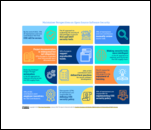
Maintainer Perspectives on Open Source Software Security Bernhard M. Wiedemann spotted that a recent report entitled Maintainer Perspectives on Open Source Software Security written by Stephen Hendrick and Ashwin Ramaswami of the Linux Foundation sports an infographic which mentions that 56% of [polled] projects support reproducible builds .
Mailing list highlights From our mailing list this month:

Distribution work In Debian this month, 5 reviews of Debian packages were added, 22 were updated and 8 were removed this month adding to Debian s knowledge about identified issues. A number of issue types were updated as well. [ ][ ][ ][ ] In addition, Roland Clobus posted his 23rd update of the status of reproducible ISO images on our mailing list. In particular, Roland helpfully summarised that all major desktops build reproducibly with bullseye, bookworm, trixie and sid provided they are built for a second time within the same DAK run (i.e. [within] 6 hours) and that there will likely be further work at a MiniDebCamp in Hamburg. Furthermore, Roland also responded in-depth to a query about a previous report

Fedora developer Zbigniew J drzejewski-Szmek announced a work-in-progress script called fedora-repro-build that attempts to reproduce an existing package within a koji build environment. Although the projects README file lists a number of fields will always or almost always vary and there is a non-zero list of other known issues, this is an excellent first step towards full Fedora reproducibility.
Jelle van der Waa introduced a new linter rule for Arch Linux packages in order to detect cache files leftover by the Sphinx documentation generator which are unreproducible by nature and should not be packaged. At the time of writing, 7 packages in the Arch repository are affected by this.
Elsewhere, Bernhard M. Wiedemann posted another monthly update for his work elsewhere in openSUSE.

diffoscope diffoscope is our in-depth and content-aware diff utility that can locate and diagnose reproducibility issues. This month, Chris Lamb made a number of changes such as uploading versions 256, 257 and 258 to Debian and made the following additional changes:
  • Use a deterministic name instead of trusting gpg s use-embedded-filenames. Many thanks to Daniel Kahn Gillmor dkg@debian.org for reporting this issue and providing feedback. [ ][ ]
  • Don t error-out with a traceback if we encounter struct.unpack-related errors when parsing Python .pyc files. (#1064973). [ ]
  • Don t try and compare rdb_expected_diff on non-GNU systems as %p formatting can vary, especially with respect to MacOS. [ ]
  • Fix compatibility with pytest 8.0. [ ]
  • Temporarily fix support for Python 3.11.8. [ ]
  • Use the 7zip package (over p7zip-full) after a Debian package transition. (#1063559). [ ]
  • Bump the minimum Black source code reformatter requirement to 24.1.1+. [ ]
  • Expand an older changelog entry with a CVE reference. [ ]
  • Make test_zip black clean. [ ]
In addition, James Addison contributed a patch to parse the headers from the diff(1) correctly [ ][ ] thanks! And lastly, Vagrant Cascadian pushed updates in GNU Guix for diffoscope to version 255, 256, and 258, and updated trydiffoscope to 67.0.6.

reprotest reprotest is our tool for building the same source code twice in different environments and then checking the binaries produced by each build for any differences. This month, Vagrant Cascadian made a number of changes, including:
  • Create a (working) proof of concept for enabling a specific number of CPUs. [ ][ ]
  • Consistently use 398 days for time variation rather than choosing randomly and update README.rst to match. [ ][ ]
  • Support a new --vary=build_path.path option. [ ][ ][ ][ ]

Website updates There were made a number of improvements to our website this month, including:
Reproducibility testing framework The Reproducible Builds project operates a comprehensive testing framework (available at tests.reproducible-builds.org) in order to check packages and other artifacts for reproducibility. In February, a number of changes were made by Holger Levsen:
  • Debian-related changes:
    • Temporarily disable upgrading/bootstrapping Debian unstable and experimental as they are currently broken. [ ][ ]
    • Use the 64-bit amd64 kernel on all i386 nodes; no more 686 PAE kernels. [ ]
    • Add an Erlang package set. [ ]
  • Other changes:
    • Grant Jan-Benedict Glaw shell access to the Jenkins node. [ ]
    • Enable debugging for NetBSD reproducibility testing. [ ]
    • Use /usr/bin/du --apparent-size in the Jenkins shell monitor. [ ]
    • Revert reproducible nodes: mark osuosl2 as down . [ ]
    • Thanks again to Codethink, for they have doubled the RAM on our arm64 nodes. [ ]
    • Only set /proc/$pid/oom_score_adj to -1000 if it has not already been done. [ ]
    • Add the opemwrt-target-tegra and jtx task to the list of zombie jobs. [ ][ ]
Vagrant Cascadian also made the following changes:
  • Overhaul the handling of OpenSSH configuration files after updating from Debian bookworm. [ ][ ][ ]
  • Add two new armhf architecture build nodes, virt32z and virt64z, and insert them into the Munin monitoring. [ ][ ] [ ][ ]
In addition, Alexander Couzens updated the OpenWrt configuration in order to replace the tegra target with mpc85xx [ ], Jan-Benedict Glaw updated the NetBSD build script to use a separate $TMPDIR to mitigate out of space issues on a tmpfs-backed /tmp [ ] and Zheng Junjie added a link to the GNU Guix tests [ ]. Lastly, node maintenance was performed by Holger Levsen [ ][ ][ ][ ][ ][ ] and Vagrant Cascadian [ ][ ][ ][ ].

Upstream patches The Reproducible Builds project detects, dissects and attempts to fix as many currently-unreproducible packages as possible. We endeavour to send all of our patches upstream where appropriate. This month, we wrote a large number of such patches, including:

If you are interested in contributing to the Reproducible Builds project, please visit our Contribute page on our website. However, you can get in touch with us via:

24 February 2024

Niels Thykier: Language Server for Debian: Spellchecking

This is my third update on writing a language server for Debian packaging files, which aims at providing a better developer experience for Debian packagers. Lets go over what have done since the last report.
Semantic token support I have added support for what the Language Server Protocol (LSP) call semantic tokens. These are used to provide the editor insights into tokens of interest for users. Allegedly, this is what editors would use for syntax highlighting as well. Unfortunately, eglot (emacs) does not support semantic tokens, so I was not able to test this. There is a 3-year old PR for supporting with the last update being ~3 month basically saying "Please sign the Copyright Assignment". I pinged the GitHub issue in the hopes it will get unstuck. For good measure, I also checked if I could try it via neovim. Before installing, I read the neovim docs, which helpfully listed the features supported. Sadly, I did not spot semantic tokens among those and parked from there. That was a bit of a bummer, but I left the feature in for now. If you have an LSP capable editor that supports semantic tokens, let me know how it works for you! :)
Spellchecking Finally, I implemented something Otto was missing! :) This stared with Paul Wise reminding me that there were Python binding for the hunspell spellchecker. This enabled me to get started with a quick prototype that spellchecked the Description fields in debian/control. I also added spellchecking of comments while I was add it. The spellchecker runs with the standard en_US dictionary from hunspell-en-us, which does not have a lot of technical terms in it. Much less any of the Debian specific slang. I spend considerable time providing a "built-in" wordlist for technical and Debian specific slang to overcome this. I also made a "wordlist" for known Debian people that the spellchecker did not recognise. Said wordlist is fairly short as a proof of concept, and I fully expect it to be community maintained if the language server becomes a success. My second problem was performance. As I had suspected that spellchecking was not the fastest thing in the world. Therefore, I added a very small language server for the debian/changelog, which only supports spellchecking the textual part. Even for a small changelog of a 1000 lines, the spellchecking takes about 5 seconds, which confirmed my suspicion. With every change you do, the existing diagnostics hangs around for 5 seconds before being updated. Notably, in emacs, it seems that diagnostics gets translated into an absolute character offset, so all diagnostics after the change gets misplaced for every character you type. Now, there is little I could do to speed up hunspell. But I can, as always, cheat. The way diagnostics work in the LSP is that the server listens to a set of notifications like "document opened" or "document changed". In a response to that, the LSP can start its diagnostics scanning of the document and eventually publish all the diagnostics to the editor. The spec is quite clear that the server owns the diagnostics and the diagnostics are sent as a "notification" (that is, fire-and-forgot). Accordingly, there is nothing that prevents the server from publishing diagnostics multiple times for a single trigger. The only requirement is that the server publishes the accumulated diagnostics in every publish (that is, no delta updating). Leveraging this, I had the language server for debian/changelog scan the document and publish once for approximately every 25 typos (diagnostics) spotted. This means you quickly get your first result and that clears the obsolete diagnostics. Thereafter, you get frequent updates to the remainder of the document if you do not perform any further changes. That is, up to a predefined max of typos, so we do not overload the client for longer changelogs. If you do any changes, it resets and starts over. The only bit missing was dealing with concurrency. By default, a pygls language server is single threaded. It is not great if the language server hangs for 5 seconds everytime you type anything. Fortunately, pygls has builtin support for asyncio and threaded handlers. For now, I did an async handler that await after each line and setup some manual detection to stop an obsolete diagnostics run. This means the server will fairly quickly abandon an obsolete run. Also, as a side-effect of working on the spellchecking, I fixed multiple typos in the changelog of debputy. :)
Follow up on the "What next?" from my previous update In my previous update, I mentioned I had to finish up my python-debian changes to support getting the location of a token in a deb822 file. That was done, the MR is now filed, and is pending review. Hopefully, it will be merged and uploaded soon. :) I also submitted my proposal for a different way of handling relationship substvars to debian-devel. So far, it seems to have received only positive feedback. I hope it stays that way and we will have this feature soon. Guillem proposed to move some of this into dpkg, which might delay my plans a bit. However, it might be for the better in the long run, so I will wait a bit to see what happens on that front. :) As noted above, I managed to add debian/changelog as a support format for the language server. Even if it only does spellchecking and trimming of trailing newlines on save, it technically is a new format and therefore cross that item off my list. :D Unfortunately, I did not manage to write a linter variant that does not involve using an LSP-capable editor. So that is still pending. Instead, I submitted an MR against elpa-dpkg-dev-el to have it recognize all the fields that the debian/control LSP knows about at this time to offset the lack of semantic token support in eglot.
From here... My sprinting on this topic will soon come to an end, so I have to a bit more careful now with what tasks I open! I think I will narrow my focus to providing a batch linting interface. Ideally, with an auto-fix for some of the more mechanical issues, where this is little doubt about the answer. Additionally, I think the spellchecking will need a bit more maturing. My current code still trips on naming patterns that are "clearly" verbatim or code references like things written in CamelCase or SCREAMING_SNAKE_CASE. That gets annoying really quickly. It also trips on a lot of commands like dpkg-gencontrol, but that is harder to fix since it could have been a real word. I think those will have to be fixed people using quotes around the commands. Maybe the most popular ones will end up in the wordlist. Beyond that, I will play it by ear if I have any time left. :)

23 February 2024

Reproducible Builds (diffoscope): diffoscope 258 released

The diffoscope maintainers are pleased to announce the release of diffoscope version 258. This version includes the following changes:
[ Chris Lamb ]
* Use the 7zip package (over p7zip-full) after package transition.
  (Closes: #1063559)
* Update debian/tests/control.
[ Vagrant Cascadian ]
* Fix a typo in the package name field (!) within debian/changelog.
You find out more by visiting the project homepage.

21 February 2024

Niels Thykier: Expanding on the Language Server (LSP) support for debian/control

I have spent some more time on improving my language server for debian/control. Today, I managed to provide the following features:
  • The X- style prefixes for field names are now understood and handled. This means the language server now considers XC-Package-Type the same as Package-Type.

  • More diagnostics:

    • Fields without values now trigger an error marker
    • Duplicated fields now trigger an error marker
    • Fields used in the wrong paragraph now trigger an error marker
    • Typos in field names or values now trigger a warning marker. For field names, X- style prefixes are stripped before typo detection is done.
    • The value of the Section field is now validated against a dataset of known sections and trigger a warning marker if not known.
  • The "on-save trim end of line whitespace" now works. I had a logic bug in the server side code that made it submit "no change" edits to the editor.

  • The language server now provides "hover" documentation for field names. There is a small screenshot of this below. Sadly, emacs does not support markdown or, if it does, it does not announce the support for markdown. For now, all the documentation is always in markdown format and the language server will tag it as either markdown or plaintext depending on the announced support.

  • The language server now provides quick fixes for some of the more trivial problems such as deprecated fields or typos of fields and values.

  • Added more known fields including the XS-Autobuild field for non-free packages along with a link to the relevant devref section in its hover doc.

This covers basically all my known omissions from last update except spellchecking of the Description field. An image of emacs showing documentation for the Provides field from the language server.
Spellchecking Personally, I feel spellchecking would be a very welcome addition to the current feature set. However, reviewing my options, it seems that most of the spellchecking python libraries out there are not packaged for Debian, or at least not other the name I assumed they would be. The alternative is to pipe the spellchecking to another program like aspell list. I did not test this fully, but aspell list does seem to do some input buffering that I cannot easily default (at least not in the shell). Though, either way, the logic for this will not be trivial and aspell list does not seem to include the corrections either. So best case, you would get typo markers but no suggestions for what you should have typed. Not ideal. Additionally, I am also concerned with the performance for this feature. For d/control, it will be a trivial matter in practice. However, I would be reusing this for d/changelog which is 99% free text with plenty of room for typos. For a regular linter, some slowness is acceptable as it is basically a batch tool. However, for a language server, this potentially translates into latency for your edits and that gets annoying. While it is definitely on my long term todo list, I am a bit afraid that it can easily become a time sink. Admittedly, this does annoy me, because I wanted to cross off at least one of Otto's requested features soon.
On wrap-and-sort support The other obvious request from Otto would be to automate wrap-and-sort formatting. Here, the problem is that "we" in Debian do not agree on the one true formatting of debian/control. In fact, I am fairly certain we do not even agree on whether we should all use wrap-and-sort. This implies we need a style configuration. However, if we have a style configuration per person, then you get style "ping-pong" for packages where the co-maintainers do not all have the same style configuration. Additionally, it is very likely that you are a member of multiple packaging teams or groups that all have their own unique style. Ergo, only having a personal config file is doomed to fail. The only "sane" option here that I can think of is to have or support "per package" style configuration. Something that would be committed to git, so the tooling would automatically pick up the configuration. Obviously, that is not fun for large packaging teams where you have to maintain one file per package if you want a consistent style across all packages. But it beats "style ping-pong" any day of the week. Note that I am perfectly open to having a personal configuration file as a fallback for when the "per package" configuration file is absent. The second problem is the question of which format to use and what to name this file. Since file formats and naming has never been controversial at all, this will obviously be the easy part of this problem. But the file should be parsable by both wrap-and-sort and the language server, so you get the same result regardless of which tool you use. If we do not ensure this, then we still have the style ping-pong problem as people use different tools. This also seems like time sink with no end. So, what next then...?
What next? On the language server front, I will have a look at its support for providing semantic hints to the editors that might be used for syntax highlighting. While I think most common Debian editors have built syntax highlighting already, I would like this language server to stand on its own. I would like us to be in a situation where we do not have implement yet another editor extension for Debian packaging files. At least not for editors that support the LSP spec. On a different front, I have an idea for how we go about relationship related substvars. It is not directly related to this language server, except I got triggered by the language server "missing" a diagnostic for reminding people to add the magic Depends: $ misc:Depends [, $ shlibs:Depends ] boilerplate. The magic boilerplate that you have to write even though we really should just fix this at a tooling level instead. Energy permitting, I will formulate a proposal for that and send it to debian-devel. Beyond that, I think I might start adding support for another file. I also need to wrap up my python-debian branch, so I can get the position support into the Debian soon, which would remove one papercut for using this language server. Finally, it might be interesting to see if I can extract a "batch-linter" version of the diagnostics and related quickfix features. If nothing else, the "linter" variant would enable many of you to get a "mini-Lintian" without having to do a package build first.

20 February 2024

Niels Thykier: Language Server (LSP) support for debian/control

About a month ago, Otto Kek l inen asked for editor extensions for debian related files on the debian-devel mailing list. In that thread, I concluded that what we were missing was a "Language Server" (LSP) for our packaging files. Last week, I started a prototype for such a LSP for the debian/control file as a starting point based on the pygls library. The initial prototype worked and I could do very basic diagnostics plus completion suggestion for field names.
Current features I got 4 basic features implemented, though I have only been able to test two of them in emacs.
  • Diagnostics or linting of basic issues.
  • Completion suggestions for all known field names that I could think of and values for some fields.
  • Folding ranges (untested). This feature enables the editor to "fold" multiple lines. It is often used with multi-line comments and that is the feature currently supported.
  • On save, trim trailing whitespace at the end of lines (untested). Might not be registered correctly on the server end.
Despite its very limited feature set, I feel editing debian/control in emacs is now a much more pleasant experience. Coming back to the features that Otto requested, the above covers a grand total of zero. Sorry, Otto. It is not you, it is me.
Completion suggestions For completion, all known fields are completed. Place the cursor at the start of the line or in a partially written out field name and trigger the completion in your editor. In my case, I can type R-R-R and trigger the completion and the editor will automatically replace it with Rules-Requires-Root as the only applicable match. Your milage may vary since I delegate most of the filtering to the editor, meaning the editor has the final say about whether your input matches anything. The only filtering done on the server side is that the server prunes out fields already used in the paragraph, so you are not presented with the option to repeat an already used field, which would be an error. Admittedly, not an error the language server detects at the moment, but other tools will. When completing field, if the field only has one non-default value such as Essential which can be either no (the default, but you should not use it) or yes, then the completion suggestion will complete the field along with its value. This is mostly only applicable for "yes/no" fields such as Essential and Protected. But it does also trigger for Package-Type at the moment. As for completing values, here the language server can complete the value for simple fields such as "yes/no" fields, Multi-Arch, Package-Type and Priority. I intend to add support for Section as well - maybe also Architecture.
Diagnostics On the diagnostic front, I have added multiple diagnostics:
  • An error marker for syntax errors.
  • An error marker for missing a mandatory field like Package or Architecture. This also includes Standards-Version, which is admittedly mandatory by policy rather than tooling falling part.
  • An error marker for adding Multi-Arch: same to an Architecture: all package.
  • Error marker for providing an unknown value to a field with a set of known values. As an example, writing foo in Multi-Arch would trigger this one.
  • Warning marker for using deprecated fields such as DM-Upload-Allowed, or when setting a field to its default value for fields like Essential. The latter rule only applies to selected fields and notably Multi-Arch: no does not trigger a warning.
  • Info level marker if a field like Priority duplicates the value of the Source paragraph.
Notable omission at this time:
  • No errors are raised if a field does not have a value.
  • No errors are raised if a field is duplicated inside a paragraph.
  • No errors are used if a field is used in the wrong paragraph.
  • No spellchecking of the Description field.
  • No understanding that Foo and X[CBS]-Foo are related. As an example, XC-Package-Type is completely ignored despite being the old name for Package-Type.
  • Quick fixes to solve these problems... :)
Trying it out If you want to try, it is sadly a bit more involved due to things not being uploaded or merged yet. Also, be advised that I will regularly rebase my git branches as I revise the code. The setup:
  • Build and install the deb of the main branch of pygls from https://salsa.debian.org/debian/pygls The package is in NEW and hopefully this step will soon just be a regular apt install.
  • Build and install the deb of the rts-locatable branch of my python-debian fork from https://salsa.debian.org/nthykier/python-debian There is a draft MR of it as well on the main repo.
  • Build and install the deb of the lsp-support branch of debputy from https://salsa.debian.org/debian/debputy
  • Configure your editor to run debputy lsp debian/control as the language server for debian/control. This is depends on your editor. I figured out how to do it for emacs (see below). I also found a guide for neovim at https://neovim.io/doc/user/lsp. Note that debputy can be run from any directory here. The debian/control is a reference to the file format and not a concrete file in this case.
Obviously, the setup should get easier over time. The first three bullet points should eventually get resolved by merges and upload meaning you end up with an apt install command instead of them. For the editor part, I would obviously love it if we can add snippets for editors to make the automatically pick up the language server when the relevant file is installed.
Using the debputy LSP in emacs The guide I found so far relies on eglot. The guide below assumes you have the elpa-dpkg-dev-el package installed for the debian-control-mode. Though it should be a trivially matter to replace debian-control-mode with a different mode if you use a different mode for your debian/control file. In your emacs init file (such as ~/.emacs or ~/.emacs.d/init.el), you add the follow blob.
(with-eval-after-load 'eglot
    (add-to-list 'eglot-server-programs
        '(debian-control-mode . ("debputy" "lsp" "debian/control"))))
Once you open the debian/control file in emacs, you can type M-x eglot to activate the language server. Not sure why that manual step is needed and if someone knows how to automate it such that eglot activates automatically on opening debian/control, please let me know. For testing completions, I often have to manually activate them (with C-M-i or M-x complete-symbol). Though, it is a bit unclear to me whether this is an emacs setting that I have not toggled or something I need to do on the language server side.
From here As next steps, I will probably look into fixing some of the "known missing" items under diagnostics. The quick fix would be a considerable improvement to assisting users. In the not so distant future, I will probably start to look at supporting other files such as debian/changelog or look into supporting configuration, so I can cover formatting features like wrap-and-sort. I am also very much open to how we can provide integrations for this feature into editors by default. I will probably create a separate binary package for specifically this feature that pulls all relevant dependencies that would be able to provide editor integrations as well.

12 February 2024

Reproducible Builds (diffoscope): diffoscope 257 released

The diffoscope maintainers are pleased to announce the release of diffoscope version 257. This version includes the following changes:
[ James Addison ]
* Parse the header and hunksize of diffs strictly before parsing the context
  below. (Closes: reproducible-builds/diffoscope#363)
* Reformat code to comply with the latest version of Black (24.1.1).
[ Chris Lamb ]
* Expand the previous changelog entry to include the CVE number that was
  subsequently assigned.
* Bump the miniumum Black requirement to run the "Black clean" test and make
  test_zip.py Black clean.
You find out more by visiting the project homepage.

2 February 2024

Ben Hutchings: FOSS activity in December 2023

24 January 2024

Thomas Lange: FAI 6.2 released

After more than one a year, a new minor FAI version is available, but it includes some interesting new features. Here a the items from the NEWS file: fai (6.2) unstable; urgency=low In the past the command fai-cd was only used for creating installation ISOs, that could be used from CD or USB stick. Now it possible to create a live ISO. Therefore you create your live chroot environment using 'fai dirinstall' and then convert it to a bootable live ISO using fai-cd. See man fai-cd(8) for an example. Years ago I had the idea to use the remaining disk space on an USB stick after copying an ISO onto it. I've blogged about this recently: https://blog.fai-project.org/posts/extending-iso-images/ The new FAI version includes the tool mk-data-partition for adding a data partition to the ISO itself or to an USB stick. FAI detects this data partition, mounts it to /media/data and can then use various configurations from it. You may want to copy your own set of .deb packages or your whole FAI config space to this partition. FAI now automatically searches this partition for usable FAI configuration data and packages. FAI will install all packages from pkgs/<CLASSNAME> if the equivalent class is defined. Setting FAI_CONFIG_SRC=detect:// now looks into the data partition for the subdirectory 'config' and uses this as the config space. So it's now possible to modify an existing ISO (that is read-only) and make changes to the config space. If there's no config directory in the data partition FAI uses the default location on the ISO. The tool fai-kvm, which starts virtual machines can now boot an ISO not only as CD but also as USB stick. Sometimes users want to adjust the list of disks before the partitioning is startet. Therefore FAI provides several new functions including You can select individual disks by their model name or even the serial number. Two new FAI flags were added (tmux and screen) that make it easy to run FAI inside a tmux or screen session. And finally FAI uses systemd. Yeah! This technical change was waiting since 2015 in a merge request from Moritz 'Morty' Str be, that would enable using systemd during the installation. Before FAI still was using old-style SYSV init scripts and did not started systemd. I didn't tried to apply the patch, because I was afraid that it would need much time to make it work. But then in may 2023 Juri Grabowski just gave it a try at MiniDebConf Hamburg, and voil it just works! Many, many thanks to Moritz and Juri for their bravery. The whole changelog can be found at https://tracker.debian.org/media/packages/f/fai/changelog-6.2 New ISOs for FAI are also available including an example of a Xfce desktop live ISO: https://fai-project.org/fai-cd/ The FAIme service for creating customized installation ISOs will get its update later. The new packages are available for bookworm by adding this line to your sources.list: deb https://fai-project.org/download bookworm koeln

Louis-Philippe V ronneau: Montreal Subway Foot Traffic Data, 2023 edition

For the fifth year in a row, I've asked Soci t de Transport de Montr al, Montreal's transit agency, for the foot traffic data of Montreal's subway. By clicking on a subway station, you'll be redirected to a graph of the station's foot traffic. Licences

10 January 2024

Dirk Eddelbuettel: BH 1.84.0-1 on CRAN: New Upstream

Boost Boost is a very large and comprehensive set of (peer-reviewed) libraries for the C++ programming language, containing well over one hundred individual libraries. The BH package provides a sizeable subset of header-only libraries for (easier, no linking required) use by R. It is fairly widely used: the (partial) CRAN mirror logs (aggregated from the cloud mirrors) show over 35.7 million package downloads. Version 1.84.0 of Boost was released in December following the regular Boost release schedule of April, August and December releases. As the commits and changelog show, we packaged it almost immediately and started testing following our annual update cycle which strives to balance being close enough to upstream and not stressing CRAN and the user base too much. The reverse depends check revealed five packages requiring changes or adjustments which is a pretty good outcome given the over three hundred direct reverse dependencies. So we opened issue #100 to coordinate the issue over the winter break during which CRAN also closes (just as we did in previous years). Our sincere thanks to the two packages that already updated before, and to the one that updated today within hours (!!) of the BH uploaded it needed. There are very few actual changes. We honoured one request (in issue #97) to add Boost QVM bringing quarternion support to R. No other new changes needed to be made. A number of changes I have to make each time in BH, and it is worth mentioning them. Because CRAN cares about backwards compatibility and the ability to be used on minimal or older systems, we still adjust the filenames of a few files to fit a jurassic constraints of just over a 100 characters per filepath present in some long-outdated versions of tar. Not a big deal. We also, and that is more controversial, silence a number of #pragma diagnostic messages for g++ and clang++ because CRAN insists on it. I have no choice in that matter. One warning we suppressed last year, but no longer do, concerns the C++14 standard that some Boost libraries now default to. Packages setting C++11 explicitly will likely get a note from CRAN changing this; in most cases that should be trivial to remove as we only had to opt into (then) newer standards under old compilers. These days newer defaults help; R itself now defaults to C++17.

Changes in version 1.84.0-0 (2024-01-09)

Via my CRANberries, there is a diffstat report relative to the previous release. Comments and suggestions about BH are welcome via the issue tracker at the GitHub repo. If you like this or other open-source work I do, you can now sponsor me at GitHub.

This post by Dirk Eddelbuettel originated on his Thinking inside the box blog. Please report excessive re-aggregation in third-party for-profit settings.

9 January 2024

Louis-Philippe V ronneau: 2023 A Musical Retrospective

I ended 2022 with a musical retrospective and very much enjoyed writing that blog post. As such, I have decided to do the same for 2023! From now on, this will probably be an annual thing :) Albums In 2023, I added 73 new albums to my collection nearly 2 albums every three weeks! I listed them below in the order in which I acquired them. I purchased most of these albums when I could and borrowed the rest at libraries. If you want to browse though, I added links to the album covers pointing either to websites where you can buy them or to Discogs when digital copies weren't available. Once again this year, it seems that Punk (mostly O !) and Metal dominate my list, mostly fueled by Angry Metal Guy and the amazing Montr al Skinhead/Punk concert scene. Concerts A trend I started in 2022 was to go to as many concerts of artists I like as possible. I'm happy to report I went to around 80% more concerts in 2023 than in 2022! Looking back at my list, April was quite a busy month... Here are the concerts I went to in 2023: Although metalfinder continues to work as intended, I'm very glad to have discovered the Montr al underground scene has departed from Facebook/Instagram and adopted en masse Gancio, a FOSS community agenda that supports ActivityPub. Our local instance, askapunk.net is pretty much all I could ask for :) That's it for 2023!

8 January 2024

Antoine Beaupr : Last year on this blog

So this blog is now celebrating its 21st birthday (or 20 if you count from zero, or 18 if you want to be pedantic), and I figured I would do this yearly thing of reviewing how that went.

Number of posts 2022 was the official 20th anniversary in any case, and that was one of my best years on record, with 46 posts, surpassed only by the noisy 2005 (62) and matching 2006 (46). 2023, in comparison, was underwhelming: a feeble 11 posts! What happened! Well, I was busy with other things, mostly away from keyboard, that I will not bore you with here... The other thing that happened is that the one-liner I used to collect stats was broken (it counted folders and other unrelated files) and wildly overestimated 2022! Turns out I didn't write that much then:
anarc.at$ ls blog   grep '^[0-9][0-9][0-9][0-9].*.md'   se
d s/-.*//   sort   uniq -c    sort -n -k2
     57 2005
     43 2006
     20 2007
     20 2008
      7 2009
     13 2010
     16 2011
     11 2012
     13 2013
      5 2014
     13 2015
     18 2016
     29 2017
     27 2018
     17 2019
     18 2020
     14 2021
     28 2022
     10 2023
      1 2024
But even that is inaccurate because, in ikiwiki, I can tag any page as being featured on the blog. So we actually need to process the HTML itself because we don't have much better on hand without going through ikiwiki's internals:
anarcat@angela:anarc.at$ curl -sSL https://anarc.at/blog/   grep 'href="\./'   grep -o 20[0-9][0-9]   sort   uniq -c 
     56 2005
     42 2006
     19 2007
     18 2008
      6 2009
     12 2010
     15 2011
     10 2012
     11 2013
      3 2014
     15 2015
     32 2016
     50 2017
     37 2018
     19 2019
     19 2020
     15 2021
     28 2022
     13 2023
Which puts the top 10 years at:
$ curl -sSL https://anarc.at/blog/   grep 'href="\./'   grep -o 20[0-9][0-9]   sort   uniq -c    sort -nr   head -10
     56 2005
     50 2017
     42 2006
     37 2018
     32 2016
     28 2022
     19 2020
     19 2019
     19 2007
     18 2008
Anyway. 2023 is certainly not a glorious year in that regard, in any case.

Visitors In terms of visits, however, we had quite a few hits. According to Goatcounter, I had 122 300 visits in 2023! 2022, in comparison, had 89 363, so that's quite a rise.

What you read I seem to have hit the Hacker News front page at least twice. I say "seem" because it's actually pretty hard to tell what the HN frontpage actually is on any given day. I had 22k visits on 2023-03-13, in any case, and you can't see me on the front that day. We do see a post of mine on 2023-09-02, all the way down there, which seem to have generated another 10k visits. In any case, here were the most popular stories for you fine visitors:
  • Framework 12th gen laptop review: 24k visits, which is surprising for a 13k words article "without images", as some critics have complained. 15k referred by Hacker News. Good reference and time-consuming benchmarks, slowly bit-rotting. That is, by far, my most popular article ever. A popular article in 2021 or 2022 was around 6k to 9k, so that's a big one. I suspect it will keep getting traffic for a long while.
  • Calibre replacement considerations: 15k visits, most of which without a referrer. Was actually an old article, but I suspect HN brought it back to light. I keep updating that wiki page regularly when I find new things, but I'm still using Calibre to import ebooks.
  • Hacking my Kobo Clara HD: is not new but always gathering more and more hits, it had 1800 hits in the first year, 4600 hits last year and now brought 6400 visitors to the blog! Not directly related, but this iFixit battery replacement guide I wrote also seem to be quite popular
Everything else was published before 2023. Replacing Smokeping with Prometheus is still around and Looking at Wayland terminal emulators makes an entry in the top five.

Where you've been People send less and less private information when they browse the web. The number of visitors without referrers was 41% in 2021, it rose to 44% in 2023. Most of the remaining traffic comes from Google, but Hacker News is now a significant chunk, almost as big as Google. In 2021, Google represented 23% of my traffic, in 2022, it was down to 15% so 18% is actually a rise from last year, even if it seems much smaller than what I usually think of.
Ratio Referrer Visits
18% Google 22 098
13% Hacker News 16 003
2% duckduckgo.com 2 640
1% community.frame.work 1 090
1% missing.csail.mit.edu 918
Note that Facebook and Twitter do not appear at all in my referrers.

Where you are Unsurprisingly, most visits still come from the US:
Ratio Country Visits
26% United States 32 010
14% France 17 046
10% Germany 11 650
6% Canada 7 425
5% United Kingdom 6 473
3% Netherlands 3 436
Those ratios are nearly identical to last year, but quite different from 2021, where Germany and France were more or less reversed. Back in 2021, I mentioned there was a long tail of countries with at least one visit, with 160 countries listed. I expanded that and there's now 182 countries in that list, almost all of the 193 member states in the UN.

What you were Chrome's dominance continues to expand, even on readers of this blog, gaining two percentage points from Firefox compared to 2021.
Ratio Browser Visits
49% Firefox 60 126
36% Chrome 44 052
14% Safari 17 463
1% Others N/A
It seems like, unfortunately, my Lynx and Haiku users have not visited in the past year. It seems like trying to read those metrics is like figuring out tea leaves... In terms of operating systems:
Ratio OS Visits
28% Linux 34 010
23% macOS 28 728
21% Windows 26 303
17% Android 20 614
10% iOS 11 741
Again, Linux and Mac are over-represented, and Android and iOS are under-represented.

What is next I hope to write more next year. I've been thinking about a few posts I could write for work, about how things work behind the scenes at Tor, that could be informative for many people. We run a rather old setup, but things hold up pretty well for what we throw at it, and it's worth sharing that with the world... So anyway, thanks for coming, faithful reader, and see you in the coming 2024 year...

3 January 2024

John Goerzen: Live Migrating from Raspberry Pi OS bullseye to Debian bookworm

I ve been getting annoyed with Raspberry Pi OS (Raspbian) for years now. It s a fork of Debian, but manages to omit some of the most useful things. So I ve decided to migrate all of my Pis to run pure Debian. These are my reasons:
  1. Raspberry Pi OS has, for years now, specified that there is no upgrade path. That is, to get to a newer major release, it s a reinstall. While I have sometimes worked around this, for a device that is frequently installed in hard-to-reach locations, this is even more important than usual. It s common for me to upgrade machines for a decade or more across Debian releases and there s no reason that it should be so much more difficult with Raspbian.
  2. As I noted in Consider Security First, the security situation for Raspberry Pi OS isn t as good as it is with Debian.
  3. Raspbian lags behind Debian often times by 6 months or more for major releases, and days or weeks for bug fixes and security patches.
  4. Raspbian has no direct backports support, though Raspberry Pi 3 and above can use Debian s backports (per my instructions as Installing Debian Backports on Raspberry Pi)
  5. Raspbian uses a custom kernel without initramfs support
It turns out it is actually possible to do an in-place migration from Raspberry Pi OS bullseye to Debian bookworm. Here I will describe how. Even if you don t have a Raspberry Pi, this might still be instructive on how Raspbian and Debian packages work.

WARNINGS Before continuing, back up your system. This process isn t for the neophyte and it is entirely possible to mess up your boot device to the point that you have to do a fresh install to get your Pi to boot. This isn t a supported process at all.

Architecture Confusion Debian has three ARM-based architectures:
  • armel, for the lowest-end 32-bit ARM devices without hardware floating point support
  • armhf, for the higher-end 32-bit ARM devices with hardware float (hence hf )
  • arm64, for 64-bit ARM devices (which all have hardware float)
Although the Raspberry Pi 0 and 1 do support hardware float, they lack support for other CPU features that Debian s armhf architecture assumes. Therefore, the Raspberry Pi 0 and 1 could only run Debian s armel architecture. Raspberry Pi 3 and above are capable of running 64-bit, and can run both armhf and arm64. Prior to the release of the Raspberry Pi 5 / Raspbian bookworm, Raspbian only shipped the armhf architecture. Well, it was an architecture they called armhf, but it was different from Debian s armhf in that everything was recompiled to work with the more limited set of features on the earlier Raspberry Pi boards. It was really somewhere between Debian s armel and armhf archs. You could run Debian armel on those, but it would run more slowly, due to doing floating point calculations without hardware support. Debian s raspi FAQ goes into this a bit. What I am going to describe here is going from Raspbian armhf to Debian armhf with a 64-bit kernel. Therefore, it will only work with Raspberry Pi 3 and above. It may theoretically be possible to take a Raspberry Pi 2 to Debian armhf with a 32-bit kernel, but I haven t tried this and it may be more difficult. I have seen conflicting information on whether armhf really works on a Pi 2. (If you do try it on a Pi 2, ignore everything about arm64 and 64-bit kernels below, and just go with the linux-image-armmp-lpae kernel per the ARMMP page) There is another wrinkle: Debian doesn t support running 32-bit ARM kernels on 64-bit ARM CPUs, though it does support running a 32-bit userland on them. So we will wind up with a system with kernel packages from arm64 and everything else from armhf. This is a perfectly valid configuration as the arm64 like x86_64 is multiarch (that is, the CPU can natively execute both the 32-bit and 64-bit instructions). (It is theoretically possible to crossgrade a system from 32-bit to 64-bit userland, but that felt like a rather heavy lift for dubious benefit on a Pi; nevertheless, if you want to make this process even more complicated, refer to the CrossGrading page.)

Prerequisites and Limitations In addition to the need for a Raspberry Pi 3 or above in order for this to work, there are a few other things to mention. If you are using the GPIO features of the Pi, I don t know if those work with Debian. I think Raspberry Pi OS modified the desktop environment more than other components. All of my Pis are headless, so I don t know if this process will work if you use a desktop environment. I am assuming you are booting from a MicroSD card as is typical in the Raspberry Pi world. The Pi s firmware looks for a FAT partition (MBR type 0x0c) and looks within it for boot information. Depending on how long ago you first installed an OS on your Pi, your /boot may be too small for Debian. Use df -h /boot to see how big it is. I recommend 200MB at minimum. If your /boot is smaller than that, stop now (or use some other system to shrink your root filesystem and rearrange your partitions; I ve done this, but it s outside the scope of this article.) You need to have stable power. Once you begin this process, your pi will mostly be left in a non-bootable state until you finish. (You did make a backup, right?)

Basic idea The basic idea here is that since bookworm has almost entirely newer packages then bullseye, we can just switch over to it and let the Debian packages replace the Raspbian ones as they are upgraded. Well, it s not quite that easy, but that s the main idea.

Preparation First, make a backup. Even an image of your MicroSD card might be nice. OK, I think I ve said that enough now. It would be a good idea to have a HDMI cable (with the appropriate size of connector for your particular Pi board) and a HDMI display handy so you can troubleshoot any bootup issues with a console.

Preparation: access The Raspberry Pi OS by default sets up a user named pi that can use sudo to gain root without a password. I think this is an insecure practice, but assuming you haven t changed it, you will need to ensure it still works once you move to Debian. Raspberry Pi OS had a patch in their sudo package to enable it, and that will be removed when Debian s sudo package is installed. So, put this in /etc/sudoers.d/010_picompat:
pi ALL=(ALL) NOPASSWD: ALL
Also, there may be no password set for the root account. It would be a good idea to set one; it makes it easier to log in at the console. Use the passwd command as root to do so.

Preparation: bluetooth Debian doesn t correctly identify the Bluetooth hardware address. You can save it off to a file by running hcitool dev > /root/bluetooth-from-raspbian.txt. I don t use Bluetooth, but this should let you develop a script to bring it up properly.

Preparation: Debian archive keyring You will next need to install Debian s archive keyring so that apt can authenticate packages from Debian. Go to the bookworm download page for debian-archive-keyring and copy the URL for one of the files, then download it on the pi. For instance:
wget http://http.us.debian.org/debian/pool/main/d/debian-archive-keyring/debian-archive-keyring_2023.3+deb12u1_all.deb
Use sha256sum to verify the checksum of the downloaded file, comparing it to the package page on the Debian site. Now, you ll install it with:
dpkg -i debian-archive-keyring_2023.3+deb12u1_all.deb

Package first steps From here on, we are making modifications to the system that can leave it in a non-bootable state. Examine /etc/apt/sources.list and all the files in /etc/apt/sources.list.d. Most likely you will want to delete or comment out all lines in all files there. Replace them with something like:
deb http://deb.debian.org/debian/ bookworm main non-free-firmware contrib non-free
deb http://security.debian.org/debian-security bookworm-security main non-free-firmware contrib non-free
deb https://deb.debian.org/debian bookworm-backports main non-free-firmware contrib non-free
(you might leave off contrib and non-free depending on your needs) Now, we re going to tell it that we ll support arm64 packages:
dpkg --add-architecture arm64
And finally, download the bookworm package lists:
apt-get update
If there are any errors from that command, fix them and don t proceed until you have a clean run of apt-get update.

Moving /boot to /boot/firmware The boot FAT partition I mentioned above is mounted at /boot by Raspberry Pi OS, but Debian s scripts assume it will be at /boot/firmware. We need to fix this. First:
umount /boot
mkdir /boot/firmware
Now, edit fstab and change the reference to /boot to be to /boot/firmware. Now:
mount -v /boot/firmware
cd /boot/firmware
mv -vi * ..
This mounts the filesystem at the new location, and moves all its contents back to where apt believes it should be. Debian s packages will populate /boot/firmware later.

Installing the first packages Now we start by installing the first of the needed packages. Eventually we will wind up with roughly the same set Debian uses.
apt-get install linux-image-arm64
apt-get install firmware-brcm80211=20230210-5
apt-get install raspi-firmware
If you get errors relating to firmware-brcm80211 from any commands, run that install firmware-brcm80211 command and then proceed. There are a few packages that Raspbian marked as newer than the version in bookworm (whether or not they really are), and that s one of them.

Configuring the bootloader We need to configure a few things in /etc/default/raspi-firmware before proceeding. Edit that file. First, uncomment (or add) a line like this:
KERNEL_ARCH="arm64"
Next, in /boot/cmdline.txt you can find your old Raspbian boot command line. It will say something like:
root=PARTUUID=...
Save off the bit starting with PARTUUID. Back in /etc/default/raspi-firmware, set a line like this:
ROOTPART=PARTUUID=abcdef00
(substituting your real value for abcdef00). This is necessary because the microSD card device name often changes from /dev/mmcblk0 to /dev/mmcblk1 when switching to Debian s kernel. raspi-firmware will encode the current device name in /boot/firmware/cmdline.txt by default, which will be wrong once you boot into Debian s kernel. The PARTUUID approach lets it work regardless of the device name.

Purging the Raspbian kernel Run:
dpkg --purge raspberrypi-kernel

Upgrading the system At this point, we are going to run the procedure beginning at section 4.4.3 of the Debian release notes. Generally, you will do:
apt-get -u upgrade
apt full-upgrade
Fix any errors at each step before proceeding to the next. Now, to remove some cruft, run:
apt-get --purge autoremove
Inspect the list to make sure nothing important isn t going to be removed.

Removing Raspbian cruft You can list some of the cruft with:
apt list '~o'
And remove it with:
apt purge '~o'
I also don t run Bluetooth, and it seemed to sometimes hang on boot becuase I didn t bother to fix it, so I did:
apt-get --purge remove bluez

Installing some packages This makes sure some basic Debian infrastructure is available:
apt-get install wpasupplicant parted dosfstools wireless-tools iw alsa-tools
apt-get --purge autoremove

Installing firmware Now run:
apt-get install firmware-linux

Resolving firmware package version issues If it gives an error about the installed version of a package, you may need to force it to the bookworm version. For me, this often happened with firmware-atheros, firmware-libertas, and firmware-realtek. Here s how to resolve it, with firmware-realtek as an example:
  1. Go to https://packages.debian.org/PACKAGENAME for instance, https://packages.debian.org/firmware-realtek. Note the version number in bookworm in this case, 20230210-5.
  2. Now, you will force the installation of that package at that version:
    apt-get install firmware-realtek=20230210-5
    
  3. Repeat with every conflicting package until done.
  4. Rerun apt-get install firmware-linux and make sure it runs cleanly.
Also, in the end you should be able to:
apt-get install firmware-atheros firmware-libertas firmware-realtek firmware-linux

Dealing with other Raspbian packages The Debian release notes discuss removing non-Debian packages. There will still be a few of those. Run:
apt list '?narrow(?installed, ?not(?origin(Debian)))'
Deal with them; mostly you will need to force the installation of a bookworm version using the procedure in the section Resolving firmware package version issues above (even if it s not for a firmware package). For non-firmware packages, you might possibly want to add --mark-auto to your apt-get install command line to allow the package to be autoremoved later if the things depending on it go away. If you aren t going to use Bluetooth, I recommend apt-get --purge remove bluez as well. Sometimes it can hang at boot if you don t fix it up as described above.

Set up networking We ll be switching to the Debian method of networking, so we ll create some files in /etc/network/interfaces.d. First, eth0 should look like this:
allow-hotplug eth0
iface eth0 inet dhcp
iface eth0 inet6 auto
And wlan0 should look like this:
allow-hotplug wlan0
iface wlan0 inet dhcp
    wpa-conf /etc/wpa_supplicant/wpa_supplicant.conf
Raspbian is inconsistent about using eth0/wlan0 or renamed interface. Run ifconfig or ip addr. If you see a long-named interface such as enx<something> or wlp<something>, copy the eth0 file to the one named after the enx interface, or the wlan0 file to the one named after the wlp interface, and edit the internal references to eth0/wlan0 in this new file to name the long interface name. If using wifi, verify that your SSIDs and passwords are in /etc/wpa_supplicant/wpa_supplicant.conf. It should have lines like:
network= 
   ssid="NetworkName"
   psk="passwordHere"
 
(This is where Raspberry Pi OS put them).

Deal with DHCP Raspberry Pi OS used dhcpcd, whereas bookworm normally uses isc-dhcp-client. Verify the system is in the correct state:
apt-get install isc-dhcp-client
apt-get --purge remove dhcpcd dhcpcd-base dhcpcd5 dhcpcd-dbus

Set up LEDs To set up the LEDs to trigger on MicroSD activity as they did with Raspbian, follow the Debian instructions. Run apt-get install sysfsutils. Then put this in a file at /etc/sysfs.d/local-raspi-leds.conf:
class/leds/ACT/brightness = 1
class/leds/ACT/trigger = mmc1

Prepare for boot To make sure all the /boot/firmware files are updated, run update-initramfs -u. Verify that root in /boot/firmware/cmdline.txt references the PARTUUID as appropriate. Verify that /boot/firmware/config.txt contains the lines arm_64bit=1 and upstream_kernel=1. If not, go back to the section on modifying /etc/default/raspi-firmware and fix it up.

The moment arrives Cross your fingers and try rebooting into your Debian system:
reboot
For some reason, I found that the first boot into Debian seems to hang for 30-60 seconds during bootstrap. I m not sure why; don t panic if that happens. It may be necessary to power cycle the Pi for this boot.

Troubleshooting If things don t work out, hook up the Pi to a HDMI display and see what s up. If I anticipated a particular problem, I would have documented it here (a lot of the things I documented here are because I ran into them!) So I can t give specific advice other than to watch boot messages on the console. If you don t even get kernel messages going, then there is some problem with your partition table or /boot/firmware FAT partition. Otherwise, you ve at least got the kernel going and can troubleshoot like usual from there.

John Goerzen: Consider Security First

I write this in the context of my decision to ditch Raspberry Pi OS and move everything I possibly can, including my Raspberry Pi devices, to Debian. I will write about that later. But for now, I wanted to comment on something I think is often overlooked and misunderstood by people considering distributions or operating systems: the huge importance of getting security updates in an automated and easy way.

Background Let s assume that these statements are true, which I think are well-supported by available evidence:
  1. Every computer system (OS plus applications) that can do useful modern work has security vulnerabilities, some of which are unknown at any given point in time;
  2. During the lifetime of that computer system, some of these vulnerabilities will be discovered. For a (hopefully large) subset of those vulnerabilities, timely patches will become available.
Now then, it follows that applying those timely patches is a critical part of having a system that it as secure as possible. Of course, you have to do other things as well good passwords, secure practices, etc but, fundamentally, if your system lacks patches for known vulnerabilities, you ve already lost at the security ballgame.

How to stay patched There is something of a continuum of how you might patch your system. It runs roughly like this, from best to worst:
  1. All components are kept up-to-date automatically, with no intervention from the user/operator
  2. The operator is automatically alerted to necessary patches, and they can be easily installed with minimal intervention
  3. The operator is automatically alerted to necessary patches, but they require significant effort to apply
  4. The operator has no way to detect vulnerabilities or necessary patches
It should be obvious that the first situation is ideal. Every other situation relies on the timeliness of human action to keep up-to-date with security patches. This is a fallible situation; humans are busy, take trips, dismiss alerts, miss alerts, etc. That said, it is rare to find any system living truly all the way in that scenario, as you ll see.

What is your system ? A critical point here is: what is your system ? It includes:
  • Your kernel
  • Your base operating system
  • Your applications
  • All the libraries needed to run all of the above
Some OSs, such as Debian, make little or no distinction between the base OS and the applications. Others, such as many BSDs, have a distinction there. And in some cases, people will compile or install applications outside of any OS mechanism. (It must be stressed that by doing so, you are taking the responsibility of patching them on your own shoulders.)

How do common systems stack up?
  • Debian, with its support for unattended-upgrades, needrestart, debian-security-support, and such, is largely category 1. It can automatically apply security patches, in most cases can restart the necessary services for the patch to take effect, and will alert you when some processes or the system must be manually restarted for a patch to take effect (for instance, a kernel update). Those cases requiring manual intervention are category 2. The debian-security-support package will even warn you of gaps in the system. You can also use debsecan to scan for known vulnerabilities on a given installation.
  • FreeBSD has no way to automatically install security patches for things in the packages collection. As with many rolling-release systems, you can t automate the installation of these security patches with FreeBSD because it is not safe to blindly update packages. It s not safe to blindly update packages because they may bring along more than just security patches: they may represent major upgrades that introduce incompatibilities, etc. Unlike Debian s practice of backporting fixes and thus producing narrowly-tailored patches, forcing upgrades to newer versions precludes a minimal intervention install. Therefore, rolling release systems are category 3.
  • Things such as Snap, Flatpak, AppImage, Docker containers, Electron apps, and third-party binaries often contain embedded libraries and such for which you have no easy visibility into their status. For instance, if there was a bug in libpng, would you know how many of your containers had a vulnerability? These systems are category 4 you don t even know if you re vulnerable. It s for this reason that my Debian-based Docker containers apply security patches before starting processes, and also run unattended-upgrades and friends.

The pernicious library problem As mentioned in my last category above, hidden vulnerabilities can be a big problem. I ve been writing about this for years. Back in 2017, I wrote an article focused on Docker containers, but which applies to the other systems like Snap and so forth. I cited a study back then that Over 80% of the :latest versions of official images contained at least one high severity vulnerability. The situation is no better now. In December 2023, it was reported that, two years after the critical Log4Shell vulnerability, 25% of apps were still vulnerable to it. Also, only 21% of developers ever update third-party libraries after introducing them into their projects. Clearly, you can t rely on these images with embedded libraries to be secure. And since they are black box, they are difficult to audit. Debian s policy of always splitting libraries out from packages is hugely beneficial; it allows finegrained analysis of not just vulnerabilities, but also the dependency graph. If there s a vulnerability in libpng, you have one place to patch it and you also know exactly what components of your system use it. If you use snaps, or AppImages, you can t know if they contain a deeply embedded vulnerability, nor could you patch it yourself if you even knew. You are at the mercy of upstream detecting and remedying the problem a dicey situation at best.

Who makes the patches? Fundamentally, humans produce security patches. Often, but not always, patches originate with the authors of a program and then are integrated into distribution packages. It should be noted that every security team has finite resources; there will always be some CVEs that aren t patched in a given system for various reasons; perhaps they are not exploitable, or are too low-impact, or have better mitigations than patches. Debian has an excellent security team; they manage the process of integrating patches into Debian, produce Debian Security Advisories, maintain the Debian Security Tracker (which maintains cross-references with the CVE database), etc. Some distributions don t have this infrastructure. For instance, I was unable to find this kind of tracker for Devuan or Raspberry Pi OS. In contrast, Ubuntu and Arch Linux both seem to have active security teams with trackers and advisories.

Implications for Raspberry Pi OS and others As I mentioned above, I m transitioning my Pi devices off Raspberry Pi OS (Raspbian). Security is one reason. Although Raspbian is a fork of Debian, and you can install packages like unattended-upgrades on it, they don t work right because they use the Debian infrastructure, and Raspbian hasn t modified them to use their own infrastructure. I don t see any Raspberry Pi OS security advisories, trackers, etc. In short, they lack the infrastructure to support those Debian tools anyhow. Not only that, but Raspbian lags behind Debian in both new releases and new security patches, sometimes by days or weeks. Live Migrating from Raspberry Pi OS bullseye to Debian bookworm contains instructions for migrating Raspberry Pis to Debian.

31 December 2023

Chris Lamb: Favourites of 2023

This post should have marked the beginning of my yearly roundups of the favourite books and movies I read and watched in 2023. However, due to coming down with a nasty bout of flu recently and other sundry commitments, I wasn't able to undertake writing the necessary four or five blog posts In lieu of this, however, I will simply present my (unordered and unadorned) highlights for now. Do get in touch if this (or any of my previous posts) have spurred you into picking something up yourself

Books

Peter Watts: Blindsight (2006) Reymer Banham: Los Angeles: The Architecture of Four Ecologies (2006) Joanne McNeil: Lurking: How a Person Became a User (2020) J. L. Carr: A Month in the Country (1980) Hilary Mantel: A Memoir of My Former Self: A Life in Writing (2023) Adam Higginbotham: Midnight in Chernobyl (2019) Tony Judt: Postwar: A History of Europe Since 1945 (2005) Tony Judt: Reappraisals: Reflections on the Forgotten Twentieth Century (2008) Peter Apps: Show Me the Bodies: How We Let Grenfell Happen (2021) Joan Didion: Slouching Towards Bethlehem (1968)Erik Larson: The Devil in the White City (2003)

Films Recent releases

Unenjoyable experiences included Alejandro G mez Monteverde's Sound of Freedom (2023), Alex Garland's Men (2022) and Steven Spielberg's The Fabelmans (2022).
Older releases (Films released before 2022, and not including rewatches from previous years.) Distinctly unenjoyable watches included Ocean's Eleven (1960), El Topo (1970), L olo (1992), Hotel Mumbai (2018), Bulworth (1998) and and The Big Red One (1980).

30 December 2023

Russ Allbery: Review: The Hound of Justice

Review: The Hound of Justice, by Claire O'Dell
Series: Janet Watson Chronicles #2
Publisher: Harper Voyager
Copyright: July 2019
ISBN: 0-06-269938-5
Format: Kindle
Pages: 325
The Hound of Justice is a near-future thriller novel with Sherlock Holmes references. It is a direct sequel to A Study in Honor. This series is best read in order. Janet Watson is in a much better place than she was in the first book. She has proper physical therapy, a new arm, and a surgeon's job waiting for her as soon as she can master its features. A chance meeting due to an Inauguration Day terrorist attack may even develop into something more. She just needs to get back into the operating room and then she'll feel like her life is back on track. Sara Holmes, on the other hand, is restless, bored, and manic, rudely intruding on Watson's date. Then she disappears, upending Watson's living arrangements. She's on the trail of something. When mysterious destructible notes start appearing in Watson's books, it's clear that she wants help. The structure of this book didn't really work for me. The first third or so is a slice-of-life account of Watson's attempt to resume her career as a surgeon against a backdrop of ongoing depressing politics. This part sounds like the least interesting, but I was thoroughly engrossed. Watson is easy to care about, hospital politics are strangely interesting, and while the romance never quite clicked for me, it had potential. I was hoping for another book like A Study in Honor, where Watson's life and Holmes's investigations entwine and run in parallel. That was not to be. The middle third of the book pulls Watson away to Georgia and a complicated mix of family obligations and spy-novel machinations. If this had involved Sara's fae strangeness, verbal sparring, and odd tokens of appreciation, maybe it would have worked, but Sara Holmes is entirely off-camera. Watson is instead dealing with a minor supporting character from the first book, who drags her through disguises, vehicle changes, and border stops in a way that felt excessive and weirdly out of place. (Other reviews say that this character is the Mycroft Holmes equivalent; the first initial of Micha's name fits, but nothing else does so far as I can tell.) Then the last third of the novel turns into a heist. I like a heist novel as much as the next person, but a good heist story needs a team with chemistry and interplay, and I didn't know any of these people. There was way too little Sara Holmes, too much of Watson being out of her element in a rather generic way, and too many steps that Watson is led through without giving the reader a chance to enjoy the competence of the team. It felt jarring and disconnected, like Watson got pulled out of one story and dropped into an entirely different story without a proper groundwork. The Hound of Justice still has its moments. Watson is a great character and I'm still fully invested in her life. She was pulled into this mission because she's the person Holmes knows with the appropriate skills, and when she finally gets a chance to put those skills to use, it's quite satisfying. But, alas, the magic of A Study in Honor simply isn't here, in part because Sara Holmes is missing for most of the book and her replacements and stand-ins are nowhere near as intriguing. The villain's plan seems wildly impractical and highly likely to be detected, and although I can come up with some explanations to salvage it, those don't appear in the book. And, as in the first book, the villain seems very one-dimensional and simplistic. This is certainly not a villain worthy of Holmes. Fittingly, given the political movements O'Dell is commenting on, a lot of this book is about racial politics. O'Dell contrasts the microaggressions and more subtle dangers for Watson as a black woman in Washington, D.C., with the more explicit and active racism of the other places to which she travels over the course of the story. She's trying very hard to give the reader a feeling for what it's like to be black in the United States. I don't have any specific complaints about this, and I'm glad she's attempting it, but I came away from this book with a nagging feeling that Watson's reactions were a tiny bit off. It felt like a white person writing about racism rather than a black person writing about racism: nothing is entirely incorrect, but the emotional beats aren't quite where black authors would put them. I could be completely wrong about this, and am certainly much less qualified to comment than O'Dell is, but there were enough places that landed slightly wrong that I wanted to note it. I would still recommend A Study in Honor, but I'm not sure I can recommend this book. This is one of those series where the things that I enjoyed the most about the first book weren't what the author wanted to focus on in subsequent books. I would read more about the day-to-day of Watson's life, and I would certainly read more of Holmes and Watson sparring and circling and trying to understand each other. I'm less interested in somewhat generic thrillers with implausible plots and Sherlock Holmes references. At the moment, this is academic, since The Hound of Justice is the last book of the series so far. Rating: 6 out of 10

25 December 2023

Sergio Talens-Oliag: GitLab CI/CD Tips: Automatic Versioning Using semantic-release

This post describes how I m using semantic-release on gitlab-ci to manage versioning automatically for different kinds of projects following a simple workflow (a develop branch where changes are added or merged to test new versions, a temporary release/#.#.# to generate the release candidate versions and a main branch where the final versions are published).

What is semantic-releaseIt is a Node.js application designed to manage project versioning information on Git Repositories using a Continuous integration system (in this post we will use gitlab-ci)

How does it workBy default semantic-release uses semver for versioning (release versions use the format MAJOR.MINOR.PATCH) and commit messages are parsed to determine the next version number to publish. If after analyzing the commits the version number has to be changed, the command updates the files we tell it to (i.e. the package.json file for nodejs projects and possibly a CHANGELOG.md file), creates a new commit with the changed files, creates a tag with the new version and pushes the changes to the repository. When running on a CI/CD system we usually generate the artifacts related to a release (a package, a container image, etc.) from the tag, as it includes the right version number and usually has passed all the required tests (it is a good idea to run the tests again in any case, as someone could create a tag manually or we could run extra jobs when building the final assets if they fail it is not a big issue anyway, numbers are cheap and infinite, so we can skip releases if needed).

Commit messages and versioningThe commit messages must follow a known format, the default module used to analyze them uses the angular git commit guidelines, but I prefer the conventional commits one, mainly because it s a lot easier to use when you want to update the MAJOR version. The commit message format used must be:
<type>(optional scope): <description>
[optional body]
[optional footer(s)]
The system supports three types of branches: release, maintenance and pre-release, but for now I m not using maintenance ones. The branches I use and their types are:
  • main as release branch (final versions are published from there)
  • develop as pre release branch (used to publish development and testing versions with the format #.#.#-SNAPSHOT.#)
  • release/#.#.# as pre release branches (they are created from develop to publish release candidate versions with the format #.#.#-rc.# and once they are merged with main they are deleted)
On the release branch (main) the version number is updated as follows:
  1. The MAJOR number is incremented if a commit with a BREAKING CHANGE: footer or an exclamation (!) after the type/scope is found in the list of commits found since the last version change (it looks for tags on the same branch).
  2. The MINOR number is incremented if the MAJOR number is not going to be changed and there is a commit with type feat in the commits found since the last version change.
  3. The PATCH number is incremented if neither the MAJOR nor the MINOR numbers are going to be changed and there is a commit with type fix in the the commits found since the last version change.
On the pre release branches (develop and release/#.#.#) the version and pre release numbers are always calculated from the last published version available on the branch (i. e. if we published version 1.3.2 on main we need to have the commit with that tag on the develop or release/#.#.# branch to get right what will be the next version). The version number is updated as follows:
  1. The MAJOR number is incremented if a commit with a BREAKING CHANGE: footer or an exclamation (!) after the type/scope is found in the list of commits found since the last released version.In our example it was 1.3.2 and the version is updated to 2.0.0-SNAPSHOT.1 or 2.0.0-rc.1 depending on the branch.
  2. The MINOR number is incremented if the MAJOR number is not going to be changed and there is a commit with type feat in the commits found since the last released version.In our example the release was 1.3.2 and the version is updated to 1.4.0-SNAPSHOT.1 or 1.4.0-rc.1 depending on the branch.
  3. The PATCH number is incremented if neither the MAJOR nor the MINOR numbers are going to be changed and there is a commit with type fix in the the commits found since the last version change.In our example the release was 1.3.2 and the version is updated to 1.3.3-SNAPSHOT.1 or 1.3.3-rc.1 depending on the branch.
  4. The pre release number is incremented if the MAJOR, MINOR and PATCH numbers are not going to be changed but there is a commit that would otherwise update the version (i.e. a fix on 1.3.3-SNAPSHOT.1 will set the version to 1.3.3-SNAPSHOT.2, a fix or feat on 1.4.0-rc.1 will set the version to 1.4.0-rc.2 an so on).

How do we manage its configurationAlthough the system is designed to work with nodejs projects, it can be used with multiple programming languages and project types. For nodejs projects the usual place to put the configuration is the project s package.json, but I prefer to use the .releaserc file instead. As I use a common set of CI templates, instead of using a .releaserc on each project I generate it on the fly on the jobs that need it, replacing values related to the project type and the current branch on a template using the tmpl command (lately I use a branch of my own fork while I wait for some feedback from upstream, as you will see on the Dockerfile).

Container used to run itAs we run the command on a gitlab-ci job we use the image built from the following Dockerfile:
Dockerfile
# Semantic release image
FROM golang:alpine AS tmpl-builder
#RUN go install github.com/krakozaure/tmpl@v0.4.0
RUN go install github.com/sto/tmpl@v0.4.0-sto.2
FROM node:lts-alpine
COPY --from=tmpl-builder /go/bin/tmpl /usr/local/bin/tmpl
RUN apk update &&\
  apk upgrade &&\
  apk add curl git jq openssh-keygen yq zip &&\
  npm install --location=global\
    conventional-changelog-conventionalcommits@6.1.0\
    @qiwi/multi-semantic-release@7.0.0\
    semantic-release@21.0.7\
    @semantic-release/changelog@6.0.3\
    semantic-release-export-data@1.0.1\
    @semantic-release/git@10.0.1\
    @semantic-release/gitlab@9.5.1\
    @semantic-release/release-notes-generator@11.0.4\
    semantic-release-replace-plugin@1.2.7\
    semver@7.5.4\
  &&\
  rm -rf /var/cache/apk/*
CMD ["/bin/sh"]

How and when is it executedThe job that runs semantic-release is executed when new commits are added to the develop, release/#.#.# or main branches (basically when something is merged or pushed) and after all tests have passed (we don t want to create a new version that does not compile or passes at least the unit tests). The job is something like the following:
semantic_release:
  image: $SEMANTIC_RELEASE_IMAGE
  rules:
    - if: '$CI_COMMIT_BRANCH =~ /^(develop main release\/\d+.\d+.\d+)$/'
      when: always
  stage: release
  before_script:
    - echo "Loading scripts.sh"
    - . $ASSETS_DIR/scripts.sh
  script:
    - sr_gen_releaserc_json
    - git_push_setup
    - semantic-release
Where the SEMANTIC_RELEASE_IMAGE variable contains the URI of the image built using the Dockerfile above and the sr_gen_releaserc_json and git_push_setup are functions defined on the $ASSETS_DIR/scripts.sh file:
  • The sr_gen_releaserc_json function generates the .releaserc.json file using the tmpl command.
  • The git_push_setup function configures git to allow pushing changes to the repository with the semantic-release command, optionally signing them with a SSH key.

The sr_gen_releaserc_json functionThe code for the sr_gen_releaserc_json function is the following:
sr_gen_releaserc_json()
 
  # Use nodejs as default project_type
  project_type="$ PROJECT_TYPE:-nodejs "
  # REGEX to match the rc_branch name
  rc_branch_regex='^release\/[0-9]\+\.[0-9]\+\.[0-9]\+$'
  # PATHS on the local ASSETS_DIR
  assets_dir="$ CI_PROJECT_DIR /$ ASSETS_DIR "
  sr_local_plugin="$ assets_dir /local-plugin.cjs"
  releaserc_tmpl="$ assets_dir /releaserc.json.tmpl"
  pipeline_runtime_values_yaml="/tmp/releaserc_values.yaml"
  pipeline_values_yaml="$ assets_dir /values_$ project_type _project.yaml"
  # Destination PATH
  releaserc_json=".releaserc.json"
  # Create an empty pipeline_values_yaml if missing
  test -f "$pipeline_values_yaml"   : >"$pipeline_values_yaml"
  # Create the pipeline_runtime_values_yaml file
  echo "branch: $ CI_COMMIT_BRANCH " >"$pipeline_runtime_values_yaml"
  echo "gitlab_url: $ CI_SERVER_URL " >"$pipeline_runtime_values_yaml"
  # Add the rc_branch name if we are on an rc_branch
  if [ "$(echo "$CI_COMMIT_BRANCH"   sed -ne "/$rc_branch_regex/ p ")" ]; then
    echo "rc_branch: $ CI_COMMIT_BRANCH " >>"$pipeline_runtime_values_yaml"
  elif [ "$(echo "$CI_MERGE_REQUEST_SOURCE_BRANCH_NAME"  
      sed -ne "/$rc_branch_regex/ p ")" ]; then
    echo "rc_branch: $ CI_MERGE_REQUEST_SOURCE_BRANCH_NAME " \
      >>"$pipeline_runtime_values_yaml"
  fi
  echo "sr_local_plugin: $ sr_local_plugin " >>"$pipeline_runtime_values_yaml"
  # Create the releaserc_json file
  tmpl -f "$pipeline_runtime_values_yaml" -f "$pipeline_values_yaml" \
    "$releaserc_tmpl"   jq . >"$releaserc_json"
  # Remove the pipeline_runtime_values_yaml file
  rm -f "$pipeline_runtime_values_yaml"
  # Print the releaserc_json file
  print_file_collapsed "$releaserc_json"
  # --*-- BEG: NOTE --*--
  # Rename the package.json to ignore it when calling semantic release.
  # The idea is that the local-plugin renames it back on the first step of the
  # semantic-release process.
  # --*-- END: NOTE --*--
  if [ -f "package.json" ]; then
    echo "Renaming 'package.json' to 'package.json_disabled'"
    mv "package.json" "package.json_disabled"
  fi
 
Almost all the variables used on the function are defined by gitlab except the ASSETS_DIR and PROJECT_TYPE; in the complete pipelines the ASSETS_DIR is defined on a common file included by all the pipelines and the project type is defined on the .gitlab-ci.yml file of each project. If you review the code you will see that the file processed by the tmpl command is named releaserc.json.tmpl, its contents are shown here:
 
  "plugins": [
     - if .sr_local_plugin  
    "  .sr_local_plugin  ",
     - end  
    [
      "@semantic-release/commit-analyzer",
       
        "preset": "conventionalcommits",
        "releaseRules": [
            "breaking": true, "release": "major"  ,
            "revert": true, "release": "patch"  ,
            "type": "feat", "release": "minor"  ,
            "type": "fix", "release": "patch"  ,
            "type": "perf", "release": "patch"  
        ]
       
    ],
     - if .replacements  
    [
      "semantic-release-replace-plugin",
        "replacements":   .replacements   toJson    
    ],
     - end  
    "@semantic-release/release-notes-generator",
     - if eq .branch "main"  
    [
      "@semantic-release/changelog",
        "changelogFile": "CHANGELOG.md", "changelogTitle": "# Changelog"  
    ],
     - end  
    [
      "@semantic-release/git",
       
        "assets":   if .assets   .assets   toJson   else  []  end  ,
        "message": "ci(release): v$ nextRelease.version \n\n$ nextRelease.notes "
       
    ],
    [
      "@semantic-release/gitlab",
        "gitlabUrl": "  .gitlab_url  ", "successComment": false  
    ]
  ],
  "branches": [
      "name": "develop", "prerelease": "SNAPSHOT"  ,
     - if .rc_branch  
      "name": "  .rc_branch  ", "prerelease": "rc"  ,
     - end  
    "main"
  ]
 
The values used to process the template are defined on a file built on the fly (releaserc_values.yaml) that includes the following keys and values:
  • branch: the name of the current branch
  • gitlab_url: the URL of the gitlab server (the value is taken from the CI_SERVER_URL variable)
  • rc_branch: the name of the current rc branch; we only set the value if we are processing one because semantic-release only allows one branch to match the rc prefix and if we use a wildcard (i.e. release/*) but the users keep more than one release/#.#.# branch open at the same time the calls to semantic-release will fail for sure.
  • sr_local_plugin: the path to the local plugin we use (shown later)
The template also uses a values_$ project_type _project.yaml file that includes settings specific to the project type, the one for nodejs is as follows:
replacements:
  - files:
      - "package.json"
    from: "\"version\": \".*\""
    to: "\"version\": \"$ nextRelease.version \""
assets:
  - "CHANGELOG.md"
  - "package.json"
The replacements section is used to update the version field on the relevant files of the project (in our case the package.json file) and the assets section includes the files that will be committed to the repository when the release is published (looking at the template you can see that the CHANGELOG.md is only updated for the main branch, we do it this way because if we update the file on other branches it creates a merge nightmare and we are only interested on it for released versions anyway). The local plugin adds code to rename the package.json_disabled file to package.json if present and prints the last and next versions on the logs with a format that can be easily parsed using sed:
local-plugin.cjs
// Minimal plugin to:
// - rename the package.json_disabled file to package.json if present
// - log the semantic-release last & next versions
function verifyConditions(pluginConfig, context)  
  var fs = require('fs');
  if (fs.existsSync('package.json_disabled'))  
    fs.renameSync('package.json_disabled', 'package.json');
    context.logger.log( verifyConditions: renamed 'package.json_disabled' to 'package.json' );
   
 
function analyzeCommits(pluginConfig, context)  
  if (context.lastRelease && context.lastRelease.version)  
    context.logger.log( analyzeCommits: LAST_VERSION=$ context.lastRelease.version  );
   
 
function verifyRelease(pluginConfig, context)  
  if (context.nextRelease && context.nextRelease.version)  
    context.logger.log( verifyRelease: NEXT_VERSION=$ context.nextRelease.version  );
   
 
module.exports =  
  verifyConditions,
  analyzeCommits,
  verifyRelease
 

The git_push_setup functionThe code for the git_push_setup function is the following:
git_push_setup()
 
  # Update global credentials to allow git clone & push for all the group repos
  git config --global credential.helper store
  cat >"$HOME/.git-credentials" <<EOF
https://fake-user:$ GITLAB_REPOSITORY_TOKEN @gitlab.com
EOF
  # Define user name, mail and signing key for semantic-release
  user_name="$SR_USER_NAME"
  user_email="$SR_USER_EMAIL"
  ssh_signing_key="$SSH_SIGNING_KEY"
  # Export git user variables
  export GIT_AUTHOR_NAME="$user_name"
  export GIT_AUTHOR_EMAIL="$user_email"
  export GIT_COMMITTER_NAME="$user_name"
  export GIT_COMMITTER_EMAIL="$user_email"
  # Sign commits with ssh if there is a SSH_SIGNING_KEY variable
  if [ "$ssh_signing_key" ]; then
    echo "Configuring GIT to sign commits with SSH"
    ssh_keyfile="/tmp/.ssh-id"
    : >"$ssh_keyfile"
    chmod 0400 "$ssh_keyfile"
    echo "$ssh_signing_key"   tr -d '\r' >"$ssh_keyfile"
    git config gpg.format ssh
    git config user.signingkey "$ssh_keyfile"
    git config commit.gpgsign true
  fi
 
The function assumes that the GITLAB_REPOSITORY_TOKEN variable (set on the CI/CD variables section of the project or group we want) contains a token with read_repository and write_repository permissions on all the projects we are going to use this function. The SR_USER_NAME and SR_USER_EMAIL variables can be defined on a common file or the CI/CD variables section of the project or group we want to work with and the script assumes that the optional SSH_SIGNING_KEY is exported as a CI/CD default value of type variable (that is why the keyfile is created on the fly) and git is configured to use it if the variable is not empty.
Warning: Keep in mind that the variables GITLAB_REPOSITORY_TOKEN and SSH_SIGNING_KEY contain secrets, so probably is a good idea to make them protected (if you do that you have to make the develop, main and release/* branches protected too).
Warning: The semantic-release user has to be able to push to all the projects on those protected branches, it is a good idea to create a dedicated user and add it as a MAINTAINER for the projects we want (the MAINTAINERS need to be able to push to the branches), or, if you are using a Gitlab with a Premium license you can use the api to allow the semantic-release user to push to the protected branches without allowing it for any other user.

The semantic-release commandOnce we have the .releaserc file and the git configuration ready we run the semantic-release command. If the branch we are working with has one or more commits that will increment the version, the tool does the following (note that the steps are described are the ones executed if we use the configuration we have generated):
  1. It detects the commits that will increment the version and calculates the next version number.
  2. Generates the release notes for the version.
  3. Applies the replacements defined on the configuration (in our example updates the version field on the package.json file).
  4. Updates the CHANGELOG.md file adding the release notes if we are going to publish the file (when we are on the main branch).
  5. Creates a commit if all or some of the files listed on the assets key have changed and uses the commit message we have defined, replacing the variables for their current values.
  6. Creates a tag with the new version number and the release notes.
  7. As we are using the gitlab plugin after tagging it also creates a release on the project with the tag name and the release notes.

Notes about the git workflows and merges between branchesIt is very important to remember that semantic-release looks at the commits of a given branch when calculating the next version to publish, that has two important implications:
  1. On pre release branches we need to have the commit that includes the tag with the released version, if we don t have it the next version is not calculated correctly.
  2. It is a bad idea to squash commits when merging a branch to another one, if we do that we will lose the information semantic-release needs to calculate the next version and even if we use the right prefix for the squashed commit (fix, feat, ) we miss all the messages that would otherwise go to the CHANGELOG.md file.
To make sure that we have the right commits on the pre release branches we should merge the main branch changes into the develop one after each release tag is created; in my pipelines the fist job that processes a release tag creates a branch from the tag and an MR to merge it to develop. The important thing about that MR is that is must not be squashed, if we do that the tag commit will probably be lost, so we need to be careful. To merge the changes directly we can run the following code:
# Set the SR_TAG variable to the tag you want to process
SR_TAG="v1.3.2"
# Fetch all the changes
git fetch --all --prune
# Switch to the main branch
git switch main
# Pull all the changes
git pull
# Switch to the development branch
git switch develop
# Pull all the changes
git pull
# Create followup branch from tag
git switch -c "followup/$SR_TAG" "$SR_TAG"
# Change files manually & commit the changed files
git commit -a --untracked-files=no -m "ci(followup): $SR_TAG to develop"
# Switch to the development branch
git switch develop
# Merge the followup branch into the development one using the --no-ff option
git merge --no-ff "followup/$SR_TAG"
# Remove the followup branch
git branch -d "followup/$SR_TAG"
# Push the changes
git push
If we can t push directly to develop we can create a MR pushing the followup branch after committing the changes, but we have to make sure that we don t squash the commits when merging or it will not work as we want.

John Goerzen: The Grumpy Cricket (And Other Enormous Creatures)

This Christmas, one of my gifts to my kids was a text adventure (interactive fiction) game for them. Now that they ve enjoyed it, I m releasing it under the GPL v3. As interactive fiction, it s like an e-book, but the reader is also the player, guiding the exploration of the world. The Grumpy Cricket is designed to be friendly for a first-time player of interactive fiction. There is no way to lose the game or to die. There is an in-game hint system providing context-sensitive hints anytime the reader types HINT. There are splashes of humor throughout that got all three of my kids laughing. I wrote it in 2023 for my kids, which range in age from 6 to 17. That s quite a wide range, but they all were enjoying it. You can download it, get the source, or play it online in a web browser at https://www.complete.org/the-grumpy-cricket/

24 December 2023

Russ Allbery: Review: Liberty's Daughter

Review: Liberty's Daughter, by Naomi Kritzer
Publisher: Fairwood Press
Copyright: November 2023
ISBN: 1-958880-16-7
Format: Kindle
Pages: 257
Liberty's Daughter is a stand-alone near-future science fiction fix-up novel. The original stories were published in Fantasy and Science Fiction between 2012 and 2015. Beck Garrison lives on New Minerva (Min), one of a cluster of libertarian seasteads 220 nautical miles off the coast of Los Angeles. Her father brought her to Min when she was four, so it's the only life she knows. As this story opens, she's picked up a job for pocket change: finding very specific items that people want to buy. Since any new goods have to be shipped in and the seasteads have an ambiguous legal status, they don't get Amazon deliveries, but there are enough people (and enough tourists who bring high-value goods for trade) that someone probably has whatever someone else is looking for. Even sparkly high-heeled sandals size eight. Beck's father is high in the informal power structure of the seasteads for reasons that don't become apparent until very late in this book. Beck therefore has a comfortable, albeit cramped, life. The social protections, self-confidence, and feelings of invincibility that come with that wealth serve her well as a finder. After the current owner of the sandals bargains with her to find a person rather than an object, that privilege also lets her learn quite a lot before she starts getting into trouble. The political background of this novel is going to require some suspension of disbelief. The premise is that one of those harebrained libertarian schemes to form a freedom utopia has been successful enough to last for 49 years and attract 80,000 permanent residents. (It's a libertarian seastead so a lot of those residents are indentured slaves, as one does in libertarian philosophy. The number of people with shares, like Beck's father, is considerably smaller.) By the end of the book, Kritzer has offered some explanations for why the US would allow such a place to continue to exist, but the chances of the famously fractious con artists and incompetents involved in these types of endeavors creating something that survived internal power struggles for that long seem low. One has to roll with it for story reasons: Kritzer needs the population to be large enough for a plot, and the history to be long enough for Beck to exist as a character. The strength of this book is Beck, and specifically the fact that Beck is a second-generation teenager who grew up on the seastead. Unlike a lot of her age peers with their Cayman Islands vacations, she's never left and has no experience with life on land. She considers many things to be perfectly normal that are not at all normal to the reader and the various reader surrogates who show up over the course of the book. She also has the instinctive feel for seastead politics of the child of a prominent figure in a small town. And, most importantly, she has formed her own sense of morality and social structure that matches neither that of the reader nor that of her father. Liberty's Daughter is told in first-person by Beck. Judging the authenticity of Gen-Z thought processes is not one of my strengths, but Beck felt right to me. Her narration is dryly matter-of-fact, with only brief descriptions of her emotional reactions, but her personality shines in the occasional sarcasm and obstinacy. Kritzer has the teenage bafflement at the stupidity of adults down pat, as well as the tendency to jump head-first into ideas and make some decisions through sheer stubbornness. This is not one of those fix-up novels where the author has reworked the stories sufficiently that the original seams don't show. It is very episodic; compared to a typical novel of this length, there's more plot but less character growth. It's a good book when you want to be pulled into a stream of events that moves right along. This is not the book for deep philosophical examinations of the basis of a moral society, but it does have, around the edges, is the humans build human societies and develop elaborate social conventions and senses of belonging no matter how stupid the original philosophical foundations were. Even societies built on nasty exploitation can engender a sort of loyalty. Beck doesn't support the worst parts of her weird society, but she wants to fix it, not burn it to the ground. I thought there was a profound observation there. That brings me to my complaint: I hated the ending. Liberty's Daughter is in part Beck's fight for her own autonomy, both moral and financial, and the beginnings of an effort to turn her home into the sort of home she wants. By the end of the book, she's testing the limits of what she can accomplish, solidifying her own moral compass, and deciding how she wants to use the social position she inherited. It felt like the ending undermined all of that and treated her like a child. I know adolescence comes with those sorts of reversals, but I was still so mad. This is particularly annoying since I otherwise want to recommend this book. It's not ground-breaking, it's not that deep, but it was a thoroughly enjoyable day's worth of entertainment with a likable protagonist. Just don't read the last chapter, I guess? Or have more tolerance than I have for people treating sixteen-year-olds as if they're not old enough to make decisions. Content warnings: pandemic. Rating: 7 out of 10

17 December 2023

Dirk Eddelbuettel: littler 0.3.19 on CRAN: Several Updates

max-heap image The twentieth release of littler as a CRAN package landed a few minutes ago, following in the now seventeen year history (!!) as a package started by Jeff in 2006, and joined by me a few weeks later. littler is the first command-line interface for R as it predates Rscript. It allows for piping as well for shebang scripting via #!, uses command-line arguments more consistently and still starts faster. It also always loaded the methods package which Rscript only began to do in recent years. littler lives on Linux and Unix, has its difficulties on macOS due to yet-another-braindeadedness there (who ever thought case-insensitive filesystems as a default were a good idea?) and simply does not exist on Windows (yet the build system could be extended see RInside for an existence proof, and volunteers are welcome!). See the FAQ vignette on how to add it to your PATH. A few examples are highlighted at the Github repo:, as well as in the examples vignette. This release contains a fair number of small changes and improvements to some of the example scripts is run daily. The full change description follows.

Changes in littler version 0.3.19 (2023-12-17)
  • Changes in examples scripts
    • The help or usage text display for r2u.r, ttt.r, check.r has been improved, expanded or corrected, respectively
    • installDeps.r has a new argument for dependency selection
    • An initial 'single test file' runner tttf.r has been added
    • r2u.r has two new options for setting / varying the Debian build version of package that is built, and one for BioConductor builds, one for a 'dry run' build, and a new --compile option
    • installRSPM.r, installPPM.r, installP3M.r have been updates to reflect the name changes
    • installRub.r now understands 'package@universe' too
    • tt.r flips the default of the --effects switch

My CRANberries service provides a comparison to the previous release. Full details for the littler release are provided as usual at the ChangeLog page, and also on the package docs website. The code is available via the GitHub repo, from tarballs and now of course also from its CRAN page and via install.packages("littler"). Binary packages are available directly in Debian as well as (in a day or two) Ubuntu binaries at CRAN thanks to the tireless Michael Rutter. Comments and suggestions are welcome at the GitHub repo. If you like this or other open-source work I do, you can sponsor me at GitHub.

This post by Dirk Eddelbuettel originated on his Thinking inside the box blog. Please report excessive re-aggregation in third-party for-profit settings.

Next.

Previous.