Search Results: "Martin"

28 July 2016

Gunnar Wolf: Subtitling DebConf talks Come and join!

As I have said here a couple of times already, I am teaching a diploma course on embedded Linux at UNAM, and one of the modules I'm teaching (with Sandino Araico) is the boot process. We focus on ARM for obvious reasons, and while I have done my reading on the topic, I am very far from considering myself an expert. So, after attending Martin Michlmayr's Debian on ARM devices talk, I decided to do its subtitles as part of my teaching job. This talk gives a great panorama on what actually has to happen in order to get an ARM machine to boot, and how support for new ARM devices comes around to Linux in general and to Debian in particular Perfect for our topic! But my students are not always very fluent in English, so giving a hand is always most welcome. In case any of you dear readers didn't know, we have a DebConf subtitling team. Yes, our work takes much longer to reach the public, and we have no hopes whatsoever in getting it completed, but every person lending a hand and subtitling a talk that they thought was interesting helps a lot to improve our talks' usability. Even if you don't have enough time to do the whole talk (we are talking about some 6hr per 45 minute session), adding a bit of work is very very very welcome. So... Enjoy And thanks in advance for your work!

Olivier Gr goire: Ninth : Implementation of my API on the daemon

On week 8, I have finished to creating my API On the libring client. I coded my client in two different parts The right click menu where I launch my tools. To do that I need to: -call my API who speaks with the daemon
-send a signal connect with my second part, the goal is to display or not smartInfo (not implement yet)
-The call view part where I display all my information. I passed a lot of time trying to understand some part of the code and the link between my .ui and .cpp file. I had other issues with the clutter. Now everything is display like I want, but I have some little bug in some particular case. On week 10, I will work on the link between my two part on the client and debugging some stuff but I won t tell you everything Keep in touch! See you next week! :)

Michael Prokop: systemd backport of v230 available for Debian/jessie

At DebConf 16 I was working on a systemd backport for Debian/jessie. Results are officially available via the Debian archive now. In Debian jessie we have systemd v215 (which originally dates back to 2014-07-03 upstream-wise, plus changes + fixes from pkg-systemd folks of course). Now via Debian backports you have the option to update systemd to a very recent version: v230. If you have jessie-backports enabled it s just an apt install systemd -t jessie-backports away. For the upstream changes between v215 and v230 see upstream s NEWS file for list of changes. (Actually the systemd backport is available since 2016-07-19 for amd64, arm64 + armhf, though for mips, mipsel, powerpc, ppc64el + s390x we had to fight against GCC ICEs when compiling on/for Debian/jessie and for i386 architecture the systemd test-suite identified broken O_TMPFILE permission handling.) Thanks to the Alexander Wirt from the backports team for accepting my backport, thanks to intrigeri for the related apparmor backport, Guus Sliepen for the related ifupdown backport and Didier Raboud for the related usb-modeswitch/usb-modeswitch-data backports. Thanks to everyone testing my systemd backport and reporting feedback. Thanks a lot to Felipe Sateler and Martin Pitt for reviews, feedback and cooperation. And special thanks to Michael Biebl for all his feedback, reviews and help with the systemd backport from its very beginnings until the latest upload. PS: I cannot stress this enough how fantastic Debian s pkg-systemd team is. Responsive, friendly, helpful, dedicated and skilled folks, thanks folks!

25 July 2016

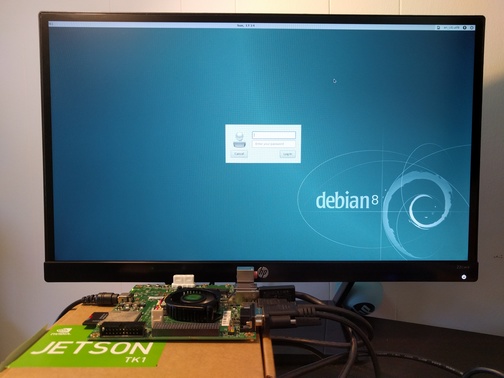
Martin Michlmayr: Debian on Jetson TK1

Debian on Jetson TK1 I became interested in running Debian on NVIDIA's Tegra platform recently. NVIDIA is doing a great job getting support for Tegra upstream (u-boot, kernel, X.org and other projects). As part of ensuring good Debian support for Tegra, I wanted to install Debian on a Jetson TK1, a development board from NVIDIA based on the Tegra K1 chip (Tegra 124), a 32-bit ARM chip. Ian Campbell enabled u-boot and Linux kernel support and added support in the installer for this device about a year ago. I updated some kernel options since there has been a lot of progress upstream in the meantime, performed a lot of tests and documented the installation process on the Debian wiki. Wookey made substantial improvements to the wiki as well. If you're interested in a good 32-bit ARM development platform, give Debian on the Jetson TK1 a try. There's also a 64-bit board. More on that later...

22 July 2016

Martin Michlmayr: Debian on Seagate Personal Cloud and Seagate NAS

The majority of NAS devices supported in Debian are based on Marvell's Kirkwood platform. This platform is quite dated now and can only run Debian's armel port. Debian now supports the Seagate Personal Cloud and Seagate NAS devices. They are based on Marvell's Armada 370, a platform which can run Debian's armhf port. Unfortunately, even the Armada 370 is a bit dated now, so I would not recommend these devices for new purchases. If you have one already, however, you now have the option to run native Debian. There are some features I like about the Seagate NAS devices: If you have a Seagate Personal Cloud and Seagate NAS, you can follow the instructions on the Debian wiki. If Seagate releases more NAS devices on Marvell's Armada platform, I intend to add Debian support.

20 July 2016

Daniel Stender: Theano in Debian: maintenance, BLAS and CUDA

I'm glad to announce that we have the current release of Theano (0.8.2) in Debian unstable now, it's on its way into the testing branch and the Debian derivatives, heading for Debian 9. The Debian package is maintained in behalf of the Debian Science Team. We have a binary package with the modules in the Python 2.7 import path (python-theano), if you want or need to stick to that branch a little longer (as a matter of fact, in the current popcon stats it's the most installed package), and a package running on the default Python 3 version (python3-theano). The comprehensive documentation is available for offline usage in another binary package (theano-doc). Although Theano builds its extensions on run time and therefore all binary packages contain the same code, the source package generates arch specific packages1 for the reason that the exhaustive test suite could run over all the architectures to detect if there are problems somewhere (#824116). what's this? In a nutshell, Theano is a computer algebra system (CAS) and expression compiler, which is implemented in Python as a library. It is named after a Classical Greek female mathematician and it's developed at the LISA lab (located at MILA, the Montreal Institute for Learning Algorithms) at the Universit de Montr al. Theano tightly integrates multi-dimensional arrays (N-dimensional, ND-array) from NumPy (numpy.ndarray), which are broadly used in Scientific Python for the representation of numeric data. It features a declarative Python based language with symbolic operations for the functional definition of mathematical expressions, which allows to create functions that compute values for them. Internally the expressions are represented as directed graphs with nodes for variables and operations. The internal compiler then optimizes those graphs for stability and speed and then generates high-performance native machine code to evaluate resp. compute these mathematical expressions2. One of the main features of Theano is that it's capable to compute also on GPU processors (graphical processor unit), like on custom graphic cards (e.g. the developers are using a GeForce GTX Titan X for benchmarks). Today's GPUs became very powerful parallel floating point devices which can be employed also for scientific computations instead of 3D video games3. The acronym "GPGPU" (general purpose graphical processor unit) refers to special cards like NVIDIA's Tesla4, which could be used alike (more on that below). Thus, Theano is a high-performance number cruncher with an own computing engine which could be used for large-scale scientific computations. If you haven't came across Theano as a Pythonistic professional mathematician, it's also one of the most prevalent frameworks for implementing deep learning applications (training multi-layered, "deep" artificial neural networks, DNN) around5, and has been developed with a focus on machine learning from the ground up. There are several higher level user interfaces build in the top of Theano (for DNN, Keras, Lasagne, Blocks, and others, or for Python probalistic programming, PyMC3). I'll seek for some of them also becoming available in Debian, too. helper scripts Both binary packages ship three convenience scripts, theano-cache, theano-test, and theano-nose. Instead of them being copied into /usr/bin, which would result into a binaries-have-conflict violation, the scripts are to be found in /usr/share/python-theano (python3-theano respectively), so that both module packages of Theano can be installed at the same time. The scripts could be run directly from these folders, e.g. do $ python /usr/share/python-theano/theano-nose to achieve that. If you're going to heavy use them, you could add the directory of the flavour you prefer (Python 2 or Python 3) to the $PATH environment variable manually by either typing e.g. $ export PATH=/usr/share/python-theano:$PATH on the prompt, or save that line into ~/.bashrc. Manpages aren't available for these little helper scripts6, but you could always get info on what they do and which arguments they accept by invoking them with the -h (for theano-nose) resp. help flag (for theano-cache). running the tests On some occasions you might want to run the testsuite of the installed library, like to check over if everything runs fine on your GPU hardware. There are two different ways to run the tests (anyway you need to have python ,3 -nose installed). One is, you could launch the test suite by doing $ python -c 'import theano; theano.test() (or the same with python3 to test the other flavour), that's the same what the helper script theano-test does. However, by doing it that way some particular tests might fail by raising errors also for the group of known failures. Known failures are excluded from being errors if you run the tests by theano-nose, which is a wrapper around nosetests, so this might be always the better choice. You can run this convenience script with the option --theano on the installed library, or from the source package root, which you could pull by $ sudo apt-get source theano (there you have also the option to use bin/theano-nose). The script accept options for nosetests, so you might run it with -v to increase verbosity. For the tests the configuration switch config.device must be set to cpu. This will also include the GPU tests when a proper accessible device is detected, so that's a little misleading in the sense of it doesn't mean "run everything on the CPU". You're on the safe side if you run it always like this: $ THEANO_FLAGS=device=cpu theano-nose, if you've set config.device to gpu in your ~/.theanorc. Depending on the available hardware and the used BLAS implementation (see below) it could take quite a long time to run the whole test suite through, on the Core-i5 in my laptop that takes around an hour even excluded the GPU related tests (which perform pretty fast, though). Theano features a couple of switches to manipulate the default configuration for optimization and compilation. There is a rivalry between optimization and compilation costs against performance of the test suite, and it turned out the test suite performs a quicker with lesser graph optimization. There are two different switches available to control config.optimizer, the fast_run toggles maximal optimization, while fast_compile runs only a minimal set of graph optimization features. These settings are used by the general mode switches for config.mode, which is either FAST_RUN by default, or FAST_COMPILE. The default mode FAST_RUN (optimizer=fast_run, linker=cvm) needs around 72 minutes on my lower mid-level machine (on un-optimized BLAS). To set mode=FAST_COMPILE (optimizer=fast_compile, linker=py) brings some boost for the performance of the test suite because it runs the whole suite in 46 minutes. The downside of that is that C code compilation is disabled in this mode by using the linker py, and also the GPU related tests are not included. I've played around with using the optimizer fast_compile with some of the other linkers (c py and cvm, and their versions without garbage collection) as alternative to FAST_COMPILE with minimal optimization but also machine code compilation incl. GPU testing. But to my experience, fast_compile without another than the linker py results in some new errors and failures of some tests on amd64, and this might the case also on other architectures, too. By the way, another useful feature is DebugMode for config.mode, which verifies the correctness of all optimizations and compares the C to Python results. If you want to have detailed info on the configuration settings of Theano, do $ python -c 'import theano; print theano.config' less, and check out the chapter config in the library documentation in the documentation. cache maintenance Theano isn't a JIT (just-in-time) compiler like Numba, which generates native machine code in the memory and executes it immediately, but it saves the generated native machine code into compiledirs. The reason for doing it that way is quite practical like the docs explain, the persistent cache on disk makes it possible to avoid generating code for the same operation, and to avoid compiling again when different operations generate the same code. The compiledirs by default are located within $(HOME)/.theano/. After some time the folder becomes quite large, and might look something like this:
$ ls ~/.theano
compiledir_Linux-4.5--amd64-x86_64-with-debian-stretch-sid--2.7.11+-64
compiledir_Linux-4.5--amd64-x86_64-with-debian-stretch-sid--2.7.12-64
compiledir_Linux-4.5--amd64-x86_64-with-debian-stretch-sid--2.7.12rc1-64
compiledir_Linux-4.5--amd64-x86_64-with-debian-stretch-sid--3.5.1+-64
compiledir_Linux-4.5--amd64-x86_64-with-debian-stretch-sid--3.5.2-64
compiledir_Linux-4.5--amd64-x86_64-with-debian-stretch-sid--3.5.2rc1-64
If the used Python version changed like in this example you might to want to purge obsolete cache. For working with the cache resp. the compiledirs, the helper theano-cache comes in handy. If you invoke it without any arguments the current cache location is put out like ~/.theano/compiledir_Linux-4.5--amd64-x86_64-with-debian-stretch-sid--2.7.12-64 (the script is run from /usr/share/python-theano). So, the compiledirs for the old Python versions in this example (11+ and 12rc1) can be removed to free the space they occupy. All compiledirs resp. cache directories meaning the whole cache could be erased by $ theano-cache basecompiledir purge, the effect is the same as by performing $ rm -rf ~/.theano. You might want to do that e.g. if you're using different hardware, like when you got yourself another graphics card. Or habitual from time to time when the compiledirs fill up so much that it slows down processing with the harddisk being very busy all the time, if you don't have an SSD drive available. For example, the disk space of build chroots carrying (mainly) the tests completely compiled through on default Python 2 and Python 3 consumes around 1.3 GB (see here). BLAS implementations Theano needs a level 3 implementation of BLAS (Basic Linear Algebra Subprograms) for operations between vectors (one-dimensional mathematical objects) and matrices (two-dimensional objects) carried out on the CPU. NumPy is already build on BLAS and pulls the standard implementation (libblas3, soure package: lapack), but Theano links directly to it instead of using NumPy as intermediate layer to reduce the computational overhead. For this, Theano needs development headers and the binary packages pull libblas-dev by default, if any other development package of another BLAS implementation (like OpenBLAS or ATLAS) isn't already installed, or pulled with them (providing the virtual package libblas.so). The linker flags could be manipulated directly through the configuration switch config.blas.ldflags, which is by default set to -L/usr/lib -lblas -lblas. By the way, if you set it to an empty value, Theano falls back to using BLAS through NumPy, if you want to have that for some reason. On Debian, there is a very convenient way to switch between BLAS implementations by the alternatives mechanism. If you have several alternative implementations installed at the same time, you can switch from one to another easily by just doing:
$ sudo update-alternatives --config libblas.so
There are 3 choices for the alternative libblas.so (providing /usr/lib/libblas.so).
  Selection    Path                                  Priority   Status
------------------------------------------------------------
* 0            /usr/lib/openblas-base/libblas.so      40        auto mode
  1            /usr/lib/atlas-base/atlas/libblas.so   35        manual mode
  2            /usr/lib/libblas/libblas.so            10        manual mode
  3            /usr/lib/openblas-base/libblas.so      40        manual mode
Press <enter> to keep the current choice[*], or type selection number:
The implementations are performing differently on different hardware, so you might want to take the time to compare which one does it best on your processor (the other packages are libatlas-base-dev and libopenblas-dev), and choose that to optimize your system. If you want to squeeze out all which is in there for carrying out Theano's computations on the CPU, another option is to compile an optimized version of a BLAS library especially for your processor. I'm going to write another blog posting on this issue. The binary packages of Theano ship the script check_blas.py to check over how well a BLAS implementation performs with it, and if everything works right. That script is located in the misc subfolder of the library, you could locate it by doing $ dpkg -L python-theano grep check_blas (or for the package python3-theano accordingly), and run it with the Python interpreter. By default the scripts puts out a lot of info like a huge perfomance comparison reference table, the current setting of blas.ldflags, the compiledir, the setting of floatX, OS information, the GCC version, the current NumPy config towards BLAS, NumPy location and version, if Theano linked directly or has used the NumPy binding, and finally and most important, the execution time. If just the execution time for quick perfomance comparisons is needed this script could be invoked with -q. Theano on CUDA The function compiler of Theano works with alternative backends to carry out the computations, like the ones for graphics cards. Currently, there are two different backends for GPU processing available, one docks onto NVIDIA's CUDA (Compute Unified Device Architecture) technology7, and another one for libgpuarray, which is also developed by the Theano developers in parallel. The libgpuarray library is an interesting alternative for Theano, it's a GPU tensor (multi-dimensional mathematical object) array written in C with Python bindings based on Cython, which has the advantage of running also on OpenCL8. OpenCL, unlike CUDA9, is full free software, vendor neutral and overcomes the limitation of the CUDA toolkit being only available for amd64 and the ppc64el port (see here). I've opened an ITP on libgpuarray and we'll see if and how this works out. Another reason for it would be great to have it available is that it looks like CUDA currently runs into problems with GCC 610. More on that, soon. Here's a litle checklist for setting up your CUDA device so that you don't have to experience something like this:
$ THEANO_FLAGS=device=gpu,floatX=float32 python ./cat_dog_classifier.py 
WARNING (theano.sandbox.cuda): CUDA is installed, but device gpu is not available (error: Unable to get the number of gpus available: no CUDA-capable device is detected)
hardware check For running Theano on CUDA you need an NVIDIA graphics card which is capable of doing that. You can recheck if your device is supported by CUDA here. When the hardware isn't too old (CUDA support started with GeForce 8 and Quadro X series) or too strange I think it isn't working only in exceptional cases. You can check your model and if the device is present in the system on the bare hardware level by doing this:
$ lspci   grep -i nvidia
04:00.0 3D controller: NVIDIA Corporation GM108M [GeForce 940M] (rev a2)
If a line like this doesn't get returned, your device most probably is broken, or not properly connected (ouch). If rev ff appears at the end of the line that means the device is off meaning powered down. This might be happening if you have a laptop with Optimus graphics hardware, and the related drivers have switched off the unoccupied device to safe energy11. kernel module Running CUDA applications requires the proprietary NVIDIA driver kernel module to be loaded into the kernel and working. If you haven't already installed it for another purpose, the NVIDIA driver and the CUDA toolkit are both in the non-free section of the Debian archive, which is not enabled by default. To get non-free packages you have to add non-free (and it's better to do so, also contrib) to your package source in /etc/apt/sources.list, which might then look like this:
deb http://httpredir.debian.org/debian/ testing main contrib non-free
After doing that, perform $ apt-cache update to update the package lists, and there you go with the non-free packages. The headers of the running kernel are needed to compile modules, you can get them together with the NVIDIA kernel module package by running:
$ sudo apt-get install linux-headers-$(uname -r) nvidia-kernel-dkms build-essential
DKMS will then build the NVIDIA module for the kernel and does some other things on the system. When the installation has finished, it's generally advised to reboot the system completely. troubleshooting If you have problems with the CUDA device, it's advised to verify if the following things concerning the NVIDIA driver resp. kernel module are in order: blacklist nouveau Check if the default Nouveau kernel module driver (which blocks the NVIDIA module) for some reason still gets loaded by doing $ lsmod grep nouveau. If nothing gets returned, that's right. If it's still in the kernel, just add blacklist nouveau to /etc/modprobe.d/blacklist.conf, and update the booting ramdisk with sudo update-initramfs -u afterwards. Then reboot once more, this shouldn't be the case then anymore. rebuild kernel module To fix it when the module haven't been properly compiled for some reason you could trigger a rebuild of the NVIDIA kernel module with $ sudo dpkg-reconfigure nvidia-kernel-dkms. When you're about to send your hardware in to repair because everything looks all right but the device just isn't working, that really could help (own experience). After the rebuild of the module or modules (if you have a few kernel packages installed) has completed, you could recheck if the module really is available by running:
$ sudo modinfo nvidia-current
filename:       /lib/modules/4.4.0-1-amd64/updates/dkms/nvidia-current.ko
alias:          char-major-195-*
version:        352.79
supported:      external
license:        NVIDIA
alias:          pci:v000010DEd00000E00sv*sd*bc04sc80i00*
alias:          pci:v000010DEd*sv*sd*bc03sc02i00*
alias:          pci:v000010DEd*sv*sd*bc03sc00i00*
depends:        drm
vermagic:       4.4.0-1-amd64 SMP mod_unload modversions 
parm:           NVreg_Mobile:int
It should be something similiar to this when everything is all right. reload kernel module When there are problems with the GPU, maybe the kernel module isn't properly loaded. You could recheck if the module has been properly loaded by doing
$ lsmod   grep nvidia
nvidia_uvm             73728  0
nvidia               8540160  1 nvidia_uvm
drm                   356352  7 i915,drm_kms_helper,nvidia
The kernel module could be loaded resp. reloaded with $ sudo nvidia-modprobe (that tool is from the package nvidia-modprobe). unsupported graphics card Be sure that you graphics cards is supported by the current driver kernel module. If you have bought new hardware, that's quite possible to come out being a problem. You can get the version of the current NVIDIA driver with:
$ cat /proc/driver/nvidia/version 
NVRM version: NVIDIA UNIX x86_64 Kernel Module 352.79  Wed Jan 13 16:17:53 PST 2016
GCC version:  gcc version 5.3.1 20160528 (Debian 5.3.1-21)
Then, google the version number like nvidia 352.79, this should get you onto an official driver download page like this. There, check for what's to be found under "Supported Products". I you're stuck with that there are two options, to wait until the driver in Debian got updated, or replace it with the latest driver package from NVIDIA. That's possible to do, but something more for experienced users. occupied graphics card The CUDA driver cannot work while the graphical interface is busy like by processing the graphical display of your X.Org server. Which kernel driver actually is used to process the desktop could be examined by this command:12
$ grep '(II).*([0-9]):' /var/log/Xorg.0.log
[    37.700] (II) intel(0): Using Kernel Mode Setting driver: i915, version 1.6.0 20150522
[    37.700] (II) intel(0): SNA compiled: xserver-xorg-video-intel 2:2.99.917-2 (Vincent Cheng <vcheng@debian.org>)
 ... 
[    39.808] (II) intel(0): switch to mode 1920x1080@60.0 on eDP1 using pipe 0, position (0, 0), rotation normal, reflection none
[    39.810] (II) intel(0): Setting screen physical size to 508 x 285
[    67.576] (II) intel(0): EDID vendor "CMN", prod id 5941
[    67.576] (II) intel(0): Printing DDC gathered Modelines:
[    67.576] (II) intel(0): Modeline "1920x1080"x0.0  152.84  1920 1968 2000 2250  1080 1083 1088 1132 -hsync -vsync (67.9 kHz eP)
This example shows that the rendering of the desktop is performed by the graphical device of the Intel CPU, which is just like it's needed for running CUDA applications on your NVIDIA graphics card, if you don't have another one. nvidia-cuda-toolkit With the Debian package of the CUDA toolkit everything pretty much runs out of the box for Theano. Just install it with apt-get, and you're ready to go, the CUDA backend is the default one. Pycuda is also a suggested dependency of the binary packages, it could be pulled together with the CUDA toolkit. The up-to-date CUDA release 7.5 is of course available, with that you have Maxwell architecture support so that you can run Theano on e.g. a GeForce GTX Titan X with 6,2 TFLOPS on single precision13 at an affordable price. CUDA 814 is around the corner with support for the new Pascal architecture15. Like the GeForce GTX 1080 high-end gaming graphics card already has 8,23 TFLOPS16. When it comes to professional GPGPU hardware like the Tesla P100 there is much more computational power available, scalable by multiplication of cores resp. cards up to genuine little supercomputers which fit on a desk, like the DGX-117. Theano can use multiple GPUs for calculations to work with highly scaled hardware, I'll write another blog post on this issue. Theano on the GPU It's not difficult to run Theano on the GPU. Only single precision floating point numbers (float32) are supported on the GPU, but that is sufficient for deep learning applications. Theano uses double precision floats (float64) by default, so you have to set the configuration variable config.floatX to float32, like written on above, either with the THEANO_FLAGS environment variable or better in your .theanorc file, if you're going to use the GPU a lot. Switching to the GPU actually happens with the config.device configuration variable, which must be set to either gpu or gpu0, gpu1 etc., to choose a particular one if multiple devices are available. Here's is a little test script check1.py, it's taken from the docs and slightly altered. You can run that script either with python or python3 (there was a single test failure on the Python 3 package, so the Python 2 library might be a little more stable currently). For comparison, here's an example on how it perfoms on my hardware, one time on the CPU, one more time on the GPU:
$ THEANO_FLAGS=floatX=float32 python ./check1.py 
[Elemwise exp,no_inplace (<TensorType(float32, vector)>)]
Looping 1000 times took 4.481719 seconds
Result is [ 1.23178029  1.61879337  1.52278066 ...,  2.20771813  2.29967761
  1.62323284]
Used the cpu
$ THEANO_FLAGS=floatX=float32,device=gpu python ./check1.py 
Using gpu device 0: GeForce 940M (CNMeM is disabled, cuDNN not available)
[GpuElemwise exp,no_inplace (<CudaNdarrayType(float32, vector)>), HostFromGpu(GpuElemwise exp,no_inplace .0)]
Looping 1000 times took 1.164906 seconds
Result is [ 1.23178029  1.61879349  1.52278066 ...,  2.20771813  2.29967761
  1.62323296]
Used the gpu
If you got a result like this you're ready to go with Theano on Debian, training computer vision classifiers or whatever you want to do with it. I'll write more on for what Theano could be used, soon.

  1. Some ports are disabled because they are currently not supported by Theano. There are NotImplementedErrors and other errors in the tests on the numpy.ndarray object being not aligned. The developers commented on that, see here. And on some ports the build flags -m32 resp. -m64 of Theano aren't supported by g++, the build flags can't be manipulated easily.
  2. Theano Development Team: "Theano: a Python framework for fast computation of mathematical expressions"
  3. Marc Couture: "Today's high-powered GPUs: strong for graphics and for maths". In: RTC magazine June 2015, pp. 22 25
  4. Ogier Maitre: "Understanding NVIDIA GPGPU hardware". In: Tsutsui/Collet (eds.): Massively parallel evolutionary computation on GPGPUs. Berlin, Heidelberg: Springer 2013, pp. 15-34
  5. Geoffrey French: "Deep learing tutorial: advanved techniques". PyData London 2016 presentation
  6. Like the description of the Lintian tag binary-without-manpage says, that's not needed for them being in /usr/share.
  7. Tom. R. Halfhill: "Parallel processing with CUDA: Nvidia's high-performance computing platform uses massive multithreading". In: Microprocessor Report January 28, 2008
  8. Faber et.al: "Parallelwelten: GPU-Programmierung mit OpenCL". In: C't 26/2014, pp. 160-165
  9. For comparison, see: Valentine Sinitsyn: "Feel the taste of GPU programming". In: Linux Voice February 2015, pp. 106-109
  10. https://lists.debian.org/debian-devel/2016/07/msg00004.html
  11. If Optimus (hybrid) graphics hardware is present (like commonly today on PC laptops), Debian launches the X-server on the graphics processing unit of the CPU, which is ideal for CUDA. The problem with Optimus actually is the graphics processing on the dedicated GPU. If you are using Bumblebee, the Python interpreter which you want to run Theano on has be to be started with the launcher primusrun, because Bumblebee powers the GPU down with the tool bbswitch every time it isn't used, and I think also the kernel module of the driver is dynamically loaded.
  12. Thorsten Leemhuis: "Treiberreviere. Probleme mit Grafiktreibern f r Linux l sen": In: C't Nr.2/2013, pp. 156-161
  13. Martin Fischer: "4K-Rakete: Die schnellste Single-GPU-Grafikkarte der Welt". In C't 13/2015, pp. 60-61
  14. http://www.heise.de/developer/meldung/Nvidia-CUDA-8-bringt-Optimierungen-fuer-die-Pascal-Architektur-3164254.html
  15. Martin Fischer: "All In: Nvidia enth llt die GPU-Architektur 'Pascal'". In: C't 9/2016, pp. 30-31
  16. Martin Fischer: "Turbo-Pascal: High-End-Grafikkarte f r Spieler: GeForce GTX 1080". In: C't 13/2016, pp. 100-103
  17. http://www.golem.de/news/dgx-1-nvidias-supercomputerchen-mit-8x-tesla-p100-1604-120155.html

8 July 2016

Reproducible builds folks: Managing container and environment state

Author: ceridwen With some more help from Martin Pitt, it became clear to me that my previous mental model of how autopkgtest worked is very different from how it does work. I'll illustrate by borrowing my previous example. I know that schroot has the following behavior:
The default behaviour is as follows (all directory paths are inside the chroot). A login shell is run in the current working directory. If this is not available, it will try $HOME (when --preserve-environment is used), then the user's home directory, and / inside the chroot in turn. A command is always run in the current working directory inside the chroot. If none of the directories are available, schroot will exit with an error status.
I was naively thinking that the way autopkgtest would work is that it would set the current working directory of the schroot call and the ensuing subprocess call would thus take place in that directory inside the schroot. That is not how it works. If you want to change directories inside the virtual server, you have to use cd. The same is true of, at least, environment variables, which have their own specific handling in the adt_testbed.Testbed methods but have to be passed as strings, and umask. I'm assuming this is because the direct methods with qemu images or LXC containers don't work. What this means is that I was thinking about the problem the wrong way: what reprotest needs to do is generate shell scripts. This is how autopkgtest works. If this goes beyond laying out commands linearly one after another, for instance if it demands conditionals or other nested constructs, the right way to do it is to build an abstract syntax tree representation of the shell script and then convert it to code. Whether I need more complicated shell scripts depends on my approach to handling state in the containers. I need to know what state persists across separate command executions: if I call adt_testbed.Testbed.execute() twice, what if any changes I make to the container will carry forward from the first to the second? There are three categories here. First, some properties of a system aren't preserved even from one command execution to the next, like working directory and environment variables. (I thought working directory would be preserved, but it's not). The second is state that persists while the testbed is open and is then automatically reverted when it's closed, like files copied into temporary directories on the tesbed. The third is state that persists across different sessions on the same container and must be cleaned up by reprotest. It's worth noting that which state falls into which category may vary by the container in question, though for the most part I can either do unnecessary cleanup or issue unnecessary commands to handle the differences. autopkgtest itself has a very different approach to cleanup, as it relies almost entirely on the builtin reversion capabilities from some of its containers. I would prefer to avoid doing the same, partly because I know that some of the modifications I need to make, for instance creating new users or mounting disorderfs, can't be reverted by the faster, simpler containers like schroot. From discussions with Lunar, I think that the variations that correspond to environment variables (captures_environment, home, locales, path, and timezone) fall into the first category, but because of the special handling for them they don't require sending a separate command. The shell (bash foo) accepts a script or command as an argument so it also doesn't need a separate command. Setting the working directory and umask require separate commands that have to be joined. On Linux, setarch also accepts a command/script as an argument so can be handled like the shell, but there's no unified POSIX protocol for mocking uname so other OSes will require different approaches. Users, groups, file ordering, host, and domain will require cleanup in all containers except for (maybe) qemu. If I want to handle the cleanup in the shell scripts themselves, I need conditionals so that for instance the shell script only tries to unmount disorderfs if disorderfs was successfully mounted. This approach would simplify the error handling problems I've had before, where when a build crashes cleanup code run from Python doesn't get run until after the testbed stop accepting commands. Lunar suggested the Plumbum library to me, and I think I can use it to avoid writing my own shell AST library. It has a method that converts the Python representation of a shell script into a string that can be passed to Testbed.command(). Integrating Plumbum to generate the necessary scripts is where I'm going in the next week. Any feedback on any of this is welcome. I'm also curious what other projects are using autopkgtest code. Holger brought to my attention piuparts, which brings the list up to four that I'm aware of, autopkgtest itself, sbuild, piuparts, and now reprotest.

5 July 2016

Olivier Gr goire: Sixth week: and the framerates appear....

Last week, I worked on linking the D_BUS with the client and implement MAP on my callback smartInfo to push all my information in only one parameter.
This week I wanted to display my first real information in my client. I choose to begin with the frame rate to help another person in Savoir Faire Linux who work on the encoding and decoding of the video. So I worked on the video part of the daemon trying to understand how the daemon sends frames to LRC. All the frames are decoded in the same place so I just pull the number of frames per second for the local and remote video and put it on my callback smartInfo.
Next week, I will change my architecture a little bit. Ring can handle several calls with different information and my implementation don't take care of this. I need to search and implement a new architecture to link my callback with the call.

29 June 2016

Olivier Gr goire: Sixth week: and the framerates appear....

Last week, I worked on link the D_BUS with the client and implement MAP on my callback smartInfo to push all my information in only one parameter.
This week I wanted to display my first real information in my client. I choose to begin with the frame rate to help another person in Savoir Faire Linux who work on the encoding and decoding of the video. So I worked on the video part of the daemon trying to understand how the daemon sends frames to LRC. All the frames are decoded in the same place so I just pull the number of frames per second for the local and remote video and put it on my callback smartInfo.
Next week, I will change my architecture a little bit. Ring can handle several calls with different information and my implementation don't take care of this. I need to search and implement a new architecture to link my callback with the call.

26 June 2016

Steinar H. Gunderson: Nageru 1.3.0 released

I've just released version 1.3.0 of Nageru, my live software video mixer. Things have been a bit quiet on the Nageru front recently, for two reasons: First, I've been busy with moving (from Switzerland to Norway) and associated job change (from Google to MySQL/Oracle). Things are going well, but these kinds of changes tend to take, well, time and energy. Second, the highlight of Nageru 1.3.0 is encoding of H.264 streams meant for end users (using x264), not just the Quick Sync Video streams from earlier versions, which work more as a near-lossless intermediate format meant for transcoding to something else later. Like with most things video, hitting such features really hard (I've been doing literally weeks of continuous stream testing) tends to expose weaknesses in upstream software. In particular, I wanted x264 speed control, where the quality is tuned up and down live as the content dictates. This is mainly because the content I want to stream this summer (demoscene competitions) varies from the very simple to downright ridiculously complex (as you can see, YouTube just basically gives up and creates gray blocks). If you have only one static quality setting, you will have the choice between something that looks like crap for everything, and one that drops frames like crazy (or, if your encoding software isn't all that, like e.g. using ffmpeg(1) directly, just gets behind and all your clients' streams just stop) when the tricky stuff comes. There was an unofficial patch for speed control, but it was buggy, not suitable for today's hardware and not kept at all up to date with modern x264 versions. So to get speed control, I had to work that patch pretty heavily (including making it so that it could work in Nageru directly instead of requiring a patched x264) and then it exposed a bug in x264 proper that would cause corruption when changing between some presets, and I couldn't release 1.3.0 before that fix had at least hit git. Similarly, debugging this exposed an issue with how I did streaming with ffmpeg and the MP4 mux (which you need to be able to stream H.264 directly to HTML5 <video> without any funny and latency-inducing segmenting business); to know where keyframes started, I needed to flush the mux before each one, but this messes up interleaving, and if frames were ever dropped right in front of a keyframe (which they would on the most difficult content, even at speed control's fastest presets!), the duration field of the frame would be wrong, causing the timestamps to be wrong and even having pts < dts in some cases. (VLC has to deal with flushing in exactly the same way, and thus would have exactly the same issue, although VLC generally doesn't transcode variable-framerate content so well to begin with, so the heuristics would be more likely to work. Incidentally, I wrote the VLC code for this flushing back in the day, to be able to stream WebM for some Debconf.) I cannot take credit for the ffmpeg/libav fixes (that was all done by Martin Storsj ), but again, Nageru had to wait for the new API they introduce (that just signals to the application when a keyframe is about to begin, removing the need for flushing) to get into git mainline. Hopefully, both fixes will get into releases soon-ish and from there one make their way into stretch. Apart from that, there's a bunch of fixes as always. I'm still occasionally (about once every two weeks of streaming or so) hitting what I believe is a bug in NVIDIA's proprietary OpenGL drivers, but it's nearly impossible to debug without some serious help from them, and they haven't been responding to my inquiries. Every two weeks means that you could be hitting it in a weekend's worth of streaming, so it would be nice to get it fixed, but it also means it's really really hard to make a reproducible test case. :-) But the fact that this is currently the worst stability bug (and that you can work around it by using e.g. Intel's drivers) also shows that Nageru is pretty stable these days.

22 June 2016

Martin-&#201;ric Racine: Batch photo manipulation via free software tools?

I have a need for batch-processing pictures. My requirements are fairly simple:Until recently, I was using Phatch to perform all of this. Unfortunately, it cannot edit the EXIF data of my current Lumix camera, whose JPEG it claims to be MPO. I am thus forced to look for other options. Ideally, I would do this via a script inside gThumb (which is my main photo editing software), but I cannot seem to find adequate documentation on how to achieve this.I am thus very interested in hearing about other options to achieve the same result. Ideas, anyone?

20 June 2016

Reproducible builds folks: Reorganizing the autopkgtest code

Author: ceridwen The very-first alpha-quality release of reprotest is now in Debian's NEW package queue, so it should soon be available for install through apt. I've spent most of the past week reverse-engineering autopkgtest, with some help from the maintainer, Martin Pitt. As its name suggests, autopkgtest is a tool for running Debian/Ubuntu package tests. The key overlap with reprotest is that it can create containers (what the autopkgtest documentation calls "virtualization servers" or "virt-servers") and then run tests in them. While reprotest builds packages and diffs binaries instead, the process of copying source trees and executing commands is much the same, so I can reuse a lot of the code. As I outlined last week, autopkgtest is composed of a main command-line program and other command-line programs chroot, lxd, schroot, null, schroot, and qemu, which live in a directory virt/. (I've followed autopkgtest 4.0 in dropping the adt-virt- prefix and other name conventions.) Autopkgtest's directory structure looks like:
autopkgtest/
    lib/
        adt_testbed.py
        adtlog.py
        VirtSubproc.py
    runner/
    setup-commands/
    ssh-setup/
    tests/
    tools/
    virt/
        chroot
        lxc
        lxd
        null
        qemu
        schroot
        ssh
Reprotest's directory structure looks like:
reprotest/
    reprotest/
    __init__.py
        lib/
            adt_testbed.py
            adtlog.py
            VirtSubproc.py
        runner/
        tools/
        virt/
            chroot
            lxc
            lxd
            null
            qemu
            schroot
            ssh
    tests/
Autopkgtest doesn't contain any __init__.py files, which means that from the perspective of Python none of its components are Python packages. To enable the various components of autopkgtest test to import each other as implicit namespace packages, there's a lot of explicit sys.path mutation code in the various files like sys.path.insert(0, '/usr/share/autopkgtest/python') and sys.path.insert(0, os.path.join(os.path.dirname(os.path.dirname(os.path.abspath(__file__))), 'lib')). For my design goals, there are two problems with this. First, setuptools makes it very, very difficult to distribute code that isn't in Python packages, so this approach more or less doesn't work with PyPi at all. Second, different OSes have different directory layouts for Python packages, so an absolute path like /usr/share/autopkgtest/python isn't portable. The main code of reprotest at the moment lives in its __init__.py. The autopkgtest CLI of the main runner is specific to running tests, so my entry point is going to be adt_testbed. My first attempt to refactor this involved putting an empty __init__.py in lib/ to turn into a package so that I could import the modules in the files in lib/ using code like from reprotest.lib import adtlog. This works fine for the files in lib/ and makes adt_testbed importable in the main __init__.py. However, the executables in virt/, which are invoked by subprocess calls in adt_testbed.py, also need to import modules from lib/ for the various adtlog functions and the timeout functions in VirtSubproc. After some trial-and-error, by replacing the sys.path mutations in virt/ with sys.path.insert(0, os.path.dirname(os.path.dirname(os.path.dirname(os.path.abspath(__file__))))), I managed to get the executables to run, though I still need to verify that this works for both PyPi and apt. I'm not sure if this is the best solution, so I may end up doing some kind of larger refactoring, either changing all the subprocess calls in adt_testbed so they work with reprotest.virt as a subpackage or reorganizing the rest of the code somehow. It's still not clear to me why autopkgtest uses its own special logging module rather than the standard library's logging module. I thought it might have something to do with combining the logging from a process and its subprocesses, but because the Python subprocesses are importing their own instances of the adtlog module, this isn't the case. Another problem related to logging and debugging is that the programs in virt/ interact through stdin and stdout, which means that I haven't been able to use simple prints to help work out their state during execution. Now that I have adt_testbed working, my next step is to change the code I've already written so that instead of executing commands directly, it executes them through the autopkgtest interface.

13 June 2016

Olivier Gr goire: Third week at GSoC

I begin this week by finish my QT tutorial. With that new knowledge, I was able to implemet my method launchSmartInfo(int) on LRC. After that, I needed to implement the gnome client too. I followed the tutorial on QT so I thought I can just learn GTK+ by reading the code. Finally, I just lost a lot of time by doing that and I didn't learn a lot. In response to that problem I finally use an GTK+ tutorial. I began to try to show n transparente window with some text in front of the call view. To do that, I want to use clutter library ------------ Conclusion: as you can see, I lost a lot of time in this GUI learning. Now it's done, I can move forward! :)

Olivier Gr goire: Third week at GSoC

I begin this week by finish my QT tutorial. With that new knowledge, I was able to implemet my method launchSmartInfo(int) on LRC. After that, I needed to implement the gnome client too. I followed the tutorial on QT so I thought I can just learn GTK+ by reading the code. Finally, I just lost a lot of time by doing that and I didn't learn a lot. In response to that problem I finally use an GTK+ tutorial. I began to try to show an transparente window with some text in front of the call view. To do that, I want to use clutter library ------------ Conclusion: as you can see, I lost a lot of time in this GUI learning. Now it's done, I can move forward! :)

9 June 2016

Martin Pitt: autopkgtest 4.0: Simplified CLI, deprecating adt

Historically, the adt-run command line has allowed multiple tests; as a consequence, arguments like --binary or --override-control were position dependent, which confused users a lot (#795274, #785068, #795274, LP #1453509). On the other hand I don t know anyone or any CI system which actually makes use of the multiple tests on a single command line feature. The command line also was a bit confusing in other ways, like the explicit --built-tree vs. --unbuilt-tree and the magic / vs. // suffixes, or option vs. positional arguments to specify tests. The other long-standing confusion is the pervasive adt acronym, which is still from the very early times when autopkgtest was called autodebtest (this was changed one month after autodebtest s inception, in 2006!). Thus in some recent night/weekend hack sessions I ve worked on a new command line interface and consistent naming. This is now available in autopkgtest 4.0 in Debian unstable and Ubuntu Yakkety. You can download and use the deb package on Debian jessie and Ubuntu 14.04 LTS as well. (I will provide official backports after the first bug fix release after this got some field testing.) New autopkgtest command The adt-run program is now superseded by autopkgtest: README.running-tests got updated to the new CLI, as usual you can also read the HTML online. The old adt-run CLI is still available with unchanged behaviour, so it is safe to upgrade existing CI systems to that version. Image build tools All adt-build* tools got renamed to autopkgtest-build*, and got changed to build images prefixed with autopkgtest instead of adt . For example, adt-build-lxc ubuntu xenial now produces an autopkgtest-xenial container instead of adt-xenial. In order to not break existing CI systems, the new autopkgtest package contains symlinks to the old adt-build* commands, and when being called through them, also produce images with the old adt- prefix. Environment variables in tests Finally there is a set of environment variables that are exported by autopkgtest for using in tests and image customization tools, which now got renamed from ADT_* to AUTOPKGTEST_*: As these are being used in existing tests and tools, autopkgtest also exports/checks those under their old ADT_* name. So tests can be converted gradually over time (this might take several years). Feedback As usual, if you find a bug or have a suggestion how to improve the CLI, please file a bug in Debian or in Launchpad. The new CLI is recent enough that we still have some liberty to change it. Happy testing!

6 June 2016

Olivier Gr goire: Community bounding + 2 weeks at GSoC!

Welcome in my first and second report!
The community was really good, I talked with a lot of people from all around the world. All that projects are just awesome and I am happy to be part of this.
For this first week, I provided a list of all information I need to pull in my client (this list is subject to change a little bit):
-Call ID
-Resolution of the camera of all the people connect to the call
-Percentage of loosing frame
-Bandwidth (upload + download)
-Name of Codecs using on the conversation
-Time to contact the other person
-The security level
-Performance using by Ring (RAM + CPU)
I am trying to figure out how work the Ring project.
-Understand the external exchange by using Wireshark to catch some important packages.
-Understand the internal exchange between the daemon and clients on the D-Bus by using Bustle
I created my architecture program on the daemon and the D-Bus. [1] You can call the method launchSmartInfo(int x) from the D-Bus (by using D-Feet for example). That will call SmartInfo signal all x ms. This signal can only push an int for the moment, but he will push all the information we want on the clients. I actually work on the Ring GNU Linux client. So I learn how work the QT and GTK+. [1]github/Gasuleg/Smartlnfo-Ring: I will stop update this repository because I will push my code on the Gerrit draft of Savoir Faire Linux. It's more easy for my team to do some commentary on that platform and it's free software)

Olivier Gr goire: Community bounding + 2 weeks at GSoC!

Welcome in my first and second report!
The community was really good, I talked with a lot of people from all around the world. All that projects are just awesome and I am happy to be part of this.
For this first week, I provided a list of all information I need to pull in my client (this list is subject to change a little bit):
-Call ID
-Resolution of the camera of all the people connect to the call
-Percentage of loosing frame
-Bandwidth (upload + download)
-Name of Codecs using on the conversation
-Time to contact the other person
-The security level
-Performance using by Ring (RAM + CPU)
I am trying to figure out how work the Ring project.
-Understand the external exchange by using Wireshark to catch some important packages.
-Understand the internal exchange between the daemon and clients on the D-Bus by using Bustle
I created my architecture program on the daemon and the D-Bus. [1] You can call the method launchSmartInfo(int x) from the D-Bus (by using D-Feet for example). That will call SmartInfo signal all x ms. This signal can only push an int for the moment, but he will push all the information we want on the clients. I actually work on the Ring GNU Linux client. So I learn how work the QT and GTK+. [1][https://github.com/Gasuleg/Smartlnfo-Ring](https://github.com/Gasuleg/Smartlnfo-Ring)(I will stop update this repository because I will push my code on the Gerrit draft of Savoir Faire Linux. It's more easy for my team to do some commentary on that platform and it's free software)

2 June 2016

Rapha&#235;l Hertzog: My Free Software Activities in May 2016

My monthly report covers a large part of what I have been doing in the free software world. I write it for my donators (thanks to them!) but also for the wider Debian community because it can give ideas to newcomers and it s one of the best ways to find volunteers to work with me on projects that matter to me. Debian LTS Due to some departure and increased workload, I wanted to find out a few new paid contributors for Debian LTS. So I sent a mail to debian-jobs@lists.debian.org and contrary to last time (where I posted the announce only here on my blog), I had plenty of replies I ended up enrolling 6 new contributors and refusing 3 persons that did not have the required profile. All new contributors are supposed to handle at least one LTS update on their free time to get up to speed. But from the 6 new contributors only 3 managed to handle their training update in May.  During the month I spent quite some time providing guidance to the new contributors both in private mails and on the debian-lts mailing list. I also reviewed a xen update where I had (rightfully) some doubts about the work done. Packaging work fonts-cantarell. After having diagnosed the problem last month, I got annoyed enough by the lack of a fixed package that I found a way to package a newer upstream release of fonts-cantarell without requiring a fontforge update that was likely to take some time still so I prepared and uploaded 0.0.24-1. cpputest. Bug #823711 reported some license issues with some of the files. I immediately forwarded this upstream (issue 961) and fixed it in Debian by repacking the upstream tarball. Fortunately upstream has been quick to handle his and there s a new upstream release (3.8) where the problematic files have been dropped. live-boot. Kali s live images were no longer booting (stuck in the initrd) and with the help of Ben Hutchings we diagnosed this back to #823069 which I fixed in live-boot 20160511. udev. I filed #824025 to request that the rule defining the MAC-based name of USB network interfaces be isolated in its own file so that it can be easily disabled (we do that in Kali). Misc stuff. I packaged Django 1.8.13 in jessie-backports. I filed
#824165 against sbuild being broken with $apt_allow_unauthenticated = 1; in .sbuildrc. I filed a wishlist bug #824168 against apt-listchanges to suggest that it ignores news from auto-installed packages. I filed #825923 to report a regression in python-nltk (discovered in Kali first). Infrastructure work packages.debian.org. A few months ago, I wrote a patch for packages.debian.org so that it forwards emails to tracker.debian.org instead of packages.qa.debian.org. At that time, I was in touch with Rhonda and was hoping that she would apply it rather quickly (the patch is rather short). After a few more pings, she made it clear that she was not alone and that I should rather file a proper request so that someone else can also process it. So I filed #824085 and tried to find someone else to apply my patch. Most of the members of pkg_maint said that they were part of the group only due to generic webmaster involvement but that they did not want to touch that part. Fortunately, Martin Zobel Helas was more receptive to my request and helped me to deploy my changes. I committed my change and Martin pulled it in the live checkout on picconi.debian.org. This update is also a first step towards the possibility to use foo@packages.debian.org and/or teams+foo@tracker.debian.org in the Maintainer field of a package. With this we can get rid of dedicated mailing lists that just duplicate the work of the package tracker. And we no longer need to care about the fact that the Maintainer is handled differently than Uploaders since all (human) co-maintainers would then be listed in Uploaders only (and the package tracker would deal appropriately with mails sent to the Maintainer). Distro Tracker. I improved the import process to be able to force a new processing of source packages that were already imported. This was useful to let it recognize architectures which were newly added in its database (and that were ignored and thus not displayed up to now). I also made a first review of the AppStream patch submitted by Matthias Klump in #806740. Thanks See you next month for a new summary of my activities.

No comment Liked this article? Click here. My blog is Flattr-enabled.

30 May 2016

Daniel Stender: My work for Debian in May

No double posting this time ;-) I've got not so much spare time this month to spend on Debian, but I could work on the following packages: This series of blog postings also includes little introductions of and into new packages in the archive. This month there is: Pyinfra Pyinfra is a new project which is currently still in development state. It has been already pointed out in an interesting German article1, and is now available as package maintained within the Python Applications Team. It's currently a one man production by Nick Barrett, and eagerly developed in the past weeks (we're currently at 0.1~dev24). Pyinfra is a remote server configuration/provisioning/service deployment tool which belongs in the same software category like Puppet or Ansible2. It's for provisioning one or an array of remote servers with software packages and to configure them. Pyinfra runs agentless like Ansible, that means for using it nothing special (like a daemon) has to run on targeted servers. It's written to be used for provisioning POSIX compatible Linux systems and has alternatives when it comes to special features like package managers (e.g. supports apt as well as yum). The documentation could be found in usr/share/doc/pyinfra/html/. Here's a little crash course on how to use Pyinfra: The pyinfra CLI tool is used on the command line like this, deploy scripts, single operations or facts (see below) could be used on a single server or a multitude of remote servers:
$ pyinfra -i <inventory script/single host> <deploy script>
$ pyinfra -i <inventory script/single host> --run <operation>
$ pyinfra -i <inventory script/single host> --facts <fact>
Remote servers which are operated on must provide a working shell and they must be reachable by SSH. For connecting, --port, --user, --password, --key/--key-password and --sudo flags are available, --sudo to gain superuser rights. Root access or sudo rights of course have to be already set up. By the way, localhost could be operated on the same way. Single operations are organized in modules like "apt", "files", "init", "server" etc. With the --run option they could be used individually on servers like follows, e.g. server.user adds a new user on a single targeted system (-v adds verbosity to the pyinfra run):
$ pyinfra -i 192.0.2.10 --run server.user sam --user root --key ~/.ssh/sshkey --key-password 123456 -v
Multiple servers can be grouped in inventories, which hold the targeted hosts and data associated with them, like e.g. an inventory file farm1.py would contain lists like this:
COMPUTE_SERVERS = ['192.0.2.10', '192.0.2.11']
DATABASE_SERVERS = ['192.0.2.20', '192.0.2.21']
Group designators must be all caps. A higher level of grouping are the file names of inventory scripts, thus COMPUTE_SERVERS and DATABASE_SERVERS can be referenced to at the same time by the group designator farm1. Plus, all servers are automatically added to the group all. And, inventory scripts should be stored in the subfolder inventory/ in the project directory. Inventory files then could be used instead of specific IP addresses like this, the single operation then gets performed on all given machines in farm1.py:
$ pyinfra -i inventory/farm1.py  --run server.user sam --user root --key ~/.ssh/sshkey --key-password=123456 -v
Deployment scripts could be used together with group data files in the subfolder group_data/ in the project directory. For example, a group_data/farm1.py designates all servers given in inventory/farm1.py (by the way, all.py designates all servers), and contains the random attribute user_name (attributes must be lowercase), next to authentication data for the whole inventory group:
user_name = 'sam'
ssh_user = 'root'
ssh_key = '~/.ssh/sshkey'
ssh_key_password = '123456'
The random attribute can be picked up by a deployment script using host.data() like follows, user_name could be used again for e.g. server.user(), like this:
from pyinfra import host
from pyinfra.modules import server
server.user(host.data.user_name)
This deploy, the ensemble of inventory file, group data file and deployment script (usually placed top level in the project folder) then could be run that way:
$ pyinfra -i inventory/farm1.py deploy.py
You have guessed it, since deployment scripts are Python scripts they are fully programmable (please regard that Pyinfra is build & runs on Python 3 on Debian), and that's the main advantage point with this piece of software. Quite handy for that come Pyinfra facts, functions which check different things on remote systems and return information as Python data. Like e.g. deb_packages returns a dictionary of installed packages from a remote apt based server:
$ pyinfra -i 192.0.2.10 --fact deb_packages --user root --key ~/.ssh/sshkey --key-password=123456
 
    "192.0.2.10":  
        "libdebconfclient0": "0.192",
        "python-debian": "0.1.27",
        "libavahi-client3": "0.6.31-5",
        "dbus": "1.8.20-0+deb8u1",
        "libustr-1.0-1": "1.0.4-3+b2",
        "sed": "4.2.2-4+b1",
Using facts, Pyinfra reveals its full potential. For example, a deployment script could go like this, linux.distribution() returns a dict containing the installed distribution:
from pyinfra import host
from pyinfra.modules import apt
if host.fact.linux_distribution['name'] == 'Debian':
   apt.packages(packages='gummi', present=True, update=True)
elif host.fact.linux_distribution['name'] == 'CentOS':
   pass
I'll spare more sophisticated examples to keep this introduction simple. Beyond fancy deployment scripts, Pyinfra features an own API by which it could be programmed from the outside, and much more. But maybe that's enough to introduce Pyinfra. That are the usage basics. Pyinfra is a brand new project and it remains to be seen whether the developer can keep on further developing the tool like he does these days. For a private project it's insane to attempt to become a contender for the established "big" free configuration management tools and frameworks, but, if Puppet has become too complex in the meanwhile or not3, I really don't think that's the point here. Pyinfra follows an own approach in being programmable the way which it is. And it's definitely not harm to have it in the toolbox already, not trying to replace nothing. Brainstorm After the first package has been in experimental, the Brainstorm library from Swiss AI research institute IDSIA4 is now available as python3-brainstorm in unstable. Brainstorm is a lean, easy-to-use library for setting up deep learning networks (multiple layered artificial neural networks) for machine learning applications like for image and speech recognition or natural language processing. To set up a working training network for a classifier for handwritten digits like the MNIST dataset (a usual "hello world") just takes a couple of lines, like an example demonstrates. The package is maintained within the Debian Python Modules Team. The Debian package ships a couple of examples in /usr/share/python3-brainstorm/examples (the data/ and examples/ folders of the upstream tarball are combined here). Among them there are5: The current documentation in /usr/share/doc/python3-brainstorm/html/ isn't complete yet (several chapters are under construction), but there's a walkthrough on the CIFAR-10 example. The MNIST example has been extended by Github user pinae, and has been explained in German C't recently6. What are the perspectives for further development? Like Zhou Mo confirmed, there are a couple of deep learning frameworks around having a rather poor outlook since there have been abandoned after being completed as PhD projects. There's really no point for thriving to have them all in Debian, like the ITP of Minerva has been given up partly for this reason, there weren't any commits since 08/2015 (and because cuDNN isn't available and most likely won't). Brainstorm, 0.5 have been released 05/2015, also was a PhD project as IDSIA. It's stated on Github that the project is "under active development", but the rather sparse project page on the other side expresses the "hope the community will help us to further improve Brainstorm". This sentence much often implies that the developers are not actively working on the project. But there are recent commits and it looks that upstream is active and could be reached when there are problems, and that the project is active. So I don't think we're riding a dead horse, here. The downside for Brainstorm in Debian is, it seems that the libraries which are needed for GPU accelerated processing can't be fully provided. Pycuda is available, but scikit-cuda (an additional library which provides wrappers for CUDA features like CUBLAS, CUFFT and CUSOLVER) is not and won't be, because the CULA Dense Toolkit (scikit-cuda also contains wrappers for also that) is not available freely as source. Because of that, a dependency against pycuda, not even as Suggests (it's non-free), has been spared. Without GPU acceleration, Brainstorm computes the matrices on openBLAS using a Cython wrapper on the NumpyHandler, and the PyCudaHandler couldn't be used. openBLAS makes pretty good use of the available hardware (it distributes over all available CPU cores), but it's not yet possible to run Brainstorm full throttle using available floating point devices to reduce training times, which becomes crucial when the projects are getting bigger. Brainstorm belongs to the number of deep learning frameworks already being or becoming available in Debian. Currently there is: I've checked over Microsoft's CNTK, but although it's also set free recently I have my doubts if that could be included. Apparently there are dependencies against non-free software and most likely other issues. So much for a little update on the state of deep learning in Debian, please excuse if my radar misses something.

  1. Tim Sch rmann: "Schlangen l: Automatisiertes Service-Deployment mit Pyinfra". In: IT-Administrator 05/2016, pp. 90-95.
  2. For a comparison of configuration management software like this, see B wetter/Johannsen/Steig: "Baukastensysteme: Konfigurationsmanagement mit Open-Source-Software". In: iX 04/2016, pp. 94-99 (please excuse the prevalence of German articles in the pointers, I've just have them at hand).
  3. On the points of critique on Puppet, see Martin Loschwitz: "David gegen Goliath Zwei Welten treffen aufeinander: Puppet und Ansible". In Linux-Magazin 01/2016, 50-54.
  4. See the interview with IDSIA's deep learning guru J rgen Schmidhuber in German C't 2014/09, p. 148
  5. The examples scripts need some more finetuning. To run the data creation scripts in place the environment variable BRAINSTORM_DATA_DIR could be set, but the trained networks are currently tried to write in place. So please copy the scripts into some workspace if you want to try them out. I'll patch the example scripts to run out-of-the-box, soon.
  6. Johannes Merkert: "Ziffernlerner. Ein k nstliches neuronales Netz selber gebaut". In: C't 2016/06, p. 142-147. Web: http://www.heise.de/ct/ausgabe/2016-6-Ein-kuenstliches-neuronales-Netz-selbst-gebaut-3118857.html.
  7. See Ramon Wartala: "Tiefensch rfe: Deep learning mit NVIDIAs Jetson-TX1-Board und dem Caffe-Framework". In: iX 06/2016, pp. 100-103
  8. https://lists.debian.org/debian-science/2016/03/msg00016.html

27 May 2016

Mike Gabriel: MATE 1.14 landing in Debian unstable...

I just did a bundle upload of all MATE 1.14 related packages to Debian unstable. Packages are currently building for the 23 architectures supported by Debian, build status can be viewed on the DDPO page of the Debian MATE Packaging Team [1] Credits Again a big thanks to the packaging team. Martin Wimpress again did a fabulous job in bumping all packages towards the 1.14 release series during the last weeks. During last week, I reviewed his work and uploaded all binary packages to a staging repository. Also a big thanks to Vangelis Mouhtsis, who recently added more hardening support to all those MATE packages that do some sort of C compilation at build time. After testing all MATE 1.14 packages on a Debian unstable system, I decided to do a bundle upload today. Packages should be falling out of the build daemons within the next couple of hours/days (depending on the architecture being built for). GTK2 -> GTK3 The greatest change for this release of MATE to Debian is the switch over from GTK2 to GTK3. People using the MATE desktop environment on Debian systems are invited to test the new MATE 1.14 packages and give feedback via the Debian bug tracker, esp. on the user experience regarding the switch over to GTK3. Thanks to all who help getting MATE 1.14 in Debian better every day!!! Known issues when running in NXv3 sessions The new GTK3 build of MATE works fine locally (against local X.org server). However, it causes some trouble (i.e. graphical glitches) when running in an NXv3 based remote desktop session. Those issues have to be addressed by me (while wearing my NXv3 upstream hat), I guess (sigh...). light+love,
Mike [1] https://qa.debian.org/developer.php?login=pkg-mate-team@lists.alioth.deb...

Next.

Previous.