Search Results: "Enrico Zini"

29 September 2017

Enrico Zini: Systemd socket units

These are the notes of a training course on systemd I gave as part of my work with Truelite. .socket units Socket units tell systemd to listen on a given IPC, network socket, or file system FIFO, and use another unit to service requests to it. For example, this creates a network service that listens on port 55555:
# /etc/systemd/system/ddate.socket
[Unit]
Description=ddate service on port 55555
[Socket]
ListenStream=55555
Accept=true
[Install]
WantedBy=sockets.target
# /etc/systemd/system/ddate@.service
[Unit]
Description=Run ddate as a network service
[Service]
Type=simple
ExecStart=/bin/sh -ec 'while true; do /usr/bin/ddate; sleep 1m; done'
StandardOutput=socket
StandardError=journal
Note that the .service file is called ddate@ instead of ddate: units whose name ends in '@' are template units which can be activated multiple times, by adding any string after the '@' in the unit name. If I run nc localhost 55555 a couple of times, and then check the list of running units, I see ddate@ instantiated twice, adding the local and remote socket endpoints to the unit name:
$ systemctl list-units 'ddate@*'
  UNIT                                             LOAD   ACTIVE SUB     DESCRIPTION
  ddate@15-127.0.0.1:55555-127.0.0.1:36936.service loaded active running Run ddate as a network service (127.0.0.1:36936)
  ddate@16-127.0.0.1:55555-127.0.0.1:37002.service loaded active running Run ddate as a network service (127.0.0.1:37002)
This allows me to monitor each running service individually. systemd also automatically creates a slice unit called system-ddate.slice grouping all services together:
$ systemctl status system-ddate.slice
  system-ddate.slice
   Loaded: loaded
   Active: active since Thu 2017-09-21 14:25:02 CEST; 9min ago
    Tasks: 4
   CGroup: /system.slice/system-ddate.slice
            ddate@15-127.0.0.1:55555-127.0.0.1:36936.service
              18214 /bin/sh -ec while true; do /usr/bin/ddate; sleep 1m; done
              18661 sleep 1m
            ddate@16-127.0.0.1:55555-127.0.0.1:37002.service
              18228 /bin/sh -ec while true; do /usr/bin/ddate; sleep 1m; done
              18670 sleep 1m
This allows to also work with all running services for this template unit as a whole, sending a signal to all their processes and setting up resource control features for the service as a whole. See:

28 September 2017

Enrico Zini: Systemd path units

These are the notes of a training course on systemd I gave as part of my work with Truelite. .path units This kind of unit can be used to monitor a file or directory for changes using inotify, and activate other units when an event happens. For example, this activates a unit that manages a spool directory, which activates another unit whenever a .pdf file is added to /tmp/spool/:
[Unit]
Description=Monitor /tmp/spool/ for new .pdf files
[Path]
Unit=beeponce.service
PathExistsGlob=/tmp/spool/*.pdf
MakeDirectory=true
This instead activates another unit whenever /tmp/ready is changed, for example by someone running touch /tmp/ready:
[Unit]
Description=Monitor /tmp/ready
[Path]
Unit=beeponce.service
PathChanged=/tmp/ready
And beeponce.service:
[Unit]
Description=Beeps once
[Service]
Type=oneshot
ExecStart=/usr/bin/aplay /tmp/beep.wav
See man systemd.path

27 September 2017

Enrico Zini: Systemd device units

These are the notes of a training course on systemd I gave as part of my work with Truelite. .device units Several devices are automatically represented inside systemd by .device units, which can be used to activate services when a given device exists in the file system. See systemctl --all --full -t device to see a list of all decives for which systemd has a unit in your system. For example, this .service unit plays a sound as long as a specific USB key is plugged in my system:
[Unit]
Description=Beeps while a USB key is plugged
DefaultDependencies=false
StopWhenUnneeded=true
[Install]
WantedBy=dev-disk-by\x2dlabel-ERLUG.device
[Service]
Type=simple
ExecStart=/bin/sh -ec 'while true; do /usr/bin/aplay -q /tmp/beep.wav; sleep 2; done'
If you need to work with a device not seen by default by systemd, you can add a udev rule that makes it available, by adding the systemd tag to the device with TAG+="systemd". It is also possible to give the device an extra alias using ENV SYSTEMD_ALIAS ="/dev/my-alias-name". To figure out all you can use for matching a device:
  1. Run udevadm monitor --environment and plug the device
  2. Look at the DEVNAME= values and pick one that addresses your device the way you prefer
  3. udevadm info --attribute-walk --name=*the value of devname* will give you all you can use for matching in the udev rule.
See:

Enrico Zini: Qt cross-architecture development in Debian

Use case: use Debian Stable as an environment to run amd64 development machines to develop Qt applications for Raspberry Pi or other smallish armhf devices. Qt Creator is used as Integrated Development Environment, and it supports cross-compiling, running the built source on the target system, and remote debugging. Debian Stable (vanilla or Raspbian) runs on both the host and the target systems, so libraries can be kept in sync, and both systems have access to a vast amount of libraries, with security support. On top of that, armhf libraries can be installed with multiarch also in the host machine, so cross-builders have access to the exact same libraries as the target system. This sounds like a dream system. But. We're not quite there yet. cross-compile attempts I tried cross compiling a few packages:
$ sudo debootstrap stretch cross
$ echo "strech_cross"   sudo tee cross/etc/debian_chroot
$ sudo systemd-nspawn -D cross
# dpkg --add-architecture armhf
# echo "deb-src http://deb.debian.org/debian stretch main" >> /etc/apt/sources.list
# apt update
# apt install --no-install-recommends build-essential crossbuild-essential-armhf
Some packages work:
# apt source bc
# cd bc-1.06.95/
# apt-get build-dep -a armhf .
# dpkg-buildpackage -aarmhf -j2 -b
 
dh_auto_configure -- --prefix=/usr --with-readline
        ./configure --build=x86_64-linux-gnu --prefix=/usr --includedir=\$ prefix /include --mandir=\$ prefix /share/man --infodir=\$ prefix /share/info --sysconfdir=/etc --localstatedir=/var --disable-silent-rules --libdir=\$ prefix /lib/arm-linux-gnueabihf --libexecdir=\$ prefix /lib/arm-linux-gnueabihf --disable-maintainer-mode --disable-dependency-tracking --host=arm-linux-gnueabihf --prefix=/usr --with-readline
 
dpkg-deb: building package 'dc-dbgsym' in '../dc-dbgsym_1.06.95-9_armhf.deb'.
dpkg-deb: building package 'bc-dbgsym' in '../bc-dbgsym_1.06.95-9_armhf.deb'.
dpkg-deb: building package 'dc' in '../dc_1.06.95-9_armhf.deb'.
dpkg-deb: building package 'bc' in '../bc_1.06.95-9_armhf.deb'.
 dpkg-genbuildinfo --build=binary
 dpkg-genchanges --build=binary >../bc_1.06.95-9_armhf.changes
dpkg-genchanges: info: binary-only upload (no source code included)
 dpkg-source --after-build bc-1.06.95
dpkg-buildpackage: info: binary-only upload (no source included)
With qmake based Qt packages, qmake is not configured for cross-building, probably because it is not currently supported:
# apt source pumpa
# cd pumpa-0.9.3/
# apt-get build-dep -a armhf .
# dpkg-buildpackage -aarmhf -j2 -b
 
        qmake -makefile -nocache "QMAKE_CFLAGS_RELEASE=-g -O2 -fdebug-prefix-map=/root/pumpa-0.9.3=.
          -fstack-protector-strong -Wformat -Werror=format-security -Wdate-time -D_FORTIFY_SOURCE=2"
          "QMAKE_CFLAGS_DEBUG=-g -O2 -fdebug-prefix-map=/root/pumpa-0.9.3=. -fstack-protector-strong
          -Wformat -Werror=format-security -Wdate-time -D_FORTIFY_SOURCE=2"
          "QMAKE_CXXFLAGS_RELEASE=-g -O2 -fdebug-prefix-map=/root/pumpa-0.9.3=. -fstack-protector-strong
          -Wformat -Werror=format-security -Wdate-time -D_FORTIFY_SOURCE=2"
          "QMAKE_CXXFLAGS_DEBUG=-g -O2 -fdebug-prefix-map=/root/pumpa-0.9.3=. -fstack-protector-strong
          -Wformat -Werror=format-security -Wdate-time -D_FORTIFY_SOURCE=2"
          "QMAKE_LFLAGS_RELEASE=-Wl,-z,relro -Wl,-z,now"
          "QMAKE_LFLAGS_DEBUG=-Wl,-z,relro -Wl,-z,now" QMAKE_STRIP=: PREFIX=/usr
qmake: could not exec '/usr/lib/x86_64-linux-gnu/qt5/bin/qmake': No such file or directory
 
debian/rules:19: recipe for target 'build' failed
make: *** [build] Error 2
dpkg-buildpackage: error: debian/rules build gave error exit status 2
With cmake based Qt packages it goes a little better in that it finds the cross compiler, pkg-config and some multiarch paths, but then it tries to run armhf moc, which fails:
# apt source caneda
# cd caneda-0.3.0/
# apt-get build-dep -a armhf .
# dpkg-buildpackage -aarmhf -j2 -b
 
        cmake .. -DCMAKE_INSTALL_PREFIX=/usr -DCMAKE_VERBOSE_MAKEFILE=ON -DCMAKE_BUILD_TYPE=None
          -DCMAKE_INSTALL_SYSCONFDIR=/etc -DCMAKE_INSTALL_LOCALSTATEDIR=/var -DCMAKE_SYSTEM_NAME=Linux
          -DCMAKE_SYSTEM_PROCESSOR=arm -DCMAKE_C_COMPILER=arm-linux-gnueabihf-gcc
          -DCMAKE_CXX_COMPILER=arm-linux-gnueabihf-g\+\+
          -DPKG_CONFIG_EXECUTABLE=/usr/bin/arm-linux-gnueabihf-pkg-config
          -DCMAKE_INSTALL_LIBDIR=lib/arm-linux-gnueabihf
 
CMake Error at /usr/lib/arm-linux-gnueabihf/cmake/Qt5Core/Qt5CoreConfig.cmake:27 (message):
  The imported target "Qt5::Core" references the file
     "/usr/lib/arm-linux-gnueabihf/qt5/bin/moc"
  but this file does not exist.  Possible reasons include:
  * The file was deleted, renamed, or moved to another location.
  * An install or uninstall procedure did not complete successfully.
  * The installation package was faulty and contained
     "/usr/lib/arm-linux-gnueabihf/cmake/Qt5Core/Qt5CoreConfigExtras.cmake"
  but not all the files it references.
Note: Although I improvised a chroot to be able to fool around with it, I would use pbuilder or sbuild to do the actual builds. Helmut suggests pbuilder --host-arch or sbuild --host. Doing it the non-Debian way This guide in the meantime explains how to set up a cross-compiling Qt toolchain in a rather dirty way, by recompiling Qt pointing it at pieces of the Qt deployed on the Raspberry Pi. Following that guide, replacing the CROSS_COMPILE value with /usr/bin/arm-linux-gnueabihf- gave me a working qtbase, for which it is easy to create a Kit for Qt Creator that works, and supports linking applications with Debian development packages that do not use Qt. However, at that point I need to recompile all dependencies that use Qt myself, and I quickly got stuck at that monster of QtWebEngine, whose sources embed the whole of Chromium. Having a Qt based development environment in which I need to become the maintainer for the whole Qt toolchain is not a product I can offer to a customer. Cross compiling qmake based packages on stretch is not currently supported, so at the moment I had to suggest to postpone all plans for total world domination for at least two years. Cross-building Debian In the meantime, Helmut Grohne has been putting a lot of effort into making Debian packages cross-buildable:
helmut> enrico: yes, cross building is painful. we have ~26000 source packages. of those, ~13000 build arch-dep packages. of those, ~6000 have cross-satisfiable build-depends. of those, I tried cross building ~2300. of those 1300 cross built. so we are at about 10% working. helmut> enrico: plus there are some 607 source packages affected by some 326 bugs with patches. helmut> enrico: gogo nmu them helmut> enrico: I've filed some 1000 bugs (most of them with patches) now. around 600 are fixed :)
He is doing it mostly alone, and I would like people not to be alone when they do a lot of work in Debian, so Join Helmut in the effort of making Debian cross-buildable! Build any Debian package for any device right from the comfort of your own work computer! Have a single development environment seamlessly spanning architecture boundaries, with the power of all that there is in Debian! Join Helmut in the effort of making Debian cross-buildable! Apply here, or join #debian-bootstrap on OFTC! Cross-building Qt in Debian mitya57 summarised the situation on the KDE team side:
mitya57> we have cross-building stuff on our TODO list, but it will likely require a lot of time and neither Lisandro nor I have it currently. mitya57> see https://gobby.debian.org/export/Teams/KDE/qt-cross for a summary of what needs to be done. mitya57> Any help or patches are always welcome :))
qemu-user-static Helmut also suggested to use qemu-user-static to make the host system able to run binaries compiled for the target system, so that even if a non-cross-compiling Qt build tries to run moc and friends in their target architecture version, they would transparently succeed. At that point, it would just be a matter of replacing compiler paths to point to the native cross-compiling gcc, and the build would not be slowed down by much. Fixing bug #781226 would help in making it possible to configure a multiarch version of qmake as the qmake used for cross compiling. I have not had a chance of trying to cross-build in this way yet. In the meantime... Having qtcreator able to work on an amd64 devel machine and deploy/test/debug remotely on an arm target machine, where both machine run debian stable and have libraries in sync, would be a great thing to have even though packages do not cross-build yet. Helmut summarised the situation on IRC:
svuorela and others repeat that Qt upstream is not compatible with Debian's multiarch thinking, in that Qt upstream insists on having one toolchain for each pair of architectures, whereas the Debian way tends to be to make packages generic and split stuff such that it can be mixed and matched. An example being that you need to run qmake (thus you need qmake for the build architecture), but qmake also embeds the relevant paths and you need to query it for them (so you need qmake for the host architecture) Either you run it through qemu, or you have a particular cross qmake for your build/host pair, or you fix qt upstream to stop this madness
Building qmake in Debian for each host-target pair, even just limited to released architectures, would mean building Qt 100 times, and that's not going to scale. I wonder:

26 September 2017

Enrico Zini: Systemd timer units

These are the notes of a training course on systemd I gave as part of my work with Truelite. .timer units Configure activation of other units (usually a .service unit) at some given time. The functionality is similar to cron, with more features and a finer time granularity. For example, in Debian Stretch apt has a timer for running apt update which runs at a random time to distribute load on servers:
# /lib/systemd/system/apt-daily.timer
[Unit]
Description=Daily apt download activities
After=network-online.target
Wants=network-online.target
[Timer]
OnCalendar=*-*-* 6,18:00
RandomizedDelaySec=12h
Persistent=true
[Install]
WantedBy=timers.target
The corresponding apt-daily.service file then only runs when the system is on mains power, to avoid unexpected batter drains for systems like laptops:
# /lib/systemd/system/apt-daily.service
[Unit]
Description=Daily apt download activities
Documentation=man:apt(8)
ConditionACPower=true
[Service]
Type=oneshot
ExecStart=/usr/lib/apt/apt.systemd.daily update
Note that if you want to schedule tasks with an accuracy under a minute (for example to play a beep every 5 seconds when running on battery), you need to also configure AccuracySec= for the timer to a delay shorter than the default 1 minute. This is how to make your computer beep when on battery:
# /etc/systemd/system/beep-on-battery.timer
[Unit]
Description=Beeps every 10 seconds
[Install]
WantedBy=timers.target
[Timer]
AccuracySec=1s
OnUnitActiveSec=10s
# /etc/systemd/system/beep-on-battery.service
[Unit]
Description=Beeps when on battery
ConditionACPower=false
[Service]
Type=oneshot
ExecStart=/usr/bin/aplay /tmp/beep.wav
See:

25 September 2017

Enrico Zini: Systemd mount and swap units

These are the notes of a training course on systemd I gave as part of my work with Truelite. .mount and .swap units Describe mount points similarly as what /etc/fstab, but with more functionality and integration with the dependency system. It is possible to define, for example, a filesystem that should be mounted only when the network is available and a given service has successfully started, and a service that should be started only after a given filesystem has been successfully mounted. At boot, systemd uses systemd-fstab-generator to generate mount and swap units from /etc/fstab, so that the usual fstab configuration file can still be used to configure the file system layout. See man systemd.mount, and man systemd.swap. See systemctl --all -t mount and systemctl --all -t swap for examples.

24 September 2017

Enrico Zini: Systemd service units

These are the notes of a training course on systemd I gave as part of my work with Truelite. .service units Describe how to start and stop system services, like daemons. Services are described in a [Service] section. The Type= configuration describes how the service wants to be brought up: There are a lot more configuration options to fine-tune how the program should be managed, to limit its resource access or capabilities to harden the system security, to run setup/cleanup scripts before or after it started, and after it gets stopped, to control what signals to send to ask for reload or quit, and quite a lot more. See: man systemd.service, man systemd.exec, man systemd.resource-control, and man systemd.kill. See systemctl --all -t service for examples.

23 September 2017

Enrico Zini: Systemd unit files

These are the notes of a training course on systemd I gave as part of my work with Truelite. Writing .unit files For reference, the global index with all .unit file directives is at man systemd.directives. All unit files have a [Unit] section with documentation and dependencies. See man systemd.unit for documentation. It is worth having a look at existing units to see what they are like. Use systemctl --all -t unittype for a list, and systemctl cat unitname to see its content wherever it is installed. For example: systemctl cat graphical.target. Note that systemctl cat adds a line of comment at the top so one can see where the unit file is installed. Most unit files also have an [Install] section (also documented in man systemd.unit) that controls what happens when enabling or disabling the unit. See also: .target units .target units only contain [Unit] and [Install] sections, and can be used to give a name to a given set of dependencies. For example, one could create a remote-maintenance.target unit, that when brought up activates, via dependencies, a set of services, mounts, network sockets, and so on. See man systemd.target See systemctl --all -t target for examples. special units man systemd.special has a list of units names that have a standard use associated to them. For example, ctrl-alt-del.target is a unit that is started whenever Control+Alt+Del is pressed on the console. By default it is symlinked to reboot.target, and you can provide your own version in /etc/systemd/system/ to perform another action when Control+Alt+Del is pressed. User units systemd can also be used to manage services on a user session, starting them at login and stopping them at logout. Add --user to the normal systemd commands to have them work with the current user's session instead of the general system. See systemd/User in the Arch Wiki for a good description of what it can do.

22 September 2017

Enrico Zini: Systemd on the command line

These are the notes of a training course on systemd I gave as part of my work with Truelite. Exploring the state of a system Start and stop services Similar to the System V service command, systemctl provides commands to start/stop/restart/reload units or services: Changing global system state systemctl has halt, poweroff, reboot, suspend, hibernate, and hybrid-sleep commands to tell systemd to reboot, power off, suspend and so on. kexec and switch-root also work. The rescue and emergency commands switch the system to rescue and emergency mode (see man systemd.special. systemctl default switches to the default mode, which also happens when exiting the rescue or emergency shell. Run services at boot systemd does not implement runlevels, and services start at boot based on their dependencies. To start a service at boot, you add to its .service file a WantedBy= dependency on a well-known .target unit. At boot, systemd brings up the whole chain of dependency started from a default unit, and that will eventually activate also your service. See systemctl get-default for what unit is currently the default in your system. You can change it via the systemd.unit= kernel command line, so you can configure multiple entries in the boot loader that boot the system running different services. For example systemd.unit=rescue.target for a rescue mode, systemd.unit=multi-user.target for a non-graphical mode, or add your own .target file to implement new system modes. See systemctl list-units -t target --all for a list of all currently available targets in your system. Notes: systemctl start activates a unit right now, but does not automatically enable it at boot systemctl enable enables a unit at boot, but does not automatically start it right now * a disabled unit can still be activated if another unit depends on it To disable a unit so that it will never get started even if another unit depends on it, use systemctl mask unitname. Use systemctl unmask unitname to undo the masking. Reloading / restarting systemd systemctl daemon-reload tells systemd to reload its configuration. systemctl daemon-reexec tells systemd to restart iself.

21 September 2017

Enrico Zini: Systemd Truelite course

These are the notes of a training course on systemd I gave as part of my work with Truelite. There is quite a lot of material, so I split them into a series of posts, running once a day for the next 9 days. Units Everything managed by systemd is called a unit (see man systemd.unit), and each unit is described by a configuration in ini-style format. For example, this unit continuously plays an alarm sound when the system is in emergency or rescue mode:
[Unit]
Description=Beeps when in emergency or rescue mode
DefaultDependencies=false
StopWhenUnneeded=true
[Install]
WantedBy=emergency.target rescue.target
[Service]
Type=simple
ExecStart=/bin/sh -ec 'while true; do /usr/bin/aplay -q /tmp/beep.wav; sleep 2; done'
Units can be described by configuration files, which have different extensions based on what kind of thing they describe: System unit files can be installed in: Unit files in /etc/ override unit files in /lib/. Note that while Debian uses /lib/, other distributions may use /usr/lib/ instead. If there is a directory with the same name as the unit file plus a .d suffix, any file *.conf it contains is parsed after the unit, and can be used to add or override configuration options. For example: Similarly, a unitname.wants/ or unitname.requires/ directory can be used to extend Wants= and Requires= dependencies on other units, by placing symlinks to other units in them. See also:

13 August 2017

Enrico Zini: Consensually doing things together?

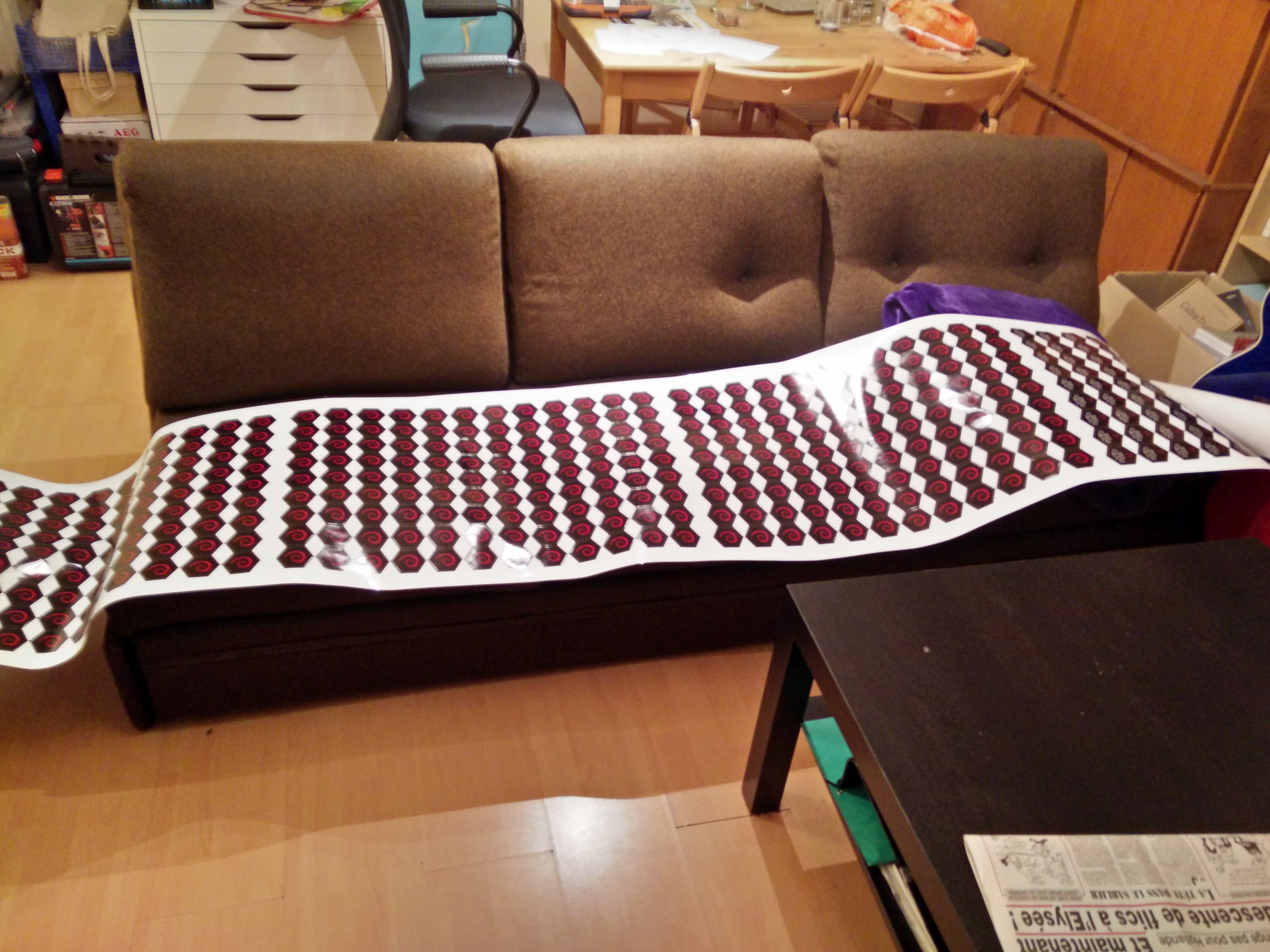
On 2017-08-06 I have a talk at DebConf17 in Montreal titled "Consensually doing things together?" (video). Here are the talk notes. Abstract At DebConf Heidelberg I talked about how Free Software has a lot to do about consensually doing things together. Is that always true, at least in Debian? I d like to explore what motivates one to start a project and what motivates one to keep maintaining it. What are the energy levels required to manage bits of Debian as the project keeps growing. How easy it is to say no. Whether we have roles in Debian that require irreplaceable heroes to keep them going. What could be done to make life easier for heroes, easy enough that mere mortals can help, or take their place. Unhappy is the community that needs heroes, and unhappy is the community that needs martyrs. I d like to try and make sure that now, or in the very near future, Debian is not such an unhappy community. Consensually doing things together I gave a talk in Heidelberg. Valhalla made stickers Debian France distributed many of them. There's one on my laptop. Which reminds me of what we ought to be doing. Of what we have a chance to do, if we play our cards right. I'm going to talk about relationships. Consensual relationships. Relationships in short. Nonconsensual relationships are usually called abuse. I like to see Debian as a relationship between multiple people. And I'd like it to be a consensual one. I'd like it not to be abuse. Consent From wikpedia:
In Canada "consent means the voluntary agreement of the complainant to engage in sexual activity" without abuse or exploitation of "trust, power or authority", coercion or threats.[7] Consent can also be revoked at any moment.[8] There are 3 pillars often included in the description of sexual consent, or "the way we let others know what we're up for, be it a good-night kiss or the moments leading up to sex." They are:
  • Knowing exactly what and how much I'm agreeing to
  • Expressing my intent to participate
  • Deciding freely and voluntarily to participate[20]
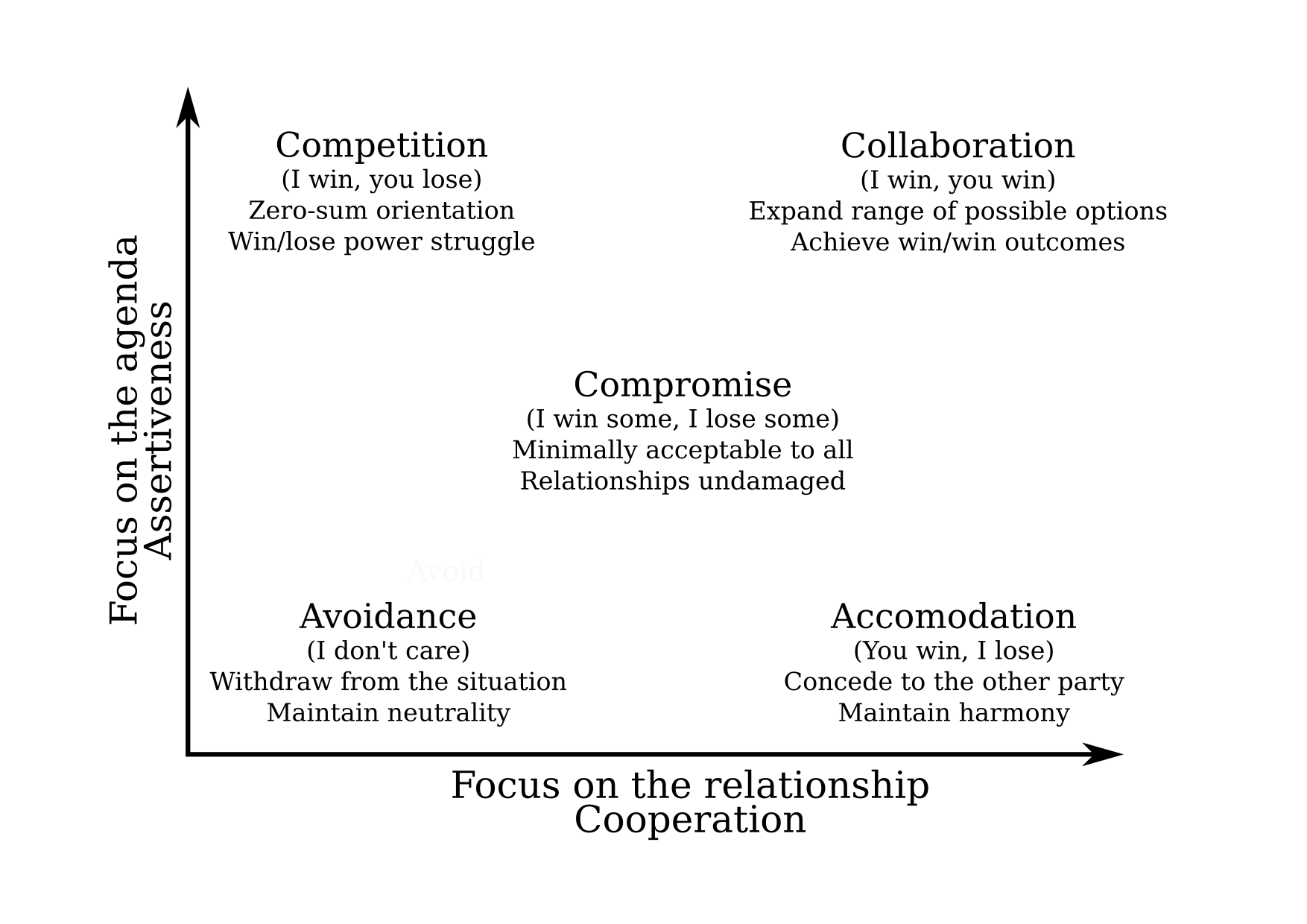
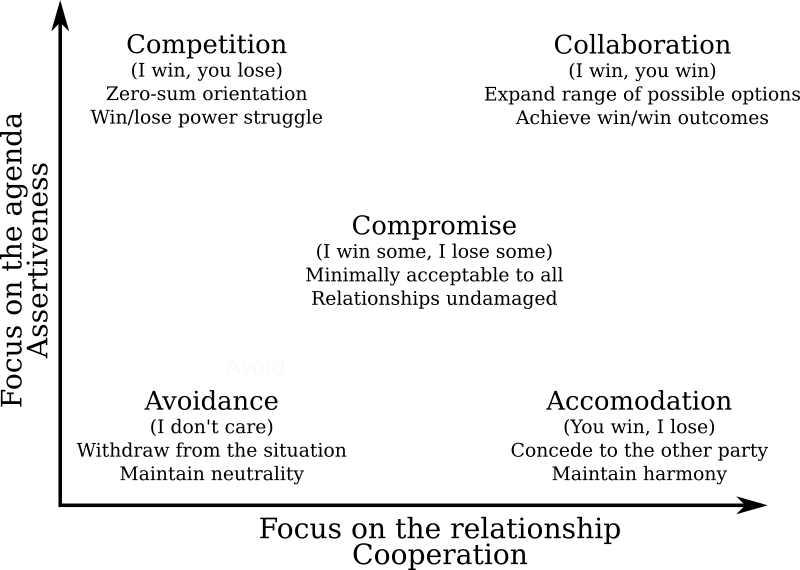
Saying "I've decided I won't do laundry anymore" when the other partner is tired, or busy doing things. Is different than saying "I've decided I won't do laundry anymore" when the other partner has a chance to say "why? tell me more" and take part in negotiation. Resources: Relationships Debian is the Universal Operating System. Debian is made and maintained by people. The long term health of debian is a consequence of the long term health of the relationship between Debian contributors. Debian doesn't need to be technically perfect, it needs to be socially healthy. Technical problems can be fixed by a healty community. graph showing relationship between avoidance, accomodation, compromise, competition, collaboration The Thomas-Kilmann Conflict Mode Instrument: source png. Motivations Quick poll: What are your motivations to be in a relationship? Which of those motivations are healthy/unhealthy? "Galadriel" (noun, by Francesca Ciceri): a task you have to do otherwise Sauron takes over Middle Earth See: http://blog.zouish.org/nonupdd/#/22/1 What motivates me to start a project or pick one up? What motivates me to keep maintaning a project? What motivates you? What's an example of a sustainable motivation? Is it really all consensual in Debian? Energy Energy that thing which is measured in spoons. The metaphore comes from people suffering with chronic health issues:
"Spoons" are a visual representation used as a unit of measure used to quantify how much energy a person has throughout a given day. Each activity requires a given number of spoons, which will only be replaced as the person "recharges" through rest. A person who runs out of spoons has no choice but to rest until their spoons are replenished.
For example, in Debian, I could spend: What is one person capable of doing? Have reasonable expectations, on others: Have reasonable expectations, on yourself: Debian is a shared responsibility When spoons are limited, what takes more energy tends not to get done As the project grows, project-wide tasks become harder Are they still humanly achievable? I don't want Debian to have positions that require hero-types to fill them Dictatorship of who has more spoons: Perfectionism You are in a relationship that is just perfect. All your friends look up to you. You give people relationship advice. You are safe in knowing that You Are Doing It Right. Then one day you have an argument in public. You don't just have to deal with the argument, but also with your reputation and self-perception shattering. One things I hate about Debian: consistent technical excellence. I don't want to be required to always be right. One of my favourite moments in the history of Debian is the openssl bug Debian doesn't need to be technically perfect, it needs to be socially healthy, technical problems can be fixed. I want to remove perfectionism from Debian: if we discover we've been wrong all the time in something important, it's not the end of Debian, it's the beginning of an improved Debian. Too good to be true There comes a point in most people's dating experience where one learns that when some things feel too good to be true, they might indeed be. There are people who cannot say no: There are people who cannot take a no: Note the diversity statement: it's not a problem to have one of those (and many other) tendencies, as long as one manages to keep interacting constructively with the rest of the community Also, it is important to be aware of these patterns, to be able to compensate for one's own tendencies. What happens when an avoidant person meets a narcissistic person, and they are both unaware of the risks? Resources: Note: there are problems with the way these resources are framed: Red flag / green flag http://pervocracy.blogspot.ca/2012/07/green-flags.html Ask for examples of red/green flags in Debian. Green flags: Red flags: Apologies / Dealing with issues I don't see the usefulness of apologies that are about accepting blame, or making a person stop complaining. I see apologies as opportunities to understand the problem I caused, help fix it, and possibly find ways of avoiding causing that problem again in the future. A Better Way to Say Sorry lists a 4 step process, which is basically what we do when in bug reports already: 1, Try to understand and reproduce the exact problem the person had. 2. Try to find the cause of the issue. 3. Try to find a solution for the issue. 4. Verify with the reporter that the solution does indeed fix the issue. This is just to say
My software ate
the files
that where in
your home directory and which
you were probably
needing
for work Forgive me
it was so quick to write
without tests
and it worked so well for me
(inspired by a 1934 poem by William Carlos Williams) Don't be afraid to fail Don't be afraid to fail or drop the ball. I think that anything that has a label attached of "if you don't do it, nobody will", shouldn't fall on anybody's shoulders and should be shared no matter what. Shared or dropped. Share the responsibility for a healthy relationship Don't expect that the more experienced mates will take care of everything. In a project with active people counted by the thousand, it's unlikely that harassment isn't happening. Is anyone writing anti-harassment? Do we have stats? Is having an email address and a CoC giving us a false sense of security?
When you get involved in a new community, such as Debian, find out early where, if that happens, you can find support, understanding, and help to make it stop. If you cannot find any, or if the only thing you can find is people who say "it never happens here", consider whether you really want to be in that community.
(from http://www.enricozini.org/blog/2016/debian/you-ll-thank-me-later/)
There are some nice people in the world. I mean nice people, the sort I couldn t describe myself as. People who are friends with everyone, who are somehow never involved in any argument, who seem content to spend their time drawing pictures of bumblebees on flowers that make everyone happy. Those people are great to have around. You want to hold onto them as much as you can. But people only have so much tolerance for jerkiness, and really nice people often have less tolerance than the rest of us. The trouble with not ejecting a jerk whether their shenanigans are deliberate or incidental is that you allow the average jerkiness of the community to rise slightly. The higher it goes, the more likely it is that those really nice people will come around less often, or stop coming around at all. That, in turn, makes the average jerkiness rise even more, which teaches the original jerk that their behavior is acceptable and makes your community more appealing to other jerks. Meanwhile, more people at the nice end of the scale are drifting away.
(from https://eev.ee/blog/2016/07/22/on-a-technicality/) Give people freedom If someone tries something in Debian, try to acknowledge and accept their work. You can give feedback on what they are doing, and try not to stand in their way, unless what they are doing is actually hurting you. In that case, try to collaborate, so that you all can get what you need. It's ok if you don't like everything that they are doing. I personally don't care if people tell me I'm good when I do something, I perceive it a bit like "good boy" or "good dog". I rather prefer if people show an interest, say "that looks useful" or "how does it work?" or "what do you need to deploy this?" Acknowledge that I've done something. I don't care if it's especially liked, give me the freedom to keep doing it. Don't give me rewards, give me space and dignity. Rather than feeding my ego, feed by freedom, and feed my possibility to create.

15 June 2017

Enrico Zini: 5 years of Debian Diversity Statement

The Debian Project welcomes and encourages participation by everyone. No matter how you identify yourself or how others perceive you: we welcome you. We welcome contributions from everyone as long as they interact constructively with our community. While much of the work for our project is technical in nature, we value and encourage contributions from those with expertise in other areas, and welcome them into our community.
The Debian Diversity Statement has recently turned 5 years old, and I still find it the best diversity statement I know of, one of the most welcoming texts I've seen, and the result of one of the best project-wide mailing list discussions I can remember.

31 May 2017

Enrico Zini: Today I Learnt

Build a system that can install GRUB2 on UEFI and on legacy systems grub-efi-amd64 and grub-pc are not coinstallable. It turns out however that they do not contain GRUB, but the machinery to keep GRUB configuration up to date on the current system. If I want to be able to install GRUB on other systems, I can use the -bin packages:
apt install grub-common grub2-common grub-efi-amd64-bin grub-pc-bin
That gave me a grub-install command that worked on both kinds of systems. GRUB configuration on a UEFI system An old GRUB configuration on a UEFI system gave me this:
error: no suitable mode found
Booting blind
which boots on a blank screen until the kernel reinitialises the video hardware. The Arch Linux Wiki has excellent documentation for this case, and here's the resulting UEFI GRUB snippet:
insmod efi_gop
insmod efi_uga
insmod font
if loadfont $ prefix /fonts/unicode.pf2
then
    insmod gfxterm
    set gfxmode=auto
    set gfxpayload=keep
    terminal_output gfxterm
fi
# Follow with the usual GRUB menu entries 
Use an unsigned local APT repository for testing/development purposes I found out today that one can have options in square brackets in sources.list:
# In /etc/apt/sources.list.d/local-devel.list
deb [trusted=yes] http://localhost:1234/debian jessie main
pabs on IRC also mentioned local-apt-repository but I haven't tried it. Booting Jessie Debian Live with a kernel from jessie-backports This requires working around #844749 and 844749. In hooks/9000-fix-bugs.chroot I ended up having this:
# Workaround per https://bugs.debian.org/cgi-bin/bugreport.cgi?bug=844749
if ! grep -q ^nls_ascii /etc/initramfs-tools/modules
then
        echo "nls_ascii" >> /etc/initramfs-tools/modules
fi
# Workaround per https://bugs.debian.org/cgi-bin/bugreport.cgi?bug=844749
if ! grep -q ^overlay /etc/initramfs-tools/modules
then
        echo "overlay" >> /etc/initramfs-tools/modules
fi
Using a custom kernel in Jessie Debian Live How do I have live-build pick a custom kernel package instead of the default one?
  1. lb config --linux-packages linux-image-$SOMETHING
  2. Use equivs to build a linux-image-$SOMETHING-$ARCH package that depends on the kernel that you built.

Enrico Zini: Debian Jessie Live on UEFI part 2

A refinement on my previous attempt. This is how to configure a Jessie live-build environment to boot on UEFI systems, and get a USB key image that works:
# Build a FAT image instead of an ISO image...
lb config -b hdd
# ...and work around #773833
echo "/usr/lib/syslinux/mbr/*.bin /usr/lib/syslinux/" > hooks/9000-fix-773833.chroot
# Get EFI Shell from https://svn.code.sf.net/p/edk2/code/trunk/edk2/ShellBinPkg/UefiShell/X64/
curl -o binary/efi/boot/Bootx64.efi https://svn.code.sf.net/p/edk2/code/trunk/edk2/ShellBinPkg/UefiShell/X64/Shell.efi
# Configure the EFI shell to boot the live setup
echo 'live\vmlinuz initrd=live\initrd.img append boot=live components' > binary/startup.nsh
Rationale: UEFI understants FAT filesystems, and would run EFI binaries placed under efi/boot. For a hard drive, it only considers a FAT filesystem on a GPT partition marked with a special UUID, so that it doesn't get confused with other FAT filesystems that are on disk. For a USB key, it seems that most hardware will happily look for efi/boot even if the partition table is the old MBR kind. live-build can build a FAT image for USB keys, losing the ability to boot on CDROMs and DVDs. Since I don't need that ability, I can use -b hdd to get the live system packaged inside a container that UEFI hardware can understand (FAT). At that point, enabling UEFI boot on a Live Debian Jessie is just a matter of adding an efi/boot/Bootx64.efi binary that is able to load the kernel and initrd in memory, and blow life into them.

29 May 2017

Enrico Zini: Egg-walking with qemu-nbd and kpartx

I wanted to retrieve a file from a VirtualBox VDI image for this blog post. I followed these instructions and ended up here:
Once having used nbd0, only rebooting the system makes it possible to mount another image ... a little bit unpractical.
What happened was this:
# modprobe nbd  # NOO! Don't *EVER* do that!
# qemu-nbd -c /dev/nbd0 file.vdi
# kpartx -d /dev/nbd0
# mount /dev/nbd0  EHI! Where's /dev/nbdpp1 ??
# qemu-nbd -d /dev/nbd0
# rmmod nbd
rmmod: ERROR: Module nbd is in use
# kpartx -d /dev/nbd0
read error, sector 0
llseek error
llseek error
llseek error
# rmmod nbd
rmmod: ERROR: Module nbd is in use
# WHAT THE 
It turns out it's really modprobe nbd max_part=16, otherwise max_part defaults to, uhm, zero? really? and kpartx cannot create device mappings because there are not enough (as in, not even a single one) partition devices available. At this point, however, kpartx did create some mappings connected to, uhm, probably Ancient Beings from beyond spacetime, and because of those the device is in use and cannot be removed, and unmapping doesn't work either because the Ancient Beings from beyond spacetime are keeping the device busy by feeding on it. I energized the pentacle and tried a desperate ritual of banishment:
# # Reconnect nbd0 to the vdi file to Restore the Balance
# qemu-nbd --verbose -c /dev/nbd0 file.vdi
# # This works now
# kpartx -vd /dev/nbd0
del devmap : nbd0p5
del devmap : nbd0p2
del devmap : nbd0p1
# # This too, the Ancient Beings lie asleep yet again
# modprobe nbd -r
At this point I managed to get my file, almost:
# modprobe nbd max_part=16
# qemu-nbd --verbose -c /dev/nbd0 file.vdi
NBD device /dev/nbd0 is now connected to file.vdi
# kpartx -va /dev/nbd0
add map nbd0p1 (254:12): 0 60260352 linear 43:0 2048
add map nbd0p2 (254:13): 0 2 linear 43:0 60264446
add map nbd0p5 (254:14): 0 2648064 linear 43:0 60264448
# mount /dev/nbd0p1 /mnt
mount: /dev/nbd0p1 is already mounted or /mnt busy
# # WHAT NOW?!
# lsblk
NAME                                       MAJ:MIN RM   SIZE RO TYPE  MOUNTPOINT
 
nbd0                                        43:0    0    30G  0 disk
 nbd0p1                                    43:1    0  28.8G  0 part
 nbd0p2                                    43:2    0     1K  0 part
 nbd0p5                                    43:5    0   1.3G  0 part
 nbd0p1                                   254:12   0  28.8G  0 part
 nbd0p2                                   254:13   0     1K  0 part
 nbd0p5                                   254:14   0   1.3G  0 part
# # WHAAAT?!!
# kpartx -vd /dev/nbd0
del devmap : nbd0p5
del devmap : nbd0p2
del devmap : nbd0p1
# lsblk
NAME                                       MAJ:MIN RM   SIZE RO TYPE  MOUNTPOINT
 
nbd0                                        43:0    0    30G  0 disk
 nbd0p1                                    43:1    0  28.8G  0 part
 nbd0p2                                    43:2    0     1K  0 part
 nbd0p5                                    43:5    0   1.3G  0 part
# mount /dev/nbd0p1 /mnt
# # I got my file, my preciouss file!
# umount /mnt
# kpartx -vd /dev/nbd0
# qemu-nbd -d /dev/nbd0
# rmmod nbd
# # sit in a corner hugging my precious file and sobbing quietly
As can be seen from the multiple exclamation marks, those Ancient Beings from beyond spacetime did manage to have a bite on my sanity after all.

Enrico Zini: Jessie live on UEFI systems

According to the Debian Wiki, you can't boot a Debian Live based on Jessie on a UEFI system:
UEFI support in live images At this point, UEFI support exists only in Debian's installation images. The accompanying live images do not have support for UEFI boot, as the live-build software used to generate them still does not include it. Hopefully the debian-live developers will add this important feature soon.
Some people really needed it, though, so I kept looking. Here's a script that takes a Jessie Debian Live .iso file and the device name for a USB pendrive, and gives you a pendrive that boots on UEFI:
#!/bin/sh
# License: do what you want but it's not my fault, I told you not to.
sh -ue
ISO=$ 1:?"Usage: $0 file.iso usbdev" 
DEV=$ 2:?"Usage: $0 file.iso usbdev" 
parted -s $DEV mklabel gpt mkpart primary fat32 1 100%
mkfs.vfat $ DEV 1
mount $ DEV 1 /mnt
bsdtar -C /mnt -xf $ISO
mkdir -p /mnt/efi/boot
# Shell.efi comes from https://svn.code.sf.net/p/edk2/code/trunk/edk2/ShellBinPkg/UefiShell/X64/
cp Shell.efi /mnt/efi/boot/Bootx64.efi
echo 'live\vmlinuz initrd=live\initrd.img append boot=live components' > /mnt/startup.nsh
umount /mnt
Only use it if you really need it, though: Stretch will support this out of the box, and it's coming soon.

16 May 2017

Enrico Zini: Accident on the motorway

There was an accident on the motorway, luckily noone got seriously wounded, but a truckful of sugar and a truckful of cereals completely spilled on the motorway, and took some time to clean. 19:15:23 19:45:07 20:02:37 20:11:52 20:28:43 20:32:34 20:44:03 21:27:41 21:44:20 22:10:50

2 May 2017

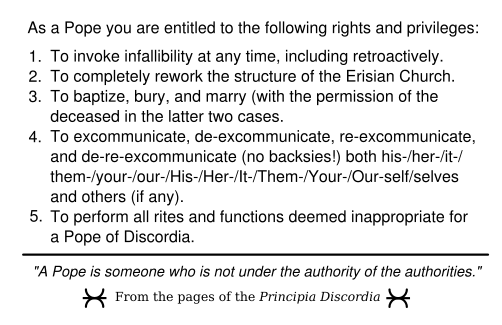
Enrico Zini: Vector Discordian Pope Cards

I like Discordian Pope cards. I wanted to print a batch, but online I could only find low-quality .jpg versions, so I took inkscape, used the low-quality as a template grayed out in a background immutable layer, and redid them properly. Here are the results: Preview: Discordian Pope Card, Front Discordian Pope Card, Back I release them under the WTFPL license: you can print them, redistribute them, and modify them at will. The fonts I used are: Update: now available as a git repo

22 April 2017

Enrico Zini: Splitting a git-annex repository

I have a git annex repo for all my media that has grown to 57866 files and git operations are getting slow, especially on external spinning hard drives, so I decided to split it into separate repositories. This is how I did it, with some help from #git-annex. Suppose the old big repo is at ~/oldrepo:
# Create a new repo for photos only
mkdir ~/photos
cd photos
git init
git annex init laptop
# Hardlink all the annexed data from the old repo
cp -rl ~/oldrepo/.git/annex/objects .git/annex/
# Regenerate the git annex metadata
git annex fsck --fast
# Also split the repo on the usb key
cd /media/usbkey
git clone ~/photos
cd photos
git annex init usbkey
cp -rl ../oldrepo/.git/annex/objects .git/annex/
git annex fsck --fast
# Connect the annexes as remotes of each other
git remote add laptop ~/photos
cd ~/photos
git remote add usbkey /media/usbkey
At this point, I went through all repos doing standard cleanup:
# Remove unneeded hard links
git annex unused
git annex dropunused --force 1-12345
# Sync
git annex sync
To make sure nothing is missing, I used git annex find --not --in=here to see if, for example, the usbkey that should have everything could be missing some thing. Update: Antoine Beaupr pointed me to this tip about Repositories with large number of files which I will try next time one of my repositories grows enough to hit a performance issue.

9 April 2017

Enrico Zini: Ansible config for my stereo

I bought a Raspberry Pi 2 and its case. I could not reuse the existing SD card because it wants a MicroSD. A wise person once told me:
First you do it, then you document it, then you automate it.
I had done the first two, and now I've redone the whole setup with ansible, here: stereo.tar.xz. Hifi with a Raspberry Pi 2 and its case

Next.

Previous.