Search Results: "ag"

14 August 2012

Matthew Garrett: Playing with Thunderbolt under Linux on Apple hardware

I've temporarily got hold of a Retina Macbook Pro. Fedora 17 boots fine on it with the following kernel arguments: nointremap drm_kms_helper.poll=0 video=eDP-1:2880x1800@45e, although you'll want an updated install image. The nointremap requirement is fixed by this patch, and the others are being tracked here. The gmux chip that controls the multiple graphics chipsets has changed - patches here. That just leaves Thunderbolt.

Thunderbolt is, to a first approximation, PCIe tunnelled over a Displayport connector. It's a high-bandwidth protocol for connecting external devices. Things are complicated by it also supporting Displayport over the same connection, which I'm sure will be hilarious when we get yet another incompatible display protocol. But anyway. I picked up a Thunderbolt ethernet adapter and started poking.

Booting with the device connected looked promising - an ethernet device appeared. Pulling it out resulted in the pcie hotplug driver noticing that it was missing and cleaning up, although the b44 ethernet driver sat around looking puzzled for a while. So far so good. Unfortunately plugging it in again didn't work, and rebooting without any Thunderbolt devices connected not only did nothing on hotplug, it also meant that the Thunderbolt controller didn't show up in lspci at all.

It turns out that there's several problems at play here. The first is the missing Thunderbolt controller. The problem here is the following code in Apple's ACPI tables:
        Method (RMCR, 0, Serialized)
         
            If (LNot (OSDW))
             
                If (LAnd (LEqual (\_SB.PCI0.PEG1.UPSB.DSB1.UPS0.AVND, 0xFFFF), 
                    LEqual (\_SB.PCI0.PEG1.UPSB.DSB2.UPS0.AVND, 0xFFFF)))
                 
                    Store ("RMCR: Disable Link and Power Off Cactus Ridge Chip",
                           Debug)
                    Store (0x01, \_SB.PCI0.PEG1.LDIS)
                    Sleep (0x07D0)
                    Store (0x00, GP23)


This checks if the system claims to be Darwin (the core of OS X). If not, it checks whether two PCIe bridges have been configured. If both are still in an unconfigured state, it cuts the PCIe link to the upstream PCIe link and then sets GP23 to 0. Looking further, GP23 turns out to be a GPIO line. Setting it to 0 appears to cut power to the Thunderbolt controller. In summary, unless your OS claims to be OS X, booting without an attached Thunderbolt device will result in the chipset being powered down so hard that it's entirely invisible to the OS.

Fixing that is as easy as adding Darwin to the list of operating systems Linux claims to be. So, now I could boot without a connected device and still see the controller. Since ACPI seemed to be important here, I started looking at the other ACPI methods associated with the device. The first one that drew attention was Name(_GPE, 0x14). The _GPE method (not to be confused with the _GPE object at the top of the global ACPI namespace) is defined as providing the ACPI general purpose event associated with the device. Unfortunately, it's only defined as doing this for embedded controllers - Apple's use of it on a PCI device is massively non-standard. But, still, easy enough to handle. Intel chipsets map GPE 0x10 to 0x1f to GPIO lines 0-15, so this GPE is associated with GPIO 4. Looking through the ACPI code showed a bunch of other references to GP04, and it turns out that if the chip is powered down (via setting GP23 to 0) then plugging a device in to the port will generate a GPE. This makes sense - a powered down controller isn't going to notice hotplug events itself, so you need some kind of out of band notification mechanism. There's also another ACPI method that flips the polarity of the GPIO line so it doesn't keep generating events for the entire time a device is connected. It didn't take long to come up with a stub driver that would power down the controller if nothing was connected at boot, and then wake it up again on a hotplug event.

Unfortunately that's as far as I've got. I'd been hoping that everything beyond this was just PCIe hotplug, but it seems not. Apple's Thunderbolt driver is rather too large to just be handling ACPI events, and this document on Apple's website makes it pretty clear that there's OS involvement in events and device configuration. Booting with a device connected means that the firmware does the setup, but if you want to support hotplug then the OS needs to know how to do that - and Linux doesn't.

Getting this far involved rather a lot of irritation at Apple for conspiring to do things in a range of non-standard ways, but it turns out that the real villains of the piece are Intel. The Thunderbolt controller in the Apples is an Intel part - the 82524EF, according to Apple. Given Intel's enthusiasm for Linux and their generally high levels of engagement with the Linux development community, it's disappointing[1] to discover that this controller has been shipping for over a year with (a) no Linux driver and (b) no documentation that would let anyone write such a driver. It's not even mentioned on Intel's website. So, thanks Intel. You're awful.

Anyway. This was my attempt to spend a few days doing something more relaxing than secure boot, and all I ended up with was eczema and liver pain. Lesson learned, hardware vendors hate you even more than firmware vendors do.

[1] By which I mean grotesquely infuriating

comment count unavailable comments

Peter Eisentraut: Funny version numbers

Often, I install a new Debian package using apt-get install, and as the progress output flies by, I wonder, Whoa!, should I really be using a piece of software with that version number? It says a lot, after all. If I see
tool 2.4.1-2
then I (subconsciously) think, yeah, the upstream maintainers are obviously sane, the tool has been around for a while, they have made several major and minor releases, and what I'm using has seen about one round of bug fixing, and a minimal amount of tweaking by the Debian maintainer. On the other hand, when I see
tool 7.0.50~6.5~rc2+0.20120405-1
I don't know what went on there. The original release version 7.0.50 was somehow wrong and had to be renamed 6.5? And then the 2nd release candidate of that? And then even that wasn't good enough, and some dated snapshot had to be taken? Now, of course, there are often reasons for things like this, but it doesn't look good, and I felt it was getting out of hand a little bit. I tried to look into this some more and find a regular expression for a reasonably sane version number. It's difficult. This is how far I've gotten: https://gist.github.com/3345974. But this still lists more than 1500 packages with funny version numbers. Which could be cause for slight concern. Take a look at what this prints. You can't make some of that stuff up.

Asheesh Laroia: Zooming in

She zoomed in on the git commits to check that the new contributors were thanked properly. She was not looking for bad programmers or bad community managers. She was looking for the kinds of misses that even excellent programmers and community managers can make under pressure.
A mis-quote of "Can Hospital Chains Improve the Medical Industry?".

Dirk Eddelbuettel: RInside 0.2.7

A new version 0.2.7 of RInside is now available via CRAN. RInside provides a set of convenience classes which facilitate embedding of R inside of C++ applications and programs, using the classes and functions provided by the Rcpp R and C++ integration package. This release adds two new examples subdirectories demonstrating use of RInside with, respectively, RcppArmadillo and RcppEigen. We extended the 'web application' example using the Wt toolkit by adding CSS and XML support, and added another new example motivated by a StackOverflow question. CMake support has been added for Windows as well thanks to Peter Aberline---he also contributed CMake code for the two new example directories but that contribution made it only into SVN and not this release. All changes since the last release are summarized below in the NEWS file entry:
Changes in RInside version 0.2.7 (2012-08-12)
  • New fifth examples subdirectory 'armadillo' with two new examples showing how to combine RInside with RcppArmadillo
  • New sixth examples subdirectory 'eigen' with two new examples showing how to combine RInside with RcppEigen
  • Prettified the Wt example 'web application' with CSS use, also added and XML file with simple headers and description text
  • New example rinside_sample12 motivated by StackOverflow question on using sample() from C
  • Added CMake build support on Windows for the examples
CRANberries also provides a short report with changes from the previous release. More information is on the RInside page. Questions, comments etc should go to the rcpp-devel mailing list off the Rcpp R-Forge page.

13 August 2012

Patrick Matth i: Logging packets with iptables and ULOG

Imagine you have got the following iptables rule set:
*filter
:INPUT ACCEPT [2:130]
:FORWARD ACCEPT [0:0]
:OUTPUT ACCEPT [119:14185]
-A INPUT -s 127.0.0.0/8 -j ACCEPT
-A INPUT -p tcp -m tcp dport 22 -j ACCEPT
-A INPUT -p tcp -m tcp dport 80 -j ACCEPT
-A INPUT -p tcp -m tcp tcp-flags FIN,SYN,RST,ACK SYN -j DROP
COMMIT
This would allow all traffic from 127.0.0.0/8, on port 22 and 80. Other (TCP/IP) SYN packages (so on all the other connections) would be dropped.
Now you see, that your counter for the SYN DROP rule is increasing and you want to know what is rejected, but how? The simple answer is ULOG the netfilter userspace logging daemon.
In Debian you have got various implementations/variants of it, the local logging one (which I will use here, just called ulogd) and the -postgres, -mysql and -sqlite3 one (that are not the exact package names), with that you also can log everything to a (remote) database.
An special variant is the -pcap one, it will write the logs in the .pcap format, so you can analyze the full traffic. So for our example it is enough to install the package:
apt-get install ulogd
And then add another rule BEFORE our SYN DROP:
-A INPUT -p tcp -m tcp tcp-flags FIN,SYN,RST,ACK SYN -j ULOG
-A INPUT -p tcp -m tcp tcp-flags FIN,SYN,RST,ACK SYN -j DROP
Now you will find in /var/log/ulog/syslogemu.log a log of all connections, which would be dropped, the log looks like this:
Aug 13 14:42:07 srv1 IN=eth0 OUT= MAC=00:0c:29:8c:2b:6c:00:d0:02:eb:e8:0a:08:00 SRC=75.125.70.194 DST=XXX.XXX.XXX.XXX LEN=40 TOS=00 PREC=0 00 TTL=54 ID=9566 PROTO=TCP SPT=57144 DPT=445 SEQ=2770468863 ACK=0 WINDOW=512 SYN URGP=0
Aug 13 14:45:29 srv1 IN=eth0 OUT= MAC=00:0c:29:8c:2b:6c:00:d0:02:eb:e8:0a:08:00 SRC=75.125.70.194 DST=XXX.XXX.XXX.XXX LEN=40 TOS=00 PREC=0 00 TTL=55 ID=13702 PROTO=TCP SPT=58528 DPT=445 SEQ=1217789951 ACK=0 WINDOW=512 SYN URGP=0
So you have got now the information about the full date, mac address (mostly it will be the one of your gateway), source and destination IP, source and destination port, length, protocol, etc. You also could use it to log outgoing connections to port 80 and the IRC ports:
-A OUTPUT -p tcp -m tcp dport 80 -j ULOG -A OUTPUT -p tcp -m tcp dport 6666:6669 -j ULOG
Whatever you want.

Raphaël Hertzog: Looking back at 16 years of dpkg history with some figures

With Debian s 19th anniversary approaching, I thought it would be nice to look back at dpkg s history. After all, it s one of the key components of any Debian system. The figures in this article are all based on dpkg s git repository (as of today, commit 9a06920). While the git repository doesn t have all the history, we tried to integrate as much as possible when we created it in 2007. We have data going back to April 1996 In this period between April 1996 and August 2012: Currently the dpkg source tree contains 28303 lines of C, 14956 lines of Perl and 6984 lines of shell (figures generated by David A. Wheeler s SLOCCount ) and is translated in 40 languages (but very few languages managed to translate everything, with all the manual pages there are 3997 strings to translate). The top 5 contributors of all times (in number of commits) is the following (result of git log --pretty='%aN' sort uniq -c sort -k1 -n -r head -n 5):
  1. Guillem Jover with 2663 commits
  2. Rapha l Hertzog with 993 commits
  3. Wichert Akkerman with 682 commits
  4. Christian Perrier with 368 commits
  5. Adam Heath with 342 commits
I would like to point out that those statistics are not entirely representative as people like Ian Jackson (the original author of dpkg s C reimplementation) or Scott James Remnant were important contributors in parts of the history that were recreated by importing tarballs. Each tarball counts for a single commit but usually bundles much more than one change. Also each contributor has its own habits in terms of crafting a work in multiple commits. Last but not least, I have generated this 3 minutes gource visualization of dpkg git s history (I used Planet s head pictures for dpkg maintainers where I could find it). <iframe allowfullscreen="allowfullscreen" frameborder="0" height="281" src="http://www.youtube.com/embed/1x9-Etj1Ew4?fs=1&amp;feature=oembed" width="500"></iframe> Watching this video made me realize that I have been contributing to dpkg for 5 years already. I m looking forward to the next 5 years :-) And what about you? You could be the 147th contributor see this wiki page to learn more about the team and to start contributing.

No comment Liked this article? Click here. My blog is Flattr-enabled.

Jonathan Wiltshire: From building to demolishing

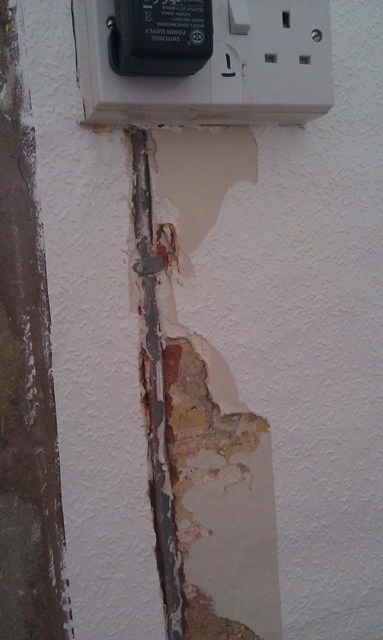
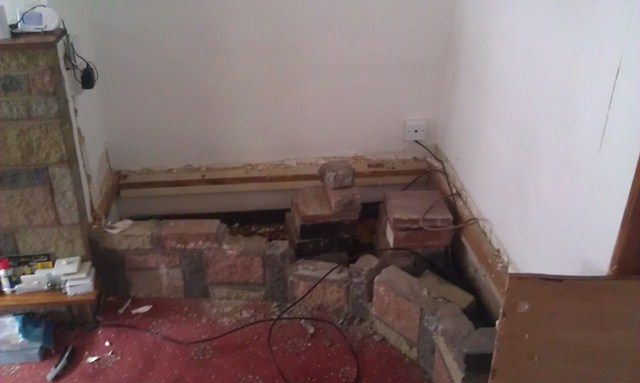
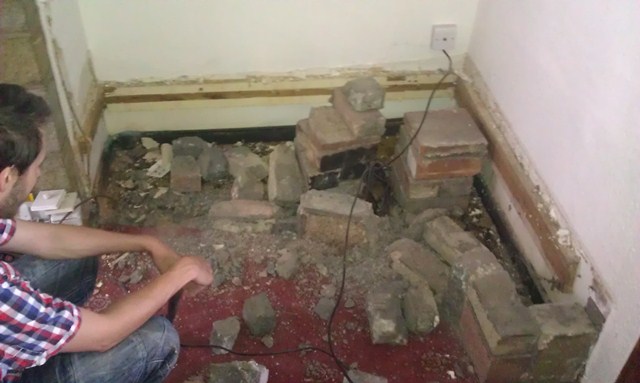
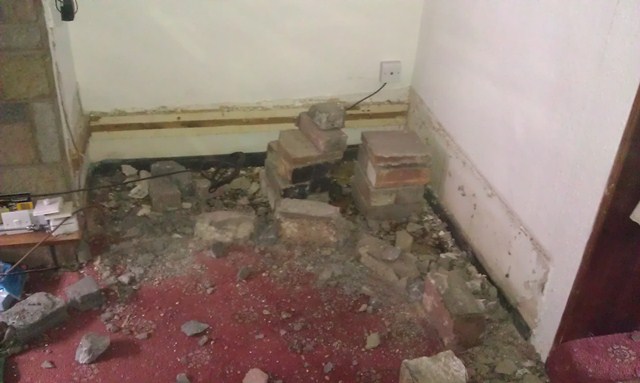
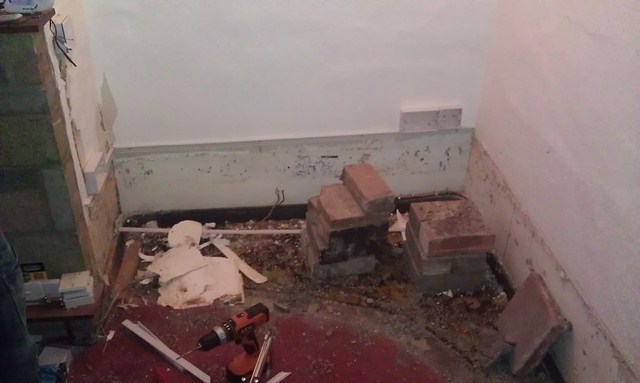
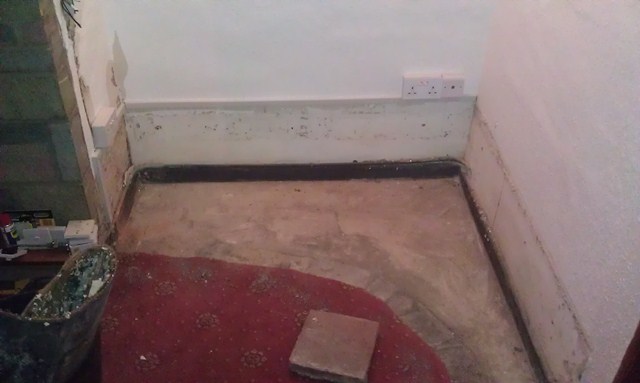
Building things is fun, but sometimes it s nice to have a little light relief with a sledgehammer. Saturday was one of those occasions; there is was a decorative wall in the corner of our lounge. It should have died about thirty years ago and I ve hated it ever since we moved in a year ago. First job was to remove the sockets and cable running up the side, which was a nice surprise in itself: Looks like whoever installed it believed that mastick and wallpaper is a suitable covering to stop drill bits. Hmm. Next we could take out the wall itself. In this case the wooden top was sealed down with more mastick and supported by piles of bricks, then the wall had been secured with concrete and not proper mortar. Fortunately a good sledgehammering soon took care of that: Those bricks truly were hideous, and they are all around the dodgy gas fire and another similar feature in the opposite corner of the room. Incidentally, the newly-revealed carpet in the void should also have died in the seventies (it went straight into the skip), but at least now we have some understanding of the mysterious wallpaper we found under the stairs. Finally we had enough room to work with surface trunking (a temporary housing until the gas pipe is removed and we can bury the cables properly): And the final result, with the sockets moved to a more sensible level and the cable properly protected, new LightwaveRF sockets in the corner and a shiny new aerial point ready for cabinets to go into the gap:
13/08: A couple of people pointed out that in the first photo, the offending cable is in a protected zone. This is true, but it wiggles half way round the room from the CU in a similar fashion first sometimes in trunking, sometimes clipped to the fireplace, and sometimes masticked and papered flush with the plaster surface.
From building to demolishing is a post from: jwiltshire.org.uk Flattr

Robert Collins: minimising downtime for schema changes with postgresql

Two years ago Launchpad did schema changes once a month. Everyone would cross their fingers and hope while the system administrators took all the application servers offline, patched the database with a months worth of work and brought up the servers again running the new QA d codebase. This had two problems:
  1. due to the complexity of the system something like 300 processes have to be stopped or inhibited to take everything offline the downtime duration was often about 90 minutes long irrespective of the schema patch duration. [Some of the processes don't like being interrupted at all].
  2. We simply could not deliver any change in less than 1 week, with the on average latency for something that jumped all the queues still being 2 weeks.
About a year ago we wanted to increase the rate at which schema changes could be carried out the efforts to speed Launchpad up had consumed most low hanging fruit and more and more schema patches were required. We didn t want to introduce additional 90 minute downtime windows though. Adopting incremental migrations the sort of change process described in various places on the internet seemed like a good way to make it possible to apply the schema changes without this slow shutdown-and-restart step, which was required because the pre-patch codebase couldn t speak to the new schema. We could optimise each patch to be very fast by avoiding anything that causes a full table scan or table rewrite (such as adding indices, adding columns with a non-NULL default value). That would let us avoid the 90 minutes of downtime caused by stopping and restarting everything. However, that wasn t sufficient the reason Launchpad ended up doing monthly downtime is that previous attempts to do more frequent schema changes had too high a failure rate. A key reason for patch deployment time blowing out when everything wasn t shut down was due to Launchpad being a very busy system with the use of Slony, schema changes require an exclusive lock on all tables. [More recent versions of Slony only lock some tables, but it still requires very widespread locks for most DDL operations]. We re doing nearly 10 thousand transactions per minute, at any point in time there are always locks open on some table in the system: it was highly improbably and effectively impossible for slonik to get an exclusive lock on all tables in a reasonable timeframe. Background tasks that take many minutes to complete exacerbate this we can t just block new transactions long enough to deliver all the in-flight web pages and let locks clear that way. PGBouncer turns out to be an ideal tool here. If you route all your connections through PGBouncer, you have a single point you can deliberately interrupt to clear all database locks in a second or so (it takes time for backends to all notice that their clients have gone). So we combined these things to get what we called Fast Down Time or FDT. We set the following rules for developers:
  1. Any schema patch had to complete in <= 15 seconds in our schema staging environment (which has a full copy of the production DB), or we d roll it back and redesign.
  2. Any patch could change either code or schema, never both. schema patches were to land on a separate branch and would be promoted to trunk only after deployment. That branch also receives automated merges from trunk after every commit to trunk, so its running the latest code.
This meant that we could be confident in QA: we would QA the new schema and the application process with the current live code (we deploy trunk multiple times a day). We published some documentation about how to write fast schema patches to help socialise the approach. Then we wrote an automated tool that would:
  1. Check for known fragile processes and abort if any were found.
  2. Check for very long transactions and abort if any were found.
  3. Shutdown pgbouncer, disconnecting all clients instantly.
  4. Use slonik to apply one or more schema patches.
  5. Start pgbouncer back up again.
The code for this (call it FDTv1) is in the Launchpad source code history its pretty entangled but its there for grabbing if you need it. Read on to see why its only available in the history :) The result was wonderful we immediately were able to deploy schema changes with <= 90 seconds of downtime, which was significantly less than the 5 minutes our stakeholders had agreed to as a benchmark if we were under 5 minutes, we could schedule downtime once a day rather than once a month. We had to fix some API client code to retry more reliably, and likewise fix a few minor bugs in the database connection handling logic in the appservers, but all in all it was a pretty smooth project. Along the way we spun off a small python helper to run and control pgbouncer, which let us write effective tests for the connection handling code paths. In This gave us the following workflow for making schema changes:
  1. Land and deploy an incremental schema change.
  2. Land and deploy any indices that need to be added these are deployed live using CREATE INDEX CONCURRENTLY.
  3. Land and deploy code changes to populate any additional fields/tables from both application servers, and from cron we do a bulk backfill that does many small transactions while walking over the entire dataset that needs to be updated / populated.
  4. Land and deploy code changes to drop references to the old schema, whatever it was.
  5. Land and deploy an incremental schema change to finalise the change such as making a new column NOT NULL once the backfill is complete.
This looks long and unwieldy but its worth noting that its actually just repeated applications of a smaller primitive:
  1. Make a schema change that is fast and compatible with existing code.
  2. Change code to take advantage of the changed schema
Pretty much any change that is desired can be done using this single primitive. We wanted to go further though the multiple stages required for complex migrations became a burden with one change a day. Fortunately PostgreSQL now includes its own replication engine, which replicates the WAL logs rather than installing triggers on all tables like Slony. Stuart, our intrepid DBA migrated Launchpad to PostreSQL 9.1, updated the FDT tool to work with native replication, and migrated Launchpad off of Slony. The result is again wonderful the overhead in doing a schema patch, with all the protection I described above, is now ~5 seconds. We can do incremental changes in less time than it takes your browser to figure out that a given server is offline. We re now negotiating with the Launchpad stakeholders to get multiple downtime windows each day, with this almost unnoticable, super reliable process in place. Reliability wise, FDT has been superb. We ve had 2 failures: one where we believe we encountered a bug in Slony when dropping two tables at once, and one where we landed a patch that worked on staging but led to lock contention in production so the patch applied, but the system was very unhealthy after that until we fixed it. Thats after doing approximately 60 patches over a 1 year period. We re partway through extracting the patching logic from Launchpad s code base into a reusable tool, but the basic principles will apply to any PostgreSQL environment.

John Goerzen: Summer

It s been a hot year in Kansas this year. Really hot. Our average high for July was 101F / 38C. It s also been extremely dry. So we haven t had too many pleasant opportunities to enjoy a bit of an upcycling project I had with the boys. When we renovated our old farmhouse, we had two chimneys removed. The bricks were saved in a large pile out back, and we haven t really touched them in the last 5 years. I got the idea at some point that it would be nice to have a fire ring on our yard. The boys love campfire-style cooking, and enjoy helping gather kindling and watching the fire grow. I had looked at fire rings in stores, but just couldn t bring myself to pay $60 or $100 or even more for what was really a piece of round metal. I decided we would find a way to build our own fire ring. So the idea of chimney bricks seemed perfect. Some of these bricks still have mortar on them, so the result is imperfect, but it is functional. More importantly, the boys helped. They picked out bricks one at a time, set them in the wheelbarrow (or even carried a few themselves, as Jacob insisted on doing sometimes.) Then we d dump them out on the ground, and I d make some attempt at making the thing round, while the boys would put them on the pile. We did this over the course of several evenings, with me filling in on some of it after they lost interest. When we got it done, they of course loved cooking outside. I made sure that we placed it in a place that will be in the shade every summer evening so we d be comfortable. I made no attempt to mortar it in; this way, it s easy to move or resize. And it s safer for the boys than a metal one, since the outer edge never even gets warm to the touch. Anyhow, it finally got a little cooler last week, so we cooked out there for dinner two days in a row. One day, after eating, the boys came back out to help put out the fire with the hose. After that, Jacob and I went out there to eat dessert. He sat on the grass, and I sat down next to him. He scooted over a bit to be closer to me. Pretty soon, Oliver came running out too, and sat on my lap. The three of us just sat there on the grass, eating our desserts and enjoying the evening. It s the kind of moment that makes a dad happy. The other evening, they again helped me put out the fire with a hose. They d been active that day, so after I finished hosing down the fire ring, I gave them each a small spray with the hose. After a brief flicker of indecision, they both decided this was hilarious. Jacob took off running, yelling You ll never catch me! (And clearly hoping I would.) Oliver copied him, and so I proceeded to chase them around the yard with a hose for quite awhile. There was much laughter from them, and they wound up totally soaked and happy. Another good evening. You never know what will happen outdoors, but so often it is very good.

12 August 2012

Patrick Matth i: glusterfs Wheezy status

While many (german) IT magazines write about glusterfs since RedHat has taken it over, here is a short summarzy of the glusterfs Debian packaging status. If you are interested, I am still seeking for help!

Gregor Herrmann: RC bugs 2012/32

this was a weird RCBW week for me. although we are not that far into the freeze yet, the amount of easy-enough-for-me-to-fix RC bugs on UDD is already rather low. besides the not very impressive list below, I at least tried to do some housekeeping on some bugreports (tagging, reassigning, forwarding, ).

Steve McIntyre: EFI installation progress

As promised last month at DebConf, I've been working on adding EFI support to debian-cd and debian-installer, hopefully to get it up and running. At the moment, this is basic support only for booting and setting up the installed system via UEFI. I'm not worrying about "Secure" (better named "Restricted"?) Boot yet - that comes later, and depends on the basic stuff working first. So, how is it going? Quite well, really. I've got a debian-cd branch that I'm working on locally, and with a relatively small amount of work there I've got a locally-built CD that boots in EFI mode, using grub-efi as a boot loader. I've borrowed a script called efi-image from Colin Watson which generates the necessary EFI boot image from bits out of the grub-efi-amd64-bin package. For some reason, this grub image isn't working with all the normal graphics code so I've not got a pretty branded startup screen yet. But, nonetheless, I do have a working EFI boot CD. Yay! Next step: the installer. At the moment, generic amd64 and i386 machines are assumed to use need dos-style partitioning, and then either lilo or grub as a bootloader. I've patched and rebuilt some of the d-i packages locally to add a new sub-architecture of "efi" for both amd64 and i386, alongside the existing "generic" and "mac" variants. Using that new sub-architecture, it's possible to add checks for amd/efi and i386/efi in various places to make the necessary changes: Why elilo? It's the default for current ia64 systems, and for EFI Macs. I tried to get grub-efi working with the grub-installer package, but with little success so far. I'll try again with grub-efi, but for now elilo is much simpler and (importantly!) it works for me. So, I have a netinst CD built that works for me in local testing in a qemu VM using James Bottomley's OVMF build of Tianocore. It's not pretty, but it works fine, covering all the normal Debian installation steps and giving me a UEFI system at the end of the process. I'm about to start testing on real hardware now, so I think it's worth sharing this netinst image with others too. Grab it from http://cdimage.debian.org/cdimage/unofficial/efi-development/upload1/ . The "bits" subdirectory contains all the tweaked d-i packages I've played with, in both source and binary form. If you have an EFI system and would like to help us get it supported well in Debian, please download this image and play with it! Feedback to the debian-cd and/or debian-boot lists, please!

John Goerzen: A Verbose, Hands-On Nexus 7 Review

Some of you may have noticed that I am not a concise author. Perhaps that has something to do with the fact that I am not a concise reader. I like facts, details, and lots of them. So as a recent Nexus 7 purchaser, here you go. Genesis I ve long used Android devices, and last year had a company-issued Motorola Xoom, which was the first Google Experience tablet with Honeycomb. That tablet has specs roughly similar to iPads; its 10.1 screen was the same, the 1280 800 screen was better than the iPad available at the time, and its 730g weight identical to the early iPads (though 10% higher than the current iPad). I lost access to it when I changed jobs, and had been without a tablet until recently. Other devices I own are the Galaxy Nexus, sporting a 4.65 screen; and what s now called the Kindle Keyboard, with an eInk screen. I had been somewhat interested in the Kindle Fire, but the closed nature and limited capability of the system kept me away. The Nexus 7 reviews, however, were stunning, as was the price. $200 for a great tablet. I wound up buying the $250 16GB model. But not until after I spent a great deal of time thinking about size. Physical Size My main concern was that the Nexus 7 would be too small to be useful. I had never been particularly pleased with my input speed on the Xoom. I tried to touch type on it, but was just never fast enough to surpass frustratingly slow. I have long been a fast and accurate typist on keyboard; well over 100 words per minute, and it is frustrating when my fingers can t maintain that speed. I figured the situation would be even worse on the Nexus 7, given its smaller size. I also found the Xoom to sometimes feel a little small with the 10 screen, and was concerned about that as well. And finally, 7 doesn t sound all that much larger than 4.65 . However, having actually had the Nexus 7 for a little while now, I m very pleased with the size, and may even prefer it. The 10 tablets are just too big and heavy to comfortably hold in one hand, and I ve realized that part of my Xoom frustration was the fact that I had to set it down and prop it up for anything beyond very brief use. At 340g, the Nexus 7 is less than half the weight of the Xoom or iPad, and it makes a huge difference. While still nowhere near where I d be with a keyboard, two-thumb typing in portrait mode, or even something approaching touch typing in landscape mode, is possible on the Nexus 7. The screen size hasn t been a bother, at all. This may be due to the fact that it s higher resolution (it s 1280 800 like the Xoom, but those pixels are crammed into only 7 ). I think it s also partly due to the fact that the browser in Jelly Bean is significantly better than the one in Honeycomb, and perhaps that websites are better at tablet-friendliness, too. Overall, the Nexus 7 feels a lot farther from the size of a laptop than did the Xoom, and as such is more prone to come with me in lots of situations, I think. It works reasonably well with foldable Bluetooth keyboards, so when thinking about a laptop replacement or alternative, that might be the way I go. A Bluetooth mouse also works with it, though I found it didn t provide near the utility that a BT keyboard does. Display The display is both amazing and disappointing. Browse some photos and some of them will show up in eye-popping clarity. Websites display fine. But the screen can also take on a washed-out appearance at times. I am notoriously picky in my displays, and this bothered me enough that I researched it. Analysis has shown that poor firmware calibration has lead to the compression of highlights, which mirrors what I was seeing. I am mostly used to it by now, but it s a disappointment. Most of the time, though, the screen is excellent. In comparison to my eInk Kindle, however, I don t think any tablet will ever be as good for book reading. The eInk screen truly is easier on the eyes, and the reflection of overhead lights on the Nexus 7 display can be distracting at first. I have had occasional issues with it not registering touches properly. This is always cleared up by touching the power button to put the unit to sleep, then waking it back up. Other Hardware There are three hardware buttons: power and volume up/down. Physically, the device fits my hand well, though I might wish it was a little lighter like my Kindle. Charging is accomplished via high-power 2A micro-USB, and there is, of course, a headphone port. There is no alert LED like my Galaxy Nexus has, and no vibration feature. The speaker is on the back, and the microphones along the left side a position which, it appears, many Nexus 7 cases are blocking. Battery Life I am astonished at how good this device is battery-wise, especially compared to the battery disaster that is the Galaxy Nexus. Google claims the Nexus 7 can survive 8 hours of solid screen-on use, and I don t doubt it. Mine s never gotten low enough to get a solid measurement. Wifi The wifi works well, as far as it goes. The wifi doesn t support 802.11n in 5GHz, which although somewhat common for devices like this, is a bit of a disappointment. Software The big story about the Nexus 7 is Jelly Bean. I had used Honeycomb on the Xoom, and Ice Cream Sandwich on my Galaxy Nexus, so I m familiar with its predecessors. Let s take a look. Project Butter Much has been made of Project Butter, Google s attempt to optimize Android to improve its responsiveness and the smoothness of things like scrolling. I can say they have done quite well. This device is so smooth you don t notice how smooth it is. It wasn t until I had been using it for a bit that I really noticed. That s a job well-done. Chrome The browser in Jelly Bean is now called Chrome. I am not sure if this is just marketing or not. It doesn t really feel all that different from previous versions of the Android browser, and the changes have been along the lines of incremental changes Google has introduced before. One of the very best new features happens when you touch a link that is close to other links on a page. Rather than getting a pretty much random page, Chrome pops up a partial-screen zoom box showing the part of the page near where your finger touched. With everything showing up huge, it is now easy to touch the precise link you want. Do so, and the box goes away, and your page loads. I am amazed at how much improvement this one change brings. Compared to ICS Browser, bookmarks can be brought up quicker, and the tab interface is nicer. All is not perfect in the land of Chrome, however. It contains several regressions from the Ice Cream Sandwich browser. I have two complaints about bookmarks. One is that previous versions of the browser would show thumbnails of sites in the bookmark viewer. This was a nice navigation aid. Chrome shows only favorites icons, if one is available, or a generic icon if not. Also, the bookmarks synced with other Android devices are called, confusingly enough, Desktop Bookmarks now, and require an extra tap to access. I have had occasional trouble with Chrome not wanting to prompt for credentials for servers on my LAN that use HTTP auth. Chrome has also removed the ICS browser s ability to save a page, including all its elements, for offline viewing. Good for things like an airline checkin screen and such. I have no idea why Chrome removed this. I installed the Firefox Beta for Android, which also doesn t have the offline save feature, but it does have a save to PDF feature. Soft Keyboard The on-screen soft keyboard in Jelly Bean is a significant regression from previous versions of Android. My biggest complaint is the lack of visual feedback for keypresses. On earlier versions of Android, when you push a key, you ll see an image of it pop up on the screen, offset a little from the location of the key itself. In JB, all that happens is that the key itself changes colors. Not very helpful, because it is under your finger at the time. This small thing frustrates me to no end. The keyboard in ICS introduced some nice features as well, mainly long-presses as shortcuts to other features. For instance, you can long-press a key on the top row of letters to get numerals without having to switch to the number mode. Similarly, long press the period and you get other common punctuation. The JB keyboard removed both of those features. Thankfully, in the Market, there is an app called Ice Cream Sandwich Keyboard. It appears geared towards people running earlier versions of Android. Sadly, it is also a step up over what we have in JB. Google Now and Voice Recognition The other main headline feature in Jelly Bean is Google Now. The somewhat-competitor to Apple s Siri, Google Now takes a bit of a different approach than Apple. It is said that Siri is better than Google Now at responding to queries, but Google Now is better at predicting what you want to know before you ever ask. I haven t ever used Siri, but I would buy that explanation. Google Now is available with a swipe up from the bottom of the screen, or with a single touch from any Home screen. Bring it up and it shows you current information about what it thinks you need to know. Examples include weather and forecast information, time to get to home or work from your current location, alerts that you need to leave soon to get to a certain place on time, flight schedules, sports scores, etc. Google Now has been mostly a gimmick to me, but that may be because I fall outside its target demographic in significant ways. I live nowhere near a public transportation system, work at home for the most part, haven t flown wince I ve had the Nexus 7, don t follow sports, and already know how long it takes to get places (and when it varies, it s because of muddy roads or harvest neither things that traffic services know about.) The weather widget always seems to show the temperature from a couple of hours ago. It does show the weather in your current location. Well, mostly. I was in Newton, KS one day. I tapped on the icon for more detail. That simply took me to a Google search for weather Newton . Which showed me the weather for Newton, Massachusetts 1600 miles away. Fail. Speech recognition in JB is definitely improved. It is somewhat useful with Google Now. I like being able to simply say set alarm for 30 minutes. And it does it a lot quicker than I could in the interface. It s supposed to be able to let me bring up my contacts in the same way, but it is much more likely to try turning such an attempt into a Google search than an actual display of a contact. It s picky on the precise language used for setting an alarm too; say it slightly differently, and it s another Google search. JB also supports limited offline speech recognition. I say limited because it s a bit strange. I have, for instance, a Remember the Milk widget on my home screen. It has a microphone icon to use to speak a new reminder. Tap it, and you can t use it offline. It also has a button that brings up the on-screen keyboard. Do that, then touch the microphone on the keyboard, and you can use offline recognition. I have no idea how to explain this difference, since both are clearly using Google s engine. The speech recognition is indeed better, and might make it suitable for use instead of a keyboard for composing short texts and such. But it rarely produces even a sentence that I don t have to correct in some way, even now. Conclusion Despite some of its shortcomings, I am very fond of the Nexus 7. It is an excellent device. And at $200-$250, it is an AMAZING device. I am truly impressed with it, and don t regret my purchase at all.

11 August 2012

Patrick Matth i: OTRS updates

Debian Wheezy will come with otrs 3.1.7, I also backported one important upstream patch from 3.1.8 to it. Also you can get now 3.1.8+dfsg1-1 from experimental :) With the 3.1.7 packaging I also migrated our otrs instance from 2.4.9 to 3.1.7 a few weeks ago, with some small problems: Now after five years of working with otrs 2.x in my company, all our agents accept the new 3.1 one and they are happy with it :-) In the next weeks I also will check a backport of the 3.1.7 release for Squeeze.

Jakub Wilk: Adequate quality

I present you adequate, a tool that checks for some common bugs in packages you have installed on your system. The Debian package comes with APT hooks, so that you'll be notified (via debconf) every time you install an adequately-buggy package. If you don't like broken symlinks, disappearing /usr/share/doc/*/ directories, obsolete conffiles, or *.py files without corresponding *.pyc, adequate is for you.

Patrick Matth i: Debian Wheezy status of fglrx-driver

After too much months without a working fglrx-driver for Wheezys Xserver 1.12 we have got now a fully working version! What happened? Freeze exception for it is filled since > 10 days, we are now just waiting for an answer. If you are missing support for the older RadeonHD series, Andreas (co-maint of fglrx-driver) just packaged the legacy driver, which is available in experimental.
Very much thanks to him, especially for all his very good fglrx-driver packaging work!

Julien Danjou: Sony Vaio Z Debian Linux support

I had to install Debian Wheezy on a brand new Sony Vaio Z laptop with the new Ivy Bridge architecture (SVZ1311C5E). I'll talk about this here, because it's always nice to know that new hardware works quite fine (or not) under Debian. Sony Vaio Z 2012 The laptop is delivered with Window 7, which I decided to remove entirely anyway, and replace with Debian. I've installed it with Linux 3.2 and then ran Linux 3.4, 3.5 and 3.6-rc1. USB booting Don't ask me why, nor an Ubuntu or Debian USB installation booted, blocked at SYSLINUX at best, or at a black screen. This does not work. I had to use PXE to install Debian. Storage The only thing that can be surprising, is that the 128 GB SSD storage is actually made of 2 64 GB Samsung SSD aggregated in a RAID 0 using Intel Rapid Storage Technology, previously known as Intel Matrix. This is supported by Linux using the dm-raid module. So this is a fake RAID, and you anyway can see the both drives as sda and sdb under Linux. Unfortunately, this kind of RAID is not supported correctly by GRUB, and I was unable to install it this way. Therefore, I decided to remove entirely this fake RAID (which is possible via the BIOS) and use a Linux software md RAID 0 instead, plus crypto on top of it. That I know well and I trust. :) Graphics The Intel HD Graphics 4000 works fine. I'm alsmo using the HDMI output, which works fine. There's some GPU hanging (as seen on screen and in kernel logs) in Linux up to 3.4, but with versions 3.5 and above, I didn't see any problem so far. Sound The Intel HDA sound card works pretty well, both for playing and recording. The main problem is that I hear a constant noise on the speakers, but tweaking the ALSA mixers ends it at some point. There's still probably a bug, not yet resolved in Linux 3.6-rc1. Keyboard The keyboard works fine, and the back-light too, via the sony-laptop kernel module. Wonderful. Touchpad Touchpad works fine. Fingerprint It does not work, and is not supported according to my research. Not that I care about, but don't count on it. It's an AuthenTec AES1660. Webcam It works perfectly. USB Well, USB 3.0 does not work. I had to disable XHCI in the BIOS and use the 2 ports as standard USB 2.0, otherwise I would just get errors from the kernel. Still not working with Linux 3.6-rc1, and I've no clue to debug, and do not use USB 3.0 yet, so WiFi The WiFi module (based on iwlwifi) works fine. The only problem with NetworkManager is that the sony-laptop offers a second rfkill switch and NM does not know how to handle it correctly. A bug isopened about this and I hope to be able to write a patch or something at some point. Also, there seems to be some quality issue with the iwlwifi driver and 802.11n at this point. I'm losing connection quite often when the signal drops below 40 %. Loading the module with 11n_disable=1 helps a lot. Ethernet The gigabit Realtek Ethernet controller works perfectly. Card reader Works perfectly.

Patrick Matth i: After five years..

Yes after five years I had found the time to setup my whole new server and to start blogging again!
So hello world!

Julian Andres Klode: Implicit preferences in OR dependencies

Debian packages commonly use or dependencies of the form a b to mean that a or b should be installed, while preferring option a over b. In general, for resolving an or dependency, we will try all options from the left to the right, preferring the left-most option. We also prefer real packages over virtual ones. If one of the alternatives is already installed we use that.
def solve_or(or):
  best_real = None
  best_virtual = None
  for dep in or:
     for target in dep:
        if target.name == dep.name and best_real is None:
           best_real = target
        if target.name != dep.name and best_virtual is None:
           best_virtual = target        
        if target.is_installed():
          return target
  return best_real if best_real is not None else best_virtual
Now, this way of solving dependencies is slightly problematic. Let us consider a package that depends on: a b, b. APT will likely choose to install a to satisfy the first dependency and b to satisfy the second. I currently have draft code around for a future version of APT that will cause it to later on revert unneeded changes, which means that APT will then only install b . This result closely matches the CUDF solvers and cupt s solver. On the topic of solving algorithms, we also have the problem that optimizing solvers like the ones used with apt-cudf do not respect the order of dependencies, rather choosing to minimise the number of packages installed. This causes such a solver to often do stuff like selecting an sqlite database as backend for some service rather then a larger SQL server, as that installs fewer packages. To make such solvers aware of the implicit preferences, we can introduce a new type of dependency category: Weak conflicts, also known as Recommends-Not. If a package P defines a Recommends-Not dependency against a package Q, then this means that Q should not be installed if P is installed. Now, if we have a dependency like: Depends: a b c we can encode this as: Recommends-Not: c, c, b Causing the solver to prefer a, then b, and then c. This should be representable as a pseudo-boolean optimization problem, as is common for the dependency problem, although I have not looked at that yet it should work by taking the standard representation of conflicts, adding a relaxation variable and then minimising [or maximising] the number of relaxation variables.
Filed under: APT2, Debian, General

Paul Tagliamonte: fortunes-wilde

In case anyone s interested in such things, I ve packaged up some Oscar Wilde quotes, and threw them up on github (@fortunes-wilde) If a ton of people are interested, i ll consider maintaining it for real :)

Next.

Previous.