Search Results: "will"

14 June 2008

Aigars Mahinovs: RIP Tim Russert

“Thou shalt not whine” was written under his desk. I just discovered him recently and was presently surprised by his directness in questioning politicians and challenging them to explain things that they have said before. Like a Howard Stern of politics. Not shy to respectfully question the existing assumptions, but (unlike Howard) still remaining neutral and not drawing conclusions himself. He will be missed. P.S. I do however feel the NBC could have included some other news in the Nightly News of the day as well. Dropping everything and just covering one man seams a bit excessive to me.

13 June 2008

Peter Eisentraut: Debian Release Goals

I have been tracking the Debian release goals progress for a while now, through bug-squashing parties and using various iterations of wiki pages. It's time to write down some thoughts.

First of all, I think the concept of release goals is a fantastic idea. It may be one of the most important conceptual moves in Debian of late. It allows developers to implement distribution-wide changes without having to negotiate with every package maintainer individually and without having to go through the vicious no-change-without-policy/no-policy-without-established-practice maze. It moves the focus back on operating system development instead of package hoarding.

In the future, I think we should come up with some "sexier" release goal descriptions. If you look over the current list, many of these tasks are implementation-level, without any obvious benefit to users: double-build support? no unmet recommends? Or they have incomprehensible descriptions. The pretty much only release goal that has a real user benefit, namely the piuparts cleanness, ensuring clean distribution upgrades, is both the most cryptic and actually the most neglected one in terms of development attention. Don't get me wrong, all these goals are very valid. For better or worse, the press has started to pick up these release goals to put in their various Debian release candidate timeline pre-announcement articles, and next time around we should have something cool in there. If armel support or KDE 4 integration had been release goals, the marketing effect would be better.
The next thing is tracking bugs. If you have some time on your hands, how do you find a release goal bug that you can help with? I had worked up this wiki page to help myself, but it is still too weird. The fact that bts.turmzimmer.net exists shows that the BTS is lacking features or is too hard to use or both. I'm thinking, we should regularly copy the whole BTS into an SQL database and make queries from there. Think aggregation, grouping, full-text search! I'm not familiar with the BTS internals or the LDAP gateway, but I know my SQL. So if anyone knows the other end of this deal, I'd love to chat about setting something like this up.

So then, what happens to the release goals after the release? Has this been thought through?

Obviously, some release goals become technically self-enforcing. Python 2.5 and GCC 4.3 are now the default, and anything that doesn't work with these will have permanent trouble in the future.

Release goals that implement a distribution-wide feature, such as the LSB-based init system enhancements, will really need to become part of policy after the release. Otherwise they would revert to being normal bugs without any NMU powers and the other special attention given to release goals. So over time, the support for the former release goals across packages would again decline. To keep it up, you'd either have to repeat the release goal indefinitely, which would be silly, especially when there are no problems right now, or you'd have to make it a part of policy to enforce it in the future. Essentially, you'd have to consider most release goals trial policy changes, which become permanent if successful.

Near-examples of the above are the eternal release goals of IPv6 support and LFS support. We really have these under control quite well now -- although I still wouldn't dare to call Debian or any general-purpose Linux distribution fully IPv6-ready -- but nowadays these problems are almost all upstream code problems that Debian can't really fix very well on the packaging side. So under the current approach these release goals will exist forever, or worse, will be dropped from release goal status.

And then of course, some release goals fail to be reached. These should reapply for the next release, if interest persists. The dash goal comes to mind.

By the way, we had 13 release goals. 3 are completely done, 5 are pretty much done (less than 10 bugs), 1 more looks like it could get pretty much done before the release, and 4 will most likely fail to be accomplished.

Theodore Ts'o: Learning how to communicate

Pity poor Dr. Ari Jaaksi from Nokia. He gave a talk at the Handsets World conference in Berlin on Tuesday, where according to ZDnet, he lectured Open Source Developers that they needed to learn why DRM and other closed technologies were necessary, because of business issues such as subsidized (device) business models. I suspect he wasn’t prepared for the reaction, which took the form of a major fuss on Slashdot, as well as some declarations from a few people on the maemo-users mailing lists that they would never buy another Nokia device. Dr Jaaski then posted today on his blog an entry entitled, “Some learning to do?”, where he stated that while Nokia needs to learn how the open source world works (not just licenses and legal issues, but also the spirit), that the open source world also needed to learn as well — about WHY things are the way they are. He ended the post with “I’m not a teacher, I’m a learner” — which is fair enough. I actually think that Dr. Jaaksi is right; we all should be interested in learning, and having talked with a number of Nokia employees, I can testify that their hearts are very much in the right place, and there are some strong reasons regarding the demands of carriers, the subsidized business model of handsets in the US, the attitudes of suppliers for components in mobile devices, that very much tie their hands — as well the hands of every other handset company out there. Progress in this space will come slowly, and but I believe there is hope that in the long run things will get better. However, at the same time, I would suggest to Dr. Jaaksi that it’s also important how to communicate with the open source community — or with any community that holds views sometimes with great passion. Many people do not react well to being told that they need to learn something — even if it is true that they do. Admitting that they need to learn is for some people tantamount to admitting ignorance, or even worse admitting stupidity, and so they are loath to do this. Telling them this just makes them defensive and angry. My suggestion for how get people to learn without making them defensive is to use a modified Socratic method. It works especially well with the Open Source crowd, because many of them are engineers, and engineers are by nature problem solvers. So if you give them a problem to solve, they will go to work trying to find potential solutions, and thus start thinking and learning about the problem from a different point of view. Hence, a better approach is to give them a series of business constraints (time to market, the demands of carriers, the fact that most end users prefer to buy subsidized phones with 1-2 year lock-in contracts, the intransigence of suppliers, why a single company can’t afford to create their own chipsets from scratch and have to rely on companies like Broadcom, etc.) and then tell them — we’d love to delight our customers in any way we can, and clearly you are very passionate about DRM, open device drivers, and other OSS issues. We however have to create successful products and sell them at a price such that we don’t go out of business — can you help us work through all of these constraints? Let’s work together so we can make an open source mobile platform that meets the spirit as well as the legal requirements of the open source world! Dr. Jaaksi and his team are struggling with a hard problem, and I am very sympathetic to their issues. And, they have to be commended for investing as much time and effort on the Maemo platform, as well as other Linux and Open Source platforms as they have to date. The strength of the Open Source community is that we work together to solve our mutual problems, while celebrating and giving permission to people to “scratch their own itches”. In order to do that, we need to learn how to better communicate with each other, and that is something that goes in both directions. When I was at MIT as an undergraduate, far too many years ago than I care to admit, I took economics classes and Sloan School of Management classes (even though they were not necessary for a Computer Science degree) for that very reason. I encourage open source advocates to learn how to walk a mile or two in business people’s shoes, since if you want to influence them them to change in the ways that you desire, you need to know where they are coming from — just shouting and throwing rotten tomatoes generally won’t get you very far. On the flip side, people who are on the corporate side of the divide also need to understand that certain ways of engaging the community can be more productive than others. At the end of the day, hopefully we can all agree with Dr. Jaaksi that everyone will benefit if we all commit to learning from each other. Update: I’ve fixed Dr. Jaaksi’s name so it is spelled correctly; my apologies for the error.

Neil Williams: Cross-building autobuilder

Just released emdebian-tools 1.1.5 to Emdebian. Next step is 1.2.0 for Debian unstable - one more Debian release may be needed before Lenny.

Most of the changes relate to getting a cross-building autobuilder. The need to continually updated patches (most of the relevant bugs are already filed) complicates the normal autobuild process, on top of the cross-building requirements. The one bug that would have an immense impact on reducing these patches is 448615 - dh_installdocs : Please consider a separate handler for debian/copyright for embedded use. (hint, Joey?)

The autobuilder is experimental - it mostly works on my own systems but there are a few gotchas:
  1. Having patches in SVN means that noninteractive mode for a prolonged distro-wide build needs to be handled as anonymous - which means a separate tree for those with authenticated SVN access. Yes, I could try svn:switch and then svn:switch back but that would cause more trouble than it is worth IMHO (and potentially be a minefield to automate). Besides, authenticated SVN is only part of the problem:

  2. sudo suffers the same problem of caching timing out.


The solution is to use the existing empdebuild cross-building chroot. It causes a few problems itself but those are things that I'm confident the scripts can solve. Hooks for customised dput.cf config and custom upload scripts for the build logs are implemented in 1.1.5.

Once I can get widespread "nodocs" support in Debian and then file the rest of the long term mass bug filing for cross build support bugs to implement "nodocs" and "nochecks" in packages that don't use debhelper (or at least don't use debhelper exclusively).

The goal, as ever, is to get full cross building support into all relevant Debian packages, maintain a cross-building autobuilder and move towards making Emdebian an unofficial port alongside kfreebsd.

Jordi Mallach: Upgrade to PyBlosxom 1.4.3

This week I spent some time upgrading PyBlosxom to version 1.4.3. I was still using 1.2, which probably was insecure and buggy. This is the first step in a bigger plan to replace Apache2 with nginx in this server, but that will come later. I was lucky to find PyBlosxom's author, Will, on IRC at the right time, who kindly answered a few questions and helped solve a few issues with the comments plugin and flavours. So, after a while, I had fixed a few subtle, 4 year old bugs in my XHTML templates and more notably, fixed lots of small bits in the rss feed, which finally makes Liferea and Advogato like my entries. But, the biggest achievement was getting a brand new comments.py plugin from Will, which allows to close comments on entries after an expiration date. So, even if I was happily using Mako's Akismet plugin, I still was getting 5 or 6 spams each day on very old entries (favourites being one about Alonso visiting Val ncia and one remembering the 70th anniversary of the Spanish Civil War). Well, not any longer. My dear spammers, you can now go pester someone else, or pick new entries pretty quickly before they get closed down. It's been a nice fight, but it's a good time to wish you go away and fuck off. With love, Jordi. Thank you, Will!

Frank Lichtenheld: packages.ubuntu.com moved to Canonical machine

packages.ubuntu.com is now hosted on a server provided by Canonical. This will hopefully greatly improve performance and reliability, since my own server was increasingly swamped and had repeated problems with its hard disks. Many thanks to Chris Jones for handling the move.

Russell Coker: I m Skeptical about Robotic Nanotech

There has been a lot of fear-mongering about nanotech. The idea is that little robots will eat people (or maybe eat things that we depend on such as essential food crops). It’s unfortunate that fear-mongering has replaced thought and there seems to have been little serious discussion about the issues. If (as some people believe) nanotech has the potential to be more destructive than nuclear weapons then it’s an issue that needs to be discussed in debates before elections and government actions to alleviate the threat need to be reported on the news - as suggested in the Accelerating Future blog [0]. I predict that there will be three things which could be called nanotech in the future:

  1. Artifical life forms as described by Craig Venter in his talk for ted.com [1]. I believe that these should be considered along with nanotech because the boundary between creatures and machines can get fuzzy when you talk about self-replicating things devised by humans which are based on biological processes.
    I believe that artificial life forms and tweaked versions of current life forms have significant potential for harm. The BBC has an interesting article on health risks of GM food which suggests that such foods should be given the same level of testing as pharmaceuticals [2]. But that’s only the tip of the iceberg, the potential use of Terminator Gene technology [3] in biological warfare seems obvious.
But generally this form of nanotech has the same potential as bio-warfare (which currently has significantly under-performed when compared to other WMDs) and needs to be handled in the same way.
  • The more commonly discussed robotic nanotech, self-replicating and which can run around to do things (EG work inside a human body). I doubt that tiny robots can ever be as effective at adapting to their environment as animals, I also doubt that they can self-replicate in the wild. Currently we create CPU cores (the most intricate devices created by humans) from very pure materials in “clean rooms”. Making tiny machines in clean-rooms is not easy, making them in dirty environments is going to be almost impossible. Robots as we know them are based around environments that are artificially clean not natural environments. Robots that can self-replicate in a clean-room when provided with pure supplies of the necessary raw materials is a solvable problem. I predict that this will remain in science-fiction.

  • Tiny robots manufactured in factories to work as parts of larger machines. This is something that we are getting to today. It’s not going to cause any harm as long as the nano-bots can’t be manufactured on their own and can’t survive in the wild.

  • In summary, I think that the main area that we should be concerned about in regard to nano-bot technology is as a new development on the biological warfare theme. This seems to be a serious threat which deserves the attention of major governments.

    Enrico Zini: Send a fax from the laptop

    Send a fax from the laptop My bank sent me a PDF form via e-mail. I needed to fill it in, then send it back via fax. Send it back via e-mail would not work because it's not secure. The bank agrees that this is fantastically silly, but apparently this requirement is not their fault. Step 1: send a fax with the laptop
    1. apt-get source sl-modem-daemon efax-gtk
    2. patch as instructed in the Debian BTS
    3. pbuilder-satisfydepends, debuild, dpkg -i
    4. slmodemd -c ITALY --alsa hw:0,6
    5. echo ATDmymobilenumber > /dev/ttySL0 and my mobile phone rung
    6. efax-gtk
    Believe it or not, at this point I managed to successfully send a test fax. Background: the laptop's modem is actually a sound card, and is ashamed to admit that it can also work as a modem:
    $ lspci
    00:1b.0 Audio device: Intel Corporation 82801H (ICH8 Family) HD Audio Controller (rev 03)
    
    
    But the sound card actually has its own bus, which you can query with aplay -l:
    $ aplay -l
    **** List of PLAYBACK Hardware Devices ****
    card 0: Intel [HDA Intel], device 0: ALC861VD Analog [ALC861VD Analog]
      Subdevices: 1/1
      Subdevice #0: subdevice #0
    card 0: Intel [HDA Intel], device 6: Si3054 Modem [Si3054 Modem]
      Subdevices: 0/1
      Subdevice #0: subdevice #0
    
    
    Then you learn that sl-modem-daemon can drive it both on i386 and on amd64, but you get period size 48 is not supported by playback (64) when trying to dial. But then you find the patch to get rid of that, and it works. The modem was the last device in the new laptop that I had not yet attempted to use. I can now claim that every single piece of hardware on my ASUS F9E-2P119E laptop can be made to work with Debian. Oh, yes! Step 2: fill in the form Much to my surprise, evince allowed me to just click in the form fields and type text. Even checkboxes worked. "Save a copy", however, did not retain the field contents: I had to print to file to get another PDF with the fields filled in. Update: this could be a limitation of that specific PDF, see this thread on the Adobe forums (thanks to Tomas Weber). However, evince did not allow me to import an image with my signature and paste it in the right place. Inkscape, however, successfully managed to import the PDF as an editable vector drawing that I could change at will. Again, that was impressive. From there, it was just a matter of pasting the signature in the right place, save as PostScript, give it to efax-gtk and phone the bank to learn that, in fact, the fax was received and was perfectly readable.

    Miriam Ruiz: Gnash 0.8.3 released

    Russ Nelson announces that the newer version of Gnash has been released. I’ve already created newer packages for it, but I cannot upload them to Debian yet, as they’re blocked for the poppler, c-ares and ffmpeg transitions. I hope to have them uploaded soon. In any case, I’ve put them here, if someone wants to try them. As the backends for the rendering, widgets and media must be decided on compile time, there’s not much to do if you want to use the most uncommon ones. The most stable and conservative option is agg and GStreamer, but I’ve also added the possibility of using OpenGL, which would be better for hardware-accelerated machines. Versions for both GTK and KDE widget systems are compiled. In a week or so they will probably be in Debian, in time for Lenny. Improvements since 0.8.2 release are:

    Russ Allbery: FAI and Ubuntu

    My project for the past three days has been to upgrade our etch-based Debian build system to add support for Ubuntu hardy. We're primarily a Debian shop, but we want to use Ubuntu for the public timeshare systems due to its faster stable update cycle. In that environment, the latest and greatest software and active security support are both important simultaneously, and server-level stability isn't as vital. Ubuntu wins over other options because it's basically Debian and therefore shares with Debian the huge package selection, which is important for university timeshare systems. (We also use the external R package repository; we have a lot of heavy R users.) First, FAI has changed a lot since the etch release and hardy has a far more recent version of fai-client, which means that just bootstrapping an Ubuntu NFS root on an etch system and trying to install it with the etch FAI doesn't work due to the mismatch between the server expectations and the fai-client and fai-nfsroot packages. FAI during the etch release boots with a traditional read-only NFS root and works around the fact that its boot device is read-only. Current FAI does essentially the same trick that a live CD does, using unionfs to allow local modifications to the NFS root with a backing tmpfs file system, which is kind of scary but allows FAI to be much simpler. The first thing I tried was debootstrapping Ubuntu (using the debootstrap from backports.org) and then downgrading its fai-client and fai-nfsroot packages to the etch versions, but changes in other part of the system (particularly mount) makes that not very viable. One of the nice things about FAI is that it's basically a collection of shell scripts, which means that it's architecture-independent and one can easily install the unstable packages on an otherwise-etch system. So I upgraded fai-server to the current Debian sid version of FAI and installed the sid versions of fai-nfsroot and fai-client into the Ubuntu NFS root after generating it with make-fai-nfsroot as normal. That works much better. However, there are a few Ubuntu-specific problems to work around (which are patched in the Ubuntu version of FAI, but I don't want to have to track down an Ubuntu system to generate the NFS roots when the rest of our infrastructure is etch): Other than that, most of the work was upgrading the whole system to using the new boot method (changing to boot=live on the PXE kernel options, including live-initramfs in the NFS root, copying the kernel and initrd out of the NFS root into the tftp area instead of using fai-kernels, and adding initrd to the PXE kernel options). I'm now successfully building etch and hardy systems using our FAI setup and will probably upgrade the production service next week. There is one other fairly serious Ubuntu design misfeature that is only tangentially related but that cost me a lot of time. Ubuntu has modified update-grub to make it use ucf, which breaks the traditional update-grub semantics in extremely strange and confusing ways that took hours for me to diagnose. For those who aren't familiar with the details of how update-grub works, it uses comments in /boot/grub/menu.lst as a template to generate the kernel list at the end of menu.lst. It's not the best design, since it uses the same file as both a template and the active configuration file, but it works, and has worked the same way for many years. It's simple and reliable: you only change the defaults in the comments and then update-grub adds in the kernel-specific information and generates the active menu for you. If you want to edit the kernel list yourself for some reason, don't use update-grub; it's completely optional. To see how using ucf breaks this, remember that ucf's goal is to preserve local changes to a configuration file, but its notion of local changes is fundamentally contrary to how menu.lst works. Suppose that you're a large organization with a lot of systems with a variety of kernel revisions, for one reason or another, but with a desire to have uniform kernel parameters like console speed and timeouts. With update-grub, you can just copy your menu.lst template to all of your systems and run update-grub afterwards, and update-grub will apply your new defaults and generate a new kernel list using them. However, with Ubuntu's update-grub, it generates the initial menu.lst and kernel list, and then when you replace that with a fresh template, ucf sees that you've removed the kernel list. It thinks that's a local modification, and when update-grub generates a new kernel list, it "preserves" your modification and leaves the kernel list out of the new menu.lst. Tada, instant unbootable system. Even worse, this bug is sticky: you can re-run update-grub all you want, it succeeds without errors, and it keeps generating an empty menu.lst. This is a completely mystifying error until you dig into the details of what's going on. To recover, you have to run ucf --purge /var/run/grub/menu.lst (and that path, or for that matter any of the ucf stuff, is completely undocumented in the update-grub man page) and then re-run update-grub, at which point ucf will display a debconf prompt (which doesn't support debconf preseeding, but that's another problem). If you then select three-way merge (not the default) from that prompt, you get a correct menu.lst. I'm not sure why Ubuntu made this change, but as near as I can tell, it's fundamentally architecturally broken. The specific problem I had was that we were copying our template over and re-running update-grub in a post-install script, resulting in a system that always had an empty kernel menu and wouldn't boot. Once I finally figured out what's going on, I worked around it by being very careful to put our template in place before the initial system bootstrap and then never changing menu.lst afterwards, but this is a bad limitation for a large site that scales system administrators by automating configuration file updates. But maybe I'm missing some subtlety. I'll go file a Launchpad bug shortly after posting this and we'll see what happens.

    12 June 2008

    Enrico Zini: How to autologin X without a display manager

    How to autologin X without a display manager Problem: configure a custom Debian box used to drive some industrial machinery. The system should boot directly into the GUI control application, that runs full screen, with root privileges. Everything should respawn if X is killed or the control application dies. In theory, you'd run an X display manager with autologin, then run matchbox-window-manager and the control application as the X session. You wish. At the end of the post is an explanation of why this way failed. So, here is how to get the whole thing to work, without a display manager. Use init to drive the whole thing:
    6:23:respawn:/sbin/getty -L -n -l /usr/local/sbin/autologin
    
    
    This will respawn everything if it dies, stop respawning if it dies all the time, avoid starting it in single user mode, and not ask for a username. /usr/local/sbin/autologin contains:
    #!/bin/sh
    /bin/login -f root MAINAPP=true
    
    
    This will autologin as root, setting an extra env variable. Then comes root's ~/.bash_profile, that just starts X if we are doing autologin:
    if [ "$MAINAPP" = "true" ]
    then
        startx
        logout
    fi
    
    
    If the application was running as a special user, we could have made things simpler and just used startx as the shell for that user; however, we still want root to have bash as the shell, and the above hack does it. Finally, root's ~/.xsession:
    #!/bin/sh
    matchbox-window-manager &
    # If the touch screen is not calibrated, run the calibration
    while [ ! -f /etc/touchscreen-calibration ]
    do
            calibrate-touchscreen
    done
    # Run the main application: if it ends, the session ends
    main-application
    
    
    And there we go, no dependencies at all. Why not using a display manager gdm and kdm seem to do autologin, but their dependency list is not acceptable for something that should just respawn an X server in an industrial system that must be kept simple. xdm on the other hand has a small set of dependencies, but its developers seem to have decided that autologin is a ""glitz", and there is no need for it in such a bare-bones display manager". Dict for "glitz" gives "tasteless showiness". What one has to bear... wdm seems however even more disconcerting, as it "doesn't actually support autologin but you can set the default user and default password in /etc/X11/wdm/wdm-config. Now, [...] you only need to press Enter twice [...] to login". Figure how this would look in the manual: "After powering up the unit, attach a USB keyboard and press enter twice to start the system". And this is why we are not using a display manager.

    Enrico Zini: Miscellaneous bash tips

    Miscellaneous bash tips A few useful configuration bits:
    # Don't put duplicate lines in the history
    export HISTCONTROL=ignoredups
    # When you use history expansion (the !something), allows to edit the
    # expanded line before executing it
    shopt -s histverify
    # Correct spelling mistakes when using 'cd'
    shopt -s cdspell
    # Do not attempt completion on an empty line
    shopt -s no_empty_cmd_completion
    
    
    A few useful keystrokes: For more useful keystrokes, run man bash, look for "Commands for Manipulating the History" and read down from there.

    Jonathan McDowell: Missing small IPv6 packets

    I have this IPv6 issue with my ADSL. It's kinda bizarre and I'd be interested in whether anyone has any ideas or has seen anything similar themselves.

    I don't get IPv6 packets smaller than 71 bytes (excluding the PPP header).

    Small IPv4 packets? No problem. Sending small IPv6 packets? Also fine. Getting them back again? No go.

    I first noticed the problem because I couldn't get to Google's IPv6 site. I ended up getting some quite useful help from various Google engineers, who were prepared to take my report seriously even though I'm just an end user these days. I've promised to get back to them with what the problem was when I find out. If.

    My ADSL is provided by Enta, through a reseller. My parents also use them, but via a different reseller. My understanding is this shouldn't make a difference, as Enta are responsible for terminating the connection in both cases. On my parents' line IPv6 seems to work fine. They have a Linux box with a Conexant based PCI card. I have an AR7 router running OpenWRT. My first thought was that it might be some weird hardware issue, so I dug out my Speedtouch, hooked it up to my laptop and tried that. Still no small packets. I tried a different AR7 ADSL router. I downgraded to a 2.6.16.x kernel (which is what my parents are on). All gave the same results; anything over 70 bytes would get through fine, anything under wouldn't.

    So I took my router to my parents'. I unplugged their kit and plugged the router in, with only my laptop attached. I left it configured with my username/password. And it worked. Small packets came though fine. To make absolutely certain I tried the same thing again at home. And it didn't work.

    Now. Exactly the same kit at my end in both instances. Exactly the same ISP at the other end (who confirm all their end points are configured identically and even if they're not I'd have expected to get a duff one at my parent's once or twice and a working one at my end given the number of reconnections I've made over the period of trying this all out). That leaves BT as the variable (we're about 100 miles apart, so very different exchanges).

    My questions to you, the reader:

    Update: will-h has pointed out it's 70 bytes excluding the PPP header, not including it.

    Kartik Mistry: How to kill good ideas?


    * Derived from yesterday’s ‘Developing Leadership Skills’ training at AMA: - It’s against company policy - Doesn’t fit in system - It will never be approved - The timing is just not right - It didn’t work before - Too wild - We’re not yet ready for that - I will think about it - Put something in writing and get back to me - Let’s form a committee

    Thijs Kinkhorst: Bug Squashing Party

    This weekend will see the second Bug Squashing Party hosted in Utrecht, this time to help get Debian Lenny released. Stichting NLnet has generously provided funding for the cost of food and drink. For all details see the wiki page.

    Russell Coker: ECC RAM is more useful than RAID

    A common myth in the computer industry seems to be that ECC (Error Correcting Code - a Hamming Code [0]) RAM is only a server feature. The difference between a server and a desktop machine (in terms of utility) is that a server performs tasks for many people while a desktop machine only performs tasks for one person. Therefore when purchasing a desktop machine you can decide how much you are willing to spend for the safety and continuity of your work. For a server it’s more difficult as everyone has a different idea of how reliable a server should be in terms of uptime and in terms of data security. When running a server for a business there is the additional issue of customer confidence. If a server goes down occasionally customers start wondering what else might be wrong and considering whether they should trust their credit card details to the online ordering system. So it is obviously apparent that servers need a different degree of reliability - and it’s easy to justify spending the money. Desktop machines also need reliability, more so than most people expect. In a business when a desktop machine crashes it wastes employee time. If a crash wastes an hour (which is not unlikely given that previously saved work may need to be re-checked) then it can easily cost the business $100 (the value of the other work that the employee might have done). Two such crashes per week could cost the business as much as $8000. The price difference between a typical desktop machine and a low-end workstation (or deskside server) is considerably less than that (when I investigated the prices almost a year ago desktop machines with server features ranged in price from $800 to $2400 [1]). Some machines in a home environment need significant reliability. For example when students are completing high-school their assignments have a lot of time invested in them. Losing an assignment due to a computer problem shortly before it’s due in could impact their ability to get a place in the university course that they most desire! Then there is also data which is irreplaceable, one example I heard of was of a woman who’s computer had a factory pre-load of Windows, during a storm the machine rebooted and reinstalled itself to the factory defaults - wiping several years of baby photos… In both cases better backups would mostly solve the problem. For business use the common scenario is to have file servers storing all data and have very little data stored on the PC (ideally have no data on the PC). In this case a disk error would not lose any data (unless the swap space was corrupted and something important was paged out when the disk failed). For home use the backup requirements are quite small. If a student is working on an important assignment then they can back it up to removable media whenever they reach a milestone. Probably the best protection against disk errors destroying assignments would be a bulk purchase of USB flash storage sticks. Disk errors are usually easy to detect. Most errors are in the form of data which can not be read back, when that happens the OS will give an error message to the user explaining what happened. Then if you have good backups you revert to them and hope that you didn’t lose too much work in the mean-time (you also hope that your backups are actually readable - but that’s another issue). The less common errors are lost-writes - where the OS writes data to disk but the disk doesn’t store it. This is a little more difficult to discover as the drive will return bad data (maybe an old version of the file data or maybe data from a different file) and claim it to be good. The general idea nowadays is that a filesystem should check the consistency of the data it returns. Two new filesystems, ZFS from Sun [2] and BTRFS from Oracle [3] implement checksums of data stored on disk. ZFS is apparently production ready while BTRFS is apparently not nearly ready. I expect that from now on whenever anyone designs a filesystem for anything but the smallest machines (EG PDAs and phones) they will include data integrity mechanisms in the design. I believe that one such features become commonly used the need for RAID on low-end systems will dramatically decrease. A combination of good backups and knowing when your live data is corrupted will often be a good substitute for preserving the integrity of the live data. Not that RAID will necessarily protect your data - with most RAID configurations if a hard disk returns bad data and claims it to be good (the case of lost writes) then the system will not read data from other disks for checksum validation and the bad data will be accepted. It’s easy to compute checksums of important files and verify them later. One simple way of doing so is to compress the files, every file compression program that I’ve seen has some degree of error detection. Now the real problem with RAM which lacks ECC is that it can lose data without the user knowing. There is no possibility of software checks because any software which checks for data integrity could itself be mislead by memory errors. I once had a machine which experienced filesystem corruption on occasion, eventually I discovered that it had a memory error (memtest86+ reported a problem). I will never know whether some data was corrupted on disk because of this. Sifting through a large amount of stored data for some files which may have been corrupted due to memory errors is almost impossible. Especially when there was a period of weeks of unreliable operation of the machine in question. Checking the integrity of file data by using the verify option of a file compression utility, fsck on a filesystem that stores checksums on data, or any of the other methods is not difficult. I have a lot of important data on machines that don’t have ECC. One reason is that machines which have ECC cost more and have other trade-offs (more expensive parts, more noise, more electricity use, and the small supply makes it difficult to get good deals). Another is that there appear to be no laptops which support ECC (I use a laptop for most of my work). On the other hand RAID is very cheap and simple to implement, just buy a second hard disk and install software RAID - I think that all modern OSs support RAID as a standard installation option. So in spite of the fact that RAID does less good than a combination of ECC RAM and good backups (which are necessary even if you have RAID), it’s going to remain more popular in high-end desktop systems for a long time. The next development that seems interesting is the large portion of the PC market which is designed not to have the space for more than one hard disk. Such compact machines (known as Small Form Factor or SFF) could easily be designed to support ECC RAM. Hopefully the PC companies will add reliability features in one area while removing them in another.

    Edd Dumbill: Gandi's VM hosting beta now closed to new users

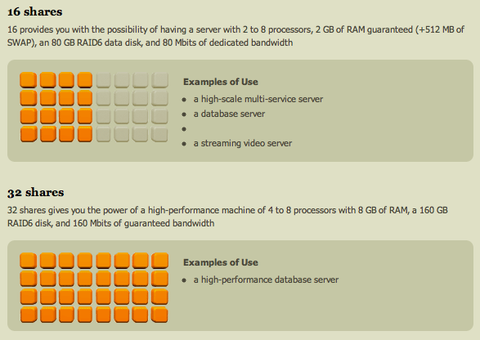
    I've been experimenting with Gandi's virtual hosting service recently. In fact, this blog is now hosted on it. Gandi have created by far the easiest hosting service I've used. The web interface allows you to buy credit, create pre-installed virtual machines and log in, all in under 15 minutes. Add the ease of Ubuntu to the mix (just one of the preinstalled images you can choose from), and commissioning times for new services are low indeed. The hosting service is based on Xen, and allows you to dynamically change the resources your VMs can access (CPU/memory/disk), on a scheduled basis if required. It has an API which provides enough functionality for you to white-label hosting as part of your own web app. Gandi's hosting options
    Excerpt from Gandi's explanation of the amount of resource you can allocate to a virtual machine Gandi's service isn't yet as flexible as Amazon's EC2, but it comes at the problem from the other end — its initial offering "just works" as an alternative hosting solution, with the added flexibility their Xen infrastructure brings to the mix. Even with all its tool support, Amazon EC2 feels like stepping into an alternate universe. I'm pretty excited about the directions in which Gandi's service will develop. And yes, now I've told you all this, unfortunately you can't yet play with the beta service if you've not got an account already. The initial success means Gandi are closing new signups for a little time to concentrate on improving their infrastructure. The good news is that Gandi say this is the final step before the full release of the system. I can't wait! It's so good to see innovative, high-quality internet solutions coming from Europe.Join the conversation about this post

    Matthew Palmer: Womble's Word of the Week: Retrofit!

    In a perfect world, when we design some aspect of our infrastructure, we'd get it right the first time, and would never have to change our design once it had been deployed. Back in this world, however, we regularly have to change things as we expand our infrastructure. Sometimes we made a mistake originally, other times new requirements pop up. In either case we will end up doing things differently in the future than how it was done in the past. The danger here is that if you only create your new machines or services differently, you've got effectively two separate and different systems to maintain. This may not sound like much, until it happens again... and again... and again... and then suddenly you've got 18 different ways of setting up backups, depending on how long ago you set it up and (if you're really unlucky) who did it and what the phase of the moon was at the time. If you've been here before, you probably remember the pain of having some disaster happen and needing to fix it NOW NOW NOW, only to wade into the setup and realise that it's been done in a way that (you thought) died out six months ago -- and so you don't really remember how it works, and yeah, the documentation's been updated so many times since then that it doesn't mention the old way of doing things, and here comes your boss to ask how long it's going to be until it's all working again... If you haven't had this experience (yet?), you'll have to trust me when I say that it's no fun to hit an older, out-of-date system. It's especially painful because the most common reason you change things is because the old way sucked. So you turn up at a critical moment to fix something in a poorly documented and sub-optimally configured system. Fun, fun, funnity fun. There are only two ways to avoid this problem: never change the way you do anything, or else plan your changes so that retrofitting is part of the plan every time you're modifying an existing service. Assuming that never changing anything isn't an option, you need to plan to retrofit. When you're putting together the design for your system change (you do design your changes, right?) you need to audit what's out there, determine what's needed to bring it all up to date, and put together a plan to make that happen. It's like documentation and testing -- if you don't make an explicit effort to make it happen, it'll never get done. That sounds like a lot of work, and it is. Luckily, if you're already working in a well-maintained infrastructure you should only really have one existing config to upgrade, which shouldn't be too painful. However, if you've got a lot of machines to change there's no way around the fact that they've all got to be changed, and that can take time. If you accept that you don't want configuration skew, you can start to think about how to engineer your systems and processes to make it less of a hassle to keep everything up to date. Putting some extra thought into how you set things up in the first place so that it's easier to update is at the heart of this. Automating deployment is an easy way to take some of the pain away from rolling out new configs, but there's also plenty of smaller decisions that help with updating configs: putting everything in revision control, making extensive use of templating and pulling out common config fragments, and making sure that you've got good notes and records of what has been done where. The more you automate your deployment and maintenance, the less pain you feel when you need to retrofit. With something like Puppet, you can eliminate a lot of the pain because you're describing what you want done for all the relevant machines, and then the machines themselves work out what needs to be done to bring themselves up to date. With an advanced automation system in place, you can say "I want all my mail servers to have setting X turned on" and off they go and set the option. Or you might want to have some of your mail servers to have a different config setting, triggered based on a config setting or class of machine. Of course, you might not already have that config setting or class defined, so you'll need to add it. Don't forget to retrofit that new config setting or class to your existing machines. That might involve finding the config for all the existing machines and modifying them. Yep, no matter how much automation you've got you can't get away from the need to retrofit, but given the choice between editing a bunch of config files on my local machine (with all the power of my text editor to back me up) or logging into dozens of machines all over the globe to edit their configs and restart services (with all the risks of making a mistake) I know which one I'd choose...

    11 June 2008

    Christian Perrier: [life] Manu en su casa

    Yes, Manu Chao was really home yesterday in Paris Bercy. And he was obviously feeling like being home. The concert began at 21:30 and ended up at 00:30. Yes...that makes 3 full hours concert. All that for 25 euros. The crowd support, dance, participation was *amazing*. I often go to concerts in the Bercy arena and never saw the crowd in the upper rows being stood up all concert long. Radio Bemba played their usual tracks first. As usual, the very Manu way to mix songs, themes from all his carreer and mix them up, distord them and make new songs from old ones. This is what always made Mano Negra, then Manu Chao oncerts unique experiences. Just imagine 20,000 people singing Clandestino a capella, most of us not knowing any damn word of Spanish... After about 2 hours of magic without any stop, the very special moments came in. Manu, Gambit, Majiv (what a guitarist when playing rumbas de Barcelona!), Julio (de Barcelona!)...and all others were just feeling like being home with a few friends. So the encores lasted...and lasted...and lasted. They just didn't want to stop (Manu probably said about 3 or 4 times "c'est fini"). Then, they did something I never ever saw in a big 20,000 people concert since my first one back in....long time ago. Manu asked "do you have 5 more minutes?". So, they stopped for 5 minutes to get the guitars re-accorded(sp?)....the crowd just...waited...and the gig re-started again with songs from "Si Sib rie m' tait cont e", the special book-album he made with friends, inspired by the sad winters he spent in Paris in his early years. Soooooo special and, believe me, that *was* special. Seeing all roadies, crew, friends just dancing backstage and partying clearly showed this was not to always happen (this will probably happen again on today's concert). He was just feeling like home. And so were we. Not wanting to leave and shut down the light. Finally, at 00:30, all of us were dead tired and we just hugged around with Manu and left. Just like old friends. I don't know if that will happen everywhere in the upcoming tour (some dates in France, some in Europe, a few in USA....nothing unfortunately in South America as of now)....but if you have the opportunity to go to Radio Bemba concerts, just do it. And (IRC reference), really, Erinn, this was not about "ethnic music for white people" (really wondering where you got this idea...or if you were just kidding me). I dunno what Manu ever did to kill your ears, but just try again and, even more important, go to the gig in your fair city on August 22nd. Radio Bemba concerts will be cheap, about half the price of regular bug size concerts....just use that opportunity.

    Evan Prodromou: 24 Prairial CCXVI

    Quick shout to announce an event here in Montreal. In response to the announced introduction of legislation to change Canadian copyright, commonly called the "Canadian DMCA" since the drafts presented so far have closely resembled that American law, the Montreal Chapter of Fair Copyright for Canada is holding an emergency organizational meeting Thursday, June 12th from 6-8PM. The event will be at Station C, 5369 Saint-Laurent #430, in the Mile End neighborhood of Montreal. It's open to anyone interested in learning more about this bill and helping to oppose it. tags:

    Next.

    Previous.