For the past four years, I ve been working on Carthage, a free-software
Infrastructure
as Code framework. We ve finally reached a point where it makes
sense to talk about Carthage and what it can do. This is the first in a
series of blog
posts to introduce Carthage, discuss what it can do and show how it
works.
Why Another IAC Framework
It seems everywhere you look, there are products designed to support
the IAC pattern. On the simple side, you could check a Containerfile
into Git. Products like Terraform and Vagrant allow you to template
cloud infrastructure and VMs. There are more commercial offerings than I
can keep up with.
We were disappointed by what was out there when we started Carthage.
Other products have improved, but for many of our applications we re
happy with what Carthage can build. The biggest challenge we ran into is
that products wanted us to specify things at the wrong level. For some
of our cyber training work we wanted to say things like We want 3 blue
teams, each with a couple defended networks, a red team, and some
neutral infrastructure for red to exploit. Yet the tools we were trying
to use wanted to lay things out at the individual machine/container
level. We found ourselves contemplating writing a program to generate
input for some other IAC tool.
Things were worse for our internal testing. Sometimes we d be
shipping hardware to a customer. But sometimes we d be virtualizing that
build out in a lab. Sometimes we d be doing a mixture. So we wanted to
completely separate the descriptions of machines, networks, and software
from any of the information about whether that was realized on hardware,
VMs, containers, or a mixture.
Dimensional Breakdown
In discussing Carthage with Enrico Zini, he pointed me at Cognitive
Dimensions of notation as a way to think about how Carthage
approaches the IAC problem. I m more interested in the idea of breaking
down a design along the idea of dimensions that allow examining the
design space than I am particular adherence to Green s original
dimensions.
Low Viscosity, High
Abstraction Reuse
One of the guiding principles is that we want to be able to reuse
different components at different scales and in different environments.
These include being able to do things like:
Define an operation like Update a Debian system and apply that
in several environments including as part of building a base VM or
container image, applying to an independently managed machine, or
applying to a micro service container that does not run services like
ssh or systemd.
Defining a role like DNS server that can be applied to a
dedicated machine only having that role, to a traditional server with
multiple roles, or in a micro service environment.
Allowing people to write groups of functionality that can be
useful in descriptions of a small number of machines, but can also be
reused in large environments like modeling of cyber infrastructure to
defend. In the small environments, things are simplified, but in larger
environments integration like directories, authentication infrastructure
and the like is needed.
Allow grouping of functionality at multiple levels. So far I have
talked about grouping of software to be installed on a single machine or
container. We also want to allow groups of containers (pods or
otherwise), groups of machines, groups of networks, or even enclaves
(think a model of an entire company or section of a company). Each kind
of grouping needs to be parametric and reusable.
Hidden Dependencies
To accomplish these abstraction goals, dependencies need to be
non-local. For example, a software role might need to integrate with a
directory if a directory is present in the environment. When writing the
role, no one is going to know which directory to use, nor whether a
directory is present. Taking that as an explicit input into the role is
error-prone when the role is combined into large abstract units (bigger
roles or collections of machines). Instead it is better to have a
non-local dependency, and to find the directory if it is available. We
accomplish this using dependency
injection.
In addition to being non-local, dependencies are sometimes hidden. It
is very easy to overwhelm our cognitive capacity with even a fairly
simple IAC description. An effective notation allows us to focus on the
parts that matter when working with a particular part of the
description. I ve found hiding dependencies, especially indirect
dependencies, to be essential in building complex descriptions.
Obviously, tools are required for examining these dependencies as
part of debugging.
First Class Modeling
Clearly one of the goals of IAC descriptions is to actually build and
manage infrastructure. It turns out that there are all sorts of things
you want to do with the description well before you instantiate the
infrastructure. You might want to query the description to build network
diagrams, understand interdependencies, or even build inventory/bill of
materials. We often find ourselves building Ansible inventory, switch
configurations, DNS zones, and all sorts of configuration artifacts.
These artifacts may be installed into infrastructure that is
instantiated by the description, but they may be consumed in other ways.
Allowing the artifacts to be consumed externally means that you can
avoid pre-commitment and focus on whatever part of the description you
originally want to work on. You may use an existing network at first.
Later the IAC description may replace that, or perhaps it never
will.
As a result, Carthage separates modeling from instantiation. The
model can generally be built and queried without needing to interact
with clouds, VMs, or containers. We ve actually found it useful to build
Carthage layouts that cannot ever be fully instantiated, for example
because they never specify details like whether a model should be
instantiated on a container or VM, or what kind of technology will
realize a modeled network. This allows developing roles before the
machines that use them or focusing on how machines will interact and how
the network will be laid out before the details of installing on
specific hardware.
The modeling separation is by far the difference I value most between
Carthage and other systems.
A Tool for Experts.
In Neal Stephenson s essay In
the Beginning Was the Command Line , Stephenson points out that the
kind of tools experts need are not the same tools that beginners need.
The illustration of why a beginner might not be satisfied with a Hole
Hog drill caught my attention. Carthage is a tool for experts. Despite
what cloud providers will tell you, IAC is not easy. Doubly so when you
start making reusable components. Trying to hide that or focus on making
things easy to get started can make it harder for experts to efficiently
solve the problems they are facing. When we have faced trade offs
between making Carthage easy to pick up and making it powerful for
expert users, we have chosen to support the experts.
That said, Carthage today is harder to pick up than it needs to be.
It s a relatively new project with few external users as of this time.
Our documentation and examples need improvement, just like every project
at this level of maturity. Similarly, as the set of things people try to
do expand, we will doubtless run into bugs that our current test cases
don t cover. So Carthage absolutely will get easier to learn and use
than it is today.
Also, we ve already had success building beginner-focused
applications on top of Carthage. For our cyber training, we built web
applications on top of Carthage that made rebuilding and exploring
infrastructure easy. We ve had success using relatively understood tools
like Ansible as integration and customization points for Carthage
layouts. But in all these cases, when the core layout had significant
reusable components and significant complexity in the networking, only
an IAC expert was going to be able to maintain and develop that
layout.
What Carthage can do.
Carthage has a number of capabilities today. One of Carthage s
strengths is its extensible design. Abstract interfaces make it easy to
add new virtualization platforms, cloud services, and support for
various ways of managing real hardware. This approach has been validated
by incrementally adding support for virtualization architectures and
cloud services. As development has progressed, adding new integrations
continues to get faster because we are able to reuse existing
infrastructure.
Today, Carthage can model:
Machines
Networks
Dynamically compose groupings of the above
Generate model level artifacts
Ansible inventory
Various DNS integrations
Various switch configurations
Carthage has excellent facilities for dealing with images on which
VMs and Containers can be based, although it does have a bit of a
Debian/Ubuntu bias in how it thinks about images:
Building base images from a tool like debootstrap
Customizing these images
Converting into VM images for kvm, VMware, and AWS
Building from scratch OCI images for Podman, Docker and k8s
Adding layers to existing OCI images
When instantiating infrastructure, Carthage can work with:
We have also looked at Oracle Cloud and I believe Openstack, although
that code is not merged.
Future posts will talk about core Carthage concepts and how to use
Carthage to build infrastructure.
I recently wrote about yet another lisp I'd
been having fun with.
Over the past couple of years I've played with a few toy scripting languages,
or random interpreters, and this time I figured I'd do something beyond the
minimum, by implementing the Language Server Protocol.
In brief the language server protocol (LSP) is designed to abstract
functionality that might be provided by an editor, or IDE, into a small
"language server". If the language-server knows how to jump to definitions,
provide completion, etc, etc, then the editor doesn't need to implement those
things for NN different languages - it just needs to launch and communicate
with something that does know how to do the job.
Anyway LSP? LISP? Only one letter different, so that's practically enough
reason to have a stab at it.
Thankfully I found a beautiful library that implements a simple framework
allowing the easy implementation of a golang-based LSP-server
Using that I quickly hacked up a server that can provide:
Overview of all standard-library functions, on hover.
Completion of all standard-library functions.
I've tested this in both GNU Emacs and Neovim, so that means I'm happy
I support all editors! (More seriously if it works in two then that
probably means that the LSP stuff should work elsewhere too.)
Here's what the "help on hover" looks like, within Emacs:
Vim looks similar but you have to press K to see the wee popup. Still
kinda cute, and was a good experiment.
Market Data section of the Financial Times US Edition print edition from May 5, 2021.
If you ve flipped through printed broadsheet newspapers, you ve probably seen pages full of tiny text listing prices and other market information for stocks and commodities. And you ve almost certainly just turned the page. Anybody interested in this market prices today will turn to the internet where these numbers are available in real time and where you don t need to squint to find what you need. This is presumably why many newspapers have stopped printing these types of pages or dramatically reduced the space devoted to them. Major financial newspapers however like the Financial Times (FT) still print multiple pages of market data daily. But does anybody read them?
The answer appears to be no. How do I know? I noticed an error in the FT s Market Data page that anybody looking in the relevant section of the page would have seen. And I have seen it reproduced every single day for the last 18 months.
In early May last year, I noticed that the Japanese telecom giant Nippon Telegraph and Telephone (NTT) was listed twice on the FT s list of the 500 largest global companies: once as Nippon T&T and also as Nippon TT. One right above the other. All the numbers are identical. Clearly a mistake.
Reproduction of the FT Market Data section showing a subset of Japanese companies from the FT 500 list of global companies. The duplicate lines are highlighted in yellow. This page is from today s paper (November 26, 2022).
Wondering if it was a one-off error, I looked at a copy of the paper from about a week before and saw that the error did not exist then. I looked at a copy from one day before and saw that it did. Since the issue was apparently recurring, but new at the time, I figured someone at the paper would notice and fix it quickly. I was wrong. It has been 18 months now and the error has been reproduced every single day.
Looking through the archives, it seems that the first day the error showed up was May 5, 2021. I ve included a screenshot from the electronic paper version from that day and from the fifth of every month since then (or the sixth if the paper was not printed on the fifth) that shows that the error is reproduced every day. A quick look in the archives suggests it not only appears in the US edition but also in the UK, European, Asian, and Middle East editions. All of them.
Why does this matter? The FTprints over 112,000 copies of its paper, six days a week. This duplicate line takes up almost no space, of course, so it s not a big deal on its own. But devoting two full broadsheet pages to market data that is out date as soon as it is printed much of which nobody appears to be reading doesn t seem like a great use of resources. There s an argument to made that papers like the FT print these pages not because they are useful but because doing so is a signal of the publications identities as serious financial papers. But that hardly seems like a good enough reason on its own if nobody is looking at them. It seems well past time for newspapers to stop wasting paper and ink on these pages.
I respect that some people think that printing paper newspapers at all is wasteful when one can just read the material online. Plenty of people disagree, of course. But who will disagree with a call to stop printing material that evidence suggests is not being seen by anybody? If an error this obvious can exist for so long, it seems clear that nobody not even anybody at the FT itself is reading it.
I ran into what seemed to be a DNS problem when building a Docker container:
Err http://archive.ubuntu.com jammy Release.gpg
  Could not resolve 'archive.ubuntu.com'
W: Failed to fetch http://archive.ubuntu.com/ubuntu/dists/jammy/Release.gpg  Could not resolve 'archive.ubuntu.com'
W: Some index files failed to download. They have been ignored, or old ones used instead.
I found that many solutions talked about
setting the default DNS server explicitly in /etc/docker/daemon.json:
"dns": ["1.1.1.1"]
but that didn't work for me.
I noticed however that I was having these problems whenever I connected to my VPN.
So what did work for me was restarting the docker daemon whenever
there is a change in networking (e.g. enabling/disabling VPN) by putting the
following in /etc/NetworkManager/dispatcher.d/docker-local:
#!/bin/sh
LOGFILE=/var/log/docker-restarts.log
if [ -z "$1" ]; then
    echo "$0: called with no interface" >> $LOGFILE
    exit 1;
fi
if [ "$1" = lo ]; then
    # Ignoring the loopback interface
    exit 0;
fi
case "$2" in
    up vpn-up down vpn-down)
        echo "$0: restarting docker due to action \ $2' on interface \ $1'" >> $LOGFILE
        /bin/systemctl restart docker.service
        ;;
    *)
        echo "$0: ignoring action \ $2' on interface \ $1'" >> $LOGFILE
        ;;
esac
You can confirm that it's working as intended by watching the logs:
tail -f /var/log/docker-restarts.log
while enabling/disable your VPN or your network connection. If you don't see
any output, then something is wrong and the Docker restart isn't happening.
Utkarsh Gupta
did 35.0h (out of 38.0h assigned and 22.0h from previous period), thus carrying over 25.0h to the next month.
Evolution of the situation
In October, we have released 42 DLAs, closing 106 CVEs.
At the moment we have 82 packages in dla-needed.txt, waiting for update.
We are continuously working on updating our infrastructure, trying to document all of our changes in the git-repo. Most of packages there are having continuous integration (CI) pipelines.
Thanks to our sponsors
Sponsors that joined recently are in bold.
tl;dr:
Don t write a Rust linked list library: they are hard to do well, and usually useless.
Use VecDeque, which is great. If you actually need more than VecDeque can do, use one of the handful of libraries that actually offer a significantly more useful API.
If you are writing your own data structure, check if someone has done it already, and consider slotmap or generation_arena, (or maybe Rc/Arc).
Contents
Survey of Rust linked list libraries
I have updated my Survey of Rust linked list libraries.
Background
In 2019 I was writing plag-mangler, a tool for planar graph layout.
I needed a data structure. Naturally I looked for a library to help. I didn t find what I needed, so I wrote rc-dlist-deque. However, on the way I noticed an inordinate number of linked list libraries written in Rust. Most all of these had no real reason for existing. Even the one in the Rust standard library is useless.
Results
Now I have redone the survey. The results are depressing. In 2019 there were 5 libraries which, in my opinion, were largely useless. In late 2022 there are now thirteen linked list libraries that ought probably not ever to be used. And, a further eight libraries for which there are strictly superior alternatives. Many of these have the signs of projects whose authors are otherwise competent: proper documentation, extensive APIs, and so on.
There is one new library which is better for some applications than those available in 2019. (I m referring to generational_token_list, which makes a plausible alternative to dlv-list which I already recommended in 2019.)
Why are there so many poor Rust linked list libraries ?
Linked lists and Rust do not go well together. But (and I m guessing here) I presume many people are taught in programming school that a linked list is a fundamental data structure; people are often even asked to write one as a teaching exercise. This is a bad idea in Rust. Or maybe they ve heard that writing linked lists in Rust is hard and want to prove they can do it.
Double-ended queues
One of the main applications for a linked list in a language like C, is a queue, where you put items in at one end, and take them out at the other. The Rust standard library has a data structure for that, VecDeque.
Five of the available libraries:
Have an API which is a subset of that of VecDeque: basically, pushing and popping elements at the front and back.
Have worse performance for most applications than VecDeque,
Are less mature, less available, less well tested, etc., than VecDeque, simply because VecDeque is in the Rust Standard Library.
For these you could, and should, just use VecDeque instead.
The Cursor concept
A proper linked list lets you identify and hold onto an element in the middle of the list, and cheaply insert and remove elements there.
Rust s ownership and borrowing rules make this awkward. One idea that people have many times reinvented and reimplemented, is to have a Cursor type, derived from the list, which is a reference to an element, and permits insertion and removal there.
Eight libraries have implemented this in the obvious way. However, there is a serious API limitation:
To prevent a cursor being invalidated (e.g. by deletion of the entry it points to) you can t modify the list while the cursor exists. You can only have one cursor (that can be used for modification) at a time.
The practical effect of this is that you cannot retain cursors. You can make and use such a cursor for a particular operation, but you must dispose of it soon. Attempts to do otherwise will see you losing a battle with the borrow checker.
If that s good enough, then you could just use a VecDeque and use array indices instead of the cursors. It s true that deleting or adding elements in the middle involves a lot of copying, but your algorithm is O(n) even with the single-cursor list libraries, because it must first walk the cursor to the desired element.
Formally, I believe any algorithm using these exclusive cursors can be rewritten, in an obvious way, to simply iterate and/or copy from the start or end (as one can do with VecDeque) without changing the headline O() performance characteristics.
IMO the savings available from avoiding extra copies etc. are not worth the additional dependency, unsafe code, and so on, especially as there are other ways of helping with that (e.g. boxing the individual elements).
Even if you don t find that convincing, generational_token_list and dlv_list are strictly superior since they offer a more flexible and convenient API and better performance, and rely on much less unsafe code.
Rustic approaches to pointers-to-and-between-nodes data structures
Most of the time a VecDeque is great. But if you actually want to hold onto (perhaps many) references to the middle of the list, and later modify it through those references, you do need something more. This is a specific case of a general class of problems where the naive approach (use Rust references to the data structure nodes) doesn t work well.
But there is a good solution:
Keep all the nodes in an array (a Vec<Option<T>> or similar) and use the index in the array as your node reference. This is fast, and quite ergonomic, and neatly solves most of the problems. If you are concerned that bare indices might cause confusion, as newly inserted elements would reuse indices, add a per-index generation count.
These approaches have been neatly packaged up in libraries like slab, slotmap, generational-arena and thunderdome. And they have been nicely applied to linked lists by the authors of generational_token_list. and dlv-list.
The alternative for nodey data structures in safe Rust: Rc/Arc
Of course, you can just use Rust s interior mutability and reference counting smart pointers, to directly implement the data structure of your choice.
In many applications, a single-threaded data structure is fine, in which case Rc and Cell/RefCell will let you write safe code, with cheap refcount updates and runtime checks inserted to defend against unexpected aliasing, use-after-free, etc.
I took this approach in rc-dlist-deque, because I wanted each node to be able to be on multiple lists.
Rust s package ecosystem demonstrating software s NIH problem
The Rust ecosystem is full of NIH libraries of all kinds. In my survey, there are: five good options; seven libraries which are plausible, but just not as good as the alternatives; and fourteen others.
There is a whole rant I could have about how the whole software and computing community is pathologically neophilic. Often we seem to actively resist reusing ideas, let alone code; and are ignorant and dismissive of what has gone before. As a result, we keep solving the same problems, badly - making the same mistakes over and over again. In some subfields, working software, or nearly working software, is frequently replaced with something worse, maybe more than once.
One aspect of this is a massive cultural bias towards rewriting rather than reusing, let alone fixing and using.
Many people can come out of a degree, trained to be a programmer, and have no formal training in selecting and evaluating software; this is even though working effectively with computers requires making good use of everyone else s work.
If one isn t taught these skills (when and how to search for prior art, how to choose between dependencies, and so on) one must learn it on the job. The result is usually an ad-hoc and unsystematic approach, often dominated by fashion rather than engineering.
The package naming paradox
The more experienced and competent programmer is aware of all the other options that exist - after all they have evaluated other choices before writing their own library.
So they will call their library something like generational_token_list or vecdeque-stableix.
Whereas the novice straight out of a pre-Rust programming course just thinks what they are doing is the one and only obvious thing (even though it s a poor idea) and hasn t even searched for a previous implementation. So they call their package something obvious like linked list .
As a result, the most obvious names seem to refer to the least useful libraries.
Edited 2022-11-16 23:55 UTC to update numbers of libraries in various categories following updates to the survey (including updates prompted by feedback received after this post first published).
I started migrating my graphical workstations to Wayland, specifically
migrating from i3 to Sway. This is mostly to address serious graphics
bugs in the latest Framwork
laptop, but also something I
felt was inevitable.
The current status is that I've been able to convert my i3
configuration to Sway, and adapt my systemd startup sequence to the
new environment. Screen sharing only works with Pipewire, so I also
did that migration, which basically requires an upgrade to Debian
bookworm to get a nice enough Pipewire release.
I'm testing Wayland on my laptop, but I'm not using it as a daily
driver because I first need to upgrade to Debian bookworm on my main
workstation.
Most irritants have been solved one way or the other. My main problem
with Wayland right now is that I spent a frigging week doing the
conversion: it's exciting and new, but it basically sucked the life
out of all my other projects and it's distracting, and I want it to
stop.
The rest of this page documents why I made the switch, how it
happened, and what's left to do. Hopefully it will keep you from
spending as much time as I did in fixing this.
TL;DR: Wayland is mostly ready. Main blockers you might find are
that you need to do manual configurations, DisplayLink (multiple
monitors on a single cable) doesn't work in Sway, HDR and color
management are still in development.
I had to install the following packages:
And did some of tweaks in my $HOME, mostly dealing with my esoteric
systemd startup sequence, which you won't have to deal with if you are
not a fan.
Why switch?
I originally held back from migrating to Wayland: it seemed like a
complicated endeavor hardly worth the cost. It also didn't seem
actually ready.
But after reading this blurb on LWN, I decided to at least
document the situation here. The actual quote that convinced me it
might be worth it was:
It s amazing. I have never experienced gaming on Linux that looked
this smooth in my life.
... I'm not a gamer, but I docare about
latency. The longer version is
worth a read as well.
The point here is not to bash one side or the other, or even do a
thorough comparison. I start with the premise that Xorg is likely
going away in the future and that I will need to adapt some day. In
fact, the last major Xorg release (21.1, October 2021) is rumored
to be the last ("just like the previous release...", that said,
minor releases are still coming out, e.g. 21.1.4). Indeed, it
seems even core Xorg people have moved on to developing Wayland, or at
least Xwayland, which was spun off it its own source tree.
X, or at least Xorg, in in maintenance mode and has been for
years. Granted, the X Window System is getting close to forty
years old at this point: it got us amazingly far for something that
was designed around the time the firstgraphical
interface. Since Mac and (especially?) Windows released theirs,
they have rebuilt their graphical backends numerous times, but UNIX
derivatives have stuck on Xorg this entire time, which is a testament
to the design and reliability of X. (Or our incapacity at developing
meaningful architectural change across the entire ecosystem, take your
pick I guess.)
What pushed me over the edge is that I had some pretty bad driver
crashes with Xorg while screen sharing under Firefox, in Debian
bookworm (around November 2022). The symptom would be that the UI
would completely crash, reverting to a text-only console, while
Firefox would keep running, audio and everything still
working. People could still see my screen, but I couldn't, of course,
let alone interact with it. All processes still running, including
Xorg.
(And no, sorry, I haven't reported that bug, maybe I should have, and
it's actually possible it comes up again in Wayland, of course. But at
first, screen sharing didn't work of course, so it's coming a much
further way. After making screen sharing work, though, the bug didn't
occur again, so I consider this a Xorg-specific problem until further
notice.)
There were also frustrating glitches in the UI, in general. I actually
had to setup a compositor alongside i3 to make things bearable at
all. Video playback in a window was laggy, sluggish, and out of sync.
Wayland fixed all of this.
Wayland equivalents
This section documents each tool I have picked as an alternative to
the current Xorg tool I am using for the task at hand. It also touches
on other alternatives and how the tool was configured.
Note that this list is based on the series of tools I use in
desktop.
TODO: update desktop with the following when done,
possibly moving old configs to a ?xorg archive.
Window manager: i3 sway
This seems like kind of a no-brainer. Sway is around, it's
feature-complete, and it's in Debian.
I'm a bit worried about the "Drew DeVault community", to be
honest. There's a certain aggressiveness in the community I don't like
so much; at least an open hostility towards more modern UNIX tools
like containers and systemd that make it hard to do my work while
interacting with that community.
I'm also concern about the lack of unit tests and user manual for
Sway. The i3 window manager has been designed by a fellow
(ex-)Debian developer I have a lot of respect for (Michael
Stapelberg), partly because of i3 itself, but also working with
him on other projects. Beyond the characters, i3 has a user
guide, a code of conduct, and lots more
documentation. It has a test suite.
Sway has... manual pages, with the homepage just telling users to use
man -k sway to find what they need. I don't think we need that kind
of elitism in our communities, to put this bluntly.
But let's put that aside: Sway is still a no-brainer. It's the easiest
thing to migrate to, because it's mostly compatible with i3. I had
to immediately fix those resources to get a minimal session going:
i3
Sway
note
set_from_resources
set
no support for X resources, naturally
new_window pixel 1
default_border pixel 1
actually supported in i3 as well
That's it. All of the other changes I had to do (and there were
actually a lot) were all Wayland-specific changes, not
Sway-specific changes. For example, use brightnessctl instead of
xbacklight to change the backlight levels.
See a copy of my full sway/config for details.
Other options include:
dwl: tiling, minimalist, dwm for Wayland, not in Debian
Status bar: py3status waybar
I have invested quite a bit of effort in setting up my status bar with
py3status. It supports Sway directly, and did not actually require
any change when migrating to Wayland.
Unfortunately, I had trouble making nm-applet work. Based on this
nm-applet.service, I found that you need to pass --indicator for
it to show up at all.
In theory, tray icon support was merged in 1.5, but in practice
there are still several limitations, like icons not
clickable. Also, on startup, nm-applet --indicator triggers this
error in the Sway logs:
nov 11 22:34:12 angela sway[298938]: 00:49:42.325 [INFO] [swaybar/tray/host.c:24] Registering Status Notifier Item ':1.47/org/ayatana/NotificationItem/nm_applet'
nov 11 22:34:12 angela sway[298938]: 00:49:42.327 [ERROR] [swaybar/tray/item.c:127] :1.47/org/ayatana/NotificationItem/nm_applet IconPixmap: No such property  IconPixmap
nov 11 22:34:12 angela sway[298938]: 00:49:42.327 [ERROR] [swaybar/tray/item.c:127] :1.47/org/ayatana/NotificationItem/nm_applet AttentionIconPixmap: No such property  AttentionIconPixmap
nov 11 22:34:12 angela sway[298938]: 00:49:42.327 [ERROR] [swaybar/tray/item.c:127] :1.47/org/ayatana/NotificationItem/nm_applet ItemIsMenu: No such property  ItemIsMenu
nov 11 22:36:10 angela sway[313419]: info: fcft.c:838: /usr/share/fonts/truetype/dejavu/DejaVuSans.ttf: size=24.00pt/32px, dpi=96.00
... but that seems innocuous. The tray icon displays but is not
clickable.
Note that there is currently (November 2022) a pull request to
hook up a "Tray D-Bus Menu" which, according to Reddit might fix
this, or at least be somewhat relevant.
If you don't see the icon, check the bar.tray_output property in the
Sway config, try: tray_output *.
The non-working tray was the biggest irritant in my migration. I have
used nmtui to connect to new Wifi hotspots or change connection
settings, but that doesn't support actions like "turn off WiFi".
I eventually fixed this by switching from py3status to
waybar, which was another yak horde shaving session, but
ultimately, it worked.
Web browser: Firefox
Firefox has had support for Wayland for a while now, with the team
enabling it by default in nightlies around January 2022. It's
actually not easy to figure out the state of the port, the meta bug
report is still open and it's huge: it currently (Sept 2022)
depends on 76 open bugs, it was opened twelve (2010) years ago, and
it's still getting daily updates (mostly linking to other tickets).
Firefox 106 presumably shipped with "Better screen sharing for
Windows and Linux Wayland users", but I couldn't quite figure out what
those were.
TL;DR: echo MOZ_ENABLE_WAYLAND=1 >> ~/.config/environment.d/firefox.conf && apt install xdg-desktop-portal-wlr
How to enable it
Firefox depends on this silly variable to start correctly under
Wayland (otherwise it starts inside Xwayland and looks fuzzy and fails
to screen share):
MOZ_ENABLE_WAYLAND=1 firefox
To make the change permanent, many recipes recommend adding this to an
environment startup script:
if [ "$XDG_SESSION_TYPE" == "wayland" ]; then
    export MOZ_ENABLE_WAYLAND=1
fi
At least that's the theory. In practice, Sway doesn't actually run any
startup shell script, so that can't possibly work. Furthermore,
XDG_SESSION_TYPE is not actually set when starting Sway from gdm3
which I find really confusing, and I'm not the onlyone. So
the above trick doesn't actually work, even if the environment
(XDG_SESSION_TYPE) is set correctly, because we don't have
conditionals in environment.d(5).
(Note that systemd.environment-generator(7)do support running
arbitrary commands to generate environment, but for some some do not
support user-specific configuration files... Even then it may be a
solution to have a conditional MOZ_ENABLE_WAYLAND environment, but
I'm not sure it would work because ordering between those two isn't
clear: maybe the XDG_SESSION_TYPE wouldn't be set just yet...)
At first, I made this ridiculous script to workaround those
issues. Really, it seems to me Firefox should just parse the
XDG_SESSION_TYPE variable here... but then I realized that Firefox
works fine in Xorg when the MOZ_ENABLE_WAYLAND is set.
So now I just set that variable in environment.d and It Just Works :
MOZ_ENABLE_WAYLAND=1
Screen sharing
Out of the box, screen sharing doesn't work until you install
xdg-desktop-portal-wlr or similar
(e.g. xdg-desktop-portal-gnome on GNOME). I had to reboot for the
change to take effect.
Without those tools, it shows the usual permission prompt with "Use
operating system settings" as the only choice, but when we accept...
nothing happens. After installing the portals, it actualyl works, and
works well!
This was tested in Debian bookworm/testing with Firefox ESR 102 and
Firefox 106.
Major caveat: we can only share a full screen, we can't currently
share just a window. The major upside to that is that, by default,
it streams onlyone output which is actually what I want most
of the time! See the screencast compatibility for more
information on what is supposed to work.
This is actually a huge improvement over the situation in Xorg,
where Firefox can only share a window or all monitors, which led
me to use Chromium a lot for video-conferencing. With this change, in
other words, I will not need Chromium for anything anymore, whoohoo!
If slurp, wofi, or bemenu are
installed, one of them will be used to pick the monitor to share,
which effectively acts as some minimal security measure. See
xdg-desktop-portal-wlr(1) for how to configure that.
Side note: Chrome fails to share a full screen
I was still using Google Chrome (or, more accurately, Debian's
Chromium package) for some videoconferencing. It's mainly because
Chromium was the only browser which will allow me to share only one of
my two monitors, which is extremely useful.
To start chrome with the Wayland backend, you need to use:
If it shows an ugly gray border, check the Use system title bar and
borders setting.
It can do some screensharing. Sharing a window and a tab seems to
work, but sharing a full screen doesn't: it's all black. Maybe not
ready for prime time.
And since Firefox can do what I need under Wayland now, I will not
need to fight with Chromium to work under Wayland:
apt purge chromium
Note that a similar fix was necessary for Signal Desktop, see this
commit. Basically you need to figure out a way to pass those same
flags to signal:
News: feed2exec, gnus
See Email, above, or Emacs in Editor, below.
Editor: Emacs okay-ish
Emacs is being actively ported to Wayland. According to this LWN
article, the first (partial, to Cairo) port was done in 2014 and a
working port (to GTK3) was completed in 2021, but wasn't merged until
late 2021. That is: after Emacs 28 was released (April
2022).
So we'll probably need to wait for Emacs 29 to have native Wayland
support in Emacs, which, in turn, is unlikely to arrive in time for
the Debian bookworm freeze. There are, however, unofficial
builds for both Emacs 28 and 29 provided by spwhitton which
may provide native Wayland support.
I tested the snapshot packages and they do not quite work well
enough. First off, they completely take over the builtin Emacs they
hijack the $PATH in /etc! and certain things are simply not
working in my setup. For example, this hook never gets ran on startup:
(add-hook 'after-init-hook 'server-start t)
Still, like many X11 applications, Emacs mostly works fine under
Xwayland. The clipboard works as expected, for example.
Scaling is a bit of an issue: fonts look fuzzy.
I have heard anecdotal evidence of hard lockups with Emacs running
under Xwayland as well, but haven't experienced any problem so far. I
did experience a Wayland crash with the snapshot version however.
TODO: look again at Wayland in Emacs 29.
Backups: borg
Mostly irrelevant, as I do not use a GUI.
Color theme: srcery, redshift gammastep
I am keeping Srcery as a color theme, in general.
Redshift is another story: it has no support for Wayland out of
the box, but it's apparently possible to apply a hack on the TTY
before starting Wayland, with:
redshift -m drm -PO 3000
This tip is from the arch wiki which also has other suggestions
for Wayland-based alternatives. Both KDE and GNOME have their own "red
shifters", and for wlroots-based compositors, they (currently,
Sept. 2022) list the following alternatives:
greetd and QtGreet (former in Debian, not latter, which
means we're stuck with the weird agreety which doesn't work at
all)
sddm: KDE's default, in Debian, probably heavier or as heavy as
gdm3
Terminal: xterm foot
One of the biggest question mark in this transition was what to do
about Xterm. After writing twoarticles about terminal
emulators as a professional journalist, decades of working on the
terminal, and probably using dozens of different terminal emulators,
I'm still not happy with any of them.
This is such a big topic that I actually have an entire blog post
specifically about this.
For starters, using xterm under Xwayland works well enough, although
the font scaling makes things look a bit too fuzzy.
I have also tried foot: it ... just works!
Fonts are much crisper than Xterm and Emacs. URLs are not clickable
but the URL selector (control-shift-u) is just plain
awesome (think "vimperator" for the terminal).
There's cool hack to jump between prompts.
Copy-paste works. True colors work. The word-wrapping is excellent: it
doesn't lose one byte. Emojis are nicely sized and colored. Font
resize works. There's even scroll back search
(control-shift-r).
Foot went from a question mark to being a reason to switch to Wayland,
just for this little goodie, which says a lot about the quality of
that software.
The selection clicks are a not quite what I would expect though. In
rxvt and others, you have the following patterns:
single click: reset selection, or drag to select
double: select word
triple: select quotes or line
quadruple: select line
I particularly find the "select quotes" bit useful. It seems like foot
just supports double and triple clicks, with word and line
selected. You can select a rectangle with control,. It
correctly extends the selection word-wise with right click if
double-click was first used.
One major problem with Foot is that it's a new terminal, with its own
termcap entry. Support for foot was added to ncurses in the
20210731 release, which was shipped after the current Debian
stable release (Debian bullseye, which ships 6.2+20201114-2). A
workaround for this problem is to install the foot-terminfo package
on the remote host, which is available in Debian stable.
This should eventually resolve itself, as Debian bookworm has a newer
version. Note that some corrections were also shipped in the
20211113 release, but that is also shipped in Debian bookworm.
That said, I am almost certain I will have to revert back to xterm
under Xwayland at some point in the future. Back when I was using
GNOME Terminal, it would mostly work for everything until I had to use
the serial console on a (HP ProCurve) network switch, which have a
fancy TUI that was basically unusable there. I fully expect such
problems with foot, or any other terminal than xterm, for that matter.
The foot wiki has good troubleshooting instructions as well.
Update: I did find one tiny thing to improve with foot, and it's the
default logging level which I found pretty verbose. After discussing
it with the maintainer on IRC, I submitted this patch to tweak
it, which I described like this on Mastodon:
today's reason why i will go to hell when i die (TRWIWGTHWID?): a
600-word, 63 lines commit log for a one line change:
https://codeberg.org/dnkl/foot/pulls/1215
The above list comes partly from https://arewewaylandyet.com/ and
awesome-wayland. It is likely incomplete.
I have read some good things about bemenu, fuzzel, and wofi.
A particularly tricky option is that my rofi password management
depends on xdotool for some operations. At first, I thought this was
just going to be (thankfully?) impossible, because we actually like
the idea that one app cannot send keystrokes to another. But it seems
there are actually alternatives to this, like wtype or
ydotool, the latter which requires root access. wl-ime-type
does that through the input-method-unstable-v2 protocol (sample
emoji picker, but is not packaged in Debian.
As it turns out, wtype just works as expected, and fixing this was
basically a two-line patch. Another alternative, not in Debian, is
wofi-pass.
The other problem is that I actually heavily modified rofi. I use
"modis" which are not actually implemented in wofi or tofi, so I'm
left with reinventing those wheels from scratch or using the rofi +
wayland fork... It's really too bad that fork isn't being
reintegrated...
For now, I'm actually still using rofi under Xwayland. The main
downside is that fonts are fuzzy, but it otherwise just works.
Note that wlogout could be a partial replacement (just for the
"power menu").
Image viewers: geeqie ?
I'm not very happy with geeqie in the first place, and I suspect the
Wayland switch will just make add impossible things on top of the
things I already find irritating (Geeqie doesn't support copy-pasting
images).
In practice, Geeqie doesn't seem to work so well under Wayland. The
fonts are fuzzy and the thumbnail preview just doesn't work anymore
(filed as Debian bug 1024092). It seems it also has problems
with scaling.
Alternatives:
See also this list and that list for other list of image
viewers, not necessarily ported to Wayland.
TODO: pick an alternative to geeqie, nomacs would be gorgeous if it
wouldn't be basically abandoned upstream (no release since 2020), has
an unpatchedCVE-2020-23884 since July 2020, does bad
vendoring, and is in bad shape in Debian (4 minor releases
behind).
So for now I'm still grumpily using Geeqie.
Media player: mpv, gmpc / sublime
This is basically unchanged. mpv seems to work fine under Wayland,
better than Xorg on my new laptop (as mentioned in the introduction),
and that before the version which improves Wayland support
significantly, by bringing native Pipewire support and DMA-BUF
support.
gmpc is more of a problem, mainly because it is abandoned. See
2022-08-22-gmpc-alternatives for the full discussion, one of
the alternatives there will likely support Wayland.
Finally, I might just switch to sublime-music instead... In any
case, not many changes here, thankfully.
Screensaver: xsecurelock swaylock
I was previously using xss-lock and xsecurelock as a screensaver, with
xscreensaver "hacks" as a backend for xsecurelock.
The basic screensaver in Sway seems to be built with swayidle and
swaylock. It's interesting because it's the same "split" design
as xss-lock and xsecurelock.
That, unfortunately, does not include the fancy "hacks" provided by
xscreensaver, and that is unlikely to be implemented upstream.
Other alternatives include gtklock and waylock (zig), which
do not solve that problem either.
It looks like swaylock-plugin, a swaylock fork, which at least
attempts to solve this problem, although not directly using the real
xscreensaver hacks. swaylock-effects is another attempt at this,
but it only adds more effects, it doesn't delegate the image display.
Other than that, maybe it's time to just let go of those funky
animations and just let swaylock do it's thing, which is display a
static image or just a black screen, which is fine by me.
In the end, I am just using swayidle with a configuration based on
the systemd integration wiki page but with additional tweaks from
this service, see the resulting swayidle.service file.
Interestingly, damjan also has a service for swaylock itself,
although it's not clear to me what its purpose is...
Screenshot: maim grim, pubpaste
I'm a heavy user of maim (and a package uploader in Debian). It
looks like the direct replacement to maim (and slop) is grim
(and slurp). There's also swappy which goes on top of grim
and allows preview/edit of the resulting image, nice touch (not in
Debian though).
See also awesome-wayland screenshots for other alternatives:
there are many, including X11 tools like Flameshot that also
support Wayland.
One key problem here was that I have my own screenshot / pastebin
software which will needed an update for Wayland as well. That,
thankfully, meant actually cleaning up a lot of horrible code that
involved calling xterm and xmessage for user interaction. Now,
pubpaste uses GTK for prompts and looks much better. (And before
anyone freaks out, I already had to use GTK for proper clipboard
support, so this isn't much of a stretch...)
Screen recorder: simplescreenrecorder wf-recorder
In Xorg, I have used both peek or simplescreenrecorder for
screen recordings. The former will work in Wayland, but has no
sound support. The latter has a fork with Wayland support but
it is limited and buggy ("doesn't support recording area selection and
has issues with multiple screens").
It looks like wf-recorder will just do everything correctly out
of the box, including audio support (with --audio, duh). It's also
packaged in Debian.
One has to wonder how this works while keeping the "between app
security" that Wayland promises, however... Would installing such a
program make my system less secure?
Many other options are available, see the awesome Wayland
screencasting list.
RSI: workrave nothing?
Workrave has no support for Wayland. activity watch is a
time tracker alternative, but is not a RSI watcher. KDE has
rsiwatcher, but that's a bit too much on the heavy side for my
taste.
SafeEyes looks like an alternative at first, but it has many
issues under Wayland (escape doesn't work, idle doesn't
work, it just doesn't work really). timekpr-nextcould be
an alternative as well, and has support for Wayland.
I am also considering just abandoning workrave, even if I stick with
Xorg, because it apparently introduces significant latency in the
input pipeline.
And besides, I've developed a pretty unhealthy alert fatigue with
Workrave. I have used the program for so long that my fingers know
exactly where to click to dismiss those warnings very effectively. It
makes my work just more irritating, and doesn't fix the fundamental
problem I have with computers.
Other apps
This is a constantly changing list, of course. There's a bit of a
"death by a thousand cuts" in migrating to Wayland because you realize
how many things you were using are tightly bound to X.
.Xresources - just say goodbye to that old resource system, it
was used, in my case, only for rofi, xterm, and ... Xboard!?
keyboard layout switcher: built-in to Sway since 2017 (PR
1505, 1.5rc2+), requires a small configuration change, see
this answer as well, looks something like this command:
That works refreshingly well, even better than in Xorg, I must say.
swaykbdd is an alternative that supports per-window layouts
(in Debian).
wallpaper: currently using feh, will need a replacement, TODO:
figure out something that does, like feh, a random shuffle.
swaybg just loads a single image, duh. oguri might be a
solution, but unmaintained, used here, not in
Debian. wallutils is another option, also not in
Debian. For now I just don't have a wallpaper, the background is a
solid gray, which is better than Xorg's default (which is whatever
crap was left around a buffer by the previous collection of
programs, basically)
notifications: currently using dunst in some places, which
works well in both Xorg and Wayland, not a blocker, salut a
possible alternative (not in Debian), damjan uses mako. TODO:
install dunst everywhere
 nov 11 22:34:12 angela sway[298938]: 00:49:42.325 [INFO] [swaybar/tray/host.c:24] Registering Status Notifier Item ':1.47/org/ayatana/NotificationItem/nm_applet'
 nov 11 22:34:12 angela sway[298938]: 00:49:42.327 [ERROR] [swaybar/tray/item.c:127] :1.47/org/ayatana/NotificationItem/nm_applet IconPixmap: No such property  IconPixmap
 nov 11 22:34:12 angela sway[298938]: 00:49:42.327 [ERROR] [swaybar/tray/item.c:127] :1.47/org/ayatana/NotificationItem/nm_applet AttentionIconPixmap: No such property  AttentionIconPixmap
 nov 11 22:34:12 angela sway[298938]: 00:49:42.327 [ERROR] [swaybar/tray/item.c:127] :1.47/org/ayatana/NotificationItem/nm_applet ItemIsMenu: No such property  ItemIsMenu
 nov 11 22:36:10 angela sway[313419]: info: fcft.c:838: /usr/share/fonts/truetype/dejavu/DejaVuSans.ttf: size=24.00pt/32px, dpi=96.00
... but it seems innocuous. The tray icon displays but, as stated
above, is not clickable. If you don't see the icon, check the
bar.tray_output property in the Sway config, try: tray_output *.
Note that there is currently (November 2022) a pull request to
hook up a "Tray D-Bus Menu" which, according to Reddit might
fix this, or at least be somewhat relevant.
This was the biggest irritant in my migration. I have used nmtui
to connect to new Wifi hotspots or change connection settings, but
that doesn't support actions like "turn off WiFi".
I eventually fixed this by switching from py3status to
waybar.
window switcher: in i3 I was using this bespoke i3-focus
script, which doesn't work under Sway, swayr an option, not in
Debian. So I put together this other bespoke hack from
multiple sources, which works.
PDF viewer: currently using atril (which supports Wayland), could
also just switch to zatura/mupdf permanently, see also calibre
for a discussion on document viewers
More X11 / Wayland equivalents
For all the tools above, it's not exactly clear what options exist in
Wayland, or when they do, which one should be used. But for some basic
tools, it seems the options are actually quite clear. If that's the
case, they should be listed here:
Note that arandr and autorandr are not directly part of
X. arewewaylandyet.com refers to a few alternatives. We suggest
wdisplays and kanshi above (see also this service
file) but wallutils can also do the autorandr stuff, apparently,
and nwg-displays can do the arandr part. Neither are packaged in
Debian yet.
So I have tried wdisplays and it Just Works, and well. The UI even
looks better and more usable than arandr, so another clean win from
Wayland here.
TODO: test kanshi as a autorandr replacement
Other issues
systemd integration
I've had trouble getting session startup to work. This is partly
because I had a kind of funky system to start my session in the first
place. I used to have my whole session started from .xsession like
this:
But obviously, the xsession.target is not started by the Sway
session. It seems to just start a default.target, which is really
not what we want because we want to associate the services directly
with the graphical-session.target, so that they don't start when
logging in over (say) SSH.
damjan on #debian-systemd showed me his sway-setup which
features systemd integration. It involves starting a different session
in a completely new .desktop file. That work was submitted
upstream but refused on the grounds that "I'd rather not give a
preference to any particular init system." Another PR was
abandoned because "restarting sway does not makes sense: that
kills everything".
The work was therefore moved to the wiki.
So. Not a great situation. The upstream wikisystemd
integration suggests starting the systemd target from within
Sway, which has all sorts of problems:
you don't get Sway logs anywhere
control groups are all messed up
I have done a lot of work trying to figure this out, but I remember
that starting systemd from Sway didn't actually work for me: my
previously configured systemd units didn't correctly start, and
especially not with the right $PATH and environment.
So I went down that rabbit hole and managed to correctly configure
Sway to be started from the systemd --user session.
I have partly followed the wiki but also picked ideas from damjan's
sway-setup and xdbob's sway-services. Another option is
uwsm (not in Debian).
This is the config I have in .config/systemd/user/:
You will also need at least part of my sway/config, which
sends the systemd notification (because, no, Sway doesn't support any
sort of readiness notification, that would be too easy). And you might
like to see my swayidle-config while you're there.
Finally, you need to hook this up somehow to the login manager. This
is typically done with a desktop file, so drop
sway-session.desktop in /usr/share/wayland-sessions and
sway-user-service somewhere in your $PATH (typically
/usr/bin/sway-user-service).
The session then looks something like this:
Environment propagation
At first, my terminals and rofi didn't have the right $PATH, which
broke a lot of my workflow. It's hard to tell exactly how Wayland
gets started or where to inject environment. This discussion
suggests a few alternatives and this Debian bug report discusses
this issue as well.
I eventually picked environment.d(5) since I already manage my user
session with systemd, and it fixes a bunch of other problems. I used
to have a .shenv that I had to manually source everywhere. The only
problem with that approach is that it doesn't support conditionals,
but that's something that's rarely needed.
Pipewire
This is a whole topic onto itself, but migrating to Wayland also
involves using Pipewire if you want screen sharing to work. You
can actually keep using Pulseaudio for audio, that said, but that
migration is actually something I've wanted to do anyways: Pipewire's
design seems much better than Pulseaudio, as it folds in JACK
features which allows for pretty neat tricks. (Which I should probably
show in a separate post, because this one is getting rather long.)
I first tried this migration in Debian bullseye, and it didn't work
very well. Ardour would fail to export tracks and I would get
into weird situations where streams would just drop mid-way.
A particularly funny incident is when I was in a meeting and I
couldn't hear my colleagues speak anymore (but they could) and I went
on blabbering on my own for a solid 5 minutes until I realized what
was going on. By then, people had tried numerous ways of letting me
know that something was off, including (apparently) coughing, saying
"hello?", chat messages, IRC, and so on, until they just gave up and
left.
I suspect that was also a Pipewire bug, but it could also have been
that I muted the tab by error, as I recently learned that clicking on
the little tiny speaker icon on a tab mutes that tab. Since the tab
itself can get pretty small when you have lots of them, it's actually
quite frequently that I mistakenly mute tabs.
Anyways. Point is: I already knew how to make the migration, and I had
already documented how to make the change in Puppet. It's
basically:
An optional (but key, IMHO) configuration you should also make is to
"switch on connect", which will make your Bluetooth or USB headset
automatically be the default route for audio, when connected. In
~/.config/pipewire/pipewire-pulse.conf.d/autoconnect.conf:
See the excellent as usual Arch wiki page about Pipewire for
that trick and more information about Pipewire. Note that you must
not put the file in ~/.config/pipewire/pipewire.conf (or
pipewire-pulse.conf, maybe) directly, as that will break your
setup. If you want to add to that file, first copy the template from
/usr/share/pipewire/pipewire-pulse.conf first.
So far I'm happy with Pipewire in bookworm, but I've heard mixed
reports from it. I have high hopes it will become the standard media
server for Linux in the coming months or years, which is great because
I've been (rather boldly, I admit) on the record saying I don't like
PulseAudio.
Rereading this now, I feel it might have been a little unfair, as
"over-engineered and tries to do too many things at once" applies
probably even more to Pipewire than PulseAudio (since it also handles
video dispatching).
That said, I think Pipewire took the right approach by implementing
existing interfaces like Pulseaudio and JACK. That way we're not
adding a third (or fourth?) way of doing audio in Linux; we're just
making the server better.
Keypress drops
Sometimes I lose keyboard presses. This correlates with the following
warning from Sway:
d c 06 10:36:31 curie sway[343384]: 23:32:14.034 [ERROR] [wlr] [libinput] event5 - SONiX USB Keyboard: client bug: event processing lagging behind by 37ms, your system is too slow
... and corresponds to an open bug report in Sway. It seems the
"system is too slow" should really be "your compositor is too slow"
which seems to be the case here on this older system
(curie). It doesn't happen often, but it does happen,
particularly when a bunch of busy processes start in parallel (in my
case: a linter running inside a container and notmuch new).
The proposed fix for this in Sway is to gain real time privileges
and add the CAP_SYS_NICE capability to the binary. We'll see how
that goes in Debian once 1.8 gets released and shipped.
Improvements over i3
Tiling improvements
There's a lot of improvements Sway could bring over using plain
i3. There are pretty neat auto-tilers that could replicate the
configurations I used to have in Xmonad or Awesome, see:
Display latency tweaks
TODO: You can tweak the display latency in wlroots compositors with the
max_render_time parameter, possibly getting lower latency than
X11 in the end.
Sound/brightness changes notifications
TODO: Avizo can display a pop-up to give feedback on volume and
brightness changes. Not in Debian. Other alternatives include
SwayOSD and sway-nc, also not in Debian.
Debugging tricks
The xeyes (in the x11-apps package) will run in Wayland, and can
actually be used to easily see if a given window is also in
Wayland. If the "eyes" follow the cursor, the app is actually running
in xwayland, so not natively in Wayland.
Another way to see what is using Wayland in Sway is with the command:
Conclusion
In general, this took me a long time, but it mostly works. The tray
icon situation is pretty frustrating, but there's a workaround and I
have high hopes it will eventually fix itself. I'm also actually
worried about the DisplayLink support because I eventually want to
be using this, but hopefully that's another thing that will hopefully
fix itself before I need it.
A word on the security model
I'm kind of worried about all the hacks that have been added to
Wayland just to make things work. Pretty much everywhere we need to,
we punched a hole in the security model:
windows can overlay on top of each other (so one app could, for
example, spoof a password dialog, through the layer-shell
protocol)
Wikipedia describes the security properties of Wayland as it
"isolates the input and output of every window, achieving
confidentiality, integrity and availability for both." I'm not sure
those are actually realized in the actual implementation, because of
all those holes punched in the design, at least in Sway. For example,
apparently the GNOME compositor doesn't have the virtual-keyboard
protocol, but they do have (another?!) text input protocol.
Wayland does offer a better basis to implement such a system,
however. It feels like the Linux applications security model lacks
critical decision points in the UI, like the user approving "yes, this
application can share my screen now". Applications themselves might
have some of those prompts, but it's not mandatory, and that is
worrisome.
In my tubman setup, I started using ZFS on an old server
I had lying around. The machine is really old though (2011!) and it
"feels" pretty slow. I want to see how much of that is ZFS and how
much is the machine. Synthetic benchmarks show that ZFS may be slower
than mdadm in RAID-10 or RAID-6 configuration, so I want to confirm
that on a live workload: my workstation. Plus, I want easy, regular,
high performance backups (with send/receive snapshots) and there's no
way I'm going to use BTRFS because I find
it too confusing and unreliable.
So off we go.
Installation
Since this is a conversion (and not a new install), our procedure is
slightly different than the official documentation but otherwise
it's pretty much in the same spirit: we're going to use ZFS for
everything, including the root filesystem.
So, install the required packages, on the current system:
    root@curie:/home/anarcat# sgdisk -p /dev/sdc
    Disk /dev/sdc: 1953525168 sectors, 931.5 GiB
    Model: ESD-S1C
    Sector size (logical/physical): 512/512 bytes
    Disk identifier (GUID): [REDACTED]
    Partition table holds up to 128 entries
    Main partition table begins at sector 2 and ends at sector 33
    First usable sector is 34, last usable sector is 1953525134
    Partitions will be aligned on 16-sector boundaries
    Total free space is 14 sectors (7.0 KiB)
    Number  Start (sector)    End (sector)  Size       Code  Name
       1              48            2047   1000.0 KiB  EF02
       2            2048         1050623   512.0 MiB   EF00
       3         1050624         3147775   1024.0 MiB  BF01
       4         3147776      1953525134   930.0 GiB   BF00
Unfortunately, we can't be sure of the sector size here, because the
USB controller is probably lying to us about it. Normally, this
smartctl command should tell us the sector size as well:
root@curie:~# smartctl -i /dev/sdb -qnoserial
smartctl 7.2 2020-12-30 r5155 [x86_64-linux-5.10.0-14-amd64] (local build)
Copyright (C) 2002-20, Bruce Allen, Christian Franke, www.smartmontools.org
=== START OF INFORMATION SECTION ===
Model Family:     Western Digital Black Mobile
Device Model:     WDC WD10JPLX-00MBPT0
Firmware Version: 01.01H01
User Capacity:    1 000 204 886 016 bytes [1,00 TB]
Sector Sizes:     512 bytes logical, 4096 bytes physical
Rotation Rate:    7200 rpm
Form Factor:      2.5 inches
Device is:        In smartctl database [for details use: -P show]
ATA Version is:   ATA8-ACS T13/1699-D revision 6
SATA Version is:  SATA 3.0, 6.0 Gb/s (current: 6.0 Gb/s)
Local Time is:    Tue May 17 13:33:04 2022 EDT
SMART support is: Available - device has SMART capability.
SMART support is: Enabled
Above is the example of the builtin HDD drive. But the SSD device
enclosed in that USB controller doesn't support SMART commands,
so we can't trust that it really has 512 bytes sectors.
This matters because we need to tweak the ashift value
correctly. We're going to go ahead the SSD drive has the common 4KB
settings, which means ashift=12.
Note here that we are not creating a separate partition for
swap. Swap on ZFS volumes (AKA "swap on ZVOL") can trigger lockups and
that issue is still not fixed upstream. Ubuntu recommends using a
separate partition for swap instead. But since this is "just" a
workstation, we're betting that we will not suffer from this problem,
after hearing a report from another Debian developer running this
setup on their workstation successfully.
We do not recommend this setup though. In fact, if I were to redo this
partition scheme, I would probably use LUKS encryption and setup a
dedicated swap partition, as I had problems with ZFS encryption as
well.
Creating pools
ZFS pools are somewhat like "volume groups" if you are familiar with
LVM, except they obviously also do things like RAID-10. (Even though
LVM can technically also do RAID, people typically use mdadm
instead.)
In any case, the guide suggests creating two different pools here:
one, in cleartext, for boot, and a separate, encrypted one, for the
rest. Technically, the boot partition is required because the Grub
bootloader only supports readonly ZFS pools, from what I
understand. But I'm a little out of my depth here and just following
the guide.
Boot pool creation
This creates the boot pool in readonly mode with features that grub
supports:
-O encryption=on -O keylocation=prompt -O keyformat=passphrase:
encryption, prompt for a password, default algorithm is
aes-256-gcm, explicit in the guide, made implicit here
-O acltype=posixacl -O xattr=sa: enable ACLs, with better
performance (not enabled by default)
-O dnodesize=auto: related to extended attributes, less
compatibility with other implementations
-O compression=zstd: enable zstd compression, can be
disabled/enabled by dataset to with zfs set compression=off
rpool/example
-O relatime=on: classic atime optimisation, another that could
be used on a busy server is atime=off
-O canmount=off: do not make the pool mount automatically with
mount -a?
-O mountpoint=/ -R /mnt: mount pool on / in the future, but
/mnt for now
Those settings are all available in zfsprops(8). Other flags are
defined in zpool-create(8). The reasoning behind them is also
explained in the upstream guide and some also in [the Debian
wiki][]. Those flags were actually not used:
-O normalization=formD: normalize file names on comparisons (not
storage), implies utf8only=on, which is a bad idea (and
effectively meant my first sync failed to copy some files,
including this folder from a supysonic checkout). and this
cannot be changed after the filesystem is created. bad, bad, bad.
Side note about single-disk pools
Also note that we're living dangerously here: single-disk ZFS pools
are rumoured to be more dangerous than not running ZFS at all. The
choice quote from this article is:
[...] any error can be detected, but cannot be corrected. This
sounds like an acceptable compromise, but its actually not. The
reason its not is that ZFS' metadata cannot be allowed to be
corrupted. If it is it is likely the zpool will be impossible to
mount (and will probably crash the system once the corruption is
found). So a couple of bad sectors in the right place will mean that
all data on the zpool will be lost. Not some, all. Also there's no
ZFS recovery tools, so you cannot recover any data on the drives.
Compared with (say) ext4, where a single disk error can recovered,
this is pretty bad. But we are ready to live with this with the idea
that we'll have hourly offline snapshots that we can easily recover
from. It's trade-off. Also, we're running this on a NVMe/M.2 drive
which typically just blinks out of existence completely, and doesn't
"bit rot" the way a HDD would.
Also, the FreeBSD handbook quick start doesn't have any warnings
about their first example, which is with a single disk. So I am
reassured at least.
Creating mount points
Next we create the actual filesystems, known as "datasets" which are
the things that get mounted on mountpoint and hold the actual files.
Note that it's unclear to me why those datasets are necessary, but
they seem common practice, also used in this FreeBSD
example. The OpenZFS guide mentions the Solaris upgrades and
Ubuntu's zsys that use that container for upgrades and rollbacks.
This blog post seems to explain a bit the layout behind the
installer.
this creates the actual boot and root filesystems:
Notice here a peculiarity: we must create rpool/var/lib to
create rpool/var/lib/docker otherwise we get this error:
cannot create 'rpool/var/lib/docker': parent does not exist
... and no, just creating /mnt/var/lib doesn't fix that
problem. In fact, it makes things even more confusing because an
existing directory shadows a mountpoint, which is the opposite of
how things normally work.
Also note that you will probably need to change storage driver in
Docker, see the zfs-driver documentation for details but,
basically, I did:
Now that we have everything setup and mounted, let's copy all files
over.
Copying files
This is a list of all the mounted filesystems
for fs in /boot/ /boot/efi/ / /home/; do
    echo "syncing $fs to /mnt$fs..." &&
    rsync -aSHAXx --info=progress2 --delete $fs /mnt$fs
done
You can check that the list is correct with:
mount -l -t ext4,btrfs,vfat awk ' print $3 '
Note that we skip /srv as it's on a different disk.
On the first run, we had:
root@curie:~# for fs in /boot/ /boot/efi/ / /home/; do
        echo "syncing $fs to /mnt$fs..." &&
        rsync -aSHAXx --info=progress2 $fs /mnt$fs
    done
syncing /boot/ to /mnt/boot/...
              0   0%    0.00kB/s    0:00:00 (xfr#0, to-chk=0/299)
syncing /boot/efi/ to /mnt/boot/efi/...
     16,831,437 100%  184.14MB/s    0:00:00 (xfr#101, to-chk=0/110)
syncing / to /mnt/...
 28,019,293,280  94%   47.63MB/s    0:09:21 (xfr#703710, ir-chk=6748/839220)rsync: [generator] delete_file: rmdir(var/lib/docker) failed: Device or resource busy (16)
could not make way for new symlink: var/lib/docker
 34,081,267,990  98%   50.71MB/s    0:10:40 (xfr#736577, to-chk=0/867732)
rsync error: some files/attrs were not transferred (see previous errors) (code 23) at main.c(1333) [sender=3.2.3]
syncing /home/ to /mnt/home/...
rsync: [sender] readlink_stat("/home/anarcat/.fuse") failed: Permission denied (13)
 24,456,268,098  98%   68.03MB/s    0:05:42 (xfr#159867, ir-chk=6875/172377)
file has vanished: "/home/anarcat/.cache/mozilla/firefox/s2hwvqbu.quantum/cache2/entries/B3AB0CDA9C4454B3C1197E5A22669DF8EE849D90"
199,762,528,125  93%   74.82MB/s    0:42:26 (xfr#1437846, ir-chk=1018/1983979)rsync: [generator] recv_generator: mkdir "/mnt/home/anarcat/dist/supysonic/tests/assets/\#346" failed: Invalid or incomplete multibyte or wide character (84)
*** Skipping any contents from this failed directory ***
315,384,723,978  96%   76.82MB/s    1:05:15 (xfr#2256473, to-chk=0/2993950)
rsync error: some files/attrs were not transferred (see previous errors) (code 23) at main.c(1333) [sender=3.2.3]
Note the failure to transfer that supysonic file? It turns out they
had a weird filename in their source tree, since then removed,
but still it showed how the utf8only feature might not be such a bad
idea. At this point, the procedure was restarted all the way back to
"Creating pools", after unmounting all ZFS filesystems (umount
/mnt/run /mnt/boot/efi && umount -t zfs -a) and destroying the pool,
which, surprisingly, doesn't require any confirmation (zpool destroy
rpool).
The second run was cleaner:
root@curie:~# for fs in /boot/ /boot/efi/ / /home/; do
        echo "syncing $fs to /mnt$fs..." &&
        rsync -aSHAXx --info=progress2 --delete $fs /mnt$fs
    done
syncing /boot/ to /mnt/boot/...
              0   0%    0.00kB/s    0:00:00 (xfr#0, to-chk=0/299)
syncing /boot/efi/ to /mnt/boot/efi/...
              0   0%    0.00kB/s    0:00:00 (xfr#0, to-chk=0/110)
syncing / to /mnt/...
 28,019,033,070  97%   42.03MB/s    0:10:35 (xfr#703671, ir-chk=1093/833515)rsync: [generator] delete_file: rmdir(var/lib/docker) failed: Device or resource busy (16)
could not make way for new symlink: var/lib/docker
 34,081,807,102  98%   44.84MB/s    0:12:04 (xfr#736580, to-chk=0/867723)
rsync error: some files/attrs were not transferred (see previous errors) (code 23) at main.c(1333) [sender=3.2.3]
syncing /home/ to /mnt/home/...
rsync: [sender] readlink_stat("/home/anarcat/.fuse") failed: Permission denied (13)
IO error encountered -- skipping file deletion
 24,043,086,450  96%   62.03MB/s    0:06:09 (xfr#151819, ir-chk=15117/172571)
file has vanished: "/home/anarcat/.cache/mozilla/firefox/s2hwvqbu.quantum/cache2/entries/4C1FDBFEA976FF924D062FB990B24B897A77B84B"
315,423,626,507  96%   67.09MB/s    1:14:43 (xfr#2256845, to-chk=0/2994364)
rsync error: some files/attrs were not transferred (see previous errors) (code 23) at main.c(1333) [sender=3.2.3]
Also note the transfer speed: we seem capped at 76MB/s, or
608Mbit/s. This is not as fast as I was expecting: the USB connection
seems to be at around 5Gbps:
anarcat@curie:~$ lsusb -tv   head -4
/:  Bus 02.Port 1: Dev 1, Class=root_hub, Driver=xhci_hcd/6p, 5000M
    ID 1d6b:0003 Linux Foundation 3.0 root hub
     __ Port 1: Dev 4, If 0, Class=Mass Storage, Driver=uas, 5000M
        ID 0b05:1932 ASUSTek Computer, Inc.
So it shouldn't cap at that speed. It's possible the USB adapter is
failing to give me the full speed though. It's not the M.2 SSD drive
either, as that has a ~500MB/s bandwidth, acccording to its spec.
At this point, we're about ready to do the final configuration. We
drop to single user mode and do the rest of the procedure. That used
to be shutdown now, but it seems like the systemd switch broke that,
so now you can reboot into grub and pick the "recovery"
option. Alternatively, you might try systemctl rescue, as I found
out.
I also wanted to copy the drive over to another new NVMe drive, but
that failed: it looks like the USB controller I have doesn't work with
older, non-NVME drives.
Boot configuration
Now we need to enter the new system to rebuild the boot loader and
initrd and so on.
First, we bind mounts and chroot into the ZFS disk:
mount --rbind /dev  /mnt/dev &&
mount --rbind /proc /mnt/proc &&
mount --rbind /sys  /mnt/sys &&
chroot /mnt /bin/bash
Next we add an extra service that imports the bpool on boot, to make
sure it survives a zpool.cache destruction:
I had to trim down /etc/fstab and /etc/crypttab to only contain
references to the legacy filesystems (/srv is still BTRFS!).
If we don't already have a tmpfs defined in /etc/fstab:
Strangely, that's not exactly what the author, Jim Salter, did in
his actual test bench used in the ZFS benchmarking
article. The first thing is there's no read test at all, which is
already pretty strange. But also it doesn't include stuff like
dropping caches or repeating results.
So here's my variation, which i called fio-ars-bench.sh for
now. It just batches a bunch of fio tests, one by one, 60 seconds
each. It should take about 12 minutes to run, as there are 3 pair of
tests, read/write, with and without async.
My bias, before building, running and analysing those results is that
ZFS should outperform the traditional stack on writes, but possibly
not on reads. It's also possible it outperforms it on both, because
it's a newer drive. A new test might be possible with a new external
USB drive as well, although I doubt I will find the time to do this.
Results
All tests were done on WD blue SN550 drives, which claims to be
able to push 2400MB/s read and 1750MB/s write. An extra drive was
bought to move the LVM setup from a WDC WDS500G1B0B-00AS40 SSD, a WD
blue M.2 2280 SSD that was at least 5 years old, spec'd at 560MB/s
read, 530MB/s write. Benchmarks were done on the M.2 SSD drive but
discarded so that the drive difference is not a factor in the test.
In practice, I'm going to assume we'll never reach those numbers
because we're not actually NVMe (this is an old workstation!) so the
bottleneck isn't the disk itself. For our purposes, it might still
give us useful results.
Rescue test, LUKS/LVM/ext4
Those tests were performed with everything shutdown, after either
entering the system in rescue mode, or by reaching that target with:
systemctl rescue
The network might have been started before or after the test as well:
systemctl start systemd-networkd
So it should be fairly reliable as basically nothing else is running.
Raw numbers, from the ?job-curie-lvm.log, converted to MiB/s and
manually merged:
test
read I/O
read IOPS
write I/O
write IOPS
rand4k4g1x
39.27
10052
212.15
54310
rand4k4g1x--fsync=1
39.29
10057
2.73
699
rand64k256m16x
1297.00
20751
1068.57
17097
rand64k256m16x--fsync=1
1290.90
20654
353.82
5661
rand1m16g1x
315.15
315
563.77
563
rand1m16g1x--fsync=1
345.88
345
157.01
157
Peaks are at about 20k IOPS and ~1.3GiB/s read, 1GiB/s write in the
64KB blocks with 16 jobs.
Slowest is the random 4k block sync write at an abysmal 3MB/s and 700
IOPS The 1MB read/write tests have lower IOPS, but that is expected.
Rescue test, ZFS
This test was also performed in rescue mode.
Raw numbers, from the ?job-curie-zfs.log, converted to MiB/s and
manually merged:
test
read I/O
read IOPS
write I/O
write IOPS
rand4k4g1x
77.20
19763
27.13
6944
rand4k4g1x--fsync=1
76.16
19495
6.53
1673
rand64k256m16x
1882.40
30118
70.58
1129
rand64k256m16x--fsync=1
1865.13
29842
71.98
1151
rand1m16g1x
921.62
921
102.21
102
rand1m16g1x--fsync=1
908.37
908
64.30
64
Peaks are at 1.8GiB/s read, also in the 64k job like above, but much
faster. The write is, as expected, much slower at 70MiB/s (compared
to 1GiB/s!), but it should be noted the sync write doesn't degrade
performance compared to async writes (although it's still below the
LVM 300MB/s).
Conclusions
Really, ZFS has trouble performing in all write conditions. The
random 4k sync write test is the only place where ZFS outperforms
LVM in writes, and barely (7MiB/s vs 3MiB/s). Everywhere else, writes
are much slower, sometimes by an order of magnitude.
And before some ZFS zealot jumps in talking about the SLOG or some
other cache that could be added to improved performance, I'll remind
you that those numbers are on a bare bones NVMe drive, pretty much as
fast storage as you can find on this machine. Adding another NVMe
drive as a cache probably will not improve write performance here.
Still, those are very different results than the tests performed by
Salter which shows ZFS beating traditional configurations in all
categories but uncached 4k reads (not writes!). That said, those tests
are very different from the tests I performed here, where I test
writes on a single disk, not a RAID array, which might explain the
discrepancy.
Also, note that neither LVM or ZFS manage to reach the 2400MB/s read
and 1750MB/s write performance specification. ZFS does manage to reach
82% of the read performance (1973MB/s) and LVM 64% of the write
performance (1120MB/s). LVM hits 57% of the read performance and ZFS
hits barely 6% of the write performance.
Overall, I'm a bit disappointed in the ZFS write performance here, I
must say. Maybe I need to tweak the record size or some other ZFS
voodoo, but I'll note that I didn't have to do any such configuration
on the other side to kick ZFS in the pants...
Real world experience
This section document not synthetic backups, but actual real world
workloads, comparing before and after I switched my workstation to
ZFS.
Docker performance
I had the feeling that running some git hook (which was firing a
Docker container) was "slower" somehow. It seems that, at runtime, ZFS
backends are significant slower than their overlayfs/ext4 equivalent:
May 16 14:42:52 curie systemd[1]: home-docker-overlay2-17e4d24228decc2d2d493efc401dbfb7ac29739da0e46775e122078d9daf3e87\x2dinit-merged.mount: Succeeded.
May 16 14:42:52 curie systemd[5161]: home-docker-overlay2-17e4d24228decc2d2d493efc401dbfb7ac29739da0e46775e122078d9daf3e87\x2dinit-merged.mount: Succeeded.
May 16 14:42:52 curie systemd[1]: home-docker-overlay2-17e4d24228decc2d2d493efc401dbfb7ac29739da0e46775e122078d9daf3e87-merged.mount: Succeeded.
May 16 14:42:53 curie dockerd[1723]: time="2022-05-16T14:42:53.087219426-04:00" level=info msg="starting signal loop" namespace=moby path=/run/docker/containerd/daemon/io.containerd.runtime.v2.task/moby/af22586fba07014a4d10ab19da10cf280db7a43cad804d6c1e9f2682f12b5f10 pid=151170
May 16 14:42:53 curie systemd[1]: Started libcontainer container af22586fba07014a4d10ab19da10cf280db7a43cad804d6c1e9f2682f12b5f10.
May 16 14:42:54 curie systemd[1]: docker-af22586fba07014a4d10ab19da10cf280db7a43cad804d6c1e9f2682f12b5f10.scope: Succeeded.
May 16 14:42:54 curie dockerd[1723]: time="2022-05-16T14:42:54.047297800-04:00" level=info msg="shim disconnected" id=af22586fba07014a4d10ab19da10cf280db7a43cad804d6c1e9f2682f12b5f10
May 16 14:42:54 curie dockerd[998]: time="2022-05-16T14:42:54.051365015-04:00" level=info msg="ignoring event" container=af22586fba07014a4d10ab19da10cf280db7a43cad804d6c1e9f2682f12b5f10 module=libcontainerd namespace=moby topic=/tasks/delete type="*events.TaskDelete"
May 16 14:42:54 curie systemd[2444]: run-docker-netns-f5453c87c879.mount: Succeeded.
May 16 14:42:54 curie systemd[5161]: run-docker-netns-f5453c87c879.mount: Succeeded.
May 16 14:42:54 curie systemd[2444]: home-docker-overlay2-17e4d24228decc2d2d493efc401dbfb7ac29739da0e46775e122078d9daf3e87-merged.mount: Succeeded.
May 16 14:42:54 curie systemd[5161]: home-docker-overlay2-17e4d24228decc2d2d493efc401dbfb7ac29739da0e46775e122078d9daf3e87-merged.mount: Succeeded.
May 16 14:42:54 curie systemd[1]: run-docker-netns-f5453c87c879.mount: Succeeded.
May 16 14:42:54 curie systemd[1]: home-docker-overlay2-17e4d24228decc2d2d493efc401dbfb7ac29739da0e46775e122078d9daf3e87-merged.mount: Succeeded.
Translating this:
container setup: ~1 second
container runtime: ~1 second
container teardown: ~1 second
total runtime: 2-3 seconds
Obviously, those timestamps are not quite accurate enough to make
precise measurements...
After I switched to ZFS:
mai 30 15:31:39 curie systemd[1]: var-lib-docker-zfs-graph-41ce08fb7a1d3a9c101694b82722f5621c0b4819bd1d9f070933fd1e00543cdf\x2dinit.mount: Succeeded.
mai 30 15:31:39 curie systemd[5287]: var-lib-docker-zfs-graph-41ce08fb7a1d3a9c101694b82722f5621c0b4819bd1d9f070933fd1e00543cdf\x2dinit.mount: Succeeded.
mai 30 15:31:40 curie systemd[1]: var-lib-docker-zfs-graph-41ce08fb7a1d3a9c101694b82722f5621c0b4819bd1d9f070933fd1e00543cdf.mount: Succeeded.
mai 30 15:31:40 curie systemd[5287]: var-lib-docker-zfs-graph-41ce08fb7a1d3a9c101694b82722f5621c0b4819bd1d9f070933fd1e00543cdf.mount: Succeeded.
mai 30 15:31:41 curie dockerd[3199]: time="2022-05-30T15:31:41.551403693-04:00" level=info msg="starting signal loop" namespace=moby path=/run/docker/containerd/daemon/io.containerd.runtime.v2.task/moby/42a1a1ed5912a7227148e997f442e7ab2e5cc3558aa3471548223c5888c9b142 pid=141080
mai 30 15:31:41 curie systemd[1]: run-docker-runtime\x2drunc-moby-42a1a1ed5912a7227148e997f442e7ab2e5cc3558aa3471548223c5888c9b142-runc.ZVcjvl.mount: Succeeded.
mai 30 15:31:41 curie systemd[5287]: run-docker-runtime\x2drunc-moby-42a1a1ed5912a7227148e997f442e7ab2e5cc3558aa3471548223c5888c9b142-runc.ZVcjvl.mount: Succeeded.
mai 30 15:31:41 curie systemd[1]: Started libcontainer container 42a1a1ed5912a7227148e997f442e7ab2e5cc3558aa3471548223c5888c9b142.
mai 30 15:31:45 curie systemd[1]: docker-42a1a1ed5912a7227148e997f442e7ab2e5cc3558aa3471548223c5888c9b142.scope: Succeeded.
mai 30 15:31:45 curie dockerd[3199]: time="2022-05-30T15:31:45.883019128-04:00" level=info msg="shim disconnected" id=42a1a1ed5912a7227148e997f442e7ab2e5cc3558aa3471548223c5888c9b142
mai 30 15:31:45 curie dockerd[1726]: time="2022-05-30T15:31:45.883064491-04:00" level=info msg="ignoring event" container=42a1a1ed5912a7227148e997f442e7ab2e5cc3558aa3471548223c5888c9b142 module=libcontainerd namespace=moby topic=/tasks/delete type="*events.TaskDelete"
mai 30 15:31:45 curie systemd[1]: run-docker-netns-e45f5cf5f465.mount: Succeeded.
mai 30 15:31:45 curie systemd[5287]: run-docker-netns-e45f5cf5f465.mount: Succeeded.
mai 30 15:31:45 curie systemd[1]: var-lib-docker-zfs-graph-41ce08fb7a1d3a9c101694b82722f5621c0b4819bd1d9f070933fd1e00543cdf.mount: Succeeded.
mai 30 15:31:45 curie systemd[5287]: var-lib-docker-zfs-graph-41ce08fb7a1d3a9c101694b82722f5621c0b4819bd1d9f070933fd1e00543cdf.mount: Succeeded.
That's double or triple the run time, from 2 seconds to 6
seconds. Most of the time is spent in run time, inside the
container. Here's the breakdown:
container setup: ~2 seconds
container run: ~4 seconds
container teardown: ~1 second
total run time: about ~6-7 seconds
That's a two- to three-fold increase! Clearly something is going on
here that I should tweak. It's possible that code path is less
optimized in Docker. I also worry about podman, but apparently it
also supports ZFS backends. Possibly it would perform better, but
at this stage I wouldn't have a good comparison: maybe it would have
performed better on non-ZFS as well...
Interactivity
While doing the offsite backups (below), the system became somewhat
"sluggish". I felt everything was slow, and I estimate it introduced
~50ms latency in any input device.
Arguably, those are all USB and the external drive was connected
through USB, but I suspect the ZFS drivers are not as well tuned with
the scheduler as the regular filesystem drivers...
Recovery procedures
For test purposes, I unmounted all systems during the procedure:
umount /mnt/boot/efi /mnt/boot/run
umount -a -t zfs
zpool export -a
And disconnected the drive, to see how I would recover this system
from another Linux system in case of a total motherboard failure.
To import an existing pool, plug the device, then import the pool with
an alternate root, so it doesn't mount over your existing filesystems,
then you mount the root filesystem and all the others:
zpool import -l -a -R /mnt &&
zfs mount rpool/ROOT/debian &&
zfs mount -a &&
mount /dev/sdc2 /mnt/boot/efi &&
mount -t tmpfs tmpfs /mnt/run &&
mkdir /mnt/run/lock
Offsite backup
Part of the goal of using ZFS is to simplify and harden backups. I
wanted to experiment with shorter recovery times specifically both
point in time recovery objective and recovery time objective
and faster incremental backups.
This is, therefore, part of my backup services.
This section documents how an external NVMe enclosure was setup in a
pool to mirror the datasets from my workstation.
The final setup should include syncoid copying datasets to the backup
server regularly, but I haven't finished that configuration yet.
Partitioning
The above partitioning procedure used sgdisk, but I couldn't figure
out how to do this with sgdisk, so this uses sfdisk to dump the
partition from the first disk to an external, identical drive:
First sync
I used syncoid to copy all pools over to the external device. syncoid
is a thing that's part of the sanoid project which is
specifically designed to sync snapshots between pool, typically over
SSH links but it can also operate locally.
The sanoid command had a --readonly argument to simulate changes,
but syncoid didn't so I tried to fix that with an upstream PR.
It seems it would be better to do this by hand, but this was much
easier. The full first sync was:
root@curie:/home/anarcat# ./bin/syncoid -r  bpool bpool-tubman
CRITICAL ERROR: Target bpool-tubman exists but has no snapshots matching with bpool!
                Replication to target would require destroying existing
                target. Cowardly refusing to destroy your existing target.
          NOTE: Target bpool-tubman dataset is < 64MB used - did you mistakenly run
                 zfs create bpool-tubman  on the target? ZFS initial
                replication must be to a NON EXISTENT DATASET, which will
                then be CREATED BY the initial replication process.
INFO: Sending oldest full snapshot bpool/BOOT@test (~ 42 KB) to new target filesystem:
44.2KiB 0:00:00 [4.19MiB/s] [========================================================================================================================] 103%
INFO: Updating new target filesystem with incremental bpool/BOOT@test ... syncoid_curie_2022-05-30:12:50:39 (~ 4 KB):
2.13KiB 0:00:00 [ 114KiB/s] [===============================================================>                                                         ] 53%
INFO: Sending oldest full snapshot bpool/BOOT/debian@install (~ 126.0 MB) to new target filesystem:
 126MiB 0:00:00 [ 308MiB/s] [=======================================================================================================================>] 100%
INFO: Updating new target filesystem with incremental bpool/BOOT/debian@install ... syncoid_curie_2022-05-30:12:50:39 (~ 113.4 MB):
 113MiB 0:00:00 [ 315MiB/s] [=======================================================================================================================>] 100%
root@curie:/home/anarcat# ./bin/syncoid -r  rpool rpool-tubman
CRITICAL ERROR: Target rpool-tubman exists but has no snapshots matching with rpool!
                Replication to target would require destroying existing
                target. Cowardly refusing to destroy your existing target.
          NOTE: Target rpool-tubman dataset is < 64MB used - did you mistakenly run
                 zfs create rpool-tubman  on the target? ZFS initial
                replication must be to a NON EXISTENT DATASET, which will
                then be CREATED BY the initial replication process.
INFO: Sending oldest full snapshot rpool/ROOT@syncoid_curie_2022-05-30:12:50:51 (~ 69 KB) to new target filesystem:
44.2KiB 0:00:00 [2.44MiB/s] [===========================================================================>                                             ] 63%
INFO: Sending oldest full snapshot rpool/ROOT/debian@install (~ 25.9 GB) to new target filesystem:
25.9GiB 0:03:33 [ 124MiB/s] [=======================================================================================================================>] 100%
INFO: Updating new target filesystem with incremental rpool/ROOT/debian@install ... syncoid_curie_2022-05-30:12:50:52 (~ 3.9 GB):
3.92GiB 0:00:33 [ 119MiB/s] [======================================================================================================================>  ] 99%
INFO: Sending oldest full snapshot rpool/home@syncoid_curie_2022-05-30:12:55:04 (~ 276.8 GB) to new target filesystem:
 277GiB 0:27:13 [ 174MiB/s] [=======================================================================================================================>] 100%
INFO: Sending oldest full snapshot rpool/home/root@syncoid_curie_2022-05-30:13:22:19 (~ 2.2 GB) to new target filesystem:
2.22GiB 0:00:25 [90.2MiB/s] [=======================================================================================================================>] 100%
INFO: Sending oldest full snapshot rpool/var@syncoid_curie_2022-05-30:13:22:47 (~ 5.6 GB) to new target filesystem:
5.56GiB 0:00:32 [ 176MiB/s] [=======================================================================================================================>] 100%
INFO: Sending oldest full snapshot rpool/var/cache@syncoid_curie_2022-05-30:13:23:22 (~ 627.3 MB) to new target filesystem:
 627MiB 0:00:03 [ 169MiB/s] [=======================================================================================================================>] 100%
INFO: Sending oldest full snapshot rpool/var/lib@syncoid_curie_2022-05-30:13:23:28 (~ 69 KB) to new target filesystem:
44.2KiB 0:00:00 [1.40MiB/s] [===========================================================================>                                             ] 63%
INFO: Sending oldest full snapshot rpool/var/lib/docker@syncoid_curie_2022-05-30:13:23:28 (~ 442.6 MB) to new target filesystem:
 443MiB 0:00:04 [ 103MiB/s] [=======================================================================================================================>] 100%
INFO: Sending oldest full snapshot rpool/var/lib/docker/05c0de7fabbea60500eaa495d0d82038249f6faa63b12914737c4d71520e62c5@266253254 (~ 6.3 MB) to new target filesystem:
6.49MiB 0:00:00 [12.9MiB/s] [========================================================================================================================] 102%
INFO: Updating new target filesystem with incremental rpool/var/lib/docker/05c0de7fabbea60500eaa495d0d82038249f6faa63b12914737c4d71520e62c5@266253254 ... syncoid_curie_2022-05-30:13:23:34 (~ 4 KB):
1.52KiB 0:00:00 [27.6KiB/s] [============================================>                                                                            ] 38%
INFO: Sending oldest full snapshot rpool/var/lib/flatpak@syncoid_curie_2022-05-30:13:23:36 (~ 2.0 GB) to new target filesystem:
2.00GiB 0:00:17 [ 115MiB/s] [=======================================================================================================================>] 100%
INFO: Sending oldest full snapshot rpool/var/tmp@syncoid_curie_2022-05-30:13:23:55 (~ 57.0 MB) to new target filesystem:
61.8MiB 0:00:01 [45.0MiB/s] [========================================================================================================================] 108%
INFO: Clone is recreated on target rpool-tubman/var/lib/docker/ed71ddd563a779ba6fb37b3b1d0cc2c11eca9b594e77b4b234867ebcb162b205 based on rpool/var/lib/docker/05c0de7fabbea60500eaa495d0d82038249f6faa63b12914737c4d71520e62c5@266253254
INFO: Sending oldest full snapshot rpool/var/lib/docker/ed71ddd563a779ba6fb37b3b1d0cc2c11eca9b594e77b4b234867ebcb162b205@syncoid_curie_2022-05-30:13:23:58 (~ 218.6 MB) to new target filesystem:
 219MiB 0:00:01 [ 151MiB/s] [=======================================================================================================================>] 100%
Funny how the CRITICAL ERROR doesn't actually stop syncoid and it
just carries on merrily doing when it's telling you it's "cowardly
refusing to destroy your existing target"... Maybe that's because my pull
request broke something though...
During the transfer, the computer was very sluggish: everything feels
like it has ~30-50ms latency extra:
anarcat@curie:sanoid$ LANG=C top -b  -n 1   head -20
top - 13:07:05 up 6 days,  4:01,  1 user,  load average: 16.13, 16.55, 11.83
Tasks: 606 total,   6 running, 598 sleeping,   0 stopped,   2 zombie
%Cpu(s): 18.8 us, 72.5 sy,  1.2 ni,  5.0 id,  1.2 wa,  0.0 hi,  1.2 si,  0.0 st
MiB Mem :  15898.4 total,   1387.6 free,  13170.0 used,   1340.8 buff/cache
MiB Swap:      0.0 total,      0.0 free,      0.0 used.   1319.8 avail Mem
    PID USER      PR  NI    VIRT    RES    SHR S  %CPU  %MEM     TIME+ COMMAND
     70 root      20   0       0      0      0 S  83.3   0.0   6:12.67 kswapd0
4024878 root      20   0  282644  96432  10288 S  44.4   0.6   0:11.43 puppet
3896136 root      20   0   35328  16528     48 S  22.2   0.1   2:08.04 mbuffer
3896135 root      20   0   10328    776    168 R  16.7   0.0   1:22.93 zfs
3896138 root      20   0   10588    788    156 R  16.7   0.0   1:49.30 zfs
    350 root       0 -20       0      0      0 R  11.1   0.0   1:03.53 z_rd_int
    351 root       0 -20       0      0      0 S  11.1   0.0   1:04.15 z_rd_int
3896137 root      20   0    4384    352    244 R  11.1   0.0   0:44.73 pv
4034094 anarcat   30  10   20028  13960   2428 S  11.1   0.1   0:00.70 mbsync
4036539 anarcat   20   0    9604   3464   2408 R  11.1   0.0   0:00.04 top
    352 root       0 -20       0      0      0 S   5.6   0.0   1:03.64 z_rd_int
    353 root       0 -20       0      0      0 S   5.6   0.0   1:03.64 z_rd_int
    354 root       0 -20       0      0      0 S   5.6   0.0   1:04.01 z_rd_int
I wonder how much of that is due to syncoid, particularly because I
often saw mbuffer and pv in there which are not strictly necessary
to do those kind of operations, as far as I understand.
Once that's done, export the pools to disconnect the drive:
Monitoring
ZFS should be monitoring your pools regularly. Normally, the [[!debman
zed]] daemon monitors all ZFS events. It is the thing that will report
when a scrub failed, for example. See this configuration guide.
Scrubs should be regularly scheduled to ensure consistency of the
pool. This can be done in newer zfsutils-linux versions
(bullseye-backports or bookworm) with one of those, depending on the
desired frequency:
When the scrub runs, if it finds anything it will send an event which
will get picked up by the zed daemon which will then send a
notification, see below for an example.
TODO: deploy on curie, if possible (probably not because no RAID)
TODO: this should be in Puppet
Scrub warning example
So what happens when problems are found? Here's an example of how I
dealt with an error I received.
After setting up another server (tubman) with ZFS, I
eventually ended up getting a warning from the ZFS toolchain.
Date: Sun, 09 Oct 2022 00:58:08 -0400
From: root <root@anarc.at>
To: root@anarc.at
Subject: ZFS scrub_finish event for rpool on tubman
ZFS has finished a scrub:
   eid: 39536
 class: scrub_finish
  host: tubman
  time: 2022-10-09 00:58:07-0400
  pool: rpool
 state: ONLINE
status: One or more devices has experienced an unrecoverable error.  An
        attempt was made to correct the error.  Applications are unaffected.
action: Determine if the device needs to be replaced, and clear the errors
        using 'zpool clear' or replace the device with 'zpool replace'.
   see: https://openzfs.github.io/openzfs-docs/msg/ZFS-8000-9P
  scan: scrub repaired 0B in 00:33:57 with 0 errors on Sun Oct  9 00:58:07 2022
config:
        NAME        STATE     READ WRITE CKSUM
        rpool       ONLINE       0     0     0
          mirror-0  ONLINE       0     0     0
            sdb4    ONLINE       0     1     0
            sdc4    ONLINE       0     0     0
        cache
          sda3      ONLINE       0     0     0
errors: No known data errors
This, in itself, is a little worrisome. But it helpfully links to this
more detailed documentation (and props up there: the link still
works) which explains this is a "minor" problem (something that could
be included in the report).
In this case, this happened on a server setup on 2021-04-28, but the
disks and server hardware are much older. The server itself
(marcosv1) was built
around 2011, over 10 years ago now. The hard drive in question is:
root@tubman:~# smartctl -i -qnoserial /dev/sdb
smartctl 7.2 2020-12-30 r5155 [x86_64-linux-5.10.0-15-amd64] (local build)
Copyright (C) 2002-20, Bruce Allen, Christian Franke, www.smartmontools.org
=== START OF INFORMATION SECTION ===
Model Family:     Seagate BarraCuda 3.5
Device Model:     ST4000DM004-2CV104
Firmware Version: 0001
User Capacity:    4,000,787,030,016 bytes [4.00 TB]
Sector Sizes:     512 bytes logical, 4096 bytes physical
Rotation Rate:    5425 rpm
Form Factor:      3.5 inches
Device is:        In smartctl database [for details use: -P show]
ATA Version is:   ACS-3 T13/2161-D revision 5
SATA Version is:  SATA 3.1, 6.0 Gb/s (current: 3.0 Gb/s)
Local Time is:    Tue Oct 11 11:02:32 2022 EDT
SMART support is: Available - device has SMART capability.
SMART support is: Enabled
That's over a year of power on, which shouldn't be so bad. It has
written about 10TB of data (21107792664 LBAs * 512 byte/LBA), which
is about two full writes. According to its specification, this
device is supposed to support 55 TB/year of writes, so we're far below
spec. Note that are still far from the "non-recoverable read error per
bits" spec (1 per 10E15), as we've basically read 13E12 bits
(3201579750 LBAs * 512 byte/LBA = 13E12 bits).
It's likely this disk was made in 2018, so it is in its fourth
year.
Interestingly, /dev/sdc is also a Seagate drive, but of a different
series:
root@tubman:~# smartctl -qnoserial  -i /dev/sdb
smartctl 7.2 2020-12-30 r5155 [x86_64-linux-5.10.0-15-amd64] (local build)
Copyright (C) 2002-20, Bruce Allen, Christian Franke, www.smartmontools.org
=== START OF INFORMATION SECTION ===
Model Family:     Seagate BarraCuda 3.5
Device Model:     ST4000DM004-2CV104
Firmware Version: 0001
User Capacity:    4,000,787,030,016 bytes [4.00 TB]
Sector Sizes:     512 bytes logical, 4096 bytes physical
Rotation Rate:    5425 rpm
Form Factor:      3.5 inches
Device is:        In smartctl database [for details use: -P show]
ATA Version is:   ACS-3 T13/2161-D revision 5
SATA Version is:  SATA 3.1, 6.0 Gb/s (current: 3.0 Gb/s)
Local Time is:    Tue Oct 11 11:21:35 2022 EDT
SMART support is: Available - device has SMART capability.
SMART support is: Enabled
It has seen much more reads than the other disk which is also interesting:
That's 4 years of Head_Flying_Hours, and over 4 years (4 years and
48 days) of Power_On_Hours. The copyright date on that drive's
specs goes back to 2016, so it's a much older drive.
SMART self-test succeeded.
Remaining issues
TODO: move send/receive backups to offsite host, see also
zfs for alternatives to syncoid/sanoid there
TODO: document this somewhere: bpool and rpool are both pools and
datasets. that's pretty confusing, but also very useful because it
allows for pool-wide recursive snapshots, which are used for the
backup system
fio improvements
I really want to improve my experience with fio. Right now, I'm just
cargo-culting stuff from other folks and I don't really like
it. stressant is a good example of my struggles, in the sense
that it doesn't really work that well for disk tests.
I would love to have just a single .fio job file that lists multiple
jobs to run serially. For example, this file describes the above
workload pretty well:
[global]
# cargo-culting Salter
fallocate=none
ioengine=posixaio
runtime=60
time_based=1
end_fsync=1
stonewall=1
group_reporting=1
# no need to drop caches, done by default
# invalidate=1
# Single 4KiB random read/write process
[randread-4k-4g-1x]
rw=randread
bs=4k
size=4g
numjobs=1
iodepth=1
[randwrite-4k-4g-1x]
rw=randwrite
bs=4k
size=4g
numjobs=1
iodepth=1
# 16 parallel 64KiB random read/write processes:
[randread-64k-256m-16x]
rw=randread
bs=64k
size=256m
numjobs=16
iodepth=16
[randwrite-64k-256m-16x]
rw=randwrite
bs=64k
size=256m
numjobs=16
iodepth=16
# Single 1MiB random read/write process
[randread-1m-16g-1x]
rw=randread
bs=1m
size=16g
numjobs=1
iodepth=1
[randwrite-1m-16g-1x]
rw=randwrite
bs=1m
size=16g
numjobs=1
iodepth=1
... except the jobs are actually started in parallel, even though they
are stonewall'd, as far as I can tell by the reports. I sent a
mail to the fio mailing list for clarification.
It looks like the jobs are started in parallel, but actual
(correctly) run serially. It seems like this might just be a matter of
reporting the right timestamps in the end, although it does feel like
starting all the processes (even if not doing any work yet) could
skew the results.
Hangs during procedure
During the procedure, it happened a few times where any ZFS command
would completely hang. It seems that using an external USB drive to
sync stuff didn't work so well: sometimes it would reconnect under a
different device (from sdc to sdd, for example), and this would
greatly confuse ZFS.
Here, for example, is sdd reappearing out of the blue:
May 19 11:22:53 curie kernel: [  699.820301] scsi host4: uas
May 19 11:22:53 curie kernel: [  699.820544] usb 2-1: authorized to connect
May 19 11:22:53 curie kernel: [  699.922433] scsi 4:0:0:0: Direct-Access     ROG      ESD-S1C          0    PQ: 0 ANSI: 6
May 19 11:22:53 curie kernel: [  699.923235] sd 4:0:0:0: Attached scsi generic sg2 type 0
May 19 11:22:53 curie kernel: [  699.923676] sd 4:0:0:0: [sdd] 1953525168 512-byte logical blocks: (1.00 TB/932 GiB)
May 19 11:22:53 curie kernel: [  699.923788] sd 4:0:0:0: [sdd] Write Protect is off
May 19 11:22:53 curie kernel: [  699.923949] sd 4:0:0:0: [sdd] Write cache: enabled, read cache: enabled, doesn't support DPO or FUA
May 19 11:22:53 curie kernel: [  699.924149] sd 4:0:0:0: [sdd] Optimal transfer size 33553920 bytes
May 19 11:22:53 curie kernel: [  699.961602]  sdd: sdd1 sdd2 sdd3 sdd4
May 19 11:22:53 curie kernel: [  699.996083] sd 4:0:0:0: [sdd] Attached SCSI disk
Next time I run a ZFS command (say zpool list), the command
completely hangs (D state) and this comes up in the logs:
May 19 11:34:21 curie kernel: [ 1387.914843] zio pool=bpool vdev=/dev/sdc3 error=5 type=2 offset=71344128 size=4096 flags=184880
May 19 11:34:21 curie kernel: [ 1387.914859] zio pool=bpool vdev=/dev/sdc3 error=5 type=2 offset=205565952 size=4096 flags=184880
May 19 11:34:21 curie kernel: [ 1387.914874] zio pool=bpool vdev=/dev/sdc3 error=5 type=2 offset=272789504 size=4096 flags=184880
May 19 11:34:21 curie kernel: [ 1387.914906] zio pool=bpool vdev=/dev/sdc3 error=5 type=1 offset=270336 size=8192 flags=b08c1
May 19 11:34:21 curie kernel: [ 1387.914932] zio pool=bpool vdev=/dev/sdc3 error=5 type=1 offset=1073225728 size=8192 flags=b08c1
May 19 11:34:21 curie kernel: [ 1387.914948] zio pool=bpool vdev=/dev/sdc3 error=5 type=1 offset=1073487872 size=8192 flags=b08c1
May 19 11:34:21 curie kernel: [ 1387.915165] zio pool=bpool vdev=/dev/sdc3 error=5 type=2 offset=272793600 size=4096 flags=184880
May 19 11:34:21 curie kernel: [ 1387.915183] zio pool=bpool vdev=/dev/sdc3 error=5 type=2 offset=339853312 size=4096 flags=184880
May 19 11:34:21 curie kernel: [ 1387.915648] WARNING: Pool 'bpool' has encountered an uncorrectable I/O failure and has been suspended.
May 19 11:34:21 curie kernel: [ 1387.915648]
May 19 11:37:25 curie kernel: [ 1571.558614] task:txg_sync        state:D stack:    0 pid:  997 ppid:     2 flags:0x00004000
May 19 11:37:25 curie kernel: [ 1571.558623] Call Trace:
May 19 11:37:25 curie kernel: [ 1571.558640]  __schedule+0x282/0x870
May 19 11:37:25 curie kernel: [ 1571.558650]  schedule+0x46/0xb0
May 19 11:37:25 curie kernel: [ 1571.558670]  schedule_timeout+0x8b/0x140
May 19 11:37:25 curie kernel: [ 1571.558675]  ? __next_timer_interrupt+0x110/0x110
May 19 11:37:25 curie kernel: [ 1571.558678]  io_schedule_timeout+0x4c/0x80
May 19 11:37:25 curie kernel: [ 1571.558689]  __cv_timedwait_common+0x12b/0x160 [spl]
May 19 11:37:25 curie kernel: [ 1571.558694]  ? add_wait_queue_exclusive+0x70/0x70
May 19 11:37:25 curie kernel: [ 1571.558702]  __cv_timedwait_io+0x15/0x20 [spl]
May 19 11:37:25 curie kernel: [ 1571.558816]  zio_wait+0x129/0x2b0 [zfs]
May 19 11:37:25 curie kernel: [ 1571.558929]  dsl_pool_sync+0x461/0x4f0 [zfs]
May 19 11:37:25 curie kernel: [ 1571.559032]  spa_sync+0x575/0xfa0 [zfs]
May 19 11:37:25 curie kernel: [ 1571.559138]  ? spa_txg_history_init_io+0x101/0x110 [zfs]
May 19 11:37:25 curie kernel: [ 1571.559245]  txg_sync_thread+0x2e0/0x4a0 [zfs]
May 19 11:37:25 curie kernel: [ 1571.559354]  ? txg_fini+0x240/0x240 [zfs]
May 19 11:37:25 curie kernel: [ 1571.559366]  thread_generic_wrapper+0x6f/0x80 [spl]
May 19 11:37:25 curie kernel: [ 1571.559376]  ? __thread_exit+0x20/0x20 [spl]
May 19 11:37:25 curie kernel: [ 1571.559379]  kthread+0x11b/0x140
May 19 11:37:25 curie kernel: [ 1571.559382]  ? __kthread_bind_mask+0x60/0x60
May 19 11:37:25 curie kernel: [ 1571.559386]  ret_from_fork+0x22/0x30
May 19 11:37:25 curie kernel: [ 1571.559401] task:zed             state:D stack:    0 pid: 1564 ppid:     1 flags:0x00000000
May 19 11:37:25 curie kernel: [ 1571.559404] Call Trace:
May 19 11:37:25 curie kernel: [ 1571.559409]  __schedule+0x282/0x870
May 19 11:37:25 curie kernel: [ 1571.559412]  ? __kmalloc_node+0x141/0x2b0
May 19 11:37:25 curie kernel: [ 1571.559417]  schedule+0x46/0xb0
May 19 11:37:25 curie kernel: [ 1571.559420]  schedule_preempt_disabled+0xa/0x10
May 19 11:37:25 curie kernel: [ 1571.559424]  __mutex_lock.constprop.0+0x133/0x460
May 19 11:37:25 curie kernel: [ 1571.559435]  ? nvlist_xalloc.part.0+0x68/0xc0 [znvpair]
May 19 11:37:25 curie kernel: [ 1571.559537]  spa_all_configs+0x41/0x120 [zfs]
May 19 11:37:25 curie kernel: [ 1571.559644]  zfs_ioc_pool_configs+0x17/0x70 [zfs]
May 19 11:37:25 curie kernel: [ 1571.559752]  zfsdev_ioctl_common+0x697/0x870 [zfs]
May 19 11:37:25 curie kernel: [ 1571.559758]  ? _copy_from_user+0x28/0x60
May 19 11:37:25 curie kernel: [ 1571.559860]  zfsdev_ioctl+0x53/0xe0 [zfs]
May 19 11:37:25 curie kernel: [ 1571.559866]  __x64_sys_ioctl+0x83/0xb0
May 19 11:37:25 curie kernel: [ 1571.559869]  do_syscall_64+0x33/0x80
May 19 11:37:25 curie kernel: [ 1571.559873]  entry_SYSCALL_64_after_hwframe+0x44/0xa9
May 19 11:37:25 curie kernel: [ 1571.559876] RIP: 0033:0x7fcf0ef32cc7
May 19 11:37:25 curie kernel: [ 1571.559878] RSP: 002b:00007fcf0e181618 EFLAGS: 00000246 ORIG_RAX: 0000000000000010
May 19 11:37:25 curie kernel: [ 1571.559881] RAX: ffffffffffffffda RBX: 000055b212f972a0 RCX: 00007fcf0ef32cc7
May 19 11:37:25 curie kernel: [ 1571.559883] RDX: 00007fcf0e181640 RSI: 0000000000005a04 RDI: 000000000000000b
May 19 11:37:25 curie kernel: [ 1571.559885] RBP: 00007fcf0e184c30 R08: 00007fcf08016810 R09: 00007fcf08000080
May 19 11:37:25 curie kernel: [ 1571.559886] R10: 0000000000080000 R11: 0000000000000246 R12: 000055b212f972a0
May 19 11:37:25 curie kernel: [ 1571.559888] R13: 0000000000000000 R14: 00007fcf0e181640 R15: 0000000000000000
May 19 11:37:25 curie kernel: [ 1571.559980] task:zpool           state:D stack:    0 pid:11815 ppid:  3816 flags:0x00004000
May 19 11:37:25 curie kernel: [ 1571.559983] Call Trace:
May 19 11:37:25 curie kernel: [ 1571.559988]  __schedule+0x282/0x870
May 19 11:37:25 curie kernel: [ 1571.559992]  schedule+0x46/0xb0
May 19 11:37:25 curie kernel: [ 1571.559995]  io_schedule+0x42/0x70
May 19 11:37:25 curie kernel: [ 1571.560004]  cv_wait_common+0xac/0x130 [spl]
May 19 11:37:25 curie kernel: [ 1571.560008]  ? add_wait_queue_exclusive+0x70/0x70
May 19 11:37:25 curie kernel: [ 1571.560118]  txg_wait_synced_impl+0xc9/0x110 [zfs]
May 19 11:37:25 curie kernel: [ 1571.560223]  txg_wait_synced+0xc/0x40 [zfs]
May 19 11:37:25 curie kernel: [ 1571.560325]  spa_export_common+0x4cd/0x590 [zfs]
May 19 11:37:25 curie kernel: [ 1571.560430]  ? zfs_log_history+0x9c/0xf0 [zfs]
May 19 11:37:25 curie kernel: [ 1571.560537]  zfsdev_ioctl_common+0x697/0x870 [zfs]
May 19 11:37:25 curie kernel: [ 1571.560543]  ? _copy_from_user+0x28/0x60
May 19 11:37:25 curie kernel: [ 1571.560644]  zfsdev_ioctl+0x53/0xe0 [zfs]
May 19 11:37:25 curie kernel: [ 1571.560649]  __x64_sys_ioctl+0x83/0xb0
May 19 11:37:25 curie kernel: [ 1571.560653]  do_syscall_64+0x33/0x80
May 19 11:37:25 curie kernel: [ 1571.560656]  entry_SYSCALL_64_after_hwframe+0x44/0xa9
May 19 11:37:25 curie kernel: [ 1571.560659] RIP: 0033:0x7fdc23be2cc7
May 19 11:37:25 curie kernel: [ 1571.560661] RSP: 002b:00007ffc8c792478 EFLAGS: 00000246 ORIG_RAX: 0000000000000010
May 19 11:37:25 curie kernel: [ 1571.560664] RAX: ffffffffffffffda RBX: 000055942ca49e20 RCX: 00007fdc23be2cc7
May 19 11:37:25 curie kernel: [ 1571.560666] RDX: 00007ffc8c792490 RSI: 0000000000005a03 RDI: 0000000000000003
May 19 11:37:25 curie kernel: [ 1571.560667] RBP: 00007ffc8c795e80 R08: 00000000ffffffff R09: 00007ffc8c792310
May 19 11:37:25 curie kernel: [ 1571.560669] R10: 000055942ca49e30 R11: 0000000000000246 R12: 00007ffc8c792490
May 19 11:37:25 curie kernel: [ 1571.560671] R13: 000055942ca49e30 R14: 000055942aed2c20 R15: 00007ffc8c795a40
Here's another example, where you see the USB controller bleeping out
and back into existence:
mai 19 11:38:39 curie kernel: usb 2-1: USB disconnect, device number 2
mai 19 11:38:39 curie kernel: sd 4:0:0:0: [sdd] Synchronizing SCSI cache
mai 19 11:38:39 curie kernel: sd 4:0:0:0: [sdd] Synchronize Cache(10) failed: Result: hostbyte=DID_ERROR driverbyte=DRIVER_OK
mai 19 11:39:25 curie kernel: INFO: task zed:1564 blocked for more than 241 seconds.
mai 19 11:39:25 curie kernel:       Tainted: P          IOE     5.10.0-14-amd64 #1 Debian 5.10.113-1
mai 19 11:39:25 curie kernel: "echo 0 > /proc/sys/kernel/hung_task_timeout_secs" disables this message.
mai 19 11:39:25 curie kernel: task:zed             state:D stack:    0 pid: 1564 ppid:     1 flags:0x00000000
mai 19 11:39:25 curie kernel: Call Trace:
mai 19 11:39:25 curie kernel:  __schedule+0x282/0x870
mai 19 11:39:25 curie kernel:  ? __kmalloc_node+0x141/0x2b0
mai 19 11:39:25 curie kernel:  schedule+0x46/0xb0
mai 19 11:39:25 curie kernel:  schedule_preempt_disabled+0xa/0x10
mai 19 11:39:25 curie kernel:  __mutex_lock.constprop.0+0x133/0x460
mai 19 11:39:25 curie kernel:  ? nvlist_xalloc.part.0+0x68/0xc0 [znvpair]
mai 19 11:39:25 curie kernel:  spa_all_configs+0x41/0x120 [zfs]
mai 19 11:39:25 curie kernel:  zfs_ioc_pool_configs+0x17/0x70 [zfs]
mai 19 11:39:25 curie kernel:  zfsdev_ioctl_common+0x697/0x870 [zfs]
mai 19 11:39:25 curie kernel:  ? _copy_from_user+0x28/0x60
mai 19 11:39:25 curie kernel:  zfsdev_ioctl+0x53/0xe0 [zfs]
mai 19 11:39:25 curie kernel:  __x64_sys_ioctl+0x83/0xb0
mai 19 11:39:25 curie kernel:  do_syscall_64+0x33/0x80
mai 19 11:39:25 curie kernel:  entry_SYSCALL_64_after_hwframe+0x44/0xa9
mai 19 11:39:25 curie kernel: RIP: 0033:0x7fcf0ef32cc7
mai 19 11:39:25 curie kernel: RSP: 002b:00007fcf0e181618 EFLAGS: 00000246 ORIG_RAX: 0000000000000010
mai 19 11:39:25 curie kernel: RAX: ffffffffffffffda RBX: 000055b212f972a0 RCX: 00007fcf0ef32cc7
mai 19 11:39:25 curie kernel: RDX: 00007fcf0e181640 RSI: 0000000000005a04 RDI: 000000000000000b
mai 19 11:39:25 curie kernel: RBP: 00007fcf0e184c30 R08: 00007fcf08016810 R09: 00007fcf08000080
mai 19 11:39:25 curie kernel: R10: 0000000000080000 R11: 0000000000000246 R12: 000055b212f972a0
mai 19 11:39:25 curie kernel: R13: 0000000000000000 R14: 00007fcf0e181640 R15: 0000000000000000
mai 19 11:39:25 curie kernel: INFO: task zpool:11815 blocked for more than 241 seconds.
mai 19 11:39:25 curie kernel:       Tainted: P          IOE     5.10.0-14-amd64 #1 Debian 5.10.113-1
mai 19 11:39:25 curie kernel: "echo 0 > /proc/sys/kernel/hung_task_timeout_secs" disables this message.
mai 19 11:39:25 curie kernel: task:zpool           state:D stack:    0 pid:11815 ppid:  2621 flags:0x00004004
mai 19 11:39:25 curie kernel: Call Trace:
mai 19 11:39:25 curie kernel:  __schedule+0x282/0x870
mai 19 11:39:25 curie kernel:  schedule+0x46/0xb0
mai 19 11:39:25 curie kernel:  io_schedule+0x42/0x70
mai 19 11:39:25 curie kernel:  cv_wait_common+0xac/0x130 [spl]
mai 19 11:39:25 curie kernel:  ? add_wait_queue_exclusive+0x70/0x70
mai 19 11:39:25 curie kernel:  txg_wait_synced_impl+0xc9/0x110 [zfs]
mai 19 11:39:25 curie kernel:  txg_wait_synced+0xc/0x40 [zfs]
mai 19 11:39:25 curie kernel:  spa_export_common+0x4cd/0x590 [zfs]
mai 19 11:39:25 curie kernel:  ? zfs_log_history+0x9c/0xf0 [zfs]
mai 19 11:39:25 curie kernel:  zfsdev_ioctl_common+0x697/0x870 [zfs]
mai 19 11:39:25 curie kernel:  ? _copy_from_user+0x28/0x60
mai 19 11:39:25 curie kernel:  zfsdev_ioctl+0x53/0xe0 [zfs]
mai 19 11:39:25 curie kernel:  __x64_sys_ioctl+0x83/0xb0
mai 19 11:39:25 curie kernel:  do_syscall_64+0x33/0x80
mai 19 11:39:25 curie kernel:  entry_SYSCALL_64_after_hwframe+0x44/0xa9
mai 19 11:39:25 curie kernel: RIP: 0033:0x7fdc23be2cc7
mai 19 11:39:25 curie kernel: RSP: 002b:00007ffc8c792478 EFLAGS: 00000246 ORIG_RAX: 0000000000000010
mai 19 11:39:25 curie kernel: RAX: ffffffffffffffda RBX: 000055942ca49e20 RCX: 00007fdc23be2cc7
mai 19 11:39:25 curie kernel: RDX: 00007ffc8c792490 RSI: 0000000000005a03 RDI: 0000000000000003
mai 19 11:39:25 curie kernel: RBP: 00007ffc8c795e80 R08: 00000000ffffffff R09: 00007ffc8c792310
mai 19 11:39:25 curie kernel: R10: 000055942ca49e30 R11: 0000000000000246 R12: 00007ffc8c792490
mai 19 11:39:25 curie kernel: R13: 000055942ca49e30 R14: 000055942aed2c20 R15: 00007ffc8c795a40
I understand those are rather extreme conditions: I would fully expect
the pool to stop working if the underlying drives disappear. What
doesn't seem acceptable is that a command would completely hang like
this.
References
See the zfs documentation for more information about ZFS,
and tubman for another installation and migration procedure.
Due to recent events around Twitter, I finally decided to give Mastodon a
try. Naturally, I find the idea of an open and decentralized platform much more
appealing than the privately owned walled gardens that became so hugely popular
in the past two decades. I m curious whether Mastodon can keep up the momentum
of the last two weeks and eventually establish itself as an alternative to
Twitter. On that note, I think it will be interesting to see how well
moderation of hate speech etc. works- and scales on Mastodon. I believe that
Twitter, Facebook and the likes, spend a significant amount of resources on
content moderation, so this may become a huge headache for Mastodon instance
admins when it gets more popular.
Choosing an Instance
For no particular reason, I went with the mastodon.social instance, so my
handle is @venthur@mastodon.social. After my first steps, I realized that
choosing the instance does have an impact, particularly if you follow the
local timeline. mastodon.social is currently one of the biggest instances
and therefore the local timeline is very busy and the topics naturally very
random. Maybe I ll try out a more specialized instance such as fosstodon at
some point one of the awesome features of Mastodon is that it actually
supports the migration of accounts between instances!
I wonder if there are plans to have an official Debian instance?
First Impressions
So far I m quite happy with Mastodon. There s good quality content and I
already found a few people that I was following on Twitter here on Mastodon
too. Interestingly, some of them actually are more active on Mastodon than on
Twitter. But truth to be told: many of them do cross-post on both mediums, and
most of the people I follow on Twitter are not on Mastodon yet.
I do like the concepts of the local- and federated timelines, although they are
quite busy.
I like that you can set the language of your (individual) toots which allows
users to filter their timelines for languages. In practice, this does not work
so well yet, and I still see a lot of different languages in my local and
federated timelines. I assume the problem is that people just forget to set the
language of their toots so the default language is used. This problem should be
easily solvable in the frontend by guessing the language once a few words
have been typed.
I also like the idea that you can follow hashtags, although for me the results
were mixed. I tried to follow #debian and #python and got a lot of toots
that were not really relevant for me in the case of #python I got quite
spammed with job ads so I had to unfollow it again.
Unfollwing a hashtag is not very intuitive, as the tags are not in your list of
people you follow, so you have to find the page of the hashtag itself (e.g.
#debian) and unfollow from there.
You see, there are some rough edges here and there, but I find the overall
experience much more enjoyable than Twitter.
Debian Folks in the Fediverse?
Which brings me to: are there any Debian Developers or -Maintainers out there
to follow in the fediverse? I found most of the ones I m following on
Twitter, but I m sure there s more hiding out there.
The Debian Videoteam has been
sprinting in
Cape Town, South Africa -- mostly because with Stefano here for a few
months, four of us (Jonathan, Kyle, Stefano, and myself) actually are in
the country on a regular basis. In addition to that, two more members of
the team (Nicolas and Louis-Philippe) are joining the sprint remotely
(from Paris and Montreal).
(Kyle and Stefano working on things, with me behind the camera and
Jonathan busy elsewhere.)
We've made loads of
progress!
Some highlights:
We did a lot of triaging of outstanding bugs and merge requests
against our ansible
repository.
Stale issues were closed, merge requests have been merged (or closed
when they weren't relevant anymore), and new issues that we found
while working on them were fixed. We also improved our test coverage
for some of our ansible roles, and modernized as well as improved the
way our
documentation
is built. (Louis-Philippe, Stefano, Kyle, Wouter, Nicolas)
Some work was done on SReview, our video review and transcode tool:
I fixed up the metadata export code and did some other backend work,
while Stefano worked a bit on the frontend, bringing it up to date to
use bootstrap 4, and adding client-side filtering using vue. Future
work on this will allow editing various things from the webinterface
-- currently that requires issuing SQL commands directly. (Wouter and
Stefano)
Jonathan explored new features in OBS. We've been using OBS for our
"loopy" setup since DebConf20, which is used for the slightly more
interactive sponsor loop that is shown in between talks. The result is
that we'll be able to simplify and improve that setup in future
(mini)DebConf instances. (Jonathan)
Kyle had a look at options for capturing hardware. We currently use
Opsis boards, but they are not an ideal solution, and we are exploring
alternatives. (Kyle)
Some package uploads happened! libmedia-convert-perl will now
(hopefully) migrate to testing; and if all goes well, a new version of
SReview will be available in unstable soon.
The sprint isn't over yet (we're continuing until Sunday), but loads of
things have already happened. Stay tuned!
The Road to Gandolfo
I think I had read this book almost 10-12 years back and somehow ended up reading it up again. Apparently, he had put this fiction, story, book under some other pen name earlier. It is possible that I might have read it under that name and hence forgotten all about it. This book/story is full of innuendo, irony, sarcasm and basically the thrill of life. There are two main characters in the book, the first is General Mackenzie who has spent almost 3 to 4 decades being a spy/a counterintelligence expert in the Queen s service. And while he outclasses them all even at the ripe age of 50, he is thrown out under the pretext of conduct unbecoming of an officer.
The other main character is Sam Devereaux. This gentleman is an army lawyer and is basically counting the days when he completes his tour of duty as a military lawyer and start his corporate civil law with somebody he knows. It is much to his dismay that while under a week is left for his tour of duty to be left over he is summoned to try and extradite General MacKenzie who has been put on house arrest. Apparently, in China there was a sculpture of a great Chinese gentleman in the nude. For reasons unknown or rather not being shared herein, he basically breaks part of the sculpture. This of course, enrages the Chinese and they call it a diplomatic accident and try to put the General into house arrest. Unfortunately for both the General and his captors, he decides to escape/go for it. While he does succeed entering the American embassy, he finds himself to be person non-grata and is thrown back outside where the Chinese recapture him.
This is where the Embassy & the Govt. decide it would be better if somehow the General could be removed from China permanently so he doesn t cause any further diplomatic accidents. In order to do that Sam s services are bought.
Now in order to understand the General, Sam learns that he has 4 ex-wives. He promptly goes and meet them to understand why the general behaved as he did. He apparently also peed on the American flag. To his surprise, all the four ex-wives are still very much in with the general. During the course of interviewing the ladies he is seduced by them and also gives names to their chests in order to differentiate between each one of them. Later he is seduced by the eldest of the four wives and they spend the evening together.
Next day Sam meets and is promptly manhandled by the general and the diplomatic papers are seen by the general. After meeting the general and the Chinese counterpart, they quickly agree to extradite him as they do not know how to keep the general control. During his stay of house arrest, the General reads one of the communist rags as he puts it and gets the idea to kidnap the pope and that forms the basis of the story.
Castel Gandolfo seems to be a real place which is in Italy and is apparently is the papal residence where s/he goes to reside every winter. The book is written in 1976 hence in the book, the General decides to form a corporation for which he would raise funds in order to make the kidnapping. The amount in 1976 was 40 million dollars and it was a big sum, to be with times, let s think of say 40 billion dollars so gets the scale of things.
Now while a part of me wants to tell the rest of the story, the story isn t really mine to tell. Read The Road to Gandolfo for the rest. While I can t guarantee you much, I can say you might find yourself constantly amused by the antics of both the General, Sam and the General s ex-wives. There are also a few minute characters that you will meet on the way, hope you discover them and enjoy it immensely as I have.
One thing I have to say, while I was reading it, I very much got vibes of Not a penny more, not a penny less by Jeffrey Archer. As shared before, lots of twists and turns, enjoy the ride
Webforms
Webforms are nothing but a form you fill on the web or www. Webforms are and were a thing from early 90s to today. I was supposed to register for https://www.swavlambancard.gov.in/ almost a month back but procrastinated till few couple of days back and with good reason. I was hoping one of my good friends would help me but they had their own thing. So finally, I tried to fill the form few days back. It took me almost 30 odd attempts to finally fill the form and was given an enrollment number. Why it took me 30 odd attempts and with what should tell you the reason
I felt like I was filling the form from 1990 s rather than today because
The form doesn t know either its state or saves data during a session This lesson has been learned a long time back by almost all service providers except Govt. of India. Both the browsers on a mobile as well as desktop can save data during session. If you don t know what I mean by that go to about:preferences#privacy in Firefox and look at Manage Data. There you will find most sites do put some data along with cookies arguably to help make your web experience better. Chrome or Chromium has the same thing perhaps shared under a different name but its the same thing. But that is not all.
None of the fields have any verification. The form is of 3 pages. The verification at the end of the document doesn t tell you what is wrong and what needs to be corrected. Really think on this, I am on a 24 LED monitor and I m filling the form and I had to do it at least 20-30 times before it was accepted. And guess what, I have no clue even about why it was selected. The same data, the same everything and after the nth time it accepted. Now if I am facing such a problem when I have some idea how technology works somewhat how are people who are trying to fill this form on 6 mobiles supposed to do? And many of them not at all clued in technology as I am.
I could go on outlining many of the issues that I faced but they are all similar in many ways the problems faced while filling the NEW Income Tax forms. Of course the New Income Tax portal is a whole ball-game in itself as it gives new errors every time instead of solving them. Most C.A. s have turned to third-party xml tools that enable you to upload xml compliant data to the New Income tax portal but this is for businesses and those who can afford it. Again, even that is in a sort of messy state but that is a whole another tale altogether.
One of the reasons to my mind why the forms are designed the way they are so that people go to specific cybercafes or get individual people to fill and upload it and make more money. I was told to go to a specific cybercafe and meet a certain individual and he asked for INR 500/- to do the work. While I don t have financial problems, I was more worried about my data going into the wrong hands. But I can see a very steady way to make money without doing much hard work.
Hearing Loss info.
Now because I had been both to Kamla Nehru Hospital as well as Sasoon and especially the deaf department, I saw many kids with half-formed ears. I had asked the doctors and they had shared this is due to malnutrition. We do know that women during pregnancies need more calories, more everything as they are eating for two bodies, not one. And this is large-scale, apparently more than 5 percent of population have children like this. And this number was of 2014, what is it today nobody knows. I also came to know that at least for some people like me, due to Covid they became deaf. I had asked the doctors if they knew of people who had become deaf due to Covid. They basically replied in the negative as they don t have the resources to monitor the same. The Govt. has an idea of health ID but just like Aadhar has to many serious sinister implications. Somebody had shared with me a long time back that in India systems work inspite of Govt. machinery rather than because of it. Meaning that the Government itself ties itself into several knots and then people have to be creative to try and figure a way out to help people. I found another issue while dealing with them.
Apparently, even though I have 60% hearing loss I would be given a certificate of 40% hearing loss and they call it Temporary Progressive Loss. I saw almost all the people who had come, many of them having far severe defencies than me getting the same/similar certificate. All of them got Temporary Progressive. Some of the cases were real puzzling. For e.g. I met another Agarwal who had a severe accident few months ago and there is some kind of paralysis & bone issue. The doctors have given up but even that gentleman was given Temporary Progressive. From what little I could understand, the idea is that over period if there is possibility of things becoming better then it should be given. Another gentleman suffered a case of dwarfism. Even he was given the same certificate. Think there have been orders from above so that people even having difficulties are not helped. Another point if you look in a macro sense, it presents a somewhat rosy picture. If someone were to debunk the Govt. data either from India or abroad then from GOI perspective they have an agenda even though the people who are suffering are our brothers and sisters And all of this is because I can read, write, articulate. Perhaps many of them may not even have a voice or a platform.
Even to get this temporary progressive disability certificate there is more than 4 months of running from one place to the other, 4 months of culmination of work. This I can share and tell from my experience, who knows how much else others might have suffered for the same. In my case a review will happen after 5 years, in most other cases they have given only 1 year. Of course, this does justify people s jobs and perhaps partly it may be due to that. Such are times where I really miss that I am unable to hear otherwise could have fleshed out lot more other people s sufferings.
And just so people know/understand this is happening in the heart of the city whose population easily exceeds 6 million plus and is supposed to be a progressive city. I do appreciate and understand the difficulties that the doctors are placed under.
Mum s Birthday & Social Engineering.
While I don t want to get into details, in the last couple of weeks mum s birthday was there and that had totally escaped me. I have been trying to disassociate myself from her and at times it s hard and then you don t remember and somebody makes you remember. So, on one hand guilty, and the other do not know what to do. If she were alive I would have bought a piece of cake or something. Didn t feel like it, hence donated some money to the local aged home. This way at least I hope they have some semblance of peace. All of them are of her similar age group.
The other thing that I began to observe in the earnest, fake identities have become the norm. Many people took elon musk s potrait using their own names in the handles, but even then Elon Free Speech Musk banned them. So much for free speech. Then I saw quite a few handles that have cute women as their profile picture but they are good at social engineering. This has started only a couple of weeks back and have seen quite a few handles leaving Twitter and joining Mastodon. Also, have been hearing that many admins of Mastodon pods are unable to get on top of this. Also, lot of people complaining as it isn t user-friendly UI as twitter is. Do they not realize that Twitter has its own IP and any competing network can t copy or infringe on their product. Otherwise, they will be sued like how Ford was & potentially win. I am not really gonna talk much about it as the blog post has become quite long and that needs its own post to do any sort of justice to it. Till later people
Government approves T&Cs for first offshore wind auction under the Renewable Electricity Support Scheme
ORESS 1 expected to secure 2.5GW of electricity generating capacity
#GreensInGovernment
The Government has today approved the Terms and Conditions of ORESS 1, the first auction for offshore wind under the Renewable Electricity Support Scheme.
This is a seminal moment in the delivery of offshore wind in Ireland. The offshore auction, the first in Ireland's history, is expected to provide a route to market for up to 2.5GW of offshore renewable energy to the Irish grid, enough to power 2.5 million Irish homes with clean electricity. Coming during the weeks of COP27, publishing details of the auction sends a strong international signal that Ireland is serious about offshore energy and our national climate targets and obligations.
Recognising the critical role of local hosting communities in the development of this critical infrastructure, all offshore wind projects developed via ORESS will be required to make Community Benefit Fund contributions, from construction phase and continuing for the duration of the support period, typically for a total period of 25 years. This will result in lasting, tangible benefits for these communities.
Speaking about this development, Minister Ryan said: The publication of these ORESS 1 Terms and Conditions is another massive step forward for offshore wind, for Irish climate leadership and towards Ireland s future as an international green energy hub. The first stage of this transformative auction will start before Christmas and it sets us on a path to powering many more of our homes and businesses from our own green energy resources over the coming years. It follows the enactment of the Maritime Area Planning Act last year, and the announcement regarding the awarding of Maritime Area Consents to Phase One projects last month.
A final ORESS 1 auction calendar will be published by EirGrid shortly. The pre-qualification stage will launch next month (December). The qualification stage and the auction process will take place in the first half of 2023. Final auction results will be published by June 2023.
Eligible projects
Any project that has been awarded a Maritime Area Consent is eligible to partake in the ORESS 1 auction. Seven projects known as Relevant Projects were deemed ready to apply for Maritime Area Consents in Spring 2022. Once Maritime Area Consents are granted, these projects can not only compete for State support via the ORESS, but can also apply for planning permission from An Bord Plean la.
Delivering on our broader targets
ORESS 1 is expected to procure approximately 2.5GW of electricity generating capacity.
Further auctions will be required to meet our renewable energy and climate ambitions. At least three offshore energy auctions are currently planned for this decade. The aim is to progress enough viable offshore projects through the consenting system to have competitive auctions. This will ultimately drive down cost for electricity consumers.
Armadillo is a powerful and expressive C++ template library for linear algebra and scientific computing. It aims towards a good balance between speed and ease of use, has a syntax deliberately close to Matlab, and is useful for algorithm development directly in C++, or quick conversion of research code into production environments. RcppArmadillo integrates this library with the R environment and language and is widely used by (currently) 1027 packages other packages on CRAN, downloaded 26.9 million times (per the partial logs from the cloud mirrors of CRAN), and the CSDA paper (preprint / vignette) by Conrad and myself has been cited 503 times according to Google Scholar.
This release reflect as new upstream bugfix release 11.4.2 made recently by Conrad. To accomodate CRAN and their preference for at most a release per month, we held it back since the 11.4.0 release early October. As we usually do, we generally update once upstream Armadillo releases are made. When we do not immediately release to CRAN (in order to lower the release cadence), we make those interim releases available via GitHub source and the Rcpp drat repo.
This release also brings a rearranged, and as we think, simplified layout of the header files. All existing locations are still supported but we will be starting a (very patient and slow) transition at some point.
The full set of changes (since the last CRAN release 0.11.4.0.1) follows.
Changes in RcppArmadillo version 0.11.4.2.1 (2022-11-08)
Upgraded to Armadillo release 11.4.2 (Ship of Theseus)
more robust handling of corner cases in multi-threaded contexts
Internal header organisation with new sub-directories while providing full compatibility via existing paths (#395#396)
Changes in RcppArmadillo version 0.11.4.1.0 (2022-10-10) (GitHub Only)
Upgraded to Armadillo release 11.4.1 (Ship of Theseus)
fix data race in Cube::slice()
workarounds for false warnings emitted by GCC 12 when compiling with FORTIFY_SOURCE enabled (already in RcppArmadillo 0.11.4.0.1 too)
Desde de setembro de 2015, o
time de publicidade
do Projeto Debian passou a publicar a cada dois meses
listas com os nomes dos(as) novos(as)
Desenvolvedores(as) Debian (DD - do
ingl s Debian Developer) e
Mantenedores(as) Debian
(DM - do ingl s Debian Maintainer).
Estamos aproveitando estas listas para publicar abaixo os nomes dos(as)
brasileiros(as) que se tornaram Desenvolvedores(as) e Mantenedores(as) Debian a
partir de julho de 2015.
Desenvolvedores(as) Debian / Debian Developers / DDs:
Marcos Talau
Esta lista ser atualizada quando o time de publicidade do Debian publicar
novas listas com DMs e DDs e tiver brasileiros.
Para ver a lista completa de Mantenedores(as) e Desenvolvedores(as) Debian,
inclusive outros(as) brasileiros(as) antes de julho de 2015 acesse:
https://nm.debian.org/public/people
Desde de setembro de 2015, o
time de publicidade
do Projeto Debian passou a publicar a cada dois meses
listas com os nomes dos(as) novos(as)
Desenvolvedores(as) Debian (DD - do
ingl s Debian Developer) e
Mantenedores(as) Debian
(DM - do ingl s Debian Maintainer).
Estamos aproveitando estas listas para publicar abaixo os nomes dos(as)
brasileiros(as) que se tornaram Desenvolvedores(as) e Mantenedores(as) Debian a
partir de julho de 2015.
Desenvolvedores(as) Debian / Debian Developers / DDs:
Marcos Talau
Esta lista ser atualizada quando o time de publicidade do Debian publicar
novas listas com DMs e DDs e tiver brasileiros.
Para ver a lista completa de Mantenedores(as) e Desenvolvedores(as) Debian,
inclusive outros(as) brasileiros(as) antes de julho de 2015 acesse:
https://nm.debian.org/public/people
Computer terminals have traditionally had an actual bell
that would ring when a certain control character (the bell
character, typically control-g or \a in an C escape
sequence) would come in the input stream.
That feature actually predates computers altogether, and was present
in Baudot code, "an early character encoding for telegraphy
invented by mile Baudot in the 1870s", itself superseding Morse
code.
Modern terminal emulators have, of course, kept that feature: if
you run this command in a terminal right now:
printf '\a'
... you may hear some annoying beep. Or not. It actually depends on
a lot of factors, including which terminal emulator you're using, how
it's configured, whether you have headphones on, or speakers
connected, or, if you're really old school, a PC speaker, even.
Typically, I have this theory that it does the exact opposite of what
you want, regardless of whether you have configured it or not. That
is, if you want it to make noises, it won't, and if you want it to
stay silent, it will make brutal, annoying noises in moments you would
the least expect. I suspect this is a law in computer science, but I'm
too lazy to come up with a formal definition.
Yet something can be done with this.
Making the bell useful and silent
Many terminal emulators have this feature where they can silence the
bell somehow. It can be turned into a "visual bell" which basically
flashes the screen when a bell arrives. Or that can also be disabled
and the bell is just completely ignored.
What I did instead is turn the bell into a "urgency hint" (part
of the ICCCM standard. In xterm, this is done with this X
resource entry (typically in ~/.Xresources):
XTerm*bellIsUrgent:  true
XTerm*visualBell: false
Interestingly, this doesn't clearly say "bell is muted", but it's
effectively what it does. Or maybe it works because I have muted
"System Sounds" in Pulseaudio. Who knows. I do have this in my startup
scripts though:
If the dash or 'off' are given, the bell will be turned off.
Interestingly, you have the option of setting the bell "volume",
"pitch, in hertz, and [...] duration in milliseconds. Note that not
all hardware can vary the bell characteristics." In any case, I think
that's the magic trick to turn the darn thing off.
Now this should send urgency hints to your window manager:
sleep 3 ; printf '\a'
Try it: run the command, switch to another desktop, then wait 3
seconds. You should see the previous desktop show up in red or
something.
In the i3 window manager I am currently using, this is
the default, although I did set the colors (client.urgent and
urgent_workspace in bar.colors).
Other window managers or desktop environments may require different
configurations.
Sending a bell...
Now that, on itself, will only be useful when something sets a
bell. One place I had found a trick like this, long ago, is this
post (dead link, archived) which has various instructions for
different tools. I'll recopy some of them here since the original site
is dead, but credit goes to the Netbuz blog.
(Note that the blog post also features an Awesome WM configuration for
urgency hints.)
Mutt
set beep=yes
set beep_new=yes
Irssi
/set beep_when_window_active ON
/set beep_when_away ON
/set beep_msg_level MSGS DCC DCCMSGS HILIGHT
It was also recommending this setting, but it appears to be deprecated
and gives a warning in modern irssi versions:
/set bell_beeps ON
GNU Screen
This is an important piece of the puzzle, because by default, terminal
multiplexers have their own opinion of what to do with the bell as
well:
# disabled: we want to propagate bell to clients, which should handle
# it in their own terminal settings. this  vbell off  is also the
# upstream and tmux's default
#
# see also: http://netbuz.org/blog/2011/11/x-bells-and-urgency-hints/
vbell off
# propagate bell from other windows up to the terminal emulator as well
bell_msg 'Bell in window %n^G'
The bell_msg bit is an extra from me: it uses the bell message that
pops up when screen detects a bell in another window to resend the
bell control character up to the running terminal.
This makes it so a bell in any multiplexed window will also
propagate to the parent terminal, which is not the default.
Tmux
Untested, but that is apparently how you do it:
# listen to alerts from all windows
set -g bell-action any
# notice bell in windows
set -g monitor-bell on
# only propagate bell, don't warn user, as it hangs tmux for a second
set -g visual-bell off
# send bell *and* notify when activity (if monitor-activity)
set -g visual-activity both
Note that this config goes beyond what we have in GNU screen in that
inactivity or activity will trigger a bell as well. This might be
useful for cases where you don't have the prompt hack (below) but it
could also very well be very noisy. It will only generate noise when
monitor-activity is enabled though.
bash and shell prompts
Now the icing on cake is to actually send the bell when a command
completes. This is what I use this for the most, actually.
I was previously using undistract-me for this, actually. That was
nice: it would send me a nice desktop notification when a command was
running more than a certain amount of time, and if the window was
unfocused. But configuring this was a nightmare: because it uses a
complex PROMPT_COMMAND in bash, it would conflict with my (already
existing and way too) complex bash prompt, and lead to odd
behaviors. It would also not work for remote commands, of course, as
it wouldn't have access to my local D-BUS to send notifications
(thankfully!).
So instead, what I do now is systematically print a bell whenever a
command terminates, in all my shells. I have this in my
/root/.bashrc on all my servers, deployed in Puppet:
PROMPT_COMMAND='printf "\a"'
Or you can just put it directly in the shell prompt, with something
like:
PS1='\[\a\]'"$PS1"
(I have the equivalent in my own .bashrc, although that thing is
much more complex, featuring multi-command pipeline exit status,
colors, terminal title setting, and more, which should probably
warrant its own blog post.)
This sounds a little bonkers and really noisy, but remember that I
turned off the audible bell. And urgency hints are going to show up
only if the window is unfocused. So it's actually really nice and not
really distracting.
Or, to reuse the undistract-me concept: it allows me to not lose focus
too much when I'm waiting for a long process to complete.
That idea actually came from ahf, so kudos to him on that nice
hack.
Caveats
That is not setup on all the machines I administer for work, that
said. I'm afraid that would be too disruptive for people who do not
have that configuration. This implies that I don't get notifications
for commands that run for a long time on remote servers, most of the
time. That said, I could simply run a command with a trailing printf
'\a' to get a notification.
This might not work in Wayland, your window manager, your desktop
environment, your Linux console, or your telegraphy session.
Marie is a royal bastardess, a product of rape no less, and entirely out
of place in the court in Westminster, where she landed after being kicked
off her mother's farm. She had run the farm since her mother's untimely
death, but there was no way that her relatives would let her inherit. In
court, Marie is too tall, too ugly, and too strange, raised by women who
were said to carry the blood of the fairy M lusine. Eleanor of
Aquitaine's solution to her unwanted house guest is a Papal commission.
Marie is to become the prioress of an abbey.
I am occasionally unpleasantly reminded of why I don't read very much
literary fiction. It's immensely frustrating to read a book in which the
author cares about entirely different things than the reader, and where
the story beats all land wrong.
This is literary historical fiction set in the 12th century. Marie is
Marie de France,
author of the lais about courtly love that are famous primarily due to
their position as early sources for the legends of King Arthur. The lais
are written on-screen very early in this book, but they disappear without
any meaningful impact on the story. Matrix is, instead, about
Shaftesbury Abbey and what it becomes during Marie's time as prioress and
then abbess, following the theory that Marie de France was
Mary of
Shaftesbury.
What I thought I was getting in this book, from numerous reviews and
recommendations, was a story of unexpected competence: how a wild,
unwanted child of seventeen lands at a dilapidated and starving abbey,
entirely against her will, and then over the next sixty years transforms
it into one of the richest abbeys in England. This does happen in this
book, but Groff doesn't seem to care about the details of that
transformation at all.
Instead, Matrix takes the mimetic fiction approach of detailed and
precise description of a few characters, with all of their flaws and
complexities, and with all of the narrative's attention turned to how they
are feeling and what they are seeing. It is also deeply, fully committed
to a Great Man (or in this case a Great Woman) view of history.
Marie is singular. The narrative follows her alone, she makes all the
significant decisions, and the development of the abbey is determined by
her apparently mystical visions. (In typical mimetic fashion, these are
presented as real to her, and the novel takes no position on whether that
reality is objective.) She builds spy networks, maneuvers through local
and church politics, and runs the abbey like her personal kingdom. The
tiny amount of this that is necessarily done by other people is attributed
to Marie's ability to judge character. Other people's motives are simply
steamrolled over and have no effect.
Maddeningly, essentially all of this happens off-screen, and Groff is
completely uninterested in the details of how any of it is accomplished.
Marie decides to do something, the narrative skips forward a year, and it
has happened. She decides to build something, and then it's built. She
decides to collect the rents she's due, the novel gestures vaguely at how
she's intimidating, and then everyone is happily paying up. She builds
spy networks; who cares how? She maneuvers through crises of local and
church politics that are vaguely alluded to, through techniques that are
apparently too uninteresting to bother the reader with.
Instead, the narrative focuses on two things: her deeply dysfunctional,
parasocial relationship with Eleanor, and her tyrannical relationship with
the other nuns. I suspect that Groff would strongly disagree with my
characterization of both of those narratives, and that's the other half of
my problem with this book.
Marie is obsessed with and in love with Eleanor, a completely impossible
love to even talk about, and therefore turns to courtly love from afar as
a model into which she can fit her feelings. While this is the setup for
a tragedy, it's a good idea for a story. But what undermined it for me is
that Marie's obsession seems to be largely physical (she constantly dwells
on Eleanor's beauty), and Eleanor is absolutely horrible to her in every
way: condescending, contemptuous, dismissive, and completely uninterested.
This does change a bit over the course of the book, but not enough to
justify the crush that Marie maintains for this awful person through her
entire life.
And Eleanor is the only person in the book who Marie treats like an equal.
Everyone else is a subordinate, a daughter, a charge, a servant, or a
worker. The nuns of the abbey prosper under her rule, so Marie has ample
reason to justify this to herself, but no one else's opinions or beliefs
matter to her in any significant way. The closest anyone can come to
friendship is to be reliably obedient, perhaps after some initial
objections that Marie overrules. Despite some quite good characterization
of the other nuns, none of the other characters get to do anything.
There is no delight in teamwork, sense of healthy community, or
collaborative problem-solving. It's just all Marie, all the time,
imposing her vision on the world both living and non-living through sheer
force of will.
This just isn't entertaining, at least for me. The writing might be
beautiful, the descriptions detailed and effective, and the research
clearly extensive, but I read books primarily for characters, I read
characters primarily for their relationships, and these relationships are
deeply, horribly unhealthy. They are not, to be clear, unrealistic
(although I do think there's way too much chosen one in Marie and way too
many problems that disappear off-camera); there are certainly people in
the world with dysfunctional obsessive relationships, and there are
charismatic people who overwhelm everyone around them. This is just not
what I want to read about.
You might think, with all I've said above, that I'm spoiling a lot of the
book, but weirdly I don't think I am. Every pattern I mention above is
well-established early in the novel. About the only thing that I'm
spoiling is the hope that any of it is somehow going to change, a hope
that I clung to for rather too long.
This is a great setup for a book, and I wish it were written by a fantasy
author instead of a literary author. Perhaps I'm being too harsh on
literary fiction here, but I feel like fantasy authors are more likely to
write for readers who want to see the growth sequence. If someone is
going to change the world, I want to see how they changed the
world. The mode of fantasy writing tends to think that what people do
(and how they do it) is as interesting or more interesting than what they
feel or what they perceive.
If this idea, with the exact same level of (minor) mysticism and historic
realism, without added magic, were written by, say, Guy Gavriel Kay or
Nicola Griffith, it would be a far different and, in my opinion, a much
better book. In fact, Hildis
part of this book written by Nicola Griffith, and it is a much
better book.
I have seen enough people rave about this book to know that this is a
personal reaction that is not going to be shared by everyone, or possibly
even most people. My theory is that this is due to the different reading
protocols between literary fiction readers and fantasy readers. I put
myself in the latter camp; if you prefer literary fiction, you may like
this much better (and also I'm not sure you'll find my book reviews
useful). I may be wrong, though; maybe there are fantasy readers who
would like this. I will say that the sense of place is very strong and
the writing has all the expected literary strengths of descriptiveness and
rhythm.
But, sadly, this was not at all my thing, and I'm irritated that I wasted
time on it.
Rating: 4 out of 10
If you ve done anything in the Kubernetes space in recent years, you ve most likely come across the words Service Mesh . It s backed by a set of mature technologies that provides cross-cutting networking, security, infrastructure capabilities to be used by workloads running in Kubernetes in a manner that is transparent to the actual workload. This abstraction enables application developers to not worry about building in otherwise sophisticated capabilities for networking, routing, circuit-breaking and security, and simply rely on the services offered by the service mesh.In this post, I ll be covering Linkerd, which is an alternative to Istio. It has gone through a significant re-write when it transitioned from the JVM to a Go-based Control Plane and a Rust-based Data Plane a few years back and is now a part of the CNCF and is backed by Buoyant. It has proven itself widely for use in production workloads and has a healthy community and release cadence.It achieves this with a side-car container that communicates with a Linkerd control plane that allows central management of policy, telemetry, mutual TLS, traffic routing, shaping, retries, load balancing, circuit-breaking and other cross-cutting concerns before the traffic hits the container. This has made the task of implementing the application services much simpler as it is managed by container orchestrator and service mesh. I covered Istio in a prior post a few years back, and much of the content is still applicable for this post, if you d like to have a look.Here are the broad architectural components of Linkerd:The components are separated into the control plane and the data plane.The control plane components live in its own namespace and consists of a controller that the Linkerd CLI interacts with via the Kubernetes API. The destination service is used for service discovery, TLS identity, policy on access control for inter-service communication and service profile information on routing, retries, timeouts. The identity service acts as the Certificate Authority which responds to Certificate Signing Requests (CSRs) from proxies for initialization and for service-to-service encrypted traffic. The proxy injector is an admission webhook that injects the Linkerd proxy side car and the init container automatically into a pod when the linkerd.io/inject: enabled is available on the namespace or workload.On the data plane side are two components. First, the init container, which is responsible for automatically forwarding incoming and outgoing traffic through the Linkerd proxy via iptables rules. Second, the Linkerd proxy, which is a lightweight micro-proxy written in Rust, is the data plane itself.I will be walking you through the setup of Linkerd (2.12.2 at the time of writing) on a Kubernetes cluster.Let s see what s running on the cluster currently. This assumes you have a cluster running and kubectl is installed and available on the PATH.
On most systems, this should be sufficient to setup the CLI. You may need to restart your terminal to load the updated paths. If you have a non-standard configuration and linkerd is not found after the installation, add the following to your PATH to be able to find the cli:
export PATH=$PATH:~/.linkerd2/bin/
At this point, checking the version would give you the following:
$ linkerd version
Client version: stable-2.12.2
Server version: unavailable
Setting up Linkerd Control PlaneBefore installing Linkerd on the cluster, run the following step to check the cluster for pre-requisites:
kubernetes-api
--------------
  can initialize the client
  can query the Kubernetes API
kubernetes-version
------------------
  is running the minimum Kubernetes API version
  is running the minimum kubectl version
pre-kubernetes-setup
--------------------
  control plane namespace does not already exist
  can create non-namespaced resources
  can create ServiceAccounts
  can create Services
  can create Deployments
  can create CronJobs
  can create ConfigMaps
  can create Secrets
  can read Secrets
  can read extension-apiserver-authentication configmap
  no clock skew detected
linkerd-version
---------------
  can determine the latest version
  cli is up-to-date
Status check results are
All the pre-requisites appear to be good right now, and so installation can proceed.The first step of the installation is to setup the Custom Resource Definitions (CRDs) that Linkerd requires. The linkerd cli only prints the resource YAMLs to standard output and does not create them directly in Kubernetes, so you would need to pipe the output to kubectl apply to create the resources in the cluster that you re working with.
$ linkerd install --crds   kubectl apply -f -
Rendering Linkerd CRDs...
Next, run  linkerd install   kubectl apply -f -  to install the control plane.
customresourcedefinition.apiextensions.k8s.io/authorizationpolicies.policy.linkerd.io created
customresourcedefinition.apiextensions.k8s.io/httproutes.policy.linkerd.io created
customresourcedefinition.apiextensions.k8s.io/meshtlsauthentications.policy.linkerd.io created
customresourcedefinition.apiextensions.k8s.io/networkauthentications.policy.linkerd.io created
customresourcedefinition.apiextensions.k8s.io/serverauthorizations.policy.linkerd.io created
customresourcedefinition.apiextensions.k8s.io/servers.policy.linkerd.io created
customresourcedefinition.apiextensions.k8s.io/serviceprofiles.linkerd.io created
Next, install the Linkerd control plane components in the same manner, this time without the crds switch:
$ linkerd install   kubectl apply -f -
namespace/linkerd created
clusterrole.rbac.authorization.k8s.io/linkerd-linkerd-identity created
clusterrolebinding.rbac.authorization.k8s.io/linkerd-linkerd-identity created
serviceaccount/linkerd-identity created
clusterrole.rbac.authorization.k8s.io/linkerd-linkerd-destination created
clusterrolebinding.rbac.authorization.k8s.io/linkerd-linkerd-destination created
serviceaccount/linkerd-destination created
secret/linkerd-sp-validator-k8s-tls created
validatingwebhookconfiguration.admissionregistration.k8s.io/linkerd-sp-validator-webhook-config created
secret/linkerd-policy-validator-k8s-tls created
validatingwebhookconfiguration.admissionregistration.k8s.io/linkerd-policy-validator-webhook-config created
clusterrole.rbac.authorization.k8s.io/linkerd-policy created
clusterrolebinding.rbac.authorization.k8s.io/linkerd-destination-policy created
role.rbac.authorization.k8s.io/linkerd-heartbeat created
rolebinding.rbac.authorization.k8s.io/linkerd-heartbeat created
clusterrole.rbac.authorization.k8s.io/linkerd-heartbeat created
clusterrolebinding.rbac.authorization.k8s.io/linkerd-heartbeat created
serviceaccount/linkerd-heartbeat created
clusterrole.rbac.authorization.k8s.io/linkerd-linkerd-proxy-injector created
clusterrolebinding.rbac.authorization.k8s.io/linkerd-linkerd-proxy-injector created
serviceaccount/linkerd-proxy-injector created
secret/linkerd-proxy-injector-k8s-tls created
mutatingwebhookconfiguration.admissionregistration.k8s.io/linkerd-proxy-injector-webhook-config created
configmap/linkerd-config created
secret/linkerd-identity-issuer created
configmap/linkerd-identity-trust-roots created
service/linkerd-identity created
service/linkerd-identity-headless created
deployment.apps/linkerd-identity created
service/linkerd-dst created
service/linkerd-dst-headless created
service/linkerd-sp-validator created
service/linkerd-policy created
service/linkerd-policy-validator created
deployment.apps/linkerd-destination created
cronjob.batch/linkerd-heartbeat created
deployment.apps/linkerd-proxy-injector created
service/linkerd-proxy-injector created
secret/linkerd-config-overrides created
Kubernetes will start spinning up the data plane components and you should see the following when you list the pods:
kubernetes-api
--------------
  can initialize the client
  can query the Kubernetes API
kubernetes-version
------------------
  is running the minimum Kubernetes API version
  is running the minimum kubectl version
linkerd-existence
-----------------
  'linkerd-config' config map exists
  heartbeat ServiceAccount exist
  control plane replica sets are ready
  no unschedulable pods
  control plane pods are ready
  cluster networks contains all pods
  cluster networks contains all services
linkerd-config
--------------
  control plane Namespace exists
  control plane ClusterRoles exist
  control plane ClusterRoleBindings exist
  control plane ServiceAccounts exist
  control plane CustomResourceDefinitions exist
  control plane MutatingWebhookConfigurations exist
  control plane ValidatingWebhookConfigurations exist
  proxy-init container runs as root user if docker container runtime is used
linkerd-identity
----------------
  certificate config is valid
  trust anchors are using supported crypto algorithm
  trust anchors are within their validity period
  trust anchors are valid for at least 60 days
  issuer cert is using supported crypto algorithm
  issuer cert is within its validity period
  issuer cert is valid for at least 60 days
  issuer cert is issued by the trust anchor
linkerd-webhooks-and-apisvc-tls
-------------------------------
  proxy-injector webhook has valid cert
  proxy-injector cert is valid for at least 60 days
  sp-validator webhook has valid cert
  sp-validator cert is valid for at least 60 days
  policy-validator webhook has valid cert
  policy-validator cert is valid for at least 60 days
linkerd-version
---------------
  can determine the latest version
  cli is up-to-date
control-plane-version
---------------------
  can retrieve the control plane version
  control plane is up-to-date
  control plane and cli versions match
linkerd-control-plane-proxy
---------------------------
  control plane proxies are healthy
  control plane proxies are up-to-date
  control plane proxies and cli versions match
Status check results are
Everything looks good.Setting up the Viz ExtensionAt this point, the required components for the service mesh are setup, but let s also install the viz extension, which provides a good visualization capabilities that will come in handy subsequently. Once again, linkerd uses the same pattern for installing the extension.
$ linkerd viz install   kubectl apply -f -
namespace/linkerd-viz created
clusterrole.rbac.authorization.k8s.io/linkerd-linkerd-viz-metrics-api created
clusterrolebinding.rbac.authorization.k8s.io/linkerd-linkerd-viz-metrics-api created
serviceaccount/metrics-api created
clusterrole.rbac.authorization.k8s.io/linkerd-linkerd-viz-prometheus created
clusterrolebinding.rbac.authorization.k8s.io/linkerd-linkerd-viz-prometheus created
serviceaccount/prometheus created
clusterrole.rbac.authorization.k8s.io/linkerd-linkerd-viz-tap created
clusterrole.rbac.authorization.k8s.io/linkerd-linkerd-viz-tap-admin created
clusterrolebinding.rbac.authorization.k8s.io/linkerd-linkerd-viz-tap created
clusterrolebinding.rbac.authorization.k8s.io/linkerd-linkerd-viz-tap-auth-delegator created
serviceaccount/tap created
rolebinding.rbac.authorization.k8s.io/linkerd-linkerd-viz-tap-auth-reader created
secret/tap-k8s-tls created
apiservice.apiregistration.k8s.io/v1alpha1.tap.linkerd.io created
role.rbac.authorization.k8s.io/web created
rolebinding.rbac.authorization.k8s.io/web created
clusterrole.rbac.authorization.k8s.io/linkerd-linkerd-viz-web-check created
clusterrolebinding.rbac.authorization.k8s.io/linkerd-linkerd-viz-web-check created
clusterrolebinding.rbac.authorization.k8s.io/linkerd-linkerd-viz-web-admin created
clusterrole.rbac.authorization.k8s.io/linkerd-linkerd-viz-web-api created
clusterrolebinding.rbac.authorization.k8s.io/linkerd-linkerd-viz-web-api created
serviceaccount/web created
server.policy.linkerd.io/admin created
authorizationpolicy.policy.linkerd.io/admin created
networkauthentication.policy.linkerd.io/kubelet created
server.policy.linkerd.io/proxy-admin created
authorizationpolicy.policy.linkerd.io/proxy-admin created
service/metrics-api created
deployment.apps/metrics-api created
server.policy.linkerd.io/metrics-api created
authorizationpolicy.policy.linkerd.io/metrics-api created
meshtlsauthentication.policy.linkerd.io/metrics-api-web created
configmap/prometheus-config created
service/prometheus created
deployment.apps/prometheus created
service/tap created
deployment.apps/tap created
server.policy.linkerd.io/tap-api created
authorizationpolicy.policy.linkerd.io/tap created
clusterrole.rbac.authorization.k8s.io/linkerd-tap-injector created
clusterrolebinding.rbac.authorization.k8s.io/linkerd-tap-injector created
serviceaccount/tap-injector created
secret/tap-injector-k8s-tls created
mutatingwebhookconfiguration.admissionregistration.k8s.io/linkerd-tap-injector-webhook-config created
service/tap-injector created
deployment.apps/tap-injector created
server.policy.linkerd.io/tap-injector-webhook created
authorizationpolicy.policy.linkerd.io/tap-injector created
networkauthentication.policy.linkerd.io/kube-api-server created
service/web created
deployment.apps/web created
serviceprofile.linkerd.io/metrics-api.linkerd-viz.svc.cluster.local created
serviceprofile.linkerd.io/prometheus.linkerd-viz.svc.cluster.local created
A few seconds later, you should see the following in your pod list:
The viz components live in the linkerd-viz namespace.You can now checkout the viz dashboard:
$ linkerd viz dashboard
Linkerd dashboard available at:
http://localhost:50750
Grafana dashboard available at:
http://localhost:50750/grafana
Opening Linkerd dashboard in the default browser
Opening in existing browser session.
The Meshed column indicates the workload that is currently integrated with the Linkerd control plane. As you can see, there are no application deployments right now that are running.Injecting the Linkerd Data Plane componentsThere are two ways to integrate Linkerd to the application containers:1 by manually injecting the Linkerd data plane components 2 by instructing Kubernetes to automatically inject the data plane componentsInject Linkerd data plane manuallyLet s try the first option. Below is a simple nginx-app that I will deploy into the cluster:
Back in the viz dashboard, I do see the workload deployed, but it isn t currently communicating with the Linkerd control plane, and so doesn t show any metrics, and the Meshed count is 0:Looking at the Pod s deployment YAML, I can see that it only includes the nginx container:
Let s directly inject the linkerd data plane into this running container. We do this by retrieving the YAML of the deployment, piping it to linkerd cli to inject the necessary components and then piping to kubectl apply the changed resources.
Back in the viz dashboard, the workload now is integrated into Linkerd control plane.Looking at the updated Pod definition, we see a number of changes that the linkerd has injected that allows it to integrate with the control plane. Let s have a look:
At this point, the necessary components are setup for you to explore Linkerd further. You can also try out the jaeger and multicluster extensions, similar to the process of installing and using the viz extension and try out their capabilities.Inject Linkerd data plane automaticallyIn this approach, we shall we how to instruct Kubernetes to automatically inject the Linkerd data plane to workloads at deployment time.We can achieve this by adding the linkerd.io/inject annotation to the deployment descriptor which causes the proxy injector admission hook to execute and inject linkerd data plane components automatically at the time of deployment.
This annotation can also be specified at the namespace level to affect all the workloads within the namespace. Note that any resources created before the annotation was added to the namespace will require a rollout restart to trigger the injection of the Linkerd components.Uninstalling LinkerdNow that we have walked through the installation and setup process of Linkerd, let s also cover how to remove it from the infrastructure and go back to the state prior to its installation.The first step would be to remove extensions, such as viz.
FTP master
This month I accepted 484 and rejected 55 packages. The overall number of packages that got accepted was 492.
Debian LTS
This was my hundredth month that I did some work for the Debian LTS initiative, started by Raphael Hertzog at Freexian. Woohoo, There is a party. (yes I am old). Unfortunately there are already 101 completed month listed in the debian-lts-announce archive, so I seem to have counted wrong once. *sigh*, yes I am old.
This month my all in all workload has been 14h.
During that time I uploaded:
[DLA 3168-1] openvswitch security update for one CVE
[graphicsmagick] debdiff for Bullseye sent to security team (update as DLA or via PU?)
[graphicsmagick] prepared upload for Buster
[libvncserver] debdiff for Buster and Bullseye sent to maintainer (no upload yet :-()
I also started to work on virglrenderer.
Last but not least I took care of NEW packages on security-master.
Debian ELTS
This month was the fifty first ELTS month.
During my allocated time I uploaded:
[ELA-719-1] graphicsmagick security update of Jessie and Stretch for one CVE
[ELA-720-1] bluez security update of Jessie and Stretch for three CVEs
marked two CVEs of curl as not-affected for Jessie and Stretch
checked that all patches for dpdk need to be backported, unfortunately that was beyond my capabilities
I also started to work on snapd.
Last but not least I finally managed to become familiar with the git workflow and imported several packages to the salsa repository.
Debian Astro
This month I uploaded new upstream versions or improved packaging of:
I also uploaded a new package pysqm. This software supports the Sky Quality Meters made by Unihedron. I was kindly given an SQM-LU for USB and SQM-LE with network adapter. I plan to put a working Python3 version of the old PySQM software into Debian, package the UDM (Unihedron Device Manager) and finally check the support within Indi.
Debian IoT
This month I uploaded new upstream versions or improved packaging of:
Debian Mobcom
This month I finished the transition of the Osmocom packages, except osmo-mgw and osmo-msc seem to have problems. I have no idea how I can solve this, so help is appreciated.
Other stuff
This month I uploaded new packages:
1.3 billion announced for new Forestry Support
Funds to be delivered through new Forestry Programme
Premiums for planting trees to be increased by between 46% and 66% and extended to 20 years for farmers
#GreensInGovernment
The Taoiseach, Miche l Martin TD, Minister of State with responsibility for Forestry, Senator Pippa Hackett, and Minister for Agriculture, Food and the Marine, Charlie McConalogue T.D today announced a proposed investment by the Government of 1.3 billion in Irish forestry. The funding will be for the next national Forestry Programme and represents the largest ever investment by an Irish Government in tree-planting. The programme will now be the subject of state-aid approval by the European Commission.
The Taoiseach said:
This commitment by the Government to such a substantial financial package reflects the seriousness with which we view the climate change and biodiversity challenges, which affect all of society. Forestry is at the heart of delivering on our sustainability goals and strong support is needed to encourage engagement from all our stakeholders in reaching our objectives.
Minister Hackett said:
I m delighted to have secured a package of 1.318 billion for forestry. This will support the biggest and best-funded Forestry Programme ever in Ireland. It comes at an appropriate time, given the urgency of taking climate mitigation measures. Planting trees is one of the most effective methods of tackling climate change as well as contributing to improved biodiversity and water quality. One of my main aims is to re-engage farmers in afforestation. I m delighted therefore to be proposing a new 20-year premium term exclusively for farmers, as well as introducing a new small-scale native woodland scheme which will allow farmers to plant up to 1 hectare of native woodland on farmland and along watercourses outside of the forestry licensing process.
Minister McConalogue said:
Today we commit to providing unprecedented incentives to encourage the planting of trees that can provide a valuable addition to farm income and help to meet national climate and biodiversity objectives. This funding guarantees continued payments to those forest owners who planted under the current scheme and who are still in receipt of premiums. It also offers new and improved financial supports to those who undertake planting and sustainable forest management under the new Programme. We intend to increase premiums for planting trees by between 46% and 66% and to extend the premium period from 15 to 20 years for farmers.
"We are approaching a new and exciting period for forestry in Ireland. The new Forestry Programme will drive a new and brighter future for forestry, for farmers and for our climate.
The proposed new Forestry Programme is currently out to public consultation as part of the Strategic Environmental Assessment and Appropriate Assessment process. The Programme is the main implementation mechanism for the new Forest Strategy (2023 -2030) which reflects the ambitions contained in the recently published Shared National Vision for Trees, Woods and Forests in Ireland until 2050. The public consultation closes on 29th November, 2022 and any changes which result from this process will be incorporated into the Programme and the Forest Strategy.
Minister Hackett commented: The draft Forestry Programme and Forest Strategy are the product of extensive stakeholder consultation and feedback, and both documents are open to public consultation for the next number of weeks. I would strongly encourage all interested parties to engage with the consultation in advance of the Strategy and Programme being finalised.
The new Programme is built around the principle of right trees in the right places for the right reasons with the right management. It aims to deliver more diverse forest which will meet multiple societal objectives, economic, social and environmental. Higher grant rates for forest establishment are also proposed with increases of approximately 20% to reflect rising living costs. The new one hectare native tree area scheme will also make it easier for landowners who wish to plant small areas of trees on their farm.
The Taoiseach concluded I welcome this milestone and I believe that this funding injection will be an important catalyst in delivering on the ambition outlined in the new Forest Strategy. Our environmental challenges are huge but so is our commitment to overcoming them and this Forestry Programme is key to delivering so many of our priorities.
The new Programme will be 100% Exchequer funded and is subject to State Aid approval from the EU Commission. The Department is in contact with the Commission in relation to this approval which is a rigorous process.
 comments
 I recently wrote about
  Vim looks similar but you have to press

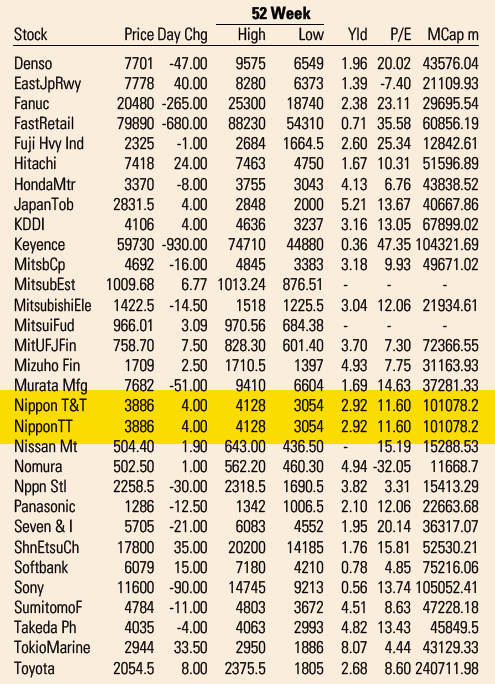
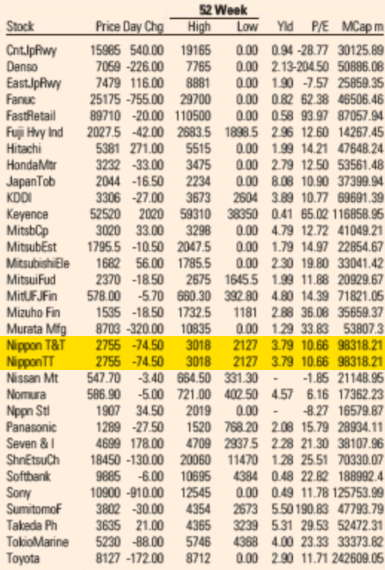
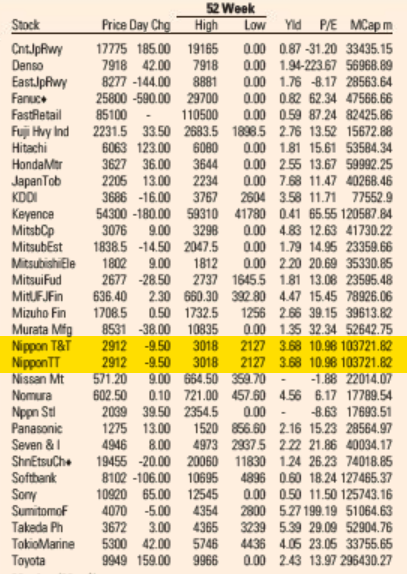
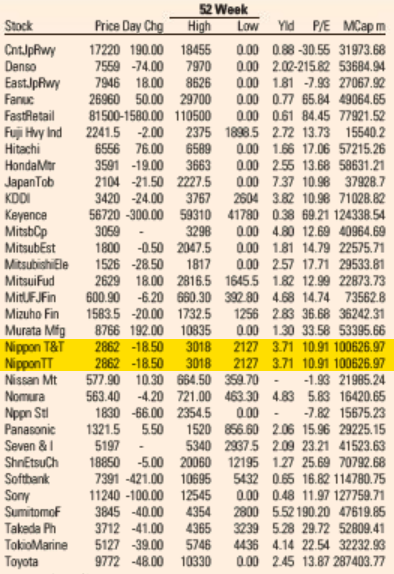
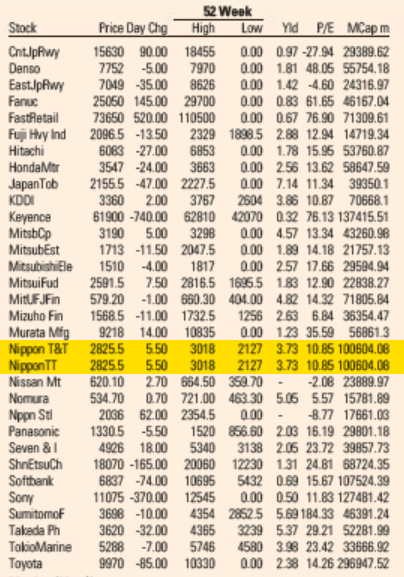
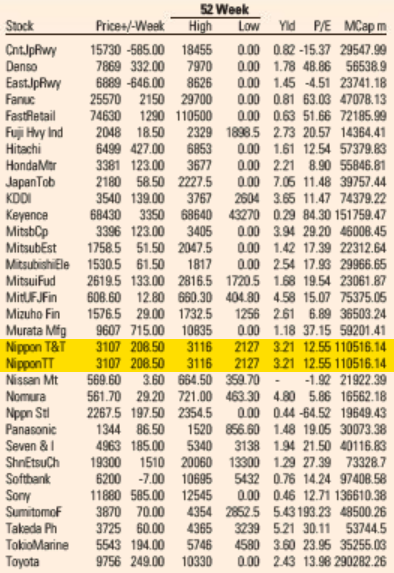
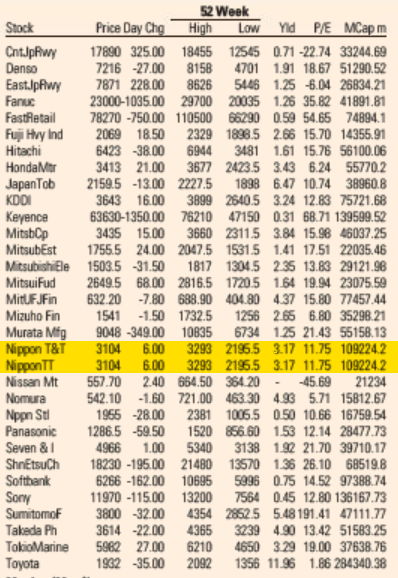
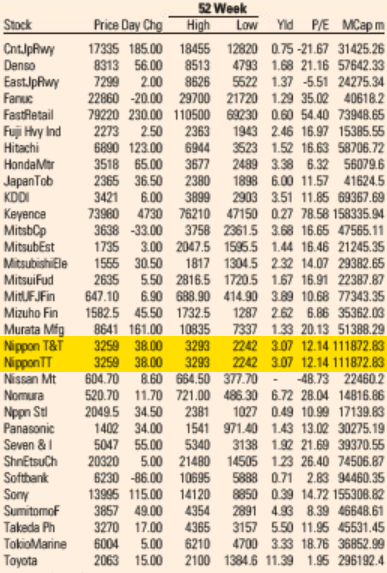
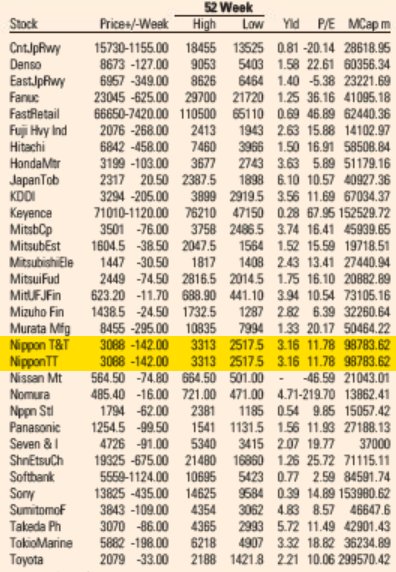
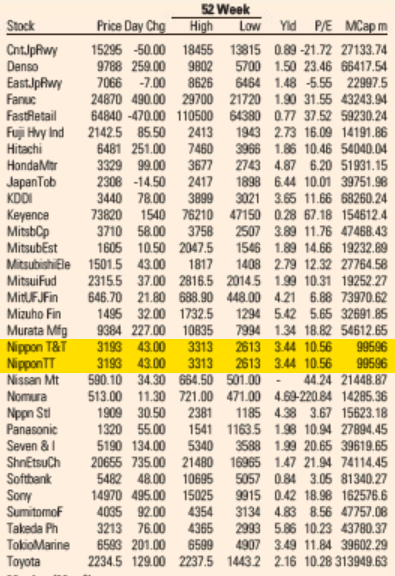
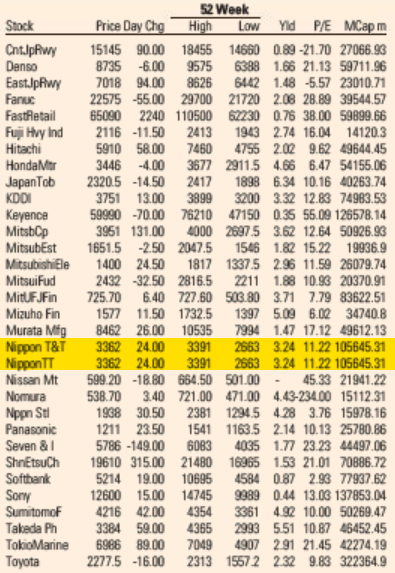

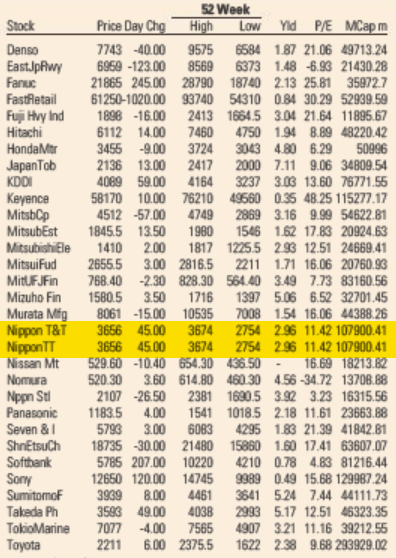


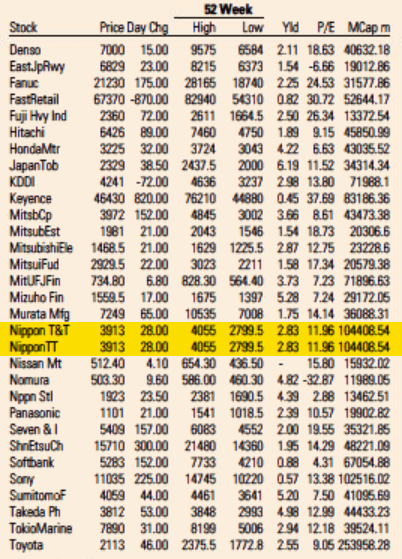
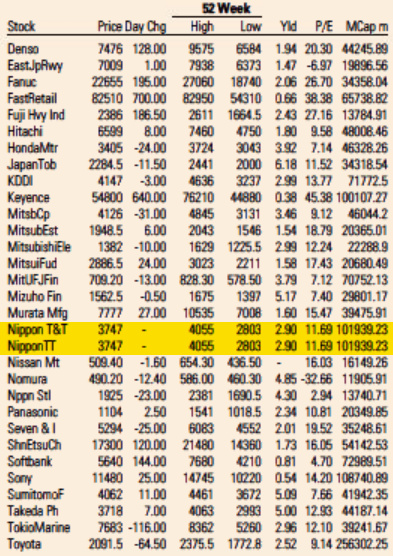
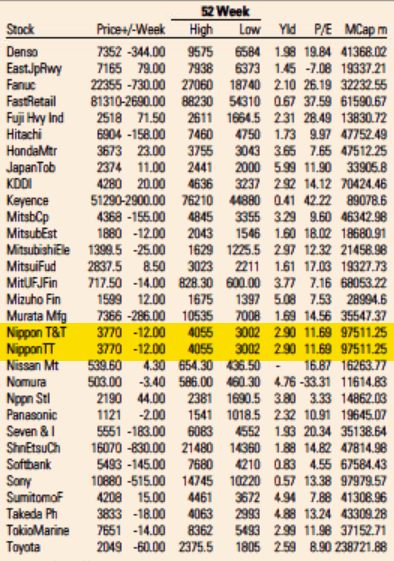
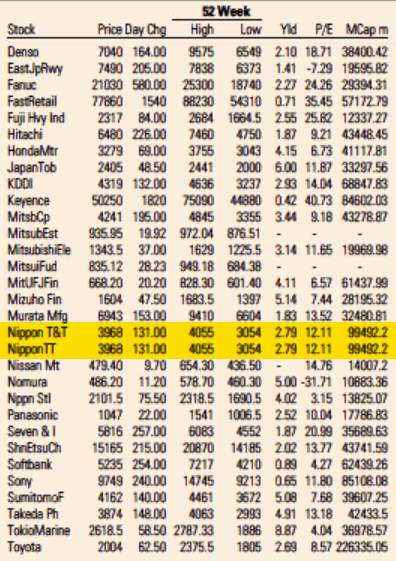

 Like each month, have a look at the work funded by
  Due to recent events around Twitter, I finally decided to give
  The Debian Videoteam has been
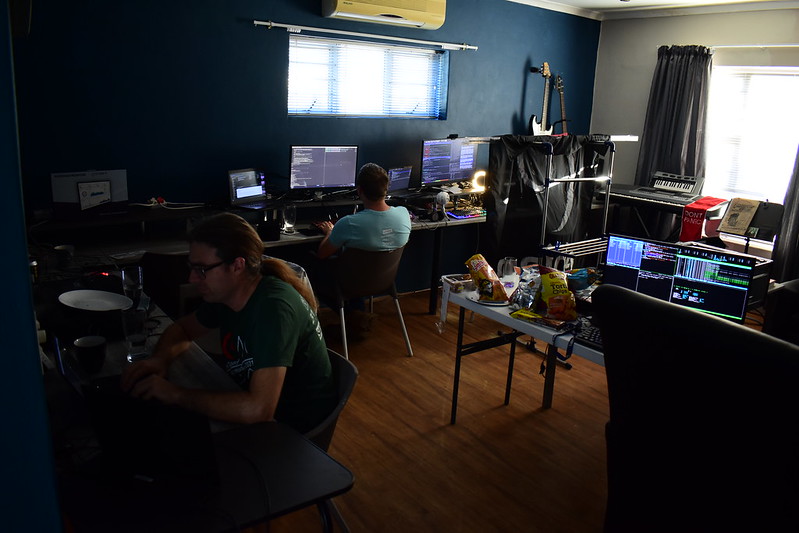


 And all of this is because I can read, write, articulate. Perhaps many of them may not even have a voice or a platform.
Even to get this temporary progressive disability certificate there is more than 4 months of running from one place to the other, 4 months of culmination of work. This I can share and tell from my experience, who knows how much else others might have suffered for the same. In my case a review will happen after 5 years, in most other cases they have given only 1 year. Of course, this does justify people s jobs and perhaps partly it may be due to that. Such are times where I really miss that I am unable to hear otherwise could have fleshed out lot more other people s sufferings.
And just so people know/understand this is happening in the heart of the city whose population easily exceeds 6 million plus and is supposed to be a progressive city. I do appreciate and understand the difficulties that the doctors are placed under.
And all of this is because I can read, write, articulate. Perhaps many of them may not even have a voice or a platform.
Even to get this temporary progressive disability certificate there is more than 4 months of running from one place to the other, 4 months of culmination of work. This I can share and tell from my experience, who knows how much else others might have suffered for the same. In my case a review will happen after 5 years, in most other cases they have given only 1 year. Of course, this does justify people s jobs and perhaps partly it may be due to that. Such are times where I really miss that I am unable to hear otherwise could have fleshed out lot more other people s sufferings.
And just so people know/understand this is happening in the heart of the city whose population easily exceeds 6 million plus and is supposed to be a progressive city. I do appreciate and understand the difficulties that the doctors are placed under.


 Desde de setembro de 2015, o