Search Results: "mt"

28 December 2011

Guido G nther: GNOME Prepaid Manager 0.0.3

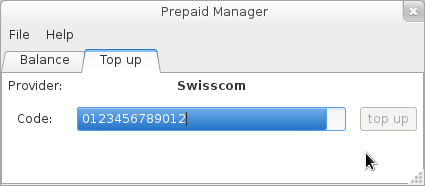
A recent trip to Switzerland made me dig out my prepaid card for UMTS usage again. This resulted in some minor enhancements for Prepaid Manager. The new release handles disabled and missing modems more reliably. It also has some visual feedback if we know the length of the top up code: GNOME Prepaid Manager screenshot This blog is flattr enabled.

26 December 2011

Russ Allbery: Testing PAM modules

I maintain a couple of PAM modules, pam-afs-session and pam-krb5. I'm also a big fan of test-driven development and automated regression testing, and have been slowly converting all of my software over to using a test suite. But therein lies a challenge, since PAM modules are hard to test. First, Linux PAM doesn't offer a good way to run a module in a test environment. Specifically, it doesn't offer a way to use an alternative PAM configuration other than the system PAM configuration, so that one can load only the module being tested (or it and some glue modules to set things up). One has to resort to dedicated test systems that do things like symlink part of their PAM configuration into a shared build tree. Second, even if this problem were solved, Linux PAM doesn't (rightfully) allow a lot of introspection and digging around in its guts. This makes it harder to test whether data items, environment variables, and so forth are set properly and make sense. It also doesn't provide facilities for intercepting logging output that would otherwise go to syslog. So, about a year and a half ago (and then with substantial improvements a year ago), I wrote a fake PAM library to test pam-afs-session. This library provides all of the PAM API that's called by a PAM module (at least the modules I'm testing), but has a much-simplified interface and allows test cases to look through its internals and be sure the module did things properly. This was great as far as it goes. But writing the wrapper code to invoke a PAM module entry point and then check its return status, its logging, and so forth was complicated, messy, and difficult to understand. It also didn't handle testing prompting and other important aspects of PAM modules. So earlier this fall I wrote the beginnings of a PAM test driver that would move as much of the complexity as possible into shared code and into configuration files, and since then I've been expanding and improving it until it could handle the major testing required for pam-krb5 (which is much more complex than pam-afs-session). Yesterday, I released the results as part of rra-c-util. Here's an example configuration file, this one for a pam-krb5 test that simulates prompting the user for a password and then obtaining credentials (but not creating a ticket cache):
    [options]
        auth    = no_ccache
        account = no_ccache
        session = no_ccache
    [run]
        authenticate  = PAM_SUCCESS
        acct_mgmt     = PAM_SUCCESS
        open_session  = PAM_SUCCESS
        close_session = PAM_SUCCESS
    [prompts]
        echo_off = Password:  %p
    [output]
        INFO user %u authenticated as %u
That's a complete and fairly complex test. The test framework takes care of running the listed entry points, passing them the given PAM configuration, and checking the return status. It provides a conversation function that checks the prompt and its type and replies with the text after . As you can see, it supports some escapes that are replaced by data passed into the test suite driver, in this case the password to use for testing. And it checks the logging output, including the priority level, and similarly supports escapes there. Running simple tests is very easy and is doable with a tiny C program. Here's a complete test program from pam-krb5, one that tests functionality that doesn't require a valid password and hence doesn't need to do much setup:
    #include <config.h>
    #include <portable/system.h>
    #include <tests/fakepam/script.h>
    int
    main(void)
     
        struct script_config config;
        plan_lazy();
        memset(&config, 0, sizeof(config));
        config.user = "root";
        run_script_dir("data/scripts/basic", &config);
        return 0;
     
That's all there is to it. That finds every configuration file like the above in the tests/data/scripts/basic directory in the package source and runs through each one, checking the results, and outputing the results as TAP output (the protocol used for the Perl test suite, and also my C TAP Harness package). There are, of course, other things that it can do: more substitutions, setting the authtok in advance of calling the module, and a callback so that one can inspect PAM state before the PAM session is shut down. I've started writing some documentation, although so far it primarily covers the configuration file syntax and the headers are the best reference for the API. The source code of the pam-krb5 package are the best reference so far. The library itself is part of rra-c-util and, like the rest of that package, is designed to be copied into the package that uses it and built alongside it so that it can be linked easily with the test programs. It's worth noting that there isn't a way to use it to test installed PAM modules that are already bound to the system libpam library. The way one builds test programs currently is to link the test program with the individual objects making up the PAM module and then link with this library and the TAP library, since that ensures the right symbols are called. But it may be possible to do something tricky using LD_PRELOAD if anyone feels inspired.

23 December 2011

Keith Packard: calypso

Calypso CalDAV/CardDAV/WebDAV for Android and Evolution Ever since I bought my first Palm Pilot in 1997, I ve relied upon a pocket-able device to carry a copy of my calendar and contacts, and for that same database to be present on my laptop. I went through a long list of Palm-compatible devices, including both the Palm Treo and Palm Centro telephones. I even wrote a number of my own Palm applications. Years ago, it was pretty obvious that I d have to find a new phone, but I was stuck looking for something that could provide the same hot-sync functionality. SyncML on the Series 40 I bought a Series 40 Nokia phone in Shanghai that promised SyncML support. Given that I had seen numerous SyncML implementations for Linux, it seemed like I should be able to get something to work. SyncML on the Series 40 is a disaster the phone couldn t actually store all of my contacts, and it couldn t hold half of the data fields I used. So, that phone landed in the box and back to the Centro I went. SyncML on the N900 Nokia kindly sent me an N900 at some point, so I gave SyncML another try. Given that the N900 runs evolution-data-server, and that I ve had evolution-data-server running on my laptop, it seemed like I should be in business. Well, almost. It took several days of hacking to fix bugs in the evolution SyncML back end, then another several days fussing with opensync. I ended up abandoning direct synchronization as unworkable opensync would sit in an infinite loop, or worse, trash my database completely. I finally found syncml-ds-tool , which is a debugging tool that comes with opensync. This tool simply synchronizes a set of disk files, one per contact or calendar entry, with the phone. That worked for well over a year. And then, a few months ago, Bluetooth on the laptop stopped connecting with the phone s SyncML server. I d get ECONNREFUSED every time I tried to use it. So much for the N900. DUN still worked, mostly, although it too would get ECONNREFUSED at times, but retrying seemed to make it work. However, While the N900 SyncML solution worked, I discovered another thing I wanted contacts and calendar entries stored in individual files and revision controlled with git. This makes it reasonable to delete stale calendar entries and know that they re never really gone, just left behind in an older version of the calendar. And, if you mess up, you can recover by poking at the database with git directly. I switched back to the venerable Palm Centro; it turns out that calendar and contacts are more important to me than being able to surf the web on my phone. Alas, my Centro went swimming in August and has passed on to the great electronics recycling house in the sky. I pulled the SIM out and switched back to the N900. I got my contacts imported on the N900 by copying files over the net work; not a long-term strategy, but at least I had phone numbers again. There was no hope for my calendar. I started looking for a solution in earnest. How about Android? At this point in my story, I m sure you re asking why I didn t just use one of the numerous Android phones that came through my hands. The answer is simple my calendar and contacts are probably some of my most personal data, and I m not willing to store them outside of my direct control, for reasons similar to those which are driving the development of the FreedomBox. When Android first came out, it could only talk to Google services, which didn t meet my hard requirement for personal data storage. One of my co-workers had his Google account suspended for violating the terms-of-service; he asked what he had done, but they wouldn t say. He asked if he could get his data back, and they said no . They invited him to create a new account, but it would not ever get any of the old data. A few days later, he got a nice apologetic email letting him know that they d made a mistake and that he hadn t, in fact, violated any of the terms-of-service, and that his old account was restored with all of his data intact. Wasn t that nice of Google? WebOS? I got a WebOS phone over the summer and discovered that while it had multiple contact/calendar back ends, none of them used standard protocols and so you only had the choice between multiple corporate data centers, which isn t actually a choice at all. Furthermore, the WebOS phone refused route PAN packets over the phone network, even though I have a data plan which allows this. It s not that it couldn t support it, it s that it refused. A couple of weeks after the WebOS phone arrived, HP canceled all of their WebOS hardware products, which made me less interested in trying to solve this problem. Android recovers About the same time the WebOS phone arrived, I discovered that Google had published enough information about the calendar/contacts internals for Marten Gajda to write CalDAV-Sync and CardDAV-Sync. And then, Andrew McMillan wrote aCal, which is a complete replacement for the built-in calendar and contacts applications and supports CalDAV and CardDAV. With two different standards-compliant solutions available, it seemed like it might be time to try Android again. I d love for CardDAV-Sync and CalDAV-Sync to become free software like aCal is. Andrew makes money from aCal by offering it for sale via the Android Market, while still publishing the sources for those who want to build their own copy. CalDAV/CardDAV on Linux I think the most widely known CalDAV server for Linux is probably DAViCal, a huge pile of PHP and SQL sitting on top of Apache. I m sure it s suitable for running on a server and being accessed over the internet, but I m not interested in that, nor am I interested in having my laptop run Apache and PostgreSQL. I found a tiny little CalDAV server, Radicale, which seemed like a lot better fit. It s written in Python and uses the usual Python HTTP server infrastructure, which provides SSL and authentication support along with some fairly convenient APIs for parsing and generating HTML. Before long, I discovered that Radicale was actually too simple for my needs. It stores the whole calendar in a single file, re-parsing it whenever a request is made, so a calendar with just hundreds of entries caused the server to slow down enough that evolution would time-out when talking to it. Also, Radicale doesn t actually parse the calendar entries completely, it has some ad-hoc code that finds various pieces of data, but without dealing with the whole syntax. I started hacking at Radicale to see how far I could get. I changed the storage code to store one event per file, then added hooks to use git for change management. Then, I found a full vcalendar/vcard parsing library in python, vobject, which I used to replace the ad-hoc parsing code. Finally, I added support for VCARD entries as well, allowing the system to store both calendar and contact information. Introducing Calypso, a CardDAV/CalDAV server With this much divergence from the original project, I ve figured I d best rename things to avoid confusion, so I decided to call it calypso , after a brief trip through the dictionary looking for names starting with ca . Calypso works with evolution, iceowl and the Android CalDAV/CardDAV plugins. It does not yet work with aCal; for some reason aCal cannot find any calendars on the server. Calypso also supports importing calendar changes from the command line, allowing you to integrate support into a text-based email application like notmuch or mutt. Calypso is available via git from git://keithp.com/git/calypso and is distributed under the GPL (v3 or later). I still consider it a work derived from Radicale, and so the code retains all of the Radicale copyrights along with my own. Using Calypso Initial setup Calypso runs as a regular user, all data are stored in ~/.config/calypso. To initialize calypso:
$ mkdir ~/.config/calypso ~/.config/calypso/calendars
$ cat > ~/.config/calypso/config << EOF
[server]
ssl=true
certificate=/home/keithp/.config/calypso/ssl/server.crt
key=/home/keithp/.config/calypso/ssl/server.key
[acl]
;type=htpasswd
type=fake
filename=/home/keithp/.config/calypso/passwd
Running calypso Then run calypso:
$ python ./calypso.py
No, I haven t figured out how to install it Creating new calendars To add a new database:
$ mkdir -p ~/.config/calypso/calendars/private/my_calendar
$ cd ~/.config/calypso/calendars/private/my_calendar
$ git init
$ git commit --allow-empty -m'initialize new calendar'
The new calendar should now be visible as https://localhost:5233/private/my_calendar You can add files to the directory at any time; calypso will check the directory mtime at each operation and update its internal state from that on disk automatically when the directory changes. Importing files Given a set of files with VCALENDAR or VCARD entries, you can import them with:
$ calypso --import private/my_calendar <filenames...>
This will update any changed entries and add any new ones. ToDo list for calypso
  1. Document the config file contents.
  2. Make it installable
  3. Figure out what aCal wants
  4. Support calendar creation
More Android info I m running cyanogenmod on my Nexus S as that provides PAN support. With PAN, I can create a network link between laptop and phone which doesn t depend on any local WiFi infrastructure and which gives both phone and laptop static IP addresses, allowing me to configure the sync URLs statically on the phone. I d use mDNS, but Android doesn t bother to support that.

21 December 2011

Jon Dowland: mail archiving script

Here's the mail archiving script I was talking about: http://github.com/jmtd/detachment. Sorry about the name-pun. There's still a LOT of work to do, but it's useful enough to deploy, with modifications, now. If you set up a way of pushing stuff in a local directory to a remote webserver (ideally behind an SSL certificate and with access control configured) and you have a resolvable hostname for that site, then you can get at your files from most mail/web client combinations, including smartphones. Here's some stats from running it on a sample mailbox: Before
$ du -sh ncl/archive/2010
116M    ncl/archive/2010
After
$ du -sh ncl/archive/2010 bucket
41M     ncl/archive/2010
51M     bucket
Or, approximately 20% smaller. (That's the on-disk usage for the mail and the attachments, now not base64-encoded, and saved to disk). The above folder was a local Maildir copy of a folder on an Exchange mail system, synchronised via offlineimap. Here are the sizes reported by Exchange for the same folder: Or, approximately 70% smaller. (That's the mails without the attachments counted, which are not in the Exchange server any more). Lots of caveats:

19 December 2011

Jon Dowland: wadc

I'm happy to announce the release of wadc version 1.2.
A WadC session A WadC session
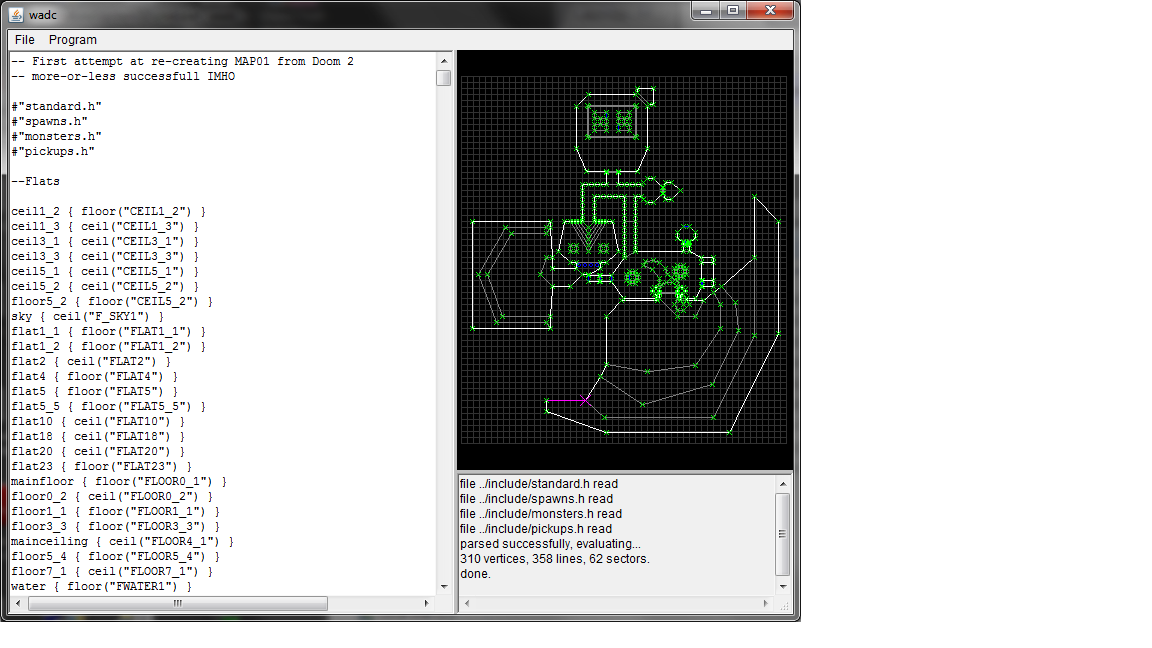
WadC is a functional programming language for the composition of Doom-format maps. Originally created by Wouter "Aardappel" van Oortmerssen, I was granted permission to take over the project over a year ago, but didn't get around to releasing anything until now. This version adds a few functions that permit you to draw two-sided lines which are textured and impassible: important for a lot of detailing techniques. You can also create friendly monsters for Boom-compatible ports. There's a new example demonstrating these features; plus a recreation of Doom 2's "entryway", courtesy of GreyGhost. See WadC for a summary, or go straight to the binaries or source on github. Discussions: reddit, doomworld.

17 December 2011

Lior Kaplan: Can t select my country on the Ubuntu installation map

In 1977 Tal Brody said after winning the Euroleague Basketball cup with Maccabi Tel Aviv as sentence which became quite famous in Israel:
We are on the map! And we are staying on the map not only in sports, but in everything.
I found out through Invar Hovav that there s a regression in the Ubuntu installation doesn t believe this is true anymore, as according to lp#905754, you can t select Israel or its major cities, and instead get suggestions for Gaza and Hebron. This is a regression from past installers when you could at least choose Tel Aviv, Jerusalem and Gaza. It used to be hard to pin point each location, but was still possible. This might be part of a bigger problem of selecting close/adjacent cities, but the default behavior in the past was different. From the technical point of view, the Gaza and Hebron TZ files are weird (tzdata version 2011n-1). Both don t have info for 2012 daylight saving time (usually start in late March or early April). Hebron switches twice a year to DST, hopefully nothing critical uses this time zone.
$ zdump -v Asia/Hebron grep 2011
Asia/Hebron Fri Apr 1 10:00:59 2011 UTC = Fri Apr 1 12:00:59 2011 EET isdst=0 gmtoff=7200
Asia/Hebron Fri Apr 1 10:01:00 2011 UTC = Fri Apr 1 13:01:00 2011 EEST isdst=1 gmtoff=10800
Asia/Hebron Sun Jul 31 20:59:59 2011 UTC = Sun Jul 31 23:59:59 2011 EEST isdst=1 gmtoff=10800
Asia/Hebron Sun Jul 31 21:00:00 2011 UTC = Sun Jul 31 23:00:00 2011 EET isdst=0 gmtoff=7200
Asia/Hebron Mon Aug 29 21:59:59 2011 UTC = Mon Aug 29 23:59:59 2011 EET isdst=0 gmtoff=7200
Asia/Hebron Mon Aug 29 22:00:00 2011 UTC = Tue Aug 30 01:00:00 2011 EEST isdst=1 gmtoff=10800
Asia/Hebron Thu Sep 29 23:59:59 2011 UTC = Fri Sep 30 02:59:59 2011 EEST isdst=1 gmtoff=10800
Asia/Hebron Fri Sep 30 00:00:00 2011 UTC = Fri Sep 30 02:00:00 2011 EET isdst=0 gmtoff=7200
And Gaza only have a 3 months daylight saving time, while Israel has 6 and European eastern time has 7 months (all are UTC+2 region).
$ zdump -v Asia/Gaza grep 2011
Asia/Gaza Sat Apr 2 10:00:59 2011 UTC = Sat Apr 2 12:00:59 2011 EET isdst=0 gmtoff=7200
Asia/Gaza Sat Apr 2 10:01:00 2011 UTC = Sat Apr 2 13:01:00 2011 EEST isdst=1 gmtoff=10800
Asia/Gaza Sun Jul 31 20:59:59 2011 UTC = Sun Jul 31 23:59:59 2011 EEST isdst=1 gmtoff=10800
Asia/Gaza Sun Jul 31 21:00:00 2011 UTC = Sun Jul 31 23:00:00 2011 EET isdst=0 gmtoff=7200
p.s.
This isn t a political post, don t make it into one.
Filed under: Debian GNU/Linux, Ubuntu

12 December 2011

Simon Josefsson: Small syslog server

My home network has several devices that do not have large persistent storage to keep log files. For example, my wireless routers based on OpenWRT doesn t log to the limited local storage it has, and a Flukso energy metering device log power readings to a ramdisk. These devices log a fair amount of information that I ideally would like to keep for later analysis. I have never before seen a need to setup a syslogd server, thinking that storing logs locally and keeping regular backups of the machine is good enough. However, it appears like this situation calls for a syslogd server. I found an old NSLU2 in my drawer and installed Debian Squeeze on it following Martin Michlmayr s instructions. I m using a 4GB USB memory stick for storage, which should hold plenty of log data. I keep backups of the machine in case the USB memory stick wears out. After customizing the installation to my preferences (disable ssh passwords, disable portmap/rpc.statd/exim4, installing etckeeper, emacs23-nox, etc) I am ready to configure Rsyslog. I found what looked like the perfect configuration example, Storing messages from a remote system into a specific file , but it requires me to hard code a bit too much information in the configuration file for my taste. Instead, I found the DynFile concept. With a file /etc/rsyslogd.d/logger.conf as below I can point any new device to my log server and it will automatically create a new file for it. And since the dates are embedded into the filename, I get log rotation suitable for rsync-style backups for free.
$ModLoad imudp
$UDPServerRun 514 $ModLoad imtcp
$InputTCPServerRun 514 $template DynFile, /var/log/network-%HOSTNAME%-%$year%-%$month%-%$day%.log
:fromhost-ip, !isequal, 127.0.0.1 ?DynFile
:fromhost-ip, !isequal, 127.0.0.1 ~

flattr this!

10 December 2011

Patrick Schoenfeld: Migrating from blogspot to Movable Type

A while ago I decided to migrate my existing blogspot blog to an own domain and webspace again. My reasoning was mostly, that blogspot lacked some features, which I'd like to have in my blog.
Additionally, my requirements have changed a bit since I originally moved to blogspot and, last but not least, Blogspot was a compromise anyway.

So I started re-evaluating a possible software platform for my blog. In my numerous previous attempts to start blogging (there were several blogs of me in the internet since at least 2006), before I moved to Blogspot, I used Wordpress. But there were quiet some reasons against it, one of the biggest concerns being its security history. Also, while I worked a lot with PHP in the past years, I have developed a serious antipathy against software written in PHP, which I couldn't just ignore.

In the end, the decision fell on Movable Type, because its written in Perl, which is the language I prefer for most of my projects, because its features were matching my wishes (mostly) and because I heard some good opinions about it. Also it is used by my employer for our company blog.

So the next question was: How to migrate?

I decided to use Movable Type 5, although, at present, it seems not to be the communities choice. At least the list of plugins supporting MT5 is really short. Foremost there was no plugin to import blogger posts, which, after all, was the most important thing about the migration.
Luckily there is such a plugin for Movable Type and so I basically did the following:

  1. Install Movable Type 4
  2. Install the Blogger Import Plugin
  3. Import posts (it supports either the export file of blogger or directly importing posts via the Google API)
  4. Upgrade to Movable Type 5
  5. Check the result
Check the results, or: The missing parts

Obviously such an import is not perfect. Some posts contain images or in-site links. The importer is not able to detect that and honestly it would have a hard time to track that anyway.
So as soon as content is migrated, its time to look for the missing parts.

The process to find missing parts is basically very easy and common among the various missing parts:
Just search for your blogspot URL via the Search & Replace option in the Movable Type administration.

Now how to fix that? For links its quiet easy (although I forgot about them in the first run), as long as the permalinks have kept the same scheme.
In my case that is the case, since I decided to use the Preferred Archive option "Entry" in the blog settings for the new blog and the default (if there is an option, because I don't know)
in Blogspot. The importer does import the Basename of the document, so fixing links is just a matter of replacing the domain part of the URL.

For images its some more work. One has to get the images somehow and upload them in Movable Type. Eventually it then boils down to search and replace, but I decided to do that manually, since I only have a very low number of images in my posts so far.

After that I did everything else, which is not specific to the migration, like picking a template, modifying it to my wishes, considering the additions of plugin etc.
And here we are. There were some issues during the migration, which I haven't handled here. I will blog about them another time.

9 December 2011

Vincent Sanders: And one man in his time plays many parts

Perhaps the immortal bard was making a more noble and deep reference to the stages of ones life but I feel no compunction lifting the line for my purpose.

And it is about changes in my own life I wish to speak. I have been employed by Simtec for more than a decade now. There have been great changes in the embedded electronics industry in that time, especially for those using open source software.

A decade ago we were considered cutting edge and strange for advocating and using NetBSD and Linux, especially for our committing of our changes back upstream, today that is considered normal behaviour.

Alas the last couple of years have shown that Simtec is not the best place for me to continue, so I have decided to move on to pastures new. From the new year I will be working with a great bunch of people at Collabora.

This should not have any great detrimental impact on my open source activities but as with any big life change, it may take a while to settle down and I apologize in advance if I am not as responsive as usual.

6 December 2011

John Goerzen: Snapshots of Life

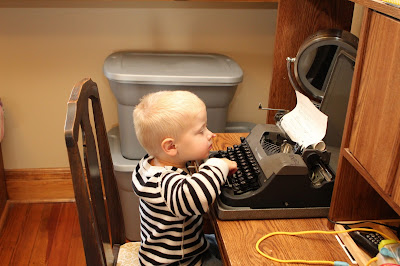
It s been busy lately, and I haven t had the time to blog. With the change in job, various travel, and settling into a new routine, I ve not done as much writing of late. But life marches on, and before memories grow too fleeting, I think I should share a few. We recently changed the arrangements for the boys. Instead of them each having their own room in which they sleep and sometimes play, we purchased a bunk bed. Oliver graduated from his crib to the lower bunk, and Jacob has the higher bunk. This has, predictably, created a few opportunities for behavior issues. Overall, it s going well, and they appreciate their new, more open, play room. Both boys sleep with their stuffed animals. Jacob calls his my friends . He still likes his butterfly, which he has had since he was an infant. He sometimes talks about how much he loves his friends, and how they like to get hugs, and how they are happy. Jacob continues to enjoy reading. He has a toy low-res camera and he even recorded a video of himself reading Brown Bear, Brown Bear. Oliver s vocabulary is coming alive and is fun to watch. Jacob has taken to trying to teach Oliver how to say things. One day, Jacob saw a number like 451 on the side of a train, producing a conversation like this: Oliver, can you say four hundred and fifty-one? Four dred iffy on! You got it!!! YAY! Today as I was walking past Oliver s train track on the floor, he grabbed me by the hand, had me sit down, and kept holding on to make sure I d stay right where he wanted me as he pointed and talked all about his trains. Aww. One cold and windy Saturday morning, the boys were getting restless. What to do, we thought? I decided to bring out one of the manual typewriters from my collection. Oliver loved watching it do things as he pressed buttons. Jacob enjoyed spelling mom . New problem: boys fighting over how long each one s turn at the typewriter is. This has gone on for a month now. Ahh, winter. A few weeks ago, Jacob informed us that he built an antenna out of blocks. He was REALLY proud of it, and even, incredibly, insisted I take his picture with it! I m pleased to have a 5-year-old that calls this structure an antenna instead of a skyscraper or tower or some such thing ;-) We took a train trip to Portland, OR, recently. That s about 2.5 days on the train each way. It went pretty well we had quite a bit of excitement though it got a little long for the boys at times. One evening, Jacob excitedly noted that the sky was almost really dark blue, just like my song! Wow. That was a song he made up in New York in summer 2010. Jacob enjoyed collecting leaves as we walked around in Portland. He would then stash his pile of leaves outside the door of whatever building we d enter, then hope to find them still there when we got back out. It usually worked out OK for him.

4 December 2011

Francois Marier: Optimising PNG files

I have written about using lossless optimisations techniques to reduce the size of images before, but I recently learned of a few other tools to further reduce the size of PNG images.

Basic optimisationWhile you could use Smush.it to manually optimise your images, if you want a single Open Source tool you can use in your scripts, optipng is the most effective one:
optipng -o9 image.png

Removing unnecessary chunksWhile not as effective as optipng in its basic optimisation mode, pngcrush can be used remove unnecessary chunks from PNG files:
pngcrush -q -rem gAMA -rem alla -rem text image.png image.crushed.png
Depending on the software used to produce the original PNG file, this can yield significant savings so I usually start with this.

Reducing the colour paletteWhen optimising images uploaded by users, it's not possible to know whether or not the palette size can be reduced without too much quality degradation. On the other hand, if you are optimising your own images, it might be worth trying this lossy optimisation technique.

For example, this image went from 7.2 kB to 5.2 kB after running it through pngnq:
pngnq -f -n 32 -s 3 image.png

Re-compressing final imageMost PNG writers use zlib to compress the final output but it turns out that there are better algorithms to do this.

Using AdvanceCOMP I was able to bring the same image as above from 5.1kB to 4.6kB:
advpng -z -4 image.png

When the source image is an SVGAnother thing I noticed while optimising PNG files is that rendering a PNG of the right size straight from an SVG file produces a smaller result than exporting a large PNG from that same SVG and then resizing the PNG to smaller sizes.

Here's how you can use Inkscape to generate an 80x80 PNG:
inkscape --without-gui --export-width=80 --export-height=80 --export-png=80.png image.svg

3 December 2011

Steve Kemp: So I removed some more software from my host

Today I was idly performing some maintainence upon one of my hosts, and it crossed my mind to look beneath /etc in there I found:
/etc/python
/etc/python2.4
/etc/python2.5
/etc/python2.6
That made me look more closely at the contents of /etc - the following command output was surprising:
steve@steve:~$ ls /etc   wc -l
187
Is that average? Heavy? Light? I have no idea, but I purged a hell of a lot of software today. Now I have only python v2.6 although for some reason I still have:
python
python-apt
python-apt-common
python-central
python-minimal
python-support
python2.6
python2.6-minimal
I suspect I could drop the pything2.6-minimal package, but for the moment I'm done. I have to make pretty people look exceptional with my magical camera. Anyway as part of this cleanup I ran a quick sanity-check on which processes are running and I think, short of kernel processes, I'm as minimal as I can be. I understand the purpose and reason for every running service:
UID        PID  CMD
root         1  init [2]
pdnsd    14091  /usr/sbin/pdnsd --daemon -p /var/run/pdnsd.pid
root     14199  /usr/sbin/monit -c /etc/monit/monitrc -s /var/lib/monit/monit.state
root     14206  /usr/sbin/syslog-ng -p /var/run/syslog-ng.pid
root     14234  /usr/sbin/cron
102      14595  /usr/sbin/exim4 -bd -q30m
redis    14627  /usr/bin/redis-server /etc/redis/redis.conf
root     14637  /usr/sbin/sshd
These are basic services; I use monit to ensure those essential daemons keep running. The only oddity there is probably the local DNS cache, but it is useful if you run any kind of DNS blacklist-using service, for example.
root     14794  /sbin/getty -L ttyS0 9600 vt100
I need a serial console login for emergencies.
root     14796  runsv node-reverse-proxy
root     14797  /bin/sh ./run
root     14799  /opt/node/bin/node node-reverse-proxy.js --config ./rewrites.js
These three processes combine to run my reverse proxy which routes incoming HTTP requests to a number of local thttpd instances.
qpsmtpd  27309    /usr/bin/perl -Tw /usr/bin/qpsmtpd-prefork --port 25 --user qpsmtpd --pid-file /var/run/qpsmtpd/qpsmtpd.pid --detach
..
The perl SMTP daemon which runs my incoming mail, passing it to exim4 which listens upon 127.0.0.1:2525. You can read about my setup in the out-of-date writeup Chris & I put together.
 /usr/bin/memcached -m 64 -p 11211 -u root -l 127.0.0.1
Memory cache for transient items.
s-blog    thttpd -C /etc/thttpd/sites.enabled/blog.steve.org.uk
1030      thttpd -C /etc/thttpd/sites.enabled/edinburgh-portraits.com
s-hg      thttpd -C /etc/thttpd/sites.enabled/hg.steve.org.uk
s-ipv4    thttpd -C /etc/thttpd/sites.enabled/ipv4.steve.org.uk
s-ipv6    thttpd -C /etc/thttpd/sites.enabled/ipv6.steve.org.uk
s-kvm     thttpd -C /etc/thttpd/sites.enabled/kvm-hosting.org
...
One thttpd instance is launched for each distinct HTTP site my server runs. Each site runs under its own UID, with its own chrooted directory tree. This is important for security. Each local instance listens upon 127.0.0.1 - and the reverse proxy previously mentioned rewrites connections to the appropriate one.
1016     28812     /usr/bin/perl -I./lib/ -I./ /usr/local/bin/blogspam
My anti-spam filter for blog comments.
Here is my christmas challenge. Can you identify each service upon your host? Do you know why you're running what you're running? Me? I had no idea I had a dbus deamon running. Now I've purged it. Ha! ObQuote - "I owe everything to George Bailey. Help him, dear Father." - It's a wonderful life.

2 December 2011

Jon Dowland: Flowers for Algernon Daniel Keyes

A melancholic look at intellectual disability and how it was regarded and treated by the society of the time (1960s). Despite an inevitable conclusion, it was enjoyable and thought provoking.

29 November 2011

Jon Dowland: mail archiving

I wrote a quick proof-of-concept script that can traverse my email (in local Maildir format) and detach all attachments: saving them to another location and replacing them with a text attachment which documents where they've gone. This reduces my work mailbox size substantially and allows for more space-efficient storage of the attachments (utilising all 8 bits of the byte, at the very least, but with the potential for compression to be added to the mix). It maintains the link between email and attachment, however, which is crucial if the method of discovery of the attachment in the future is to find the email. For this to be future proof, the path where the mail is saved needs to be. The best scheme I can think of involves dedicating a sub-domain to the problem and using a URI scheme which is guaranteed1 to be unique for the attachment, such as a hash-sum:
https://file.example.com/sha1/509c2fe2eba509e93987c3024a74d74583c274bd
I could finish up my script, set my my own personal infrastructure for this and convert my mailbox with a few hours more work. Before I do, I have two questions:

  1. within the practical limitations of hashing algorithms, at least.

27 November 2011

Gregor Herrmann: RC bugs 2011/47

after the rather intensive last week, this week was more business as usual. here's the list:

23 November 2011

Jon Dowland: In response to Andrew Cowie

Andrew Cowie blogs about 'A good GNOME 3 Experience'. He writes
I think it s a bit odd not to expect that something that was widely advertised as being such a different user experience is different.
and
if they had gone and bought an Apple laptop with Mac OS X on it they would be perfectly reasonably working through learning how to use a new Desktop and not complaining about it at all. But here we are admonishing the GNOME hackers had the temerity to do something new and different.
I think Andrew's phrasing here is a bit disingeneous. Or perhaps he genuinely mistakes the frustration that has been felt by GNOME 3. I don't want to whine on too much, so I'll try to get this out of the way in one paragraph. F/OSS users are members of a community. There is inevitably a wall between the majority of community members and the blessed: the decision makers, the developers. The art of maintaining a good community is partly to do with making this wall as invisible as possible: encouraging participation, lowering the barrier for contributions; welcoming feedback; etc.1. The GNOME community have invested a lot into the GNOME 2 way of doing things, and GNOME 3, by breaking away from that so fundamentally, has devalued the community's investment. It screams: we don't want your panel widgets! We don't want your themes! Your working practices are wrong: this is the right way! GNOME 3 is opinionated software, and it's opinion differs from a large body of the GNOME community. The result? resentment. Remember: GNOME 3 is not just something new: it's the abrupt termination of something old, tried and tested. and hopefully that's the last time I need to vent about my GNOME 3 frustration. It's hear to stay, the question for the frustrated is: are you? Moving on Andrew goes on to recommend:
One thing I do recommend is mapping (say) CapsLock as an additional Hyper You do the mapping in: System Settings Keyboard Layout Layout tab Options..
I used to do this with GNOME 2, but I couldn't find how to do it on GNOME 3. Andrew's post gave me the important hint that it was still possible, but the precise location doesn't match: On my Fedora 16 / GNOME 3.2 system, it's System Settings Region and Language Layouts Options ". This is especially useful on my beloved UltraNav keyboard which lacks the Windows 95 keys. Sadly it does not work very well through various remote desktop tools: I get an inconsistent capslock state within VMs connected to via VNC. rdesktop seems ok.

  1. I have more to write about GNOME in this context in a future post.

20 November 2011

Gregor Herrmann: RC bugs 2011/46

as expected this week was characterised by fixing bugs around the perl 5.14 transition. besides that I've also uploaded a couple of NMUs with patches kindly provided in the BTS by some tireless bug fixers.

14 November 2011

Vincent Bernat: A quick look at Typekit

Back in the dark ages of the web, before the introduction of CSS 3, browsers could only display fonts available on the client system. Thanks to the introduction of @font-face and its now widespread support, this is over. Now, Web designers have access to a large selection of fonts and most users will be able to appreciate them. Typekit provides a subscription-based library of hosted, high-quality fonts to use on websites. I expose here my own, mostly uneducated1 on the typographic side, look on this service.

Fonts embedding 101 There are several ways to embed fonts for the Web. Let s have a look at the most common ones.

Self-hosting and @font-face A first possibility is to host fonts yourself and provide a CSS file with the appropriate @font-face declarations. There are five important things to know:
  1. There is no common format. You will need to host different versions of the same font to support most browsers.
  2. Of course, Internet Explorer comes with its own quirks that you need to work around.
  3. Most browsers enforce a same origin policy. You need to serve your fonts from the same domain as the requesting page. You can circumvent such a limitation by enabling cross-origin resource sharing: add an Access-Control-Allow-Origin header when serving fonts.
  4. Fonts are unlikely to change. To leverage caching, configure an explicit expiration date far in the future. Something like 30 days.
  5. There is no MIME types registered for fonts. Don t bother setting one, even if Google Chrome likes to complain about them in the console.
One great resource is Font Squirrel which provides kits with fonts and the appropriate CSS declarations. You choose your font family (or upload one of your own), the formats that you want to use (check them all) and you will get a ZIP archive with all fonts and a CSS file. You may want to tweak it a bit to enable automatic use of the bold variant when needed and to use a local copy if available. For example, if you choose Crimson, an oldstyle typeface, you may want to declare the bold version with font-weight: bold and add local names:
@font-face  
    font-family: 'Crimson';
    src: url('Crimson-Bold-webfont.eot');
    src: local('Crimson Bold'), local('Crimson Text Bold'),
         url('Crimson-Bold-webfont.eot?#iefix') format('embedded-opentype'),
         url('Crimson-Bold-webfont.woff') format('woff'),
         url('Crimson-Bold-webfont.ttf') format('truetype'),
         url('Crimson-Bold-webfont.svg#CrimsonBold') format('svg');
    font-weight: bold;
    font-style: normal;
 

Google Web Fonts For open-source fonts, you can also use Google Web Fonts instead of hosting the files yourself. Build a collection of fonts and choose the variants that you want to use for each of them. You will then be provided with a code snippet to paste in the <head> element of your page. For example, for Crimson:
<link href='http://fonts.googleapis.com/css?family=Crimson+Text:400,700,400italic'
      rel='stylesheet' type='text/css'>
Why choose this solution over self-hosting?
  1. You don t use your own bandwith to serve fonts. This may be important if you pay for it.
  2. Google uses its own CDN to serve fonts. If you don t use a CDN yourself, this can be a major performance improvement.
  3. Caching is more efficient since many sites will use the same font.
  4. It s easier to do it right.
Unless you are concerned about Google tracking your users2, I think this is a better solution than self-hosting. Quick delivery of fonts is pretty important since content rendering can be delayed by them.

Typekit: the good parts So, why choose Typekit? First, there is the very large choice of fonts. The first paid plan comes with more than 500 fonts from about 80 foundries. There are about a hundred serif fonts and a couple hundred sans serif ones. Typekit provides a convenient interface to browse fonts. You can either search fonts by name or by characteristics. In the last case, you can filter on properties like the classification (serif, sans serif, decorative, etc.), weight, width, contrast, x-height, recommended use or language support. Once a font is selected and added to your kit, you can easily choose what variants you want. The kit total size is displayed. If you happen to meet any problem or have some questions, Typekit support is very responsive. I got clear and crisp answers in less than a few hours in the week-end.

and the bad ones Unfortunately, Typekit has also some shortcomings. One of the most commonly cited is that Javascript is mandatory. No Javascript, no fonts. If you want to display the appropriate fonts for users without Javascript, you should just not use Typekit.

Not free, nor free While Typekit offers some open-source fonts, most of them are not. Moreover, only a few of them are available in the free plan. While I would prefer to use open-source fonts, I don t consider this a strong requirement: if you are dissatisfied for some reason, switching back to open-source fonts (or another service) is fast and easy. I like serif fonts a lot and they get less attention from the FLOSS world: it is difficult to find one whose readability on screen is excellent. Droid Serif is a nice font but is a bit too black for me. Maybe Cardo would be a good match. You may disagree and in this case, Google Web Fonts or self-hosting seem the perfect match.

Difficulty to choose and test fonts While browsing fonts is easy and smooth, choosing and testing them is another matter. For example, Typekit is missing some interface to compare font rendering for whole paragraphs at a given size. It also misses a way to check how two fonts render together, one for headings and one for paragraphs. Here, Google Web Fonts is more versatile. Things become really difficult when you want to test your selected fonts for real. Except if you have invested into one of the expensive plans, you can only include a limited number of fonts in your kit. Each time you want to try another set of fonts, you need to modify your kit and wait for it to be distributed across Typekit network. You may have to wait five or ten minutes between each change! Another inconvenient thing is that once you publish your site, any change to the kit will affect the published version. Therefore, you need to use a second kit for development and play back and forth with those two kits. What would be convenient here is a special kit with all fonts from the library with restricted access to some IP to avoid abuse. This is something done by Fontdeck, a competitor.

Poor subset support Because you want to keep the font size small (about 30 kB for each variant), Typekit usually proposes two subsets: the default one contains only latin characters and the complete one with all glyphs. If some glyph is absent from the default subset, you need to use the complete one which is roughly two to four times the size of the default one. This is a bit huge for only one character. What would be nice is to have subsets for each language. In my case, I would take a French subset because I need the glyph which appears in French in words like c ur (heart or core) or il (eye). I don t want to select the complete subset just for this character. When a glyph is absent, the next font in the CSS stack is used. For example, if the selected font is FF Tisa Web Pro and the next font in the stack is Droid Serif, here is how the word c ur may be rendered. On the first line, FF Tisa Web Pro contains the appropriate glyph. On the second line, the glyph is absent and taken from Droid Serif. Since x-height and contrast are a bit different, the replaced glyph seems out of tone. At small sizes, the difference accounts for more than 10%. Various rendering of word "c ur" I have also added a third line where the ligature is built from o and e and the following style is applied to e :
.lf-ligature  
    margin-left: -0.172em;
    zoom: 1; /* Here to trigger hasLayout on IE7 */
 
As you can see, the result seems good. I have a piece of Javascript turning a ligature into the appropriate markup. It can be extended to handle more ligatures and could be adapted to handle other composed characters (like the ones in Anton n Dvo k ).

Defective caching Because a document can only be rendered after the fonts have been loaded3, it is pretty important to deliver fonts as fast as possible. Typekit uses Edgecast as a CDN and DynECT for DNS hosting. Two files are downloaded. Both of them are hosted on use.typekit.com. The first one is a script that will act as a loader. Based on the characteristics of your browser, it will choose how to download the requested fonts for best rendering. The second file is generally a big CSS file containing the fonts. Here are the headers returned for the first file:
HTTP/1.1 200 OK
Accept-Ranges: bytes
Cache-Control: max-age=300
Content-Encoding: gzip
Content-Type: text/javascript
Date: Tue, 08 Nov 2011 18:34:16 GMT
ETag: "388467610+gzip"
Expires: Tue, 08 Nov 2011 18:39:16 GMT
Last-Modified: Sat, 05 Nov 2011 09:31:57 GMT
Server: ECS (cdg/D624)
Vary: Accept-Encoding
X-Cache: HIT
Content-Length: 7440
First, notice that the content is served compressed. Good point. The next headers to look at are Cache-Control, Date, ETag and Expires: the server requests the content to be cached for 5 minutes. When the browser notices that its copy is out-of-date, it will issue a new request including a If-None-Match: 388467610+gzip header. Unless the kit has been modified, the server will answer with 304 Not Modified and no content. The copy of the browser will be valid for another 5 minutes. This means that after 5 minutes, at least 3 round-trips are needed to check if our fonts are up-to-date. Worse, sometimes, Typekit servers may be just slow. They can wait one second before answering, just to send a 304. Since the first file is a script embedded in <head>, the whole page is blocked until you get the answer. Here is an illustrative example with Chromium 14 where a page using Typekit is loaded while all static assets are in the navigator cache and things have gone wrong (which is pretty rare): Screenshot of Chromium Inspector Since fonts are needed, the rendering has been paused for 3.5 seconds until Typekit was fully loaded. If we look more closely, we may also notice we got a status 200 from the server instead of 304. Here is an excerpt of the browser request:

GET /tyt0atd.js HTTP/1.1
Host: use.typekit.com
Connection: keep-alive
Accept-Encoding: gzip,deflate,sdch
If-None-Match: "2200251225+gzip"
If-Modified-Since: Thu, 10 Nov 2011 11:38:11 GMT
And here is an excerpt of the answer headers:
HTTP/1.1 200 OK
Accept-Ranges: bytes
Cache-Control: max-age=300
Content-Type: text/javascript
Date: Fri, 11 Nov 2011 17:10:03 GMT
ETag: "2200251225"
Expires: Fri, 11 Nov 2011 17:15:03 GMT
Last-Modified: Thu, 10 Nov 2011 11:38:11 GMT
Server: EOS (lax001/54E5)
Content-Length: 25755
What happened? For some unknown reason, the server denied the access to the compressed version of the resource: there is no Content-Encoding: gzip while the browser did send Accept-Encoding: gzip. The tag provided by the browser (2200251225+gzip) came obviously from the compressed resource and therefore does not match. RFC 2616 requests If-Modified-Since header to be ignored if the tag does not match. Consequently, the server answers with 200 OK and resend the whole file. The same problem happened with the CSS file. Let me stress again how important the problem is: we had to download again the two files but we also downloaded the non-compressed version. Now, let s suppose that we did not run into this problem and the server answered with 304 Not Modified. The result is still not satisfactory: we would have waited 1.3 seconds to get both answers from the server. Keep in mind that most of the time, Typekit is pretty fast. Here is how I think this should have been done: each time you modify your font kit, you get a new URL to use (containing the version of the font kit for example). This resource and the associated fonts (whose URL is also versioned) are requested to be cached for several days. As a sidenote, this also enables to modify a kit for your development environment without modifying the kit for your production site. I suspect that Typekit did not go this way to track kit usage more accurately and enforce the appropriate pricing. Having multiple versions of the same kit would also allow us to use more fonts that we are paying for. UPDATED: Typekit support knows the problem and is working on it:
You ve identified a small bug in our CDN provider that we re working with them to fix. Hopefully I can give an explanation of what s happening. The CDN edge servers have a cache of recently served kits on them. Any request that is served from that cache will be correctly Gzipped and handle ETags. Unfortunately, if the content isn t already in cache and needs to be fetched from the master origin server then the request won t be gzipped correctly which has the side effect of breaking ETags. [ ] We are working to on getting this bug fixed, but any change to a globally distributed CDN will take some time. We re also working on having our content cached longer than 5 minutes whilst still allowing people to quickly update their site.

Conclusion I have mixed feelings about Typekit. While the difficulty to test fonts and the lack of language-related subsets are annoying, I have been able to work around them. However, the caching problem is more annoying. I am still considering going back to Google Web Fonts just because of this.

  1. While I have a high interest in typography, have my own copy of The Elements of Typographic Style by Robert Bringhurst and have throughly read The Elements of Typographic Style Applied to the Web , I am still fairly novice on this matter.
  2. Google serves fonts from a cookie-less domain. Technically, they could still do some kind of tracking but I believe they don t.
  3. In fact, browsers have different strategies on how to render before fonts availability. Paul Irish wrote a comprehensive article on FOUT. One common strategy is to render a blank space until downloaded fonts are available. If this takes too much time, fallback fonts may be used.

13 November 2011

Axel Beckert: grep everything

During the OpenRheinRuhr I noticed that a friend of mine didn t know about zgrep and friends. So I told him what other grep variations I know and he told me about some grep variations I didn t know about. So here s our collection of grep wrappers, derivatives and variations. First I ll list programs which search for text in different file formats:
grep through whatFixed StringsWildcards / Basic RegExpsExtended RegExpsDebian package
uncompressed text filesfgrepgrepegrepgrep
gzip-compressed text fileszfgrepzgrepzegrepzutils, gzip
bzip2-compressed text filesbzfgrepbzgrepbzegrepbzip2
xz-compressed text filesxzfgrepxzgrepxzegrepxz-utils
uncompressed text files in installed Debian packagesdfgrepdgrepdegrepdebian-goodies
gzip-compressed text files in installed Debian packages-dzgrep-debian-goodies
PDF documents--pdfgreppdfgrep
POD textspodgrep--pmtools
E-Mail folder (mbox, MH, Maildir)-mboxgrep -Gmboxgrep -Emboxgrep
Patches-grepdiffgrepdiff -Epatchutils
Process list--pgrepprocps
Gnumeric spreadsheetsssgrep -Fssgrep?gnumeric
Files in ZIP archives--zipgrepunzip
ID3 tags in MP3s--taggreppertaggrepper
Network packets--ngrepngrep
Tar archives--targrep / ptargrepperl (Experimental only for now)
And then there are also greps for special patterns on more or less normal files:
grep for whatuncompressed filescompressed filesDebian package
PCRE (Perl Compatible Regular Expression)pcregrep (see also the grep -P option)zpcregreppcregrep
IP Address in a given CIDR rangegrepcidr-grepcidr
XPath expressionxml_grep-xml-twig-tools
One question is though still unanswered for us: Is there some kind of meta-grep which chooses per file the right grep from above by looking at the MIME type of the according files, similar to xdg-open. Other tools which have grep in their name, but are too special to properly fit into the above lists: Includes contributions by Frank Hofmann and Faidon Liambotis.

12 November 2011

Kai Wasserb ch: New Greasemonkey script available for WotC's Magic section

No matter whether you're a professional or hobby player, if you play Magic: The Gathering, you certainly visit Wizards of the Coast's homepage from time to time. And while other parts of the WotC's page have been made unusable without ECMAScript enabled, the MTG part can be used without it mostly. The one part, that didn't work (and I needed) was card links. They have some ECMAScript to fetch the image from the Gatherer and overlay that on the current page, if you hover over a card link. If you click, it's again some script, that opens a Gatherer window. I just want all card links to be plain links pointing to the respective entries in the rather lightweight magiccards.info card search, which displays all relevant data in a compact layout. Today I finally got around to throw the ten or so lines of ECMAScript together, Greasemonkey needs to make that happen. If you like to give it a try, you can download it from my Greasemonkey script collection (direct link for the impatient: wotc_with_noscript_and_card_links.user.js). As an additional note: I'd like to point out, that there are other scripts available from userscripts.org which can do the same. But all those scripts did a lot else (like using jQuery to fetch the image on mouse over from magiccards.info).

Next.

Previous.