Search Results: "cas"

13 May 2022

Arturo Borrero Gonz lez: Toolforge GridEngine Debian 10 Buster migration

Toolforge logo, a circle with an anvil in the middle This post was originally published in the Wikimedia Tech blog, authored by Arturo Borrero Gonzalez. In accordance with our operating system upgrade policy, we should migrate our servers to Debian Buster. As discussed in the previous post, one of the most important and successful services provided by the Wikimedia Cloud Services team at the Wikimedia Foundation is Toolforge. Toolforge is a platform that allows users and developers to run and use a variety of applications with the ultimate goal of helping the Wikimedia mission from the technical side. As you may know already, all Wikimedia Foundation servers are powered by Debian, and this includes Toolforge and Cloud VPS. The Debian Project mostly follows a two year cadence for releases, and Toolforge has been using Debian Stretch for some years now, which nowadays is considered old-old-stable . In accordance with our operating system upgrade policy, we should migrate our servers to Debian Buster. Toolforge s two different backend engines, Kubernetes and Grid Engine, are impacted by this upgrade policy. Grid Engine is notably tied to the underlying Debian release, and the execution environment offered to tools running in the grid is limited to what the Debian archive contains for a given release. This is unlike in Kubernetes, where tool developers can leverage container images and decouple the runtime environment selection from the base operating system. Since the Toolforge grid original conception, we have been doing the same operation over and over again: We ve done this type of migration several times before. The last few ones were Ubuntu Precise to Ubuntu Trusty and Ubuntu Trusty to Debian Stretch. But this time around we had some special angles to consider.

So, you are upgrading the Debian release
  • You are migrating to Debian 11 Bullseye, no?
  • No, we re migrating to Debian 10 Buster
  • Wait, but Debian 11 Bullseye exists!
  • Yes, we know! Let me explain
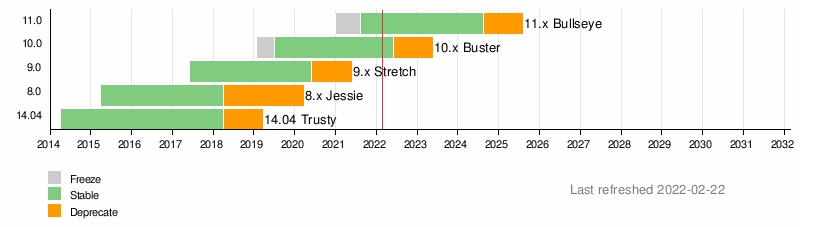
We re migrating the grid from Debian 9 Stretch to Debian 10 Buster, but perhaps we should be migrating from Debian 9 Stretch to Debian 11 Bullseye directly. This is a legitimate concern, and we discussed it in September 2021. A timeline showing Debian versions since 2014 Back then, our reasoning was that skipping to Debian 11 Bullseye would be more difficult for our users, especially because greater jump in version numbers for the underlying runtimes. Additionally, all the migration work started before Debian 11 Bullseye was released. Our original intention was for the migration to be completed before the release. For a couple of reasons the project was delayed, and when it was time to restart the project we decided to continue with the original idea. We had some work done to get Debian 10 Buster working correctly with the grid, and supporting Debian 11 Bullseye would require an additional effort. We didn t even check if Grid Engine could be installed in the latest Debian release. For the grid, in general, the engineering effort to do a N+1 upgrade is lower than doing a N+2 upgrade. If we had tried a N+2 upgrade directly, things would have been much slower and difficult for us, and for our users. In that sense, our conclusion was to not skip Debian 10 Buster.

We no longer want to run Grid Engine In a previous blog post we shared information about our desired future for Grid Engine in Toolforge. Our intention is to discontinue our usage of this technology.

No grid? What about my tools? Toolforge logo, a circle with an anvil in the middle Traditionally there have been two main workflows or use cases that were supported in the grid, but not in our Kubernetes backend:
  • Running jobs, long-running bots and other scheduled tasks.
  • Mixing runtime environments (for example, a nodejs app that runs some python code).
The good news is that work to handle the continuity of such use cases has already started. This takes the form of two main efforts:
  • The Toolforge buildpacks project to support arbitrary runtime environments.
  • The Toolforge Jobs Framework to support jobs, scheduled tasks, etc.
In particular, the Toolforge Jobs Framework has been available for a while in an open beta phase. We did some initial design and implementation, then deployed it in Toolforge for some users to try it and report bugs, report missing features, etc. These are complex, and feature-rich projects, and they deserve a dedicated blog post. More information on each will be shared in the future. For now, it is worth noting that both initiatives have some degree of development already. The conclusion Knowing all the moving parts, we were faced with a few hard questions when deciding how to approach the Debian 9 Stretch deprecation:
  • Should we not upgrade the grid, and focus on Kubernetes instead? Let Debian 9 Stretch be the last supported version on the grid?
  • What is the impact of these decisions on the technical community? What is best for our users?
The choices we made are already known in the community. A couple of weeks ago we announced the Debian 9 Stretch Grid Engine deprecation. In parallel to this migration, we decided to promote the new Toolforge Jobs Framework, even if it s still in beta phase. This new option should help users to future-proof their tool, and reduce maintenance effort. An early migration to Kubernetes now will avoid any more future grid problems. We truly hope that Debian 10 Buster is the last version we have for the grid, but as they say, hope is not a good strategy when it comes to engineering. What we will do is to work really hard in bringing Toolforge to the service level we want, and that means to keep developing and enabling more Kubernetes-based functionalities. Stay tuned for more upcoming blog posts with additional information about Toolforge. This post was originally published in the Wikimedia Tech blog, authored by Arturo Borrero Gonzalez.

10 May 2022

Melissa Wen: Multiple syncobjs support for V3D(V) (Part 1)

As you may already know, we at Igalia have been working on several improvements to the 3D rendering drivers of Broadcom Videocore GPU, found in Raspberry Pi 4 devices. One of our recent works focused on improving V3D(V) drivers adherence to Vulkan submission and synchronization framework. We had to cross various layers from the Linux Graphics stack to add support for multiple syncobjs to V3D(V), from the Linux/DRM kernel to the Vulkan driver. We have delivered bug fixes, a generic gate to extend job submission interfaces, and a more direct sync mapping of the Vulkan framework. These changes did not impact the performance of the tested games and brought greater precision to the synchronization mechanisms. Ultimately, support for multiple syncobjs opened the door to new features and other improvements to the V3DV submission framework.

DRM Syncobjs But, first, what are DRM sync objs?
* DRM synchronization objects (syncobj, see struct &drm_syncobj) provide a
* container for a synchronization primitive which can be used by userspace
* to explicitly synchronize GPU commands, can be shared between userspace
* processes, and can be shared between different DRM drivers.
* Their primary use-case is to implement Vulkan fences and semaphores.
[...]
* At it's core, a syncobj is simply a wrapper around a pointer to a struct
* &dma_fence which may be NULL.
And Jason Ekstrand well-summarized dma_fence features in a talk at the Linux Plumbers Conference 2021:
A struct that represents a (potentially future) event:
  • Has a boolean signaled state
  • Has a bunch of useful utility helpers/concepts, such as refcount, callback wait mechanisms, etc.
Provides two guarantees:
  • One-shot: once signaled, it will be signaled forever
  • Finite-time: once exposed, is guaranteed signal in a reasonable amount of time

What does multiple semaphores support mean for Raspberry Pi 4 GPU drivers? For our main purpose, the multiple syncobjs support means that V3DV can submit jobs with more than one wait and signal semaphore. In the kernel space, wait semaphores become explicit job dependencies to wait on before executing the job. Signal semaphores (or post dependencies), in turn, work as fences to be signaled when the job completes its execution, unlocking following jobs that depend on its completion. The multisync support development comprised of many decision-making points and steps summarized as follow:
  • added to the v3d kernel-driver capabilities to handle multiple syncobj;
  • exposed multisync capabilities to the userspace through a generic extension; and
  • reworked synchronization mechanisms of the V3DV driver to benefit from this feature
  • enabled simulator to work with multiple semaphores
  • tested on Vulkan games to verify the correctness and possible performance enhancements.
We decided to refactor parts of the V3D(V) submission design in kernel-space and userspace during this development. We improved job scheduling on V3D-kernel and the V3DV job submission design. We also delivered more accurate synchronizing mechanisms and further updates in the Broadcom Vulkan driver running on Raspberry Pi 4. Therefore, we summarize here changes in the kernel space, describing the previous state of the driver, taking decisions, side improvements, and fixes.

From single to multiple binary in/out syncobjs: Initially, V3D was very limited in the numbers of syncobjs per job submission. V3D job interfaces (CL, CSD, and TFU) only supported one syncobj (in_sync) to be added as an execution dependency and one syncobj (out_sync) to be signaled when a submission completes. Except for CL submission, which accepts two in_syncs: one for binner and another for render job, it didn t change the limited options. Meanwhile in the userspace, the V3DV driver followed alternative paths to meet Vulkan s synchronization and submission framework. It needed to handle multiple wait and signal semaphores, but the V3D kernel-driver interface only accepts one in_sync and one out_sync. In short, V3DV had to fit multiple semaphores into one when submitting every GPU job.

Generic ioctl extension The first decision was how to extend the V3D interface to accept multiple in and out syncobjs. We could extend each ioctl with two entries of syncobj arrays and two entries for their counters. We could create new ioctls with multiple in/out syncobj. But after examining other drivers solutions to extend their submission s interface, we decided to extend V3D ioctls (v3d_cl_submit_ioctl, v3d_csd_submit_ioctl, v3d_tfu_submit_ioctl) by a generic ioctl extension. I found a curious commit message when I was examining how other developers handled the issue in the past:
Author: Chris Wilson <chris@chris-wilson.co.uk>
Date:   Fri Mar 22 09:23:22 2019 +0000
    drm/i915: Introduce the i915_user_extension_method
    
    An idea for extending uABI inspired by Vulkan's extension chains.
    Instead of expanding the data struct for each ioctl every time we need
    to add a new feature, define an extension chain instead. As we add
    optional interfaces to control the ioctl, we define a new extension
    struct that can be linked into the ioctl data only when required by the
    user. The key advantage being able to ignore large control structs for
    optional interfaces/extensions, while being able to process them in a
    consistent manner.
    
    In comparison to other extensible ioctls, the key difference is the
    use of a linked chain of extension structs vs an array of tagged
    pointers. For example,
    
    struct drm_amdgpu_cs_chunk  
    	__u32		chunk_id;
        __u32		length_dw;
        __u64		chunk_data;
     ;
[...]
So, inspired by amdgpu_cs_chunk and i915_user_extension, we opted to extend the V3D interface through a generic interface. After applying some suggestions from Iago Toral (Igalia) and Daniel Vetter, we reached the following struct:
struct drm_v3d_extension  
	__u64 next;
	__u32 id;
#define DRM_V3D_EXT_ID_MULTI_SYNC		0x01
	__u32 flags; /* mbz */
 ;
This generic extension has an id to identify the feature/extension we are adding to an ioctl (that maps the related struct type), a pointer to the next extension, and flags (if needed). Whenever we need to extend the V3D interface again for another specific feature, we subclass this generic extension into the specific one instead of extending ioctls indefinitely.

Multisync extension For the multiple syncobjs extension, we define a multi_sync extension struct that subclasses the generic extension struct. It has arrays of in and out syncobjs, the respective number of elements in each of them, and a wait_stage value used in CL submissions to determine which job needs to wait for syncobjs before running.
struct drm_v3d_multi_sync  
	struct drm_v3d_extension base;
	/* Array of wait and signal semaphores */
	__u64 in_syncs;
	__u64 out_syncs;
	/* Number of entries */
	__u32 in_sync_count;
	__u32 out_sync_count;
	/* set the stage (v3d_queue) to sync */
	__u32 wait_stage;
	__u32 pad; /* mbz */
 ;
And if a multisync extension is defined, the V3D driver ignores the previous interface of single in/out syncobjs. Once we had the interface to support multiple in/out syncobjs, v3d kernel-driver needed to handle it. As V3D uses the DRM scheduler for job executions, changing from single syncobj to multiples is quite straightforward. V3D copies from userspace the in syncobjs and uses drm_syncobj_find_fence()+ drm_sched_job_add_dependency() to add all in_syncs (wait semaphores) as job dependencies, i.e. syncobjs to be checked by the scheduler before running the job. On CL submissions, we have the bin and render jobs, so V3D follows the value of wait_stage to determine which job depends on those in_syncs to start its execution. When V3D defines the last job in a submission, it replaces dma_fence of out_syncs with the done_fence from this last job. It uses drm_syncobj_find() + drm_syncobj_replace_fence() to do that. Therefore, when a job completes its execution and signals done_fence, all out_syncs are signaled too.

Other improvements to v3d kernel driver This work also made possible some improvements in the original implementation. Following Iago s suggestions, we refactored the job s initialization code to allocate memory and initialize a job in one go. With this, we started to clean up resources more cohesively, clearly distinguishing cleanups in case of failure from job completion. We also fixed the resource cleanup when a job is aborted before the DRM scheduler arms it - at that point, drm_sched_job_arm() had recently been introduced to job initialization. Finally, we prepared the semaphore interface to implement timeline syncobjs in the future.

Going Up The patchset that adds multiple syncobjs support and improvements to V3D is available here and comprises four patches:
  • drm/v3d: decouple adding job dependencies steps from job init
  • drm/v3d: alloc and init job in one shot
  • drm/v3d: add generic ioctl extension
  • drm/v3d: add multiple syncobjs support
After extending the V3D kernel interface to accept multiple syncobjs, we worked on V3DV to benefit from V3D multisync capabilities. In the next post, I will describe a little of this work.

9 May 2022

Robert McQueen: Evolving a strategy for 2022 and beyond

As a board, we have been working on several initiatives to make the Foundation a better asset for the GNOME Project. We re working on a number of threads in parallel, so I wanted to explain the big picture a bit more to try and connect together things like the new ED search and the bylaw changes. We re all here to see free and open source software succeed and thrive, so that people can be be truly empowered with agency over their technology, rather than being passive consumers. We want to bring GNOME to as many people as possible so that they have computing devices that they can inspect, trust, share and learn from. In previous years we ve tried to boost the relevance of GNOME (or technologies such as GTK) or solicit donations from businesses and individuals with existing engagement in FOSS ideology and technology. The problem with this approach is that we re mostly addressing people and organisations who are already supporting or contributing FOSS in some way. To truly scale our impact, we need to look to the outside world, build better awareness of GNOME outside of our current user base, and find opportunities to secure funding to invest back into the GNOME project. The Foundation supports the GNOME project with infrastructure, arranging conferences, sponsoring hackfests and travel, design work, legal support, managing sponsorships, advisory board, being the fiscal sponsor of GNOME, GTK, Flathub and we will keep doing all of these things. What we re talking about here are additional ways for the Foundation to support the GNOME project we want to go beyond these activities, and invest into GNOME to grow its adoption amongst people who need it. This has a cost, and that means in parallel with these initiatives, we need to find partners to fund this work. Neil has previously talked about themes such as education, advocacy, privacy, but we ve not previously translated these into clear specific initiatives that we would establish in addition to the Foundation s existing work. This is all a work in progress and we welcome any feedback from the community about refining these ideas, but here are the current strategic initiatives the board is working on. We ve been thinking about growing our community by encouraging and retaining diverse contributors, and addressing evolving computing needs which aren t currently well served on the desktop. Initiative 1. Welcoming newcomers. The community is already spending a lot of time welcoming newcomers and teaching them the best practices. Those activities are as time consuming as they are important, but currently a handful of individuals are running initiatives such as GSoC, Outreachy and outreach to Universities. These activities help bring diverse individuals and perspectives into the community, and helps them develop skills and experience of collaborating to create Open Source projects. We want to make those efforts more sustainable by finding sponsors for these activities. With funding, we can hire people to dedicate their time to operating these programs, including paid mentors and creating materials to support newcomers in future, such as developer documentation, examples and tutorials. This is the initiative that needs to be refined the most before we can turn it into something real. Initiative 2: Diverse and sustainable Linux app ecosystem. I spoke at the Linux App Summit about the work that GNOME and Endless has been supporting in Flathub, but this is an example of something which has a great overlap between commercial, technical and mission-based advantages. The key goal here is to improve the financial sustainability of participating in our community, which in turn has an impact on the diversity of who we can expect to afford to enter and remain in our community. We believe the existence of this is critically important for individual developers and contributors to unlock earning potential from our ecosystem, through donations or app sales. In turn, a healthy app ecosystem also improves the usefulness of the Linux desktop as a whole for potential users. We believe that we can build a case for commercial vendors in the space to join an advisory board alongside with GNOME, KDE, etc to input into the governance and contribute to the costs of growing Flathub. Initiative 3: Local-first applications for the GNOME desktop. This is what Thib has been starting to discuss on Discourse, in this thread. There are many different threats to free access to computing and information in today s world. The GNOME desktop and apps need to give users convenient and reliable access to technology which works similarly to the tools they already use everyday, but keeps them and their data safe from surveillance, censorship, filtering or just being completely cut off from the Internet. We believe that we can seek both philanthropic and grant funding for this work. It will make GNOME a more appealing and comprehensive offering for the many people who want to protect their privacy. The idea is that these initiatives all sit on the boundary between the GNOME community and the outside world. If the Foundation can grow and deliver these kinds of projects, we are reaching to new people, new contributors and new funding. These contributions and investments back into GNOME represent a true win-win for the newcomers and our existing community. (Originally posted to GNOME Discourse, please feel free to join the discussion there.)

6 May 2022

Antoine Beaupr : Wallabako 1.4.0 released

I don't particularly like it when people announce their personal projects on their blog, but I'm making an exception for this one, because it's a little special for me. You see, I have just released Wallabako 1.4.0 (and a quick, mostly irrelevant 1.4.1 hotfix) today. It's the first release of that project in almost 3 years (the previous was 1.3.1, before the pandemic). The other reason I figured I would mention it is that I have almost never talked about Wallabako on this blog at all, so many of my readers probably don't even know I sometimes meddle with in Golang which surprises even me sometimes.

What's Wallabako Wallabako is a weird little program I designed to read articles on my E-book reader. I use it to spend less time on the computer: I save articles in a read-it-later app named Wallabag (hosted by a generous friend), and then Wallabako connects to that app, downloads an EPUB version of the book, and then I can read it on the device directly. When I'm done reading the book, Wallabako notices and sets the article as read in Wallabag. I also set it to delete the book locally, but you can actually configure to keep those books around forever if you feel like it. Wallabako supports syncing read status with the built-in Kobo interface (called "Nickel"), Koreader and Plato. I happen to use Koreader for everything nowadays, but it should work equally well on the others. Wallabako is actually setup to be started by udev when there's a connection change detected by the kernel, which is kind of a gross hack. It's clunky, but actually works and I thought for a while about switching to something else, but it's really the easiest way to go, and that requires the less interaction by the user.

Why I'm (still) using it I wrote Wallabako because I read a lot of articles on the internet. It's actually most of my readings. I read about 10 books a year (which I don't think is much), but I probably read more in terms of time and pages in Wallabag. I haven't actually made the math, but I estimate I spend at least double the time reading articles than I spend reading books. If I wouldn't have Wallabag, I would have hundreds of tabs open in my web browser all the time. So at least that problem is easily solved: throw everything in Wallabag, sort and read later. If I wouldn't have Wallabako however, I would be either spend that time reading on the computer -- which I prefer to spend working on free software or work -- or on my phone -- which is kind of better, but really cramped. I had stopped (and developing) Wallabako for a while, actually, Around 2019, I got tired of always read those technical articles (basically work stuff!) at home. I realized I was just not "reading" (as in books! fiction! fun stuff!) anymore, at least not as much as I wanted. So I tried to make this separation: the ebook reader is for cool book stuff. The rest is work. But because I had the Wallabag Android app on my phone and tablet, I could still read those articles there, which I thought was pretty neat. But that meant that I was constantly looking at my phone, which is something I'm generally trying to avoid, as it sets a bad example for the kids (small and big) around me. Then I realized there was one stray ebook reader lying around at home. I had recently bought a Kobo Aura HD to read books, and I like that device. And it's going to stay locked down to reading books. But there's still that old battered Kobo Glo HD reader lying around, and I figured I could just borrow it to read Wallabag articles.

What is this new release But oh boy that was a lot of work. Wallabako was kind of a mess: it was using the deprecated go dep tool, which lost the battle with go mod. Cross-compilation was broken for older devices, and I had to implement support for Koreader.

go mod So I had to learn go mod. I'm still not sure I got that part right: LSP is yelling at me because it can't find the imports, and I'm generally just "YOLO everythihng" every time I get anywhere close to it. That's not the way to do Go, in general, and not how I like to do it either. But I guess that, given time, I'll figure it out and make it work for me. It certainly works now. I think.

Cross compilation The hard part was different. You see, Nickel uses SQLite to store metadata about books, so Wallabako actually needs to tap into that SQLite database to propagate read status. Originally, I just linked against some sqlite3 library I found lying around. It's basically a wrapper around the C-based SQLite and generally works fine. But that means you actually link your Golang program against a C library. And that's when things get a little nutty. If you would just build Wallabag naively, it would fail when deployed on the Kobo Glo HD. That's because the device runs a really old kernel: the prehistoric Linux kobo 2.6.35.3-850-gbc67621+ #2049 PREEMPT Mon Jan 9 13:33:11 CST 2017 armv7l GNU/Linux. That was built in 2017, but the kernel was actually released in 2010, a whole 5 years before the Glo HD was released, in 2015 which is kind of outrageous. and yes, that is with the latest firmware release. My bet is they just don't upgrade the kernel on those things, as the Glo was probably bought around 2017... In any case, the problem is we are cross-compiling here. And Golang is pretty good about cross-compiling, but because we have C in there, we're actually cross-compiling with "CGO" which is really just Golang with a GCC backend. And that's much, much harder to figure out because you need to pass down flags into GCC and so on. It was a nightmare. That's until I found this outrageous "little" project called modernc.org/sqlite. What that thing does (with a hefty does of dependencies that would make any Debian developer recoil in horror) is to transpile the SQLite C source code to Golang. You read that right: it rewrites SQLite in Go. On the fly. It's nuts. But it works. And you end up with a "pure go" program, and that thing compiles much faster and runs fine on older kernel. I still wasn't sure I wanted to just stick with that forever, so I kept the old sqlite3 code around, behind a compile-time tag. At the top of the nickel_modernc.go file, there's this magic string:
//+build !sqlite3
And at the top of nickel_sqlite3.go file, there's this magic string:
//+build sqlite3
So now, by default, the modernc file gets included, but if I pass --tags sqlite3 to the Go compiler (to go install or whatever), it will actually switch to the other implementation. Pretty neat stuff.

Koreader port The last part was something I was hesitant in doing for a long time, but that turned out to be pretty easy. I have basically switch to using Koreader to read everything. Books, PDF, everything goes through it. I really like that it stores its metadata in sidecar files: I synchronize all my books with Syncthing which means I can carry my read status, annotations and all that stuff without having to think about it. (And yes, I installed Syncthing on my Kobo.) The koreader.go port was less than 80 lines, and I could even make a nice little test suite so that I don't have to redeploy that thing to the ebook reader at every code iteration. I had originally thought I should add some sort of graphical interface in Koreader for Wallabako as well, and had requested that feature upstream. Unfortunately (or fortunately?), they took my idea and just ran with it. Some courageous soul actually wrote a full Wallabag plugin for koreader, in Lua of course. Compared to the Wallabako implementation however, the koreader plugin is much slower, probably because it downloads articles serially instead of concurrently. It is, however, much more usable as the user is given a visible feedback of the various steps. I still had to enable full debugging to diagnose a problem (which was that I shouldn't have a trailing slash, and that some special characters don't work in passwords). It's also better to write the config file with a normal text editor, over SSH or with the Kobo mounted to your computer instead of typing those really long strings over the kobo. There's no sample config file which makes that harder but a workaround is to save the configuration with dummy values and fix them up after. Finally I also found the default setting ("Remotely delete finished articles") really dangerous as it can basically lead to data loss (Wallabag article being deleted!) for an unsuspecting user... So basically, I started working on Wallabag again because the koreader implementation of their Wallabag client was not up to spec for me. It might be good enough for you, but I guess if you like Wallabako, you should thank the koreader folks for their sloppy implementation, as I'm now working again on Wallabako.

Actual release notes Those are the actual release notes for 1.4.0.
Ship a lot of fixes that have accumulated in the 3 years since the last release. Features:
  • add timestamp and git version to build artifacts
  • cleanup and improve debugging output
  • switch to pure go sqlite implementation, which helps
  • update all module dependencies
  • port to wallabago v6
  • support Plato library changes from 0.8.5+
  • support reading koreader progress/read status
  • Allow containerized builds, use gomod and avoid GOPATH hell
  • overhaul Dockerfile
  • switch to go mod
Documentation changes:
  • remove instability warning: this works well enough
  • README: replace branch name master by main in links
  • tweak mention of libreoffice to clarify concern
  • replace "kobo" references by "nickel" where appropriate
  • make a section about related projects
  • mention NickelMenu
  • quick review of the koreader implementation
Bugfixes:
  • handle errors in http request creation
  • Use OutputDir configuration instead of hardcoded wallabako paths
  • do not noisily fail if there's no entry for book in plato
  • regression: properly detect read status again after koreader (or plato?) support was added

How do I use this?
This is amazing. I can't believe someone did something that awesome. I want to cover you with gold and Tesla cars and fresh water.
You're weird please stop. But if you want to use Wallabako, head over to the README file which has installation instructions. It basically uses a hack in Kobo e-readers that will happily overwrite their root filesystem as soon as you drop this file named KoboRoot.tgz in the .kobo directory of your e-reader. Note that there is no uninstall procedure and it messes with the reader's udev configuration (to trigger runs on wifi connect). You'll also need to create a JSON configuration file and configure a client in Wallabag. And if you're looking for Wallabag hosting, Wallabag.it offers a 14-day free trial. You can also, obviously, host it yourself. Which is not the case for Pocket, even years after Mozilla bought the company. All this wouldn't actually be necessary if Pocket was open-source because Nickel actually ships with a Pocket client. Shame on you, Mozilla. But you still make an awesome browser, so keep doing that.

5 May 2022

Reproducible Builds: Reproducible Builds in April 2022

Welcome to the April 2022 report from the Reproducible Builds project! In these reports, we try to summarise the most important things that we have been up to over the past month. If you are interested in contributing to the project, please take a few moments to visit our Contribute page on our website.

News Cory Doctorow published an interesting article this month about the possibility of Undetectable backdoors for machine learning models. Given that machine learning models can provide unpredictably incorrect results, Doctorow recounts that there exists another category of adversarial examples that comprise a gimmicked machine-learning input that, to the human eye, seems totally normal but which causes the ML system to misfire dramatically that permit the possibility of planting undetectable back doors into any machine learning system at training time .
Chris Lamb published two supporter spotlights on our blog: the first about Amateur Radio Digital Communications (ARDC) and the second about the Google Open Source Security Team (GOSST).
Piergiorgio Ladisa, Henrik Plate, Matias Martinez and Olivier Barais published a new academic paper titled A Taxonomy of Attacks on Open-Source Software Supply Chains (PDF):
This work proposes a general taxonomy for attacks on open-source supply chains, independent of specific programming languages or ecosystems, and covering all supply chain stages from code contributions to package distribution. Taking the form of an attack tree, it covers 107 unique vectors, linked to 94 real-world incidents, and mapped to 33 mitigating safeguards.

Elsewhere in academia, Ly Vu Duc published his PhD thesis. Titled Towards Understanding and Securing the OSS Supply Chain (PDF), Duc s abstract reads as follows:
This dissertation starts from the first link in the software supply chain, developers . Since many developers do not update their vulnerable software libraries, thus exposing the user of their code to security risks. To understand how they choose, manage and update the libraries, packages, and other Open-Source Software (OSS) that become the building blocks of companies completed products consumed by end-users, twenty-five semi-structured interviews were conducted with developers of both large and small-medium enterprises in nine countries. All interviews were transcribed, coded, and analyzed according to applied thematic analysis

Upstream news Filippo Valsorda published an informative blog post recently called How Go Mitigates Supply Chain Attacks outlining the high-level features of the Go ecosystem that helps prevent various supply-chain attacks.
There was new/further activity on a pull request filed against openssl by Sebastian Andrzej Siewior in order to prevent saved CFLAGS (which may contain the -fdebug-prefix-map=<PATH> flag that is used to strip an arbitrary the build path from the debug info if this information remains recorded then the binary is no longer reproducible if the build directory changes.

Events The Linux Foundation s SupplyChainSecurityCon, will take place June 21st 24th 2022, both virtually and in Austin, Texas. Long-time Reproducible Builds and openSUSE contributor Bernhard M. Wiedemann learned that he had his talk accepted, and will speak on Reproducible Builds: Unexpected Benefits and Problems on June 21st.
There will be an in-person Debian Reunion in Hamburg, Germany later this year, taking place from 23 30 May. Although this is a Debian event, there will be some folks from the broader Reproducible Builds community and, of course, everyone is welcome. Please see the event page on the Debian wiki for more information. 41 people have registered so far, and there s approx 10 on-site beds still left.
The minutes and logs from our April 2022 IRC meeting have been published. In case you missed this one, our next IRC meeting will take place on May 31st at 15:00 UTC on #reproducible-builds on the OFTC network.

Debian Roland Clobus wrote another in-depth status update about the status of live Debian images, summarising the current situation that all major desktops build reproducibly with bullseye, bookworm and sid, including the Cinnamon desktop on bookworm and sid, but at a small functionality cost: 14 words will be incorrectly abbreviated . This work incorporated:
  • Reporting an issue about unnecessarily modified timestamps in the daily Debian installer images. [ ]
  • Reporting a bug against the debian-installer: in order to use a suitable kernel version. (#1006800)
  • Reporting a bug in: texlive-binaries regarding the unreproducible content of .fmt files. (#1009196)
  • Adding hacks to make the Cinnamon desktop image reproducible in bookworm and sid. [ ]
  • Added a script to rebuild a live-build ISO image from a given timestamp. [
  • etc.
On our mailing list, Venkata Pyla started a thread on the Debian debconf cache is non-reproducible issue while creating system images and Vagrant Cascadian posted an excellent summary of the reproducibility status of core package sets in Debian and solicited for similar information from other distributions.
Lastly, 122 reviews of Debian packages were added, 44 were updated and 193 were removed this month adding to our extensive knowledge about identified issues. A number of issue types have been updated as well, including timestamps_generated_by_hevea, randomness_in_ocaml_preprocessed_files, build_path_captured_in_emacs_el_file, golang_compiler_captures_build_path_in_binary and build_path_captured_in_assembly_objects,

Other distributions Happy birthday to GNU Guix, which recently turned 10 years old! People have been sharing their stories, in which reproducible builds and bootstrappable builds are a recurring theme as a feature important to its users and developers. The experiences are available on the GNU Guix blog as well as a post on fossandcrafts.org
In openSUSE, Bernhard M. Wiedemann posted his usual monthly reproducible builds status report.

Upstream patches The Reproducible Builds project detects, dissects and attempts to fix as many currently-unreproducible packages as possible. We endeavour to send all of our patches upstream where appropriate. This month, we wrote a large number of such patches, including:

diffoscope diffoscope is our in-depth and content-aware diff utility. Not only can it locate and diagnose reproducibility issues, it can provide human-readable diffs from many kinds of binary formats. This month, Chris Lamb prepared and uploaded versions 210 and 211 to Debian unstable, as well as noticed that some Python .pyc files are reported as data, so we should support .pyc as a fallback filename extension [ ]. In addition, Mattia Rizzolo disabled the Gnumeric tests in Debian as the package is not currently available [ ] and dropped mplayer from Build-Depends too [ ]. In addition, Mattia fixed an issue to ensure that the PATH environment variable is properly modified for all actions, not just when running the comparator. [ ]

Testing framework The Reproducible Builds project runs a significant testing framework at tests.reproducible-builds.org, to check packages and other artifacts for reproducibility. This month, the following changes were made:
  • Daniel Golle:
    • Prefer a different solution to avoid building all OpenWrt packages; skip packages from optional community feeds. [ ]
  • Holger Levsen:
    • Detect Python deprecation warnings in the node health check. [ ]
    • Detect failure to build the Debian Installer. [ ]
  • Mattia Rizzolo:
    • Install disorderfs for building OpenWrt packages. [ ]
  • Paul Spooren (OpenWrt-related changes):
    • Don t build all packages whilst the core packages are not yet reproducible. [ ]
    • Add a missing RUN directive to node_cleanup. [ ]
    • Be less verbose during a toolchain build. [ ]
    • Use disorderfs for rebuilds and update the documentation to match. [ ][ ][ ]
  • Roland Clobus:
    • Publish the last reproducible Debian ISO image. [ ]
    • Use the rebuild.sh script from the live-build package. [ ]
Lastly, node maintenance was also performed by Holger Levsen [ ][ ].
If you are interested in contributing to the Reproducible Builds project, please visit our Contribute page on our website. However, you can get in touch with us via:

3 May 2022

Steve Kemp: A plea for books ..

Recently I've been getting much more interested in the "retro" computers of my youth, partly because I've been writing crazy code in Z80 assembly-language, and partly because I've been preparing to introduce our child to his first computer: I've got a few books, books I've hoarded for 30+ years, but I'd love to collect some more. So here's my request: I'd be happy to pay 5-10 each for any book I don't yet own, and I'd also be more than happy to cover the cost of postage to Finland. I'd be particularly pleased to see anything from Melbourne House, and while low-level is best, the coding-books from Usbourne (The Mystery Of Silver Mountain, etc, etc) wouldn't go amiss either. I suspect most people who have collected and kept these wouldn't want to part with them, but just in case ..

Gunnar Wolf: Using a RPi as a display adapter

Almost ten months ago, I mentioned on this blog I bought an ARM laptop, which is now my main machine while away from home a Lenovo Yoga C630 13Q50. Yes, yes, I am still not as much away from home as I used to before, as this pandemic is still somewhat of a thing, but I do move more. My main activity in the outside world with my laptop is teaching. I teach twice a week, and well, having a display for my slides and for showing examples in the terminal and such is a must. However, as I said back in August, one of the hardware support issues for this machine is:
No HDMI support via the USB-C displayport. While I don t expect
to go to conferences or even classes in the next several months,
I hope this can be fixed before I do. It s a potential important
issue for me.
It has sadly not yet been solved While many things have improved since kernel 5.12 (the first I used), the Device Tree does not yet hint at where external video might sit. So, I went to the obvious: Many people carry different kinds of video adaptors I carry a slightly bulky one: A RPi3 For two months already (time flies!), I had an ugly contraption where the RPi3 connected via Ethernet and displayed a VNC client, and my laptop had a VNC server. Oh, but did I mention My laptop works so much better with Wayland than with Xorg that I switched, and am now a happy user of the Sway compositor (a drop-in replacement for the i3 window manager). It is built over WLRoots, which is a great and (relatively) simple project, but will thankfully not carry some of Gnome or KDE s ideas not even those I d rather have. So it took a bit of searching; I was very happy to find WayVNC, a VNC server for wlroot-sbased Wayland compositors. I launched a second Wayland, to be able to have my main session undisturbed and present only a window from it. Only that VNC is slow and laggy, and sometimes awkward. So I kept searching for something better. And something better is, happily, what I was finally able to do! In the laptop, I am using wf-recorder to grab an area of the screen and funnel it into a V4L2 loopback device (which allows it to be used as a camera, solving the main issue with grabbing parts of a Wayland screen):
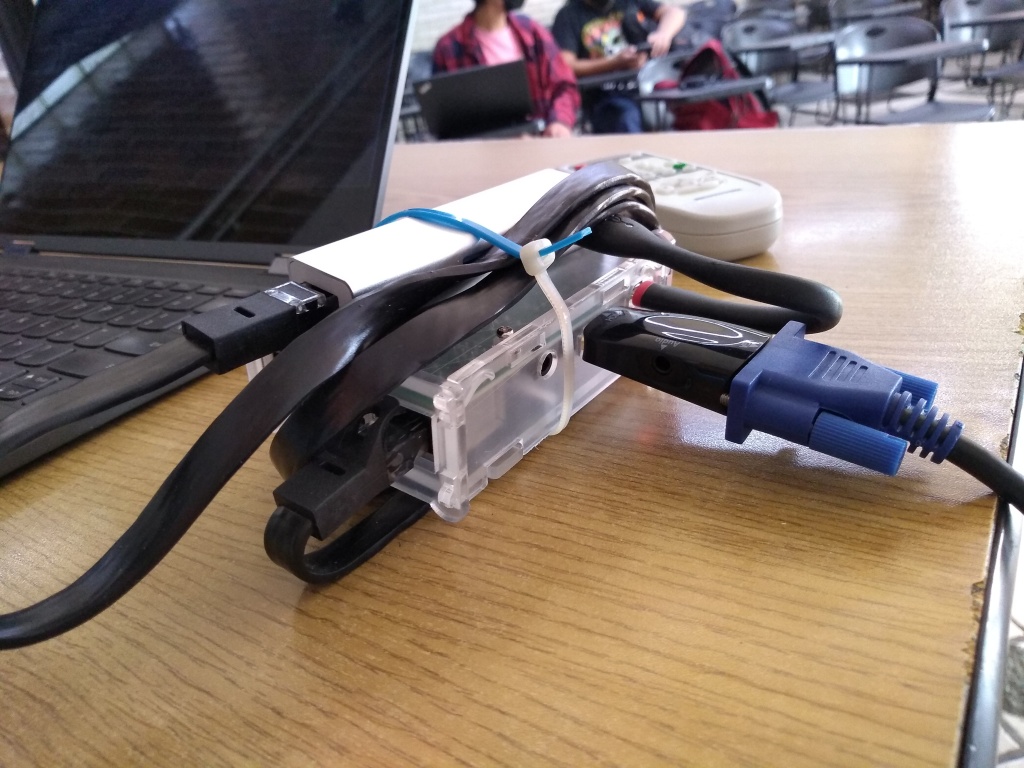
/usr/bin/wf-recorder -g '0,32 960x540' -t --muxer=v4l2 --codec=rawvideo --pixelformat=yuv420p --file=/dev/video10
(yes, my V4L2Loopback device is set to /dev/video10). You will note I m grabbing a 960 540 rectangle, which is the top of my screen (1920x1080) minus the Waybar. I think I ll increase it to 960 720, as the projector to which I connect the Raspberry has a 4 3 output. After this is sent to /dev/video10, I tell ffmpeg to send it via RTP to the fixed address of the Raspberry:
/usr/bin/ffmpeg -i /dev/video10 -an -f rtp -sdp_file /tmp/video.sdp rtp://10.0.0.100:7000/
Yes, some uglier things happen here. You will note /tmp/video.sdp is created in the laptop itself; this file describes the stream s metadata so it can be used from the client side. I cheated and copied it over to the Raspberry, doing an ugly hardcode along the way:
user@raspi:~ $ cat video.sdp
v=0
o=- 0 0 IN IP4 127.0.0.1
s=No Name
c=IN IP4 10.0.0.100
t=0 0
a=tool:libavformat 58.76.100
m=video 7000 RTP/AVP 96
b=AS:200
a=rtpmap:96 MP4V-ES/90000
a=fmtp:96 profile-level-id=1
People familiar with RTP will scold me: How come I m streaming to the unicast client address? I should do it to an address in the 224.0.0.0 239.0.0.0 range. And it worked, sometimes. I switched over to 10.0.0.100 because it works, basically always Finally, upon bootup, I have configured NoDM to start a session with the user user, and dropped the following in my user s .xsession:
setterm -blank 0 -powersave off -powerdown 0
xset s off
xset -dpms
xset s noblank
mplayer -msglevel all=1 -fs /home/usuario/video.sdp
Anyway, as a result, my students are able to much better follow the pace of my presentation, and I m able to do some tricks better (particularly when it requires quick reaction times, as often happens when dealing with concurrency and such issues). Oh, and of course in case it s of interest to anybody, knowing that SD cards are all but reliable in the long run, I wrote a vmdb2 recipe to build the images. You can grab it here; it requires some local files to be present to be built some are the ones I copied over above, and the other ones are surely of no interest to you (such as my public ssh key or such :-] ) What am I still missing? (read: Can you help me with some ideas? ) Of course, this is a blog post published to brag about my stuff, but also to serve me as persistent memory in case I need to recreate this

27 April 2022

Antoine Beaupr : Using LSP in Emacs and Debian

The Language Server Protocol (LSP) is a neat mechanism that provides a common interface to what used to be language-specific lookup mechanisms (like, say, running a Python interpreter in the background to find function definitions). There is also ctags shipped with UNIX since forever, but that doesn't support looking backwards ("who uses this function"), linting, or refactoring. In short, LSP rocks, and how do I use it right now in my editor of choice (Emacs, in my case) and OS (Debian) please?

Editor (emacs) setup First, you need to setup your editor. The Emacs LSP mode has pretty good installation instructions which, for me, currently mean:
apt install elpa-lsp-mode
and this .emacs snippet:
(use-package lsp-mode
  :commands (lsp lsp-deferred)
  :hook ((python-mode go-mode) . lsp-deferred)
  :demand t
  :init
  (setq lsp-keymap-prefix "C-c l")
  ;; TODO: https://emacs-lsp.github.io/lsp-mode/page/performance/
  ;; also note re "native compilation": <+varemara> it's the
  ;; difference between lsp-mode being usable or not, for me
  :config
  (setq lsp-auto-configure t))
(use-package lsp-ui
  :config
  (setq lsp-ui-flycheck-enable t)
  (add-to-list 'lsp-ui-doc-frame-parameters '(no-accept-focus . t))
  (define-key lsp-ui-mode-map [remap xref-find-definitions] #'lsp-ui-peek-find-definitions)
  (define-key lsp-ui-mode-map [remap xref-find-references] #'lsp-ui-peek-find-references))
Note: this configuration might have changed since I wrote this, see my init.el configuration for the most recent config. The main reason for choosing lsp-mode over eglot is that it's in Debian (and eglot is not). (Apparently, eglot has more chance of being upstreamed, "when it's done", but I guess I'll cross that bridge when I get there.) I already had lsp-mode partially setup in Emacs so I only had to do this small tweak to switch and change the prefix key (because s-l or mod is used by my window manager). I also had to pin LSP packages to bookworm here so that it properly detects pylsp (the older version in Debian bullseye only supports pyls, not packaged in Debian). This won't do anything by itself: Emacs will need something to talk with to provide the magic. Those are called "servers" and are basically different programs, for each programming language, that provide the magic.

Servers setup The Emacs package provides a way (M-x lsp-install-server) to install some of them, but I prefer to manage those tools through Debian packages if possible, just like lsp-mode itself. Those are the servers I currently know of in Debian:
package languages
ccls C, C++, ObjectiveC
clangd C, C++, ObjectiveC
elpa-lsp-haskell Haskell
fortran-language-server Fortran
gopls Golang
python3-pyls Python
There might be more such packages, but those are surprisingly hard to find. I found a few with apt search "Language Server Protocol", but that didn't find ccls, for example, because that just said "Language Server" in the description (which also found a few more pyls plugins, e.g. black support). Note that the Python packages, in particular, need to be upgraded to their bookworm releases to work properly (here). It seems like there's some interoperability problems there that I haven't quite figured out yet. See also my Puppet configuration for LSP. Finally, note that I have now completely switched away from Elpy to pyls, and I'm quite happy with the results. lsp-mode feels slower than elpy but I haven't done any of the performance tuning and this will improve even more with native compilation. And lsp-mode is much more powerful. I particularly like the "rename symbol" functionality, which ... mostly works.

Remaining work

Puppet and Ruby I still have to figure how to actually use this: I mostly spend my time in Puppet these days, there is no server listed in the Emacs lsp-mode language list, but there is one listed over at the upstream language list, the puppet-editor-services server. But it's not packaged in Debian, and seems somewhat... involved. It could still be a good productivity boost. The Voxpupuli team have vim install instructions which also suggest installing solargraph, the Ruby language server, also not packaged in Debian.

Bash I guess I do a bit of shell scripting from time to time nowadays, even though I don't like it. So the bash-language-server may prove useful as well.

Other languages Here are more language servers available:

Antoine Beaupr : building Debian packages under qemu with sbuild

I've been using sbuild for a while to build my Debian packages, mainly because it's what is used by the Debian autobuilders, but also because it's pretty powerful and efficient. Configuring it just right, however, can be a challenge. In my quick Debian development guide, I had a few pointers on how to configure sbuild with the normal schroot setup, but today I finished a qemu based configuration.

Why I want to use qemu mainly because it provides better isolation than a chroot. I sponsor packages sometimes and while I typically audit the source code before building, it still feels like the extra protection shouldn't hurt. I also like the idea of unifying my existing virtual machine setup with my build setup. My current VM is kind of all over the place: libvirt, vagrant, GNOME Boxes, etc?). I've been slowly converging over libvirt however, and most solutions I use right now rely on qemu under the hood, certainly not chroots... I could also have decided to go with containers like LXC, LXD, Docker (with conbuilder, whalebuilder, docker-buildpackage), systemd-nspawn (with debspawn), unshare (with schroot --chroot-mode=unshare), or whatever: I didn't feel those offer the level of isolation that is provided by qemu. The main downside of this approach is that it is (obviously) slower than native builds. But on modern hardware, that cost should be minimal.

How Basically, you need this:
sudo mkdir -p /srv/sbuild/qemu/
sudo apt install sbuild-qemu
sudo sbuild-qemu-create -o /srv/sbuild/qemu/unstable.img unstable https://deb.debian.org/debian
Then to make this used by default, add this to ~/.sbuildrc:
# run autopkgtest inside the schroot
$run_autopkgtest = 1;
# tell sbuild to use autopkgtest as a chroot
$chroot_mode = 'autopkgtest';
# tell autopkgtest to use qemu
$autopkgtest_virt_server = 'qemu';
# tell autopkgtest-virt-qemu the path to the image
# use --debug there to show what autopkgtest is doing
$autopkgtest_virt_server_options = [ '--', '/srv/sbuild/qemu/%r-%a.img' ];
# tell plain autopkgtest to use qemu, and the right image
$autopkgtest_opts = [ '--', 'qemu', '/srv/sbuild/qemu/%r-%a.img' ];
# no need to cleanup the chroot after build, we run in a completely clean VM
$purge_build_deps = 'never';
# no need for sudo
$autopkgtest_root_args = '';
Note that the above will use the default autopkgtest (1GB, one core) and qemu (128MB, one core) configuration, which might be a little low on resources. You probably want to be explicit about this, with something like this:
# extra parameters to pass to qemu
# --enable-kvm is not necessary, detected on the fly by autopkgtest
my @_qemu_options = ['--ram-size=4096', '--cpus=2'];
# tell autopkgtest-virt-qemu the path to the image
# use --debug there to show what autopkgtest is doing
$autopkgtest_virt_server_options = [ @_qemu_options, '--', '/srv/sbuild/qemu/%r-%a.img' ];
$autopkgtest_opts = [ '--', 'qemu', @qemu_options, '/srv/sbuild/qemu/%r-%a.img'];
This configuration will:
  1. create a virtual machine image in /srv/sbuild/qemu for unstable
  2. tell sbuild to use that image to create a temporary VM to build the packages
  3. tell sbuild to run autopkgtest (which should really be default)
  4. tell autopkgtest to use qemu for builds and for tests
Note that the VM created by sbuild-qemu-create have an unlocked root account with an empty password.

Other useful tasks
  • enter the VM to make test, changes will be discarded (thanks Nick Brown for the sbuild-qemu-boot tip!):
     sbuild-qemu-boot /srv/sbuild/qemu/unstable-amd64.img
    
    That program is shipped only with bookworm and later, an equivalent command is:
     qemu-system-x86_64 -snapshot -enable-kvm -object rng-random,filename=/dev/urandom,id=rng0 -device virtio-rng-pci,rng=rng0,id=rng-device0 -m 2048 -nographic /srv/sbuild/qemu/unstable-amd64.img
    
    The key argument here is -snapshot.
  • enter the VM to make permanent changes, which will not be discarded:
     sudo sbuild-qemu-boot --readwrite /srv/sbuild/qemu/unstable-amd64.img
    
    Equivalent command:
     sudo qemu-system-x86_64 -enable-kvm -object rng-random,filename=/dev/urandom,id=rng0 -device virtio-rng-pci,rng=rng0,id=rng-device0 -m 2048 -nographic /srv/sbuild/qemu/unstable-amd64.img
    
  • update the VM (thanks lavamind):
     sudo sbuild-qemu-update /srv/sbuild/qemu/unstable-amd64.img
    
  • build in a specific VM regardless of the suite specified in the changelog (e.g. UNRELEASED, bookworm-backports, bookworm-security, etc):
     sbuild --autopkgtest-virt-server-opts="-- qemu /var/lib/sbuild/qemu/bookworm-amd64.img"
    
    Note that you'd also need to pass --autopkgtest-opts if you want autopkgtest to run in the correct VM as well:
     sbuild --autopkgtest-opts="-- qemu /var/lib/sbuild/qemu/unstable.img" --autopkgtest-virt-server-opts="-- qemu /var/lib/sbuild/qemu/bookworm-amd64.img"
    
    You might also need parameters like --ram-size if you customized it above.
And yes, this is all quite complicated and could be streamlined a little, but that's what you get when you have years of legacy and just want to get stuff done. It seems to me autopkgtest-virt-qemu should have a magic flag starts a shell for you, but it doesn't look like that's a thing. When that program starts, it just says ok and sits there. Maybe because the authors consider the above to be simple enough (see also bug #911977 for a discussion of this problem).

Live access to a running test When autopkgtest starts a VM, it uses this funky qemu commandline:
qemu-system-x86_64 -m 4096 -smp 2 -nographic -net nic,model=virtio -net user,hostfwd=tcp:127.0.0.1:10022-:22 -object rng-random,filename=/dev/urandom,id=rng0 -device virtio-rng-pci,rng=rng0,id=rng-device0 -monitor unix:/tmp/autopkgtest-qemu.w1mlh54b/monitor,server,nowait -serial unix:/tmp/autopkgtest-qemu.w1mlh54b/ttyS0,server,nowait -serial unix:/tmp/autopkgtest-qemu.w1mlh54b/ttyS1,server,nowait -virtfs local,id=autopkgtest,path=/tmp/autopkgtest-qemu.w1mlh54b/shared,security_model=none,mount_tag=autopkgtest -drive index=0,file=/tmp/autopkgtest-qemu.w1mlh54b/overlay.img,cache=unsafe,if=virtio,discard=unmap,format=qcow2 -enable-kvm -cpu kvm64,+vmx,+lahf_lm
... which is a typical qemu commandline, I'm sorry to say. That gives us a VM with those settings (paths are relative to a temporary directory, /tmp/autopkgtest-qemu.w1mlh54b/ in the above example):
  • the shared/ directory is, well, shared with the VM
  • port 10022 is forward to the VM's port 22, presumably for SSH, but not SSH server is started by default
  • the ttyS1 and ttyS2 UNIX sockets are mapped to the first two serial ports (use nc -U to talk with those)
  • the monitor UNIX socket is a qemu control socket (see the QEMU monitor documentation, also nc -U)
In other words, it's possible to access the VM with:
nc -U /tmp/autopkgtest-qemu.w1mlh54b/ttyS2
The nc socket interface is ... not great, but it works well enough. And you can probably fire up an SSHd to get a better shell if you feel like it.

Nitty-gritty details no one cares about

Fixing hang in sbuild cleanup I'm having a hard time making heads or tails of this, but please bear with me. In sbuild + schroot, there's this notion that we don't really need to cleanup after ourselves inside the schroot, as the schroot will just be delted anyways. This behavior seems to be handled by the internal "Session Purged" parameter. At least in lib/Sbuild/Build.pm, we can see this:
my $is_cloned_session = (defined ($session->get('Session Purged')) &&
             $session->get('Session Purged') == 1) ? 1 : 0;
[...]
if ($is_cloned_session)  
$self->log("Not cleaning session: cloned chroot in use\n");
  else  
if ($purge_build_deps)  
    # Removing dependencies
    $resolver->uninstall_deps();
  else  
    $self->log("Not removing build depends: as requested\n");
 
 
The schroot builder defines that parameter as:
    $self->set('Session Purged', $info-> 'Session Purged' );
... which is ... a little confusing to me. $info is:
my $info = $self->get('Chroots')->get_info($schroot_session);
... so I presume that depends on whether the schroot was correctly cleaned up? I stopped digging there... ChrootUnshare.pm is way more explicit:
$self->set('Session Purged', 1);
I wonder if we should do something like this with the autopkgtest backend. I guess people might technically use it with something else than qemu, but qemu is the typical use case of the autopkgtest backend, in my experience. Or at least certainly with things that cleanup after themselves. Right? For some reason, before I added this line to my configuration:
$purge_build_deps = 'never';
... the "Cleanup" step would just completely hang. It was quite bizarre.

Disgression on the diversity of VM-like things There are a lot of different virtualization solutions one can use (e.g. Xen, KVM, Docker or Virtualbox). I have also found libguestfs to be useful to operate on virtual images in various ways. Libvirt and Vagrant are also useful wrappers on top of the above systems. There are particularly a lot of different tools which use Docker, Virtual machines or some sort of isolation stronger than chroot to build packages. Here are some of the alternatives I am aware of: Take, for example, Whalebuilder, which uses Docker to build packages instead of pbuilder or sbuild. Docker provides more isolation than a simple chroot: in whalebuilder, packages are built without network access and inside a virtualized environment. Keep in mind there are limitations to Docker's security and that pbuilder and sbuild do build under a different user which will limit the security issues with building untrusted packages. On the upside, some of things are being fixed: whalebuilder is now an official Debian package (whalebuilder) and has added the feature of passing custom arguments to dpkg-buildpackage. None of those solutions (except the autopkgtest/qemu backend) are implemented as a sbuild plugin, which would greatly reduce their complexity. I was previously using Qemu directly to run virtual machines, and had to create VMs by hand with various tools. This didn't work so well so I switched to using Vagrant as a de-facto standard to build development environment machines, but I'm returning to Qemu because it uses a similar backend as KVM and can be used to host longer-running virtual machines through libvirt. The great thing now is that autopkgtest has good support for qemu and sbuild has bridged the gap and can use it as a build backend. I originally had found those bugs in that setup, but all of them are now fixed:
  • #911977: sbuild: how do we correctly guess the VM name in autopkgtest?
  • #911979: sbuild: fails on chown in autopkgtest-qemu backend
  • #911963: autopkgtest qemu build fails with proxy_cmd: parameter not set
  • #911981: autopkgtest: qemu server warns about missing CPU features
So we have unification! It's possible to run your virtual machines and Debian builds using a single VM image backend storage, which is no small feat, in my humble opinion. See the sbuild-qemu blog post for the annoucement Now I just need to figure out how to merge Vagrant, GNOME Boxes, and libvirt together, which should be a matter of placing images in the right place... right? See also hosting.

pbuilder vs sbuild I was previously using pbuilder and switched in 2017 to sbuild. AskUbuntu.com has a good comparative between pbuilder and sbuild that shows they are pretty similar. The big advantage of sbuild is that it is the tool in use on the buildds and it's written in Perl instead of shell. My concerns about switching were POLA (I'm used to pbuilder), the fact that pbuilder runs as a separate user (works with sbuild as well now, if the _apt user is present), and setting up COW semantics in sbuild (can't just plug cowbuilder there, need to configure overlayfs or aufs, which was non-trivial in Debian jessie). Ubuntu folks, again, have more documentation there. Debian also has extensive documentation, especially about how to configure overlays. I was ultimately convinced by stapelberg's post on the topic which shows how much simpler sbuild really is...

Who Thanks lavamind for the introduction to the sbuild-qemu package.

Russell Coker: PIN for Login

Windows 10 added a new PIN login method, which is an optional login method instead of an Internet based password through Microsoft or a Domain password through Active Directory. Here is a web page explaining some of the technology (don t watch the YouTube video) [1]. There are three issues here, whether a PIN is any good in concept, whether the specifics of how it works are any good, and whether we can copy any useful ideas for Linux. Is a PIN Any Good? A PIN in concept is a shorter password. I think that less secure methods of screen unlocking (fingerprint, face unlock, and a PIN) can be reasonably used in less hostile environments. For example if you go to the bathroom or to get a drink in a relatively secure environment like a typical home or office you don t need to enter a long password afterwards. Having a short password that works for short time periods of screen locking and a long password for longer times could be a viable option. It could also be an option to allow short passwords when the device is in a certain area (determined by GPS or Wifi connection). Android devices have in the past had options to disable passwords when at home. Is the Windows 10 PIN Any Good? The Windows 10 PIN is based on TPM security which can provide real benefits, but this is more of a failure of Windows local passwords in not using the TPM than a benefit for the PIN. When you login to a Windows 10 system you will be given a choice of PIN or the configured password (local password or AD password). As a general rule providing a user a choice of ways to login is bad for security as an attacker can use whichever option is least secure. The configuration options for Windows 10 allow either group policy in AD or the registry to determine whether PIN login is allowed but doesn t have any control over when the PIN can be used which seems like a major limitation to me. The claim that the PIN is more secure than a password would only make sense if it was a viable option to disable the local password or AD domain password and only use the PIN. That s unreasonably difficult for home users and usually impossible for people on machines with corporate management. Ideas For Linux I think it would be good to have separate options for short term and long term screen locks. This could be implemented by having a screen locking program use two different PAM configurations for unlocking after short term and long term lock periods. Having local passwords based on the TPM might be useful. But if you have the root filesystem encrypted via the TPM using systemd-cryptoenroll it probably doesn t gain you a lot. One benefit of the TPM is limiting the number of incorrect attempts at guessing the password in hardware, the default is allowing 32 wrong attempts and then one every 10 minutes. Trying to do that in software would allow 32 guesses and then a hardware reset which could average at something like 32 guesses per minute instead of 32 guesses per 320 minutes. Maybe something like fail2ban could help with this (a similar algorithm but for password authentication guesses instead of network access). Having a local login method to use when there is no Internet access and network authentication can t work could be useful. But if the local login method is easier then an attacker could disrupt Internet access to force a less secure login method. Is there a good federated authentication system for Linux? Something to provide comparable functionality to AD but with distributed operation as a possibility?

22 April 2022

Russell Coker: Joplin Notes

In response to my post about Android phones without Google Play [1] I received an email recommending Joplin for notes on Android [2]. Joplin supports storing notes on a number of protocols including Nextcloud and WebDAV. I setup WebDAV because it s easiest, here is Digital Ocean instructions for WebDAV on Apache [3]. That basically works. One problem for my use case is that the Joplin client doesn t support accounts on multiple servers and the only released way of sharing notes between accounts is using the paid Joplin Cloud service. There is a Joplin Server in beta which allows sharing notes but that is designed to run in Docker and is written in TypeScript so it was too much pain to setup. One mitigating factor is that there are Notebooks which are collections of notes. So if multiple people who trust each other share an account they can have Notebooks for personal notes and a Notebook for shared notes. There is also a Snap install of the client for Debian [4]. Snap isn t my favourite way of doing things but packaging JavaScript programs will probably be painful so I ll do it if I continue using Joplin.

Ritesh Raj Sarraf: Systemd Service Hang

Finally, TIL, what can all be the reason for systemd services to hang indefinitely. The internet is flooded with numerous reports on this topic but no clear answers. So no more uselessly marked workarounds like: systemctl daemon-reload and systemctl-daemon-reexec for this scenario. The scene would be something along the lines of:

rrs         6467  0.0  0.0  23088 15852 pts/1    Ss   12:53   0:00          \_ /bin/bash
rrs        11512  0.0  0.0  14876  4608 pts/1    S+   13:18   0:00              \_ systemctl restart snapper-timeline.timer
rrs        11513  0.0  0.0  14984  3076 pts/1    S+   13:18   0:00                  \_ /bin/systemd-tty-ask-password-agent --watch
rrs        11514  0.0  0.0 234756  6752 pts/1    Sl+  13:18   0:00                  \_ /usr/bin/pkttyagent --notify-fd 5 --fallback
The snapper-timeline service is important to me and it not running for months is a complete failure. Disappointingly, commands like systemctl --failed do not report of this oddity. The overall system status is reported to be fine, which is completely incorrect. Thankfully, a kind soul s comment gave the hint. The problem is that you could be having certain services in Activating status, which thus blocks all other services; quietly. So much for the unnecessary fun. Looking further, in my case, it was:
rrs@priyasi:~$ systemctl list-jobs 
JOB  UNIT                           TYPE  STATE  
81   timers.target                  start waiting
85   man-db.timer                   start waiting
88   fstrim.timer                   start waiting
3832 snapper-timeline.service       start waiting
83   snapper-timeline.timer         start waiting
39   systemd-time-wait-sync.service start running
87   logrotate.timer                start waiting
84   debspawn-clear-caches.timer    start waiting
89   plocate-updatedb.timer         start waiting
91   dpkg-db-backup.timer           start waiting
93   e2scrub_all.timer              start waiting
40   time-sync.target               start waiting
86   apt-listbugs.timer             start waiting

13 jobs listed.
13:12                      
That was it. I knew the systemd-timesyncd service, in the past, had given me enough headaches. And so was it this time, just quietly doing it all again.
rrs@priyasi:~$ systemctl status systemd-time-wait-sync.service
  systemd-time-wait-sync.service - Wait Until Kernel Time Synchronized
     Loaded: loaded (/lib/systemd/system/systemd-time-wait-sync.service; enabled; vendor preset>
     Active: activating (start) since Fri 2022-04-22 13:14:25 IST; 1min 38s ago
       Docs: man:systemd-time-wait-sync.service(8)
   Main PID: 11090 (systemd-time-wa)
      Tasks: 1 (limit: 37051)
     Memory: 836.0K
        CPU: 7ms
     CGroup: /system.slice/systemd-time-wait-sync.service
              11090 /lib/systemd/systemd-time-wait-sync

Apr 22 13:14:25 priyasi systemd[1]: Starting Wait Until Kernel Time Synchronized...
Apr 22 13:14:25 priyasi systemd-time-wait-sync[11090]: adjtime state 5 status 40 time Fri 2022->
13:16                   => 3  
Dear LazyWeb, anybody knows of why the systemd-time-wait-sync service would hang indefinitely? I ve had identical setups on many machines, in the same network, where others don t exhibit this problem.
rrs@priyasi:~$ systemctl cat systemd-time-wait-sync.service

...snipped...

[Service]
Type=oneshot
ExecStart=/lib/systemd/systemd-time-wait-sync
TimeoutStartSec=infinity
RemainAfterExit=yes

[Install]
WantedBy=sysinit.target
The TimeoutStartSec=infinity is definitely an attribute that shouldn t be shipped in any system services. There are use cases for it but that should be left for local admins to explicitly decide. Hanging for infinity is not a desired behavior for a system service. In figuring all this out, today I learnt the handy systemctl list-jobs command, which will give the list of active running/blocked/waiting jobs.

21 April 2022

Andy Simpkins: Firmware and Debian

There has been a flurry of activity on the Debian mailing lists ever since Steve McIntyre raised the issue of including non-free firmware as part of official Debian installation images. Firstly I should point out that I am in complete agreement with Steve s proposal to include non-free firmware as part of an installation image. Likewise I think that we should have a separate archive section for firmware. Because without doing so it will soon become almost impossible to install onto any new hardware. However, as always the issue is more nuanced than a first glance would suggest. Lets start by defining what is firmware? Firmware is any software that runs outside the orchestration of the operating system. Typically firmware will be executed on a processor(s) separate from the processor(s) running the OS, but this does not need to be the case. As Debian we are content that our systems can operate using fully free and open source software and firmware. We can install our OS without needing any non-free firmware. This is an illusion! Each and every PC platform contains non-free firmware It may be possible to run free firmware on some Graphics controllers, Wi-Fi chip-sets, or Ethernet cards and we can (and perhaps should) choose to spend our money on systems where this is the case. When installing a new system we might still be forced to hold our nose and install with non-free firmware on the peripheral before we are able to upgrade it to FLOSS firmware later if this is exists or is even possible to do so. However after the installation we are running a full FLOSS system in terms of software and firmware. We all (almost without exception) are running propitiatory firmware whether we like it or not. Even after carefully selecting graphics and network hardware with FLOSS firmware options we still haven t escaped from non-free-firmware. Other peripherals contain firmware too each keyboard, disk (SSDs and Spinning rust). Even your USB memory stick that you use to contain the Debian installation image contains a microcontroller and hence also contains firmware that runs on it.
  1. Much of this firmware can not even be updated.
  2. Some can be updated, but is stored in FLASH ROM and the hardware vendor has defeated all programming methods (possibly circumnavigated with a hardware mod).
  3. Some of it can be updated but requires external device programmers (and often the programming connections are a series of test points dotted around the board and not on a header in order to make programming as difficult as possible).
  4. Sometimes the firmware can be updated from within the host operating system (i.e. Debian)
  5. Sometimes, as Steve pointed out in his post, the hardware vendor has enough firmware on a peripheral to perform basic functions perhaps enough to install the OS, but requires additional firmware to enable specific feature (i.e. higher screen resolutions, hardware accelerated functions etc.)
  6. Finally some vendors don t even bother with any non-volatile storage beyond a basic boot loader and firmware must be loaded before the device can be used in any mode.
What about the motherboard? If we are lucky we might be able to run a FLOSS implementation of the UEFI subsystem (edk2/tianocore for example), indeed the non AMD64/i386 platforms based around ARM, MIPS architectures are often the most free when it comes to firmware. What about the microcode on the processor? Personally I wasn t aware that that this was updatable firmware until the Spectre and Meltdown classes of vulnerabilities arose a few years back. So back to Debian images including non-free firmware. This is specifically to address the last two use cases mentioned above, i.e. where firmware needs to be loaded to achieve a minimum functioning of a device. Although it could also include motherboard support, and microcode as well. As far as I can tell the proposal exists for several reasons: #1 Because some freely distributable firmware is required for more and more devices, in order to install Debian, or because whilst Debian can be installed a desktop environment can not be started or fully function #2 Because frankly it is less work to produce, test and maintain fewer installation images As someone who performs tests on our images, this clearly gets my vote :-) and perhaps most important of all.. #3 Because our least experienced users, and new users will download an official image and give up if things don t just work TM Steve s proposal option 5 would address theses issues and I fully support it. I would love to see separate repositories for firmware and firmware-none free. Additionally to accompany firmware non-free I would like to have information on what the firmware actually does. Can I run my hardware without it, what function(s) are limited without the firmware, better yet is there a FLOSS equivalent that I can load instead? Is this something that we can present in Debian installer? I would love not to require non-free firmware, but if I can t, I would love if DI would enable a user to make an informed choice as to what, if any, firmware is installed. Should we be requesting (requiring?) this information for any non-free firmware image that we carry in the archive? Finally lets consider firmware in the wider general case, not just the case where we need to load firmware from within Debian each and every boot. Personally I am annoyed whenever a hardware manufacturer has gone out of their way to prevent firmware updates. Lets face it software contains bugs, and we can assume that the software making up a firmware image will as well. Critical (security) vulnerabilities found in firmware, especially if this runs on the same processor(s) as the OS can impact on the wider system, not just the device itself. This will mean that, without updatable firmware, the hardware itself should be withdrawn from use whilst it would otherwise still function. By preventing firmware updates vendors are forcing early obsolescence in the hardware they sell, perhaps good for their bottom line, but certainly no good for users or the environment. Here I can practice what I preach. As an Electronic Engineer / Systems architect I have been beating the drum for In System Updatable firmware for ALL programmable devices in a system, be it a simple peripheral or a deeply embedded system. I can honestly say that over the last 20 years (yes I have been banging this particular drum for that long) I have had 100% success in arguing this case commercially. Having device programmers in R&D departments is one thing, but that is additional cost for production, and field service. Needing custom programming headers or even a bed of nails fixture to connect your target device to a programmer is more trouble than it is worth. Finally, the ability to update firmware in the field means that you can launch your product on schedule, make a sale and ship to a customer even if the first thing that you need to do is download an update. Offering that to any project manager will make you very popular indeed. So what if this firmware is non-free? As long as the firmware resides in non-volatile media without needing the OS to interact with it, we as a project don t need to carry it in our archives. And we as principled individuals can vote with our feet and wallets by choosing to purchase devices that have free firmware. But where that isn t an option, I ll take updatable but non-free firmware over non-free firmware that can not be updated any day of the week. Sure, the manufacture can choose to no longer support the firmware, and it is shocking how soon this happens often in the consumer market, the manufacture has withdrawn support for a product before it even reaches the end user (In which case we should boycott that manufacture in future until they either change their ways of go bust). But again if firmware can be updated in system that would at least allow the possibility of open firmware to arise. Indeed the only commercial case I have seen to argue against updatable firmware has been either for DRM, in which case good lets get rid of both, or for RF licence compliance, and even then it is tenuous because in this case the manufacture wants ISP for its own use right up until a device is shipped out the door, typically achived by blowing one time programmable fuse links .

20 April 2022

Ritesh Raj Sarraf: Btrfs Subvol Fix

There surely is need for better tooling on the BTRFS File System side. While migrating my setup from one machine to another, this is one issue I came to be aware of, only today, when my backup tool (btrbk) complained about it. Following the pointers, I see the below snippet in btrfs-subvolume manual page.
       A snapshot that was created by send/receive will be read-only, with different last change generation, read-only and with set received_uuid which identifies the subvolume on the
       filesystem that produced the stream. The usecase relies on matching data on both sides. Changing the subvolume to read-write after it has been received requires to reset the
       received_uuid. As this is a notable change and could potentially break the incremental send use case, performing it by btrfs property set requires force if that is really desired by
       user.

           Note
           The safety checks have been implemented in 5.14.2, any subvolumes previously received (with a valid received_uuid) and read-write status may exist and could still lead to
           problems with send/receive. You can use btrfs subvolume show to identify them. Flipping the flags to read-only and back to read-write will reset the received_uuid manually. There
           may exist a convenience tool in the future.
Fixing the Received UUID: flag meant running the below:
rrs@priyasi:.../spool$ sudo btrfs sub show /
WARNING: the subvolume is read-write and has received_uuid set,
         don't use it for incremental send. Please see section
         'SUBVOLUME FLAGS' in manual page btrfs-subvolume for
         further information.
ROOTVOL
        Name:                   ROOTVOL
        UUID:                   122b0de1-e6f2-6845-aba0-6bf766c16526
        Parent UUID:            -
        Received UUID:          34772967-c709-5146-bf20-898f7dbc2c1f
        Creation time:          2021-12-02 19:59:29 +0530
        Subvolume ID:           256
        Generation:             138473
        Gen at creation:        7
        Parent ID:              5
        Top level ID:           5
        Flags:                  -
        Send transid:           35245
        Send time:              2021-12-02 19:59:29 +0530
        Receive transid:        34
        Receive time:           2021-12-02 20:13:11 +0530
        Snapshot(s):
                                ROOTVOL/.snapshots/1/snapshot
                                ROOTVOL/.snapshots/2/snapshot
22:40                      


rrs@priyasi:.../spool$ sudo btrfs property set / ro true
WARNING: read-write subvolume with received_uuid, this is bad
22:40                      


rrs@priyasi:.../spool$ sudo btrfs property set -f / ro false
22:40                      


rrs@priyasi:.../spool$ sudo btrfs sub show /
ROOTVOL
        Name:                   ROOTVOL
        UUID:                   122b0de1-e6f2-6845-aba0-6bf766c16526
        Parent UUID:            -
        Received UUID:          -
        Creation time:          2021-12-02 19:59:29 +0530
        Subvolume ID:           256
        Generation:             138473
        Gen at creation:        7
        Parent ID:              5
        Top level ID:           5
        Flags:                  -
        Send transid:           0
        Send time:              2021-12-02 19:59:29 +0530
        Receive transid:        138480
        Receive time:           2022-04-20 22:40:43 +0530
        Snapshot(s):
                                ROOTVOL/.snapshots/1/snapshot
                                ROOTVOL/.snapshots/2/snapshot
22:40                      
Hoping there won t be surprises in the coming months.

19 April 2022

Steve McIntyre: Firmware - what are we going to do about it?

TL;DR: firmware support in Debian sucks, and we need to change this. See the "My preference, and rationale" Section below. In my opinion, the way we deal with (non-free) firmware in Debian is a mess, and this is hurting many of our users daily. For a long time we've been pretending that supporting and including (non-free) firmware on Debian systems is not necessary. We don't want to have to provide (non-free) firmware to our users, and in an ideal world we wouldn't need to. However, it's very clearly no longer a sensible path when trying to support lots of common current hardware. Background - why has (non-free) firmware become an issue? Firmware is the low-level software that's designed to make hardware devices work. Firmware is tightly coupled to the hardware, exposing its features, providing higher-level functionality and interfaces for other software to use. For a variety of reasons, it's typically not Free Software. For Debian's purposes, we typically separate firmware from software by considering where the code executes (does it run on a separate processor? Is it visible to the host OS?) but it can be difficult to define a single reliable dividing line here. Consider the Intel/AMD CPU microcode packages, or the U-Boot firmware packages as examples. In times past, all necessary firmware would normally be included directly in devices / expansion cards by their vendors. Over time, however, it has become more and more attractive (and therefore more common) for device manufacturers to not include complete firmware on all devices. Instead, some devices just embed a very simple set of firmware that allows for upload of a more complete firmware "blob" into memory. Device drivers are then expected to provide that blob during device initialisation. There are a couple of key drivers for this change: Due to these reasons, more and more devices in a typical computer now need firmware to be uploaded at runtime for them to function correctly. This has grown: At the beginning of this timeline, a typical Debian user would be able to use almost all of their computer's hardware without needing any firmware blobs. It might have been inconvenient to not be able to use the WiFi, but most laptops had wired ethernet anyway. The WiFi could always be enabled and configured after installation. Today, a user with a new laptop from most vendors will struggle to use it at all with our firmware-free Debian installation media. Modern laptops normally don't come with wired ethernet now. There won't be any usable graphics on the laptop's screen. A visually-impaired user won't get any audio prompts. These experiences are not acceptable, by any measure. There are new computers still available for purchase today which don't need firmware to be uploaded, but they are growing less and less common. Current state of firmware in Debian For clarity: obviously not all devices need extra firmware uploading like this. There are many devices that depend on firmware for operation, but we never have to think about them in normal circumstances. The code is not likely to be Free Software, but it's not something that we in Debian must spend our time on as we're not distributing that code ourselves. Our problems come when our user needs extra firmware to make their computer work, and they need/expect us to provide it. We have a small set of Free firmware binaries included in Debian main, and these are included on our installation and live media. This is great - we all love Free Software and this works. However, there are many more firmware binaries that are not Free. If we are legally able to redistribute those binaries, we package them up and include them in the non-free section of the archive. As Free Software developers, we don't like providing or supporting non-free software for our users, but we acknowledge that it's sometimes a necessary thing for them. This tension is acknowledged in the Debian Free Software Guidelines. This tension extends to our installation and live media. As non-free is officially not considered part of Debian, our official media cannot include anything from non-free. This has been a deliberate policy for many years. Instead, we have for some time been building a limited parallel set of "unofficial non-free" images which include non-free firmware. These non-free images are produced by the same software that we use for the official images, and by the same team. There are a number of issues here that make developers and users unhappy:
  1. Building, testing and publishing two sets of images takes more effort.
  2. We don't really want to be providing non-free images at all, from a philosophy point of view. So we mainly promote and advertise the preferred official free images. That can be a cause of confusion for users. We do link to the non-free images in various places, but they're not so easy to find.
  3. Using non-free installation media will cause more installations to use non-free software by default. That's not a great story for us, and we may end up with more of our users using non-free software and believing that it's all part of Debian.
  4. A number of users and developers complain that we're wasting their time by publishing official images that are just not useful for a lot (a majority?) of users.
We should do better than this. Options The status quo is a mess, and I believe we can and should do things differently. I see several possible options that the images team can choose from here. However, several of these options could undermine the principles of Debian. We don't want to make fundamental changes like that without the clear backing of the wider project. That's why I'm writing this...
  1. Keep the existing setup. It's horrible, but maybe it's the best we can do? (I hope not!)
  2. We could just stop providing the non-free unofficial images altogether. That's not really a promising route to follow - we'd be making it even harder for users to install our software. While ideologically pure, it's not going to advance the cause of Free Software.
  3. We could stop pretending that the non-free images are unofficial, and maybe move them alongside the normal free images so they're published together. This would make them easier to find for people that need them, but is likely to cause users to question why we still make any images without firmware if they're otherwise identical.
  4. The images team technically could simply include non-free into the official images, and add firmware packages to the input lists for those images. However, that would still leave us with problem 3 from above (non-free generally enabled on most installations).
  5. We could split out the non-free firmware packages into a new non-free-firmware component in the archive, and allow a specific exception only to allow inclusion of those packages on our official media. We would then generate only one set of official media, including those non-free firmware packages. (We've already seen various suggestions in recent years to split up the non-free component of the archive like this, for example into non-free-firmware, non-free-doc, non-free-drivers, etc. Disagreement (bike-shedding?) about the split caused us to not make any progress on this. I believe this project should be picked up and completed. We don't have to make a perfect solution here immediately, just something that works well enough for our needs today. We can always tweak and improve the setup incrementally if that's needed.)
These are the most likely possible options, in my opinion. If you have a better suggestion, please let us know! I'd like to take this set of options to a GR, and do it soon. I want to get a clear decision from the wider Debian project as to how to organise firmware and installation images. If we do end up changing how we do things, I want a clear mandate from the project to do that. My preference, and rationale Mainly, I want to see how the project as a whole feels here - this is a big issue that we're overdue solving. What would I choose to do? My personal preference would be to go with option 5: split the non-free firmware into a special new component and include that on official media. Does that make me a sellout? I don't think so. I've been passionately supporting and developing Free Software for more than half my life. My philosophy here has not changed. However, this is a complex and nuanced situation. I firmly believe that sharing software freedom with our users comes with a responsibility to also make our software useful. If users can't easily install and use Debian, that helps nobody. By splitting things out here, we would enable users to install and use Debian on their hardware, without promoting/pushing higher-level non-free software in general. I think that's a reasonable compromise. This is simply a change to recognise that hardware requirements have moved on over the years. Further work If we do go with the changes in option 5, there are other things we could do here for better control of and information about non-free firmware:
  1. Along with adding non-free firmware onto media, when the installer (or live image) runs, we should make it clear exactly which firmware packages have been used/installed to support detected hardware. We could link to docs about each, and maybe also to projects working on Free re-implementations.
  2. Add an option at boot to explicitly disable the use of the non-free firmware packages, so that users can choose to avoid them.
Acknowledgements Thanks to people who reviewed earlier versions of this document and/or made suggestions for improvement, in particular:

14 April 2022

Jonathan Dowland: hledger

This year I've decided to bite the bullet and properly try out hledger for personal accounting. It seems I need to commit to it properly if I'm to figure out whether it will work for me or not. Up until now I'd been strictly separating my finances into two buckets: family and personal. I'd been using GNUCash for a couple of years for my personal finances, initially to evaluate it for use for the family, but I had not managed to adopt it for that. I set up a new git repository to track the ledger file, as well as a notes.txt "diary" that documents my planning around its structure and how to use it, and a import.txt which documents what account data I have imported and confirmed that the resulting balances match those reported on monthly statements. For this evaluation, I decided to bite the bullet and track both family and personal finances at the same time. I'm still keeping them conceptually very separate. To reflect that I've organised my account names around that: all accounts relating to family are prefixed family:, and likewise personal jon:.1 Some example accounts:
family:assets:shared    - shared bank account
family:dues:jon         - I owe to family
family:expenses:cat     - budget category for the cat
income                  - where money enters this universe
jon:assets:current      - my personal account
jon:dues:peter          - money Peter owes me
jon:expenses:snacks     - budget category for coffees etc
jon:liabilities:amex    - a personal credit card
I decided to make the calendar year a strict cut-over point: my personal opening balances in hledger are determined by what GNUCash reports. It's possible those will change over this year, as adjustments are made to last year's data: but it's easy enough to go in and update the opening balances in hledger to reflect that. Credit cards are a small exception. January's credit card bills are paid in January but cover transactions from mid-December. I import those transactions into hledger to balance the credit card payment. As a consequence, the "spend per month" view of my data is a bit skewed: All the transactions in December should be thought of as in January since that's when they were paid. I need to explore options to fix this. When I had family and personal managed separately, occasionally something would be paid for on the wrong card and end up in the wrong data. The solution I used last year was to keep an account dues:family to which I posted those and periodically I'd settle it with a real-world bank transfer. I've realised that this doesn't work so well when I manage both together: I can't track both dues and expense categorisation with just one posting. The solution I'm using for now is hledger's unbalanced virtual postings: a third posting for the transaction to the budget category, which is not balanced, e.g.:
2022-01-02 ZTL*RELISH
    family:liabilities:creditcard        -3.00
    family:dues:jon                       3.00
    (jon:expenses:snacks)                 3.00
This works, but it completely side-steps double-entry book keeping, which is the whole point of using a double-entry system. There's also no check and balance that the figure I put in the virtual posting ( 3) matches the figure in the rest of the transaction. I'm therefore open to other ideas.

  1. there are a couple of places in hledger where default account names are used, such as the default place that expenses are posted to during CSV imports: expenses:unknown, that obviously don't fit my family/jon: prefix scheme. The solution is to make sure I specify a default posting-to account in all my CSV import rules.

13 April 2022

Antoine Beaupr : Tuning my wifi radios

After listening to an episode of the 2.5 admins podcast, I realized there was some sort of low-hanging fruit I could pick to better tune my WiFi at home. You see, I'm kind of a fraud in WiFi: I only started a WiFi mesh in Montreal (now defunct), I don't really know how any of that stuff works. So I was surprised to hear one of the podcast host say "it's all about airtime" and "you want to reduce the power on your access points" (APs). It seemed like sound advice: better bandwidth means less time on air, means less collisions, less latency, and less power also means less collisions. Worth a try, right?

Frequency So the first thing I looked at was WifiAnalyzer to see if I had any optimisation I could do there. Normally, I try to avoid having nearby APs on the same frequency to avoid collisions, but who knows, maybe I had messed that up. And turns out I did! Both APs were on "auto" for 5GHz, which typically means "do nothing or worse". 5GHz is really interesting, because, in theory, there are LOTS of channels to pick from, it goes up to 196!! And both my APs were on 36, what gives? So the first thing I did was to set it to channel 100, as there was that long gap in WifiAnalyzer where no other AP was. But that just broke 5GHz on the AP. The OpenWRT GUI (luci) would just say "wireless not associated" and the ESSID wouldn't show up in a scan anymore. At first, I thought this was a problem with OpenWRT or my hardware, but I could reproduce the problem with both my APs: a TP-Link Archer A7 v5 and a Turris Omnia (see also my review). As it turns out, that's because that range of the WiFi band interferes with trivial things like satellites and radar, which make the actually very useful radar maps look like useless christmas trees. So those channels require DFS to operate. DFS works by first listening on the frequency for a certain amount of time (1-2 minute, but could be as high as 10) to see if there's something else transmitting at all. So typically, that means they just don't operate at all in those bands, especially if you're near any major city which generally means you are near a weather radar that will transmit on that band. In the system logs, if you have such a problem, you might see this:
Apr  9 22:17:39 octavia hostapd: wlan0: DFS-CAC-START freq=5500 chan=100 sec_chan=1, width=0, seg0=102, seg1=0, cac_time=60s
Apr  9 22:17:39 octavia hostapd: DFS start_dfs_cac() failed, -1
... and/or this:
Sat Apr  9 18:05:03 2022 daemon.notice hostapd: Channel 100 (primary) not allowed for AP mode, flags: 0x10095b NO-IR RADAR
Sat Apr  9 18:05:03 2022 daemon.warn hostapd: wlan0: IEEE 802.11 Configured channel (100) not found from the channel list of current mode (2) IEEE 802.11a
Sat Apr  9 18:05:03 2022 daemon.warn hostapd: wlan0: IEEE 802.11 Hardware does not support configured channel
Here, it clearly says RADAR (in all caps too, which means it's really important). NO-IR is also important, I'm not sure what it means but it could be that you're not allowed to transmit in that band because of other local regulations. There might be a way to workaround those by changing the "region" in the Luci GUI, but I didn't mess with that, because I figured that other devices will have that already configured. So using a forbidden channel might make it more difficult for clients to connect (although it's possible this is enforced only on the AP side). In any case, 5GHz is promising, but in reality, you only get from channel 36 (5.170GHz) to 48 (5.250GHz), inclusively. Fast counters will notice that is exactly 80MHz, which means that if an AP is configured for that hungry, all-powerful 80MHz, it will effectively take up all 5GHz channels at once. This, in other words, is as bad as 2.4GHz, where you also have only two 40MHz channels. (Really, what did you expect: this is an unregulated frequency controlled by commercial interests...) So the first thing I did was to switch to 40MHz. This gives me two distinct channels in 5GHz at no noticeable bandwidth cost. (In fact, I couldn't find hard data on what the bandwidth ends up being on those frequencies, but I could still get 400Mbps which is fine for my use case.)

Power The next thing I did was to fiddle with power. By default, both radios were configured to transmit as much power as they needed to reach clients, which means that if a client gets farther away, it would boost its transmit power which, in turns, would mean the client would still connect to instead of failing and properly roaming to the other AP. The higher power also means more interference with neighbors and other APs, although that matters less if they are on different channels. On 5GHz, power was about 20dBm (100 mW) -- and more on the Turris! -- when I first looked, so I tried to lower it drastically to 5dBm (3mW) just for kicks. That didn't work so well, so I bumped it back up to 14 dBm (25 mW) and that seems to work well: clients hit about -80dBm when they get far enough from the AP, which gets close to the noise floor (and where the neighbor APs are), which is exactly what I want. On 2.4GHz, I lowered it down even further, to 10 dBm (10mW) since it's better at going through wells, I figured it would need less power. And anyways, I rather people use the 5GHz APs, so maybe that will act as an encouragement to switch. I was still able to connect correctly to the APs at that power as well.

Other tweaks I disabled the "Allow legacy 802.11b rates" setting in the 5GHz configuration. According to this discussion:
Checking the "Allow b rates" affects what the AP will transmit. In particular it will send most overhead packets including beacons, probe responses, and authentication / authorization as the slow, noisy, 1 Mb DSSS signal. That is bad for you and your neighbors. Do not check that box. The default really should be unchecked.
This, in particular, "will make the AP unusable to distant clients, which again is a good thing for public wifi in general". So I just unchecked that box and I feel happier now. I didn't make tests to see the effect separately however, so this is mostly just a guess.

Jonathan Dowland: Another Green World

Brian Eno's classic 1975 album Another Green World, with the iconic cover crop from Tom Philip's After Raphael. This is a recent pressing. I try to avoid buying new vinyl, and I think I got this as part of a trade-in swap two years ago when I went to get one of my first Covid vaccinations in Newcastle. It was the first time I'd been anywhere near a record shop (which was adjacent to the temporary vaccine centre) in a year or more, and I took the opportunity to bring in some records to sell. I definitely left with fewer records than I went in with, at least
Another Green World on the turntable
What to say about this album? It's a classic, it's weirdly compelling, it dances over the line between engaging your attention and something you can have on in the background. Many of the tracks are quite short relative to the ideas they express: I imagine some remixer could have a lot of fun with it. The Big Ship is perhaps the standout, but I really like the title track, and opener Sky Saw too. It's probably the first album written using using the oblique strategies card system.
Card reading 'You are an Engineer'

8 April 2022

Reproducible Builds: Reproducible Builds in March 2022

Welcome to the March 2022 report from the Reproducible Builds project! In our monthly reports we outline the most important things that we have been up to over the past month.
The in-toto project was accepted as an incubating project within the Cloud Native Computing Foundation (CNCF). in-toto is a framework that protects the software supply chain by collecting and verifying relevant data. It does so by enabling libraries to collect information about software supply chain actions and then allowing software users and/or project managers to publish policies about software supply chain practices that can be verified before deploying or installing software. CNCF foundations hosts a number of critical components of the global technology infrastructure under the auspices of the Linux Foundation. (View full announcement.)
Herv Boutemy posted to our mailing list with an announcement that the Java Reproducible Central has hit the milestone of 500 fully reproduced builds of upstream projects . Indeed, at the time of writing, according to the nightly rebuild results, 530 releases were found to be fully reproducible, with 100% reproducible artifacts.
GitBOM is relatively new project to enable build tools trace every source file that is incorporated into build artifacts. As an experiment and/or proof-of-concept, the GitBOM developers are rebuilding Debian to generate side-channel build metadata for versions of Debian that have already been released. This only works because Debian is (partial) reproducible, so one can be sure that that, if the case where build artifacts are identical, any metadata generated during these instrumented builds applies to the binaries that were built and released in the past. More information on their approach is available in README file in the bomsh repository.
Ludovic Courtes has published an academic paper discussing how the performance requirements of high-performance computing are not (as usually assumed) at odds with reproducible builds. The received wisdom is that vendor-specific libraries and platform-specific CPU extensions have resulted in a culture of local recompilation to ensure the best performance, rendering the property of reproducibility unobtainable or even meaningless. In his paper, Ludovic explains how Guix has:
[ ] implemented what we call package multi-versioning for C/C++ software that lacks function multi-versioning and run-time dispatch [ ]. It is another way to ensure that users do not have to trade reproducibility for performance. (full PDF)

Kit Martin posted to the FOSSA blog a post titled The Three Pillars of Reproducible Builds. Inspired by the shock of infiltrated or intentionally broken NPM packages, supply chain attacks, long-unnoticed backdoors , the post goes on to outline the high-level steps that lead to a reproducible build:
It is one thing to talk about reproducible builds and how they strengthen software supply chain security, but it s quite another to effectively configure a reproducible build. Concrete steps for specific languages are a far larger topic than can be covered in a single blog post, but today we ll be talking about some guiding principles when designing reproducible builds. [ ]
The article was discussed on Hacker News.
Finally, Bernhard M. Wiedemann noticed that the GNU Helloworld project varies depending on whether it is being built during a full moon! (Reddit announcement, openSUSE bug report)

Events There will be an in-person Debian Reunion in Hamburg, Germany later this year, taking place from 23 30 May. Although this is a Debian event, there will be some folks from the broader Reproducible Builds community and, of course, everyone is welcome. Please see the event page on the Debian wiki for more information. Bernhard M. Wiedemann posted to our mailing list about a meetup for Reproducible Builds folks at the openSUSE conference in Nuremberg, Germany. It was also recently announced that DebConf22 will take place this year as an in-person conference in Prizren, Kosovo. The pre-conference meeting (or Debcamp ) will take place from 10 16 July, and the main talks, workshops, etc. will take place from 17 24 July.

Misc news Holger Levsen updated the Reproducible Builds website to improve the documentation for the SOURCE_DATE_EPOCH environment variable, both by expanding parts of the existing text [ ][ ] as well as clarifying meaning by removing text in other places [ ]. In addition, Chris Lamb added a Twitter Card to our website s metadata too [ ][ ][ ]. On our mailing list this month:

Distribution work In Debian this month:
  • Johannes Schauer Marin Rodrigues posted to the debian-devel list mentioning that he exploited the property of reproducibility within Debian to demonstrate that automatically converting a large number of packages to a new internal source version did not change the resulting packages. The proposed change could therefore be applied without causing breakage:
So now we have 364 source packages for which we have a patch and for which we can show that this patch does not change the build output. Do you agree that with those two properties, the advantages of the 3.0 (quilt) format are sufficient such that the change shall be implemented at least for those 364? [ ]
In openSUSE, Bernhard M. Wiedemann posted his usual monthly reproducible builds status report.

Tooling diffoscope is our in-depth and content-aware diff utility. Not only can it locate and diagnose reproducibility issues, it can provide human-readable diffs from many kinds of binary formats. This month, Chris Lamb prepared and uploaded versions 207, 208 and 209 to Debian unstable, as well as made the following changes to the code itself:
  • Update minimum version of Black to prevent test failure on Ubuntu jammy. [ ]
  • Updated the R test fixture for the 4.2.x series of the R programming language. [ ]
Brent Spillner also worked on adding graceful handling for UNIX sockets and named pipes to diffoscope. [ ][ ][ ]. Vagrant Cascadian also updated the diffoscope package in GNU Guix. [ ][ ] reprotest is the Reproducible Build s project end-user tool to build the same source code twice in widely different environments and checking whether the binaries produced by the builds have any differences. This month, Santiago Ruano Rinc n added a new --append-build-command option [ ], which was subsequently uploaded to Debian unstable by Holger Levsen.

Upstream patches The Reproducible Builds project detects, dissects and attempts to fix as many currently-unreproducible packages as possible. We endeavour to send all of our patches upstream where appropriate. This month, we wrote a large number of such patches, including:

Testing framework The Reproducible Builds project runs a significant testing framework at tests.reproducible-builds.org, to check packages and other artifacts for reproducibility. This month, the following changes were made:
  • Holger Levsen:
    • Replace a local copy of the dsa-check-running-kernel script with a packaged version. [ ]
    • Don t hide the status of offline hosts in the Jenkins shell monitor. [ ]
    • Detect undefined service problems in the node health check. [ ]
    • Update the sources.lst file for our mail server as its still running Debian buster. [ ]
    • Add our mail server to our node inventory so it is included in the Jenkins maintenance processes. [ ]
    • Remove the debsecan package everywhere; it got installed accidentally via the Recommends relation. [ ]
    • Document the usage of the osuosl174 host. [ ]
Regular node maintenance was also performed by Holger Levsen [ ], Vagrant Cascadian [ ][ ][ ] and Mattia Rizzolo.
If you are interested in contributing to the Reproducible Builds project, please visit our Contribute page on our website. However, you can get in touch with us via:

Jacob Adams: The Unexpected Importance of the Trailing Slash

For many using Unix-derived systems today, we take for granted that /some/path and /some/path/ are the same. Most shells will even add a trailing slash for you when you press the Tab key after the name of a directory or a symbolic link to one. However, many programs treat these two paths as subtly different in certain cases, which I outline below, as all three have tripped me up in various ways1.

POSIX and Coreutils Perhaps the trickiest use of the trailing slash in a distinguishing way is in POSIX2 which states:
When the final component of a pathname is a symbolic link, the standard requires that a trailing <slash> causes the link to be followed. This is the behavior of historical implementations3. For example, for /a/b and /a/b/, if /a/b is a symbolic link to a directory, then /a/b refers to the symbolic link, and /a/b/ refers to the directory to which the symbolic link points.
This leads to some unexpected behavior. For example, if you have the following structure of a directory dir containing a file dirfile with a symbolic link link pointing to dir. (which will be used in all shell examples throughout this article):
$ ls -lR
.:
total 4
drwxr-xr-x 2 jacob jacob 4096 Apr  3 00:00 dir
lrwxrwxrwx 1 jacob jacob    3 Apr  3 00:00 link -> dir
./dir:
total 0
-rw-r--r-- 1 jacob jacob 0 Apr  3 00:12 dirfile
On Unixes such as MacOS, FreeBSD or Illumos4, you can move a directory through a symbolic link by using a trailing slash:
$ mv link/ otherdir
$ ls
link	otherdir
On Linux5, mv will not rename the indirectly referenced directory and not the symbolic link, when given a symbolic link with a trailing slash as the source to be renamed. despite the coreutils documentation s claims to the contrary6, instead failing with Not a directory:
$ mv link/ other
mv: cannot move 'link/' to 'other': Not a directory
$ mkdir otherdir
$ mv link/ otherdir
mv: cannot move 'link/' to 'otherdir/link': Not a directory
$ mv link/ otherdir/
mv: cannot move 'link/' to 'otherdir/link': Not a directory
$ mv link otherdirlink
$ ls -l otherdirlink
lrwxrwxrwx 1 jacob jacob 3 Apr  3 00:13 otherdirlink -> dir
This is probably for the best, as it is very confusing behavior. There is still one advantage the trailing slash has when using mv, even on Linux, in that is it does not allow you to move a file to a non-existent directory, or move a file that you expect to be a directory that isn t.
$ mv dir/dirfile nonedir/
mv: cannot move 'dir/dirfile' to 'nonedir/': Not a directory
$ touch otherfile
$ mv otherfile/ dir
mv: cannot stat 'otherfile/': Not a directory
$ mv otherfile dir
$ ls dir
dirfile  otherfile
However, Linux still exhibits some confusing behavior of its own, like when you attempt to remove link recursively with a trailing slash:
rm -rvf link/
Neither link nor dir are removed, but the contents of dir are removed:
removed 'link/dirfile'
Whereas if you remove the trailing slash, you just remove the symbolic link:
$ rm -rvf link
removed 'link'
While on MacOS, FreeBSD or Illumos4, rm will also remove the source directory:
$ rm -rvf link
link/dirfile
link/
$ ls
link
The find and ls commands, in contrast, behave the same on all three operating systems. The find command only searches the contents of the directory a symbolic link points to if the trailing slash is added:
$ find link -name dirfile
$ find link/ -name dirfile
link/dirfile
The ls command acts similarly, showing information on just a symbolic link by itself unless a trailing slash is added, at which point it shows the contents of the directory that it links to:
$ ls -l link
lrwxrwxrwx 1 jacob jacob 3 Apr  3 00:13 link -> dir
$ ls -l link/
total 0
-rw-r--r-- 1 jacob jacob 0 Apr  3 00:13 dirfile

rsync The command rsync handles a trailing slash in an unusual way that trips up many new users. The rsync man page notes:
You can think of a trailing / on a source as meaning copy the contents of this directory as opposed to copy the directory by name , but in both cases the attributes of the containing directory are transferred to the containing directory on the destination.
That is to say, if we had two folders a and b each of which contained some files:
$ ls -R .
.:
a  b
./a:
a1  a2
./b:
b1  b2
Running rsync -av a b moves the entire directory a to directory b:
$ rsync -av a b
sending incremental file list
a/
a/a1
a/a2
sent 181 bytes  received 58 bytes  478.00 bytes/sec
total size is 0  speedup is 0.00
$ ls -R b
b:
a  b1  b2
b/a:
a1  a2
While running rsync -av a/ b moves the contents of directory a to b:
$ rsync -av a/ b
sending incremental file list
./
a1
a2
sent 170 bytes  received 57 bytes  454.00 bytes/sec
total size is 0  speedup is 0.00
$ ls b
a1  a2	b1  b2

Dockerfile COPY The Dockerfile COPY command also cares about the presence of the trailing slash, using it to determine whether the destination should be considered a file or directory. The Docker documentation explains the rules of the command thusly:
COPY [--chown=<user>:<group>] <src>... <dest>
If <src> is a directory, the entire contents of the directory are copied, including filesystem metadata. Note: The directory itself is not copied, just its contents. If <src> is any other kind of file, it is copied individually along with its metadata. In this case, if <dest> ends with a trailing slash /, it will be considered a directory and the contents of <src> will be written at <dest>/base(<src>). If multiple <src> resources are specified, either directly or due to the use of a wildcard, then <dest> must be a directory, and it must end with a slash /. If <dest> does not end with a trailing slash, it will be considered a regular file and the contents of <src> will be written at <dest>. If <dest> doesn t exist, it is created along with all missing directories in its path.
This means if you had a COPY command that moved file to a nonexistent containerfile without the slash, it would create containerfile as a file with the contents of file.
COPY file /containerfile
container$ stat -c %F containerfile
regular empty file
Whereas if you add a trailing slash, then file will be added as a file under the new directory containerdir:
COPY file /containerdir/
container$ stat -c %F containerdir
directory
Interestingly, at no point can you copy a directory completely, only its contents. Thus if you wanted to make a directory in the new container, you need to specify its name in both the source and the destination:
COPY dir /dirincontainer
container$ stat -c %F /dirincontainer
directory
Dockerfiles do also make good use of the trailing slash to ensure they re doing what you mean by requiring a trailing slash on the destination of multiple files:
COPY file otherfile /othercontainerdir
results in the following error:
When using COPY with more than one source file, the destination must be a directory and end with a /
  1. I m sure there are probably more than just these three cases, but these are the three I m familiar with. If you know of more, please tell me about them!.
  2. Some additional relevant sections are the Path Resolution Appendix and the section on Symbolic Links.
  3. The sentence This is the behavior of historical implementations implies that this probably originated in some ancient Unix derivative, possibly BSD or even the original Unix. I don t really have a source on that though, so please reach out if you happen to have any more knowledge on what this refers to.
  4. I tested on MacOS 11.6.5, FreeBSD 12.0 and OmniOS 5.11 2
  5. unless the source is a directory trailing slashes give -ENOTDIR
  6. In fairness to the coreutils maintainers, it seems to be true on all other Unix platforms, but it probably deserves a mention in the documentation when Linux is the most common platform on which coreutils is used. I should submit a patch.

Next.

Previous.