
Search Results: "will"

6 July 2008

Martín Ferrari: How to organise DebConf and remain sane

Forget it, there's no fucking way in hell to accomplish that. The last 6 months of my life had been turned upside-down, it's too much work, too much pressure... My performance at the University (which was never too good) degraded, sometimes I took too much time from my paid work, not to mention the abandon of almost all my other Debian duties. That is enough to drive you nuts, but there's more: a couple of event at my jobs resulted in lots of overwork around March-April and even more in the last month... Sum all this up, and you find that the only way to keep doing things is to rob precious sleeping hours: to finish pending work, to prepare the exams, and from time to time to have a little fun. The result is a grumpy mood, a aching back, and a tendency to get into arguments easily. My apologies to all the people that I mistreated, specially Marga, who's in a similar state of madness. So I really hope that DC8 turn out to be a great conference, and that everybody will have a good time. So all this would be justified. Tags: Planet Debian, Planet Lugfi

Russell Coker: Awful Computers for Kids

I have just observed demonstration units of the V-Smile system [1]. They have “educational games” aimed at ages 3-5, 4-7, and some similar ranges. The first thing I noticed was that children who were able to correctly play the games were a lot older than the designated ages. For example 10yo children were playing the Scooby-Doo addition game (supposedly teaching children to add single-digit numbers) and apparently finding the non-addition part of the game challenging (I tried it myself and found catching flying hamburgers while dodging birds to be challenging enough that it was difficult to find numbers). For children who were in the suggested age-range (and a suitable age for learning the basic lessons contained in the games) the only ones who actually managed to achieve the goals were the ones who were heavily directed by their father. So my observation is that the games will either be used by children who are too old for the basic lessons or be entirely directed by parents (I didn’t observe any mother giving the amount of assistance necessary for a 5yo to complete the games but assume that it happens sometimes). I doubt that there are many children who have the coordination needed for a platform game who have not yet learned to recognise printed letters (as supposedly taught in the Winnie the Pooh game). The Thomas the Tank Engine spelling game had a UI that was strange to say the least (using a joystick not to indicate which direction to go but instead to move a cursor between possible tracks) and I doubt that it does any good at teaching letter recognition. There was also a game that involved using a stylus for tracing the outline of a letter, as I had great difficulty in doing this (due to the poor interface and the low resolution of the touch-pad) it seems very unlikely that a young child who is just learning to write letters would gain anything from it. Strangely there was a game that involved using the touch-pad to indicate matching colors. Recognising matching colors is even easier than recognising letters and I don’t think that a child who can’t recognise the colors would be able to manage the touch-pad. The V-Smile system seems to primarily consist of a console designed for connection to a TV but also has hand-held units that take the same cartridges. The same company produces “laptops” which sell for $50 and have a very low resolution screen and only the most basic functionality (and presumably other useless games). Sometimes the old-fashioned methods are best. It seems that crayons are among the best tools for teaching letter recognition and writing. But if there is a desire to use a computer for teaching, then a regular PC or laptop should do. Letter recognition can be taught by reading the text menus needed to launch games. The variety of computer poker games can be used for recognising matching colors and numbers as can the Mahjong series of games. Counting can be taught through the patience games, and the GIMP can be used for teaching computer graphics and general control of the mouse and the GUI. NB I’m not advocating that all education be done on a computer, merely noting the fact that it can be done better with free software on an open platform than on the proprietary systems which are supposedly designed for education. Finally with a PC children can take it apart! I believe that an important part of learning comes from disassembling and re-building toys. While it’s obvious that a PC is not going to compare with a Lego set, I think it’s good for children (and adults) to know that a computer is not a magic box, it’s a machine that they can understand (to a limited extent) and which is comprised of a number of parts that they could also understand if they wanted to learn the details. This idea is advocated by Gever Tulley advocates such disassembly of household items in his TED talk “5 dangerous things you should let your kids do” [2]. Gever runs The Tinkering School [3] which teaches young children how to make and break things. Finally I just checked some auction sites and noticed that I can get reasonably new second-hand laptops for less than $300. A laptop for $250 running Linux should not be much more expensive than a proprietary laptop that starts at $50 once you include the price of all the extra games. For an older laptop (P3) the price is as low as $100 on an auction with an hour to go. Then of course for really cheap laptops you would buy from a company that is getting new machines for their staff. It’s not uncommon for companies to sell old laptops to employees for $50 each. At a recent LUG meeting I gave away a Thinkpad with a 233MHz Pentium-MMX CPU, 96M of RAM, and a 800*600 color display - by most objective criteria such a machine would be much more capable than one of those kids computers (either V-Smile or a competitor). Of course the OLPC [4] is the ideal solution to such problems. It’s a pity that they are not generally available. I have previously written about the planned design for future OLPC machines [5] which makes it a desirable machine for my own personal use.

John Goerzen: Look out Nebraska, Here Comes Jacob!

img_5195.jpg

This weekend, the three of us got in the car and drove up to Tekamah, NE for Blogstock 08 at Cliff's. That's Jacob when we were stopped at a park halfway there. Sure looks like he's about to do something ornery, doesn't it? I think he looks even more ornery than the photo of Cliff. That's saying something.

We all really enjoyed Blogstock. Ralph, Cliff, and the rest of the Morrows sure know how to have an event. Ralph said that Cliff's BBQ smoked chicken is the best we'll ever have, and he may just have been right.

I'm going to include a few of my photos in this post; you can see all of my 200+ Blogstock photos on Flickr. (In case anyone else uploads Blogstock photos, you might tag them blogstock08).

Jacob had a blast, and I think he took special pleasure in keeping Terah and me busy. I recall saying something like this, all strung together:

"Jacob, please stop throwing dirt at the cat. That cat doesn't like to have dirt thrown on it. Jacob, stop throwing grass on the cat. Jacob, stop hitting the cat. The cat doesn't like to be hit. Can you pet the cat gently like this? Good job! Jacob, stop sitting on the cat. That hurts the cat. Stop throwing dirt at the cat. Would you like to go play in the corn?"

The Morrow cat was the most tolerant cat I've ever seen, and didn't really seem to mind having a toddler sit on its head. However, we noticed this morning that Jacob's legs mysteriously have some scratches that look very much like cat scratches. We didn't see anything happen, and Jacob didn't come crying to us or anything. I suspect the cat found a way to communicate that it doesn't very much like to have someone sit on it. I also suspect that Jacob understood the message.

img_4996.jpg

As for corn -- Jacob loves corn. He first noticed it within the past week or two, and always gets excited when we drove past some. He calls it "koh!", and particularly tall corn is "koh-koh" or "ah-koh". Cliff has tall corn, and when I first asked Jacob if he wanted to see it, he immediately stopped pestering the cat, yelled "KOOHHHHH!!! KOH KOH KOH KOH!!!" and started running towards it. He started by carefully inspecting the corn from the edge of the field. (I can't help but thinking he looks a bit like is great-grandpa Yoder in this picture.) I can almost hear him saying "yep, this corn looks pretty good" in a couple of years.

img_5051.jpg

The real fun begins when you get into the corn, apparently. With a little bit of holding my hand to balance while walking over the rows of dirt, he'd get between the rows of corn and have a blast. That means mainly picking up a full handful of dirt, running to another random corn plant somewhere, throwing the dirt in the general direction of the corn, and cackling like this was the best thing ever. I had to watch out with the camera, because I didn't really care for it to be hit by dirt, and well, I was in the general direction of corn, too.

img_5062.jpg

And, in case you didn't know, having fun in the corn is serious business.

Now, what can a toddler possibly do after playing in the corn, eating some cherries off a tree, and smearing some dirt on his face with cherry juice?
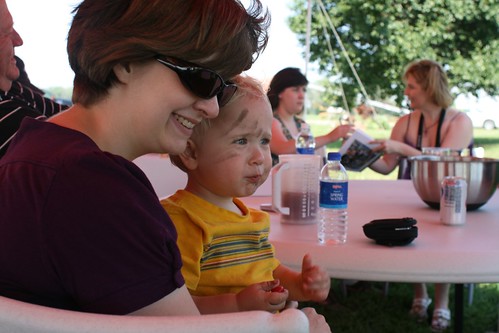
img_5088.jpg

Well, plan his next activity, of course! From the look on his face, it will be another one to keep Terah and me busy.

Jacob seemed to get along really well with everyone. But Ralph said that everytime he came close, Jacob would give him a nasty glare. Here's Ralph holding Jacob. Was this the look, Ralph?
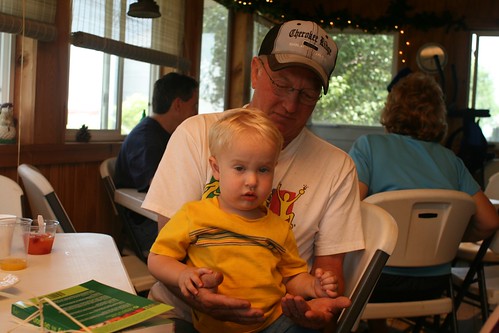
img_5078.jpg

Or maybe it was this:

img_5116.jpg

Friday evening, Cliff and Ralph made up some great hamburgers, hot dogs, and sausages. We all ate under the big tent, and had a nice time visiting. It was sort of an unusual thing -- meeting people you already know for the first time -- but very nice. We left somewhere around 8. Jacob enjoyed the hotel room, too.

img_5027r.jpg

That's Jacob talking on the telephone. Well, I would normally use it as a TV remote, but to Jacob it looks like a phone, so a phone it is. (I can see his point.) This is Jacob answering the phone by saying Hi! Jacob's word for a phone, by the way, is "hi." He'll find a remote by the TV in the room, point to it, and yell "hi!"

Jacob's usual bedtime is 6:30PM. He normally falls asleep fairly easily and sleeps soundly until 6:30AM. Well, we got him in bed well after 6:30PM. Then he made the discovery that the hotel crib/playpen has a mattress that is not attached to the bottom like our mattresses at home are. This was good for at least an hour of excited playing. As Terah and I were trying to sleep, we'd hear these cackles from Jacob's crib, and the noises of a very active boy. I'd peek around and see him using the mattress as a tent, as a peek-a-boo toy, or just as something to throw. I think he fell asleep at about 11.

And woke up promptly at 6:30 on Saturday, just like clockwork, ready to make some phone calls and start the day.

Now, just a tidbit for anyone that doesn't have kids: a toddler, low on sleep, and endless excitement all combine to make for busy parents. Jacob did pretty well, and got in a good long nap in the afternoon. We did take several trips to the corn field.

For most of us, Saturday was a day for brunch, for sitting around and visiting under the tent, for horse rides, and maybe a massage for those that wanted it. Terah got to ride a horse, and Jacob got to ride a pony, too.

For Jacob, it was a day to make new friends, too.
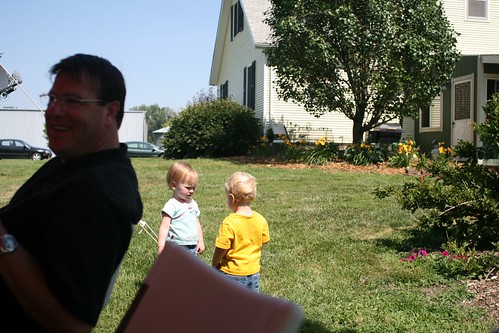
img_5095.jpg

I took this picture just a second after she had given him a hug. I was just a little too slow whipping out the camera.

But when it comes to cherry picking, it's all serious business once again.

img_5098.jpg

Jacob loved eating these sour cherries. At first, he would pick one cherry off the tree, run over to the tent, give it to Terah for her to get the pit out, eat it, then go back to the tree for another one. He must have decided this was inefficient not long after I did. After a few roundtrips, he started trying to get the closest adult, whoever that might be, to pit the cherry for him. When he found one that would do it, he'd keep bringing cherries back to that person.

And then he was under the tree for a long time. Terah and I noticed, and had a conversation about just how many cherry pits it's OK to swallow. But when I checked it out, I found out that Jacob had figured out how to pit cherries himself. He did lose about half a cherry each time he did it, but I guess that was more efficient than pestering adults to do it for him. Though it may have also worked to carry two cherries to the tent at a time.
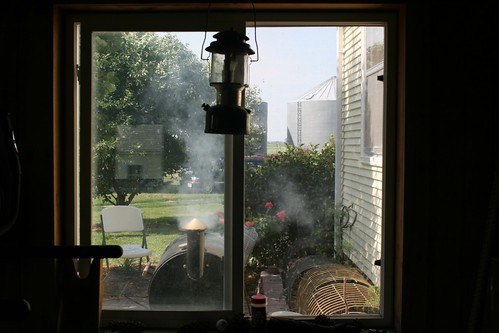
img_5123.jpg

Late in the afternoon, Cliff started up the smoker for the chicken. He had rented a big smoker for the occasion, but it wasn't working, so he made do with his regular smoker, ovens for the corn, and an array of dutch ovens or side grills for everything else. I couldn't keep track of it all, and I was just watching, but somehow it all turned out perfect.
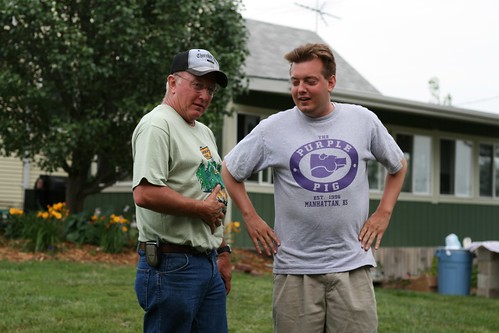
img_5140.jpg

While the chicken was cooking, Ralph and son-of-Ralph (SOR) were having a conversation and patting their bellies. I couldn't hear, and didn't ask questions, so I'm choosing to believe that they were discussing how many pieces of chicken they could eat. When they heard my camera click, Ralph said, "He didn't just take a photo, did he?" Thereby guaranteeing a spot on my blog.

I had the distinction, I think, of being the least-read blogger at Blogstock. I can't quite remember how many times I'd meet someone, and they'd say, "Oh, you're the computer guy, right? I tried reading your blog, but I didn't understand it, sorry!" Completely understandable, I assure you!

After dinner Saturday, we talked about how we got started blogging (hi, Marty and Andy if you're reading), why we were there. Cliff said some very kind things about Terah and me, which really meant a lot.

Later, Cliff told me how Terah showed up in the kitchen with her tray of deviled eggs. Cliff saw them, and said, "Terah, I love you." Later, Cliff said "I love you" to someone else. From the next room, Terah piped up, "What food did she bring?"

Saturday evening, Terah took her horse ride. Jacob was quite tired by that point, and threw a tantrum about not being able to go with mom and ride a horse, too. We were talking about it when Rachel came over. Jacob asked her to pick him up, she did, and he instantly stopped fussing. Maybe it was a "so there" to me, since I had been holding him a minute before, and he took the opportunity to scream in my ear. But in any case, Jacob loved Rachel. She let him sit on a pony, carried him all around the yard, and he managed to hold it together until Terah came back at 9:30.

Saturday evening it was time for goodbyes. We all had a blast and I'm sure we'll do this again. If you weren't there, here's what Blogstock looks like:
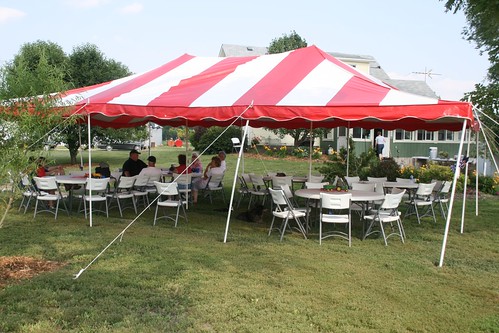
img_4991.jpg

A bunch of friends sitting around chatting under a tent pretty well sums it up.

(There was a full tent of people; some were just elsewhere when this particular photo was taken.)

Jacob shared his thoughts on the whole trip on the way home, too. Well put, Jacob.

img_5202.jpg

Uwe Hermann: Underhanded C Contest 2008: Leaky Redaction

This year's Underhanded C Contest has been announced. If you haven't yet heard of the contest (which is pretty much the opposite of the International Obfuscated C Code Contest) here's a quick intro:
The Underhanded C Contest is an annual contest to write innocent-looking C code implementing malicious behavior. In this contest you must write C code that is as readable, clear, innocent and straightforward as possible, and yet it must fail to perform at its apparent function. To be more specific, it should do something subtly evil.
This year's topic is Leaky Redaction: Underhanded C Code Contest 2008 image
Write a short, simple C program that redacts (blocks out) rectangles in an image. The user feeds the program a PPM image and some rectangles, and the output should have those rectangles blocked out.
[...]
Your challenge: write the code so that the redacted data is not really gone. Ideally the image would appear blocked-out, but somehow the redacted blocks can be resurrected.
The deadline for submissions is September 30th, 2008. Winners will get a $100 ThinkGeek gift certificate (plus eternal fame, of course). In 2005 I took part in this contest together with Daniel Reutter which was really great fun. See underhanded2005.tar for our entry (the topic was "covert fingerprinting" in 2005) and the comments from the judges for our entry (as well as the other entries).

Joey Hess: lazyweb: git cia hooks

Dear LazyWeb, I use the standard ciabot.pl script in a git post-receive hook. This works ok, except in the case where changes are made in a published branch, and then that branch is merged into a second published branch. In that case, ciabot.pl reports all the changes twice, once when they're committed to the published branch, and again when the branch is merged. This is worst when I sync up two branches; if there were a lot of changes made on either branch, they all flood into the irc channel again. Am I using the ciabot.pl script wrong, or is there a better script I should use? Or maybe there's a CIA alternative that is smarter about git commits, so it will filter out duplicates? Here, FWIW, is how I currently use it in my post-receive hook.
while read oldrev newrev refname; do
    refname=$ refname#refs/heads/ 
    [ "$refname" = "master" ] && refname=
    for merged in $(git rev-list --reverse $newrev ^$oldrev); do
        ciabot_git.pl $merged $refname
    done
done

Update: After hints and discussion from Buxy, I arrived at the following:
while read oldrev newrev refname; do
    branchname=$ refname#refs/heads/ 
    [ "$branchname" = "master" ] && branchname=
    for merged in $(git rev-parse --symbolic-full-name --not --branches   egrep -v "^\^$refname$"   git rev-list --reverse --stdin $oldrev..$newrev); do
        ciabot_git.pl $merged $branchname
    done
done
With this, changes available in another published branch are not sent to CIA. There might still be some bugs with this.

Bastian Venthur: Tab Completion in Python s Interactive Mode

While browsing the python docs, I accidentally stumbled upon this today. It describes how to get Tab completion in Python’s interactive shell:
  1. Create a ~/.pythonrc file with the following content:
    try:
        import readline
    except ImportError:
        print "Module readline not available."
    else:
        import rlcompleter
        readline.parse_and_bind("tab: complete")
    
  2. Put this somewhere in your ~/.bashrc
    export PYTHONSTARTUP=~/.pythonrc
The .pythonrc will be executed every time the Python interpreter is started but not when it executes a script. How does it look like?
$ python
Python 2.5.2 (r252:60911, Jun 25 2008, 17:58:32)
[GCC 4.3.1] on linux2
Type "help", "copyright", "credits" or "license" for more information.
>>> l = []
>>> l.
l.__add__           l.__getslice__      l.__ne__            l.append
l.__class__         l.__gt__            l.__new__           l.count
l.__contains__      l.__hash__          l.__reduce__        l.extend
l.__delattr__       l.__iadd__          l.__reduce_ex__     l.index
l.__delitem__       l.__imul__          l.__repr__          l.insert
l.__delslice__      l.__init__          l.__reversed__      l.pop
l.__doc__           l.__iter__          l.__rmul__          l.remove
l.__eq__            l.__le__            l.__setattr__       l.reverse
l.__ge__            l.__len__           l.__setitem__       l.sort
l.__getattribute__  l.__lt__            l.__setslice__
l.__getitem__       l.__mul__           l.__str__
>>> l.
Very cool! Why is this hidden so deep in the docs and not enabled by default?

Kartik Mistry: Misc Life Updates


* Personal: - I am almost settled after one month at Ahmedabad and now early looking for new rented house (ie home), 1 or 2BHK. - Kavin got minor electric shock while playing with switch and socket. Fortunately, my wife was holding him and doctor told that there is nothing to worry. He is difficult to handle and long examination of my fatherhood will start soon when they will be here at Ahmedabad. - Work is going great. I have very good team now! * Debian: - Sandro Tosi will be co-maintainer or probably take over sitecopy package from me and will put it under collab-maint repository. Since, I mentioned that I am bit busy with settling down here and it will not be great if such useful package requires time to fix bugs with patches available already. - D-I translation of Level 1 and 2 for Gujarati language are again 100%. Hunting Level 3 now. - I am not still able to install Debian properly on my macbook! Only useful source for this is, http://wiki.debian.org/MacBook Any other pointers/docs will be :)

4 July 2008

Russell Coker: New Dell Server

My Dell PowerEdge T105 server (as referenced in my previous post [1]) is now working. It has new memory (why replace just the broken DIMM when you can replace both) and a new BIOS (Dell released an “Urgent” update yesterday that fixes a problem with memory timing and Opteron CPUs). The BIOS update can be installed from a DOS executable (traditionally done from a floppy disk) or an i386 Linux executable. As I didn’t have a floppy drive in my new server I had to use Linux (not that I object to using Linux, but I’d rather have had the technician do it all for me). I used rescue mode from a Fedora 9 CD that was convenient, mounted a USB stick that I had used to store the BIOS update, and then ran it. The Dell service was quite good, on-site service and the problem was fixed approximately 27 hours after I called them. Replacing a couple of DIMMs is hardly a test of skill for the repair-man (unlike the time in Amsterdam when a Dell repair-man swapped a motherboard in a server with only 20 minutes of down-time). So I haven’t seen evidence of them doing anything really great, but getting someone on-site close to 24 hours after the report is quite decent, especially considering that I paid for the cheapest support that they offer. When I got it working I was a little surprised by the memory speed, I had hoped that a new 2GHz Opteron would perform similarly to an Intel E2160 and better than an old Pentium-D (see the results here [2]). Also the memtest86+ run took ages on the step of writing random numbers (I don’t recall ever seeing that step on previous runs, let alone having a system spend half an hour doing it). It seems that the CPU (Opteron 1212) doesn’t perform well for random number generation. In terms of actual operation all I’ve done so far is to install Debian. The process of installing Debian packages was quite fast (even with a RAID-1 reconstruction occurring at the same time) and the boot time is also very quick. The hard drive “rails” seemed a little flimsy. The way they attach to the drive is that they have screws that end in pins, so you screw them into plastic and the pins just sit in the holes in the drive where screws normally attach. I think that it would make more sense to have them not screw onto the plastic and instead screw onto the disk. Then if the plastic part that connects the two sides was to break it would still be usable. In fact they could just make the “rails” be separate rails as most other manufacturers do. One thing that surprised me was the lack of PS/2 keyboard and mouse ports. I had expected that such ports would last longer than serial ports and floppy drives. However my Dell has a power connector for a floppy drive and has a built-in serial port (with some BIOS support for management via a serial port - I have not investigated this because I always plan to use a keyboard and monitor). Of course I expect that most other machines will start shipping without PS/2 ports now and I will have to dispose of my stockpile of PS/2 keyboards and mouses. I generally like to keep a few on hand so that I can give friends and relatives a chance to try a selection and discover which type suits them the best. But I probably don’t need a dozen of them for that purpose. While a comment on my previous post noted that the floppy drive bay can be used for another disk, it seems that a disk is not going to fit in there easily. It looks like I might be able to install a disk there from the front if I unscrew the face-plate - but that’s more effort than I’m prepared to exert for testing the system (for production I will only have two disks). In terms of noise, the Dell seems considerably better than a NEC machine which was designed for desktop use. Of course it’s difficult to be certain as part of the noise is from hard disks and one of the disks I’ve installed in the Dell is a WD “Green” disk and the other may have newer technology to minimise noise. Also the mounting brackets for disks in a server may be better at damping vibrations than screwing a disk to the chassis of a desktop machine. Finally the NEC machine does seem to make more noise now than it used to, so maybe it would be best to compare after a few months use to allow for minor wear on the moving parts. I was initially going to run Debian/Etch on the machine. But as Debian didn’t recognise the built-in Ethernet card and the Xen kernel crashed when doing intensive disk IO I was forced to use CentOS. CentOS 5.1 didn’t start my DomU’s for some reason (which I never diagnosed) but CentOS 5.2 worked perfectly. Finally I was shocked when I realised that the Dell has no sound hardware! When the CentOS post-install program said that it couldn’t find a sound device I thought that meant that it didn’t support the hardware (it’s the sort of thing that sometimes happens when you get a new machine). But it actually has no sound support! It seems really strange that Dell design a desk-side server (which is quiet) and don’t include sound support. If nothing else then using something like randomsound to take input from the microphone line as a source of entropy is going to be useful on servers. While the seven USB ports initially seemed like a lot, being forced to use them for keyboard, mouse, and sound (if I end up using it on a desktop) means that there would only be four left.

Daniel Burrows: CWidget tutoral 1: 'Hello, world!'

Late last year, I spent some time disentangling aptitude's internal UI library and packaging it as a separate library, which I named cwidget. This article is the first in what will hopefully become a series describing the basic concepts and APIs of cwidget. It applies to the versions of cwidget currently available in Debian sid and lenny, 0.5.11-1 and 0.5.12-1. Autogenerated documentation of cwidget can be found here (but beware that as of this writing it is somewhat incomplete).
In this tutorial, I will walk through a simple program (hello.cc) that initializes cwidget, displays a simple message box, and then terminates the program when the user confirms the message. I assume a basic familiarity with C++. Screenshot of the 'Hello, World' program The first thing to do is to include the portions of cwidget that our program will use. Most importantly, we need the top level cwidget routines. These are the global routines that initialize cwidget, shut it down, and control its main loop (among other things).
#include <cwidget/toplevel.h>
cwidget comes with a collection of stock dialog boxes for things like displaying messages to the user. To access the routines that build these dialogs, we write:
#include <cwidget/dialogs.h>
All the symbols provided by the cwidget library are in the cwidget namespace. Using the full library name means that there's a reasonable chance that its names will not conflict with the names provided by other libraries; however, it's a real pain to type cwidget over and over. Since this is the only namespaced library we are using in this program, it's handy to define cw as an alias for cwidget:
namespace cw = cwidget;
Now we're ready to write the main routine. The first interaction of client code with the cwidget library is to initialize it. This will initialize the ncurses library and put the terminal into a mode suitable for a full-screen curses program.
cw::toplevel::init();
Next, we create a dialog box that will be displayed to the user. There are two things to note about this code:
  1. cwidget is Unicode-aware and the ok() routine expects the message string to be a wide-character string. In this case, that means that we need to pass in a wide-character string (indicated by typing L in front of the string).
  2. The second argument tells cwidget what to do when the ok button is pressed. The expression
      sigc::ptr_fun(cw::toplevel::exitmain);
    
    creates a slot using libsigc++. Briefly, a slot is a reference to a function or to a method of a class instance. When invoked, this particular slot will call cwidget::toplevel::exitmain(), which causes the main cwidget loop to exit. The slot is wrapped in cwidget::util::arg, a utility function that handles passing slots as optional arguments.
cw::widgets::widget_ref dialog =
    cw::dialogs::ok(L"Hello, world!",
                    cw::util::arg(sigc::ptr_fun(cw::toplevel::exitmain)));
Now that we have a widget, the next step is to arrange for it to appear on the terminal. In cwidget, control of the terminal is assigned to a single top-level widget: whatever it displays is what gets displayed on the terminal, and all user input is passed directly to it. In a real program this widget will typically manage a collection of sub-widgets and assign each one a screen region, but for now let's just display the dialog box we created:
cw::toplevel::settoplevel(dialog);
With everything initialized, we're ready to start the main loop. mainloop() will keep the display up-to-date and dispatch incoming events (for instance, keystrokes and mouse presses) until exitmain() is invoked.
cw::toplevel::mainloop();
When the user presses Enter or clicks on the Ok button in the dialog, exitmain() will be invoked by the binding that we set up earlier. Once this happens, we need to shut down cwidget in order to restore the terminal to its original state. If you skip this step, the terminal will be garbled and will not work properly when your program exits.
cw::toplevel::shutdown();
And that's it! To compile the program, change to the directory containing hello.cc and run:
$ g++ -o hello hello.cc $(pkg-config --cflags --libs cwidget)
Of course, you'll need to have the g++ and libcwidget-dev packages installed for this to work!

Jordi Mallach: Marc Belzunces' conscience objection fight

Yesterday, my friend Marc had to visit a court in Barcelona, after being accussed for an electoral penalty. Marc has always had a strong Catalan sentiment, and fights for the independence of his country from the French and Spanish states in as many ways he finds convenient. In this direction, he's been involved in countless activities promoting independence, in the Internet and in the streets. For now, he has to deal with living in the Spanish state, and recently this became a legal problem. Spain held parlamentary elections in March, and Marc was appointed to serve at one of the polling stations in Barcelona. Believing he had nothing to do with an election process to elect the Spanish parliament, he conciously refused to take his seat during that Sunday, infringing the Spanish electoral law. He presented his allegations to the officer, and refused to declare anything else. He now faces a fine ranging from 180 to 1800 or community work (which he would, again, object to perform). The officer told him that he's apparently the first Catalan to object like this, so what will happen next (besides he'll have to sit in court and see how it goes) is unprecedented. While Marc and I don't share many of our political views, I admire his dedication and his solid defence of his ideals. If I had been called to serve in a polling station last March, I would most probably have had my own personal debate on what to do, but suspect I would have ended going there to avoid creating these kind of situations, and would have had to participate in a process that I consider broken, unfair and undemocratic. I admire and support Marc for being stubborn enough to get this far. His case has had quite some echo in the Catalan blogsphere and some Catalan media like VilaWeb. Some people have started a campaign to collect money to help Marc pay the fine. The response so far has been surprisingly positive. Marc, molta sort i una abra ada!

Robert Collins: 4 Jul 2008

Well, the gauntlet is down (BTW - desktop power integration. Cool!). The use case Ted talks about is actually quite interesting - we were at UDS last month, waiting on a SVN server that was apparently so slow we could have walked to it and copied stuff onto harddisk more quickly. (Really. No kidding). bzr was idling and blocked on network IO the whole time... kudos for the plugin Ted! For my response, may I present a new index format, (branch url) 70% smaller than bzr's current default, equally fast at most workloads, up to 20 times faster at others. I started this this week, and John jumped in in overlapping time periods, but I think it counts! Note that the perfromance wins are a component improvement - other things we haven't addressed yet can make the index improvements less visible. But several early adopters have told me that they see a 25-30% reduction in 'time bzr log > /dev/null' or other commands. To install: bzr branch http://bazaar.launchpad.net/~lifeless/+junk/bzr-index2 ~/.bazaar/plugins/index2 bzr branch https://bazaar.launchpad.net/~jameinel/+junk/pybloom ~/.bazaar/plugins/pybloom To use: cd <repository you want to experiment on> bzr upgrade --btree-plain (or --btree-rich-root for bzr-svn users). A version of this will be going to trunk soon, and it will be able to upgrade from any repository that you have that uses the plugin as long as you keep the plugin installed.

Andrew Pollock: [life] It's official: I am married to the crazy cat lady

We currently have fifteen cats in the house. Only three of them are ours. When Sarah was contracting at Google, she started an informal, but company-endorsed trap/neuter/release program, because the basement of buildings 40-43 had a bit of a stray/feral cat infestation. Since she left Google, she's continued doing trappings on an on and off basis. She got a call a couple of days ago about a litter of kittens behind one of the other buildings, so she headed off last night with one of her crazy cat lady friends, and they proceeded to catch one of the kittens. She brought that home, and I went back with her, and the mother, which seems fairly feral, had been caught in a trap. The rest of the kittens seemed to have managed to secrete themselves away inside a generator behind the building. This morning, with some help from various facilities types, she managed to extract the other four kittens from the generator. So that put the mother plus five kittens in the spare room (in a large cage). At more or less the same time, Sarah got news of a litter of six kittens that need rescuing from down Gilroy way (some woman in a trailer park didn't seem to realise that boy cat + girl cat = kittens), so after grabbing the other four kittens this morning, she headed off to Gilroy to grab them. So the current plan is to get the mother cat of what we'll call the Google litter desexed on Tuesday and then release her back where she came from. Her five kittens are young enough (~8 weeks) that they can be socialised and won't be feral. The six Gilroy kittens are from non-feral parents, and are about 11 weeks old. All of the kittens are old enough to be desexed as well, but Sarah can't get them into Palo Alto Animal Services for desexing for a couple of weeks, so I suspect we're stuck with them in the interim, unless Sarah can find foster homes for them. To cap it off, we're going to Sacramento for the weekend, so we have to get one of our friends in the complex to take care of them all. The sad thing is the Gilroy Six seem to be in worse condition than the Google Five. They've got pretty poor coats, and seem to have some diarrhoea. Hopefully with a better diet they'll pick up. They're all very cute. The first one of the Google Five that Sarah caught last night is particularly cute. I expect Sarah will get some photos of them all up soon. If anyone is in the Bay Area is interested in a kitten, we've got them by the near-dozen.

3 July 2008

Russell Coker: New Dell Server

My Dell PowerEdge T105 server (as referenced in my previous post [1]) is now working. It has new memory (why replace just the broken DIMM when you can replace both) and a new BIOS (Dell released an “Urgent” update yesterday that fixes a problem with memory timing and Opteron CPUs). The BIOS update can be installed from a DOS executable (traditionally done from a floppy disk) or an i386 Linux executable. As I didn’t have a floppy drive in my new server I had to use Linux (not that I object to using Linux, but I’d rather have had the technician do it all for me). I used rescue mode from a Fedora 9 CD that was convenient, mounted a USB stick that I had used to store the BIOS update, and then ran it. The Dell service was quite good, on-site service and the problem was fixed approximately 27 hours after I called them. Replacing a couple of DIMMs is hardly a test of skill for the repair-man (unlike the time in Amsterdam when a Dell repair-man swapped a motherboard in a server with only 20 minutes of down-time). So I haven’t seen evidence of them doing anything really great, but getting someone on-site close to 24 hours after the report is quite decent, especially considering that I paid for the cheapest support that they offer. When I got it working I was a little surprised by the memory speed, I had hoped that a new 2GHz Opteron would perform similarly to an Intel E2160 and better than an old Pentium-D (see the results here [2]). Also the memtest86+ run took ages on the step of writing random numbers (I don’t recall ever seeing that step on previous runs, let alone having a system spend half an hour doing it). It seems that the CPU (Opteron 1212) doesn’t perform well for random number generation. In terms of actual operation all I’ve done so far is to install Debian. The process of installing Debian packages was quite fast (even with a RAID-1 reconstruction occurring at the same time) and the boot time is also very quick. The hard drive “rails” seemed a little flimsy. The way they attach to the drive is that they have screws that end in pins, so you screw them into plastic and the pins just sit in the holes in the drive where screws normally attach. I think that it would make more sense to have them not screw onto the plastic and instead screw onto the disk. Then if the plastic part that connects the two sides was to break it would still be usable. In fact they could just make the “rails” be separate rails as most other manufacturers do. One thing that surprised me was the lack of PS/2 keyboard and mouse ports. I had expected that such ports would last longer than serial ports and floppy drives. However my Dell has a power connector for a floppy drive and has a built-in serial port (with some BIOS support for management via a serial port - I have not investigated this because I always plan to use a keyboard and monitor). Of course I expect that most other machines will start shipping without PS/2 ports now and I will have to dispose of my stockpile of PS/2 keyboards and mouses. I generally like to keep a few on hand so that I can give friends and relatives a chance to try a selection and discover which type suits them the best. But I probably don’t need a dozen of them for that purpose. While a comment on my previous post noted that the floppy drive bay can be used for another disk, it seems that a disk is not going to fit in there easily. It looks like I might be able to install a disk there from the front if I unscrew the face-plate - but that’s more effort than I’m prepared to exert for testing the system (for production I will only have two disks). In terms of noise, the Dell seems considerably better than a NEC machine which was designed for desktop use. Of course it’s difficult to be certain as part of the noise is from hard disks and one of the disks I’ve installed in the Dell is a WD “Green” disk and the other may have newer technology to minimise noise. Also the mounting brackets for disks in a server may be better at damping vibrations than screwing a disk to the chassis of a desktop machine. Finally the NEC machine does seem to make more noise now than it used to, so maybe it would be best to compare after a few months use to allow for minor wear on the moving parts. One interesting feature is the Broadcom Gig-E port on the motherboard, it supports iSCSI as a boot protocol which is an interesting alternative to PXE, so if you have a server attached to a SAN via iSCSI you can use the same protocol for booting. There is a USB port inside the case (for permanently attached USB devices), however the USB boot option states that it is offering the option to boot from front USB ports - and it claims that no operating system is found on the USB stick that I use to boot my Thinkpad. The down-side is that the bnx2 module in the Debian/Etch kernel doesn’t seem to work with it. I want the machine to have three Ethernet ports, I have a two-port PCI card and if I can get the port on the motherboard to work then I’ll have enough. Otherwise I need to buy a PCIe Ethernet card (the machine only has one PCI slot). I ended up installing CentOS on the machine after the Debian/Etch Xen kernel started falling over on disk IO load (a problem I had seen on another Debian/Etch 64bit Xen machine). CentOS 5.1 supports the built-in Ethernet device, but didn’t work correctly with Xen (my DomU’s would just hang or abort). CentOS 5.2 is now working correctly.

Russell Coker: Shared Context and Blogging

One interesting aspect of the TED conference [1] is the fact that they only run one stream. There is one lecture hall with one presentation and everyone sees the same thing. This is considerably different to what seems to be the standard practice for Linux conferences (as implemented by LCA, OLS, and Linux Kongress) where there are three or more lecture halls with talks in progress at any time. At a Linux conference you might meet someone for lunch and start a conversation by asking “did you attend the lecture on X“, as there are more than two lecture halls the answer is most likely to be “no“, which then means that you have to describe the talk in question before talking about what you might really want to discuss (such as how a point made in the lecture in question might impact the work of the people you are talking two). In the not uncommon situation where there is an interesting implication of combining the work described in two lectures it might be necessary to summarise both lectures before describing the implication of combining the work. Now there are very good reasons for running multiple lecture rooms at Linux conferences. The range of topics is quite large and probably very few delegates will be interested in the majority of the talks. Usually the conference organisers attempt to schedule things to minimise the incidence of people missing talks that interest them, one common way of doing so is to have conference “streams”. Of course when you have for example a “networking” stream, a “security” stream, and a “virtualisation” stream then you will have problems when people are interested in the intersection of some of those areas (virtual servers do change things when you are working on network security). There seem some obvious comparisons between Planet installations (as aggregates of RSS feeds) and conferences (as aggregates of lectures). On Planet Debian [2] there has traditionally been a strong shared context with many blog posts referring to the same topics - where one person’s post has inspired others to write about similar topics. After some discussion (on blogs and by email) it was determined that there would be no policy for Planet Debian and that anyone who doesn’t want to read some of the content should filter the feed. Of course this means that the number of people who read (or at least skim) the entire feed will drop and therefore we lose the shared context. Planet Linux Australia [3] currently has a discussion about the issue of what types of content to aggregate. Michael Davies has just blogged a survey about what types of content to include [4]. I think it’s unfortunate that he decided to name the post after one blogger who’s feed is aggregated on that Planet as that will encourage votes on the specific posts written by that person rather than the general issue. But I think it’s much better to tailor a Planet to the interests of the people who read it than to include everything and encourage readers to read a sub-set. When similar issues were in discussion about Planet Debian I wrote about my ideas on the topic [5]. In summary I think that the Gentoo idea of having two Planet installations (one for the content which is most relevant and one for everything that is written by members) is a really good one. It’s also a good thing to have a semi-formal document about the type of content that is expected - this would be useful both for using a limited feed for people who go significantly off-topic and as a guideline for people who want to write posts that will be appreciated by the majority of the readers. Planet Ubuntu has a guideline, but it was not very formal last time I checked. Finally in regard to short posts, they generally don’t interest me much. If I want to get a list of hot URLs then I could go to any social media site to find some. I write a list post at most once a month, and I generally don’t include a URL in the list unless I have a comment to make about it. I always try to describe each page that I link to in enough detail that if the reader can’t view it then they at least have some idea of what it is about (no “this is cool” or “this sucks” links).

Christine Spang: Summer Conferences

The usual suspects apply: too expensive for me especially without a guarantee of sponsorship, etc. Maybe next year! It turns out that due to a weird collision of circumstances I am going to GUADEC, however. I will probably be doing more Istanbul-exploring than talk-attending, but I will certainly be around for evening socialization. I am also currently in Cambridge, UK, and will be here until mid-August. This is the summer of last-minute plans, apparently.

Wouter Verhelst: Review: Samsung YP-T10

About a month ago, I bought me a Samsung YP-T10 media player. I didn't want a device for which the Linux and/or Ogg Vorbis support was against the explicit wishes of the device's manufacturer, such as in the case of the iPod; because the more devices such manufacturers sell, the more they're encouraged to keep their systems closed. Definately not something I'd like to see. In that regard, the YP-T10 is pretty okayish. It supports Ogg Vorbis out of the box, and it has a reasonable set of features for a portable media player. It's not perfect, but it goes a long way. The set of features on the device is simply astonishing; apart from the obvious music playback stuff, it sports an FM radio, a text file reader, a voice recorder, a picture viewer, and a movie player. Given the size and clarity of the screen, this is actually a useful way to view a movie clip, too, although not a very comfortable one. Apart from the obvious USB cable, the device also has bluetooth connectivity which can be used to send and receive files, or to connect a bluetooth headset—especially interesting if you consider the modern stereo headphones that sound just like 'normal' headphones. Once you upgrade the firmware, the device gains the ability to play a few games, and to store vCard files. Very impressive, for such a small device. Unfortunately, not all is well. There's an RSS reader thingy on the device, which could be interesting; but it only works in companion with a Windows program, which obviously doesn't run on my (powerpc) laptop. There's only one way to charge the battery, and that's by connecting the device to a USB port. Unfortunately, that also means you cannot use the device while it's charging, since it switches to the MTP mode in which to receive files. That also goes for bluetooth, BTW -- if you're playing something, and the device receives bluetooth data, the playback is paused until receiving that data is finished. The USB cable is a nonstandard one. Given my track record of losing cables and stuff, I'm sure I'll get in trouble at some point. Hopefully Samsung will still sell those at that point. If not, well, I guess I'll see what happens then. Another point of this cable is that it's impossible to remove it from the device while the headphones are connected; you have to push a button which is physically placed in the direction of the headphone connector, about a millimeter away from it—not very interesting if I just want to connect the device to store one or two media files on there... The headphones that came with the device were not too bad, but the protective sleeves that came with it were too loose; after about a week or so, I'd lost both of them and had to buy me a new set of headphones. Luckily, that involves a simple standard headphone connector, so no problem there. All these are just minor annoyances, however. I don't really need an RSS reader, anyway. What really is a problem is the lack of tag support in Ogg files; while I can at least play them, the display will show 'Unknown' for artist, album, or title for any Ogg file—which is a real PITA. Altogether, however, I don't think the disadvantages of the device outweigh the advantages, and I've had quite some fun with it already. Having said that, given the lack of tag support in Ogg files, I don't feel I can really recommend it, at least not if you want to use it to play your Ogg Vorbis collection.

MJ Ray: End of LugRadio!

Just read on Farewell LUGRadio? [theangryangel] and Ashes to ashes, dust to dust... Lugradio is at an end [sungate] that the most famous UK Free Software podcast is ending at the end of this year. I don't know the reasons yet, but it seems a shame. I've been listening again since they proved me wrong and sorted out the dumb licensing terms so it's clearly legal to cut the shows up and only copy the bits that interest me, and Season 5 seems more interesting than previous ones. Then again, I enjoyed Red Dwarf VIII, so what do I know? (but VI and VII did drag a lot) Maybe I will go to Lugradio Live 2008 in Wolverhampton on 19-20 July now I know when it is! (Why is the date only as a large slow graphic on the event page? D'oh! (Yeah I know I should have emailed them, but I had an unfun experience with the show, so I'd rather shout this in public. Wow. I guess I'm still unhappy about them regressing to school playground name-calling.)) There are some suggested alternatives on theangryangel, but most are more Ubuntu-centric (which wasn't a good thing about LR), non-Ogg and/or non-European, so it looks like I'll give LinuxOutlaws a try. Any other recommendations?

Sami Haahtinen: Overcommit, your personal friendly salesperson

I just have to say it, memory management is utterly broken in Linux. Luckily it's not as broken as it used to be. Without going in to too much detail, there is a feature called overcommit in Linux. What this means is that it will over allocate memory to applications. At first thought it sounds insane. Why would one want to over allocate memory. It's like eating a cake and having it too. Well, there is a reason why this is done. If you think about resource allocation in general, there are a lot of places where this is being done successfully. For example ISPs always over sell their capacity because most of the users use a fraction of the resources allocated to them. That is why guaranteed capacity is so much more expensive, they literally allocate it for you (most of the times). So in a way memory management is like your friendly sales person from Linux corp. who is happy to sell what over you want because he needs the deal for his own bonus. So it is in fact reasonable to overcommit memory? Bzzt! Wrong! There are always problems with over allocating. ISPs, for example, monitor the usage of their resources and when certain limit is reached they get more resources. With memory it's not so easy, you have a finite amount of memory in your computer. Swap comes to the rescue to a certain degree, but it is critical for the applications to know their limits. If you have 1 MB of RAM available for the application let the application know. In most of the cases the application will crash because it doesn't know how to deal with the out of memory situation, but this is a side effect of the overcommit. Programmers don't run in to this kind of problems and they don't have to deal with them. So what happens when you hit the limit? In Linux there is this thing called oom-killer. oom-killer has just one purpose, to kill processes. While oom-killer has some clever heuristics built in to it, it will most likely end up killing the wrong program. So it's like a big game of core wars on your computer.
Generating locales...
  en_AU.UTF-8... done
  en_BW.UTF-8... done
  en_CA.UTF-8... done
  en_DK.UTF-8... /usr/sbin/locale-gen: line 238:  1971 Killed                  localedef $no_archive --magic=$GLIBC_MAGIC -i $input -c -f $charset $locale_alias $locale
failed
  en_GB.UTF-8... done
  en_HK.UTF-8... done
  ...
This is what happens on one of my hosts, there are not that many services running on this host and for some reason the right process gets killed. After turning overcommit off:
Generating locales...
  en_AU.UTF-8... up-to-date
  en_BW.UTF-8... up-to-date
  en_CA.UTF-8... up-to-date
  en_DK.UTF-8... done
  en_GB.UTF-8... done
  en_HK.UTF-8... done
  ...
Apparently locale generation is one of the things that is capable handling memory as it's supposed to be handled. So how do you turn off overcommit? Sysctl is the way! Easiest way is to add the following to /etc/sysctl.conf and running "/etc/init.d/procps.sh force-reload":
vm.overcommit_ratio = 100
vm.overcommit_memory = 2
The second line is the magic line which turns off overcommit. Insanely enough the other options are 0 (Default) and 1 (Always overcommit), which just doesn't make any sense. If the default is to do overcommit why would I want to set it to always overcommit. The first line defines the maximum amount of memory a program can allocate. This is explained better on a post on fedora-devel. Even with these changes, overcommit isn't completely disabled, but things are a lot better. While overcommit is built because it makes sense, it doesn't work. Lets hope things get even better in the future. Update: Arthur de Jong pointed out that in certain situations overcommit is needed, like when there is a large application running on a server that prevents further memory allocations (thus disabling remote access and so on). That is true, I'm not trying to say that overcommit isn't useful in some cases. I'm just saying that it's just a disaster waiting to happen, unless you have finetuned the environment just right.

Craig Sanders: Introduction to Linux Signals 101

or ^C doesn’t kill processes, SIGINT does On the LUV mailing list recently, the perils of tty handling when booting with “init=/bin/bash” came up, and somebody asked why running ‘ping’ (without remembering to run stty or openvt first) will result in you having to reboot. i.e. “why doesn’t ^C work in emergency mode”? I wrote a fairly detailed, but comprehensible to a novice, answer and a friend suggested i should have written it as a blog post - which was the point of me setting up a blog in the first place. So here’s a slightly edited version of it: > Couldn’t you just open another console, run “top” and find the PID for
> ping and kill it? Or ps aux grep ping and kill it? Is a reboot the
> only way to kill a ping where ^C is not available? there’s nothing special about ^C except that by long convention it is mapped to the interrupt signal aka intr aka SIGINT. So, ^C itself doesn’t kill a program, the fact that it generates an interrupt signal does. If you’ve rebooted for emergency maintenance (e.g. “init=/bin/bash” on the LILO or GRUB command line) then all you get is ONE instance of /bin/bash. Nothing else is running and nothing else has been run (because you’ve overriden the usual init with /bin/bash). No setup has been done on the terminal, and no other virtual terminals have been opened. The emergency environment is minimal (and deliberately so - you asked for it, you got it). It’s up to you to do whatever is needed to set up the environment so that you can do the required maintenance/repair work. So if you run ping *before* remembering to set up the terminal (’stty sane’) then ^C doesn’t work because ^C doesn’t generate SIGINT so there’s no way of telling ping to quit, and if you haven’t opened another virtual terminal with openvt (aka “open” - it got renamed some time ago) then there is no other shell available to run top or ps or kill. BTW, it’s not just ping. You’ll see the same problem in the same environment with ANY program that runs continuously until it gets a signal to terminate it. ping’s just the most obvious and common example. Most programs, especially simple programs like ping, don’t have a ^C handler. They don’t need one. They have a signal handler which, amongst other things, handles SIGINT however it’s generated - it can be generated by pressing ^C in a normal tty environment, or by sending the program a SIGINT (e.g. “kill -2″). That, BTW, is a core difference between a SIGTERM (just plain ‘kill’ or ‘kill -15′) and SIGKILL (’kill -9′). SIGTERM is usually handled by the program by setting up a signal handler for it, and it voluntarily terminates when it receives the signal (usually cleaning up, closing files, etc before it does so). If the program hasn’t set up a handler for SIGTERM then the default action is to just terminate. A program can set up a handler which does nothing on SIGTERM, which effectively just ignores the signal. SIGKILL is handled by the kernel and it just kills the process immediately - it can not be blocked or intercepted by the program. (By common convention, SIGHUP or ‘kill -1′ tells a long running daemon process to just reload it’s config files. It’s also generated when the tty that the program is running on is terminated - e.g. you log out or the modem hangs up or the ssh session dies, hence the name “HUP” aka “HANGUP”. That’s why you need to use something like nohup or screen if you want a program to continue running after you log out) In a way, ‘kill’ is a bit of a misnomer. It’s actually a generic tool for sending signals to running processes, but the default action for most of those signals is to terminate the program. Here’s a list of the signals which can be sent.
$ kill -l
 1) SIGHUP	 2) SIGINT	 3) SIGQUIT	 4) SIGILL
 5) SIGTRAP	 6) SIGABRT	 7) SIGBUS	 8) SIGFPE
 9) SIGKILL	10) SIGUSR1	11) SIGSEGV	12) SIGUSR2
13) SIGPIPE	14) SIGALRM	15) SIGTERM	16) SIGSTKFLT
17) SIGCHLD	18) SIGCONT	19) SIGSTOP	20) SIGTSTP
21) SIGTTIN	22) SIGTTOU	23) SIGURG	24) SIGXCPU
25) SIGXFSZ	26) SIGVTALRM	27) SIGPROF	28) SIGWINCH
29) SIGIO	30) SIGPWR	31) SIGSYS	34) SIGRTMIN
35) SIGRTMIN+1	36) SIGRTMIN+2	37) SIGRTMIN+3	38) SIGRTMIN+4
39) SIGRTMIN+5	40) SIGRTMIN+6	41) SIGRTMIN+7	42) SIGRTMIN+8
43) SIGRTMIN+9	44) SIGRTMIN+10	45) SIGRTMIN+11	46) SIGRTMIN+12
47) SIGRTMIN+13	48) SIGRTMIN+14	49) SIGRTMIN+15	50) SIGRTMAX-14
51) SIGRTMAX-13	52) SIGRTMAX-12	53) SIGRTMAX-11	54) SIGRTMAX-10
55) SIGRTMAX-9	56) SIGRTMAX-8	57) SIGRTMAX-7	58) SIGRTMAX-6
59) SIGRTMAX-5	60) SIGRTMAX-4	61) SIGRTMAX-3	62) SIGRTMAX-2
63) SIGRTMAX-1	64) SIGRTMAX
See the man pages for init(8), kill(1), and especially signal(7) for more info on this topic. Syndicated from Craig Sanders' Errata: Tech Notes and Miscellaneous Thoughts Introduction to Linux Signals 101

Biella Coleman: Going going gone

So, while you can still access this blog via the healthhacker address, you can only subsribe to one feed and this is it [http://gabriellacoleman.org/blog/?feed=rss] and the new blog address will be http://gabriellacoleman.org/blog/

Next.

Previous.