Search Results: "sf"

19 May 2017

Michael Prokop: Debian stretch: changes in util-linux #newinstretch

We re coming closer to the Debian/stretch stable release and similar to what we had with #newinwheezy and #newinjessie it s time for #newinstretch! Hideki Yamane already started the game by blogging about GitHub s Icon font, fonts-octicons and Arturo Borrero Gonzalez wrote a nice article about nftables in Debian/stretch. One package that isn t new but its tools are used by many of us is util-linux, providing many essential system utilities. We have util-linux v2.25.2 in Debian/jessie and in Debian/stretch there will be util-linux >=v2.29.2. There are many new options available and we also have a few new tools available. Tools that have been taken over from other packages New tools New features/options addpart (show or change the real-time scheduling attributes of a process):
--reload reload prompts on running agetty instances
blkdiscard (discard the content of sectors on a device):
-p, --step <num>    size of the discard iterations within the offset
-z, --zeroout       zero-fill rather than discard
chrt (show or change the real-time scheduling attributes of a process):
-d, --deadline            set policy to SCHED_DEADLINE
-T, --sched-runtime <ns>  runtime parameter for DEADLINE
-P, --sched-period <ns>   period parameter for DEADLINE
-D, --sched-deadline <ns> deadline parameter for DEADLINE
fdformat (do a low-level formatting of a floppy disk):
-f, --from <N>    start at the track N (default 0)
-t, --to <N>      stop at the track N
-r, --repair <N>  try to repair tracks failed during the verification (max N retries)
fdisk (display or manipulate a disk partition table):
-B, --protect-boot            don't erase bootbits when creating a new label
-o, --output <list>           output columns
    --bytes                   print SIZE in bytes rather than in human readable format
-w, --wipe <mode>             wipe signatures (auto, always or never)
-W, --wipe-partitions <mode>  wipe signatures from new partitions (auto, always or never)
New available columns (for -o):
 gpt: Device Start End Sectors Size Type Type-UUID Attrs Name UUID
 dos: Device Start End Sectors Cylinders Size Type Id Attrs Boot End-C/H/S Start-C/H/S
 bsd: Slice Start End Sectors Cylinders Size Type Bsize Cpg Fsize
 sgi: Device Start End Sectors Cylinders Size Type Id Attrs
 sun: Device Start End Sectors Cylinders Size Type Id Flags
findmnt (find a (mounted) filesystem):
-J, --json             use JSON output format
-M, --mountpoint <dir> the mountpoint directory
-x, --verify           verify mount table content (default is fstab)
    --verbose          print more details
flock (manage file locks from shell scripts):
-F, --no-fork            execute command without forking
    --verbose            increase verbosity
getty (open a terminal and set its mode):
--reload               reload prompts on running agetty instances
hwclock (query or set the hardware clock):
--get            read hardware clock and print drift corrected result
--update-drift   update drift factor in /etc/adjtime (requires --set or --systohc)
ldattach (attach a line discipline to a serial line):
-c, --intro-command <string>  intro sent before ldattach
-p, --pause <seconds>         pause between intro and ldattach
logger (enter messages into the system log):
-e, --skip-empty         do not log empty lines when processing files
    --no-act             do everything except the write the log
    --octet-count        use rfc6587 octet counting
-S, --size <size>        maximum size for a single message
    --rfc3164            use the obsolete BSD syslog protocol
    --rfc5424[=<snip>]   use the syslog protocol (the default for remote);
                           <snip> can be notime, or notq, and/or nohost
    --sd-id <id>         rfc5424 structured data ID
    --sd-param <data>    rfc5424 structured data name=value
    --msgid <msgid>      set rfc5424 message id field
    --socket-errors[=<on off auto>] print connection errors when using Unix sockets
losetup (set up and control loop devices):
-L, --nooverlap               avoid possible conflict between devices
    --direct-io[=<on off>]    open backing file with O_DIRECT 
-J, --json                    use JSON --list output format
New available --list column:
DIO  access backing file with direct-io
lsblk (list information about block devices):
-J, --json           use JSON output format
New available columns (for --output):
HOTPLUG  removable or hotplug device (usb, pcmcia, ...)
SUBSYSTEMS  de-duplicated chain of subsystems
lscpu (display information about the CPU architecture):
-y, --physical          print physical instead of logical IDs
New available column:
DRAWER  logical drawer number
lslocks (list local system locks):
-J, --json             use JSON output format
-i, --noinaccessible   ignore locks without read permissions
nsenter (run a program with namespaces of other processes):
-C, --cgroup[=<file>]      enter cgroup namespace
    --preserve-credentials do not touch uids or gids
-Z, --follow-context       set SELinux context according to --target PID
rtcwake (enter a system sleep state until a specified wakeup time):
--date <timestamp>   date time of timestamp to wake
--list-modes         list available modes
-r, --reorder <dev>  fix partitions order (by start offset)
sfdisk (display or manipulate a disk partition table):
New Commands:
-J, --json <dev>                  dump partition table in JSON format
-F, --list-free [<dev> ...]       list unpartitioned free areas of each device
-r, --reorder <dev>               fix partitions order (by start offset)
    --delete <dev> [<part> ...]   delete all or specified partitions
--part-label <dev> <part> [<str>] print or change partition label
--part-type <dev> <part> [<type>] print or change partition type
--part-uuid <dev> <part> [<uuid>] print or change partition uuid
--part-attrs <dev> <part> [<str>] print or change partition attributes
New Options:
-a, --append                   append partitions to existing partition table
-b, --backup                   backup partition table sectors (see -O)
    --bytes                    print SIZE in bytes rather than in human readable format
    --move-data[=<typescript>] move partition data after relocation (requires -N)
    --color[=<when>]           colorize output (auto, always or never)
                               colors are enabled by default
-N, --partno <num>             specify partition number
-n, --no-act                   do everything except write to device
    --no-tell-kernel           do not tell kernel about changes
-O, --backup-file <path>       override default backup file name
-o, --output <list>            output columns
-w, --wipe <mode>              wipe signatures (auto, always or never)
-W, --wipe-partitions <mode>   wipe signatures from new partitions (auto, always or never)
-X, --label <name>             specify label type (dos, gpt, ...)
-Y, --label-nested <name>      specify nested label type (dos, bsd)
Available columns (for -o):
 gpt: Device Start End Sectors Size Type Type-UUID Attrs Name UUID
 dos: Device Start End Sectors Cylinders Size Type Id Attrs Boot End-C/H/S Start-C/H/S
 bsd: Slice Start  End Sectors Cylinders Size Type Bsize Cpg Fsize
 sgi: Device Start End Sectors Cylinders Size Type Id Attrs
 sun: Device Start End Sectors Cylinders Size Type Id Flags
swapon (enable devices and files for paging and swapping):
-o, --options <list>     comma-separated list of swap options
New available columns (for --show):
UUID   swap uuid
LABEL  swap label
unshare (run a program with some namespaces unshared from the parent):
-C, --cgroup[=<file>]                              unshare cgroup namespace
    --propagation slave shared private unchanged   modify mount propagation in mount namespace
-s, --setgroups allow deny                         control the setgroups syscall in user namespaces
Deprecated / removed options sfdisk (display or manipulate a disk partition table):
-c, --id                  change or print partition Id
    --change-id           change Id
    --print-id            print Id
-C, --cylinders <number>  set the number of cylinders to use
-H, --heads <number>      set the number of heads to use
-S, --sectors <number>    set the number of sectors to use
-G, --show-pt-geometry    deprecated, alias to --show-geometry
-L, --Linux               deprecated, only for backward compatibility
-u, --unit S              deprecated, only sector unit is supported

17 May 2017

Daniel Pocock: Hacking the food chain in Switzerland

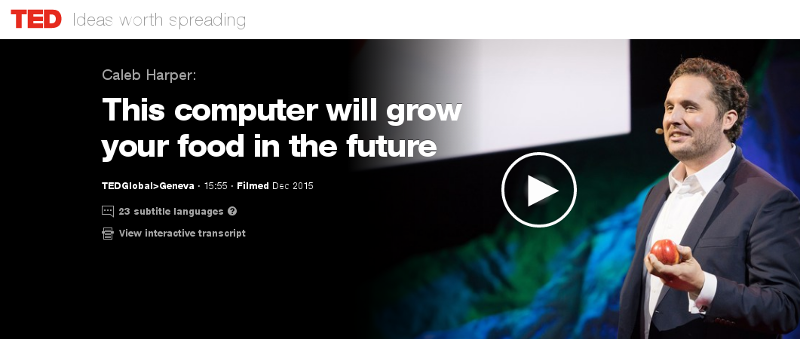
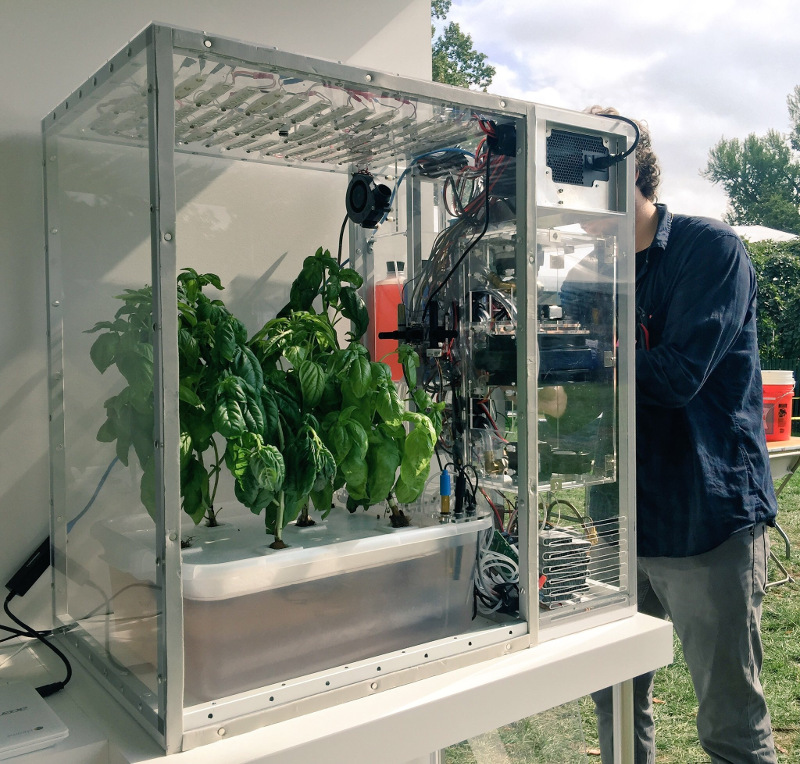
A group has recently been formed on Meetup seeking to build a food computer in Zurich. The initial meeting is planned for 6:30pm on 20 June 2017 at ETH, (Zurich Centre/Zentrum, R mistrasse 101). The question of food security underlies many of the world's problems today. In wealthier nations, we are being called upon to trust a highly opaque supply chain and our choices are limited to those things that major supermarket chains are willing to stock. A huge transport and storage apparatus adds to the cost and CO2 emissions and detracts from the nutritional value of the produce that reaches our plates. In recent times, these problems have been highlighted by the horsemeat scandal, the Guacapocalypse and the British Hummus crisis. One interesting initiative to create transparency and encourage diversity in our diets is the Open Agriculture (OpenAg) Initiative from MIT, summarised in this TED video from Caleb Harper. The food produced is healthier and fresher than anything you might find in a supermarket and has no exposure to pesticides. An open source approach to food An interesting aspect of this project is the promise of an open source approach. The project provides hardware plans, a a video of the build process, source code and the promise of sharing climate recipes (scripts) to replicate the climates of different regions, helping ensure it is always the season for your favour fruit or vegetable. Do we need it? Some people have commented on the cost of equipment and electricity. Carsten Agger recently blogged about permaculture as a cleaner alternative. While there are many places where people can take that approach, there are also many overpopulated regions and cities where it is not feasible. Some countries, like Japan, have an enormous population and previously productive farmland contaminated by industry, such as the Fukushima region. Growing our own food also has the potential to reduce food waste, as individual families and communities can grow what they need. Whether it is essential or not, the food computer project also provides a powerful platform to educate people about food and climate issues and an exciting opportunity to take the free and open source philosophy into many more places in our local communities. The Zurich Meetup group has already received expressions of interest from a diverse group including professionals, researchers, students, hackers, sustainability activists and free software developers. Next steps People who want to form a group in their own region can look in the forum topic "Where are you building your Food Computer?" to find out if anybody has already expressed interest. Which patterns from the free software world can help more people build more food computers? I've already suggested using Debian's live-wrapper to distribute a runnable ISO image that can boot from a USB stick, can you suggest other solutions like this? Can you think of any free software events where you would like to see a talk or exhibit about this project? Please suggest them on the OpenAg forum. There are many interesting resources about the food crisis, an interesting starting point is watching the documentary Food, Inc. If you are in Switzerland, please consider attending the meeting on at 6:30pm on 20 June 2017 at ETH (Centre/Zentrum), Zurich. One final thing to contemplate: if you are not hacking your own food supply, who is?

Reproducible builds folks: Reproducible Builds: week 107 in Stretch cycle

Here's what happened in the Reproducible Builds effort between Sunday May 7 and Saturday May 13 2017: Report from Reproducible Builds Hamburg Hackathon We were 16 participants from 12 projects: 7 Debian, 2 repeatr.io, 1 ArchLinux, 1 coreboot + LEDE, 1 F-Droid, 1 ElectroBSD + privoxy, 1 GNU R, 1 in-toto.io, 1 Meson and 1 openSUSE. Three people came from the USA, 3 from the UK, 2 Finland, 1 Austria, 1 Denmark and 6 from Germany, plus we several guests from our gracious hosts at the CCCHH hackerspace as well as a guest from Australia We had four presentations: Some of the things we worked on: We had a Debian focussed meeting where we discussed a number of topics: And then we also had a lot of fun in the hackerspace, enjoying some of their gimmicks, such as being able to open physical doors with ssh or controlling light and music with an webbrowser without authentication (besides being in the right network). Not quite the hackathon (This wasn't the hackathon per-se, but some of us appreciated these sights and so we thought you would too.) Many thanks to: News and media coverage openSUSE has had a security breach in their infrastructure, including their build services. As of this writing, the scope and impact are still unclear, however the incident illustrates that no one should rely on being able to secure their infrastructure at all times. Reproducible Builds help mitigate this by allowing independent verification of build results, by parties that are unaffected by the compromise. (Whilst this can happen to anyone. Kudos to openSUSE for being open about it. Now let's continue working on Reproducible Builds everywhere!) On May 13th Chris Lamb gave a talk on Reproducible Builds at OSCAL 2017 in Tirana, Albania. OSCAL 2017 Toolchain bug reports and fixes Packages' bug reports Reviews of unreproducible packages 11 package reviews have been added, 2562 have been updated and 278 have been removed in this week, adding to our knowledge about identified issues. Most of the updates were to move ~1800 packages affected by the generic catch-all captures_build_path (out of ~2600 total) to the more specific gcc_captures_build_path, fixed by our proposed patches to GCC. 5 issue types have been updated: Weekly QA work During our reproducibility testing, FTBFS bugs have been detected and reported by: diffoscope development diffoscope development continued on the experimental branch: strip-nondeterminism development reprotest development trydiffoscope development Misc. This week's edition was written by Ximin Luo, Holger Levsen and Chris Lamb & reviewed by a bunch of Reproducible Builds folks on IRC & the mailing lists.

16 May 2017

Daniel Pocock: Building an antenna and receiving ham and shortwave stations with SDR

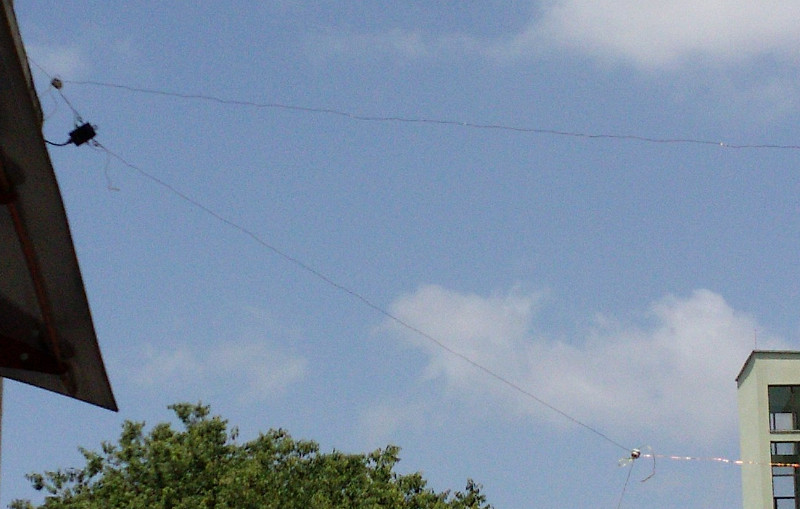
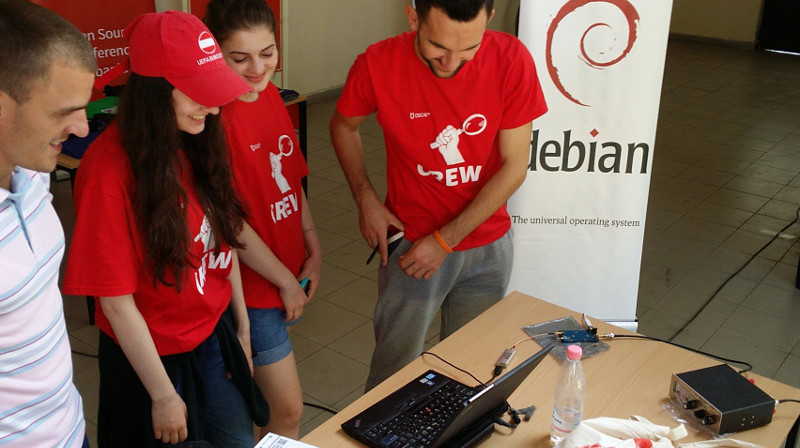
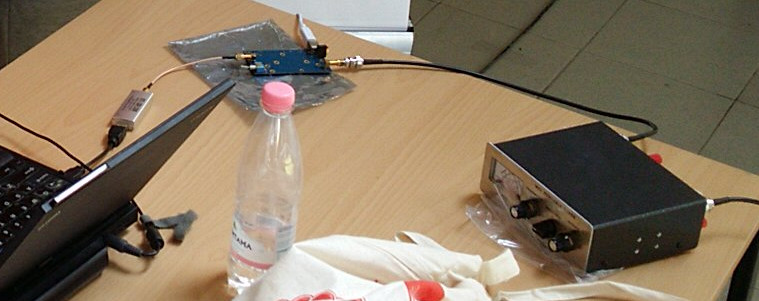
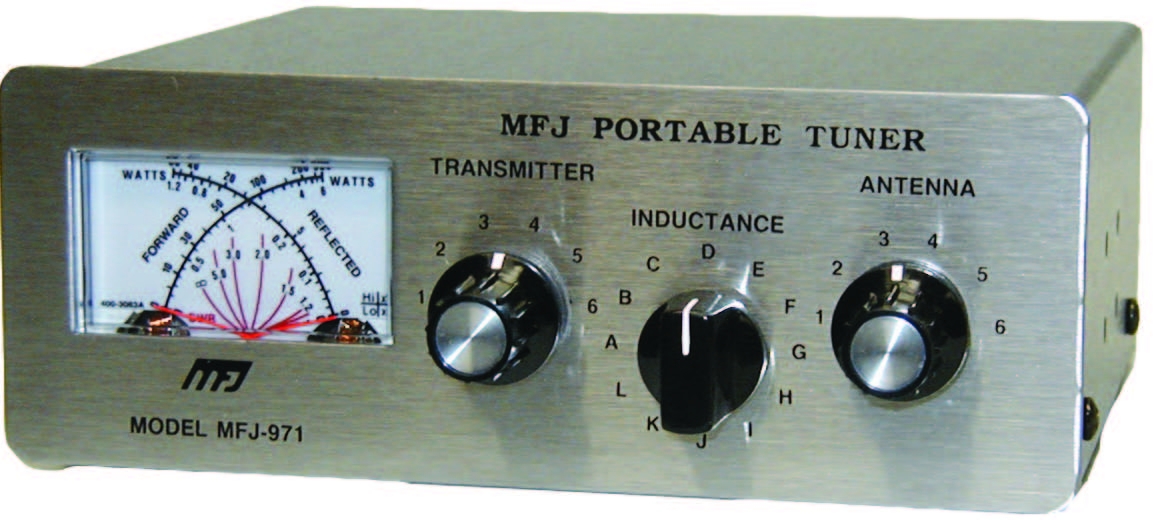
In my previous blog on the topic of software defined radio (SDR), I provided a quickstart guide to using gqrx, GNU Radio and the RTL-SDR dongle to receive FM radio and the amateur 2 meter (VHF) band. Using the same software configuration and the same RTL-SDR dongle, it is possible to add some extra components and receive ham radio and shortwave transmissions from around the world. Here is the antenna setup from the successful SDR workshop at OSCAL'17 on 13 May: After the workshop on Saturday, members of the OSCAL team successfully reconstructed the SDR and antenna at the Debian info booth on Sunday and a wide range of shortwave and ham signals were detected: Here is a close-up look at the laptop, RTL-SDR dongle (above laptop), Ham-It-Up converter (above water bottle) and MFJ-971 ATU (on right): Buying the parts
Component Purpose, Notes Price/link to source
RTL-SDR dongle Converts radio signals (RF) into digital signals for reception through the USB port. It is essential to buy the dongles for SDR with TCXO, the generic RTL dongles for TV reception are not stable enough for anything other than TV. ~ 25
Enamelled copper wire, 25 meters or more Loop antenna. Thicker wire provides better reception and is more suitable for transmitting (if you have a license) but it is heavier. The antenna I've demonstrated at recent events uses 1mm thick wire. ~ 10
4 (or more) ceramic egg insulators Attach the antenna to string or rope. Smaller insulators are better as they are lighter and less expensive. ~ 10
4:1 balun The actual ratio of the balun depends on the shape of the loop (square, rectangle or triangle) and the point where you attach the balun (middle, corner, etc). You may want to buy more than one balun, for example, a 4:1 balun and also a 1:1 balun to try alternative configurations. Make sure it is waterproof, has hooks for attaching a string or rope and an SO-239 socket. from 20
5 meter RG-58 coaxial cable with male PL-259 plugs on both ends If using more than 5 meters or if you want to use higher frequencies above 30MHz, use thicker, heavier and more expensive cables like RG-213. The cable must be 50 ohm. ~ 10
Antenna Tuning Unit (ATU) I've been using the MFJ-971 for portable use and demos because of the weight. There are even lighter and cheaper alternatives if you only need to receive. ~ 20 for receive only or second hand
PL-259 to SMA male pigtail, up to 50cm, RG58 Joins the ATU to the upconverter. Cable must be RG58 or another 50 ohm cable ~ 5
Ham It Up v1.3 up-converter Mixes the HF signal with a signal from a local oscillator to create a new signal in the spectrum covered by the RTL-SDR dongle ~ 40
SMA (male) to SMA (male) pigtail Join the up-converter to the RTL-SDR dongle ~ 2
USB charger and USB type B cable Used for power to the up-converter. A spare USB mobile phone charge plug may be suitable. ~ 5
String or rope For mounting the antenna. A ligher and cheaper string is better for portable use while a stronger and weather-resistent rope is better for a fixed installation. 5
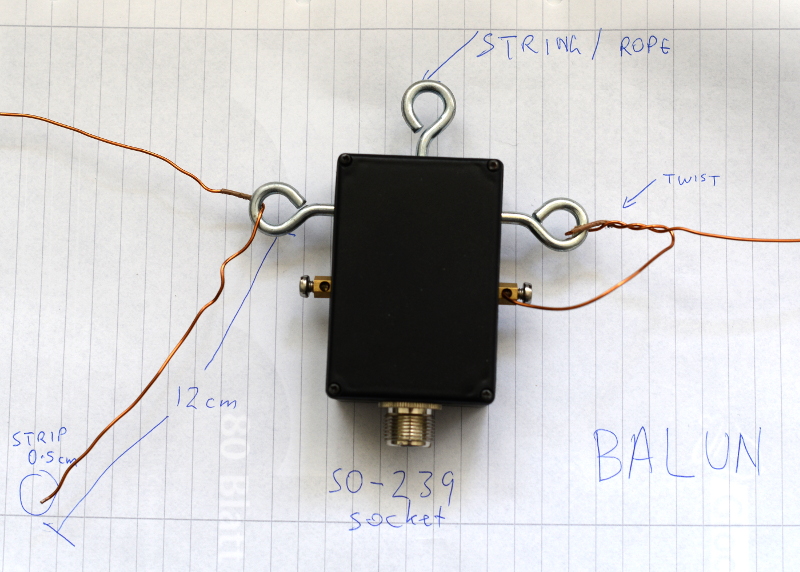
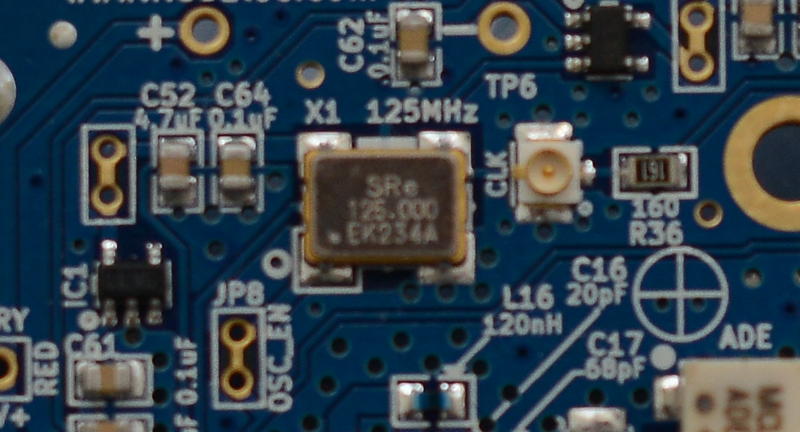
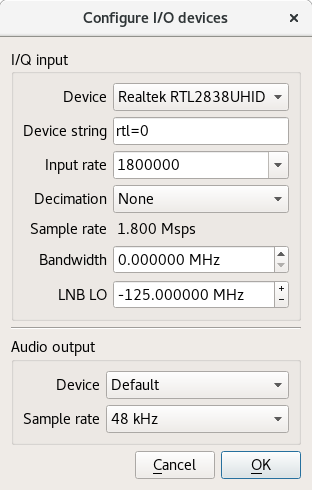
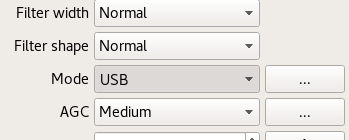
Building the antenna There are numerous online calculators for measuring the amount of enamelled copper wire to cut. For example, for a centre frequency of 14.2 MHz on the 20 meter amateur band, the antenna length is 21.336 meters. Add an extra 24 cm (extra 12 cm on each end) for folding the wire through the hooks on the balun. After cutting the wire, feed it through the egg insulators before attaching the wire to the balun. Measure the extra 12 cm at each end of the wire and wrap some tape around there to make it easy to identify in future. Fold it, insert it into the hook on the balun and twist it around itself. Use between four to six twists. Strip off approximately 0.5cm of the enamel on each end of the wire with a knife, sandpaper or some other tool. Insert the exposed ends of the wire into the screw terminals and screw it firmly into place. Avoid turning the screw too tightly or it may break or snap the wire. Insert string through the egg insulators and/or the middle hook on the balun and use the string to attach it to suitable support structures such as a building, posts or trees. Try to keep it at least two meters from any structure. Maximizing the surface area of the loop improves the performance: a circle is an ideal shape, but a square or 4:3 rectangle will work well too. For optimal performance, if you imagine the loop is on a two-dimensional plane, the first couple of meters of feedline leaving the antenna should be on the plane too and at a right angle to the edge of the antenna. Join all the other components together using the coaxial cables. Configuring gqrx for the up-converter and shortwave signals Inspect the up-converter carefully. Look for the crystal and find the frequency written on the side of it. The frequency written on the specification sheet or web site may be wrong so looking at the crystal itself is the best way to be certain. On my Ham It Up, I found a crystal with 125.000 written on it, this is 125 MHz. Launch gqrx, go to the File menu and select I/O devices. Change the LNB LO value to match the crystal frequency on the up-converter, with a minus sign. For my Ham It Up, I use the LNB LO value -125.000000 MHz. Click OK to close the I/O devices window. On the Input Controls tab, make sure Hardware AGC is enabled. On the Receiver options tab, change the Mode value. Commercial shortwave broadcasts use AM and amateur transmission use single sideband: by convention, LSB is used for signals below 10MHz and USB is used for signals above 10MHz. To start exploring the 20 meter amateur band around 14.2 MHz, for example, use USB. In the top of the window, enter the frequency, for example, 14.200 000 MHz. Now choose the FFT Settings tab and adjust the Freq zoom slider. Zoom until the width of the display is about 100 kHZ, for example, from 14.15 on the left to 14.25 on the right. Click the Play icon at the top left to start receiving. You may hear white noise. If you hear nothing, check the computer's volume controls, move the Gain slider (bottom right) to the maximum position and then lower the Squelch value on the Receiver options tab until you hear the white noise or a transmission. Adjust the Antenna Tuner knobs Now that gqrx is running, it is time to adjust the knobs on the antenna tuner (ATU). Reception improves dramatically when it is tuned correctly. Exact instructions depend on the type of ATU you have purchased, here I present instructions for the MFJ-971 that I have been using. Turn the TRANSMITTER and ANTENNA knobs to the 12 o'clock position and leave them like that. Turn the INDUCTANCE knob while looking at the signals in the gqrx window. When you find the best position, the signal strength displayed on the screen will appear to increase (the animated white line should appear to move upwards and maybe some peaks will appear in the line). When you feel you have found the best position for the INDUCTANCE knob, leave it in that position and begin turning the ANTENNA knob clockwise looking for any increase in signal strength on the chart. When you feel that is correct, begin turning the TRANSMITTER knob. Listening to a transmission At this point, if you are lucky, some transmissions may be visible on the gqrx screen. They will appear as darker colours in the waterfall chart. Try clicking on one of them, the vertical red line will jump to that position. For a USB transmission, try to place the vertical red line at the left hand side of the signal. Try dragging the vertical red line or changing the frequency value at the top of the screen by 100 Hz at a time until the station is tuned as well as possible. Try and listen to the transmission and identify the station. Commercial shortwave broadcasts will usually identify themselves from time to time. Amateur transmissions will usually include a callsign spoken in the phonetic alphabet. For example, if you hear "CQ, this is Victor Kilo 3 Tango Quebec Romeo" then the station is VK3TQR. You may want to note down the callsign, time, frequency and mode in your log book. You may also find information about the callsign in a search engine. The video demonstrates reception of a transmission from another country, can you identify the station's callsign and find his location? If you have questions about this topic, please come and ask on the Debian Hams mailing list. The gqrx package is also available in Fedora and Ubuntu but it is known to crash on startup in Ubuntu 17.04. Users of other distributions may also want to try the Debian Ham Blend bootable ISO live image as a quick and easy way to get started.

Foteini Tsiami: Outreachy internship!

Hello everyone! I am very happy that I have been accepted as an intern in the Outreachy 2017 round. My project task is to adapt sch-scripts into a new project ltsp-manager , primarily through internationalization and localization as well as documentation.

Sch-scripts is a graphical tool that assists with management of a classroom computer lab, managing users and network booted computers with LTSP, and is used in more than 1000 schools in Greece along with the epoptes user monitoring software.

Traditionally, maintaining an LTSP environment requires comfort with a commandline interface, but sch-scripts provides a graphical tool that simplifies the installation, configuration and management of an LTSP classroom.

Epoptes allows the teacher to monitor or assist users in the computer lab, as well as send messages, boot and shut down computers.

Both LTSP and Epoptes are present in Debian, and internationalizing sch-scripts is an important step towards making the same interface used successfully in Greek schools available to all Debian and Ubuntu users.

12 May 2017

Daniel Pocock: Kamailio World and FSFE team visit, Tirana arrival

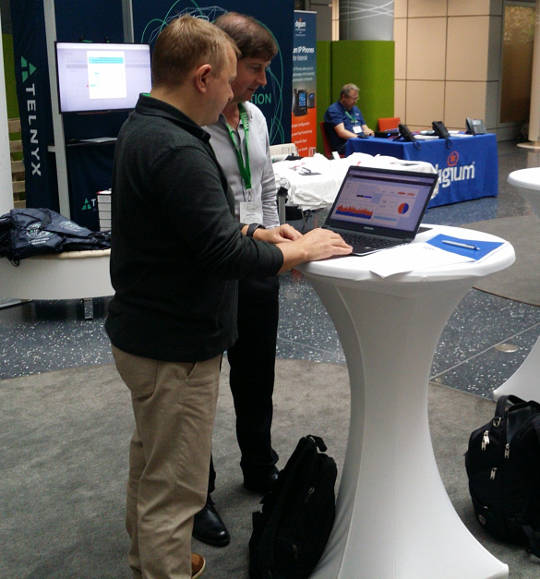
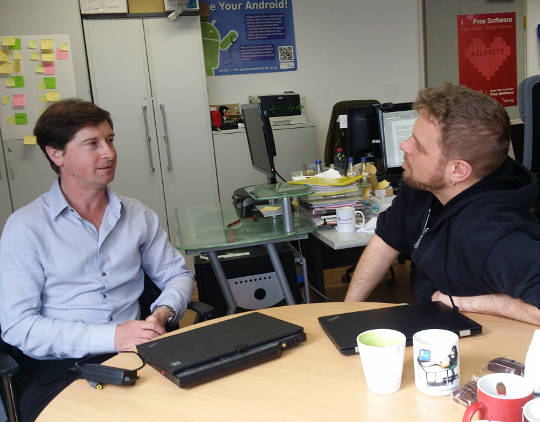
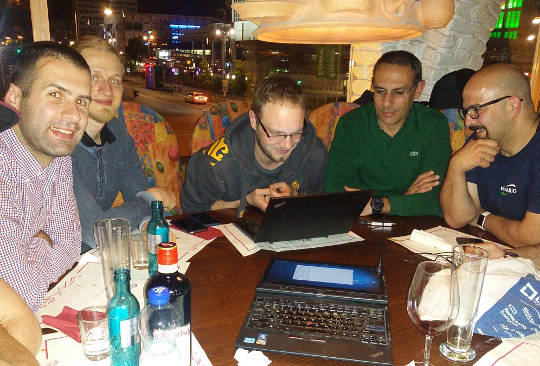
This week I've been thrilled to be in Berlin for Kamailio World 2017, one of the highlights of the SIP, VoIP and telephony enthusiast's calendar. It is an event that reaches far beyond Kamailio and is well attended by leaders of many of the well known free software projects in this space. HOMER 6 is coming Alexandr Dubovikov gave me a sneak peek of the new version of the HOMER SIP capture framework for gathering, storing and analyzing messages in a SIP network. exploring HOMER 6 with Alexandr Dubovikov at Kamailio World 2017 Visiting the FSFE team in Berlin Having recently joined the FSFE's General Assembly as the fellowship representative, I've been keen to get to know more about the organization. My visit to the FSFE office involved a wide-ranging discussion with Erik Albers about the fellowship program and FSFE in general. discussing the Fellowship program with Erik Albers Steak and SDR night After a hard day of SIP hacking and a long afternoon at Kamailio World's open bar, a developer needs a decent meal and something previously unseen to hack on. A group of us settled at Escados, Alexanderplatz where my SDR kit emerged from my bag and other Debian users found out how easy it is to apt install the packages, attach the dongle and explore the radio spectrum. playing with SDR after dinner Next stop OSCAL'17, Tirana Having left Berlin, I'm now in Tirana, Albania where I'll give an SDR workshop and Free-RTC talk at OSCAL'17. The weather forecast is between 26 - 28 degrees celsius, the food is great and the weekend's schedule is full of interesting talks and workshops. The organizing team have already made me feel very welcome here, meeting me at the airport and leaving a very generous basket of gifts in my hotel room. OSCAL has emerged as a significant annual event in the free software world and if it's too late for you to come this year, don't miss it in 2018. OSCAL'17 banner

11 May 2017

Arturo Borrero Gonz lez: Debunk some Debian myths

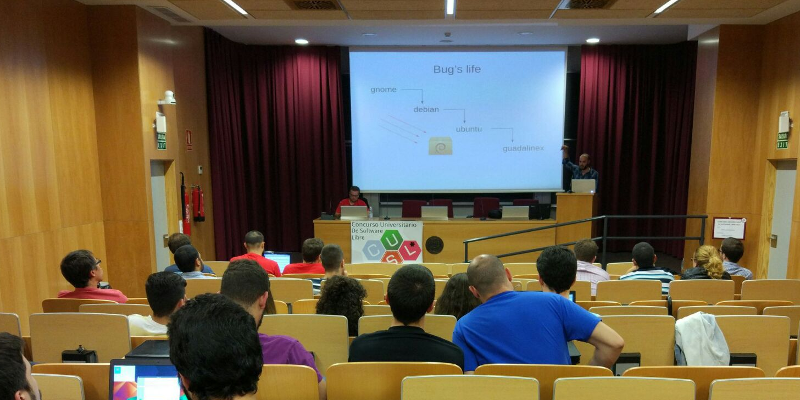
Debian CUSL 11 Debian has many years of history, about 25 years already. With such a long travel over the continous field of developing our Universal Operating System, some myths, false accusations and bad reputation has arisen. Today I had the opportunity to discuss this topic, I was invited to give a Debian talk in the 11 Concurso Universitario de Software Libre , a Spanish contest for students to develop and dig a bit into free-libre open source software (and hardware). In this talk, I walked through some of the most common Debian myths, and I would like to summarize here some of them, with a short explanation of why I think they should be debunked. Picture of the talk myth #1: Debian is old software Please, use testing or stable-backports. If you use Debian stable your system will in fact be stable and that means: updates contain no new software but only fixes. myth #2: Debian is slow We compile and build most of our packages with industry-standard compilers and options. I don t see a significant difference on how fast linux kernel or mysql run in a CentOS or in Debian. myth #3: Debian is difficult I already discussed about this issue back in Jan 2017, Debian is a puzzle: difficult. myth #4: Debian has no graphical environment This is, simply put, false. We have gnome, kde, xfce and more. The basic Debian installer asks you what do you want at install time. myth #5: since Debian isn t commercial, the quality is poor Did you know that most of our package developers are experts in their packages and in their upstream code? Not all, but most of them. Besides, many package developers get paid to do their Debian job. Also, there are external companies which do indeed offer support for Debian (see freexian for example). myth #6: I don t trust Debian Why? Did we do something to gain this status? If so, please let us know. You don t trust how we build or configure our packages? You don t trust how we work? Anyway, I m sorry, you have to trust someone if you want to use any kind of computer. Supervising every single bit of your computer isn t practical for you. Please trust us, we do our best. myth #7: nobody uses Debian I don t agree. Many people use Debian. They even run Debian in the International Space Station. Do you count derivatives, such as Ubuntu? I believe this myth is just pointless, but some people out there really think nobody uses Debian. myth #8: Debian uses systemd Well, this is true. But you can run sysvinit if you want. I prefer and recommend systemd though :-) myth #9: Debian is only for servers No. See myths #1, #2 and #4. You may download my slides in PDF and in ODP format (only in Spanish, sorry for English readers).

7 May 2017

Vasudev Kamath: Tips for fuzzing network programs with AFL

Fuzzing is method of producing random malformed inputs for a software and observe the software behavior. If a software crashes then there is a bug and it can have security implications. Fuzzing has gained a lot of interest now a days, especially with automated tools like American Fuzzy Lop (AFL) which can easily help you to fuzz the program and record inputs which causes crash in the software. American Fuzzy Lop is a file based fuzzer which feeds input to program via standard input. Using it with network program like server's or clients is not possible in the original state. There is a version of AFL with patches to allow it fuzz network programs, but this patch is not merged upstream and I do not know if it ever makes into upstream or not. Also the above repository contains version 1.9 which is older compared to currently released versions. There is another method for fuzzing network program using AFL with help of LD_PRELOAD tricks. preeny is a project which provides library which when used with LD_PRELOAD can desocket the network program and make it read from stdin. There is this best tutorial from LoLWare which talks about fuzzing Nginx with preeny and AFL. There is a best AFL workflow by Foxglove Security which gives start to finish details about how to use AFL and its companion tool to do fuzzing. So I'm not going to talk about any steps of fuzzing in this post instead I'm going to list down my observations on changes that needs to be done to get clean fuzzing with AFL and preeny.
  1. desock.so provided by preeny works only with read and write (or rather other system call does not work with stdin) system calls and hence you need to make sure you replace any reference to send, sendto, recv and recvfrom with read and write system calls respectively. Without this change program will not read input provided by AFL on standard input.
  2. If your network program is using forking or threading model make sure to remove all those and make it plain simple program which receives request and sends out response. Basically you are testing the ability of program to handle malformed input so we need very minimum logic to make program do what it is supposed to do when AFL runs it.
  3. If you are using infinite loop like all normal programs replace the infinite loop with below mentioned AFL macro and use afl-clang-fast to compile it. This speeds up the testing as AFL will run the job n times before discarding the current fork and doing a fresh fork. After all fork is costly affair.
while(__AFL_LOOP(1000))   // Change 1000 with iteration count
             // your logic here
 
With above modification I could fuzz a server program talking binary protocol and another one talking textual protocol. In both case I used Wireshark capture to get the packet extract raw content and feed it as input to AFL. I was successful in finding crashes which are exploitable in case of textual protocol program than in binary protocol case. In case of binary protocol AFL could not easily find new paths which probably is because of bad inputs I provided. I will continue to do more experiment with binary protocol case and provide my findings as new updates here. If you have anything more to add do share with me :-). Happy fuzzing!.

6 May 2017

Vasudev Kamath: Magic: Attach a HTML file to mail and get different on other side

It's been a long time I did not write any new blog posts, and finally I got something which is interesting enough for a new post and so here it is. I actually wanted some bills from my ISP for some work and I could not find mail from the ISP which had bills for some specific months in my mailbox. Problem with my ISP is bills are accessible in their account which can be only accessed from their own network. They do have a mobile app and that does not seem to work especially for the billing section. I used mobile app and selected month for which I did not have bill and clicked Send Mail button. App happily showed message saying it sent the bill to my registered mail address but that was a fancy lie. After trying several time I gave up and decided I will do it once I get back home. Fast forward few hours, I'm back home from office and then I sat in front of my laptop and connected to ISP site, promptly downloaded the bills, then used notmuch-emacs and fire up a mail composer, attach those HTML file (yeah they produce bill in HTML file :-/) send it to my gmail and forget about it. Fast forward few more days, I just remember I need those bills. I got hold of mail I sent earlier in gmail inbox and clicked on attachment and when browser opened the attachment I was shocked/surprised . Did you ask why?. See what I saw when I opened attachment. Well I was confused for moment on what happened, I tried downloading the file and opened it an editor, and I see Chinese characters here also. After reaching home I checked the Sent folder in my laptop where I keep copy of mails sent using notmuch-emacs's notmuch-fcc-dirs variable. I open the file and open the attachement and I see same character as I saw in browser!. I open the original bills I downloaded and it looks fine. To check if I really attached the correct files I again drafted a mail this time to my personal email and sent it. Now I open the file from Sent folder and voila again there is different content inside my attachment!. Same happens when I receive the mail and open the attachment everything inside is Chinese characters!. Totally lost I finally opened the original file using emacs, since I use spacemacs it asked me for downloading of html layer and after which I was surprised because everything inside the editor is in Chinese!. OK finally I've something now so I opened same file at same time in nano from terminal and there it looks fine!. OK that is weird again I read carefully content and saw this line in beginning of file
<?xml version="1.0" encoding="UTF-16" ?>
<html xmlns="http://www.w3.org/1999/xhtml>....
OK that is new XML tag had encoding declared as UTF-16, really?. And just for checking I changed it to UTF-8 and voila file is back to normal in Emacs window!. To confirm this behavior I created a sample file with following content
<?xml version="1.0" encoding="utf-8"?><html xmlns="http://www.w3.org/1999/xhtml"><head><meta http-equiv="Content-Type" content="text/html; charset=iso-8859-1" /><title> Something weird </title><body>blablablablablalabkabakba</body></html>
Yeah with long line because ISP had similar case and now I opened the same file in nano using terminal and changed encoding="UTF-8" to encoding="UTF-16" and the behavior repeated I see Chinese character in the emacs buffer which has also opened the same file. Below is the small gif showing this happening in real time, see what happens in emacs buffer when I change the encoding in terminal below. Fun right?. I made following observation from above experiments.
  1. When I open original file in browser or my sample file with encoding="UTF-16" its normal, no Chinese characters.
  2. When I attach the mail and send it out the attachment some how gets converted into HTML file with Chinese characters and viewing source from browser shows header containing xml declarations and original <html> declarations get ripped off and new tags show up which I've pasted below.
  3. If I download the same file and open in editor only Chinese characters are present and no HTML tags inside it. So definitely the new tags which I saw by viewing source in browser is added by Firefox.
  4. I create similar HTML file and change encoding I can see the characters changing back and forth in emacs web-mode when I change encoding of the file.
<!DOCTYPE HTML PUBLIC "-//W3C//DTD HTML 4.01 Transitional//EN">
<html>
  <head><META http-equiv="Content-Type"  content="text/html; charset=utf-8">
So if I'm understanding this correctly, Emacs due to encoding declaration interprets the actual contents differently. To see how Emacs really interpreted the content I opened the sent mail I had in raw format and saw following header lines for attachment.
Content-Type: text/html; charset=utf-8
Content-Disposition: attachment;
             filename=SOA-102012059675-FEBRUARY-2017.html
Content-Transfer-Encoding: base64
This was followed with base64 encoded data. So does this mean emacs interpreted the content as UTF-16 and encoded the content using UTF-8?. Again I've no clue, so I changed the encoding in both the files to be as UTF-8 and sent the mail by attaching these files again to see what happens. And my guess was right I could get the attachment as is on the receiving side. And inspecting raw mail the attachment headers now different than before.
Content-Type: text/html
Content-Disposition: attachment;
             filename=SOA-102012059675-DECEMBER-2016.html
Content-Transfer-Encoding: quoted-printable
See how Content-Type its different now also see the Content-Transfer-Encoding its now quoted-printable as opposed to base64 earlier. Additionally I can see HTML content below the header. When I opened the attachment from mail I get the actual bill. As far as I understand base64 encoding is used when the data to be attached is base64. So I guess basically due to wrong encoding declared inside the file Emacs interpreted the content as a binary data and encoded it differently than what it really should be. Phew that was a lot of investigation to understand the magic but it was worth it. Do let me know your thoughts on this.

3 May 2017

Vincent Bernat: VXLAN: BGP EVPN with Cumulus Quagga

VXLAN is an overlay network to encapsulate Ethernet traffic over an existing (highly available and scalable, possibly the Internet) IP network while accomodating a very large number of tenants. It is defined in RFC 7348. For an uncut introduction on its use with Linux, have a look at my VXLAN & Linux post. VXLAN deployment In the above example, we have hypervisors hosting a virtual machines from different tenants. Each virtual machine is given access to a tenant-specific virtual Ethernet segment. Users are expecting classic Ethernet segments: no MAC restrictions1, total control over the IP addressing scheme they use and availability of multicast. In a large VXLAN deployment, two aspects need attention:
  1. discovery of other endpoints (VTEPs) sharing the same VXLAN segments, and
  2. avoidance of BUM frames (broadcast, unknown unicast and multicast) as they have to be forwarded to all VTEPs.
A typical solution for the first point is using multicast. For the second point, this is source-address learning.

Introduction to BGP EVPN BGP EVPN (RFC 7432 and draft-ietf-bess-evpn-overlay for its application to VXLAN) is a standard control protocol to efficiently solves those two aspects without relying on multicast nor source-address learning. BGP EVPN relies on BGP (RFC 4271) and its MP-BGP extensions (RFC 4760). BGP is the routing protocol powering the Internet. It is highly scalable and interoperable. It is also extensible and one of its extension is MP-BGP. This extension can carry reachability information (NLRI) for multiple protocols (IPv4, IPv6, L3VPN and in our case EVPN). EVPN is a special family to advertise MAC addresses and the remote equipments they are attached to. There are basically two kinds of reachability information a VTEP sends through BGP EVPN:
  1. the VNIs they have interest in (type 3 routes), and
  2. for each VNI, the local MAC addresses (type 2 routes).
The protocol also covers other aspects of virtual Ethernet segments (L3 reachability information from ARP/ND caches, MAC mobility and multi-homing2) but we won t describe them here. To deploy BGP EVPN, a typical solution is to use several route reflectors (both for redundancy and scalability), like in the picture below. Each VTEP opens a BGP session to at least two route reflectors, sends its information (MACs and VNIs) and receives others . This reduces the number of BGP sessions to configure. VXLAN deployment with route reflectors Compared to other solutions to deploy VXLAN, BGP EVPN has three main advantages:
  • interoperability with other vendors (notably Juniper and Cisco),
  • proven scalability (a typical BGP routers handle several millions of routes), and
  • possibility to enforce fine-grained policies.
On Linux, Cumulus Quagga is a fairly complete implementation of BGP EVPN (type 3 routes for VTEP discovery, type 2 routes with MAC or IP addresses, MAC mobility when a host changes from one VTEP to another one) which requires very little configuration. This is a fork of Quagga and currently used in Cumulus Linux, a network operating system based on Debian powering switches from various brands. At some point, BGP EVPN support will be contributed back to FRR, a community-maintained fork of Quagga3. It should be noted the BGP EVPN implementation of Cumulus Quagga currently only supports IPv4.

Route reflector setup Before configuring each VTEP, we need to configure two or more route reflectors. There are many solutions. I will present three of them:
  • using Cumulus Quagga,
  • using GoBGP, an implementation of BGP in Go,
  • using Juniper JunOS.
For reliability purpose, it s possible (and easy) to use one implementation for some route reflectors and another implementation for the other ones. The proposed configurations are quite minimal. However, it is possible to centralize policies on the route reflectors (e.g. routes tagged with some community can only be readvertised to some group of VTEPs).

Using Quagga The configuration is pretty simple. We suppose the configured route reflector has 203.0.113.254 configured as a loopback IP.
router bgp 65000
  bgp router-id 203.0.113.254
  bgp cluster-id 203.0.113.254
  bgp log-neighbor-changes
  no bgp default ipv4-unicast
  neighbor fabric peer-group
  neighbor fabric remote-as 65000
  neighbor fabric capability extended-nexthop
  neighbor fabric update-source 203.0.113.254
  bgp listen range 203.0.113.0/24 peer-group fabric
  !
  address-family evpn
   neighbor fabric activate
   neighbor fabric route-reflector-client
  exit-address-family
  !
  exit
!
A peer group fabric is defined and we leverage the dynamic neighbor feature of Cumulus Quagga: we don t have to explicitely define each neighbor. Any client from 203.0.113.0/24 and presenting itself as part of AS 65000 can connect. All sent EVPN routes will be accepted and reflected to the other clients. You don t need to run Zebra, the route engine talking with the kernel. Instead, start bgpd with the --no_kernel flag.

Using GoBGP GoBGP is a clean implementation of BGP in Go4. It exposes an RPC API for configuration (but accepts a configuration file and comes with a command-line client). It doesn t support dynamic neighbors, so you ll have to use the API, the command-line client or some templating language to automate their declaration. A configuration with only one neighbor is like this:
global:
  config:
    as: 65000
    router-id: 203.0.113.254
    local-address-list:
      - 203.0.113.254
neighbors:
  - config:
      neighbor-address: 203.0.113.1
      peer-as: 65000
    afi-safis:
      - config:
          afi-safi-name: l2vpn-evpn
    route-reflector:
      config:
        route-reflector-client: true
        route-reflector-cluster-id: 203.0.113.254
More neighbors can be added from the command line:
$ gobgp neighbor add 203.0.113.2 as 65000 \
>         route-reflector-client 203.0.113.254 \
>         --address-family evpn
GoBGP won t try to interact with the kernel which is fine as a route reflector.

Using Juniper JunOS A variety of Juniper products can be a BGP route reflector, notably: The main factor is the CPU and the memory. The QFX5100 is low on memory and won t support large deployments without some additional policing. Here is a configuration similar to the Quagga one:
interfaces  
    lo0  
        unit 0  
            family inet  
                address 203.0.113.254/32;


protocols  
    bgp  
        group fabric  
            family evpn  
                signaling  
                    /* Do not try to install EVPN routes */
                    no-install;
                 
             
            type internal;
            cluster 203.0.113.254;
            local-address 203.0.113.254;
            allow 203.0.113.0/24;


routing-options  
    router-id 203.0.113.254;
    autonomous-system 65000;
 

VTEP setup The next step is to configure each VTEP/hypervisor. Each VXLAN is locally configured using a bridge for local virtual interfaces, like illustrated in the below schema. The bridge is taking care of the local MAC addresses (notably, using source-address learning) and the VXLAN interface takes care of the remote MAC addresses (received with BGP EVPN). Bridged VXLAN device VXLANs can be provisioned with the following script. Source-address learning is disabled as we will rely solely on BGP EVPN to synchronize FDBs between the hypervisors.
for vni in 100 200; do
    # Create VXLAN interface
    ip link add vxlan$ vni  type vxlan
        id $ vni  \
        dstport 4789 \
        local 203.0.113.2 \
        nolearning
    # Create companion bridge
    brctl addbr br$ vni 
    brctl addif br$ vni  vxlan$ vni 
    brctl stp br$ vni  off
    ip link set up dev br$ vni 
    ip link set up dev vxlan$ vni 
done
# Attach each VM to the appropriate segment
brctl addif br100 vnet10
brctl addif br100 vnet11
brctl addif br200 vnet12
The configuration of Cumulus Quagga is similar to the one used for a route reflector, except we use the advertise-all-vni directive to publish all local VNIs.
router bgp 65000
  bgp router-id 203.0.113.2
  no bgp default ipv4-unicast
  neighbor fabric peer-group
  neighbor fabric remote-as 65000
  neighbor fabric capability extended-nexthop
  neighbor fabric update-source dummy0
  ! BGP sessions with route reflectors
  neighbor 203.0.113.253 peer-group fabric
  neighbor 203.0.113.254 peer-group fabric
  !
  address-family evpn
   neighbor fabric activate
   advertise-all-vni
  exit-address-family
  !
  exit
!
If everything works as expected, the instances sharing the same VNI should be able to ping each other. If IPv6 is enabled on the VMs, the ping command shows if everything is in order:
$ ping -c10 -w1 -t1 ff02::1%eth0
PING ff02::1%eth0(ff02::1%eth0) 56 data bytes
64 bytes from fe80::5254:33ff:fe00:8%eth0: icmp_seq=1 ttl=64 time=0.016 ms
64 bytes from fe80::5254:33ff:fe00:b%eth0: icmp_seq=1 ttl=64 time=4.98 ms (DUP!)
64 bytes from fe80::5254:33ff:fe00:9%eth0: icmp_seq=1 ttl=64 time=4.99 ms (DUP!)
64 bytes from fe80::5254:33ff:fe00:a%eth0: icmp_seq=1 ttl=64 time=4.99 ms (DUP!)
--- ff02::1%eth0 ping statistics ---
1 packets transmitted, 1 received, +3 duplicates, 0% packet loss, time 0ms
rtt min/avg/max/mdev = 0.016/3.745/4.991/2.152 ms

Verification Step by step, let s check how everything comes together.

Getting VXLAN information from the kernel On each VTEP, Quagga should be able to retrieve the information about configured VXLANs. This can be checked with vtysh:
# show interface vxlan100
Interface vxlan100 is up, line protocol is up
  Link ups:       1    last: 2017/04/29 20:01:33.43
  Link downs:     0    last: (never)
  PTM status: disabled
  vrf: Default-IP-Routing-Table
  index 11 metric 0 mtu 1500
  flags: <UP,BROADCAST,RUNNING,MULTICAST>
  Type: Ethernet
  HWaddr: 62:42:7a:86:44:01
  inet6 fe80::6042:7aff:fe86:4401/64
  Interface Type Vxlan
  VxLAN Id 100
  Access VLAN Id 1
  Master (bridge) ifindex 9 ifp 0x56536e3f3470
The important points are:
  • the VNI is 100, and
  • the bridge device was correctly detected.
Quagga should also be able to retrieve information about the local MAC addresses :
# show evpn mac vni 100
Number of MACs (local and remote) known for this VNI: 2
MAC               Type   Intf/Remote VTEP      VLAN
50:54:33:00:00:0a local  eth1.100
50:54:33:00:00:0b local  eth2.100

BGP sessions Each VTEP has to establish a BGP session to the route reflectors. On the VTEP, this can be checked by running vtysh:
# show bgp neighbors 203.0.113.254
BGP neighbor is 203.0.113.254, remote AS 65000, local AS 65000, internal link
 Member of peer-group fabric for session parameters
  BGP version 4, remote router ID 203.0.113.254
  BGP state = Established, up for 00:00:45
  Neighbor capabilities:
    4 Byte AS: advertised and received
    AddPath:
      L2VPN EVPN: RX advertised L2VPN EVPN
    Route refresh: advertised and received(new)
    Address family L2VPN EVPN: advertised and received
    Hostname Capability: advertised
    Graceful Restart Capabilty: advertised
[...]
 For address family: L2VPN EVPN
  fabric peer-group member
  Update group 1, subgroup 1
  Packet Queue length 0
  Community attribute sent to this neighbor(both)
  8 accepted prefixes

  Connections established 1; dropped 0
  Last reset never
Local host: 203.0.113.2, Local port: 37603
Foreign host: 203.0.113.254, Foreign port: 179
The output includes the following information:
  • the BGP state is Established,
  • the address family L2VPN EVPN is correctly advertised, and
  • 8 routes are received from this route reflector.
The state of the BGP sessions can also be checked from the route reflectors. With GoBGP, use the following command:
# gobgp neighbor 203.0.113.2
BGP neighbor is 203.0.113.2, remote AS 65000, route-reflector-client
  BGP version 4, remote router ID 203.0.113.2
  BGP state = established, up for 00:04:30
  BGP OutQ = 0, Flops = 0
  Hold time is 9, keepalive interval is 3 seconds
  Configured hold time is 90, keepalive interval is 30 seconds
  Neighbor capabilities:
    multiprotocol:
        l2vpn-evpn:     advertised and received
    route-refresh:      advertised and received
    graceful-restart:   received
    4-octet-as: advertised and received
    add-path:   received
    UnknownCapability(73):      received
    cisco-route-refresh:        received
[...]
  Route statistics:
    Advertised:             8
    Received:               5
    Accepted:               5
With JunOS, use the below command:
> show bgp neighbor 203.0.113.2
Peer: 203.0.113.2+38089 AS 65000 Local: 203.0.113.254+179 AS 65000
  Group: fabric                Routing-Instance: master
  Forwarding routing-instance: master
  Type: Internal    State: Established
  Last State: OpenConfirm   Last Event: RecvKeepAlive
  Last Error: None
  Options: <Preference LocalAddress Cluster AddressFamily Rib-group Refresh>
  Address families configured: evpn
  Local Address: 203.0.113.254 Holdtime: 90 Preference: 170
  NLRI evpn: NoInstallForwarding
  Number of flaps: 0
  Peer ID: 203.0.113.2     Local ID: 203.0.113.254     Active Holdtime: 9
  Keepalive Interval: 3          Group index: 0    Peer index: 2
  I/O Session Thread: bgpio-0 State: Enabled
  BFD: disabled, down
  NLRI for restart configured on peer: evpn
  NLRI advertised by peer: evpn
  NLRI for this session: evpn
  Peer supports Refresh capability (2)
  Stale routes from peer are kept for: 300
  Peer does not support Restarter functionality
  NLRI that restart is negotiated for: evpn
  NLRI of received end-of-rib markers: evpn
  NLRI of all end-of-rib markers sent: evpn
  Peer does not support LLGR Restarter or Receiver functionality
  Peer supports 4 byte AS extension (peer-as 65000)
  NLRI's for which peer can receive multiple paths: evpn
  Table bgp.evpn.0 Bit: 20000
    RIB State: BGP restart is complete
    RIB State: VPN restart is complete
    Send state: in sync
    Active prefixes:              5
    Received prefixes:            5
    Accepted prefixes:            5
    Suppressed due to damping:    0
    Advertised prefixes:          8
  Last traffic (seconds): Received 276  Sent 170  Checked 276
  Input messages:  Total 61     Updates 3       Refreshes 0     Octets 1470
  Output messages: Total 62     Updates 4       Refreshes 0     Octets 1775
  Output Queue[1]: 0            (bgp.evpn.0, evpn)
If a BGP session cannot be established, the logs of each BGP daemon should mention the cause.

Sent routes From each VTEP, Quagga needs to send:
  • one type 3 route for each local VNI, and
  • one type 2 route for each local MAC address.
The best place to check the received routes is on one of the route reflectors. If you are using JunOS, the following command will display the received routes from the provided VTEP:
> show route table bgp.evpn.0 receive-protocol bgp 203.0.113.2
bgp.evpn.0: 10 destinations, 10 routes (10 active, 0 holddown, 0 hidden)
  Prefix                  Nexthop              MED     Lclpref    AS path
  2:203.0.113.2:100::0::50:54:33:00:00:0a/304 MAC/IP
*                         203.0.113.2                  100        I
  2:203.0.113.2:100::0::50:54:33:00:00:0b/304 MAC/IP
*                         203.0.113.2                  100        I
  3:203.0.113.2:100::0::203.0.113.2/304 IM
*                         203.0.113.2                  100        I
  3:203.0.113.2:200::0::203.0.113.2/304 IM
*                         203.0.113.2                  100        I
There is one type 3 route for VNI 100 and another one for VNI 200. There are also two type 2 routes for two MAC addresses on VNI 100. To get more information, you can add the keyword extensive. Here is a type 3 route advertising 203.0.113.2 as a VTEP for VNI 1008:
> show route table bgp.evpn.0 receive-protocol bgp 203.0.113.2 extensive
bgp.evpn.0: 11 destinations, 11 routes (11 active, 0 holddown, 0 hidden)
* 3:203.0.113.2:100::0::203.0.113.2/304 IM (1 entry, 1 announced)
     Accepted
     Route Distinguisher: 203.0.113.2:100
     Nexthop: 203.0.113.2
     Localpref: 100
     AS path: I
     Communities: target:65000:268435556 encapsulation:vxlan(0x8)
[...]
Here is a type 2 route announcing the location of the 50:54:33:00:00:0a MAC address for VNI 100:
> show route table bgp.evpn.0 receive-protocol bgp 203.0.113.2 extensive
bgp.evpn.0: 11 destinations, 11 routes (11 active, 0 holddown, 0 hidden)
* 2:203.0.113.2:100::0::50:54:33:00:00:0a/304 MAC/IP (1 entry, 1 announced)
     Accepted
     Route Distinguisher: 203.0.113.2:100
     Route Label: 100
     ESI: 00:00:00:00:00:00:00:00:00:00
     Nexthop: 203.0.113.2
     Localpref: 100
     AS path: I
     Communities: target:65000:268435556 encapsulation:vxlan(0x8)
[...]
With Quagga, you can get a similar output with vtysh:
# show bgp evpn route
BGP table version is 0, local router ID is 203.0.113.1
Status codes: s suppressed, d damped, h history, * valid, > best, i - internal
Origin codes: i - IGP, e - EGP, ? - incomplete
EVPN type-2 prefix: [2]:[ESI]:[EthTag]:[MAClen]:[MAC]
EVPN type-3 prefix: [3]:[EthTag]:[IPlen]:[OrigIP]
   Network          Next Hop            Metric LocPrf Weight Path
Route Distinguisher: 203.0.113.2:100
*>i[2]:[0]:[0]:[48]:[50:54:33:00:00:0a]
                    203.0.113.2                   100      0 i
*>i[2]:[0]:[0]:[48]:[50:54:33:00:00:0b]
                    203.0.113.2                   100      0 i
*>i[3]:[0]:[32]:[203.0.113.2]
                    203.0.113.2                   100      0 i
Route Distinguisher: 203.0.113.2:200
*>i[3]:[0]:[32]:[203.0.113.2]
                    203.0.113.2                   100      0 i
[...]
With GoBGP, use the following command:
# gobgp global rib -a evpn   grep rd:203.0.113.2:200
    Network  Next Hop             AS_PATH              Age        Attrs
*>  [type:macadv][rd:203.0.113.2:100][esi:single-homed][etag:0][mac:50:54:33:00:00:0a][ip:<nil>][labels:[100]]203.0.113.2                               00:00:17   [ Origin: i   LocalPref: 100   Extcomms: [VXLAN], [65000:268435556] ]
*>  [type:macadv][rd:203.0.113.2:100][esi:single-homed][etag:0][mac:50:54:33:00:00:0b][ip:<nil>][labels:[100]]203.0.113.2                               00:00:17   [ Origin: i   LocalPref: 100   Extcomms: [VXLAN], [65000:268435556] ]
*>  [type:macadv][rd:203.0.113.2:200][esi:single-homed][etag:0][mac:50:54:33:00:00:0a][ip:<nil>][labels:[200]]203.0.113.2                               00:00:17   [ Origin: i   LocalPref: 100   Extcomms: [VXLAN], [65000:268435656] ]
*>  [type:multicast][rd:203.0.113.2:100][etag:0][ip:203.0.113.2]203.0.113.2                               00:00:17   [ Origin: i   LocalPref: 100   Extcomms: [VXLAN], [65000:268435556] ]
*>  [type:multicast][rd:203.0.113.2:200][etag:0][ip:203.0.113.2]203.0.113.2                               00:00:17   [ Origin: i   LocalPref: 100   Extcomms: [VXLAN], [65000:268435656] ]

Received routes Each VTEP should have received the type 2 and type 3 routes from its fellow VTEPs, through the route reflectors. You can check with the show bgp evpn route command of vtysh. Does Quagga correctly understand the received routes? The type 3 routes are translated to an assocation between the remote VTEPs and the VNIs:
# show evpn vni
Number of VNIs: 2
VNI        VxLAN IF              VTEP IP         # MACs   # ARPs   Remote VTEPs
100        vxlan100              203.0.113.2     4        0        203.0.113.3
                                                                   203.0.113.1
200        vxlan200              203.0.113.2     3        0        203.0.113.3
                                                                   203.0.113.1
The type 2 routes are translated to an association between the remote MACs and the remote VTEPs:
# show evpn mac vni 100
Number of MACs (local and remote) known for this VNI: 4
MAC               Type   Intf/Remote VTEP      VLAN
50:54:33:00:00:09 remote 203.0.113.1
50:54:33:00:00:0a local  eth1.100
50:54:33:00:00:0b local  eth2.100
50:54:33:00:00:0c remote 203.0.113.3

FDB configuration The last step is to ensure Quagga has correctly provided the received information to the kernel. This can be checked with the bridge command:
# bridge fdb show dev vxlan100   grep dst
00:00:00:00:00:00 dst 203.0.113.1 self permanent
00:00:00:00:00:00 dst 203.0.113.3 self permanent
50:54:33:00:00:0c dst 203.0.113.3 self
50:54:33:00:00:09 dst 203.0.113.1 self
All good! The two first lines are the translation of the type 3 routes (any BUM frame will be sent to both 203.0.113.1 and 203.0.113.3) and the two last ones are the translation of the type 2 routes.

Interoperability One of the strength of BGP EVPN is the interoperability with other network vendors. To demonstrate it works as expected, we will configure a Juniper vMX to act as a VTEP. First, we need to configure the physical bridge9. This is similar to the use of ip link and brctl with Linux. We only configure one physical interface with two old-school VLANs paired with matching VNIs.
interfaces  
    ge-0/0/1  
        unit 0  
            family bridge  
                interface-mode trunk;
                vlan-id-list [ 100 200 ];


routing-instances  
    switch  
        instance-type virtual-switch;
        interface ge-0/0/1.0;
        bridge-domains  
            vlan100  
                domain-type bridge;
                vlan-id 100;
                vxlan  
                    vni 100;
                    ingress-node-replication;
                 
             
            vlan200  
                domain-type bridge;
                vlan-id 200;
                vxlan  
                    vni 200;
                    ingress-node-replication;


Then, we configure BGP EVPN to advertise all known VNIs. The configuration is quite similar to the one we did with Quagga:
protocols  
    bgp  
        group fabric  
            type internal;
            multihop;
            family evpn signaling;
            local-address 203.0.113.3;
            neighbor 203.0.113.253;
            neighbor 203.0.113.254;


routing-instances  
    switch  
        vtep-source-interface lo0.0;
        route-distinguisher 203.0.113.3:1; #  
        vrf-import EVPN-VRF-VXLAN;
        vrf-target  
            target:65000:1;
            auto;
         
        protocols  
            evpn  
                encapsulation vxlan;
                extended-vni-list all;
                multicast-mode ingress-replication;


routing-options  
    router-id 203.0.113.3;
    autonomous-system 65000;
 
policy-options  
    policy-statement EVPN-VRF-VXLAN  
        then accept;
     
 
We also need a small compatibility patch for Cumulus Quagga10. The routes sent by this configuration are very similar to the routes sent by Quagga. The main differences are:
  • on JunOS, the route distinguisher is configured statically (in ), and
  • on JunOS, the VNI is also encoded as an Ethernet tag ID.
Here is a type 3 route, as sent by JunOS:
> show route table bgp.evpn.0 receive-protocol bgp 203.0.113.3 extensive
bgp.evpn.0: 13 destinations, 13 routes (13 active, 0 holddown, 0 hidden)
* 3:203.0.113.3:1::100::203.0.113.3/304 IM (1 entry, 1 announced)
     Accepted
     Route Distinguisher: 203.0.113.3:1
     Nexthop: 203.0.113.3
     Localpref: 100
     AS path: I
     Communities: target:65000:268435556 encapsulation:vxlan(0x8)
     PMSI: Flags 0x0: Label 6: Type INGRESS-REPLICATION 203.0.113.3
[...]
Here is a type 2 route:
> show route table bgp.evpn.0 receive-protocol bgp 203.0.113.3 extensive
bgp.evpn.0: 13 destinations, 13 routes (13 active, 0 holddown, 0 hidden)
* 2:203.0.113.3:1::200::50:54:33:00:00:0f/304 MAC/IP (1 entry, 1 announced)
     Accepted
     Route Distinguisher: 203.0.113.3:1
     Route Label: 200
     ESI: 00:00:00:00:00:00:00:00:00:00
     Nexthop: 203.0.113.3
     Localpref: 100
     AS path: I
     Communities: target:65000:268435656 encapsulation:vxlan(0x8)
[...]
We can check that the vMX is able to make sense of the routes it receives from its peers running Quagga:
> show evpn database l2-domain-id 100
Instance: switch
VLAN  DomainId  MAC address        Active source                  Timestamp        IP address
     100        50:54:33:00:00:0c  203.0.113.1                    Apr 30 12:46:20
     100        50:54:33:00:00:0d  203.0.113.2                    Apr 30 12:32:42
     100        50:54:33:00:00:0e  203.0.113.2                    Apr 30 12:46:20
     100        50:54:33:00:00:0f  ge-0/0/1.0                     Apr 30 12:45:55
On the other end, if we look at one of the Quagga-based VTEP, we can check the received routes are correctly understood:
# show evpn vni 100
VNI: 100
 VxLAN interface: vxlan100 ifIndex: 9 VTEP IP: 203.0.113.1
 Remote VTEPs for this VNI:
  203.0.113.3
  203.0.113.2
 Number of MACs (local and remote) known for this VNI: 4
 Number of ARPs (IPv4 and IPv6, local and remote) known for this VNI: 0
# show evpn mac vni 100
Number of MACs (local and remote) known for this VNI: 4
MAC               Type   Intf/Remote VTEP      VLAN
50:54:33:00:00:0c local  eth1.100
50:54:33:00:00:0d remote 203.0.113.2
50:54:33:00:00:0e remote 203.0.113.2
50:54:33:00:00:0f remote 203.0.113.3
Get in touch if you have some success with other vendors!

  1. For example, they may use bridges to connect containers together.
  2. Such a feature can replace proprietary implementations of MC-LAG allowing several VTEPs to act as a endpoint for a single link aggregation group. This is not needed on our scenario where hypervisors act as VTEPs.
  3. The development of Quagga is slow and closed . New features are often stalled. FRR is placed under the umbrella of the Linux Foundation, has a GitHub-centered development model and an election process. It already has several interesting enhancements (notably, BGP add-path, BGP unnumbered, MPLS and LDP).
  4. I am unenthusiastic about projects whose the sole purpose is to rewrite something in Go. However, while being quite young, GoBGP is quite valuable on its own (good architecture, good performance).
  5. The 48-port version is around $10,000 with the BGP license.
  6. An empty chassis with a dual routing engine (RE-S-1800X4-16G) is around $30,000.
  7. I don t know how pricey the vRR is. For evaluation purposes, it can be downloaded for free if you are a customer.
  8. The value 100 used in the route distinguishier (203.0.113.2:100) is not the one used to encode the VNI. The VNI is encoded in the route target (65000:268435556), in the 24 least signifiant bits (268435556 & 0xffffff equals 100). As long as VNIs are unique, we don t have to understand those details.
  9. For some reason, the use of a virtual switch is mandatory. This is specific to this platform: a QFX doesn t require this.
  10. The encoding of the VNI into the route target is being standardized in draft-ietf-bess-evpn-overlay. Juniper already implements this draft.

Mike Gabriel: Joining "The Club" Tomorrow

After having waited for about four months, I received an official mail from office (at) ccc.de today, containing my personal chaos number and initial membership payment information and all...
\o/ .oO( Yipppieehhh )
Money has immediately been transfered, so club joining should be complete by tomorrow. Blogged by a highly delighted...
... sunweaver

Reproducible builds folks: Reproducing R packages

In the past couple of weeks, Ximin Luo worked on making R generate reproducible output. This is now mostly complete, and we're waiting on feedback from upstream about our patch. In the meantime, there are a few packages that remain unreproducible, but the issue probably lies in those specific packages rather than the R toolchain. Perhaps you can help out with them, after reading this!
R packages compile into a .rdb database format that contains the package's definitions, plus a .rdx index file for easy lookup in the .rdb file. Usually, there is a main rdb with the package contents, plus another rdb that stores the help data. There is also a paths.rds (same format as .rdx) that contains some more stuff. One can actually read these files by hand using Rscript, see the diffoscope code in rdata.py. If you run that, you can see that path.rds contains some obvious paths, but the other files contain less obvious stuff, and in fact these scripts give identical output for the .rdb files, even though they are bitwise different. To get to the bottom of this, we'll have to use the R debugger. Attached to this post is a script that smooths this process. I ran this against Debian's R packages, but it probably also works with other distros' R packages - try it and see. You run it like ./r-mini-repro-test.sh $pkgdir $builddir and it will output some hashes for you; make sure to install the build dependencies first. You should manually vary both $pkgdir and $builddir to introduce the build-path variations; $builddir can be an arbitrary string but $pkgdir should point to the actual R package's source directory, so I just copy that to two locations and point the script at each of them in turn. Now, we can begin debugging. Before I did this, we had 478 unreproducible R packages so the biggest problem was likely with R itself. I downloaded the source code of both R and a small example package (r-cran-tensor), then figured out how the R packages were actually being built. This resulted in me writing the script above, to speed up debugging. You can read about R's debugger here (no HTTPS), it's a bit primitive but it supports the basic stuff (step, continue, where, print/eval) and that was adequate for me. Debugging R core So let's take a small example with Debian R 3.4.0-1:
$ ../r-mini-repro-test.sh r-cran-tensor-1.5 123
[..]
* installing *source* package  tensor  ...
** package  tensor  successfully unpacked and MD5 sums checked
** R
** preparing package for lazy loading
** help
*** installing help indices
** building package indices
** testing if installed package can be loaded
* DONE (tensor)
[..]
c71a766429151a13e46039f3c37a14edc704004f410c34f8f37a2f098506421d  ./debian/123/usr/lib/R/site-library/tensor/R/tensor.rdx
736b5b4a885db71fb3fe2a538faeefe43c500c4080dbf2c75b97135b98401acd  ./debian/123/usr/lib/R/site-library/tensor/R/tensor.rdb
8a3f9616de7ee78a83b07395dd6ec43c5259d3f1b1b653d397808fc9fc5d96c2  ./debian/123/usr/lib/R/site-library/tensor/help/tensor.rdx
d1ac634987b24606a5da627ec073f45edce2bddf071391dd17c246a0a01eba63  ./debian/123/usr/lib/R/site-library/tensor/help/tensor.rdb
80796cc1a2cfcac40c394153f67617d575e103a405430b8483c2261a903db046  ./debian/123/usr/lib/R/site-library/tensor/help/paths.rds
$ ../r-mini-repro-test.sh r-cran-tensor-1.5 1234
[..]
5f081f4d6f9da1fbe06e374067e6636d926de4cdf09886058b15c5928c636c0d  ./debian/1234/usr/lib/R/site-library/tensor/R/tensor.rdx
7145669891e1b766ca0d8d89fa9c317af716e61a62650abe3a11a848240f1d57  ./debian/1234/usr/lib/R/site-library/tensor/R/tensor.rdb
8a3f9616de7ee78a83b07395dd6ec43c5259d3f1b1b653d397808fc9fc5d96c2  ./debian/1234/usr/lib/R/site-library/tensor/help/tensor.rdx
d1ac634987b24606a5da627ec073f45edce2bddf071391dd17c246a0a01eba63  ./debian/1234/usr/lib/R/site-library/tensor/help/tensor.rdb
80796cc1a2cfcac40c394153f67617d575e103a405430b8483c2261a903db046  ./debian/1234/usr/lib/R/site-library/tensor/help/paths.rds
The files are created by the ** preparing package for lazy loading and ** help steps. In retrospect this seems somewhat obvious from the output, but I had never done R before so I spent a while using strace to be sure; one can see that those files are indeed written to after those strings are printed. Then we can grep the R source code for these strings.
r-base-3.4.0$ grep -Ri "preparing package for lazy loading" src
src/library/tools/R/install.R:                starsmsg(stars, "preparing package for lazy loading")
Reading the file, we see that this happens in the tools:::.install_packages function, and reading it further we see that it calls makeLazyLoading then code2LazyLoadDB then makeLazyLoadDB. Seems promising, let's confirm it before chasing potential wild geese. Important: In the rest of these command-line outputs I'll prepend what I input with >>> but this doesn't actually get printed by Rscript. So don't be surprised that you don't see these, when you're trying to recreate my steps. Also I am a total R noob so possibly there are more elegant ways to do what I'm about to show you; this is what I came up with after 2-3 hours of research.
$ DEBUG=1 ../r-mini-repro-test.sh r-cran-tensor-1.5 123
enter (some or all of) the following into R:
[.. helpful commands ..]
+ R_DEFAULT_PACKAGES= LC_COLLATE=C /usr/lib/R/bin/R --no-restore --slave --args nextArg-lnextArgdebian/123/usr/lib/R/site-librarynextArg-dnextArg.nextArg--built-timestamp="Thu, 01 Jan 1970 00:00:00 +0000"
>>> debug(tools:::makeLazyLoadDB)
>>> tools:::.install_packages()
processing  . 
[..]
** preparing package for lazy loading
debugging in: makeLazyLoadDB(ns, dbbase, compress = compress)
debug:  
[.. source code of makeLazyLoadDB, not yet run ..]
 
OK so we just entered the function and it's paused, in a separate shell let's check what it's doing:
$ find r-cran-tensor-1.5 -name '*.rdb'
[ no output ]
So, no files have been written yet, which means none of the parent functions did anything, we are in the right function (or it's in a child). If we continue the function, we get:
>>> c
exiting from: makeLazyLoadDB(ns, dbbase, compress = compress)
** help
debugging in: makeLazyLoadDB(db, file.path(manOutDir, basename(outDir)))
debug:  
[.. source code of makeLazyLoadDB, not yet run ..]
 
$ find r-cran-tensor-1.5 -name '*.rdb'
r-cran-tensor-1.5/debian/123/usr/lib/R/site-library/tensor/R/tensor.rdb
Then continuing again:
>>> c
exiting from: makeLazyLoadDB(db, file.path(manOutDir, basename(outDir)))
*** installing help indices
** building package indices
** testing if installed package can be loaded
* DONE (tensor)
$ find r-cran-tensor-1.5 -name '*.rdb'
r-cran-tensor-1.5/debian/123/usr/lib/R/site-library/tensor/help/tensor.rdb
r-cran-tensor-1.5/debian/123/usr/lib/R/site-library/tensor/R/tensor.rdb
So it seems likely this function is the correct one. After reading the source code of makeLazyLoadDB, even though I don't understand the whole thing, it looks like possibly this part is the one that does the actual writing:
    for (i in seq_along(vars))  
        key <- if (is.null(from)   is.environment(from))
            lazyLoadDBinsertVariable(vars[i], from, datafile,
                                     ascii, compress,  envhook)
        else lazyLoadDBinsertListElement(from, i, datafile, ascii,
                                         compress, envhook)
        assign(vars[i], key, envir = varenv)
     
So let's step through it and see if the data contains any paths.
$ DEBUG=1 ../r-mini-repro-test.sh r-cran-tensor-1.5 123
[..]
>>> debug(tools:::makeLazyLoadDB)
>>> tools:::.install_packages()
processing  . 
[..]
** preparing package for lazy loading
debugging in: makeLazyLoadDB(ns, dbbase, compress = compress)
debug:  
[.. source code of makeLazyLoadDB, not yet run ..]
 
>>>                                                                             # pressing <Enter> just means "step"
debug: ascii <- as.logical(ascii)                                               # this is the first line of the function
>>>                                                                             # keep stepping
[..]
>>>
debug: for (i in seq_along(vars))  
[.. source code of the inside of the block, not yet run ..]
 
>>>
debug: key <- if (is.null(from)   is.environment(from)) lazyLoadDBinsertVariable(vars[i],
    from, datafile, ascii, compress, envhook) else lazyLoadDBinsertListElement(from,
    i, datafile, ascii, compress, envhook)
>>>
debug: lazyLoadDBinsertVariable(vars[i], from, datafile, ascii, compress,
    envhook)                                                                    # not yet run
If we look at the source code we see that it will try to insert the value of .Internal(getVarsFromFrame(vars[i], from, FALSE))[[1L]] into the file, so let's evaluate it:
>>> .Internal(getVarsFromFrame(vars[i], from, FALSE))[[1L]]
function (x, y)
tensor(x, y, 2, 2)
<environment: namespace:tensor>
>>> typeof(.Internal(getVarsFromFrame(vars[i], from, FALSE))[[1L]])
[1] "closure"
>>> environment(.Internal(getVarsFromFrame(vars[i], from, FALSE))[[1L]])        # get the environment of a closure
<environment: namespace:tensor>
>>> envlist(environment(.Internal(getVarsFromFrame(vars[i], from, FALSE))[[1L]])) # environment as an envlist, more detailed output
$ %*t% 
function (x, y)
tensor(x, y, 2, 2)
<environment: namespace:tensor>
$ %t*% 
function (x, y)
tensor(x, y, 1, 1)
<environment: namespace:tensor>
$ %t*t% 
function (x, y)
tensor(x, y, 1, 2)
<environment: namespace:tensor>
$.__NAMESPACE__.
<environment: 0x55eb55d00be0>
$.__S3MethodsTable__.
<environment: 0x55eb55d166e8>
$.packageName
[1] "tensor"
$tensor
function (A, B, alongA = integer(0), alongB = integer(0))
 
[.. function definition ..]
 
<environment: namespace:tensor>
Nothing obviously containing paths so far, let's keep stepping and dumping the objects
>>>
debug: assign(vars[i], key, envir = varenv)
>>>                                                                             # next iteration now
debug: key <- if (is.null(from)   is.environment(from)) lazyLoadDBinsertVariable(vars[i],
    from, datafile, ascii, compress, envhook) else lazyLoadDBinsertListElement(from,
    i, datafile, ascii, compress, envhook)
>>>
debug: lazyLoadDBinsertVariable(vars[i], from, datafile, ascii, compress,
    envhook)
>>> .Internal(getVarsFromFrame(vars[i], from, FALSE))[[1L]]
function (x, y)
tensor(x, y, 1, 1)
<environment: namespace:tensor>
>>>
[.. more stepping ..]
debug: lazyLoadDBinsertVariable(vars[i], from, datafile, ascii, compress,
    envhook)
>>> .Internal(getVarsFromFrame(vars[i], from, FALSE))[[1L]]
<environment: 0x55eb55d00be0>
>>> envlist(.Internal(getVarsFromFrame(vars[i], from, FALSE))[[1L]])
$S3methods
     [,1] [,2] [,3]
$dynlibs
NULL
$exports
<environment: 0x55eb55d0a4f8>
$imports
$imports$base
[1] TRUE
$lazydata
<environment: 0x55eb55d0a178>
attr(,"name")
[1] "lazydata:tensor"
$path
[1] "/mystupidbuildpath/r-tests/r-cran-tensor-1.5/debian/123/usr/lib/R/site-library/tensor"
$spec
    name  version
"tensor"    "1.5"
Oh, here we go. (In fact we could have got this earlier, it was part of the .__NAMESPACE__. key of the first environment that we examined.) Naturally, you'll sometimes miss stuff, and sometimes go down dead ends when doing something like this, perseverence is important. The names are also a hint, after grepping the R source code for names like "S3methods" and "lazydata" we see that src/library/base/R/namespace.R is the only one that contains all of them, then reading that code in more depth reveals this. After patching it, rebuilding r-base, installing this patched version, then running our tests again, we see that we've eliminated differences in the main rdb file but not the help rdb file. :( In fact, after some more time stepping through the loop repeatedly and printing out all the objects, nothing obvious shows up. Time to re-read the source code of makeLazyLoadDB. We notice that all the lazyLoadDBinsert* functions have a hook parameter that we haven't been stepping through because it's in a separate function. So let's do that. Since it's an inner function, one has to call debug() inside makeLazyLoadDB:
$ DEBUG=1 ../r-mini-repro-test.sh r-cran-tensor-1.5 123
[..]
>>> debug(tools:::makeLazyLoadDB)
>>> tools:::.install_packages()
processing  . 
[..]
** preparing package for lazy loading
debugging in: makeLazyLoadDB(ns, dbbase, compress = compress)
debug:  
[.. source code of makeLazyLoadDB, not yet run ..]
 
>>> c
exiting from: makeLazyLoadDB(ns, dbbase, compress = compress)
** help
debugging in: makeLazyLoadDB(db, file.path(manOutDir, basename(outDir)))
debug:  
[.. source code of makeLazyLoadDB, not yet run ..]
 
[.. stepping through the function ..]
debug: envhook <- function(e)  
[.. function definition ..]
 
>>>                                                                             # step next, to define that function
[.. next statement, we don't care about it ..]
>>> debug(envhook)
[.. then keep stepping through makeLazyLoadDB ..]
>>>
debug: lazyLoadDBinsertVariable(vars[i], from, datafile, ascii, compress,
    envhook)
[.. then keep stepping through makeLazyLoadDB ..]
debug: lazyLoadDBinsertVariable(vars[i], from, datafile, ascii, compress,
    envhook)
[.. hook wasn't run for these previous iterations for some reason, but keep stepping ..]
[.. eventually we get ..]
debugging in: (function (e)
 
[.. function definition ..]
 )(<environment>)                                                               # "(..)(<environment>)" is R's name for that function (actually a closure)
debug:  
[.. source code, not yet run ..]
 
>>> e
/mystupidbuildpath/r-tests/r-cran-tensor-1.5/man/tensor.Rd
>>> typeof(e)
[1] "environment"
>>> envlist(e)
$Enc
[1] "UTF-8"
$encoding
[1] ""
$filename
[1] "/mystupidbuildpath/r-tests/r-cran-tensor-1.5/man/tensor.Rd"
$timestamp
[1] "2002-01-16 11:51:14 CET"
$wd
[1] "/mystupidbuildpath/r-tests/r-cran-tensor-1.5"
After doing the same thing as before, i.e. grepping the R source code for "Enc" "timestamp" etc, we spot a few different places that are setting the wd field. Then after some experimenting, we find that overwriting this in a different file (src/library/tools/R/parseRd.R) seems to work to get rid of this irreproducibility. (This may not be the best; our exact strategy is still being discussed with upstream, but at least we know which areas of the code are responsible.) Exercise for the reader to figure out how to get rid of the paths.rds difference. After doing the previous two, this one is fairly easy. These three issues allowed us to write a preliminary patch that enabled us to reproduce r-cran-tensor.
$ ./r-mini-repro-test.sh r-cran-tensor-1.5 123
[..]
bca9de1351ab265475cf6f1af3f6aff49bde1d209e8fafb33954caa8d90f3462  ./debian/123/usr/lib/R/site-library/tensor/R/tensor.rdx
ac7fffeb751ffc2d13c5317704b19787a7078446d97d1c6f259c93f282e04cef  ./debian/123/usr/lib/R/site-library/tensor/R/tensor.rdb
d989603340d1e8f14c35551ef379956653bf3b6e7b1868b4bf9a66d85820998e  ./debian/123/usr/lib/R/site-library/tensor/help/tensor.rdx
30e543cda9f97c202dc9c0291933940dfe71b94d352f66d8ed6c035c1a722b41  ./debian/123/usr/lib/R/site-library/tensor/help/tensor.rdb
e9f78ba2cca39a6face1ed88fce4bb718d911d567d01db49bc00a3011720ac50  ./debian/123/usr/lib/R/site-library/tensor/help/paths.rds
$ ./r-mini-repro-test.sh r-cran-tensor-1.5 1234
[..]
bca9de1351ab265475cf6f1af3f6aff49bde1d209e8fafb33954caa8d90f3462  ./debian/1234/usr/lib/R/site-library/tensor/R/tensor.rdx
ac7fffeb751ffc2d13c5317704b19787a7078446d97d1c6f259c93f282e04cef  ./debian/1234/usr/lib/R/site-library/tensor/R/tensor.rdb
d989603340d1e8f14c35551ef379956653bf3b6e7b1868b4bf9a66d85820998e  ./debian/1234/usr/lib/R/site-library/tensor/help/tensor.rdx
30e543cda9f97c202dc9c0291933940dfe71b94d352f66d8ed6c035c1a722b41  ./debian/1234/usr/lib/R/site-library/tensor/help/tensor.rdb
e9f78ba2cca39a6face1ed88fce4bb718d911d567d01db49bc00a3011720ac50  ./debian/1234/usr/lib/R/site-library/tensor/help/paths.rds
$ ./r-mini-repro-test.sh r-cran-tensor 1234
[..]
bca9de1351ab265475cf6f1af3f6aff49bde1d209e8fafb33954caa8d90f3462  ./debian/1234/usr/lib/R/site-library/tensor/R/tensor.rdx
ac7fffeb751ffc2d13c5317704b19787a7078446d97d1c6f259c93f282e04cef  ./debian/1234/usr/lib/R/site-library/tensor/R/tensor.rdb
d989603340d1e8f14c35551ef379956653bf3b6e7b1868b4bf9a66d85820998e  ./debian/1234/usr/lib/R/site-library/tensor/help/tensor.rdx
30e543cda9f97c202dc9c0291933940dfe71b94d352f66d8ed6c035c1a722b41  ./debian/1234/usr/lib/R/site-library/tensor/help/tensor.rdb
e9f78ba2cca39a6face1ed88fce4bb718d911d567d01db49bc00a3011720ac50  ./debian/1234/usr/lib/R/site-library/tensor/help/paths.rds
Testing the patch Of course r-cran-tensor is just 1 package, so then we tested this patch on all 478 tagged R packages. Before the patch, all of these were unreproducible. Now 463/478 are reproducible, hurray! The first version of the patch made 2 packages FTBFS ("fail to build from source"), r-bioc-biobase and r-cran-shinybs; this was fixed in a subsequent version of the patch. (Some other packages, r-cran-randomfields r-cran-randomfieldsutils, FTBFS even with an unpatched r-base, due to differences between 3.3.3 and 3.4.0 (#861333), and not because of our patch.) Given the overwhelming proportion of packages that did reproduce, the other 14 packages that are still unreproducible, are quite probably due to issues in those specific packages. Only 2 of these are certainly due to build-path differences: r-cran-runit r-cran-rinside. This is because, we currently see they are reproducible in Debian testing but not Debian unstable. This is slightly misleading, the real reason is not testing vs unstable directly; rather the fact that we (at the time of writing) use the same build path when trying to reproduce Debian testing packages, and different paths for unstable. The other 12 are unreproducible in both testing and unstable, so it either suffers from a non-build-path issue as well as a build-path issue, or only a non-build-path issue. So, further investigation of each package is needed. This is where you can help. :) Debugging R packages To investigate why (for example) r-cran-runit doesn't reproduce despite our patches, we just do the above process again:
$ DEBUG=1 ../r-mini-repro-test.sh r-cran-runit
[..]
>>> debug(tools:::makeLazyLoadDB)
>>> tools:::.install_packages()
processing  . 
a directory
* build_help_types=
* DBG: 'R CMD INSTALL' now doing do_install()
* created lock directory  /mystupidbuildpath/r-tests/r-cran-runit/debian/r-cran-runit/usr/lib/R/site-library/00LOCK-r-cran-runit 
* installing *source* package  RUnit  ...
** package  RUnit  successfully unpacked and MD5 sums checked
** backing up earlier installation
** R
** inst
** preparing package for lazy loading
debugging in: makeLazyLoadDB(ns, dbbase, compress = compress)
debug:  
[.. source code of makeLazyLoadDB ..]
 
We know our irreproducibility is with the help files and not the main package, so c to skip this part:
>>> c
exiting from: makeLazyLoadDB(ns, dbbase, compress = compress)
** help
debugging in: makeLazyLoadDB(db, file.path(manOutDir, basename(outDir)))
debug:  
[.. source code of makeLazyLoadDB ..]
 
Examine the "from" object, grep the output for our builddir
>>> from
$ RUnit-internal 
[..]
$ RUnit-intro 
[..]
[.. etc ..]
[..]
$checkFuncs
\title RUnit check [..]
[..]
  For a simple example see the provided test cases in
  /mystupidbuildpath/r-tests/r-cran-runit/debian/r-cran-runit/usr/lib/R/site-library/RUnit/examples/runitVirtualClassTest.r.
[..]
Found it, now we quit, patch the source code, and try again.
>>> Q
[..]
exit code 1
[.. hack hack hack ..]
$ ../r-mini-repro-test.sh r-cran-runit-0.4.31/ 123
[..]
01347305351a45bb88dab909c56942498e97f5edbe583cf6ab1327138914e315  ./debian/123/usr/lib/R/site-library/RUnit/R/RUnit.rdx
ecde40bdfac5b070acc30a0d5889d9d7f65418844d14312aceff6af5b9d0bf7a  ./debian/123/usr/lib/R/site-library/RUnit/R/RUnit.rdb
182d38ac5adc160eb9edd40d5bd7e27b95b756b8f14cee7d912ba4745ae81bdc  ./debian/123/usr/lib/R/site-library/RUnit/help/RUnit.rdx
f8a9f22acc9f937cb47a92f3979d619e83a791ad734796c2fcd9d0a34e1f11ca  ./debian/123/usr/lib/R/site-library/RUnit/help/RUnit.rdb
5c37672fdc1f325b8a3846f4eafd2624b246ec70ce01d197134fa1b97a9ee849  ./debian/123/usr/lib/R/site-library/RUnit/help/paths.rds
$ ../r-mini-repro-test.sh r-cran-runit-0.4.31/ 1234
[..]
01347305351a45bb88dab909c56942498e97f5edbe583cf6ab1327138914e315  ./debian/1234/usr/lib/R/site-library/RUnit/R/RUnit.rdx
ecde40bdfac5b070acc30a0d5889d9d7f65418844d14312aceff6af5b9d0bf7a  ./debian/1234/usr/lib/R/site-library/RUnit/R/RUnit.rdb
182d38ac5adc160eb9edd40d5bd7e27b95b756b8f14cee7d912ba4745ae81bdc  ./debian/1234/usr/lib/R/site-library/RUnit/help/RUnit.rdx
f8a9f22acc9f937cb47a92f3979d619e83a791ad734796c2fcd9d0a34e1f11ca  ./debian/1234/usr/lib/R/site-library/RUnit/help/RUnit.rdb
5c37672fdc1f325b8a3846f4eafd2624b246ec70ce01d197134fa1b97a9ee849  ./debian/1234/usr/lib/R/site-library/RUnit/help/paths.rds
Works! All finished. :) If yours doesn't, just repeat the above loop; hopefully eventually you'll get there.

2 May 2017

Shirish Agarwal: Advice for people registering for debconf

Let me start by sharing the nice offer I got from Qatar airways today Qatar airways discount offer Unfortunately it doesn t work for me as the offer ends way before the conference will happen. I am guessing this is slack time for Qatar airways hence they are introduced this offer. I would have gladly taken this up if it was there in July end, August mid-week but guess that s when international tourist season might start :(. Now onto other business, while I m glad of the response generated by my blog post about Debconf which was published about a week back I am in much the same boat as everybody else so connecting with me wouldn t be beneficial at all. While I know the rough criteria that is used to evaluate applications, everybody has a fair chance. While I have shared some advice/insight for new people making proposals and a somewhat longer version in a mail the best way IMO is to take lots of care during the registration process. Think of the registration process as making a GSOC application, rework and reiterate the application as many times as possible till you yourself are not satisfied with the application although May 10th is the cut-off date for bursary applications. Having shared that, Debconf and Debian likes to have varied crowd, hence both fresh people who may be curious and have shown a slant of contributing towards free software has as much as a chance as seasoned Debian Developers. From the numbers shared, it seems something like 109 odd bursary requests till about 2 days back and while around 28-30 odd bursary requests would be fulfilled. So it s a pretty unenvious position for the people who are going to be making the choices. That does not mean one should lose hope as some people cancel their bursaries, the easiest being if the visa is denied then obviously the person whose visa is denied can t travel, other reasons might be work/business plans changing, death in the family etc. everything and anything that life can throw on you. Usually then the bursary moves on the next person on the list. Even if you are not selected this year, don t lose heart and try again next year. The beautiful thing about Debconf is each time the circumstances differ, for e.g. next year in Taiwan the accommodation is free from the University so it s possible that more people would be there in Debconf18. One contribution that people can easily do/make and doesn t need a lot of Unix skills is the Debian SSO documentation , you could do in the Debian wiki or if mediawiki is your tea then the Debconf wiki is also welcoming which uses mediawiki. The current documentation is text-based, it would be an improvement if we have the same thing with help of pictures showing how you get the certificate and add it to your favourite browser. Let somebody who is new try it, if nobody steps up say in a week, then will do that documentation myself. So best of luck on your applications and hopefully we will all meet either in Debconf17 or Debconf18. Till later.
Filed under: Miscellenous Tagged: #Advice, #applicaiton, #Bursary requests, #contribution, #debconf17, #Debconf18, #planet-debian, #QatarAirways, #variety, Documentation

Markus Koschany: My Free Software Activities in April 2017

Welcome to gambaru.de. Here is my monthly report that covers what I have been doing for Debian. If you re interested in Java, Games and LTS topics, this might be interesting for you. Debian Games Debian Java Debian LTS This was my fourteenth month as a paid contributor and I have been paid to work 23,75 hours on Debian LTS, a project started by Rapha l Hertzog. In that time I did the following: Misc Thanks for reading and see you next time.

Russ Allbery: Review: Ninefox Gambit

Review: Ninefox Gambit, by Yoon Ha Lee
Series: The Machineries of Empire #1
Publisher: Solaris
Copyright: 2016
ISBN: 1-84997-992-8
Format: Kindle
Pages: 384
Charis is a Kel, which means that she's a soldier of the Hexarchate. A captain, to be precise: Captain Kel Charis of Heron Company, commanding infantry forces to stamp out heresy. The heresy she's stamping out at the start of the book are the Eels, or the Society of the Flourish as they call themselves, and they're strong enough that they can also command heretical technology. Charis manages to win through, but only because she has enough flexibility and quick thinking to adjust to the presence of a heresy and reach beyond the Lexicon Primary, improvising formations on the spot to adjust for the affects of the rebel calendar. Military victory is prized among the Kel, but stepping outside the bounds of Doctrine to achieve it is not. Charis is not particularly surprised when her company is disbanded for re-education after the battle. She is very surprised when she personally is tapped to offer a solution to a far greater attack on the Hexarchate. I first encountered Yoon Ha Lee's fiction in the short story "The Unstrung Zither", was blown away by the creativity and delightfully weird twist on science fiction war, and have been following his writing ever since. Most of it is short fiction, though, and I'm not much of a short fiction reader, so there haven't been many reviews. Ninefox Gambit is his first, and much-anticipated, full-length novel. It's probably not too surprising for someone from the generation that grew up with Star Wars, but I have a soft spot in my heart for magitech. Hard science fiction has its merits, as does the softer sort that takes standard, if impossible, genre tropes for granted. But something about a far-future, space-faring society based on magic that straddles the rules of technology, physics, affinities, and beliefs calls to that part of me that spent hours thinking about the nature of the Force. It has to be good magitech, though: something odd and different but well-thought-out, full of implications and twisty consequences that reshape society and that inspire a whole new type of engineering and science. Magic that's not physics as we know it, but that's knowable, researchable, and something that a society can reshape itself around. This is the good magitech. In the world of the Hexarchate, calendrical systems are more than just a mutual agreement for conveying time. They order and structure the laws of the universe as much as they structure society. What technological devices, and what weapons, are possible is influenced by the calendar in observance, which in turn is based on what calendar people believe in and follow. Close adherence to a calendrical regime enables exotics: weapons with incredibly powerful and often horrific effects, such as the threshold winnower that plays a repeated, nightmarish role in this story. Invariant weapons, ones that will work in any calendar system, are much weaker. The Hexarchate is called that because it is a society formed by six factions, who divide the work of ruling its scattered planets according to the expertise and tendencies of each faction. Together, they impose the high calendar, and maintain it against heresies with an iron fist lest their power be undermined or transformed and their exotics fail to function. The Kel is their military faction, a key component of that fist, and their specialty is formations: specific arrangements of humans or ships that channel the power of the calendar to defend against or attack with exotics. Formations have to be held exactly to hold their power and yet have to be flexible enough to change based on fast-changing battlefield conditions. To assist in this, Kel are programmed with formation instinct: psychological conditioning that helps them obediently take and hold formations. And, not coincidentally, offer nearly absolute obedience to their chain of command. I just finished reading another book that attempted to use math as a key component of its world-building. I think Lee was far more successful. The math here is realistic for its purpose, obviously necessary given the formation structures built into the world's physics, and a lovely nod to the importance of calendars. A single calendar might involve only simple arithmetic, but the formation and technological implications of a calendar, let alone the fuzzy boundaries between two calendars each partially in force, would naturally require tricky advanced mathematics to work out. For someone in Charis's position, mathematical training is a rare but vitally important tactical advantage. As you might have guessed from the amount that I'm talking about combat, Ninefox Gambit is military SF. Charis is a military officer, and a comfortable majority of this book is combat of one kind or another. That's not normally my thing, and I did wish there was a bit more non-military social development. But my normal problem with military SF is that I lack the interest in battlefield tactics and strategy to stay fully engaged by description of battle after battle. Ninefox Gambit is the story of Charis attempting to retake a stronghold of the Hexarchate that's fallen to heretical forces, but Lee adds an important twist that does keep me engaged: Jedao. General Shuos Jedao was the greatest general the Hexarchate had ever seen. He never lost a battle. The only catch is that, in the middle of a highly successful campaign against heretics, he went mad, slaughtering both the heretics and his own troops with a horrific weapon while simultaneously murdering all of his command staff. He's much too dangerous and insane to leave alive, but he was also much too valuable and skillful to lose as a weapon, so for the subsequent centuries he's been kept in a threshold state, an undead ghost. A ghost that the Hexarchate can put into Charis's head, a constant advisor as she's placed in charge of the swarm sent to retake the Fortress of Scattered Needles. A brilliant tactician, sociopath, and mass murderer whose advice can never be trusted. The heart of Ninefox Gambit isn't the combat. It's the interplay of power, analysis, and guesswork under the combat, as Charis attempts to use Jedao's brilliance while not losing her own sense of identity or letting him mess too badly with her head. At the start, she's way out of her depth. But she's thoughtful, careful, has a strong internal sense of identity, and learns fast. And the story of Jedao's past is accurate, but incomplete. For those who are familiar with the often-ornate language and prose style of Yoon Ha Lee's short fiction and who are worried it wouldn't hold up at longer length, note that his style here is much different. There are a few touches of ornate description, but most of the book is written in a straightforward and easily-understandable narrative style. Thankfully, because the layers of tactical thrust and counter-thrust are complicated enough that I would have lost them entirely beneath too-complex prose. There's a lot of brutal death in this book. I got a bit tired of both that and the tactical maneuvering, although that's less the fault of the book and more my own mild antipathy towards military SF. But the unique universe background held my interest long enough to become intrigued by Charis's slow but determined probing at Jedao's secrets and the politics of the Hexarchate. I still would have preferred the story to have a somewhat lower body count, but as long as one can read past some gore, there's plenty here to appeal to someone who normally gives military SF a pass. I think its biggest drawback is that, although it has a narrative arc that comes to a clear conclusion, Ninefox Gambit raises a lot of important questions about its world and mostly doesn't answer them. There are more books coming, and I hope they contain more definitive answers. Followed by Raven Stratagem. Rating: 7 out of 10

1 May 2017

Russ Allbery: Review: Survival

Review: Survival, by Julie E. Czerneda
Series: Species Imperative #1
Publisher: DAW
Copyright: May 2004
ISBN: 0-7564-0180-1
Format: Hardcover
Pages: 401
Dr. Mackenzie Connor, Mac to everyone she works with, is a biodiversity researcher specializing in salmon. In her future United States, humanity seems to have caught on to the importance of preserving wild places and learning about them, and is willing to invest in good equipment and a semi-permanent research installation. This comes with some occasional drawbacks, since she has to fight to get access to the salmon runs inside a nature preserve, but she wouldn't have it any other way. She wins enough of those fights, won the latest, and is now in position to monitor a run in a way that she's never been able to before. She was not expecting an alien to go diving in the middle of her salmon run. She was certainly not expecting that alien to be accompanied by a bureaucrat insisting that this alien's curiosity is more important than her research (hah). But the accompanying letter she receives is scarily persuasive, if maddeningly unhelpful. Much like the apparently jovial, earnest, eager, and very odd alien. Mac's continued hopes that she can quickly put this bizarre intrusion to rest and go back to her salmon are dashed by an impossible power outage, an alien visitor, and a violent kidnapping. Now her best friend and colleague is missing, the bureaucrat is not who he appears to be, and Mac is getting caught up in something that feels way over her head. SF novels feature a lot of science, but not a lot of scientific research. The research that does appear is often impulsive, wildly compressed, or far too focused on the breakthroughs of single people. The SF novel that everyone points to for accurate portrayal of real scientific research is Benford's Timescape, which I found deeply unexciting. Now I have a new novel to point to for a better treatment, although (somewhat disappointingly) Mac's research gets sidelined relatively early in the story and left behind for the conclusion. Czerneda gives us not just a few scientists and an imaginary research project, but an entire operational field station with a history. The Norcoast Salmon Research Facility is located just off-shore in carefully-designed domes to provide easy access to the sea with minimal intrusion into the local ecology. It's a bustling mix of research scientists, engineers, and the ever-present seasonal grad students, who come and go in all their immature enthusiasm and are viewed with a motherly bemusement that I immediately recognized from years of working at a university. Mac splits administrative duties with another scientist in an arrangement that will be familiar to academics everywhere, and the book opens with a mutually suspicious but mostly scripted turf fight with the guardian of the neighboring wildlife trust, the same fight they've been having every six months for years. I know Czerneda is herself a biologist by training; I'm not sure what her other academic background is, but if she hasn't spent years around academics and field studies, she's at least done some excellent research. A lot of novels have a quotidian background that's interrupted by the arrival of the plot. At the start of the story, the characters often care more about their day-to-day lives than the plot, and are dragged into it reluctantly. But one sign of an excellent writer is their ability to get the reader to care about that quotidian background alongside the character, and to sympathize with the character's reluctance to get pulled into the promised (and generally more exciting) novel plot. Czerneda succeeds in this about as well as any writer I've read since Robin McKinley's Sunshine, and that's high praise. I cared about Mac's salmon, I was nearly as irritated as she was when her research was interrupted, and I still want to go back and see more of the experiments and studies she was hoping to run. Interstellar drama and threats to multiple species are all well and good, but the salmon are running! The actual plot is a mysterious threat that turns into a combination of a biological and cultural puzzle and a sort of first-contact story. Mac is not truly the first human to encounter the Dhryn, but she's certainly the first person they've explained anything to, and the first human to go where she goes. Sadly, it also shares some of the characteristics that sour me a bit on biological SF for personal reasons: a bit too much description of food, eating habits, squishy body parts, digestive processes, and biological discomfort. This is mostly a personal gripe, and won't bother other people as much as it does me, but I could have done without bits like the descriptions of Mac's attempts to figure out how to survive on alien cuisine. I'm also dubious of some of the biology of the Dhryn; given the startling bizarreness of Earth biology, maybe I shouldn't be, but I still think there are a few problems with the square-cube law here. But Mac's irrepressible grumpy curiosity makes this story, even in the bits that made me squeamish. I think I'd read any book in which she's the main character. I will warn that the ending is surprisingly dark and wasn't what I was expecting, and Survival doesn't resolve its central mysteries. This is clearly the first book of a trilogy and should be read with that expectation. But I thoroughly enjoyed it, and hopefully the next book will have more salmon. Followed by Migration. Rating: 8 out of 10

30 April 2017

Paul Wise: FLOSS Activities April 2017

Changes

Issues

Review

Administration
  • Debian systems: quiet a logrotate warning, investigate issue with DNSSEC and alioth, deploy fix on our first stretch buildd, restore alioth git repo after history rewrite, investigate iptables segfaults on buildd and investigate time issues on a NAS
  • Debian derivatives census: delete patches over 5 MiB, re-enable the service
  • Debian wiki: investigate some 403 errors, fix alioth KGB config, deploy theme changes, close a bogus bug report, ping 1 user with bouncing email, whitelist 9 email addresses and whitelist 2 domains
  • Debian QA: deploy my changes
  • Debian mentors: security upgrades and service restarts
  • Openmoko: debug mailing list issue, security upgrades and reboots

Communication
  • Invite Wazo to the Debian derivatives census
  • Welcome ubilinux, Wazo and Roopa Prabhu (of Cumulus Linux) to the Debian derivatives census
  • Discuss HP/ProLiant wiki page with HPE folks
  • Inform git history rewriter about the git mailmap feature

Sponsors The libconfig-crontab-perl backports and pyvmomi issue were sponsored by my employer. All other work was done on a volunteer basis.

29 April 2017

Antoine Beaupr : My free software activities, April 2017

Debian Long Term Support (LTS) This is my monthly Debian LTS report. My time this month was spent working on various hairy security issues, most notably XBMC (now known as Kodi) and yaml-cpp.

Kodi directory transversal I started by looking in CVE-2017-5982, a "directory traversal" vulnerability in XBMC (now known as Kodi) which is a technical term for "allow attackers to read any world-readable file on your computer from the network". It's a serious vulnerability which has no known fix. When you enable the "remote control" interface in Kodi, it allows anyone with the password (which is disabled by default) to download any files Kodi has read access to on the machine it's running. Considering Kodi is often connected to multiple services, this may mean elevated compromise and more nasty stuff. I furthered the investigation done with my own analysis which showed the problem is difficult to solve: Kodi internally uses the facility to show thumbnails and media to the user, and there are no clear way of restricting which paths Kodi should have access to. Indeed, Kodi is designed to access mounted file systems and paths in arbitrary locations. In Debian bug #855225, I further confirmed confirmed wheezy and jessie-backports as vulnerable and therefore showed with good certainty that stretch and sid are vulnerable as well. I also suggested possible workaround, but at this point, it's in upstream's hands, as the changes will be intrusive. The file transfer mechanism need to be revamped all over Kodi, or authentication (with a proper password policy), need to be enforced.

Squirrelmail Next I looked at that old webmail software, Squirrelmail, which suffers from a remote code execution vulnerability (CVE-2017-7692) when sending mails with sendmail on the commandline. This is arguably an edge case, but considering the patch was simple, I figured I would provide an update to the LTS community. I tried to get a coordinated release for jessie, since the code is the same, but this wasn't completed at the time of writing. A patch is available and will hopefully be picked up by another LTS worker soon.

Fop and Batik Those issues (CVE-2017-5661 and CVE-2017-5662) were more difficult. The patches weren't clearly documented and there were no upstream references other than security advisories for the first release in years (in the case of batik) or months (in the case of fop), which made it hard to track down the issues. Fortunately, I was able to track down the upstream issues (FOP-2668 and BATIK-1139) where I got confirmation on what the proper fixes were. I could then release DLA-927-1 and DLA-926-1 with the backported patches. I do not use fop or batik. In fact, even after reading the homepage of both products, I couldn't quite figure out what use people could possibly have for that thing. Before uploading the packages, I therefore made packages available for testing for fop and batik.

libsndfile Next up was libsndfile which a bunch of overflows when parsing various audio files. I backported a patch for CVE-2017-7585 CVE-2017-7586 and CVE-2017-7741 which all seemed to be fixed by a single patch usptream. CVE-2017-7742 was also fixed, although with a separate patch. In all of those, i could only test CVE-2017-7741 and CVE-2017-7742, as the others were missing test cases. I provided a test package for a few days then I also figured it would be best to incorporate the security fixes done in stable, which brought in fixes for CVE-2015-7805, CVE-2014-9756 and CVE-2014-9496. So in the end, I ported patches from wheezy to jessie and uploaded the jessie version (reverting certain build changes) into wheezy and uploaded DLA-928-1 with the results.

yaml-cpp I then turned to yaml-cpp, a C++ parser for YAML. This one didn't have a known upstream fix, but I figured I would give it a shot anyways. I ended up writing my first C++ code in years which is still pending review and merge upstream. It's not an easy problem to fix: this is basically an excessive recursion problem that can be used to smash the stack. I figured I could introduce a recursion limit, but as the discussion showed, this is a limited approach: stack size varies on different platforms and it's not easy to find the right limit. The real solution is to rewrite the code to avoid recursion but that's a major code refactoring I didn't feel belong in a LTS update. Besides, this could be better handled by upstream, so I will leave things at that for now. It does make you wonder how much code out there is recursing on untrusted data structures...

kedpm Finally, a friend over at Koumbit.org reported Debian bug #860817, as information leak in kedpm, a password manager I previously maintained. I requested and got assigned CVE-2017-8296 and provided a fix for wheezy and jessie. For unstable and the coming stretch release, I have requested kedpm to be completely removed from Debian (Debian bug #860817) which involved a release notes update (Debian bug #861277). It's unfortunate to see software go, but kedpm wasn't maintained. I wasn't the original author: I just gave a few patches and ended up maintaining that software and not using it. It's a bad situation to be in, as you don't really know what's working and not with the tools you are supposed to be responsible for. There are more modern alternatives available now and I encourage everyone to switch.

Triage Looking for more work, I peeked a bit in the secretary tasks to triage some pending issues. I found that trafficserver could be crashed with simple requests (CVE-2017-5659) so I looked into that issue. My analysis showed that the patch is long and complex and could be difficult to backport to the old version available in wheezy. I also couldn't reproduce the issue in wheezy, so it may be a bug introduced only later, although I couldn't confirm that directly. I also triaged wireshark, where I just noted the maintainer expressed concern that we were taking up issues too fast and will probably take care of this one. I also postponed various issues in GnuTLS (marked "no-dsa") as they affect only a (unfortunately) rarely used part of GnuTLS that has been removed in later version: OpenPGP support.

Other free software work

Debiman I finally got around contributing to the debiman project. I worked on ensuring that there is a dman compatibility in debiman, by shipping dman in the debian-goodies package (Debian bug #860920). I also submitted a pull request to fix the fix about page title, document the custom assets repository, fix a stray bracket and link to the link to venerable man7.org project After a discussion on IRC, I also filed a few more issues: I'm happy to be able to contribute to this important service and I hope the new FAQ I created will be online soon!

XMonad and Emacs I started using writeroom-mode again as part of my work on LWN. As it turns out, my setup was not exactly working: I had to port my config to the new version and windows weren't "sticky" as they should be, a known issue with Xmonad. Indeed, Xmonad doesn't obey the "static" or "all desktops" standard directives. Writeroom is a "distraction-free writing" mode for Emacs, so the irony of working on such a deep distraction in establishing a distraction free environment is not lost on me. Needing to scratch that particular itch, and with the help of clever people from the IRC channel, I was able to make Emacs tell Xmonad to show its window (or "frame" as Emacs likes to call it) on all desktops. This involved creating a new function which I think could be useful in the CopyWindow library:
--   Toggle between "copyToAll" or "killAllOtherCopies". Copies to all
-- workspaces, or remove from all other workspaces, depending on
-- previous state (checked with "wsContainingCopies").
copyToAllToggle :: X ()
copyToAllToggle = do
    -- check which workspaces have copies
    copies <- wsContainingCopies
    if null copies
      then windows copyToAll -- no workspaces, make sticky
      else killAllOtherCopies -- already other workspaces, unstick
There are probably better ways of implementing this directly in the CopyWindow code - wsContainingCopies, in particular, is probably overkill. But it's all I can use directly from my xmonad.hs, so that's what I did. The other bit I needed was something to trigger that function from the outside. I rejected the ServerMode hook because it looked a bit too complicated and there is a built-in facility within X that works without this, which, from Emacs' point of view, is the x-send-client-message function. So I made up a new message identifier and wrote a event hook handler to process it:
--   handle X client messages that tell Xmonad to make a window appear
-- on all workspaces
--
-- this should really be using _NET_WM_STATE and
-- _NET_WM_STATE_STICKY. but that's more complicated: then we'd need
-- to inspect a window and figure out the current state and act
-- accordingly. I am not good enough with Xmonad to figure out that
-- part yet.
--
-- Instead, just check for the relevant message and check if the
-- focused window is already on all workspaces and toggle based on
-- that.
--
-- this is designed to interoperate with Emacs's writeroom-mode module
-- and called be called from elisp with:
--
-- (x-send-client-message nil 0 nil "XMONAD_COPY_ALL_SELF" 8 '(0))
myClientMessageEventHook :: Event -> X All
myClientMessageEventHook (ClientMessageEvent  ev_message_type = mt, ev_data = dt ) = do
  dpy <- asks display
  -- the client message we're expecting
  copyAllMsg <- io $ internAtom dpy "XMONAD_COPY_ALL_SELF" False
  -- if the event matches the message we expect, toggle sticky state
  when (mt == copyAllMsg && dt /= []) $ do
    copyToAllToggle
  -- we processed the event completely
  return $ All True
All that was left was to hook that into Emacs, and I was done! Whoohoo! Full screen total domination, distraction free work! :) I would love to hear from others what they think of that approach, if they have improvements or if the above copyToAllToggle function could be merged in. Ideally, Xmonad would just parse the STICKY client messages and do the right thing - maybe even directly in CopyWindow - but I have found this enough Haskell for one day. You can see the diff on my home directory to see exactly the changes involved to make this configuration work.
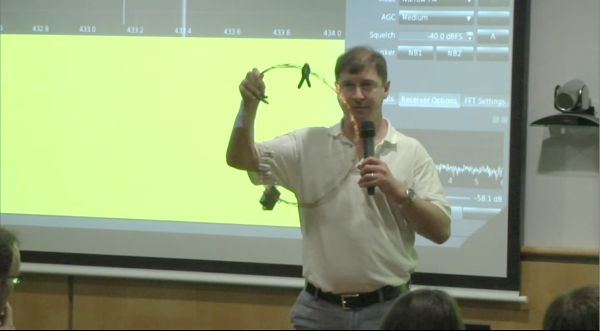
Emacs packaging Speaking of Emacs, after complaining in the noisy #emacs IRC channel about the poor TLS configuration of marmelade.org -- and filing a bug (Debian bug #861106) regarding the use of SHA-1 in certificate pinning -- I was told we shouldn't expect trust from third-party ELPA repositories. Marmelade seems to be dead, as the maintainer is "behind the great firewall of China" and MELPA still hasn't figured out how to sign packages. In the end, it seems like there are tons of elpa packages in Debian and that if your favorite one is missing, that's a bug that can be filed and fixed. I first discovered that 6 of the packages I used were already packaged: And so I went ahead and filed a ton more bugs for the packages I am using but that aren't in Debian just yet: Of those, I can't recommend multiple-cursors (MC) enough: I used it at least 4 times just writing this text. It's just awesome. The other ones are also all great in their own right of course, but I feel they are more specific to my workflow whereas MC is just amazing.

ikiwiki I did some more work on ikiwiki the software driving this blog. I created a new plugin to, at least, fix anchors in the table of contents to be human readable. This is something I had done on the MoinMoin wiki almost a decade ago -- which I called then NicerHeadingIds and that I have always found frustrating with Ikiwiki. It turns out the problem was both easier and hairier than I thought. Right from the start, something weird was happening: something was already adding nice headings, but they were somewhat broken. It turns out that multimarkdown already inserts those headers, but I wasn't satisfied with the way they were generated. But even worse, I had the headinganchors plugin enabled, but that plugin wasn't taking effect, because of multimarkdown. And even if it would take effect, it doesn't behave well with non-ASCII characters, which gets turned in their numeric presentation. So I also wrote the i18nheadinganchors plugin that creates better headings and patched the toc plugin so that it can reuse existing anchors if they exist, while keeping backwards compatibility. I hope this gets merged in a future ikiwiki release so I do not have to carry this patch locally too long... In other news, I have upgraded the ikiwiki-hosting package to the latest version and sent a patch upstream to provide HSTS support.

Other stuff I have migrated all my public repos hosted on my home server to either Gitlab.com or Github. I also have repositories on 0xacab and it seemed ludicrous to have 4 different, canonical, places where my code was hosted. I have now about 40 different projects on Gitlab and about 60 on Github, although most of the latter are forks of existing projects. I also made a manpage for stressant and moved the documentation to RTFD which makes it neatly accessible. I also made small incremental improvements (like --directory support). I installed Rainloop on this server to give a nice, mobile-friendly webmail. Instructions to replicate this setup are in mail. In the constant git-annex documentation effort, I tried to draft a user guide that could be a basis for restructuring the documentation to be more easily accessible. I also helped a friend put his documentation on the wiki in splitting a repository. Finally, I also looked into Android stuff a little more. I wrote a usability review of the F-Droid privileged extension that will bring good changes, I hope. I also opened the discussion regarding reproducible builds to try and clarify exactly how those worked to help the Wallabag people ship consistently signed alphas. So far, it seems that it will remain a standard practice on F-Droid to ship packages that are not signed by the official upstream signature, unfortunately, unless upstream provides a reproducible build that is publicly available... Switching to such build is also a hairy issue, as, obviously, the signature changes, which raises the alarm we are trying to avoid in the first place.

Russ Allbery: Review: Neverness

Review: Neverness, by David Zindell
Publisher: Bantam Spectra
Copyright: May 1988
Printing: July 1989
ISBN: 0-553-27903-3
Format: Mass market
Pages: 552
Mallory Ringess is a Pilot, one of the people who can guide a lightship through interstellar space from inside the dark cocoon and biotech interface that allows visualization of the mathematics of interstellar travel. At the start of the book, he's young, arrogant, impulsive, and has a deeply unhealthy relationship with Leopold Soli, the Lord Pilot and supposedly his uncle by marriage (although they share a remarkable physical resemblance). An encounter with his uncle in a bar provokes a rash promise, and Ringess finds himself promising to attempt to map the Solid State Entity in search of the Elder Eddas, a secret of life from the mythical Ieldra that might lead to mankind's immortality. The opening of Neverness is Ringess's initial voyage and brash search, in which he proves to be a capable mathematician who can navigate a region of space twisted and deformed by becoming part of a transcendent machine intelligence. The knowledge he comes away with, though, is scarcely more coherent than the hints Soli relates at the start of the story: the secret of mankind is somehow hidden in its deepest past. That, in turn, provokes a deeply bizarre trip into the ice surrounding his home city of Neverness to attempt to steal biological material from people who have recreated themselves as Neanderthals. Beyond that point, I would say that things get even weirder, but weird still implies some emotional connection with the story. I think a more accurate description is that the book gets more incoherently mystical, more hopelessly pretentious, and more depressingly enthralled by childish drama. It's the sort of thing that one writes if one is convinced that the Oedipal complex is the height of subtle characterization. I loathed this book. I started loathing this book partway through Ringess's trip through the Solid State Entity, when Zindell's prose reached for transcendent complexity, tripped over its own shoelaces, and fell headlong into overwrought babbling. I continued reading every page because there's a perverse pleasure in hate-reading a book one dislikes this intensely, and because I wanted to write a review on the firm foundation of having endured the entire experience. The paperback edition I have has a pull quote from Orson Scott Card on the cover, which includes the phrase "excellent hard science fiction." I'm not sure what book Card read, because if this is hard science fiction, Lord of the Rings is paranormal romance. Even putting aside the idea that one travels through interstellar space by proving mathematical theorems in artificially dilated time (I don't think Zindell really understands what a proof is or why you write one), there's the whole business with stopping time with one's mind, reading other people's minds, and remembering one's own DNA. The technology, such as it is, makes considerably less sense than Star Wars. The hard SF requirement to keep technology consistent with extrapolated science is nowhere to be found here. The back-cover quote from the St. Louis Post-Dispatch is a bit more on-target: "Reminiscent of Gene Wolfe's New Sun novels... really comes to life among the intrigues of Neverness." This is indeed reminiscent of Gene Wolfe, in that it wouldn't surprise me at all if Zindell fell in love with the sense of antiquity, strangeness, and hints of understood technology that Wolfe successfully creates and attempted to emulate Wolfe in his first novel. Sadly, Zindell isn't Wolfe. Almost no one is, which is why attempting to emulate the extremely difficult feat Wolfe pulls off in the Book of the New Sun in your first novel is not a good idea. The results aren't pretty. There is something to be said for resplendent descriptions, rich with detail and ornamental prose. That something is "please use sparingly and with an eye to the emotional swings of the novel." Wolfe does not try to write most of a novel that way, which is what makes those moments of description so effective. Wolfe is also much better at making his mysteries and allusions subtle and unobtrusive, rather than having the first-person protagonist beat the reader over the head with them for pages at a time. This is a case where showing is probably better than telling. Let me quote a bit of description from the start of the book:
She shimmers, my city, she shimmers. She is said to be the most beautiful of all the cities of the Civilized Worlds, more beautiful even than Parpallaix or the cathedral cities of Vesper. To the west, pushing into the green sea like a huge, jewel-studded sleeve of city, the fragile obsidian cloisters and hospices of the Farsider's Quarter gleamed like black glass mirrors. Straight ahead as we skated, I saw the frothy churn of the Sound and their whitecaps of breakers crashing against the cliffs of North Beach and above the entire city, veined with purple and glazed with snow and ice, Waaskel and Attakel rose up like vast pyramids against the sky. Beneath the half-ring of extinct volcanoes (Urkel, I should mention, is the southernmost peak, and though less magnificent than the others, it has a conical symmetry that some find pleasing) the towers and spires of the Academy scattered the dazzling false winter light so that the whole of the Old City sparkled.
That's less than half of that paragraph, and the entire book is written like that, even in the middle of conversations. Endless, constant words piled on words about absolutely everything, whether important or not, whether emotionally significant or not. And much of it isn't even description, but philosophical ponderings that are desperately trying to seem profound. Here's another bit:
Although I knew I had never seen her before, I felt as if I had known her all my life. I was instantly in love with her, not, of course, as one loves another human being, but as a wanderer might love a new ocean or a gorgeous snowy peak he has glimpsed for the first time. I was practically struck dumb by her calmness and her beauty, so I said the first stupid thing which came to mind. "Welcome to Neverness," I told her.
Now, I should be fair: some people like this kind of description, or at least have more tolerance for it than I do. But that brings me to the second problem: there isn't a single truly likable character in this entire novel. Ringess, the person telling us this whole story, is a spoiled man-child, the sort of deeply immature and insecure person who attempts to compensate through bluster, impetuousness, and refusing to ever admit that he made a mistake or needed to learn something. He spends a good portion of the book, particularly the deeply bizarre and off-putting sections with the fake Neanderthals, attempting to act out some sort of stereotyped toxic masculinity and wallowing in negative emotions. Soli is an arrogant, abusive asshole from start to finish. Katherine, Ringess's love interest, is a seer who has had her eyes removed to see the future (I cannot express how disturbing I found Zindell's descriptions of this), has bizarre and weirdly sexualized reactions to the future she never explains, and leaves off the ends of all of her sentences, which might be be the most pointlessly irritating dialogue quirk I've seen in a novel. And Ringess's mother is a man-hating feminist from a separatist culture who turns into a master manipulator (I'm starting to see why Card liked this book). I at least really wanted to like Bardo, Ringess's closest friend, who has a sort of crude loyalty and unwillingness to get pulled too deep into the philosophical quicksand lurking underneath everything in this novel. Alas, Zindell insists on constantly describing Bardo's odious eating, belching, and sexual habits every time he's on the page, thus reducing him to the disgusting buffoon who gets drunk a lot and has irritating verbal ticks. About the only person I could stand by the end of the book was Justine, who at least seems vaguely sensible (and who leaves the person who abuses her), but she's too much of a non-entity to carry sustained interest. (There is potential here for a deeply scathing and vicious retelling of this story from Justine's point of view, focusing on the ways she was belittled, abused, and ignored, but I think Zindell was entirely unaware of why that would be so effective.) Oh, and there's lots of gore and horrific injury and lovingly-described torture, because of course there is. And that brings me back to the second half of that St. Louis Post-Dispatch review quote: "... really comes to life among the intrigues of Neverness." I would love to know what was hiding behind the ellipses in this pull quote, because this half-sentence is not wrong. Insofar as Neverness has any real appeal, it's in the intrigues of the city of Neverness and in the political structure that rules it. What this quote omits is that these intrigues start around page 317, more than halfway through the novel. That's about the point where faux-Wolfe starts mixing with late-career Frank Herbert and we get poet-assassins, some revelations about the leader of the Pilot culture, and some more concrete explanations of what this mess of a book is about. Unfortunately, you have to read through the huge and essentially meaningless Neanderthal scenes to get there, scenes that have essentially nothing to do with the interesting content of this book. (Everything that motivates them turns out to be completely irrelevant to the plot and useless for the characters.) The last 40% of the book is almost passable, and characters I cared about might have even made it enjoyable. Still, a couple of remaining problems detract heavily, chief among them the lack of connection of the great revelation of the story to, well, anything in the story. We learn at the very start of the novel that the stars of the Vild are mysteriously exploding, and much of the novel is driven by uncovering an explanation and solution. The characters do find an explanation, but not through any investigation. Ringess is simply told what is happening, in a wad of exposition, as a reward for something else entirely. It's weirdly disconnected from and irrelevant to everything else in the story. (There are some faint connections to the odd technological rules that the Pilot society lives under, but Zindell doesn't even draw attention to those.) The political intrigue in Neverness is similar: it appears out of nowhere more than halfway through the book, with no dramatic foundation for the motives of the person who has been keeping most of the secrets. And the final climax of the political machinations involves a bunch of mystical nonsense masquerading as science, and more of the Neanderthal bullshit that ruins the first half of the book. This is a thoroughly bad book: poorly plotted, poorly written, clotted and pretentious in style, and full of sociopaths and emotionally stunted children. I read the whole thing because I'm immensely stubborn and make poor life choices, but I was saying the eight deadly words ("I don't care what happens to these people") by a hundred pages in. Don't emulate my bad decisions. (Somehow, this novel was shortlisted for the Arthur C. Clarke award in 1990. What on earth could they possibly have been thinking?) Neverness is a stand-alone novel, but the ending sets up a subsequent trilogy that I have no intention of reading. Followed by The Broken God. Rating: 2 out of 10

25 April 2017

Daniel Pocock: FSFE Fellowship Representative, OSCAL'17 and other upcoming events

The Free Software Foundation of Europe has just completed the process of electing a new fellowship representative to the General Assembly (GA) and I was surprised to find that out of seven very deserving candidates, members of the fellowship have selected me to represent them on the GA. I'd like to thank all those who voted, the other candidates and Erik Albers for his efforts to administer this annual process. Please consider becoming an FSFE fellow or donor The FSFE runs on the support of both volunteers and financial donors, including organizations and individual members of the fellowship program. The fellowship program is not about money alone, it is an opportunity to become more aware of and involved in the debate about technology's impact on society, for better or worse. Developers, users and any other supporters of the organization's mission are welcome to join, here is the form. You don't need to be a fellow or pay any money to be an active part of the free software community and FSFE events generally don't exclude non-members, nonetheless, becoming a fellow gives you a stronger voice in processes such as this annual election. Attending OSCAL'17, Tirana During the election period, I promised to keep on doing the things I already do: volunteering, public speaking, mentoring, blogging and developing innovative new code. During May I hope to attend several events, including OSCAL'17 in Tirana, Albania on 13-14 May. I'll be running a workshop there on the Debian Hams blend and Software Defined Radio. Please come along and encourage other people you know in the region to consider attending. What is your view on the Fellowship and FSFE structure? Several candidates made comments about the Fellowship program and the way individual members and volunteers are involved in FSFE governance. This is not a new topic. Debate about this topic is very welcome and I would be particularly interested to hear any concerns or ideas for improvement that people may contribute. One of the best places to share these ideas would be through the FSFE's discussion list. In any case, the fellowship representative can not single-handedly overhaul the organization. I hope to be a constructive part of the team and that whenever my term comes to an end, the organization and the free software community in general will be stronger and happier in some way.

Next.

Previous.