Anand Kumria: Beginning Django Development
Oddly, I have had four different people ask me about the best way to begin a Django project or setup their system to make it easy to develop with Django.
Since I've now given my response via email so many times, I figure I might as well broadcast it and hopefully this will help others as well
My assumptions:
- Using Linux (or a Unix machine)
- Single developer with root access (quite possibly a laptop)
- Knowledge of DVCSes (e.g. git / hg / bzr )
$ sudo adduser newbie
$ ssh localhost -l newbie
$ whoami
newbie
Then we want to create some local bin and lib directories. First the binary directory
$ mkdir ~/bin # On Ubuntu/Debian, this will automatically be in your PATH the next time you login
And now a local directory for our various libraries
$ mkdir -p ~/lib/python
$ echo "PYTHONPATH=~/lib/python:" >> ~/.bashrc
$ echo "export PYTHONPATH" >> ~/.bashrc
This will add that directory to our Python path. If you happen to also use another language you can put things into ~/lib/ruby, ~/lib/perl as appropriate
$ mkdir ~/Projects
$ cd ~/Projects
Here is where we will store copies of upstream software. What is the reason for using the repositories rather than packages? This allows us to checkout specific versions to match what our clients might be using. Or test things against newer versions of the upstream project. First, let's setup Django. I tend to use git by default, especially if the upstream is using Subversion. If they are using Mercurial or Bazaar, I use those directly.
$ git svn clone -s http://code.djangoproject.com/svn/django/
Initialized empty Git repository in /home/newbie/Projects/django/.git/
Using higher level of URL: http://code.djangoproject.com/svn/django => http://code.djangoproject.com/svn
r1 = 5cda37203ffa6ea83da2958a95c377984482877f (refs/remotes/trunk)
	A	django-docs/images/flatfiles_admin.png
	A	django-docs/images/users_changelist.png
	A	django-docs/model-api.txt
	A	django-docs/build.py
	A	django-docs/db-api.txt
	A	django-docs/writing-apps-guide-outline.txt
	A	django-docs/templates.txt
r2 = b8249ac45e2154933b9649fd8181d5769e31c9fc (refs/remotes/trunk)
	A	django/utils/feedgenerator.py
	A	django/utils/datastructures.py
[...]
r13399 = f3902c67a3b8788de2145899e435a394c512b455 (refs/remotes/releases)
	M	tests/regressiontests/m2m_through_regress/tests.py
r13400 = cd72207306a5a4eecdf07f65c109f37c8317ed81 (refs/remotes/trunk)
$
Now we have Django, push it into our python path
$ cd ~/lib/python
$ ln -s ~/Projects/django/django/
$ python
Python 2.6.5 (r265:79063, Apr 16 2010, 13:57:41)
[GCC 4.4.3] on linux2
Type "help", "copyright", "credits" or "license" for more information.
>>> import django
>>> django.VERSION
(1, 2, 1, 'final', 0)
Now, let's do the same for South. South is a database migration helper for Django. These are the two things you want to have in any Django at a minimum. There are also plenty of other amazing things like haystack, piston, satchmo, etc. You can follow the same recipie for them too.
$ cd ~/Projects
$ hg clone http://bitbucket.org/andrewgodwin/south/
destination directory: south
requesting all changes
adding changesets
adding manifests
adding file changes
added 802 changesets with 1340 changes to 183 files (+1 heads)
updating to branch default
143 files updated, 0 files merged, 0 files removed, 0 files unresolved
$ cd ~/lib/python
$ ln -s ~/Projects/south/south
$ python
Python 2.6.5 (r265:79063, Apr 16 2010, 13:57:41)
[GCC 4.4.3] on linux2
Type "help", "copyright", "credits" or "license" for more information.
>>> import south
>>> south.__version__
'0.7.1'
Finally, we want to be able to create Django projects. There is a great helper called django-admin that will do this. Let's put it into our path
$ cd ~/bin
$ ln -s ~/Projects/django/django/bin/django-admin.py
$ hash -r
That last statment will cause your interpreter to re-read PATH and make anything new available for execution. Now, you should go ahead and create your projects. There are a variety of ways to do this. However what I like to do is keep Django applications separate from the Django project. That way, they can easily be re-used if required. So, for a project called 'foo', we might have
$ mkdir -p ~/Work/foo
$ cd ~/Work/foo
$ mkdir foo.example.com
$ mkdir templates
$ mkdir media
$ mkdir <individual apps>
For each individual app, put them into the Python library. And you then have your re-usability from within Django. For a application called 'bar', you would do:
$ cd ~/Work/foo
$ django-admin.py startapp bar
$ cd ~/lib/python
$ ln -s ~/Work/foo/bar
And now, in your Django foo.example.com setting.py's file you can put 'bar' as one the installed applications and things will Just Work Obviously there are many way to slice this particular mango, but I've found that this works pretty well for me. You can spruce it up by revision controlling each directory in your project (I do) and also take advantage of things like virtualenv and Fabric to make deploying just as easy as developing. But I'll leave those topics until a later date
 I ve been watching the June budget and pondering its effects on me, our co-op, co-ops in general and the wider community.
 Grah.
I got my current phone (a Nokia N95) back in January 2008. It was the first phone I ever paid for, and I don't expect that to change - The feature set I need from a phone is extremely basic, but I wanted to have a GPS unit on me, without needing to plan for it beforehand. As I recently blogged,
Grah.
I got my current phone (a Nokia N95) back in January 2008. It was the first phone I ever paid for, and I don't expect that to change - The feature set I need from a phone is extremely basic, but I wanted to have a GPS unit on me, without needing to plan for it beforehand. As I recently blogged,  The world around me seems to whirl these days. One week ago, I graduated
from
The world around me seems to whirl these days. One week ago, I graduated
from 
 So, I spent an hour or two this afternoon following the iPhone 4 liveblog.
It all looked fairly compelling (the screen!), right up until Steve's 'and
one more thing': video calling.
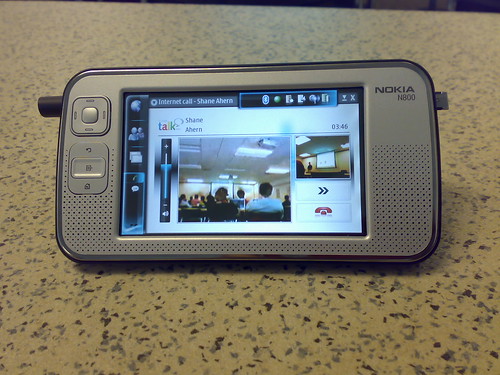
So, I spent an hour or two this afternoon following the iPhone 4 liveblog.
It all looked fairly compelling (the screen!), right up until Steve's 'and
one more thing': video calling.
 After
After 
 I'we just launched website (well it's quite pretentious name for few pages),
which shows debts for politics when they were in government in Czech Republic.
We're still not in situation like in Greece, but it can quite easily happen
that we would be in few years and it's good to show some numbers describing
what was happening in past.
It took just few hours of coding yesterday evening using
I'we just launched website (well it's quite pretentious name for few pages),
which shows debts for politics when they were in government in Czech Republic.
We're still not in situation like in Greece, but it can quite easily happen
that we would be in few years and it's good to show some numbers describing
what was happening in past.
It took just few hours of coding yesterday evening using  Conference Management systems are web applications designed to make the lives of conference organisers easier. They usually include features such as registration, payment, paper submission and review, scheduling and publishing of announcements.
 I just updated the software at
 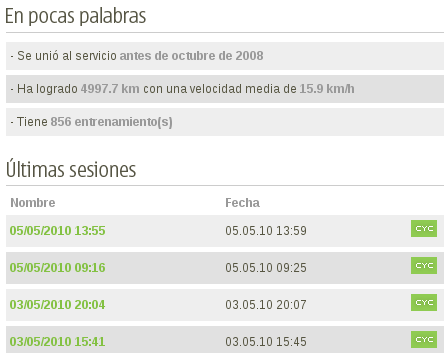 After breaking the 5000 Km mark, yesterday at night:
 So, following