Search Results: "ag"

4 November 2012

Wouter Verhelst: Why Windows is not ready for general usage

There's this new Windows thing that people keep talking about, and which attempts to replace Linux as the major operating system. I've given it a look, but there's a wide range of problems with using it: In short, while this Windows thing has some promise, the above list shows that there's clearly still quite some work to be done before anyone can even think about starting to use it seriously. Hopefully the Windows developers will understand that and work on the above list of serious issues; otherwise, I'm afraid Windows will not be used by many people. Update: before you go all berserk and start commenting on this list, please read my followup to this post, which explains the point I was trying to make.

Paul Wise: Remembering the dead

Last week was el D a de los Muertos (the Day of the Dead), a Mexican holiday where people gather to remember their dead. Today I would like to remember <predator>. pred was a core member of the cat@lyst collective, a group of folks providing computers, Internet and other tech resources to the activists of Sydney, Australia. I knew pred as cat@lyst's hardware geek, he was always scrounging computers from roadsides, coaxing them back to life and setting them to work supporting cat@lyst. I only knew pred through email and just missed out on meeting him due to the cancer that eventually killed him. pred wrote extensively during his life and of his experiences while dying of cancer. After he died, some friends compiled some of his writing into a book, simply named pred.txt. His full writings also happen to have been archived on the net. Through the book and his writings I came to learn that he was much more than just a hardware geek and gain some more insight into who he was. pred was a geek, activist, anarchist, urban explorer, scientist in the area of molecular genetics, cancer victim and all-around awesome dude. I still miss him.

3 November 2012

Richard Hartmann: Release Critical Bug report for Week 42

Lucas Nussbaum pointed out that the weekly stats which Alexander Reichle-Schmehl used to provide are AWOL so I decided to take over. As I am patently lazy, I hacked together a little helper in perl which outputs the page I am just adding to by writing this. It's a tad hackish inasmuch I don't bother to transform the HTML into anything and simply embedd it in the Markdown, but it's working well enough for now. In the medium term, I am hoping to add some nice graphs as per azhag's suggestion, but they didn't get back to me, yet. A warning to anyone not subscribed to Planet Debian and reading this via a different aggregator: You will still see weekly stats from now on which may or may not be interesting to you. In case you object, please leave a comment or poke me directly. The UDD bugs interface currently knows about the following release critical bugs: How do we compare to the squeeze cycle ?
Week Squeeze Wheezy Diff
43 284 (213+71) 468 (332+136) +184 (+119 ; +65)
44 261 (201+60)
45 261 (205+56)
46 271 (200+71)
47 283 (209+74)
48 256 (177+79)
49 256 (180+76)
50 204 (148+56)
51 124 (124+54)
52 115 (78+37)
1 93 (60+33)
2 82 (46+36)
3 25 (15+10)
4 14 (8+6)
5 2 (0+2)
6 release!

Russ Allbery: Welcome, Planet Debian

As part of a discussion about something else on debian-project, it seemed clear that people were interested in more than just Debian-relevant posts on the Planet Debian aggregator. I'd previously only pushed Debian-related posts there, but I asked explicitly and people want the full feed. So this is the first untagged post going there (and something of a test). The difference, for Planet Debian readers, is that you'll get a lot more book reviews (of non-technical books), and a smattering of software announcements. You'll also get posts like the below whenever I buy more books. I got into the habit of making haul posts from enjoying a friend's version of that, and now I use them as a way of keeping track of what I've already bought until I get around to putting stuff into a real book database. (I'm currently leaning towards Tellico, for what it's worth.) I'll try to add at least a bit of commentary so that it won't just be a list of books. If I can get back into the habit, you'll also get regular postings of photographs. I've been out of the habit for about a year, though, so we'll see how that goes. Anyway, a small haul: Kevin Barry Dark Lies the Island (mainstream)
J. Robert Lennon Familiar (mainstream)
Ken & Jo Walton GURPS: Celtic Myth (RPG) This is notable because it's my first Indiespensible shipment. Powell's Books, from which I buy nearly all of my books, has a subscription club called Indiespensible, which sends a new novel, usually from independent presses, every six weeks. I've been eyeing this for a long time and finally decided to go ahead and try it for a while. I mostly read science fiction and fantasy, so this is a good way to try to read more mainstream fiction, and since I know absolutely nothing about what's good in mainstream fiction, something curated is a good idea. I haven't cracked open either of the books yet, but I quite enjoyed the chocolate toffee. GURPS: Celtic Myth was because I discovered that there was a role-playing supplement by one of my favorite authors, so that had to be acquired, even if I'm not a GURPS player.

2 November 2012

Neil Williams: Introducing pyBit - Buildd Integration Toolkit

pyBit - cross-platform package building using AMQP


Message queues provide a simple way to create a distributed, cross-platform buildd toolkit to build packages using a collection of buildds, direct from various VCS clients. pyBit is intended to support rapidly evolving software collections and can support multiple VCS frontends and multiple build backends. Cross building is expected to be supported for some backends. The initial backend uses dpkg for Debian with subversion providing the source and sbuild doing the actual build.

pyBit includes support for cancelling selected builds and using multiple buildd clients per architecture, per platform and per suite.

Hooks are available or in development for subversion and git, other VCS hooks can be added. A RESTful web API provides live build reports and can generate build jobs for specific packages using particular VCS branches on selected architectures to support re-building packages at any point in the development process. Build history is stored using postgresql.

Other buildd systems can rebuild long lists of packages or build lots of binary packages from relatively slow moving source packages. PyBit exists to handle much more rapid software development across a wide range of platforms, VCS inputs and architectures. Buildd clients which are under-used can be tasked with building multiple suites or adding cross-build support. Buildd clients which are over-utilised are easily identified and adding new machines to an existing architecture / platform / suite pool should be easy. Hook activation automatically cancels any ongoing build for the same architecture, platform and suite to avoid wasting time on an interim version.

The emphasis in pyBit is to have fast builds with redundant clients, reliable reporting using a flexible and intuitive frontend. To this end, there is no need for a source package to be uploaded. Depending on the VCS hook in use, builds can happen every time a particular file is changed (e.g. debian/changelog for a native Debian package) or at every push (for a distributed VCS) or whatever is appropriate for a particular software collection. Builds are checked for available build-dependencies and packages re-queued if the build-dependencies are not yet met.

In the longer term, it may well be possible to use more than one server / database combination to support more builds and more platforms.

So far, we've got to a working model and tagged 0.1.0 as the first downloadable release. There is a lot more to do, especially adding more documentation, more VCS hooks, support for more VCS methods on the buildd clients and more buildd client scripts for platforms other than Debian. (The git hook and git source client are expected to let pyBit be self-buildable but a certain amount of configuration will be required for the server and each client which makes it not-quite self-hosting.)

pyBit concentrates on preparing collections of binary packages which can be used to build others, rather than trying to rebuild everything every time - this allows more rapid upstream software development and encourages modular, re-usable software. pyBit will also support rebuilding specific versions, architectures, suites or platforms via the RESTful web API. Access to this frontend can be controlled through any of the standard methods.

Components are loosely coupled via JSON encoded messages sent using rabbitMQ and curl. A new client can be added at any time and it will simply pick up buildd jobs from the relevant queue.

Development has now moved to Github and if anyone wants to look at new clients and new hooks, just contact the team by email or via IRC (#pybit on irc.oftc.net). Current development is based on Debian Squeeze 6.0.6 with backports and also on Debian Wheezy - more testing is welcome. Patches are also very welcome, pyBit is licensed under GPL2+.

There is no intrinsic reason why pyBit could not support any buildd platform capable of taking source from a known location and building a set of binaries. Packages are added to the queues whenever the hook is activated, so adding new packages to the collection is simply a case of triggering the existing hook.

Another interesting challenge for pyBit would be to trigger a hook on a new source code repository and just let it work through every package until everything is built. That probably won't work with the current 0.1.0 code but if that is what you'd like to work on, join the team.

Vincent Bernat: Network virtualization with VXLAN

Virtual eXtensible Local Area Network (VXLAN) is a protocol to overlay a virtualized L2 network over an existing IP network with little setup. It is currently described in an Internet-Draft. It adds the following perks to VLANs while still providing isolation:
  1. It uses a 24-bit VXLAN Network Identifier (VNI) which should be enough to address any scale-based concerns of multitenancy.
  2. It wraps L2 frames into UDP datagrams. This allows one to rely on some interesting properties of IP networks like availability and scalability. A VXLAN segment can be extended far beyond the typical reach of today VLANs.
The VXLAN Tunnel End Point (VTEP) originates and terminates VXLAN tunnels. Thanks to a serie of patches from Stephen Hemminger, Linux can now act as a VTEP. Let s see how this works.

About IPv6 When possible, I try to use IPv6 for my labs. This is not the case here for several reasons:
  1. IP multicast is required and PIM-SM implementations for IPv6 are not widespread yet. However, they exist. This explains why I use XORP for this lab: it supports PIM-SM for both IPv4 and IPv6.
  2. VXLAN Internet-Draft specifically addresses only IPv4. This seems a bit odd for a protocol running on top of UDP and I hope this will be fixed soon. This is not a major stopper since some VXLAN implementations support IPv6.
  3. However, the current implementation for Linux does not support IPv6. IPv6 support will be added later.
Once IPv6 support is available, the lab should be easy to adapt.

Lab So, here is the lab used. R1, R2 and R3 will act as VTEPs. They do not make use of PIM-SM. Instead, they have a generic multicast route on eth0. E1, E2 and E3 are edge routers while C1, C2 and C3 are core routers. The proposed lab is not resilient but convenient to explain how things work. It is built on top of KVM hosts. Have a look at my previous article for more details on this. VXLAN lab The lab is hosted on GitHub. I have made the lab easier to try by including the kernel I have used for my tests. XORP comes preconfigured, you just have to configure the VXLAN part. For this, you need a recent version of ip.
$ sudo apt-get install screen vde2 kvm iproute xorp git
$ git clone git://git.kernel.org/pub/scm/linux/kernel/git/shemminger/iproute2.git
$ cd iproute2
$ ./configure && make
You get  ip' as  ip/ip' and  bridge' as  bridge/bridge'.
$ cd ..
$ git clone git://github.com/vincentbernat/network-lab.git
$ cd network-lab/lab-vxlan
$ ./setup

Unicast routing The first step is to setup unicast routing. OSPF is used for this purpose. The chosen routing daemon is XORP. With xorpsh, we can check if OSPF is working as expected:
root@c1# xorpsh
root@c1$ show ospf4 neighbor   
  Address         Interface             State      ID              Pri  Dead
192.168.11.11    eth0/eth0              Full      3.0.0.1          128    36
192.168.12.22    eth1/eth1              Full      3.0.0.2          128    33
192.168.101.133  eth2/eth2              Full      2.0.0.3          128    36
192.168.102.122  eth3/eth3              Full      2.0.0.2          128    38
root@c1$ show route table ipv4 unicast ospf   
192.168.1.0/24  [ospf(110)/2]
                > to 192.168.11.11 via eth0/eth0
192.168.2.0/24  [ospf(110)/2]
                > to 192.168.12.22 via eth1/eth1
192.168.3.0/24  [ospf(110)/3]
                > to 192.168.102.122 via eth3/eth3
192.168.13.0/24 [ospf(110)/2]
                > to 192.168.102.122 via eth3/eth3
192.168.21.0/24 [ospf(110)/2]
                > to 192.168.101.133 via eth2/eth2
192.168.22.0/24 [ospf(110)/2]
                > to 192.168.12.22 via eth1/eth1
192.168.23.0/24 [ospf(110)/2]
                > to 192.168.101.133 via eth2/eth2
192.168.103.0/24        [ospf(110)/2]
                > to 192.168.102.122 via eth3/eth3

Multicast routing Once unicast routing is up and running, we need to setup multicast routing. There are two protocols for this: IGMP and PIM-SM. The former one allows routers to forward multicast datagrams while the first one allows hosts to subscribe to a multicast group.

IGMP IGMP is used by hosts and adjacent routers to establish multicast group membership. In our case, it will be used by R2 to let E2 know it subscribed to 239.0.0.11 (a multicast group). Configuring XORP to support IGMP is simple. Let s test with iperf to have a multicast listener on R2:
root@r2# iperf -u -s -l 1000 -i 1 -B 239.0.0.11
------------------------------------------------------------
Server listening on UDP port 5001
Binding to local address 239.0.0.11
Joining multicast group  239.0.0.11
Receiving 1000 byte datagrams
UDP buffer size:  208 KByte (default)
------------------------------------------------------------
On E2, we can now check that R2 is properly registered for 239.0.0.11:
root@e2$ show igmp group
Interface    Group           Source          LastReported Timeout V State
eth0         239.0.0.11      0.0.0.0         192.168.2.2      248 2     E
XORP documentation contains a good overview of IGMP.

PIM-SM PIM-SM is far more complex. It does not have its own topology discovery protocol and relies on routing information from other protocols, OSPF in our case. I will describe here a simplified view on how PIM-SM works. XORP documentation contains more details about PIM-SM. The first step for all PIM-SM routers is to elect a rendez-vous point (RP). In our lab, only C1, C2 and C3 have been configured to be elected as a RP. Moreover, we give better priority to C3 to ensure it wins. RP election
root@e1$ show pim rps   
RP              Type      Pri Holdtime Timeout ActiveGroups GroupPrefix       
192.168.101.133 bootstrap 100      150     135            0 239.0.0.0/8
Let s suppose we start iperf on both R2 and R3. Using IGMP, they subscribe to multicast group 239.0.0.11 with E2 and E3 respectively. Then, E2 and E3 send a join message (also known as a (*,G) join) to the RP (C3) for that multicast group. Using the unicast path from E2 and E3 to the RP, the routers along the paths build the RP tree (RPT), rooted at C3. Each router in the tree knows how to send multicast packets to 239.0.0.11: it will send them to the leaves. RP tree
root@e3$ show pim join   
Group           Source          RP              Flags
239.0.0.11      0.0.0.0         192.168.101.133 WC   
    Upstream interface (RP):   eth2
    Upstream MRIB next hop (RP): 192.168.23.133
    Upstream RPF'(*,G):        192.168.23.133
    Upstream state:            Joined 
    Join timer:                5
    Local receiver include WC: O...
    Joins RP:                  ....
    Joins WC:                  ....
    Join state:                ....
    Prune state:               ....
    Prune pending state:       ....
    I am assert winner state:  ....
    I am assert loser state:   ....
    Assert winner WC:          ....
    Assert lost WC:            ....
    Assert tracking WC:        O.O.
    Could assert WC:           O...
    I am DR:                   O..O
    Immediate olist RP:        ....
    Immediate olist WC:        O...
    Inherited olist SG:        O...
    Inherited olist SG_RPT:    O...
    PIM include WC:            O...
Let s suppose that R1 wants to send multicast packets to 239.0.0.11. It sends them to R1 which does not have any information on how to contact all the members of the multicast group because it is not the RP. Therefore, it encapsulates the multicast packets into PIM Register packets and sends them to the RP. The RP decapsulates them and sends them natively. The multicast packets are routed from the RP to R2 and R3 using the reverse path formed by the join messages. Multicast routing via the RP
root@r1# iperf -c 239.0.0.11 -u -b 10k -t 30 -T 10
------------------------------------------------------------
Client connecting to 239.0.0.11, UDP port 5001
Sending 1470 byte datagrams
Setting multicast TTL to 10
UDP buffer size:  208 KByte (default)
------------------------------------------------------------
root@e1# tcpdump -pni eth0
10:58:23.424860 IP 192.168.1.1.35277 > 239.0.0.11.5001: UDP, length 1470
root@c3# tcpdump -pni eth0
10:58:23.552903 IP 192.168.11.11 > 192.168.101.133: PIMv2, Register, length 1480
root@e2# tcpdump -pni eth0
10:58:23.896171 IP 192.168.1.1.35277 > 239.0.0.11.5001: UDP, length 1470
root@e3# tcpdump -pni eth0
10:58:23.824647 IP 192.168.1.1.35277 > 239.0.0.11.5001: UDP, length 1470
As presented here, the routing is not optimal: packets from R1 to R2 could avoid the RP. Moreover, encapsulating multicast packets into unicast packets is not efficient either. At some point, the RP will decide to switch to native multicast1. Rooted at R1, the shortest-path tree (SPT) for the multicast group will be built using source-specific join messages (also known as a (S,G) join). Multicast routing without RP From here, each router in the tree knows how to handle multicast packets from R1 to the group without involving the RP. For example, E1 knows it must duplicate the packet and sends one through the interface to C3 and the other one through the interface to C1:

root@e1$ show pim join   
Group           Source          RP              Flags
239.0.0.11      192.168.1.1     192.168.101.133 SG SPT DirectlyConnectedS 
    Upstream interface (S):    eth0
    Upstream interface (RP):   eth1
    Upstream MRIB next hop (RP): 192.168.11.111
    Upstream MRIB next hop (S):  UNKNOWN
    Upstream RPF'(S,G):        UNKNOWN
    Upstream state:            Joined 
    Register state:            RegisterPrune RegisterCouldRegister 
    Join timer:                7
    KAT(S,G) running:          true
    Local receiver include WC: ....
    Local receiver include SG: ....
    Local receiver exclude SG: ....
    Joins RP:                  ....
    Joins WC:                  ....
    Joins SG:                  .OO.
    Join state:                .OO.
    Prune state:               ....
    Prune pending state:       ....
    I am assert winner state:  ....
    I am assert loser state:   ....
    Assert winner WC:          ....
    Assert winner SG:          ....
    Assert lost WC:            ....
    Assert lost SG:            ....
    Assert lost SG_RPT:        ....
    Assert tracking SG:        OOO.
    Could assert WC:           ....
    Could assert SG:           .OO.
    I am DR:                   O..O
    Immediate olist RP:        ....
    Immediate olist WC:        ....
    Immediate olist SG:        .OO.
    Inherited olist SG:        .OO.
    Inherited olist SG_RPT:    ....
    PIM include WC:            ....
    PIM include SG:            ....
    PIM exclude SG:            ....
root@e1$ show pim mfc  
Group           Source          RP             
239.0.0.11      192.168.1.1     192.168.101.133
    Incoming interface :      eth0
    Outgoing interfaces:      .OO.
root@e1$ exit
[Connection to XORP closed]
root@e1# ip mroute
(192.168.1.1, 239.0.0.11)        Iif: eth0       Oifs: eth1 eth2

Setting up VXLAN Once IP multicast is running, setting up VXLAN is quite easy. Here are the software requirements:
  • A recent kernel. Pick at least 3.7-rc3. You need to enable CONFIG_VXLAN option. You also currently need a patch on top of it to be able to specify a TTL greater than 1 for multicast packets.
  • A recent version of ip. Currently, you need the version from git.
On R1, R2 and R3, we create a vxlan42 interface with the following commands:
root@rX# ./ip link add vxlan42 type vxlan id 42 \
>                               group 239.0.0.42 \
>                               ttl 10 dev eth0
root@rX# ip link set up dev vxlan42
root@rX# ./ip -d link show vxlan42
10: vxlan42: <BROADCAST,MULTICAST,UP,LOWER_UP> mtu 1460 qdisc noqueue state UNKNOWN mode DEFAULT 
link/ether 3e:09:1c:e1:09:2e brd ff:ff:ff:ff:ff:ff
vxlan id 42 group 239.0.0.42 dev eth0 port 32768 61000 ttl 10 ageing 300
Let s assign an IP in 192.168.99.0/24 for each router and check they can ping each other:
root@r1# ip addr add 192.168.99.1/24 dev vxlan42
root@r2# ip addr add 192.168.99.2/24 dev vxlan42
root@r3# ip addr add 192.168.99.3/24 dev vxlan42
root@r1# ping 192.168.99.2                    
PING 192.168.99.2 (192.168.99.2) 56(84) bytes of data.
64 bytes from 192.168.99.2: icmp_req=1 ttl=64 time=3.90 ms
64 bytes from 192.168.99.2: icmp_req=2 ttl=64 time=1.38 ms
64 bytes from 192.168.99.2: icmp_req=3 ttl=64 time=1.82 ms
--- 192.168.99.2 ping statistics ---
3 packets transmitted, 3 received, 0% packet loss, time 2003ms
rtt min/avg/max/mdev = 1.389/2.375/3.907/1.098 ms
We can check the packets are encapsulated:
root@r1# tcpdump -pni eth0
tcpdump: verbose output suppressed, use -v or -vv for full protocol decode
listening on eth0, link-type EN10MB (Ethernet), capture size 65535 bytes
11:30:36.561185 IP 192.168.1.1.43349 > 192.168.2.2.8472: UDP, length 106
11:30:36.563179 IP 192.168.2.2.33894 > 192.168.1.1.8472: UDP, length 106
11:30:37.562677 IP 192.168.1.1.43349 > 192.168.2.2.8472: UDP, length 106
11:30:37.564316 IP 192.168.2.2.33894 > 192.168.1.1.8472: UDP, length 106
Moreover, if we send broadcast packets (with ping -b or ARP requests), they are encapsulated into multicast packets:
root@r1# tcpdump -pni eth0
11:31:27.464198 IP 192.168.1.1.41958 > 239.0.0.42.8472: UDP, length 106
11:31:28.463584 IP 192.168.1.1.41958 > 239.0.0.42.8472: UDP, length 106
Recent versions of iproute also comes with bridge, an utility allowing one to inspect the FDB of bridge-like interfaces:
root@r1# ../bridge/bridge fdb show vxlan42
3e:09:1c:e1:09:2e dev vxlan42 dst 192.168.2.2 self 
0e:98:40:c6:58:10 dev vxlan42 dst 192.168.3.3 self

Demo For a demo, have a look at the following video (it is also available as an Ogg Theora video).
<iframe frameborder="0" height="270" src="http://www.dailymotion.com/embed/video/xusell" width="480"></iframe>

  1. The decision is usually done when the bandwidth used by the follow reachs some threshold. With XORP, this can be controlled with switch-to-spt-threshold. However, I was unable to make this works as expected. XORP never sends the appropriate PIM packets to make the switch. Therefore, for this lab, it has been configured to switch to native multicast at the first received packet.

Erich Schubert: DBSCAN and OPTICS clustering

DBSCAN [wikipedia] and OPTICS [wikipedia] are two of the most well-known density based clustering algorithms. You can read more on them in the Wikipedia articles linked above.
An interesting property of density based clustering is that these algorithms do not assume clusters to have a particular shape. Furthermore, the algorithms allow "noise" objects that do not belong to any of the clusters. K-means for examples partitions the data space in Voronoi cells (some people claim it produces spherical clusters - that is incorrect). See Wikipedia for the true shape of K-means clusters and an example that canot be clustered by K-means. Internal measures for cluster evaluation also usually assume the clusters to be well-separated spheres (and do not allow noise/outlier objects) - not surprisingly, as we tend to experiment with artificial data generated by a number of Gaussian distributions.
The key parameter to DBSCAN and OPTICS is the "minPts" parameter. It roughly controls the minimum size of a cluster. If you set it too low, everything will become clusters (OPTICS with minPts=2 degenerates to a type of single link clustering). If you set it too high, at some point there won't be any clusters anymore, only noise. However, the parameter usually is not hard to choose. If you for example expect clusters to typically have 100 objects, I'd start with a value of 10 or 20. If your clusters are expected to have 10000 objects, then maybe start experimenting with 500.
The more difficult parameter for DBSCAN is the radius. In some cases, it will be very obvious. Say you are clustering users on a map. Then you might know that a good radius is 1 km. Or 10 km. Whatever makes sense for your particular application. In other cases, the parameter will not be obvious, or you might need multiple values. That is when OPTICS comes into play.
OPTICS is based on a very clever idea: instead of fixing MinPts and the Radius, we only fix minpts, and plot the radius at which an object would be considered dense by DBSCAN. In order to sort the objects on this plot, we process them in a priority heap, so that nearby objects are nearby in the plot. this image on Wikipedia shows an example for such a plot.
OPTICS comes at a cost compared to DBSCAN. Largely because of the priority heap, but also as the nearest neighbor queries are more complicated than the radius queries of DBSCAN. So it will be slower, but you no longer need to set the parameter epsilon. However, OPTICS won't produce a strict partitioning. Primarily it produces this plot, and in many situations you will actually want to visually inspect the plot. There are some methods to extract a hierarchical partitioning out of this plot, based on detecting "steep" areas.
The open source ELKI data mining framework (package "elki" in Debian and Ubuntu) has a very fast and flexible implementation of both algorithms. I've benchmarked this against GNU R ("fpc" package") and Weka, and the difference is enormous. ELKI without index support runs in roughly 11 minutes, with index down to 2 minutes for DBSCAN and 3 minutes for OPTICS. Weka takes 11 hours and GNU R/fpc takes 100 minutes (DBSCAN, no OPTICS available). And the implementation of OPTICS in Weka is not even complete (it does not support proper cluster extraction from the plot). Many of the other OPTICS implementations you can find with Google (e.g. in Python or MATLAB) seem to be based on this Weka version ...
ELKI is open source. So if you want to peek at the code, here are direct links: DBSCAN.java, OPTICS.java.
Some part of the code may be a bit confusing at first. The "Parameterizer" classes serve the purpose of allowing automatic UI generation, for example. So there is quite a bit of meta code involved.
Plus, ELKI is quite extensively optimized. For example, it does not use Java Collections much anymore. Java Iterators, for example, require returning an object on next();. The C++ style iterators used by ELKI can have multiple values, and primitive values.
for(DBIDIter id = relation.iterDBIDs(); id.valid(); id.advance())
is a typical for loop in ELKI, iterating over all objects of a relation, but the whole loop requires creating (and GC'ing) a single object. And actually, this is as literal as a for loop can get.
ModifiableDBIDs processedIDs = DBIDUtil.newHashSet(size);
is another example. Essentially, this is like a HashSet<DBID>. Except that it is a lot faster, because the object IDs do not need to live a Java objects, but can internally be stored more efficiently (the only currently available implementation of the DBID layer uses primitive integers).
Java advocates always accuse you of premature optimization when you avoid creating objects for primitives. Yet, in all my benchmarking, I have seen this continuously to have a major impact how many objects you allocate. At least when it is inside a loop that is heavily used. Java collections with boxed primitives just eat a lot of memory, and the memory management overhead does often make a huge difference. Which is why libraries such as Trove (which ELKI uses a lot) exist. Because memory usage does make a difference.
(Avoiding boxing/unboxing systematically in ELKI yielded approximately a 4x speedup. But obviously, ELKI involves a lot of numerical computations.)

Michal &#268;iha&#345;: RSS feeds and feature freeze of Weblate 1.3

Yesterday I've completed last big feature I wanted to have for Weblate 1.3 - improved changes tracking and exporting this as RSS feed. You can find example of this feature on data exports page on demo server, it is also covered in the documentation. I think there is not much to describe here, these are simple RSS feeds which will contain all important things happening to translation. This being last major feature, we're now aiming at stabilization and bug fixes. I expect this phase will take two weeks where I plan to deploy new version to http://l10n.cihar.com/ (probably next week). If you can help with testing, you're welcome to help and report bugs.

Filed under: English Weblate 0 comments Flattr this!

Bastian Venthur: Introducing The Art of Asking

Since October 2011 my flatmate and I where quite busy realizing a little pet project of ours called The Art of Asking. The ultimate goal is to visualize the world s opinion in an intuitive fashion and make it easy for everyone to play around with the data. The idea behind The Art of Asking is that users submit interesting questions which are answered by users around the world. But instead of showing only the boring result, we want to provide interesting insights and statistics about the answers given. For now the users can see the results of the question visualized by geographical regions. For example on the page for the question How are you today? you can see the interactive map with the pie chart. The map shows the average/dominating answer for each continent encoded by color, and the pie chart the distribution of the different answers for that region. If you move the mouse over a continent the pie chart updates and shows the distribution of answers for that continent. You can also click to zoom into the map to see the same for countries and regions. This allows you to investigate how the answers are distributed around the world. This is already quite nice and fancy to play around with, but of course we want much more. Right now we re working on a feature which will users allow to combine two arbitrary questions and see how the answers are related. This doesn t sound like much, but it is very addictive to crawl through the list of questions and find interesting correlations. Here is a little plot how it could look like (the data is from the actual data base of answers). For each possible combination of answers it shows the percentage of people who answered in that combination. Of course those plots only make sense when enough users answered for both questions you want to compare which is right now not very often the case, so I guess we ll roll out that feature sometime later when we have more data. But we have lots of ideas and are working on further ways to investigate the answers. Obviously one low hanging fruit for example would be the distribution of the answers over time. We ve been working for over a year now on this project in our spare time and we built it more or less from scratch. I wrote a small WSGI framework in Python and on top of that the WSGI application which runs the site. We use MongoDB for the storage of the data, uWSGI and nginx for the server, Jinja2 and Bootstrap for the HTML and D3.js for the visualization of the data, where Maci did a wonderful job realizing the interactive map and charts. We re running this site since July 2012 now and are already quite satisfied with the number of users, and the quality of the questions. But of course we could always use more (especially more answers). So if you want to try it out, go to theartofasking.com and fill out the blank spots on the map! We re happy about every answer and question we can get and are eager to hear your suggestions.

Lisandro Dami&aacute;n Nicanor P&eacute;rez Meyer: Is your KDE slooooow? Check your loopback interface

While digging Debian Qt-KDE's bugs, it has become more common to find people reporting that their KDE is very slow. Most of the time (if not every time) it turns out that the loopback interface is down. Sometimes the user did something wrong, sometimes some network manager, but the end result is the same: KDE is terribly slow.

A user filled a bug upstream to ask for a dialogue in KDE that warns the user about this fact. Let's hope it get's implemented :-)

OK, so, how do I check that my lo interface is up?

You can simply run:

$ /sbin/ifconfig
eth0 Link encap:Ethernet HWaddr 00:1f:c6:ba:70:f3

lo Link encap:Local Loopback
inet addr:127.0.0.1 Mask:255.0.0.0
inet6 addr: ::1/128 Scope:Host
UP LOOPBACK RUNNING MTU:16436 Metric:1
RX packets:1807 errors:0 dropped:0 overruns:0 frame:0
TX packets:1807 errors:0 dropped:0 overruns:0 carrier:0
collisions:0 txqueuelen:0
RX bytes:494525 (482.9 KiB) TX bytes:494525 (482.9 KiB)

The last entry "lo" tells us that the interface is up.

In Debian, the file /etc/network/interfaces should have something like:

# The loopback network interface
auto lo
iface lo inet loopback

So, next time you find a KDE session is slow, you know what to do ;-)

1 November 2012

Michal &#268;iha&#345;: Weblate brings source strings checks and review

Weblate 1.3 will bring several new features. One of recently implemented parts is source strings review. Translators quite often find some problems with original string. Be it typo, wrong wording or simply the message is hard to understand. In Weblate 1.3 they will have an option to push feedback to developers. The feedback is stored within Weblate and optionally can be sent to configured email. In addition to this, there are now checks for source strings as well, which might help you to improve quality of them. New checks are of course covered in the documentation. You can already try current Weblate on http://demo.weblate.org/, though there are still some things which need polishing.

Filed under: English Weblate 0 comments Flattr this!

Antoine Beaupr : My short computing history

This is a long story. I wanted to document which tools I used on my desktop, but then realized it was difficult to do this without an historical context. This therefore, became a history of my computer usage and programming habits.

Before the desktop: vic 20 and apple My first contacts with computers were when my uncle showed me his Apple computers at his home. He was working at UQAM and had access to all sorts of crazy computers. My memory is vague, but I believe he showed me a turtle moving around the screen, which I suspect was Logo, and some rabbit game which I was quite fond of. Later, I hooked up with a Vic-20 (similar to a Commodore 64) and typed in my first programs. Back then, you would painstakingly transcribe the program from a book into the screen, type RUN at the end and really hope that you didn't make a typo. You could also read and write data off audio tape with an external tape drive, which was really amazing. To put things into perspective, the Vic-20 would plug into your television for a display, and the computer was "in the keyboard". Old school shit. The language was BASIC, which was awful. Later, we got luxurious and had the privilege of a Macintosh Plus computer. 3000$ plus the printer, that was quite something. Still, that modern system could run Word, had games, and a 9" black and white screen. But the best part, and where I really started to learn to program, is with Hypercard, the crazy software written by Bill Atkinson that became the inspiration for wikis, the Myst computer game and, to a certain extent, popularized the concept of hyperlinking, which is the basic principle of the World Wide Web.

The early years: afterstep and FreeBSD But my real computer life all started with FreeBSD 2.2.x (probably 2.2.5), around 1997, when I installed my first FLOSS operating system. This was just amazing: source code for everything, down to the compilers themselves, I was amazed, since I was coming from a Mac (still had that Mac Plus lying around) and Windows (95!) world. Back then, X11 (XFree86, it was called) was a fantasy. Something I would compile with the FreeBSD ports system and sometimes would be able to run. Window managers were some weird things I wasn't sure how to use, but I figured out twm (yuck!) but was still amazed. At the university, we had SGI workstations (remember the Indigo machines?) on which I started setting up the Afterstep window manager, which I used for a long time. The web browser was Netscape Communicator 4, and lo and behold, it also did email, although I mostly used Pine over a modem terminal to the university. Internet access at home was spotty and was dependent on students compiling discreetly copies of slirp which were allowing us, in a really clunky way, to run a PPP session over those terminal lines. That actually got my account suspended because I messed up my sendmail configuration and was sending emails that appeared to be coming as , which freaked out the sysadmins that be over there. The hardware was a Pentium 166Mhz with 32MB of ram and 20GB of disk space, which was a huge improvement over the 1MB of ram and 20MB of (external!) hard disk that the Mac Plus was proud of. By then, I started programming in more languages: I learned the basics of shell scripting, C programming and I had learned Pascal in a college class.

The real freedom: Debian and... enlightenment? I then switched to Debian, thanks to my friend scyrma, which showed me the power of dselect which, for a FreeBSD user, was really impressive. Imagine that: you could just install software and all dependencies without compiling anything! ;) I don't exactly remember when that was, but it was probably Woody. I probably still used afterstep, but at that time, changing window managers was like changing t-shirts and we would waste countless hours fiddling around with borders and background images and other silly things. I remember running Enlightenment and writing software for it, for example, but not much else. Back then, email was still over pine, but a new web browser was rearing its ugly head, Mozilla, and was quickly trimmed down to Phoenix, shortly lived as Mozilla Firebird, only to be finally renamed Mozilla Firefox, and was unleashed as a stable release to an unsuspecting Internet Explorer and Microsoft-dominated world. Throughout this chaos, I also used various Mozilla derivatives like Galeon since all of this was pretty unstable and heavy for my poor computers. This was probably around 2002 to 2005. By then, I had formal classes on programming languages, was forced to learn Java, discovered C++, and learned more C as the university assumed that you knew that language in the data structures and algorithm class, which some students really didn't find funny at all. I also learned some Prolog and Haskell back then. Through my experiences with free software, I discovered various eclectic programming languages like TCL, and kept an eye out for other languages like lisp (thanks to Emacs), Forth (thanks to the FreeBSD boot loader), HTML/CSS/Javascript (no thanks to the web). There are probably others I am forgetting here, voluntarily or not.

The years of the desktops: rox, sawfish and gnome Another stable increment on my desktop was the use of the sawfish window manager and the rox desktop, mostly because of the awesome Rox file manager that had no equal in the rest of the free software world. Gnome was an atrocity and KDE even more so: bloated and unstable. Eventually, however, KDE and Gnome not only matured, but simply took over the whole of the graphical environment psyche of the free world. People nowadays don't even know what a window manager is and assume that you now have a "desktop environment", which, for me, is a real desk with a bunch of papers, a radio transceiver and maybe a computer with a screen lying around. So I did use KDE, and then Gnome. I switched from KDE to Gnome because I felt that Gnome left me more space to run my own stuff without starting crazy daemons to preload everything. At this point, Firefox was the new thing and basically stable enough for daily use. This lasted until around 2009, I guess. On the programming side, I had picked up Perl because I had to learn it to work at Ericsson (don't ask) and learned PHP to pay my rent, which I consider one of the biggest professional mistakes I have made so far in that story. It is around that time that Koumbit was founded by me and other friends.

The tiles fall on the gnomes: awesome desktop and sysadmin programming At some point, friends (mostly comar and millette) introduced me to wmii as the best thing since sliced bread. I banged my head against it with great pains, but I really enjoyed the hands off approach to window management. Tiling window managers really got a hold on me there, and in fact we can say on the whole desktop, with recent Gnome 3 taking up some tiling concepts itself. I have since then switched to the Awesome Window Manager which is probably the worst name you can use for software (try googling for "Awesome crash" to get an idea). I have switched from Firefox to Chromium, after having repeated crashes from Firefox on a site that Chrome would load fine. I was expecting Chrome to crash only one tab, because of its design, and it turned out to not crash at all, and I have since given up on Firefox totally. I have also given up on desktop environments. While I have given them a chance in quick setups and still use them when forced to, I find them too bloated and single-minded for my needs. I want control over my desktop, and those tools work very hard to remove control and hide it behind user interfaces that treat me like a brain-dead dog. Finally, I have kept on programming in PHP for work, because that's what we do over there (unfortunately). Mostly because of Drupal and Aegir, in which I was and still am deeply involved. But I am quite fond of Python for my personnal project and still use shell scripting to get myself out of trouble or automate data processing from time to time. I have a rule though: once a program hits 100 lines of shell scripting, it needs to be rewritten, usually in Perl because the syntax is closer. During the years 2009 to 2012, I have started to work more and more on system administration however. In 2010, I became a Debian Developer and a lot of my work at Koumbit revolves around system administration, optimisation and maintenance. I work oncall and sometimes get called during the night to nurse servers (which is why I am up writing this right now).

The future of programming I have become seriously disgruntled with programming. I have seen the emergence of the web, where programmers felt it was relevant to rewrite 30 years of programs into the web framework (webmail? wtf?), and now we are seeing the same thing happen with mobile devices, the tracking devices they call phones and "pads", we should rather say. And again they are trying to make people pay for trivial software. I am tired of seeing our community reinvent the wheel every 10 years because of infatuated egos and marketing sprints. We are wasting great minds on this, a lot of energy and precious time. I would rather maintain 5 year old imperfect software than coordinate a 5 year project to rewrite that software into another imperfect software. That is what is happening right now, and it's going nowhere. So here's the current state of affairs, some perls, some tiles, but mostly system administration and less programming. Through all this time, the common pattern is that I have learned to solve problems and document my work, which are key concepts of the job of a system administrator, which is what I really am now. Somehow, that popped into my life like a natural fit. Maybe, one day, I will retire and become a shepherd in far away mountains, but I will always have in my mind the strong desire to fix shit up and make things right with the world. Maybe get involved in a project like Open Source Ecology and especially their Global Village Construction Set to make sure humankind survives all that stupidity.

Rog rio Brito: Another meme: The Geek test

I was with some spare time a few days ago and I took one of those stupid tests that are so popular in the Internet. Well, here are the results, saying that I am, indeed, a Geek, which does not surprise me that much. :)
NerdTests.com says I'm a Cool Nerd King.  Click here to take the Nerd Test, get geeky images and jokes, and write on the nerd forum!
I did expect my Math score to be higher than everything else (I'm only in the 90th percentile with respect to this), while I am high on the Computer side of things (in the 97th percentile). I guess that I should devote myself to more Mathematics and writing less code. :)

31 October 2012

Benjamin Mako Hill: Time to Boot

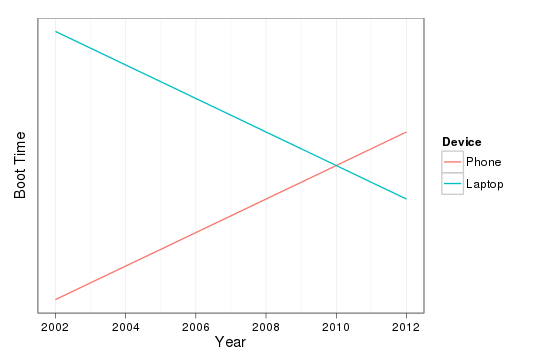
Last weekend, my friend Andr s Monroy-Hern ndez pointed out something that I've been noticing as well. Although the last decade has seen a huge decrease in the time of it takes to boot, the same can not be said for the increasing powerful computer in my pocket that is my phone. Graph showing increasing boot-times for phones and decreasing boot-times for laptops. As the graph indicates, I think my cross-over was around 2010 when I acquired an SSD for my laptop.

Mirco Bauer: Mono 3.0 Preview Packages for Debian and Ubuntu

Just after the Mono 3.0 release was announced I started working on Debian packages and after a couple of days of hard work I already have some preview packages for you. The preview packages are currently limited to the AMD64 architecture but can be installed on Debian/Testing (Wheezy), Debian/Unstable (Sid) and Ubuntu/Quantal (12.10). After these preview packages have received some successful feedback (please leave feedback via comments!), I will upload them to Debian/Experimental. In case you are shocked why I have packages in just 8 days after the official Mono 3.0 release, there are 3 factors that play a big role:
  1. New packaging workflow
    • Downstream patches are management in git branches
    • Release Early, Release Often: I no longer port and test every patch very carefully (especially with architecture specific patches), instead I port them with my best knowledge and upload them to debian.meebey.net and/or Debian/Experimental and use that as test ground. If regressions happen, let them happen, and make further uploads to address them.
  2. New packaging style
  3. Sponsored packaging
    • As my employer needs Mono packages for an upcoming software project, I was granted to work on Mono packages in worktime.
Install instructions OBLIGATORY WARNING: DO NOT USE THESE PREVIEW PACKAGES ON PRODUCTION SYSTEMS NOR BLAME ME IF YOUR MONO SOFTWARE NO LONGER WORKS! Add this line to your /etc/apt/sources.list file:
deb http://debian.meebey.net/experimental/mono /
Now update the APT database and install mono-complete from that repository:
apt-get update
apt-get install mono-complete

Raphael Geissert: rsync is not enough

Ask how can one create a Debian mirror and you will get a dozen different responses. Those who are used to mirroring content, whether it is distribution packages, software in general, documents, etc., will usually come up with one answer: rsync.

Truth is: for Debian's archive, rsync is not enough.

Due to the design of the archive, a single call to rsync leaves the mirror in an inconsistent state during most of the sync process.
Explanation is simple: index files are stored in dists/, package files are stored in pool/. Sort those directories by name (just like rsync does) and you get that the indexes will be updated before the actual packages are downloaded.

There are multiple scripts out there that do exactly that, one of them in Ubuntu's wiki. Plenty more if you search the web.

Now, addressing that issue shouldn't be so difficult, right? after all, all the index files are in dists/, so syncing in two stages should be enough. It's not that simple.

With the dists/ directory containing over 8.5GBs worth of indexes and, erm, installer files, even a two stages sync will usually leave the mirror in an inconsistent state for a while.

How about only deferring to the second stage the bare minimum?, I hear you ask.
That is the current approach, but it leads to some errors when new index files are added and used. The fact that people insist in writing their own scripts doesn't help.

Hopefully, some ideas like moving the installer stuff out of dists/ and
overhauling the repository layout are being considered. An alternative is to make the users of the mirrors more robust and fault-tolerant, but we would be talking about tenths if not hundreds of tools that would need to be improved.

In all cases, the one script that is actively maintained, is rather portable, and improved from time to time is the ftpsync script. Please, do yourself and your users a favour: don't attempt to reinvent the wheel (and forget about calling rsync just once).

Russell Coker: Links October 2012

The F Word has an informative post about men commenting on Feminist blogs [1]. Most of it applies to any situation where a member of a powerful group comments on an issue related to a minority group. Near the end they say: I ll also paraphrase and flesh out the most useful piece of advice I ever read, when I made the effort to research white privilege: don t expect the minority to trust you. Trust is earned, and you re just another commenter who they can t tell apart from any other commenter. You re entering someone else s space, where different rules apply. You get to have the rest of the world for people to assume you re a wonderful person. Here, you re just another one of them , and given the track record of them , it s up to you to listen, learn and prove that you re being thoughtful and honestly trying to examine your privilege. Sociological Images has an interesting article on people s perception of the sky colour it seems that the blue sky meme is modern [2]. Charles Stross wrote an interesting article about the possible uses for future low power computers [3]. He gets a bit over-excited about the possibilities for sensing making a tiny computer that can sense so many things isn t going to be easy (DSLRs are big for a reason). But having lots of powerful computers everywhere does provide lots of interesting and potentially bad opportunities. Martin Bekkelund has an interesting article about Amazon wiping DRM infected books that it had sold to a customer without giving a refund or an explanation [4]. If you want to buy ebooks it seems that the sensible thing to do would be to immediately crack them or download them from The Pirate Bay so Amazon can t steal them back. Rebecca Saxe gave an interesting talk about trying to develop methods for conflict resolution through neuroscience [5]. Barry Eisler has written an interesting article about the corruption of journalists [6]. It s really worth reading, some of the methods of corruption apply to even the more casual bloggers. Krebs on Security has an informative article about the Microsoft Tech Support phone scams [7]

Paul Tagliamonte: dput-ng -- the next generation of your friendly upload tool

Hello, World! Arno and I have been in the middle of a 3 week long quest to rewrite dput. We feature tons of improvements over the old dput, such as: Support for even core features are treated as plugins, so derivative distributions should be able to add features without maintaining a patch against dput (current situation). In addition, I ve implemented some show-ey post-upload hooks, such as a Twitter plugin. Here s how it s defined:
import twitter
import json
import os
def tweet(changes, profile, interface):
    tweet = "I've just uploaded %s/%s to %s's %s suite #debian" % (
        changes['Source'],
        changes['Version'],
        profile['name'],
        changes['Distribution']
    )
    if len(tweet) > 140:
        tweet = tweet[:140]
    obj = json.load(open(os.path.expanduser("~/.twitter.json"), 'r'))
    t = twitter.Api(
        consumer_key=obj['consumer_key'],
        consumer_secret=obj['consumer_secret'],
        access_token_key=obj['oath_token'],
        access_token_secret=obj['oath_secret']
    )
    t.PostUpdates(tweet)
This file is placed in ~/.dput.d/scripts, as tweet.py, and the plugin def file is placed in ~/.dput.d/processors (since it s a post-upload processor), which looks like:
 
    "name": "Tweet after an upload.",
    "path": "tweet.tweet"
 
I know this sounds confusing, but it s actually quite nice. Check out the plugin in action Feedback, and contributors more then welcome! Documentation is at dput.rtfd.org. It s all a bit pre-beta at the moment, but the authors are using it for all their uploads, and should be stable for users who don t mind a bit of breakage. We ve filed the ITP, and updates on it & and upload will follow shortly. We re just weeding out some final major issues. Should be stable enough for general use in the next 30 days or so.

30 October 2012

Tanguy Ortolo: Supporting GNU MediaGoblin

Gavroche, a purple goblin, holding a poster in his arms and giving it a hug You certainly know Picasa Albums Web and Flickr, two commercial picture hosting services. You probably know a few free software projects that allow people to keep control of their own pictures, such as Gallery, Piwigo, Zenphoto or PhotoShow. GNU MediaGoblin is a similar project, but with some interesting characteristics and features: If you find GNU MediaGoblin as promising as I do, please consider donating!

Nathan Handler: Debian Screencast Challenge

Today in #debian-mentors, a brief discussion about screencasts came up. Some people felt that a series of short screencasts might be a nice addition to the existing Debian Developer documentation. After seeing the popularity of of Ubuntu's various video series over the years, I tend to agree that video documentation can be a nice way to supplement traditional text-based documentation. No, this is not designed to replace the existing documentation; it is merely designed to provide an alternative method for people to learn the material. From past experience, I know that if I were to start making screencasts by myself, I would end up making one or two before getting bored and moving on to a new project. That is why I am posing a challenge to the Debian community: I will make one screencast for every screencast made by someone in the Debian community. These screencasts can and should be short (only a couple of minutes in length) and focus on accomplishing one small task or explaining a single concept related to Debian Development. I discovered a Debian Screencasts page on the Debian wiki that links to Ubuntu's guide to creating screencasts. While I have done some traditional documentation work in the past, I have never really tried doing screencasts. As a result, this will be a bit of a learning experience for me at first. If you are interested in taking me up on this challenge, simply send me an email (nhandler [at] ubuntu [dot] com) or poke me on IRC (nhandler@ freenode,oftc ). This will allow us to coordinate and plan the screencasts. As I mentioned earlier, I have no experience creating screencasts, so if you are familar with the Debian Development processes and think this challenge sounds interesting, feel free to contact me.

Next.

Previous.